Computing Foundations › APIs and the Web › Day 25
Day 25: API Authentication: Keys, Tokens, and OAuth
After this lesson you will be able to authenticate to any API using the scheme it expects — API key, bearer token, Basic auth, or OAuth 2.0 — and keep your credentials out of your code and git so a leaked key never costs you money.
Hands-on lab for this lesson
Lab files on GitHub: https://github.com/ai-roadmap-365/ai-roadmap-365.github.io/tree/main/labs/sections/computing-foundations/day-025-api-authentication-keys-tokens-and-oauth
- Get the hands-on files. Clone the labs repository once (you can reuse this clone for every lesson). This works on macOS, Linux, and Windows (PowerShell or WSL):
git clone https://github.com/ai-roadmap-365/ai-roadmap-365.github.io.git cd ai-roadmap-365.github.io - Open this lesson's lab. Move into the directory for this specific day. Every lab lives at the same predictable path — section / subsection / week / day:
cd labs/sections/computing-foundations/day-025-api-authentication-keys-tokens-and-oauth - Read the lab guide. Open `README.md` in that directory. It lists the exact commands, what each does, the expected output, and how to check your work — read it before running anything.
- Run it and check your work. Follow the README's "How to run" section: run the example first to see the finished result, then complete the numbered exercises in `starter/`, then run the tests. The tests pass (exit 0) only when your work is correct.
bash tests/run_tests.sh # or the test command named in the lab README
You can also open the lab as a local page (works offline, shows the file tree and expected output).
Learning objectives
By the end of this lesson you will be able to:
- Distinguish authentication from authorization and map each failure to its HTTP status code (401 vs 403)
- Send an API key in a header, a bearer token in the Authorization header, and Basic auth with curl, and explain why a key in a URL query string is riskier
- Explain why base64 in Basic auth is encoding, not encryption, and why TLS is what actually protects the credential
- Describe the OAuth 2.0 authorization-code flow at an intuitive level, including consent, scopes, and access versus refresh tokens
- Apply safe-secret habits: read keys from environment variables, keep them out of code and git, use least privilege, and rotate leaked keys immediately
- Connect authentication to AI practice: every hosted model API call carries Authorization: Bearer <key>, and keeping that key out of code and git is a daily security habit
Prerequisites
- Day 18 (HTTP requests, responses, methods, and status codes) and Day 19 (HTTPS and TLS)
- Day 11 (environment variables and shell configuration) and comfort running curl in a terminal
Why this matters
The moment you make your first real call to a model API, you will meet authentication — and if you get it wrong, one of two things happens. Either the server refuses you with a 401 and nothing works, or, far worse, your secret key ends up somewhere it should not be and someone else spends your money running up a bill against your account. Both outcomes are avoidable, and both come down to a single question every API asks of every request: who is calling, and are they allowed?
This is not an abstract concern you can defer. Every request to a hosted model — every completion, every embedding, every image you generate through a paid service — carries a credential in its Authorization header that proves the call is yours to make. That credential is tied to a billing account. A leaked key is not like a leaked password you can quietly reset before anyone notices; it is a live payment instrument, and automated bots scan public code constantly looking for exactly these strings so they can drain them within minutes. The habit you build today — keys live in the environment, never in your code, never in your git history — is the single most valuable security reflex in your whole first month of building with APIs.
There is a happier reason this matters too. Authentication is what lets an API safely give you things: your usage, your rate limits, your fine-tuned models, your saved data. Once you understand the handful of schemes that nearly every API on the internet uses — a key in a header, a bearer token, Basic auth, and OAuth for acting on behalf of a user — you can read any API’s documentation and know within a minute how to authenticate to it. Today you learn that handful, send each one by hand, and set up the safe-secret habits that keep the whole thing from ever costing you a cent you did not mean to spend.
The idea in plain language
An API is a door into someone else’s server, and authentication is the doorkeeper. Before the server will do any work for you, it wants to know two things. First, who are you? — proving your identity is authentication. Second, are you allowed to do this? — deciding what an identified caller may do is authorization. These two words look alike and are constantly confused, but they are different jobs: authentication checks the badge; authorization checks whether the badge opens this particular door.
The way you prove identity is by presenting a credential — a secret string the server recognizes as yours. The simplest kind is an API key: a long random string the API issued to you, which you attach to every request. Slightly more structured is a bearer token: a token that means “whoever bears this is authorized,” sent in a standard Authorization header. Basic auth bundles a username and password together into one header field. And OAuth 2.0 is the elaborate-but-necessary dance that lets you grant an app permission to act on your behalf at another service — “let this photo printer read my cloud photos” — without ever handing over your actual password.
All four schemes are just different envelopes for the same idea: put a secret in the request, and let the server check it. The differences are in who issued the secret, how long it lasts, what it grants, and how carefully it must be guarded. Learn the four envelopes and you have learned API authentication.
Historical background
Authentication on the web is older than the web’s fame. HTTP Basic authentication — username and password, encoded together and sent in a header — was specified in the earliest HTTP standards and formalized in 1999 in RFC 2617; it is genuinely ancient by internet standards and still works in every browser and every HTTP client today. Its weakness was understood from the start: it protects nothing on its own, because the encoding is trivially reversible. Only the arrival of widespread transport encryption made it safe to use at all.
As web APIs proliferated in the 2000s, providers handed out API keys — long random strings tied to a developer account — as a simpler alternative than making every integrator manage passwords. Keys are easy to issue, easy to revoke, and easy to reason about, and they remain the workhorse of machine-to-machine APIs to this day.
The hard problem was delegation: how can you let a third-party app use your data at another service without giving that app your password? Early answers were ugly — apps literally asked for your username and password and logged in as you, a pattern that gave them far too much power and no way to revoke it short of changing your password. OAuth was created to fix exactly this. OAuth 1.0 was published in 2007, refined as RFC 5849 in 2010, and then substantially redesigned into OAuth 2.0, published in October 2012 as RFC 6749. OAuth 2.0 shifted much of the complexity onto encrypted transport (TLS) instead of the elaborate request-signing of 1.0, and it became the foundation of “Sign in with…” buttons and delegated API access across the industry. The bearer-token pattern it popularized — a token that stands alone as proof of authorization — is now how the majority of modern APIs, including model APIs, accept credentials.
What it is — and what it is not
API authentication is the mechanism by which a server verifies the identity behind a request and — usually in the same breath — decides what that identity is permitted to do. It is a check performed on every request: HTTP is stateless, so the server does not “remember” that you logged in a moment ago. Each request must carry its own proof, which is why the credential rides along in a header every single time.
Authentication is not encryption, and this trips up beginners constantly. Encryption (the TLS you met on Day 19) hides your request from eavesdroppers in transit; authentication proves who sent it. You need both, and they are independent: Basic auth over plain HTTP is encrypted by nothing and readable by anyone on the path, while a bearer token over HTTPS is both hidden in transit and proves identity on arrival. Authentication is also not the same as authorization, its constant companion. Authentication answers “who are you”; authorization answers “may you do this.” A valid key that lacks permission for an action gets you a 403 Forbidden, whereas a missing or wrong credential gets you a 401 Unauthorized — two different failures with two different fixes.
Finally, an API key or token is not a username you can share freely. It is a secret, equivalent to a password, and often more dangerous than one because it is designed to be used by automated code with no human watching. Treating credentials as secrets — the whole back half of this lesson — is not optional polish; it is the core of the discipline.
| Common misconception | The reality |
|---|---|
| ”Authentication and authorization are the same thing.” | Authentication proves who you are (→ 401 if it fails); authorization decides what you may do (→ 403 if it fails). |
| ”Basic auth encrypts my password.” | It only encodes it reversibly; without TLS, anyone on the network can read it in seconds. |
| ”An API key isn’t really a password.” | It is exactly a password — a secret string that grants access and spends money — and often used with no human oversight. |
| ”OAuth means the app knows my password.” | The whole point of OAuth is that the app never sees your password; it receives a scoped token instead. |
| ”If my key leaks, I’ll just notice the bill later.” | Automated scanners find committed keys within minutes and can rack up charges before any bill arrives. |
Why it was created and what problems it solves
Authentication exists because an open API endpoint with no doorkeeper is a resource anyone in the world can consume — and if that resource costs money to serve (compute, bandwidth, a language model’s GPU time), an unauthenticated endpoint is a way to go bankrupt. The first problem authentication solves is simply attribution: tying every request to an account so the provider can meter usage, enforce limits, bill correctly, and cut off abuse. Without a credential on each request, none of that is possible.
The second problem is least privilege. Once the server knows who you are, it can give you exactly the access you need and no more — your data but not someone else’s, read access but not delete, this project but not that one. Authorization built on top of authentication is what makes multi-tenant services safe, so that millions of customers can share one API without reaching into each other’s accounts.
The third problem — the one OAuth was invented for — is delegation without disclosure. In a connected world you constantly want one service to act on your behalf at another: a calendar app reading your email for events, a photo printer fetching your cloud album, a data tool exporting your spreadsheet. The naive solution of handing over your password is catastrophic: the app gets total control forever and you cannot revoke it without locking yourself out. OAuth solves this by letting you grant a narrow, revocable permission — a scoped token — while your password stays with you. That single idea is why “Connect your account” buttons are safe to click.
How it works
Let’s build up the four schemes concretely, then look at how OAuth’s delegation flow works, and finally at how secrets are handled safely. Throughout, when a key or token appears it is an obviously fake short placeholder like token-example-123 — never paste a real one into anything you will share.
The common schemes
Every scheme puts a secret into the HTTP request. They differ mainly in which part of the request carries it and what the secret represents.
API key in a header. The API issues you a key, and you attach it to a request header whose name the API chooses — commonly something like X-API-Key:
GET /v1/data HTTP/1.1
Host: api.example.com
X-API-Key: key-example-abc123
To send it with curl, you set the header explicitly:
curl -H "X-API-Key: key-example-abc123" https://api.example.com/v1/dataSome APIs instead let you put the key in the URL as a query parameter, like ?api_key=key-example-abc123. This is worse, and you should avoid it when a header is available. A query string is part of the URL, and URLs leak: they are written to server access logs, saved in browser history, stored in proxy caches, and pasted into chat messages and bug reports. A header is far less likely to be logged by accident. Same secret, riskier envelope — choose the header.
Bearer token. A bearer token is sent in the standard Authorization header with the scheme name Bearer. “Bearer” means exactly what it says: possession is authorization, so whoever holds the token can use it, which is why it must be guarded like cash.
curl -H "Authorization: Bearer token-example-123" https://api.example.com/v1/dataThis is the format the great majority of modern APIs — including model APIs — expect. When you later write Authorization: Bearer <your key>, you are using this exact scheme.
Basic auth. Basic auth carries a username and password. The two are joined with a colon (user:pass), encoded together with base64, and sent in the Authorization header with the scheme name Basic:
# curl builds the header for you from -u:
curl -u user:pass https://api.example.com/v1/data

# which produces this header (dXNlcjpwYXNz is base64 of "user:pass"):
# Authorization: Basic dXNlcjpwYXNz
The crucial fact: base64 is not encryption. It is a reversible encoding — anyone can decode dXNlcjpwYXNz back to user:pass instantly, with no key. Basic auth therefore keeps a password secret only when it rides inside TLS (HTTPS). Over plain HTTP it is equivalent to shouting your password across the room. This is why Basic auth is safe on modern HTTPS APIs and disastrous without it.
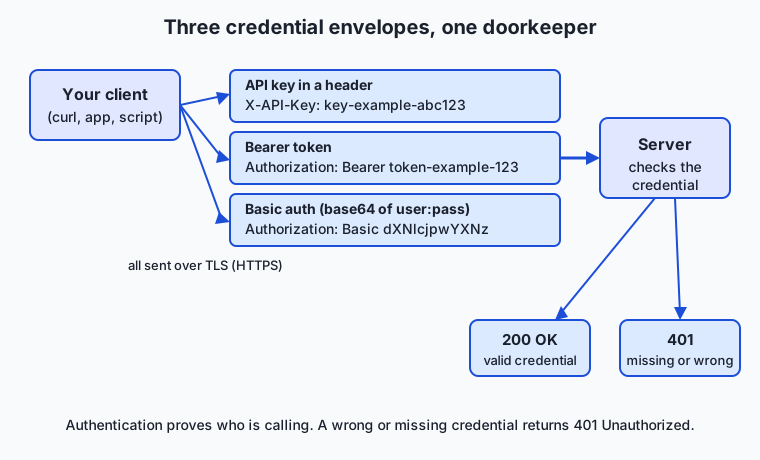
Read the diagram left to right: the same request can carry any of three credential envelopes — an API key in a custom header, a bearer token in the Authorization header, or a base64-encoded user:pass for Basic auth — and the server’s doorkeeper checks whichever it receives, then answers 200 OK if the credential is valid or 401 Unauthorized if it is missing or wrong.
OAuth 2.0 at an intuitive level
The three schemes above all assume you hold the secret and call the API directly. OAuth 2.0 handles a different situation: an application wants to call an API on your behalf, using data that belongs to you at some other service, and it should never see your password.
The core flow is the authorization-code flow, and it is easiest to follow as a story with four players: you (the resource owner), the app you are using (the client), the authorization server (the login/consent service at the provider that owns your data), and the API (the resource server holding your data). Here is the dance:
- The app sends you to the authorization server — you are redirected to a page hosted by the provider, not the app. You already have an account there.
- You log in and consent. The provider shows exactly what the app is asking for (“read your photos”) and you approve or deny. Your password is typed into the provider’s page, which the app never sees.
- The authorization server hands the app a short-lived authorization code (delivered by redirecting your browser back to the app). This code is not yet a usable credential — it is a one-time voucher.
- The app exchanges that code, together with its own client secret, directly with the authorization server for an access token. This exchange happens app-to-server, out of your browser’s view.
- The app calls the API, sending the access token as a bearer token:
Authorization: Bearer <access token>. The API honors it and returns your photos — and only your photos, within the scope you granted.
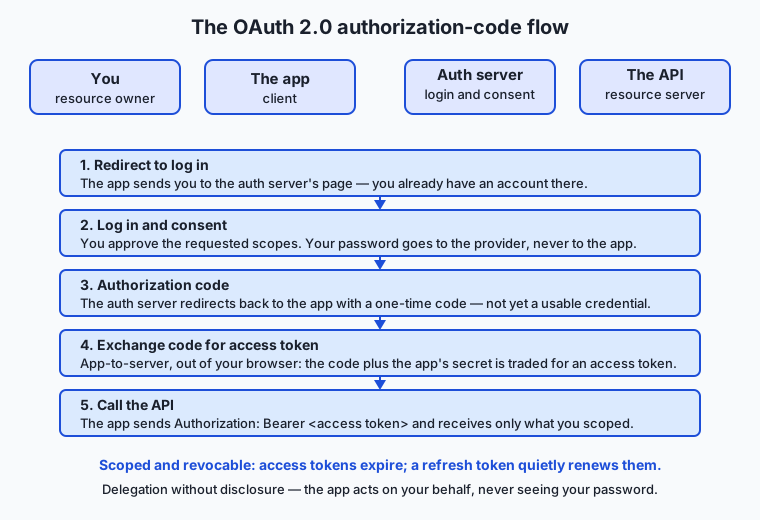
Two ideas make this powerful. First, scopes: when the app requests access, it names the specific permissions it wants (read photos, but not delete them; calendar, but not email), and the token it receives is limited to exactly those scopes. You can see them on the consent screen and refuse. Second, access tokens versus refresh tokens. Access tokens are deliberately short-lived — often minutes to an hour — so that a leaked one expires quickly. To avoid asking you to log in again every hour, the app may also receive a longer-lived refresh token, which it can exchange for a fresh access token without bothering you. The refresh token is the more sensitive of the two and is guarded most carefully, because it is the key to minting new access. If anything goes wrong, you can revoke the app’s tokens at the provider — the delegation is undoable, which is the whole point.
Handling secrets safely
A credential is only as safe as the place you keep it. The cardinal rule, which you met on Day 11, is: secrets live in the environment, never in your code and never in git. Your program reads the key from an environment variable at runtime; the literal string never appears in a source file that could be committed, shared, screenshotted, or pushed to a public repository.
# Set it once in your shell (or, better, in a gitignored .env file you load):
export DEMO_TOKEN="token-example-123"

# Your code and commands read it from the environment — the secret is never typed inline:
curl -H "Authorization: Bearer $DEMO_TOKEN" https://api.example.com/v1/data
Four habits turn this rule into a discipline:
- Never hard-code. A key pasted into your source is one accidental
git pushaway from the entire internet. Read it from the environment instead. - Keep it out of git. Put real secrets in a
.envfile and add that file to.gitignoreso it is never tracked. Commit a.env.examplewith the names of the variables and empty values, so collaborators know what to set without seeing your secret. - Least privilege. When an API lets you scope a key (read-only, one project, limited spend), create the narrowest key that does the job. If it leaks, the blast radius is small.
- Rotate. Keys are meant to be replaced. Rotate them periodically, and immediately if one is ever exposed — the instant a key touches a public place, treat it as burned: revoke it at the provider and issue a new one. Revocation is what makes a leak survivable.
A note on rate limiting
Authentication is what makes rate limiting possible, so the two travel together. Because every request carries a credential tied to an account, the server can count how many requests that account makes and refuse further ones past a limit, replying 429 Too Many Requests. Limits protect the service from overload and protect you from a runaway loop quietly spending your budget. You will meet rate limits, pagination, and robust error handling in full on Day 27; for now, simply know that the same credential that proves who you are is also the meter that counts what you use.
An everyday analogy
Think of an API as an exclusive members’ club, and authentication as everything that happens at the door.
An API key is a membership card with your name on it: you show it every time you enter, the doorkeeper checks it against the member list, and if it is valid you are in. Lose the card and whoever finds it can walk in as you — which is why you keep it in your wallet, not taped to the front door. Putting the key in a URL query string is like writing your membership number on a postcard: technically it works, but it passes through many hands and gets copied into places you will never see.
A bearer token is a coat-check ticket. The rule is blunt: whoever holds the ticket gets the coat, no questions asked. That is what “bearer” means — the club does not check that you are the holder, only that the ticket is genuine. Convenient, and exactly why you never let the ticket out of your hand.
Basic auth is telling the doorkeeper your name and a password out loud. Inside a private, soundproof booth (TLS) that is perfectly safe. Shouted across a crowded lobby (plain HTTP), everyone hears it. The words are the same; the room is what makes it safe or reckless. Base64 is merely spelling the password phonetically — it does not lower your voice one bit.
OAuth is the club’s guest system. Suppose you want a caterer to pick up a parcel you left at the club, but you will not hand them your membership card. Instead you go to the front desk yourself, prove who you are, and authorize a single, specific errand: “this caterer may collect the one parcel in locker 12, today only.” The desk gives the caterer a limited pass (the access token) good for exactly that. Your card never leaves your pocket, the pass expires, and you can cancel it at the desk anytime. The scope (“locker 12 only”) and the expiry are what make handing a stranger a pass sane.
The analogy even covers secret-keeping: you would not photocopy your membership card and leave stacks of copies around town. Keeping your key in an environment variable rather than in committed code is exactly the discipline of keeping the one card in the one wallet.
Examples in practice
Let’s authenticate to a public test server that accepts any credentials, so we can see each scheme succeed and fail without needing a real account. (This is precisely what today’s lab does, at length, against httpbin.org.)
Basic auth, right and wrong. A test endpoint expects the username user and password pass. Send them and the server returns 200 OK; send the wrong password and it returns 401 Unauthorized:
# Correct credentials → 200
curl -s -o /dev/null -w '%{http_code}\n' -u user:pass \
  https://httpbin.org/basic-auth/user/pass
# prints: 200

# Wrong password → 401
curl -s -o /dev/null -w '%{http_code}\n' -u user:wrongpass \
  https://httpbin.org/basic-auth/user/pass
# prints: 401
Here -u user:pass tells curl to build the Authorization: Basic … header for you, and -w '%{http_code}' prints just the status code so you can see authentication pass or fail as a number. 401 is the server saying “I don’t know who you are”; that single number is the most common authentication signal you will read.
Bearer token accepted. A bearer endpoint accepts any well-formed token and echoes it back, showing the Authorization: Bearer … header being honored:
curl -s -H "Authorization: Bearer token-example-123" \
  https://httpbin.org/bearer
returns a small JSON body confirming the token was received:
{
  "authenticated": true,
  "token": "token-example-123"
}
Key in a header, echoed back. To see a header arrive at the server, send a custom key header to an endpoint that reflects your headers:
curl -s -H "X-API-Key: demo-key" https://httpbin.org/headersThe JSON response includes your header among those the server saw:
{
  "headers": {
    "Host": "httpbin.org",
    "X-Api-Key": "demo-key"
  }
}
Reading the token from the environment. Finally, the safe pattern — the token lives in a variable, and the command references the variable, so the secret never appears inline:
export DEMO_TOKEN="token-example-123"
curl -s -H "Authorization: Bearer $DEMO_TOKEN" https://httpbin.org/bearer
The server sees the same request as before, but your source and your shell history never contain the literal secret in the command you typed. That is the whole habit, in one line.
Now the real-world tie: when you call a hosted model API, you do precisely the bearer-token example above — Authorization: Bearer $YOUR_KEY, with the key read from an environment variable — against the provider’s endpoint instead of httpbin.org. Everything you just practiced is the actual mechanism, not a simplified stand-in.
Implications: security, privacy, performance, scalability, and cost
Security
Credentials are the crown jewels of API security, and the threat model is specific: a stolen key is usable by anyone, from anywhere, immediately. The dominant real-world failure is not clever cryptographic attacks but keys committed to source control — public repositories are scanned continuously by bots that extract and abuse keys within minutes. Defenses are layered: keep secrets out of code and git, scope keys to least privilege so a leak is contained, rotate on any suspicion, and prefer short-lived tokens (OAuth access tokens) over long-lived static keys where you have the choice. Always send credentials over TLS; a secret sent over plain HTTP is compromised in transit regardless of how carefully you stored it.
Privacy
Because authentication ties every request to an identity, it necessarily produces a detailed record of who did what and when. That is useful for security auditing and essential for billing, but it also means your API activity is inherently identifiable and logged by the provider. Two practical consequences: never put secrets in URLs, where they leak into logs you do not control; and remember that whatever data you send with an authenticated request is now associated with your account — for AI work, prompts and inputs sent to a hosted model are logged against your identity under the provider’s data policies, which you should read before sending anything sensitive.
Performance
Checking a credential is cheap — usually a lookup or a signature verification measured in fractions of a millisecond — so authentication rarely dominates request time. The performance story is really about avoiding waste: a request with a missing or bad credential is a wasted round trip that returns only a 401, so validating that your key is set before you send, and reading 401/403 correctly instead of retrying blindly, saves both latency and rate-limit budget. OAuth adds one wrinkle: the token exchange steps happen up front, but the resulting access token is then reused across many calls, so the cost is amortized and per-request overhead stays low.
Scalability
Bearer tokens and API keys scale beautifully because they make each request self-contained: the server can verify the credential and serve the request without remembering anything about a prior “login,” which is what lets a service spread across thousands of machines behind a load balancer with no shared session state. This statelessness is a direct descendant of HTTP’s own design (Day 18). It is also why rate limiting keyed on the credential (Day 27) is the natural unit of fairness at scale — the same identity that authenticates each request is the bucket the limiter counts against.
Cost
Authentication is inseparable from money. The credential is what attaches usage to a paying account, so a leaked key is a direct financial liability — attackers running expensive model calls on a stolen key can generate real charges fast. This is why scoping keys (including spend limits where offered) and rotating promptly are cost controls, not just security controls. On the flip side, authentication is what enables usage dashboards and per-key metering, so you can attribute spend to projects and catch anomalies early. Treat every key as a spending instrument, because that is exactly what it is.
Alternatives: free, open source, and commercial
Here “alternatives” means the tools and standards you can reach for to do API authentication, plus the leading services you will authenticate to. Free-versus-paid is about the tools, since the schemes themselves are open standards anyone can implement.
| Tool or standard | Type | What it offers | Cost |
|---|---|---|---|
curl | Free, open source | Sends every scheme by hand (-u for Basic, -H for keys and bearer tokens); the universal way to test auth | Free |
Environment variables + a gitignored .env | Free convention | The baseline safe place to keep secrets out of code and git (Day 11) | Free |
dotenv libraries (many languages) | Open source | Load .env files into your program’s environment at startup | Free |
| Postman / Insomnia | Freemium clients | GUI API clients with built-in Basic, bearer, API-key, and full OAuth 2.0 flows | Free tier; paid team plans |
| Cloud secret managers (e.g. managed vault services) | Commercial | Store, rotate, and audit secrets centrally instead of in .env files | Paid, usage-based |
| OAuth 2.0 (RFC 6749) | Open standard | The delegation framework itself — free to implement; every major provider supports it | Free standard |
For learning and everyday testing, curl plus an environment variable is all you need, and it is entirely free — that is exactly the toolkit for today’s lab. Reach for a GUI client like Postman when you want to click through an OAuth flow without wiring it up in code, and for a cloud secret manager only when a team or production system outgrows hand-managed .env files.
Comparison with related concepts
| Concept A | Concept B | Key difference |
|---|---|---|
| Authentication | Authorization | Authentication proves who you are (fails with 401); authorization decides what you may do (fails with 403) |
| API key | Bearer token | A key is often a static, long-lived string in a provider-chosen header; a bearer token rides in the standard Authorization: Bearer header and is frequently short-lived |
| Basic auth | Bearer token | Basic sends user:pass (base64-encoded, reversible); Bearer sends a single opaque token that already represents authorization |
| Access token | Refresh token | An access token is short-lived and used on every API call; a refresh token is longer-lived and used only to obtain new access tokens |
| Base64 encoding | Encryption | Base64 is reversible with no key and hides nothing; encryption (TLS) requires a key and actually protects the data |
| API key | OAuth token | A key authenticates you calling your own account; an OAuth token lets an app act on your behalf, scoped and revocable, without your password |
The table’s throughline: every row is a distinction beginners routinely blur, and each blurred pair causes a specific, avoidable bug — a 403 mistaken for a 401, a base64 string mistaken for encryption, a refresh token treated as casually as an access token.
When to use it — and when not to
You authenticate whenever you call an API that serves a specific account’s resources or costs money to run — which, in practice, is nearly every useful API and certainly every hosted model API. Choose the scheme the provider documents; you rarely get to pick. Reach for a plain API key or bearer token for machine-to-machine calls where you own the account and your code is the caller — the common case for scripts, backends, and model APIs. Reach for OAuth when an application must act on behalf of end users against their accounts at another service, so those users grant scoped, revocable access without surrendering passwords. Use Basic auth when an API specifies it, and only ever over HTTPS.
Know when authentication is not the tool in front of you. It does not encrypt your traffic — TLS does that, and you need it underneath every scheme here. It does not, by itself, decide fine-grained permissions — that is authorization, configured separately. And you do not need OAuth’s full machinery for a script talking to your own account; reaching for it there is over-engineering, while a simple keyed request is exactly right. The professional instinct is to match the scheme to the situation: static credential for your own machine-to-machine calls, OAuth for delegated user access, TLS always, and secrets in the environment without exception.
The AI thread ties it all together. Every call you will make to a hosted model API is an authenticated request carrying Authorization: Bearer <your key>, with that key read from an environment variable and kept out of your code and your git history. Nothing about the model changes this picture — it is the same doorkeeper, the same envelope, the same discipline you practiced today. Build the habit now, on a free test server with fake tokens, and by the time a real key with a real bill attached is in your hands, keeping it safe will already be second nature.
Knowledge check
Try these from memory before looking back:
- In one sentence each, distinguish authentication from authorization, and name the HTTP status code that signals each one failing.
- A colleague says Basic auth is safe because the password is “encoded.” Explain precisely why base64 encoding provides no secrecy, and what actually makes Basic auth safe in practice.
- Why is putting an API key in a URL query string worse than putting it in a header? Name two specific places the query-string key can leak.
- Walk through the OAuth authorization-code flow for “let a printing app read my cloud photos,” naming the four participants and where the user’s password does and does not go.
- Your key was accidentally pushed to a public repository ten minutes ago. State, in order, exactly what you do — and explain why deleting the commit is not enough.
Hands-on exercise
Time to send each scheme yourself. In this exercise — worked through in full in the Day 25 lab directory — you will use curl to authenticate to httpbin.org, a free public test server whose auth endpoints accept any credentials, so you need no account and no real key. You will watch Basic auth succeed and fail, send a bearer token, echo a key header, and read a token from an environment variable.
Open your terminal and run each command, reading the output before moving on. First, Basic auth with the credentials the endpoint expects:
curl -s -o /dev/null -w '%{http_code}\n' -u user:pass https://httpbin.org/basic-auth/user/passThis prints just the HTTP status code. The endpoint basic-auth/user/pass expects username user and password pass; sending them should print 200.
Now send the wrong password and watch authentication fail:
curl -s -o /dev/null -w '%{http_code}\n' -u user:wrongpass https://httpbin.org/basic-auth/user/passThis should print 401 — the server rejecting an unrecognized credential.
Send a bearer token to the bearer endpoint, which accepts any token and echoes it:
curl -s -H "Authorization: Bearer token-example-123" https://httpbin.org/bearerEcho a custom key header off the headers endpoint to see it arrive at the server:
curl -s -H "X-API-Key: demo-key" https://httpbin.org/headersFinally, the safe pattern — set a fake token in an environment variable and reference the variable, so the secret never appears inline:
export DEMO_TOKEN="token-example-123"
curl -s -H "Authorization: Bearer $DEMO_TOKEN" https://httpbin.org/bearer
Expected output
A typical run looks like this (the JSON bodies are lightly reformatted for reading):
$ curl -s -o /dev/null -w '%{http_code}\n' -u user:pass https://httpbin.org/basic-auth/user/pass
200

$ curl -s -o /dev/null -w '%{http_code}\n' -u user:wrongpass https://httpbin.org/basic-auth/user/pass
401

$ curl -s -H "Authorization: Bearer token-example-123" https://httpbin.org/bearer
{
  "authenticated": true,
  "token": "token-example-123"
}

$ curl -s -H "X-API-Key: demo-key" https://httpbin.org/headers
{
  "headers": {
    "Accept": "*/*",
    "Host": "httpbin.org",
    "X-Api-Key": "demo-key"
  }
}
Line by line: 200 confirms correct Basic auth was accepted; 401 confirms the wrong password was rejected — the two states of authentication as raw status codes. The bearer response "authenticated": true shows the Authorization: Bearer … header being honored and the token read back. And the headers endpoint reflects your X-API-Key back to you (note the server normalizes the capitalization to X-Api-Key), proving your key header reached the server. The environment-variable command produces the same bearer response, but with the secret sourced from $DEMO_TOKEN instead of typed inline.
Validate your work
You are done when you can check every box:
- You saw
200for correct Basic auth and401for the wrong password. - The bearer endpoint returned
"authenticated": trueand echoed your token. - The headers endpoint reflected your
X-API-Keyvalue back to you. - You ran the final command with the token in
$DEMO_TOKENand got the same bearer response, without typing the secret inline. - You can explain why
401(not403) is the code for a missing or wrong credential.
Troubleshooting
- Every command prints
000or hangs.000from-w '%{http_code}'means no HTTP response — you are offline or a proxy is blocking the request. Check connectivity; the lab’s tests will simply skip network checks when offline. - A command prints
503. The publichttpbin.orgis a shared free service and is occasionally overloaded, returning503 Service Temporarily Unavailable. That is the server, not your credential — wait a moment and retry, or add--retry 5 --retry-delay 2to ride past it. - Basic auth prints
401even withuser:pass. Check for a typo and that the URL path is exactly/basic-auth/user/pass— the username and password in the path must match the ones you send with-u. $DEMO_TOKENcame through empty. You opened a new shell afterexport, or a typo in the variable name. Re-run theexportline in the same shell, then thecurl. Runecho "$DEMO_TOKEN"to confirm it is set.curl: command not found. Installcurl(preinstalled on macOS and most Linux; on Debian/Ubuntu,sudo apt install curl).
Common mistakes
- Confusing
401and403.401 Unauthorizedmeans “I don’t know who you are” (authentication failed — fix your credential).403 Forbiddenmeans “I know who you are, but you may not do this” (authorization failed — your credential lacks permission). Reaching for a new key when you actually have a permissions problem wastes time. - Thinking base64 hides the password.
dXNlcjpwYXNzdecodes touser:passwith no key. Basic auth is protected by the TLS around it, never by the encoding. Never rely on base64 for secrecy. - Putting the secret in the URL. A key in
?api_key=…lands in server logs and browser history. Keep credentials in headers, and never paste a real one into a chat, ticket, or screenshot.
Practice assignment
Open the auth-worksheet.md file in the starter directory of the Day 25 lab and complete it for a real run on your machine. Record: the exact status code returned for correct Basic auth and for wrong credentials; whether the bearer endpoint accepted your token (and what the JSON body said); and — the important part — a short paragraph (4–6 sentences) describing, in your own words, how you would store a real API key safely if you were about to call a paid service tomorrow. Name the environment variable you would use, where the .env file would live, why it must be gitignored, and what you would do the instant you discovered that key had been committed to a public repository. Keep the worksheet; the answers are your personal checklist for the first real key you handle.
Extension challenge
Go one step past sending credentials and prove to yourself that base64 is not encryption. Encode a fake user:pass string yourself and then decode it straight back:
printf 'user:pass' | base64
# prints: dXNlcjpwYXNz

printf 'dXNlcjpwYXNz' | base64 --decode; echo
# prints: user:pass
You just performed, by hand and with no key, the exact transformation that “hides” a password in Basic auth — which is to say, it hides nothing. Then do the security exercise every developer should internalize: imagine the string you decoded was a real credential that had appeared in a public place. Write three or four sentences describing your incident response — revoke first or investigate first, and why — and explain, using what you learned about bearer tokens, why a short-lived OAuth access token would have limited the damage compared with a long-lived static key. You have now reasoned about credential exposure from both sides: how a secret is (barely) wrapped, and what to do when the wrapping fails.
Quiz
Q1. What is the difference between authentication and authorization?
- Authentication encrypts the request; authorization decrypts it
- Authentication proves who you are; authorization decides what you are allowed to do
- They are two words for the same identity check
- Authentication is for users; authorization is only for machines
Show answer
Answer: B. Authentication proves who you are; authorization decides what you are allowed to do
Authentication answers "who are you" and fails with 401; authorization answers "may you do this" and fails with 403. They are separate steps, and confusing them leads to fixing the wrong problem.
Q2. Which HTTP status code means the server does not recognize your credential (authentication failed)?
- 403 Forbidden
- 404 Not Found
- 401 Unauthorized
- 429 Too Many Requests
Show answer
Answer: C. 401 Unauthorized
401 Unauthorized signals a missing or invalid credential — an authentication failure. 403 Forbidden means you are authenticated but lack permission (an authorization failure), which is a different fix.
Q3. How is a bearer token sent in an HTTP request?
- In the URL as ?token=...
- In the Authorization header as "Authorization: Bearer <token>"
- As a base64-encoded username and password
- In a cookie the browser sets automatically
Show answer
Answer: B. In the Authorization header as "Authorization: Bearer <token>"
A bearer token rides in the standard Authorization header with the scheme name Bearer. This is the format the great majority of modern APIs, including hosted model APIs, expect.
Q4. Why is Basic auth unsafe over plain HTTP?
- Base64 encoding is reversible with no key, so anyone on the network can read the password
- Basic auth sends the password as an image that can be screenshotted
- The server refuses Basic auth unless a key is also supplied
- Basic auth works only with usernames longer than 16 characters
Show answer
Answer: A. Base64 encoding is reversible with no key, so anyone on the network can read the password
Basic auth base64-encodes user:pass, and base64 is encoding, not encryption — dXNlcjpwYXNz decodes straight back to user:pass. Only the TLS in HTTPS actually protects it in transit.
Q5. Why is putting an API key in a URL query string worse than putting it in a header?
- Query strings can only hold 8 characters
- Headers are automatically encrypted while query strings are not
- URLs are written to server logs, browser history, and caches, so the key leaks into places you do not control
- A key in a header is ignored by most servers
Show answer
Answer: C. URLs are written to server logs, browser history, and caches, so the key leaks into places you do not control
A query string is part of the URL, and URLs get logged, cached, and stored in history. A header is far less likely to be recorded by accident, so the same secret is safer in a header.
Q6. In the OAuth 2.0 authorization-code flow, where does the user type their password?
- Into the third-party app, which forwards it to the provider
- Into the provider's own authorization server page — the app never sees it
- Into the API request as a Basic auth header
- Nowhere; OAuth does not use passwords at all
Show answer
Answer: B. Into the provider's own authorization server page — the app never sees it
The whole point of OAuth is delegation without disclosure: the user logs in on the provider's own consent page, and the app receives a scoped access token instead of ever seeing the password.
Q7. What is the difference between an access token and a refresh token?
- An access token is public; a refresh token is secret
- They are identical but issued by different servers
- An access token is short-lived and used on every API call; a refresh token is longer-lived and used only to obtain new access tokens
- An access token is for reading and a refresh token is for writing
Show answer
Answer: C. An access token is short-lived and used on every API call; a refresh token is longer-lived and used only to obtain new access tokens
Access tokens are deliberately short-lived so a leaked one expires quickly; a refresh token lives longer and is used only to mint new access tokens without making the user log in again, which is why it is guarded most carefully.
Q8. You discover an API key was pushed to a public repository ten minutes ago. What is the right first response?
- Delete the commit, since that removes the key from history
- Do nothing until the monthly bill arrives to confirm misuse
- Revoke the key at the provider immediately and issue a new one
- Rename the variable so bots cannot find it
Show answer
Answer: C. Revoke the key at the provider immediately and issue a new one
The instant a key touches a public place, treat it as burned: revoke it at the provider and issue a replacement. Deleting the commit does not help — automated scanners find keys within minutes, and the key may already be copied elsewhere.
Glossary
- authentication
- The process by which a server verifies who is making a request, usually by checking a secret credential the caller presents; failing it returns HTTP 401.
- authorization
- The process of deciding what an already-identified caller is permitted to do; failing it returns HTTP 403, distinct from an authentication failure.
- API key
- A long random string an API issues to your account, attached to each request (usually in a header) to identify and authenticate the caller.
- bearer token
- A credential sent in the standard Authorization header as "Bearer <token>"; possession alone grants access, so it must be guarded like cash.
- Basic auth
- An HTTP authentication scheme that sends a username and password joined by a colon and base64-encoded in the Authorization header; safe only over TLS.
- OAuth
- An open standard (OAuth 2.0, RFC 6749) that lets an application act on a user's behalf at another service using a scoped, revocable token, without ever seeing the user's password.
- access token
- A short-lived credential, obtained through OAuth, that an app sends as a bearer token on each API call; it expires quickly to limit the damage from a leak.
- refresh token
- A longer-lived OAuth credential used only to obtain new access tokens when they expire, so the user need not log in again; the more sensitive of the two tokens.
- scope
- A named permission an OAuth token is limited to (such as read photos but not delete them), shown on the consent screen so the user can approve or refuse it.
- secret
- Any credential — API key, token, or password — that grants access and must be kept out of code and version control; equivalent to a password in the harm a leak causes.
- least privilege
- The practice of giving a credential the narrowest access that still does the job (read-only, one project, limited spend) so that a leak has the smallest possible blast radius.
- base64
- A reversible text encoding with no key, used to package binary or colon-separated data for transport; it hides nothing on its own, which is why Basic auth needs TLS.
Sources and further reading
- Authorization header — MDN Web Docs (accessed 2026-07-12)
- OAuth 2.0 — OAuth.net (accessed 2026-07-12)
- OAuth — Wikipedia (accessed 2026-07-12)
- HTTP authentication — MDN Web Docs (accessed 2026-07-12)
- The OAuth 2.0 Authorization Framework (RFC 6749) — IETF (accessed 2026-07-12)
Kept in this browser, no account needed. Your progress page turns the whole record into one link you can bookmark or open on another device.