Programming with Python › Python Setup and First Programs › Day 46
Day 46: Numbers, Math, and Precision
After this lesson you will be able to choose the right Python number type for any task, explain why 0.1 + 0.2 is not exactly 0.3, compare floats safely, and use the decimal module for exact money math.
Hands-on lab for this lesson
Lab files on GitHub: https://github.com/ai-roadmap-365/ai-roadmap-365.github.io/tree/main/labs/sections/programming-with-python/day-046-numbers-math-and-precision
- Get the hands-on files. Clone the labs repository once (you can reuse this clone for every lesson). This works on macOS, Linux, and Windows (PowerShell or WSL):
git clone https://github.com/ai-roadmap-365/ai-roadmap-365.github.io.git cd ai-roadmap-365.github.io - Open this lesson's lab. Move into the directory for this specific day. Every lab lives at the same predictable path — section / subsection / week / day:
cd labs/sections/programming-with-python/day-046-numbers-math-and-precision - Read the lab guide. Open `README.md` in that directory. It lists the exact commands, what each does, the expected output, and how to check your work — read it before running anything.
- Run it and check your work. Follow the README's "How to run" section: run the example first to see the finished result, then complete the numbered exercises in `starter/`, then run the tests. The tests pass (exit 0) only when your work is correct.
bash tests/run_tests.sh # or the test command named in the lab README
You can also open the lab as a local page (works offline, shows the file tree and expected output).
Learning objectives
By the end of this lesson you will be able to:
- Distinguish Python's numeric types — int (exact, unlimited), float (fast, approximate), Decimal (exact base-10), and Fraction (exact ratio) — and pick the right one for a task
- Use the arithmetic operators + - * / // % ** correctly, and explain why / always returns a float while // stays an exact integer operation
- Explain, in terms of binary and a fixed mantissa, why floating-point cannot represent 0.1 exactly, and connect it to the base-10 impossibility of writing one third
- Compare floats safely with math.isclose or rounding instead of ==, and know when each is appropriate
- Compute an exact currency total with the decimal module, building Decimals from strings rather than floats
- Use floor division and modulo to split whole quantities into units and remainders without any rounding error
- Connect float precision to machine-learning practice: why float32/float16/bfloat16 choices trade memory, speed, and accuracy, and what quantization gives up
Prerequisites
- Day 45 — Variables, Types, and Assignment (you can create variables and read basic Python)
- Day 43 — Python installed and runnable as python3
- Day 4 — binary and data representation (numbers are bit patterns)
Why this matters
Every program you will write leans on numbers, and Python makes numbers look effortless: you type 0.1 + 0.2 and expect 0.3. Run it, though, and Python answers 0.30000000000000004. That trailing ...4 is not a bug in Python, a fault in your machine, or a rounding you can switch off — it is the single most important fact about how computers store fractions, and today you learn exactly why it happens and what to do about it.
This matters the moment your programs touch anything real. If you total a shopping cart in the wrong number type, the invoice can be a cent off, and a cent that reconciles wrong at the end of the month is a support ticket, an audit finding, or a lost customer’s trust. If you compare two computed prices with == and they differ by an invisible 0.0000000000001, your “these should be equal” check fails and your code takes the wrong branch. And when you reach the machine-learning sections of this course, the numbers only get sharper-edged: models store their millions of parameters as floats with a deliberately chosen number of bits — float32, float16, bfloat16 — and that single choice trades memory against speed against accuracy. Understanding the limits of a float is what lets you later read a sentence like “we quantized the model to 8 bits” and know precisely what was given up and what was gained.
Numbers also touch cost and correctness at the same time. Choosing float where you needed exact decimal math produces bugs that hide for months and surface at the worst moment; choosing the slow, exact type everywhere wastes memory and time you did not need to spend. By the end of this lesson you will know Python’s numeric types, the operators that combine them, the precision traps built into floating-point, and the exact tools — round, math.isclose, and the decimal module — that keep your arithmetic honest.
The idea in plain language
Python gives you a small family of number types, and picking the right one is most of the skill. There are two you will use constantly. An integer (int) is a whole number — 0, 42, -7 — and Python’s integers are exact and have no size limit: they grow as large as your memory allows, so 2 ** 100 gives the full 31-digit answer with no overflow. A floating-point number (float) is a number with a decimal point — 3.14, 0.1, -2.5 — and it is stored in a fixed 64 bits, which makes it fast and able to represent enormous and tiny magnitudes, but only to limited precision. That precision limit is where the famous 0.1 + 0.2 surprise lives.
The reason a float cannot hold 0.1 exactly is the same reason you cannot write one third exactly in ordinary decimal. Try: one third is 0.3333..., and no matter how many threes you write, you never quite arrive. Decimal notation, with its finite string of digits, simply has no exact spelling for one third. A float stores numbers in binary (base 2, the on/off world of Day 4), and in binary it is one tenth that has no exact spelling: it becomes 0.0001100110011... repeating forever. Since a float has only a fixed number of binary digits, Python rounds 0.1 to the nearest value it can store — a value a whisker larger than one tenth — and every later calculation carries that whisker along.
So the plan of the day is this: meet the number types and the arithmetic operators (+ - * / // % **), understand where floats round and how to compare them safely, learn the exact types (Decimal for money, Fraction for ratios) for when rounding is unacceptable, and pick up the standard-library toolkits — math, random, and a peek at statistics — that do the heavy lifting. Through it all, hold one picture in mind: a number type is a notebook with a fixed number of boxes per number, and the trouble starts whenever the number you want does not fit the boxes.
Historical background
The trouble with fractions on computers is older than Python by decades. Early machines each invented their own way of storing non-whole numbers, and the incompatibility was a real problem: a calculation that ran correctly on one manufacturer’s computer could give subtly different answers on another’s, because they rounded differently, handled overflow differently, and disagreed about the edges. Portable numerical software was nearly impossible.
The fix was a standard. In 1985 the Institute of Electrical and Electronics Engineers published IEEE 754, the standard for binary floating-point arithmetic, driven substantially by the mathematician William Kahan, who won the 1989 Turing Award in part for this work. IEEE 754 pinned down exactly how a floating-point number is laid out in bits, how arithmetic on it must round, and how special values (infinity, and “not a number”) behave — so that the same program produces the same answer on any conforming hardware. The standard defined a 32-bit “single precision” format and a 64-bit “double precision” format; it was revised in 2008 and 2019, adding smaller and larger formats, but the core layout has been stable for forty years. When Python evaluates 0.1 + 0.2, it is following IEEE 754 double precision to the letter — the ...4 is not Python improvising, it is Python obeying a global standard.
The exact side of the family has its own lineage. The idea of computing in base 10 to avoid the binary-fraction problem goes back to business machines that always worked in decimal because money is decimal. Python’s decimal module implements the IBM-authored General Decimal Arithmetic specification, a modern descendant of that tradition, and it has shipped in Python’s standard library since 2004 (Python 2.4). So the two halves of today’s lesson — fast-but-approximate binary floats and slow-but-exact decimals — are not Python quirks; they are two long-standing engineering answers to the same question: how do you write a number that does not fit in a finite box?
What it is — and what it is not
A Python number is a value of a specific numeric type, and the type determines both what the value can represent and how arithmetic behaves. int is exact whole-number arithmetic with unlimited size. float is IEEE 754 double-precision binary floating-point: fast, wide-ranging, and approximate for most decimal fractions. Decimal is exact base-10 arithmetic to a chosen precision. Fraction is an exact ratio of two integers. complex is a number with a real and an imaginary part, written like 3 + 4j. Each is a different notebook with different rules.
It helps to be clear about what floating-point is not. A float is not broken or random: 0.1 + 0.2 gives the same answer every time, on every conforming machine, forever — it is deterministic, just not exactly one tenth plus two tenths. A float is not “accurate to a few decimal places and then garbage”: a double carries roughly 15 to 17 significant decimal digits of precision, which is plenty for most measurements and science. And the error is not something you remove by rounding once at the start; rounding is a tool you apply deliberately at the end, when you present or compare results. Finally, Decimal is not “the correct type you should always use.” It is slower and heavier than float, and for measurements, physics, graphics, and machine learning, float is exactly right. The skill is matching the type to the job, not treating one type as universally superior.
Why it was created and what problems it solves
Floating-point exists to solve a genuinely hard problem: representing a vast range of magnitudes — from the size of an atom to the distance between galaxies — in a fixed, small amount of memory, fast enough to do billions of operations per second. Whole numbers cannot express 3.14; fixed-point schemes (a whole-number count of, say, thousandths) waste bits and cap the range. The floating-point trick is to store a number the way scientists write it: a handful of significant digits (the mantissa) times a power of the base (set by the exponent), so the decimal point “floats” to wherever it is needed. That is how a mere 64 bits can hold both 0.0000001 and 100000000000.0. The price of that range and speed is precision: only a fixed number of significant digits fit, so most values are stored as the nearest representable neighbour.
The exact types exist to solve the opposite problem. Sometimes “nearest neighbour” is unacceptable. Money is the classic case: a bank cannot answer “is this balance exactly zero?” with “close enough.” Tax calculations, invoices, and anything that must reconcile to the cent need arithmetic that behaves exactly like the base-10 math a human does on paper — which is precisely what Decimal provides. Fraction solves a third problem: keeping ratios exact so that 1/3 really is one third and 1/3 * 3 is exactly 1, never 0.9999.... Each type was created because no single representation can be simultaneously fast, compact, wide-ranging, and exact — so Python gives you the whole toolbox and lets you choose.
How it works
Start with the star of the show, the 64-bit float. A double-precision float divides its 64 bits into three fields: 1 sign bit (positive or negative), 11 exponent bits (the scale — which power of two), and 52 mantissa bits (the significant binary digits, also called the fraction). The value is, in effect, (sign) × 1.mantissa × 2^(exponent − 1023). The 11 exponent bits give the enormous range (up to about 1.8 × 10^308); the 52 mantissa bits give the precision (about 15–17 decimal digits). This is the Day 4 idea — everything is bit patterns — applied to fractions.
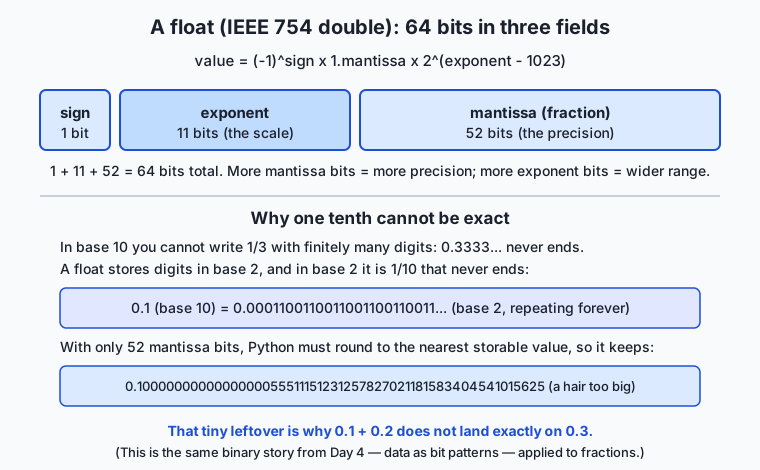
Now the crucial mechanism. To store 0.1, Python must express one tenth as 1.something × 2^n using only 52 mantissa bits. But one tenth in binary is 0.00011001100110011..., repeating forever, so it cannot fit in 52 bits. Python rounds to the nearest value that does fit, which happens to be very slightly larger than one tenth — its exact stored value is 0.1000000000000000055511151231257827021181583404541015625. Store 0.2 and you get another tiny error; add them and the errors combine into a sum stored as 0.3000000000000000444..., which is not the value stored for the literal 0.3. Hence 0.1 + 0.2 == 0.3 is False. Nothing went wrong — three separate roundings simply did not cancel.
The arithmetic operators are the other half of “how it works.” Python has seven you will use daily, and two of them — / and // — are easy to confuse:
| Operator | Name | Example | Result | Notes |
|---|---|---|---|---|
+ | Addition | 7 + 2 | 9 | |
- | Subtraction | 7 - 2 | 5 | |
* | Multiplication | 7 * 2 | 14 | |
/ | True division | 7 / 2 | 3.5 | Always returns a float, even for 4 / 2 → 2.0 |
// | Floor division | 7 // 2 | 3 | Divides and rounds down to a whole number |
% | Modulo (remainder) | 7 % 2 | 1 | What is left over after floor division |
** | Exponentiation | 7 ** 2 | 49 | 2 ** 10 → 1024 |
The / versus // distinction is the one to burn in. In Python 3, / is true division and always produces a float: 10 / 5 is 2.0, not 2. // is floor division: it divides and throws away the fractional part, rounding toward negative infinity, so 7 // 2 is 3 and -7 // 2 is -4. The companion operator % gives the remainder, so that (a // b) * b + (a % b) always reconstructs a. Together // and % are how you split a quantity into whole units and leftovers — pages of items, rows of a grid, or coins of change — without ever touching a float, and therefore without any rounding error at all.
For the exact types, the mechanism is different. A Decimal stores a number as a whole-number sequence of decimal digits plus a base-10 exponent, so Decimal("0.1") holds exactly one tenth, and Decimal("0.1") + Decimal("0.2") is exactly Decimal("0.3"). The one rule you must respect: build a Decimal from a string (Decimal("0.1")), never from a float (Decimal(0.1)), because Decimal(0.1) faithfully copies the float’s error — it stores 0.1000000000000000055.... A Fraction stores a numerator and denominator as two integers and keeps them reduced, so Fraction(1, 3) is exactly one third and Fraction(1, 3) * 3 is exactly 1.
Two standard-library toolkits round out the picture. The math module holds the mathematical functions that do not belong to any one number — math.sqrt(2) (1.4142135623730951), math.floor(3.7) (3), math.ceil(3.2) (4), constants like math.pi, and, most useful today, math.isclose(a, b), which reports whether two floats are equal within a small tolerance — the right way to compare floats. The random module produces pseudo-random numbers — random.random(), random.randint(1, 6), random.choice(seq) — for simulations, samples, and shuffles. One warning that belongs right here: random is fast and statistically good but predictable, so it must never be used for passwords, tokens, or anything that has to be unguessable; for that, Python has the secrets module.
An everyday analogy
Think of each number type as a notebook with a fixed number of little boxes per number, and a rule about what base the boxes count in.
The float notebook is a working scientist’s field book. Every number is written in scientific notation — a few significant digits and a separate power to say where the decimal point sits — and there is a fixed number of boxes for those digits. That fixed box count is what makes the notebook fast to write in and able to record both the mass of an electron and the distance to the sun on the same page. But because the boxes count in binary and there are only so many of them, some perfectly ordinary numbers do not fit. Writing “one tenth” is like being asked to write “one third” in a notebook that only allows a fixed number of decimal boxes: you write 0.3333 and stop, knowing it is a hair off. The scientist does not panic — a hair off is fine for a measurement — but they never claim two such jottings are exactly equal.
The int notebook is an accountant’s ledger for whole tallies. It has a beautiful property the field book lacks: when a number needs more boxes, you simply glue on another column. There is no size limit and never any rounding — every whole number is written exactly, however enormous. But it refuses to record anything with a decimal point.
The Decimal notebook is a shop till’s tape. It counts in tenths and hundredths — base 10, the way money works — and it, too, gives you as many exact boxes as you ask for. “One tenth” fits perfectly, because a base-10 notebook has an exact spelling for it. It is a little slower to write in than the field book, and overkill for jotting down a temperature, but when the number is money you reach for the till tape every time. Keep this one notebook picture through the whole lesson: the question is always how many boxes does this notebook give each number, and in what base — and every precision trap is just a number that did not fit the boxes.
Examples in practice
First, watch the trap and its fix, exactly as you would type them into Python:
>>> 0.1 + 0.2
0.30000000000000004
>>> 0.1 + 0.2 == 0.3
False
>>> import math
>>> math.isclose(0.1 + 0.2, 0.3)
True
>>> round(0.1 + 0.2, 2) == round(0.3, 2)
True
The bare sum reveals the stored error; == therefore reports False; and math.isclose — comparing within a tolerance — reports the True you expected. Rounding both sides to two places also works when you know how many places matter. Note one subtlety you will meet: Python’s round uses banker’s rounding (round half to even), so round(2.5) is 2 and round(3.5) is 4; this reduces bias when you round many numbers, and is worth knowing before it surprises you.
Now the money example, the heart of today’s lab. Suppose a cart holds items priced 19.99, 5.99, 2.50, 0.10, 0.20. Total them two ways:
>>> prices = [19.99, 5.99, 2.50, 0.10, 0.20]
>>> sum(prices)
28.779999999999998            # float: subtly wrong
>>> from decimal import Decimal
>>> sum(Decimal(str(p)) for p in prices)
Decimal('28.78')              # Decimal: exactly right
The float total is 28.779999999999998 — off by a hair, and if you print it as a price it can display as $28.78 while comparing unequal to 28.78, the kind of mismatch that breaks a payment check. The Decimal total, built from the string form of each price, is exactly 28.78. This is why financial code uses Decimal (or integer cents), never bare floats.
Next, floor division and modulo making change, with no float in sight. A customer is owed 725 cents; break it into coins:
>>> change = 725
>>> change // 100        # whole dollars
7
>>> change % 100         # cents left after the dollars
25
>>> 25 // 25             # whole quarters in the remainder
1
Working in whole cents as integers means the arithmetic is exact — // peels off the whole units, % keeps the remainder, and no rounding error can creep in. Finally, a taste of the math module and the exact Fraction:
>>> import math
>>> math.sqrt(2)
1.4142135623730951
>>> math.floor(3.7), math.ceil(3.2)
(3, 4)
>>> from fractions import Fraction
>>> Fraction(1, 3) * 3
Fraction(1, 1)               # exactly one, where float 1/3 * 3 may not be
Every number here can be re-derived by typing it yourself — which is the point: precision behaviour is deterministic, so you can always check it.
Implications: security, privacy, performance, scalability, and cost
Security. The sharpest security lesson in this topic is about random. Python’s default random module uses a Mersenne Twister generator: excellent for simulations, but predictable — observe enough outputs and its entire future can be reconstructed. Using it to generate passwords, session tokens, password-reset links, or one-time codes is a real vulnerability. For anything that must be unguessable, use the secrets module (secrets.token_urlsafe(32), secrets.randbelow(n)), which draws from the operating system’s cryptographically secure source. “Which random do I need?” — statistical or unguessable — is a security decision, not a style preference.
Privacy and correctness. Silent floating-point error in the wrong place is a data-integrity problem. Financial records, billing systems, and anything audited must use exact arithmetic so that totals reconcile and balances are provably correct; a fraction-of-a-cent drift that accumulates over millions of transactions is both a correctness bug and, potentially, a compliance and trust failure. Choosing Decimal for money is engineering the correctness in, not decorating the code.
Performance. The type you pick has real speed costs. float arithmetic runs directly on hardware floating-point units and is extremely fast; Decimal and Fraction are implemented in software and are markedly slower. This is exactly the trade-off: reach for exact types where correctness demands it, and stay with float where speed and range matter and small rounding is harmless — measurements, physics, graphics, and machine learning.
Scalability and cost. At scale, the width of your numbers is a budget. This is where today’s topic meets machine learning head-on: a model with billions of parameters stores each as a floating-point number, and the choice between 32-bit (float32), 16-bit (float16), and 16-bit-with-wide-range (bfloat16) directly sets how much memory the model occupies, how much data moves per calculation, and how fast it runs. Halving the bits per number roughly halves the memory and the bandwidth cost. The catch is precision: fewer mantissa bits mean coarser numbers and more rounding, which can degrade accuracy or cause numerical instability during training. The whole practice of quantization — storing weights in 8 or even 4 bits — is this lesson’s box-counting trade-off, applied at enormous scale to save memory and money.
Alternatives: free, open source, and commercial
The tools for numbers in Python are, happily, almost all free and built in. Here is how the leading options compare and when to reach for each.
| Tool | What it is | When to choose it | Cost |
|---|---|---|---|
Built-in int / float | The core numeric types | Everyday counting and measurement; the default for almost all code | Free, built in |
decimal module | Exact base-10 arithmetic | Money, tax, invoices, anything that must reconcile exactly | Free, built in |
fractions module | Exact rational numbers | Exact ratios and probabilities where no rounding is tolerable | Free, built in |
math module | Scalar math functions and constants | Square roots, floor/ceil, isclose, trigonometry on single numbers | Free, built in |
statistics module | Mean, median, standard deviation | Quick statistics on small data without any install | Free, built in |
random / secrets | Pseudo-random / secure random | Simulations and sampling (random); tokens and passwords (secrets) | Free, built in |
| NumPy | Fast arrays of numbers | Large numerical arrays, matrices, and the foundation of scientific Python | Free, open source (install with pip) |
The one non-built-in tool worth previewing is NumPy, which you meet properly in Course 3. Where a Python list of floats is flexible but slow for math, a NumPy array stores numbers in a compact block and does arithmetic on the whole array at once, far faster — and it exposes exactly the precision choices (float32, float16) that matter for machine learning. For today, know that when your numbers become large arrays, NumPy is where you will go; for single values and money, the built-in types above are all you need, and none of them costs a cent.
Comparison with related concepts
The four numeric families are best understood side by side: what each guarantees, and what it gives up.
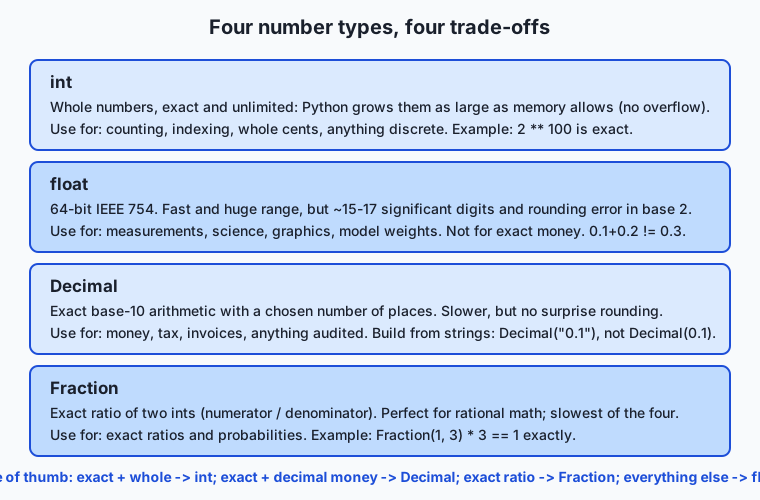
| Type | Exact? | Range / size | Speed | Use it for |
|---|---|---|---|---|
int | Exact (whole numbers) | Unlimited — grows with memory | Fast | Counting, indexing, whole cents, discrete quantities |
float | Approximate (binary) | Huge (to ~1.8 × 10³⁰⁸) but ~15–17 digits | Fastest for decimals | Measurements, science, graphics, model weights |
Decimal | Exact (base 10) | Chosen precision | Slower (software) | Money, tax, invoices, audited totals |
Fraction | Exact (rational) | Limited by memory | Slowest | Exact ratios and probabilities |
Read the table as a decision tree. Is the quantity whole? Use int — exact and unbounded. Is it money or must it reconcile exactly in decimal? Use Decimal, built from strings. Is it an exact ratio? Use Fraction. Is it a measurement, a scientific value, or a model parameter, where speed and range beat the last digit? Use float. The related distinction to keep straight is / versus //: true division always yields a float (and so inherits float’s approximation), while floor division on integers stays in the exact integer world — which is why money and change are computed in integer cents with // and %, not in floats.
When to use it — and when not to
Reach for float as your default for any real-valued measurement: sensor readings, physics, geometry, graphics, statistics, and — later — the weights and activations of machine-learning models, where its speed and range are exactly what you want and its tiny rounding is harmless. Reach for int whenever the quantity is whole and you want it exact forever: counts, indices, loop counters, and money expressed in the smallest unit (cents, satoshis, milliseconds). Reach for Decimal the instant real money in decimal form is involved and the total must reconcile — billing, tax, accounting, invoicing. Reach for Fraction when you need exact ratios and any rounding at all would be wrong.
Know equally when not to use each. Do not use float for money — its base-2 rounding is precisely wrong for base-10 currency. Do not compare computed floats with ==; use math.isclose or round to the places you care about. Do not build a Decimal from a float literal (Decimal(0.1)); build it from a string (Decimal("0.1")), or you import the very error you were trying to avoid. Do not reach for Decimal or Fraction in hot numerical loops or large arrays where their software-level slowness will dominate — that is float (and NumPy) territory. And never use random for secrets; that is what secrets is for. The professional habit is simple: name the property you actually need — exactness, range, speed, or unguessability — and let that name pick the type.
Knowledge check
Try these from memory before looking back:
- Explain, in terms of binary and a fixed number of mantissa bits, why
0.1 + 0.2is not exactly0.3in Python. What is the base-10 analogy? - You need to check whether two computed floats are “the same.” Why is
==the wrong tool, and what should you use instead? - What is the difference between
/and//in Python 3? Give the result of7 / 2,7 // 2, and7 % 2. - A colleague writes
Decimal(0.1)and is surprised it is not exactly one tenth. What did they do wrong, and what should they have written? - Name the four exact-vs-approximate numeric types and give one task each is the right choice for.
- Why must you never use the
randommodule to generate a password or session token, and what should you use instead?
Hands-on exercise
Time to make the trap and its fixes concrete at the keyboard. In the Day 46 lab directory you will run a small Python program, precision_demo.py, that reproduces 0.1 + 0.2, shows the exact stored value, compares floats safely with math.isclose, totals a shopping cart in float (wrong) and Decimal (exact), and makes change with // and %. Then you complete a starter version yourself.
From the lab directory, first run the finished reference so you know the target:
python3 examples/precision_demo.pyThen open starter/precision_demo.py in any editor and complete its five numbered exercises — showing the float error, using math.isclose, computing an exact Decimal total, and using // and % — each one labelled with the exact expression to fill in. Run your version as you go:
python3 starter/precision_demo.pyExpected output
The reference program is pure arithmetic on fixed numbers, so its output is identical on every standard Python build. Its first two sections look like this:
============================================================
1. The float trap: 0.1 + 0.2 != 0.3
============================================================
0.1 + 0.2        = 0.30000000000000004
Is it exactly 0.3? False
0.1 stored as    = 0.1000000000000000055511151231257827021181583404541015625
0.1 + 0.2 stored = 0.3000000000000000444089209850062616169452667236328125

============================================================
2. Comparing floats safely with math.isclose
============================================================
total == 0.3               -> False
math.isclose(total, 0.3)   -> True
round(total, 2) == 0.3     -> True
Line by line: the bare sum shows the stored error; Decimal(0.1) reveals the exact value the 64 bits actually hold; == 0.3 is False because three roundings did not cancel; and math.isclose and round both recover the answer you meant. The shopping-cart section then prints a float total of 28.779999999999998 against an exact Decimal total of 28.78, and the change section hands out 7 x dollar and 1 x quarter for 725 cents.
Validate your work
You are done when you can check every box:
- You ran
examples/precision_demo.pyand saw0.1 + 0.2print as0.30000000000000004. - You can explain why
Is it exactly 0.3?printsFalse. - Your completed
starter/precision_demo.pyprints the exactDecimalcart total of28.78. - Your starter uses
//to get7whole dollars and%to get25leftover cents from725. -
bash tests/run_tests.shprints9 checks, 0 failure(s).and exits0.
Troubleshooting
- “
0.1 + 0.2 == 0.3isFalse— is my Python broken?” No. That is IEEE 754 double precision behaving exactly as specified. Compare withmath.iscloseinstead of==. Decimal(0.1)is not exact. You built aDecimalfrom a float, which copies the float’s error. Build from a string:Decimal("0.1").7 / 2gave3.5when you wanted3./is true division and always returns a float; use//(floor division) for whole-number results.ModuleNotFoundErrorformathordecimal. A file in your directory is probably namedmath.pyordecimal.py, shadowing the standard library — rename it.
Common mistakes
- Comparing floats with
==. The single most common numeric bug. Always compare computed floats withmath.iscloseor by rounding to a chosen number of places. - Using
floatfor money. Base-2 floats cannot represent base-10 cents exactly. UseDecimal(built from strings) or integer cents. - Confusing
/and//. True division (/) yields a float and its approximation; floor division (//) stays exact on integers. Pick deliberately.
Practice assignment
Open starter/numbers-worksheet.md in the lab and fill it in completely from your own runs: record exactly what 0.1 + 0.2 prints, the exact stored value of 0.1, the float and Decimal cart totals, the amount the customer is charged, and the results of 725 / 100, 725 // 100, and 725 % 100. Then write one short paragraph (4–6 sentences) explaining, in your own words and using the base-10 “one third” analogy, why 0.1 cannot be stored exactly as a float, and stating the rule you will follow from now on for (a) comparing floats and (b) representing money. Keep the worksheet; it is your personal reference for every program you write that touches numbers.
Extension challenge
Go one step deeper into exactness. First, demonstrate accumulation: in Python, add 0.1 to itself ten times in a loop with a float accumulator and print the result, then do the same with Decimal("0.1"), and observe that the float drifts from 1.0 while the Decimal lands exactly on 1.0. Second, explore Fraction: show that Fraction(1, 3) + Fraction(1, 3) + Fraction(1, 3) is exactly 1, then compare with 1/3 + 1/3 + 1/3 as floats. Finally, connect it to scale: a float32 uses 23 mantissa bits and a float16 only 10. Write two or three sentences explaining why storing a large model’s parameters in float16 instead of float32 halves the memory but coarsens every number — and why practitioners nonetheless do it, and sometimes go further to 8-bit quantization, to fit bigger models into the same hardware. You have now reasoned about model precision from the same box-counting first principles you used on 0.1 + 0.2.
Quiz
Q1. In Python, what does the expression 0.1 + 0.2 == 0.3 evaluate to, and why?
- True, because Python rounds all decimals to two places automatically
- False, because 0.1, 0.2, and 0.3 cannot all be stored exactly in binary floating-point, so the sum is a hair off
- True, because floating-point arithmetic is always exact
- It raises an error, because you cannot compare floats
Show answer
Answer: B. False, because 0.1, 0.2, and 0.3 cannot all be stored exactly in binary floating-point, so the sum is a hair off
Each of 0.1, 0.2, and 0.3 is stored as the nearest available binary fraction, and the rounding errors do not cancel: 0.1 + 0.2 is stored as 0.30000000000000004, which is not the stored value of 0.3, so the comparison is False.
Q2. Which numeric type should you use to total a shopping cart so the amount reconciles exactly to the cent?
- float, because it is the fastest
- int, because money is always whole numbers
- Decimal, because it does exact base-10 arithmetic
- complex, because it has two parts
Show answer
Answer: C. Decimal, because it does exact base-10 arithmetic
Decimal performs exact base-10 arithmetic, so decimal fractions like 0.10 and 0.20 add up exactly. float uses base-2 and introduces rounding error; Decimal (or integer cents) is the correct choice for money.
Q3. What is the difference between 7 / 2 and 7 // 2 in Python 3?
- They are identical; both give 3.5
- 7 / 2 gives 3 (an int) and 7 // 2 gives 3.5 (a float)
- 7 / 2 gives 3.5 (true division, always a float) and 7 // 2 gives 3 (floor division, rounded down)
- 7 // 2 raises an error because you cannot floor-divide odd numbers
Show answer
Answer: C. 7 / 2 gives 3.5 (true division, always a float) and 7 // 2 gives 3 (floor division, rounded down)
In Python 3, / is true division and always returns a float (7 / 2 is 3.5), while // is floor division that divides and rounds down to a whole number (7 // 2 is 3).
Q4. You need to check whether two computed floats are effectively equal. What is the recommended approach?
- Use == directly; float comparison is always exact
- Use math.isclose(a, b), which tests equality within a small tolerance
- Convert both to strings and compare the strings
- Multiply both by 1000 and hope they match
Show answer
Answer: B. Use math.isclose(a, b), which tests equality within a small tolerance
Because floats carry tiny rounding errors, == often reports False for values that are mathematically equal. math.isclose(a, b) returns True when the values are within a small tolerance, which is the correct way to compare computed floats.
Q5. Why is Decimal("0.1") exact but Decimal(0.1) is not?
- Decimal(0.1) takes the already-imprecise float 0.1 and copies its error; Decimal("0.1") parses the exact string
- There is no difference; both are exact
- Decimal("0.1") is actually the inexact one
- Decimal(0.1) rounds to the nearest whole number
Show answer
Answer: A. Decimal(0.1) takes the already-imprecise float 0.1 and copies its error; Decimal("0.1") parses the exact string
Decimal(0.1) receives the float 0.1, which already holds 0.1000000000000000055..., and stores that error. Decimal("0.1") parses the string "0.1" and stores exactly one tenth. Always build money Decimals from strings.
Q6. What is special about Python's int type compared with integers in many other languages?
- Python ints are limited to 64 bits and overflow silently
- Python ints are stored as floats internally
- Python ints have arbitrary precision — they grow as large as memory allows, with no overflow
- Python ints can only hold values up to one million
Show answer
Answer: C. Python ints have arbitrary precision — they grow as large as memory allows, with no overflow
Python integers have arbitrary precision: they are exact and unbounded, growing to use as much memory as needed, so an expression like 2 ** 100 produces the full exact 31-digit result with no overflow.
Q7. A colleague uses Python's random module to generate password-reset tokens. What is the problem?
- random is too slow for generating tokens
- random produces predictable pseudo-random numbers, so tokens can be guessed; use the secrets module instead
- random only produces whole numbers
- There is no problem; random is cryptographically secure
Show answer
Answer: B. random produces predictable pseudo-random numbers, so tokens can be guessed; use the secrets module instead
The random module uses a predictable Mersenne Twister generator: given enough outputs its future values can be reconstructed. For anything that must be unguessable — tokens, passwords, one-time codes — use the secrets module, which draws from a cryptographically secure source.
Q8. What do the 52 mantissa bits and 11 exponent bits of a 64-bit float control, respectively?
- The mantissa controls the sign and the exponent controls the color
- The mantissa controls precision (how many significant digits) and the exponent controls range (how large or small)
- Both control only the range
- The mantissa controls range and the exponent controls precision
Show answer
Answer: B. The mantissa controls precision (how many significant digits) and the exponent controls range (how large or small)
In IEEE 754 double precision, the 52 mantissa (fraction) bits set the precision — about 15 to 17 significant decimal digits — while the 11 exponent bits set the scale, giving the enormous range up to about 1.8 x 10^308.
Glossary
- int
- Python's integer type: an exact whole number with arbitrary precision, meaning it grows as large as memory allows and never overflows.
- float
- Python's floating-point type: a number with a decimal point stored in 64 bits as an IEEE 754 double, fast and wide-ranging but limited to about 15 to 17 significant digits of precision.
- IEEE 754
- The international standard, published in 1985, that defines how binary floating-point numbers are laid out in bits and how arithmetic on them rounds, so the same program gives the same result on any conforming hardware.
- floating-point error
- The small, deterministic rounding difference that arises because most decimal fractions (like 0.1) have no exact representation in binary and must be stored as the nearest available value.
- mantissa
- The field of a floating-point number that holds its significant binary digits (also called the fraction); a 64-bit double has 52 mantissa bits, which set its precision.
- exponent
- The field of a floating-point number that sets the scale — which power of two the mantissa is multiplied by; a 64-bit double has 11 exponent bits, which set its range.
- floor division
- The // operator, which divides two numbers and rounds the result down to a whole number (toward negative infinity); 7 // 2 is 3.
- modulo
- The % operator, which returns the remainder left over after floor division; 7 % 2 is 1, and (a // b) * b + (a % b) always reconstructs a.
- Decimal
- A standard-library type (from the decimal module) that performs exact base-10 arithmetic to a chosen precision, correct for money; build it from a string, as Decimal("0.1"), never from a float.
- Fraction
- A standard-library type (from the fractions module) that stores a number as an exact ratio of two integers, so values like one third stay exact through arithmetic.
- math.isclose
- A function in the math module that reports whether two floats are equal within a small tolerance; the correct way to compare computed floats instead of using ==.
- rounding
- Reducing a number to a chosen number of digits; Python's built-in round uses banker's rounding (round half to even), so round(2.5) is 2 and round(3.5) is 4.
- quantization
- Storing numbers with fewer bits (for example a model's parameters in 8 bits instead of 32) to save memory and bandwidth, at the cost of coarser precision.
Sources and further reading
- Numeric Types — int, float, complex — Python Software Foundation (accessed 2026-07-12)
- decimal — Decimal fixed-point and floating-point arithmetic — Python Software Foundation (accessed 2026-07-12)
- Floating Point Arithmetic: Issues and Limitations — Python Software Foundation (accessed 2026-07-12)
- math — Mathematical functions — Python Software Foundation (accessed 2026-07-12)
- IEEE 754 — Wikipedia (accessed 2026-07-12)
Kept in this browser, no account needed. Your progress page turns the whole record into one link you can bookmark or open on another device.