Programming with Python › Control Flow and Collections › Day 51
Day 51: Loops: for, while, and Iteration Patterns
After this lesson you will be able to choose between a for loop and a while loop, walk any iterable, use range, enumerate, and zip, control a loop with break, continue, and the loop-else clause, and apply the five core iteration patterns — accumulate, filter, transform, search, and nest — while avoiding infinite loops and off-by-one errors.
Hands-on lab for this lesson
Lab files on GitHub: https://github.com/ai-roadmap-365/ai-roadmap-365.github.io/tree/main/labs/sections/programming-with-python/day-051-loops-for-while-and-iteration-patterns
- Get the hands-on files. Clone the labs repository once (you can reuse this clone for every lesson). This works on macOS, Linux, and Windows (PowerShell or WSL):
git clone https://github.com/ai-roadmap-365/ai-roadmap-365.github.io.git cd ai-roadmap-365.github.io - Open this lesson's lab. Move into the directory for this specific day. Every lab lives at the same predictable path — section / subsection / week / day:
cd labs/sections/programming-with-python/day-051-loops-for-while-and-iteration-patterns - Read the lab guide. Open `README.md` in that directory. It lists the exact commands, what each does, the expected output, and how to check your work — read it before running anything.
- Run it and check your work. Follow the README's "How to run" section: run the example first to see the finished result, then complete the numbered exercises in `starter/`, then run the tests. The tests pass (exit 0) only when your work is correct.
bash tests/run_tests.sh # or the test command named in the lab README
You can also open the lab as a local page (works offline, shows the file tree and expected output).
Learning objectives
By the end of this lesson you will be able to:
- Choose correctly between a for loop (definite iteration over a collection) and a while loop (indefinite iteration until a condition is false), and state the progress responsibility a while loop places on you
- Explain the iteration model — an iterable produces an iterator that hands one item at a time to the loop body — and why the same for loop works over lists, strings, ranges, and files
- Use range, enumerate, and zip idiomatically instead of hand-managing an index with range(len(...))
- Control a loop with break (exit now), continue (skip this pass), and the loop-else clause (runs only when no break happened), and place a search-and-report loop correctly
- Apply the five iteration patterns — accumulate a running result, filter, transform, search with early exit, and nested loops — and trace an accumulator step by step
- Reason about loop cost with the outer-times-inner rule, and avoid infinite loops and off-by-one errors
- Connect iteration to AI practice: training epochs and batches, data-pipeline passes, and agent step-loops are all loops
Prerequisites
- Days 43-50 of this course: a working Python 3 install, variables and types, strings, numbers, input/output, reading error messages, program structure, and conditionals with boolean logic
- Comfort running a script from the terminal with python3 and editing a text file
Why this matters
Almost nothing interesting in computing happens once. You rarely process a single number, a single file, or a single row of data — you process thousands, then millions. The tool that turns “do this to one thing” into “do this to every thing” is the loop, and it is the single most-used control structure you will ever write. Yesterday you learned to make a decision with if; today you learn to repeat, which is what makes a program do real work instead of a party trick.
This matters directly and immediately for where you are headed. Every artificial-intelligence system you will meet is, underneath, a loop over data. Training a model means passing over a dataset again and again — each full pass is called an epoch, and inside each epoch the data is walked in small groups called batches — which is nothing more than a loop inside a loop. Serving a model means looping over incoming requests. Preparing data means looping over records to clean, filter, and transform them before a model ever sees them. An AI agent that takes actions in a tool is running a step-loop: observe, act, check if done, repeat. If loops are shaky for you, every one of those topics will feel like magic; once loops are solid, they will feel like variations on a theme you already know.
There are concrete consequences to getting loops wrong, and they cost real time and money. A loop that never ends freezes your program and, in the cloud, quietly burns money until you notice. A loop that runs one time too few or too many — the classic off-by-one error — silently corrupts a total or skips the last record, and produces a wrong answer that looks plausible. A loop nested inside another loop can be fast on ten items and unbearably slow on ten thousand, because the work multiplies. By the end of today you will write loops that stop when they should, count correctly, and whose cost you can predict — the difference between code that works on your test input and code that survives real data.
The idea in plain language
A loop is a way to tell the computer “keep doing this until I say stop.” There are two shapes of loop, and choosing between them is the first thing to get right. A for loop is for when you already have a collection of things and want to visit each one: every item in a list, every character in a word, every line in a file, every number in a range. You do not manage the counting — the loop walks the collection for you and stops automatically when it runs out. A while loop is for when you do not know in advance how many times to repeat, and instead repeat as long as some condition stays true: keep asking the user until they type a valid answer, keep improving a guess until it is close enough, keep going until a signal says stop. You manage the condition; the loop trusts you to eventually make it false.
Underneath the for loop is a small, tidy idea worth naming now, because it explains a great deal later. Anything you can loop over is called an iterable — a list, a string, a range, a file. When a for loop starts, it asks the iterable for a helper called an iterator, a little bookmark that remembers where you are and hands back the next item each time the loop asks. When the items run out, the iterator says “done” and the loop ends. You do not usually see this machinery, but knowing it is there demystifies why a for loop works the same way over a list, a string, and a file: they are all iterables, and the loop only ever talks to the iterator.
Once you can repeat, a handful of patterns appear again and again, and recognizing them is most of the skill. You accumulate, building up a running total or count or list as you go. You filter, keeping only the items that pass a test. You transform, producing a new item from each old one. You search, scanning until you find what you want and then stopping early. And you handle the awkward middle of a loop with two small commands: break to leave the loop immediately, and continue to skip the rest of this round and move to the next item. Learn these five patterns and you have learned what most loops are actually doing.
Historical background
Repetition is older than electronic computers. In 1843, Ada Lovelace, writing notes on Charles Babbage’s proposed Analytical Engine, described how a “cycle of operations” could be repeated to compute a sequence of numbers — the idea of a loop, written down a century before a machine existed to run it. The word “loop” itself came from the physical reality of early programming: on machines that read instructions from punched paper tape, you could literally join the ends of a length of tape into a loop so the reader passed over the same instructions again and again.
The deeper story is about taming the loop. The earliest programming languages built repetition out of a raw jump instruction — GOTO — which let control leap to any labelled line. You could make a loop by jumping backward, but you could also make an incomprehensible tangle, because nothing said where a loop began or ended. In 1966 Corrado Böhm and Giuseppe Jacopini proved a foundational result: any program at all can be written using just three building blocks — running statements in sequence, choosing between them (selection), and repeating them (iteration) — with no arbitrary jumps required. Iteration, the loop, was one of the three pillars. Two years later Edsger Dijkstra’s famous letter “Go To Statement Considered Harmful” pressed the point, and the structured programming movement gave loops the clear beginning-and-end forms — the for and while we still write — that make them readable.
Python, released by Guido van Rossum in 1991, inherited these lessons and made a distinctive choice. Its for loop is not the C-style “start at zero, count up, stop at a limit” counter; it is a for each that walks any iterable directly — for item in things: — because Python was designed around the iterable-and-iterator idea from the start. That is why looping over a list, a dictionary, a file, and a custom object all look identical, and why the counting machinery that trips up beginners in older languages is largely hidden. When you write a Python for loop today, you are using sixty years of the field’s hard-won agreement that repetition should be a named, bounded, readable structure — not a jump into the dark.
What it is — and what it is not
A loop is a control structure that runs a block of code repeatedly. A for loop repeats the block once for each item produced by an iterable and stops on its own when the items are exhausted; a while loop repeats the block as long as a condition evaluates to true and stops when it becomes false. Inside either, break ends the loop immediately, continue skips to the next repetition, and a loop may carry an else clause that runs only if the loop finished normally without ever hitting a break.
It helps to be clear about what a loop is not, because beginners misread it in predictable ways. A for loop is not a counter you must drive by hand: writing for i in range(len(items)): and then using items[i] is almost always the wrong instinct in Python — you loop over the items directly. A loop variable is not special or permanent; it is an ordinary name that is reassigned to the next item on each pass and simply holds the last item after the loop ends. A while loop’s condition is not re-checked in the middle of the body — it is only tested at the top of each pass, so the body always runs to completion before the condition is looked at again. And a loop is not guaranteed to end: a while loop whose condition never becomes false runs forever, which is a bug, not a feature.
| Common misconception | The reality |
|---|---|
| ”A for loop is for counting numbers.” | A Python for loop walks any iterable — list, string, file, range. Counting is just one case, done with range. |
”I need an index i to loop over a list.” | You loop over the items directly: for name in names:. Reach for the index only when you truly need position — then use enumerate. |
”break exits the whole program.” | break exits only the innermost loop it is in; the program keeps running after that loop. |
”continue skips the whole loop.” | continue skips only the rest of the current pass and jumps to the next item; the loop continues. |
| ”A while loop checks its condition constantly.” | The condition is checked once at the top of each pass. The body always finishes before the next check. |
| ”More lines in the loop body means a slower loop.” | Loop cost is dominated by how many times the body runs, especially when loops are nested — not by the body’s length. |
Why it was created and what problems it solves
Loops exist to solve a problem that appears the moment a program does anything real: the same operation must be applied to many pieces of data, and writing it out by hand is impossible. Imagine summing a list of ten numbers without a loop — you could just add them. Now imagine summing ten thousand numbers, or a list whose length you will not know until the program runs because it comes from a file a user provides. Without a loop there is no way to write code that adapts to a quantity you cannot see in advance. The loop is the construct that lets one short block of code process a collection of any size, including sizes that did not exist when you wrote the program.
The two loop shapes solve two distinct versions of this problem, which is why both exist. The for loop solves definite iteration: you have a collection, you want to visit each member exactly once, and the number of repetitions is fixed by the collection’s size. The while loop solves indefinite iteration: you do not know how many repetitions you need, only a condition that tells you when to stop — retry until success, refine until close enough, continue until interrupted. Trying to force a while loop to do a for loop’s job (manually managing an index) invites off-by-one errors; trying to force a for loop to do a while loop’s job (looping over a fixed range and breaking early) obscures the real stopping condition. Matching the loop to the problem is not style; it is what keeps the code correct and readable. And break and continue exist because real loops are messy in the middle: sometimes you find your answer before the end and should stop, and sometimes one item should be skipped without abandoning the rest.
How it works
Let’s build up the mechanics from the smallest piece to the full patterns.
The for loop and the iteration model
A Python for loop reads almost like English: for item in collection: followed by an indented body. On each pass, the name item is bound to the next element of collection, the body runs, and then the loop asks for the next one. When there are no more, the loop ends. The magic is in what “asks for the next one” means.
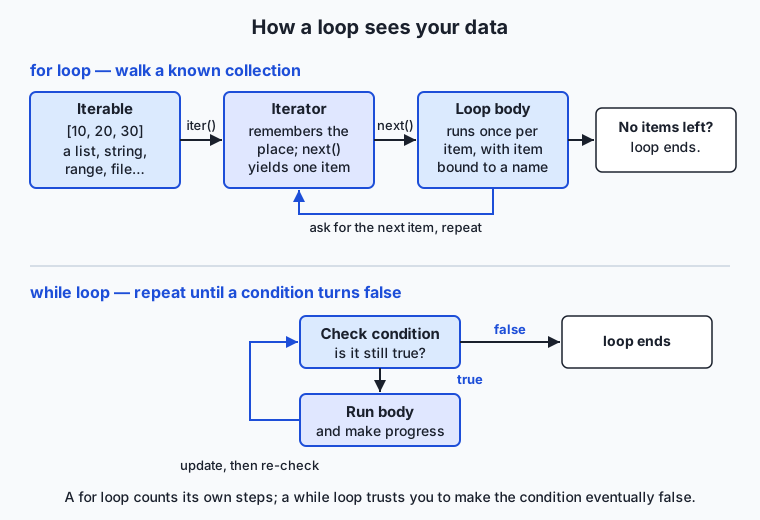
Read the top half of the diagram left to right. Your collection is an iterable. When the for loop starts, it calls iter() on the iterable to get an iterator — a small object that remembers your position. Each pass, the loop calls next() on that iterator, which returns the next item; the loop body runs with that item; then it loops back and calls next() again. When the iterator has nothing left, it signals exhaustion and the loop stops cleanly. You almost never write iter() and next() yourself — the for loop does it for you — but this is why the same for loop works over a list, a string, a range, and a file: each is an iterable, and the loop only ever speaks to the iterator. (You will meet iterables and iterators in fuller depth on Day 55; today’s picture is enough to make loops make sense.)
Three built-in helpers make for loops far more expressive, and you will use all three constantly:
range(stop)produces the whole numbers0, 1, …, stop − 1. It is how you loop a fixed number of times:for i in range(5):runs five times withitaking0through4.range(start, stop)andrange(start, stop, step)give you more control. Crucially,rangeis lazy — it produces each number as asked rather than building a giant list — sorange(1_000_000)costs almost no memory.enumerate(items)pairs each item with its position, so you get both without managing a counter:for index, value in enumerate(items):. This is the right tool the moment you genuinely need to know where you are, and it replaces the error-pronerange(len(items))pattern.zip(a, b)walks two (or more) iterables in lockstep, handing you one item from each per pass:for name, score in zip(names, scores):. It stops when the shortest runs out, which is usually what you want.
The while loop
A while loop is written while condition: followed by an indented body. The condition is checked; if it is true, the body runs; then the condition is checked again; and so on until the condition is false, at which point the loop ends and the program continues below it. The bottom half of the iteration diagram shows this: check, run, update, check again.
The one responsibility a while loop places on you is progress: something inside the body must move the condition toward becoming false, or the loop never ends. while count < 10: requires that count grows; forget the count += 1 and you have an infinite loop. Prefer a while loop when the number of repetitions is not known ahead of time — reading until end-of-input, retrying until something succeeds, or looping “forever” with while True: and leaving the loop from the inside with break when a stopping condition is met. That while True / break shape is common and perfectly idiomatic; the key is that a break is reachable.
break, continue, and the loop-else clause
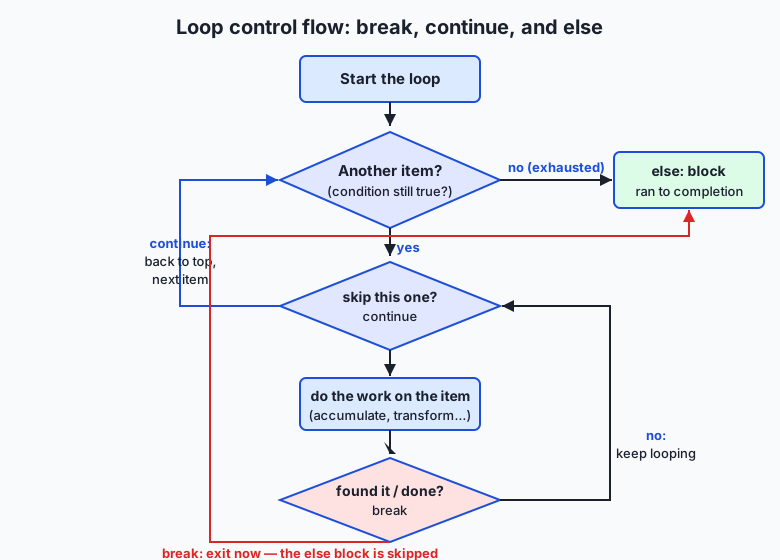
The flow diagram shows the three ways a loop’s body can steer itself. break exits the loop immediately — no more items are visited, and control jumps to the first line after the loop. It is how you search: scan until you find what you want, then stop, because continuing would be wasted work. continue abandons only the current pass and jumps straight to the next item — useful for skipping items that do not qualify without wrapping the rest of the body in an if.
Python adds a feature many languages lack: a loop can have an else clause, and it runs only if the loop finished without hitting a break. Read for … else as “for each item … and if we never broke out, do this.” It is precisely the tool for search-and-report: loop looking for something, break when found, and put the “not found” handling in the else. The diagram makes the rule visual — the arrow from a break leaps past the else block, while natural exhaustion flows into it.
The five iteration patterns, in code
Almost every loop you write is one of these shapes. Here they are on a small list, nums = [3, 1, 4, 1, 5, 9, 2, 6]:
nums = [3, 1, 4, 1, 5, 9, 2, 6]

# 1. Accumulate — build a running result
total = 0
for n in nums:
    total = total + n        # total ends at 31

# 2. Filter — keep the items that pass a test
big = []
for n in nums:
    if n > 4:
        big.append(n)        # big is [5, 9, 6]

# 3. Transform — make a new item from each old one
squares = []
for n in nums:
    squares.append(n * n)    # squares is [9, 1, 16, 1, 25, 81, 4, 36]

# 4. Search — scan, stop early, report with else
target = 5
for index, n in enumerate(nums):
    if n == target:
        print(f"found {target} at index {index}")
        break
else:
    print(f"{target} not found")   # runs only if no break happened

# 5. Nested — a loop inside a loop
for row in range(3):
    for col in range(3):
        pass                 # body runs 3 x 3 = 9 times
The accumulator (pattern 1) is the workhorse: total starts at a neutral value (0 for a sum, an empty list for a build) and each pass folds in one more item. Filtering and transforming are accumulators that build a list. Search adds an early break so you stop the moment you succeed. And the nested loop is where cost lives: the inner body runs outer × inner times, so a 1000 × 1000 nested loop runs a million times. That multiplication is the first thing to check when a program is mysteriously slow.
An everyday analogy
Picture a parcel sorting line in a warehouse. A crate of parcels arrives — that crate is your iterable, the collection you are going to process. You do not grab the whole crate at once; a feeder mechanism lifts out one parcel at a time and places it on the belt in front of a worker. That feeder is the iterator: it remembers which parcel is next and hands them over one by one until the crate is empty. The worker’s fixed routine — do the same thing to whatever parcel arrives — is the loop body. This is a for loop: the belt runs once per parcel and stops by itself when the crate runs dry. Nobody counts the parcels; the empty crate is the signal to stop.
The worker’s routine covers every pattern. If the job is to add up the declared weights, the worker keeps a running tally on a clipboard and adds each parcel’s weight as it passes — the accumulator. If the job is to pull out only the parcels over five kilograms, the worker sets the heavy ones aside and lets the rest go by — filtering. If the job is to slap a new label on each parcel, that is transforming. Now suppose the worker is looking for one specific tracking number: the moment it appears, there is no point checking the rest of the crate, so the worker stops the belt — that is break, the search pattern. If a parcel is damaged and should be ignored, the worker waves it past without processing and reaches for the next — that is continue. And the quality stamp at the end of the shift — “entire crate processed, nothing broke the line early” — is the else clause: it only gets applied if the worker never stopped the belt midway.
A while loop is a different station. Here there is no crate to empty; instead the worker keeps repackaging a parcel until it passes a drop-test — an unknown number of tries, repeated as long as the test fails. The danger is obvious and physical: if nothing the worker does ever lets the parcel pass, they repackage forever and the whole line jams. That is the infinite loop, and the fix is the same in the warehouse as in code — make sure each attempt actually changes something, and set a hard limit of tries after which you stop and raise the problem. Keep this sorting line in mind and every loop you write has a place you can point to.
Examples in practice
Let’s trace the accumulator completely, because seeing every step is how the pattern becomes yours. Summing nums = [3, 1, 4, 1, 5, 9, 2, 6]:
start:      total = 0
n = 3   ->  total = 0 + 3  = 3
n = 1   ->  total = 3 + 1  = 4
n = 4   ->  total = 4 + 4  = 8
n = 1   ->  total = 8 + 1  = 9
n = 5   ->  total = 9 + 5  = 14
n = 9   ->  total = 14 + 9 = 23
n = 2   ->  total = 23 + 2 = 25
n = 6   ->  total = 25 + 6 = 31
loop ends (crate empty) -> total = 31
Eight passes, one per item, each folding the current number into a running total that starts at the neutral value 0. Counting is the same shape with + 1 instead of + n, and building a filtered list is the same shape with .append() into a list that starts empty. Once you see that filtering, transforming, and totalling are all “start neutral, fold in one item per pass,” you have seen the deep structure of most loops.
Now the search pattern with its early exit, which is where break earns its keep. Searching nums for 5:
index 0: nums[0] = 3, is it 5? no  -> keep going (comparison 1)
index 1: nums[1] = 1, is it 5? no  -> keep going (comparison 2)
index 2: nums[2] = 4, is it 5? no  -> keep going (comparison 3)
index 3: nums[3] = 1, is it 5? no  -> keep going (comparison 4)
index 4: nums[4] = 5, is it 5? YES -> print "found at index 4", break (comparison 5)
(the else clause is skipped because we broke out)
Five comparisons, then we stop — we never look at indices 5, 6, 7, because there is nothing to gain. On a long list this early exit is the difference between fast and slow. Had 5 not been present, the loop would have made all eight comparisons, never hit break, and flowed into the else clause to print “not found” — which is exactly why the else clause belongs to search.
Now the leading built-in helpers in real use (this is the A13 tour — each with when to reach for it and a concrete example). Use enumerate whenever you need position alongside value; use zip to march two related sequences together; use range to repeat a fixed number of times or to generate a sequence of numbers:
names  = ["Ada", "Alan", "Grace"]
scores = [95, 88, 91]

# enumerate: numbered output without a hand-managed counter
for rank, name in enumerate(names, start=1):
    print(f"{rank}. {name}")          # 1. Ada / 2. Alan / 3. Grace

# zip: two lists in lockstep
for name, score in zip(names, scores):
    print(f"{name} scored {score}")   # Ada scored 95, ...

# range: a fixed number of repetitions, and a countdown with a step
for i in range(3):
    print("tick")                     # runs 3 times
for i in range(5, 0, -1):
    print(i)                          # 5, 4, 3, 2, 1
Finally, the AI-flavoured example that shows why all of this is worth mastering — a miniature training loop, which is just nested iteration over epochs and batches:
data = [10, 20, 30, 40]          # stand-in for a dataset
batch_size = 2
for epoch in range(3):            # outer loop: 3 full passes over the data
    for start in range(0, len(data), batch_size):
        batch = data[start:start + batch_size]   # [10,20], then [30,40]
        # a real trainer would update the model from `batch` here
        print(f"epoch {epoch} batch {batch}")
Read it and the whole vocabulary of model training is already familiar: an epoch is one full pass over the data (the outer loop), a batch is a small group processed together (the inner loop’s slice), and “train for more epochs” literally means “raise the outer loop’s range.” The trainer that adjusts billions of parameters has this exact skeleton — a loop inside a loop over data — with heavier work in the body.
Implications: security, privacy, performance, scalability, and cost
Security
The security story of loops is mostly the story of loops that do not stop. A loop driven by untrusted input — the length of a request, a value from a file, a counter a user controls — can be pushed into running far longer than you intended, and an attacker who can make your loop run “one more time” a billion times has a denial-of-service lever: your program hangs and stops serving everyone else. The defenses are simple and worth building as habits now: put an upper bound on loops that process external input (a maximum number of iterations, after which you stop and report), and never trust a stopping condition that depends entirely on data you did not generate. A bounded loop fails safely; an unbounded one fails open.
Privacy
Loops are where data is actually touched, so they are where privacy is enforced or leaked. When you loop over records to build a report or a log, every field you read and every field you write is a decision about what is exposed. A filtering loop is the natural place to drop sensitive fields before data flows onward — remove the personal columns in the same pass that transforms the rest — and a well-structured loop makes that one obvious place to check. Tangled repetition hides what data is being handled; a clear filter-and-transform loop shows it plainly, which is what makes a data pipeline auditable when it later handles real people’s information.
Performance
Performance in loops comes down to one number: how many times does the body run? For a single loop that is the length of the collection. For a nested loop it is the product of the lengths, and that multiplication is the most common cause of code that is instant on small input and unusable on large input. A loop over a thousand items that, inside, loops over the same thousand items runs a million times; add a third level and it is a billion. This is why the first question about a slow loop is “how does the number of iterations grow as the input grows?” — you will meet this idea formally as time complexity later, but the intuition starts here: flatten nesting where you can, stop early with break when you have your answer, and be suspicious of a loop inside a loop over large data.
Scalability
The loop that works on your laptop’s test file is the same loop that must handle a dataset too big to fit in memory — and the iteration model is what lets it. Because a for loop only ever asks the iterator for the next item, it never needs the whole collection at once. Looping over a file line by line reads one line at a time, so a program can process a file far larger than its memory; the same is true of any lazy iterable like range or a generator (which you will meet soon). Writing loops that consume one item at a time, rather than building giant lists first, is the habit that lets the same code scale from a hundred rows to a hundred million.
Cost
In the cloud, loops cost money in proportion to how long they run, and the two failure modes are expensive in opposite ways. An infinite or accidentally quadratic loop runs up a bill for compute you did not mean to buy — the runaway-loop story that surprises people on their first cloud invoice. On the other side, an inefficient loop that recomputes work it could have done once wastes a smaller amount continuously. Both are addressed by the same discipline: know how many times your loop runs, put bounds on loops fed by external input, and stop early when you can. For AI specifically, training loops are among the most expensive computations there are — every extra epoch is real electricity and rented hardware — so understanding that “more epochs” means “more loop iterations means more cost” is budgeting, not trivia.
Alternatives: free, open source, and commercial
Every tool here ships with Python itself and is free and open source; the “alternatives” are different ways to express iteration, and choosing well is a readability and performance decision, not a cost one.
| Approach | When to choose it | Example | Cost |
|---|---|---|---|
Plain for loop | The default; any per-item work, especially with side effects (printing, accumulating into several things, early break) | for n in nums: total += n | Free (built in) |
while loop | Indefinite repetition — retry until success, loop until a signal, unknown count | while not done: done = try_step() | Free (built in) |
| List comprehension | Building one new list by filtering and/or transforming; more concise and often faster than the equivalent for loop | squares = [n*n for n in nums] | Free (built in) |
map / filter | Applying one function across a sequence in a functional style | list(map(str, nums)) | Free (built in) |
sum, min, max, any, all | Common accumulations — do not hand-roll a loop to add or check a list | total = sum(nums) | Free (built in) |
itertools module | Advanced iteration — infinite counters, grouping, combinations, chaining iterables lazily | itertools.chain(a, b) | Free (standard library) |
| NumPy / pandas vectorization | Numeric work over large arrays, where a Python-level loop is too slow | arr * arr (no loop) | Free, open source |
The guidance is practical. Reach for a comprehension when your loop is purely “build a list by filtering and/or transforming” — [n*n for n in nums if n > 4] says exactly that in one line, and it is the Pythonic default for that shape. Reach for sum/min/max/any/all instead of writing an accumulator by hand for those exact jobs; sum(nums) is clearer and faster than a for loop that adds. Reach for itertools when you need iteration cleverness — pairing, grouping, endless counters — without building huge intermediate lists. And once you are doing heavy numeric work, reach for NumPy, where an operation like squaring a million-element array runs in optimized C with no Python loop at all — the reason serious AI code pushes loops down into libraries rather than writing them in Python. But every one of these is a loop underneath; the plain for loop is the one you must understand first, because it is what the others are made of.
Comparison with related concepts
| Concept A | Concept B | Key difference |
|---|---|---|
for loop | while loop | for visits each item of a collection a fixed number of times and stops on its own; while repeats as long as a condition holds and stops when you make it false |
break | continue | break leaves the loop entirely; continue skips only the rest of the current pass and moves to the next item |
for … else | plain for | The else clause runs only when the loop finished without a break — a built-in “we never found it / never stopped early” branch |
| Loop | Recursion | Both repeat work; a loop repeats by cycling a block, recursion by a function calling itself — loops are the everyday tool and are cheaper in Python |
for loop | List comprehension | A for loop is general (side effects, several accumulators, early exit); a comprehension is a concise loop specialized for building one list |
| Iterable | Iterator | An iterable is anything you can loop over (a list, a string); an iterator is the one-use bookmark a loop gets from it to fetch items one at a time |
When to use it — and when not to
Reach for a for loop whenever you have a collection and want to do something with each item — which is most of the time. Reach for a while loop when the number of repetitions is not known in advance and you have a condition that tells you when to stop: retrying an operation until it succeeds, reading until input runs out, or looping until an external signal says finish. Reach for break to stop a search the instant you succeed, continue to cleanly skip items that do not qualify, and the loop else to handle “we went through everything and never found it.” These are the bread-and-butter decisions of everyday code, and matching the shape to the job keeps the code both correct and readable.
Know equally when not to write a raw loop. If you are building one list by filtering or transforming, a comprehension usually says it better. If you are summing, counting, finding a maximum, or asking “do any/all of these pass?”, the built-ins sum, min, max, any, and all are clearer and faster than a hand-written accumulator — reaching for a manual loop there is reinventing a wheel that is already round. And if you are doing heavy numeric work over large arrays, a Python-level loop is the wrong tool entirely; push it into NumPy or pandas, which loop in optimized C. The professional instinct is to write the plain loop when it is the clearest expression of the logic, and to recognize the common shapes that a built-in or a library already does better.
Here is where today points. Every serious AI workload you will touch is loops all the way down, and you now have the vocabulary for it. The training loop that fits a model is a loop over epochs wrapping a loop over batches — nested iteration whose cost you can now reason about. The data pipeline that cleans a dataset before training is a filter-and-transform loop over records — the exact patterns you traced today, deciding what to keep, what to change, and what to drop. An AI agent taking steps in a tool runs a while not done: loop — observe, act, check, repeat — with a bound so it cannot run forever. And when you meet code that squares a million-element array with no visible loop, you will know the loop is still there, pushed down into a fast library for speed. Master the five patterns and the two shapes today, and none of that will be magic — it will be iteration wearing an AI costume.
Knowledge check
Try these from memory before looking back:
- In one sentence each, say when you would choose a
forloop and when you would choose awhileloop, and give the one responsibility awhileloop places on you. - Explain the difference between
breakandcontinue, and describe exactly when afor … elseclause’selseblock runs. - Trace the accumulator that sums
[2, 5, 3]: givetotalbefore the loop and after each pass. - You have
names = ["Ada", "Alan"]andscores = [95, 88]and want to print"Ada: 95"then"Alan: 88". Which built-in pairs them, and write the loop. - A nested loop runs over a list of 1,000 items, and inside it loops over the same 1,000 items. Roughly how many times does the inner body run, and why does this matter as the list grows?
Hands-on exercise
Time to build the loops yourself. In the Day 51 lab — the Iteration Patterns Workbench — you will complete a small program that demonstrates all five patterns on numbers read from the command line or standard input: accumulate a total, filter a sequence, transform each item, search with an early break, and build a small text histogram. Work in the lab directory; every command below is run from there.
First, see the finished reference in action, which needs no input of its own:
python3 examples/patterns.py demoThen feed your own numbers to individual patterns through standard input:
echo "3 1 4 1 5 9 2 6" | python3 examples/patterns.py total
echo "3 1 4 1 5 9 2 6" | python3 examples/patterns.py filter 4
echo "3 1 4 1 5 9 2 6" | python3 examples/patterns.py search 5
echo "1 2 2 3 3 3"     | python3 examples/patterns.py histogram
Now open starter/patterns.py and complete its five numbered exercises — one per pattern — using the reference only when you are stuck. Then run the test suite:
bash tests/run_tests.shExpected output
A correct run of the reference looks exactly like this (the demo command uses the built-in sample list [3, 1, 4, 1, 5, 9, 2, 6]):
$ python3 examples/patterns.py demo
sample: [3, 1, 4, 1, 5, 9, 2, 6]
total    -> count=8 sum=31
filter>4 -> [5, 9, 6]
transform-> [9, 1, 16, 1, 25, 81, 4, 36]
search 5 -> found 5 at index 4 after 5 comparisons
histogram:
 1 | ##
 2 | #
 3 | #
 4 | #
 5 | #
 6 | #
 9 | #

$ echo "3 1 4 1 5 9 2 6" | python3 examples/patterns.py total
count=8 sum=31

$ echo "3 1 4 1 5 9 2 6" | python3 examples/patterns.py search 7 ; echo "exit: $?"
7 not found after 8 comparisons
exit: 1
The demo prints all five patterns at once; the piped commands run one pattern each. A successful search exits 0; a search that finds nothing prints its report and exits non-zero, so another program can tell whether the value was present.
Validate your work
You are done when you can check every box:
-
python3 examples/patterns.py demoprints the five-pattern report above. -
echo "3 1 4 1 5 9 2 6" | python3 examples/patterns.py totalprintscount=8 sum=31. -
echo "3 1 4 1 5 9 2 6" | python3 examples/patterns.py filter 4prints[5, 9, 6]. - A found search exits
0; a not-found search prints... not found ...and exits non-zero. - Bad input (a non-number token, or an unknown command) prints a clear error to standard error and exits non-zero.
- Your completed
starter/patterns.pypasses the same checks, andbash tests/run_tests.shends with0 failure(s)and exits0.
Troubleshooting
- The program seems to hang with no output. It is waiting for input on standard input because you ran a data command (like
total) without piping anything in. Either pipe data (echo "1 2 3" | python3 examples/patterns.py total) or press Ctrl-D to signal end-of-input. Thedemocommand needs no input. ValueErroror an “is not a whole number” error. One of your tokens is not an integer — check for stray letters or punctuation in the input. The program validates input at the boundary and reports the bad token rather than crashing.filterorsearchsays it is missing an argument. Those commands need a number after them:filter 4,search 5. Running them bare is rejected with a usage message.- Your histogram bars are misaligned. The value labels are right-aligned to the width of the largest value; re-check that you build each bar as
countcopies of#and pad the label, not the bar. echo $?shows0after a not-found search. Your search path is not returning a non-zero exit code. The found and not-found cases must end with different exit codes so callers can tell them apart.
Common mistakes
- Using
range(len(items))to loop over a list. Loop over the items directly withfor item in items:, or useenumeratewhen you also need the index. The index-juggling version is where off-by-one errors breed. - Forgetting to make progress in a
whileloop. If nothing in the body moves the condition toward false, the loop runs forever. Always ensure the counter advances or the stopping signal can be reached. - Not stopping a search early. A search loop that keeps scanning after it found its answer wastes work;
breakthe moment you succeed, and use the loopelsefor the not-found case.
Practice assignment
Extend the Workbench with a sixth pattern of your own and record it in the lab. Choose a genuinely useful per-item loop — a running maximum and its position (scan the numbers, track the largest value seen so far and the index where it occurred, using the accumulator pattern), a run-length summary (loop once and report the longest streak of consecutive equal values), or a two-list merge (read two lines of numbers and use zip to pair and sum them position by position). Before coding, write in starter/patterns-worksheet.md which loop shape you will use (for or while), what your accumulator starts at, and at least two edge cases (empty input, and a single-item input). Then implement it as its own named function plus a new subcommand, validate input at the boundary so a bad token prints a clear error and exits non-zero, and record in the worksheet what your command prints on one normal input and one edge-case input. Keep the file — the collections you meet on Days 52-54 will give you richer things to iterate over with exactly these patterns.
Extension challenge
Take the Workbench one step toward professional code by measuring and then eliminating a loop. First, add a --count option to the search command that reports how many comparisons it made, and run it searching for a value near the front of a long list and again for a value near the end (generate a long input with python3 -c "print(' '.join(str(i) for i in range(10000)))" piped in). Confirm from the comparison counts that an early break really does less work when the target is found early — you have just measured why searching stops as soon as it succeeds. Second, rewrite the filter and transform patterns as one-line list comprehensions ([n for n in nums if n > threshold] and [n * n for n in nums]) and confirm they produce identical output to the loops; note in a comment when you would keep the explicit loop instead (when the body does more than build a list — printing, several accumulators, or an early exit). Finally, write a comment explaining, in terms of the outer-times-inner rule, how many times the inner body of a two-level nested loop over your 10,000-item input would run, and why that number is the reason real numeric code pushes loops down into libraries like NumPy. You have now reasoned about iteration cost from first principles — the same reasoning that governs how fast a model trains.
Quiz
Q1. You have a list of filenames and want to do the same thing to each one, exactly once. Which loop fits best, and why?
- A while loop, because you never know how many files there are
- A for loop, because you are visiting each item of a known collection once and it stops on its own
- A for loop with range(len(files)) and indexing, because you need the position
- Either one works identically, so it does not matter
Show answer
Answer: B. A for loop, because you are visiting each item of a known collection once and it stops on its own
This is definite iteration: a known collection, each item visited once. A for loop walks the collection directly (`for name in files:`) and stops automatically when the items run out. You only need range/indexing if you truly need the position, and even then enumerate is better.
Q2. In the iteration model, what is the role of the iterator that a for loop obtains from an iterable?
- It sorts the items before the loop begins
- It copies the whole collection into memory so the loop can scan it
- It remembers the current position and hands back the next item each time the loop asks, signalling when none are left
- It is the loop variable that holds the final item after the loop
Show answer
Answer: C. It remembers the current position and hands back the next item each time the loop asks, signalling when none are left
A for loop calls iter() on the iterable to get an iterator — a bookmark that remembers where you are and returns the next item on each next() call, signalling exhaustion when the items run out. This is why the same for loop works over lists, strings, ranges, and files.
Q3. What is the difference between break and continue inside a loop?
- break leaves the loop entirely; continue skips the rest of the current pass and moves to the next item
- break skips one item; continue exits the loop
- break ends the whole program; continue restarts it
- They are interchangeable ways to end a loop early
Show answer
Answer: A. break leaves the loop entirely; continue skips the rest of the current pass and moves to the next item
break exits the innermost loop immediately and jumps to the code after it. continue abandons only the current pass and jumps straight to the next item, leaving the loop running. Neither affects the program beyond the loop they are in.
Q4. When does the else block of a `for ... else` loop run?
- Every time the loop finishes, no matter what
- Only if the loop body never executed
- Only if the loop finished without ever hitting a break
- Only if a break was executed
Show answer
Answer: C. Only if the loop finished without ever hitting a break
A loop-else runs only when the loop completed normally without a break. Read it as "for each item ... and if we never broke out, do this." It is the natural home for the "we searched everything and never found it" case.
Q5. You want to print each name in `names` alongside its 1-based position. Which is the idiomatic tool?
- zip(names, names)
- range(len(names)) and index into the list
- enumerate(names, start=1)
- a while loop with a manual counter
Show answer
Answer: C. enumerate(names, start=1)
enumerate pairs each item with its position without a hand-managed counter: `for rank, name in enumerate(names, start=1):`. The start argument sets the first number. This replaces the error-prone range(len(...)) pattern.
Q6. A while loop is written `while count < 10:` but the loop never ends. What is the most likely cause?
- The condition should use <= instead of <
- Nothing in the loop body increases count, so the condition never becomes false
- while loops always run forever unless you add a for loop inside
- The condition is checked only once, so the loop can never stop
Show answer
Answer: B. Nothing in the loop body increases count, so the condition never becomes false
A while loop places one responsibility on you: make progress toward the condition becoming false. If nothing in the body increases count, the condition stays true forever — an infinite loop. The fix is to ensure count advances (e.g. `count += 1`).
Q7. A nested loop runs over 1,000 items and, inside, loops over the same 1,000 items. Roughly how many times does the inner body run, and why does it matter?
- About 2,000 times — the two loops add up
- About 1,000 times — nesting does not change the count
- About 1,000,000 times — the counts multiply, so cost explodes as the input grows
- It cannot be predicted without running it
Show answer
Answer: C. About 1,000,000 times — the counts multiply, so cost explodes as the input grows
Nested loops multiply: the inner body runs outer x inner times, so 1,000 x 1,000 is about a million. This multiplication is the most common reason code is instant on small input and unusable on large input, which is why you flatten nesting and stop early where you can.
Q8. Which statement about choosing loops versus built-ins is correct?
- You should always hand-write a for loop; built-ins are for experts only
- To sum, count, or check "do any/all pass?", the built-ins sum/any/all are clearer and faster than a hand-rolled accumulator loop
- A list comprehension can replace every loop with no loss of clarity
- while loops are always faster than for loops
Show answer
Answer: B. To sum, count, or check "do any/all pass?", the built-ins sum/any/all are clearer and faster than a hand-rolled accumulator loop
For common accumulations — summing, finding a max, or asking any()/all() — the built-ins are clearer and faster than a manual loop. Comprehensions are ideal for building one list by filtering/transforming, but a plain loop is still right when the body has side effects, several accumulators, or an early break.
Glossary
- iterable
- Anything you can loop over — a list, string, range, dictionary, or file. A for loop asks an iterable for an iterator and then visits its items one at a time.
- iterator
- A one-use helper a loop obtains from an iterable: it remembers the current position and returns the next item each time the loop asks, signalling when the items are exhausted.
- for loop
- A loop that visits each item produced by an iterable exactly once and stops on its own when the items run out; the tool for definite iteration over a known collection.
- while loop
- A loop that repeats its body as long as a condition is true and stops when the condition becomes false; the tool for indefinite iteration, where the number of repetitions is not known in advance.
- range
- A built-in that lazily produces a sequence of whole numbers — range(stop) gives 0 to stop-1 — used to repeat a fixed number of times or to generate numeric sequences without building a list in memory.
- enumerate
- A built-in that pairs each item of an iterable with its position, so a for loop can read both index and value at once (for i, x in enumerate(items):), replacing the error-prone range(len(...)) pattern.
- zip
- A built-in that walks two or more iterables in lockstep, handing one item from each per pass and stopping when the shortest runs out; used to march related sequences together.
- break
- A statement that immediately exits the innermost loop it is in, jumping to the first line after the loop; the mechanism behind stopping a search as soon as it succeeds.
- continue
- A statement that abandons the rest of the current loop pass and jumps straight to the next item, leaving the loop running; used to skip items that do not qualify.
- loop else
- An optional else clause on a for or while loop that runs only if the loop finished without ever hitting a break — the natural home for a "searched everything and never found it" branch.
- accumulator
- A variable that starts at a neutral value (0 for a sum, an empty list for a build) and folds in one item per loop pass to build up a running total, count, or collection.
- infinite loop
- A loop whose stopping condition never becomes true, so it runs forever — usually a while loop whose body fails to make progress toward the condition becoming false; a bug that freezes a program and can run up cloud cost.
- off-by-one error
- A mistake in which a loop runs one time too many or too few — often from hand-managed indices or boundary conditions — producing a wrong result that still looks plausible.
- nested loop
- A loop placed inside another loop; the inner body runs the product of the two loop counts (outer x inner), which is the most common source of code that is fast on small input and slow on large.
Sources and further reading
- The Python Tutorial — More Control Flow Tools — Python Software Foundation (accessed 2026-07-13)
- Built-in Functions (range, enumerate, zip) — Python Software Foundation (accessed 2026-07-13)
- Automate the Boring Stuff with Python, 2nd Edition — Chapter 2: Flow Control — Al Sweigart (accessed 2026-07-13)
- Python 'for' Loops (Definite Iteration) — Real Python (accessed 2026-07-13)
- Control flow — Wikipedia (accessed 2026-07-13)
Kept in this browser, no account needed. Your progress page turns the whole record into one link you can bookmark or open on another device.