Programming with Python › Python for Automation and the Web › Day 78
Day 78: HTTP in Python with requests
After this lesson you will be able to read an HTTP request and response as the plain bytes they are; name what a method promises and why a proxy or a retry loop depends on that promise; recognise the status codes that matter individually and say which of them are worth retrying; build a query string with params= rather than string concatenation, and explain what an unencoded ampersand does to a request; use requests properly — Session, timeout, .text versus .content versus .json(), raise_for_status, streaming; implement retry with exponential backoff and jitter that honours Retry-After; tell a network-level exception apart from a perfectly successful response carrying a 500; and write every networked function so it takes its session as a parameter, which is what lets you test the whole client with a fake and no server at all.
Hands-on lab for this lesson
Lab files on GitHub: https://github.com/ai-roadmap-365/ai-roadmap-365.github.io/tree/main/labs/sections/programming-with-python/day-078-http-in-python-with-requests
- Get the hands-on files. Clone the labs repository once (you can reuse this clone for every lesson). This works on macOS, Linux, and Windows (PowerShell or WSL):
git clone https://github.com/ai-roadmap-365/ai-roadmap-365.github.io.git cd ai-roadmap-365.github.io - Open this lesson's lab. Move into the directory for this specific day. Every lab lives at the same predictable path — section / subsection / week / day:
cd labs/sections/programming-with-python/day-078-http-in-python-with-requests - Read the lab guide. Open `README.md` in that directory. It lists the exact commands, what each does, the expected output, and how to check your work — read it before running anything.
- Run it and check your work. Follow the README's "How to run" section: run the example first to see the finished result, then complete the numbered exercises in `starter/`, then run the tests. The tests pass (exit 0) only when your work is correct.
bash tests/run_tests.sh # or the test command named in the lab README
You can also open the lab as a local page (works offline, shows the file tree and expected output).
Learning objectives
By the end of this lesson you will be able to:
- Trace what actually happens when one machine asks another for something — DNS, the TCP handshake, the TLS handshake, the request, the wait, the response — and say which phase each half of a timeout tuple governs
- Read the anatomy of a request and a response from real captured bytes: request line, headers, blank line, body; status line, headers, blank line, body
- State what each HTTP method promises about safety and idempotence, explain why a timed-out POST is dangerous to retry when a GET is not, and describe what an idempotency key is for
- Classify status codes by family and name the individually important ones — 200, 201, 204, 301 versus 302, 304, 400, 401 versus 403, 404, 409, 422, 429, 500, 502, 503, 504 — with the correct client response to each
- Use Content-Type, Accept, User-Agent and Authorization correctly, and pass query parameters with params= so that values containing spaces and ampersands are percent-encoded rather than silently changing the meaning of the request
- Apply the operational rules that separate a script from something you can leave running: always set a timeout, use a Session for connection reuse and shared headers, retry only 429 and 5xx with exponential backoff and jitter, stream large bodies instead of loading them, and read credentials from the environment
- Distinguish a network-level exception, where no response arrived, from a successful response carrying a failure status, and handle both — including turning a 404 into one sentence a human can act on rather than a traceback
- Compare requests, urllib.request, http.client and httpx on what each does for you and what each costs, having seen all four run against the same server
- Apply Day 74's boundary argument to the network: a function that takes a session parameter can be tested with a hand-written fake and no server at all, while one that calls requests.get directly cannot
Prerequisites
- Day 74: boundaries, test doubles, and the argument that you inject a boundary rather than patch it — the backbone of this lesson
- Days 71 to 73: pytest, fixtures, pytest.raises and parametrization
- Day 66: exception hierarchies and raising your own exception types on purpose
- Day 65: reading and writing JSON
- Day 69: dataclasses and type hints
- Day 43: creating a virtual environment with python3 -m venv
- Days 1 to 40: addresses, ports, TCP, and what a network layer is
Why this matters
Every program you have written in this course so far has been alone. It read a file that was already on your disk, computed something, and printed the answer. If it was slow it was your fault, if it crashed the traceback pointed at a line you had written, and if it worked once it worked every time.
Today that ends. Today your program asks another machine for something, and every assumption in the previous paragraph stops holding. The other machine might be busy. It might be down. It might answer in four milliseconds or in forty seconds or never. It might send back a page of HTML apologising, with a status code that says everything is fine. It might tell you that you have asked too often and to come back in a second. It might start sending you a four-gigabyte file. And none of that is a bug in your code — it is the normal, expected, everyday behaviour of talking to a computer you do not control.
The immediate reason this matters for your AI goal is blunt: every model API is an HTTP API. When you call a language model later in this course, you are doing exactly what you will do today. You will build a request, set headers including an Authorization header holding a token you must not write into a file, send a JSON body, wait, and get back a status code and a body. When that call is slow, you will need a timeout. When it returns 429 because you have exceeded your rate limit, you will need a retry with backoff. When the provider has a bad ten minutes and returns 503, you will need to know that 503 is worth retrying and 401 is not. When you want tokens to appear on screen as they are generated rather than after the whole answer is finished, you will need streaming. Course 07 does not teach you those things again; it assumes today.
There is a second reason, and it is about money and time rather than correctness. A missing timeout is one of the most expensive one-character omissions in software. requests — the library this lesson is mostly about — has no default timeout. A call with no timeout= argument, made against a server that accepts your connection and then says nothing at all, will wait. Not for thirty seconds; for as long as the operating system’s TCP settings allow, which on a typical Linux machine is a couple of hours. A background job that should take four seconds pins a worker for two hours, the queue backs up behind it, and the incident report says “the service was degraded” when the actual cause was one missing keyword argument. You will set a timeout on every request you write from today, and you will do it because you have watched one fire rather than because a lesson told you to.
The third reason is the thread from last week. Day 74 argued that you do not patch a boundary, you inject it: a function that takes its dependencies as parameters is testable, and one that reaches out for them is not. The network is the canonical boundary — slow, unreliable, non-deterministic, sometimes metered, and entirely outside your control. Today that argument becomes concrete, and the lab proves it in the least deniable way available: it copies your client into an empty directory with no server in it and runs twenty tests that all pass.
The idea in plain language
HTTP — the HyperText Transfer Protocol — is a set of rules for one computer to ask another for something and get an answer. That is the whole idea. Two programs agree on a format for questions and a format for answers, and everything else is detail.
The remarkable part, when you first see it, is that both formats are text. Not a binary encoding, not a serialised object graph: lines of readable characters, ending in a blank line, optionally followed by a body. You can type a request by hand. Here is one that really works, sent over a plain socket to a server with no HTTP library involved on either side of the conversation:
GET /api/readings?station=ALPHA HTTP/1.1
Host: 127.0.0.1:54037
User-Agent: day078-raw-socket/1.0
Accept: application/json
Connection: close
Four lines and a blank line. The first line is the request line: what you want to do (GET), what you want it done to (/api/readings?station=ALPHA), and which version of the rules you are speaking (HTTP/1.1). The next three are headers: name, colon, value, one per line. Then the blank line, which is the marker that says “headers finished”. A GET has no body, so that is the entire message — 147 bytes, every one of them typeable.
The answer comes back in the same shape:
HTTP/1.1 200 OK
Server: DayLab/1.0
Date: Sun, 19 Jul 2026 13:21:06 GMT
Content-Type: application/json; charset=utf-8
Content-Length: 255

{"station":"ALPHA","count":4,"query_seen":{"station":["ALPHA"]},"readings":[…]}
A status line — version, a three-digit status code, and a human-readable reason. Then headers. Then a blank line. Then the body, which here is JSON but could be a photograph, a video, or nothing at all. HTTP itself neither knows nor cares what the body is; Content-Type is the header that says so.
requests is a Python library that builds those bytes for you, sends them, reads the answer, and hands you an object. That is all it is. Everything it adds — encoding the query string, pooling connections, following redirects, decoding the body, turning a status code into an exception if you ask — is convenience layered over text you have now seen.
The sustained picture for today is a service counter: a busy office where you fill in a form, hand it over, and get it back with a stamp on it. The form is your request. Which form you chose is the method. The boxes you filled in are the query string. The notes you wrote in the margin — which language you would like the reply in, who you are, your membership number — are the headers. The stamp is the status code. And every awkward thing about HTTP has an exact counterpart at that counter: the clerk who takes an hour, the sign saying “one enquiry per person per hour”, the queue you have to rejoin every time, and the difference between “we have no record of that” and “you are not allowed to see that”.
Historical background
HTTP was invented by Tim Berners-Lee at CERN, the European particle physics laboratory near Geneva, at the end of the 1980s. His 1989 proposal, Information Management: A Proposal, was about linking documents held on different machines by different groups, and his manager’s famous handwritten comment on it was “Vague but exciting”.
The first version, retrospectively called HTTP/0.9 and dating from around 1991, was almost unbelievably simple. A request was one line — GET /path — and the response was the document, with no status code, no headers, and no way to send anything but HTML. There was no way for a server to say “that does not exist”, because there was no place to put such a message.
HTTP/1.0 was documented in RFC 1945 in 1996. It added the things whose absence had immediately become painful: a version number on the request line, status codes, headers, and a body that could be any content type. It also had a costly property — one connection per request. Fetch a page with ten images and you performed eleven separate TCP handshakes.
HTTP/1.1 arrived in RFC 2068 in 1997, was revised as RFC 2616 in 1999, and is still what most Python code speaks. Its central addition was persistent connections: by default the connection stays open after a response, so the next request costs nothing to set up. That single change is what requests.Session is exposing when the lab shows five requests through one Session opening exactly one TCP connection while five bare calls open five. HTTP/1.1 also made the Host header mandatory, which is why thousands of websites can share one IP address, and added chunked transfer encoding, which is what makes streaming a response of unknown length possible.
HTTP/2, standardised in RFC 7540 in 2015 and derived from Google’s SPDY experiment, changed the wire format from text to a binary framing layer, allowing many requests to be in flight at once on one connection without blocking each other, and compressing headers. HTTP/3, RFC 9114 in 2022, replaced TCP underneath with QUIC, which runs over UDP, so that a lost packet in one stream no longer stalls the others. Both are genuinely different transports — and both deliberately preserve the same semantics. A GET is still a GET; a 404 is still a 404. That stability is why the 1996 mental model you are learning today is still the right one.
The current definitive specification is RFC 9110, “HTTP Semantics”, published in June 2022, which pulled the meaning of methods, status codes and headers out of the version-specific documents so that it could be shared by HTTP/1.1, HTTP/2 and HTTP/3 alike.
On the Python side: urllib has been in the standard library since the beginning and was reorganised into urllib.request in Python 3. Kenneth Reitz released requests in 2011 with the tagline “HTTP for Humans”, and its popularity was a direct verdict on how unpleasant the standard library was to use for ordinary work. It is now maintained by the Python Software Foundation, and it is among the most-downloaded packages in the entire ecosystem. httpx arrived in 2019 from the Encode team, offering the same shape of API for both synchronous and asynchronous code, and — a detail that matters more than it sounds — a default timeout.
What it is — and what it is not
HTTP is a request/response protocol: one side asks, the other answers, and the exchange is complete. It is stateless by design — the server is not required to remember anything about you between requests, which is why every request carries everything it needs, including who you are.
requests is a Python library that speaks that protocol on your behalf. It is not a browser, not a web framework, and not a scraper; it fetches bytes and gives you an object.
| Common misconception | The reality |
|---|---|
”If requests.get returned without raising, the call worked.” | It means bytes came back. A 500 is a perfectly successful delivery of bad news. Check .status_code or call .raise_for_status(). |
”timeout= is optional, so there must be a sensible default.” | There is no default at all in requests. Without it, a hung socket hangs your program for as long as the operating system allows. httpx defaults to 5 seconds; requests defaults to forever. |
”timeout=10 means the whole call finishes in 10 seconds.” | It means at most 10 seconds between bytes arriving. A server dribbling one byte every 9 seconds keeps a 10-second read timeout satisfied indefinitely. |
| ”Retrying a failed request is always safe.” | Retrying a GET is safe. Retrying a POST may create a second order, because the first attempt might have succeeded and only lost its reply. |
| ”A 404 means the server is broken.” | A 404 means the server is working perfectly and telling you clearly that the thing you asked for is not there. |
| ”HTTPS means the data is safe.” | It means the channel is encrypted and the certificate was verified. It says nothing about what the other end does with your data, and nothing at all if you pass verify=False. |
”.text and .content are basically the same.” | .content is bytes exactly as they arrived. .text is those bytes decoded to a string using a guessed or declared encoding. For an image, .text is meaningless. |
”A Session is just a convenience for headers.” | It is also a pool of open TCP connections, which is usually the larger win — and over HTTPS, much larger. |
Why it was created and what problems it solves
Take the problems one at a time; each has a counterpart at the service counter.
Machines needed a common way to ask. Before a shared protocol, every pair of systems invented its own. HTTP is boring, universal and text-based, which is why a Python script, a browser, a phone, a fridge and a load balancer written in four different languages can all take part in the same conversation. At the counter: everyone uses the same forms.
The answer needs to say what kind of answer it is. A response might be a success, a redirection, your mistake, or their failure, and the caller has to branch on that without parsing prose. Status codes give a machine-readable verdict in three digits. At the counter: the clerk stamps the form, and you can read the stamp without reading the whole form.
Some requests are safe to repeat and some are not. If a request times out, you genuinely do not know whether the server did the work. HTTP encodes the distinction in the methods themselves, so intermediaries and clients can behave correctly without understanding the application. At the counter: handing in a duplicate change-of-address form is harmless; handing in a duplicate withdrawal slip is not.
Setting up a connection is expensive, and you do it constantly. A TCP handshake is one round trip; a TLS handshake adds one or two more. Against a server 100 ms away that is 200–400 ms before a single useful byte moves. Persistent connections and connection pooling exist because that cost, multiplied by every request, dominates everything else. At the counter: keeping your place instead of rejoining the queue.
Some responses do not fit in memory. A four-gigabyte export, a video, a database dump. HTTP allows the body to be consumed incrementally, so a client can process an arbitrarily large response in a fixed amount of memory. At the counter: the clerk reads the long document out to you page by page instead of photocopying all six hundred pages first.
Servers must be able to say “slow down”. Without a way to push back, a popular service is one enthusiastic client away from falling over. Status 429 plus the Retry-After header is that mechanism, and honouring it is both polite and the fastest route back to being served. At the counter: the sign that says one enquiry per person per hour.
Failure has to be distinguishable from silence. The hardest case in all distributed computing is not “it failed” but “I do not know”. Timeouts turn an unbounded unknown into a bounded one, which is the only thing that makes the rest of your error handling possible.
How it works
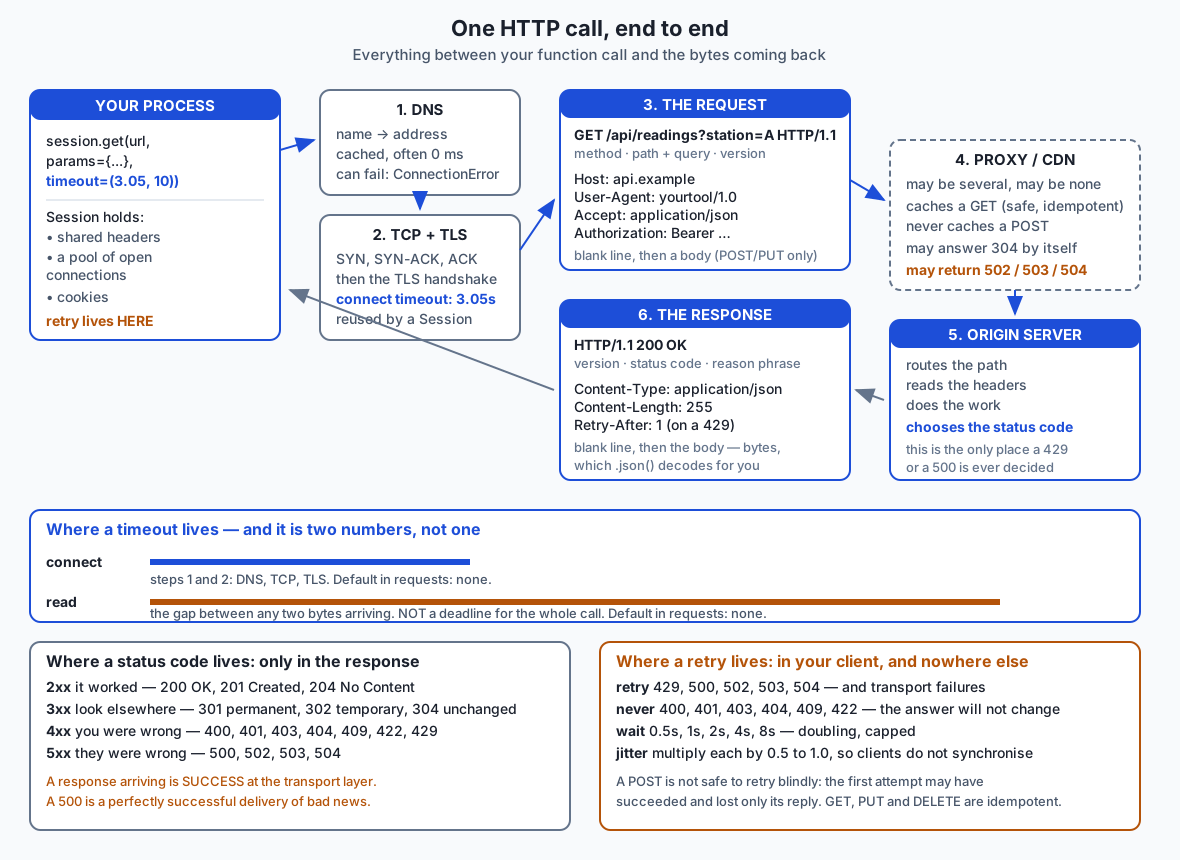
What actually happens when one machine asks another
Days 1 to 40 gave you the layers this sits on: an address, a port, and a reliable stream of bytes between two programs. Here is what one line of Python sets in motion.
1. The name becomes an address (DNS). api.example.com is a name for humans; the network routes to numbers. Your machine asks a resolver, which may answer from cache in microseconds or may take a round trip to another continent. A failure here surfaces in Python as a ConnectionError, because there was never anything to connect to.
2. A TCP connection opens. Three packets — SYN, SYN-ACK, ACK — one round trip. Now there is a reliable, ordered byte stream in both directions. The connect timeout covers steps 1 and 2.
3. TLS negotiates, if the scheme is https. The server presents a certificate; your client checks it against a bundle of trusted authorities, and the two sides agree on keys. One or two further round trips. This is what makes the difference between a header anybody on the path can read and one they cannot.
4. You send the request. Request line, headers, blank line, body if there is one.
5. You wait. The read timeout governs this: not the total duration of the call, but the maximum gap between bytes arriving. That distinction matters and is misunderstood constantly.
6. The response comes back. Status line, headers, blank line, body. Between you and the origin server there may be zero, one or several intermediaries — a corporate proxy, a load balancer, a CDN edge node. Each can answer on the server’s behalf from cache, and each can fail on its own account, which is exactly what 502, 503 and 504 are telling you: something in the middle could not reach or could not wait for what was behind it.
The anatomy of a request and a response
Look again at the real bytes from the top of this lesson, this time with each part named.
| Request part | Example | Notes |
|---|---|---|
| Method | GET | What you want done. Uppercase, always. |
| Path and query | /api/readings?station=ALPHA | Everything after the host. The ? starts the query string. |
| Version | HTTP/1.1 | The rules being spoken. |
| Headers | Accept: application/json | Name, colon, space, value. Order does not matter; names are case-insensitive. |
| Blank line | — | Not decorative. It is the delimiter that ends the headers. |
| Body | JSON, form data, a file | Absent for GET; present for POST and PUT. |
| Response part | Example | Notes |
|---|---|---|
| Version | HTTP/1.1 | |
| Status code | 200 | Three digits. The machine-readable verdict. |
| Reason phrase | OK | For humans. Never parse it; servers may write anything. |
| Headers | Content-Type: application/json; charset=utf-8 | How to interpret the body, how long it is, how to cache it. |
| Body | {"station":"ALPHA",…} | Bytes. Content-Type says what they mean. |
The methods, and what they promise
A method is not just a label. It is a promise about consequences, and proxies, caches, browsers and retry loops all rely on that promise.
Two properties matter:
- Safe — the request is not supposed to change anything. It is a read.
- Idempotent — doing it twice has the same effect as doing it once. Note that this is about the effect on the server, not about getting an identical response body.
| Method | Safe | Idempotent | Has a body | What it means |
|---|---|---|---|---|
GET | yes | yes | no | Fetch a thing. May be cached, prefetched, or retried freely. |
HEAD | yes | yes | no | Like GET but headers only. Useful to check size or existence cheaply. |
POST | no | no | yes | Do something, usually create. The one you must not retry blindly. |
PUT | no | yes | yes | Put this exact content at this address. Sending it twice leaves the same result. |
PATCH | no | not necessarily | yes | Apply a partial change. “Add 5 to the balance” is not idempotent. |
DELETE | no | yes | no | Remove it. Deleting twice leaves it deleted; the second call may return 404, which is a different response but the same state. |
Why anyone cares: a browser will happily prefetch a GET link, a CDN will cache a GET response, and a well-built client will retry a timed-out GET without a second thought. None of that is safe for POST. The dangerous case is precise — your POST succeeded, the server created the order, and the response was lost on the way back. You saw a timeout. If you retry, you create a second order. The industry answer is an idempotency key: a unique value you generate and send in a header, which the server uses to recognise a repeat and return the original result instead of doing the work again. Most payment APIs require one, and now you know why.
Status codes, by family and by name
The first digit is the family, and knowing the five families gets you most of the way.
| Family | Meaning | Your move |
|---|---|---|
| 1xx | Informational, rarely seen | Ignore |
| 2xx | It worked | Proceed |
| 3xx | Look somewhere else | Follow, or notice that you were redirected |
| 4xx | You were wrong | Fix your request. Do not retry unchanged |
| 5xx | They were wrong | Retry, with backoff |
The individual codes worth knowing by name:
| Code | Name | What it actually tells you |
|---|---|---|
| 200 | OK | Success, with a body. |
| 201 | Created | Success, and something new exists. Usually carries a Location header pointing at it. |
| 204 | No Content | Success, and there is deliberately no body. Calling .json() on it raises. |
| 301 | Moved Permanently | The thing lives elsewhere now, forever. Clients and caches may remember this — a wrong 301 is remarkably hard to take back. |
| 302 | Found | It is elsewhere for now. Do not remember it. |
| 304 | Not Modified | You already have the current version. Sent in reply to a conditional request; the body is empty on purpose, and this is the header-driven mechanism that makes the web affordable. |
| 400 | Bad Request | Your request was malformed — bad syntax, unparseable body. |
| 401 | Unauthorized | You are not authenticated. The name is a historical misnomer; it means “who are you?“. |
| 403 | Forbidden | You are authenticated, and you still may not. Re-sending credentials will not help. |
| 404 | Not Found | No such thing at that path. |
| 409 | Conflict | Your request clashes with the current state — an edit against a version that has since changed. |
| 422 | Unprocessable Content | The syntax was fine, the values were not. Day 82’s validation errors arrive as this. |
| 429 | Too Many Requests | Slow down. Often carries Retry-After. The one 4xx that is worth retrying. |
| 500 | Internal Server Error | Their code raised an exception. |
| 502 | Bad Gateway | An intermediary got a broken answer from what was behind it. |
| 503 | Service Unavailable | Temporarily down or overloaded. Often carries Retry-After. |
| 504 | Gateway Timeout | An intermediary waited for the origin and gave up. Somebody else’s timeout, reported to you. |
The 401/403 distinction is the one people get wrong most: 401 means we do not know who you are, 403 means we know exactly who you are, and no. Retrying with fresh credentials can fix a 401. Nothing you send will fix a 403.
Headers that matter
Content-Type— what the body is.application/json,text/html; charset=utf-8,image/png. On a request it describes what you are sending; on a response, what you are receiving. Treat it as a claim, not a guarantee.Accept— what you would like back. A polite request, not a command; some APIs honour it, many ignore it.User-Agent— who you are. Identify yourself honestly with a name and a contact. Some services block empty or default agents outright, and a scraper pretending to be a browser is the subject of Day 79’s ethics section.Authorization— your credentials, usuallyBearer <token>. This is the header that must never be logged, never be committed, and never travel over plain HTTP.Content-Length— how many bytes the body is. Its absence, withTransfer-Encoding: chunkedinstead, is what allows a server to start sending before it knows the total size.Retry-After— how long to wait. Legally either a number of seconds or an HTTP date.
Query strings, and why params= is not optional
A query string carries parameters in the URL: ?station=ALPHA&hour=12. The delimiters are ?, & and =, which raises an obvious question: what if a value contains one of those characters, or a space?
The answer is percent-encoding, and the reason you should never build a query string with an f-string is best shown rather than argued. This is captured from a real run against the lab’s local test server, using a station name containing both a space and an ampersand:
2. params= versus gluing strings together
=========================================
  station value    : 'ALPHA ONE&station=BRAVO'
  params=          : /api/search?station=ALPHA+ONE%26station%3DBRAVO
    server parsed  : {'station': ['ALPHA ONE&station=BRAVO']}
  f-string         : /api/search?station=ALPHA%20ONE&station=BRAVO
    server parsed  : {'station': ['ALPHA ONE', 'BRAVO']}
  the f-string smuggled a second parameter in. params= encoded it.
Read the two “server parsed” lines. With params=, the server received one parameter with the value you meant. With the f-string, the ampersand inside the value was interpreted as a delimiter, and the server received two parameters. Your single station became a list of two. In this lab that is a wrong answer; in an application where the value comes from user input, it is an injection vulnerability with a name.
params= percent-encodes & as %26, = as %3D, and a space as +. You do not have to remember which; you have to remember to pass the dictionary.
requests itself
import requests

response = requests.get(
    "https://api.example.com/readings",
    params={"station": "ALPHA"},
    headers={"Accept": "application/json"},
    timeout=(3.05, 10.0),
)
The three ways to read the body, and they are genuinely different:
  .content is      : bytes, 255 bytes
  .text is         : str, 255 characters
  .json() is       : dict with keys ['count', 'query_seen', 'readings', 'station']
.content is the bytes exactly as they arrived — the right choice for an image, a zip file, or anything you intend to write to disk unchanged. .text decodes those bytes to a string, using the charset from Content-Type if there is one and a guess if there is not. .json() parses the string as JSON and raises if it is not JSON, which is why you check the status code first.
raise_for_status() converts a 4xx or 5xx into an HTTPError and does nothing at all for 2xx and 3xx. It is a good default for a script and a poor one for a library, because it discards the response’s own explanation of what went wrong.
And the crucial operational points, in order of how much trouble each one saves you.
Always set a timeout. timeout accepts one number, applied to both phases, or a tuple (connect, read). The tuple is better because the two have different natural values: a connection either happens fast or is not going to, while a slow query legitimately takes longer. The odd-looking 3.05 is a documented convention — a connect timeout slightly above a multiple of three aligns with the TCP retransmission window. Here is a real timeout firing, from the lab:
5. The timeout that is not there by default
===========================================
  asked for        : 3 seconds of server work
  read timeout     : 0.5s
  raised after     : 0.50s — ReadTimeout
The client gave up on its schedule, not the server’s. Without timeout=, that call would have taken the full three seconds — and against a server that accepted the connection and then said nothing, it would still be waiting now.
Use a Session. A Session carries shared headers and cookies, and — more valuably — a pool of open connections. From a real run, counted by the server itself:
7. Session and connection reuse
===============================
  5 calls, one Session      : 1 TCP connection(s)
  5 calls, requests.get()   : 5 TCP connection(s)
Five requests, one handshake instead of five. Over HTTPS each of those saved handshakes is two or three round trips, so against a server 100 ms away this is not a micro-optimisation — it is most of the elapsed time.
Retry, but only the right things. Retryable: 429, 500, 502, 503, 504, and transport-level failures where no response arrived at all. Never retryable: 400, 401, 403, 404, 409, 422 — the answer will not change, and hammering a 404 is just noise in someone’s logs. The schedule doubles and is capped, and then each wait is multiplied by a random factor. Real output:
  waits requested  : [1.0, 1.0]  (Retry-After: 1 overrode the schedule)
  real time taken  : 0.002s — the sleep was injected
  schedule alone   : [0.5, 1.0, 2.0, 4.0]
  with half jitter : [0.25, 0.5, 1.0, 2.0]
Jitter is the least obvious part and the most important at scale. Without it, a thousand clients that all saw the same outage retry at exactly the same instants — half a second, then one second, then two — and the server that was just coming back up is knocked over by a synchronised wave. Randomising each wait spreads the load. The pattern above, taking a random value between half and all of the computed delay, is usually called “full jitter” or “equal jitter” depending on the exact variant.
Stream what is large. stream=True returns as soon as the headers arrive; the body is pulled as you iterate. Real numbers from the lab:
8. Streaming a large body instead of loading it
===============================================
  bytes written    : 524288
  chunks read      : 64 of at most 8192 bytes
  peak held        : one chunk, not 524288 bytes
Half a megabyte does not need streaming. Four gigabytes does, and the failure mode without it is your process being killed by the operating system.
Read credentials from the environment. os.environ.get("READINGS_TOKEN"), never a literal in the file. A token in git history is a token you must rotate, and deleting the line does not help because the old object is already in every clone.
Two kinds of failure, and why the difference is the whole game
This is the single most important conceptual point of the day.
A network-level exception means no response arrived. DNS failed, the connection was refused, TLS could not be verified, or you timed out. In requests these are subclasses of requests.exceptions.RequestException: ConnectionError, Timeout (with ConnectTimeout and ReadTimeout beneath it), SSLError, TooManyRedirects. You catch them with try/except.
A response carrying a bad status means the conversation succeeded perfectly and the news is bad. No exception is raised. requests.get returns normally, and if you do not look at .status_code you will happily call .json() on an error page and get a confusing failure three functions later.
3. Status codes: a 404 is a successful response
===============================================
  the call itself  : returned normally, no exception
  status_code      : 404
  bool(response)   : False   <- False for 4xx and 5xx
  described        : HTTP 404 (your request was rejected) — no such station
  raise_for_status : HTTPError: 404 Client Error: Not Found
  the client raises: StationNotFound: no station named 'NOWHERE'
Robust code handles both, because they need different responses: a transport failure is usually worth retrying, and a 404 never is.
The testability argument — Day 74, made concrete
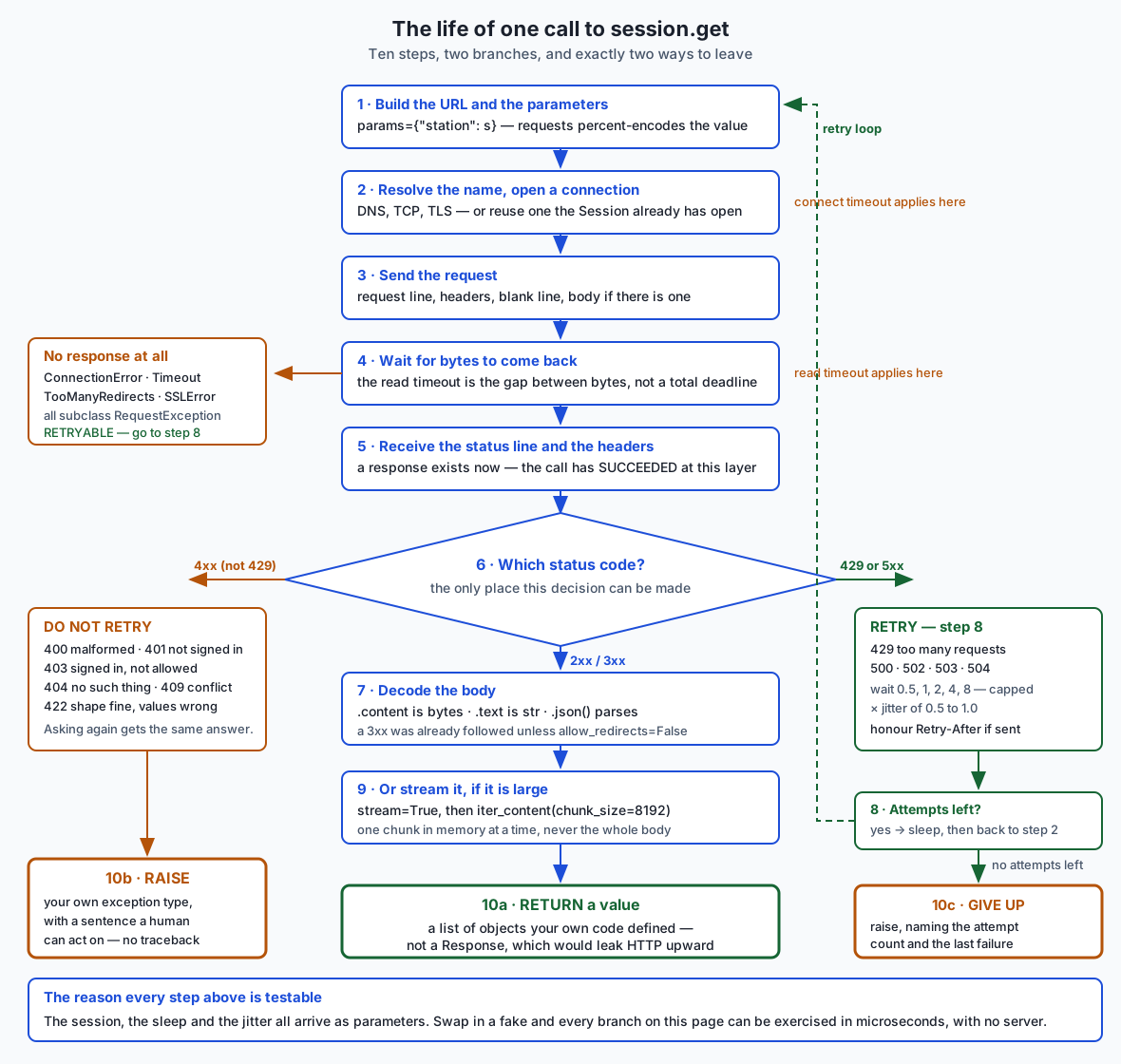
Here is the whole of last week’s lesson in four lines:
def fetch_readings(station):                       # untestable: reaches out
    return requests.get(URL, params={"station": station}, timeout=T).json()

def fetch_readings(station, *, session):           # testable: takes it in
    return session.get(URL, params={"station": station}, timeout=T).json()
The first version can only be tested by running a real server, or by patching requests.get — which means a target string nothing checks, a MagicMock that will accept any method name you misspell, and a test that breaks the moment somebody changes the import style. The second version can be tested by passing in an object with a get method. That object can be forty lines of ordinary Python:
class FakeSession:
    def __init__(self, script):
        self._script = list(script)
        self.calls = []

    def get(self, url, **kwargs):
        self.calls.append({"url": url, **kwargs})
        item = self._script.pop(0)
        if isinstance(item, Exception):
            raise item
        return item
Nine lines, and look what they buy. A scripted Exception in the list is raised, so a test can produce a ConnectionError or a ReadTimeout on demand — states that are genuinely awkward to arrange against a real server. self.calls records the URL, the params and the timeout of every call, so a test can assert that a timeout was set at all, which is the check every real codebase should have and almost none does.
The lab proves this is not a rhetorical claim. It copies three files — the client, the fake, and the test file — into an empty temporary directory, deliberately leaving the server module behind, and runs pytest there. Twenty tests pass in forty milliseconds. Then it runs the same suite with socket.connect and socket.getaddrinfo replaced so that any non-loopback address raises, and they pass again.
Keep both kinds of test. The fake-based tests prove your logic; the server-based tests prove your understanding of the server is right. Neither substitutes for the other.
An everyday analogy
Picture a busy public records office. There is a counter, a clerk behind it, and a long queue.
Making a request is filling in a form and handing it over. Which form you chose is the method: the pale blue “view my record” form is a GET, and it changes nothing; the pink “change my registered address” form is a PUT, and handing in two identical copies leaves you with one new address; the yellow “submit a new application” form is a POST, and handing in two copies gets you two applications and a problem.
The boxes you filled in are the query string. And here the encoding lesson writes itself: the form has boxes divided by vertical lines, and if your street name happens to contain a vertical line, the clerk reads it as the end of one box and the start of another. params= is the assistant who knows to write such a character in the special “escaped” notation the office uses. An f-string is you writing it in directly and hoping.
The notes in the margin are the headers: which language you would like the reply in (Accept), who you are (User-Agent), and your membership number (Authorization). That last one you write on the form and hand over; you do not shout it across the room, which is what sending it over plain HTTP amounts to. A TLS connection is a private booth rather than an open counter.
The stamp on the returned form is the status code. Green means done. Blue means “this is now handled at the office on the next street” — and there are two blue stamps, one saying permanently and one saying just for today, which is exactly 301 versus 302. Red means you got it wrong — you left a box blank (400), you did not show a membership card (401), you showed one and are not entitled (403), or there is no such record (404). Black means the office got it wrong: the clerk fainted (500), or the clerk sent your form to the back room and the back room never replied (504).
The timeout is how long you are willing to stand there. Without one you will wait until the building closes, and possibly through the night. And note the two numbers: how long you will wait to reach the counter at all, and how long you will tolerate the clerk saying nothing while apparently working. The second is not a limit on the whole visit — a clerk who says something every four minutes keeps a five-minute patience satisfied indefinitely.
Rate limiting is the sign reading “one enquiry per person per hour”, and a 429 is the clerk pointing at it. Retry-After is them telling you when to come back. Coming back immediately and repeatedly gets you nothing except remembered.
Jitter is the part of the analogy that everyone recognises. The office closed unexpectedly at ten, and two hundred people were turned away. If everyone was told “come back in an hour”, two hundred people arrive at eleven and the office falls over again. If everyone was told “come back in about an hour”, they trickle in and the office copes. That is the entire argument for adding randomness to a backoff schedule.
A Session is being given a numbered ticket that keeps your place, so your second and third enquiries do not mean rejoining a queue of four hundred people.
Streaming is asking the clerk to read a six-hundred-page document to you page by page while you write each page down, instead of waiting for them to photocopy the whole thing and then trying to carry it home in one armful.
The analogy has one honest limit, and it is worth stating. A real clerk remembers you from five minutes ago. HTTP is stateless: the server is not required to remember anything, which is why your membership number goes on every form, every time. That is a genuine difference, and it is why authentication headers exist at all.
Examples in practice
Every block below was captured from a real run on the authoring machine, against the lab’s local test server on 127.0.0.1. Nothing here touched the internet.
HTTP with no HTTP library at all. A plain socket, a hand-typed request, and the raw bytes coming back:
  bytes sent (147 bytes)
  ----------------------
    GET /api/readings?station=ALPHA HTTP/1.1\r\n
    Host: 127.0.0.1:54037\r\n
    User-Agent: day078-raw-socket/1.0\r\n
    Accept: application/json\r\n
    Connection: close\r\n
    \r\n          <- the blank line: headers finished

  status line and headers (142 bytes)
  -----------------------------------
    HTTP/1.1 200 OK\r\n
    Server: DayLab/1.0\r\n
    Date: Sun, 19 Jul 2026 13:21:06 GMT\r\n
    Content-Type: application/json; charset=utf-8\r\n
    Content-Length: 255\r\n
That is the protocol, complete. Note \r\n — carriage return then line feed — ending every line, a convention HTTP inherited from the teletype era and never dropped.
A request through requests, with everything named:
1. A request and a response, in the pieces that matter
======================================================
  request method   : GET
  request path     : /api/readings?station=ALPHA
  request headers  : 4 sent
  status code      : 200 OK
  content type     : application/json; charset=utf-8
  .content is      : bytes, 255 bytes
  .text is         : str, 255 characters
  .json() is       : dict with keys ['count', 'query_seen', 'readings', 'station']
  elapsed          : 0.0010s
A redirect, followed and unfollowed:
4. A redirect, followed and unfollowed
======================================
  final status     : 200
  final url path   : readings
  history          : [301]
  unfollowed       : 301, Location: /api/readings
  301 is permanent — a client may cache it. 302 is temporary.
requests followed the 301 by default and left the original response in .history. That is usually what you want and occasionally hides something you needed to see — a redirect from https to http, for instance, or one that crosses to a different host.
Retry against a server that returns 429 twice and then succeeds:
6. Retry with backoff — and what must never be retried
======================================================
  server sent      : 429, 429, then 200
  final status     : 200 on attempt 3
  waits requested  : [1.0, 1.0]  (Retry-After: 1 overrode the schedule)
  real time taken  : 0.002s — the sleep was injected
  404 retryable?   : False
  a 404 will be a 404 on the tenth try. Retrying it is a bug.
Two milliseconds of wall-clock time for a test that proves a two-second retry schedule, because sleep arrives as a parameter and the test passes a recorder. That is Day 74 paying rent.
The standard library doing the same work. Here is the difference that surprises people most, from a real run of urllib.request:
2. urllib.request — a 404 is an EXCEPTION, not a status
=======================================================
  raised      : HTTPError
  status      : 404
  detail      : no such station
  note        : this is the big behavioural difference. urllib
                raises on 4xx and 5xx; requests returns a
                response and lets you decide.
And httpx, on the point where it is clearly better:
2. The default timeout — the difference that matters
====================================================
  httpx.Client() default timeout : Timeout(timeout=5.0)
  requests has no default timeout at all. A missing timeout=
  in requests hangs; in httpx it gives up after 5 seconds.
The test suite, all four ways it is run:
$ pytest examples -q
48 passed in 1.43s

$ pytest examples/test_without_a_server.py -q   # no server involved at all
20 passed in 0.04s

$ PYTHONPATH=tests pytest examples -q   # every non-loopback socket blocked
48 passed in 1.44s
Implications: security, privacy, performance, scalability, and cost
Security. The single largest risk in this lesson is a credential in a file. Read tokens from the environment; add the file that will hold them to .gitignore before you create it; never put a credential in a URL, because URLs land in access logs, browser histories and error reports. When you log a request for debugging, log the method, the URL and the status — never the headers, because Authorization and Cookie are exactly the two you will leak.
requests verifies TLS certificates by default, and verify=False reduces HTTPS to obfuscation: the traffic is encrypted to whoever answered, which may be an attacker sitting in the middle. If your organisation intercepts traffic with its own certificate authority, point requests at that bundle — the correct response to a certificate error is to fix the trust chain, never to switch off the check.
Two more, less obvious. First, redirects can cross hosts, and a client that forwards your Authorization header to whatever the Location header names has handed your token to a stranger; requests strips it across hosts, and it is worth knowing that protection exists because hand-rolled redirect handling regularly forgets it. Second, every field you read from a response is input from another party’s machine. response.json() parses whatever arrived; nothing guarantees the shape. Validate before it reaches anything that matters — which is the job Day 82’s pydantic models will do properly.
Privacy. Your User-Agent and your request pattern are a fingerprint. Identify yourself honestly rather than imitating a browser. Anything you send in a query string is likely to be stored in someone’s logs for months, so personal data belongs in a body over HTTPS, not in a URL. And remember that DNS lookups are typically not encrypted, so the names of the hosts you talk to are visible even when the traffic is not.
Performance. The costs, roughly and honestly: a DNS lookup is anywhere from zero (cached) to a hundred milliseconds; a TCP handshake is one round trip; TLS adds one or two more. Against a server 100 ms away, a cold HTTPS request spends 300–400 ms before a single useful byte moves, and a warm one on a pooled connection spends 100 ms. That is the entire argument for Session. In the lab, on loopback where a round trip is microseconds, the same effect is visible as one connection instead of five.
Compression matters too: requests sends Accept-Encoding: gzip, deflate for you and transparently decompresses, which for JSON and HTML is frequently a five-to-tenfold reduction in bytes on the wire.
Scalability. A retry loop without a cap and without jitter is a small denial-of-service tool pointed at whoever you are calling, and it is most dangerous exactly when the other side is already struggling. Cap your attempts. Add jitter. Honour Retry-After. When one client’s retries make an overloaded service slower, causing more timeouts, causing more retries, you have built a retry storm, and they are a recurring cause of large outages. A circuit breaker — stop calling entirely for thirty seconds after N consecutive failures — is the standard next control beyond backoff.
Cost. Two kinds. Bytes: many services bill for egress, and streaming does not reduce the total but does prevent your own process from needing gigabytes of memory. And requests themselves: metered APIs — every model API among them — charge per call or per token. A retry is a second charge. A retry loop with five attempts against a request that always fails is five charges for zero results, which is a genuinely good reason to be strict about which statuses you retry, and to log when you exhausted your attempts.
Alternatives: free, open source, and commercial
Four ways to speak HTTP from Python. All four are free and open source; there is no paid tier, no account and no licence fee for any of them. The real distinctions are what ships with Python and what you install, and how much the library does for you.
On the machine this lesson was written on, requests 2.34.2 and httpx 0.28.1 are both installed, and urllib.request and http.client are standard library, so all four ran for real. Every output below is captured, not imagined.
| Option | What it is | When to choose it | Install | Cost |
|---|---|---|---|---|
requests | The de facto standard third-party client | Almost all synchronous work; the ecosystem assumes it | pip install requests | Free, Apache 2.0 |
urllib.request | The standard library’s high-level client | A script that must run anywhere with zero dependencies | none needed | Free, part of Python |
http.client | The standard library’s low-level protocol implementation | You need control of the protocol itself, or you are learning how it works | none needed | Free, part of Python |
httpx | A modern client with sync and async APIs | New code, especially anything needing concurrency or HTTP/2 | pip install httpx | Free, BSD |
requests — when to choose it, how to use it, and an example. Choose it when you are writing ordinary synchronous code and are willing to have one dependency, which is nearly always. Its API is the one every tutorial, every colleague and every code example assumes.
with requests.Session() as session:
    session.headers.update({"User-Agent": "yourtool/1.0", "Accept": "application/json"})
    response = session.get(url, params={"station": "ALPHA"}, timeout=(3.05, 10.0))
    response.raise_for_status()
    data = response.json()
Its weaknesses are real and worth naming: no default timeout, no retries without configuring an adapter, and no async support at all. This lesson’s lab is built on it, and every number quoted above came out of it.
urllib.request — when to choose it, how to use it, and an example. Choose it when your script must run on a machine where you cannot install anything: a locked-down server, a minimal container, a colleague’s laptop. It needs no pip, and it is genuinely capable — it follows redirects, handles proxies, and does everything most scripts need.
import json, urllib.parse, urllib.request

query = urllib.parse.urlencode({"station": "ALPHA"})
req = urllib.request.Request(f"{root}/api/readings?{query}",
                             headers={"Accept": "application/json"})
with urllib.request.urlopen(req, timeout=10.0) as response:
    payload = json.loads(response.read().decode("utf-8"))
This really ran, against the lab’s local server:
1. urllib.request — a GET with a query string
=============================================
  status      : 200 OK
  content type: application/json; charset=utf-8
  count       : 4
  note        : you encoded the query, decoded the bytes, and
                parsed the JSON yourself. requests does all three.
Count what you did by hand: built the query string, set the headers, read the bytes, decoded them, parsed the JSON. And note the behavioural difference that will bite you if you switch: urllib.request raises HTTPError on a 4xx or 5xx, where requests returns a response. Code ported carelessly in either direction breaks in a way that only shows up on the error path.
http.client — when to choose it, how to use it, and an example. This is the layer beneath both of the above; urllib.request is built on it. Choose it when you need to control the protocol itself — issue an unusual method, manage a connection explicitly, or see exactly what is on the wire — or when you are learning, because it hides nothing.
conn = http.client.HTTPConnection(host, port, timeout=10.0)
conn.request("GET", "/api/readings?station=BRAVO", headers={"Accept": "application/json"})
response = conn.getresponse()
raw = response.read()
Real output, including two requests down one connection because the connection object is explicit:
4. http.client — the layer underneath both
==========================================
  status      : 200 OK
  headers     : 4 of them
  body bytes  : 164
  connections : 1 opened for those 2 requests
  note        : http.client speaks the protocol and nothing
                more — no redirects, no pooling, no decoding.
No redirect following, no query encoding, no JSON, no retries, no connection pool. Everything is yours. That is the point of it.
httpx — when to choose it, how to use it, and an example. Choose it for new code, and especially for anything that needs concurrency: the same API exists as httpx.Client (synchronous) and httpx.AsyncClient (with await), which is what you will want the day you have fifty model calls to make and no wish to make them one at a time.
with httpx.Client(headers={"User-Agent": "yourtool/1.0"}, timeout=10.0) as client:
    response = client.get(f"{root}/api/readings", params={"station": "ALPHA"})
    response.raise_for_status()
    data = response.json()
That is requests code with one word changed, which is deliberate on httpx’s part. Its clearest advantage, captured from a real run here:
httpx.Client() default timeout : Timeout(timeout=5.0)A default timeout of five seconds, where requests has none. That one decision prevents the most common serious mistake in this whole lesson.
On HTTP/2: httpx supports it, and the honest statement of what that means is worth care. HTTP/2 support is an optional extra — you install httpx[http2] and pass http2=True — and without it httpx speaks HTTP/1.1 exactly as requests does. It was not enabled on this machine, so no HTTP/2 claim in this lesson is based on a measurement made here. What HTTP/2 buys, in general, is many concurrent requests on one connection without head-of-line blocking at the HTTP layer, plus header compression; it helps most when you are making many requests to the same host at once, and it is invisible when you are making one.
httpx is a genuinely good choice. The reason this course teaches requests first is that the ecosystem, the documentation you will find when you search, and the code you will inherit are all overwhelmingly requests.
A word on retries specifically. requests can do retries without you writing the loop, via urllib3’s Retry class mounted on an HTTPAdapter. It handles backoff and status codes and is a good production choice. This lesson has you write the loop by hand once, because the concepts — which statuses, how long, why jitter, how to prove it — are what transfer, and they transfer to every language you will ever use.
Comparison with related concepts
| Concept | What it is | How it relates to today |
|---|---|---|
| TCP | A reliable, ordered byte stream between two programs | The pipe HTTP flows through. TCP delivers bytes; HTTP gives them meaning. |
| TLS / HTTPS | Encryption and server identity on top of TCP | HTTPS is HTTP inside TLS. Same protocol, private channel, verified identity. |
| DNS | Names to addresses | Step zero of every request to a named host. Its failures look like ConnectionError. |
| REST | An architectural style using HTTP methods and paths to represent resources | A convention for how to use HTTP well, not a protocol. Most “REST APIs” are HTTP+JSON without the full discipline. |
| GraphQL | A query language, usually carried over one HTTP POST endpoint | Still HTTP underneath. Timeouts, retries and status codes work exactly as today. |
| WebSockets | A long-lived two-way connection, opened by an HTTP upgrade | For when request/response is the wrong shape — a live feed, a chat. Starts as HTTP. |
| Server-Sent Events | A one-way stream of text events over one HTTP response | How most model APIs stream tokens. It is stream=True with a defined line format. |
| gRPC | A binary RPC protocol, usually over HTTP/2 | Faster and stricter; needs a schema and generated code. HTTP+JSON needs neither. |
| Web scraping | Extracting data from HTML meant for humans | Tomorrow. It is this lesson plus a parser — and a large ethical and legal question. |
And the comparison closest to today’s argument:
| Test against a local server | Test against a fake session | Test against the real internet | |
|---|---|---|---|
| Proves your protocol handling is right | yes | no | yes |
| Proves your logic is right | yes | yes | yes |
| Can produce a 429 or a 500 on demand | yes | yes | no |
| Can produce a connection reset on demand | awkward | yes | no |
| Runs on a plane | yes | yes | no |
| Speed | milliseconds | microseconds | tens to hundreds of milliseconds |
| Still passes in five years | yes | yes | almost certainly not |
| Used in this lab | 28 tests | 20 tests | never |
When to use it — and when not to
Use HTTP, and requests, when: you need data from a service that offers an HTTP API; you are integrating with almost any modern platform, including every model provider; you are writing a script that must be readable by the next person; or you need something working today, because the ecosystem support is unmatched.
Reach for urllib.request instead when: you cannot install packages, or you are writing something that must have zero dependencies by policy.
Reach for httpx instead when: you need async, you want a default timeout you did not have to remember to set, or you are starting a new project with no legacy to match.
Reach for something else entirely when:
- You need a persistent two-way channel. Polling an endpoint every second is a request/response tool used as a subscription. Use WebSockets or Server-Sent Events.
- You are moving very large files repeatedly. HTTP works, but a purpose-built transfer protocol or an object store’s own client will handle resume, checksums and parallelism for you.
- Latency is the dominant requirement between your own services. gRPC over HTTP/2 with a schema is measurably faster and catches shape mistakes at build time.
- The data is available another way. If a service publishes a bulk download or a dataset, use it. This is a preview of tomorrow’s argument: making ten thousand requests to build a table that already exists as a file is worse for you and for them.
And two warnings about how not to use it. Do not use HTTP without a timeout, ever — there is no situation where waiting forever is the behaviour you wanted. And do not build a retry loop without a cap and jitter; the moment it matters is the moment the other side is already in trouble, and an un-jittered uncapped retry loop is precisely the thing that turns a brief outage into a long one.
Knowledge check
Answer these before running anything. Each has a definite answer in the material above.
- A response arrives with status 500. Did
requests.getraise an exception? What is the difference between that situation and aConnectionError? timeout=10is set and the call takes 45 seconds without raising. Explain how that is possible.- Why is retrying a
POSTafter a timeout risky when retrying aGETis not? What mechanism exists to make it safe? - You need one value from an API and the value contains an ampersand. What does an f-string do to your request, and what does
params=do instead? - Which of 400, 401, 403, 404, 429, 500 and 503 are worth retrying, and why is exactly one member of the 4xx family on that list?
- What does a
Sessiongive you beyond a place to keep shared headers, and roughly how much is it worth against a server 100 ms away over HTTPS? - What is jitter, and what specifically goes wrong without it when a popular service comes back after an outage?
- Why can a function that takes
sessionas a parameter be tested without a server, and what exactly can those tests not prove?
Hands-on exercise
The lab is Talk to a Server You Control. You write a client; the server is a two-hundred-line standard-library program shipped in examples/, bound to 127.0.0.1 on a port the operating system picks at run time. It can produce a 200 with JSON, a 404, a 500, a 301, a 429 with Retry-After, an endpoint that takes three seconds so a timeout can really fire, and a 512 KiB body so streaming is not theoretical.
Nothing in the lab touches the internet after the one-time install, and that is enforced rather than promised.
Install the two dependencies first:
cd labs/sections/programming-with-python/day-078-http-in-python-with-requests
python3 -m venv .venv
.venv/bin/pip install -r requirements/requirements.txt
.venv/bin/python3 -c "import requests; print(requests.__version__)"
Then see HTTP with no HTTP library, and then the whole story with one:
.venv/bin/python3 examples/raw_socket_demo.py
.venv/bin/python3 examples/demo.py
.venv/bin/python3 examples/stdlib_demo.py
.venv/bin/python3 examples/httpx_demo.py
Run the reference suites, including the one that needs no server at all and the one run with every non-loopback socket blocked:
.venv/bin/pytest examples -q
.venv/bin/pytest examples/test_without_a_server.py -q
PYTHONPATH=tests .venv/bin/pytest examples -q
Then do the work: six functions in starter/client.py (fetch and parse JSON, describe a failure in one sentence, the backoff schedule, retry-with-backoff, a Session with a token from the environment, and streaming), your own fake-session tests in starter/test_client.py, and the written answers in starter/NOTES.md. Unfinished exercises are skipped, so pytest starter -q is green from the first minute. Finally:
bash tests/run_tests.shExpected output
The raw-socket demonstration is the one to read twice. Real captured output:
  bytes sent (147 bytes)
  ----------------------
    GET /api/readings?station=ALPHA HTTP/1.1\r\n
    Host: 127.0.0.1:54037\r\n
    User-Agent: day078-raw-socket/1.0\r\n
    Accept: application/json\r\n
    Connection: close\r\n
    \r\n          <- the blank line: headers finished
And the two numbers that make the Session argument concrete:
  5 calls, one Session      : 1 TCP connection(s)
  5 calls, requests.get()   : 5 TCP connection(s)
The test suite prints one line per check and ends with 58 checks, 0 failure(s). while the starter is unfinished, and 53 checks, 0 failure(s). once every exercise is complete — the count drops because eight structural checks are replaced by three behavioural ones that hold your file to the reference’s standard.
Validate your work
python3 examples/raw_socket_demo.pyexits 0 and shows a request beginningGET /api/readings?station=ALPHA HTTP/1.1and a response beginningHTTP/1.1 200 OK.- Section 2 of
demo.pyshowsstation=ALPHA+ONE%26station%3DBRAVOforparams=, and the f-string version producing two parsed values where you meant one. - Section 5 raises
ReadTimeoutin about 0.50 s against an endpoint that would have taken 3 s. - Section 7 shows
1 TCP connection(s)for the Session and5without one. If yours shows 5 and 5, you calledrequests.getinside the loop. - Section 8 shows
524288bytes read as64chunks of at most 8192. pytest examples -qreports48 passed;pytest examples/test_without_a_server.py -qreports20 passedin about 0.04 s.PYTHONPATH=tests pytest examples -qstill reports48 passed, and the same guard makes a request to a public site fail withNetworkBlocked. Both halves matter: the second proves the guard is not silently doing nothing.- Your
get_with_retryreturns a 404 immediately with zero waits, and gives up on a permanent 429 with a message containingafter 3 attempts. - Your fake-session tests assert that every call carries a timeout, and they pass with no server running anywhere.
bash tests/run_tests.shreports0 failure(s).and exits 0.
Troubleshooting
The lab’s troubleshooting.md has the full list. The five you are most likely to meet: ModuleNotFoundError: No module named 'requests', which always means the interpreter running your script is not the one the package is installed in — check .venv/bin/python3 -c "import requests, sys; print(sys.executable)"; a call that never returns, which always means a missing timeout=; ConnectTimeout where you expected ReadTimeout, because the tuple is (connect, read) in that order and over loopback the connection is instant; a streaming loop reporting one chunk instead of 64, which means something read .content before the loop and consumed the whole body; and gave up after 4 attempts in the retry exercise, which means the flaky endpoint was still armed from an earlier test and needs /control/reset first.
Common mistakes
- No
timeout=. The default is none. Not thirty seconds — none. This is the one to fix in your habits today. - Assuming a returned response means success. Check
.status_code, or call.raise_for_status(), or you will call.json()on an error page. - Building the query string with an f-string. One unencoded
&in a value silently changes the meaning of your request. - Retrying a 4xx. Ten identical 404s are ten wrong answers and ten entries in somebody’s log. Retry 429 and 5xx only.
- Retrying without jitter. It works fine in testing with one client and fails badly in production with a thousand.
- Retrying a
POSTblindly. The first attempt may have succeeded and lost its reply. - Calling
requests.getin a loop. A newSession, a new connection, a new handshake, every time. - Reading
.contenton something huge. Usestream=Trueanditer_content, and never let an unknown-length body decide how much memory your process needs. - Hard-coding a token. Read it from the environment. A secret in git history has to be rotated.
- Calling
requests.getinside a function you want to test. Takesessionas a parameter. It costs one keyword and buys the entire test suite.
Practice assignment
Build a small command-line tool called fetch-readings that takes a station name, fetches its readings from a base URL given by an argument or an environment variable, and prints a summary. It must:
- set an explicit connect and read timeout on every request;
- use one
Sessionfor all its calls, with an honestUser-Agentnaming the tool; - read an optional bearer token from the environment and never from a file;
- retry 429 and 5xx with exponential backoff, a cap, and jitter, honouring
Retry-Afterwhen present, and never retry a 4xx other than 429; - exit 0 on success, and on failure print one sentence a human can act on — no traceback — and exit non-zero with a different code for “your request was wrong” and “the server failed”;
- take
session,sleepandjitteras parameters at every level, so none of it needs a server to test.
Then write two test files. The first runs against the lab’s local server and proves your protocol handling. The second uses a fake session and proves your logic, your retry policy, your error messages, and — the assertion worth stealing for real projects — that every request your tool makes carries a timeout.
Your deliverable is the tool, both test files, and half a page answering three questions: how many tests you have of each kind and how long each file takes; which failures you could produce with the fake that you could not produce against the server; and one failure you could produce against the server that the fake could not catch. That third answer is the one that stops you over-trusting fakes.
Extension challenge
Build the retry adapter properly. Replace your hand-written loop with urllib3.util.Retry mounted on a requests.adapters.HTTPAdapter, configured with total, backoff_factor, status_forcelist and allowed_methods. Get your existing tests passing against it. Then write down two things: what the adapter does that your loop did not (start with allowed_methods and think about POST), and what your loop did that the adapter cannot (start with “assert the schedule without waiting”). Both lists are short and both are instructive.
Make the timeout fire three different ways. Produce, deliberately, a ConnectTimeout, a ReadTimeout and a ConnectionError, and write down exactly what you did to cause each. The safe way to get a ConnectionError is a port on 127.0.0.1 with nothing listening; the safe way to get a ConnectTimeout is harder and is worth thinking about rather than looking up. Then add an endpoint to the lab’s server that sends one byte every 0.3 seconds for thirty seconds, and demonstrate that a timeout=(3.05, 1.0) never fires against it. That is the misconception in the “what it is not” table, made real — and then fix it with an overall deadline you enforce yourself.
Write the client you will need in Course 07. Sketch a model client with one method, complete(prompt), and give it everything today taught: a Session with an Authorization header read from the environment, an explicit timeout, retry on 429 and 5xx with backoff and jitter, a cap on attempts, and a streaming mode that yields chunks as they arrive rather than returning one string at the end. Then test all of it with a FakeSession and no model: assert the prompt you built, assert that a malformed reply is retried exactly once, assert that a 401 is never retried, assert that a streaming response yields in order, and assert that your accumulated token count stays under a budget you set. You will have written the skeleton of every model client in the rest of this course, and a cost guard, without spending anything and without an API key.
The AI thread, to end on. Everything in this lesson is what a model API call is. The 429 you will see is a rate limit, and it will arrive far more often than you expect because model APIs are metered tightly. The 503 you will see is a provider having a bad ten minutes, and retrying it correctly is the difference between an application that degrades and one that falls over. The streaming you will do is the reason tokens appear on screen one at a time instead of after forty seconds of blank waiting. The timeout you set is what stops a hung request pinning a worker while you pay for the tokens it already generated. And the session parameter you got into the habit of writing today is what lets you test your prompt building, your parsing, your retry policy and your budget guard deterministically, in milliseconds, for nothing — because the model itself, as Day 74 argued, is the one thing in your system whose behaviour belongs in an evaluation suite rather than a unit test. Today is not a detour before the interesting part. Today is the floor the interesting part stands on.
Quiz
Q1. Your code calls `requests.get(url, timeout=(3.05, 10.0))` and the server replies with status 500. What happened in Python?
- The call returned a Response object normally; no exception was raised
- `requests.exceptions.HTTPError` was raised at the call site
- `requests.exceptions.ConnectionError` was raised, because 5xx means the server is unreachable
- The call returned `None`, which is why 5xx handling needs a null check
Show answer
Answer: A. The call returned a Response object normally; no exception was raised
This is the distinction the whole lesson turns on. A 500 means the conversation succeeded perfectly and the news is bad: DNS resolved, the connection opened, your request was delivered, and a complete, well-formed response came back. `requests` returns it. Nothing raises unless you call `raise_for_status()` yourself, and `bool(response)` being False for 4xx and 5xx is the only hint you get for free. Contrast that with a `ConnectionError` or a `Timeout`, where no response exists at all — different situations needing different handling, because one is usually worth retrying and a 400 never is.
Q2. A call has `timeout=10` and takes 45 seconds without raising. How?
- The timeout applies only to the connection phase, never to reading
- Redirects reset the timer, so each hop gets its own 10 seconds
- The read timeout limits the gap BETWEEN bytes, not the total duration — a server sending something every few seconds never trips it
- A timeout below 30 seconds is silently raised to the operating system minimum
Show answer
Answer: C. The read timeout limits the gap BETWEEN bytes, not the total duration — a server sending something every few seconds never trips it
A single number applies to both phases, so the connect phase was covered too — but the read timeout is a per-gap limit, not a deadline for the whole call. A server that dribbles one byte every nine seconds keeps a ten-second read timeout satisfied indefinitely, which is exactly how a slow-loris style response ties up a client. If you need a bound on total elapsed time you must enforce it yourself, and the extension challenge has you build a server that demonstrates the problem.
Q3. After a timeout on a POST that creates an order, why is retrying risky?
- POST bodies cannot be re-sent once the socket has closed
- The first attempt may have succeeded and only its response was lost, so retrying creates a second order
- Servers reject a repeated POST with 409 by specification
- requests refuses to retry a POST, so the retry silently does nothing
Show answer
Answer: B. The first attempt may have succeeded and only its response was lost, so retrying creates a second order
A timeout tells you nothing about whether the server did the work — it tells you only that you stopped waiting. POST is neither safe nor idempotent, so a duplicate is a real second effect. GET, PUT and DELETE are idempotent: repeating them leaves the same state, which is why a client, a proxy or a browser prefetcher can repeat them freely. The industry fix for POST is an idempotency key: a unique value you generate and send in a header so the server can recognise a repeat and return the original result. Most payment APIs require one, and this is why.
Q4. A station name is the literal string `ALPHA ONE&station=BRAVO`. You build the URL with an f-string instead of `params=`. What does the server receive?
- One parameter whose value is the whole string, because the client escapes it automatically
- A 400, because the URL is syntactically invalid
- Nothing — requests refuses to send a URL containing a raw space
- TWO parameters, `station=ALPHA ONE` and `station=BRAVO`, because the unencoded ampersand was read as a delimiter
Show answer
Answer: D. TWO parameters, `station=ALPHA ONE` and `station=BRAVO`, because the unencoded ampersand was read as a delimiter
This is captured output from the lab, not a hypothetical: the f-string produced `?station=ALPHA%20ONE&station=BRAVO` and the server parsed `{"station": ["ALPHA ONE", "BRAVO"]}`. The space was encoded because requests tidies the URL, but the ampersand inside the value was not, so it acted as a separator and smuggled in a parameter you never meant to send. `params={"station": value}` percent-encodes the ampersand as `%26` and the equals as `%3D`, and the server receives one value. When the value comes from user input, the f-string version is an injection vulnerability rather than merely a wrong answer.
Q5. Which set is worth retrying?
- 400, 401, 403, 404 — client errors are usually transient
- 429, 500, 502, 503, 504 — plus transport failures where no response arrived
- Every 4xx and 5xx, since both indicate failure
- Only 5xx; a 4xx of any kind is always permanent
Show answer
Answer: B. 429, 500, 502, 503, 504 — plus transport failures where no response arrived
The rule is about whether asking again could plausibly produce a different answer. A 500, 502, 503 or 504 says something on their side failed or was overloaded, which may well be over in two seconds. A transport failure — ConnectionError, Timeout — means no response existed at all, and is the classic transient case. 429 is the one member of the 4xx family on the list, because it explicitly means "not now" rather than "not ever", and it usually carries a Retry-After telling you exactly how long. Everything else in 4xx — 400, 401, 403, 404, 409, 422 — will give the identical answer on the tenth attempt, so retrying is pure noise in somebody else's log.
Q6. Why does a backoff schedule multiply each wait by a random factor?
- To make the retry timing harder for a rate limiter to fingerprint
- Because time.sleep is imprecise, so the randomness corrects for drift
- To spread out clients that all failed at the same moment, so a recovering server is not hit by a synchronised wave
- To ensure each retry lands on a different connection in the pool
Show answer
Answer: C. To spread out clients that all failed at the same moment, so a recovering server is not hit by a synchronised wave
Jitter is a load-shaping device, not an obfuscation one. Picture a thousand clients that all saw the same outage: without jitter they all retry at 0.5s, then 1s, then 2s, in lockstep, and the server that was just coming back up is knocked over again by the thundering herd. Randomising each wait between half and all of the computed delay turns a spike into a trickle. It matters most at exactly the moment things are already going badly, which is why it is easy to omit in testing with one client and expensive to omit in production with a thousand.
Q7. Five requests to the same host through one `requests.Session`, versus five calls to `requests.get`. What did the lab's server count?
- 1 TCP connection versus 5
- 5 versus 5 — pooling only helps across threads
- 1 versus 1; requests pools globally either way
- 5 versus 1; a Session opens a fresh connection per request for isolation
Show answer
Answer: A. 1 TCP connection versus 5
Captured from the server's own accept counter: `5 calls, one Session : 1 TCP connection(s)` and `5 calls, requests.get() : 5 TCP connection(s)`. The module-level functions create and discard a Session per call, so the pool is thrown away every time. Over loopback the saving is small; against a host 100 ms away it is one round trip per request saved on plain HTTP and two or three on HTTPS, which is usually most of the elapsed time. A Session is a connection pool first and a header bag second.
Q8. Your `fetch_readings` takes `session` as a keyword-only parameter. What does that buy, and what can those tests NOT prove?
- It buys type safety; it cannot prove anything about behaviour at run time
- It buys tests with a fake session and no server; it cannot prove your understanding of the real server is correct
- It buys faster requests through connection reuse; it cannot prove the retry policy
- It buys nothing testing-wise — patching `requests.get` gives exactly the same result
Show answer
Answer: B. It buys tests with a fake session and no server; it cannot prove your understanding of the real server is correct
This is Day 74 applied to the network. A forty-line FakeSession lets you script a 429, a 503, a ConnectionError or a malformed body on demand, record every URL, param and timeout, and run twenty tests in forty milliseconds with no socket — the lab proves it by copying three files into an empty directory with no server module and running them there. What a fake cannot do is check that your beliefs about the real server are right: if you assumed the readings live under a "readings" key and they do not, the fake agrees with you happily. That is what the server-backed tests are for. Keep both. Patching is not equivalent: it needs an unchecked target string and yields a mock that accepts any misspelled attribute.
Glossary
- HTTP
- The HyperText Transfer Protocol: a set of rules for one machine to ask another for something and get an answer. Invented by Tim Berners-Lee at CERN around 1989-1991, and remarkable for being plain text — a request is a line, some headers, a blank line, and optionally a body, all of which you can type by hand. Its meaning is defined today by RFC 9110, deliberately separated from the wire formats of HTTP/1.1, HTTP/2 and HTTP/3 so that a GET is a GET on all three.
- Request
- The message a client sends: a request line naming the method, path and version; then headers; then a blank line; then a body if the method has one. The blank line is not decoration — it is the delimiter that tells the server the headers have finished.
- Response
- The message a server sends back: a status line with the version, the three-digit status code and a human-readable reason phrase; then headers; then a blank line; then the body. Never parse the reason phrase — servers may write anything there. Parse the code.
- Status code
- The three-digit machine-readable verdict on a request. The first digit gives the family: 1xx informational, 2xx it worked, 3xx look elsewhere, 4xx you were wrong, 5xx they were wrong. A response arriving at all is a success at the transport layer, which is why a 500 raises no exception in requests.
- Header
- A name-colon-value line carrying metadata about a request or response. The ones worth memorising: Content-Type (what the body is), Accept (what you would like back), User-Agent (who you are), Authorization (your credentials), Content-Length (how many bytes the body is) and Retry-After (how long to wait). Names are case-insensitive and order is not significant.
- Query string
- The part of a URL after the question mark, carrying parameters as name=value pairs separated by ampersands. Because those characters are delimiters, any that appear inside a value must be percent-encoded — which is why you pass params= and let the library encode, rather than building the string with an f-string and silently changing what you asked for.
- Idempotence
- The property that doing something twice has the same effect on the server as doing it once. GET, HEAD, PUT and DELETE are idempotent; POST is not, and PATCH need not be. This is the property that makes retrying a timed-out request safe or dangerous, and it is why an idempotency key exists: a unique value you send so the server can recognise a repeat and return the original result instead of doing the work again.
- Safe method
- A method that is not supposed to change anything — a read. GET and HEAD are safe. Safety is what lets a proxy cache a response and a browser prefetch a link without asking anyone's permission.
- Timeout
- The limit on how long a client will wait. In requests it is two numbers: a connect timeout covering DNS, TCP and TLS, and a read timeout covering the gap between bytes arriving — not the total duration of the call. There is no default at all, so a call with no timeout= against a socket that never answers waits for as long as the operating system allows, which can be hours.
- Retry
- Asking again after a failure that might not repeat. Worth doing for 429, 500, 502, 503 and 504, and for transport failures where no response arrived. Never worth doing for 400, 401, 403, 404, 409 or 422, because the answer will not change. A retry against a metered API is a second charge, which is a further reason to be strict about which statuses qualify.
- Exponential backoff
- Doubling the wait between successive retries — 0.5s, 1s, 2s, 4s, 8s — usually with a cap, so that a client which is failing repeatedly asks progressively less often instead of hammering. The alternative, a fixed short delay, is indistinguishable from an attack when a service is already struggling.
- Jitter
- A random factor applied to each backoff delay, so clients that failed simultaneously do not retry simultaneously. Without it, a thousand clients that saw one outage all return at exactly 0.5s, 1s and 2s, and knock over the server that was just recovering. It is the cheapest reliability control in this lesson and the one most often left out.
- Session
- In requests, an object that carries configuration shared by many requests — headers, cookies, authentication — and, more valuably, a pool of open connections. Using one is usually worth more than every other optimisation in a client combined, especially over HTTPS.
- Connection reuse
- Sending several requests down one already-open TCP connection instead of opening a new one each time. Default behaviour in HTTP/1.1, and what a Session gives you: five requests through one Session opened one connection in this lab, where five bare calls opened five. Each connection avoided is one TCP round trip, plus one or two more for TLS.
- Rate limiting
- A server restricting how often a client may ask. Signalled with status 429 and usually a Retry-After header giving the delay in seconds or as a date. Honouring it is both polite and the fastest route back to being served; ignoring it typically escalates to a longer block. Model APIs rate-limit tightly, so this is the status code you will meet most in Course 07.
- Streaming response
- Consuming a response body incrementally rather than loading it all at once. In requests, stream=True returns as soon as the headers arrive and iter_content pulls the body a chunk at a time, so a four-gigabyte download needs one chunk of memory rather than four gigabytes. It is also how token-by-token model output reaches a screen.
- TLS
- Transport Layer Security: encryption and server identity verification layered over TCP. HTTPS is HTTP inside TLS. The handshake costs one or two extra round trips, which is why connection reuse matters more over HTTPS than over plain HTTP. requests verifies certificates by default; verify=False reduces HTTPS to obfuscation, because the traffic is then encrypted to whoever answered.
- User-Agent
- The header saying who is making the request. Identify yourself honestly with a tool name, a version and ideally a contact address; some services block empty or default agents outright. Impersonating a browser to evade a block is the subject of the next lesson's ethics section, and it is not a technical question.
- RequestException
- The base class of every exception requests raises for a failure at the transport layer — ConnectionError, Timeout with ConnectTimeout and ReadTimeout beneath it, SSLError, TooManyRedirects. Catching this one class catches the whole family. It is raised when NO response arrived, which is what distinguishes it from a response carrying a 500.
Sources and further reading
- Requests documentation — Requests project (accessed 2026-07-19)
- urllib.request — Extensible library for opening URLs — Python Software Foundation (accessed 2026-07-19)
- http.server — HTTP servers — Python Software Foundation (accessed 2026-07-19)
- HTTP Semantics (RFC 9110) — IETF (accessed 2026-07-19)
- HTTP response status codes — Mozilla (accessed 2026-07-19)
Kept in this browser, no account needed. Your progress page turns the whole record into one link you can bookmark or open on another device.