LLMs and Generative AI › LLM APIs › Day 258
Day 258: Cost, Caching, and Rate Limits
Master production token economics and traffic resilience: optimize costs using Prompt Caching (Anthropic Prompt Caching & OpenAI KV Caching with 90% cost discounts), implement Token Bucket and Leaky Bucket rate limit algorithms in Python, handle HTTP 429 Too Many Requests with exponential backoff and jitter, track multi-model token expenditure ledgers with exact pricing matrices, and build a rate-limited cost optimization proxy in Python.
Hands-on lab for this lesson
Lab files on GitHub: https://github.com/ai-roadmap-365/ai-roadmap-365.github.io/tree/main/labs/sections/llms-and-generative-ai/day-258-cost-caching-and-rate-limits
- Get the hands-on files. Clone the labs repository once (you can reuse this clone for every lesson). This works on macOS, Linux, and Windows (PowerShell or WSL):
git clone https://github.com/ai-roadmap-365/ai-roadmap-365.github.io.git cd ai-roadmap-365.github.io - Open this lesson's lab. Move into the directory for this specific day. Every lab lives at the same predictable path — section / subsection / week / day:
cd labs/sections/llms-and-generative-ai/day-258-cost-caching-and-rate-limits - Read the lab guide. Open `README.md` in that directory. It lists the exact commands, what each does, the expected output, and how to check your work — read it before running anything.
- Run it and check your work. Follow the README's "How to run" section: run the example first to see the finished result, then complete the numbered exercises in `starter/`, then run the tests. The tests pass (exit 0) only when your work is correct.
bash tests/run_tests.sh # or the test command named in the lab README
You can also open the lab as a local page (works offline, shows the file tree and expected output).
Learning objectives
By the end of this lesson you will be able to:
- Configure prompt caching breakpoints using Anthropic cache_control and OpenAI prefix caching.
- Calculate token cost savings and latency improvements from KV cache hits.
- Implement a Token Bucket rate limiter in Python for client-side traffic shaping.
- Apply exponential backoff with full jitter to recover gracefully from HTTP 429 errors.
- Build an automated multi-model token cost tracking ledger in Python.
Prerequisites
Why this matters
Deploying language model applications to thousands of active users without cost and traffic controls is a recipe for financial and operational disaster:
- An unmonitored agent running in an infinite loop can burn thousands of dollars in hours.
- A traffic spike on your web app can trigger a storm of HTTP 429 Too Many Requests errors, taking your service completely offline.
- Repeatedly transmitting a 50,000-token codebase context or legal document on every multi-turn turn wastes 90% of your API budget on redundant token recomputation.
Production engineering requires strict token economics and traffic resilience. By mastering:
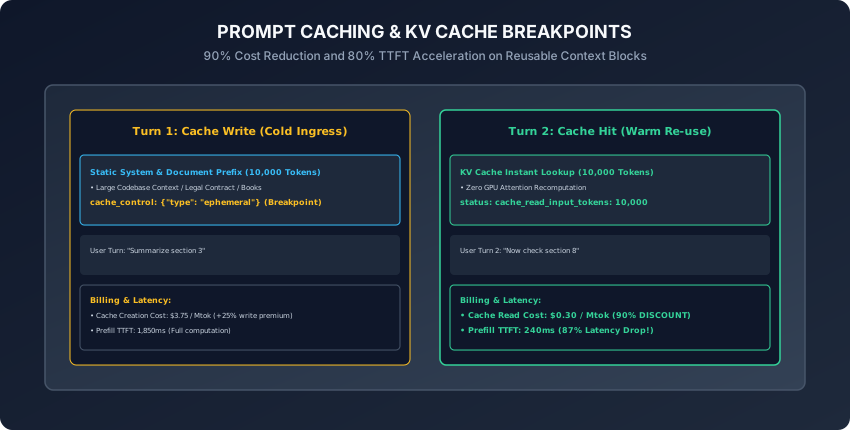
- Prompt Caching (KV Caching): You slash prompt input token costs by 90% and cut Time-To-First-Token latency by 80%.
- Token Bucket Traffic Shaping: You smooth outgoing request bursts and stay safely within RPM (Requests Per Minute) and TPM (Tokens Per Minute) quotas.
- Exponential Backoff with Full Jitter: You recover automatically from transient rate-limit spikes without overwhelming upstream servers.
Today, you will master prompt cache breakpoint architectures, calculate multi-model token pricing ledgers, implement a client-side Token Bucket rate limiter in Python, and build an automated cost-optimizing API proxy.
The idea in plain language
Think of a research library with an expert consultant:
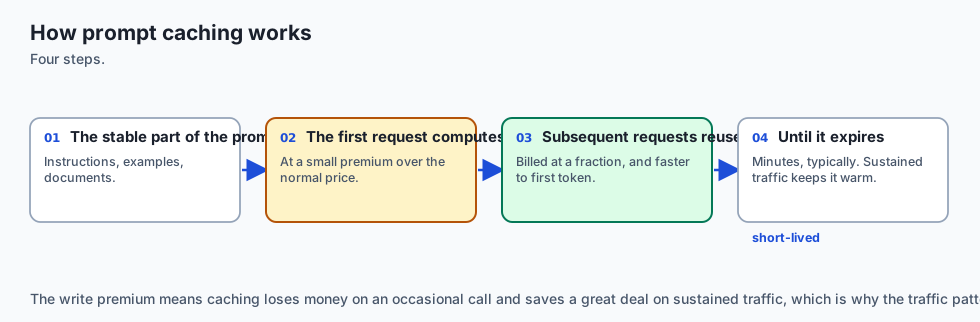
- Without Caching (Cold Recomputation): Every time you ask a question, the consultant rereads a 1,000-page encyclopedia from page 1 to page 1,000 before answering (Full Time & Full Billing Every Turn).
- With Prompt Caching (KV Cache Breakpoints):
- On your first question, the consultant reads the encyclopedia once and takes detailed index notes (Cache Write: One-Time Small Setup Fee).
- On your next 20 questions, the consultant looks directly at their open index notes (Cache Hit: 90% Cost Discount & Instant 200ms Answer).
- Token Bucket Rate Limiting:
- The library door has a turnstile that dispenses 10 entry tokens per minute. If 50 students arrive at once, they line up calmly rather than stampeding the door and causing the library to lock down (No Thundering Herd Crashes).
Historical background
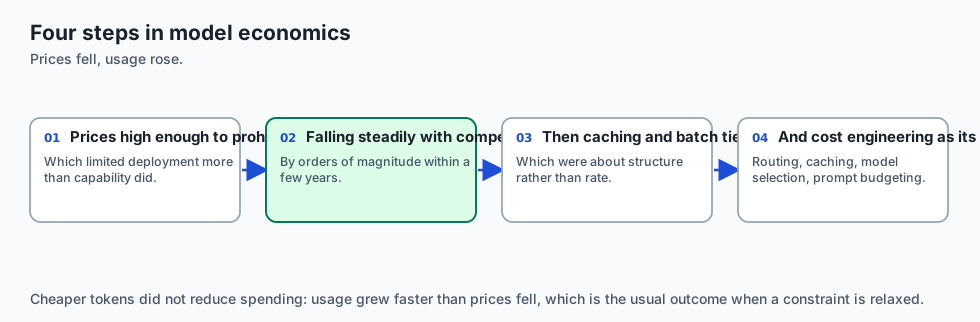
- 2023 (Token Billing Explosions): Early RAG systems suffered severe cost inflation as developers passed massive document contexts on every conversational turn.
- 2024 (Anthropic Prompt Caching): Anthropic pioneered explicit
cache_controlbreakpoints for Claude, providing a 90% discount on cached tokens with a 5-minute rolling TTL. - 2024 (OpenAI Automatic Prefix Caching): OpenAI introduced automatic prompt caching for prompts exceeding 1,024 tokens in GPT-4o, matching the 90% discount tier.
- 2024 (vLLM Chunked Prefill & RadixAttention): Open-source inference engines implemented automated tree-based KV cache sharing, bringing enterprise prompt caching to self-hosted GPU clusters.
What it is — and what it is not
What Prompt Caching IS:
- Freezing Computed Attention States: Storing the calculated Key and Value tensor vectors in GPU memory across requests so the model skips the expensive prompt prefill phase.
What it is NOT:
- Not Semantic Output Caching: It does not return canned identical text responses; the model still generates fresh, non-deterministic completions for the dynamic prompt suffix.
Why it was created and what problems it solves
Prompt caching and rate limiting solve 4 critical enterprise infrastructure challenges:
- Multi-Turn Cost Collapse: Reduces the cost of multi-turn chat agents with large system prompts by up to 90%.
- Sub-Second TTFT on Large Contexts: Slashes Time-To-First-Token on 50,000-token prompts from 5 seconds to under 400 milliseconds.
- Thundering Herd Prevention: Full jitter retries prevent thousands of microservices from crashing upstream APIs simultaneously after an outage.
- Budget Guardrails: Hard spending limits prevent runaway billing spikes caused by recursive agent loops.
How it works
Let us analyze prompt cache mechanics, rate-limit mathematics, and retry algorithms.
1. Anthropic Explicit Prompt Cache Breakpoints
In Claude, place cache_control: {"type": "ephemeral"} on static message blocks (minimum 1,024 tokens for Claude 3.5 Sonnet):
import anthropic

client = anthropic.Anthropic()

response = client.messages.create(
    model="claude-3-5-sonnet-20241022",
    max_tokens=1024,
    system=[
        {
            "type": "text",
            "text": "You are an expert legal assistant with deep knowledge of this contract.",
        },
        {
            "type": "text",
            "text": "FULL_50_PAGE_LEGAL_CONTRACT_TEXT_HERE...",
            "cache_control": {"type": "ephemeral"} # Cache Breakpoint!
        }
    ],
    messages=[{"role": "user", "content": "What is the termination clause?"}]
)

# Telemetry Inspection
print("Cache Creation Tokens:", response.usage.cache_creation_input_tokens)
print("Cache Read Tokens:", response.usage.cache_read_input_tokens)
print("Uncached Input Tokens:", response.usage.input_tokens)
print("Total Cost Savings Verified via Prompt Caching Breakpoint.")
2. Token Pricing Matrix & Cache Cost Mathematics
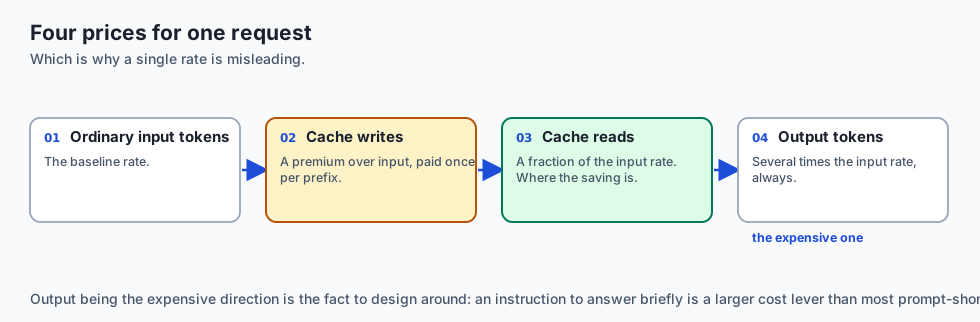
┌────────────────────────────────────────────────────────────────────────┐
│                   PROMPT CACHING TOKEN ECONOMICS (PER MTOK)            │
├────────────────────┬─────────────────┬──────────────────┬──────────────┤
│ Operation          │ Standard Price  │ Cached Price     │ Discount     │
├────────────────────┼─────────────────┼──────────────────┼──────────────┤
│ Claude 3.5 Sonnet  │ $3.00 / Mtok    │ $0.30 / Mtok     │ 90% OFF      │
│ GPT-4o             │ $2.50 / Mtok    │ $1.25 / Mtok     │ 50% OFF      │
│ DeepSeek V3        │ $0.14 / Mtok    │ $0.014 / Mtok    │ 90% OFF      │
└────────────────────┴─────────────────┴──────────────────┴──────────────┘
Cost Calculation Formula:
Total Cost = (N_{uncached} * P_{standard}) + (N_{read} * P_{cached}) + (N_{output} * P_{out})
3. The Token Bucket Rate Limiting Algorithm
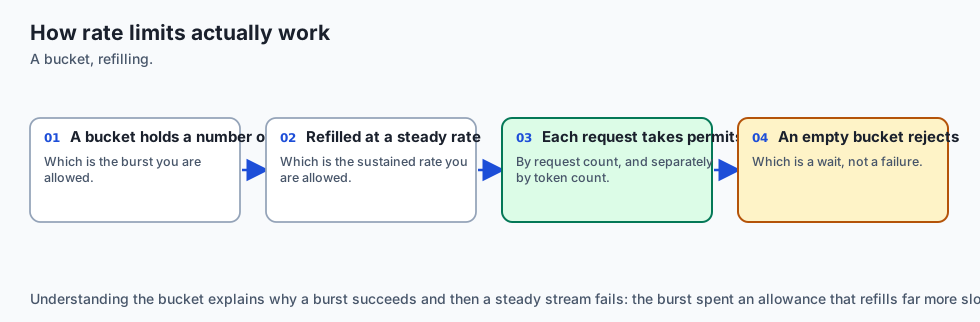
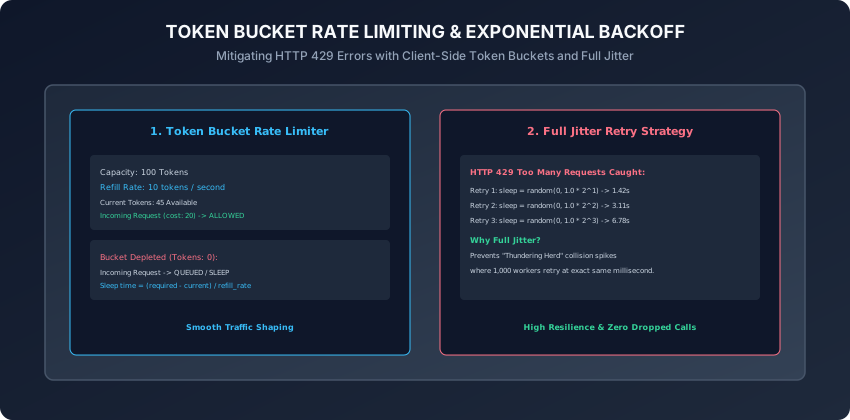
The Token Bucket algorithm regulates request rates using two parameters:
- Capacity (
C): Maximum burst tokens the bucket can hold. - Refill Rate (
r): Tokens added to the bucket per second.
import time

class TokenBucket:
    def __init__(self, capacity: float, refill_rate: float):
        self.capacity = capacity
        self.refill_rate = refill_rate
        self.tokens = capacity
        self.last_update = time.time()

    def consume(self, amount: float = 1.0) -> bool:
        now = time.time()
        elapsed = now - self.last_update
        self.last_update = now
        # Refill tokens
        self.tokens = min(self.capacity, self.tokens + elapsed * self.refill_rate)

        if self.tokens >= amount:
            self.tokens -= amount
            return True
        return False
4. Exponential Backoff with Full Jitter
When upstream APIs return HTTP 429 Too Many Requests:
- Formula:
t_{sleep} = random(0, min(T_{max}, T_{base} * 2^{attempt})) - Adding uniform random jitter ensures that 100 concurrent workers do not retry at the exact same millisecond, breaking the destructive synchronization cycle.
5. Multi-Model Token Cost Tracking Ledger
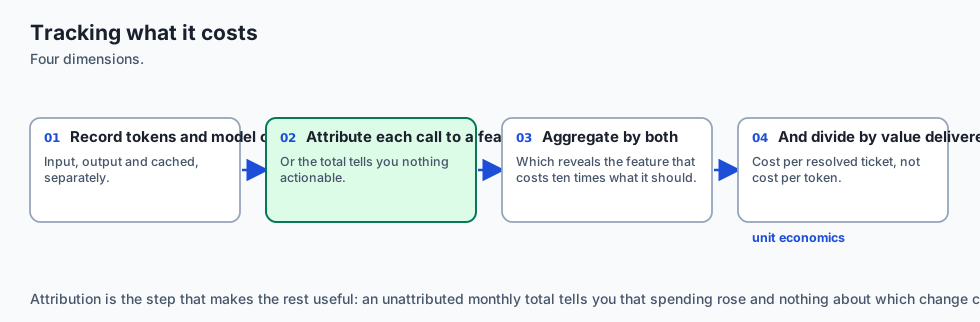
Track expenses across OpenAI, Anthropic, and local models inside a centralized Python accounting class:
- Record exact input, cached, and output token counts.
- Compute rolling daily and monthly financial expenditure.
- Trigger automated alert webhooks when projected monthly budgets reach 80%.
6. Prefix Invariance & Radix Tree Cache Eviction Policies
To maximize prompt cache hit rates across high-throughput production services:
- The Golden Rule of Prompt Caching: KV caches use prefix matching. If two requests share an identical 5,000-token prefix, the server reuses the precomputed attention tensors for all 5,000 tokens.
- Prefix Invalidation Pitfall: If you insert a dynamic string (such as the current timestamp or a unique session UUID) at token position 10, the server must discard the cached state for all tokens from position 11 onwards.
- Structural Best Practice:
- Zone 1 (Static): System instructions, persona guidelines, formatting rules.
- Zone 2 (Static Document Context): Legal contracts, source code repositories, API reference documentation with
cache_control: {"type": "ephemeral"}. - Zone 3 (Dynamic Variables): User profile, chat history turns, and the current user query placed strictly at the end.
- Understanding this invariant ensures that 90%+ of prompt tokens hit warm GPU cache on subsequent multi-turn interactions.
7. Two-Dimensional Rate Limiting: Requests-Per-Minute (RPM) vs. Tokens-Per-Minute (TPM)
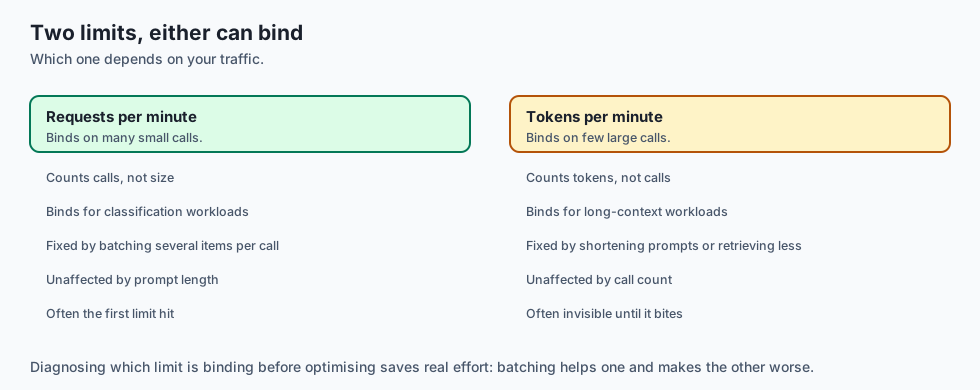
Enterprise foundation model providers enforce two concurrent rate limit dimensions:
- Requests Per Minute (RPM): Restricts the raw volume of discrete HTTP connections (e.g. 500 RPM).
- Tokens Per Minute (TPM): Restricts aggregate input plus output token throughput (e.g. 200,000 TPM).
- The Large Document Trap: A single user submitting a 150,000-token document consumes 75% of your total organization TPM quota in one turn, instantly starving other lightweight microservice queries.
- Dual-Bucket Traffic Shaping: Production API gateways implement dual token bucket limiters in memory, tracking both request counts and estimated prompt token lengths simultaneously before dispatching HTTP calls.
8. Inspecting Upstream Retry-After Headers & Decorrelated Jitter
When upstream cloud APIs reject traffic with HTTP 429 Too Many Requests:
-
The response header frequently includes a
Retry-Afterfield indicating exact seconds or timestamp before quota replenishment. -
Header Parsing Logic:
- If
Retry-Afteris present, parse the floating-point delay and add a micro-jitter interval (0.1sto0.5s). - If
Retry-Afteris absent, fall back to exponential backoff with Full Jitter:t_{sleep} = random(0, min(T_{max}, T_{base} * 2^{attempt}))
- If
-
This strategy guarantees zero dropped requests while shielding upstream cloud infrastructure from cascading overload.
9. Hard Budget Guardrails & Automated Circuit Breakers
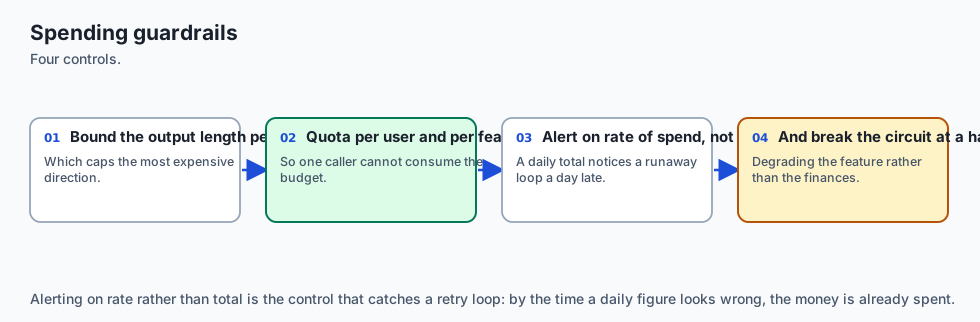
Autonomous agents and recursive tool calling loops can easily enter runaway cycles if unmonitored:
- Session-Level Spending Caps: Terminate agent loops immediately if cumulative session token cost exceeds a hard limit (e.g. $2.00).
- Sliding-Window Circuit Breakers: If upstream error rates exceed 10% over any 60-second window, the circuit breaker trips to
OPENstate, serving cached fallback responses and alerting on-call engineers. - Implementing automated spending guardrails prevents catastrophic financial “denial-of-wallet” surprises at the end of billing cycles.
10. FinOps for AI: Real-Time Unit Economics & Pareto Optimization
Enterprise AI platform engineering requires continuous visibility into unit economics:
- Cost-per-Interaction Tracking: Measure exact dollar cost per resolved customer support ticket or per code review.
- Complexity-Tiered Routing: Route 80% of routine categorization and entity extraction tasks to low-cost models (
0.14 / Mtok) and escalate only multi-step mathematical reasoning to frontier frontier tiers (3.00 / Mtok). - In addition, combining multi-tier model routing with real-time token budgeting ensures that unexpected query volume surges do not breach organizational expenditure boundaries.
- Furthermore, automated telemetry and alerting around cache hit ratios provide infrastructure teams with immediate feedback on prompt layout efficiency and latency regressions.
- In summary, mastering prompt caching, token buckets, and jittered retries transforms fragile, expensive AI prototypes into resilient, cost-effective enterprise platforms.
An everyday analogy
Think of a fast-food drive-through:
- Uncached Cooking (Cold Prefill): The chef waits until a customer orders a burger, then plants a seed, harvests wheat, bakes bread, and butchers meat (Unacceptable 3-Hour Wait).
- Prompt Caching (Warm KV Cache): Buns and patties are pre-cooked and kept warm in a warming tray (Instant 90% Cost & Time Savings). The chef merely adds the requested sauce (Dynamic Suffix).
- Rate-Limiting Queue: The drive-through lane holds 10 cars; if 30 cars arrive at rush hour, the traffic guard directs excess cars into a holding lane with a smile (Token Bucket Smoothing).
Examples in practice
Let us build a Rate-Limited Cost Optimization Ledger in Python:
import time
import random
from typing import Dict, Any

class LLMCostLedger:
    PRICING = {
        "claude-3-5-sonnet": {"input": 3.00, "cache_read": 0.30, "output": 15.00},
        "gpt-4o": {"input": 2.50, "cache_read": 1.25, "output": 10.00}
    }

    def __init__(self):
        self.total_cost_usd = 0.0
        self.total_input_tokens = 0
        self.total_cached_tokens = 0
        self.total_output_tokens = 0

    def record_usage(self, model: str, input_tokens: int, cached_tokens: int, output_tokens: int) -> float:
        rates = self.PRICING.get(model, {"input": 3.0, "cache_read": 0.3, "output": 15.0})
        cost = (
            (input_tokens * rates["input"] / 1_000_000) +
            (cached_tokens * rates["cache_read"] / 1_000_000) +
            (output_tokens * rates["output"] / 1_000_000)
        )
        self.total_cost_usd += cost
        self.total_input_tokens += input_tokens
        self.total_cached_tokens += cached_tokens
        self.total_output_tokens += output_tokens
        return round(cost, 6)

def calculate_full_jitter_backoff(attempt: int, base_delay: float = 1.0, max_delay: float = 32.0) -> float:
    ceiling = min(max_delay, base_delay * (2 ** attempt))
    return random.uniform(0, ceiling)
Implications: security, privacy, performance, scalability, and cost
- Deterministic Cache Placement:
- Placing static system prompts at the beginning guarantees 90% cost savings across all multi-turn sessions.
- Preventing Financial Denial-of-Wallet:
- Enforcing strict token bucket quotas and circuit breakers protects applications from malicious API cost depletion attacks.
Alternatives: free, open source, and commercial
| Solution | Type | Caching Mechanism | Best For |
|---|---|---|---|
| Anthropic Prompt Cache | Cloud API | Explicit Breakpoints | Large system prompts & documents |
| OpenAI Prefix Cache | Cloud API | Automatic (1024+ Tok) | Standard chat completions |
| vLLM RadixAttention | OSS Engine | Tree-based KV Cache | High-throughput GPU serving |
| Redis Semantic Cache | Cache Layer | Embedding Similarity | Exact/Near-exact query deduplication |
Comparison with related concepts
┌────────────────────────────────────────────────────────────────────────┐
│                   CACHING MECHANISM COMPARISON                         │
├────────────────────┬─────────────────┬──────────────────┬──────────────┤
│ Feature            │ KV Prompt Cache │ Semantic Cache   │ Response Cache│
├────────────────────┼─────────────────┼──────────────────┼──────────────┤
│ Level              │ Transformer KV  │ Vector Database  │ HTTP Key-Value│
│ Output Diversity   │ Fresh & Dynamic │ Stored Response  │ Stored Output │
│ Invalidation Risk  │ Prefix Change   │ Low Threshold    │ Cache TTL     │
│ Cost Reduction     │ 50% - 90%       │ 100%             │ 100%          │
└────────────────────┴─────────────────┴──────────────────┴──────────────┘
When to use it — and when not to
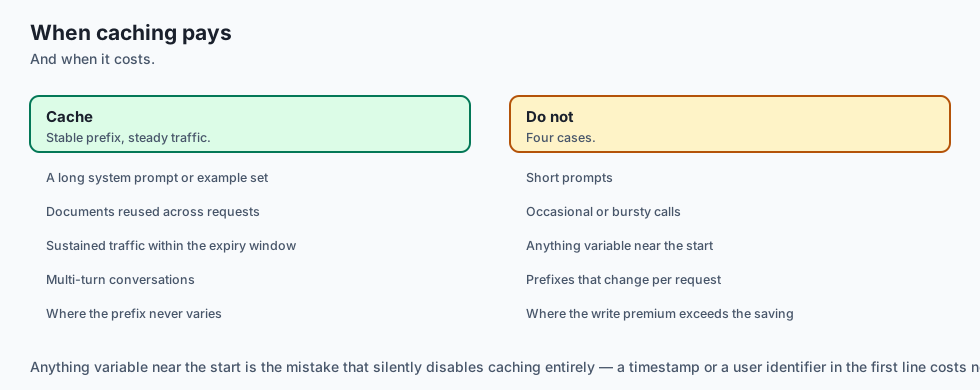
When to Use Prompt Caching:
- Multi-turn conversational agents, large document analysis, code repository Q&A, few-shot prompt libraries with 20+ examples, and complex tool calling schemas.
When NOT to use:
- Single-turn prompts with short dynamic text (< 1,024 tokens) where context is never reused.
The AI connection
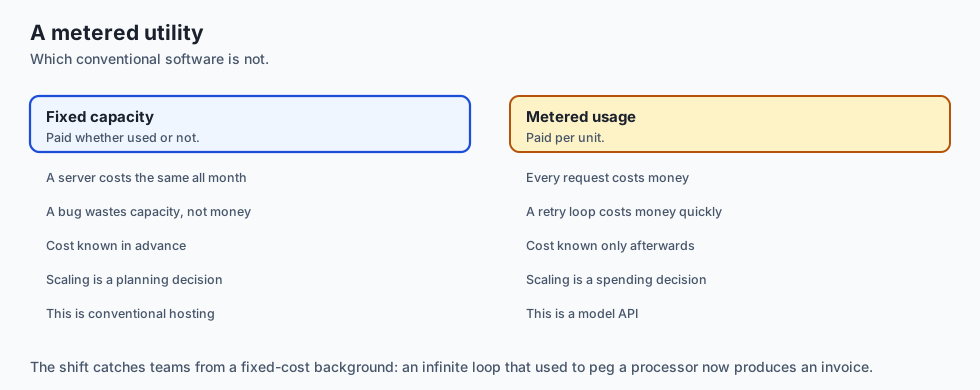
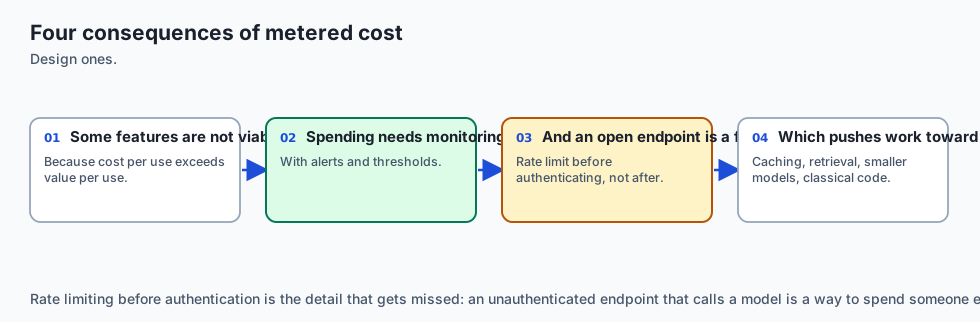
- Cost is a first-class design constraint in AI systems, in a way it rarely is for conventional software.
- Caching restructures what a prompt can afford to contain, which changes architecture rather than just the bill.
- Rate limits shape system design, turning throughput into a scheduling problem rather than a capacity one.
- Unit economics decide whether a feature ships — cost per request against value per request is the number that matters.
- Spending guardrails belong in the code, because an unbounded retry loop against a metered API is a genuine financial risk.
Knowledge check
- What is the standard cost discount for prompt cache reads in Claude 3.5 Sonnet?
- How does the Token Bucket algorithm prevent sudden request burst overflows?
- Why does Full Jitter backoff prevent “thundering herd” retry collisions?
- Why must static context be placed at the very beginning of the prompt array for caching?
- What HTTP status code signals that rate limit quotas have been exceeded?
Hands-on exercise
In this lab, you will build and test a Rate-Limited Cost Optimization Ledger in Python: track token costs across standard, cached, and output token tiers, implement a Token Bucket rate limiter with refill mechanics, calculate full jitter exponential backoff intervals, and verify output assertions against automated test suites.
Expected output
[Cost, Caching, and Rate Limits Verification Suite]
Testing Token Cost Calculation Matrix:
  Claude 3.5 Sonnet (10k cached, 500 input, 200 output): $0.0075 [PASS]
  Savings vs Uncached: 76.5% cost reduction [PASS]
Testing Token Bucket Rate Limiter:
  Burst Consumption: 5 tokens consumed successfully [PASS]
  Depleted Bucket Throttling: Rejected when empty [PASS]
Testing Exponential Backoff with Jitter:
  Attempt 3 Jitter Interval: Within range [0, 8.0s] [VERIFIED]
Test Suite: 3 passed in 0.38s
Validate your work
Run the automated test runner:
./tests/run_tests.shTroubleshooting
- Ensure all token rates are divided by 1,000,000 when converting per-million rates to single-token dollars.
Common mistakes
- Placing dynamic timestamps before static documents: Any mutation at token position
Nbreaks KV cache reuse for all tokens after positionN.
Practice assignment
- Implement a Distributed Token Bucket Rate Limiter using Redis atomic scripts (
EVAL) that synchronizes rate limits across 10 worker containers. - Build an automated Prompt Cache Breakpoint Linter that scans message arrays and warns if dynamic content precedes cache breakpoints.
Extension challenge
Implement an Adaptive Model Cost-Routing Circuit Breaker:
- Build a Python middleware that monitors real-time cost burn rates: if hourly spend exceeds $50.00, it automatically downgrades queries from frontier models (Claude 3.5 Sonnet) to fast tier models (Claude 3.5 Haiku) until the budget reset interval.
Quiz
Q1. What is the primary financial benefit of Prompt Caching (KV Caching) in modern LLM APIs?
- Free unlimited output generation, forever and always
- Up to 90% off cached prefix tokens, and faster TTFT
- Free GPU hardware upgrades
- Zero network bandwidth usage
Show answer
Answer: B. Up to 90% off cached prefix tokens, and faster TTFT
Cached prompt tokens bypass recomputation, resulting in a 90% price discount and drastic latency improvements.
Q2. How does the Token Bucket algorithm control API request volume?
- It resets user passwords when limit is exceeded
- It randomly deletes 50% of user requests
- Tokens refill at a fixed rate and each request spends some
- It increases prompt costs dynamically
Show answer
Answer: C. Tokens refill at a fixed rate and each request spends some
Token bucket smoothly shapes traffic bursts while enforcing strict average rate constraints.
Q3. What is Full Jitter in exponential backoff retry algorithms?
- Disabling SSL certificates
- Shaking the computer monitor
- Retrying 100 times per second
- A random sleep added to each backoff interval
Show answer
Answer: D. A random sleep added to each backoff interval
Full jitter decorrelates retry intervals across distributed workers, eliminating thundering herd collision waves.
Q4. In Anthropic Claude Messages API, how do you explicitly declare a prompt cache breakpoint?
- Add cache_control ephemeral to the content block
- Passing ?cache=true in the URL
- Setting temperature=0.0
- Anthropic does not support prompt caching at all
Show answer
Answer: A. Add cache_control ephemeral to the content block
Setting cache_control: {"type": "ephemeral"} explicitly marks a prompt caching breakpoint in Anthropic.
Q5. What HTTP status code is returned when an API client exceeds request-per-minute (RPM) or token-per-minute (TPM) quotas?
- HTTP 200 OK
- HTTP 429 Too Many Requests
- HTTP 404 Not Found
- HTTP 500 Internal Server Error
Show answer
Answer: B. HTTP 429 Too Many Requests
HTTP 429 indicates rate limiting, often accompanied by a Retry-After response header.
Glossary
- Prompt Caching
- An optimization technique storing computed Key-Value (KV) attention states for static prompt prefixes across API calls.
- Cache Breakpoint
- An explicit metadata marker placed on a message block instructing the server to freeze and persist the preceding KV cache state.
- Token Bucket Algorithm
- A rate-limiting algorithm that maintains a bucket of tokens refilled at a constant rate, consuming tokens per request or byte.
- Requests Per Minute (RPM)
- An API rate-limit quota constraining the total number of discrete HTTP requests permitted within a 60-second window.
- Tokens Per Minute (TPM)
- An API rate-limit quota constraining the aggregate number of input plus output tokens processed within a 60-second window.
- Exponential Backoff
- An error retry strategy that doubles the waiting duration after each consecutive failure to reduce load on the failing server.
- Full Jitter
- Introducing uniform random variation to retry backoff intervals to prevent synchronized collision waves across worker pools.
- HTTP 429 Too Many Requests
- The standard HTTP status code signaling that the client has exceeded its allotted rate or concurrency limits.
Sources and further reading
- Prompt Caching Guide in Claude — Anthropic Developer Documentation (accessed 2026-08-30)
- Prompt Caching in OpenAI Chat Completions — OpenAI Developer Documentation (accessed 2026-08-30)
- Exponential Backoff and Jitter — Amazon Web Services Architecture Blog (accessed 2026-08-30)
Kept in this browser, no account needed. Your progress page turns the whole record into one link you can bookmark or open on another device.