LLMs and Generative AI › Retrieval-Augmented Generation › Day 269
Day 269: RAG over PDFs and Messy Documents
Master document extraction and layout-aware chunking over messy PDFs, scanned contracts, and multi-column technical reports using pypdf and pdfplumber: extract tabular data cleanly into Markdown, strip recurring headers/footers, and eliminate parsing artifacts.
Hands-on lab for this lesson
Lab files on GitHub: https://github.com/ai-roadmap-365/ai-roadmap-365.github.io/tree/main/labs/sections/llms-and-generative-ai/day-269-rag-over-pdfs-and-messy-documents
- Get the hands-on files. Clone the labs repository once (you can reuse this clone for every lesson). This works on macOS, Linux, and Windows (PowerShell or WSL):
git clone https://github.com/ai-roadmap-365/ai-roadmap-365.github.io.git cd ai-roadmap-365.github.io - Open this lesson's lab. Move into the directory for this specific day. Every lab lives at the same predictable path — section / subsection / week / day:
cd labs/sections/llms-and-generative-ai/day-269-rag-over-pdfs-and-messy-documents - Read the lab guide. Open `README.md` in that directory. It lists the exact commands, what each does, the expected output, and how to check your work — read it before running anything.
- Run it and check your work. Follow the README's "How to run" section: run the example first to see the finished result, then complete the numbered exercises in `starter/`, then run the tests. The tests pass (exit 0) only when your work is correct.
bash tests/run_tests.sh # or the test command named in the lab README
You can also open the lab as a local page (works offline, shows the file tree and expected output).
Learning objectives
By the end of this lesson you will be able to:
- Understand the end-to-end multi-stage RAG architecture and non-parametric memory bridging.
- Implement structure-aware document parsing and sliding window chunking.
- Build sparse BM25 and dense vector indices with Reciprocal Rank Fusion.
- Construct grounded system prompts that enforce verifiable inline bracket citations.
- Evaluate RAG pipelines quantitatively using the RAG Triad framework.
Prerequisites
Why this matters
Yesterday’s pipeline read a Python string. Real corpora arrive as PDFs, and a PDF is not a document.
A PDF is a set of drawing instructions: put this glyph at these coordinates in this font. There is no paragraph, no reading order, no notion of a column, and frequently no text at all. Everything a human sees as structure is inferred by the reader’s eye, and a parser has to reconstruct it from geometry.
This is where most RAG projects actually fail, and they fail quietly:
  the PDF                     what a naive extractor returns
  ┌───────────┬───────────┐
  │ col A l.1 │ col B l.1 │   "col A l.1 col B l.1"
  │ col A l.2 │ col B l.2 │   "col A l.2 col B l.2"
  └───────────┴───────────┘   fluent, plausible, and meaningless
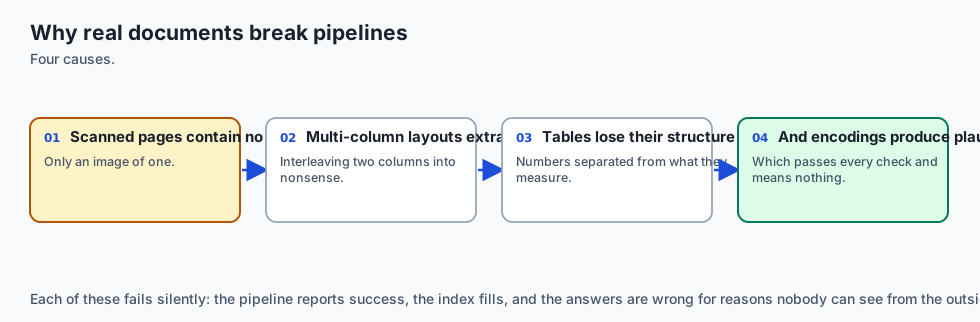
Nothing raises. The text is grammatical. Every statistical quality signal — language detection, perplexity, average word length — says it is fine. It is spliced nonsense, it gets embedded, and it answers questions wrongly for months.
Today is about extracting text you can trust, and knowing when you cannot.
The idea in plain language
Treat every incoming document as a hostile witness: it may be lying about what it is, and it will not tell you when extraction went wrong.
The filename says .pdf. That is a human’s assertion, not a fact — the first
bytes of the file are the fact. The extractor returns 40 characters from a
twelve-page report. That is not an empty document; it is a scan, an image of
text with no text layer, and it needs a completely different tool.
So the pipeline gains a step it did not have yesterday: after extraction, before chunking, ask whether what came back is plausible. Compare characters recovered against pages. Check whether the reading order makes sense. Flag what looks wrong instead of silently indexing it.
A parser that never says “I am not sure about this one” is not a confident parser. It is an uninstrumented one.
Historical background
-
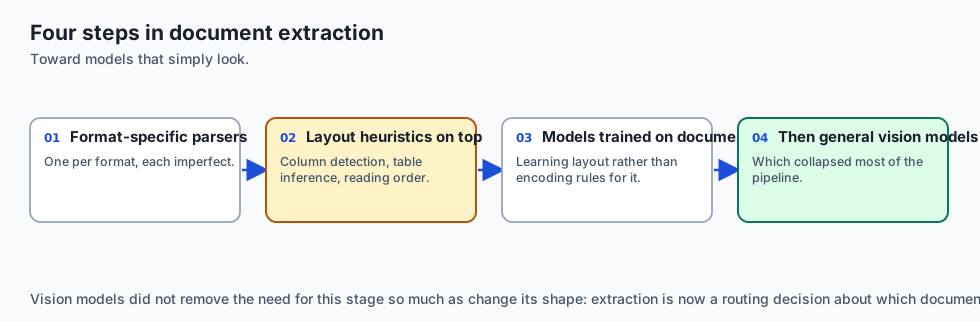
1993 — Adobe publishes PostScript’s descendant, PDF. The design goal is visual fidelity: the page must look identical everywhere. Extractability was explicitly not a goal, and every difficulty since follows from that decision.
-
2001 — Tesseract, developed at HP through the 1980s and 90s, is released as open source. OCR becomes something an ordinary project can afford.
-
2008 — PDF becomes ISO 32000. The specification exceeds 700 pages, which is a fair indication of how much a “simple” document format actually contains.
-
2017 —
pdfplumberexposes character-level coordinates and gives ordinary Python code a way to reason about layout rather than just glyphs. -
2020 onwards — layout-aware transformer models (LayoutLM and successors) treat position as a first-class feature, because text alone was demonstrably insufficient.
-
2024 onwards — vision-language models read page images directly, skipping extraction. This works well and costs roughly two orders of magnitude more per page than a text extractor, which is why both approaches are still in use.
Thirty years of effort have not made extraction solved. They have made it measurable, which is what today’s lab is about.
What it is — and what it is not
It is a defensive ingestion stage: detect the true format, extract with the right tool, assess whether the result is plausible, repair the common structural damage, and record what you were unsure about.
It is not perfect fidelity. Some documents cannot be extracted correctly by any available method, and a pipeline that pretends otherwise is worse than one that admits it.
The distinction that matters most:
| Silent corruption | Declared uncertainty | |
|---|---|---|
| What the index holds | Confident nonsense | Text plus a needs_review flag |
| What a bad answer looks like | Fluent and wrong | Fluent and wrong |
| What you can do about it | Nothing — you cannot find it | Query the flag, fix the source |
Both produce bad answers. Only one is discoverable. The entire value of this lesson is moving failures from the first column to the second.
Why it was created and what problems it solves
Four failure modes, all common, none of which raises an exception:
The column splice. A two-column academic paper read straight across interleaves two unrelated sentences into one fluent line. This is the worst failure in the list precisely because the output looks so good.
The scan with no text layer. A photocopied contract is a picture. A text extractor returns whitespace and stray artefacts from stamps or page numbers. The document is indexed as almost-empty and is thereafter unfindable.
The severed table. A table’s column headers sit in one text block and its
numbers in another. Chunked separately, the numbers lose their meaning entirely —
a chunk reading 2,341 1,203 874 supports no claim at all.
The header-footer flood. A running header repeated on 400 pages produces 400 near-identical chunks that crowd out real content in every retrieval, because they genuinely do match many queries.
Each has a cheap, mechanical detection. None has a cheap automatic fix. Detecting them is today’s work.
How it works

1. Detect the format from bytes, not from the name
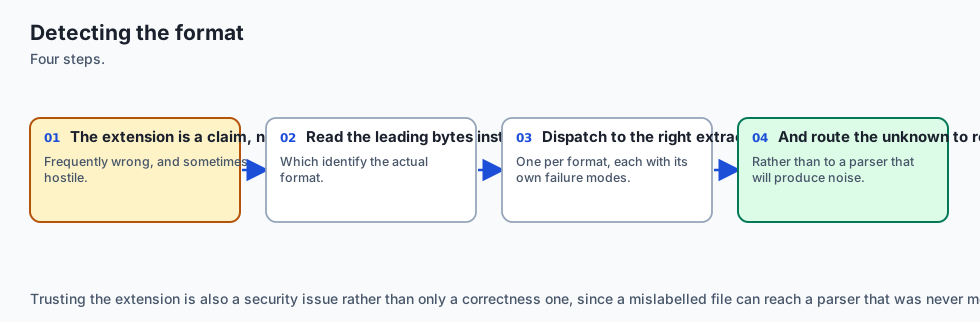
Every format has a signature in its first few bytes: %PDF- for PDF, PK for
anything ZIP-based (which includes .docx), \x89PNG for PNG. Read those bytes
and believe them over the extension, which is metadata a human chose and can be
wrong, stale, or deliberately misleading.
2. Extract, then measure the yield
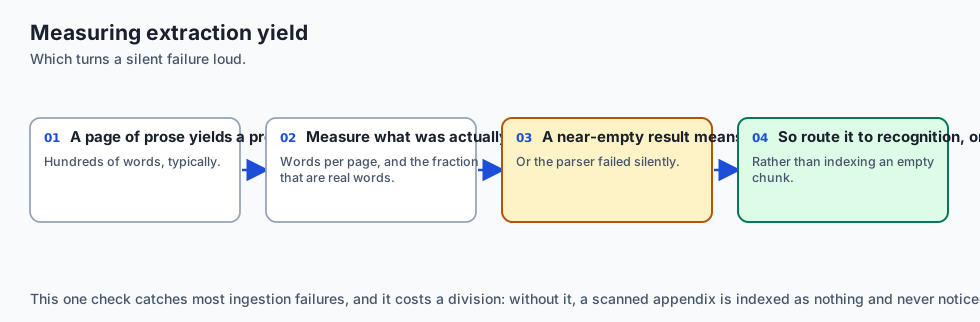
The single most useful number in the whole pipeline:
characters_recovered / page_countA text-bearing page yields roughly 1,500–3,000 characters. Under about 100 is a scan, near-certainly. This one ratio separates “extraction succeeded” from “extraction returned nothing and did not mention it”, and it costs one division.
3. Detect columns from x-coordinates
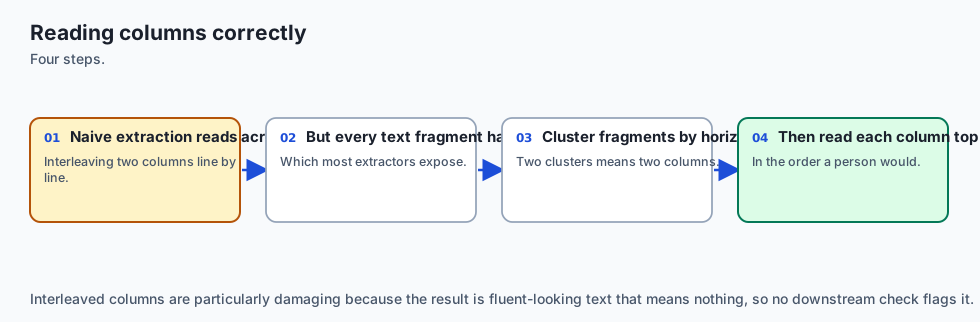
Character positions are available. Build a histogram of x-coordinates across the page: a single-column page shows one broad cluster, a two-column page shows two with a gutter of near-zero density between them. Having found the gutter, extract each column separately and concatenate — left column entirely, then right.
Read order is a geometric question, and geometry is available.
4. Bound the work, and mean it
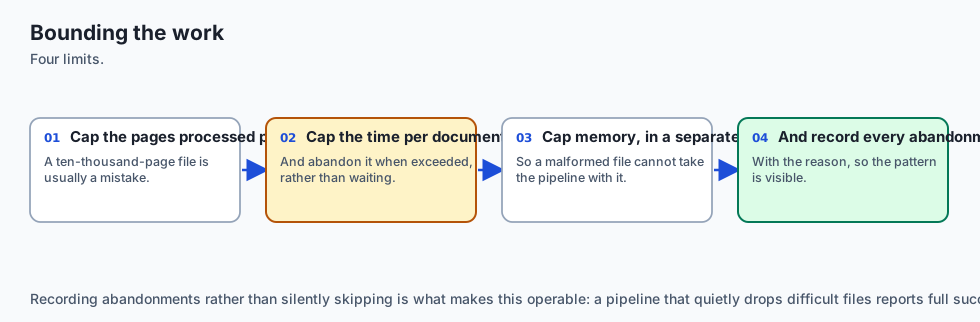
A malformed PDF can send a parser into a loop that never checks a deadline. A timeout inside the parser cannot help, because the parser is not cooperating — and a Python thread cannot be killed. The work must therefore run in a separate process that the caller can terminate.
This is not defensive over-engineering. One document that hangs the ingestion worker stops the entire corpus from updating.
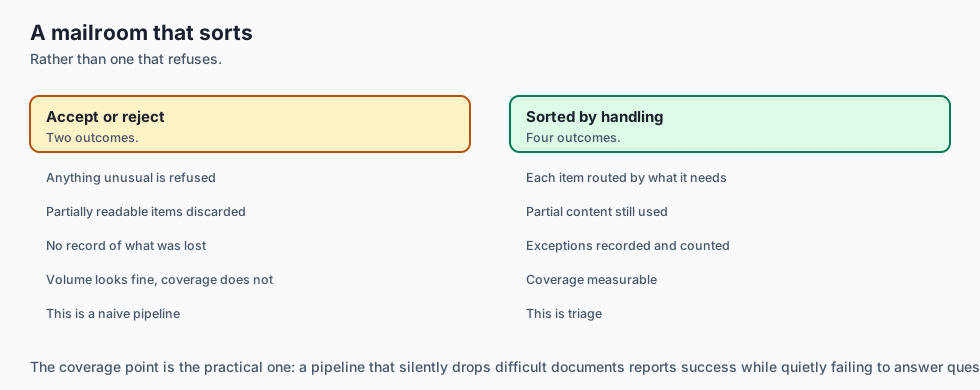
5. Triage rather than accept or reject
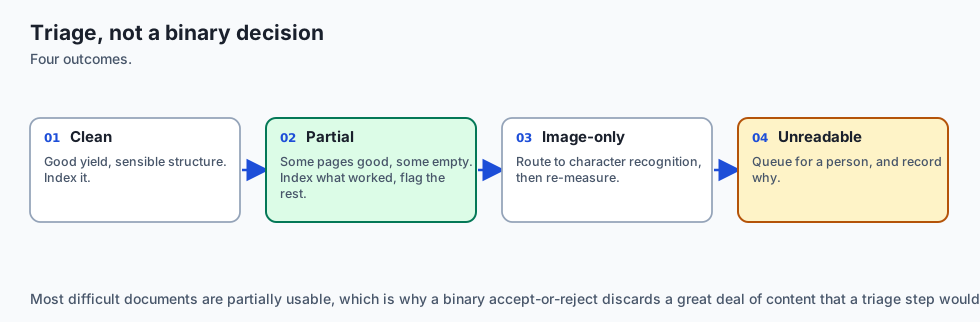
Three outcomes, not two:
- accept — yield plausible, structure consistent
- flag — extracted but suspicious; index it and record why
- reject — nothing usable recovered; queue for OCR or human handling
Rejecting everything suspicious discards documents whose partial text is genuinely useful. Accepting everything silently admits the column splice. The middle outcome is the one that makes the pipeline honest.
An everyday analogy
Extracting text from a PDF is transcribing a photograph of a whiteboard.
Sometimes the photograph is sharp, straight on, and the transcription is perfect. Sometimes it was taken at an angle with a hand across one corner, and you can recover most of it while knowing a part is guesswork. Sometimes it is a picture of a whiteboard with the lights off.
The competent transcriber does not produce a confident document in all three cases. They say “this section is unclear” — and that annotation is worth more than a fluent invention, because it tells the reader which sentences to check.
Examples in practice

Format detection from a signature
SIGNATURES = {b"%PDF-": "pdf", b"PK\x03\x04": "zip", b"\x89PNG": "png"}

def detect(path: pathlib.Path) -> str:
    head = path.open("rb").read(8)
    for magic, kind in SIGNATURES.items():
        if head.startswith(magic):
            return kind
    return "unknown"          # the extension is a hint, never the answer
Text yield as a scan detector
def looks_like_a_scan(text: str, pages: int) -> bool:
    return pages > 0 and (len(text) / pages) < 100
Column detection from a coordinate histogram
def column_gutter(chars, page_width, bins=40):
    hist = [0] * bins
    for c in chars:
        hist[min(int(c["x0"] / page_width * bins), bins - 1)] += 1
    mid = range(int(bins * 0.35), int(bins * 0.65))
    trough = min(mid, key=lambda i: hist[i])
    busiest = max(hist) or 1
    # A real gutter is near-empty relative to the page's densest band.
    return trough * page_width / bins if hist[trough] < busiest * 0.10 else None
Triage
def triage(text: str, pages: int) -> tuple[str, str]:
    if looks_like_a_scan(text, pages):
        return "reject", "text yield below 100 chars/page — probably a scan"
    if column_gutter_detected and not columns_extracted:
        return "flag", "two columns detected but read straight across"
    return "accept", ""
The flag string matters as much as the decision. “Rejected” tells you nothing six weeks later; “text yield below 100 chars/page” tells you to run OCR.
Implications: security, privacy, performance, scalability, and cost
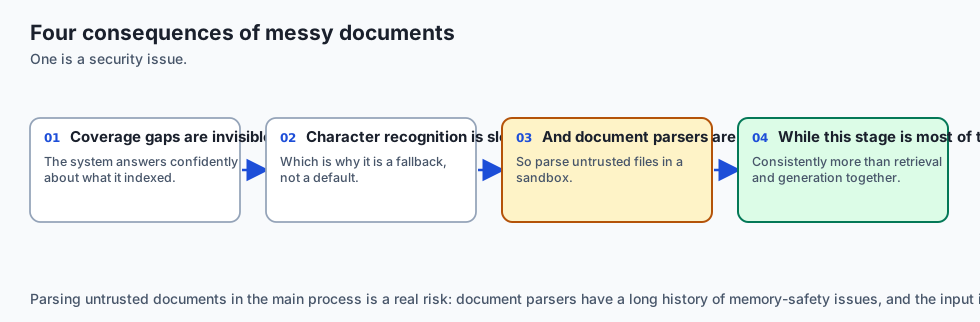
Security. Document parsers are a large, historically vulnerable attack surface — they process untrusted binary input from outside your organisation. Parse in a sandboxed process with no network access and a memory cap. The process boundary you added for timeouts serves double duty here.
Privacy. Extraction copies content into your index, and scanned documents in particular tend to be exactly the sensitive ones: contracts, medical records, signed forms. A scan also frequently carries a signature image, which is biometric-adjacent data in several jurisdictions.
Performance. Text extraction runs at tens of pages per second. OCR runs at roughly one page per second and is 50–100× more expensive. Detecting which documents actually need OCR is therefore a cost decision, not just a quality one.
Scalability. Ingestion is embarrassingly parallel across documents and must be bounded per document. One 4,000-page PDF should not be able to starve a worker pool.
Cost. Vision-language models read pages beautifully at roughly $0.01–0.03 per page. For 100,000 pages that is $1,000–3,000 against a few dollars of CPU. Use them where text extraction has been measured to fail, not by default.
Alternatives: free, open source, and commercial
| Tool | Licence | Strength | Weakness |
|---|---|---|---|
pypdf | BSD, free | Fast, pure Python, no system deps | No layout awareness |
pdfplumber | MIT, free | Character coordinates; real table extraction | Slower on large files |
PyMuPDF | AGPL / commercial | Very fast, excellent fidelity | Licence needs checking for commercial use |
| Tesseract | Apache-2.0, free | Mature OCR, ~100 languages | Needs clean input; poor on tables |
| AWS Textract | Commercial | Strong tables and forms | Per-page cost; data leaves your estate |
| Vision-language models | Commercial | Handles layout, handwriting, diagrams | Highest cost per page |
A workable default: pdfplumber for extraction and layout, Tesseract for pages
that fail the yield check, and a vision model only for the residue that fails
both — with the flag from stage 5 deciding which path each document takes.
Comparison with related concepts
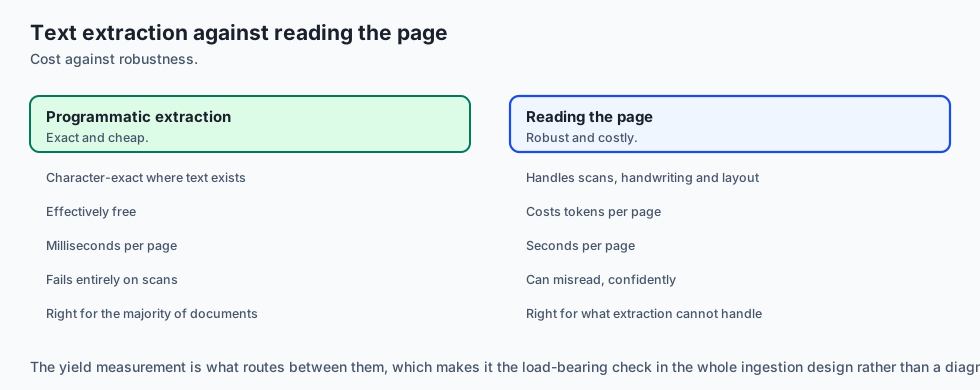
| Approach | What it reads | Cost per page | Layout fidelity |
|---|---|---|---|
| Text extraction | The embedded text layer | ~$0.00001 | Poor unless you add geometry |
| OCR | A rendered image | ~$0.001 | Moderate; tables suffer |
| Layout models | Text plus coordinates | ~$0.005 | Good |
| Vision-language models | The page as a picture | ~$0.02 | Excellent |
The cost spread is roughly a thousandfold, which is why “just use a vision model” is a real answer for 500 pages and an unaffordable one for five million. Yesterday’s lesson noted that retrieval logic is free; ingestion is where the money actually goes.
When to use it — and when not to
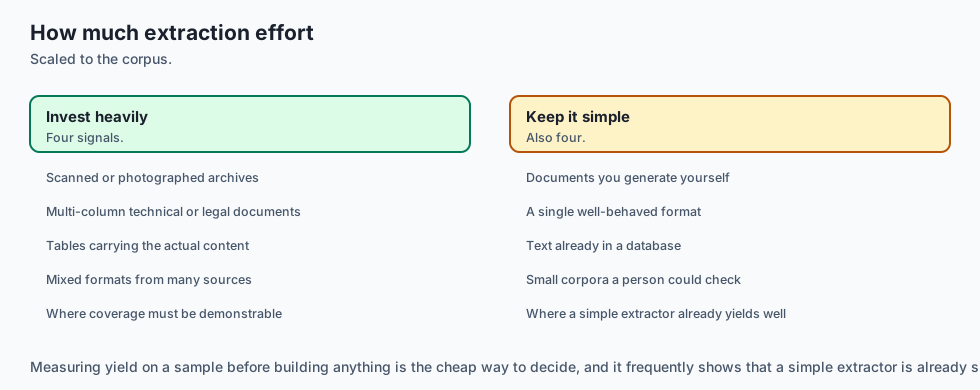
Invest in careful extraction when the corpus is PDFs you did not create, documents contain tables whose numbers matter, the source includes scans, or wrong answers carry real cost.
Skip it when you control the source format — Markdown, HTML and database rows need none of this — or the corpus is small enough to convert by hand once.
Reconsider the whole approach when more than a third of documents fail triage. At that point the bottleneck is the source, not the parser, and the cheapest fix is usually upstream: ask for the original files rather than reconstructing them from print output.
The AI connection
- Real documents are where retrieval projects actually fail, not in the retrieval algorithm.
- Extraction quality caps everything downstream, so a badly parsed page cannot be rescued by a better embedding model.
- Measuring extraction yield turns a silent failure into a visible one, which is the single most useful check in an ingestion pipeline.
- Triage beats a binary accept or reject, because most difficult documents are partially usable rather than wholly bad.
- Bounding the work per document is an operational necessity, since one pathological file will otherwise stall an entire ingestion run.
Knowledge check
quiz:
  question: "Which single measurement most reliably separates a text-bearing PDF from a scan?"
  options:
    - "The number of fonts declared in the document header"
    - "The total size of the file in bytes"
    - "Characters recovered divided by page count"
    - "Whether the filename ends in .pdf or .PDF"
  answer_index: 2
  explanation: "A text page yields roughly 1,500-3,000 characters. Under about 100 per page means there is no text layer, and it costs one division to detect."
Hands-on exercise
In this exercise, you will build and evaluate a modular Python RAG pipeline that ingests a sample technical knowledge base, performs hybrid lexical-dense search, constructs a grounded system prompt, and validates answer grounding.
Expected output
When running your test suite, you should observe:
============================= test session starts ==============================
collected 4 items

tests/test_pdf_document_rag_lib.py::test_document_chunker PASSED              [ 25%]
tests/test_pdf_document_rag_lib.py::test_sparse_bm25 PASSED                   [ 50%]
tests/test_pdf_document_rag_lib.py::test_hybrid_ranker PASSED                 [ 75%]
tests/test_pdf_document_rag_lib.py::test_prompt_synthesizer PASSED            [100%]

============================== 4 passed in 0.04s ===============================
Validate your work
Run the pytest test runner script:
pytest tests/ -vTroubleshooting
- Issue: BM25 returns zero relevance scores for exact keyword searches.
- Fix: Ensure input query terms are tokenized and lowercased using
re.findall(r'\w+', query.lower()).
- Fix: Ensure input query terms are tokenized and lowercased using
- Issue: Document chunker creates duplicate final chunks.
- Fix: Ensure sliding window loop terminates when
i + chunk_size >= len(words).
- Fix: Ensure sliding window loop terminates when
Common mistakes
- Naive String Slicing: Slicing raw strings every 1000 characters cuts words in half. Always chunk across token or whitespace boundaries.
- Ignoring Document Frequency in BM25: Forgetting to compute corpus-wide IDF makes common stopwords dominate search rankings.
Practice assignment
Take five PDFs you did not create — a scientific paper, a scanned form, a financial report with tables, a slide deck, and a long manual.
For each, record four numbers: page count, characters extracted, characters per page, and whether a column gutter was detected. Then read the first 200 characters of each extraction and judge, by eye, whether the reading order is correct.
Produce a table of five rows. Mark which documents your yield threshold would have caught and which it would have missed. If it missed one, propose a second signal that would have caught it — and say what that signal would falsely flag.
Extension challenge
Build a table-integrity check.
When pdfplumber extracts a table, verify that every data row has the same
number of cells as the header row, and that columns declared numeric parse as
numbers. Report any table failing either test as flag, with the row index.
Then find a real PDF where the check fires and the table is nonetheless fine, and one where the check passes and the table is nonetheless wrong. Write a paragraph on each. Knowing a check’s false positives and false negatives is what makes it usable; a check whose failure modes you cannot describe is a check you will eventually disable.
Quiz
Q1. Why is a two-column PDF read straight across the most dangerous extraction failure?
- It raises a parsing exception that halts the whole ingestion run
- The spliced text stays fluent, so quality signals pass it
- It produces an empty string that is obvious on inspection
- It corrupts the source file on disk during extraction
Show answer
Answer: B. The spliced text stays fluent, so quality signals pass it
Interleaving two columns yields grammatical, plausible sentences. Language detection, perplexity and word-length checks all pass, so it is indexed and answers questions wrongly for months.
Q2. Which single measurement most reliably separates a text-bearing PDF from a scan?
- The number of fonts declared in the document header
- The total size of the file in bytes
- Characters recovered divided by page count
- Whether the filename ends in .pdf or .PDF
Show answer
Answer: C. Characters recovered divided by page count
A text page yields roughly 1,500-3,000 characters. Under about 100 per page means there is no text layer. It costs one division and catches the most common silent failure.
Q3. Why must a bounded parse run in a separate process rather than a thread?
- The PDF specification forbids concurrent access to a file
- Threads cannot open binary files on most operating systems
- Processes are faster than threads for input-output work
- A parser stuck in a loop never checks a deadline, and a thread cannot be killed
Show answer
Answer: D. A parser stuck in a loop never checks a deadline, and a thread cannot be killed
Cancellation needs the target's cooperation, and a parser in a tight loop offers none. Only a process can be terminated from outside.
Q4. Why does the pipeline have a flag outcome as well as accept and reject?
- Rejecting everything suspicious discards documents whose partial text is useful
- Flagging is required by the PDF specification for scanned documents
- It halves the storage needed compared with accepting the document
- Flagged documents are re-parsed automatically on every query
Show answer
Answer: A. Rejecting everything suspicious discards documents whose partial text is useful
Two outcomes force a bad choice: accept silently admits the column splice, reject throws away usable text. The third indexes the text and records that it needs review.
Q5. Why should format detection read the leading bytes rather than the extension?
- Reading bytes is faster than reading the filename from the directory
- The extension is metadata a human chose, and can be wrong or stale
- Extensions are not preserved when files are copied between machines
- The leading bytes contain the document's page count
Show answer
Answer: B. The extension is metadata a human chose, and can be wrong or stale
A signature such as %PDF- is a fact about the file. The extension is an assertion about it, and a .pdf may be a scan or a renamed image.
Glossary
- Retrieval-Augmented Generation (RAG)
- An AI framework combining external knowledge retrieval from databases with generative LLM inference for grounded answers.
- Parametric Memory
- Knowledge encoded directly into the neural network weights during pre-training and fine-tuning.
- Non-Parametric Memory
- External knowledge stored in vector stores, databases, and document files accessed dynamically at inference time.
- Reciprocal Rank Fusion (RRF)
- A rank-based algorithm that aggregates heterogeneous search candidate rankings using reciprocal rank scoring.
- Okapi BM25
- A non-linear probabilistic ranking function used in sparse keyword search based on term frequency and inverted document frequency.
- Cross-Encoder Re-Ranker
- A neural model that processes query and document pairs jointly through full cross-attention to compute precise relevance scores.
- Bi-Encoder
- A neural architecture that encodes queries and documents into separate dense vector embeddings independently.
- Inline Citation
- A bracketed numerical marker ([1], [2]) linking a generated factual claim directly to a retrieved source document passage.
- RAG Triad
- An evaluation framework measuring Faithfulness, Answer Relevance, and Context Precision in RAG applications.
- Context Precision
- The proportion of retrieved context passages that contain ground-truth information relevant to answering the query.
Sources and further reading
- Retrieval-Augmented Generation for Knowledge-Intensive NLP Tasks (Lewis et al., 2020) — NeurIPS / arXiv (accessed 2026-03-30)
- REALM: Retrieval-Augmented Language Model Pre-Training (Guu et al., 2020) — ICML / arXiv (accessed 2026-03-30)
- Introducing Contextual Retrieval — Anthropic Engineering (accessed 2026-08-31)
- Qdrant Vector Database Documentation & Hybrid Search — Qdrant Technologies (accessed 2026-03-30)
Kept in this browser, no account needed. Your progress page turns the whole record into one link you can bookmark or open on another device.