Deployment, MLOps, and Security › Containers and Cloud › Day 330
Day 330: Docker Fundamentals
Understand the one rule that decides how long a container build takes: a layer is reused only if every layer above it was reused and its own inputs are unchanged. Model it, measure it, and see the same instructions rebuild in 76 seconds or 1 second depending only on their order.
Hands-on lab for this lesson
Lab files on GitHub: https://github.com/ai-roadmap-365/ai-roadmap-365.github.io/tree/main/labs/sections/deployment-mlops-and-security/day-330-docker-fundamentals
- Get the hands-on files. Clone the labs repository once (you can reuse this clone for every lesson). This works on macOS, Linux, and Windows (PowerShell or WSL):
git clone https://github.com/ai-roadmap-365/ai-roadmap-365.github.io.git cd ai-roadmap-365.github.io - Open this lesson's lab. Move into the directory for this specific day. Every lab lives at the same predictable path — section / subsection / week / day:
cd labs/sections/deployment-mlops-and-security/day-330-docker-fundamentals - Read the lab guide. Open `README.md` in that directory. It lists the exact commands, what each does, the expected output, and how to check your work — read it before running anything.
- Run it and check your work. Follow the README's "How to run" section: run the example first to see the finished result, then complete the numbered exercises in `starter/`, then run the tests. The tests pass (exit 0) only when your work is correct.
bash tests/run_tests.sh # or the test command named in the lab README
You can also open the lab as a local page (works offline, shows the file tree and expected output).
Learning objectives
By the end of this lesson you will be able to:
- Explain what a layer is and which instructions produce one.
- State the cache rule, including why an unchanged layer still rebuilds.
- Order a Dockerfile so the expensive layer survives a source edit.
- Explain why reordering costs nothing on a cold build.
- Identify the pinning, cleanup and privilege mistakes that ship a real risk.
Prerequisites
Why this matters
You have spent a year building things that run on your machine. This week is about making them run somewhere else, and the first problem is not the cloud — it is that “somewhere else” has a different Python, a different libc, a different CUDA driver and none of your environment variables.
A container is the answer the industry settled on: package the filesystem the application needs alongside the application, and the target machine only has to be able to run containers. That is the whole idea, and it is not the hard part.
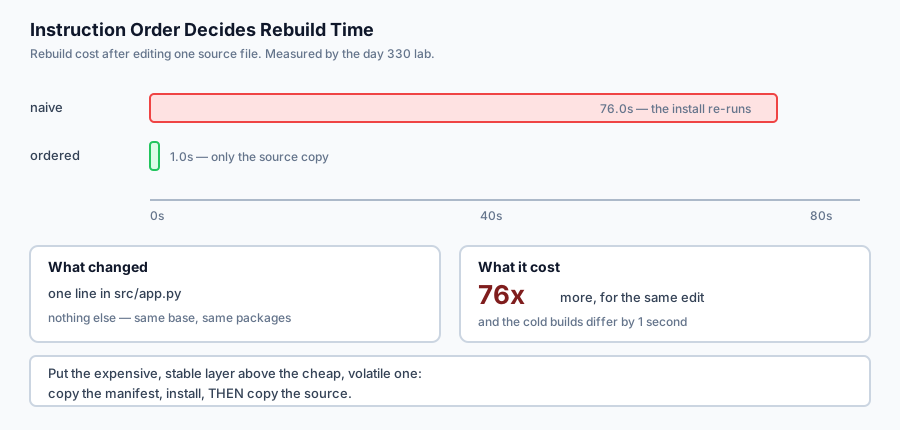
The hard part is the build cache, because it is where the time goes. A Dockerfile with the instructions in the wrong order rebuilds in 76 seconds after you edit one line of Python. The same instructions in the right order rebuild in one second. Both take the same time on a first build. Nothing else changes — not the base image, not the packages, not the application.
That ratio is the lesson. Over a day of development it is the difference between a tight loop and a coffee break, and it is decided entirely by where you put one COPY line.
The idea in plain language
An image is a stack of layers. Each instruction in a Dockerfile produces one, and each layer is a filesystem diff — what changed relative to the layer beneath.
When you rebuild, Docker walks the instructions from the top and asks a question at each one:
can I reuse the layer I built last time?
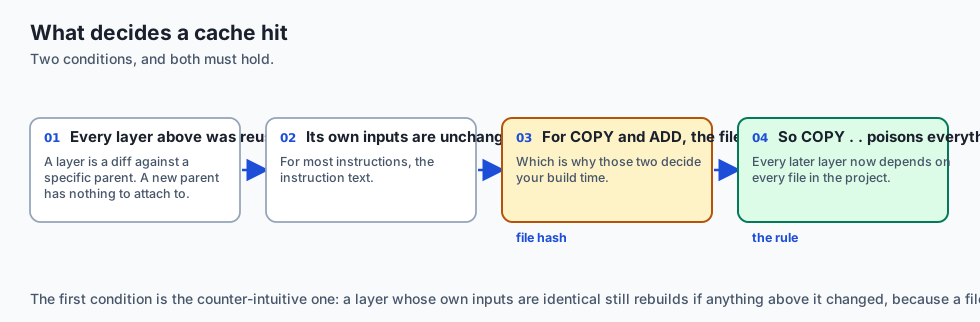
The answer is yes only when both of these hold:
Every layer above it was reused. A layer is a diff against a specific parent. If the parent is new, the diff has nothing to attach to, so the layer must be rebuilt whether or not its own inputs changed.
Its own inputs are unchanged. For most instructions the input is the instruction text. For COPY and ADD it is also the contents of the files being copied — which is what makes those two the instructions that decide your build time.
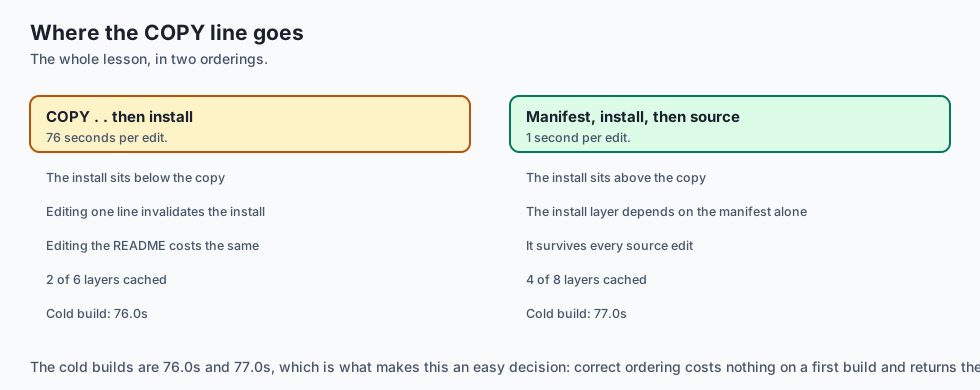
Put those together and the consequence is sharp. COPY . . early in a Dockerfile makes every layer beneath it depend on every file in your project. Edit a README and the dependency install re-runs.
The fix costs nothing: copy the dependency manifest, install, and only then copy the source. The install layer now depends on requirements.txt alone, and it survives every edit that does not change your dependencies.
Historical background
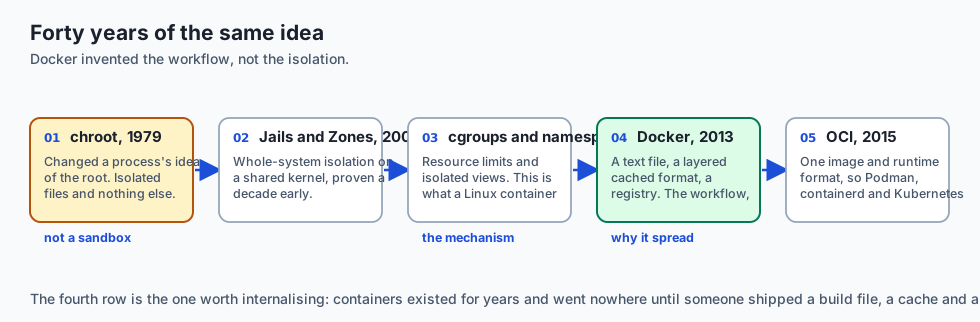
chroot, 1979
chroot changed a process’s idea of the filesystem root. It isolated the view of files and nothing else — same network, same process table, same users. Useful, and not a sandbox, which is a distinction people re-learn painfully.
FreeBSD Jails and Solaris Zones, 2000–2004
The first serious attempts at whole-system isolation on a shared kernel: separate process tables, network interfaces and root users. The idea was proven a decade before Linux made it ubiquitous.
cgroups and namespaces, 2006–2008
Google contributed cgroups (resource limits) to Linux; namespaces (isolated views of PIDs, mounts, networks, users) arrived alongside. Together these are what a Linux container actually is. Everything after this is packaging and ergonomics.
Docker, 2013
Docker did not invent containers. It invented a format and a workflow: a text file describing a build, a layered image format that deduplicates and caches, and a registry to push to. That combination is why containers spread — not the isolation, which had existed for years.
OCI, 2015 onward
The Open Container Initiative standardised the image and runtime formats, which is why Podman, containerd, Buildah and Kubernetes all consume the same images. A Dockerfile is portable in a way that a vendor’s packaging format is not.
What it is — and what it is not
A container image is a layered filesystem plus metadata describing how to start a process in it.
What it is
It is a filesystem and a default command. Not a virtual machine and not a running thing — an image is inert until a runtime starts a process against it.
It is layered and content-addressed. Layers are shared between images, which is why pulling a second image based on the same base is fast.
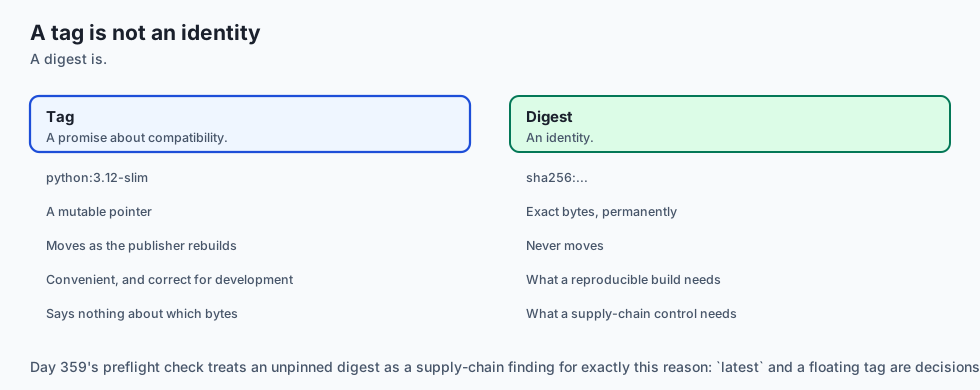
It is reproducible only as far as you make it. FROM python:3.12-slim today and in a year are different images.
What it is not
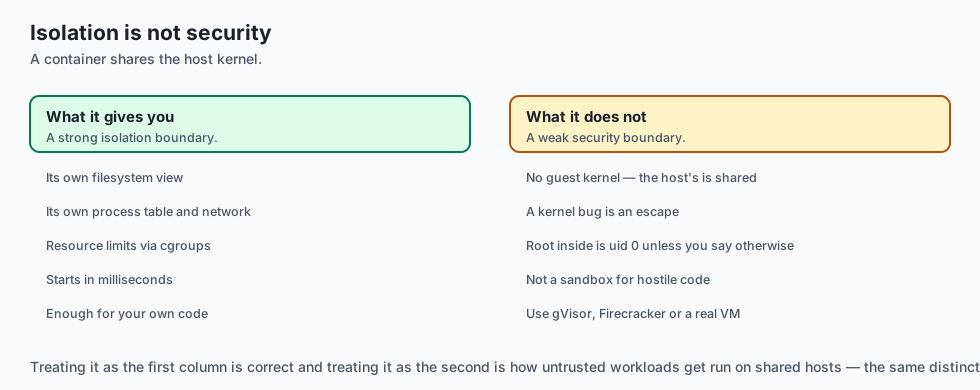
It is not a security boundary by default. A container shares the host kernel. It is a strong isolation boundary and a weak security one; treat it as the former.
It is not a virtual machine. There is no guest kernel, which is why a container starts in milliseconds and why a Linux container needs a Linux kernel underneath.
It is not a way to make a slow application fast. It changes where the code runs, not how well.
Why it was created and what problems it solves
“Works on my machine.” The single most expensive sentence in software. Solution: ship the filesystem the application depends on, not a list of instructions for recreating it.
Dependency conflicts between projects. Two applications needing different versions of the same system library. Solution: each gets its own filesystem.
Slow, fragile provisioning. Configuration-management scripts that drift and are never exactly re-run. Solution: a build that starts from a fixed base and is described in one file.
Deploy artifacts that are not the thing you tested. Solution: the image you tested is the image that runs, identified by digest.
Rebuild times that make iteration painful. Solution: a layer cache — which only helps if the instructions are ordered so that the expensive layer sits above the volatile one.
How it works
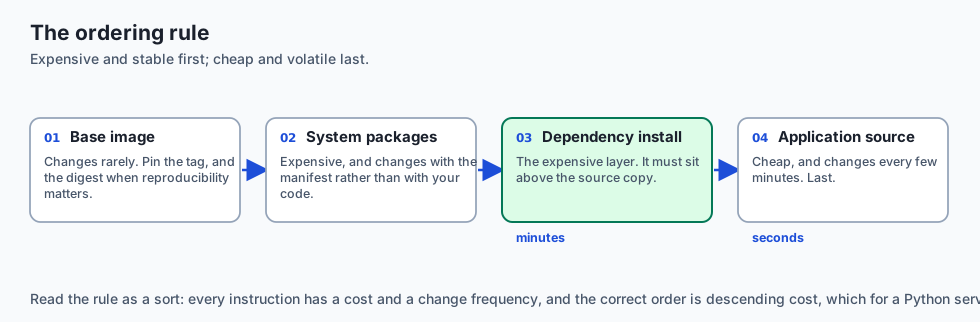
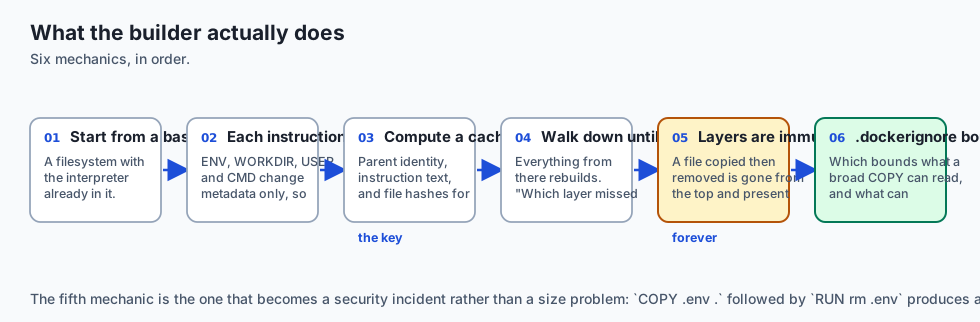
A build starts from a base image. FROM python:3.12-slim provides a filesystem with Python already in it.
Each instruction adds a layer. RUN executes a command and captures what changed. COPY adds files. ENV, WORKDIR, USER, CMD change metadata and add nothing to the filesystem, which is why they are free.
The builder computes a cache key per layer from the parent layer’s identity, the instruction text, and — for COPY and ADD — a hash of the file contents being copied.
On a rebuild it walks down until a key differs. Everything from that point rebuilds. This is the rule, and it is why “which layer missed first” explains the entire cost of a build.
Layers are immutable and all of them are kept. A file you COPY and later RUN rm is gone from the final filesystem and completely present in the layer beneath. That is a size problem and, when the file was a .env, a security incident.
.dockerignore controls what the build context contains, which controls what a broad COPY can read — and therefore what can invalidate the cache.
An everyday analogy
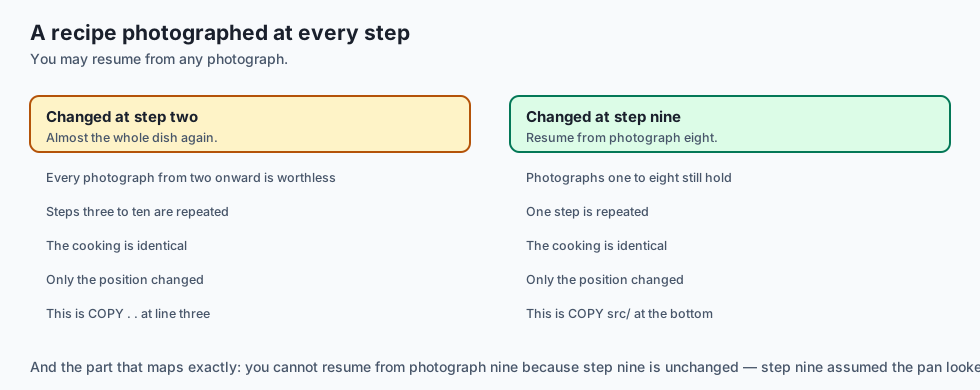
Think of a recipe where each step is photographed, and you may resume from any photograph rather than starting over.
Yesterday you made the dish. Today one ingredient changed. If the changed ingredient goes in at step two, every photograph from step two onward is worthless and you cook almost the whole dish again. If it goes in at step nine, you resume from photograph eight.
The cooking is identical. The order decides how much you repeat.
And the part that maps most exactly: you cannot resume from photograph nine just because step nine is unchanged. Step nine assumed the pan looked like photograph eight. If eight is gone, nine is gone, regardless of its own ingredients.
That is the whole cache rule, and it is why a Dockerfile is written expensive-and-stable first, cheap-and-volatile last.
Examples in practice
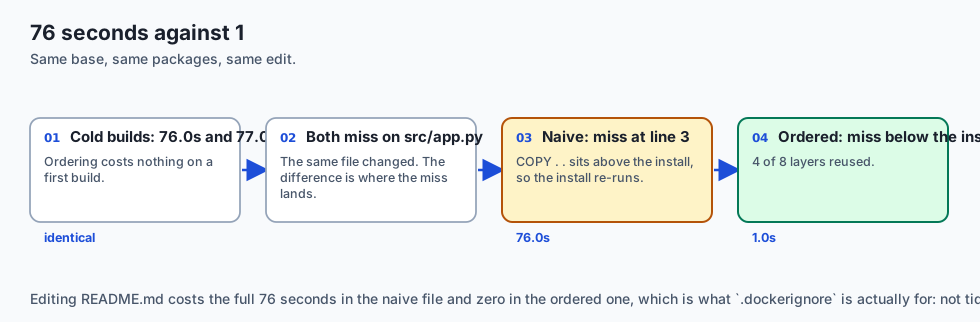
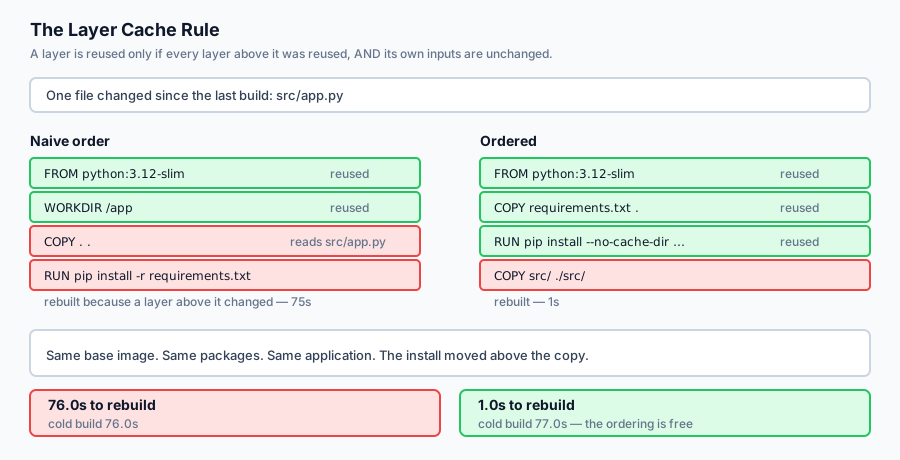
Here is the measured output from today’s lab. Two Dockerfiles build the same application from the same base image with the same packages. One line of source code changed.
--- naive: COPY . . then install ---
  cold build   0/6 layers cached  rebuild 76.0s
  after edit   2/6 layers cached  rebuild 76.0s
  first miss   line 3: COPY . .
               reads changed file(s): src/app.py
--- ordered: manifest, install, then source ---
  cold build   0/8 layers cached  rebuild 77.0s
  after edit   4/8 layers cached  rebuild 1.0s
76 seconds against 1. Both miss on the same file — src/app.py. The difference is where the miss happens. In the naive file COPY . . sits above the install, so the install is downstream and re-runs. In the ordered file the install sits above the copy and is reused.
Read the cold builds too, because that is the part that makes this an easy decision: 76.0s and 77.0s. Ordering the instructions costs nothing on a first build and returns the entire install on every build after it.
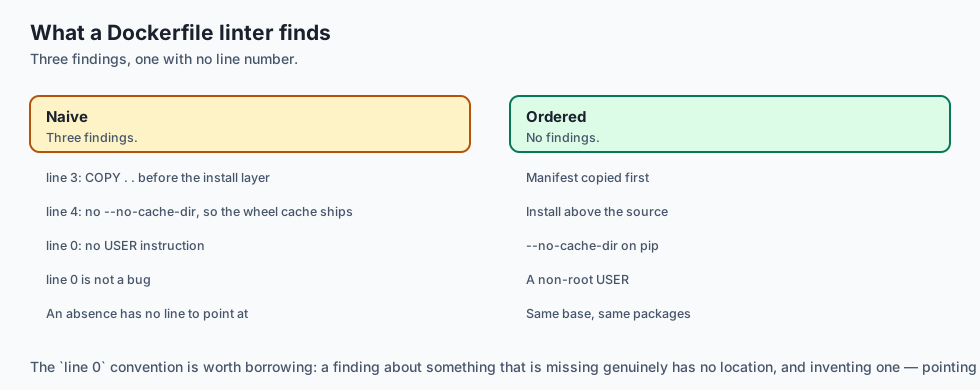
--- lint: naive ---
  line  3 [copy-before-install] COPY . . before the install layer
  line  4 [pip-cache-kept]      no --no-cache-dir, so the wheel cache ships
  line  0 [runs-as-root]        no USER instruction
--- lint: ordered ---
  no findings
line 0 is not a bug. The finding is about the absence of an instruction, and an absence has no line to point at.
One more result worth knowing, because it surprises people: editing README.md costs the full 76 seconds in the naive Dockerfile and zero in the ordered one. COPY . . reads the README as readily as the source. That is what .dockerignore is actually for — not tidiness, but keeping irrelevant files out of the thing that decides your cache.
Implications: security, privacy, performance, scalability, and cost
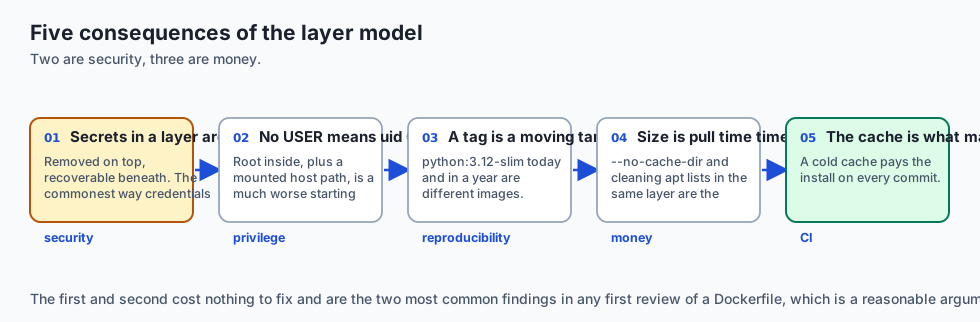
Security. Every layer is kept. COPY .env . followed by RUN rm .env produces an image where the secret is invisible in the final filesystem and fully recoverable with docker save and tar. This is the most common way credentials reach a public registry. Never copy the secret; use .dockerignore, a build secret, or a runtime variable.
Privilege. Without USER, the process runs as uid 0 inside the container. Combined with a mounted host path or a kernel escape, root inside is a much worse starting point than an unprivileged uid. One line fixes it.
Reproducibility. FROM python:3.12-slim is a moving target. Pin the tag, and pin the digest when a build must be reproducible months later.
Performance and cost. Image size is pull time, multiplied by every node that pulls it. --no-cache-dir on pip and removing the apt lists in the same layer are the two cheapest wins available.
Scalability of the practice. The cache rule is what makes CI affordable. A CI job with a cold cache pays the install on every commit; one with a warm cache and a correctly ordered Dockerfile pays it only when dependencies change.
Alternatives: free, open source, and commercial
Docker Engine — Apache-2.0, the default, and the one every tutorial assumes. Docker Desktop is the commercial packaging and has licence conditions for larger companies; the engine itself does not.
Podman and Buildah — Red Hat’s daemonless, rootless alternatives. They read the same Dockerfiles and produce the same OCI images. podman is close enough to a drop-in that aliasing it usually works.
BuildKit — now the default Docker builder. Parallel stages, build secrets that never enter a layer, and cache mounts that persist a package cache across builds without shipping it.
Nix and Bazel — reproducible builds taken seriously, at the cost of a much steeper learning curve. Worth it when byte-identical rebuilds matter.
Buildpacks — no Dockerfile at all; the platform detects your stack and builds an image. Convenient, and the trade is that you no longer control layer order — which, as today shows, is the thing that decides your build time.
The honest default: a hand-written Dockerfile with BuildKit, ordered manifest-first.
Comparison with related concepts
Container versus virtual machine. A VM brings its own kernel and boots in seconds; a container shares the host kernel and starts in milliseconds. The VM boundary is stronger; the container boundary is cheaper.
Image versus container. The image is the inert filesystem; the container is a process running against a writable layer on top of it. Deleting a container does not delete the image.
Layer cache versus dependency cache. The layer cache reuses whole filesystem diffs. A pip or npm cache lives inside a layer. BuildKit cache mounts let you keep the second without shipping it in the image — a distinction worth knowing once builds get slow.
Tag versus digest. A tag is a mutable pointer; a digest identifies exact bytes. :3.12-slim is a promise about compatibility, not identity.
When to use it — and when not to
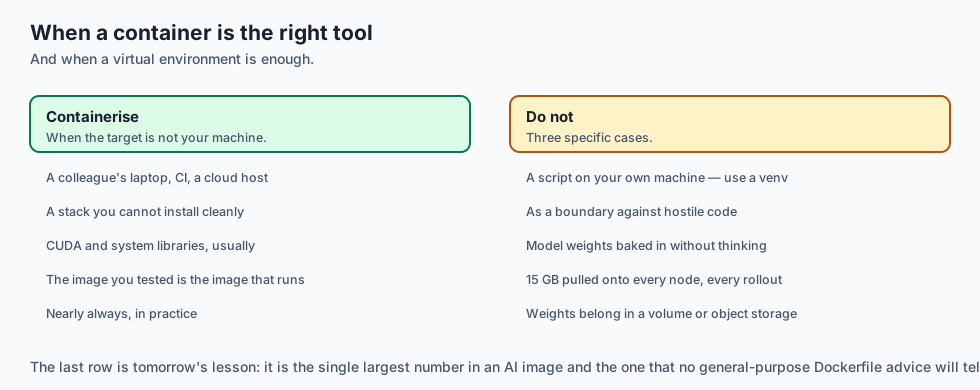
Use a container when the target machine is not yours — a colleague’s laptop, CI, a cloud host. This is nearly always.
Use one to pin a stack you cannot install cleanly, which is the usual case with CUDA and system libraries.
Do not reach for one to run a script on your own machine. A virtual environment is smaller, faster and enough.
Do not treat it as a security boundary against hostile code. Shared kernel. For untrusted workloads you want a VM boundary — gVisor, Firecracker, or an actual VM.
Do not put the model weights in the image without thinking. A 15 GB image is 15 GB pulled onto every node, every rollout. Weights usually belong in a volume or object storage, fetched at start.
The AI connection
-
AI images are where cache ordering hurts most. A
pip install torchlayer is minutes, not seconds, so aCOPY . .above it costs a coffee break per edit. -
Model weights turn a size problem into a rollout problem. A 15 GB image is 15 GB pulled onto every node, on every deploy — tomorrow’s lesson in full.
-
Reproducibility matters more for training than for serving. A moving base image quietly changes a CUDA or BLAS version, and the result is different numbers.
-
The layer that never disappears is the AI-specific footgun: a
COPYof a dataset or an.envwith an API key is recoverable from the image forever. -
cuda-develversuscuda-runtimeis a cache-and-size decision you make once in a Dockerfile and pay for on every pull thereafter.
Knowledge check
- Why does editing one Python file re-run
pip installin a Dockerfile that beginsCOPY . .? - A layer’s own inputs are unchanged, but it still rebuilds. Why?
- Why do the two Dockerfiles in the lab take almost the same time on a cold build, and what does that tell you about the cost of adopting the better order?
- Why is a secret that you
COPYand thenRUN rmstill readable in the image? - Why does the linter report
runs-as-rootat line 0?
Hands-on exercise
You will build a Dockerfile parser, a model of the layer cache, and a linter — then measure what one edit costs under two instruction orders.
Open starter/layer_cache.py in the lab directory and implement the stubbed functions, then run the tests. Docker is not required.
Expected output
Running python3 examples/cache_demo.py compares two Dockerfiles after one source edit:
--- the cost of one edit ---
  naive 76.0s vs ordered 1.0s
  ordering the same instructions is 76x faster to rebuild
Same base image, same packages, same application, different order.
Validate your work
Run bash tests/run_tests.sh. All twenty-eight tests must pass.
Then check three things by inspection. The two cold builds must be within a few seconds of each other — if reordering appears to speed up a first build, the model is skipping layers it should run. Editing README.md must cost nothing in the ordered Dockerfile and the full install in the naive one. And changing requirements.txt must re-run the install in both, because there the install genuinely does depend on what changed.
Troubleshooting
Everything after the first miss is still marked cached. That is the rule the lab exists for — set a flag on the first miss and carry it down.
The two Dockerfiles rebuild identically. Your path matcher does not treat . as covering every file, so COPY . . looks harmless.
A continuation becomes several instructions. Accumulate while a line ends with a backslash; emit only when it does not.
apt-cache-kept fires on a Dockerfile that does clean up. The cleanup must be in the same RUN — check the continuation was joined.
Common mistakes
Numbering instructions rather than lines, so the linter sends you to the wrong place.
Treating the last token of a COPY as a source; it is the destination.
Using a substring test for path matching, so src matches not-src/app.py.
Assuming reordering is a trade-off. It is not — the cold builds prove it is free.
Practice assignment
Add .dockerignore support. Give plan_build a set of ignore patterns and exclude matching files from what a broad COPY reads.
Then measure how much of the naive Dockerfile’s penalty it removes, and write a test pinning the answer. The result is instructive: ignoring README.md, .git and __pycache__ helps, and the naive Dockerfile is still catastrophically slower than the ordered one, because the source files it must copy are exactly the files you edit. .dockerignore reduces accidental invalidation; only ordering removes the structural kind.
Extension challenge
Model multi-stage builds, then check your model against reality.
Track stages by their AS name, and let COPY --from=builder depend on the builder stage’s cache state rather than on the project files. Then answer with a test: if a source file changes, does the final stage rebuild when the builder stage did not?
If you have Docker or Podman installed, do the second half. Build both Dockerfiles for real, touch one source file, rebuild, and time it. Compare the measured ratio with the 76x the model predicts.
It will not match, and the ways it is wrong are the interesting part: BuildKit parallelises independent stages, your registry may already hold the layers, and the first pip install is dominated by network rather than CPU. A model you know the error bars on is worth considerably more than one you have never checked.
Quiz
Q1. A Dockerfile begins `COPY . .` and then installs dependencies. Why does editing one Python source file re-run the whole install?
- Because pip always reinstalls when any file in the working directory changes
- Because Docker cannot cache RUN instructions at all
- The COPY layer misses, and everything below it rebuilds
- Because the base image is re-pulled whenever the build context changes
Show answer
Answer: C. The COPY layer misses, and everything below it rebuilds
The install's own inputs are unchanged. It rebuilds because its parent layer no longer exists in the form it was built against.
Q2. A layer's own inputs are unchanged and it still rebuilds. What explains it?
- The build cache expired
- The instruction was not deterministic
- Docker rebuilds every RUN instruction on every build
- A layer is a diff against a parent that no longer exists
Show answer
Answer: D. A layer is a diff against a parent that no longer exists
This is the half of the cache rule people forget, and it is why instruction ORDER matters more than instruction content.
Q3. In the lab, the naive and ordered Dockerfiles take 76.0s and 77.0s on a cold build. What does that tell you?
- That reordering is free, so there is no trade-off
- That the measurement is too noisy to draw a conclusion from
- That the ordered Dockerfile is slightly worse and should only be used in CI
- That cold builds are not affected by the cache at all, so the comparison is meaningless
Show answer
Answer: A. That reordering is free, so there is no trade-off
If reordering had a cost, adopting it would be a judgement call. It does not, so it is simply the right way to write the file.
Q4. Why is a secret that you `COPY` and then `RUN rm` still readable in the finished image?
- Because rm does not actually delete files inside a container
- The deletion is a later layer; the bytes are still there
- Because Docker keeps a backup of every file it copies
- Because the secret is cached in the registry rather than the image
Show answer
Answer: B. The deletion is a later layer; the bytes are still there
Deleting in a later layer never shrinks an image and never removes data. The fix is to never copy it — .dockerignore, a build secret, or a runtime variable.
Q5. The linter reports `runs-as-root` at line 0. Why line 0?
- Because the USER instruction is conventionally written on the first line
- Because line 0 always refers to the FROM instruction
- The finding is an absence, which has no line
- Because the parser failed to record a line number for that instruction
Show answer
Answer: C. The finding is an absence, which has no line
Findings that report a missing thing need a convention. Line 0 means "this is about the file as a whole" rather than any particular line.
Glossary
- Image
- A layered filesystem plus metadata describing how to start a process in it. Inert until a runtime creates a container from it.
- Layer
- A filesystem diff produced by one Dockerfile instruction, stored against a specific parent. Immutable, and every one is kept.
- Build Cache
- The reuse of previously built layers. Governed by one rule — a layer is reused only if every layer above it was reused and its own inputs are unchanged.
- Cache Key
- What identifies a layer for reuse — the parent's identity, the instruction text, and for COPY and ADD a hash of the file contents being copied.
- First Miss
- The topmost layer that could not be reused. Everything below it rebuilds regardless of its own inputs, so this one layer explains the whole cost of a build.
- Build Context
- The set of files sent to the builder and therefore visible to COPY. Narrowed by .dockerignore, which is what controls accidental cache invalidation.
- Multi-Stage Build
- A Dockerfile with several FROM instructions where a later stage copies artefacts out of an earlier one, leaving the build tools behind.
- Base Image
- The image a build starts FROM. Unpinned, it is a moving target — a rebuild months later gets a different operating system and a different set of vulnerabilities.
- Tag versus Digest
- A tag is a mutable pointer such as 3.12-slim; a digest identifies exact bytes. A tag is a promise about compatibility, not identity.
- OCI
- The Open Container Initiative, whose image and runtime specifications are why Docker, Podman, containerd and Kubernetes all consume the same images.
- Rootless Container
- A container whose process does not run as uid 0. Achieved with a USER instruction, and the cheapest single reduction in blast radius available.
Sources and further reading
- Dockerfile Reference — Docker Documentation (accessed 2026-08-31)
- Building Best Practices — Docker Documentation (accessed 2026-08-31)
- Docker Build Cache — Docker Documentation (accessed 2026-08-31)
- Open Container Initiative Image Format Specification — Open Container Initiative (accessed 2026-08-31)
- Podman — A Daemonless Container Engine — Containers organisation (accessed 2026-08-31)
Kept in this browser, no account needed. Your progress page turns the whole record into one link you can bookmark or open on another device.