Deployment, MLOps, and Security › Containers and Cloud › Day 335
Day 335: CI/CD with GitHub Actions
Read a CI pipeline as the job graph it is, and learn why deleting the stage that has never caught a bug makes it zero seconds faster while one cache saves nearly four minutes. Then learn the one-word trigger difference that hands your repository secrets to a fork.
Hands-on lab for this lesson
Lab files on GitHub: https://github.com/ai-roadmap-365/ai-roadmap-365.github.io/tree/main/labs/sections/deployment-mlops-and-security/day-335-ci-cd-with-github-actions
- Get the hands-on files. Clone the labs repository once (you can reuse this clone for every lesson). This works on macOS, Linux, and Windows (PowerShell or WSL):
git clone https://github.com/ai-roadmap-365/ai-roadmap-365.github.io.git cd ai-roadmap-365.github.io - Open this lesson's lab. Move into the directory for this specific day. Every lab lives at the same predictable path — section / subsection / week / day:
cd labs/sections/deployment-mlops-and-security/day-335-ci-cd-with-github-actions - Read the lab guide. Open `README.md` in that directory. It lists the exact commands, what each does, the expected output, and how to check your work — read it before running anything.
- Run it and check your work. Follow the README's "How to run" section: run the example first to see the finished result, then complete the numbered exercises in `starter/`, then run the tests. The tests pass (exit 0) only when your work is correct.
bash tests/run_tests.sh # or the test command named in the lab README
You can also open the lab as a local page (works offline, shows the file tree and expected output).
Learning objectives
By the end of this lesson you will be able to:
- Compute finish times across a graph where independent jobs run in parallel.
- Distinguish wall-clock time from runner minutes, and say which change improves each.
- Explain why pull_request_target with secrets is dangerous and pull_request is not.
- Identify gates that have never fired and slow jobs with no cache.
- Show why removing an off-critical-path job saves money and no time.
Prerequisites
Why this matters
Every pipeline is slow, and every team knows which job to blame. It is usually the one that has never caught anything — the licence scan, the docs build, the stage somebody added two years ago for a reason nobody remembers.
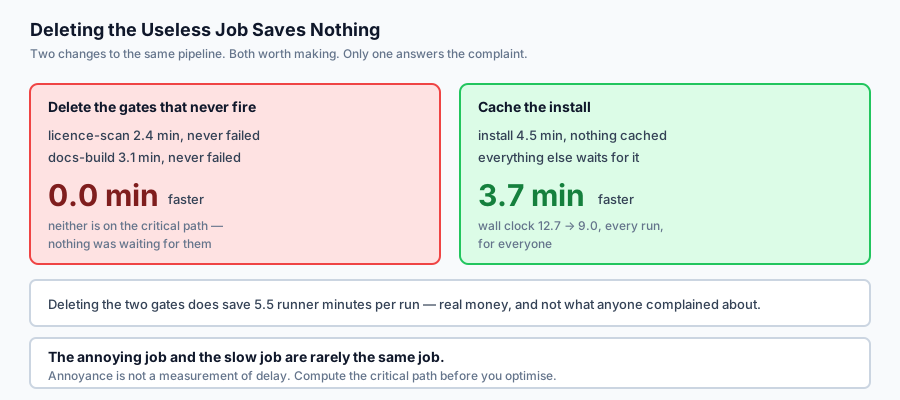
Delete it and the pipeline gets no faster. Here is the measurement from today’s lab:
licence-scan   NOT on the critical path   wall 12.7 -> 12.7 (saves 0.0)
docs-build     NOT on the critical path   wall 12.7 -> 12.7 (saves 0.0)
Zero seconds, for both. Nothing was waiting for either of them, so removing them cannot make anything finish sooner. Meanwhile:
install 4.5 -> 0.8 min (a dependency cache)
wall 12.7 -> 9.0 min   saves 3.7 min per run
One cache, on the one job everything else waits for, saves nearly four minutes on every run for everyone.
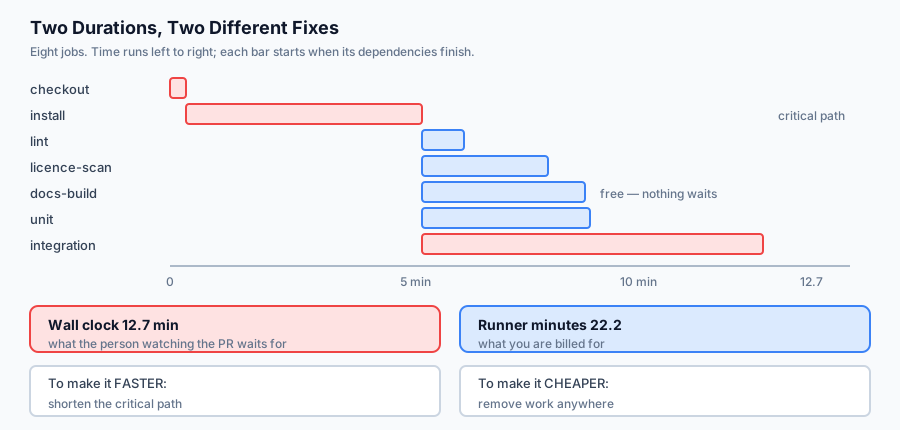
The reason the instinct fails is that a pipeline has two durations, and they are improved by different actions. Wall clock is the critical path — what the person watching the pull request waits for. Runner minutes are the sum of everything — what you are billed for. Deleting a useless off-path job improves the second and not the first, which is why the pipeline still feels slow after a satisfying afternoon of cleanup.
The idea in plain language
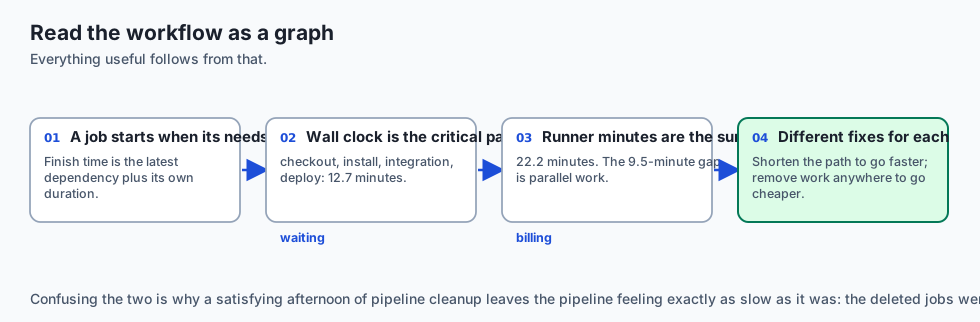
A workflow is a directed graph. Jobs are nodes, needs: gives the edges, and everything useful follows from reading it as a graph.
A job starts when everything it needs has finished. So its finish time is the latest of its dependencies, plus its own duration. Jobs with no dependency on each other run at the same time.
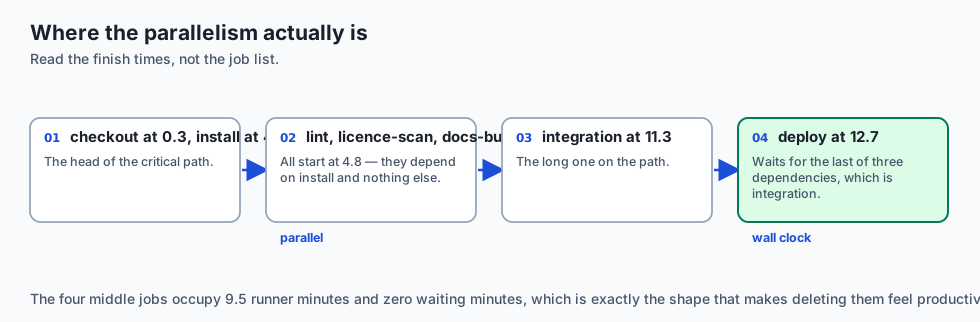
Wall clock is the critical path — the longest chain of dependent jobs. In the lab’s pipeline that is checkout → install → integration → deploy, at 12.7 minutes. Six other jobs run inside that window and cost nothing in waiting.
Runner minutes are the sum, 22.2 in the same pipeline. The 9.5-minute gap is parallel work: real money, no waiting.
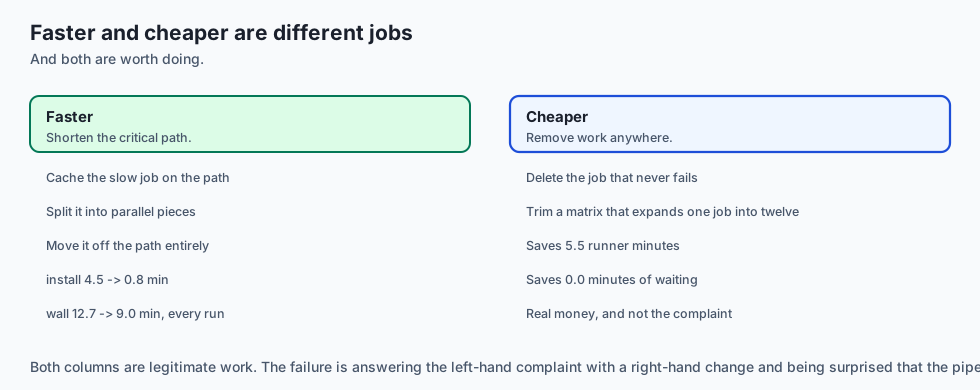
To make a pipeline faster, shorten the critical path — cache the slow job on it, split it, or move it off. To make it cheaper, remove work anywhere. Those are different jobs and they are frequently confused.
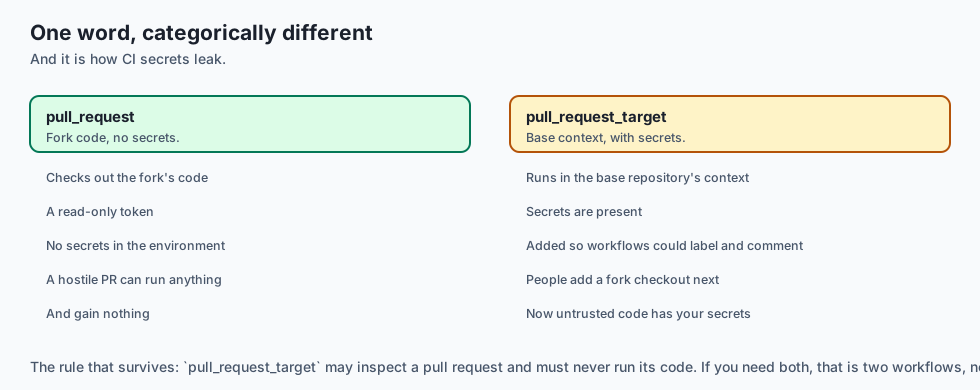
The third question is not about time at all. pull_request_target runs a workflow with your repository’s secrets against code that a fork controls. It is one word different from the safe trigger, and it is how CI secrets leak.
Historical background
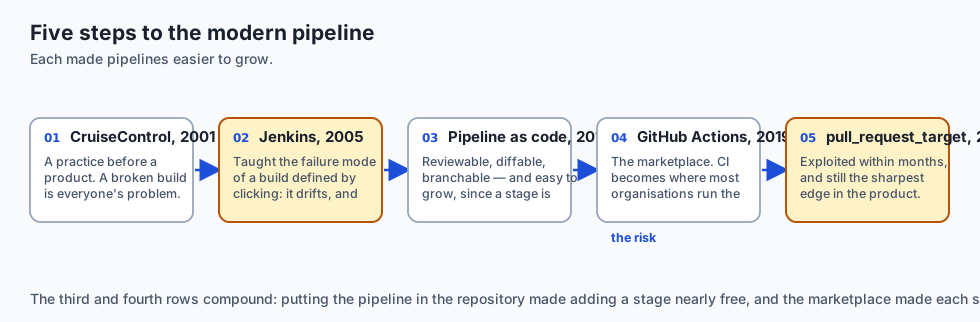
CruiseControl and continuous integration, 2001
CI began as a practice before it was a product: integrate frequently, build automatically, keep the build green. CruiseControl was the first widely used server. The insight was social — a broken build is everyone’s problem — and the tooling followed.
Jenkins (Hudson), 2005
Dominated for a decade and taught the industry the failure mode of a pipeline defined by clicking through a web interface: the build is not in version control, it drifts, and nobody can reproduce it.
Pipeline as code, 2015 onward
Travis CI’s .travis.yml, then Jenkinsfile, then GitLab CI. Putting the pipeline in the repository made it reviewable, diffable and branchable, which is why every modern system does it. It also made pipelines grow — a stage is now a small diff rather than a conversation with whoever administers the server.
GitHub Actions, 2019
The distinguishing idea was the marketplace: uses: some-org/some-action@v3 composes somebody else’s step into your build. Enormously convenient, and it made CI the place where most organisations run the most untrusted code with the highest privilege.
pull_request_target, 2020
Added because workflows on fork pull requests could not label, comment or triage — they had no token with write access. The new trigger runs in the base repository’s context with its secrets. Within months it was being exploited in the obvious way, and it remains the sharpest edge in the product.
What it is — and what it is not
CI/CD is an automated pipeline that builds, checks and deploys a change, defined in the repository it acts on.
What it is
It is a graph with two costs. Time waited and time billed, and they respond to different changes.
It is a set of gates. Each one is a claim that something is worth blocking a merge over.
It is a privileged execution environment. It holds deployment credentials and runs on every push.
What it is not
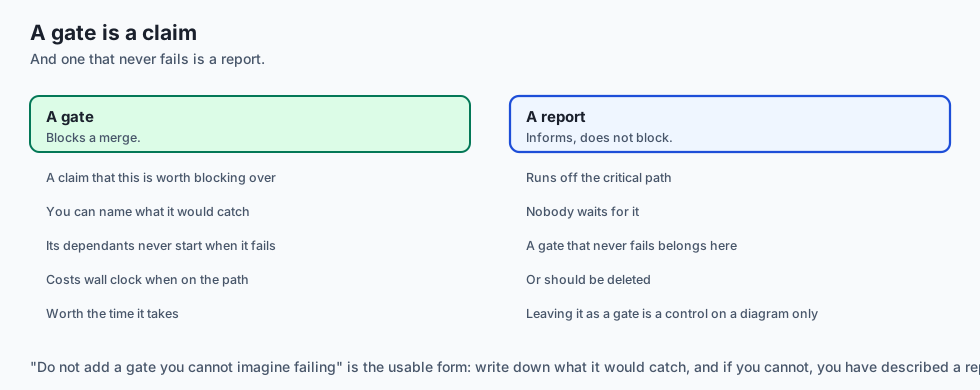
It is not a guarantee of quality. A pipeline of gates that never fail is theatre with a bill attached.
It is not free even when the tier is. Runner minutes are money, and a slow pipeline costs engineer attention, which is dearer.
It is not a safe place to run untrusted code by default. That is a property you have to arrange.
Why it was created and what problems it solves
“It works on my machine”, at the team level. Solution: one environment that builds every change the same way.
Integration pain deferred until release. Solution: integrate on every push, so the pain arrives in small pieces.
Deployment as tribal knowledge. Solution: the deploy is a job in a file anyone can read.
Build configuration that drifts and cannot be reproduced. Solution: the pipeline lives in the repository and is reviewed like code.
Nobody knowing why the pipeline takes eleven minutes. Solution: compute the critical path, which names the jobs actually responsible.
How it works
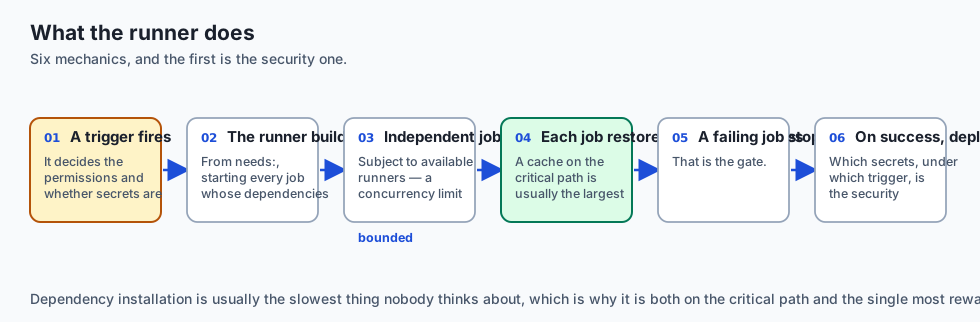
A trigger fires — a push, a pull request, a schedule, a manual dispatch. The trigger decides the permissions and whether secrets are present, which is the part people skip.
The runner builds the job graph from needs: and starts every job whose dependencies are satisfied.
Independent jobs run concurrently, subject to how many runners you have. This is why wall clock and runner minutes diverge — and why a concurrency limit can quietly turn theoretical parallelism back into a queue.
Each job restores its caches, runs its steps, and saves caches back. A cache on the critical path is usually the largest available saving, because dependency installation is usually the slowest thing nobody thinks about.
A job fails and its dependants never start. That is the gate.
On success, a deploy job runs with secrets. Which secrets, and under which trigger, is the security question — and pull_request_target is where it goes wrong.
An everyday analogy
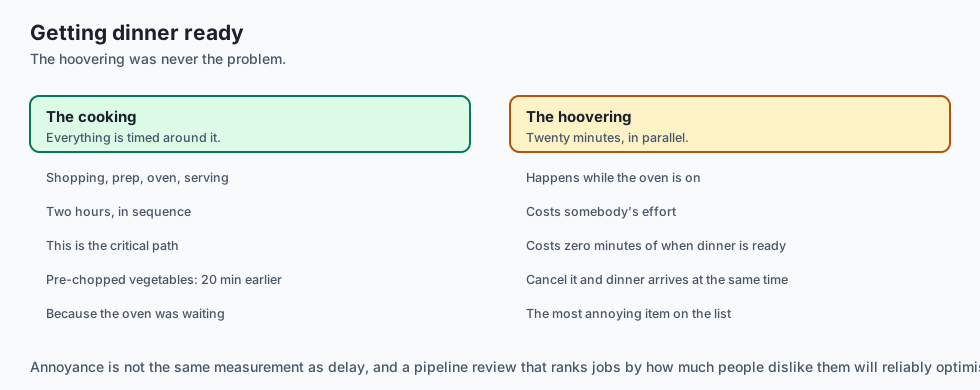
Think of getting a house ready before guests arrive.
The cooking takes two hours and everything is timed around it: shopping, then prep, then the oven, then serving. That is the critical path.
Hoovering takes twenty minutes and happens while the oven is on. It costs twenty minutes of somebody’s effort and zero minutes of when dinner is ready — because nothing was waiting for it.
Now somebody complains that the whole thing takes too long, and the obvious target is the job nobody enjoys. Cancel the hoovering and dinner arrives at exactly the same time. Buy pre-chopped vegetables — twenty minutes off the prep, which the oven was waiting for — and dinner is twenty minutes earlier.
The hoovering was never the problem. It was just the most annoying thing on the list, and annoyance is not the same measurement as delay.
Examples in practice
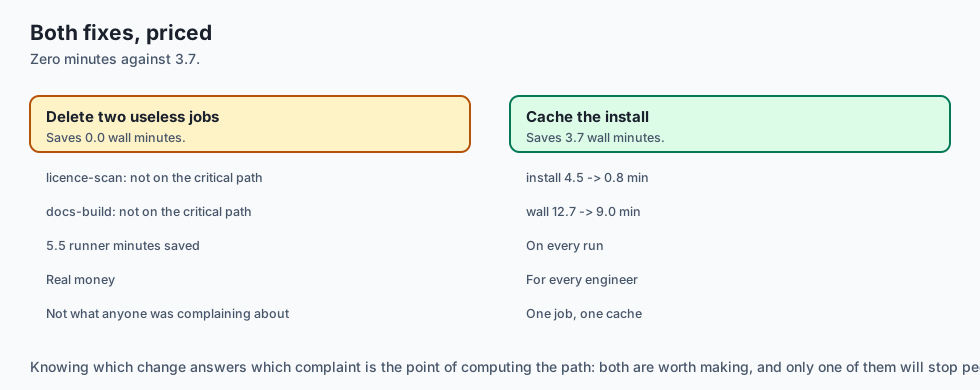
The measured output from today’s lab, on an eight-job pipeline:
  wall clock   12.7 min   along checkout -> install -> integration -> deploy
  runner time  22.2 min billed
  the gap       9.5 min of work happening in parallel
And the finish table, which shows where the parallelism is:
    0.3 min  checkout
    4.8 min  install
    5.6 min  lint
    7.2 min  licence-scan
    7.9 min  docs-build
    8.0 min  unit
   11.3 min  integration
   12.7 min  deploy
Everything from lint to integration starts at 4.8 minutes — they all depend on install and nothing else, so they run together. deploy waits for the last of its three dependencies, which is integration at 11.3.
The review finds the two jobs that have never failed and the two that are slow with no cache. Then it prices the fixes:
  licence-scan   NOT on the critical path   saves 0.0 min wall   2.4 runner minutes
  docs-build     NOT on the critical path   saves 0.0 min wall   3.1 runner minutes

  install 4.5 -> 0.8 min (a dependency cache)
  wall 12.7 -> 9.0 min   saves 3.7 min per run
Deleting both useless jobs: zero. It saves 5.5 runner minutes, which is real money and is not what anyone was complaining about. One cache on install saves 3.7 minutes of waiting, on every run, for every engineer.
Both changes are worth making. Knowing which one answers which complaint is the point.
Finally, the same jobs under a different trigger:
--- the same jobs, triggered unsafely ---
  [secrets-exposed-to-forks] deploy
Nothing about the jobs changed. pull_request_target instead of pull_request is the entire difference, and it moves the deploy job’s secrets into reach of code a fork controls.
Implications: security, privacy, performance, scalability, and cost
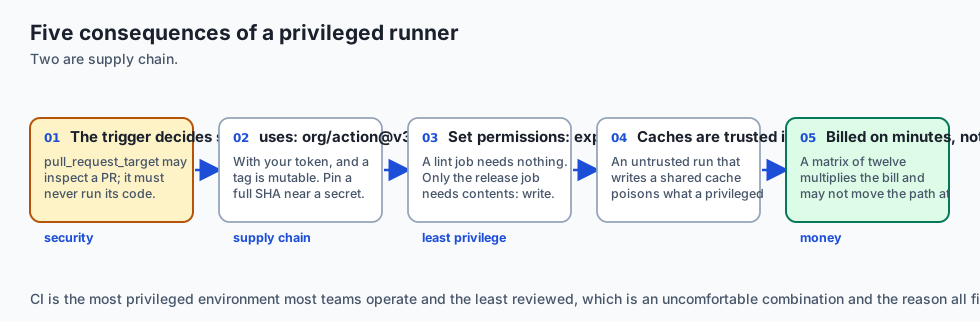
Security — the one to remember. pull_request checks out the fork’s code with a read-only token and no secrets; a hostile PR can run anything and gain nothing. pull_request_target runs in the base repository’s context with secrets, so that a workflow can label or comment on a fork’s PR. Combine it with a checkout of the fork’s code — which is what people add next, because otherwise the workflow cannot see the change — and untrusted code executes with your secrets in the environment. The rule that survives: pull_request_target may inspect a pull request; it must never run its code.
Supply chain. uses: org/action@v3 runs somebody else’s code with your token, and a tag is mutable. Pin to a full commit SHA for anything near a secret.
Least privilege. Set permissions: explicitly. A lint job needs nothing; only the release job needs contents: write.
Caches are trusted inputs. A run triggered from a fork that can write a shared cache can poison what a later privileged run restores. Scope cache keys so untrusted runs cannot write where trusted runs read.
Cost. You are billed runner minutes, not wall clock. A matrix that expands one job into twelve multiplies the bill and may not move the critical path at all.
Scalability. Parallelism is bounded by available runners. With a concurrency limit of two, most of the 9.5-minute gap becomes queueing, and the wall clock rises toward the runner-minute total.
Alternatives: free, open source, and commercial
GitHub Actions — free for public repositories, generous for private ones, and the marketplace is both the feature and the risk. The default for anything already on GitHub.
GitLab CI — mature, with a first-class self-hosted story. Its needs: keyword expresses exactly the graph this lab models.
act — MIT-licensed, runs Actions workflows locally in containers. The fastest way to shorten the push-and-wait loop, and it will not reproduce runner-specific behaviour exactly.
Woodpecker, Drone, Forgejo Actions — lightweight open-source CI you can self-host on one machine, which pairs well with the previous two days.
Buildkite, CircleCI, Jenkins — commercial or self-hosted, chosen when you need particular runner hardware or an existing investment. Jenkins remains the answer for organisations with a decade of plugins.
The honest default: GitHub Actions with explicit permissions:, third-party actions pinned to a SHA, and a dependency cache on whatever the critical path runs through.
Comparison with related concepts
Wall clock versus runner minutes. Waiting against billing. The single most useful distinction in this lesson, and the one that makes cleanup efforts miss.
pull_request versus pull_request_target. Fork code with no secrets, against base context with secrets. One word apart and categorically different.
Gate versus report. A gate blocks a merge; a report informs. A gate that never fails should become a report or be deleted — leaving it as a gate costs time and provides a control that exists only on the diagram.
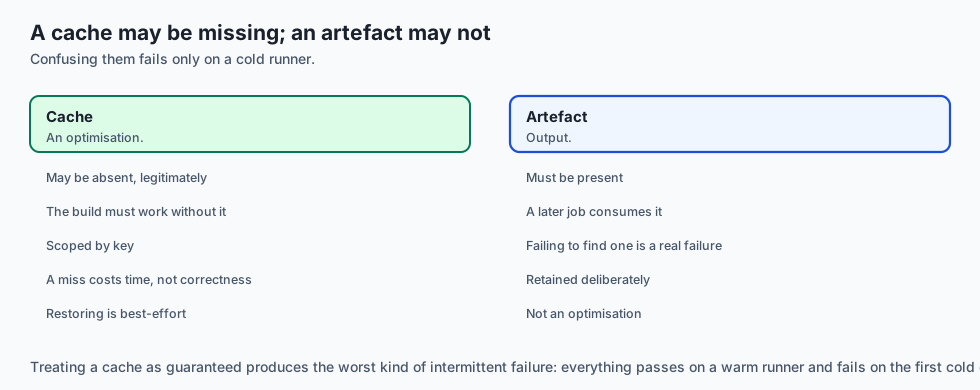
Cache versus artefact. A cache is an optimisation and may be missing; an artefact is output and must not be. Treating a cache as guaranteed produces builds that fail only on a cold runner.
CI versus CD. Integration checks every change; delivery ships it. The security question lives almost entirely in the second, because that is where the credentials are.
When to use it — and when not to
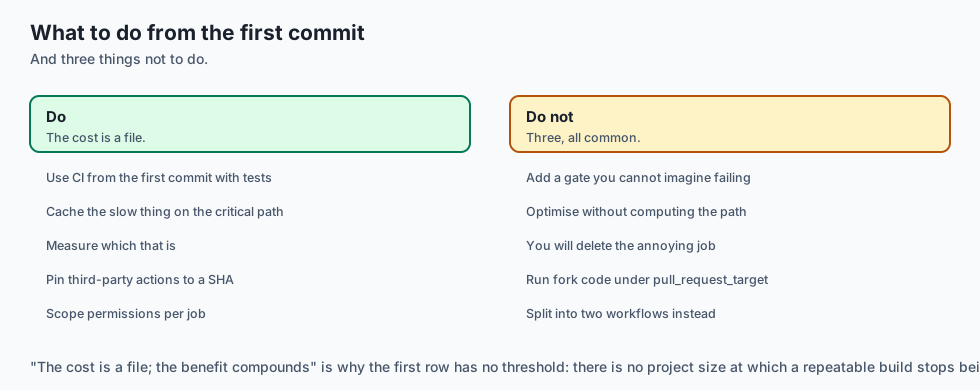
Use CI from the first commit of anything with tests. The cost is a file; the benefit compounds.
Cache the slow thing on the critical path, and measure rather than guess which that is.
Use pull_request_target only to inspect metadata, never to run fork code. If you need both, split into two workflows.
Do not add a gate you cannot imagine failing. Write down what it would catch. If you cannot, it is a report.
Do not optimise a pipeline without computing the critical path. You will delete the annoying job and be disappointed.
Do not deploy from CI without pinned actions and scoped permissions. It is the most privileged environment most teams operate and the least reviewed.
The AI connection
-
AI pipelines have an unusually slow critical path, because model downloads and large wheels live in the install job everything else waits on.
-
CI is where an evaluation gate belongs — Day 356’s scorecard as a job, so a retrieval regression blocks a merge instead of being discovered in production.
-
A GPU job in CI is expensive per minute, which makes the wall-clock versus runner-minute distinction a much larger sum of money than for a web service.
-
Model weights are a cache, not an artefact. Treating them as guaranteed produces a pipeline that passes warm and fails on a cold runner.
-
CI holds the credentials that reach your model provider, which is why
pull_request_targetmatters here even more than it does for a web deploy.
Knowledge check
- Why does deleting a job that has never caught a bug often save zero seconds of pipeline time?
- What is the difference between wall clock and runner minutes, and which does a cache on the critical path improve?
- Why is
pull_request_targetdangerous whenpull_requestis not? - When a job is removed, why must its dependants inherit its dependencies?
- Why should a gate that has never failed be deleted or downgraded rather than left alone?
Hands-on exercise
You will compute a pipeline’s two durations, review its shape, and price two competing changes.
Open starter/pipeline.py in the lab directory and implement the stubbed functions, then run the tests. No GitHub account or runner is used.
Expected output
Running python3 examples/pipeline_demo.py analyses an eight-job pipeline:
  licence-scan   NOT on the critical path   wall 12.7 -> 12.7 (saves 0.0)
  docs-build     NOT on the critical path   wall 12.7 -> 12.7 (saves 0.0)
  install 4.5 -> 0.8 min (a dependency cache)
  wall 12.7 -> 9.0 min   saves 3.7 min per run
Two deletions: nothing. One cache: 3.7 minutes.
Validate your work
Run bash tests/run_tests.sh. All twenty-seven tests must pass.
Then check three things by inspection. Runner minutes must exceed wall clock whenever any work is parallel — if they are equal everywhere, finish_times is accumulating across every job rather than along dependency edges, and the entire lesson disappears. Removing an off-path job must save exactly 0.0 of wall clock. And secrets-exposed-to-forks must fire on pull_request_target and stay silent on pull_request.
Troubleshooting
Wall clock equals runner minutes. Jobs with no dependencies must start at zero, not after the previous job.
An off-path removal saves time. Your critical path is wrong.
finish_times loops forever. Check for a cycle and raise before scheduling.
The finding fires on pull_request. Only pull_request_target exposes secrets to fork-controlled code.
Common mistakes
Summing durations for wall clock, which is the error that makes every conclusion wrong.
Dropping a removed job’s edges without re-pointing its dependants, which overstates every saving.
Reporting no-cache on every job, which produces a rule nobody reads.
Treating parallelism as free without checking how many runners exist.
Practice assignment
Add a concurrency limit. Real accounts have a finite number of runners, and the lab currently assumes unlimited.
Recompute wall clock with two runners available, then with four, and write a test pinning both. What you should find is that most of the 9.5-minute gap was theoretical: with two runners the six parallel jobs queue, and the wall clock rises substantially toward the runner-minute total.
This changes the advice in an interesting way. Under a real concurrency limit, deleting the never-firing gates does save wall clock, because they were occupying a runner that something on the critical path was waiting for. The conclusion in the lesson holds for an unconstrained account and inverts for a constrained one, which is worth knowing before repeating either as a rule.
Extension challenge
Analyse your own workflow, with two numbers you can get and one you probably have never looked at.
The durations are easy — any recent run lists them. The graph is in the file. The third number is the one that matters: for each job, how many times has it actually gone red this quarter?
Most teams have never asked. When you do, you typically find two or three jobs that have not failed in a year still blocking every merge, and one job that fails constantly for reasons unrelated to the change — which is worse, because a gate that cries wolf teaches people to re-run rather than read.
Then compute your critical path and compare it against which job everybody complains about. If they are the same job, your team’s intuition is well calibrated. If they are not, you have found something more useful than a faster pipeline.
Quiz
Q1. Why does deleting a job that has never caught a bug often save zero seconds of pipeline time?
- Because the runner still allocates time for deleted jobs
- Nothing was waiting for a job off the critical path
- Because CI systems cache the previous run's duration
- Because the job is retried automatically elsewhere
Show answer
Answer: B. Nothing was waiting for a job off the critical path
In the lab, deleting both never-firing gates saves 0.0 minutes of wall clock and 5.5 runner minutes. Real money, and not what anyone was complaining about.
Q2. What is the difference between wall clock and runner minutes, and which does a cache on the critical path improve?
- They are the same measurement reported in different units
- Wall clock includes queueing and runner minutes does not
- Wall clock is the longest chain; minutes are the sum
- Runner minutes measure only the deploy job
Show answer
Answer: C. Wall clock is the longest chain; minutes are the sum
A cache off the critical path improves only the bill. On it, it improves the waiting too, which is why identifying the path first is what makes the optimisation land.
Q3. Why is pull_request_target dangerous when pull_request is not?
- Because it runs on a slower class of runner
- Because it cannot be restricted by the permissions key
- Because it bypasses branch protection rules
- It runs with secrets in the base repository's context
Show answer
Answer: D. It runs with secrets in the base repository's context
pull_request checks out fork code with a read-only token and no secrets. The rule that survives is that pull_request_target may inspect a pull request and must never run its code.
Q4. When a job is removed from a workflow, why must its dependants inherit its dependencies?
- Otherwise dependants become roots and start at once
- To preserve the original job count for billing
- Because GitHub Actions requires every job to have a dependency
- Because the cache keys would otherwise be invalidated
Show answer
Answer: A. Otherwise dependants become roots and start at once
Dropping the edge without re-pointing it is the difference between modelling a deletion and modelling a deletion plus an accidental reordering.
Q5. Why should a gate that has never failed be deleted or downgraded to a report rather than left in place?
- Because CI systems penalise workflows with unused jobs
- A scanner nobody has seen fire is not a control
- Because passing jobs make failures harder to spot in the log
- Because gates expire after a fixed number of runs
Show answer
Answer: B. A scanner nobody has seen fire is not a control
The security version of the same point matters more — a scanner that has never reported anything is either misconfigured or unread, and both mean the control is not real.
Glossary
- Job Graph
- The directed graph a workflow describes, where jobs are nodes and needs declarations are edges. Every useful question about a pipeline is a question about this graph.
- Critical Path
- The longest chain of dependent jobs, and therefore the wall-clock time of the pipeline. Shortening it is the only way to make a pipeline finish sooner.
- Wall Clock
- How long the person watching the pull request waits. Determined by the critical path, not by the number of jobs.
- Runner Minutes
- The sum of every job's duration, and what you are billed for. Reduced by removing work anywhere, on the critical path or not.
- Gate
- A job whose failure blocks a merge. A gate that has never failed is a report wearing a gate's clothes, and it costs time on every run.
- Dependency Cache
- Stored dependencies restored at the start of a job. Usually the largest single saving available, and only a wall-clock saving when the cached job is on the critical path.
- pull_request
- A trigger that runs against a fork's code with a read-only token and no secrets. A hostile pull request can run anything and gain nothing.
- pull_request_target
- A trigger that runs in the base repository's context with its secrets, so a workflow can label or comment on a fork's pull request. It must never run the fork's code.
- GITHUB_TOKEN
- The automatically provisioned token for a workflow run. Its permissions should be set explicitly and narrowed per job rather than inherited.
- Action Pinning
- Referencing a third-party action by full commit SHA rather than a mutable tag. A tag can be moved by its author or by anyone who compromises them.
- Concurrency Limit
- The number of runners available at once. It converts theoretical parallelism into queueing, and it can invert the advice about which job to remove.
Sources and further reading
- Workflow Syntax for GitHub Actions — GitHub Docs (accessed 2026-08-31)
- Security Hardening for GitHub Actions — GitHub Docs (accessed 2026-08-31)
- Keeping Your GitHub Actions and Workflows Secure — Preventing pwn Requests — GitHub Security Lab (accessed 2026-08-31)
- Caching Dependencies to Speed Up Workflows — GitHub Docs (accessed 2026-08-31)
- act — Run Your GitHub Actions Locally — nektos (accessed 2026-08-31)
Kept in this browser, no account needed. Your progress page turns the whole record into one link you can bookmark or open on another device.