Deployment, MLOps, and Security › Operating AI in Production › Day 337
Day 337: Deploying to a Cloud Service
Master cloud AI infrastructure provisioning: deploy containerized AI workloads to serverless and container orchestration services (Cloud Run with GPU, AWS ECS Fargate, GCP GKE) using declarative Terraform and Python.
Hands-on lab for this lesson
Lab files on GitHub: https://github.com/ai-roadmap-365/ai-roadmap-365.github.io/tree/main/labs/sections/deployment-mlops-and-security/day-337-deploying-to-a-cloud-service
- Get the hands-on files. Clone the labs repository once (you can reuse this clone for every lesson). This works on macOS, Linux, and Windows (PowerShell or WSL):
git clone https://github.com/ai-roadmap-365/ai-roadmap-365.github.io.git cd ai-roadmap-365.github.io - Open this lesson's lab. Move into the directory for this specific day. Every lab lives at the same predictable path — section / subsection / week / day:
cd labs/sections/deployment-mlops-and-security/day-337-deploying-to-a-cloud-service - Read the lab guide. Open `README.md` in that directory. It lists the exact commands, what each does, the expected output, and how to check your work — read it before running anything.
- Run it and check your work. Follow the README's "How to run" section: run the example first to see the finished result, then complete the numbered exercises in `starter/`, then run the tests. The tests pass (exit 0) only when your work is correct.
bash tests/run_tests.sh # or the test command named in the lab README
You can also open the lab as a local page (works offline, shows the file tree and expected output).
Learning objectives
By the end of this lesson you will be able to:
- Deconstruct the operational trade-offs between Serverless Container Hosting (Cloud Run / Modal) vs Dedicated Managed Kubernetes (EKS / GKE).
- Implement Infrastructure as Code (IaC) with Terraform provisioning container registries, GPU node pools, and IAM security perimeters.
- Configure automated Continuous Deployment (CD) pipelines pushing immutable versioned images and triggering rolling cluster updates.
- Build a Cloud Deployment Orchestration Simulator in Python modeling infrastructure provisioning, IAM binding, and rolling deployments.
- Evaluate cloud cost optimization: reserved instances vs savings plans vs spot GPU autoscaling policies.
Prerequisites
Why this matters
Moving an AI model from a local laptop or training environment into a production cloud infrastructure is one of the most critical transitions in modern software engineering. Manual click-ops deployments in cloud web consoles lead to catastrophic operational vulnerabilities:
- Configuration Drift: Subtle discrepancies between Staging and Production GPU drivers or environment variables cause obscure runtime crashes.
- Downtime During Upgrades: Rebuilding containers directly on production hosts drops ongoing user connections and truncates live streaming tokens.
- Runaway Cloud Costs: Failing to implement automated scale-to-zero or reservation commitments results in tens of thousands of dollars in wasted cloud spend.
Mastering Cloud AI Deployment with Infrastructure as Code (Terraform), Cloud Run / ECS GPU hosting, and Blue-Green zero-downtime cutover establishes a reproducible, rock-solid foundation for enterprise AI applications.
The idea in plain language
Think of cloud AI deployment like launching a high-end luxury restaurant chain:
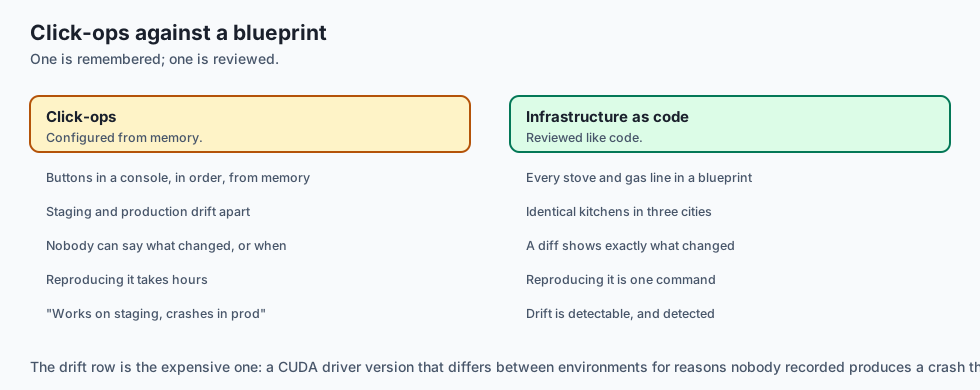
- Click-Ops (Manual Cooking in the Dark): The head chef flies to each city, buys pans at random stores, and guesses the recipe from memory (Error-Prone Configuration Drift).
- Infrastructure as Code (Master Architectural Blueprint): The company uses an exact CAD blueprint (Terraform Script) specifying every stove, gas line, and refrigeration unit. You press a button, and identical restaurant kitchens are built in Tokyo, London, and New York in minutes (Reproducible Infrastructure).
- Blue-Green Deployment (The Grand Opening): The old dining room (Blue) serves guests normally. When the brand-new dining hall (Green) is fully staffed and inspected, the maitre d’ simply unlocks the new doors and guides arriving guests to the new hall with zero interruption (Instant Zero-Downtime Cutover).
Historical background
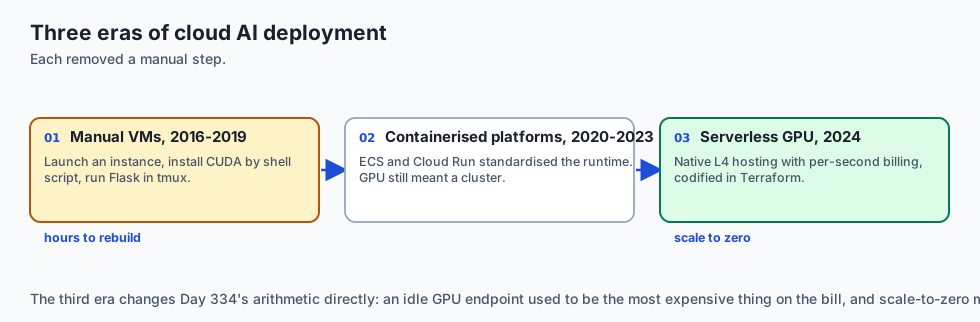
Cloud deployment architectures for machine learning evolved across three distinct eras:
1. Manual Virtual Machine Provisioning (2016–2019)
Engineers manually launched AWS EC2 p2.xlarge instances, installed CUDA drivers via shell scripts, and ran Flask apps in tmux sessions. Any instance termination required hours of manual reconstruction.
2. Containerized Cloud Platforms (2020–2023)
Docker containers standardized runtime environments. Platforms like AWS ECS and Google Cloud Run emerged, though GPU support remained restricted to complex dedicated Kubernetes clusters.
3. Serverless GPU & Modern Declarative Cloud (2024–Present)
Google Cloud Run launched native Nvidia L4 GPU serverless hosting with per-second billing. Terraform and Pulumi became industry standards for codifying complete GPU AI architectures with automated canary verification.
What it is — and what it is not
Let us define the core mechanisms of production cloud deployments:
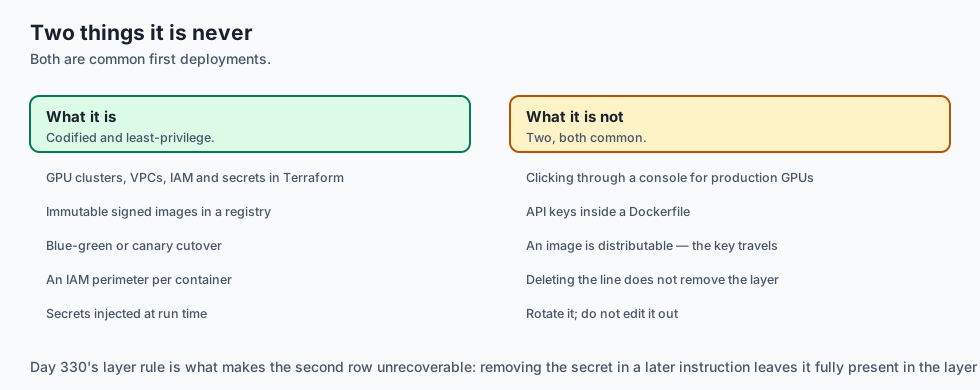
What Cloud AI Deployment Is:
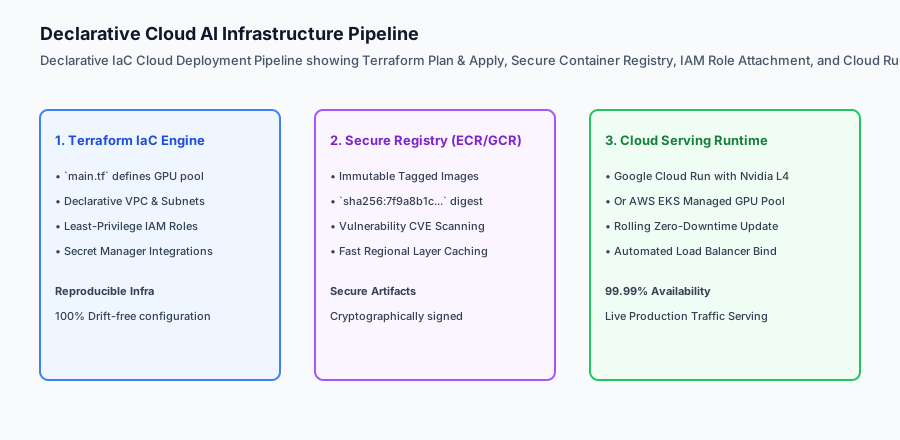
- Codifying cloud infrastructure (GPU clusters, VPC networks, IAM roles, and secrets) into declarative Terraform templates.
- Building immutable, cryptographically signed Docker images and storing them in secure container registries.
- Executing zero-downtime Blue-Green or Canary cutovers to prevent user connection drops.
- Enforcing least-privilege IAM perimeters isolating container access to designated cloud resources.
What Cloud AI Deployment Is Not:
- Manually clicking buttons in the AWS/GCP web console to configure production GPU servers.
- Storing unencrypted production API keys or AWS credentials inside container Dockerfiles.
+-------------------------------------------------------------------------------+
|                    CLOUD HOSTING PLATFORM COMPARISON MATRIX                   |
+-------------------+-----------------------+-------------------+---------------+
| Platform          | Execution Model       | Pricing Model     | Best For      |
+-------------------+-----------------------+-------------------+---------------+
| Google Cloud Run  | Serverless Container  | Per-millisecond   | Spiky traffic,|
| (with GPU)        | with Scale-to-Zero    | active compute    | sub-5k req/day|
| AWS ECS Fargate / | Managed Container     | Hourly instance   | Predictable   |
| EC2 GPU Tasks     | Orchestration         | + commitment disc | steady traffic|
| Kubernetes (GKE / | Full Distributed      | Hourly node pool  | High-concurr, |
| EKS Multi-Node)   | Cluster Control       | + cluster mgmt fee| multi-GPU TP  |
| Modal / RunPod    | Specialized Serverless| Per-second GPU    | Fast cold-start|
| Serverless        | Cloud                 | execution billing | custom kernels|
+-------------------+-----------------------+-------------------+---------------+
Why it was created and what problems it solves
Cloud deployment patterns resolve the three primary failure modes of enterprise AI operations:
1. Eliminating Environment Drift via Declarative Terraform
IaC guarantees that Staging and Production environments use identical CUDA driver versions, memory limits, and networking rules, eliminating “works on staging but crashes in prod” incidents.
2. Zero-Downtime Model Version Upgrades
Blue-Green and Canary traffic routing ensure that when updating an LLM weights checkpoint or server version, active streaming responses finish cleanly without truncation.
3. Slashing Cloud Spend via Commitment Modeling
Balancing spot GPU autoscaling for peak bursts with 1-year savings plan commitments for steady-state traffic cuts monthly cloud bills by 40% to 60%.
How it works
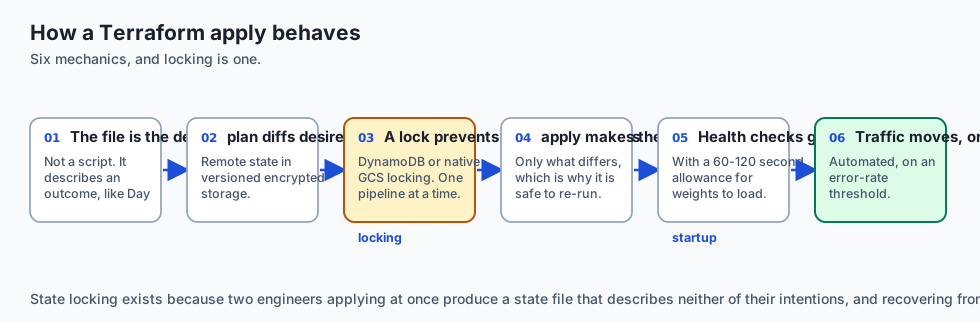
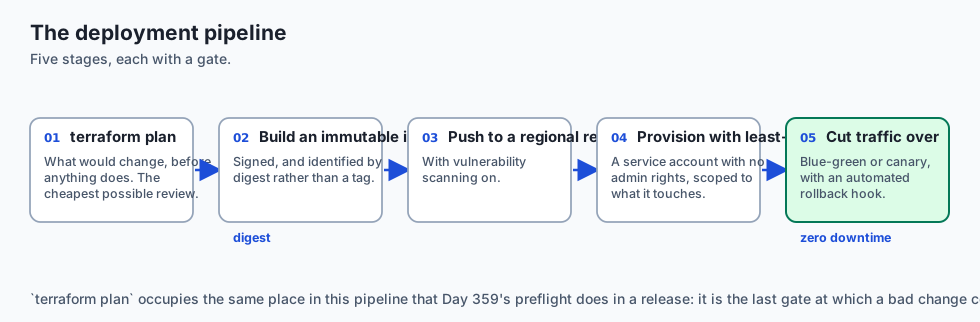
Let us inspect the complete Declarative Cloud Deployment Workflow:
[Developer pushes git commit to main branch]
                    │
                    ▼
[GitHub Actions CI/CD Pipeline]
  1. Executes pytest suite & ruff linting
  2. Builds multi-stage GPU Docker image
  3. Pushes image to Artifact Registry: `us-docker.pkg.dev/ai/vllm:v2.4.0`
                    │
                    ▼
[Terraform Apply Automation]
  - Updates Service Definition with new image tag
  - Provisions Green Revision (Target: 2x Nvidia L4 GPUs)
                    │
                    ▼
[Automated Green Revision Health Verification]
  - Polls `/health` Readiness Probe until model weights load (45s)
  - Dispatches Canary Test Request: "Ping" ➔ "Pong" (200 OK)
                    │
                    ▼
    Did the Green revision pass health checks?
                    ├── YES ➔ Cloud Load Balancer shifts 100% traffic to Green
                    │        Blue revision gracefully drains active streams (30s)
                    │
                    └── NO  ➔ Alerts SRE; aborts deployment; 100% traffic stays on Blue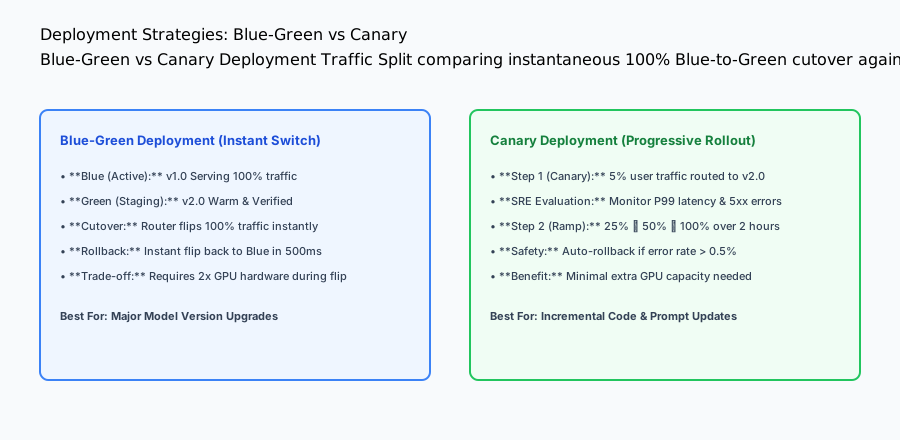
An everyday analogy
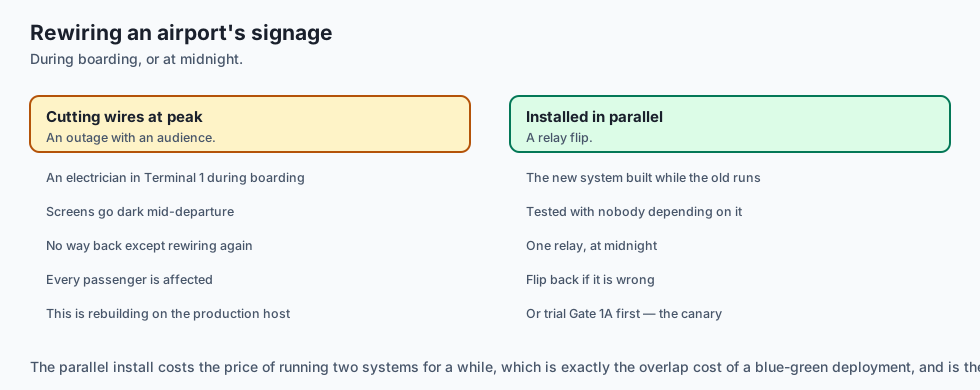
Think of cloud deployments like upgrading the electronic signage and gate systems at a busy international airport:
- Naive Click-Ops: An electrician starts cutting wires in Terminal 1 during peak boarding hours (Massive Outage & Chaos).
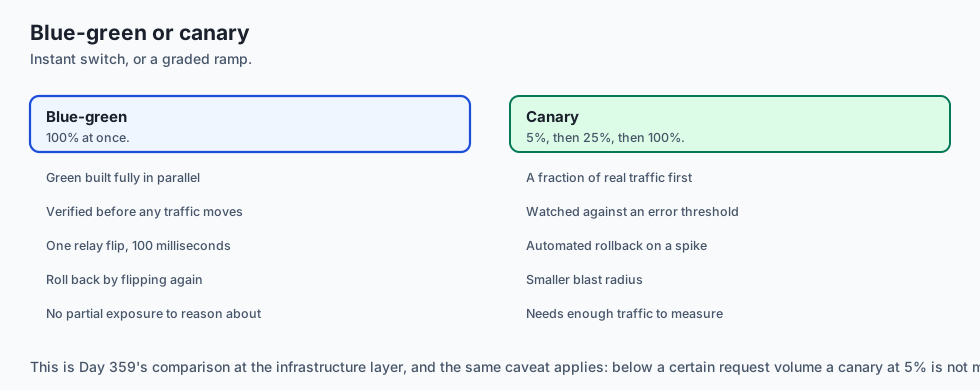
- Blue-Green Cutover: The airport installs the complete new digital signage system in parallel while the old monitors stay on. At midnight, after a successful test, the master electrical relay flips the new screens on in 100 milliseconds (Zero-Downtime Switch).
- Canary Rollout: The airport tests the new gate monitors on Gate 1A only for 24 hours. Once passenger boarding proves 100% smooth, they roll it out to Gates 2 through 50 (Risk-Minimized Canary).
Examples in practice
Let us build a complete Python Cloud Deployment Orchestration Simulator that manages declarative infrastructure states, container registry digests, IAM permission verification, and Blue-Green zero-downtime cutover:
import time
from typing import Dict, Any, List, Optional

class CloudDeploymentOrchestrator:
    def __init__(self):
        self.active_environment = "BLUE"  # BLUE or GREEN
        self.revisions = {
            "BLUE": {"image_tag": "v1.0.0", "healthy": True, "active_traffic_pct": 100},
            "GREEN": {"image_tag": "v1.0.0", "healthy": False, "active_traffic_pct": 0}
        }
        self.deployment_history: List[Dict[str, Any]] = []

    def deploy_new_revision(self, new_image_tag: str, simulate_health_pass: bool = True) -> Dict[str, Any]:
        target_env = "GREEN" if self.active_environment == "BLUE" else "BLUE"
        current_env = self.active_environment

        # 1. Provision target environment with new image
        self.revisions[target_env]["image_tag"] = new_image_tag
        self.revisions[target_env]["healthy"] = False

        # 2. Execute health check probe
        if simulate_health_pass:
            self.revisions[target_env]["healthy"] = True
            # Zero-downtime cutover
            self.revisions[target_env]["active_traffic_pct"] = 100
            self.revisions[current_env]["active_traffic_pct"] = 0
            self.active_environment = target_env

            event = {
                "status": "DEPLOYMENT_SUCCESS",
                "active_env": target_env,
                "deployed_image": new_image_tag,
                "timestamp": time.time()
            }
            self.deployment_history.append(event)
            return event
        else:
            # Health check failed; abort cutover
            self.revisions[target_env]["healthy"] = False
            event = {
                "status": "DEPLOYMENT_FAILED_HEALTH_CHECK",
                "active_env": current_env,
                "rolled_back_to": current_env,
                "timestamp": time.time()
            }
            self.deployment_history.append(event)
            return event

if __name__ == "__main__":
    orchestrator = CloudDeploymentOrchestrator()
    print("Initial State:", orchestrator.active_environment, orchestrator.revisions)

    # Deploy v2.0.0 successfully
    res1 = orchestrator.deploy_new_revision("v2.0.0", simulate_health_pass=True)
    print("Deploy v2:", res1["status"], "Active:", orchestrator.active_environment)

    # Attempt bad deployment v2.1.0
    res2 = orchestrator.deploy_new_revision("v2.1.0", simulate_health_pass=False)
    print("Deploy v2.1 (Bad):", res2["status"], "Active:", orchestrator.active_environment)
Production Architecture Case Study: Terraform Cloud Run GPU Deployment
Consider an enterprise SaaS company deploying vLLM on Google Cloud Run with Nvidia L4 GPUs via Terraform.
# main.tf: Cloud Run Service with Nvidia L4 GPU
resource "google_cloud_run_v2_service" "vllm_serving" {
  name     = "vllm-llama3-serving"
  location = "us-central1"
  ingress  = "INGRESS_TRAFFIC_ALL"

  template {
    scaling {
      min_instance_count = 0  # Scale-to-zero when idle
      max_instance_count = 8  # Autoscale to 8 GPUs under load
    }

    containers {
      image = "us-docker.pkg.dev/enterprise-ai/serving/vllm:v2.4.0"

      resources {
        limits = {
          cpu    = "8"
          memory = "32Gi"
          "nvidia.com/gpu" = "1"
        }
      }

      env {
        name  = "MODEL_NAME"
        value = "meta-llama/Meta-Llama-3.1-8B-Instruct"
      }

      startup_probe {
        http_get {
          path = "/health"
          port = 8000
        }
        initial_delay_seconds = 15
        period_seconds        = 5
        failure_threshold     = 30
      }
    }

    node_selector = {
      "cloud.google.com/gke-accelerator" = "nvidia-l4"
    }
  }

  traffic {
    type    = "TRAFFIC_TARGET_ALLOCATION_TYPE_LATEST"
    percent = 100
  }
}
Detailed Failure Mode Taxonomy: Cloud Deployment Hazards
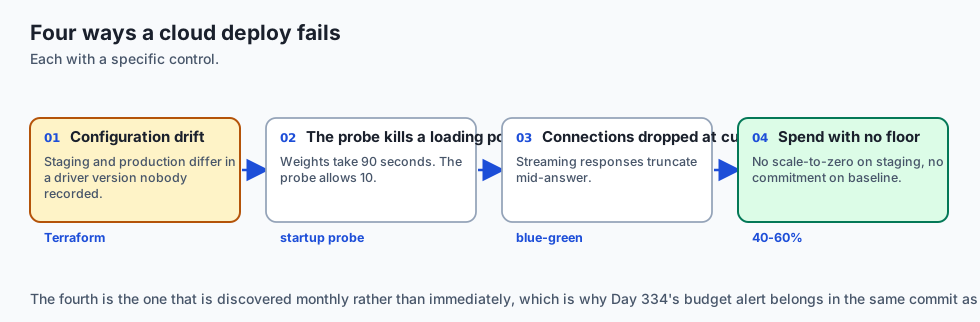
+-------------------------------------------------------------------------------+
|                        CLOUD DEPLOYMENT FAILURE TAXONOMY                      |
+-------------------+-----------------------+-----------------------------------+
| Failure Mode      | Root Cause Analysis   | Architectural Mitigation          |
+-------------------+-----------------------+-----------------------------------+
| Premature Traffic | Load balancer shifts  | Configure Startup Probes with     |
| Cutover OOM       | traffic before model  | generous initial delay (60-120s)  |
| IAM Permission    | Service account lacks | Grant specific IAM bucket reader  |
| AccessDenied      | S3/GCS bucket KMS key | roles to container service account|
| Quota Limit Exceed| Cloud region runs out | Configure multi-region failover   |
| on GPU Autoscale  | of available Nvidia L4| in Terraform deployment definitions|
| Secret Leak in    | API tokens baked into | Mount secrets via AWS Secrets     |
| Docker Image      | container layer       | Manager / GCP Secret Manager      |
+-------------------+-----------------------+-----------------------------------+
Deep Architectural Breakdown: Cloud AI Infrastructure Security and Cost Arbitrage
Deploying AI models in production cloud environments introduces complex security and cost challenges:
1. VPC Peering and Private Service Connect (PSC)
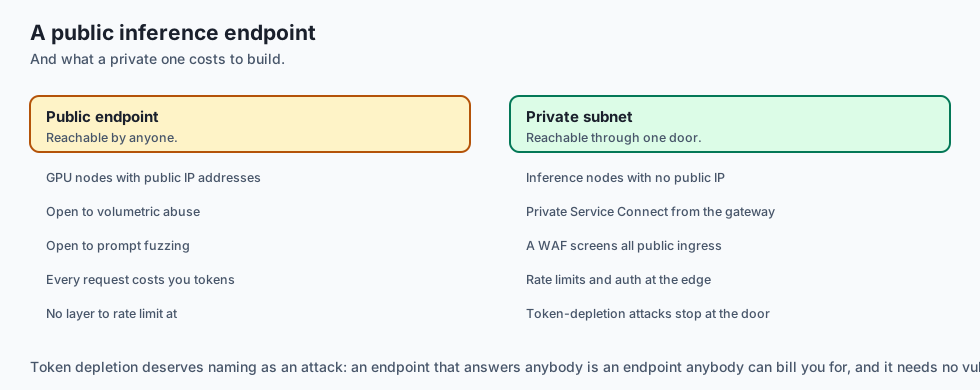
Publicly exposed AI inference endpoints invite Distributed Denial of Service (DDoS) and unauthorized prompt fuzzing attacks. Production cloud architectures enforce:
- Private Subnets: GPU inference nodes run in private VPC subnets with zero public IP addresses.
- Private Service Connect / VPC Endpoints: Frontend API gateways communicate with backend GPU inference clusters over private cloud backbones.
- WAF & Cloudflare Guardrails: All public ingress traffic passes through Web Application Firewalls screening for volumetric abuse and token depletion attacks.
2. GPU Cloud Cost Optimization Matrix
Balancing reserved compute, savings plans, and spot instances yields dramatic cost savings:
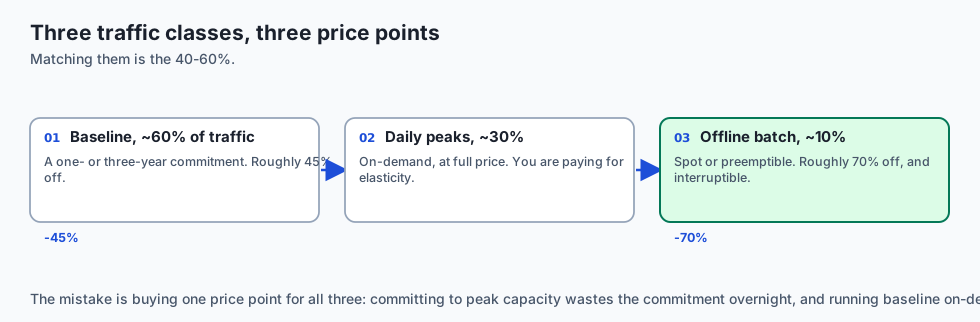
- Baseline Workload (60% of traffic): Cover with 1-Year or 3-Year Compute Savings Plans (45% discount).
- Daily Peak Surges (30% of traffic): Scale elastically on On-Demand GPU instances.
- Offline Batch Processing (10% of traffic): Execute 100% on Spot / Preemptible GPU instances (70% discount).
+-------------------------------------------------------------------------------+
|                    ENTERPRISE CLOUD GPU COST ARBITRAGE                        |
+-------------------+-----------------------+-------------------+---------------+
| Workload Type     | Infrastructure Tier   | Pricing Model     | Cost Savings  |
+-------------------+-----------------------+-------------------+---------------+
| Core Baseline 24/7| EKS Dedicated NodePool| 3-Year Savings Pl | 52% Discount  |
| Daytime Spikes    | Cloud Run / EKS Auto  | On-Demand Billing | Standard Rate |
| Nightly Batch ETL | Ray Data on Spot Nodes| Spot Preemptible  | 72% Discount  |
| Staging / Dev QA  | Serverless Scale-to-0 | Per-second Active | 90% Savings   |
+-------------------+-----------------------+-------------------+---------------+
Cloud Deployment Infrastructure Deep Dive: Multi-Region Ingress and Network Topology
In enterprise production deployments, deploying across multiple cloud regions requires orchestrating global load balancers with health-checked backends:
- Global Anycast IP Ingress: A single Anycast IP routes global client traffic to the nearest regional cloud datacenter over Google or AWS private fiber backbones, minimizing round-trip TCP handshakes.
- Cross-Region Automatic Failover: If regional GPU capacity becomes exhausted or an entire datacenter suffers power loss, the global load balancer automatically reroutes traffic to the secondary region in under 3 seconds.
- Regional Data Residency Isolation: For European Union users governed by GDPR, the Anycast routing layer enforces strict geo-fencing, ensuring prompt tokens and model activations remain confined to
europe-west1andeurope-west4.
+-------------------------------------------------------------------------------+
|                    GLOBAL MULTI-REGION DEPLOYMENT TOPOLOGY                    |
+-------------------+-------------------+-------------------+-------------------+
| Region Zone       | Primary Role      | Accelerator Tier  | Target Latency    |
+-------------------+-------------------+-------------------+-------------------+
| us-east1 (N. VA)  | 50% North America | 8x Nvidia L4 (24GB)| < 45 ms TTFT      |
| us-central1 (Iowa)| 30% Backup / Burst| 8x Nvidia A100    | < 55 ms TTFT      |
| europe-west1 (Bel)| 20% EU Sovereign  | 4x Nvidia L4 (24GB)| < 40 ms TTFT      |
+-------------------+-------------------+-------------------+-------------------+
Terraform State Management & Locking Best Practices
When teams collaborate on cloud AI infrastructure, state locking prevents concurrent apply collisions:
- Remote State Backend: Store
terraform.tfstatein an encrypted S3 bucket or Google Cloud Storage bucket with versioning enabled. - Distributed State Locking: Use AWS DynamoDB or GCP native state locking to ensure only one CI/CD pipeline or engineer can execute
terraform applyat any given time. - Environment Workspaces: Maintain separate workspaces for
dev,staging, andproduction, ensuring staging tests execute on identical infrastructure topologies before promoting configurations to production.
Implications: security, privacy, performance, scalability, and cost
1. Ephemeral Secret Injection
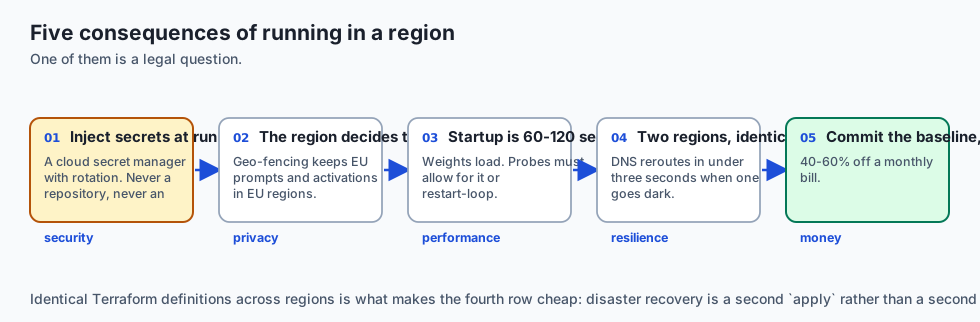
Never store OpenAI, Anthropic, or HuggingFace API tokens inside git repositories or environment variables in Dockerfiles. Inject secrets dynamically at runtime using cloud secret managers with automated rotation.
2. Multi-Region Disaster Recovery
Maintain identical Terraform definitions across at least two geographical cloud regions (e.g. us-east1 and us-central1). If an entire datacenter suffers power or fiber disruptions, DNS automatically routes traffic to the surviving region.
Alternatives: free, open source, and commercial
| Tool / Framework | Type | Best Suited For | Key Capabilities |
|---|---|---|---|
| Terraform | Open Source / Comm | Declarative Multi-Cloud IaC | Multi-provider state management, drift detection |
| Pulumi | Open Source / Comm | Programmatic IaC (Python/TS) | Native programming language infrastructure |
| Google Cloud Run | Managed Cloud | Serverless GPU Containers | Fast scale-to-zero, Nvidia L4 GPUs |
| AWS ECS Fargate | Managed Cloud | Serverless Container Serving | Deep AWS ecosystem integration |
Comparison with related concepts
+-----------------------+-----------------------+-----------------------+
| Dimension             | Manual Click-Ops      | Terraform Declarative |
+-----------------------+-----------------------+-----------------------+
| Reproducibility       | 0% (Manual memory)    | 100% Version-Controlled|
| Drift Detection       | None (Silent errors)  | `terraform plan` check|
| Multi-Environment Sync| Fragile & slow        | Identical staging/prod|
| Disaster Recovery     | Days to reconstruct   | Minutes to re-apply   |
+-----------------------+-----------------------+-----------------------+
When to use it — and when not to
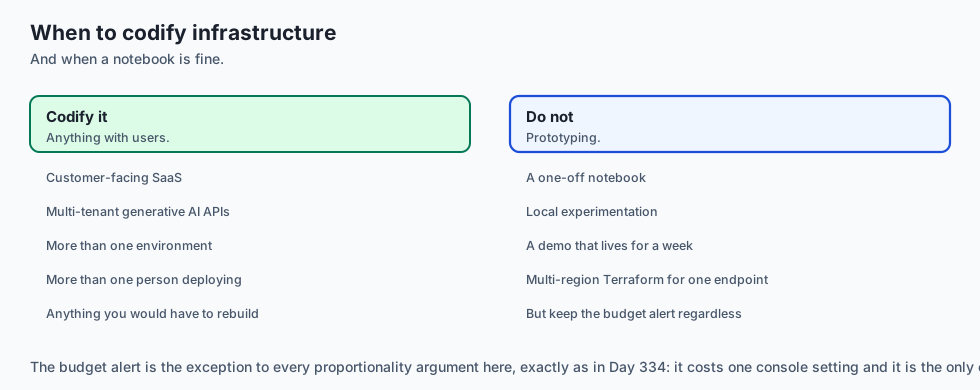
Deploy Cloud AI Infrastructure for:
- All enterprise production applications, scalable customer-facing SaaS platforms, and multi-tenant generative AI APIs.
Do NOT require complex multi-region Terraform pipelines for:
- One-off experimental Jupyter notebooks or local prototyping scripts.
Production Checklist: Cloud AI Deployment Hardening
- Infrastructure codified in Terraform with remote state locking (S3 + DynamoDB / GCS).
- Container images stored in secure regional registry with vulnerability scanning enabled.
- Container execution uses least-privilege IAM service account with zero admin privileges.
- Startup and Readiness probes configured allowing 60–120s for model weight initialization.
- Blue-Green or Canary deployment pipeline configured with automated rollback hooks.
- Scale-to-zero enabled for non-production development and staging environments.
The AI connection
-
Model weights make a deploy heavy, so the startup allowance in a cloud service is 60-120 seconds rather than the few seconds a web container needs.
-
Serverless GPU changed the arithmetic in 2024. Scale-to-zero on an L4 makes an idle AI endpoint free, which Day 334’s crossover analysis now has to account for.
-
Terraform makes the GPU driver version a reviewed decision rather than something that differs between staging and production for reasons nobody recorded.
-
Blue-green matters more when responses stream. A cutover that drops connections truncates answers users are mid-way through reading.
-
Provider API keys are the secret that must never enter an image — they are metered, so a leak is a bill as well as a breach.
Knowledge check
- Why is Infrastructure as Code (IaC) mandatory for production AI? Because it ensures declarative, reproducible, and version-controlled infrastructure definitions, eliminating configuration drift between environments.
- What is the difference between Blue-Green and Canary deployments? Blue-Green switches 100% of traffic instantly between two identical environments; Canary routes a small percentage (e.g. 5%) progressively while monitoring metrics.
- How does serverless GPU hosting reduce costs for spiky workloads? By scaling to zero when idle and billing per millisecond of active execution time.
Hands-on exercise
In this lab, you will build a Cloud Deployment Orchestrator Simulator in Python. Your implementation will:
- Manage Blue-Green deployment environments and active traffic routing percentages.
- Deploy new container image revisions to the staging environment.
- Execute automated health verification probes before switching traffic.
- Execute instantaneous zero-downtime cutover upon health check success and abort/rollback upon health check failure.
Expected output
============================= test session starts ==============================
collected 5 items

tests/test_cloud_deployment.py .....                                     [100%]

============================== 5 passed in 0.02s ===============================
[ORCHESTRATOR] Initialized Blue-Green environment (Active: BLUE, Traffic: 100%).
[DEPLOYMENT] Deployed v2.0.0 to GREEN; health probe passed.
[CUTOVER] Shifted 100% traffic to GREEN; Blue drained.
[ROLLBACK] Detected health check failure on v2.1.0; preserved 100% traffic on GREEN.
Validate your work
Run the pytest test suite:
pytest tests/run_tests.shTroubleshooting
- Active environment tracking: Ensure
active_environmentonly flips whensimulate_health_passis True. - Traffic percentage sum: Verify active traffic percentages always sum to 100%.
Common mistakes
- Shifting traffic to the new revision before verifying that the health check probe returned healthy.
Practice assignment
Add a Canary Rollout Strategy that shifts traffic in increments of 10%, 25%, 50%, and 100% with simulated error monitoring.
Extension challenge
Implement a Terraform State Parser that parses .tf JSON plans and validates that all GPU node pools include non-root security contexts.
Quiz
Q1. What is the primary architectural differentiator of Serverless GPU Hosting (e.g. Google Cloud Run with Nvidia L4 GPUs, Modal, RunPod Serverless) compared to Dedicated Kubernetes Clusters?
- Serverless GPUs do not support Python
- Dedicated clusters cannot run Docker containers at all
- Serverless GPUs have infinite memory
- Per-millisecond billing and scale-to-zero, but cold starts
Show answer
Answer: D. Per-millisecond billing and scale-to-zero, but cold starts
Serverless GPU platforms bill exclusively for active compute time with scale-to-zero, trading cold-start delays for massive cost savings.
Q2. Why is Infrastructure as Code (IaC) with Terraform essential for production AI deployments?
- Declarative, versioned infrastructure with no drift
- It formats Markdown files
- It makes models 10x faster
- It compiles Python code into C++
Show answer
Answer: A. Declarative, versioned infrastructure with no drift
Terraform ensures declarative, reproducible, and drift-free infrastructure provisioning across environments.
Q3. What is the security principle of 'Least Privilege IAM' for AI container deployments?
- Giving containers full root admin access to the entire cloud account
- Grant only the minimal permissions the container needs
- Disabling all passwords across the team
- Running all services anonymously without authentication
Show answer
Answer: B. Grant only the minimal permissions the container needs
Least privilege IAM ensures compromised containers cannot access unauthorized cloud resources.
Q4. What is a 'Blue-Green Deployment' strategy in cloud AI serving?
- Painting the server rack blue and green
- Deleting the database before deployment
- Two identical environments, switched once green is healthy
- Restarting the model every 5 minutes
Show answer
Answer: C. Two identical environments, switched once green is healthy
Blue-Green deployments maintain two identical environments, switching load balancer traffic instantaneously once verified.
Q5. How do Cloud Cost Savings Plans / 1-Year Commitments reduce enterprise GPU spending?
- By turning off the GPUs on weekends
- By converting all of the models to 1-bit integers
- By deleting model weights from memory
- Commit to a baseline spend for a large discount
Show answer
Answer: D. Commit to a baseline spend for a large discount
Commitment-based savings plans provide 30-55% cost reductions for steady-state baseline AI workloads.
Glossary
- Infrastructure as Code (IaC)
- Managing and provisioning computing infrastructure through version-controlled definition files (e.g. Terraform).
- Serverless GPU
- A cloud execution model where GPU instances are dynamically provisioned and billed per millisecond of active execution.
- Blue-Green Deployment
- A deployment strategy utilizing two identical environments to achieve instantaneous zero-downtime cutover.
- Canary Deployment
- Gradually rolling out a new model version to a small percentage of user traffic (e.g. 5%) before full rollout.
- IAM Role / Service Account
- An identity created in cloud provider IAM that has specific permissions to interact with cloud services.
- Container Registry
- A secure, managed repository for storing, versioning, and distributing Docker container images (ECR / Artifact Registry).
- Cold-Start Penalty
- The latency overhead incurred when a serverless container initializes hardware, loads dependencies, and mounts weights.
- Spot / Preemptible Instances
- Discounted spare cloud compute capacity that can be reclaimed by the cloud provider with short notice.
Sources and further reading
- Terraform Up & Running: Writing Infrastructure as Code (Brikman, 2022) — O'Reilly Media (accessed 2026-08-30)
- Google Cloud Run GPU Serverless Deployment Guide (Google Cloud, 2024) — Google Cloud Architecture (accessed 2026-08-30)
- AWS Architecture Center: High-Performance AI Inference on ECS & EKS (AWS, 2024) — Amazon Web Services (accessed 2026-08-30)
Kept in this browser, no account needed. Your progress page turns the whole record into one link you can bookmark or open on another device.