Computing Foundations › Inside the Machine › Day 7
Day 7: Processes, Threads, and Scheduling
After this lesson you will be able to explain what a process really is, how the scheduler makes hundreds of programs share a few cores, and spawn, observe, and signal processes yourself from the shell.
Hands-on lab for this lesson
Lab files on GitHub: https://github.com/ai-roadmap-365/ai-roadmap-365.github.io/tree/main/labs/sections/computing-foundations/day-007-processes-threads-and-scheduling
- Get the hands-on files. Clone the labs repository once (you can reuse this clone for every lesson). This works on macOS, Linux, and Windows (PowerShell or WSL):
git clone https://github.com/ai-roadmap-365/ai-roadmap-365.github.io.git cd ai-roadmap-365.github.io - Open this lesson's lab. Move into the directory for this specific day. Every lab lives at the same predictable path — section / subsection / week / day:
cd labs/sections/computing-foundations/day-007-processes-threads-and-scheduling - Read the lab guide. Open `README.md` in that directory. It lists the exact commands, what each does, the expected output, and how to check your work — read it before running anything.
- Run it and check your work. Follow the README's "How to run" section: run the example first to see the finished result, then complete the numbered exercises in `starter/`, then run the tests. The tests pass (exit 0) only when your work is correct.
bash tests/run_tests.sh # or the test command named in the lab README
You can also open the lab as a local page (works offline, shows the file tree and expected output).
Learning objectives
By the end of this lesson you will be able to:
- Distinguish a program from a process, and name what every process owns: a PID, private memory, file handles, an owner, a parent, and an exit code
- Trace the process lifecycle — spawn, ready, running, waiting, exit — including where zombies come from and what exit codes mean
- Explain why threads are cheaper than processes and why shared memory makes them dangerous, including what a race condition is
- Describe how the scheduler uses time slices, preemption, and context switches to run hundreds of processes on a handful of cores
- Control processes from the shell: start background jobs with &, capture PIDs from $!, inspect with jobs and ps, and send signals with kill
- Distinguish concurrency from parallelism precisely and choose between threads and processes for a given kind of work
- Connect scheduling to AI practice: data-loader worker processes, GPU kernel queues, the GIL preview, and the batch throughput-versus-latency trade-off
Prerequisites
- Days 1–6 of this course, especially Day 6 (operating systems) — this lesson builds directly on the OS mental model
- A terminal on macOS or Linux (or WSL on Windows) for the hands-on exercise
Why this matters
Open your machine’s activity monitor right now and count the processes. On a laptop doing “nothing,” you will find several hundred — window servers, update checkers, cloud-sync daemons, indexers — all apparently running at once on a chip with perhaps 8 or 14 cores. Something is doing an enormous amount of invisible bookkeeping to make hundreds of programs share a handful of processors so smoothly that you never notice, and that something is the subject of today’s lesson: processes, threads, and the scheduler that juggles them.
This is not background trivia for an AI career; it is daily working knowledge. When you train a model, your training script is a process; the data-loader workers feeding it batches are separate processes the framework spawned for you; and when they crash or hang, the error messages speak the language of this lesson — PIDs, signals, exit codes, zombies. When a fine-tuning job saturates one CPU core while thirteen sit idle, the explanation is a thread that cannot parallelize. When you launch a long job over a remote connection and wonder whether it will survive you closing the laptop, the answer hangs on how processes relate to their parents and what signals get sent when a shell dies. When GPU utilization graphs sawtooth between 100 percent and zero, the usual culprit is a scheduling story: compute waiting on data that a starved loader process failed to deliver.
The engineers who debug these situations quickly are not smarter; they simply have the model you will build today — a clear picture of what a process is, how the operating system slices time among processes, and how to observe and control processes from the shell. This is also the finale of Week 1: the day the machine you have been dissecting since Day 1 finally starts running things, and you take the controls.
The idea in plain language
A program is a file: instructions sitting on disk, doing nothing, the way a recipe in a book cooks nothing. A process is that program running — the recipe actually being cooked, with real ingredients out on the counter. The operating system creates a process by loading the program’s instructions into memory, giving it its own private slice of memory to work in, assigning it an identity number called a PID (process identifier), and handing it a small table of the files and connections it has open. One program can become many processes: open three terminal windows and you have three separate shell processes from one shell program, each with its own memory, each unaware of the others.
Inside a process live one or more threads — independent streams of instructions that share the process’s memory. If a process is a kitchen, threads are cooks in that kitchen: they share the same counters and pantry, which makes cooperation cheap and collisions possible. Two processes, by contrast, are two separate kitchens: safe from each other, but anything they want to share must be deliberately carried between them.
Above all of this sits the scheduler, a core part of the operating system. There are far more processes and threads that want CPU time than there are cores, so the scheduler gives each runnable thread a brief turn — a time slice, typically a few milliseconds — then interrupts it, saves its exact position, and hands the core to another. Swapping one thread’s saved state for another’s is a context switch, and it happens so fast, thousands of times per second across all cores, that hundreds of programs appear to run simultaneously on 14 cores. They do not. At any instant, exactly as many threads are truly executing as you have cores; everything else is frozen mid-instruction, waiting its turn. Today you will learn to see this illusion clearly — and to spawn, watch, and stop processes yourself from the shell.
Historical background
The earliest computers ran one job at a time, start to finish. In the 1950s, machines like the IBM mainframes were fed batches of jobs on punched cards: an operator queued them up, each ran to completion, and the next began. The machine was monstrously expensive and often idle — whenever a job paused to read a tape or print a line, the processor, the costliest component in the building, simply waited.
That waste drove the first big idea: multiprogramming. Keep several jobs in memory at once, and when one stops to wait for slow input or output, switch the processor to another. The processor stays busy; the accounting problem — whose job is this, where was it, what memory does it own — gives birth to the process as a bookkeeping unit.
The second big idea arrived in the 1960s: time-sharing. Systems like CTSS at MIT (1961) and its ambitious successor Multics sliced processor time so finely that many humans at terminals could each interact with the machine at the same time, each experiencing what felt like a private computer. This required preemption — the system forcibly interrupting a running job when its slice expired — and fast switching, the direct ancestors of today’s scheduler. Unix, begun in 1969 at Bell Labs by Ken Thompson and Dennis Ritchie partly in reaction to Multics’s complexity, made the process the organizing concept of the whole system: every running thing is a process; processes are created by existing processes (a parent “forks” a child); each reports an exit code to its parent when it dies. That model, refined but not replaced, is what runs on your Mac (whose kernel descends from BSD Unix), on every Linux server, and on every Android phone.
Threads came later. Through the 1980s and 1990s, as programs wanted to do several things at once within one application — redraw the screen while loading a file — operating systems added lightweight execution streams sharing one process’s memory, standardized for Unix-like systems as POSIX threads (pthreads) in 1995. Then the hardware turned the pressure up: around the mid-2000s, single cores stopped getting dramatically faster (the heat wall you met on Day 1) and vendors shipped multicore chips instead. Suddenly threads and processes were not just a convenience for overlapping work but the only way to use the whole chip — and that is precisely the world AI computing was born into: frameworks that spawn worker processes by the dozen and feed thousands of GPU cores in parallel.
What it is — and what it is not
A process is the operating system’s unit of a running program: one program image in memory, plus everything the OS must track to run, pause, resume, and clean up after it. Concretely, each process has its own PID, its own private virtual memory (Day 6’s address-space illusion — each process believes it has memory to itself), a table of open file handles (files, network connections, and terminal streams it may read or write), an owner (the user it runs as, which bounds what it may touch), a parent process that created it, and an exit code it leaves behind when it terminates — 0 for success by convention, anything else signaling some flavor of failure.
A thread is the unit of execution scheduling: an instruction stream with its own program counter and stack, living inside a process and sharing that process’s memory and file handles with its sibling threads. The scheduler actually schedules threads; a “single-threaded process” is simply a process containing one.
Equally important is what these things are not. A process is not the program — deleting a program file does not stop its running processes, and one program can run as fifty processes. A process is not a window — many processes have no window at all (the hundreds of daemons on your machine), and one application window may be backed by several cooperating processes, as modern browsers do with one process per tab. Threads are not “mini-processes” — they have no memory of their own, which is exactly their power and their danger. And the scheduler is not fair in any simple sense — it juggles priorities, sleeping processes, and interactive responsiveness, so a heavy computation politely loses the core to your mouse pointer many times per second.
| Property | Process | Thread |
|---|---|---|
| Memory | Own private address space | Shares the process’s memory with sibling threads |
| Creation cost | Relatively heavy (new address space, new bookkeeping) | Light (new stack and registers inside an existing process) |
| Isolation | Strong — one crashing process cannot corrupt another’s memory | None — one misbehaving thread can corrupt or crash the whole process |
| Communication | Deliberate and explicit (pipes, sockets, files, shared regions) | Trivial — just read the same variables (and there lies the danger) |
| Identity | PID, owner, exit code, parent | Thread ID within its process |
| Typical use | Isolation, multi-program workflows, data-loader workers | Overlapping work within one program: I/O, UI, parallel loops |
Why it was created and what problems it solves
Processes, threads, and scheduling all answer the same underlying problem in different ways: the computer has fewer processors than things worth doing, and some of those things spend most of their time waiting.
The process solves three problems at once. First, sharing: by making each running program a self-contained, pausable, resumable unit, the OS can multiplex an expensive machine among many programs and users — the original 1960s motivation. Second, protection: because each process gets private memory and runs as a specific user, a buggy or malicious program is walled off; it can crash itself but not scribble over the memory of your training run next door. Third, lifecycle management: parents, PIDs, signals, and exit codes give the system — and you, at the shell — a uniform way to start work, check on it, stop it, and learn how it ended. Every job queue, every container, every web server worker pool is built on this machinery.
Threads solve a different problem: work within one program that should overlap. A program downloading a file should still respond to clicks; a server handling a thousand connections cannot afford a whole process per connection. Threads make such overlap cheap because there is no new address space to build — but the price is that all threads share one memory, so two threads updating the same data at the same time can interleave in ways that corrupt it. This class of bug — the race condition — is why threads are famously described as cheap and dangerous, and why Python (as you will see in the AI toolchain later) historically allowed only one thread at a time to execute Python code: a global interpreter lock, the GIL, that trades parallel speed for safety.
The scheduler solves the allocation problem the other two create: given dozens of runnable threads and a few cores, who runs now, and for how long? Its goals genuinely conflict — keep interactive programs snappy (low latency), keep the machine busy on useful work (high throughput), and be reasonably fair — and every scheduling policy is a compromise among them. You will meet the same latency-versus-throughput tension again in AI serving, where batching many requests together raises throughput but makes each individual request wait.
How it works
Four mechanisms, from the single process up to the juggling act.
The anatomy and lifecycle of a process
When you run a command, your shell (itself a process) asks the kernel to create a child process, and the kernel builds the full kit: a fresh PID, a private virtual address space holding the program’s code, its global data, a heap for memory the program requests as it runs, and a stack per thread for function calls; a file-handle table whose first three entries are the standard input, output, and error streams you met on Day 6; and a record of the parent’s PID. This is why every process on your system except the very first forms one giant family tree — on your Mac or Linux box, ps -o pid,ppid,command shows each process alongside the PID of its parent.
From birth to death, a process moves through a small set of states. It starts in a spawned/new state while the kernel builds it, then becomes ready: runnable, wanting a core, standing in the scheduler’s queue. When the scheduler picks it, it is running — actually executing on a core — until one of three things happens: its time slice expires and it is preempted back to ready; it asks for something slow (a disk read, a network packet, a timer, user input) and goes to waiting, where it consumes no CPU at all until the event arrives and returns it to ready; or it finishes and exits, leaving behind its exit code. There is one famous afterlife state: a zombie is a process that has exited but whose parent has not yet collected (“reaped”) its exit code — a dead entry in the process table, consuming almost nothing, waiting for its parent to ask how it died. A few zombies are normal and momentary; zombies that accumulate mean a buggy parent, a pattern you may someday recognize in a misbehaving data-loading pipeline.
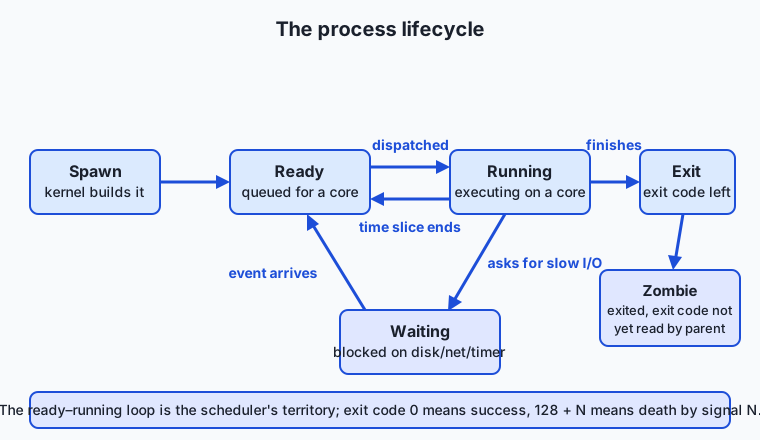
Follow the arrows: the ready-running loop in the middle is the scheduler’s territory (dispatch and preempt, over and over), the excursion to waiting is where processes spend most of their lives on an interactive machine, and the exit on the right records the exit code — the single number by which scripts and pipelines judge success. When your shell prints nothing after a command, it still received that code; echo $? reveals the last one.
Threads: cheap and dangerous
Creating a process means building a whole new address space; creating a thread means adding one more instruction stream — a program counter, registers, and a stack — inside an address space that already exists. That is why threads are cheap: starting one is orders of magnitude lighter than starting a process, and switching between two threads of the same process is cheaper than switching between processes because the memory mapping does not change.
The shared memory that makes threads cheap is exactly what makes them dangerous. Suppose two threads both execute counter = counter + 1 at nearly the same moment. Each reads the value, adds one, writes it back — but if both read before either writes, one increment vanishes. Nothing crashes; the number is simply, silently wrong, and only under just the right timing. These race conditions are among the hardest bugs in software because they are not reliably reproducible. The cures — locks that let only one thread into a critical section at a time — bring their own pathologies (deadlocks, where two threads each hold a lock the other needs, forever). The practical wisdom you will use in AI work: threads shine when work is mostly waiting (network calls, disk reads, feeding a GPU); for heavy computation in parallel, separate processes with explicit hand-offs are often the safer, and in Python historically the only effective, choice.
The scheduler: time slices, context switches, preemption
Now the juggling act. At any moment your machine has perhaps 500 processes containing a couple of thousand threads, of which almost all are waiting — blocked on input, timers, or events. The scheduler’s concern is the handful that are ready. To each running thread it grants a time slice on the order of milliseconds. When the slice expires, a hardware timer interrupts the core — this is preemption: the thread is not asked, it is stopped — and the kernel performs a context switch: it saves the interrupted thread’s complete CPU state (program counter, registers, stack pointer) into memory, selects the next ready thread by its policy and priorities, loads that thread’s saved state, and resumes it exactly where it froze, mid-computation, none the wiser.
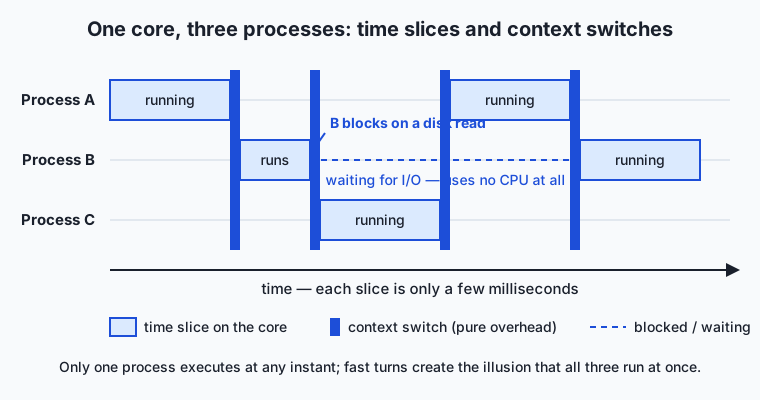
The diagram shows one core and three processes over a stretch of milliseconds: A runs, is preempted, B runs, blocks early on a disk read (yielding the rest of its slice), C runs, and so on — with thin dark slivers between slices marking the context switches themselves. Two lessons hide in those slivers. First, a context switch is pure overhead — microseconds of saving and loading during which no useful work happens, plus a subtler tax afterward as the incoming thread finds the CPU caches full of the outgoing thread’s data. Thousands of switches per second are fine; force millions (say, by spawning far more busy threads than cores) and the machine spends its life switching instead of working. Second, blocking is free CPU: a thread waiting on disk or network is charged nothing, which is why one core handles hundreds of mostly-idle processes gracefully. Multiply this picture by your core count — an M4-class laptop chip with 14 cores runs up to 14 threads truly simultaneously — and add that schedulers boost the priority of interactive, frequently-sleeping processes over long-running compute hogs, and you have the real answer to “how do 100 programs run at once on 14 cores”: they don’t; they take very fast turns, and most of them are asleep.
Jobs and signals: taking the controls in the shell
The shell gives you a direct handle on all this. End a command with & and the shell starts it as a background job: the process runs, but the shell does not wait — you get your prompt back immediately, and the special variable $! holds the new child’s PID. The jobs command lists your shell’s background children; ps shows processes system-wide; wait pauses the shell until a child finishes and hands you its exit code.
To influence a process you do not converse with it — you send it a signal, a tiny numbered notification delivered by the kernel. The kill command, despite its name, is the general signal-sender:
| Signal | Number | Sent by | Plain meaning | Can the process refuse? |
|---|---|---|---|---|
| SIGTERM | 15 | kill PID (the default) | “Please shut down.” | Yes — it may clean up first, or handle and ignore it |
| SIGINT | 2 | Ctrl+C in the terminal | ”Stop what you’re doing.” | Yes — interactive programs often catch it |
| SIGKILL | 9 | kill -9 PID | ”Cease to exist, now.” | No — the kernel ends it; no cleanup runs |
| SIGSTOP | — | kill -STOP PID | ”Freeze (resumable).” | No — paused until SIGCONT |
| SIGCONT | — | kill -CONT PID, bg, fg | ”Resume.” | Resumes a stopped process |
| SIGHUP | 1 | Terminal/connection closes | ”Your terminal went away.” | Yes — daemons traditionally reload config instead |
The etiquette matters: always try SIGTERM first, giving the process a chance to flush files and release resources; reach for SIGKILL only when a process ignores polite requests — and know that SIGKILL leaves no opportunity to clean up, which is how half-written checkpoint files happen. A process that ends because of a signal reports a distinctive exit code, 128 plus the signal number: a SIGTERM death is 143, a SIGKILL death is 137 — a number worth memorizing, because containerized jobs killed for exceeding memory limits die with exactly that code. And SIGHUP explains the remote-job problem from the introduction: close the terminal and your background children are told their terminal died, which by default terminates them — the reason tools exist to detach long jobs from any terminal (nohup, and later in this course, terminal multiplexers).
Concurrency versus parallelism, precisely
Two words this lesson lets you use exactly. Concurrency is dealing with many tasks in overlapping time periods — structure, not simultaneity. One core running three processes in slices is concurrent: progress on all three, never two at the same instant. Parallelism is executing more than one task at the same physical instant, which requires more than one execution unit — multiple cores, or a GPU’s thousands of them. A single barista rotating among four half-made drinks is concurrent; four baristas each making a drink is parallel. All parallelism on a shared machine involves concurrency (the scheduler is still there), but concurrency does not require parallelism at all. The distinction earns its keep in AI work: Python threads under the GIL give you concurrency (great for overlapping waits) but not parallelism of Python computation — which is why frameworks reach for processes when they need real simultaneous work on many cores.
An everyday analogy
Return to the restaurant kitchen from Day 1, where the chef was the CPU and the kitchen manager was the operating system. Tonight the picture sharpens. Each order pinned above the counter is a process: its own ticket number (PID), its own workspace and ingredients that no other order may touch (private memory), its own tab of what has been requisitioned from the pantry (file handles), and a defined ending — the dish goes out, and the expediter records whether it was served or scrapped (exit code). If one order is ruined, it is scraped into the bin without contaminating any other order: isolation.
The manager runs the schedule with a strict rule: no order monopolizes the chef. The chef works order A for ninety seconds — timer rings, hands off — order B goes on the stove, but B immediately needs forty minutes in the oven, so B is set aside (waiting: costing no chef time at all) and order C gets the chef early. Every hand-off, the chef must put down one order’s tools and mentally reload another’s recipe and status — a real cost, small if occasional, ruinous if the manager rang the bell every five seconds. That is the context switch, and “too many active orders” is why over-threaded programs thrash.
Now threads: a big banquet order (one process) may have three cooks on it at once (threads), sharing one workspace. They coordinate instantly — no tickets, just glances — which is fast, and occasionally two of them salt the same pot because each saw it unsalted a moment ago. That is a race condition, and the fix — a rule that only one cook touches the pot at a time — is a lock, complete with the deadlock scenario where cook one holds the pan and needs the whisk while cook two holds the whisk and needs the pan. Signals, finally, are the manager’s interventions, from a polite “wrap that order up” (SIGTERM) that lets a cook plate what is ready, to physically taking the pan off the flame mid-sauce (SIGKILL) — effective, immediate, and guaranteed to leave a mess for someone.
Examples in practice
Watch it all happen on your real machine. Run ps -e | wc -l and you will count hundreds of processes; run top (or open Activity Monitor / System Monitor) and sort by CPU, and you will see nearly all of them at 0.0% — the waiting majority — with a few percent scattered among the handful doing anything. Open a modern browser with ten tabs and check again: many separate processes for one application, a deliberate design so that one crashing tab (a dead process) takes down neither the other tabs nor the browser — process isolation used as a crash barrier.
The shell mechanics appear everywhere in real workflows. python train.py & starts a training run in the background; jobs confirms it is running; kill %1 or kill <PID> ends it politely, giving the program a chance to save a checkpoint. A pipeline like prepare_data && train uses exit codes as logic: the second command runs only if the first exits 0. And the first time a long remote job dies the moment you close your laptop, you will recognize SIGHUP doing exactly what it was designed to do in 1970s terminal rooms.
Now the AI connection, concretely. A typical training setup is a small society of processes: the main training process owns the model and talks to the GPU, while the framework spawns several data-loader worker processes whose only job is reading and preprocessing the next batches so the GPU never waits — producer processes feeding a consumer, scheduled exactly as today’s lesson describes. Why worker processes rather than threads? Python’s GIL: within one Python process, only one thread executes Python code at a time, so true parallel preprocessing on many cores requires separate processes. (You will study the GIL properly in the Python section; today you already know the vocabulary it lives in.) Multi-GPU training goes further — one process per GPU, cooperating explicitly, because isolation plus deliberate communication scales more predictably than shared everything. Meanwhile the GPU has a scheduling story of its own: your process does not command the GPU directly but submits kernels — units of GPU work — into a queue that the GPU driver and hardware schedule onto thousands of cores; when the queue runs dry because a starved data loader delivered late, utilization craters, and the sawtooth graph from this lesson’s introduction is the diagnosis. Finally, model serving replays the scheduler’s oldest dilemma: batch many user requests together and the GPU’s throughput soars while each user waits longer; serve each instantly and latency shines while throughput collapses. Time-sharing’s latency-versus-throughput trade-off, wearing an AI costume.
Implications: security, privacy, performance, scalability, and cost
Security
Process isolation is the operating system’s fundamental security boundary: private address spaces mean one process cannot read or corrupt another’s memory, and per-process ownership means a process can touch only what its user may touch. Modern software leans on this hard — browsers sandbox each tab in a low-privilege process, and containers are, at heart, ordinary processes wearing extra isolation. Signals have a security dimension too: the kernel only lets you signal processes you own, which is why the discipline you will practice in today’s lab — signal only processes you started — is both good manners and the enforced rule.
Privacy
A process’s memory holds whatever it is working on — your documents, credentials, a model’s inputs — in the clear, because the CPU must compute on it. Isolation keeps other unprivileged processes out, but administrators and debugging tools can inspect process memory, and process metadata is far more public than the memory itself: ps shows every process’s full command line to every user on a shared system. Passing a password or secret key as a command-line argument publishes it to anyone running ps at that moment — a classic leak on shared machines and clusters, avoided by passing secrets through files or environment configuration instead.
Performance
Three performance truths follow from today’s mechanics. Context switches cost real time — mostly modest, but oversubscription (hundreds of busy threads on a dozen cores) drowns machines in switching overhead, which is why worker pools default to roughly one worker per core for compute-heavy tasks. Blocking is free — a process waiting on the disk consumes no CPU, so the cure for waiting-dominated work is more concurrency, while the cure for compute-dominated work is more parallelism, and misdiagnosing which one you have is a classic performance mistake. And a single-threaded bottleneck caps everything: one Python loop tokenizing a dataset will pin one core at 100 percent while the other thirteen idle, and no scheduler can fix a program that only offers one thread of work.
Scalability
Scaling within one machine means turning cores into throughput — worker processes for isolated parallel jobs, threads where memory must be shared and waits overlapped. Scaling beyond one machine reuses the same conceptual kit at datacenter size: cluster schedulers allocate whole jobs to nodes the way a kernel allocates threads to cores, with the same tensions among fairness, throughput, and latency, and the same preemption idea (cheap “spot” GPU instances are precisely compute that a higher-priority claimant may preempt). Understanding a single machine’s scheduler is the readable small print of every job queue you will ever submit to.
Cost
Idle cores on hardware you rent are money burned, and the fixes are scheduling fixes: enough data-loader workers to keep GPUs fed, enough parallelism to keep cores busy, batch sizes that balance each request’s latency against the throughput the accountant sees. Preemptible capacity turns scheduling into a market — computing that tolerates being SIGTERM’d and resumed (checkpoint early, checkpoint often) rents for a fraction of the price of guaranteed machines. And graceful shutdown is a cost line, not a nicety: a training job that handles SIGTERM by saving a checkpoint loses minutes when preempted; one that only dies to SIGKILL loses everything since its last save.
Alternatives: free, open source, and commercial
Other excellent ways to learn and explore this material, from watching to reading to poking at live systems.
| Resource | Type | What it offers | Cost |
|---|---|---|---|
| The Day 7 lab in this course | Free | Spawn, observe, and signal real processes from your own shell | Free |
| Operating Systems: Three Easy Pieces (Arpaci-Dusseau) | Free textbook | The classic modern OS text; its virtualization chapters cover processes and scheduling in depth | Free online |
| Crash Course Computer Science (PBS Digital Studios) | Free video series | Short visual episodes on operating systems and multitasking | Free |
| Wikipedia: Process, Thread, Scheduling (computing) | Free reference | Well-cited overviews and the standard vocabulary | Free |
| htop | Open source tool | A friendlier, colorful top: live process tree, per-core meters, interactive signaling | Free |
| Activity Monitor (macOS) / System Monitor (GNOME) | Bundled tool | Graphical process viewing and termination, no terminal required | Included with the OS |
| Brendan Gregg’s Systems Performance (2nd ed.) | Book (commercial) | The professional deep end: measuring schedulers, CPUs, and latency on real systems | Book purchase |
If you read one thing beyond this course, make it the process and scheduling chapters of Operating Systems: Three Easy Pieces — a free, genuinely enjoyable university text.
Comparison with related concepts
| Concept A | Concept B | Key difference |
|---|---|---|
| Program | Process | A program is a passive file of instructions on disk; a process is a running instance with a PID, memory, and state — one program can run as many processes |
| Process | Thread | A process owns private memory and resources; a thread is an execution stream inside a process, sharing its memory with sibling threads |
| Concurrency | Parallelism | Concurrency structures many tasks over overlapping time (possible on one core); parallelism executes tasks at the same physical instant (requires multiple cores) |
| Preemptive scheduling | Cooperative scheduling | Preemptive systems interrupt tasks when their slice expires; cooperative systems wait for tasks to yield voluntarily — one stubborn task can freeze everything |
| SIGTERM | SIGKILL | SIGTERM is a request the process can catch to clean up (or ignore); SIGKILL is unrefusable termination by the kernel, with no chance to clean up |
| Foreground job | Background job | The shell waits for a foreground job and forwards your keystrokes to it; a background job (&) runs while the shell returns your prompt immediately |
When to use it — and when not to
Reach for today’s model whenever a machine’s behavior confuses you: a frozen application (waiting on what? — check its state), a fan screaming with no window open (which process — top will name it), a job that dies when you disconnect (SIGHUP), an exit code of 137 in a cluster log (SIGKILL, almost always the out-of-memory killer). Reach for it when designing work: mostly-waiting tasks want concurrency (threads or async), compute-heavy tasks want parallelism (processes, roughly one per core), and anything long-running wants a plan for SIGTERM. Reach for it in every AI pipeline decision about num_workers, per-GPU processes, or serving batch sizes — each is this lesson with a framework flag in front of it.
Know also when not to descend to this level. Do not hand-manage processes when the tools above you already do it well — frameworks spawn and reap their own workers, and fighting them causes the orphans and zombies you would be trying to prevent. Do not sprinkle threads on slow code before measuring: parallelizing a program that is actually disk-bound, or already bottlenecked on one lock, adds complexity and race-condition risk for nothing. And do not reach for kill -9 as a habit — the polite signal first is not ceremony; it is the difference between a saved checkpoint and a corrupted one. The professional pattern is the same layered thinking as all week: trust the abstractions by default, and descend deliberately, tools in hand, when the evidence points below.
Knowledge check
Try these from memory before looking back:
- A friend says “a process is just another word for a program.” Correct them precisely, naming at least three things a process has that a program file does not.
- Trace the lifecycle of a process that reads a file and exits: name each state it passes through and what moves it from one state to the next, including where a zombie could appear.
- Your machine has 14 cores and 480 processes. Explain, using time slices, context switches, and the waiting state, why everything still feels instantaneous.
- When would you choose threads over processes for parallel work, and what single property of threads makes them both cheap and dangerous?
- You must stop a training job. Give the exact sequence of signals you would send, in order, with the reason for the order — and state what exit code the job reports if it dies to each.
Hands-on exercise
Time to take the controls. In this exercise — worked through fully in the Day 7 lab directory — you spawn a background process, observe it with the shell’s job tools and with ps, terminate it politely, and verify its death. Everything runs identically on macOS and Linux.
Start a process that conveniently does nothing for five minutes, in the background:
sleep 300 &The shell prints a job number and a PID, and gives your prompt back — sleep is now a real process in the waiting state (blocked on a timer, costing zero CPU). Capture its PID from the special variable that holds the last background child’s PID:
echo $!See it through the shell’s eyes, then through the system’s:
jobs -l
ps -o pid,ppid,stat,command -p <PID>
jobs -l lists your shell’s background children with PIDs; the ps line shows the process’s PID, its parent’s PID (ppid — your shell!), its state code (stat — an S means sleeping/waiting), and the command. While you are there, meet your shell itself and count the whole population:
echo $$
ps -e | wc -l
$$ is the current shell’s own PID; the ps -e count is every process on the machine. Now end your sleeper politely and confirm the outcome:
kill <PID>
wait <PID>; echo "exit status: $?"
ps -p <PID>
kill sends SIGTERM (signal 15); wait collects the child’s exit status — expect 143, which is 128 + 15, the signature of a SIGTERM death; and the final ps finds nothing, printing only a header, because the PID is gone.
Expected output
A real session on macOS (PIDs will differ on every run — that is the nature of PIDs):
$ sleep 300 &
[1] 84210

$ echo $!
84210

$ jobs -l
[1]+ 84210 Running                 sleep 300 &

$ ps -o pid,ppid,stat,command -p 84210
  PID  PPID STAT COMMAND
84210 84019 S    sleep 300

$ echo $$
84019

$ ps -e | wc -l
     612

$ kill 84210
$ wait 84210; echo "exit status: $?"
[1]+ Terminated: 15          sleep 300
exit status: 143

$ ps -p 84210
  PID TTY           TIME CMD
Read the story in the numbers: the sleeper’s PPID (84019) is exactly the shell’s $$ — parent and child, one branch of the process tree. The state S is the waiting state from the lifecycle diagram. The exit status 143 = 128 + 15 announces death by SIGTERM. And the final ps -p printing only a header is the verification that the process is truly gone.
Validate your work
You are done when you can check every box:
- You started a background process with
&and captured its PID from$!. - You saw the same process in both
jobs -landps, and its PPID matched your shell’s$$. - You can read the
statcolumn and say which lifecycle state the sleeper was in. - You terminated it with plain
kill(SIGTERM), notkill -9. - You observed exit status 143 and can explain the arithmetic behind it.
-
ps -p <PID>confirms the process no longer exists.
Troubleshooting
kill: (12345) - No such process. The PID is wrong or the process already exited.sleep 300exits by itself after five minutes; rerunsleep 300 &and use the fresh PID from$!immediately.wait: pid 12345 is not a child of this shell.waitonly works on your own shell’s children. If you opened a new terminal (a new shell process), the sleeper belongs to the old one — run the whole sequence in a single terminal.jobsprints nothing.jobsis per-shell: it lists only background jobs of the shell you type it in. Same fix — one terminal, start to finish.ps: illegal optionor strange columns. Use exactlyps -o pid,ppid,stat,command— this portable form works on both macOS and Linux; other flag spellings differ between the two.- You killed the wrong thing. If you typo a PID belonging to another of your processes, that process gets SIGTERM. This is why the lab’s iron rule exists: check with
ps -p <PID>before you signal, and only ever signal processes you started.
Common mistakes
- Reaching for
kill -9first. SIGKILL forbids cleanup — no checkpoint saving, no file flushing, no removing temporary files. The professional habit is SIGTERM, a short wait, and only then escalation. Make it a reflex now, while the stakes are asleep. - Confusing the job number with the PID.
[1] 84210shows both:%1is the shell’s job label (usable askill %1), 84210 is the system-wide PID.kill 1andkill %1are catastrophically different commands — PID 1 is the system’s ancestral process (your kill would be refused, but the lesson stands: know which number you are holding). - Using
$!too late.$!always holds the PID of the most recent background job. Start two sleeps and$!names only the second — capture it into a variable (worker_pid=$!) immediately after each&. - Expecting exit code 0 from a killed process. Termination by signal is not success: the 128 + signal-number convention exists so scripts can distinguish “finished” from “was terminated,” and tooling all over the AI world (containers, job queues) relies on it.
Practice assignment
Open the process worksheet in the starter directory of the Day 7 lab and complete it from a real session on your machine: record your total process count, your shell’s PID and its parent chain (who spawned your shell? and who spawned that?), a full background-job lifecycle you ran (the command, its PID, both jobs and ps sightings, the signal you sent, and the exit status you collected), and finally a comparison run — terminate one sleep with plain kill and another with kill -9, and write down every difference you can observe in what the shell reports and the exit statuses (143 versus 137, and why). Then complete the five exercises in starter/process_playground.sh so the script performs the whole spawn-observe-terminate-verify cycle automatically, and prove it with the lab’s test suite.
Extension challenge
Make the scheduler visible. Run a pure compute burner in the background — yes > /dev/null & — and watch it with top: one core pinned near 100 percent. Start a second, a third, up to one more than your core count (from Day 1’s worksheet), watching how the system distributes them across cores, and what happens when burners outnumber cores and the scheduler must slice. Then pick one burner, freeze it mid-run with kill -STOP <PID>, find the T (stopped) state in ps -o stat, thaw it with kill -CONT <PID>, and finally terminate every burner you started (politely). Write three or four sentences on what you observed about time slicing and states — you have just watched, live, everything the timeline diagram claims.
You now hold Week 1 entire, and it is one connected story: transistors switch (Day 1), so a CPU can fetch, decode, and execute (Day 2); the memory hierarchy keeps that CPU fed (Day 3); everything it touches is bits (Day 4) encoding text, images, and sound (Day 5); the operating system turns that raw machine into a safe, shareable platform (Day 6); and today the platform came alive — processes taking turns on those cores, scheduled slice by slice, answering to your signals. The weekly project, the Annotated Machine Teardown, asks you to bind it together: one page, your machine, every layer labeled with the real numbers you measured — including, now, its living population of processes.
Quiz
Q1. What is the difference between a program and a process?
- They are two words for the same thing
- A program is a passive file of instructions on disk; a process is a running instance of a program with its own PID, memory, and state
- A program runs in RAM while a process runs on the disk
- A process is the source code and a program is the compiled version
Show answer
Answer: B. A program is a passive file of instructions on disk; a process is a running instance of a program with its own PID, memory, and state
A program is just a file until the operating system loads it into memory, assigns it a PID, gives it private memory and file handles, and starts executing it — that running instance is a process, and one program can run as many processes at once.
Q2. A process asks to read a block from disk. Which lifecycle state does it enter while the disk works, and what does that cost in CPU time?
- Running — it keeps its core until the read completes
- Ready — it goes back into the scheduler queue and keeps consuming its slice
- Waiting — it is blocked until the event arrives and consumes no CPU at all
- Zombie — it is dead until the disk revives it
Show answer
Answer: C. Waiting — it is blocked until the event arrives and consumes no CPU at all
A process blocked on input or output moves to the waiting state, where the scheduler ignores it entirely; when the event arrives it returns to ready. Blocked processes cost no CPU, which is why one core can host hundreds of mostly-idle processes.
Q3. What exactly is a zombie process?
- A process that has exited but whose parent has not yet collected its exit code
- A process consuming 100 percent CPU that cannot be killed
- A process whose parent died before it did
- A background process detached from any terminal
Show answer
Answer: A. A process that has exited but whose parent has not yet collected its exit code
When a process exits, the kernel keeps a small process-table entry holding its exit code until the parent reads it with a wait call; until then the dead process is a zombie. A few momentary zombies are normal — accumulating zombies indicate a parent that never reaps its children.
Q4. Why are threads described as cheap compared with processes — and what makes them dangerous?
- Threads run on special low-power cores, but overheat easily
- Threads need no new address space because they share the process's memory — and that same shared memory allows race conditions when two threads touch the same data
- Threads are cheaper because the scheduler never preempts them, which risks freezing the machine
- Threads copy the whole process memory at creation, which is fast but wastes RAM
Show answer
Answer: B. Threads need no new address space because they share the process's memory — and that same shared memory allows race conditions when two threads touch the same data
Creating a thread only adds a stack and registers inside an existing address space, so it is far lighter than creating a process. But because all threads of a process share one memory, simultaneous unsynchronized updates can silently corrupt data — the race condition.
Q5. Your laptop has 14 cores and 480 processes. How do they all appear to run at once?
- The operating system compresses processes so 480 fit onto 14 cores simultaneously
- Most processes are waiting; the scheduler gives each runnable thread a milliseconds-long time slice and context-switches so fast that turn-taking looks simultaneous
- Each core secretly contains about 34 smaller cores
- Only 14 processes ever exist at a time; the rest are swapped to disk
Show answer
Answer: B. Most processes are waiting; the scheduler gives each runnable thread a milliseconds-long time slice and context-switches so fast that turn-taking looks simultaneous
At any instant at most 14 threads truly execute. Nearly all processes are blocked in the waiting state, and the few runnable ones take rapid preempted turns — time slices separated by context switches — creating the illusion of simultaneity.
Q6. What is the practical difference between kill (SIGTERM) and kill -9 (SIGKILL)?
- SIGTERM works only on background jobs; SIGKILL works on any process
- They are identical; -9 just makes it faster
- SIGKILL politely asks the process to stop; SIGTERM forces it
- SIGTERM is a request the process can catch to clean up (or ignore); SIGKILL is unrefusable termination by the kernel with no chance to clean up
Show answer
Answer: D. SIGTERM is a request the process can catch to clean up (or ignore); SIGKILL is unrefusable termination by the kernel with no chance to clean up
SIGTERM (signal 15, the default) lets a process save files and shut down gracefully — a process killed by it exits with code 143. SIGKILL (signal 9) is enforced by the kernel, runs no cleanup, and yields exit code 137; use it only after SIGTERM fails.
Q7. Which statement correctly distinguishes concurrency from parallelism?
- Concurrency structures many tasks over overlapping time and is possible on one core; parallelism executes tasks at the same physical instant and requires multiple execution units
- Concurrency is the hardware feature; parallelism is the software feature
- Parallelism is possible on a single core; concurrency requires at least two cores
- They are synonyms used by different operating systems
Show answer
Answer: A. Concurrency structures many tasks over overlapping time and is possible on one core; parallelism executes tasks at the same physical instant and requires multiple execution units
A single core running three processes in time slices is concurrent but never parallel; simultaneous execution needs multiple cores (or a GPU's thousands). All parallelism on a shared machine also involves concurrency, but not vice versa.
Q8. Why do machine-learning frameworks load training data with several worker processes rather than threads in Python?
- Threads cannot read files on most operating systems
- Python's global interpreter lock allows only one thread to execute Python code at a time, so real parallel preprocessing across cores requires separate processes
- Processes are always faster than threads for every workload
- Worker processes can share the GPU while threads cannot
Show answer
Answer: B. Python's global interpreter lock allows only one thread to execute Python code at a time, so real parallel preprocessing across cores requires separate processes
Under the GIL, Python threads provide concurrency (overlapping waits) but not parallel execution of Python code. Spawning worker processes gives each its own interpreter and memory, so many cores can genuinely preprocess batches simultaneously to keep the GPU fed.
Glossary
- process
- A running instance of a program: the program's instructions loaded into private memory, plus the PID, file handles, owner, parent, and state the operating system tracks to run and clean up after it.
- PID
- Process identifier — the unique number the operating system assigns to each process, used to observe it (ps -p) and signal it (kill).
- thread
- An independent stream of instructions inside a process, with its own program counter and stack but sharing the process's memory and file handles with its sibling threads.
- scheduler
- The part of the operating system that decides which runnable thread gets which CPU core, and for how long, balancing responsiveness, throughput, and fairness.
- context switch
- The act of saving one thread's complete CPU state and loading another's so a core can change what it is running — pure overhead that pays for the illusion of simultaneity.
- time slice
- The brief interval, typically a few milliseconds, that the scheduler lets a thread run before preempting it and giving the core to another.
- preemption
- The scheduler forcibly interrupting a running thread when its time slice expires or something more urgent arrives — the thread is not asked, it is stopped.
- signal
- A small numbered notification the kernel delivers to a process, such as SIGTERM ("please shut down"), SIGINT (Ctrl+C), or SIGKILL (unrefusable termination).
- exit code
- The number a process leaves behind when it terminates: 0 means success, other values signal failure, and 128 plus a signal number marks death by that signal (143 for SIGTERM, 137 for SIGKILL).
- zombie process
- A process that has exited but whose exit code has not yet been collected by its parent, leaving a dead entry in the process table until it is reaped.
- concurrency
- Structuring many tasks so they make progress over overlapping time periods — achievable on a single core through time slicing, with no true simultaneity required.
- parallelism
- Executing more than one task at the same physical instant, which requires multiple execution units such as several CPU cores or a GPU's thousands of cores.
- background job
- A command started with & so the shell does not wait for it: the process runs while the prompt returns immediately, its PID captured in $! and listed by jobs.
- race condition
- A bug in which the result depends on the timing of threads touching shared data — for example two threads both incrementing a counter and silently losing one update.
Sources and further reading
- Process (computing) — Wikipedia (accessed 2026-07-12)
- Thread (computing) — Wikipedia (accessed 2026-07-12)
- Scheduling (computing) — Wikipedia (accessed 2026-07-12)
- Operating Systems: Three Easy Pieces — Remzi H. Arpaci-Dusseau and Andrea C. Arpaci-Dusseau (accessed 2026-07-12) — Free online textbook; the virtualization chapters cover processes, the process API, and scheduling in depth.
- Crash Course Computer Science — PBS Digital Studios (accessed 2026-07-12) — Free video series; the operating-systems episode covers multitasking and scheduling visually.
Kept in this browser, no account needed. Your progress page turns the whole record into one link you can bookmark or open on another device.