Computing Foundations › The Command Line › Day 10
Day 10: Working with Text: cat, grep, sed, and Pipes

After this lesson you will be able to compose small command-line tools into pipelines that search, filter, transform, and summarize text — and use them to inspect and clean the kind of real data you will feed to machine-learning workflows.
Hands-on lab for this lesson
Lab files on GitHub: https://github.com/ai-roadmap-365/ai-roadmap-365.github.io/tree/main/labs/sections/computing-foundations/day-010-working-with-text-cat-grep-sed
- Get the hands-on files. Clone the labs repository once (you can reuse this clone for every lesson). This works on macOS, Linux, and Windows (PowerShell or WSL):
git clone https://github.com/ai-roadmap-365/ai-roadmap-365.github.io.git cd ai-roadmap-365.github.io - Open this lesson's lab. Move into the directory for this specific day. Every lab lives at the same predictable path — section / subsection / week / day:
cd labs/sections/computing-foundations/day-010-working-with-text-cat-grep-sed - Read the lab guide. Open `README.md` in that directory. It lists the exact commands, what each does, the expected output, and how to check your work — read it before running anything.
- Run it and check your work. Follow the README's "How to run" section: run the example first to see the finished result, then complete the numbered exercises in `starter/`, then run the tests. The tests pass (exit 0) only when your work is correct.
bash tests/run_tests.sh # or the test command named in the lab README
You can also open the lab as a local page (works offline, shows the file tree and expected output).
Learning objectives
By the end of this lesson you will be able to:
- Explain the Unix philosophy — small tools that each do one thing, composed with pipes — and why a universal text interface makes composition powerful
- Describe the three standard streams (stdin, stdout, stderr) and why keeping errors separate from results makes pipes safe
- Use the pipe `|` and the redirection operators `>`, `>>`, and `<` to connect commands and route output to and from files
- View text with cat, less, head, and tail, and search it with grep using the flags -i, -c, -n, -v, and -r plus a basic regular expression
- Transform and summarize text with sed substitution, cut, sort, uniq -c, and wc
- Build a top-N pipeline step by step and apply it to a real web log to find the busiest client, count errors, and list unique paths
- Connect these tools to AI practice: inspecting datasets, cleaning training data, and filtering generated text streams
Prerequisites
- Day 8 (Meet the Terminal) and Day 9 (Navigating the Filesystem) for basic command-line comfort
- A computer running macOS or Linux, or Windows with WSL, and permission to open a terminal
Why this matters
Almost everything you will do on the road to AI runs through text. Datasets arrive as text files. Model outputs come back as text. Configuration, logs, prompts, code, and error messages are all text. Long before you train anything, you will spend real hours cleaning text: dropping blank rows, filtering out garbage lines, pulling one column out of a million, counting how often each label appears, and finding the three malformed records that are breaking your pipeline. This is not busywork around the edges of the “real” AI work — for most practitioners it is the majority of the work, and the people who do it fastest are the ones fluent with a handful of small command-line tools.
Here is the concrete payoff. Suppose a data file has ten million lines and your training job crashes on a bad one. Opening that file in a graphical editor may freeze your machine; scrolling to find the culprit is hopeless. A one-line command finds it in under a second. Suppose you need to know how many examples in a dataset carry each category label before you split it for training — a single pipeline answers in the time it takes to type it. Suppose a model produced a hundred thousand generated lines and you need only the ones containing a specific token — again, one command. Learning these tools is learning to move through data at the speed of thought instead of the speed of the mouse.
Today you learn the Unix philosophy — build small tools that each do one thing well, then snap them together with pipes — and the specific tools that make it real: cat, less, head, tail for viewing; grep for searching; sed, cut, sort, uniq, wc for transforming and summarizing. By the end you will read and write pipelines that answer real questions about real data, and in the lab you will point them at an actual web log.
The idea in plain language
A pipe, written as the vertical bar |, connects two commands so that the output of the first becomes the input of the second. That single idea is the whole game. Instead of one enormous program that tries to do everything, you keep a drawer of small, sharp tools — one that searches, one that sorts, one that counts — and you chain them for the job at hand. Each tool reads a stream of text, does its one transformation, and writes a stream of text for the next tool. Text in, text out, every time. Because every tool speaks the same language (lines of text), any tool’s output can feed any other tool’s input, and the number of useful combinations is effectively unlimited.
To make this work, every command-line program is born wired to three text streams. Standard input (stdin) is where it reads from — by default your keyboard, but a pipe or a file can be attached instead. Standard output (stdout) is where it writes its results — by default your screen. Standard error (stderr) is a second output, reserved for error and diagnostic messages, kept separate so that complaints never get mixed into the data flowing down a pipe. Learn these three streams and the rest is combinations.
The Unix philosophy is the design taste behind all of this: write programs that do one thing well, write them to work together, and make text streams the universal interface between them. You are not learning twenty unrelated commands today. You are learning one idea — composition — and a small vocabulary of tools that were deliberately built to compose.
Historical background
These tools are not a modern fad; they are among the most battle-tested software ever written, and they come from one remarkably productive place. In 1969 and the early 1970s, at Bell Labs in New Jersey, Ken Thompson and Dennis Ritchie created the Unix operating system. Its culture prized small, sharp programs over large monolithic ones.
The pivotal moment for today’s lesson came in 1973, when Douglas McIlroy — a Bell Labs colleague who had been arguing for a way to connect programs like sections of a garden hose — saw the pipe added to Unix. Suddenly the output of any program could flow directly into the input of another, and a style of computing was born. McIlroy later distilled the resulting philosophy into a famous summary: write programs that do one thing and do it well; write programs to work together; and write programs to handle text streams, because that is a universal interface. That sentence still governs good command-line design half a century later.
The individual tools have equally specific origins. grep was written by Ken Thompson around 1973; its odd name comes from a command sequence in the older ed text editor, g/re/p, meaning “globally search for a regular expression and print” — the name is literally the feature. sed, the stream editor, was written by Lee McMahon at Bell Labs in the early 1970s to apply editing commands to a flowing stream of text rather than an interactive session. awk, a small language for working with columns of text, appeared in 1977 and is named for its three authors — Alfred Aho, Peter Weinberger, and Brian Kernighan. These programs have been refined for decades, are installed on essentially every Mac and Linux server on earth, and behave the same today as they did on hardware you would now find in a museum. When you learn them, you learn a skill with an unusually long shelf life.
What it is — and what it is not
“Working with text” on the command line means transforming streams of lines with composable tools. A stream is just text moving through a program one line at a time, from an input to an output; a filter is a program that reads a stream, transforms it, and writes a stream. grep, sed, sort, uniq, cut, and wc are all filters. Pipes chain filters into pipelines. That is the entire mental model.
It helps to be precise about what this is not. It is not programming in the full sense — there are no functions or data structures to design today, just tools to combine, though sed and awk do contain small languages inside them. It is not editing a file in place by default: a pipeline reads its input and prints a new stream to the screen, leaving the original file untouched unless you deliberately redirect the output back to disk. This is a feature, not a limitation — it means you can experiment fearlessly, because nothing you type at a pipe can quietly corrupt your data. And it is not a graphical, point-and-click activity: the power comes precisely from expressing an operation as text you can type, save, share, and re-run exactly.
| Common misconception | The reality |
|---|---|
”grep edits the file it searches.” | grep only reads; it prints matching lines to a new stream and never changes the file. |
| ”A pipe saves the data to a temporary file.” | A pipe streams data directly between two running programs in memory; no file is created. |
”sed 's/a/b/' file changes the file.” | By default sed prints the edited text to the screen; the file is unchanged unless you save the output or use in-place mode. |
| ”`sort | uniqisn't needed —uniq` removes all duplicates.” |
| ”These old tools can’t handle big files.” | Because they stream line by line, they handle files far larger than memory — often better than graphical editors. |
Why it was created and what problems it solves
Before pipes, combining two programs meant an awkward dance: run the first, tell it to write a temporary file, run the second on that file, then remember to delete the temporary file. Every combination was a small chore, so people wrote big programs that tried to do many things at once — and big programs are hard to write, hard to trust, and hard to change. The pipe dissolved that whole class of problem. If connecting programs is free and instant, you never need a program to do more than one thing, because you can always add another program to the chain.
The deeper problem being solved is composition: how do you build a large capability out of small, reliable parts? The Unix answer — a universal text interface plus a cheap way to connect programs — is one of the most successful answers in the history of software. It solves the everyday problems you will actually hit: search a huge file without loading it into an editor; extract one field from structured records; count how often each distinct value appears; reshape data from one format toward another; and glue any of these together for a question nobody anticipated when the tools were written. The tools were created so that the person with the question — not the person who wrote the software — gets to decide how the pieces combine.
How it works
Start with the streams, because every tool is wired to them. When a program runs, the operating system hands it three open channels: standard input (file descriptor 0), standard output (file descriptor 1), and standard error (file descriptor 2). By default input comes from your keyboard and both outputs go to your terminal, which is why you normally see everything mixed together on screen. The magic of the shell is that it can rewire these channels before the program starts.
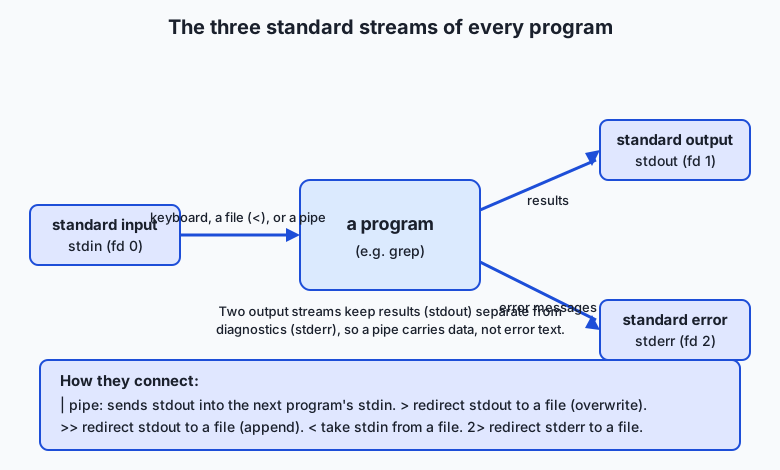
There are two ways to rewire a stream. Redirection connects a stream to a file. > sends standard output into a file, replacing its contents; >> appends to the file instead; < takes standard input from a file; and 2> sends standard error to a file. Piping, with |, connects one program’s standard output directly to the next program’s standard input, with no file in between. The separation of stdout from stderr is what makes pipes safe: because error messages travel on stderr, they appear on your screen instead of contaminating the clean data flowing through the pipe.
| Operator | What it does | Example |
|---|---|---|
| | Send stdout of the left command into stdin of the right | cat log | grep 404 |
> | Redirect stdout to a file (overwrite it) | grep 404 log > errors.txt |
>> | Redirect stdout to a file (append to it) | grep 500 log >> errors.txt |
< | Take stdin from a file | wc -l < log |
2> | Redirect stderr to a file | sort huge 2> problems.txt |
2>&1 | Send stderr to wherever stdout is going | ./run 2>&1 | less |
Now the tools themselves, grouped by job.
Viewing text
cat prints a file’s contents to standard output — handy for short files and for feeding a file into a pipe. head prints the first lines of its input (the first 10 by default; head -n 3 for three), and tail prints the last lines (tail -n 20 for the final twenty; tail -f follows a growing file live, invaluable for watching a log). For anything longer than a screen, less opens a scrollable pager you can page through and search inside with /, quitting with q. Rule of thumb: cat to dump or pipe, head/tail to peek at the ends, less to read comfortably.
Searching with grep
grep PATTERN file prints every line that contains the pattern. It is the tool you reach for constantly. A few flags carry most of the value: -i ignores case; -c prints a count of matching lines instead of the lines; -n prefixes each match with its line number; -v inverts the match, printing lines that do not contain the pattern; and -r searches a whole directory tree recursively. The pattern can be a plain string or a regular expression — a compact notation for describing text patterns, where ^ anchors to the start of a line, $ to the end, . matches any single character, and [0-9] matches any one digit. So grep '^Error' log finds lines that begin with “Error”, and grep -c '404' access.log counts how many lines mention 404. Regular expressions are a deep topic of their own; today you need only this taste.
Transforming with sed, cut, sort, uniq, and wc
sed is the stream editor; its most common use is substitution. sed 's/old/new/' replaces the first occurrence of “old” with “new” on each line, and sed 's/old/new/g' replaces every occurrence (the trailing g means “global”). sed prints the transformed stream and leaves your file alone. cut slices columns: cut -d',' -f1 takes the first comma-separated field of each line — perfect for CSV data. sort orders lines, with -n for numeric order and -r for reverse; sort -u sorts and removes duplicates in one step. uniq collapses adjacent identical lines, and uniq -c prefixes each with a count of how many times it repeated — which is why sort | uniq -c is the canonical way to tally values. Finally, wc counts: wc -l counts lines, wc -w words, wc -c bytes.
Building a pipeline step by step
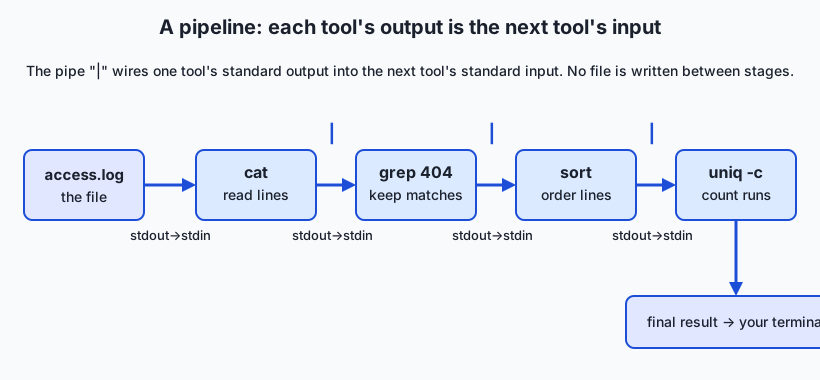
Watch a real question get answered by growing a pipeline one stage at a time. The question: which client IP addresses hit our web server most often? Each log line begins with the client’s IP. Build up from the left.
Stage 1 — read the file:
  cat access.log
  → every line of the log

Stage 2 — keep just the first column (the IP):
  cat access.log | cut -d' ' -f1
  → 10.0.0.14
    10.0.0.7
    192.168.1.10
    ...

Stage 3 — group identical IPs so uniq can see them:
  cat access.log | cut -d' ' -f1 | sort
  → 10.0.0.14
    10.0.0.14
    10.0.0.7
    ...

Stage 4 — collapse each run into "count IP":
  cat access.log | cut -d' ' -f1 | sort | uniq -c
  →   10 10.0.0.14
       7 10.0.0.7
       ...

Stage 5 — rank by count, biggest first, and keep the top 5:
  cat access.log | cut -d' ' -f1 | sort | uniq -c | sort -rn | head -n 5
Each stage does exactly one job, and you can inspect the stream after any stage by simply not typing the rest. That habit — build a pipeline incrementally, checking the output at each | — is how professionals write these commands correctly the first time.
An everyday analogy
Picture a factory assembly line. Raw material rolls in at one end and a finished product rolls out the other, and in between sits a row of workers, each at a single station doing exactly one small job. One worker only inspects items and pushes the rejects off the belt. The next only sorts what remains into order. The next only tallies how many of each kind go by. No single worker understands the whole product; each masters one narrow task and trusts the belt to bring the right thing and carry the result onward.
The belt is the pipe. The stream of items moving along it is the text flowing between commands: one worker’s finished pile is the next worker’s raw supply, which is exactly what “standard output becomes standard input” means. The worker who inspects and discards is grep, keeping only the items that match. The sorter is sort; the tallyer is uniq -c. Feeding the first worker from a bin of parts is redirection with <; boxing the final output into a warehouse crate instead of showing it to you is redirection with >. And the factory has one more belt you rarely notice: a separate chute where any worker drops a broken part with a note for the supervisor. That chute is standard error — deliberately kept off the main line so a defect report never gets sorted and counted as if it were a real product.
The analogy even explains why the Unix approach wins. You would never build a single monstrous machine that inspects, sorts, and tallies all at once; if the sorting logic needed changing you would have to rebuild the whole thing. A line of one-job stations lets you swap in a different sorter, add a new inspection step, or reorder the workers freely. Composability on the factory floor is exactly composability at the command line.
Examples in practice
Let’s do several real tasks, each a small pipeline. Assume a file access.log whose lines look like 10.0.0.14 - - [12/Jul/2026:08:01:12 +0000] "GET /index.html HTTP/1.1" 200 1043.
Count the lines in a file. The simplest useful command:
wc -l < access.logFeeding the file on standard input with < makes wc print only the number, with no filename attached — handy when you want just the count.
Find and count errors. How many “404 Not Found” responses were served?
grep -c ' 404 ' access.logThe spaces around 404 keep it from accidentally matching a byte count or timestamp that happens to contain those digits — a small habit that prevents real mistakes.
Extract unique values. Which distinct pages were requested? Here the path is the seventh space-separated field:
cut -d' ' -f7 access.log | sort -ucut pulls the path column, and sort -u orders the paths and removes duplicates, leaving one line per distinct page.
Substitute text in a stream. Strip the leading slash from each path:
cut -d' ' -f7 access.log | sort -u | sed 's#^/##'Notice the delimiter: sed lets you use any character after s, so s#^/## uses # to avoid clashing with the slash we are matching. The file on disk is never touched — only the stream printed to your screen is changed.
The top-N pattern, computed fully. Take a tiny five-line input to see every number:
input IPs (after cut):        after sort:           after uniq -c:      after sort -rn:
  10.0.0.7                      10.0.0.7               2 10.0.0.7          2 10.0.0.7
  10.0.0.14                     10.0.0.7               2 10.0.0.14         2 10.0.0.14
  10.0.0.7                      10.0.0.14              1 192.168.1.10      1 192.168.1.10
  192.168.1.10                  10.0.0.14
  10.0.0.14                     192.168.1.10
Sorting brings identical IPs together; uniq -c turns each run into a count; sort -rn ranks those counts numerically from high to low. Swap head onto the end and you have a leaderboard. This exact pipeline, on a real forty-line log, is the heart of today’s lab.
Implications: security, privacy, performance, scalability, and cost
Security. These tools only do what you type, but what you type can matter. Because > overwrites a file completely, a mistyped redirect can erase data in an instant — sort data > data will destroy data, because the shell empties the file before sort reads it. Treat > onto an existing file with the same care you would a delete. And never run a pipeline you copied from an untrusted source without reading it, especially if it pipes downloaded text into a shell.
Privacy. Logs and datasets frequently contain personal data. Under many privacy laws an IP address is personal data, and real logs may hold user identifiers or session tokens. The same tools that analyze such data can also redact it — a sed substitution can mask a field before you share a file — but the responsibility is yours: know what is in a stream before you send it anywhere. Today’s lab uses entirely synthetic data with private-range addresses precisely so there is nothing sensitive to leak.
Performance. Streaming is the quiet superpower here. Because each tool processes one line at a time and passes it on, a pipeline never needs to hold the whole file in memory, so it can chew through files far larger than your RAM — the very files that freeze a graphical editor. The pipe also lets stages run concurrently: while sort works on early output, cut is already producing more. One caveat: sort must see all its input before it can emit the first sorted line, so it is the stage most likely to need scratch space on a truly enormous file.
Scalability. The same pipeline that answers a question about a forty-line sample answers it about a forty-million-line production log, unchanged. That is a rare and valuable property: you develop on a small file you can eyeball, then run the identical command on the real thing. When one machine is not enough, the same philosophy scales outward — the “map-reduce” idea behind large data systems is recognizably grep-then-sort-then-count, spread across many computers.
Cost. These tools are free, open source, and already installed, so the direct cost is zero. The indirect savings are large: a question you can answer with a five-second pipeline is a question you do not spin up a cloud database or write a throwaway program to answer. Fluency here routinely turns an afternoon of work into a single line.
Alternatives: free, open source, and commercial
For the core jobs, several excellent tools compete, and it is worth knowing when to reach for each. All of the following are free and open source unless noted.
grep is the universal searcher — installed everywhere, fast enough for almost anything, and the right default. Its most notable modern alternative is ripgrep (rg), written by Andrew Gallant and first released in 2016. Ripgrep is free and open source, respects your project’s ignore files, searches directories recursively by default, and is often dramatically faster on large codebases because it skips binary and ignored files automatically. Use grep for portability and for pipelines on standard servers; reach for ripgrep when searching big source trees on your own machine, if you have installed it. Example: rg 'def train' src/ finds every line containing def train under src/, honoring your ignore files, with zero flags.
sed is the right tool for simple, streaming substitutions — swap this for that, delete matching lines, print a range. When the job grows to “pull out column 3 where column 5 is greater than 100 and add up column 7,” you have outgrown sed and want awk, the small columns-and-patterns language from 1977. awk '$9 == 404' access.log prints every line whose ninth field is 404; awk '{sum += $10} END {print sum}' access.log adds up the tenth field across all lines. awk shines exactly where whitespace-separated columns and simple arithmetic meet — which is most log and table data. For anything larger still, a general-purpose language such as Python (with a library like pandas) takes over; the command line stops being the right tool when the logic needs real data structures, tests, or reuse.
| Tool | Best at | When to choose it | Cost |
|---|---|---|---|
grep | Finding lines that match a pattern | The default search; portable everywhere | Free, preinstalled |
ripgrep (rg) | Fast recursive search of source trees | Big codebases on your own machine | Free, open source (install) |
sed | Simple stream substitutions and deletions | One clear find-and-replace on a stream | Free, preinstalled |
awk | Columns plus arithmetic and conditions | Field extraction with logic or sums | Free, preinstalled |
cut | Grabbing a fixed column | Pulling one field from delimited data | Free, preinstalled |
Python + pandas | Complex, reusable data transformation | Logic too big for a one-liner | Free, open source (install) |
Comparison with related concepts
| Concept A | Concept B | Key difference |
|---|---|---|
Pipe (|) | Redirect (>) | A pipe streams output into another program; a redirect writes output into a file |
grep | sed | grep selects whole lines that match; sed transforms the text of lines |
cut | awk | cut grabs fixed columns with no logic; awk adds conditions and arithmetic |
sort -u | uniq | sort -u removes all duplicates; uniq only collapses adjacent ones, so needs sorted input |
| stdout | stderr | Results travel on stdout and flow through pipes; errors travel on stderr and reach your screen |
| A shell pipeline | A Python script | The pipeline is a fast one-liner for ad-hoc questions; the script is for reusable, testable logic |
When to use it — and when not to
Reach for pipes and text tools whenever a question is ad hoc, the data is line-oriented text, and you want an answer now: inspecting logs, sampling and counting a dataset, finding malformed rows, extracting a column, or reshaping a file toward another format. This is the fastest path from question to answer that computing offers, and it is precisely the daily rhythm of preparing data — the phase where far more time goes than most beginners expect. If you can express the job as “read lines, keep or transform some, summarize,” a pipeline is almost always the right tool, and building it stage by stage keeps you correct.
Know when to climb to a higher tool, too. When the logic gets genuinely complex — nested conditions, joining two datasets on a key, parsing a format where fields can contain the delimiter (real CSV with quoted commas is a classic trap for cut) — a proper program in Python or a purpose-built library will be clearer and more reliable than an ever-growing pipeline. When you will run the same transformation many times, write and save a script (which is exactly where this week is heading) rather than retyping a fragile one-liner. And when correctness truly matters, remember that a pipeline is hard to test; code you can write tests for is safer. The professional instinct is to prototype at the command line for speed, then graduate to a script or program the moment the task earns permanence.
The AI connection
Everything today feeds directly into working with data for machine learning, because data preparation is text processing wearing a different hat. Before a dataset can teach anything, someone has to look at it, and the command line is how you look: head to see the first rows, wc -l to learn how many examples you have, cut and sort | uniq -c to see the distribution of labels, and grep to fish out the malformed lines that will otherwise crash a training run at hour three. Cleaning a dataset — dropping empties, filtering out junk, deduplicating near-identical rows, normalizing a field with sed — is exactly the filter-and-transform work you practiced here, at the scale where doing it by hand is impossible and doing it in a pipeline takes seconds.
The connection runs the other way too. Systems that generate text produce streams of it, and you will constantly pipe those streams onward — filtering generated lines to the ones that parse, counting how often each category appears in a batch of outputs, extracting a specific field from structured results, or masking sensitive values before you store them. Log analysis, the lab’s task, is the same skill again: when a data pipeline or a running service misbehaves, its logs are text, and the person who can grep the error, sort | uniq -c the failure types, and spot the pattern is the person who fixes it fastest. Master these small tools now and you will move through the unglamorous, decisive, everyday work of real machine-learning practice at the speed of a single typed line.
Knowledge check
Try these from memory before looking back:
- In your own words, state the Unix philosophy in one sentence, and explain what the pipe
|has to do with it. - Name the three standard streams, say what each is for by default, and explain why keeping standard error separate from standard output matters when you use a pipe.
- What is the difference between
>and|? Give one example of each. - Why does
uniqusually needsortin front of it? What single command does both jobs at once? - Write a pipeline that prints the five most common values in the first comma-separated column of a file called
data.csv, most frequent first.
Hands-on exercise
Time to run real pipelines on real text. This exercise is worked in full in the Day 10 lab directory, which ships a synthetic web log (examples/samples/access.log) with forty request lines. Open your terminal, change into the lab directory, and first look at the data:
head examples/samples/access.logEach line has the shape IP - - [timestamp] "METHOD path HTTP/1.1" status size, so the IP is the first space-separated field, the path is the seventh, and the status code is the ninth. Now answer four questions, each with one pipeline.
Count the total requests (one request per line):
wc -l < examples/samples/access.logFind the busiest client IPs (the top-N pattern from the lesson):
cut -d' ' -f1 examples/samples/access.log | sort | uniq -c | sort -rn | head -n 5Count the “404 Not Found” responses by matching the ninth field with awk:
awk '$9 == 404' examples/samples/access.log | wc -lCount how many distinct paths were requested:
cut -d' ' -f7 examples/samples/access.log | sort -u | wc -lThen open starter/analyze_log.sh, complete its four numbered exercises with these pipelines, run it with bash starter/analyze_log.sh, and check your work with bash tests/run_tests.sh.
Expected output
Running the completed analysis on the committed sample prints exactly these figures (the sample is fixed, so your numbers must match):
=== Log Analysis Report ===
Log file: examples/samples/access.log
Total requests: 40
Top 5 IP addresses (count  IP):
  10 10.0.0.14
   7 10.0.0.7
   6 10.0.0.99
   5 192.168.1.23
   5 192.168.1.10
404 responses: 7
Unique paths: 13
=== End of report ===
Read it back: forty total requests; the busiest client is 10.0.0.14 with ten requests; seven responses were 404s; and thirteen distinct paths were requested. Every number here came out of a pipeline you can rebuild from memory.
Validate your work
You are done when you can check every box:
-
wc -lreports 40 total requests. - Your top-IP pipeline names
10.0.0.14as the busiest, with a count of 10. - Your 404 pipeline reports 7.
- Your unique-paths pipeline reports 13.
-
bash tests/run_tests.shends with0 failure(s). - You can explain, for each pipeline, what every stage between the
|bars does.
Troubleshooting
uniq -cshows the same IP several times. You forgot tosortbeforeuniq;uniqonly collapses adjacent duplicates. Putsortimmediately before it.- The wrong column comes out. Recount the fields from the left starting at 1: the IP is field 1, the path is field 7, the status is field 9.
cut -d' ' -f1andawk '{print $1}'both mean “field 1.” - Your 404 count is 0 or far too high. Match the status field, not any stray “404”:
awk '$9 == 404'is precise; a baregrep 404can match a byte size or timestamp. See the lab’s troubleshooting file. No such file or directory. Run the commands from the lab directory so the relative pathexamples/samples/access.logresolves, or give the full path.
Common mistakes
- Using
uniqwithoutsort. The single most common pipeline bug. If a tally looks wrong, check the sort step first. - Miscounting fields. Off-by-one on the column number silently produces plausible-looking but wrong answers. Verify with a quick
headand count deliberately. - Overwriting data with
>.sort file > fileempties the file beforesortreads it. To edit in place, write to a new file and rename it, or use a tool’s dedicated in-place option — never redirect onto the file you are reading.
Practice assignment
Complete starter/analyze_log.sh so all four pipelines work, run it, and confirm bash tests/run_tests.sh reports zero failures. Then fill in starter/text-pipelines-worksheet.md with your findings: the total request count, the busiest IP and its count, the number of 404s, and the count of unique paths. Finish with a short paragraph (4–6 sentences) describing one pattern you noticed in the log — for instance, how many responses were successful (status 200) versus errors, or whether a single client dominated the traffic — and name the pipeline you would run to confirm it. Keep the worksheet; later lessons build on this data-inspection habit.
Extension challenge
Go one step past the lab. First, produce a full status-code breakdown with a single pipeline — awk '{print $9}' examples/samples/access.log | sort | uniq -c | sort -rn — and confirm the counts sum to 40. Second, adapt the top-IP pipeline to field 7 to find the single most-requested path instead of the most active IP. Third, compute the total bytes served without any pipe at all, using awk’s ability to accumulate: awk '{sum += $10} END {print sum}' examples/samples/access.log. Finally, use a sed substitution in a pipeline to rewrite every path so it drops its leading slash, and watch closely to confirm the file on disk is unchanged afterward — proof that a pipeline transforms the stream, not the source. Write two or three sentences on which of these you would keep as a saved script and why, foreshadowing the shell scripting you will meet later this week.
Quiz
Q1. What does the pipe operator `|` do in a command like `cat log | grep 404`?
- It saves the output of `cat` to a temporary file that `grep` then opens
- It connects the standard output of `cat` directly to the standard input of `grep`
- It runs `cat` and `grep` on two separate files at the same time
- It tells the shell to ignore any errors from `cat`
Show answer
Answer: B. It connects the standard output of `cat` directly to the standard input of `grep`
A pipe streams one program's standard output straight into the next program's standard input, in memory, with no intermediate file — the core mechanism of composing small tools.
Q2. Which statement about the three standard streams is correct?
- Standard input, output, and error all go to the same place and cannot be separated
- Standard error is where a program reads its input from
- Standard output carries a program's results while standard error carries its diagnostic messages, and the two are kept separate
- Standard output is only used when writing to a file
Show answer
Answer: C. Standard output carries a program's results while standard error carries its diagnostic messages, and the two are kept separate
Results travel on stdout and diagnostics on stderr; keeping them separate is what lets a pipe carry clean data while error messages still reach your screen.
Q3. Why does `uniq` almost always need `sort` before it in a pipeline?
- `uniq` runs faster on sorted input but produces the same result either way
- `uniq` only collapses duplicate lines that are adjacent, so identical lines must first be brought together by sorting
- `sort` is required to convert the text into a format `uniq` can read
- `uniq` cannot read from a pipe unless `sort` opens the stream first
Show answer
Answer: B. `uniq` only collapses duplicate lines that are adjacent, so identical lines must first be brought together by sorting
`uniq` compares each line only with the one before it, so it collapses runs of adjacent duplicates; sorting first groups all identical lines together. `sort -u` does both steps at once.
Q4. What is the key difference between `>` and `|`?
- `>` writes standard output into a file, while `|` streams standard output into another program
- They are identical; both send output to a file
- `>` appends to a file, while `|` overwrites it
- `|` writes to a file, while `>` sends output to another program
Show answer
Answer: A. `>` writes standard output into a file, while `|` streams standard output into another program
A redirect (`>`) sends output to a file (overwriting it), while a pipe (`|`) sends output to another running program. `>>` is the append form of the redirect.
Q5. Which pipeline correctly prints the five most common values in the first column of a space-separated file?
- cut -d' ' -f1 file | uniq -c | head -n 5
- cut -d' ' -f1 file | sort | uniq -c | sort -rn | head -n 5
- sort file | cut -d' ' -f1 | head -n 5
- grep -c file | sort -rn | head -n 5
Show answer
Answer: B. cut -d' ' -f1 file | sort | uniq -c | sort -rn | head -n 5
Extract the column with cut, group duplicates with sort, count each run with uniq -c, rank by count with sort -rn, and keep the top five with head — the canonical top-N pattern.
Q6. What does `sed 's/cat/dog/g'` do to each line of its input?
- Deletes every line that contains the word cat
- Replaces only the first occurrence of cat with dog on each line
- Replaces every occurrence of cat with dog on each line
- Permanently rewrites the original file, replacing cat with dog
Show answer
Answer: C. Replaces every occurrence of cat with dog on each line
The trailing `g` (global) makes the substitution replace every match on a line, not just the first; by default sed prints the changed stream and leaves the source file untouched.
Q7. In the log line format `IP - - [time] "GET /path HTTP/1.1" status size`, which command counts requests that returned status 404 by matching the ninth field?
- grep -v 404 access.log | wc -l
- cut -d' ' -f1 access.log | wc -l
- awk '$9 == 404' access.log | wc -l
- sort access.log | uniq -c
Show answer
Answer: C. awk '$9 == 404' access.log | wc -l
awk splits each line into whitespace-separated fields, so `$9 == 404` selects only lines whose status field is 404; piping to `wc -l` counts them. Matching the exact field avoids false hits from a stray 404 elsewhere in the line.
Q8. Which best states the Unix philosophy behind these tools?
- Build one large program that can perform every text operation you might need
- Always store intermediate results in files so each step can be inspected later
- Prefer graphical tools because they are easier for beginners to use
- Write small programs that each do one thing well and work together through text streams
Show answer
Answer: D. Write small programs that each do one thing well and work together through text streams
The philosophy favors small, single-purpose programs composed through a universal text interface — which is exactly why pipes make the tools so powerful in combination.
Glossary
- Unix philosophy
- A design approach that favors small programs each doing one job well, built to work together, communicating through text streams as a universal interface.
- pipe
- The `|` operator, which connects one command's standard output directly to the next command's standard input so data flows between programs without any intermediate file.
- standard input
- The default stream (stdin, file descriptor 0) a program reads from — the keyboard by default, or a file or pipe when redirected.
- standard output
- The default stream (stdout, file descriptor 1) a program writes its results to — the terminal by default, or a file or the next command in a pipe when redirected.
- standard error
- A second output stream (stderr, file descriptor 2) reserved for error and diagnostic messages, kept separate from standard output so errors never contaminate the data flowing through a pipe.
- redirection
- Connecting a program's stream to a file: `>` overwrites a file with standard output, `>>` appends to it, `<` supplies standard input from a file, and `2>` sends standard error to a file.
- filter
- A program that reads a text stream, transforms it, and writes a text stream — such as grep, sed, sort, uniq, cut, or wc — the building block of a pipeline.
- cat
- A command that prints the contents of one or more files to standard output, commonly used to view a short file or feed a file into a pipeline.
- grep
- A command that searches its input line by line and prints the lines matching a pattern; common flags include -i (ignore case), -c (count), -n (line numbers), -v (invert), and -r (recursive).
- sed
- The stream editor: a command that applies editing operations — most often substitution with `s/old/new/` — to a flowing stream of text, printing the result without changing the source file by default.
- regular expression
- A compact notation for describing text patterns, where symbols such as ^ (start of line), $ (end of line), . (any character), and [0-9] (any digit) let a single expression match many strings.
- uniq
- A command that collapses adjacent identical lines into one, and with -c prefixes each with a count of how many times it repeated — usually paired with a preceding sort.
Sources and further reading
- The Missing Semester of Your CS Education — Data Wrangling — MIT (accessed 2026-07-12) — A hands-on lecture on chaining command-line tools to slice and transform text.
- The Linux Command Line — William Shotts (accessed 2026-07-12) — A free book-length introduction to the shell, pipes, redirection, and text tools.
- GNU Grep Manual — GNU Project (accessed 2026-07-12) — The authoritative reference for grep options and regular-expression syntax.
- GNU Sed Manual — GNU Project (accessed 2026-07-12) — The authoritative reference for sed commands, including substitution.
- Pipeline (Unix) — Wikipedia (accessed 2026-07-12) — Overview of Unix pipes, their history, and Douglas McIlroy's role in their creation.
Kept in this browser, no account needed. Your progress page turns the whole record into one link you can bookmark or open on another device.