Computing Foundations › How the Internet Works › Day 17
Day 17: TCP, UDP, and Ports
After this lesson you will be able to explain how data reaches the right program on a host — through ports, TCP, and UDP — and use that model to see which ports your machine is listening on and to diagnose a "connection refused" in seconds.
Hands-on lab for this lesson
Lab files on GitHub: https://github.com/ai-roadmap-365/ai-roadmap-365.github.io/tree/main/labs/sections/computing-foundations/day-017-tcp-udp-and-ports
- Get the hands-on files. Clone the labs repository once (you can reuse this clone for every lesson). This works on macOS, Linux, and Windows (PowerShell or WSL):
git clone https://github.com/ai-roadmap-365/ai-roadmap-365.github.io.git cd ai-roadmap-365.github.io - Open this lesson's lab. Move into the directory for this specific day. Every lab lives at the same predictable path — section / subsection / week / day:
cd labs/sections/computing-foundations/day-017-tcp-udp-and-ports - Read the lab guide. Open `README.md` in that directory. It lists the exact commands, what each does, the expected output, and how to check your work — read it before running anything.
- Run it and check your work. Follow the README's "How to run" section: run the example first to see the finished result, then complete the numbered exercises in `starter/`, then run the tests. The tests pass (exit 0) only when your work is correct.
bash tests/run_tests.sh # or the test command named in the lab README
You can also open the lab as a local page (works offline, shows the file tree and expected output).
Learning objectives
By the end of this lesson you will be able to:
- Explain what a port is (a 0–65535 number identifying a service on a host) and place any port in its IANA range: well-known (0–1023), registered (1024–49151), or ephemeral (49152–65535)
- Describe the TCP three-way handshake (SYN, SYN-ACK, ACK) step by step and state what each side communicates
- List TCP's four guarantees — reliability, ordering, flow control, and congestion control — and explain why the web depends on them
- Explain how UDP differs (connectionless, best-effort, low overhead) and name applications that prefer it: DNS, live media, games, and QUIC
- Define a socket as an IP-address-and-port pair and explain how a four-tuple identifies one connection
- Use lsof, ss/netstat, nc, and curl to inspect listening ports and test loopback connectivity, and interpret "connection refused"
- Connect the transport layer to model-serving practice: model servers listen on a port, and "connection refused" means nothing is listening there
Prerequisites
- Day 16 (IP Addresses, DNS, and Routing) — ports ride on top of the IP addressing you learned there
- Day 15 (What Happens When You Load a Web Page) for the end-to-end picture of a request
- A terminal on macOS, Linux, or WSL; no software to install beyond the standard OS tools
Why this matters
The first time you run a model server on your own machine, you will type a command, watch it print a line like “listening on port 8000,” and then open a browser or a client and get one of two outcomes: it works, or you see the words connection refused. Understanding today’s lesson is the difference between those two outcomes feeling like magic and feeling like something you can reason about in ten seconds flat.
Here is why it matters concretely for the work ahead. Every inference API, every local model server, every database your application talks to, and every dataset you download over the network rides on top of two transport protocols — TCP and UDP — and reaches the right program through a number called a port. When a request hangs, when a service “isn’t reachable,” when a download is mysteriously slow, or when your training job can’t talk to the parameter server, the cause is almost always in this layer: nothing is listening on the port you addressed, or a firewall dropped the packets, or the connection setup is timing out, or you chose a slow reliable protocol where a fast lossy one would do. The engineers who debug these problems in seconds share one mental model, and today you build it.
Yesterday you learned how a packet finds a machine: IP addresses get bytes to the right host, and DNS turns names into those addresses. But a modern computer runs dozens of network programs at once — a web server, a database, a code editor’s helper, a file-sync agent. Getting a packet to the right machine is only half the delivery problem. The other half is getting it to the right program on that machine, in the right order, without loss, at a speed both sides can sustain. That is the job of the transport layer, and by the end of this lesson you will be able to see it running on your own computer.
The idea in plain language
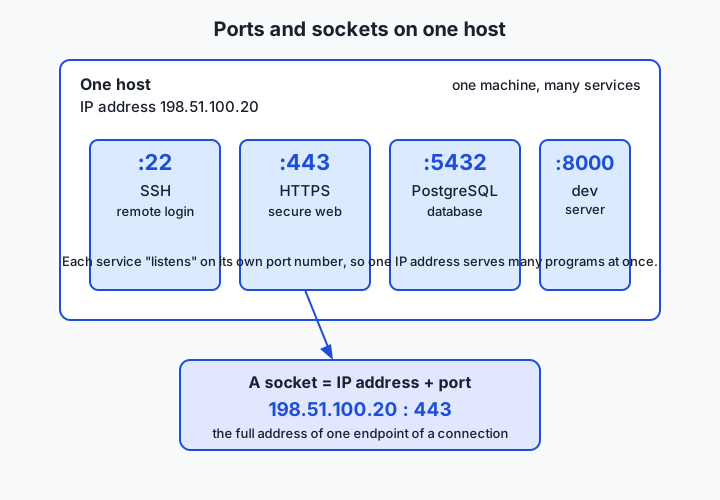
An IP address gets your data to the right computer. A port gets it to the right program inside that computer. A port is just a number, from 0 to 65535, that labels one service on a host. A web server waiting for secure traffic sits on port 443; a secure-login service sits on port 22; a name-lookup service sits on port 53. When your computer sends a request to 198.51.100.20 on port 443, the receiving machine knows to hand those bytes to its web server and not to its database.
Between the raw ability to send packets and the programs that use them sit two transport protocols that decide how the bytes travel. TCP (Transmission Control Protocol) is the careful one: before any data moves, the two sides shake hands to agree they are both ready, and then TCP guarantees that everything you send arrives, in order, with nothing missing — re-sending anything the network loses. UDP (User Datagram Protocol) is the fast, no-frills one: it just throws each little packet toward its destination with no handshake, no ordering, and no promise it will arrive. TCP is a tracked courier; UDP is a postcard.
The final idea ties the first two together. A socket is the combination of an IP address and a port — written host:port — and it names one endpoint of a conversation. A connection is a pair of sockets: your machine’s address:port talking to the server’s address:port. When a program “listens on a port,” it has opened a socket and is waiting there for anyone who addresses it. When you see connection refused, you addressed a socket where no program was listening. Ports, TCP and UDP, and sockets: three simple ideas that together explain almost everything about how programs on different machines talk.
Historical background
The transport layer was born from a specific problem: in the early 1970s there were several incompatible packet networks — the ARPANET among them — and no agreed way for them to interconnect. In 1974, Vint Cerf and Bob Kahn published “A Protocol for Packet Network Intercommunication,” describing a Transmission Control Program that would let hosts on different networks exchange data reliably. Their design is the direct ancestor of everything in this lesson.
At first, reliability and addressing lived in one monolithic protocol. The crucial architectural decision came around 1978, when that single program was split into two layers: IP (the Internet Protocol) took responsibility for getting individual packets to the right host across networks, while TCP sat on top of IP and added the reliability — the handshakes, acknowledgements, and retransmissions. This separation is why we say “TCP/IP”: two cooperating layers, not one. TCP was formally specified in RFC 793 in September 1981.
Splitting the layers made room for a deliberate alternative. Not every application wants TCP’s careful bookkeeping — a program looking up a name, or streaming live audio, would rather send a quick packet and move on than pay for handshakes and retransmissions. So in August 1980, RFC 768 defined UDP, a minimal transport that adds almost nothing to raw IP except port numbers and a checksum. From the start, the Internet offered a choice: TCP when you need reliability, UDP when you need speed and simplicity.
The switchover that made this the world’s standard happened on a single date: 1 January 1983, when the ARPANET cut over to TCP/IP — the “flag day” from which the modern Internet is usually counted. Port numbers, meanwhile, were coordinated centrally so that everyone agreed which service lived where; that registry is maintained today by the Internet Assigned Numbers Authority (IANA). The most recent chapter is QUIC, a transport begun at Google around 2012 and standardized by the IETF as RFC 9000 in 2021: it delivers TCP-like reliability but is built on top of UDP to shave off setup delays, and it is the foundation of HTTP/3. Even the newest transport is a remix of the two protocols you are learning today.
What it is — and what it is not
The transport layer is the part of the network stack that delivers data to the right program on a host, with a chosen set of guarantees. Every word is load-bearing. To the right program: that is what ports do. On a host: the IP layer below has already found the machine. With a chosen set of guarantees: TCP and UDP offer different promises, and you pick. A port by itself is not a program, a firewall, or a physical socket on the back of the computer — it is purely a number in a packet’s header that says which service the bytes are for.
It is just as important to be clear about what these things are not. A port is not security: opening a port does not protect it, and “closing” a port usually just means no program is listening there. TCP is not encryption — it guarantees delivery, not privacy; anything sent over plain TCP travels in the clear, which is exactly why HTTPS adds TLS on top (tomorrow’s neighbour lesson). And “connection” is a TCP idea, not a UDP one: UDP has no connections at all, so phrases like “the UDP connection dropped” are loose talk — UDP has nothing to drop.
| Common misconception | The reality |
|---|---|
| ”A port is a physical socket on the computer.” | A port is a number in a packet header (0–65535) identifying a service, not hardware. |
| ”Opening a port makes a service secure.” | A port is just an address; security comes from authentication and encryption layered on top. |
| ”TCP encrypts my data.” | TCP guarantees delivery and order, not privacy; encryption is a separate layer (TLS/HTTPS). |
| ”UDP is broken because packets can be lost.” | UDP is designed to be best-effort; apps that use it either tolerate loss or add their own recovery. |
| ”Connection refused means the site is down.” | It specifically means nothing is listening on that host and port — often a stopped or misconfigured service. |
Why it was created and what problems it solves
The transport layer exists to solve four problems that the layer below it — bare IP, which only knows how to shove a packet toward a host — leaves completely unsolved.
The first is multiplexing: one machine runs many network programs, so packets need a way to say which program they are for. Ports solve this. Without them, a computer could run exactly one network service at a time. The second is reliability: the underlying network can and does lose, duplicate, corrupt, and reorder packets, but many applications — loading a page, downloading a file, querying a database — cannot tolerate a single missing byte. TCP solves this by numbering every byte, acknowledging what arrives, and re-sending what doesn’t. The third is ordering: packets can take different routes and arrive scrambled, yet a file or a web page must be reassembled in the exact order it was sent. TCP restores order using those same sequence numbers.
The fourth problem is subtler and is really the reason UDP exists: not every application wants to pay for the first three. A live voice call would rather drop a lost packet than freeze the whole conversation waiting for a retransmission. A game sending sixty position updates per second does not care about a packet from 20 milliseconds ago — the next one is already better data. A name lookup is a single tiny question and answer; setting up and tearing down a reliable connection for it would be pure overhead. For all of these, the reliability machinery is a cost, not a benefit. So the transport layer offers a genuine choice, and learning when to want which is a core engineering skill.
How it works
Let’s assemble the mechanism from the parts, then watch a connection form.
Ports: one number per service
Every TCP or UDP packet carries two port numbers in its header: a source port (which program on the sender it came from) and a destination port (which program on the receiver it is for). Port numbers are split by IANA into three ranges, and the ranges tell you a lot at a glance:
| Range | Name | Meaning | Examples |
|---|---|---|---|
| 0 – 1023 | Well-known (system) ports | Reserved for standard services; often need admin rights to open | 22 SSH, 25 SMTP, 53 DNS, 80 HTTP, 443 HTTPS |
| 1024 – 49151 | Registered ports | Assigned to specific applications by request | 3306 MySQL, 5432 PostgreSQL, 6379 Redis, 8080 alt-HTTP |
| 49152 – 65535 | Ephemeral (dynamic) ports | Temporary numbers the OS hands to client programs | your browser’s outgoing connection uses one of these |
When your browser opens a page, it is the client: the OS gives it a temporary ephemeral port for the outgoing side, and it connects to the server’s well-known port 443. That asymmetry — clients use throwaway high ports, servers listen on fixed well-known ports — is the normal shape of almost every connection you will ever make.
The socket: host plus port
A socket binds a port to a program. When a server “listens on port 443,” the operating system reserves that port for it and delivers any packet addressed there to that program. A socket is identified by the pair IP-address:port, and a live connection is fully described by four numbers: source IP, source port, destination IP, destination port. That four-tuple is how one server can hold thousands of simultaneous connections on the same port 443 — each connection is a distinct combination of the four.
TCP: the three-way handshake and reliable delivery
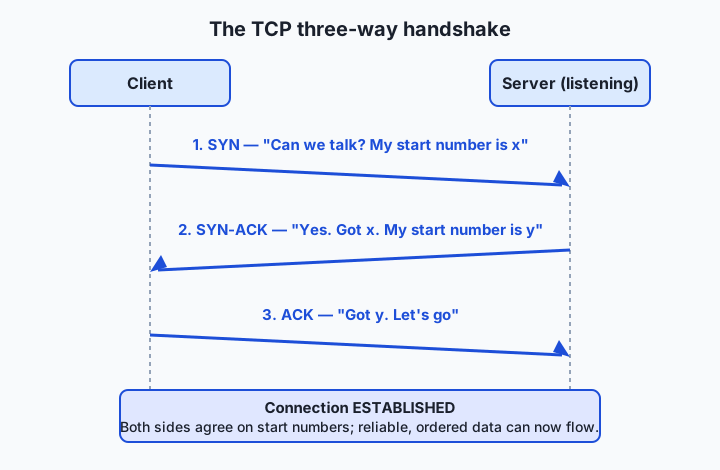
Before TCP sends any data, the two sides perform a three-way handshake to agree that both are present and ready, and to synchronize the sequence numbers they will use to count bytes:
- SYN. The client sends a packet with the SYN (“synchronize”) flag set and an initial sequence number x. In plain terms: “Can we talk? I’ll start counting from x.”
- SYN-ACK. The server replies with both SYN and ACK (“acknowledge”) flags: it acknowledges x and announces its own start number y. In plain terms: “Yes, I heard you; I’ll start counting from y.”
- ACK. The client acknowledges y. “Got it — let’s go.” The connection is now established, and data can flow in both directions.
Once established, TCP delivers on four guarantees. Reliability: every byte is numbered, and the receiver acknowledges what it gets; anything unacknowledged after a timeout is retransmitted. Ordering: the receiver uses the sequence numbers to reassemble bytes in the exact order sent, even if packets arrive scrambled. Flow control: the receiver advertises how much buffer space it has (its “window”), so a fast sender cannot overwhelm a slow receiver. Congestion control: TCP watches for signs the network itself is overloaded (lost packets, delay) and slows down, then probes cautiously back up — the algorithm that quietly shares the Internet’s capacity among millions of connections. All of this is why the web runs on TCP: a page or a download must arrive complete and in order, and TCP makes an unreliable network behave like a reliable pipe.
UDP: send and forget
UDP does almost none of that, on purpose. There is no handshake: the first packet is the data. There are no sequence numbers, no acknowledgements, no retransmissions, no flow or congestion control built in. A UDP packet (a “datagram”) carries just source and destination ports, a length, a checksum, and the payload. The receiver either gets it or doesn’t, and UDP never tells the sender which. That sounds reckless, but it is exactly right for a name lookup (one small question, one small answer, retried by the application if needed), for live media (a lost frame is stale by the time you’d resend it), and for anything that wants to build its own delivery rules on a lean foundation — which is precisely what QUIC does.
An everyday analogy
Picture a large apartment building. Its street address is the IP address — it gets mail to the right building out of all the buildings in the city. But mail to a building is useless until it reaches the right resident, so every unit has an apartment number — that is the port. “Deliver to 198 Example Street, apartment 443” is a full address for one recipient, and that street-plus-apartment pair is the socket. One building (one IP address) can house hundreds of residents (services), each reachable by their own number, which is exactly how a single server runs a web service on 443, a database on 5432, and a login service on 22 at the same time.
Now, two delivery services operate in this city. The first is a tracked courier — that is TCP. Before shipping anything large, the courier phones ahead: “I have a delivery for you, are you there?” — “Yes, I’m here, go ahead” — “Great, sending now.” That call is the three-way handshake. Then the courier sends your shipment as numbered boxes, gets a signature for each, and automatically re-sends any box that goes missing; if you say “slow down, my hallway is full,” the courier waits (flow control), and if the roads are jammed, the courier eases off (congestion control). Nothing is lost, everything arrives in order, and you pay for all that care in time and overhead.
The second service is the postcard — that is UDP. You scribble a message, drop it in the mailbox, and walk away. No phone call, no signature, no tracking, no re-send if it’s lost in the post. It is wonderfully fast and cheap, and perfect when the message is small and self-contained, or so time-sensitive that a re-sent copy would arrive too late to matter. A “connection refused” is simply knocking on an apartment door where nobody lives: the building is there, the number is valid, but no resident answers — because no program is listening on that port.
Examples in practice
Let’s make it concrete with the tools you will actually use. Everything below is free and open source or ships with your operating system; none of it costs anything.
Seeing what is listening — lsof, ss, and netstat. Reach for these when you want to know which ports are open on your own machine — the first thing to check when a service “isn’t reachable.” On macOS, lsof (list open files — and sockets are files in Unix) is the standard tool:
lsof -nP -iTCP -sTCP:LISTENThe -iTCP selects TCP sockets, -sTCP:LISTEN keeps only listening ones, and -nP skips slow name lookups so you see raw numbers. On Linux the modern equivalent is ss (socket statistics), with the same idea in shorter flags:
ss -tlnpHere -t is TCP, -l is listening, -n is numeric, -p shows the owning program. The older netstat -tln does the same job and still exists nearly everywhere as a fallback. A line of output that reads *:443 (LISTEN) tells you a web server is up and waiting; if you expected it and don’t see it, your service never started — which is a far more useful diagnosis than “the site is down.”
Probing a port — nc (netcat). Reach for netcat when you want to ask “is anything listening on this port?” without launching a full client. The -z flag means “just check, send no data,” and -w 1 caps the wait at one second:
nc -z -w 1 127.0.0.1 443If nc exits with status 0, something answered — the port is open. If it exits non-zero, the port is closed and you have reproduced “connection refused” deliberately. Netcat is often called the “Swiss army knife” of networking precisely because this one tiny command settles so many arguments. (Because probing ports on machines you do not own can be treated as an intrusion, keep your probes on 127.0.0.1 — your own machine — as today’s lab does.)
Making a real TCP connection — curl. Every time you run curl you are using TCP without thinking about it: curl resolves the name, opens a TCP connection to the server’s port (443 for HTTPS, 80 for plain HTTP), completes the handshake, sends the request, and reads the ordered reply. Adding -v (verbose) makes the transport visible:
curl -v https://example.comIn the output you will see lines like Trying 93.184.216.34:443... and Connected to example.com — that is the TCP connection to a socket, narrated. When a curl command hangs or fails, reading those first few lines tells you whether the problem is DNS, the TCP connection, or something higher up.
A worked trace. Suppose you start a local development server and it prints “listening on port 8000.” Behind that message, the program asked the OS for a socket bound to port 8000 and is now waiting. When you point a client at port 8000 on your own machine, the client gets an ephemeral source port — say 51000 — and opens a connection described by the four-tuple 127.0.0.1:51000 → 127.0.0.1:8000. The three-way handshake completes in well under a millisecond because the packets never leave the machine, and the request and response stream over that TCP connection. If instead you point the client at port 8001, where nothing is listening, the kernel immediately answers with a refusal and the client reports connection refused — not a crash, just an empty apartment.
Implications: security, privacy, performance, scalability, and cost
Security
Ports are the front doors of a networked machine, and every open port is a potential entry point, so a core security practice is to run only the services you need and expose only the ports you must. A firewall is essentially a rule set about ports and addresses: “allow inbound 443, block everything else.” Attackers port-scan — sweeping through port numbers to find something listening — which is why scanning hosts you do not own is treated as hostile and is illegal in many places; keep your own experiments on the loopback. Note also that an open port is not authenticated by virtue of being open: the service behind it must still verify who is connecting.
Privacy
TCP and UDP move bytes; they do not hide them. On plain TCP or UDP, anyone who can see the traffic can read the payload and can certainly see the metadata — which IP addresses and ports are talking, and when. The port numbers themselves leak information: traffic to port 443 says “secure web,” to 22 says “someone is logging in,” to 5432 says “a database is being reached.” Encryption (TLS, the subject of the next lesson) hides the payload but not the fact that a connection exists, which is why privacy engineering has to consider the transport layer, not just the content.
Performance
The transport choice is a performance decision. TCP’s handshake costs a full network round-trip before any data moves, and its reliability adds acknowledgement traffic and can stall a whole stream while one lost packet is retransmitted (called head-of-line blocking). UDP pays none of that but hands you no guarantees. This is the exact trade-off QUIC was designed to improve: by building reliability on UDP and folding the connection and encryption setup together, it reduces the round-trips needed before data flows — which is why fast, modern APIs increasingly run over HTTP/2 and HTTP/3 rather than older, chattier setups.
Scalability
A single server can hold an enormous number of simultaneous connections on one port because each connection is a distinct four-tuple, but every open TCP connection costs kernel memory and bookkeeping, so at large scale connection management becomes a real engineering concern — load balancers, connection pooling, and keep-alive all exist to spread or reuse that cost. UDP scales differently: with no per-connection state to keep, a UDP service can be lighter, which is one reason high-fan-out systems sometimes prefer it.
Cost
The costs here are mostly time and machinery rather than dollars. Round-trips cost latency, and latency costs user patience and, at scale, servers. Choosing the wrong transport — reliable where you needed fast, or fast where you needed reliable and then reinventing reliability badly on top — costs engineering time and reliability incidents. The tools in this lesson are all free, so the only price of learning to diagnose this layer well is the half hour of the lab.
Alternatives: free, open source, and commercial
For a concepts lesson, “alternatives” means the other ways to explore and learn this material, and the other transports you might meet.
| Resource / option | Type | What it offers | Cost |
|---|---|---|---|
| The Day 17 lab in this course | Free | Hands-on inspection of the listening ports and loopback connections on your own machine | Free |
| Wireshark | Open source software | A packet capture tool that lets you watch a real three-way handshake, SYN by SYN | Free |
nc, ss, lsof, curl | Open source / OS tools | The command-line toolkit used throughout this lesson and lab | Free |
| High Performance Browser Networking (Ilya Grigorik) | Free online book | A clear, deep chapter on the building blocks of TCP, and on UDP and QUIC | Free to read online |
| Wikipedia: TCP and UDP articles | Free reference | Well-cited overviews of both protocols and their headers | Free |
| QUIC / HTTP/3 (RFC 9000) | Open standard | The modern UDP-based transport behind the fastest web and API traffic | Free specification |
There is no commercial product you need to buy to learn or use this layer — TCP, UDP, and the tools that inspect them are open and universal. Paid offerings exist a layer up (managed load balancers, API gateways, observability platforms), but they are conveniences built on exactly the free primitives you are learning now.
Comparison with related concepts
| Concept A | Concept B | Key difference |
|---|---|---|
| TCP | UDP | TCP is connection-oriented and reliable (handshake, ordering, retransmission); UDP is connectionless and best-effort (no handshake, no guarantees) |
| Port | IP address | An IP address identifies a host; a port identifies a service on that host — the building versus the apartment |
| Socket | Port | A port is just a number; a socket is a port bound to a program on a specific IP, i.e. address:port |
| Transport layer (TCP/UDP) | Network layer (IP) | IP gets a packet to the right host; TCP/UDP get it to the right program with a chosen level of reliability |
| TCP | TLS/HTTPS | TCP guarantees delivery; TLS adds encryption and identity on top of TCP — delivery versus privacy |
| Listening socket | Established connection | A listening socket waits for new connections on a port; an established connection is one live conversation (a full four-tuple) |
When to use it — and when not to
Choose TCP whenever completeness and order matter more than shaving off latency: web pages, API calls, file downloads, database queries, and anything where a single missing or out-of-order byte would corrupt the result. This is the overwhelming majority of the traffic you will write, which is why so much tooling assumes it. Choose UDP when speed and low overhead beat guaranteed delivery, and the application can tolerate or handle loss itself: live audio and video, real-time games, name lookups (DNS), and modern transports like QUIC that layer their own smarter reliability on UDP’s lean base.
Know when not to reach into this layer at all. Most of the time you will use a library — an HTTP client, a database driver — that opens sockets and manages TCP for you, and hand-rolling raw sockets or reimplementing reliability on UDP is a classic way to introduce subtle bugs; do it only when you genuinely need what the higher-level tools can’t give you. And do not treat ports as a security mechanism: “it’s on a non-standard port so it’s safe” is false comfort. The professional habit mirrors the one from earlier lessons: work at the highest layer that solves your problem, and descend to raw ports and transports only when a real requirement — performance, a custom protocol, or a stubborn bug — sends you there.
For your model-serving work specifically, the rule of thumb is simple: your local and hosted model servers will almost always speak TCP (via HTTP), you will address them by a port, and when a client can’t reach one, your very first move is to check what is actually listening — the exact skill the lab builds next.
Knowledge check
Try these from memory before looking back:
- In one sentence each, explain what an IP address, a port, and a socket identify, using the building-and-apartments analogy.
- List the three steps of the TCP three-way handshake in order, and say what each side is really telling the other.
- Name the four guarantees TCP provides that UDP does not, and give one kind of application that is happy to give up all four.
- A colleague runs a local server, points a client at it, and sees “connection refused.” Give the single most likely cause and the one command you would run first to confirm it.
- Why is DNS — a service whose job is fast name lookups — a natural fit for UDP rather than TCP?
Hands-on exercise
Time to see the transport layer on your own machine — worked through in full in the Day 17 lab directory. You will list the ports your computer is listening on, classify them, and prove the difference between an open port and a closed one with a loopback connection test. Everything is read-only and stays on your own machine; you never contact another host.
Open your terminal. On macOS, list the listening TCP ports with:
lsof -nP -iTCP -sTCP:LISTENOn Linux, the equivalent is:
ss -tlnpEach line shows a program and the port it is waiting on. Now pick a port you can see in that list and test whether it answers on the loopback address 127.0.0.1 (your own machine):
nc -z -w 1 127.0.0.1 <port>Then run the check right after it to read the result as a number:
echo $?A 0 means the port is open — something is listening. Finally, prove the opposite by probing a port where nothing is listening (port 1 is a safe choice on a normal machine):
nc -z -w 1 127.0.0.1 1This one exits non-zero: the kernel refuses the connection because no program is home — the “connection refused” case, reproduced on demand.
Expected output
A lsof run on a Mac looks like this (your ports will differ — that is the point):
COMMAND     PID  USER   FD   TYPE  DEVICE SIZE/OFF NODE NAME
ControlCe   818  you    12u  IPv4  ...       0t0   TCP  *:5000 (LISTEN)
ControlCe   818  you    10u  IPv4  ...       0t0   TCP  *:7000 (LISTEN)
node      33106  you    30u  IPv6  ...       0t0   TCP  [::1]:4321 (LISTEN)
Reading it: ControlCe (macOS Control Center) is listening on ports 5000 and 7000; a node process is listening on port 4321, but only on the IPv6 loopback [::1]. The * means “any address on this machine.” Then the connection tests:
$ nc -z -w 1 127.0.0.1 5000
$ echo $?
0
$ nc -z -w 1 127.0.0.1 1
$ echo $?
1
Port 5000 answered (exit 0, open); port 1 refused (exit 1, closed). The lab’s examples/inspect_ports.sh wraps all of this into one readable report.
Validate your work
You are done when you can check every box:
- You can list the TCP ports your machine is listening on.
- You can name at least one process and the port it is waiting on.
- You classified two of those ports into their IANA range (well-known, registered, or ephemeral).
- You probed one open port and read exit status
0. - You probed a closed port (port 1) and read a non-zero exit status.
- You can explain, in your own words, what “connection refused” means.
Troubleshooting
lsofshows very little. Withoutsudoit lists only your own user’s sockets — that is fine and expected; this lab never usessudo.command not found: lsof/ss/nc. Use the alternative for your OS (ssornetstat -tlnon Linux) and install netcat if needed (sudo apt install netcat-openbsd); the lab’srequirements/README.mdlists the one-line installs.- A port shows as listening but
nc 127.0.0.1reports closed. The service is bound only to the IPv6 loopback[::1]; probe that instead withnc -z -w 1 ::1 <port>. This is a real subtlety, not an error. - On macOS, ports 5000 and 7000 are taken and you didn’t start anything. The AirPlay receiver holds them; you can free them in System Settings if you need them.
Common mistakes
- Confusing listening with established. A listening socket is a service waiting for new connections; an established one is a live conversation already underway. This exercise looks only at listening sockets.
- Scanning a machine you do not own. Keep every probe on
127.0.0.1. Port-scanning other hosts can be treated as an intrusion and is illegal in many jurisdictions. - Reading “connection refused” as “the network is broken.” It is the opposite: the network reached the host perfectly, and the host actively said “nothing is listening here.” That is precise, useful information.
Practice assignment
Open starter/ports-worksheet.md in the Day 17 lab and fill it in completely for your own machine: record two ports your computer is listening on, classify each into its IANA range (well-known, registered, or ephemeral), and write your best guess at the service behind it and why. Then run nc -z -w 1 127.0.0.1 80 to determine whether the standard HTTP port is open on your machine, note the exit status, and explain what a browser-style client would report if it tried to connect there. Finish with one sentence, in your own words, distinguishing a port from an IP address using the building-and-apartments analogy. Keep the worksheet; the Week 3 project (a “Request Journey Map”) builds on it.
Extension challenge
Go one layer deeper and watch UDP, which has no listening state at all. List your UDP sockets — on macOS lsof -nP -iUDP, on Linux ss -ulnp — and notice that, unlike TCP, none of them say “LISTEN”: there is no connection for them to be listening for, because UDP is connectionless. Find the port your system’s DNS resolver uses (look for port 53) and write two or three sentences explaining why a name-lookup service is a good fit for UDP rather than TCP, referring back to the four guarantees TCP provides and why a DNS query is happy to give them up. For a final stretch, read the short description of QUIC in the sources, and write one sentence on why building a reliable transport on top of UDP — rather than using TCP — lets modern APIs start sending data with fewer round-trips. You have now reasoned about the newest transport on the Internet from the same first principles you learned today.
Quiz
Q1. What does a port number identify?
- A physical socket on the back of the computer
- A specific service or program on a host, so one machine can run many at once
- The physical route a packet takes across the Internet
- The encryption key used to secure a connection
Show answer
Answer: B. A specific service or program on a host, so one machine can run many at once
An IP address gets data to the right host; a port (0–65535) gets it to the right program on that host, which is how a single machine can run a web server, a database, and a login service at the same time.
Q2. Which three messages make up the TCP three-way handshake, in order?
- ACK, SYN, SYN-ACK
- SYN, ACK, SYN-ACK
- SYN, SYN-ACK, ACK
- PING, PONG, ACK
Show answer
Answer: C. SYN, SYN-ACK, ACK
The client sends SYN ("can we talk, I start at x"), the server replies SYN-ACK ("yes, got x, I start at y"), and the client sends ACK ("got y, let's go"), after which the connection is established.
Q3. Which of these is a guarantee TCP provides but UDP does not?
- Encryption of the data payload
- Retransmission of lost packets so data arrives complete and in order
- Hiding which IP addresses are communicating
- Faster delivery with no setup cost
Show answer
Answer: B. Retransmission of lost packets so data arrives complete and in order
TCP numbers every byte, acknowledges what arrives, and retransmits what is lost, delivering data reliably and in order. UDP does none of this. Neither protocol encrypts data — that is TLS's job.
Q4. Why is UDP a good fit for DNS lookups and live video?
- Because it encrypts each packet automatically
- Because it guarantees every packet arrives in order
- Because it is connectionless and low-overhead, and those applications tolerate or handle loss themselves
- Because it uses well-known ports below 1024
Show answer
Answer: C. Because it is connectionless and low-overhead, and those applications tolerate or handle loss themselves
UDP skips the handshake and reliability machinery, so it is fast and lightweight. A DNS query is one small question retried by the application if needed, and a lost video frame is stale by the time it could be resent — so the guarantees TCP adds would be pure cost.
Q5. What is a socket?
- A synonym for a port number
- The combination of an IP address and a port, naming one endpoint of a connection
- The physical cable connecting two computers
- A firewall rule that blocks a port
Show answer
Answer: B. The combination of an IP address and a port, naming one endpoint of a connection
A socket is an IP-address-and-port pair (written host:port). A full connection is described by a four-tuple: source IP, source port, destination IP, destination port.
Q6. Which port range is reserved for well-known (system) services such as HTTPS on 443 and SSH on 22?
- 49152 – 65535
- 1024 – 49151
- 0 – 1023
- 8000 – 9000
Show answer
Answer: C. 0 – 1023
Ports 0–1023 are the well-known range for standard services. 1024–49151 are registered ports, and 49152–65535 are ephemeral ports the OS assigns temporarily to client programs.
Q7. You start a local server, point a client at it, and see "connection refused." What does that most precisely mean?
- The Internet connection is down
- The host was reached, but nothing is listening on that port
- The data was corrupted in transit
- The server requires a password you did not provide
Show answer
Answer: B. The host was reached, but nothing is listening on that port
"Connection refused" means the network reached the host successfully and the host actively reported that no program is listening on the requested port — often a service that failed to start or is on a different port.
Q8. How does QUIC relate to TCP and UDP?
- It replaces IP addresses with names
- It is a reliable transport built on top of UDP, reducing setup round-trips, and underpins HTTP/3
- It is an older protocol that TCP replaced
- It is a firewall that blocks unused ports
Show answer
Answer: B. It is a reliable transport built on top of UDP, reducing setup round-trips, and underpins HTTP/3
QUIC (standardized as RFC 9000 in 2021) provides TCP-like reliability but runs over UDP, folding connection and encryption setup together to start sending data with fewer round-trips. It is the foundation of HTTP/3.
Glossary
- port
- A number from 0 to 65535 in a packet header that identifies which service or program on a host the data is for.
- TCP
- Transmission Control Protocol: a connection-oriented transport that guarantees data arrives complete, in order, by numbering bytes, acknowledging them, and retransmitting anything lost.
- UDP
- User Datagram Protocol: a connectionless, best-effort transport that sends packets with no handshake, ordering, or delivery guarantee — fast and low-overhead.
- socket
- One endpoint of a network connection, identified by an IP address and a port together (written host:port).
- three-way handshake
- The SYN, SYN-ACK, ACK exchange TCP performs before sending data, so both sides confirm they are ready and agree on starting sequence numbers.
- packet
- A small, individually addressed unit of data sent across a network; TCP and UDP wrap application data into packets carrying source and destination ports.
- ephemeral port
- A temporary high-numbered port (49152–65535) the operating system assigns to a client program for the outgoing side of a connection.
- well-known port
- A port in the range 0–1023 reserved for a standard service, such as 22 for SSH, 53 for DNS, 80 for HTTP, and 443 for HTTPS.
- connection-oriented
- Describing a protocol like TCP that establishes a connection (via a handshake) before exchanging data, and maintains state for it; UDP, by contrast, is connectionless.
- QUIC
- A modern transport protocol (RFC 9000, 2021) that provides TCP-like reliability on top of UDP with fewer setup round-trips, and is the foundation of HTTP/3.
- listening
- The state of a server socket that has claimed a port and is waiting for incoming connections addressed to it.
- connection refused
- The error returned when a host is reached but no program is listening on the requested port, so the connection cannot be completed.
- flow control
- A TCP mechanism where the receiver advertises how much data it can accept, so a fast sender does not overwhelm a slow receiver.
- congestion control
- A TCP mechanism that slows sending when the network shows signs of overload (lost packets or delay) and cautiously speeds back up, sharing capacity fairly.
Sources and further reading
- Transmission Control Protocol — Wikipedia (accessed 2026-07-12)
- User Datagram Protocol — Wikipedia (accessed 2026-07-12)
- Port (computer networking) — Wikipedia (accessed 2026-07-12)
- High Performance Browser Networking — Building Blocks of TCP — Ilya Grigorik (accessed 2026-07-12)
- What is TCP/IP? — Cloudflare (accessed 2026-07-12)
Kept in this browser, no account needed. Your progress page turns the whole record into one link you can bookmark or open on another device.