Computing Foundations › How the Internet Works › Day 18
Day 18: HTTP: Requests, Responses, and Methods
After this lesson you will be able to read a raw HTTP request and response, choose the right method, and interpret status codes — so that when a call to a hosted model fails, you can tell a 401 from a 429 from a 500 and know exactly what to do.
Hands-on lab for this lesson
Lab files on GitHub: https://github.com/ai-roadmap-365/ai-roadmap-365.github.io/tree/main/labs/sections/computing-foundations/day-018-http-requests-responses-and-methods
- Get the hands-on files. Clone the labs repository once (you can reuse this clone for every lesson). This works on macOS, Linux, and Windows (PowerShell or WSL):
git clone https://github.com/ai-roadmap-365/ai-roadmap-365.github.io.git cd ai-roadmap-365.github.io - Open this lesson's lab. Move into the directory for this specific day. Every lab lives at the same predictable path — section / subsection / week / day:
cd labs/sections/computing-foundations/day-018-http-requests-responses-and-methods - Read the lab guide. Open `README.md` in that directory. It lists the exact commands, what each does, the expected output, and how to check your work — read it before running anything.
- Run it and check your work. Follow the README's "How to run" section: run the example first to see the finished result, then complete the numbered exercises in `starter/`, then run the tests. The tests pass (exit 0) only when your work is correct.
bash tests/run_tests.sh # or the test command named in the lab README
You can also open the lab as a local page (works offline, shows the file tree and expected output).
Learning objectives
By the end of this lesson you will be able to:
- Name and explain the four parts of an HTTP request (method, path, headers, body) and the three parts of a response (status line, headers, body)
- Choose the correct HTTP method for a task and explain what safe and idempotent mean for GET, POST, PUT, PATCH, and DELETE
- Classify status codes by their 1xx-5xx class and recall what the important codes (200, 201, 204, 301/302, 304, 400, 401, 403, 404, 429, 500, 502, 503) signal
- Identify the headers that matter most — Content-Type, Accept, Authorization, User-Agent, Cache-Control, Content-Length — and say what each controls
- Explain HTTP statelessness and how cookies and session IDs create the feeling of a continuous session on top of it
- Use curl (verbose, status-only, and POST-with-body), browser DevTools, and HTTPie to send real requests and read the raw responses
- Connect the protocol to AI practice: describe why every hosted-model call is an HTTP POST with a JSON body and an Authorization header, and how reading status codes debugs auth and rate-limit failures
Prerequisites
- Day 8-14 shell skills: running commands in a terminal and reading their output
- A basic idea that computers talk over a network (no networking theory required — this lesson builds it)
- A computer running macOS or Linux with curl (preinstalled) and internet access
Why this matters
Every time you call a hosted model, you are speaking HTTP. Behind the friendly one-line client library sits a plain text conversation: your program sends a request, a server sends back a response, and the whole exchange follows a protocol invented for sharing scientific papers in 1991. When that call fails — and it will — the difference between a five-minute fix and a lost afternoon is whether you can read the request and response yourself.
The consequences are concrete and they cost money and time. A 401 means the server rejected your credentials, so no amount of retrying will help until you fix the authorization header. A 429 means you are sending requests faster than your plan allows, so you must slow down or you will keep paying for nothing. A 500 means the fault is on the server’s side, so retrying later is exactly the right move. Confuse these three and you will retry an auth failure forever, hammer a rate limit until you are throttled harder, or give up on a request that a simple retry would have completed. The people who debug model integrations fastest are not the ones who memorized a library; they are the ones who can drop down to the protocol and see what actually crossed the wire.
Today you build that mental model. Not networking theory for its own sake, but a working picture of the request-and-response exchange every web page load, every API call, and every model invocation runs on — so that when your code talks to a server, nothing about the conversation feels like a black box. The deep dive into designing and consuming full REST APIs comes in the coming days; today is the protocol underneath all of it.
The idea in plain language
HTTP — the HyperText Transfer Protocol — is a set of rules for how two programs on a network ask each other for things. One side is the client (your browser, your script, your model SDK); the other is the server (the machine that holds the web page or runs the model). The client sends a request, and the server sends back a response. That is the entire shape of it: request in, response out, one round trip.
A request has four parts. A method says what you want to do — read something, create something, update it, delete it. A path says which thing you mean, like /v1/messages or /index.html. A set of headers carries extra information about the request — who you are, what format you can accept, how long the body is. And an optional body carries the actual data you are sending, such as the JSON payload for a model prompt.
A response has a matching shape. A status line carries a three-digit status code that summarizes what happened — 200 for success, 404 for not found, 500 for server error. A set of headers describes the response — what format the body is in, how to cache it, how long it is. And a body carries the returned data: the HTML of a page, or the JSON the model generated. Learn to read those two messages and you can debug almost anything that talks over the web.
One more idea sits underneath: HTTP is stateless. Each request stands alone, carrying everything the server needs to handle it; the server remembers nothing about you between requests unless you explicitly remind it (with a cookie or a token). This one design decision shapes almost everything else in the protocol, and we will return to it.
Historical background
HTTP was born at CERN, the European particle-physics laboratory, at the very start of the 1990s. Tim Berners-Lee, a British computer scientist working there, wanted a way for researchers scattered across institutions to share and cross-link documents. In 1989 he circulated a proposal; by 1990–1991 he had built the first web browser, the first web server, and the first version of HTTP to connect them. That earliest version, later labelled HTTP/0.9, was almost comically simple: a client sent a single line like GET /page.html, and the server replied with the raw document and closed the connection. No headers, no status codes, no methods other than GET.
That simplicity did not last, because the web needed more. HTTP/1.0, documented in 1996, added the pieces we still use every day: multiple methods, headers on both requests and responses, status codes, and the ability to transfer more than just HTML. In 1997 HTTP/1.1 arrived and became the workhorse of the web for the next two decades; it was refined and re-published several times, most notably in 1999 and again in a cleaned-up set of specifications in 2014. HTTP/1.1 introduced persistent connections — reusing one connection for many requests instead of opening a fresh one each time — along with better caching, host headers that let many sites share one server, and more.
The protocol kept evolving as the web grew heavier. HTTP/2, standardized in 2015 and derived from Google’s earlier SPDY work, kept the same methods and status codes but changed how the messages travel on the wire, letting many requests share one connection efficiently. HTTP/3, standardized in 2022, went further and swapped the underlying transport entirely, building on a protocol called QUIC to reduce delays. Through all of it, the conceptual model you learned above — method, path, headers, body, status code — has stayed remarkably constant. That stability is why learning HTTP once pays off for a career: the messages you read today are the same shape Berners-Lee designed, and the same shape every model API speaks now.
What it is — and what it is not
HTTP is an application-layer request-response protocol: a set of rules for the format and meaning of messages exchanged between a client and a server, sitting on top of a reliable connection that some lower layer provides. Every word earns its place. Application-layer means it is about the content of the conversation, not about how bits physically travel — HTTP assumes a working connection and defines what to say over it. Request-response means the client always speaks first and the server always answers; a plain HTTP server never initiates contact. Between a client and a server means the roles are fixed for the duration of a request: one asks, one answers.
It helps just as much to be clear about what HTTP is not. It is not the same as HTML: HTML is a document format, one of many things HTTP can carry, while HTTP is the delivery mechanism. It is not the internet and it is not the web’s addressing system; it rides on top of lower-level protocols that handle reliable delivery and on top of a naming system that turns api.example into a numeric address. Plain HTTP is also not encrypted — anyone between client and server can read it — which is exactly why the secure version, HTTPS, exists and why it is the subject of the very next lesson. And HTTP is not a database, a programming language, or a state machine that remembers you; it is a disciplined way to pass messages, and everything richer is built on top.
| Common misconception | The reality |
|---|---|
| ”HTTP and HTML are the same thing.” | HTML is a document format; HTTP is the protocol that delivers it (and JSON, images, video, anything). |
”A 404 means the website is down.” | 404 means that specific path was not found; the server itself answered fine. A down server gives no response or a 5xx. |
| ”The server remembers who I am between requests.” | HTTP is stateless; identity is re-sent every request via a cookie or token, or the server has no idea who you are. |
”POST is just for web forms.” | POST sends a body to be processed by any endpoint — including every call to a hosted model API. |
”A 200 means everything worked.” | 200 means the HTTP exchange succeeded; the body can still contain an application-level error the code did not capture. |
Why it was created and what problems it solves
The problem HTTP was built to solve was sharing linked documents across many independent machines. Before the web, moving a document between computers meant knowing which specific program to run, which account to log into, and which incompatible file transfer scheme each institution used. Berners-Lee’s insight was that if every document had a universal address and every machine spoke one simple protocol to fetch it, then a link in one document could point at a document anywhere, and following it would just work. HTTP is the “fetch it” half of that vision (the universal address is the URL, and the document format was HTML).
The deeper problem it solves — the reason HTTP scaled from a physics lab to the entire planet — is decoupling clients from servers. Because the protocol is a fixed, public contract, anyone can write a client and anyone can write a server, and they interoperate without ever having met. Your browser was written by one company, the server by another, the model API by a third, and they all cooperate because they agree on the same request-response grammar. Statelessness is central to this: since each request is self-contained, a server can be replaced, duplicated a thousand times behind a load balancer, or restarted mid-session without confusing the client. That property — any request can go to any copy of the server — is what lets web services and model APIs handle millions of users at once. When you later wonder how a model provider serves so many simultaneous requests, this is a large part of the answer.
How it works
Let’s open up the two messages and read them field by field, because reading them is the whole skill.
The request message
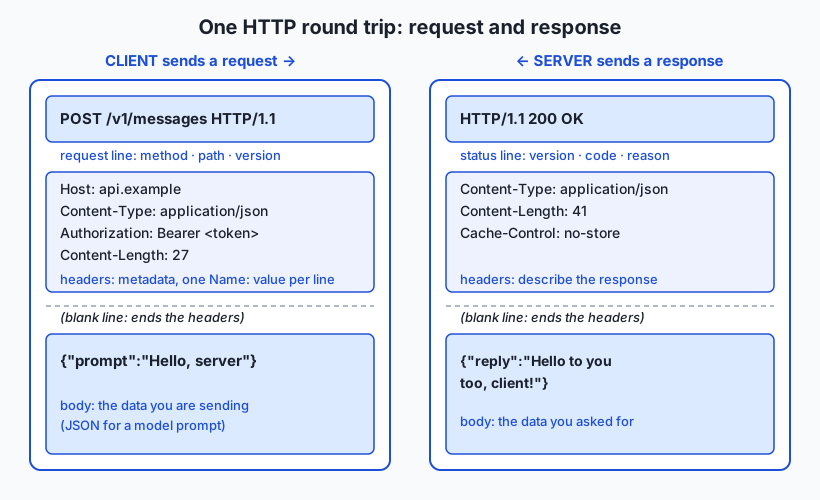
A raw HTTP request is plain text (until it is encrypted or compressed on the wire), and it has a strict layout: a request line, then headers, then a blank line, then an optional body. Here is a request that sends a small JSON payload to an endpoint:
POST /v1/messages HTTP/1.1
Host: api.example
Content-Type: application/json
Authorization: Bearer sk-secret-token
Content-Length: 27

{"prompt":"Hello, server"}
Read it top to bottom. The request line POST /v1/messages HTTP/1.1 names three things: the method (POST — “process this data”), the path (/v1/messages — which resource), and the protocol version. Next come the headers, one per line as Name: value. Host says which site on the server we want. Content-Type declares the body is JSON. Authorization carries the credential that proves who we are. Content-Length states the body is 27 bytes so the server knows where it ends. Then a single blank line marks the boundary between headers and body — this blank line is mandatory and is how the server knows the headers are finished. Finally the body carries the actual JSON. A GET request has the same shape but usually no body, because you are asking for something rather than sending something.
The response message
The server answers with a message of the same shape: a status line, then headers, a blank line, then the body.
HTTP/1.1 200 OK
Content-Type: application/json
Content-Length: 41
Cache-Control: no-store

{"reply":"Hello to you too, client!"}
The status line HTTP/1.1 200 OK carries the protocol version, the three-digit status code (200), and a short human-readable reason phrase (OK) that restates the code for people. The headers describe the response: Content-Type says the body is JSON, Content-Length gives its size, Cache-Control: no-store tells the client not to save a copy. After the blank line comes the body — the data you actually wanted. That is the complete round trip. Everything else in HTTP is variations on these two messages.
Methods: the verbs of the web
The method is the request’s verb — it declares your intent. Five methods cover almost everything you will do:
| Method | Intent | Has a body? | Safe? | Idempotent? |
|---|---|---|---|---|
GET | Read a resource; change nothing | No | Yes | Yes |
POST | Send data to be processed; often creates something | Yes | No | No |
PUT | Replace a resource entirely with the body you send | Yes | No | Yes |
PATCH | Apply a partial update to a resource | Yes | No | No |
DELETE | Remove a resource | Rarely | No | Yes |
Two properties in that table are worth learning precisely because APIs and models rely on them. A method is safe if it only reads and never changes the server’s state — GET is safe, which is why browsers and caches feel free to repeat it. A method is idempotent if making the same request many times has the same effect as making it once. GET, PUT, and DELETE are idempotent: deleting an already-deleted item leaves it deleted; replacing a resource with the same content twice is no different from once. POST is not idempotent — post the same order twice and you may create two orders — which is why a flaky network plus automatic retries on POST can quietly double-charge someone. Every call to a hosted model is a POST, so this is not abstract: if you blindly retry a timed-out model request, you may pay for the work twice.
Status codes: the server’s verdict
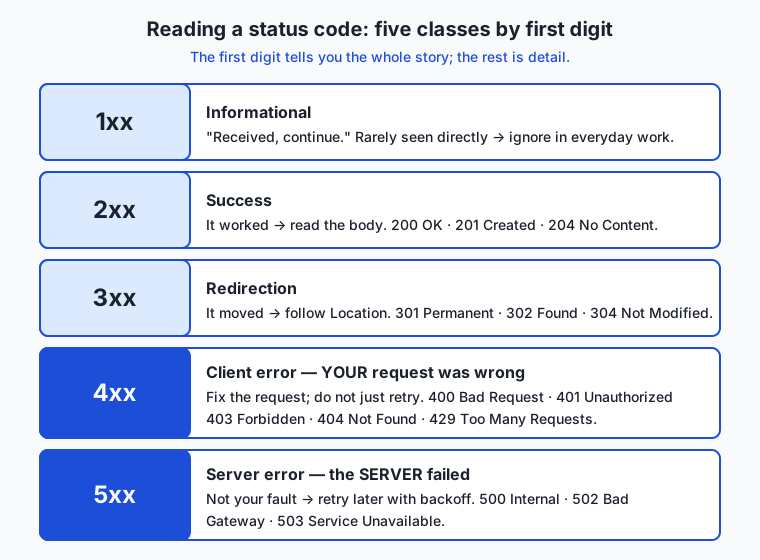
The status code is a three-digit number, and its first digit sorts it into one of five classes. Learn the classes first and the individual codes become easy to place.
| Class | Meaning | You should |
|---|---|---|
1xx Informational | ”Received, continue” — rarely seen directly | Ignore in most everyday work |
2xx Success | The request succeeded | Read the body; you got what you asked for |
3xx Redirection | The resource lives elsewhere | Follow the Location header (clients usually do this for you) |
4xx Client error | Your request was wrong | Fix the request — do not just retry unchanged |
5xx Server error | The server failed | Retry later, ideally with backoff; the fault is not yours |
The single most useful thing to internalize is the 4xx-versus-5xx distinction: 4xx is your fault (bad path, bad credentials, malformed body) and retrying unchanged is pointless, while 5xx is the server’s fault and a later retry is reasonable. Within the classes, these are the codes worth knowing by heart:
200 OK— the standard success; the body holds what you asked for.201 Created— yourPOST/PUTcreated a new resource; aLocationheader often points to it.204 No Content— success, but there is deliberately no body (common after aDELETE).301 Moved Permanently/302 Found— redirects;301says “update your link forever,”302says “temporarily, look over here.”304 Not Modified— your cached copy is still fresh, so the server sent no body to save bandwidth.400 Bad Request— the server could not understand your request (often malformed JSON).401 Unauthorized— you did not authenticate; your credential is missing or invalid.403 Forbidden— you authenticated, but you are not allowed to do this.404 Not Found— no resource at that path.429 Too Many Requests— you are being rate-limited; slow down (aRetry-Afterheader may tell you how long).500 Internal Server Error— the server hit an unhandled fault.502 Bad Gateway/503 Service Unavailable— a server in front could not reach the real one, or the service is temporarily overloaded or down.
Headers that matter
Headers are the request and response’s metadata — Name: value lines that shape how the message is understood. A handful come up constantly:
Content-Typedeclares the format of the body, such asapplication/jsonortext/html. The receiver uses it to parse the bytes correctly; send JSON without it and many servers will refuse the body.Acceptis the request’s way of saying which formats it can handle in the response, letting one endpoint serve JSON to a script and HTML to a browser.Authorizationcarries your credential, most often asBearer <token>. This is the header that decides between200and401.User-Agentidentifies the client software making the request; servers sometimes vary behavior or block based on it.Cache-Controlgoverns whether and how long a response may be stored, fromno-store(never keep it) tomax-age=3600(fine to reuse for an hour).Content-Lengthstates the body’s size in bytes so the receiver knows exactly where it ends.
Cookies, sessions, and statelessness
Because HTTP is stateless, the server forgets you the instant it answers. To create the feeling of a continuous session — staying logged in as you click around — servers use cookies. On your first request the server’s response includes a Set-Cookie header carrying a small piece of data (often a random session ID); your client stores it and automatically sends it back in a Cookie header on every later request. The server keeps the real session details (who you are, what’s in your cart) in its own storage, keyed by that ID. So the protocol stays stateless — each request still carries everything the server needs to look you up — while the experience feels stateful. Model APIs typically skip cookies and instead put a long-lived token in the Authorization header on every request, which is the same idea in a simpler form: identity travels with each self-contained request.
HTTP/1.1 vs HTTP/2 vs HTTP/3
The versions differ in how messages travel, not in what they mean. HTTP/1.1 sends messages as human-readable text and handles one request at a time per connection (though it reuses connections). Its weakness is head-of-line blocking: a slow response holds up everything queued behind it. HTTP/2 keeps the exact same methods, headers, and status codes but encodes them in a compact binary form and multiplexes — many requests and responses share one connection at once, so a slow one no longer blocks the rest. HTTP/3 keeps HTTP/2’s model but replaces the underlying transport with QUIC, which removes a remaining source of blocking and sets up connections faster, especially on flaky mobile networks. For your work the reassuring news is that the mental model is identical across all three: you still send a method, path, headers, and body, and still read a status code back. Your tools and libraries negotiate the version for you.
An everyday analogy
Think of HTTP as ordering from a restaurant by writing notes back and forth through a serving window, where the kitchen has no memory of you between notes.
Your request is an order slip. At the top you write the method and path — the verb and the dish: “BRING me table 4’s usual” (a GET, you only want to receive something) versus “MAKE this new dish” with the recipe attached (a POST, you are sending data to be processed). Below that you jot headers, the notes in the margin: which table you are (Host), that you can eat either the vegetarian or meat version (Accept), and your membership card number that proves you may order at all (Authorization). If you are sending a recipe, the recipe itself is the body, and you note how many lines it runs to (Content-Length) so the kitchen knows it received the whole thing.
The kitchen’s response comes back through the window. The first thing you read is a stamp — the status code. A green 2xx stamp means “here’s your dish,” and the food is the body. A 3xx stamp says “we moved; that dish is served at the counter next door” (a redirect with a Location). A 4xx stamp is the kitchen handing your slip back: “you asked for a dish we don’t have” (404), or “your membership card is invalid” (401), or “members can’t order this one” (403) — re-sending the identical slip will not help. A 5xx stamp means the kitchen itself broke — the oven caught fire (500) — and it is fair to wait a moment and try the same order again.
The crucial twist is that the kitchen has no memory: every slip must be complete on its own, because the cook who reads your second note may not be the one who read your first. That is statelessness. To feel remembered, on your first visit the kitchen clips a numbered tag to your jacket (Set-Cookie); you show that tag on every future slip (Cookie), and any cook can pull your file from the drawer by its number. Keep this window-and-kitchen picture in mind and the whole protocol stays intuitive.
Examples in practice
Let’s watch a real exchange, the kind you will run in today’s lab. When you ask a command-line client to fetch a page and show the traffic, you see both messages. The request your client sends looks like this (lines beginning >):
> GET / HTTP/1.1
> Host: example.org
> User-Agent: curl/8.7.1
> Accept: */*
>
That is a GET for the path /, telling the server which host you mean, identifying your client, and saying you will accept any content type. The blank > line ends the headers. The server’s response (lines beginning <) starts with its status line and headers:
< HTTP/1.1 200 OK
< Content-Type: text/html
< Content-Length: 1256
< Cache-Control: max-age=3600
<
The 200 OK tells you the fetch succeeded; Content-Type: text/html tells you the body is a web page; Content-Length: 1256 says it is 1256 bytes; Cache-Control: max-age=3600 says a client may reuse this for an hour. Then the 1256 bytes of HTML follow. You just read a complete HTTP conversation.
Now a POST that sends a body and gets it echoed back, which is how you confirm your data actually arrived. You send:
POST /post HTTP/1.1
Host: a-test-service
Content-Type: application/json
Content-Length: 17

{"hello":"world"}
A JSON-echo test service replies 200 OK and returns a body that quotes your data back to you, including a json field holding exactly {"hello": "world"} and a headers section showing the Content-Type you sent. Seeing your payload reflected back is proof that the method, headers, and body all landed as intended — the single most useful debugging move when an API “isn’t receiving” your data.
Finally, reading a status code on its own. Sometimes you do not care about the body, only whether the request worked. You can ask a client to throw away the body and print just the code. Fetch a normal page and you get 200; deliberately request a path that returns a missing resource and you get 404; hit an endpoint you are not authorized for and you get 401. In the lab you will trigger a 404 on purpose from a test service, so that a failing status stops being alarming and becomes information. Reading that number is, quite literally, how professionals decide whether to retry, fix their request, or wait.
Implications: security, privacy, performance, scalability, and cost
Security. Plain HTTP sends every byte — including your Authorization token and any private body — as readable text. Anyone positioned between you and the server can read or alter it. This is not a small flaw; it is the reason the entire web moved to HTTPS, which wraps HTTP in encryption, and it is exactly the subject of tomorrow’s lesson. The practical rule starts today: never send a real credential over plain http://, only over https://.
Privacy. Headers reveal more than beginners expect. User-Agent exposes your software and version; Cookie carries an identifier that can track you across requests; Referer (a header we did not detail) can leak which page you came from. Servers log all of this. When you send a request, assume the receiving server can see and store every header and the entire body, and choose what you include accordingly.
Performance. The costs in HTTP are round trips and bytes. Each request-response is a round trip whose latency you cannot avoid, which is why HTTP/1.1 added persistent connections and HTTP/2 and HTTP/3 added multiplexing — all aimed at getting more done per connection and per round trip. Caching (Cache-Control, 304 Not Modified) is the other great lever: the fastest request is the one you never send because a valid copy is already in hand. When a model integration feels slow, the question is usually round trips and payload size, not raw compute.
Scalability. Statelessness is what makes HTTP scale. Because each request is self-contained, a provider can put a thousand identical servers behind a load balancer and send any request to any of them; none needs to remember your previous request. This is precisely how a model provider serves enormous request volumes: horizontal replication of stateless servers, made possible by the protocol’s design. When you meet load balancers and autoscaling later, remember that the protocol was built to allow them.
Cost. With hosted APIs, requests cost money, and the status code is your cost-control instrument. A 429 means you are exceeding your paid rate and further requests are wasted; a 4xx you retry blindly burns quota on requests that can never succeed; a naive retry loop on POST can double your bill and, worse, double a real-world side effect. Reading status codes correctly is not pedantry — it is directly how you avoid paying for work that fails or happens twice.
Alternatives: free, open source, and commercial
For a protocol lesson, “alternatives” means both other protocols that do a similar job and the tools you use to speak HTTP.
Other protocols. WebSocket keeps a connection open for two-way, real-time messaging where the server can push to the client — better than HTTP’s one-shot request-response for live chat or streaming updates, though it is often opened via an HTTP request first. gRPC (built on HTTP/2) is a high-performance, binary, contract-first way for services to call each other, popular inside large systems where both ends are yours. GraphQL is a query language usually delivered over HTTP POST, letting a client ask for exactly the fields it wants in one request. Note that most of these still ride on HTTP rather than replace it — learning HTTP is not optional groundwork you later discard.
Tools for speaking HTTP. These are the everyday instruments, and all the core ones are free and open source.
| Tool | Type | What it’s for | Cost |
|---|---|---|---|
curl | Free, open source CLI | The universal command-line HTTP client; scriptable, everywhere | Free |
| HTTPie | Free, open source CLI | A friendlier CLI with colored output and JSON by default | Free |
| Browser DevTools Network tab | Free, built into browsers | Watch every request a page makes, with headers and timing | Free |
| Postman | Commercial (free tier) | Graphical client for building and saving API requests | Free tier; paid team plans |
| Insomnia | Open source core | Graphical API client, an open alternative to Postman | Free; paid tiers |
For learning and for scripting, curl plus your browser’s DevTools cover everything, at no cost. The paid graphical tools add team collaboration and request libraries, not fundamental capability.
Comparison with related concepts
| Concept A | Concept B | Key difference |
|---|---|---|
| HTTP | HTTPS | HTTPS is HTTP carried inside an encrypted TLS tunnel; same messages, but private and tamper-evident (tomorrow’s lesson) |
| HTTP | HTML | HTTP is the delivery protocol; HTML is one document format it can deliver, alongside JSON, images, and more |
GET | POST | GET reads without changing anything (safe, idempotent); POST sends a body to be processed and may create data (neither safe nor idempotent) |
PUT | PATCH | PUT replaces a resource entirely; PATCH applies a partial change to it |
Status 4xx | Status 5xx | 4xx blames the client’s request (fix it); 5xx blames the server (retry it) |
| Stateless (HTTP) | Stateful session | HTTP itself remembers nothing between requests; a “session” is faked on top with cookies or tokens re-sent each time |
| Header | Body | A header is Name: value metadata about the message; the body is the actual payload the message carries |
When to use it — and when not to
Reach for a direct, hands-on view of HTTP whenever a networked call misbehaves. If an API returns an error, run the request yourself with a verbose client and read the real status code and headers before touching your code — the answer is usually right there in the 4xx-versus-5xx distinction. When you are integrating any hosted service, inspecting the exact request you send and the exact response you get is the fastest path to a working call, because it removes every layer of guessing about what your library “probably” sent. And when you are learning any new web API, reading its request and response messages directly teaches you the API far faster than reading prose about it.
Know equally when to let the abstraction work. In normal application code you should use a well-maintained HTTP client library rather than assembling raw requests by hand; the library handles connection reuse, redirects, retries, and encoding correctly, and hand-rolling those is a rich source of bugs. You do not need to think about HTTP versions — let the client and server negotiate 1.1, 2, or 3 between them. And you should not build stateful behavior by fighting the protocol; use cookies or tokens as designed rather than trying to make the server “remember” you some other way. The professional pattern is to work through a good library day to day, and to drop down to raw HTTP deliberately when something breaks or when you are learning a new endpoint — which, with model APIs, is often.
The thread that ties this to your goal is simple and worth stating plainly: every call you will ever make to a hosted model is an HTTP request. It is almost always a POST to a specific path, carrying a JSON body with your prompt and an Authorization: Bearer <token> header, and it returns a status code and a JSON body. When that call works, a library hides all of this from you. When it fails — a 401 because your key is wrong, a 429 because you are over your rate limit, a 400 because your JSON is malformed, a 500 because the provider had a hiccup — the code that lets you diagnose it in seconds is exactly the request-and-response literacy you built today. Tomorrow you will see how that traffic gets encrypted; in the coming days you will design and consume full APIs on top of it. All of it speaks HTTP.
Knowledge check
Try these from memory before looking back:
- Name the four parts of an HTTP request and the three parts of an HTTP response, and say what each part carries.
- Your script
POSTs a model prompt, the network times out, and your retry logic fires. Why is blindly retrying aPOSTriskier than retrying aGET, and what property is at stake? - For each of
401,404,429, and503, state whether the fault is the client’s or the server’s and what you should do about it. - Explain, using cookies, how a stateless protocol produces the feeling of staying logged in across many requests.
- In one or two sentences, describe what actually crosses the wire when your program calls a hosted model, naming the method, one header that matters, and what the body contains.
Hands-on exercise
Time to speak HTTP yourself. In this exercise — worked through in full in the Day 18 lab directory — you will use curl, the universal command-line HTTP client that ships with macOS and Linux, to send real requests and read the raw responses. Every command is copy-pasteable and hits a free public test service, so nothing here costs money or needs an account.
First, see both messages of a real exchange. The -v (verbose) flag prints the request your client sends and the response headers it receives:
curl -v https://example.comLines starting with > are your request; lines starting with < are the server’s response, beginning with the HTTP/1.1 200 OK status line. Read them against today’s diagrams.
Next, read just a status code, ignoring the body. This is the professional’s quick check:
curl -s -o /dev/null -w "%{http_code}\n" https://example.com-s silences the progress meter, -o /dev/null throws the body away, and -w "%{http_code}\n" prints only the status code — you should see 200.
Now send a POST with a JSON body and watch a test service echo it back, proving your data arrived:
curl -X POST -H "Content-Type: application/json" -d '{"hello":"world"}' https://httpbin.org/post-X POST sets the method, -H adds a header, and -d supplies the body (note that using -d makes the request a POST automatically). The response’s json field will contain exactly what you sent.
Finally, trigger a failure on purpose so a bad status stops being scary:
curl -s -o /dev/null -w "%{http_code}\n" https://httpbin.org/status/404This asks the test service to return a 404, and printing just the code shows it plainly.
If you prefer a friendlier tool, HTTPie (http, installable via your package manager from Day 13) does the same work with colored output and JSON defaults — http POST httpbin.org/post hello=world is the whole POST above. And in any browser, opening DevTools (right-click, “Inspect”, then the Network tab) and reloading a page shows every request the page makes, each with its method, status code, and headers — the same messages you just sent by hand, visualized.
Expected output
A curl -v https://example.com run prints a request and a response; the essential lines look like this (details such as byte counts and dates will differ, and the status line may read HTTP/2 200 rather than HTTP/1.1 200 OK — modern servers negotiate the newer version, and the methods and codes are identical either way):
> GET / HTTP/2
> Host: example.com
> User-Agent: curl/8.7.1
> Accept: */*
>
< HTTP/2 200
< content-type: text/html
< cache-control: max-age=604800
<
The status-code checks print a single number each — 200 for the good URLs and 404 for the deliberate failure. The POST returns a JSON body that echoes your payload; the key part reads:
  "json": {
    "hello": "world"
  },
Seeing "hello": "world" reflected back confirms the body, method, and Content-Type header all arrived correctly.
Validate your work
You are done when you can check every box:
- You ran
curl -vand can point to the request lines (>) and the response status line (<). - You printed a bare
200status code with the-w "%{http_code}\n"technique. - Your
POSTreturned a body that echoed{"hello":"world"}in itsjsonfield. - You deliberately produced a
404and read it as information, not alarm. - You can state, for a
4xxversus a5xx, whose fault it is and what to do.
Troubleshooting
curl: command not found. Rare on macOS and Linux, wherecurlis preinstalled; if missing, install it with your Day 13 package manager (brew install curlorsudo apt install curl).- A
POSTyou expected returns aGET-style result. You dropped the-dflag or the body; remember-dboth supplies the body and switches the method toPOST. - The status-code command prints nothing. You likely omitted
-o /dev/null, so the body scrolled past the code, or you left out the\nand the number is stuck to your prompt. httpbin.orgis slow or returns503. It is a shared free service and occasionally rate-limits or is busy; wait a moment and retry, or usehttps://example.comfor the exchanges that do not need an echo.- You see a
301or302instead of200. You requested anhttp://URL that redirects tohttps://; add-Lto follow redirects, or request thehttps://URL directly.
Common mistakes
- Confusing the method with the status code. The method (
GET,POST) is something you choose in the request; the status code (200,404) is the server’s verdict in the response. They are different halves of the conversation. - Reading
4xxas “retry” and5xxas “give up.” It is the reverse:4xxmeans fix your request first,5xxmeans a later retry is reasonable. - Assuming
-dleaves the method asGET. Supplying a body with-dimplicitly makes the request aPOST; if you also want to inspect that, add-vand read the request line. - Treating a
200as proof the whole operation worked.200means the HTTP exchange succeeded; always read the body, because an application-level error can still hide inside a200response.
Practice assignment
Open the HTTP worksheet in the starter directory of the Day 18 lab and fill it in completely using curl against the public test services. Record three things you observed directly: (1) the exact status code returned by a normal GET to https://example.com; (2) the Content-Type header that same page reports (find it in the curl -v response headers); and (3) exactly what https://httpbin.org/post echoes back in its json field when you POST a body of your choosing. Then write one short paragraph (4–6 sentences) explaining, in your own words, why a 401 and a 429 call for completely different responses from your code, referencing whose fault each is. Keep the worksheet; a later lesson on APIs will build on it.
Extension challenge
Go one layer deeper into headers and methods. First, send a request that asks the server only for the headers, no body, using the HEAD method: curl -I https://example.com. Compare its output to the response headers you saw with -v and note that HEAD is GET without a body — useful for checking whether a resource exists or has changed without downloading it. Second, make the same request twice while capturing timing with curl -w "time_total: %{time_total}s\n" -o /dev/null -s https://example.com, and reason about which parts of the round trip that time represents. Finally, use the test service to explore the status classes systematically: request https://httpbin.org/status/200, /status/301, /status/403, and /status/500, printing just the code for each, and write two or three sentences mapping each result to its class and to the “whose fault, what to do” rule. You have now exercised every status class by hand — the exact skill that turns a failing model API call from a mystery into a two-minute fix.
Quiz
Q1. What are the four parts of an HTTP request, in order?
- Status line, headers, blank line, body
- Request line (method, path, version), headers, blank line, optional body
- Method, cookie, encryption, body
- URL, port, protocol, payload
Show answer
Answer: B. Request line (method, path, version), headers, blank line, optional body
A request begins with a request line naming the method, path, and HTTP version, followed by headers, a mandatory blank line that marks the end of the headers, and an optional body. A response has the parallel shape but opens with a status line instead of a request line.
Q2. A method is called "idempotent" when:
- It never sends a body
- It is encrypted on the wire
- Making the same request many times has the same effect as making it once
- It only reads data and never changes anything
Show answer
Answer: C. Making the same request many times has the same effect as making it once
Idempotent means repeating the request produces the same end state as sending it once — true of GET, PUT, and DELETE. The property that a method only reads and changes nothing is "safe," which is a different (though related) idea; POST is neither safe nor idempotent.
Q3. Your script POSTs a model prompt, the request times out, and it retries automatically. Why is this riskier for POST than for GET?
- POST is slower than GET, so retries waste more time
- POST is not idempotent, so a retry may create a second resource or double a side effect
- GET cannot be retried at all
- POST responses are always cached, so the retry returns stale data
Show answer
Answer: B. POST is not idempotent, so a retry may create a second resource or double a side effect
GET is idempotent, so repeating it is harmless. POST is not idempotent: if the first request actually completed but the response was lost, the retry can create a duplicate — for a paid model call, that can mean paying twice. This is why retry logic on POST needs care.
Q4. You call a hosted model API and get a 401 status code. What does it mean and what should you do?
- The server crashed; retry the same request in a few seconds
- The resource was not found; check the path
- You are being rate-limited; slow down your requests
- Your authentication failed; fix or supply a valid credential — retrying unchanged will not help
Show answer
Answer: D. Your authentication failed; fix or supply a valid credential — retrying unchanged will not help
401 Unauthorized is a 4xx client error meaning the request lacked valid authentication. It is your request that is wrong, so retrying the identical request forever cannot succeed; you must fix the Authorization header. (429 is rate limiting, 404 is not found, 5xx is a server fault.)
Q5. What distinguishes a 4xx status code from a 5xx status code?
- 4xx means the client request was wrong; 5xx means the server itself failed
- 4xx means success; 5xx means redirection
- 4xx is for GET requests; 5xx is for POST requests
- 4xx codes are encrypted; 5xx codes are not
Show answer
Answer: A. 4xx means the client request was wrong; 5xx means the server itself failed
4xx blames the client — a bad path, bad credentials, or malformed body — so you must fix the request before retrying. 5xx blames the server, so a later retry (ideally with backoff) is a reasonable response. Getting this distinction right is the core of debugging failed API calls.
Q6. Which header carries the credential that decides between a 200 and a 401 for a hosted-model call?
- Content-Type
- User-Agent
- Authorization
- Cache-Control
Show answer
Answer: C. Authorization
The Authorization header carries your credential, most often as "Bearer <token>". If it is missing or invalid the server answers 401; if it is valid the request can proceed. Content-Type describes the body format, User-Agent identifies the client, and Cache-Control governs caching.
Q7. HTTP is described as "stateless." What does that mean, and how do sites keep you logged in anyway?
- The server stores no data at all; login is impossible over HTTP
- Each request is self-contained and the server remembers nothing between them; sites re-send identity each request using a cookie or token
- The connection is dropped after every byte, so nothing can persist
- State is stored in the URL, which is why URLs are so long
Show answer
Answer: B. Each request is self-contained and the server remembers nothing between them; sites re-send identity each request using a cookie or token
Statelessness means every request stands alone and the server keeps no memory of you between requests. A session is faked on top: the server sends a Set-Cookie with a session ID, and your client returns it in a Cookie header on every later request, so each self-contained request still lets the server look you up.
Q8. What is the difference between HTTP/1.1, HTTP/2, and HTTP/3?
- They use completely different methods and status codes
- Only HTTP/3 supports POST; the others are read-only
- They differ in how messages travel on the wire (text vs binary, multiplexing, transport), but the methods, headers, and status codes are the same
- HTTP/2 and HTTP/3 remove the need for the Authorization header
Show answer
Answer: C. They differ in how messages travel on the wire (text vs binary, multiplexing, transport), but the methods, headers, and status codes are the same
The versions change transport and efficiency — HTTP/2 uses a compact binary form and multiplexes many requests over one connection, and HTTP/3 swaps in the QUIC transport — but the request/response model, methods, headers, and status codes stay identical. Your tools negotiate the version automatically.
Glossary
- HTTP
- The HyperText Transfer Protocol: the set of rules a client and server follow to exchange request and response messages over a network. It is the protocol every web page load and every hosted-model API call speaks.
- request
- The message a client sends to a server, made of a request line (method, path, version), headers, a blank line, and an optional body.
- response
- The message a server sends back, made of a status line (version, status code, reason), headers, a blank line, and a body.
- method
- The verb of a request that declares intent — GET to read, POST to send data for processing, PUT to replace, PATCH to partially update, DELETE to remove.
- status code
- A three-digit number in the response that summarizes the outcome; its first digit sorts it into a class (1xx informational, 2xx success, 3xx redirection, 4xx client error, 5xx server error).
- header
- A Name: value line carrying metadata about a request or response, such as Content-Type or Authorization; headers come before the blank line that precedes the body.
- body
- The optional payload of a message — the JSON prompt you send in a request, or the HTML or JSON data returned in a response.
- GET
- The method for reading a resource without changing anything; it is both safe (read-only) and idempotent (repeating it has the same effect as doing it once).
- POST
- The method for sending a body to be processed, often creating a resource; it is neither safe nor idempotent, so repeating it may duplicate a side effect. Every hosted-model call is a POST.
- idempotent
- A property of a method meaning that making the same request many times has the same effect as making it once; GET, PUT, and DELETE are idempotent, POST is not.
- stateless
- The property that each HTTP request is self-contained and the server keeps no memory of a client between requests, which is what lets many identical servers share the load.
- Content-Type
- A header declaring the format of the body, such as application/json or text/html, so the receiver parses the bytes correctly.
- Authorization
- A header carrying the credential that proves who the client is, most often as "Bearer <token>"; it is the header that decides between a 200 and a 401.
- cookie
- A small piece of data the server sends with Set-Cookie and the client returns in a Cookie header on later requests, used to fake a continuous session on top of stateless HTTP.
Sources and further reading
- HTTP overview — MDN Web Docs (accessed 2026-07-12)
- HTTP request methods — MDN Web Docs (accessed 2026-07-12)
- HTTP response status codes — MDN Web Docs (accessed 2026-07-12)
- Hypertext Transfer Protocol — Wikipedia (accessed 2026-07-12)
- curl Documentation — curl / Daniel Stenberg (accessed 2026-07-12)
Kept in this browser, no account needed. Your progress page turns the whole record into one link you can bookmark or open on another device.