Computing Foundations › APIs and the Web › Day 23
Day 23: REST Fundamentals: Resources and Verbs
After this lesson you will be able to read almost any web API as a set of resources at addresses acted on by standard verbs, map CRUD onto HTTP methods, and reason about statelessness, idempotency, and good URL design — the architecture behind nearly every API you will ever call.
Hands-on lab for this lesson
Lab files on GitHub: https://github.com/ai-roadmap-365/ai-roadmap-365.github.io/tree/main/labs/sections/computing-foundations/day-023-rest-fundamentals-resources-and-verbs
- Get the hands-on files. Clone the labs repository once (you can reuse this clone for every lesson). This works on macOS, Linux, and Windows (PowerShell or WSL):
git clone https://github.com/ai-roadmap-365/ai-roadmap-365.github.io.git cd ai-roadmap-365.github.io - Open this lesson's lab. Move into the directory for this specific day. Every lab lives at the same predictable path — section / subsection / week / day:
cd labs/sections/computing-foundations/day-023-rest-fundamentals-resources-and-verbs - Read the lab guide. Open `README.md` in that directory. It lists the exact commands, what each does, the expected output, and how to check your work — read it before running anything.
- Run it and check your work. Follow the README's "How to run" section: run the example first to see the finished result, then complete the numbered exercises in `starter/`, then run the tests. The tests pass (exit 0) only when your work is correct.
bash tests/run_tests.sh # or the test command named in the lab README
You can also open the lab as a local page (works offline, shows the file tree and expected output).
Learning objectives
By the end of this lesson you will be able to:
- Define REST as an architectural style and explain the resource-and-verb model, including why URLs name nouns (/users/1) rather than actions (/getUser)
- Map the four CRUD operations onto the HTTP verbs GET, POST, PUT, PATCH, and DELETE, and state which verb targets a collection versus an item
- Explain statelessness and why it lets a REST service scale horizontally behind a load balancer
- Distinguish a resource from its representation, and identify JSON as the common representation format
- Apply safety and idempotency to decide which verbs are safe to retry, and why blindly retrying a POST is risky
- Compare REST with RPC/gRPC and GraphQL at a high level and choose the right style for a given situation
- Run a full create-read-update-delete cycle against a real REST API with curl and read the status codes and representations it returns
Prerequisites
- Day 18 (HTTP requests, responses, and methods) and Day 22 (what an API is)
- A terminal with curl and network access; python3 optional for pretty-printing JSON
Why this matters
Yesterday you learned that an API is a contract for asking one program to do something for you. Today you learn the single most common shape that contract takes on the web — REST — because it is the shape almost every service you will ever call is built in. When you fetch data from a weather service, a payments provider, a maps backend, or a hosted model, you are almost always talking to a REST or REST-like API, and the whole design comes down to two ideas: things (called resources) each live at their own address, and a small fixed set of verbs act on them.
Getting these two ideas straight has direct, practical payoffs. It is why you can guess that GET /users/1 reads user 1 and DELETE /users/1 removes them without reading a single page of documentation — a well-designed REST API is predictable, and predictability is speed. It is why a request that “worked yesterday and fails today” can often be diagnosed in seconds: you know a POST was supposed to create something, so a 409 tells you it already exists. It is why you can retry a failed GET a hundred times without fear but must think twice before retrying a POST. And when you eventually build your own service — including a service that wraps a model behind an endpoint — the quality of your REST design decides whether other developers find it obvious or maddening.
Today you build that mental model from the ground up. Not a framework, not a library, just the architectural style itself: what a resource is, how its address (URL) should be shaped, which verb does which job, why the server refuses to remember you between requests, and how REST compares to the two main alternatives you will meet. By the end you will read almost any web API’s endpoints like a map, and in the lab you will run a full create-read-update-delete cycle against a real API with your own hands.
The idea in plain language
REST stands for Representational State Transfer. Behind the intimidating name is a calm idea: model everything your service offers as a collection of resources — the nouns of your system, such as users, orders, articles, or messages — and give each one a stable address. Then let clients act on those resources using the handful of HTTP verbs you already met in the HTTP lesson. You do not invent new operations; you reuse GET, POST, PUT, PATCH, and DELETE, and the combination of a verb and an address says everything.
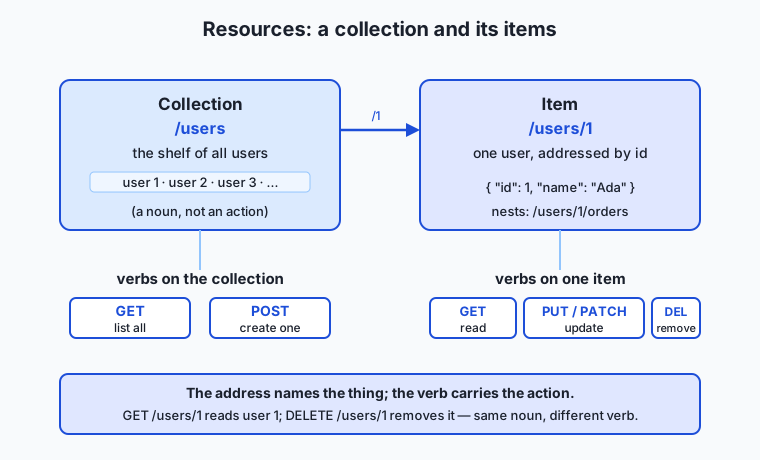
The crucial discipline is that the address names a thing, not an action. A good REST URL is /users/1 — “user number 1” — and the verb decides what you do to that user. A bad, un-RESTful URL bakes the action into the address: /getUser?id=1, /createUser, /deleteUser?id=1. Those work, but they throw away the whole benefit, because now the client must learn a fresh action name for every operation instead of reusing verbs it already knows. In REST, /users is the shelf of all users (a collection), /users/1 is one user (an item), and GET, POST, PUT, PATCH, and DELETE are the fixed set of things you can do to shelves and items.
Two more ideas round out the picture. First, the server sends you a representation of a resource, not the resource itself — usually a chunk of JSON describing user 1, the way a library catalogue card describes a book without being the book. Second, REST is stateless: each request carries everything the server needs, and the server remembers nothing about you between requests. Resources, addresses, verbs, representations, statelessness — learn those five words and you have the architecture.
Historical background
REST was not invented as a product or a framework; it was described, after the fact, as the style the web had already grown into. In 2000, Roy Fielding — a computer scientist who had co-authored the HTTP and URL specifications through the 1990s — submitted his doctoral dissertation at the University of California, Irvine. Its fifth chapter, titled “Representational State Transfer (REST),” gave a name and a precise set of constraints to the architecture that had made the World Wide Web scale from a physics lab to the planet.
Fielding’s question was essentially: why did the web work so well? Countless independent servers and browsers, written by people who never met, cooperated flawlessly and kept doing so as the system grew a millionfold. He argued the answer was a specific set of architectural constraints, and REST was his name for the bundle of them: a client–server split, statelessness, cacheability, a uniform interface (the same small set of methods and addressable resources everywhere), a layered system (proxies and gateways a client cannot even see), and an optional code-on-demand. Follow those constraints and you get systems that are scalable, resilient, and evolvable; break them and you lose those properties one by one.
Through the 2000s, as web APIs multiplied, “REST” became the popular shorthand for “an HTTP API organized around resources and standard verbs,” and it steadily displaced the heavier, more ceremonious styles that came before it (you will meet one of them, RPC, later in this lesson). In practice, most APIs people call “RESTful” today satisfy some but not all of Fielding’s original constraints — the field even coined the half-joking term “REST-ish” for them. That is fine and worth knowing: what you will build and consume day to day is the pragmatic, resource-and-verb version of REST, and understanding Fielding’s stricter original helps you see why the pragmatic version behaves the way it does.
What it is — and what it is not
REST is an architectural style for networked software — a set of design constraints, not a protocol, a standard, or a piece of software you install. Every word of that matters. Architectural style means it is a way of organizing a system, like “load-bearing walls” is a way of organizing a building, not a specific brick. Constraints means it is defined by rules you agree to follow (address resources with URLs, act on them with standard verbs, keep the server stateless), and following them buys you scalability and predictability. Because REST is a style and not a standard, there is no official validator that stamps an API “REST-compliant”; there are only APIs that follow the constraints more or less faithfully.
It helps just as much to say what REST is not. It is not the same as HTTP — HTTP is the underlying protocol REST almost always rides on, but you could design a non-REST HTTP API (an RPC-over-HTTP one, for instance), and REST as a set of ideas is not strictly bound to HTTP. It is not JSON — JSON is merely the most common representation format REST APIs use; a REST API could return XML, HTML, or anything else, and JSON gets its own full lesson tomorrow. It is not a framework or library — tools help you build REST APIs, but REST itself is the design underneath. And REST is not automatically “good API design”: you can follow every surface rule and still build something confusing, and you can bend a rule deliberately for good reason. REST is a set of principles that, followed thoughtfully, tend to produce clear, durable APIs.
| Common misconception | The reality |
|---|---|
| ”REST is a protocol you implement.” | REST is an architectural style — a set of constraints; HTTP is the protocol it usually rides on. |
| ”REST means JSON.” | JSON is the most common representation, but REST is format-agnostic; the resource is separate from how it is serialized. |
”The URL should say what to do, like /getUser.” | The URL names a resource (/users/1); the HTTP verb says what to do. Actions belong in verbs, not paths. |
”POST and PUT are interchangeable.” | POST creates (not idempotent); PUT replaces a known resource (idempotent). Confusing them causes duplicates or lost data. |
| ”A RESTful server remembers my session.” | REST is stateless by design; each request must carry its own identity (a token), or the server has no idea who you are. |
Why it was created and what problems it solves
The problem REST names and solves is how to let enormous numbers of independently built clients and servers cooperate over a network without coordinating with each other. Before the web’s resource-and-verb model won out, integrating two systems often meant learning a bespoke vocabulary of operations for every single service: one API had fetchCustomerRecord, another had getClient, a third had retrieveAccountByID, and each spoke its own dialect. Every new integration was a fresh education. There was no way to guess how an unfamiliar API worked, because there was no shared grammar.
REST’s answer is the uniform interface: agree, once and for everyone, that things are resources at addresses and that a fixed set of verbs acts on them. Now the grammar is shared. If you know one REST API, you can make a good guess at the next one — GET /orders probably lists orders, POST /orders probably creates one, GET /orders/42 probably reads order 42. The cost of learning a new API collapses, because most of it is the vocabulary you already know; only the specific resources differ.
The deeper problems REST solves flow from that uniformity. Statelessness lets a provider run a thousand identical copies of a server behind a load balancer and send any request to any copy, because no copy has to remember your previous request — the same property that lets web services and model APIs serve millions of users at once. Cacheability means a GET, being a safe read, can be stored and reused by any layer between you and the server, saving round trips. And the layered system lets providers slip caches, gateways, and security proxies between client and server invisibly, because every layer speaks the same uniform interface. REST, in short, is the design that makes web-scale cooperation cheap — and that is exactly why it became the default shape of the API economy you are now learning to work in.
How it works
Let’s build the model piece by piece: resources and their addresses, the verbs that act on them, statelessness, representations, and the two properties — safety and idempotency — that make the whole thing predictable.
Resources, collections, and items
A resource is any thing your service exposes that is worth naming: a user, an order, a photo, a comment. Resources come in two shapes that share an address family. A collection is a resource that holds many others — /users is the collection of all users. An item is a single member of a collection, addressed by appending an identifier — /users/1 is the user whose id is 1. Collections nest naturally: /users/1/orders is the collection of orders belonging to user 1, and /users/1/orders/42 is one specific order of theirs. Read a REST URL left to right and it reads like a path through a filing system: users → user 1 → their orders → order 42.
The golden rule from the plain-language section returns here with force: resource addresses are nouns, and the verb carries the action. The moment a verb creeps into your path — /users/1/delete, /getOrders, /createUser — you have stopped doing REST and started reinventing a bespoke operation vocabulary, throwing away the predictability that was the whole point.
The verbs, mapped to CRUD
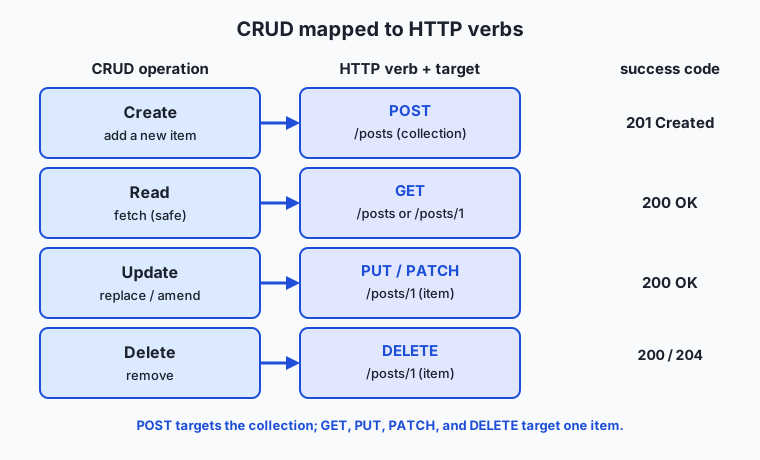
Almost everything you do to stored data is one of four operations remembered by the acronym CRUD: Create, Read, Update, Delete. REST maps those four operations onto the HTTP methods you met in the HTTP lesson, and this mapping is the heart of the whole style:
| CRUD operation | HTTP verb | Typical target | What it does | Success code |
|---|---|---|---|---|
| Read | GET | collection or item | Fetch a representation; change nothing | 200 OK |
| Create | POST | collection | Add a new item to the collection; server assigns the id | 201 Created |
| Update (replace) | PUT | item | Replace the item entirely with the body you send | 200 OK (or 204) |
| Update (partial) | PATCH | item | Change only the fields you send, leaving the rest | 200 OK |
| Delete | DELETE | item | Remove the item | 200/204 No Content |
Notice the pattern. You POST to a collection to create — POST /users means “add a new user to the users collection,” and the server assigns the new id and usually returns 201 Created with the created resource and its address. You GET, PUT, PATCH, and DELETE an item — these all name a specific /users/1 you already know. The difference between PUT and PATCH is worth memorizing: PUT replaces the whole resource with what you send (leave out a field and you may erase it), while PATCH merges only the fields you send (leave out a field and it is left untouched). Reach for PATCH when you want to change one attribute; reach for PUT when you have the complete new version in hand.
Statelessness
REST inherits HTTP’s statelessness and leans on it hard. Each request must be self-contained: it carries everything the server needs to understand and authorize it, and the server keeps no memory of you between requests. If a request needs to prove who you are, it carries a credential — typically an Authorization: Bearer <token> header — on every request, not just the first. There is no “logged-in session” living on the server that later requests silently ride on.
This feels wasteful until you see what it buys. Because no request depends on server-side memory of a previous one, any request can go to any copy of the server. A provider can run a thousand identical servers behind a load balancer, add or remove copies as traffic changes, and restart any of them mid-conversation, and no client ever notices. Statelessness is the property that turns “one server” into “as many servers as we need,” and it is the main reason REST scales the way it does.
Representations
You never touch a resource directly; you exchange representations of it. When you GET /users/1, the server does not hand you the user — it hands you a document describing the user’s current state, almost always as JSON:
{
  "id": 1,
  "name": "Ada Lovelace",
  "email": "ada@example.org",
  "role": "admin"
}
That JSON is a representation: a snapshot of the resource’s state, serialized into a format both sides understand. The same resource could be represented as XML, as HTML for a browser, or as a compact binary — the resource (“user 1”) is separate from its representation (“this JSON”). The client can even say which format it prefers using the Accept header, and the server declares what it sent with Content-Type: application/json. The name Representational State Transfer is now readable: you transfer representations of resource state back and forth. When you PUT a new body, you are sending a representation of the state you want the resource to have next; when you GET, you receive a representation of its state now.
Safety and idempotency revisited
Two properties from the HTTP lesson decide how you may safely treat each verb, and REST depends on them completely. A verb is safe if it only reads and never changes server state — GET is safe, which is why caches and crawlers repeat it freely. A verb is idempotent if making the identical request many times leaves the server in the same state as making it once.
| Verb | Safe? | Idempotent? | Why it matters |
|---|---|---|---|
GET | Yes | Yes | Read freely; cache and retry without fear |
POST | No | No | Two identical POSTs may create two resources — never blindly retry |
PUT | No | Yes | Replacing with the same body twice equals doing it once |
PATCH | No | Usually no | A relative change (e.g. “add 1”) applied twice differs from once |
DELETE | No | Yes | Deleting an already-deleted item leaves it deleted |
The single most important line in that table is that POST is not idempotent. If you POST /orders to place an order, the network times out, and your retry logic fires, you may place two orders and charge a customer twice. PUT /users/1 and DELETE /users/1, by contrast, are idempotent — repeating them is harmless — which is exactly why a flaky network is safe for them and dangerous for POST. This distinction is not academic; it is the difference between a robust integration and a mysterious double-charge, and it is the reason retry logic must know which verb it is retrying.
HATEOAS at a glance
The strictest form of REST adds one more constraint with an unlovely acronym: HATEOAS, “Hypermedia As The Engine Of Application State.” The idea is that a resource’s representation should include links telling the client what it can do next and where, so the client navigates the API by following links rather than by hard-coding URLs. A hypermedia-rich response to GET /users/1 might look like:
{
  "id": 1,
  "name": "Ada Lovelace",
  "_links": {
    "self":   { "href": "/users/1" },
    "orders": { "href": "/users/1/orders" },
    "edit":   { "href": "/users/1", "method": "PUT" }
  }
}
The client reads the _links and follows them, the way you click links on a web page instead of typing every URL by hand — which is precisely how your browser uses the web, the purest REST system there is. In practice, most APIs people call RESTful today skip full HATEOAS and let clients construct URLs from documentation instead; that is the pragmatic “REST-ish” reality. It is still worth recognizing, because when an API does return links, following them keeps your client working even if the server later reorganizes its URLs.
An everyday analogy
Picture a large, well-run public library, and let it carry the whole architecture.
Every item the library holds is a resource, and every one has a fixed address — its call number on the shelf. The address names the thing: the shelf labelled “Astronomy” is a collection, and a single book with call number 520.1 is an item. Crucially, the label on the shelf is a noun — “Astronomy” — not an instruction like “GoFetchMeAnAstronomyBook.” That is the noun-not-verb rule: the address tells you what, never what to do.
What you do with a book is a separate, small, fixed set of verbs, exactly like REST’s methods. You can read a book on the spot without changing anything — that is GET, and it is safe: a thousand people reading the same book leave it unchanged. You can add a new book to the Astronomy shelf, and the librarian assigns it the next call number and files it — that is POST to the collection, and it is not idempotent: hand in two copies and you get two entries on the shelf. You can replace a worn-out book with a fresh identical edition — that is PUT, and it is idempotent: swapping in the same replacement twice is no different from once. You can correct one detail on a book’s catalogue card without reprinting the whole card — that is PATCH. And you can remove a book from circulation — that is DELETE, also idempotent: a book already withdrawn stays withdrawn no matter how many times you ask.
The librarian is stateless: they do not remember you between visits. Every single time you want to borrow, you hand over your library card along with your request; the librarian never assumes “oh, it’s you again” from a previous visit. That is why REST puts a token on every request. And when you ask for a book, you rarely get the physical object flung at you — you get a representation: a printed copy, a large-print edition, an audiobook. Same book, different representation, chosen to suit you, just as a REST server can serve the same resource as JSON or XML depending on your Accept header. Finally, the catalogue card for each book lists where to find related material — “see also call number 523.1” — and you follow those pointers around the library rather than memorizing its entire floor plan. That is HATEOAS: the resource tells you what you can do next. Keep this library in mind and REST stops being an acronym and becomes a place you already know how to walk around.
Examples in practice
Let’s walk a full CRUD cycle against a resource called posts, exactly the kind of exchange you will run in today’s lab against a real public API. Each step is a verb plus an address, and each reply is a status code plus a representation.
Read the collection — list every post:
GET /posts
-> 200 OK
[ { "id": 1, "title": "..." }, { "id": 2, "title": "..." }, ... ]
Read one item — fetch post 1 by its address:
GET /posts/1
-> 200 OK
{ "userId": 1, "id": 1, "title": "first post", "body": "hello world" }
Create — add a new post by POSTing a representation to the collection. Note you do not choose the id; the server assigns it and echoes the created resource back:
POST /posts
Content-Type: application/json

{ "title": "my new post", "body": "written today", "userId": 1 }

-> 201 Created
{ "title": "my new post", "body": "written today", "userId": 1, "id": 101 }
The 201 Created and the new "id": 101 are the server saying “done — your post now lives at /posts/101.” Update — replace post 1 entirely with PUT to the item, sending the complete new representation:
PUT /posts/1
Content-Type: application/json

{ "id": 1, "title": "edited title", "body": "edited body", "userId": 1 }

-> 200 OK
{ "id": 1, "title": "edited title", "body": "edited body", "userId": 1 }
Had you wanted to change only the title, you would PATCH /posts/1 with just { "title": "edited title" } and leave the body untouched. Delete — remove post 1:
DELETE /posts/1
-> 200 OK   (or 204 No Content)
Read those five exchanges again and notice how little you had to memorize: the addresses were just /posts and /posts/1, and the verbs did all the work of distinguishing read from create from replace from delete. That economy — two addresses, five verbs, the whole lifecycle of a resource — is REST paying off. In the lab you will run every one of these against a live server and read the real status codes and bodies it returns.
One more real-world note ties this to your goal. When you call a hosted model, you typically POST to an endpoint like /v1/messages or /v1/chat/completions with a JSON body carrying your prompt, and you read back a JSON representation of the model’s reply. That is POST-to-a-collection (“create a new completion”) in REST clothing. Most model and tool APIs you will integrate are RESTful or REST-like, so every habit you build today — reading endpoints as resources, knowing which verb is safe to retry, expecting JSON representations — transfers directly to working with them.
Implications: security, privacy, performance, scalability, and cost
Security. Because REST rides on HTTP, everything from the HTTPS lesson applies: send REST traffic only over https:// so tokens and bodies are encrypted in transit. Statelessness shapes authentication — since the server remembers nothing, every request must carry its own credential, usually a bearer token in the Authorization header, and that token is as sensitive as a password. A subtler REST-specific risk is that predictable URLs make resources easy to enumerate: if /users/1 exists, an attacker will try /users/2, so the server must check on every request that the caller is allowed to see that specific resource (authorization), never assuming that knowing the URL implies the right to access it.
Privacy. A resource’s representation contains exactly the fields the server chooses to include, which makes field selection a privacy decision. A careless GET /users/1 that returns password hashes, internal notes, or another person’s data leaks it to anyone who can reach the endpoint. Good REST design returns the minimum representation each caller is entitled to, and treats the URL itself as visible — paths appear in logs, browser history, and proxies, so secrets never belong in a URL (/users/1?token=secret is a mistake; the token belongs in a header).
Performance. REST’s great performance lever is caching, unlocked by the safety of GET. Because a GET changes nothing, any layer — the browser, a proxy, a content-delivery network — may store the response and serve it again without troubling the origin server, using the Cache-Control and related headers from the HTTP lesson. The fastest request is the one never sent. The flip side is the classic REST cost: fetching related data can take many round trips (GET /users/1, then GET /users/1/orders, then each order), a limitation that motivates one of the alternatives you will meet next.
Scalability. This is where statelessness earns its keep. A stateless REST service scales horizontally: put identical copies behind a load balancer, route any request to any copy, and add copies as demand grows, because no copy needs another’s memory. This is precisely how large web services and model providers absorb enormous request volumes. When you later meet autoscaling and load balancers, remember that REST’s statelessness is what makes them possible.
Cost. With paid APIs, requests cost money, and REST’s structure is your cost-control instrument. Knowing that GET is cacheable lets you avoid paying for the same read twice. Knowing that POST is not idempotent stops a naive retry loop from doubling both your bill and a real-world side effect. And reading status codes correctly — a 4xx means fix your request rather than retry it, a 429 means you are over your rate limit — is directly how you avoid paying for requests that can never succeed. REST literacy is, quite literally, spend control.
Alternatives: free, open source, and commercial
For an architectural-style lesson, “alternatives” means both other API styles that solve the same problem and the free tools you use to work with REST.
Other API styles. RPC (Remote Procedure Call), including the modern gRPC, models an API as a set of functions to call rather than resources to act on — you invoke createUser(...) instead of POST /users. It is often faster and more tightly typed, and it shines for internal service-to-service communication where both ends are yours. GraphQL exposes a single endpoint and lets the client ask for exactly the fields it wants in one query, directly attacking REST’s many-round-trips problem; it excels when clients need flexible, precise data shapes (mobile apps, rich dashboards). You will see all three compared in the next section.
Tools for working with REST. Every core tool here is free and open source, and you already met most of them.
| Tool | Type | What it’s for | Cost |
|---|---|---|---|
curl | Free, open-source CLI | The universal command-line HTTP/REST client; scriptable, everywhere | Free |
| HTTPie | Free, open-source CLI | A friendlier CLI with colored output and JSON by default | Free |
| JSONPlaceholder | Free public REST API | A fake online REST API for practice; accepts CRUD requests without an account | Free |
| Postman | Commercial (free tier) | Graphical client for building, saving, and sharing REST requests | Free tier; paid team plans |
| Insomnia | Open-source core | Graphical REST/GraphQL client, an open alternative to Postman | Free; paid tiers |
| OpenAPI / Swagger | Open standard + tooling | Describe a REST API in a machine-readable file; auto-generate docs and clients | Free spec; some paid tools |
For learning and scripting, curl against a free practice API such as JSONPlaceholder — the one you will use in the lab — covers everything at zero cost. The graphical and commercial tools add collaboration, saved request libraries, and generated documentation, not fundamental capability. When you build your own REST API later, describing it with OpenAPI is the standard way to hand other developers a precise, tool-readable contract.
Comparison with related concepts
The comparison that matters most today is REST against the two alternative styles, because choosing among them is a real decision you will face. The one-line examples show the same intent — “create a user” — expressed each way.
| Style | Shape of the API | ”Create a user” looks like | Choose it when |
|---|---|---|---|
| REST | Resources at URLs, standard verbs | POST /users with a JSON body | You want a broadly understood, cacheable, public-facing API over CRUD-style data |
| RPC / gRPC | Named functions you call | createUser(name, email) (often over gRPC) | You control both ends (internal services) and want speed, strong typing, and streaming |
| GraphQL | One endpoint, client-specified queries | mutation { createUser(name, email) { id } } | Clients need flexible, precise data shapes and you want to avoid over- and under-fetching |
None of these is universally “best.” REST wins on ubiquity, cacheability, and how easily any developer can understand it, which is why it dominates public web APIs. RPC and gRPC win inside a system you fully own, where the extra speed and tight contracts pay off and human readability of URLs matters less. GraphQL wins when a single client needs to assemble varied data in one round trip and the many-GET problem of REST becomes painful. A large system often uses more than one — REST at its public edge, gRPC between internal services. The other comparisons below place REST against ideas it is often confused with.
| Concept A | Concept B | Key difference |
|---|---|---|
| REST | HTTP | HTTP is the protocol; REST is an architectural style that uses HTTP’s verbs and URLs |
| REST | JSON | REST is the design; JSON is the most common representation format it transfers |
| Resource | Endpoint | A resource is the thing (user 1); an endpoint is the addressable URL that exposes it |
POST | PUT | POST creates a new item in a collection (not idempotent); PUT replaces a known item (idempotent) |
PUT | PATCH | PUT replaces the entire resource; PATCH changes only the fields you send |
When to use it — and when not to
Reach for REST when you are building or consuming an API over resource-shaped data that many, varied clients will use — a public web API, a service other teams integrate with, a backend for web and mobile apps. Its ubiquity is its superpower: because everyone understands the resource-and-verb grammar, a well-designed REST API needs the least explanation and earns trust fastest. Reach for it, too, whenever your data maps cleanly onto CRUD over collections and items, which an enormous fraction of real systems do. And reach for REST’s mental model as a reading tool constantly: even when you did not design an API, seeing its endpoints as resources and verbs lets you predict how it behaves and debug it faster.
Know equally when another style fits better. If you own both ends of a high-traffic internal link and need maximum speed, strong typing, or streaming, gRPC may serve you better than REST. If a single client must gather many related pieces of data in one shot and REST’s round-trip count hurts, GraphQL may fit better. If your operation genuinely is not CRUD on a resource — a one-off action like “send this email” or “run this report” — do not contort it into a fake resource; it is fine and common to expose a pragmatic action endpoint rather than pretend everything is a noun. The professional habit is to default to REST for anything public and resource-shaped, and to choose a different style deliberately when a specific pressure — internal speed, flexible querying, a genuine action — argues for it.
The thread back to your goal is direct. Most of the model and tool APIs you will integrate, and any AI-facing service you eventually build yourself, are RESTful or REST-like: you will POST a JSON body to an endpoint and read a JSON representation back, exactly the pattern you practiced today. Designing your own service well means naming its resources cleanly, choosing the right verb for each operation, keeping it stateless so it scales, and returning honest status codes — the whole discipline of this lesson. Tomorrow you learn JSON, the representation format nearly all of this rides on; today you learned the architecture that shapes almost every API you will ever touch.
Knowledge check
Try these from memory before looking back:
- Explain, in one sentence each, why
/users/1is a good REST URL and/getUser?id=1is not. - Give the HTTP verb for each CRUD operation, and say which verb targets a collection rather than an item — and why.
- Your code
POSTs an order, the network times out, and your retry fires. Why is that riskier than retrying aGETor aDELETE? Name the property at stake. - A resource and its representation are not the same thing. Explain the difference using
GET /users/1. - Someone says “our REST server keeps you logged in across requests.” What REST constraint does that violate, and how should identity actually travel?
Hands-on exercise
Time to run REST with your own hands. In this exercise — worked through in full in the Day 23 lab directory — you will use curl to perform a complete CRUD cycle against JSONPlaceholder, a free public REST API that accepts create, update, and delete requests and responds realistically (it fakes the writes — more on that below — which is perfect for practice). Every command is copy-pasteable, hits a free endpoint, and needs no account or key.
First, read a single item and see its JSON representation:
curl -s https://jsonplaceholder.typicode.com/posts/1 | python3 -m json.tool-s silences the progress meter, and piping to python3 -m json.tool pretty-prints the JSON so it is easy to read. You should see a post with id, title, body, and userId. Next, read the collection and count how many posts there are:
curl -s https://jsonplaceholder.typicode.com/posts | python3 -m json.tool | head -20Now create a post by POSTing a JSON body to the collection, printing the status code so you can confirm you got a 201:
curl -s -w "\nHTTP %{http_code}\n" -X POST \
  -H "Content-Type: application/json" \
  -d '{"title":"my post","body":"hello","userId":1}' \
  https://jsonplaceholder.typicode.com/posts
The response echoes your post back with a freshly assigned id (JSONPlaceholder returns 101), and the status line reads HTTP 201. Then update post 1 by replacing it with PUT:
curl -s -w "\nHTTP %{http_code}\n" -X PUT \
  -H "Content-Type: application/json" \
  -d '{"id":1,"title":"edited","body":"changed","userId":1}' \
  https://jsonplaceholder.typicode.com/posts/1
Finally, delete post 1 and read the status code:
curl -s -w "\nHTTP %{http_code}\n" -X DELETE \
  https://jsonplaceholder.typicode.com/posts/1
You have now driven a full create-read-update-delete lifecycle against a real REST API using nothing but verbs and addresses.
Expected output
The GET /posts/1 prints a JSON representation like this (the exact text is fixed by the service):
{
    "userId": 1,
    "id": 1,
    "title": "sunt aut facere repellat provident occaecati excepturi optio reprehenderit",
    "body": "quia et suscipit\nsuscipit recusandae..."
}
The POST returns your submitted fields plus a new id and a created status:
{
    "title": "my post",
    "body": "hello",
    "userId": 1,
    "id": 101
}
HTTP 201
The PUT returns the replaced representation with HTTP 200, and the DELETE returns an empty (or {}) body with HTTP 200. Seeing 201 on create and 200 on read/update/delete confirms each verb did its job.
Validate your work
You are done when you can check every box:
- Your
GET /posts/1returned a JSON object withid,title,body, anduserId. - Your
GET /postsreturned a JSON array of many posts. - Your
POSTreturned status201and a body containing a newid(JSONPlaceholder assigns101). - Your
PUTreturned status200and the edited representation. - Your
DELETEreturned status200. - You can state which verb targeted the collection (
POST /posts) and which targeted items (the rest).
Troubleshooting
- The
POSTreturned201but a laterGET /posts/101gives404. That is expected: JSONPlaceholder fakes writes. It responds as if it created the resource (201and the id101), but nothing is actually stored, so the new post does not persist. The status codes and bodies are real; the persistence is simulated — perfect for safe practice. python3: command not found. Usepythoninstead, or drop the pretty-printer entirely —curl -s .../posts/1still prints valid JSON, just unformatted.- The status code prints stuck to the JSON. Keep the
\nin-w "\nHTTP %{http_code}\n"so the code lands on its own line below the body. - A
POSTbehaved like aGET. You dropped-X POSTor the-dbody;-dsupplies the body and, on its own, already impliesPOST. - No network. The lab scripts and tests detect this and skip the live steps with a clear message rather than failing — reconnect to see real output.
Common mistakes
- Putting the verb in the URL. Writing
POST /createPostorGET /getPostsdefeats REST; the address is a noun (/posts), and the HTTP method is the verb. POSTing to an item instead of the collection. You create byPOSTing to the collection (/posts), not to an item (/posts/1); the server assigns the new id.- Expecting fake writes to persist. On a practice API like JSONPlaceholder, your
POST/PUT/DELETEreturn realistic responses but change nothing on the server — do not treat the returned101as a real, re-fetchable resource. - Confusing
PUTandPATCH.PUTreplaces the whole resource (omit a field and you may erase it);PATCHchanges only the fields you send.
Practice assignment
Open the REST worksheet in the starter directory of the Day 23 lab and complete it using curl against JSONPlaceholder. Record three status codes you observed directly: (1) the code returned by a GET /posts/1; (2) the code returned when you POST a new post to /posts; and (3) the code returned by a DELETE /posts/1. Also record the id that JSONPlaceholder assigns to the post you created. Then write one short paragraph (4–6 sentences) explaining, in your own words, why you can safely retry a failed GET or DELETE but must be careful retrying a failed POST, naming the property that makes the difference. Keep the worksheet; the Week 4 project builds a real API client on exactly these skills.
Extension challenge
Go one layer deeper into REST’s finer distinctions. First, try a PATCH against /posts/1 sending only {"title":"just the title"}, and compare the returned representation to what a full PUT returned — notice that PATCH leaves the other fields in place while PUT would have required the whole object. Second, explore nested collections: JSONPlaceholder exposes /posts/1/comments (the comments belonging to post 1) and /users/1/todos; fetch each with GET, and write one sentence explaining how the URL structure reads as a path through related resources. Third, prove idempotency to yourself: run the same DELETE /posts/1 twice and observe that the outcome is identical both times, then reason in two or three sentences about why the same experiment with POST /posts would instead create two resources on a real server. You have now exercised every REST verb, seen the collection-versus-item distinction from both sides, and felt idempotency in your hands — the exact literacy that makes any new API predictable.
Quiz
Q1. What does REST stand for, and what kind of thing is it?
- Reliable Encrypted Server Transport — a security protocol
- Representational State Transfer — an architectural style for networked software
- Remote Execution of Server Tasks — a programming language
- Resource Exchange Standard Table — a data format
Show answer
Answer: B. Representational State Transfer — an architectural style for networked software
REST stands for Representational State Transfer, the architectural style Roy Fielding named in 2000. It is a set of design constraints — not a protocol, a format, or a piece of software — that a system usually applies on top of HTTP.
Q2. Which URL is the well-designed REST way to address a single user, and why?
- /getUser?id=1, because it says exactly what to do
- /user/fetch/1, because it lists the steps in order
- /users/1, because the address names the resource and the HTTP verb carries the action
- /deleteUser/1, because it names the operation and the target together
Show answer
Answer: C. /users/1, because the address names the resource and the HTTP verb carries the action
In REST the address is a noun that names the resource (/users/1), and the HTTP method (GET, DELETE, and so on) says what to do with it. Baking a verb into the path, like /getUser, throws away the predictability that is the whole point of REST.
Q3. You want to CREATE a new post. Which request is correct?
- POST to the collection: POST /posts with the new post in the body
- POST to an item: POST /posts/1
- PUT to the collection: PUT /posts
- GET the collection: GET /posts
Show answer
Answer: A. POST to the collection: POST /posts with the new post in the body
Create maps to POST against the collection (/posts). The server assigns the new id and typically returns 201 Created with the new resource. You POST to the collection, not to an item, because the item does not exist yet.
Q4. Which HTTP verb corresponds to the "Read" operation in CRUD, and what property does it have?
- DELETE — it is safe and never changes anything
- POST — it is idempotent
- GET — it is safe (changes nothing) and idempotent, so it can be cached and retried freely
- PATCH — it is safe but not idempotent
Show answer
Answer: C. GET — it is safe (changes nothing) and idempotent, so it can be cached and retried freely
Read maps to GET, which is safe (it only reads and never changes server state) and idempotent. Because GET changes nothing, caches and clients can store and repeat it freely — the basis of REST caching.
Q5. Why must you be careful about blindly retrying a failed POST, but not a failed GET or DELETE?
- POST requests are slower, so retrying wastes time
- POST is not idempotent — repeating it may create a second resource — while GET and DELETE are idempotent and safe to repeat
- POST requests cannot carry a body on the second attempt
- GET and DELETE are encrypted but POST is not
Show answer
Answer: B. POST is not idempotent — repeating it may create a second resource — while GET and DELETE are idempotent and safe to repeat
POST is not idempotent: two identical POSTs may create two resources (for example, two orders and a double charge). GET is safe, and both GET and DELETE are idempotent, so repeating them leaves the server in the same state — which is why retry logic must know which verb it is retrying.
Q6. What is the difference between PUT and PATCH?
- PUT reads a resource; PATCH writes one
- PUT works on collections; PATCH works on items
- PUT replaces the entire resource with the body you send; PATCH changes only the fields you send
- They are identical; the name is just a preference
Show answer
Answer: C. PUT replaces the entire resource with the body you send; PATCH changes only the fields you send
PUT replaces the whole resource — omit a field and you may erase it — while PATCH merges only the fields you send, leaving the rest untouched. Use PATCH to change one attribute and PUT when you have the complete new version.
Q7. What does it mean that REST is "stateless," and why does it matter for scaling?
- The server saves your session so later requests are faster
- Each request carries everything the server needs and the server keeps no memory of you between requests, so any request can go to any identical server copy
- The server has no database and stores nothing at all
- Only one client can talk to the server at a time
Show answer
Answer: B. Each request carries everything the server needs and the server keeps no memory of you between requests, so any request can go to any identical server copy
Statelessness means every request is self-contained (identity travels in a token on each request) and the server remembers nothing between requests. That lets a provider run many identical copies behind a load balancer and send any request to any copy — the property that makes REST scale horizontally.
Q8. What is the difference between a resource and its representation?
- They are the same thing with two names
- A resource is the JSON; a representation is the URL
- A resource is the thing itself (user 1); a representation is a serialized snapshot of its state, usually JSON, that is transferred over the wire
- A representation is stored on disk; a resource is only in memory
Show answer
Answer: C. A resource is the thing itself (user 1); a representation is a serialized snapshot of its state, usually JSON, that is transferred over the wire
The resource is the underlying thing (user 1); the representation is a document describing its current state — typically JSON — that the server sends you. The same resource can be represented as JSON, XML, or HTML; "Representational State Transfer" names exactly this exchange of representations.
Glossary
- REST
- Representational State Transfer — an architectural style for networked software that models a service as resources at addresses, acted on by a fixed set of standard verbs, with a stateless client-server exchange.
- resource
- Any thing a service exposes and names, such as a user, order, or post; the noun that a REST URL addresses.
- collection
- A resource that contains many others, addressed by a plural path such as /users; you create a new member by POSTing to it.
- endpoint
- A specific addressable URL through which a client acts on a resource, such as /users/1.
- CRUD
- The four basic operations on stored data — Create, Read, Update, Delete — which REST maps onto the HTTP verbs POST, GET, PUT/PATCH, and DELETE.
- stateless
- A design in which each request carries everything the server needs and the server keeps no memory of the client between requests, so any request can be handled by any server copy.
- representation
- A serialized snapshot of a resource's state that is transferred between client and server, most commonly as JSON; distinct from the resource itself.
- idempotent
- A property of a request such that making it many times leaves the server in the same state as making it once; GET, PUT, and DELETE are idempotent, while POST is not.
- safe
- A property of a request that only reads and never changes server state; GET is safe, which is why it can be cached and retried freely.
- HATEOAS
- Hypermedia As The Engine Of Application State — the REST constraint that a resource's representation includes links telling the client what it can do next and where.
- RPC
- Remote Procedure Call — an API style that models operations as named functions to invoke (e.g. createUser) rather than resources to act on; gRPC is a modern high-performance form.
- GraphQL
- An API style exposing a single endpoint where the client asks for exactly the fields it wants in one query, addressing REST's tendency toward many round trips or over- and under-fetching.
Sources and further reading
- Representational state transfer — Wikipedia (accessed 2026-07-12)
- What is REST — RESTful API (accessed 2026-07-12)
- HTTP request methods — MDN Web Docs (accessed 2026-07-12)
- Architectural Styles and the Design of Network-based Software Architectures (Ch. 5: REST) — Roy Fielding (accessed 2026-07-12)
- JSONPlaceholder — Guide — JSONPlaceholder (accessed 2026-07-12)
Kept in this browser, no account needed. Your progress page turns the whole record into one link you can bookmark or open on another device.