Computing Foundations › APIs and the Web › Day 22
Day 22: What an API Is and Why Everything Has One
After this lesson you will be able to explain what an API is as a contract between programs, name the parts of a request and response, and call several free public web APIs with curl — the exact skill that lets you reach a hosted model over HTTP.
Hands-on lab for this lesson
Lab files on GitHub: https://github.com/ai-roadmap-365/ai-roadmap-365.github.io/tree/main/labs/sections/computing-foundations/day-022-what-an-api-is-and-why
- Get the hands-on files. Clone the labs repository once (you can reuse this clone for every lesson). This works on macOS, Linux, and Windows (PowerShell or WSL):
git clone https://github.com/ai-roadmap-365/ai-roadmap-365.github.io.git cd ai-roadmap-365.github.io - Open this lesson's lab. Move into the directory for this specific day. Every lab lives at the same predictable path — section / subsection / week / day:
cd labs/sections/computing-foundations/day-022-what-an-api-is-and-why - Read the lab guide. Open `README.md` in that directory. It lists the exact commands, what each does, the expected output, and how to check your work — read it before running anything.
- Run it and check your work. Follow the README's "How to run" section: run the example first to see the finished result, then complete the numbered exercises in `starter/`, then run the tests. The tests pass (exit 0) only when your work is correct.
bash tests/run_tests.sh # or the test command named in the lab README
You can also open the lab as a local page (works offline, shows the file tree and expected output).
Learning objectives
By the end of this lesson you will be able to:
- Define an API as a contract and interface between two programs, and state what it hides (the implementation) versus what it exposes (the requests it accepts and responses it returns)
- Distinguish the kinds of APIs — library, operating-system, and web — and explain why web APIs over HTTP are the kind that connect programs across the network
- Name the five parts of an HTTP API request (method, path/endpoint, parameters, headers, body) and the parts of a response (status code, headers, body), and say what each contributes
- Call the free public JSONPlaceholder, httpbin, and Open Notify ISS APIs with curl and read the JSON responses
- Read API documentation well enough to find an endpoint, its parameters, and an example request/response
- Explain the public/partner/internal framing of an API as a product, and reason about the security, privacy, performance, scalability, and cost implications of calling a remote API
- Connect APIs to AI practice: explain why every hosted model is reached through a web API and why request-shaping, rate limits, and per-call cost matter
Prerequisites
- Days 15-21 (the networking category): URLs, DNS, TCP/ports, and especially HTTP requests, responses, methods, and status codes
- Day 21 comfort with curl (running a request and reading the output)
- A computer running macOS or Linux with curl and python3 (both preinstalled) and internet access
Why this matters
For three weeks you have learned how one machine talks to another: IP addresses and DNS find the right computer, TCP carries the bytes, HTTP wraps them in requests and responses, and TLS keeps them private. That was the plumbing. Today you learn what flows through the pipe on purpose — the contract two programs agree on so one can ask the other to do work. That contract is an API, and it is the single most important idea standing between you and building with modern AI.
Here is the concrete stake. Every hosted model you will ever use — the large language models behind today’s assistants, the image generators, the speech-to-text services — lives on someone else’s computers, in a data center you will never enter. You do not download the model; you call it. The way you call it is a web API: your program sends an HTTP request containing your text, and the service sends back an HTTP response containing the model’s answer. If you cannot read an API’s documentation, form a correct request, and interpret the response, you cannot use a hosted model at all — no matter how brilliant the model is. Understanding APIs is not a side topic on the road to AI; it is the on-ramp.
The consequences are as practical as they get. When your first program that calls a model returns 401 Unauthorized, you will know it is an authentication problem in the request, not a broken model. When it returns 429, you will know you are calling too fast and being rate-limited — and that each of those calls may cost real money. When the response comes back as a wall of JSON, you will know how to pull the one field you need out of it. This week (days 22–28) turns you from someone who has heard of APIs into someone who can read one, call one, and reason about one. Today opens that door.
The idea in plain language
An API — an Application Programming Interface — is a defined way for one program to ask another program to do something. It is an interface: a boundary with an agreed set of things you can ask for and an agreed shape for the answers you get back. The word “contract” captures it best. One side promises, “If you send me a request that looks exactly like this, I will do that and send you back a response that looks exactly like this.” The other side relies on that promise. Neither side needs to know how the other is built inside.
That last point is the whole magic. When you call an API, you do not see the other program’s code, its database, its language, or its servers. You see only the interface — the set of requests it accepts and responses it returns. The complicated machinery is hidden behind the contract. This is the same layering idea from Day 1, where each level of a computer hides the details of the one below. An API is that hiding drawn as a clean line between two programs: everything the caller is allowed to depend on is on the line; everything else is private.
APIs come in a few flavors, and the distinction matters. Some are library APIs — the functions a chunk of code on your own machine exposes to the rest of your program. Some are operating-system APIs — the calls a program makes to ask the OS to open a file or send network data (you met the OS as the “kitchen manager” on Day 6). But the kind this week is about, and the kind that connects you to AI, is the web API: a program on another computer that you reach over HTTP, exactly the protocol you learned on Day 18. A web API turns a whole service — a weather database, a payment system, a language model — into something your program can talk to with the same request/response conversation your browser already uses.
Historical background
The idea of a defined interface between software parts is nearly as old as software itself. In the 1960s and 70s, as programs grew too large for one person to hold in their head, programmers learned to split code into modules that talked to each other only through published procedure calls — a named operation with agreed inputs and outputs. The British computer scientist David Parnas argued influentially in 1972 that modules should hide their internal decisions behind such interfaces, so that changing the inside of one module would not break the others. That principle — information hiding — is the intellectual root of every API you will ever use.
Through the 1980s and 90s, operating systems shipped ever-larger APIs so that application programmers could reach the screen, the disk, and the network without writing hardware code. The term “API” in this era almost always meant a local interface: functions your program linked against and called in the same machine. The web changed the scale of the idea. After Tim Berners-Lee’s World Wide Web made HTTP and URLs universal in the early 1990s, people realized the same request/response mechanism that fetched web pages for humans could fetch data for programs.
The 2000s were when web APIs became a product category. Salesforce launched a web API for its service in 2000; eBay and Amazon followed, letting other companies build on top of their systems. In 2000, Roy Fielding’s doctoral dissertation described REST, an architectural style that fit web APIs naturally to HTTP’s methods and URLs — the subject of tomorrow’s lesson. The next decade brought an “API economy”: companies such as Stripe (payments), Twilio (messaging), and Google Maps (location) built entire businesses whose product was an API. By the 2020s, calling a remote service over an HTTP API had become the default way software is assembled — including the way every application reaches a hosted AI model. The line from Parnas’s 1972 modules to a modern model endpoint is unbroken: define the interface, hide the implementation, let others build on the promise.
What it is — and what it is not
An API is a contract and an interface, not a program you run and not a place you visit. Precisely: it is the agreed set of operations one piece of software exposes to another, together with the exact shape of the inputs each operation expects and the outputs it returns. For a web API, “operation” means an HTTP request to a specific address, and “shape” means the method, the parameters, the headers, and the format of the request and response bodies. The API is the specification of that exchange; the running service behind it is a separate thing that implements the API.
Keeping these apart prevents real confusion. The API is not the server — the server is the machine and code that fulfills requests; the API is the promise about what requests it honors. The API is not the data — the data is what comes back; the API is the agreed way to ask for it. And an API is not the same as a user interface: a user interface (UI) is built for a human to click and read, while an API is built for a program to call and parse. The same weather service often offers both — a website for people and an API for software — over the very same underlying system.
| Common misconception | The reality |
|---|---|
| ”An API is a kind of program I install.” | It is a contract describing how to talk to a program; the program lives elsewhere and you send it requests. |
| ”The API and the server are the same thing.” | The server implements the API; the API is the published promise about what the server accepts and returns. |
| ”Calling an API means screen-scraping a website.” | A web API returns structured data (usually JSON) meant for programs — no HTML parsing, no guessing at page layout. |
| ”APIs are only for big companies.” | Anything from a two-line script to a global service can expose or consume an API; many are free and public. |
| ”If I know one API I know them all.” | Every API defines its own endpoints, parameters, and formats — which is exactly why documentation exists and must be read. |
Why it was created and what problems it solves
APIs exist to solve one recurring problem: how do two independently built programs cooperate without one having to understand the other’s insides? Without a defined interface, every integration would require each program to reach into the other’s code and data — brittle, insecure, and impossible to maintain as either side changes. A contract fixes this. As long as both sides honor the agreed request and response shapes, either can be rewritten, moved to a new server, or scaled up, and the other never notices. The interface absorbs the change. This is decoupling, and it is why large software systems can be built by separate teams, separate companies, even separate generations of engineers.
Web APIs add a second, world-sized benefit: reuse of capability you could never build yourself. You cannot maintain a global map, a bank’s payment rails, a fleet of GPUs running a frontier model, or a satellite that tracks the space station overhead. But a program you write in an afternoon can use all of those, because each is exposed as an API. You send a request; the specialist service does the hard part; you get an answer. This is the “API economy” in one sentence: complex capabilities become callable building blocks. Your path into AI runs straight through this idea — you will not train a giant model on your laptop, but you will call one over its API and build something real on top of it, exactly the way a small program today calls a mapping service or a payment processor.
How it works
A web API works by giving a service an address you can send requests to, agreeing on the shape of those requests, and promising a shape for the responses. Let us build up each part, then watch one full exchange.
The endpoint: an address for an operation
An endpoint is a specific URL that a web API answers at, usually standing for one resource or operation. If you understood URLs on Day 15, an endpoint is just a URL a program calls instead of a browser. For the free JSONPlaceholder API, https://jsonplaceholder.typicode.com/todos/1 is an endpoint that returns to-do item number 1; https://jsonplaceholder.typicode.com/users/1 is an endpoint that returns user number 1. The path after the host names what you are asking about — a “to-do”, a “user” — and often an identifier. An API is, in large part, a well-organized set of endpoints.
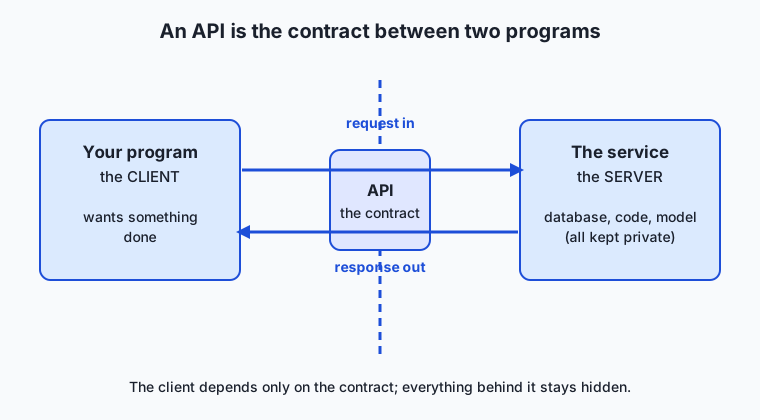
Read the diagram as a boundary. On the left is your program, the client — it wants something done. On the right is the service, the server — it can do it. Between them runs the API: the single defined line across which requests pass one way and responses pass back the other. The client depends only on that line; the server’s database, language, and machinery stay private behind it. Every web API is a version of this picture.
The request: method, path, parameters, headers, and body
A request is what the client sends. From Day 18 you already know its parts; here is how they serve an API.
| Part of the request | What it carries | Example |
|---|---|---|
| Method | The verb — what kind of operation | GET (read), POST (create) |
| Path (endpoint) | Which resource or operation | /users/1 |
| Query parameters | Options that refine the request | ?_limit=5 |
| Headers | Metadata about the request | Accept: application/json |
| Body (payload) | Data sent with the request | {"title":"Learn APIs"} |
The method says what you want done: GET to read data, POST to create it, and (from Day 18) PUT, PATCH, and DELETE for updating and removing. The path names the resource. Parameters refine the request — the query string ?userId=1 after a path filters the results, the way options on an order narrow it down. Headers carry metadata: Accept: application/json says “please answer in JSON,” and (next week) an Authorization header carries the key that proves who you are. The body, or payload, is data you send along with a request — for a POST that creates something, the body describes the thing to create, almost always as JSON.
The response: status, headers, and body
A response is what the server sends back. It carries a status code (Day 18’s 200, 404, 401, 429, 500) that tells your program at a glance whether the request succeeded, headers describing the answer (Content-Type: application/json), and a body — the actual data, again almost always JSON. JSON (JavaScript Object Notation) is a simple, text-based format of nested keys and values that both humans and programs can read; it is the near-universal language of web APIs, and you will read a lot of it this week.
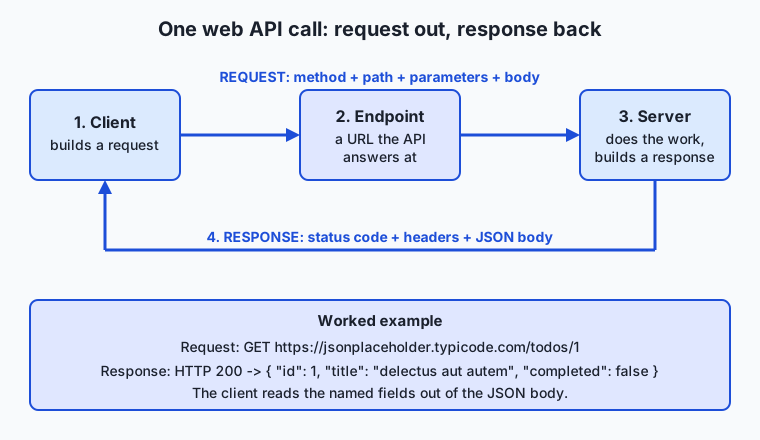
Follow the flow left to right and back. Your client builds a request — method, endpoint, any parameters and body — and sends it over HTTP. The server receives it, does its private work (perhaps reading a database or running a model), and builds a response — a status code plus a body. The response travels back over the same connection. One request, one response: the same conversation your browser has with every web page, now carried out by your program to fetch structured data instead of a page to display.
Reading the documentation
Because every API defines its own endpoints, parameters, and formats, you cannot guess your way through one — you read its documentation, the human-written guide that lists each endpoint, the parameters it accepts, an example request, and an example response. Reading API docs is a core skill: find the endpoint that returns what you want, note its method and required parameters, copy the example request, run it, and compare your response to the documented one. Good docs include a runnable example for exactly this reason. Half of using a new API is learning to read its documentation quickly.
An everyday analogy
Picture a restaurant. You are seated at a table — you are the client, the one who wants something done. Out of sight is the kitchen — the server, where the real work happens. You are never allowed to walk into the kitchen, and you do not need to: between you and it stands a waiter holding a menu. That waiter-and-menu is the API.
The menu is the contract. It lists exactly what you may order (the endpoints), and for each dish it names the choices you can make — rare or well-done, no onions, extra sauce (the parameters). You place an order in the agreed form: the dish plus your choices (the request). You cannot order something not on the menu, and you must specify your choices the way the menu allows — that is the contract keeping both sides sane. The waiter carries your order to the kitchen, and some time later returns with either a plate of food (a response with a 200 status and a body) or a message: “we’re out of salmon” (a 404), or “the kitchen is overwhelmed, please wait” (a 429), or “the oven broke” (a 500).
The beauty is everything the menu hides. You have no idea who is cooking, what brand of stove they use, whether the kitchen was remodeled last week, or how many other tables they are serving. None of it is your concern, because the menu is a promise about what you can order and what you will get back — not a description of the kitchen. The restaurant can hire a new chef, buy new equipment, or move the kitchen to another floor, and as long as the menu still means the same thing, your order still works. That is precisely what a good API gives two programs: a stable menu across which one can order work from the other, with all the machinery kept politely in the back. Keep this restaurant in mind and almost every API idea this week will feel familiar.
Examples in practice
The best way to feel what an API is, is to call one. Here are three free, public APIs that need no account and no key — you can run every command below in your terminal today, and the Day 22 lab automates all three.
JSONPlaceholder is a free fake REST API that serves realistic sample data — perfect for practice because nothing you do can break it. Ask it for to-do item number 1:
curl https://jsonplaceholder.typicode.com/todos/1The endpoint /todos/1 returns the JSON body:
{
  "userId": 1,
  "id": 1,
  "title": "delectus aut autem",
  "completed": false
}
That is a complete API exchange: a GET request to an endpoint, a 200 response, a JSON body with named fields. Change the path to /users/1 and the same API returns a user’s name, email, and address instead — a different resource at a different endpoint on the same service.
httpbin is a free service that echoes your request back to you, which makes it ideal for seeing what you sent. Call its /get endpoint with a query parameter:
curl "https://httpbin.org/get?course=365-days-of-ai&day=22"The response body contains an "args" object showing the parameters it received (course and day) and a "headers" object showing the headers your request carried. It is a mirror for requests — send anything and watch exactly how the server saw it.
Open Notify publishes a free API with the current location of the International Space Station. Note it is served over plain HTTP:
curl http://api.open-notify.org/iss-now.jsonThe response reports the station’s latitude and longitude right now:
{
  "timestamp": 1783860022,
  "iss_position": {
    "latitude": "7.5179",
    "longitude": "59.8046"
  },
  "message": "success"
}
Run it twice a minute apart and the numbers change, because a real satellite is really moving. That is the payoff of an API: with one line, your program reaches a live capability it could never build — here, a spacecraft-tracking system. To make the JSON easier to read, pipe any of these through python3 -m json.tool, which pretty-prints it with indentation; the lab does this for you.
Implications: security, privacy, performance, scalability, and cost
Security
Because an API is a doorway into a service, it is also an attack surface, and most of an API’s security lives in the request. Public APIs like the three above accept anyone; most real APIs require an API key or token in an Authorization header to prove who is calling — which is why next week’s lessons treat authentication so carefully. The key rule you can adopt today: an API key is a secret, like a password. Never paste one into a public forum, a screenshot, or a URL you share, and never send secrets to an echo service like httpbin, which reflects everything back. Whoever holds your key can call the API as you, on your bill.
Privacy
Every API call sends data to someone else’s computer. When you call a service, you are handing it whatever is in your request — the text you want summarized, the address you want mapped, the file you want scanned — and it will pass through their servers and possibly their logs. For a to-do demo this is nothing; for real user data or a private document sent to a hosted model, it is a decision with legal and ethical weight. The discipline is to know what each call transmits and to send only what the task needs.
Performance
An API call is a network round trip, so everything from Day 17’s latency applies: a local function call takes nanoseconds, but a web API call takes tens to hundreds of milliseconds because the request must physically travel to another computer and back. That makes how many calls you make a performance question. Fetching one thing per call in a loop of a thousand items means a thousand round trips; a well-designed API lets you ask for many at once, or filter with parameters so you fetch only what you need. Reading response times, and reducing the number of calls, is real engineering work.
Scalability
APIs are how services scale to millions of callers. Because the interface hides the implementation, the provider can run one server or ten thousand behind the same endpoint, and callers never know. That same decoupling lets you scale: your small program leans on the provider’s enormous infrastructure through a stable line. It is also why providers enforce rate limits — a cap on how many requests you may make per minute — returning 429 when you exceed them, so that no single caller can overwhelm the shared service.
Cost
Free public APIs exist for learning, but most production APIs cost money, usually metered per request or per unit of work. A hosted model typically bills per amount of text processed, so every call has a price, and a runaway loop is a runaway bill. This is the direct sequel to Day 1’s lesson that computation is physical and therefore costs real resources: when you call someone else’s computers, you are renting their electricity, memory, and hardware by the request. Counting your calls is counting your costs.
Alternatives: free, open source, and commercial
“Alternatives” here means the different kinds of APIs you will meet and the ways to work with them, since an API is a concept rather than a single product.
| Option | Type | What it offers | Cost |
|---|---|---|---|
| JSONPlaceholder, httpbin, Open Notify | Free public APIs | No-key endpoints for learning and testing | Free |
curl | Free, open-source tool | Call any web API from the terminal (you used it on Day 21) | Free |
| Postman / Insomnia | Commercial + free tiers | Graphical clients for exploring and testing APIs | Free tier; paid plans |
| REST APIs over HTTP | Open architectural style | The dominant web-API style — resources and HTTP verbs (Day 23) | Free to use |
| GraphQL | Open query language | One endpoint where the client specifies exactly which fields it wants | Free to use |
Language HTTP libraries (requests, fetch) | Free, open source | Call APIs from inside Python, JavaScript, and other languages | Free |
| Commercial service APIs (maps, payments, hosted models) | Commercial | Specialist capabilities exposed as callable services | Metered per request/usage |
For learning, everything you need is free: curl plus the three public APIs above cover this entire week’s ideas at zero cost. Reach for a graphical client like Postman when an API grows complex enough that you want to save and organize many requests. Move to a language library when you are ready to call APIs from inside a real program instead of the terminal — the step this course builds toward.
Comparison with related concepts
| Concept A | Concept B | Key difference |
|---|---|---|
| API | UI (user interface) | An API is built for programs to call and parse; a UI is built for humans to click and read |
| API | Web API | ”API” is the general idea of a program interface; a web API is the specific kind reached over HTTP across the network |
| API | Server | The server is the running machine and code; the API is the published contract for how to talk to it |
| Endpoint | API | An endpoint is one address/operation; the API is the whole set of endpoints and their rules |
| Library (local) API | Web API | A library API is called in the same process in nanoseconds; a web API is called over the network in milliseconds |
| API | Protocol (HTTP) | HTTP is the general transport rulebook; an API defines the specific requests and responses a particular service accepts over it |
The most useful pairing to hold onto is API versus web API. Every function your code calls exposes an API in the broad sense — an agreed way to invoke it. This week’s focus is the narrow, powerful case: a web API, reached over HTTP, across the network, to a service on another computer. When someone says “the API” for a hosted model, they mean its web API — the endpoints, request shapes, and response shapes you send HTTP requests to.
When to use it — and when not to
Reach for a web API whenever your program needs a capability or data that lives outside it and someone already offers over HTTP: current weather, a map, a payment, a translation, the space station’s position, or a hosted model’s answer. Reach for one when you want to connect two systems without wiring into each other’s internals — the API’s stable contract is exactly the clean seam that lets each side change freely. And reach for the idea of an API whenever you design your own software: defining a small, clear interface between parts, and hiding the rest, is the habit that keeps large programs maintainable, straight from Parnas’s 1972 insight.
Know when not to. If the work is purely local and fast — arithmetic, reading a file on your own disk, transforming data already in memory — a web API is the wrong tool: you would add a network round trip, a dependency on someone else’s uptime, and possibly a bill, to do something your own machine can do in microseconds. If you call an external API in a tight loop over many items, stop and check whether it offers a bulk or filtered endpoint, because thousands of round trips are slow and, when metered, expensive. And never treat an unstable third-party API as if it cannot fail: networks drop, services return 500, and rate limits return 429, so any program that depends on a remote API must handle those responses rather than assume success. Use APIs for what lives beyond your program; keep local work local.
Knowledge check
Try these from memory before looking back:
- In one sentence, explain what an API is using the word “contract,” and say what it hides.
- Name the five parts of an HTTP API request and say what each contributes.
- Using the restaurant analogy, map the waiter, the menu, an order with special requests, and a “we’re out of salmon” reply to their API terms.
- Give the exact
curlcommand to fetch user number 1 from JSONPlaceholder, and describe the shape of what comes back. - A friend’s program gets
429from a paid API inside a loop. Explain what429means, why the loop caused it, and two things they could change.
Hands-on exercise
Time to call real services. In this exercise — automated in full in the Day 22 lab — you will use curl to call three free public APIs from your terminal and read each response. Every command needs a network connection; if you are offline, connect first.
Open your terminal and run each command by typing it and pressing Return. First, fetch a single to-do from JSONPlaceholder:
curl https://jsonplaceholder.typicode.com/todos/1This sends a GET request to the /todos/1 endpoint and prints the JSON body. Now fetch a user from the same API, piping the output through Python to pretty-print it:
curl -s https://jsonplaceholder.typicode.com/users/1 | python3 -m json.toolThe -s flag silences curl’s progress meter, and python3 -m json.tool indents the JSON so the nested address and company objects are readable. Next, watch httpbin echo your request back, including a query parameter you set:
curl -s "https://httpbin.org/get?course=365-days-of-ai&day=22" | python3 -m json.toolLook for the "args" object — it shows course and day, the parameters the server received. Finally, ask Open Notify where the space station is right now:
curl -s http://api.open-notify.org/iss-now.json | python3 -m json.toolRead the latitude and longitude inside iss_position. Run it again a minute later and the numbers will have changed.
Expected output
A real run of the first and last commands (your ISS numbers and timestamp will differ — the station is moving):
$ curl https://jsonplaceholder.typicode.com/todos/1
{
  "userId": 1,
  "id": 1,
  "title": "delectus aut autem",
  "completed": false
}

$ curl -s http://api.open-notify.org/iss-now.json | python3 -m json.tool
{
    "timestamp": 1783860022,
    "iss_position": {
        "latitude": "7.5179",
        "longitude": "59.8046"
    },
    "message": "success"
}
The JSONPlaceholder to-do is always the same fixed sample; the ISS response changes every time because it reports live data. Both are complete API exchanges: a GET to an endpoint, a 200 status, and a JSON body with named fields you can read.
Validate your work
You are done when you can check every box:
- You fetched
todos/1and can state itstitleand whether it iscompleted. - You fetched
users/1and can name one field from it (for example, the user’snameoremail). - You called httpbin’s
/getand found yourcourseanddayparameters echoed in the"args"object. - You called the ISS API and read the current
latitudeandlongitude. - You can point at each response and identify it as JSON with named fields.
Troubleshooting
curl: (6) Could not resolve host. Your machine cannot reach the internet (DNS failed, Day 16). Check your connection and try again; every command here needs network access.- The JSON prints as one long unindented line. That is the raw body — pipe it through
python3 -m json.toolto pretty-print it. If Python reports an error instead, the API likely returned a non-JSON error page; check the URL for a typo. - httpbin times out or returns a
503. It is a shared free service and is sometimes overloaded. Wait a minute and retry; a503is itself a real, valid server response worth recognizing. - The ISS command “fails” with an
httpstypo. Open Notify’s ISS endpoint is served over plainhttp://, nothttps://. Use the URL exactly as written.
Common mistakes
- Confusing the API with the data. The JSON that comes back is the data; the API is the agreed way you asked for it (the method, endpoint, and parameters). Change the endpoint and the same API hands you different data.
- Forgetting the quotes around a URL with parameters. A URL containing
&must be quoted in the shell ("...?course=x&day=22"), or the shell treats&as “run in background” and the request breaks. - Assuming every API needs a key. These three are deliberately open. Many real APIs do require a key — but do not add authentication where none is asked for, and never invent a key.
Practice assignment
Open the API worksheet in the starter directory of the Day 22 lab and fill it in completely by calling the three APIs. Record: the exact title of to-do number 1 from JSONPlaceholder; one field of your choice from user number 1 (name the field and its value); and the ISS’s latitude and longitude at the moment you run the command, with a rough note of the time. Then write one short paragraph (4–6 sentences) explaining, in the restaurant analogy, which part of each call was the menu, the order, and the plate that came back — and note which of the three responses was live data and how you could tell. Keep the worksheet; later lessons build directly on these same APIs.
Extension challenge
Go one step past reading and start inspecting the exchange. Re-run the JSONPlaceholder call with curl’s -i flag, which includes the response headers above the body:
curl -i https://jsonplaceholder.typicode.com/todos/1Find the status line (HTTP/2 200), the Content-Type: application/json header that declares the body’s format, and any header describing rate limits or caching. Then use the -w flag from Day 21 to measure how long the call took:
curl -o /dev/null -s -w 'status:%{http_code} total:%{time_total}s\n' https://jsonplaceholder.typicode.com/todos/1Compare that time — tens or hundreds of milliseconds — with the nanoseconds a local calculation takes, and write two or three sentences on why the number of API calls a program makes is a performance and cost decision, not just a correctness one. Finally, using only the parameter idea from this lesson, fetch just the to-dos belonging to user 1 by adding a query parameter: https://jsonplaceholder.typicode.com/todos?userId=1. You have just filtered a request with a parameter — the same move that, next week, lets you ask a real service for exactly the data you need and nothing more.
Quiz
Q1. What is the best short description of an API?
- A program you download and install to speed up your computer
- A contract that defines how one program can ask another to do something, hiding the second program's internals
- The physical server that stores a website's data
- A visual dashboard that humans click to use a service
Show answer
Answer: B. A contract that defines how one program can ask another to do something, hiding the second program's internals
An API is an Application Programming Interface: an agreed contract describing the requests one program accepts and the responses it returns, while hiding how it is implemented. The server, the data, and a human dashboard are all different things.
Q2. Which kind of API is reached over HTTP across the network and is the focus of this week?
- A library API
- An operating-system (system-call) API
- A web API
- A hardware API
Show answer
Answer: C. A web API
A web API is a service on another computer that you call over HTTP, using the same request/response conversation your browser uses. Library and operating-system APIs are local — called within one machine — rather than across the network.
Q3. In a web API request, what is the endpoint?
- The status code the server sends back
- The specific URL the API answers at, usually standing for one resource or operation
- The secret key that proves who is calling
- The JSON data returned in the response body
Show answer
Answer: B. The specific URL the API answers at, usually standing for one resource or operation
An endpoint is a specific URL a web API answers at, such as /todos/1 or /users/1. The path names what you are asking about; the status code and body are parts of the response, not the endpoint.
Q4. Which list correctly names parts of an HTTP API request?
- Status code, headers, and body
- Method, path, parameters, headers, and body
- Latitude, longitude, and timestamp
- Client, server, and network
Show answer
Answer: B. Method, path, parameters, headers, and body
A request carries a method (the verb), a path/endpoint, query parameters that refine it, headers of metadata, and an optional body (payload). Status code, headers, and body describe the response, not the request.
Q5. You run `curl https://jsonplaceholder.typicode.com/todos/1` and get back `{"userId":1,"id":1,"title":"delectus aut autem","completed":false}`. What did you just do?
- Installed the JSONPlaceholder service on your computer
- Made a GET request to an endpoint and received a JSON response body
- Sent a secret API key to authenticate yourself
- Changed the data stored on the server
Show answer
Answer: B. Made a GET request to an endpoint and received a JSON response body
This is a complete API exchange: a GET request to the /todos/1 endpoint returns a 200 response whose JSON body has named fields. Nothing was installed, no key was sent, and GET only reads — it does not change server data.
Q6. Why does API documentation exist and need to be read for each new API?
- Because every API defines its own endpoints, parameters, and response formats that you cannot guess
- Because APIs are illegal to use without reading a legal notice first
- Because documentation is the program that runs the API
- Because all APIs are identical, so one manual covers them all
Show answer
Answer: A. Because every API defines its own endpoints, parameters, and response formats that you cannot guess
Each API defines its own set of endpoints, the parameters they accept, and the shape of their responses, so you read the docs to find the right endpoint and copy a working example. Documentation is a guide, not the running service, and APIs are not interchangeable.
Q7. A paid API returns HTTP 429 when your program calls it rapidly in a loop. What does that mean and why did it happen?
- The server crashed; there is nothing you can do
- You are being rate-limited for making too many requests too fast; slow down or batch your calls
- Your request body was malformed; fix the JSON
- The endpoint URL was misspelled; correct the path
Show answer
Answer: B. You are being rate-limited for making too many requests too fast; slow down or batch your calls
429 Too Many Requests signals a rate limit — a cap on requests per period that shared services enforce so no caller overwhelms them. A tight loop trips it; the fixes are to slow down, batch, or fetch fewer times. A malformed body is 400 and a bad path is usually 404.
Q8. What does it mean to describe an API "as a product" with public, partner, and internal audiences?
- The API is sold in physical stores
- The same interface idea can be opened to anyone (public), shared with select companies (partner), or used only inside one organization (internal)
- Only public APIs are real APIs; partner and internal ones are fakes
- A product API cannot be reached over HTTP
Show answer
Answer: B. The same interface idea can be opened to anyone (public), shared with select companies (partner), or used only inside one organization (internal)
Organizations treat APIs as products with different audiences: public APIs are open to any developer, partner APIs are shared with specific companies under agreement, and internal APIs connect a company's own systems. All are the same technical idea aimed at different callers.
Glossary
- API
- An Application Programming Interface: a defined contract by which one program asks another to do something, exposing the requests it accepts and responses it returns while hiding how it works inside.
- web API
- An API reached over HTTP across the network — a service on another computer your program calls with requests and reads responses from, instead of a local function.
- endpoint
- A specific URL that a web API answers at, usually standing for one resource or operation, such as /todos/1 or /users/1.
- request
- What a client sends to an API: a method (verb), a path/endpoint, optional query parameters, headers, and an optional body.
- response
- What the server sends back: a status code indicating the outcome, headers describing the answer, and a body carrying the data (usually JSON).
- payload
- The data carried in the body of a request or response — for example the JSON describing a thing to create in a POST, or the data returned in a response.
- parameter
- A value that refines a request, most often a query parameter appended after the path (such as ?userId=1) to filter or configure what the API returns.
- client
- The program that initiates an API call — it builds and sends the request and reads the response. Your curl command or your program is the client.
- server
- The machine and code that receives requests and fulfills them, implementing the API behind the contract while keeping its database and internals private.
- REST
- A widely used architectural style for web APIs, described by Roy Fielding in 2000, that maps operations onto HTTP methods and resource URLs (covered in depth on Day 23).
- documentation
- The human-written guide to an API that lists each endpoint, the parameters it accepts, and example requests and responses — what you read to learn how to call a new API.
- JSON
- JavaScript Object Notation, a simple text format of nested keys and values that is the near-universal way web APIs format their request and response bodies.
- rate limit
- A cap a service places on how many requests a caller may make per period; exceeding it returns HTTP 429 so that no single caller can overwhelm the shared service.
- API key
- A secret token a caller sends (usually in an Authorization header) to prove who they are; like a password, it must never be shared publicly or sent to an echo service.
Sources and further reading
- Introduction to web APIs — MDN Web Docs (accessed 2026-07-12)
- API — Wikipedia (accessed 2026-07-12)
- Web API — Wikipedia (accessed 2026-07-12)
- HTTP overview — MDN Web Docs (accessed 2026-07-12)
- JSONPlaceholder — Free fake REST API — JSONPlaceholder (accessed 2026-07-12)
Kept in this browser, no account needed. Your progress page turns the whole record into one link you can bookmark or open on another device.