Computing Foundations › APIs and the Web › Day 28
Day 28: Consuming a Public API from the Command Line
After this lesson you will be able to read an API's documentation and build a working client from scratch — form the request, send it with curl, parse the JSON reply, handle errors and rate limits, and present the result — the exact motion every AI API call needs.
Hands-on lab for this lesson
Lab files on GitHub: https://github.com/ai-roadmap-365/ai-roadmap-365.github.io/tree/main/labs/sections/computing-foundations/day-028-consuming-a-public-api-from-the
- Get the hands-on files. Clone the labs repository once (you can reuse this clone for every lesson). This works on macOS, Linux, and Windows (PowerShell or WSL):
git clone https://github.com/ai-roadmap-365/ai-roadmap-365.github.io.git cd ai-roadmap-365.github.io - Open this lesson's lab. Move into the directory for this specific day. Every lab lives at the same predictable path — section / subsection / week / day:
cd labs/sections/computing-foundations/day-028-consuming-a-public-api-from-the - Read the lab guide. Open `README.md` in that directory. It lists the exact commands, what each does, the expected output, and how to check your work — read it before running anything.
- Run it and check your work. Follow the README's "How to run" section: run the example first to see the finished result, then complete the numbered exercises in `starter/`, then run the tests. The tests pass (exit 0) only when your work is correct.
bash tests/run_tests.sh # or the test command named in the lab README
You can also open the lab as a local page (works offline, shows the file tree and expected output).
Learning objectives
By the end of this lesson you will be able to:
- Read API documentation and locate the four things every request needs: endpoint, parameters, authentication, and response shape
- Build and send a request from the command line with curl, quoting the URL and setting a timeout
- Parse a JSON response for the fields you want using jq and python3, reading nested fields by path
- Handle a failed request and a missing field gracefully so a client fails with a clear message instead of garbage
- Choose an appropriate free public API to practice on, and explain when a call needs an API key and when it does not
- Decide when a curl one-liner should graduate to a shell script and then to a real program with an HTTP client library
- Explain why calling an AI model is the same request-and-parse skill, with a JSON body and an auth header added
Prerequisites
- Days 22-27 (the APIs and the Web category): what an API is, REST, JSON, authentication, webhooks, rate limits and pagination
- A terminal with curl and python3 (both preinstalled on macOS and Linux); network access to reach a free public API
Why this matters
Every AI feature you will ever build talks to a model the same way: your program sends a request over the network to an address, attaches a small block of text describing what it wants, proves who it is with a secret, and reads back a reply it has to unpack. That is an API call, and today you build one by hand, from nothing but a terminal. By the end you will have a working weather client you wrote yourself — and the exact muscle memory every AI API call needs.
This matters in concrete, money-and-time ways. When your first call to a language model fails, the error will be an HTTP status code and a JSON error body — the same shapes you meet today. When a script that worked yesterday suddenly returns nothing, the cause is usually a missing field in the response or a rate limit you tripped, and the habit of reading the raw reply is what saves the afternoon. When you are choosing between pasting into a web chat and calling an API from a script, the difference is whether you can automate the request — and automating a request is precisely this skill. People who cannot form an API call from scratch stay stuck clicking buttons in someone else’s interface; people who can turn any documented service into a tool they control.
It also ties a bow on a week of groundwork. You have learned what an API is, how REST names resources and verbs, how JSON carries the data, how authentication proves identity, how webhooks push events, and how rate limits and pagination shape real traffic. Today those pieces stop being separate lessons and become one motion: read the docs, form the request, send it, parse the reply, handle what goes wrong, and present the result. Do it once carefully with a free weather service, and you will never again be intimidated by the phrase “just call the API.”
The idea in plain language
Consuming an API means writing a small program that asks a remote service a question and uses the answer. You are the client; the service is the server. The whole exchange is a request you send and a response you read, both traveling as ordinary web traffic over HTTPS.
To make the request, you need four things, and they all come from the service’s documentation. First, the endpoint: the URL you send the request to, like an address on an envelope. Second, the parameters: the specifics of your question — for weather, which latitude and longitude, and which measurements you want. Third, the headers: extra notes attached to the request, such as what format you would like back. Fourth, if the service requires it, authentication: a secret key that proves you are allowed to ask. Free “no-key” services skip the fourth entirely, which is why we start with one.
Sending the request is one command. curl is a small program, preinstalled on macOS and Linux, that does exactly one job: it makes an HTTP request and prints the response. You give it a URL, it hands you back whatever the server said. For most APIs that reply is JSON — a block of text with labeled fields — and JSON is text, not a picture, so you can print it, save it, and pick it apart. Picking it apart is parsing: pulling the one number you care about out of the larger reply, using a tool like jq or a few lines of python3. String those steps together — curl to fetch, a parser to extract, echo to present — and you have a pipeline: a tiny program built from ordinary commands. That pipeline is your API client.
Historical background
The command-line tools you will use today are older than most of the web they now query. curl was released by Daniel Stenberg in 1997 (first under the name httpget, then urlget, and finally curl in 1998), created to fetch currency-exchange rates from a script. It has been maintained continuously ever since and now ships on billions of devices — in cars, phones, game consoles, and the operating systems this course runs on — making it one of the most widely deployed pieces of software ever written. Its whole design philosophy is the Unix idea from the 1970s: a small program that does one thing, reads from one place, writes to another, and composes with other small programs through pipes.
JSON, the format nearly every modern API replies in, is younger. Douglas Crockford specified and popularized it in the early 2000s, drawing its syntax from JavaScript object notation but keeping it language-neutral so any program in any language could read it. It was standardized (as ECMA-404 and later RFC 8259) and rapidly displaced the heavier XML formats that came before, because it was small, human-readable, and trivial to parse. jq, the command-line JSON processor you will meet today, appeared in 2012 to make slicing JSON on the command line as natural as grep made slicing text.
The public-API era arrived alongside these tools. Through the 2000s and 2010s, services from mapping to payments to weather began exposing REST APIs so that anyone could build on them, and a culture of free, documented, no-registration test services grew up to help people learn — the very services you will practice on. None of this required new science; it required agreement on plain conventions (URLs, HTTP verbs, JSON) so that a program written by a stranger could talk to a server it had never met. That agreement is what you cash in every time you run a single curl command and get useful data back.
What it is — and what it is not
Consuming an API is the act of programmatically requesting data or an action from a remote service and using its response in your own program. Every word carries weight. Programmatically: a script does it, so it can repeat, schedule, and combine with other steps — unlike clicking a website by hand. Remote service: the logic and data live on someone else’s server, and you reach them only through the documented request. Its response: you get back exactly what the API chooses to return, in the shape it documents, and your job is to parse that shape, not to guess.
It is not screen-scraping, and the difference matters. Scraping means pulling a human web page apart to extract data it was never meant to hand out cleanly; it breaks whenever the page’s layout changes. An API is a stable, documented contract meant for programs, so it is the right tool whenever one exists. Consuming an API is also not the same as building one — today you are the caller, not the service. And it is not magic or intelligence: the server runs ordinary code that looks up your parameters and returns a result. When you later call a language model, that will still be true — a very large program on a server, reached by the same kind of request, returning JSON like any other API.
| Common misconception | The reality |
|---|---|
| ”I need a special library or framework to call an API.” | A single curl command makes a real API call; libraries add convenience, not capability. |
| ”The response is a web page I have to read.” | Most APIs return JSON — labeled text meant for programs, which you parse for the fields you want. |
| ”Every API needs an API key.” | Many excellent public APIs (weather, ISS position, test data) need no key at all. |
| ”If the call fails, the API is broken.” | Failures are usually your request (wrong URL, missing parameter) or a rate limit — the status code tells you which. |
| ”Calling an AI model is a totally different skill.” | It is the same request-and-parse motion, with a JSON body and an auth header added. |
Why it was created and what problems it solves
The problem public APIs solve is duplication. Weather data comes from expensive networks of sensors, satellites, and forecast models; the International Space Station’s position comes from tracking systems; a realistic set of fake users comes from someone’s careful test fixtures. No one wants to rebuild any of that. An API lets the organization that already has the data publish one documented door, and lets everyone else walk through it with a request instead of reinventing the work. You get the data; they keep the source of truth in one place.
Consuming that API from the command line, specifically, solves a second problem: control and automation. A website shows you one answer, formatted for a human, one click at a time. A command-line client turns the same service into something you can script — run on a schedule, feed into another program, loop over a hundred cities, or wire into a larger tool. The moment your request is a line of text rather than a sequence of clicks, it becomes automatable, testable, and repeatable. That is the leap from consumer to builder, and it is why this skill sits at the end of the API week: the earlier days taught you the parts of a request, and this one teaches you to assemble and fire it yourself, then do something with what comes back.
How it works
Let’s walk the whole path once, from an empty terminal to a printed forecast, then look at the two tools that turn a request into code.
The six-stage pipeline
Building an API client is always the same six stages, whatever the service.
- Read the docs. Find the endpoint, the required and optional parameters, the authentication rule (if any), and the shape of the response. For our weather service the docs say: send a GET request to
https://api.open-meteo.com/v1/forecast, withlatitude,longitude, and acurrentlist of the measurements you want; no key required. - Build the request. Assemble the URL with its query string. A query string starts with
?and joinsname=valuepairs with&:?latitude=52.52&longitude=13.41¤t=temperature_2m,wind_speed_10m. - Send it. One command:
curlfetches the URL and prints the raw response. - Parse the JSON. Pull the fields you want — here,
current.temperature_2mandcurrent.wind_speed_10m— out of the larger reply withjqorpython3. - Handle errors. Check whether the request actually succeeded and whether the field you wanted was present, so a network blip or a typo produces a clear message instead of garbage.
- Present the result. Print a clean, human-readable line: the temperature and wind for the place you asked about.
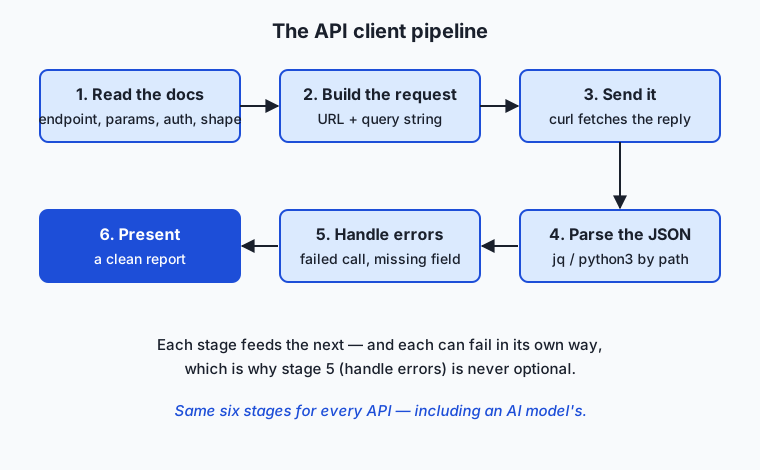
Each stage feeds the next, and each can fail in its own way — which is why stage five is not optional. Skip error handling and the first flaky network moment turns your tidy client into a wall of confusing output.
Reading the docs is the core skill
The single most transferable ability in this lesson is reading API documentation. Every API’s docs answer the same four questions, and once you know to hunt for them, a page you have never seen becomes usable in minutes: What is the base URL / endpoint? What parameters does it take, which are required, and what are their allowed values? What authentication does it need? And what does a successful response look like — which fields, nested how? Good docs show an example request and an example response side by side; your job is to copy that example, confirm it works, then change one piece at a time. You are not expected to memorize an API. You are expected to read its contract and hold it to that contract.
From curl to jq to a full report
Here is the client growing one stage at a time. First, just fetch and look:
curl -s "https://api.open-meteo.com/v1/forecast?latitude=52.52&longitude=13.41¤t=temperature_2m,wind_speed_10m"The -s flag means “silent” — hide the download progress meter so only the JSON prints. You will get back a block like this (reformatted for reading):
{
  "current_units": { "temperature_2m": "°C", "wind_speed_10m": "km/h" },
  "current": { "time": "2026-07-12T12:30", "temperature_2m": 29.5, "wind_speed_10m": 16.9 }
}
Now extract just the temperature. Pipe the response into jq, giving it a path into the JSON:
curl -s "https://api.open-meteo.com/v1/forecast?latitude=52.52&longitude=13.41¤t=temperature_2m,wind_speed_10m" \
| jq '.current.temperature_2m'That prints 29.5. The path .current.temperature_2m reads left to right: enter the current object, then take its temperature_2m field — exactly the nesting you saw in the response. Swap in .current.wind_speed_10m and you get the wind. Two fields, two paths, and you have the data you came for. Present it, and the client is done — which is precisely what today’s lab builds, with error handling around every stage.
The two tools, side by side
Most of this lesson uses curl to send and jq to parse, because they are ubiquitous and composable. But you have two real choices for each half of the job, and knowing when to reach for which is part of the skill.
For sending a request, curl is the universal default: everywhere, scriptable, verbose when you need it. httpie is a friendlier alternative — the same job with color output and simpler syntax (http GET example.com/path key==value), lovely for exploring by hand but an extra install. And when a shell one-liner starts straining, you move the request into a real programming language with an HTTP client library — Python’s requests, or JavaScript’s built-in fetch — where the request becomes a few readable lines you can wrap in logic. For parsing, jq handles JSON beautifully at the command line, while python3 -m json.tool (built in, no install) pretty-prints or, in a short script, gives you the full power of a language to reshape the data. Today’s lab shows both a python3 parser and the jq equivalent, so you can run it on any machine.
An everyday analogy
Think of consuming an API as ordering from a specialist takeaway counter that only accepts written order slips through a window.
Before you order, you read the menu taped to the window — that is the documentation. It tells you what the counter serves, exactly how to write each item on the slip, and whether you need a membership card to order at all. You then fill out an order slip: the counter’s address is the endpoint, the specific items and options you write down are the parameters, any notes in the margin (“hot, to go”) are the headers, and the membership card you clip on is the authentication. A no-key service is a counter that lets anyone order — no card needed.
You slide the slip through the window; that is curl sending the request. Moments later a sealed box with a printed packing slip comes back — the JSON response. You do not eat through the cardboard; you open the box and take out the one dish you ordered, reading the packing slip to find it. That unpacking is parsing with jq or python3: the box holds a lot, but you lift out current.temperature_2m and leave the rest. Sometimes the window slides back with “that item’s not on today’s menu” (a 404) or “you’ve ordered ten times this minute, please wait” (a rate limit) — and a careful customer reads the note rather than staring at an empty counter. Handle those replies gracefully, plate the dish, and you have served the meal: a clean forecast line. The counter never leaves its kitchen, and you never see how the food is made — you only ever exchange a slip for a box. That is every API call you will ever write, including the day you order from the AI counter down the street.
Examples in practice
Start with the smallest possible real call — no key, no parameters — to prove the loop end to end. The Open Notify service reports where the International Space Station is right now:
curl -s "http://api.open-notify.org/iss-now.json"You get back JSON with the station’s latitude and longitude and a timestamp. Extract just the latitude with jq:
curl -s "http://api.open-notify.org/iss-now.json" | jq '.iss_position.latitude'Now a call with parameters — the weather client at the heart of today’s work. The request carries three parameters in its query string, and the response nests the numbers under current:
curl -s "https://api.open-meteo.com/v1/forecast?latitude=48.85&longitude=2.35¤t=temperature_2m,wind_speed_10m" \
| jq '{temp: .current.temperature_2m, wind: .current.wind_speed_10m}'That prints a small object, { "temp": ..., "wind": ... }, for Paris (latitude 48.85, longitude 2.35). Change the two numbers and you have any place on Earth; wrap it in a script that accepts them as arguments and you have a reusable tool.
Third, a call that returns a list, using a free test API that mimics a real blog. JSONPlaceholder serves fake posts and users so you can practice without consequences:
curl -s "https://jsonplaceholder.typicode.com/posts/1" | jq '.title'That fetches post number 1 and prints its title. Ask for /posts (no number) and you get an array of 100 posts; jq '. | length' counts them, and jq '.[0].title' reads the first one’s title — the array indexing you would use to walk any paginated list.
Finally, the shape of a key-based call, so the pattern is complete even though we will not run one here. A service that requires a key documents where the key goes — usually a header:
# Conceptual — a key-based service; the key lives in an environment variable,
# never hard-coded (see Day 25). We are not running this today.
curl -s -H "Authorization: Bearer $API_KEY" "https://api.example-service/v1/data"
The only additions are the -H header carrying the secret and the fact that you must register for the key first. Everything else — endpoint, parameters, JSON reply, parsing — is identical to the free calls above. That is the whole point: once you can consume a free API, a paid one is the same motion with a card clipped to the slip.
Implications: security, privacy, performance, scalability, and cost
Security. The most common command-line API mistake is putting a secret in the request where it can leak. A key baked into a script gets committed to version control and shared with everyone who reads the file; a key on the command line lands in your shell history and in the process list other users can see. The rule you learned on Day 25 holds here: keep the key in an environment variable and reference it as $API_KEY, so the secret never appears in the file. Prefer sending keys in a header over the URL’s query string, because URLs are logged by servers and proxies along the way. And never send real secrets to an echo or test service that hands your request straight back.
Privacy. Every request you make tells the service something: your IP address, the location you asked about, the time you asked. A weather lookup for your home coordinates, repeated daily, is a small breadcrumb trail. Read a service’s terms to know what it logs and retains, and be deliberate about what you send — for AI APIs especially, the prompt you transmit is data leaving your machine and sitting on someone else’s server.
Performance. An API call crosses the network, so it is thousands of times slower than a local computation — tens to hundreds of milliseconds at best. That means two habits: do not call in a tight loop when one request would do, and always set a timeout (curl --max-time) so a hung server cannot freeze your whole script. Caching a response you will reuse, rather than re-fetching it, is often the single biggest speed-up available.
Scalability. One call is easy; ten thousand calls run into the rate limits from Day 27. A polite client respects them — spacing requests, honoring the Retry-After header, and backing off when told to — rather than hammering a free service until it blocks you. Scaling up a consumer is mostly the discipline of staying within the contract you were given.
Cost. Free public APIs like Open-Meteo cost nothing for reasonable personal use, which is exactly why they are perfect for learning. Paid APIs — including every commercial AI model — bill per request or per unit of data, so a runaway loop is a runaway invoice. The command-line habits here (timeouts, caching, respecting limits, testing against a saved sample offline) are the same habits that keep a production bill sane.
Alternatives: free, open source, and commercial
For sending and parsing requests, several good tools overlap; choose by where you are in a project.
| Tool | Role | When to choose it | Cost |
|---|---|---|---|
curl | Send requests | The universal default: preinstalled, scriptable, everywhere | Free, open source |
httpie | Send requests | Interactive exploring by hand — friendlier syntax and color | Free, open source (extra install) |
wget | Fetch/download | Grabbing files or whole pages; less suited to shaping API calls | Free, open source |
jq | Parse JSON | Slicing JSON at the command line, in pipelines | Free, open source |
python3 (requests, json) | Send and parse | When logic grows past a one-liner — loops, retries, real error handling | Free, open source |
| Postman and similar GUI clients | Send and explore | A visual way to build and save requests while learning an API | Free tier; paid team plans |
For the data itself, the free public APIs below are the ones this course recommends practicing on, because they are stable, well-documented, and — for the first three — need no registration at all.
| API | What it returns | Auth | Good for practicing |
|---|---|---|---|
Open-Meteo (api.open-meteo.com) | Current and forecast weather by latitude/longitude | None | Parameters, nested JSON, real numbers |
Open Notify (api.open-notify.org) | The ISS’s current position | None | The simplest possible request/response loop |
JSONPlaceholder (jsonplaceholder.typicode.com) | Fake posts, users, comments | None | Lists, pagination, array indexing |
| A key-based service (e.g. many commercial APIs) | Varies | API key | The header-plus-secret pattern (conceptually) |
Start with Open Notify to see the loop, move to Open-Meteo for parameters and nesting, use JSONPlaceholder to practice lists, and only then reach for anything that needs a key.
Comparison with related concepts
| Concept A | Concept B | Key difference |
|---|---|---|
| Consuming an API | Building an API | Consuming means calling someone’s service; building means running the service others call |
| API call | Web scraping | An API is a stable documented contract for programs; scraping pulls data from a page meant for humans and breaks on layout changes |
curl | A browser | curl fetches the raw response for a program to read; a browser fetches and renders it for a person to look at |
jq | grep | grep finds lines of text by pattern; jq understands JSON structure and reads fields by path |
| A no-key API | A key-based API | No-key APIs let anyone call them; key-based APIs require a registered secret that proves who you are |
| Query parameter | Header | A parameter is part of the URL and names what you want; a header travels alongside the request and carries how or who (format, auth) |
When to use it — and when not to
Reach for a command-line API client whenever a service you need already exposes an API and you want to automate, script, or combine its data — which is most of the time. It is the right tool for quick exploration (“what does this endpoint actually return?”), for gluing services together in a shell pipeline, for scheduled jobs that fetch and store data, and above all for learning any new API fast: a single curl tells you more than pages of prose. When you are about to integrate any AI model, this is where you start — a curl call to the model’s endpoint proves the whole path works before you write a line of application code.
Know when to move past it, too. When your logic grows — loops over many inputs, retries with backoff, real error branching, combining several calls — a shell one-liner becomes hard to read and easy to break, and the request belongs in a real program with an HTTP library. When there is no API and only a web page, an API client is the wrong tool. When a task is a one-off you will never repeat, clicking the website may genuinely be faster than scripting it. And when you would have to violate a service’s terms or its rate limits to do what you want, the answer is not a cleverer script but a different approach. The professional instinct is to start at the command line to understand the API, then graduate to code exactly when the problem outgrows a single line — never before.
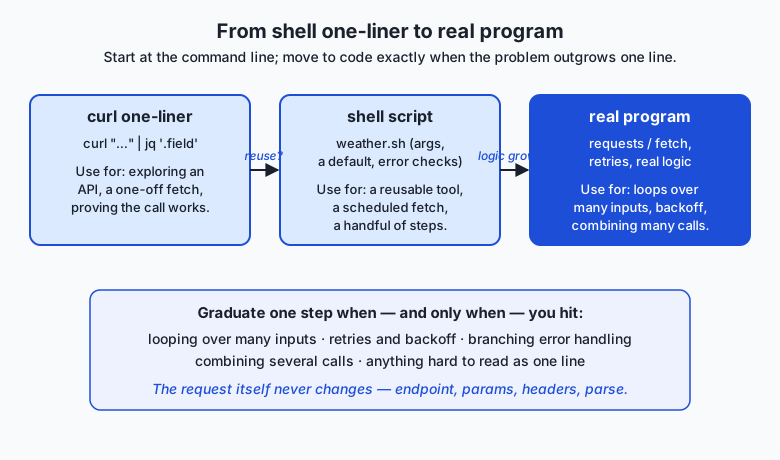
This is the last stop in the “APIs and the Web” category, and it collects everything the week built. You learned what an API is and why every service has one, how REST organizes it into resources and verbs, how JSON serializes the data that flows, how authentication proves who is calling, how webhooks let a service call you, and how rate limits and pagination govern real traffic. Today those threads braid into a single skill — reading docs, forming a request, sending it, parsing the reply, handling failure, presenting the result — and the week’s capstone, the Weather Command-Line Dashboard project, is exactly this client grown up: many locations, cached responses, a clean display. Build the small version in today’s lab, and the project is a matter of scale, not of new ideas.
And the AI connection is not an afterthought — it is the whole reason this skill comes first. Calling a language model is this exact pattern: you send a request to the model’s endpoint, attach a JSON body describing your prompt and options, add an Authorization header carrying your key, and parse the JSON reply for the field holding the model’s answer. Endpoint, parameters, headers, auth, parse — every one of those is what you practiced today on a free weather service. When you make your first model call later in this course, you will not be learning something new; you will be pointing today’s skill at a different URL. That is why a weather client on Day 28 is the direct prerequisite for every AI API call to come.
Knowledge check
Try these from memory before looking back:
- Name the six stages of building an API client, in order, and say what can go wrong at each.
- A friend says “I can’t call this weather API because I don’t have a key.” What would you check in the documentation, and why might they be wrong?
- Given the response
{"current": {"temperature_2m": 12.4}}, write thejqpath that prints12.4. - Explain, in two sentences, why calling a language model is “the same skill” as calling a weather API, and name the one thing you add.
- You run a
curlcommand and nothing prints. List three things you would check, in the order you would check them.
Hands-on exercise
Time to build the client. In the Day 28 lab you will assemble a working weather lookup from scratch: read the Open-Meteo docs, form the request, send it with curl, parse the JSON with python3 (with the jq equivalent shown), handle a failed request and a missing field, and print a clean current-conditions report. No API key is required — Open-Meteo is free and open.
First, prove the raw call works. From the lab directory, run this one line (it needs network access):
curl -s "https://api.open-meteo.com/v1/forecast?latitude=52.52&longitude=13.41¤t=temperature_2m,wind_speed_10m"You should see a block of JSON with a current object inside it. Now run the finished client, which does the same call and then parses and presents the result:
bash examples/weather.shWith no arguments it uses a default location; pass a latitude and longitude to look up anywhere:
bash examples/weather.sh 48.85 2.35Then open starter/weather.sh and complete its five numbered exercises, which build the client piece by piece — the URL, the curl call, the parse, the missing-field check, and the final report — and run it the same way. When you are done, run the tests.
Expected output
A typical run of the finished client for the default location (your exact numbers will differ with the weather and the day):
$ bash examples/weather.sh 52.52 13.41
Weather for 52.52, 13.41
  Time:        2026-07-12T12:30
  Temperature: 29.5 °C
  Wind:        16.9 km/h
And when the network is unavailable, the same client fails gracefully instead of printing garbage:
$ bash examples/weather.sh 52.52 13.41
Error: could not reach the weather service (no network or the request timed out).
Check your connection and try again.
Validate your work
You are done when you can check every box:
- The raw
curlcommand prints JSON containing acurrentobject. -
bash examples/weather.shprints a temperature (a number) and a wind speed for the default location. - Passing your own latitude and longitude changes the location in the output.
- You completed all five exercises in
starter/weather.shand it produces the same shape of report. - With the network off (or a deliberately broken URL), the client prints a clear error and does not crash.
-
bash tests/run_tests.shprints0 failure(s)and exits 0.
Troubleshooting
- Nothing prints at all. You likely dropped the
-sand the URL is being treated as two arguments, or the network is down. Re-run the rawcurlfirst; if it also prints nothing, check your connection and add--max-time 15to fail fast. jq: command not found.jqis optional in this lab — the client parses withpython3by default. Installjqonly if you want to run the commented alternative (brew install jqon macOS, your package manager on Linux).- The temperature comes back as
null. You asked for a measurement the response does not contain, or thecurrent=list is misspelled. Check thatcurrent=temperature_2m,wind_speed_10mmatches the docs exactly — the field names are case-sensitive. curlcomplains about the&in the URL. The shell treats a bare&as “run in background.” Wrap the whole URL in double quotes, as every example here does.
Common mistakes
- Forgetting to quote the URL. A query string contains
&and?, which the shell interprets unless the URL is in quotes. Unquoted, only the first parameter reachescurland the rest vanish. - Not handling a missing field. If you read
current.temperature_2mwithout checking the request succeeded, a network error or a typo yieldsnullor a crash instead of a clear message. Check first, then read. - Hard-coding what should be a variable. A client with the coordinates frozen into the URL can look up exactly one place. Accepting latitude and longitude as arguments (with a sensible default) is what makes it a tool.
Practice assignment
Open starter/weather-worksheet.md in the Day 28 lab and fill it in for a location you choose. Look up its latitude and longitude, run your completed weather.sh for it, and record the current temperature and wind the client reports. Then disconnect from the network (or point the client at a deliberately unreachable URL) and record exactly what the script prints when the request fails. Finally, write two or three sentences explaining which of the six pipeline stages produced each line of the successful output — the curl fetch, the parse, or the presentation — so you can see the whole path in your own run.
Extension challenge
Grow the client one honest step. First, add a third measurement to the report — Open-Meteo’s current list accepts relative_humidity_2m among others; add it to the query string and to the parse, and print it on its own line. Then make the client resilient to a partial response: if the API returns the current object but omits one field, print unavailable for that line instead of a number or a crash. As a final stretch, rewrite the core fetch-and-parse in a few lines of python3 using nothing but the standard library (urllib.request to fetch, json to parse), and note in a comment where you would add an Authorization header if this were a key-based service — the one addition that turns today’s free-API client into tomorrow’s AI-API client.
Quiz
Q1. In the six-stage API client pipeline, what is the correct order of the stages?
- Send, read the docs, build the request, present, parse, handle errors
- Read the docs, build the request, send, parse the JSON, handle errors, present
- Build the request, read the docs, parse, send, present, handle errors
- Parse the JSON, send, build the request, read the docs, present, handle errors
Show answer
Answer: B. Read the docs, build the request, send, parse the JSON, handle errors, present
Every client follows the same path: read the documentation, build the request from it, send it with curl, parse the JSON reply, handle whatever went wrong, and present a clean result. Each stage feeds the next.
Q2. Why must you wrap an API URL in double quotes when it contains a query string like ?a=1&b=2?
- Quotes make the request faster
- Quotes encrypt the URL before sending it
- The shell treats a bare & as "run in the background", so without quotes only the first parameter reaches curl
- curl cannot read a URL longer than one parameter unless it is quoted
Show answer
Answer: C. The shell treats a bare & as "run in the background", so without quotes only the first parameter reaches curl
An unquoted & tells the shell to run the command in the background, cutting the URL off after the first parameter. Double quotes pass the whole URL, & and ? included, to curl intact.
Q3. Given the response {"current": {"temperature_2m": 12.4}}, which jq path prints 12.4?
- jq '.temperature_2m'
- jq '.current'
- jq '.current.temperature_2m'
- jq 'temperature_2m.current'
Show answer
Answer: C. jq '.current.temperature_2m'
A jq path reads left to right through the nesting: enter the current object, then take its temperature_2m field. The path mirrors exactly how the field is nested in the JSON.
Q4. Which statement about free public APIs is correct?
- Every public API requires an API key before you can call it
- Some public APIs (such as Open-Meteo weather, Open Notify ISS position, and JSONPlaceholder) need no key at all
- Free APIs never return JSON, only plain text
- You must install a special library to call any public API
Show answer
Answer: B. Some public APIs (such as Open-Meteo weather, Open Notify ISS position, and JSONPlaceholder) need no key at all
Many excellent public APIs are "no-key": Open-Meteo, Open Notify, and JSONPlaceholder all respond to an anonymous request, which is why they are ideal for learning the request-and-parse loop.
Q5. What is the single most transferable skill in consuming any new API?
- Memorizing every endpoint of the service
- Reading the documentation to find the endpoint, parameters, authentication, and response shape
- Writing the client in a compiled language
- Guessing the field names until one works
Show answer
Answer: B. Reading the documentation to find the endpoint, parameters, authentication, and response shape
You are never expected to memorize an API. Every API's docs answer the same four questions — endpoint, parameters, auth, response shape — so learning to read that contract makes any new service usable in minutes.
Q6. Your curl command prints nothing at all. Which is the best first thing to check?
- Reinstall curl from scratch
- Run the raw curl command by itself to see whether the request reaches the server and returns JSON
- Assume the API has permanently shut down
- Delete your parse step and hope it works
Show answer
Answer: B. Run the raw curl command by itself to see whether the request reaches the server and returns JSON
Isolate the stages: run the raw curl first. If it prints JSON, the fetch works and the problem is in your parse; if it prints nothing, the request or the network is the issue — check quoting and add --max-time to fail fast.
Q7. When should a curl one-liner graduate into a real program with an HTTP client library?
- Immediately — one-liners are never appropriate for real work
- Never — a shell one-liner can do anything a program can
- When the logic grows: looping over many inputs, retries with backoff, branching error handling, or combining several calls
- Only when the API starts requiring a key
Show answer
Answer: C. When the logic grows: looping over many inputs, retries with backoff, branching error handling, or combining several calls
Start at the command line to understand an API, then move the request into code exactly when the problem outgrows a single readable line — loops, retries, real error branching, or combining calls. The request itself does not change.
Q8. Why is consuming a weather API called the direct prerequisite for every AI API call in the course?
- Weather models and language models use the same training data
- Calling an AI model is the same motion — an endpoint, a JSON body, an auth header, and parsing the JSON reply — with only the URL and body changed
- AI APIs return weather data by default
- Language models can only be reached through weather services
Show answer
Answer: B. Calling an AI model is the same motion — an endpoint, a JSON body, an auth header, and parsing the JSON reply — with only the URL and body changed
A language-model call is this exact pattern: send a request to the model's endpoint, attach a JSON body describing the prompt, add an Authorization header, and parse the JSON reply. Endpoint, parameters, headers, auth, parse — every piece is what you practice on a free weather API.
Glossary
- API client
- A program — even a single command — that sends a request to a remote service and uses the response it gets back. Today you build one for weather.
- endpoint
- The URL a request is sent to, naming the specific resource or operation you want, like an address on an envelope.
- query parameter
- A name=value pair carried in the URL after a ?, joined by &, that specifies the details of your request (for example latitude=52.52).
- JSON parsing
- Pulling the fields you want out of a JSON response by their path, so a larger reply becomes the one or two values your program needs.
- jq
- A command-line tool that reads JSON structurally and extracts fields by path (for example .current.temperature_2m), the way grep extracts lines by pattern.
- curl
- A small, ubiquitous command-line program that makes an HTTP request to a URL and prints the response — the standard way to send an API call from a terminal.
- error handling
- Checking whether a request actually succeeded and whether the expected field was present, so a failure produces a clear message instead of garbage or a crash.
- free tier
- A level of an API that costs nothing to use within stated limits; free public APIs like Open-Meteo make them ideal for learning without a bill.
- no-auth API
- A public API that requires no key or token to call — anyone can send an anonymous request and get a response, as with Open-Meteo, Open Notify, and JSONPlaceholder.
- request pipeline
- The six repeatable stages of any API client: read the docs, build the request, send it, parse the JSON, handle errors, and present the result.
- HTTP client library
- A library inside a programming language (such as Python's requests or JavaScript's built-in fetch) that sends HTTP requests from code, used when a shell one-liner outgrows a single line.
- documentation
- The reference an API publishes describing its endpoints, parameters, authentication, and response shape; reading it is the core transferable skill of consuming any API.
- rate limit
- A cap a service places on how many requests you may send in a period; a polite client stays within it, spacing requests and honoring any Retry-After header.
Sources and further reading
- Open-Meteo — Free Weather API — Open-Meteo (accessed 2026-07-12) — The no-key weather API this lesson and lab build a client for; documents the forecast endpoint and its parameters.
- curl Documentation — curl / Daniel Stenberg (accessed 2026-07-12) — Reference for the command-line HTTP tool used to send every request in this lesson.
- jq Manual — jq (accessed 2026-07-12) — Reference for the command-line JSON processor used to parse responses by path.
- Working with JSON — MDN Web Docs (accessed 2026-07-12) — Background on the JSON format that nearly every API responds in.
- JSONPlaceholder — Free fake REST API — JSONPlaceholder (accessed 2026-07-12) — A free no-key test API used to practice reading lists and indexing arrays.
Kept in this browser, no account needed. Your progress page turns the whole record into one link you can bookmark or open on another device.