Computing Foundations › Git and GitHub › Day 29
Day 29: Why Version Control Exists
After this lesson you will be able to explain what problem version control solves, name its core ideas — history, commits, diffs, reverting, branching, and merging — and say why the distributed design Git uses won, so you understand what every repository you touch is really doing.
Hands-on lab for this lesson
Lab files on GitHub: https://github.com/ai-roadmap-365/ai-roadmap-365.github.io/tree/main/labs/sections/computing-foundations/day-029-why-version-control-exists
- Get the hands-on files. Clone the labs repository once (you can reuse this clone for every lesson). This works on macOS, Linux, and Windows (PowerShell or WSL):
git clone https://github.com/ai-roadmap-365/ai-roadmap-365.github.io.git cd ai-roadmap-365.github.io - Open this lesson's lab. Move into the directory for this specific day. Every lab lives at the same predictable path — section / subsection / week / day:
cd labs/sections/computing-foundations/day-029-why-version-control-exists - Read the lab guide. Open `README.md` in that directory. It lists the exact commands, what each does, the expected output, and how to check your work — read it before running anything.
- Run it and check your work. Follow the README's "How to run" section: run the example first to see the finished result, then complete the numbered exercises in `starter/`, then run the tests. The tests pass (exit 0) only when your work is correct.
bash tests/run_tests.sh # or the test command named in the lab README
You can also open the lab as a local page (works offline, shows the file tree and expected output).
Learning objectives
By the end of this lesson you will be able to:
- Explain the problems version control solves — lost work, untraceable changes, unsafe experimentation, uncoordinated collaboration, and irreproducible results — in terms of the world before it existed
- Define version control as both a time machine and a collaboration system, and describe a commit, its metadata, and how a chain of commits forms a project history
- Explain diffs, reverting, branching, and merging, and how they build safe, reversible change on top of an append-only history
- Distinguish centralized from distributed version control and give concrete reasons the distributed model won on speed, offline work, and resilience
- Name the leading tools — Git, Mercurial, Perforce, and the hosting platforms GitHub, GitLab, and Bitbucket — with when to choose each and what is free
- Connect version control to reproducible, collaborative work with code, datasets, notebooks, and configurations, and inspect a real three-commit history from the command line
Prerequisites
- A computer running macOS, Linux, or Windows with a terminal (Days 8–14 introduced the shell)
- Git installed, or the ability to install it freely (the lab explains how); no prior version control experience required
Why this matters
Every serious piece of software you will ever touch on your way into AI — a training script, a data-cleaning notebook, a configuration file that pins which model version runs in production, even the course you are reading right now — lives inside a version control system. It is the quiet layer underneath modern collaboration: the reason a team of fifty engineers can change the same codebase every hour without overwriting each other, the reason you can ask “what exactly changed between the run that worked and the run that broke?” and get an exact answer, and the reason you can undo a mistake from three weeks ago without having kept a folder of dated copies. You have already used it: you obtained this course by cloning a repository, which is a version control operation, whether or not anyone told you that at the time.
The consequences of not having it are concrete and expensive. Without version control you get lost work when two people edit the same file and one save silently erases the other’s afternoon. You get the “who changed this, and why?” mystery, where a line of code breaks production and nobody can say when it appeared or what it replaced. You get a graveyard of files named report_final.docx, report_final_v2.docx, and report_final_FINAL_use_this_one.docx, none of which anyone trusts. And you get the reproducibility crisis that haunts data and AI work specifically: a model that scored well last month, a notebook that has been edited a dozen times since, and no way to recover the exact code and settings that produced the good result.
Today you build the mental model that makes all of that go away. You will not memorize commands — that starts tomorrow. Instead you will understand what problem version control solves, what it actually is (a time machine for your files plus a system for many people to change them safely), and why the distributed design that Git uses won over the older centralized approach. By the end you will see why practitioners put not just code but datasets, notebooks, configurations, and prompt libraries under version control, and why reproducible, collaborative AI work is impossible without it.
The idea in plain language
Version control is a system that records the complete history of a set of files, so you can see how they got to their current state, compare any two moments, go back to any earlier moment, and let many people change the files at once without losing anyone’s work. Think of it as two tools fused into one. The first is a time machine: at any point you can take a snapshot of your whole project, label it with a note about what you did, and keep that snapshot forever — and you can travel back to any snapshot you have taken. The second is a collaboration system: it lets several people each build their own line of snapshots and then combine them intelligently, flagging the rare places where two people changed the very same line so a human can decide what is correct.
The unit at the center of everything is the commit: one saved snapshot of your project, stamped with who made it, when, a message describing it, and a unique identifier. A project’s history is just a chain of commits, each pointing back to the one before it, like beads on a string. Because every commit is kept, nothing is ever truly overwritten; changing a file adds a new commit rather than destroying the old one. That single design choice is what turns “save” from a destructive act into a reversible one.
Everything else in version control is built from that foundation. A diff is the precise list of lines that differ between two commits — what was added, what was removed. Reverting means bringing back the content of an earlier commit. A branch is a second chain of commits that splits off from the main line so you can experiment or build a feature without disturbing anyone else, and merging is folding two branches back together. Master those five ideas — commit, diff, revert, branch, merge — and you understand version control, regardless of which tool implements them.
Historical background
The problem is as old as shared source code, and the solutions arrived in recognizable generations. In 1972 at Bell Labs, Marc Rochkind built the Source Code Control System (SCCS), generally considered the first version control system: it stored the history of a file as a series of changes rather than as a pile of full copies. A decade later, in 1982, Walter Tichy at Purdue University released the Revision Control System (RCS), which was faster and simpler and became a Unix staple. Both shared a hard limitation: they versioned one file at a time and let only one person lock and edit a file at once, which does not scale to teams working on a whole project together.
The next generation versioned an entire project and let people work in parallel. The Concurrent Versions System (CVS) grew out of a set of scripts Dick Grune wrote in the mid-1980s and was rebuilt in C by Brian Berliner at the end of that decade; it introduced the model of a central server holding the project history while many developers checked out and committed changes. CVS had rough edges, and in 2000 the company CollabNet started Subversion (SVN) explicitly to be “a better CVS” — atomic commits (a change either fully lands or does not), proper versioning of directories and renames. For much of the 2000s, Subversion was the default centralized version control system for open-source and corporate projects alike.
Then came the split that shaped today’s world. The Linux kernel project had been using a commercial distributed system called BitKeeper under a free-of-charge license. In 2005 that license was withdrawn after a dispute, and the kernel — a project with thousands of contributors scattered across the planet — suddenly needed a new system that matched BitKeeper’s distributed design, where every developer holds the entire history locally. Linus Torvalds, the creator of Linux, wrote Git in a remarkably short span in April 2005, designing it for speed, for the integrity of history (every commit is identified by a cryptographic hash of its contents, so tampering is detectable), and for fully distributed work. That same month, Matt Mackall began Mercurial, another distributed system born of the same event. Around this same era the commercial Perforce (first released in 1995) remained the choice of large studios and enterprises handling huge binary assets. Git steadily became dominant, and its rise was accelerated by hosting platforms built around it that made sharing and reviewing changes online effortless. The through-line across fifty years is unbroken: the tools kept getting faster and more collaborative, but the core promise — never lose history, and let people work together safely — never changed.
What it is — and what it is not
Version control is a system that records changes to a collection of files over time so that you can recall any specific version later, understand how the files evolved, and coordinate changes among many people. The repository — the store of that full history — is the thing that is versioned; the files you currently see and edit are just the latest snapshot checked out of it. Precision matters in the definition. Records changes over time: the history is the product, not a side effect. Recall any specific version: not just the newest, but any commit ever made. Coordinate changes among many people: the collaboration machinery is as central as the history.
It is equally important to be clear about what version control is not, because it is easy to confuse with neighboring tools. It is not a backup system, although it improves your resilience: a backup captures the current state of files on a schedule, while version control captures every deliberate, labeled step and the reasons for them. It is not a file-synchronization service like a shared cloud drive that mirrors your latest file to other machines; those tools race to make everyone’s copy identical and will happily let one person’s save clobber another’s, which is exactly the failure version control is built to prevent. And it is not merely an “undo button,” because undo is linear and forgotten when you close the program, whereas version control keeps a permanent, branching, shareable history that survives across machines and years.
| Common misconception | The reality |
|---|---|
| ”Version control is just automated backup.” | Backups snapshot files on a clock; version control records intentional, labeled changes and why they were made, and lets you branch and merge. |
| ”It’s the same as syncing a shared cloud folder.” | Sync tools race to make copies identical and can silently overwrite one person’s work; version control detects conflicts and asks a human to resolve them. |
| ”It’s only for source code.” | Any text-based files benefit — configs, documentation, datasets, notebooks, infrastructure definitions, and this course all live in it. |
| ”The history takes too much space to keep forever.” | Systems store differences and compress aggressively; keeping full history is cheap compared with the cost of losing it. |
| ”Once I commit, I can never change anything again.” | You can revert, amend, and branch freely; commits make change safe and reversible, not permanent and rigid. |
Why it was created and what problems it solves
Picture the world before version control, which is still the world of any project not using it. You finish a working version of a file and, wanting to be safe before a risky change, you copy it to analysis_v2.py. The risky change works, so now analysis_v2.py is real and analysis.py is stale — except a colleague has meanwhile edited analysis.py. Whose is canonical? You email files back and forth; someone integrates two versions by hand, missing a change; a bug you fixed last week reappears because an old copy got promoted. Multiply this by ten people and a hundred files and you have the daily reality that gave every experienced developer the same scars: lost work, untraceable changes, and merge-by-email chaos.
Version control was created to solve a specific cluster of problems, each of which maps to one of its features. No history: without it, once you save over a file the previous content is gone, so version control keeps every commit and lets you view or restore any of them. No attribution: when something breaks, you need to know when the offending line arrived and who wrote it and why — version control records the author, timestamp, and message of every change, so any line can be traced to the commit that introduced it. No safe experimentation: trying a bold idea should not risk the working version, so branches let you build in isolation and throw the work away or fold it in. No coordinated collaboration: many people must change the same project without stepping on each other, so version control merges independent work automatically and flags genuine conflicts for a human. And no reproducibility: to trust a result you must be able to recover the exact files that produced it, so a commit is a fixed, retrievable point you can always return to. Strip away the tooling and version control is simply the disciplined answer to a single question every team eventually asks in a panic: what changed, when, by whom, and can we get the old version back?
How it works
Under the hood, a version control system revolves around a repository: a hidden database, usually a folder named .git living alongside your project, that stores the entire history. The files you see and edit are the working directory — one checked-out snapshot. When you are ready to record progress, you tell the system which changes to include (a step called staging in Git) and then commit, which writes a new snapshot into the repository. Each commit stores the state of the tracked files, plus metadata: the author, a timestamp, a message you write, and a pointer to its parent — the commit that came immediately before. Because every commit names its parent, the history forms a graph: a straight chain when work is linear, and a splitting-and-rejoining shape when branches are involved.
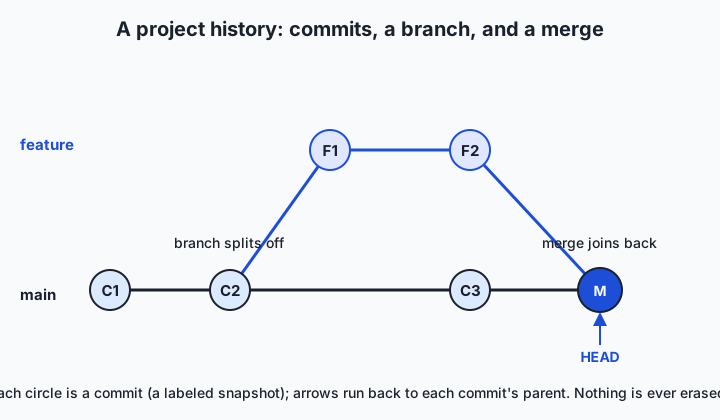
Read the diagram left to right. Each circle is a commit — a full labeled snapshot — and the arrows point from each commit back to its parent, so the line is the history. The lower track is the main line of development. Partway along, a branch splits off: a second track where you can build a feature in isolation, committing freely, while main continues to receive other work. When the feature is ready, a merge commit joins the two tracks back together, combining their changes. A special pointer called HEAD marks the commit you are currently looking at; moving HEAD to an earlier commit is exactly the “time machine” trip. Nothing on the diagram is ever erased — even abandoned branches remain in the history unless you deliberately discard them.
Two operations make the history useful rather than merely stored. A diff compares any two commits and reports the precise lines that changed — additions and deletions, file by file — which is how you answer “what changed?” without reading whole files. And reverting takes the content from an earlier commit and brings it back, either by checking out that old snapshot to look at it or by making a new commit that undoes a previous one. Crucially, reverting is itself recorded as history: you do not travel back and erase the intervening commits, you add a new step that restores the old content, so the record of what happened stays honest.
The last structural idea is where the repository lives, and this is where the two great families of version control diverge. In a centralized system such as Subversion, there is one repository on a server that holds the authoritative history; each developer keeps only a working copy of the latest files and must contact the server to commit, view history, or branch. In a distributed system such as Git or Mercurial, every developer clones the entire repository — all commits, all history — onto their own machine, so committing, branching, viewing history, and diffing are all local and instant, and the network is needed only to share changes with others. This is not a small tweak; it changes what you can do offline, how fast everyday operations feel, and how resilient the project is to any single machine failing.
An everyday analogy
Imagine a team of authors writing a long book together, and hold onto this picture for the rest of the lesson. The manuscript is your project. Rather than typing over the same pages, the team keeps a shelf where, at the end of every meaningful chunk of work, they place a complete, dated copy of the whole manuscript with a sticky note: “Chapter 3 rewritten to fix the timeline.” Each dated copy is a commit — a snapshot you can always return to — and the shelf, read left to right, is the project’s history. Nothing is thrown away; the shelf only grows.
When an editor asks “what did you actually change in this revision?”, nobody re-reads two whole manuscripts. They lay the new copy beside the previous one and mark the lines that differ — that red-lined comparison is a diff. If a rewrite turns out worse than what it replaced, they simply take the earlier copy back off the shelf and continue from it; that is a revert, and note that the bad draft still sits on the shelf as an honest record of what was tried.
Now suppose one author wants to attempt a daring new ending without disrupting everyone else. They take a full photocopy of the manuscript and work on it separately for a week — that private line of dated copies is a branch. Meanwhile the main manuscript keeps advancing. When the new ending is ready, the team reconciles the two versions, folding the new chapters into the main manuscript; that is a merge. Almost always the two lines touched different chapters and combine cleanly. Occasionally both edited the very same paragraph, and here the system refuses to guess: it hands the paragraph to a human with both versions shown, and someone decides — a merge conflict resolved by judgment, not by a coin flip. Finally, the difference between the old office model, where a single master binder lives in a locked room and every author must walk there to add a page, and the modern model, where every author has a full photocopy of the entire manuscript and its whole history at home, is exactly the difference between centralized and distributed version control.
Examples in practice
The clearest example is the one you will run in this lesson’s lab. You create a fresh repository, write a short file, and make a first commit — snapshot one. You edit the file and commit again — snapshot two. You edit once more and commit a third time. Now git log --oneline prints your history as three lines, newest first, each with a short identifier and your message, and you can see the shelf you have built:
9f3c2a1 Add a closing line to the notes
4b7e8d0 Expand the notes with a second point
1a2f5c9 Start notes with a first point
Ask what changed between two of those snapshots and a diff answers exactly, with - marking removed lines and + marking added ones:
--- notes.txt (commit 1a2f5c9)
+++ notes.txt (commit 4b7e8d0)
@@
 Point one: version control keeps history.
+Point two: every commit records who, when, and why.
And if the latest edit was a mistake, you restore the file’s earlier content and carry on — the time machine in action, with the record intact. That tiny loop — change, commit, inspect, and when needed step back — is the whole of everyday version control, and every larger workflow is built from it.
Beyond that toy, the pattern is everywhere in real work. This entire course is a repository: every lesson, lab, and diagram is committed, so an editor can see what changed between drafts and restore an earlier version of any page. A data scientist keeps the notebook, the cleaning script, and the configuration that names the exact dataset revision all in one repository, so that a result from three months ago can be reproduced by checking out the commit that produced it. A team building a web service branches for each new feature, reviews the diff before merging, and — when a deploy misbehaves — reads the history to find the exact change responsible and reverts just that. In all three cases the leverage comes from the same primitives you will practice on three commits in a temporary folder.
Implications: security, privacy, performance, scalability, and cost
Security
Because every commit in a system like Git is identified by a cryptographic hash computed from its contents and its parent, the history is tamper-evident: altering an old commit changes its hash and every hash after it, so silent rewriting of the record is detectable. That integrity is a genuine security property, and it is why signed commits and tags can attest to who authored a change. The flip side is a discipline you must learn early: a repository’s history remembers everything ever committed, so a password or key committed by accident is not fixed by deleting it in a later commit — it still sits in the history and must be treated as compromised and rotated. Version control protects the integrity of what you record, but it will faithfully preserve mistakes too.
Privacy
The same permanence has privacy consequences. Names, email addresses, and timestamps of contributors are recorded in every commit, and any personal or sensitive data that lands in a commit persists in the history even after later removal. On shared platforms, the visibility of a repository (private to a team versus public to the world) governs who can read that history, so the choice of where a repository lives and who can see it is a privacy decision, not just a convenience. The practical rule is to keep secrets and personal data out of repositories entirely — a lesson every practitioner eventually learns, ideally not the hard way.
Performance
The distributed design has a striking performance implication: because your clone contains the whole history, the operations you do constantly — committing, viewing the log, diffing, switching branches — happen locally at memory-and-disk speed, with no network round-trip. This is why Git feels instant even on large projects and why you can work fully offline on a train and synchronize later. Centralized systems, by contrast, must contact the server for many of these operations, so everyday work carries network latency. The cost of the distributed model is the initial clone, which transfers the entire history rather than just the current files — a one-time price paid for permanently fast local operations.
Scalability
Version control scales along two axes: the number of collaborators and the size of the project. Branching and merging let thousands of contributors work in parallel — the Linux kernel, with its enormous contributor base, is the original proof — because independent work stays isolated until deliberately combined. Scaling in content is subtler. These systems are optimized for text, where diffs are small and meaningful; large binary files (video, high-resolution images, multi-gigabyte model checkpoints) do not diff well and can bloat a repository, which is why specialized handling exists for them and why some studios prefer systems like Perforce that were built for massive binary asset libraries. Knowing this boundary matters directly in AI work, where model weights and datasets can be enormous.
Cost
The core technology is free. Git, Mercurial, and Subversion are open-source and cost nothing to run, and the storage a text project’s history consumes is trivially small. Real costs appear at the edges: hosting a repository on a managed platform can be free for individuals and small teams and priced per user for larger organizations; storing very large files or long histories of binary assets consumes real storage that platforms may charge for; and the largest cost of all is the human time saved or lost — a team without version control pays continuously in reconstructed work, untraceable bugs, and cautious, slow collaboration, which dwarfs any tooling expense.
Alternatives: free, open source, and commercial
“Alternatives” here means the actual tools you might choose, and in practice the choice is unusually settled: for almost everyone starting today, the answer is Git. Still, it helps to know the landscape and when the others make sense.
| Tool | Type | When to choose it | Cost |
|---|---|---|---|
| Git | Distributed VCS (open source) | The default for essentially all new projects; the standard this course teaches | Free and open source |
| Mercurial | Distributed VCS (open source) | Teams who prefer its simpler command set; still used by some large organizations | Free and open source |
| Subversion (SVN) | Centralized VCS (open source) | Legacy projects already on it, or workflows wanting a single locked central copy | Free and open source |
| Perforce (Helix Core) | Centralized VCS (commercial) | Game studios and enterprises versioning huge binary assets at scale | Free for small teams; paid per user beyond that |
| GitHub | Hosting for Git | The most popular place to host, share, and review Git repositories | Free for public and private repos; paid tiers for teams |
| GitLab | Hosting for Git | Hosting plus built-in automation; can be self-hosted on your own servers | Free tier and open-source self-hosted edition; paid tiers |
| Bitbucket | Hosting for Git | Teams already using its vendor’s other project tools | Free for small teams; paid tiers |
A few words on how to use each. Git is the version control system itself — a program you run on your own machine to create repositories, commit, branch, and merge; you will start learning its commands tomorrow. Mercurial and Subversion are alternative systems you would only reach for if a project already uses them; the concepts transfer directly. Perforce is worth knowing by name because you will meet it in industries with gigantic binary files, where its centralized, lock-friendly design shines. The three hosting platforms are a different category: they do not replace Git, they give a Git repository a home on the internet so a team can share it, review changes, and run automation — and all three offer a free tier that is more than enough to learn on. The single practical recommendation is to learn Git deeply; everything else is either a variation on the same ideas or a service built on top of them.
Comparison with related concepts
The comparison that most shapes your daily experience is centralized versus distributed version control, and the diagram makes the structural difference concrete.
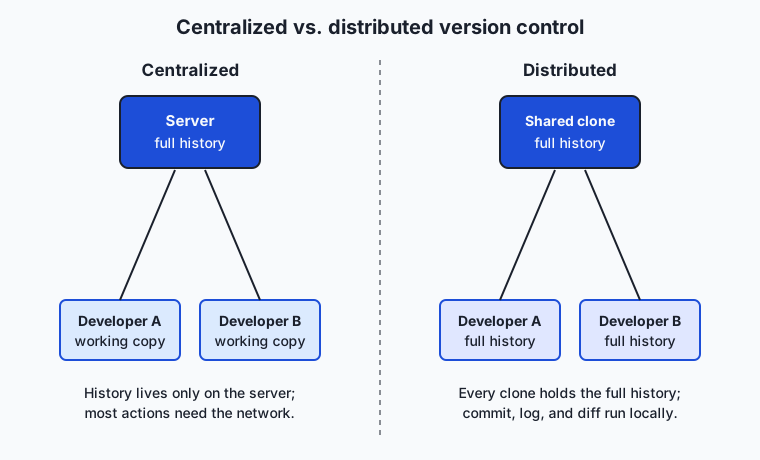
On the left, the centralized model: a single server holds the one authoritative repository, and each developer keeps only a working copy of the current files. Committing, viewing history, and branching all require talking to the server, and if the server is unreachable, everyday work stalls; if it is lost without backups, the history can be gone. On the right, the distributed model: every developer clones the entire repository, history and all, so each machine is a full copy. Local operations need no network, work continues offline, and the project survives any single machine’s failure because the history lives in many places at once. Sharing happens by pushing and pulling commits between clones, often through one clone that the team agrees to treat as the reference — which looks a little like a central server but is a convention, not a technical requirement.
| Dimension | Centralized (e.g. Subversion) | Distributed (e.g. Git) |
|---|---|---|
| Where history lives | One server holds the authoritative history | Every clone holds the full history |
| Working offline | Limited; most operations need the server | Full; commit, branch, diff, and log all work locally |
| Speed of everyday operations | Bound by network latency to the server | Local and near-instant |
| Resilience | Losing the server can lose the history | History survives on every clone |
| Branching and merging | Possible but historically heavier | Cheap and central to the workflow |
| Mental model | Check out from, and commit to, one shared copy | Clone a full repository; sync changes peer-to-peer |
It is also worth separating version control from two things people conflate with it. A backup captures the state of files on a schedule for disaster recovery; version control captures intentional, labeled changes and their reasons, and while it adds resilience it is not a substitute for off-site backups of the server or platform. A file-sync service keeps the latest copy of a file identical across devices; it has no concept of a commit, a branch, or a merge, and it will overwrite rather than reconcile. Version control is the only one of the three that treats history and deliberate collaboration as the point.
When to use it — and when not to
Use version control for essentially every project involving text files that you will change over time, and start it on day one rather than bolting it on later. Any code, however small, belongs in it, and so do documents, configuration files, infrastructure definitions, datasets small enough to diff, and notebooks — anywhere you would ever want to answer “what changed?” or “can I get the old version back?” The moment more than one person touches a project, version control moves from helpful to essential, because it is the only tool that lets people change the same files in parallel without losing work. The habit is cheap to start and compounds: a repository begun today gives you a complete, searchable history for the entire life of the project.
There are a few honest limits. Version control is not the right store for very large binary files that do not diff — multi-gigabyte model checkpoints, raw video, large image sets — which bloat the repository; those are better handled by dedicated large-file tooling or artifact storage, with the repository holding a reference to them. It is not a secrets manager: passwords, API keys, and personal data should be kept out of history entirely, using environment variables or a secrets vault. And it is not a substitute for off-site backups of the hosting platform itself. Within those boundaries, though, the guidance is simple and near-absolute: if it is text and it will change, put it under version control, and do it from the very first commit.
Knowledge check
Try these from memory before looking back:
- In your own words, define version control using both of its two roles — the time-machine role and the collaboration role — and give one concrete failure each role prevents.
- Explain what a commit is and what metadata it records, then describe how a chain of commits forms a project’s history.
- A teammate says version control is “just automatic backup.” Give two specific ways it differs from a scheduled backup.
- Describe the difference between a centralized and a distributed version control system, and name one everyday operation that is fast in the distributed model because it needs no network.
- Why do practitioners keep datasets, notebooks, and configurations — not only source code — under version control, and how does that connect to reproducing a past result?
Hands-on exercise
Time to watch the time machine work on real files. In this exercise — carried out in full in the Day 29 lab directory — you will create a throwaway repository, make three commits to a single file, and then inspect the history you built. Everything is local; nothing touches the network. The lab’s examples/history_demo.sh script does all of this automatically in a temporary folder it creates and deletes, so you can run it safely and then read it to see each step.
From the lab directory, run the demo:
bash examples/history_demo.shThe script creates a temporary directory, initializes a repository inside it, sets a local name and email so commits work even if you have never configured Git, and then makes three commits to a file called notes.txt. After building that history it shows you three views of it. First, the one-line log:
git log --onelineThis prints your commits newest-first, each as a short identifier plus its message — your shelf of dated snapshots, read at a glance. Next, a diff between the first and second commits:
git diff <first-commit> <second-commit> -- notes.txtThis shows exactly which lines the second commit added, with + in front of new lines. Then the full detail of one commit:
git show <second-commit>Finally the script demonstrates reverting by restoring an earlier version of the file, proving that an unwanted change can be undone. When it finishes, it deletes the temporary directory, leaving nothing behind.
Expected output
A typical run prints (identifiers on your machine will differ, because commit hashes depend on time and author):
=== Version control history demo ===
Creating a throwaway repository in a temporary directory...
Made commit 1: Start notes with a first point
Made commit 2: Expand the notes with a second point
Made commit 3: Add a closing line to the notes

--- git log --oneline (newest first) ---
9f3c2a1 Add a closing line to the notes
4b7e8d0 Expand the notes with a second point
1a2f5c9 Start notes with a first point

--- git diff between commit 1 and commit 2 (notes.txt) ---
+Point two: every commit records who, when, and why.

--- git show of commit 2 ---
Author: Course Learner <learner@example.com>
    Expand the notes with a second point

--- Time machine: restoring notes.txt to commit 1 ---
Restored. notes.txt now reads:
Point one: version control keeps history.

Cleaning up the temporary repository...
Done. Nothing left behind.
Line by line: the three “Made commit” lines confirm the history was built; git log --oneline shows all three snapshots; the diff shows only the single line the second commit added; git show reveals a commit’s author and message; and the restore step proves an earlier version can be recovered. The cleanup line confirms the temporary repository was removed.
Validate your work
You are done when you can check every box:
- The demo ran and printed three “Made commit” lines.
-
git log --onelineshowed exactly three commits, newest first. - You can point to the single line the diff reported as added between commit 1 and commit 2.
- You saw the author and message in the
git showoutput. - The restore step brought back the first commit’s version of the file.
- After the script finished, the temporary directory it used no longer exists.
Troubleshooting
git: command not found. Git is not installed. It ships with the macOS Command Line Tools (xcode-select --install) and is a free install on Linux (sudo apt install gitorsudo dnf install git). See the lab’srequirements/README.md.Author identity unknownor a prompt for your name and email. This happens when Git has no global identity. The demo avoids it by setting a local name and email inside the temporary repository only; if you are running commands by hand, set them locally in your test repo rather than globally.- The temporary directory seems to linger. The script removes it on exit via a trap; if you interrupted it partway (Ctrl-C during a step), delete the leftover folder printed near the top of the output. The script never writes anywhere except that one temporary directory.
- The commit identifiers do not match the sample. That is expected and correct — a commit’s hash is computed from its content, author, and time, so yours will differ. Only the messages and structure should match.
Common mistakes
- Expecting the sample hashes to match yours. Commit identifiers are content-and-time-dependent; different hashes are a sign the system is working, not broken.
- Confusing the working file with the history. Editing
notes.txtdoes not change past commits; it only sets up the next commit. The old versions remain safely in the repository until you look at them. - Thinking a revert erases history. Restoring an earlier version adds a new step; the commits in between still exist, keeping the record honest.
Practice assignment
Open the worksheet at starter/vcs-worksheet.md in the Day 29 lab and complete it after running the demo. Record three things in your own words: how many commits the demo created and what each one did; what the git log --oneline output showed, copied from your own run; and one specific thing you could recover with version control that you could not recover with plain dated file copies — for example, the exact author and reason behind a single changed line, or a clean restore of one file without disturbing the others. Then run the four numbered exercises in starter/history_demo.sh, each of which names the exact Git command to fill in, and confirm the tests pass with bash tests/run_tests.sh. Keep the worksheet; the Week 5 project builds a real versioned repository on top of exactly these ideas.
Extension challenge
Go one step deeper into what a commit really is. After the demo builds its history (you can copy the script and remove the cleanup line, or run the commands by hand in a throwaway folder), run git log --stat to see, for each commit, which files changed and how many lines were added or removed — the shape of the history at a glance. Then run git cat-file -p HEAD to print the raw contents of the most recent commit object: notice that it records a tree (the snapshot of files), a parent commit, an author, a committer, and your message. Trace how the parent pointer links this commit to the one before it — that single link, repeated, is the entire chain you saw in the log. Finally, write three or four sentences explaining, in terms of parents and snapshots, why version control can always reconstruct any past state of the project and why nothing is ever truly lost. You have just looked directly at the data structure that makes the time machine possible.
Quiz
Q1. Which pair of roles best captures what a version control system does?
- A time machine for your files and a system for many people to change them safely
- A spell-checker and a file compressor
- A password manager and a cloud backup scheduler
- A text editor and a code compiler
Show answer
Answer: A. A time machine for your files and a system for many people to change them safely
Version control fuses two tools: a time machine that lets you snapshot and return to any earlier state, and a collaboration system that lets many people change the same files without losing work.
Q2. What is a commit?
- A permanent lock that prevents a file from ever being edited again
- A copy of a file uploaded to a cloud drive
- A promise to finish a feature by a deadline
- A saved snapshot of the project, stamped with an author, a timestamp, a message, and a link to its parent commit
Show answer
Answer: D. A saved snapshot of the project, stamped with an author, a timestamp, a message, and a link to its parent commit
A commit records the state of the tracked files plus metadata — who made it, when, a descriptive message, and a pointer to the previous (parent) commit — and a chain of commits is the project history.
Q3. Which statement about version control is accurate?
- It is simply an automatic backup that snapshots files on a schedule
- It records intentional, labeled changes and why they were made, and lets you branch and merge
- It keeps only the most recent version of each file to save space
- It is the same as a shared cloud folder that syncs your latest file everywhere
Show answer
Answer: B. It records intentional, labeled changes and why they were made, and lets you branch and merge
Unlike a scheduled backup or a sync service, version control captures deliberate, labeled changes and their reasons, keeps the full history, and supports branching and merging.
Q4. What does a diff show?
- The total number of files in a repository
- A list of every person who has ever cloned the repository
- The precise lines that were added and removed between two commits
- The amount of disk space the history occupies
Show answer
Answer: C. The precise lines that were added and removed between two commits
A diff compares two commits and reports exactly which lines changed — additions and deletions — which is how you answer "what changed?" without reading whole files.
Q5. Why did the Linux kernel project prompt the creation of Git in 2005?
- Its developers wanted a system with no history at all
- The free license for the distributed system it had been using (BitKeeper) was withdrawn, so it needed a new distributed system
- Subversion had become too fast for their needs
- They wanted to stop using version control entirely
Show answer
Answer: B. The free license for the distributed system it had been using (BitKeeper) was withdrawn, so it needed a new distributed system
The kernel had relied on BitKeeper under a free license; when that license was withdrawn in 2005, Linus Torvalds wrote Git to provide a fast, distributed, integrity-checked replacement.
Q6. In a distributed version control system such as Git, where does the project history live?
- Only on a single central server
- Only in the cloud, never on your machine
- On every developer's clone — each holds the full history
- Nowhere; distributed systems keep no history
Show answer
Answer: C. On every developer's clone — each holds the full history
Every clone in a distributed system contains the entire history, which is why committing, viewing the log, diffing, and branching are all local and instant, and why the project survives any single machine failing.
Q7. Which everyday operation is fast in a distributed system specifically because it needs no network?
- Downloading the entire history for the first time
- Inviting a new collaborator by email
- Buying more server storage
- Viewing the commit log
Show answer
Answer: D. Viewing the commit log
Because your clone already holds the full history, viewing the log — like committing, diffing, and switching branches — runs locally at disk speed with no server round-trip.
Q8. Why do practitioners put datasets, notebooks, and configurations under version control, not just source code?
- So that a past result can be reproduced by recovering the exact files and settings that produced it
- Because version control automatically improves the accuracy of any dataset
- Because it converts binary files into text
- Because hosting platforms require every file to be a dataset
Show answer
Answer: A. So that a past result can be reproduced by recovering the exact files and settings that produced it
Reproducibility depends on recovering the exact code, data reference, and configuration behind a result; committing all of them means you can check out the commit that produced a past outcome and get it back.
Glossary
- version control
- A system that records the full history of a set of files over time so you can recall any earlier version, see what changed, and let many people change the files without losing work.
- repository
- The store of a project's complete history — in Git, a hidden database (often a `.git` folder) that lives alongside the files and holds every commit.
- commit
- One saved snapshot of a project, stamped with its author, a timestamp, a descriptive message, a unique identifier, and a pointer to its parent commit.
- snapshot
- The captured state of the tracked files at the moment of a commit; a project's history is a sequence of these snapshots.
- history
- The ordered chain of commits that records how a project reached its current state, with each commit linked to the one before it.
- diff
- The precise list of lines added and removed between two commits, used to answer "what changed?" without reading whole files.
- revert
- Bringing back the content of an earlier commit — recorded as a new step in the history rather than by erasing the commits in between.
- branch
- A separate line of commits that splits off from the main line so you can experiment or build a feature in isolation without disturbing others.
- merge
- Folding the changes from two branches back together into one; where both changed the same lines, the system flags a conflict for a human to resolve.
- centralized VCS
- A version control design in which one server holds the authoritative history and developers keep only working copies, so most operations require the network (for example, Subversion).
- distributed VCS
- A version control design in which every developer clones the entire repository, history and all, so committing, diffing, and branching are local and instant (for example, Git and Mercurial).
- clone
- A full local copy of a repository, including its complete history, made when you obtain a project from another copy.
- merge conflict
- The situation where two branches changed the same lines and the system cannot combine them automatically, so it asks a person to decide the correct result.
Sources and further reading
- About Version Control — Pro Git — Scott Chacon & Ben Straub / Pro Git (accessed 2026-07-12) — The canonical explanation of local, centralized, and distributed version control.
- Version control — Wikipedia (accessed 2026-07-12)
- Git — Wikipedia (accessed 2026-07-12)
- What is version control? — GitLab (accessed 2026-07-12)
- The Missing Semester of Your CS Education — Version Control (Git) — MIT (accessed 2026-07-12)
Kept in this browser, no account needed. Your progress page turns the whole record into one link you can bookmark or open on another device.