Computing Foundations › Systems Foundations: Storage, Observability, and Tooling › Day 39
Day 39: Data Storage: Files, Databases, Object Storage, and Caches
After this lesson you will be able to name the four main ways software stores data — files, databases, object storage, and caches — explain the trade-offs that separate them, and choose the right store for a given workload on purpose instead of by habit.
Hands-on lab for this lesson
Lab files on GitHub: https://github.com/ai-roadmap-365/ai-roadmap-365.github.io/tree/main/labs/sections/computing-foundations/day-039-data-storage-files-databases-object-storage
- Get the hands-on files. Clone the labs repository once (you can reuse this clone for every lesson). This works on macOS, Linux, and Windows (PowerShell or WSL):
git clone https://github.com/ai-roadmap-365/ai-roadmap-365.github.io.git cd ai-roadmap-365.github.io - Open this lesson's lab. Move into the directory for this specific day. Every lab lives at the same predictable path — section / subsection / week / day:
cd labs/sections/computing-foundations/day-039-data-storage-files-databases-object-storage - Read the lab guide. Open `README.md` in that directory. It lists the exact commands, what each does, the expected output, and how to check your work — read it before running anything.
- Run it and check your work. Follow the README's "How to run" section: run the example first to see the finished result, then complete the numbered exercises in `starter/`, then run the tests. The tests pass (exit 0) only when your work is correct.
bash tests/run_tests.sh # or the test command named in the lab README
You can also open the lab as a local page (works offline, shows the file tree and expected output).
Learning objectives
By the end of this lesson you will be able to:
- Describe the four main storage shapes — file, database, object storage, cache — and give a concrete best-fit workload for each
- Explain why relational databases exist: schemas, ACID transactions, and indexes, and how they make concurrent updates safe and queries fast
- Distinguish the four NoSQL families (key-value, document, wide-column, graph) and when each fits better than a relational database
- Contrast object storage with block and file storage, and explain the bucket-and-key model for huge, cheap, immutable blobs
- Explain how a cache sits in front of a slow store, why it is volatile, and what cache invalidation and a TTL are, tying it back to the memory hierarchy
- Apply a decision process to pick a store for a real workload, weighing durability, consistency, speed, and cost
- Connect storage choices to AI systems: datasets and model weights in object storage, vector databases for embeddings, and caching to cut cost
Prerequisites
- Day 3 (the memory hierarchy: registers, cache, RAM, storage) and Day 5 (data as bytes)
- A terminal with bash and sqlite3 (preinstalled on macOS and most Linux)
- No prior database experience required
Why this matters
Every program you will ever write, deploy, or debug has to answer one blunt question: where does the data live when the program is not running? Get that answer right and your system is fast, cheap, and easy to reason about. Get it wrong and you inherit slow pages, corrupted records, surprise bills, and 2 a.m. outages — every one of them traceable to a storage choice made months earlier by someone who reached for the first tool they knew.
The choice matters because storage systems trade off against each other on axes you cannot cheat: how fast you can read and write, how much you can keep, how much it costs per gigabyte, how certain you are the data survives a crash, and how flexibly you can ask questions of it. A store that is brilliant for one workload is a disaster for another. A plain file is perfect for a config setting and hopeless for ten thousand users updating their profiles at once. A relational database is perfect for those profiles and a wasteful, slow place to park a 5 GB video. Object storage swallows that video for pennies but cannot answer “which users signed up last Tuesday?” A cache makes the whole thing feel instant but forgets everything the moment you look away.
This lesson gives you the map. It builds directly on Day 3, where you learned the memory hierarchy — the ladder from registers through cache and RAM down to disk and network, each rung larger, slower, and cheaper than the one above. Storage systems are that same ladder wearing professional clothes, and a cache in front of a database is the exact same idea as a CPU cache in front of RAM. It also builds on Day 5, where you learned that all data — text, images, model weights — is ultimately bytes; today you learn the four main shapes those bytes take at rest, and how to pick the right one on purpose instead of by habit.
The idea in plain language
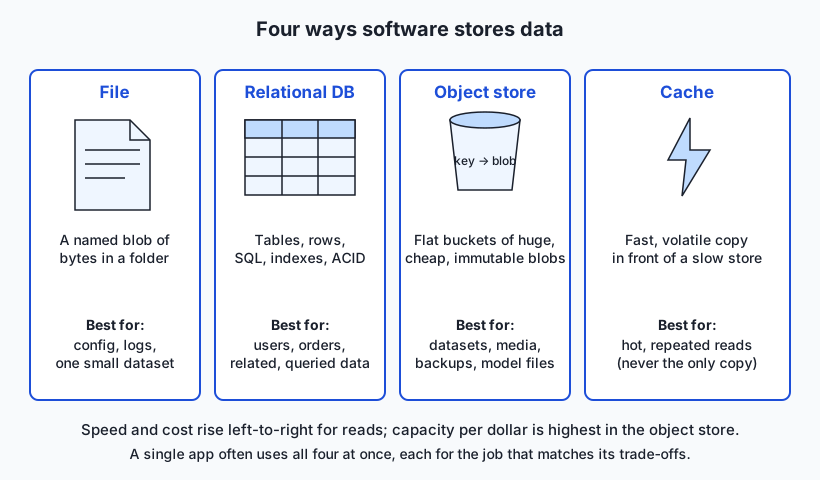
There are, at heart, four ways software keeps data, and almost everything else is a variation on these.
A file is the simplest: a named blob of bytes on a disk, organized into folders by a filesystem. You open it, read or write bytes, and close it. A file is what you already know from every document, photo, and log on your computer. It is the right tool an astonishing amount of the time — until many programs need to change the same data at once, or you need to ask questions more precise than “give me the whole thing.”
A database is a program whose entire job is storing data so you can query and change it safely, even when many clients hit it simultaneously. The dominant kind is the relational database: data lives in tables of rows and columns with a fixed schema, you ask questions in a language called SQL, and the system guarantees your changes are all-or-nothing and never leave the data half-updated. When the relational model’s strict rules get in the way, a family of NoSQL databases offers looser, more specialized shapes.
Object storage is a warehouse for large, whole blobs — a photo, a dataset, a video, a model file. You put an object in a bucket under a key (a name), and later you fetch the whole thing back by that key. It is cheap, effectively bottomless, and flat (no folders, just keys), but you cannot edit an object in place or run rich queries over the contents.
A cache is a small, fast, temporary copy of data you keep reaching for, placed in front of a slower store so most requests never touch the slow thing at all. It is volatile — lose it and nothing is lost, because the real data lives elsewhere — and it is the direct descendant of the CPU cache from Day 3.
Historical background
Storage evolved as a series of answers to problems the previous generation created. Early computers wrote records to magnetic tape and, from the 1950s, to disk — data lived in flat files whose structure each program had to know intimately. That worked until organizations had dozens of programs sharing the same data and constantly contradicting each other.
The breakthrough came in 1970, when Edgar F. Codd, a researcher at IBM’s San Jose laboratory, published “A Relational Model of Data for Large Shared Data Banks.” Codd proposed organizing data as mathematical relations — tables — with a formal query language, separating what data you want from how it is physically stored. IBM’s experimental System R (mid-1970s) turned the theory into a working system and produced SQL, the query language that still dominates. By the 1980s, relational databases from Oracle, IBM (DB2), and others ran the business world, and the SQL standard was ratified in 1986.
Two later pressures cracked the relational monopoly. First, the web’s biggest sites — handling volumes and traffic no single database server could hold — drove the NoSQL movement of the late 2000s: systems like Google’s Bigtable (2006) and Amazon’s Dynamo (2007) traded some of the relational guarantees for the ability to spread across thousands of machines. Second, in 2006 Amazon launched S3 (Simple Storage Service), which popularized object storage: a dead-simple bucket-and-key interface for storing unlimited blobs cheaply, without running a database at all. Meanwhile, in-memory caches — Memcached (2003) and Redis (2009) — became the standard way to put a fast layer in front of slow stores. Each of the four shapes you will learn today entered the mainstream to solve a concrete pain the others could not.
What it is — and what it is not
“Data storage” is the set of systems that hold your data when a program is not actively computing on it — data at rest, as opposed to data in a CPU register or in flight over a network. Each system in this lesson is a distinct answer to “how should these bytes be organized so I can get them back usefully?”
It is important to see what these systems are not. A database is not “a place files go” — it is a running program with its own memory, its own on-disk format, and strict rules it enforces on your behalf. Object storage is not a filesystem, even though its keys look like paths: there are no real folders, you cannot append to the middle of an object, and there is no notion of “open for writing.” A cache is not a database: it is allowed to lose your data at any moment, and any design that treats a cache as the source of truth is a bug waiting to happen. And a file is not automatically safe just because you saved it: without a database’s guarantees, two programs writing the same file at once can shred it.
| Store | What it is | What it is not |
|---|---|---|
| File / filesystem | A named blob of bytes in a folder hierarchy | Not safe for many concurrent writers; not queryable beyond “read it all” |
| Relational database | A program enforcing tables, a schema, and all-or-nothing changes | Not a good home for huge binary blobs; not schema-free |
| NoSQL database | A family of stores trading strict rules for scale or flexibility | Not a drop-in replacement for SQL’s guarantees; not “no rules at all” |
| Object storage | A flat bucket of large, immutable blobs addressed by key | Not a filesystem; not editable in place; not richly queryable |
| Cache | A fast, volatile copy in front of a slower store | Not durable; never the source of truth |
Why it was created and what problems it solves
Each store exists to solve a problem the plain file could not.
Files alone fail at concurrency and integrity. Imagine a bank keeping balances in a text file. Two withdrawals arrive at once; both read a balance of 100, both subtract 30, both write 70 — and 30 has vanished into thin air. The relational database was created to make such updates safe: it wraps related changes in a transaction that either fully happens or fully does not, and it stops two clients from stepping on each other. This is the heart of ACID — Atomicity, Consistency, Isolation, Durability — the four guarantees that let you trust a database with money.
Files also fail at asking questions. A file of a million orders can answer “give me the whole file,” but “total revenue from customers in Ohio last March” means reading and scanning everything, every time. Relational databases add indexes — extra sorted lookup structures — so the system can jump to the relevant rows instead of scanning all of them, turning a minute-long scan into a millisecond lookup. (This is exactly why the lab has you beat grep with a SQL query.)
NoSQL databases were created because the relational model’s strictness — one fixed schema, hard to spread across many machines — became a bottleneck at web scale and for rapidly changing data shapes. Object storage was created because putting large blobs (images, videos, backups, datasets) in a database is wasteful and slow, yet everyone still needed somewhere cheap and durable to keep them. And caches were created because the correct store for your data is often too slow to hit on every single request — so you keep a fast copy of the hot parts close by.
How it works
Let’s walk each store, from the byte layer up.
Files and filesystems
At the bottom, a filesystem organizes a disk into named files inside a tree of folders, tracking where each file’s bytes physically live. Files come in two flavors. Unstructured files are opaque blobs — a JPEG, an MP4, a compiled program — where the bytes mean something only to the program that reads them. Structured files impose a format you can parse: CSV (comma-separated rows), JSON (nested key–value data), YAML, and so on. A structured file is often enough: for configuration, for a small dataset, for a log, for anything read far more than it is written and by one program at a time, a file is the simplest thing that works, and simplicity is a feature. You reach past files only when you hit their limits — many concurrent writers, or queries more precise than “read the whole thing.”
Relational databases and block, file, and object storage
A relational database stores data in tables. Each table has a fixed set of columns (each with a type — integer, text, timestamp), and each row is one record filling in those columns. A schema is the declared structure — which tables exist, which columns they have, which rules hold (this column is unique, that one must reference a real row in another table). You change and query data with SQL:
SELECT customer, SUM(amount) AS total
FROM orders
WHERE state = 'OH'
GROUP BY customer;
Behind that one line, the database uses indexes to find matching rows fast, runs the aggregate, and — for writes — wraps everything in an ACID transaction so a crash mid-update never leaves a half-written mess.
It helps to place the database’s storage against the two lower-level shapes it is often confused with. Block storage is a raw disk carved into fixed-size blocks (what your SSD presents, what a cloud “volume” gives a virtual machine); it is the fast foundation databases and filesystems are built on top of. File storage is a filesystem — blocks organized into the named-files-in-folders tree you already know, shareable over a network. Object storage is the third shape: not blocks, not a folder tree, but a flat pool of whole objects addressed by key.
NoSQL families
When the relational model fits badly, four NoSQL shapes cover most needs. A key-value store (like Redis or DynamoDB) is a giant dictionary: hand it a key, get a value, extremely fast — ideal for sessions, caches, and simple lookups. A document store (like MongoDB) keeps self-contained JSON-like documents that need no fixed schema — good when each record’s shape varies. A wide-column store (like Cassandra or Bigtable) spreads enormous tables across many machines, tuned for massive write volumes. A graph database (like Neo4j) stores nodes and the edges between them, making “friends of friends” or “shortest path” queries natural — the kind of question that ties a relational database in knots.
Object storage
Object storage’s model is deliberately tiny. You create a bucket (a top-level container), and you store each object under a key, a string name. The object is an immutable blob plus a little metadata; you PUT it and later GET it by key. Keys often look like paths (datasets/2026/train.csv), but that is a naming convention, not real folders — the namespace is flat. Objects are cheap, highly durable (the service keeps multiple copies across machines), and effectively unlimited, which is why buckets are the natural home for datasets, media, backups, and large model files. The trade-off: you swap objects wholesale rather than editing them in place, and you cannot run SQL over their contents.
Caches
A cache sits in front of a slower store and holds copies of the hottest data in fast memory (RAM), so most reads never reach the slow store. Systems like Redis and Memcached are dedicated cache servers. The pattern is: check the cache first; on a hit, return the cached value immediately; on a miss, fetch from the real store, put a copy in the cache, and return it. This is the Day 3 memory hierarchy exactly — fast-and-small in front of slow-and-large — moved up a level. The hard part is cache invalidation: when the underlying data changes, stale copies must be updated or evicted, or users see old data. A common tactic is a time-to-live (TTL): each cached entry expires after a set number of seconds, trading a little staleness for simplicity.
An everyday analogy
Picture a busy office that keeps records and goods.
A file is a single document in a folder on someone’s desk. To use it you take it out, read it or rewrite the whole page, and put it back. Wonderful for one person and one document — but if two people grab the same sheet and both scribble edits, you get a contradictory mess. That is a file with concurrent writers.
The relational database is the master ledger managed by a meticulous records clerk. Every entry has the same strict columns, the clerk keeps an alphabetical index so any record is found in seconds, and — crucially — the clerk enforces rules: a payment is recorded against a real account or not at all, and a transfer either debits one account and credits another or does neither. That “both or neither” is atomicity; the refusal to record nonsense is consistency. Ask the clerk a precise question (“all Ohio customers who paid in March”) and you get a precise answer fast. The NoSQL shapes are alternative filing systems for when the ledger’s rigid columns get in the way: a labeled key rack you grab by tag (key-value), a drawer of free-form dossiers each shaped differently (document), a vast wall of tally sheets (wide-column), and a corkboard of index cards joined by string (graph).
Object storage is the off-site warehouse. You bring a sealed crate, the clerk gives you a numbered claim ticket (the key), and the crate goes on an endless rack. Later you present the ticket and get the whole crate back. You never open and edit a crate on the rack — if the contents change, you bring a new sealed crate. Cheap, enormous, and perfect for bulky things you retrieve whole, useless for “which crates contain a red widget?”
The cache is the small tray on your desk where you keep the three files you keep reaching for. Looking in the tray (a hit) is instant; when it is not there (a miss), you walk to the warehouse, and drop a copy in the tray on your way back. The tray can be swept clean anytime with nothing lost, because the real records live in the ledger and the warehouse. The catch: if the ledger changes but your tray still holds yesterday’s copy, you act on stale information — the invalidation problem in one sentence.
Examples in practice
Consider a photo-sharing app, and watch each store earn its place.
The user accounts and photo metadata — who owns which photo, captions, timestamps, follower relationships — go in a relational database. You need transactions (creating an account and its default settings must both succeed), integrity (a photo must belong to a real user), and rich queries (“photos by users I follow, newest first”). This is textbook SQL.
The photo files themselves — potentially billions of multi-megabyte blobs — go in object storage. The database stores only the key (photos/u123/img987.jpg); the bytes live in a bucket, cheap and durable. Putting the images in the database would bloat it, slow every backup, and cost far more.
The home feed, recomputed constantly and read far more than it changes, is served from a cache. The first request builds the feed from the database (a miss) and stores it in Redis with a 30-second TTL; the next thousand requests in that window are instant hits that never touch the database. When someone posts, the app invalidates the affected feeds so the staleness stays bounded.
And a config file — feature flags, the list of supported image formats — is just a structured JSON file in the codebase. No database needed; it changes rarely and one process reads it. Four stores, one app, each chosen because its trade-offs match the job. In the lab you will build a tiny version of all four with your own hands.
Implications: security, privacy, performance, scalability, and cost
Security. Every store needs access control, and each fails differently. A database’s classic wound is SQL injection — building a query by pasting untrusted text straight into SQL, letting an attacker rewrite it; the fix is parameterized queries, where data can never be mistaken for commands. Object storage’s classic wound is the accidentally public bucket — countless breaches are simply buckets left readable by the world. Files inherit the operating system’s permissions, which is both simple and easy to misconfigure.
Privacy. Where data rests governs who can see it and how it is deleted. “Deleting a row” may leave it recoverable in backups and logs; an object may live on in cached copies. Sensitive data should be encrypted at rest, and — a rule worth memorizing — you never store secrets like passwords or API keys unencrypted in a file or database.
Performance. This is the memory hierarchy again. A cache hit is sub-millisecond; a database query with a good index is milliseconds; the same query with no index may scan millions of rows and take seconds; an object-storage fetch crosses a network. Fast systems keep hot data high on the ladder and touch the slow tiers rarely.
Scalability. Files and a single database server scale up (a bigger machine) until they hit a ceiling. NoSQL and object storage are built to scale out across many machines, which is why they dominate at web scale — at the cost of weaker guarantees or a narrower interface.
Cost. The gradient from Day 3 holds: fast storage costs more per byte than slow storage. Cache memory (RAM) is the priciest and smallest; object storage is the cheapest per gigabyte and where bulk data belongs. A large chunk of real-world cloud bills is simply data in the wrong tier — hot blobs in an expensive database, or cold archives paying for fast access they never use.
Alternatives: free, open source, and commercial
The leading systems in each category, and what each costs, so you can start today for free.
SQLite — an embedded relational database that is a single file with no server to run. When to choose it: local apps, small-to-medium sites, prototypes, test suites, and anywhere a self-contained database beats a full server; the SQLite project itself notes it is an excellent replacement for using ad-hoc files. How to use it: sqlite3 app.db opens (or creates) the database; you type SQL. Free: fully public-domain and open source; ships with macOS and most Linux, and is used in essentially every phone and browser. Example: sqlite3 shop.db "CREATE TABLE orders(id INTEGER, amount REAL);".
PostgreSQL and MySQL — the two dominant open-source relational database servers, built for many concurrent clients and large datasets. When to choose them: a real application backend with multiple users and processes, where you need a shared, always-on database. PostgreSQL is prized for correctness and rich features; MySQL for ubiquity and simplicity. How to use them: start the server, then connect with a client (psql for PostgreSQL) and run SQL. Free: both are free and open source; paid managed versions exist in every cloud, but you can run them yourself at no license cost. Example: psql -c "SELECT count(*) FROM users;".
Redis — an in-memory key-value store, the default choice for caching. When to choose it: a fast cache in front of a database, session storage, rate-limit counters, and hot ephemeral data. How to use it: run the server, then SET key value and GET key, often with an expiry (SET key value EX 30 for a 30-second TTL). Free: the widely used implementation is open source and free to run; managed versions are paid. Example: caching a computed feed under a user’s key for 30 seconds.
S3-style object storage, with MinIO — the bucket-and-key model. Amazon S3 is the commercial original (pay-per-gigabyte, no free self-hosting), but MinIO is a free, open-source, S3-compatible object server you can run yourself, so you can learn and even deploy the exact same interface at no license cost. When to choose it: datasets, media, backups, and large files that must be cheap and durable. How to use it: create a bucket, then PUT and GET objects by key with an S3 client. Free: MinIO is open source; hosted S3 and its clones are paid by storage and transfer. Example: mc cp train.csv myminio/datasets/train.csv uploads a dataset under a key.
Comparison with related concepts
The comparison that trips up most beginners is SQL versus NoSQL, so here it is directly.
| Dimension | Relational (SQL) | NoSQL (key-value, document, wide-column, graph) |
|---|---|---|
| Data shape | Fixed schema: tables, rows, typed columns | Flexible: pairs, documents, wide rows, or graphs |
| Query language | SQL, with joins and aggregates | Varies; often simple get/put or per-engine APIs |
| Guarantees | Strong ACID transactions | Often relaxed (eventual consistency) for scale |
| Scaling | Primarily scale up (bigger server) | Built to scale out (many servers) |
| Best fit | Related, structured data needing integrity | Huge scale, flexible shapes, or specialized graphs |
| Typical example | PostgreSQL, MySQL, SQLite | Redis, MongoDB, Cassandra, Neo4j |
Two more distinctions worth nailing down. Cache vs. database: both store data, but a database is the durable source of truth while a cache is a disposable speed layer — if you cannot afford to lose it, it is not a cache. Object storage vs. a filesystem: both hold blobs with path-like names, but a filesystem gives you real folders, in-place edits, and appends, while object storage gives you a flat keyspace of immutable objects and near-infinite cheap scale — you choose the filesystem for working files and the object store for bulk archives.
When to use it — and when not to
The decision usually comes down to four questions, in order.
First: is the data structured and related, and do you need integrity or rich queries? If yes — users, orders, anything with relationships and rules — reach for a relational database, and only look past it if scale or shape forces you out. Second: is it a big blob you retrieve whole — an image, video, dataset, model file? Then object storage, every time; never park large binaries in a relational database. Third: do you need extreme scale, a flexible schema, or graph-shaped queries? That is where a NoSQL store fits — key-value for simple fast lookups, document for varied records, wide-column for massive writes, graph for relationship traversal. Fourth: is a slower store too slow for how often you read this? Put a cache in front of it — but keep the durable copy underneath, because the cache can vanish at any moment.
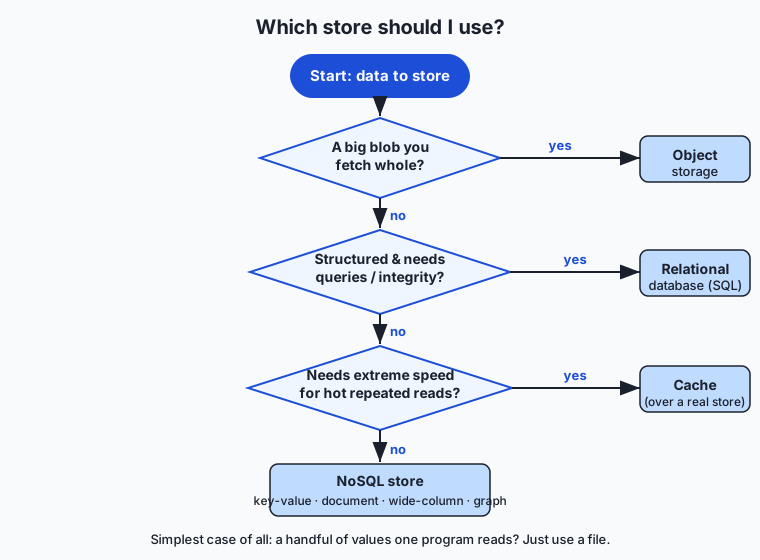
And when not to reach for the heavy tools: do not stand up a database for three config values a single program reads — a file is simpler and correct. Do not add a cache before you have measured that the store is actually too slow; a cache is extra complexity and a fresh source of stale-data bugs, justified only by a real bottleneck. The professional habit is to start with the simplest store that meets the requirements — often a file or a single SQLite database — and add heavier machinery only when a measured need appears.
These four shapes are not background detail for the systems you will study later in this course — they are the skeleton of every one of them. The large datasets you train on and the model weights a finished model ships as are large immutable blobs, so they live in object storage: a model file is PUT in a bucket under a key and pulled back whole, exactly the crate-and-ticket pattern above. Two specialized stores you will meet are just variations on this lesson: a feature store is a database organized so the same precomputed inputs feed both training and live use, and a vector database is a store built to hold embeddings — the numeric fingerprints of text or images — and find the nearest ones fast, which is how retrieval-augmented generation (RAG) fetches relevant context before a model answers. That retrieval step is a database query; the knowledge it searches is data at rest in one of the shapes you now know. And cost bends on these choices directly: caching a model’s response to a repeated request returns the stored answer instead of recomputing it, and because computing a fresh response is far more expensive than a cache hit, the cache is often the single biggest lever on both the speed and the bill of a deployed system. Storage is not where AI systems keep their leftovers — it is where most of their cost, latency, and correctness are decided.
Knowledge check
Try these from memory before looking back:
- Name the four main storage shapes and give a one-line “best fit” for each.
- A bank keeps balances in a plain file and two withdrawals arrive at once, losing money. Which storage property fixes this, and what do the four letters of ACID stand for?
- Explain why an index lets a database answer “customers in Ohio” faster than grepping a million-line file.
- Why is object storage the right home for a 5 GB dataset but the wrong home for user login records?
- What is cache invalidation, and why is a TTL a common (if imperfect) way to handle it?
Hands-on exercise
Time to store the same information four ways and feel the differences. The full walkthrough is in this day’s lab directory (labs/sections/computing-foundations/day-039-data-storage-files-databases-object-storage/); here is the shape of it. Using only bash and sqlite3 (preinstalled on macOS and most Linux), you will: (1) write structured data to a file and read it back; (2) create a SQLite database, make a table, insert rows, and run a SELECT with a WHERE and an aggregate — then watch the query answer a question a file could only grep at; (3) simulate object storage by hashing a blob to a content key and filing it in a bucket directory; and (4) simulate a cache with a key→value file that shows a hit versus a recompute.
Open a terminal and run the finished demo first:
cd labs/sections/computing-foundations/day-039-data-storage-files-databases-object-storage
bash examples/storage_demo.sh
Then open starter/storage_demo.sh and complete its four numbered exercises — creating the table, running the query, storing a blob by key, and using the cache — before running the tests.
Expected output
Your run will look like the capture in expected-output/sample-macos.txt. The key moments:
[2/4] DATABASE (SQLite)
  Query: total revenue per customer in state 'OH'
  ada|180.0
  grace|90.0
  -> A SQL query answered a precise question that a file could only grep.

[4/4] CACHE (key -> value with timestamp)
  First call:  MISS -> computed and stored
  Second call: HIT  -> served from cache (no recompute)
The database step prints one aggregated row per Ohio customer — a computed answer, not raw lines. The cache step prints MISS the first time and HIT the second, proving the second call skipped the work.
Validate your work
You are done when you can check every box:
- The CSV/JSON file was written and read back correctly.
-
storage_demo.dbexists and yourSELECT ... WHERE ... GROUP BYreturned the expected Ohio rows. - A blob is retrievable from the bucket directory by its content key (hash), and the same content produces the same key.
- The cache prints
MISSthenHITfor the same key. -
bash tests/run_tests.shprints a passing summary and exits 0.
Troubleshooting
sqlite3: command not found. Install it: it ships on macOS; on Debian/Ubuntu runapt install sqlite3. Confirm withsqlite3 --version.- The query returns nothing. Check your
WHEREclause matches the data (state = 'OH', not'Ohio') and that the inserts ran before the select. - The cache always says MISS. Your cache-key filename likely changes each run, or you write the result after checking — check for the file first, compute only on a miss, then save.
- “database is locked.” Another process still holds
storage_demo.db; close othersqlite3sessions, or let the script’s cleanup remove it and rerun.
Common mistakes
- Reaching for a file when you needed a database. The moment two writers or a precise query appears, a plain file fights you; that is the database’s cue.
- Storing a large blob in the database. Keep the blob in object storage and only the key in the database — the demo shows exactly this split.
- Treating the cache as the source of truth. The cache in the demo can be deleted with nothing lost, because the real data lives in the file, database, and bucket.
Practice assignment
Extend the demo into a tiny two-table design. In a fresh SQLite database, create a customers table (id, name, state) and an orders table (id, customer_id, amount), insert a handful of rows, and write one query that joins the two tables to list each customer’s name alongside their total order amount, for customers in a state you choose. Add an index on orders(customer_id) and note in a comment why it helps. Then answer, in the worksheet, three storage-choice questions in writing: which store you would use for (a) a 5 GB training dataset, (b) a user profile record, and (c) a hot counter incremented thousands of times per second — and one sentence each on why. Keep both the SQL and your answers; they are graded against the instructor solution.
Extension challenge
Make the object-storage simulation real about immutability and deduplication. Modify the demo so that storing a blob computes its content hash (for example with shasum or sha256sum) and uses that hash as the key. Now store the same content twice: because identical bytes hash to the same key, the second store should recognize the object already exists and skip rewriting it — content-addressed storage giving you deduplication for free, which is exactly how large systems avoid keeping ten copies of the same file. Then store slightly different content and confirm it lands under a different key. Write two or three sentences explaining why content-addressed keys make objects naturally immutable (change the bytes and it is, by definition, a different object with a different key) and how that property makes caching and integrity-checking easy: if the key is the hash, a client can verify it got the right bytes by re-hashing them.
Quiz
Q1. Which storage shape is the right home for a plain configuration file that one program reads and that changes rarely?
- A relational database, for the ACID guarantees
- A file, because it is the simplest thing that works for a single reader
- Object storage, because keys look like paths
- A cache, because config is read often
Show answer
Answer: B. A file, because it is the simplest thing that works for a single reader
A file is the simplest correct choice when data is read far more than written and by one program at a time. You reach past files only when many concurrent writers or precise queries appear — none of which a rarely-changing config needs.
Q2. Two withdrawals hit a bank balance stored in a plain file at the same time; both read 100, subtract 30, and write 70, so one withdrawal is lost. Which property of relational databases prevents this?
- Indexes, because they sort the data
- Object immutability, because blobs cannot change
- ACID transactions, which make related changes all-or-nothing and isolate concurrent clients
- A time-to-live, which expires stale data
Show answer
Answer: C. ACID transactions, which make related changes all-or-nothing and isolate concurrent clients
ACID (Atomicity, Consistency, Isolation, Durability) wraps related changes in a transaction that fully happens or not at all and stops two clients from stepping on each other, so no update silently vanishes.
Q3. Why can a database answer "customers in Ohio" far faster than grepping a million-line file for the same thing?
- The database keeps an index — a sorted lookup structure — so it jumps to matching rows instead of scanning every row
- The database stores the data in RAM and the file is always on disk
- grep is written in a slow programming language
- The database compresses the data so there is less to read
Show answer
Answer: A. The database keeps an index — a sorted lookup structure — so it jumps to matching rows instead of scanning every row
An index is an extra sorted structure that lets the database find relevant rows directly, turning a full scan into a quick lookup. A plain file has no index, so answering the same question means reading and scanning everything.
Q4. In object storage, how is a stored object identified and retrieved?
- By its row number in a table
- By a bucket and a key (a string name), fetching the whole object back
- By opening a file handle and seeking to an offset
- By a SQL SELECT over the object contents
Show answer
Answer: B. By a bucket and a key (a string name), fetching the whole object back
Object storage puts each object in a bucket under a key and you GET the whole object back by that key. The namespace is flat — keys may look like paths but there are no real folders — and you cannot run SQL over the contents or edit an object in place.
Q5. Which statement about a cache is true?
- A cache is the durable source of truth for your data
- A cache must be a relational database
- A cache is a fast, volatile copy in front of a slower store, and losing it loses nothing because the real data lives elsewhere
- A cache permanently replaces the store behind it
Show answer
Answer: C. A cache is a fast, volatile copy in front of a slower store, and losing it loses nothing because the real data lives elsewhere
A cache holds copies of hot data in fast memory so most reads never touch the slow store. It is volatile and disposable — if you cannot afford to lose it, it is not a cache but a source of truth.
Q6. Which NoSQL family is the natural fit for "friends of friends" or shortest-path questions about connected entities?
- Key-value store
- Wide-column store
- Document store
- Graph database
Show answer
Answer: D. Graph database
A graph database stores nodes and the edges between them, making relationship traversals like "friends of friends" or shortest path natural — exactly the queries that tie a relational database in knots with repeated joins.
Q7. Where should a 5 GB training dataset live, and where should the record describing it (name, owner, date) live?
- Both in the relational database, in the same table
- Both in a cache, for speed
- The dataset in object storage; the record (and the object key) in a relational database
- The dataset in a relational database; the record in a plain file
Show answer
Answer: C. The dataset in object storage; the record (and the object key) in a relational database
Large blobs belong in cheap, durable object storage; the database stores only the key plus structured, queryable metadata. Putting the 5 GB blob in the database would bloat it, slow every backup, and cost far more.
Q8. What is "cache invalidation," and why is a time-to-live (TTL) a common way to handle it?
- It is deleting the underlying database; a TTL schedules that deletion
- It is keeping stale copies fresh: when data changes, stale cached copies must be updated or evicted, and a TTL expires each entry after a set time, bounding staleness
- It is validating SQL syntax before a query runs
- It is encrypting cached data; a TTL sets the encryption key lifetime
Show answer
Answer: B. It is keeping stale copies fresh: when data changes, stale cached copies must be updated or evicted, and a TTL expires each entry after a set time, bounding staleness
When the underlying data changes, cached copies can go stale, so they must be refreshed or evicted. A TTL expires each entry after a set number of seconds, trading a little possible staleness for simplicity instead of tracking every change precisely.
Glossary
- file
- A named blob of bytes stored on disk and organized by a filesystem into folders; the simplest storage shape, ideal when data is read far more than written and by one program at a time.
- filesystem
- The part of an operating system that organizes a disk into named files inside a tree of folders and tracks where each file's bytes physically live.
- database
- A running program whose whole job is to store data so it can be queried and changed safely, even when many clients access it at once.
- relational database
- A database that stores data in tables of rows and typed columns under a fixed schema, queried with SQL and protected by ACID transactions; examples include PostgreSQL, MySQL, and SQLite.
- SQL
- Structured Query Language, the standard language for asking questions of and changing data in a relational database, with clauses such as SELECT, WHERE, and GROUP BY.
- schema
- The declared structure of a relational database: which tables exist, which typed columns each has, and which rules (uniqueness, references) must hold.
- NoSQL
- A family of non-relational databases — key-value, document, wide-column, and graph — that trade some of the relational model's strict rules for scale, flexibility, or specialized query shapes.
- ACID
- The four guarantees a relational transaction provides — Atomicity (all-or-nothing), Consistency (no invalid state), Isolation (concurrent clients do not corrupt each other), and Durability (committed data survives a crash).
- index
- An extra sorted lookup structure a database maintains so it can jump straight to matching rows instead of scanning every row, turning a slow full scan into a fast lookup.
- object storage
- A flat store of large, immutable blobs addressed by a key inside a bucket; cheap, highly durable, and effectively unlimited, and the natural home for datasets, media, backups, and model files.
- bucket
- The top-level container in object storage that holds objects, each stored under a key; the S3-style equivalent of a namespace for your blobs.
- key-value store
- A NoSQL database that works like a giant dictionary — hand it a key, get a value back very fast — ideal for sessions, caches, and simple lookups; Redis and DynamoDB are examples.
- cache
- A fast, volatile copy of frequently used data placed in front of a slower store so most reads never reach the slow store; disposable, because the durable data lives elsewhere.
- cache invalidation
- The problem of keeping cached copies from going stale when the underlying data changes, often handled with a time-to-live (TTL) that expires each entry after a set time.
- durability
- The guarantee that once data is committed to a store it survives crashes and restarts; object storage and databases provide it, while a cache deliberately does not.
Sources and further reading
- Appropriate Uses For SQLite — SQLite (accessed 2026-07-12) — The SQLite project's own guidance on when an embedded database is the right choice, including as a replacement for ad-hoc files.
- Database — Wikipedia (accessed 2026-07-12)
- Object storage — Wikipedia (accessed 2026-07-12)
- Cache (computing) — Wikipedia (accessed 2026-07-12)
- Computer data storage — Wikipedia (accessed 2026-07-12)
Kept in this browser, no account needed. Your progress page turns the whole record into one link you can bookmark or open on another device.