Computing Foundations › Systems Foundations: Storage, Observability, and Tooling › Day 42
Day 42: Section Review: Your Computing Foundations Toolkit
After this lesson you will be able to see the six areas of Course 1 as one connected stack, trace a real action through every layer, honestly assess your own strengths and gaps, and know exactly which earlier day to revisit for each weakness — a solid foundation to build Python and everything after on.
Hands-on lab for this lesson
Lab files on GitHub: https://github.com/ai-roadmap-365/ai-roadmap-365.github.io/tree/main/labs/sections/computing-foundations/day-042-section-review-your-computing-foundations-toolkit
- Get the hands-on files. Clone the labs repository once (you can reuse this clone for every lesson). This works on macOS, Linux, and Windows (PowerShell or WSL):
git clone https://github.com/ai-roadmap-365/ai-roadmap-365.github.io.git cd ai-roadmap-365.github.io - Open this lesson's lab. Move into the directory for this specific day. Every lab lives at the same predictable path — section / subsection / week / day:
cd labs/sections/computing-foundations/day-042-section-review-your-computing-foundations-toolkit - Read the lab guide. Open `README.md` in that directory. It lists the exact commands, what each does, the expected output, and how to check your work — read it before running anything.
- Run it and check your work. Follow the README's "How to run" section: run the example first to see the finished result, then complete the numbered exercises in `starter/`, then run the tests. The tests pass (exit 0) only when your work is correct.
bash tests/run_tests.sh # or the test command named in the lab README
You can also open the lab as a local page (works offline, shows the file tree and expected output).
Learning objectives
By the end of this lesson you will be able to:
- Consolidate the six areas of Course 1 (the machine, the command line, the internet, APIs, git and GitHub, and systems foundations) into a single mental model of the computing stack
- Trace one concrete action — calling an API and storing the result — through every layer you learned, naming what happens at each step
- Explain how the two wrapping domains, version control and systems tooling, apply at every layer rather than at one
- Self-assess your confidence across all six areas and identify the specific earlier day to revisit for each weakness
- Diagnose a failed request by naming the layer it lives in, using the right Course 1 concept at each step
- Explain how this foundation makes Python and everything after (data, machine learning, deployment) comprehensible rather than magical
- Run a toolkit check on your own machine that confirms the core Course 1 tools and cross-section skills are present and ready
Prerequisites
- Days 1-41 of this section — this review consolidates all of them
- A computer running macOS, Linux, or Windows with a terminal, git, and python3 available
Why this matters
For forty-one days you have been assembling something, one tool at a time, and today you finally step back and see that it is a whole. You started with a bare machine — transistors and the fetch-decode-execute loop — and you now hold a working engineer’s foundation: you can drive a shell, reason about a network request, read and call an API, version your work with git, debug it, store its data, watch it run, and automate the whole thing. Course 1 is finished. This is the day it stops being forty-one separate lessons and becomes one mental model you carry everywhere.
Why spend a day reviewing instead of racing ahead to Python? Because the difference between someone who copies code from the internet and someone who builds systems is exactly this consolidated picture. When your Python program later fails to reach a server, the person with the foundation asks a precise question — is it DNS, the port, the TLS handshake, the HTTP status, or my API key? — while the person without it just retypes the command and hopes. When a training run is mysteriously slow, one of them checks the memory hierarchy and the storage layer; the other files a bug report. The foundation is not trivia you memorize; it is the set of questions you now know how to ask, and the layers you now know how to look inside.
Here is the concrete promise of today. Everything ahead in this course — Python, then data work, machine learning, large language models, agents, and deployment — sits directly on top of the six areas you just learned. A deployed model is a program (days 1-7) started by a shell command (8-14), reachable over the network (15-21) through an API (22-28), with its code in version control (29-35) and its data, logs, and automation handled by the systems tooling of days 36-41. Nothing in the rest of the course asks you to abandon this foundation; it asks you to build on it. Today you make sure the foundation is solid, find the one or two soft spots, and learn exactly which day to revisit to firm them up.
The idea in plain language
A “computing foundation” is the layer of general knowledge that sits beneath any specific technology you will ever use. It does not go stale when a framework changes its name, because it is about the machine, the network, and the workflow — the things that stay the same underneath the fashions. Course 1 taught this foundation in six connected areas, and the point of today is to see the connections, not just the list.
The six areas are: how computers work (the machine underneath everything), the command line (how you talk to that machine directly), the internet (how machines talk to each other), APIs (how programs talk to each other over that internet), git and GitHub (how you track and share the changes you make), and systems foundations — editors, debugging, regular expressions, storage, observability, and automation (the everyday craft of building and running real software). Learned separately they are six skills. Understood together they are a single stack: a request leaves your keyboard, travels down through your machine, out across the network, into somebody’s API, and back — and now you understand every layer it passes through.
Today does four things. It recaps each of the six areas in a sentence or two so the whole map is in front of you at once. It connects them, tracing one concrete action all the way through the stack so you feel how the pieces interlock. It helps you self-assess honestly — what can you actually do now, and where are you shaky? And it gives you a repair manual: for each weakness, the exact earlier day to revisit. A review that only congratulates you is worthless; this one is meant to be used.
Historical background
The idea that a working programmer needs a broad, shared baseline — not just the syntax of one language — is older than any specific tool in this section, and it has a clear lineage. In 1968 a NATO conference coined the term “software engineering” to name a crisis: programs had grown too large and too interconnected for ad-hoc craft, and the field needed shared foundations and disciplined practice. The tools you learned are that discipline made concrete.
Each of your six areas has its own well-documented origin. The layered machine descends from the stored-program design of the 1945 EDVAC report. The command line and the pipe date to Unix at Bell Labs in the early 1970s, where Ken Thompson and Dennis Ritchie built a system whose philosophy — small tools, composed by piping text — you used every day of Week 2. The internet’s addressing and transport grew from ARPANET and the TCP/IP work of Vint Cerf and Bob Kahn in the 1970s; the Web and HTTP came from Tim Berners-Lee at CERN in 1989-1991. The API-over-HTTP style you learned, REST, was named and described by Roy Fielding in his 2000 doctoral dissertation. Git was written by Linus Torvalds in 2005 to manage the Linux kernel’s development after a licensing dispute with a previous tool. Regular expressions trace to Stephen Kleene’s mathematical work in the 1950s and reached programmers through Unix tools in the 1970s and 1980s.
The striking thing, looking back, is how stable this foundation is. Some of these ideas are half a century old and still exactly what you use. That stability is the whole reason a course puts them first: the transistor count on a chip has grown a millionfold since these ideas appeared, but the shell, the pipe, an IP address, an HTTP request, a git commit, and a regular expression work today essentially as they did decades ago. You have not learned a fashion. You have learned the part that lasts.
What it is — and what it is not
Your computing foundation is a coherent, durable, portable body of knowledge about how software systems actually work and how a professional builds them. It is coherent because the six areas connect into one stack. It is durable because it changes slowly. It is portable because it applies whether you end up doing web development, data science, machine learning, or operations. When you can look at an unfamiliar system and immediately see which layer you are dealing with, you have the foundation.
It is equally important to be honest about what this foundation is not, so you neither undersell nor oversell what you now know.
| It is | It is not |
|---|---|
| A working mental model of the whole stack, top to bottom | Deep mastery of any single layer — each of these areas has specialists who spend careers in it |
| Enough to reason about, debug, and build real systems | A substitute for the practice you still owe each skill |
| The vocabulary to ask precise questions and read documentation | Everything you will ever need — the course has eleven more months for good reason |
| Transferable across languages, clouds, and job titles | Tied to any one tool; tools will change, the layers will not |
| The launchpad for Python and everything after | The destination — it is Day 42 of 365 |
Read that table both ways. You know more than most people ever will about how their computers work, and you should feel that. And you have barely begun — which is exactly right for the end of the first of many courses. Confidence without arrogance is the correct posture leaving Course 1.
Why it was created and what problems it solves
This course front-loads six weeks of foundations before you write a single line of Python, and that ordering is deliberate. It solves a specific, common failure: the self-taught developer who can produce code but cannot operate. That person can write a script but cannot say why it will not connect to a server, cannot recover a file they deleted, cannot read a stack trace, cannot tell whether the bug is in their code or the network, and treats every layer below their editor as an impenetrable box. Their ceiling is low not because they cannot code, but because they cannot see the system their code lives in.
The foundation solves this by making the boxes transparent before you have a language to hide inside. Learn the shell before Python, and Python’s subprocess and file paths make immediate sense. Learn HTTP before you call an API from Python, and the requests library is obvious rather than magical. Learn git before you have a big project to lose, and you never lose one. Learn debugging, storage, and observability as concepts first, and the Python-specific versions later are just the same ideas with new syntax. The problem this section solves is dependency: everything ahead depends on this, so putting it first means nothing ahead has to be taught as magic.
There is a second problem it solves: transfer. Languages and frameworks come and go, but a person grounded in the machine, the network, and the workflow can pick up any of them quickly, because the new thing is always a variation on a foundation they already hold. You did not spend six weeks learning things you will discard. You spent six weeks learning the things you will still be using when today’s frameworks are historical footnotes.
How it works
The foundation “works” as a system when its six areas connect. Let us make the connections explicit, first as a map of the whole, then by tracing one action through it.
The six areas, and how they connect
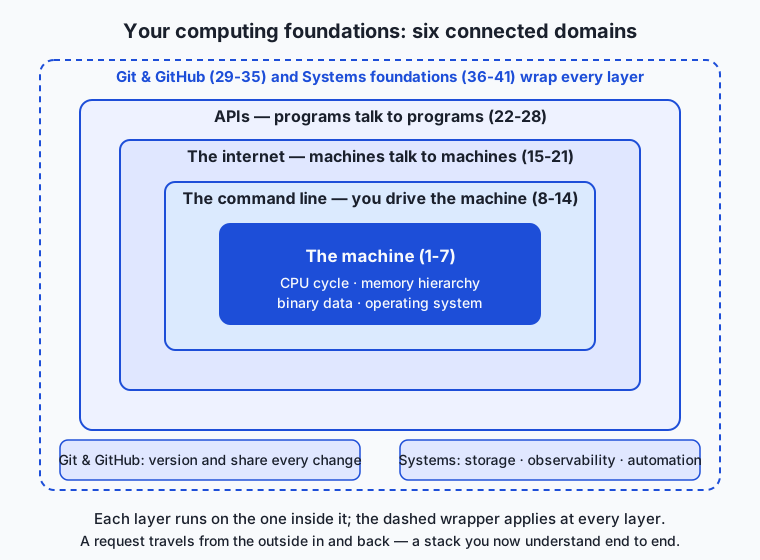
Read the map from the inside out. At the center sits the machine (days 1-7): transistors, the fetch-decode-execute cycle, the memory hierarchy, binary data, and the operating system that schedules it all. Everything else runs on this. Wrapped around it is the command line (days 8-14): the shell is how you drive the machine directly — navigating the filesystem, transforming text with pipes, setting environment variables, and scripting repeatable work. The shell is the hinge between you and everything else; almost every other tool in the section is something you invoke from it.
Reaching outward, the internet (days 15-21) is how your machine talks to other machines: IP and DNS to find them, TCP and ports to connect, HTTP and HTTPS to exchange requests and responses, and tools like curl to inspect the traffic. Built on top of the internet, APIs (days 22-28) are how programs talk to each other: REST resources and verbs, JSON as the shared data format, authentication with keys and tokens, and the practical realities of rate limits, pagination, and error handling.
Underneath and around all of your building work sit two more areas. Git and GitHub (days 29-35) track every change you make — commits, branches, merges, remotes, pull requests, and the ability to undo almost anything. And systems foundations (days 36-41) are the daily craft: a configured editor, debuggers and linters and formatters, regular expressions for pattern work, storage choices (files, databases, object storage, caches), observability (logs, metrics, traces), and the automation that ties it together with scripts, hooks, and pipelines. These last two areas are not “on top of” the stack — they wrap the whole thing, because you version and observe and automate at every layer.
Tracing one action through every layer
The connections become concrete the moment you follow a single action down through the stack. Consider one ordinary task — fetch some data from a public API and save it to a database — and watch how many of your six areas it touches.
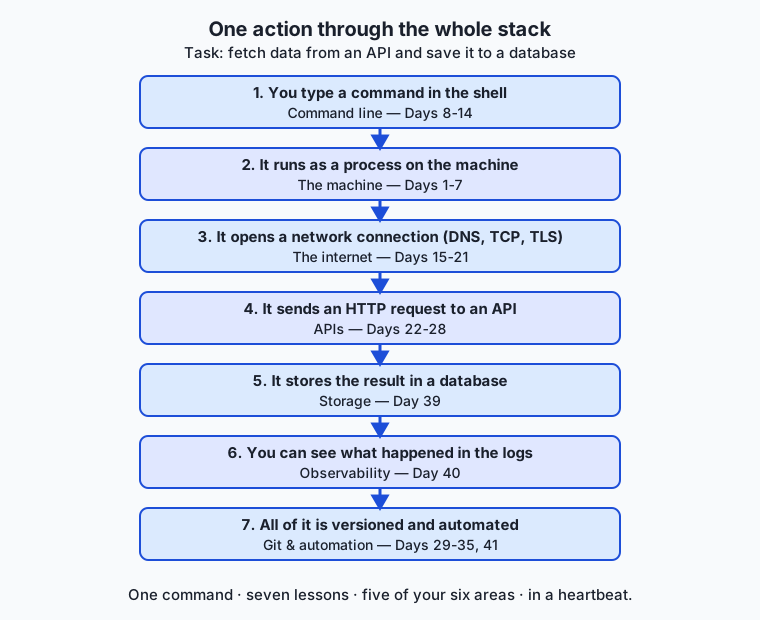
- You type a command in the shell (days 8-14). The terminal is a program; the shell parses your line, expands variables and globs, and prepares to run it. This is Week 2 at work.
- The command runs as a process on the machine (days 1-7). The operating system loads it, gives it memory and a slice of CPU time, and it begins to execute — the fetch-decode-execute loop from Day 1, now running your program.
- The program opens a network connection (days 15-21). It resolves the server’s name to an IP address via DNS, opens a TCP connection to a port, and completes a TLS handshake so the traffic is encrypted. Everything from Week 3 fires here, in a fraction of a second.
- It sends an HTTP request to an API (days 22-28). A
GETrequest with anAuthorizationheader travels to a REST endpoint; the server checks your key, applies rate limits, and returns a JSON body with a status code you know how to interpret. - The result is stored (day 39). You parse the JSON and write it somewhere deliberate — a file, a SQLite database, object storage, or a cache — having chosen the store on purpose, not by accident.
- You can see what happened (day 40). Logs record the request and its status; if something failed, you have a trace to follow rather than a shrug.
- All of it is versioned and automated (days 29-35, 41). The script lives in a git repository; a commit records this change; a hook or pipeline could run it on a schedule, format and lint it, and test it — without you touching it again.
One command. Seven of your lessons, five of your six areas, in the space of a heartbeat. That is what it means to have a foundation rather than a pile of facts: you can trace any action through the stack and know, at each step, what is happening and how to look inside it. Before Course 1 this was one opaque event — “the program got the data.” Now it is a sequence of layers you understand end to end.
An everyday analogy
Think of the last six weeks as equipping a workshop. When you started, the room was empty: bare walls, a power outlet, nothing on the benches. You could not build anything, because you had no tools and did not know where anything was.
Week by week you fitted out a station. First you learned the building itself — where the power comes from, how the lights work, what the load-bearing walls are (the machine). Then you set up your main workbench with the hand tools you reach for constantly (the command line). You ran pipes and wiring to the outside so materials could come and go (the internet), and you fitted standard couplings so you could connect to any supplier’s delivery system (APIs). You installed a logbook and a labeling system so every change to the workshop is recorded and reversible (git). And you added the quality bench — good lighting, measuring tools, inspection gauges, and a conveyor that moves work through automatically (the systems foundations of storage, observability, and automation).
Today you are not adding a new station. Today you stand in the middle of the finished workshop, and for the first time you see it as one place where the stations connect — how a part comes in through the couplings, gets logged, moves along the bench, is measured and stored, and how the conveyor can run the whole sequence while you sleep. A person with a workshop like this does not panic when a job is unfamiliar; they know which station handles which part of it. That is precisely the difference the foundation makes, and it is why the next thing you build — your first real programs in Python — will feel like using a workshop you own, not wandering an empty room.
Examples in practice
Here is the recap in the form you will actually use it: the six areas, the flagship skill of each, and the day that anchors it. This is the table to screenshot and keep.
| Area | Days | The one skill that anchors it | Anchor day |
|---|---|---|---|
| How computers work | 1-7 | Trace an instruction and place data in the memory hierarchy | Day 1 |
| The command line | 8-14 | Compose small tools with pipes to transform text | Day 10 |
| The internet | 15-21 | Follow a request from URL to response across DNS, TCP, and HTTP | Day 15 |
| APIs | 22-28 | Make an authenticated REST call and parse the JSON reply | Day 28 |
| Git and GitHub | 29-35 | Commit, branch, and recover work without losing history | Day 30 |
| Systems foundations | 36-41 | Choose a store, read the logs, and automate a repeatable task | Day 41 |
Now three worked “you can do this now” examples that each cross several areas, to prove the recap is real and not just a list.
Diagnosing a failed request. A script cannot reach an API. You do not guess. You check name resolution first (is the host even found? — Day 16), then whether the connection opens on the right port (Day 17), then the HTTP status the server actually returned (Day 18): a 401 means your key or token is wrong (Day 25), a 429 means you hit a rate limit (Day 27), a 404 means the resource path is wrong (Day 23). Five days, one calm diagnosis, instead of blind retries.
Recovering from a mistake. You deleted the wrong file and panicked — except it was committed, so git checkout brought it back (Day 30). You made three commits on the wrong branch, so you learned that branches are cheap and moved them (Day 31). You force-changed history and thought all was lost, until the reflog showed every prior state (Day 34). The foundation turns “I lost my work” from a catastrophe into a two-command fix.
Making something run itself. You wrote a small shell script (Day 12), had it fetch data from an API on a schedule (Day 28), write the result into a SQLite database (Day 39), and log each run so you can see failures (Day 40) — then wired a git hook so the script is formatted and linted on every commit (Days 37, 41). No single step is advanced. Together they are a small automated system, built entirely from Course 1.
Implications: security, privacy, performance, scalability, and cost
A consolidated foundation changes how you handle every cross-cutting concern, because each one lives across multiple layers you now understand.
Security
Security is not one lesson; it threads through all six areas, and you can now see the whole thread. Physical control of the machine is total control (Day 1). The shell can run anything, so an unread script from the internet is a live risk (Days 8, 14). Traffic is exposed unless encrypted, which is why HTTPS and TLS exist (Day 19). API keys and tokens are secrets that must never be committed to git (Days 25, 30) — a mistake the whole industry keeps making. You now hold the map of where a system can be attacked, which is the first requirement for defending one.
Privacy
Data lives in states with different exposures, at every layer. It rests in your chosen store (Day 39), travels over the network where encryption does or does not protect it (Day 19), passes through APIs whose providers may retain it (Days 22-27), and leaves traces in logs that can quietly capture sensitive values (Day 40). The foundation lets you ask the right privacy question at each hop — who can see this here, and for how long? — instead of assuming data is private simply because you cannot see it.
Performance
Slow systems are usually waiting, not computing, and you now know where they wait. The memory hierarchy explains why data that does not fit in fast memory crawls (Day 3). The network is orders of magnitude slower than local memory, so every API round trip has a real cost (Days 15-17). Storage choices change everything — a cache exists precisely to avoid a slow trip (Day 39). Observability is how you find the slow layer instead of guessing (Day 40). Performance work is measurement, and you now know what to measure.
Scalability
Growing a system means growing at the layer that is actually the bottleneck, and you can now identify it. One machine can only get so big (Day 1); beyond that you add machines that cooperate over the network (Days 15-17), coordinate through APIs (Days 22-27), share state in databases and caches (Day 39), and stay debuggable only if they are observable (Day 40) and automated (Day 41). Every scaling technique ahead is an extension of a Course 1 idea.
Cost
Cost lives at every layer too. Faster hardware and memory cost more (Day 1). Network egress is billed (Days 15-18). APIs charge per call, which is why rate limits, caching, and pagination are cost tools as much as technical ones (Days 27, 39). Storage tiers trade price for speed (Day 39). You can now reason about the bill the way you reason about the code, because you understand what generates it.
Alternatives: free, open source, and commercial
For a review, “alternatives” means other good ways to consolidate and stress-test the foundation you have built — different depths, formats, and costs. All of the core ones are free.
| Resource | Type | What it offers | Cost |
|---|---|---|---|
| Today’s lab (the toolkit check) | Free | Inspects your own machine for the whole Course 1 toolkit and reports readiness, tied to this review | Free |
| The Missing Semester of Your CS Education (MIT) | Free lectures | The exact companion to this section: shell, editors, git, debugging, and automation as one practical toolkit | Free |
| The Linux Command Line (William Shotts) | Free online book | A thorough, beginner-friendly deep dive to firm up Weeks 2 and 6 | Free (PDF/HTML); optional print purchase |
| Pro Git (Chacon & Straub) | Free online book | The definitive reference to consolidate the git week (29-35) | Free; optional print purchase |
| MDN Web Docs — Learn web development | Free reference | Authoritative, current material to deepen the internet and API weeks (15-28) | Free |
| Crash Course Computer Science (PBS) | Free video series | A fast visual re-run of the machine layer (days 1-7) if that is your soft spot | Free |
The pattern is deliberate: the entire foundation of this course can be reinforced with free, high-quality, stable resources. If you revisit exactly one thing before Course 2, make it the area you rate yourself weakest on in today’s self-assessment — the resources above are chosen to match each area.
Comparison with related concepts
It helps to place “having a foundation” against the things it is often confused with.
| Concept A | Concept B | Key difference |
|---|---|---|
| Having a foundation | Knowing a language | The foundation is the durable stack any language runs on; a language is one changeable tool that sits on it |
| Foundational skill | Framework knowledge | Foundations change over decades; frameworks change over months — the first makes the second easy to pick up |
| A section review | A cheat sheet | A cheat sheet lists commands; a review builds the mental model that tells you which command and why |
| Breadth (this section) | Depth (a specialty) | Course 1 is deliberately broad so nothing ahead is a mystery; depth comes later, on top of the breadth |
| Self-assessment | A graded exam | The exam ranks you against others; the self-assessment finds your soft spot so you can fix it before you need it |
The comparison to hold onto is the first one. People new to the field often believe learning to code means learning a language. You now know better: the language is the small, visible part; the foundation is the large, durable part underneath. That is why this section came before Python, not after.
When to use it — and when not to
Reach for the consolidated foundation constantly, and in a specific way: whenever something confuses you, name the layer. A program that will not connect is a networking question before it is a code question. A file that vanished is a version control question. A run that is slow is a memory-or-storage question. A bug you cannot reproduce is an observability question. The single most valuable habit from Course 1 is asking “which layer is this?” before you touch anything — it turns panic into a plan and is the fastest route to a fix.
Use it, too, as your guide for filling gaps. The honest truth is that you are stronger in some of the six areas than others, and that is completely normal after six weeks. The professional move is not to pretend otherwise but to know your weakest area and its repair day, so you can shore it up deliberately.
| If you feel shaky about… | Revisit | Because it anchors |
|---|---|---|
| What the machine is really doing | Days 1-3 | The stack, the CPU cycle, and the memory hierarchy |
| Living in the terminal | Days 8-10 | Shell basics, filesystem navigation, and text tools |
| Why a request fails | Days 15-18 | The page load, DNS/IP, ports, and HTTP |
| Calling and reading APIs | Days 23-25, 28 | REST, JSON, auth, and a real end-to-end call |
| Losing or recovering work | Days 30-31, 34 | Commits, branches, and undo |
| Storing, seeing, and automating | Days 39-41 | Storage choices, observability, and automation |
Know equally when not to over-rely on it. The foundation tells you which layer a problem lives in; it does not, by itself, make you an expert in that layer — do not mistake a good map for having walked every road on it. And do not let review become procrastination: one honest pass to find your soft spot, one targeted revisit, and then move forward. You do not need to master all six areas before Course 2; you need them solid enough that Python builds cleanly on top, which they now are.
Knowledge check
Try these from memory before moving on — they deliberately draw across the whole section.
- Name the six areas of Course 1 in order, with one sentence each on what it lets you do. Which two “wrap” the whole stack rather than sitting at one layer?
- Trace the action “fetch data from an API and save it to a database” through as many of the six areas as you can, naming what happens at each step.
- A script fails with the message that it cannot connect to a host. List, in order, the three layers you would check and the tool or concept from Course 1 you would use at each.
- Your teammate committed an API key to a shared repository. Using ideas from the git week and the API week, explain why this is a security problem and what two things must now happen.
- Honestly rate yourself 1-5 on each of the six areas. For your lowest score, state the exact day you will revisit and one thing you expect to relearn there.
Hands-on exercise
Time to prove the foundation is real — on your own machine. In this exercise, worked through in full in the Day 42 lab directory, you will run a toolkit check: a script that inspects your computer for the core Course 1 tools, reports the version of each, confirms you can actually perform three cross-section skills (make a git repository, run a shell pipeline, and query a SQLite database), and maps every tool back to the day that taught it — a genuine readiness report for the rest of the course.
From the lab directory, first run the finished version to see what a readiness report looks like:
bash examples/toolkit_check.shIt detects your operating system, then checks for a shell, git, curl, python3, sqlite3, and a configured editor, printing each tool’s version and the day it maps to. It then runs three live skill checks — creating a throwaway git repo and committing to it, running a printf | grep | wc -l pipeline, and creating and querying a tiny in-memory SQLite table — and prints a final readiness score. Everything is read-only on your real files and needs no network.
Then open the starter version and complete its four numbered exercises:
bash starter/toolkit_check.shEach exercise names the exact command to fill in. When you are done, run the tests:
bash tests/run_tests.shExpected output
A typical run of the completed check on macOS (your versions will differ — that is the point):
=== Computing Foundations Toolkit Check ===
Generated on: 2026-07-12
Operating system kernel: Darwin

-- Tool inventory --
[ok]   shell     : /bin/zsh (maps to Day 8: Meet the Terminal)
[ok]   git       : git version 2.39.5 (maps to Day 30: Git Fundamentals)
[ok]   curl      : curl 8.7.1 (maps to Day 21: Inspecting Traffic with curl)
[ok]   python3   : Python 3.12.7 (maps to Day 15+: used across the course)
[ok]   sqlite3   : 3.43.2 (maps to Day 39: Data Storage)
[ok]   editor    : $EDITOR=vim (maps to Day 36: Choosing an Editor)

-- Skill checks --
[ok]   git init + commit works        (Days 29-30)
[ok]   shell pipeline works           (Days 10-12)
[ok]   sqlite query works             (Day 39)

-- Readiness --
Tools present: 6 / 6   Skills passed: 3 / 3
You are ready for Course 2. Nice work finishing the foundations.
=== End of check ===
If a tool is missing, its line reads [--] instead of [ok] and names the day that covers installing it, so a gap points you straight to its repair.
Validate your work
You are done when you can check every box:
- The check runs and prints the header, a tool inventory, skill checks, and a readiness line.
-
git,curl, andpython3are reported present on your machine. - The three skill checks (git commit, pipeline, SQLite query) all pass.
- Every tool line names the Course 1 day it maps to.
- A missing tool degrades to a
[--]line naming its install day — it does not crash the script. -
bash tests/run_tests.shends with0 failure(s).
Troubleshooting
sqlite3: command not found. SQLite ships with macOS and most Linux installs; if it is missing, the check reports it as a gap rather than failing. Day 39 covers installing it (brew install sqliteorapt install sqlite3).editorshows as unset. You have no$EDITORenvironment variable. The check then looks for common editors on yourPATH; if it still finds none, that is your cue to revisit Day 36 and configure one.- The git skill check leaves a folder behind. It should not — it builds the repo under a temporary directory and removes it. If you interrupted the script mid-run, delete any
toolkit-check-tmp.*directory in your system temp folder. Permission deniedrunning the script. Run it through bash explicitly (bash starter/toolkit_check.sh) rather than./, or make it executable withchmod +x.
Common mistakes
- Reading a missing tool as a failure of the check. A
[--]line is the script working correctly — it found a gap. The readiness report is meant to surface gaps, not hide them. - Confusing “tool present” with “skill solid.” Having
gitinstalled is not the same as being comfortable with branching and undo. Use the worksheet’s confidence ratings, not just the tool inventory, to decide what to revisit. - Editing the wrong line in the starter. Each exercise asks you to replace one specific assignment. If output looks scrambled, restore the starter from git and change only the assignments named in the exercise comments.
Practice assignment
Open the self-assessment worksheet in the starter directory of the Day 42 lab and complete it fully. Rate your confidence from 1 (shaky) to 5 (solid) on each of the six areas of Course 1, and for every area note the specific day you would revisit to improve. Then run the toolkit check on your machine, paste its readiness line into the worksheet, and write one short paragraph (5-8 sentences) answering: which single area is your weakest, which exact day will you revisit, and what do you expect to relearn there? Keep the worksheet — it is your personal map into Course 2, and a later checkpoint will ask you to revisit it and mark your progress.
Extension challenge
Turn the toolkit check into something you keep. Extend the completed script to add one more meaningful check drawn from a Course 1 area the starter does not cover — for example, confirm that curl can format a request without sending it (curl --help is enough; keep it offline), or that your git has a global user.name and user.email configured (git config --get user.name), or that a Python one-liner can parse JSON (python3 -c 'import json; print(json.loads("{\"ok\":true}"))'), exercising the API week’s data-format skill. Map your new check to its day, make it degrade gracefully if the tool is missing, and add a matching assertion to tests/run_tests.sh so your extended check is verified. Then write two or three sentences explaining which area your new check strengthens and why a working engineer would want it in a readiness report. You have just done what the rest of this course asks of you constantly: take a working system you understand, extend it deliberately, and test the extension — the exact loop that carries you from here through Python and everything after.
Quiz
Q1. Course 1 taught six connected areas. Which two of them "wrap" the whole stack rather than sitting at a single layer?
- The machine and the command line
- The internet and APIs
- Git/GitHub and systems foundations (storage, observability, automation)
- The command line and the internet
Show answer
Answer: C. Git/GitHub and systems foundations (storage, observability, automation)
You version, observe, and automate at every layer, so git/GitHub (days 29-35) and the systems foundations (days 36-41) wrap the entire stack instead of occupying one layer of it.
Q2. When you trace "fetch data from an API and save it to a database" through the stack, in which order do the layers engage?
- Network connection, then shell command, then process on the machine, then storage
- Shell command, then process on the machine, then network connection, then HTTP request to the API, then storage
- HTTP request, then storage, then shell command, then the machine
- Storage, then the API, then the network, then the shell
Show answer
Answer: B. Shell command, then process on the machine, then network connection, then HTTP request to the API, then storage
You type a command in the shell (8-14); it runs as a process on the machine (1-7); the process opens a network connection (15-21); it sends an HTTP request to the API (22-28); then the result is stored (39). The action moves from your keyboard down and out through the layers.
Q3. A script reports it cannot connect to a host. Following the Course 1 foundation, what is the first layer to check?
- Whether the database schema is correct
- Whether the name resolves to an IP address (DNS)
- Whether the git history is clean
- Whether the code has a linter warning
Show answer
Answer: B. Whether the name resolves to an IP address (DNS)
Cannot-connect problems are networking problems first. You check name resolution (DNS, Day 16), then the connection and port (Day 17), then the HTTP status (Day 18) — naming the layer before touching the code.
Q4. An HTTP response comes back with status 401 when your script calls an API. What does the foundation tell you it most likely means?
- The server is rate-limiting you; slow down
- The resource path is wrong; the endpoint does not exist
- Your API key or token is missing or invalid (an authentication problem)
- The JSON body is malformed
Show answer
Answer: C. Your API key or token is missing or invalid (an authentication problem)
A 401 is an authentication failure (Day 25): the key or token is wrong or missing. A 429 would be a rate limit (Day 27) and a 404 a wrong resource path (Day 23) — knowing the status codes turns a vague failure into a precise fix.
Q5. Why does this course teach six weeks of foundations before you write a single line of Python?
- Because Python is too hard to learn without a computer science degree
- Because everything ahead depends on this foundation, so teaching it first means nothing later has to be presented as magic
- Because the foundations are more important than Python and you will rarely use Python
- Because employers require a certificate in each area before hiring
Show answer
Answer: B. Because everything ahead depends on this foundation, so teaching it first means nothing later has to be presented as magic
The foundation is a dependency for everything ahead: learn the shell, HTTP, git, and debugging first and their Python equivalents become obvious rather than magical. The ordering removes magic from the rest of the course.
Q6. A teammate accidentally committed an API key to a shared repository. Drawing on the git and API weeks, what must happen?
- Nothing — committed keys are automatically encrypted by git
- The key must be treated as compromised and rotated, and it must be removed from the repository going forward
- Delete the whole repository and start over
- Only make the repository private; the key is then safe
Show answer
Answer: B. The key must be treated as compromised and rotated, and it must be removed from the repository going forward
A secret in version control should be assumed exposed (Days 25, 30): rotate/revoke the key with the provider and remove it from the tracked files. Making a repo private later does not undo the exposure — the key must be rotated.
Q7. Your program runs slowly even though the CPU is barely busy. Which Course 1 ideas best explain where to look?
- Only the choice of programming language matters for speed
- The memory hierarchy and the storage/network layers — slow systems are usually waiting on data, not computing, and observability helps you find where
- Slow runs are always caused by a git merge conflict
- The regular-expression engine is the only possible bottleneck
Show answer
Answer: B. The memory hierarchy and the storage/network layers — slow systems are usually waiting on data, not computing, and observability helps you find where
Slow-but-idle usually means waiting, not computing: the memory hierarchy (Day 3), storage choices (Day 39), and network round trips (Days 15-17) are the usual culprits, and observability (Day 40) is how you find the actual slow layer instead of guessing.
Q8. What is the single most valuable habit to carry out of Course 1 when something breaks?
- Immediately rewrite the whole program from scratch
- Retype the failing command repeatedly until it works
- Name the layer the problem lives in before touching anything — is it networking, version control, memory/storage, or observability?
- Assume the tool is broken and switch to a different one
Show answer
Answer: C. Name the layer the problem lives in before touching anything — is it networking, version control, memory/storage, or observability?
The foundation turns confusion into a plan: asking "which layer is this?" narrows a vague failure to a specific area with its own tools and concepts, which is the fastest route to a real fix.
Glossary
- computing foundation
- The durable, portable body of knowledge about how software systems work — the machine, the network, and the workflow — that sits beneath any specific language or framework and changes only slowly.
- the stack
- The layered set of technologies an action passes through, from your keyboard down through the machine, out across the network, into an API, and back — understood here as one connected whole rather than separate topics.
- command line
- The shell and terminal you use to drive the machine directly, composing small tools with pipes; the hinge between you and every other tool in the section (days 8-14).
- memory hierarchy
- The layered arrangement of storage from fast, small registers and cache through RAM to slow, large disk, which explains why systems that outgrow fast memory slow down (day 3).
- DNS
- The Domain Name System, which resolves a human-readable host name to an IP address — the first layer to check when a program cannot connect (day 16).
- HTTP status code
- The number a server returns with a response that tells you what happened: for example 401 (authentication failed), 404 (resource not found), or 429 (rate limited) — days 18, 23, 25, 27.
- REST API
- A style of interface where programs exchange data over HTTP using resources and verbs, most often carrying JSON; how programs talk to each other over the internet (days 22-24).
- version control
- Tracking every change to your work with git so you can commit, branch, merge, share, and undo almost anything — a domain that wraps the whole stack (days 29-35).
- observability
- The practice of seeing what a running system is doing through logs, metrics, and traces, so you can find the layer where a problem lives instead of guessing (day 40).
- automation
- Making repeatable work run itself with scripts, hooks, and pipelines, so tasks like formatting, linting, testing, and scheduled jobs happen without manual effort (days 12, 14, 41).
- self-assessment
- An honest rating of your own confidence across the six areas, used to find your weakest area and the specific earlier day to revisit — a repair map rather than a grade.
- readiness report
- The output of the toolkit-check lab: a summary of which core Course 1 tools and cross-section skills are present on your machine, mapping each to the day that taught it.
Sources and further reading
- The Missing Semester of Your CS Education — MIT (accessed 2026-07-12) — The closest companion to this section: shell, editors, git, debugging, and automation taught as one practical toolkit.
- Pro Git — Chacon & Straub (accessed 2026-07-12) — The definitive free reference for consolidating the git week (days 29-35).
- The Linux Command Line — William Shotts (accessed 2026-07-12) — A thorough, beginner-friendly deep dive to firm up the command-line weeks.
- MDN Web Docs — Learn web development — MDN Web Docs (accessed 2026-07-12) — Authoritative, current material to deepen the internet and API weeks (days 15-28).
- Crash Course Computer Science — PBS Digital Studios (accessed 2026-07-12) — A fast visual re-run of the machine layer (days 1-7) if that is your soft spot.
Kept in this browser, no account needed. Your progress page turns the whole record into one link you can bookmark or open on another device.