Programming with Python › Python Setup and First Programs › Day 44
Day 44: Variables and Types
After this lesson you will be able to explain what a Python variable really is — a name bound to an object — name the core built-in types, tell mutable from immutable, and convert between types safely, so type confusion never silently breaks your data or model code.
Hands-on lab for this lesson
Lab files on GitHub: https://github.com/ai-roadmap-365/ai-roadmap-365.github.io/tree/main/labs/sections/programming-with-python/day-044-variables-and-types
- Get the hands-on files. Clone the labs repository once (you can reuse this clone for every lesson). This works on macOS, Linux, and Windows (PowerShell or WSL):
git clone https://github.com/ai-roadmap-365/ai-roadmap-365.github.io.git cd ai-roadmap-365.github.io - Open this lesson's lab. Move into the directory for this specific day. Every lab lives at the same predictable path — section / subsection / week / day:
cd labs/sections/programming-with-python/day-044-variables-and-types - Read the lab guide. Open `README.md` in that directory. It lists the exact commands, what each does, the expected output, and how to check your work — read it before running anything.
- Run it and check your work. Follow the README's "How to run" section: run the example first to see the finished result, then complete the numbered exercises in `starter/`, then run the tests. The tests pass (exit 0) only when your work is correct.
bash tests/run_tests.sh # or the test command named in the lab README
You can also open the lab as a local page (works offline, shows the file tree and expected output).
Learning objectives
By the end of this lesson you will be able to:
- Explain the name-object model of variables (names are tags bound to objects, not boxes that hold values) and connect it to bytes in memory from Day 4
- Identify the core built-in types — int, float, bool, str, NoneType, list, tuple, dict, set — and give a literal and use for each
- Distinguish dynamic typing (types live on objects, checked at run time) from static typing (types declared on names, checked before running)
- Use type() and isinstance() to inspect and test an object's type, and explain when to prefer isinstance
- Predict truthiness for values including the falsy set (None, False, 0, empty containers) and distinguish absent from present-but-empty with is None
- Distinguish mutable from immutable objects using id(), and convert between types safely with int(), float(), and str() while handling ValueError
- Apply PEP 8 snake_case naming conventions and connect clean typing to reliable data pipelines and typed AI inputs and outputs
Prerequisites
- Day 43 — Python installed and runnable (python3 launches the interpreter and REPL)
- Day 4 — data is bytes in memory (this lesson builds the object layer on top of that)
- A terminal and any text editor; no prior Python programming required
Why this matters
Every program you will ever write — and every data pipeline that will ever feed an AI model — is a river of typed values moving through named variables. A user’s age is a whole number; a temperature reading is a decimal; a name is text; a “is this account active?” flag is a yes/no. Python has to know which is which, because what + means depends entirely on the types involved: 3 + 4 is 7, but "3" + "4" is "34". Get the type wrong and your program either crashes loudly or, far worse, computes something plausible and false.
This is not abstract. When you later load a dataset and every “price” column arrives as text because a spreadsheet exported it with dollar signs, your averages will silently break until you convert the types. When you call a machine-learning library and it complains that it expected a floating-point array but got integers, or a list where it wanted something else, you are staring at a type mismatch. Practitioners will tell you that a large share of the bugs in real data and modelling code are not clever algorithmic errors at all — they are type confusion: a string where a number belonged, None where a value was assumed, a whole number where a fraction was needed.
Today you build the mental model that prevents those bugs. You will learn what a variable actually is in Python (not what most beginners think it is), the handful of built-in types you will use every day, how Python tracks types at runtime, and how to convert safely between them. This connects directly to Day 4, where you saw that everything in a computer is ultimately bytes in memory — today you learn how Python wraps those bytes in objects that know their own type, and how names in your code point at them.
The idea in plain language
A variable in Python is a name that refers to an object. That is the whole idea, and it is worth slowing down on because it is not how most people first imagine it.
Many beginners picture a variable as a labelled box: you have a box called x, and you put the number 5 inside it. That “box” picture comes from other languages and it will mislead you in Python. In Python, the number 5 is an object that lives in memory on its own, and x is simply a tag — a sticky label — that you attach to it. Writing x = 5 does not copy 5 into a box named x; it ties the tag x to the already-existing object 5.
Why does the difference matter? Because a single object can wear more than one tag. If you write x = 5 and then y = x, you now have two tags — x and y — pointing at the same object. For a number this is harmless, but for the kinds of objects that can change (like a list), it has visible consequences: change the object through one tag and every other tag pointing at it sees the change too. Holding the tag picture in your head is the difference between that behaviour feeling like a mystery and feeling obvious.
An object carries three things: a type (what kind of thing it is — a whole number, some text, a list), a value (the actual data), and an identity (a permanent tag-independent “which object is this,” which in the standard Python interpreter is essentially its address in memory). Names have none of these on their own — a name is untyped; only the object it points to has a type. That single fact is the key to everything else in this lesson.
Historical background
Python was created by the Dutch programmer Guido van Rossum, who began working on it in December 1989 as a holiday project and released the first version, 0.9.0, in February 1991. He named it not after the snake but after the British comedy troupe Monty Python’s Flying Circus — which is why Python documentation and tutorials have a long tradition of whimsical examples. From the start, Python was designed around a simple, consistent object model: everything is an object. A number is an object, a piece of text is an object, a function is an object, even a type is an object. This uniformity is why the rules you learn today apply almost everywhere in the language.
The “names refer to objects” model Python uses is sometimes called “call by object reference” or “call by sharing,” and it was not invented by Python — it goes back to languages like Lisp (1958) and Smalltalk (1970s), which pioneered the idea that variables hold references to objects rather than the objects themselves. Python’s contribution was to make this model approachable, wrapping it in clean syntax with no pointers to manage by hand and automatic memory management underneath.
The style rules you will meet at the end of the lesson also have a history. In 2001, Guido van Rossum, Barry Warsaw, and Nick Coghlan wrote PEP 8, the Style Guide for Python Code — one of a series of “Python Enhancement Proposals” that steer the language. PEP 8 codified conventions such as snake_case for variable names, and it is now so widely followed that reading un-PEP-8 code feels, to a Python programmer, like reading a paragraph with random capital letters. Type checking arrived later still: mypy, the most widely used static type checker for Python, grew out of work by Jukka Lehtosalo in the early 2010s, and the type-annotation syntax it relies on was standardised in PEP 484 in 2014. Python thus grew up dynamically typed, then gained optional static checking on top — a history you can still feel in how the language works today.
What it is — and what it is not
A variable is a name bound to an object. Assignment (name = object) creates or re-points that binding. It is not a container, not a box, and not a fixed slot of memory that belongs to the name.
A type is a property of the object, not of the name. x is not “an integer variable”; x is a name currently pointing at an integer object. Point it at a string next moment and it points at a string — the name did not change type, because the name never had a type to begin with. This is worth stating three ways because it overturns intuitions carried from other languages.
| Common misconception | The reality in Python |
|---|---|
| ”A variable is a box that stores a value.” | A variable is a name (a tag) that refers to an object living independently in memory. |
”x = 5 copies 5 into x.” | It binds the name x to the existing integer object 5; no box is filled. |
”The variable x has a type (int).” | The object has the type; the name x is untyped and can be re-bound to any type. |
”y = x makes an independent copy.” | It makes a second name for the same object; for mutable objects, changes show through both names. |
| ”Assigning a new value changes the old object.” | For immutable objects it creates a new object and re-points the name; the old object is untouched. |
What a type is not: it is not a label you declare in advance and are then locked into. In statically typed languages such as Java or C, you write int x; and x may only ever hold integers, checked before the program runs. Python does no such thing — types travel with objects at runtime, which is the topic of dynamic typing below.
Why it was created and what problems it solves
The object-and-name model solves a real tension: programs need to share and reshape data efficiently, without the programmer manually tracking memory. If every assignment copied the whole object, passing a million-row dataset into a function would duplicate a million rows — ruinous. By making assignment simply attach another name to the same object, Python keeps assignment instant and cheap regardless of how big the object is. The trade-off (aliasing, which you will see) is a deliberate one, and understanding it is what today buys you.
Dynamic typing — letting the type live on the object rather than being declared on the name — solves a different problem: developer speed and flexibility. You can write and run code without annotating every variable’s type, prototype quickly, and write functions that naturally work on many types (a total function that sums ints or floats without caring which). This is a large part of why Python became the default language for data work and experimentation. The cost is that some type errors are only discovered when the code runs rather than before — which is exactly why optional type checkers like mypy were later added, to recover some of that safety without giving up the flexibility.
Finally, having a small, well-defined set of built-in types solves the problem of interoperability. Because everyone’s ints are the same int, everyone’s text is the same str, and every library agrees on what a list or a dict is, code from thousands of authors composes without negotiation. When you feed data into a numerical or machine-learning library later, it can state precisely what types it needs, and you can supply exactly those.
How it works
Names, objects, and binding
When Python runs a = [1, 2, 3], three things happen in order. First, the object on the right — a list containing 1, 2, and 3 — is created in memory, with its own type (list), value ([1, 2, 3]), and identity. Second, the name a is created (if it did not exist) in the current namespace. Third, a is bound to that list object. The name and the object are now connected, but they remain separate things.
Run b = a next and no new list is made. Python looks up what a points to and binds b to the very same object. Both names now tag one list. You can prove it with the built-in id() function, which returns an object’s identity: id(a) and id(b) come back identical. This is aliasing — two names for one object — and it is the single most important consequence of the model.
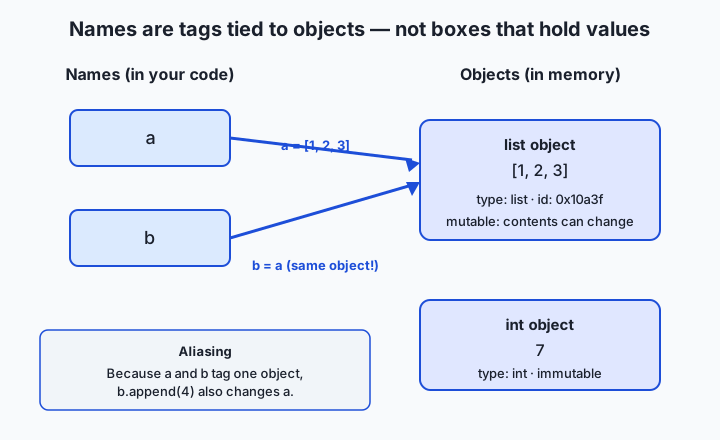
Read the diagram left to right: the names a and b live in your code; the objects live in memory; the arrows are the bindings. Because both arrows land on the same list, appending to the list through b (b.append(4)) mutates the object that a also points at, so a now reads [1, 2, 3, 4] too. Rebinding is different from mutating: b = "hello" does not touch the list at all — it just moves the b tag onto a brand-new string object, leaving a still pointing at [1, 2, 3, 4].
The core built-in types
You will meet many types over this section, but a small core covers the vast majority of everyday code:
| Type | Name | Example literal | What it holds | Mutable? |
|---|---|---|---|---|
| Integer | int | 42, -7, 0 | Whole numbers, unlimited size | No |
| Floating-point | float | 3.14, -0.5, 2.0 | Real numbers with a fractional part | No |
| Boolean | bool | True, False | A truth value (a subtype of int) | No |
| String | str | "hello", 'a' | Text, a sequence of characters | No |
| None | NoneType | None | The single “no value” object | No |
| List | list | [1, 2, 3] | An ordered, changeable sequence | Yes |
| Tuple | tuple | (1, 2, 3) | An ordered, fixed sequence | No |
| Dictionary | dict | {"a": 1} | Key-to-value lookups | Yes |
| Set | set | {1, 2, 3} | An unordered collection of unique items | Yes |
A few notes that trip people up. A float is not the same as an int even when it looks whole: 2 is an int and 2.0 is a float, and they have different types despite being equal in value. A bool is technically a special kind of int in Python — True behaves as 1 and False as 0 in arithmetic, so True + True is 2 — a quirk worth knowing but not relying on. None is not zero, not an empty string, and not False; it is a distinct object of its own type, NoneType, used to mean “there is deliberately no value here.” The four collection types — list, tuple, dict, set — get full lessons of their own later in this section; today you only need to recognise them and know which can change.
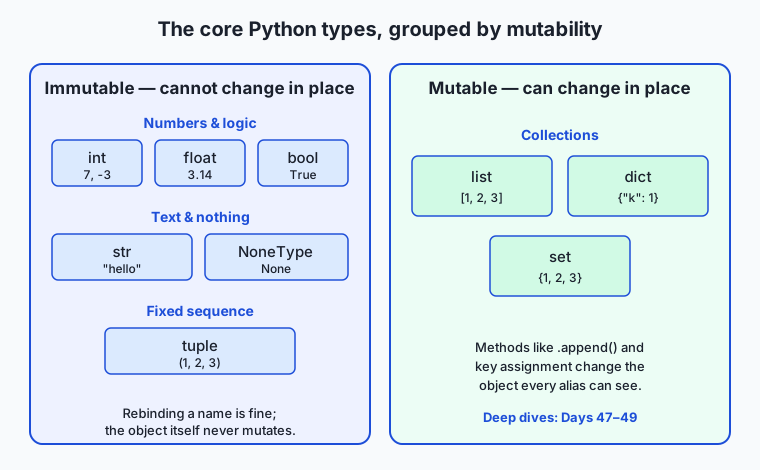
The type map sorts the core types into two columns by the property that matters most in practice: whether the object can change in place. Everything on the left — numbers, bool, str, None, tuple — is immutable: once created, the object’s value never changes. Everything on the right — list, dict, set — is mutable: you can add, remove, or alter contents without making a new object.
Dynamic typing versus static typing
Python is dynamically typed: the type belongs to the object, checked as the program runs, and a name may be re-bound to a value of any type at any time. This is legal and common:
x = 42          # x points at an int
x = "forty-two" # now x points at a str — perfectly fine
x = [4, 2]      # now a list
The name x never had a type; each line just re-points it. Contrast a statically typed language such as Java, where you would write int x = 42; and the compiler would refuse to build the program if you later assigned text to x. Static typing catches whole classes of mistakes before the program runs, at the cost of more ceremony and less flexibility; dynamic typing does the reverse. Python lets you have some of both: you can add optional type hints (x: int = 42) that the interpreter ignores but a tool like mypy checks, giving you early warnings without changing how the code runs.
type() and isinstance()
Two built-in functions let you ask about types. type(obj) returns the object’s type: type(42) is <class 'int'>, type("hi") is <class 'str'>. isinstance(obj, SomeType) returns True or False for “is this object of that type (or a subtype)?”: isinstance(42, int) is True. Prefer isinstance() for real checks in code, because it understands subtypes (for example isinstance(True, int) is True, since bool is a subtype of int) and accepts a tuple of types to check several at once: isinstance(x, (int, float)) asks “is x any kind of number?”. Reserve type() for exploration and printing.
Truthiness
Every Python object can be treated as true or false in a condition, even when it is not a bool. This is truthiness. The rule is simple: a handful of values are falsy — False, None, any zero (0, 0.0), and any empty container ("", [], {}, (), set()) — and everything else is truthy. So if items: reads naturally as “if the list has anything in it,” and if name: as “if the name string is non-empty.” This is idiomatic Python, but it has a sharp edge: because 0 and "" are falsy, a value that is genuinely present but happens to be zero or empty will fail an if value: test. When you must distinguish “absent” from “present but empty,” test against None explicitly with if value is not None:.
Mutability and why it matters
An immutable object cannot be changed after it is created; a mutable object can. int, float, bool, str, and tuple are immutable. list, dict, and set are mutable. This is not a pedantic distinction — it changes program behaviour. Because a string is immutable, “changing” one always produces a new object: s = "cat"; s = s + "s" does not edit the original string; it builds a new string "cats" and re-points s, leaving the old "cat" object untouched (soon to be cleaned up). Because a list is mutable, nums.append(4) changes the existing object, which — through aliasing — every name pointing at that list will see. You can watch the difference directly with id(): after string “modification” the id changes (new object); after list mutation the id stays the same (same object, new contents). Immutability is what makes strings, numbers, and tuples safe to share freely; mutability is what makes lists and dicts efficient to build up and edit in place.
Type conversion
You convert between types by calling the type as a function: int("42") gives the integer 42, str(42) gives "42", float("3.14") gives 3.14, bool(0) gives False. These are essential when data arrives in the wrong shape — for instance, user input from the keyboard always comes in as a string, so int(input()) is how you turn typed digits into a number. But conversion has pitfalls. int("3.5") does not give 3; it raises ValueError, because "3.5" is not a valid integer string — you must go through int(float("3.5")) if you want truncation. int(3.9) gives 3, silently discarding the fraction (it truncates toward zero, it does not round). bool("False") is True, not False, because any non-empty string is truthy — the letters inside are irrelevant. Safe conversion means anticipating these: wrap risky conversions in try/except ValueError so a bad input becomes a handled case rather than a crash.
Naming conventions
PEP 8 asks that variable and function names use snake_case: lowercase words joined by underscores, like total_price, user_name, is_active. Names should say what the value means (elapsed_seconds, not x), constants intended never to change are written in UPPER_SNAKE_CASE (MAX_RETRIES = 5) by convention, and names cannot be Python keywords (you cannot name a variable class or for). These are conventions, not laws the interpreter enforces — but following them makes your code instantly readable to every other Python programmer, and unreadable names are a real and avoidable source of bugs.
An everyday analogy
Think of a busy storage room full of items — boxes, envelopes, crates — each item sitting on the floor as its own thing. A variable name is a sticky luggage tag you tie to an item. Writing a = [1, 2, 3] is like putting a crate on the floor and tying the tag “a” to its handle. The crate exists independently; the tag just tells you how to find it.
Now tie a second tag to the same crate: b = a. There are two tags — “a” and “b” — hanging from one crate. If you open the crate and drop something in through the “b” tag (b.append(4)), then when someone comes looking by the “a” tag, they find the very same crate with the new item inside. That is aliasing, and the tag picture makes it feel inevitable rather than spooky.
Some items are sealed and cannot be opened — a shrink-wrapped number, a sealed envelope of text. These are the immutable objects: int, str, tuple. If you “change” one, you are not really opening it; you are fetching a different sealed item and moving the tag onto that one. The original sits untouched until the room’s cleaner (Python’s memory manager) hauls away anything with no tags left on it. Other items — crates and filing cabinets — are open and rearrangeable: those are the mutable objects, list, dict, set.
The tags themselves are blank about contents — a tag does not “know” it is on a crate rather than an envelope. That is dynamic typing: the item has a kind (a type), never the tag. Move a tag from a crate to an envelope and nothing about the tag changes; it simply now points at a different kind of thing. Keep this storage room in mind and most of Python’s surprising behaviour turns ordinary.
Examples in practice
Start in the REPL — Python’s interactive prompt, which you met when you installed Python on Day 43. Type python3, and you can explore types live:
>>> x = 7
>>> type(x)
<class 'int'>
>>> y = 7
>>> id(x) == id(y)
True
That last line reveals a real detail: small integers like 7 are so common that the standard interpreter keeps a single shared object for each, so x and y end up tagging the same 7. This is safe precisely because integers are immutable — sharing a value nobody can change can never cause surprises.
Now watch immutability versus mutability through id():
>>> s = "cat"
>>> before = id(s)
>>> s = s + "s"       # "change" the string
>>> id(s) == before
False                  # different object — a NEW string was made
>>> nums = [1, 2, 3]
>>> before = id(nums)
>>> nums.append(4)     # change the list
>>> id(nums) == before
True                   # SAME object — mutated in place
The string operation produced a new object (the id changed); the list operation kept the same object (the id held). Aliasing then makes the consequence concrete:
>>> a = [1, 2, 3]
>>> b = a
>>> b.append(99)
>>> a
[1, 2, 3, 99]          # a sees b's change: one object, two tags
Type conversion, done safely, is the everyday workhorse. Suppose you read an age from the keyboard, which always arrives as text:
raw = input("Enter your age: ")   # raw is a str, e.g. "30"
try:
    age = int(raw)                # convert text -> integer
    print("Next year you will be", age + 1)
except ValueError:
    print("That was not a whole number:", repr(raw))
If the user types 30, age becomes the integer 30 and arithmetic works. If they type thirty or 30.5, int() raises ValueError, and the except turns a crash into a friendly message. This try/except pattern is the difference between a program that survives bad input and one that dies on it — and real-world data is full of bad input.
Finally, a truthiness example that shows the sharp edge:
>>> def describe(value):
...     if value:
...         print("has a value")
...     else:
...         print("empty or missing")
...
>>> describe([1, 2])   # has a value
>>> describe([])       # empty or missing
>>> describe(0)        # empty or missing  <- careful: 0 is falsy!
The number 0 is a perfectly real value, but if value: reports it as empty because 0 is falsy. If 0 should count as present, test if value is not None: instead.
Implications: security, privacy, performance, scalability, and cost
Security. The safest habit today’s lesson teaches is to treat all external input as untrusted text and convert it deliberately. Never pass raw input straight into something that will act on it; convert to the exact type you expect, inside a try/except, and reject anything that does not fit. A great many security holes begin with a value that was assumed to be one type (a number, a safe string) but was actually attacker-controlled text of another shape. And never use Python’s eval() to turn a string into a value — it will execute any code the string contains; use the type constructors (int(), float()) or purpose-built parsers instead. The lab’s security note returns to this.
Privacy. Types shape how sensitive data flows. A value’s type determines where it can be stored and how it is compared, logged, and serialised — a password held as a plain str may be printed to logs or held in memory longer than intended. Being deliberate about which fields are text, which are numbers, and which should be None when absent is part of not leaking data by accident.
Performance. The name-object model is what makes Python assignment cheap: binding a new name to a huge object costs the same as binding one to a small one, because nothing is copied. But immutability has a cost — building a big string by repeated += creates a new object each time, quietly turning a loop into quadratic work; the idiomatic fix is to collect pieces in a list and "".join() them once. Knowing which operations mutate in place and which build new objects is direct performance knowledge.
Scalability. As programs and datasets grow, aliasing bugs scale from annoying to catastrophic: a shared mutable object modified in one corner of a large codebase can corrupt state everywhere else that aliases it. Teams tame this with clear conventions about who may mutate what, and by preferring immutable types for values that are passed around widely — a tuple cannot be changed out from under you the way a list can.
Cost. In data and modelling work, storing values in the right type saves real money at scale: representing a column of whole numbers as text instead of integers can multiply its memory and storage footprint and slow every operation on it. Choosing compact, correct types — the numeric ones especially — is a lever on both speed and the size of the machine you must rent to hold your data.
Alternatives: free, open source, and commercial
For a foundational concepts lesson, “alternatives” means the tools you can use to explore and enforce types, and other good ways to learn the material.
| Resource | Type | What it offers | Cost |
|---|---|---|---|
The Python REPL (python3) | Built-in, free | Live experimentation with type(), id(), and conversions — the fastest way to build intuition | Free (ships with Python) |
The type() and isinstance() built-ins | Built-in, free | Runtime type inspection and checking, no install needed | Free |
| mypy | Open source | Static type checker: reads optional type hints and flags mismatches before you run | Free |
| Pyright / Pylance | Open source (Microsoft) | Fast static type checker, built into the popular VS Code Python extension | Free |
| The official Python Tutorial | Free documentation | The canonical, authoritative introduction to types and the object model | Free |
| Real Python — “Variables in Python” | Tutorial site | A clear, example-driven walkthrough of the name-object model | Free articles; paid membership optional |
For most learners the winning combination is entirely free: explore in the REPL to build intuition, then add mypy (or Pyright inside VS Code) once your programs grow, so a tool catches type mistakes for you. You will preview mypy in this section and adopt it properly later; today, the REPL and the two built-ins are all you need.
Comparison with related concepts
| Concept A | Concept B | Key difference |
|---|---|---|
| Variable (name) | Object (value) | A name is a tag in your code; the object is the thing in memory that has the type, value, and identity |
| Dynamic typing | Static typing | Dynamic checks types on objects at run time and allows re-binding to any type; static declares types on names and checks before running |
type(x) | isinstance(x, T) | type returns the exact type; isinstance tests membership including subtypes and accepts several types at once |
Mutable (list) | Immutable (str, tuple) | A mutable object can change in place (same identity); “changing” an immutable one makes a new object |
== (equality) | is (identity) | == asks “same value?”; is asks “same object?” — two lists can be == yet not is |
None | 0 / "" / False | None means “no value at all”; the others are real values that merely happen to be falsy |
The == versus is distinction deserves a closing word because it flows straight from today’s model. == compares values; is compares identities (what id() reports). Two separate lists with the same contents are == but not is. The only thing you should routinely test with is is None — if x is None: — because there is exactly one None object in the whole program, so identity is the correct and idiomatic test.
When to use it — and when not to
You use this model every time you write Python, so the real question is when to think about it consciously. Reach for the name-object picture whenever behaviour surprises you: a value that changed when you did not expect it to is almost always aliasing (two names, one mutable object); a value that did not change when you thought you edited it is almost always immutability (you made a new object and left the old name pointing at the old one). Reach for explicit type checks (isinstance) and conversions when data crosses a boundary into your program — user input, a file, a network response — because that is where types are least trustworthy. Reach for is None whenever “absent” and “present but empty/zero” must be told apart.
Know when not to over-apply it, too. Do not sprinkle type() checks through code that would work fine on any reasonable input — Python’s flexibility is a feature, and excessive type-guarding makes code rigid and noisy. Do not reach for is to compare ordinary values (x is 5 is a bug waiting to happen; use ==). And do not fear aliasing everywhere: for immutable objects — the numbers and strings that make up most values — sharing is completely safe, because nothing can change out from under you. The skill is knowing which of your objects are mutable and being careful only there.
The AI connection
Everything in modern AI is typed data, and the discipline you practised today is exactly the discipline that keeps AI code from breaking. The text you feed a language model is a str; it gets converted into tokens, which are integers; those integers index into arrays of float numbers called tensors, which are the model’s inputs, weights, and outputs. Every stage is a type, and every boundary between stages is a place a type can go wrong. When a machine-learning library rejects your data with a message about expecting floating-point values but receiving integers, or wanting one shape of numeric array and getting text, you are meeting the same int-versus-float, number-versus-string distinctions you learned today — just at industrial scale.
Type confusion is, by wide agreement among practitioners, one of the largest sources of bugs in data and modelling code: a column that should be numbers arriving as strings, a missing value that should be None silently becoming the string "NaN", a boolean flag stored as the text "True" (which, remember, is truthy no matter what it says). None of these crash immediately; they quietly poison results. The habits from this lesson — check types at the boundaries, convert deliberately and safely, distinguish None from empty, respect mutability — are precisely what make a data pipeline reliable enough to trust an AI system’s output. Clean, correct types are not busywork before the interesting AI part; they are a large part of what makes the interesting AI part work.
Knowledge check
Try these from memory before looking back:
- Explain, using the tag-and-object picture, why
b = afollowed byb.append(4)changes whatarefers to, but only whenais a list — not whenais a number. x = 5thenx = "five". Did the namexchange type? Explain what actually happened in terms of names and objects.- Predict the result of
int("3.5"),int(3.9), andbool("False"), and explain each. - Name the falsy values in Python. Then explain why
if count:is a risky test whencountmight legitimately be0, and what to write instead. - Give one difference between
type(x)andisinstance(x, int), and one situation where the difference matters.
Hands-on exercise
Time to explore types on your own machine, in the lab directory for Day 44. You will run a working demonstration program, then complete a starter version yourself. Everything runs with the python3 you installed on Day 43 — no downloads, no network.
From the lab directory, first run the finished demonstration to see every idea from this lesson in action:
python3 examples/types_demo.pyIt assigns a value of each core type and prints it with its type(), rebinds one name to a different type to show dynamic typing, mutates a list and “mutates” a string while printing id() so you can see one object change in place and the other become a new object, and finishes with a safe int() conversion wrapped in try/except.
Then open starter/types_demo.py and complete its four numbered exercises — creating variables of three types and printing their types, converting a string to an integer safely, and demonstrating that a list is mutable. Each exercise names the exact function to use. Run your version the same way:
python3 starter/types_demo.pyExpected output
Running the completed example prints something close to this (identity numbers will differ every run — that is expected, since they reflect memory addresses):
--- Core types ---
count      = 42            type = int
price      = 19.99         type = float
is_open    = True          type = bool
label      = widget        type = str
missing    = None          type = NoneType

--- Dynamic typing ---
thing = 100 (int)
thing = hello (str)   <- same name, different type

--- Mutability ---
list before: [1, 2, 3]  id unchanged after append: True
str  before: cat        id changed after '+': True

--- Safe conversion ---
'30'  -> 30 (int)
'oops' -> could not convert (ValueError handled)
The exact id-comparison booleans (True) are the point: the list keeps its identity after .append(), while the string gets a new identity after +.
Validate your work
You are done when you can check every box:
-
python3 examples/types_demo.pyruns and exits without error. - You can name the type printed for each of the five core values.
- You can explain why the list’s id is unchanged after
.append()but the string’s id changes after+. - Your completed
starter/types_demo.pyprints three types, one safe conversion, and a mutated list. -
bash tests/run_tests.shprints a passing summary and exits 0.
Troubleshooting
python3: command not found. Python is not installed or not on your PATH — return to the Day 43 lesson. On some systems the command ispython; check withpython --versionand use whichever reports 3.x.SyntaxErrorwhen you paste REPL lines into a file. The>>>prompts in the examples are REPL markers, not code. In a.pyfile, write the code without them.ValueError: invalid literal for int(). That isint()refusing a non-integer string — the exercise’s point. Make sure the conversion sits inside thetryblock.- Your
id()numbers differ from the sample. They are supposed to; identities are per-run. Only the comparisons (same/different) are stable.
Common mistakes
- Thinking
b = acopies the list. It does not — it makes a second name for one object. If you need an independent copy, that is a later lesson; for now, notice the sharing. - Expecting
int("3.5")to give 3. It raisesValueError; onlyint(float("3.5"))truncates. Test both in the REPL. - Reading
if value:as “if value exists”. It means “if value is truthy” —0,"", and[]all fail it despite existing. Useis not Noneto test existence.
Practice assignment
In the starter directory you will find types-worksheet.md. Fill it in completely for values you choose: record the type() of three different values (pick three different types), state in one sentence whether a str is mutable and cite the id() evidence you gathered, and document one type conversion that fails — what you converted, the exact error, and why it fails in terms of this lesson. Then, using the REPL, verify each answer live rather than from memory, and paste the REPL lines that prove each claim into the worksheet. Keep the worksheet; the next lesson on strings builds directly on it.
Extension challenge
Go one layer deeper into how Python tracks types, using only the REPL and the tools from today. First, confirm the small-integer sharing you read about: check whether a = 256; b = 256; a is b and a = 257; b = 257; a is b give the same answer, and write two sentences on what the difference tells you about how the standard interpreter reuses small immutable objects (and why doing this is safe only because ints are immutable). Second, preview static type checking: add a type hint to a variable, deliberately assign the wrong type (n: int = "hello"), and note that Python runs it anyway — then read one paragraph of the mypy documentation and explain, in your own words, what mypy would say about that line and why catching it before running is valuable. You have now seen both halves of Python’s type story: the dynamic runtime you use every day, and the optional static checking that guards larger programs.
Quiz
Q1. In Python, what is a variable such as x after you write x = 5?
- A box in memory that stores the value 5 inside it
- A name (a tag) bound to the integer object 5, which lives independently in memory
- A reserved slot that can only ever hold integers from now on
- A copy of the number 5 that is separate from the original
Show answer
Answer: B. A name (a tag) bound to the integer object 5, which lives independently in memory
A Python variable is a name bound to an object, not a container. Writing x = 5 ties the name x to the already-existing integer object 5; the object holds the type, value, and identity, while the name is just a tag.
Q2. After a = [1, 2, 3] and b = a, you run b.append(4). What does a now refer to?
- [1, 2, 3] — a is an independent copy and is unaffected
- [4] — appending replaces the contents
- [1, 2, 3, 4] — a and b are two names for the same list object
- It raises an error because you cannot change a shared list
Show answer
Answer: C. [1, 2, 3, 4] — a and b are two names for the same list object
b = a makes a second name for the same object (aliasing), it does not copy. Because the list is mutable, appending through b changes the one shared object, so a sees [1, 2, 3, 4] too.
Q3. Which statement best describes dynamic typing in Python?
- Every variable must be declared with its type before use
- The type belongs to the object and is checked at run time, and a name can be re-bound to any type
- Types are checked by the compiler before the program runs
- A variable keeps the type of the first value assigned to it forever
Show answer
Answer: B. The type belongs to the object and is checked at run time, and a name can be re-bound to any type
Python is dynamically typed: the type lives on the object, not the name, and is checked as the program runs. A name like x can be re-bound from an int to a str to a list freely — the name itself is untyped.
Q4. Which of these groups lists only IMMUTABLE Python types?
- list, dict, set
- int, str, tuple
- int, list, str
- dict, tuple, float
Show answer
Answer: B. int, str, tuple
int, str, and tuple are all immutable — once created, their value cannot change in place. list, dict, and set are mutable. "Changing" an immutable object always produces a new object and re-points the name.
Q5. What does int("3.5") do in Python?
- Returns the integer 3 by truncating
- Returns the integer 4 by rounding
- Raises ValueError because "3.5" is not a valid integer string
- Returns the float 3.5 unchanged
Show answer
Answer: C. Raises ValueError because "3.5" is not a valid integer string
int() on a string only accepts a valid whole-number string, so int("3.5") raises ValueError. To truncate you must go through the float first: int(float("3.5")) gives 3. (int(3.9) on a float does truncate to 3.)
Q6. Which list contains only FALSY values?
- 1, "a", [0], True
- 0, "", [], None
- "False", -1, [None], {0: 0}
- 0.1, " ", (0,), {None}
Show answer
Answer: B. 0, "", [], None
The falsy values are False, None, any zero (0, 0.0), and any empty container ("", [], {}, (), set()). Note that "False" is a non-empty string and therefore truthy, and (0,) is a non-empty tuple and also truthy.
Q7. Why should you usually prefer isinstance(x, int) over type(x) == int for type checks?
- isinstance is faster in every case
- type() does not exist in modern Python
- isinstance understands subtypes and can accept a tuple of types to check several at once
- type() returns a string while isinstance returns a real type
Show answer
Answer: C. isinstance understands subtypes and can accept a tuple of types to check several at once
isinstance() returns True for subtypes (for example isinstance(True, int) is True because bool is a subtype of int) and accepts a tuple like (int, float) to test several types at once. type() reports only the exact type and is best reserved for exploration and printing.
Q8. You need to tell "no value was provided" apart from "the value is zero." Which test is correct?
- if value: — because zero counts as no value
- if value is not None: — because None means absent while 0 is a real, present value
- if value == "": — because absent values are empty strings
- if type(value) == int: — because only integers can be present
Show answer
Answer: B. if value is not None: — because None means absent while 0 is a real, present value
Because 0 is falsy, if value: cannot distinguish a genuine 0 from an absent value. None is the object that means "no value," and there is exactly one of it, so if value is not None: is the correct and idiomatic test for presence.
Glossary
- variable
- A name that refers (is bound) to an object. In Python a variable is a tag on an object, not a box that stores a value.
- object
- A thing in memory that carries a type, a value, and an identity. In Python everything — numbers, text, lists, even types — is an object.
- binding
- The link between a name and the object it refers to, created by assignment (name = object). Re-binding moves the name to a different object.
- aliasing
- The situation where two or more names refer to the same object, so a change made through one name is visible through the others (relevant for mutable objects).
- dynamic typing
- The rule that a value's type belongs to the object and is checked at run time, so a name may be re-bound to a value of any type at any point.
- static typing
- The alternative approach, used by languages like Java, where a variable's type is declared in advance and checked before the program runs.
- int
- The integer type: whole numbers of unlimited size, such as 42, 0, and -7. Immutable.
- float
- The floating-point type: real numbers with a fractional part, such as 3.14 and 2.0. Immutable, and distinct from int even when the value looks whole.
- bool
- The boolean type with the two values True and False. A subtype of int, so True behaves as 1 and False as 0 in arithmetic. Immutable.
- str
- The string type: text as a sequence of characters, such as "hello". Immutable, so "changing" a string produces a new object.
- NoneType
- The type of the single object None, which represents the deliberate absence of a value — distinct from 0, "", and False.
- mutable
- Describes an object that can be changed in place after creation, keeping the same identity. list, dict, and set are mutable.
- immutable
- Describes an object that cannot be changed after creation; "modifying" it creates a new object. int, float, bool, str, and tuple are immutable.
- truthiness
- The rule that any object can be treated as true or false in a condition. Falsy values are False, None, any zero, and any empty container; everything else is truthy.
- type conversion
- Turning a value of one type into another by calling the target type, such as int("42"), float("3.14"), or str(42). Can raise ValueError on invalid input.
- identity
- A permanent, per-object marker of "which object is this," returned by id(). In the standard interpreter it is essentially the object's memory address; the is operator compares it.
Sources and further reading
- Built-in Types — Python Software Foundation (accessed 2026-07-12)
- An Informal Introduction to Python — Python Software Foundation (accessed 2026-07-12)
- Variables in Python — Real Python (accessed 2026-07-12)
- PEP 8 — Style Guide for Python Code — Python Software Foundation (accessed 2026-07-12)
- Data type — Wikipedia (accessed 2026-07-12)
Kept in this browser, no account needed. Your progress page turns the whole record into one link you can bookmark or open on another device.