Programming with Python › Control Flow and Collections › Day 55
Day 55: Comprehensions and Iterator Thinking
After this lesson you will be able to write list, dict, and set comprehensions that map and filter in one readable line, and think in iterators — using generators and itertools to process data one item at a time, lazily, no matter how large the stream.
Hands-on lab for this lesson
Lab files on GitHub: https://github.com/ai-roadmap-365/ai-roadmap-365.github.io/tree/main/labs/sections/programming-with-python/day-055-comprehensions-and-iterator-thinking
- Get the hands-on files. Clone the labs repository once (you can reuse this clone for every lesson). This works on macOS, Linux, and Windows (PowerShell or WSL):
git clone https://github.com/ai-roadmap-365/ai-roadmap-365.github.io.git cd ai-roadmap-365.github.io - Open this lesson's lab. Move into the directory for this specific day. Every lab lives at the same predictable path — section / subsection / week / day:
cd labs/sections/programming-with-python/day-055-comprehensions-and-iterator-thinking - Read the lab guide. Open `README.md` in that directory. It lists the exact commands, what each does, the expected output, and how to check your work — read it before running anything.
- Run it and check your work. Follow the README's "How to run" section: run the example first to see the finished result, then complete the numbered exercises in `starter/`, then run the tests. The tests pass (exit 0) only when your work is correct.
bash tests/run_tests.sh # or the test command named in the lab README
You can also open the lab as a local page (works offline, shows the file tree and expected output).
Learning objectives
By the end of this lesson you will be able to:
- Write list, dict, and set comprehensions that map and filter a collection in a single expression, naming the three parts (output expression, for clause, if clause)
- Judge when a comprehension improves readability and when a plain loop is the clearer, honest choice — including the caution against over-nesting
- Flatten a nested collection with a single nested comprehension and explain why one level is the limit of good taste
- Explain what a `for` loop really does under the hood in terms of `iter()`, `next()`, and `StopIteration`, and distinguish an iterable from an iterator
- Write a `yield`-based generator function and a generator expression, and describe how lazy evaluation keeps memory flat over an arbitrarily large stream
- Assemble a lazy generator pipeline over a stream of records and prove it returns the same result as an eager loop
- Use itertools building blocks — chain, islice, and count — and connect lazy iterators to AI data loaders, streaming tokenizers, and batch pipelines
Prerequisites
- Days 51-54 of this course: for and while loops, and lists, dictionaries, tuples, and sets
- Comfort running a script from the terminal with `python3 file.py` and reading a small Python function
Why this matters
For the last four days you have been filling a toolbox: loops that repeat work, then lists, dictionaries, and sets to hold it. You can already write a for loop that walks a collection, builds up a new list with append, and filters out the items you do not want. Today you learn two things that change how that work reads and how much memory it costs — and both are everywhere in the AI code you are working toward. The first is the comprehension: a single expression that maps and filters a collection in one readable line. The second, deeper idea is iterator thinking: the realization that a for loop does not need the whole collection to exist at once, and that you can process a stream of data one item at a time, lazily, no matter how large it is.
The payoff is concrete and it is measured in memory. Every serious machine-learning workflow reads more data than fits in your computer’s memory: a dataset of millions of images, a text corpus of billions of words, a log file that never stops growing. If you try to load all of it into a list first, your program dies with a MemoryError before it does any work. The tool that saves you is the generator — a lazy iterator that hands you one record at a time and forgets it before fetching the next. Data loaders, streaming tokenizers, and batch pipelines in every AI framework are built on exactly this mechanism. Learn it on six rows today and the million-row version later will be the same three functions.
The everyday half matters just as much. Comprehensions are the routine transform of data work — “take these records, pull out this field, keep the ones that qualify” — the shape of nearly every feature-building step before a model ever sees the data. Written as a comprehension, that step is one clear line a reader understands at a glance; written as a four-line loop, it is four lines to skim and a place for a bug to hide. Knowing when a comprehension improves readability, and when a plain loop is honestly clearer, is a judgment you build today and use for the rest of your programming life.
The idea in plain language
A comprehension is a compact way to build a new collection from an existing one by describing, in a single expression, what to do to each item and which items to keep. Instead of creating an empty list, looping, and appending, you write the answer directly: “the square of n, for each n in numbers, if n is even.” That reads almost like the English sentence, and Python gives you one for each of the collections you met this week — a list comprehension in square brackets [...], a set comprehension in curly braces {...}, and a dict comprehension in curly braces with a key: value pair {k: v ...}.
Iterator thinking is the mental shift underneath. When you write for item in things:, it feels like Python hands you the whole collection. It does not. Behind the scenes, for asks the collection for an iterator — a little bookmark object — and then repeatedly asks that bookmark, “what is the next item?” until the bookmark says “there are no more.” Because the loop only ever asks for the next item, the items do not all have to exist yet. They can be produced on demand, one at a time, by a function that computes each one only when asked. That producer is a generator, and the property that makes it powerful is lazy evaluation: nothing is computed until something pulls on it, and only as much is computed as is actually consumed.
Put the two ideas together and you have the everyday transform (a comprehension) and the memory-safe transform (a generator) for the same job. A list comprehension builds the entire result in memory right now; a generator expression — the same syntax with round brackets (...) instead of square — describes the same result but produces it lazily, one item at a time, holding almost nothing. Choosing between them is choosing between “I need all the answers now” and “I will take them as they come.”
Historical background
Comprehensions did not begin with Python; they begin in mathematics. Set-builder notation — writing a set as { x² | x ∈ ℕ, x < 10 }, read “the set of x squared, for x in the natural numbers, where x is less than 10” — has been standard mathematical shorthand for over a century, and its three parts (an expression, a source, a condition) are exactly the three parts of a Python comprehension. In the 1970s the programming language SETL, designed by Jack Schwartz at New York University, brought set-builder notation into code. Functional languages Miranda and later Haskell popularized the “list comprehension” by name in the 1980s, and it was from Haskell that the feature came to Python.
Python, first released by Guido van Rossum in 1991, added list comprehensions in version 2.0 in 2000, formalized in the proposal PEP 202. The lazy machinery arrived over the next few years. PEP 234 introduced the iterator protocol in Python 2.2 (2001), giving for its formal contract: any object that can produce an iterator can be looped over. In the same release, PEP 255 added “simple generators” — the yield keyword that lets an ordinary-looking function produce a lazy sequence. PEP 289 added generator expressions in Python 2.4 (2004), the work of Raymond Hettinger, giving comprehension syntax a lazy sibling. Hettinger also contributed the itertools module in Python 2.3, a toolbox of fast, lazy iterator building blocks inspired by APL and the functional languages. Finally, dict and set comprehensions became part of the language in Python 3.0 (2008) and were backported to Python 2.7. So the syntax you write today is the settled result of a decade of the language absorbing a much older mathematical idea, and every version of Python 3 you will ever run has all of it.
What it is — and what it is not
A comprehension is a single expression that produces a collection. It always has an output expression (what to build for each kept item) and at least one for clause (the source to iterate); it may have one or more if clauses (which items to keep) and, less often, more than one for clause (nesting). An iterator is any object with a __next__ method that returns the next item or raises StopIteration when exhausted; an iterable is any object that can hand you a fresh iterator via __iter__. A generator is the easiest way to make an iterator: a function that uses yield instead of return, or a generator expression.
It is worth being precise about what these are not, because the compactness invites misuse. A comprehension is not a place to do everything — piling three for clauses and two if clauses into one line produces something no one can read, and a plain loop would be clearer. It is not faster by magic; it is usually a little faster than the equivalent append loop because the work happens in optimized internal code, but readability, not speed, is the reason to reach for it. A generator is not a list: you cannot index it with gen[0], you cannot ask its len(), and it is single-use — once you have iterated it to the end, it is exhausted and yields nothing more. And laziness is not free storage: a generator holds little memory precisely because it does not remember what it already produced, so if you need the data twice, you must either keep a list or rebuild the generator.
| Common misconception | The reality |
|---|---|
| ”Comprehensions are always better than loops.” | They win when the transform is simple and fits one readable line; a loop with side effects, several steps, or complex logic is clearer as a loop. |
| ”A generator is just a small list.” | A generator computes items on demand and forgets them; it has no length, no indexing, and is exhausted after one full pass. |
| ”Comprehensions are mainly a performance trick.” | The main gain is readability. The speed difference over an append loop is modest; choose them to say more with less, not to optimize. |
”for needs the whole collection in memory.” | for only ever asks for the next item, so it works identically over a lazy generator that never holds more than one item at a time. |
| ”Nesting comprehensions is elegant.” | One level (a flatten) is fine; two or more nested for/if clauses quickly become unreadable and belong in a named loop or helper. |
Why it was created and what problems it solves
Each of today’s tools answers a specific, recurring pain. Comprehensions were created to fix the noise of the build-a-collection loop. The pattern “make an empty list, loop, conditionally append” appears constantly, and written out it buries a simple intention under four lines of bookkeeping — the empty list, the loop header, the if, the append. Three of those four lines are pure ceremony that says nothing about what you are building. A comprehension deletes the ceremony and leaves the intention: the mapping and the filter, in the order you would say them aloud. Less code to read means fewer places for a bug and a faster grasp for the next person.
The iterator protocol and generators solve a harder problem: how to process more data than fits in memory, without special-casing every data source. Before a uniform protocol, every kind of sequence — a list, a file, a range of numbers — needed its own way to be walked. The iterator protocol gave them all one contract, so for works the same over a list, a file’s lines, a dictionary’s keys, or your own custom object. Generators then made producing such a stream trivial: instead of writing a class with __iter__ and __next__ by hand, you write a normal function and say yield where you would have collected a result. That unlocks lazy pipelines — chains of transforms where each stage pulls one item from the stage before it — which is the only practical way to run a filter-then-map-then-aggregate over a dataset that would never fit in RAM as a list. The problem it solves is not academic; it is the difference between a program that runs and one that dies with MemoryError.
How it works
Start with the comprehension, because its three parts map exactly onto the loop you already know.
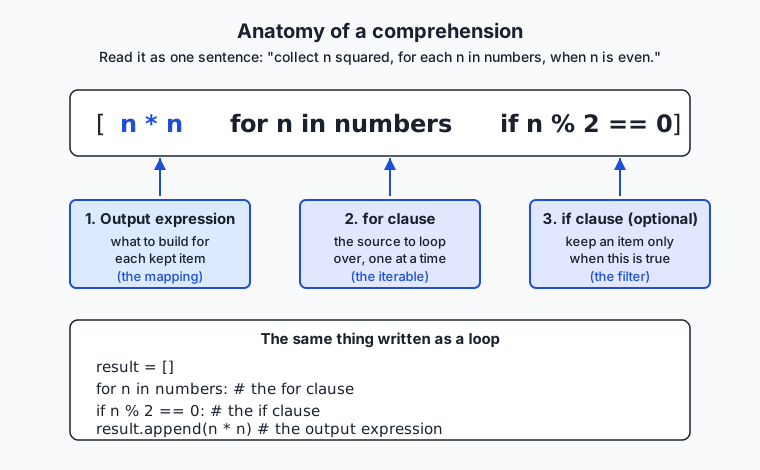
Read the diagram left to right, because that is the order Python evaluates the clauses in your head, even though the output expression is written first. The for clause names the source and a variable for each item; the optional if clause decides whether to keep that item; and the output expression, written at the front, says what to build from each kept item. The comprehension [n * n for n in numbers if n % 2 == 0] is precisely the loop shown at the bottom of the diagram: create a result list, loop over numbers, skip the odd ones, and append n * n for the rest. The three kinds differ only in the brackets and the output shape: [expr for ...] builds a list, {expr for ...} builds a set (so duplicates collapse and order is not kept), and {key: value for ...} builds a dict. Swap the square brackets for round ones — (expr for ...) — and you have a generator expression that produces the same items lazily instead of building them all at once.
What a for loop really does
Now the machinery under the loop. When you write for x in things:, Python does three things. First it calls iter(things), which asks the object for a fresh iterator by calling its __iter__ method. Then, on each pass, it calls next() on that iterator, which runs the iterator’s __next__ method to get one item. When there are no more items, __next__ raises the special exception StopIteration, and the for loop quietly catches it and ends. That is the whole protocol: iter() to begin, next() to advance, StopIteration to finish. You can drive it by hand to see it plainly:
numbers = [10, 20]
it = iter(numbers)      # get an iterator (a bookmark into the list)
print(next(it))         # 10
print(next(it))         # 20
print(next(it))         # raises StopIteration — nothing left
An iterable is anything you can call iter() on (a list, a string, a dict, a file); an iterator is what you get back, and it is what actually remembers your place. This is why a for loop does not need the whole collection: it only ever calls next() for the next item, so the items can be produced on demand.
Generators: producing items lazily
A generator function looks like an ordinary function but uses yield instead of return. Calling it does not run the body; it hands back a generator object — an iterator. Each time next() is called, the function runs until it hits a yield, hands that value out, and then pauses, remembering exactly where it was, including all its local variables. The next next() resumes right after the yield. When the function finally returns (or runs off the end), the generator raises StopIteration.
def count_up_to(limit):
    n = 1
    while n <= limit:
        yield n          # hand out n, then pause here
        n += 1           # resume here on the next next()

for value in count_up_to(3):
    print(value)         # 1, then 2, then 3
Because the generator computes each value only when asked and keeps just its current state, it uses the same tiny amount of memory whether limit is 3 or 3 billion. That is lazy evaluation made practical.
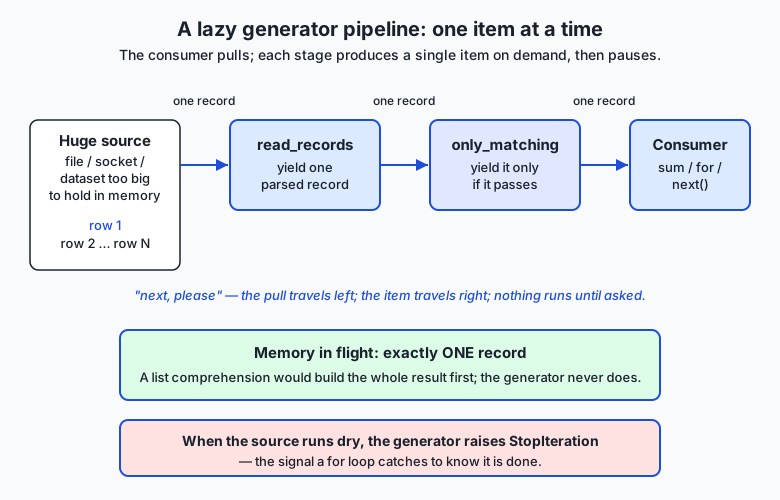
The flow diagram shows why this scales. A pipeline stacks generators: a reader yields one parsed record, a filter yields it onward only if it qualifies, and a consumer (a sum, a for, a next()) pulls on the end. The pull travels leftward and a single item travels rightward; at no moment does more than one record exist in flight. Replace the reader’s six rows with a file of six million and nothing else changes — the memory stays flat. When the source is exhausted, the reader raises StopIteration, which ripples through the pipeline and stops the consumer.
A first look at itertools
The standard-library module itertools ships ready-made lazy iterators so you rarely write the plumbing yourself. Three you will use immediately: chain(a, b) treats several iterables as one continuous stream without copying them into a combined list; islice(it, start, stop) takes a slice of an iterator lazily, the way list[2:5] slices a list, which is the safe way to peek at the first few items of an endless stream; and count(start) is an iterator that counts upward forever, the canonical infinite iterator you tame with islice. Because they are lazy, itertools.islice(itertools.count(0), 5) produces 0, 1, 2, 3, 4 without ever trying to build an infinite list.
An everyday analogy
Think of a restaurant kitchen, and keep it in mind for the rest of the lesson.
A comprehension is the chef’s shorthand on a prep card: “dice each tomato that is ripe.” One line names the ingredient source (the tomatoes), the condition (ripe), and the action (dice), and it produces a full tray of diced tomatoes. That is a list comprehension — the whole tray is prepared at once and set on the counter. If the card instead said “list every distinct herb we used,” duplicates would collapse to one of each — that is a set comprehension. And “pair each dish with its price” is a dict comprehension, building a lookup rather than a plain pile.
Now the deeper idea. Cooking the entire banquet before a single guest arrives fills every counter in the kitchen — that is building a list, and it is fine for a dinner party of six but impossible for a stadium. A busy kitchen instead runs a made-to-order line, like a conveyor-belt sushi bar: a plate is prepared only when the next diner reaches for it, and the kitchen holds just the plate currently being made. That conveyor is a generator, and preparing one plate at a time on demand is lazy evaluation. The diner reaching out is a call to next(); the waiter who fetches a fresh conveyor for a new party is __iter__; and when the kitchen calls out “that’s all, we’re out!” it is raising StopIteration — the signal the diners (the for loop) take as their cue to stop. The kitchen gadgets are itertools: chain splices two conveyors into one, islice says “give me only plates three through eight,” and count is the endless ticket dispenser at the door. The analogy holds all the way down: a comprehension is a recipe that fills a tray now; a generator is a line that serves one plate at a time, forever if need be, on nothing but a plate’s worth of counter space.
Examples in practice
Start with the everyday transforms. Suppose you have parsed some records, each a small dictionary:
records = [
    {"name": "alice", "team": "engineering", "score": 88},
    {"name": "bob",   "team": "design",      "score": 72},
    {"name": "carol", "team": "engineering", "score": 95},
]
A list comprehension maps and filters in one line — the names of high scorers, upper-cased:
high = [r["name"].upper() for r in records if r["score"] >= 80]
# ['ALICE', 'CAROL']
A dict comprehension builds a lookup from name to score, and a set comprehension collects the distinct teams:
by_name = {r["name"]: r["score"] for r in records}
# {'alice': 88, 'bob': 72, 'carol': 95}
teams = {r["team"] for r in records}
# {'engineering', 'design'}   (design appears once, though two records have it)
Compare the list comprehension to its honest loop equivalent and the readability case is clear:
high = []
for r in records:
    if r["score"] >= 80:
        high.append(r["name"].upper())
Four lines of scaffolding versus one line that reads like its intention. Now nesting and flattening, the one nested form worth knowing. Given a list of rows, flatten it to a single list:
grid = [[1, 2], [3, 4], [5, 6]]
flat = [value for row in grid for value in row]
# [1, 2, 3, 4, 5, 6]
Read the two for clauses left to right, exactly as you would nest them in a loop: for each row in grid, for each value in row. That single flatten is fine; a third for clause or a nested if on top of it is the point to stop and write a named loop instead — the caution against over-nesting is real.
Now the lazy half. Swap the brackets for round ones and you have a generator expression that never builds the whole list. Feeding it straight into an aggregator like sum is the idiom you will use constantly:
total = sum(r["score"] for r in records) # 255, and no intermediate list is builtFinally, a generator function and a small pipeline. Imagine the records arrive as raw text lines from a file far too large to load:
def read_records(rows):
    """Yield one parsed record at a time — O(1) memory, however many rows."""
    for row in rows:
        name, team, score = row.split(",")
        yield {"name": name, "team": team, "score": int(score)}

def only_team(records, team):
    """Yield only the records for one team — still lazy."""
    for r in records:
        if r["team"] == team:
            yield r

rows = ["alice,engineering,88", "bob,design,72", "carol,engineering,95"]
pipeline = only_team(read_records(rows), "engineering")
average = sum(r["score"] for r in pipeline) / 2   # (88 + 95) / 2 = 91.5
Each record is read, filtered, and consumed one at a time; the program never holds more than a single record, whether rows has three entries or three million. And itertools supplies the ready-made pieces — take just the first two records of a possibly endless stream:
import itertools
first_two = list(itertools.islice(read_records(rows), 2))
ids = list(itertools.islice(itertools.count(1000), 3))   # [1000, 1001, 1002]
The lab has you build exactly this shape — comprehensions for the transforms, a generator pipeline for the stream — and prove the lazy version returns the same answer as a plain loop.
Implications: security, privacy, performance, scalability, and cost
Security
The security note is the same rule you met with input handling, seen from a new angle: a comprehension’s output expression runs real code for every item, so never build one whose expression evaluates untrusted text. There is no eval() hiding in a comprehension unless you put it there — so do not. Keep the output expression a plain transform (r["name"].upper(), int(x)), never a call that executes a string a user supplied. Generators add one operational caution: because they are lazy, an exception inside a generator surfaces when you consume it, not when you create it, so validate inputs where the data is pulled, and do not let a half-consumed generator swallow errors silently.
Privacy
Laziness is quietly good for privacy. A generator pipeline touches each record exactly once and holds nothing after passing it along, so a filter that drops personal fields early means the sensitive data never accumulates anywhere in memory. Building a giant list first does the opposite: it materializes every record, including the fields you were about to discard. Streaming with a filter at the front is the structural way to minimize how much sensitive data your program is holding at any instant.
Performance
A comprehension is usually modestly faster than the equivalent append loop because the appending happens in optimized internal code rather than a Python-level method call each pass — but the honest reason to use one is readability, not speed. The larger performance story is the generator’s: by trading storage for laziness, it turns an impossible job (build a billion-item list) into a routine one (stream a billion items through a pipeline) at flat memory cost. The trade is time-shaped: a generator recomputes on each pass and cannot be indexed, so if you need random access or multiple passes, a list is the right tool and paying the memory is correct.
Scalability
This is where iterator thinking earns its place in AI work. The reason a data loader can train a model on a dataset larger than memory is that it is a lazy iterator: it yields one batch, the model consumes it, and only then is the next batch read from disk. Nothing about that pipeline changes as the dataset grows from thousands of rows to billions — the memory stays flat and only the running time grows. A pipeline built from generators scales by streaming; a pipeline built from lists scales until it hits your RAM ceiling and stops.
Cost
Memory is money, directly. On a rented cloud machine you pay for RAM by the gigabyte-hour, and a program that streams a dataset through generators can run on a small, cheap instance where the list version would demand a large, expensive one — or would not run at all. Laziness also saves wasted compute: a lazy pipeline that stops early (you only needed the first ten matches) never computes the rest, whereas an eager list computes everything and throws most of it away. Choosing the lazy tool when the data is large is a choice that shows up on the bill.
Alternatives: free, open source, and commercial
Everything today is part of Python itself and free; the choices are about which built-in tool fits the job. When the topic is “transform a collection,” here are the leading options and when to reach for each.
| Tool / approach | When to choose it | How to use it | Cost |
|---|---|---|---|
List comprehension [...] | You need the whole result now, it fits in memory, and the transform is one readable line | [f(x) for x in xs if keep(x)] | Free (built in) |
Dict / set comprehension {...} | Building a lookup table or a set of distinct values in one line | {k: v for ...} / {x for ...} | Free (built in) |
Generator expression (...) | The data is large or streamed, or you feed it straight into sum/any/max | sum(f(x) for x in xs) | Free (built in) |
Generator function (yield) | A multi-step lazy producer, or logic too big for one expression | def gen(...): ... yield item | Free (built in) |
A plain for loop | The body has side effects, several steps, or complex branching | for x in xs: ... | Free (built in) |
map() / filter() | You already have a named function to apply; a functional style you prefer | map(str.upper, names) (returns a lazy iterator) | Free (built in) |
itertools | Combining, slicing, grouping, or generating streams with tested building blocks | itertools.islice(it, 5) | Free (built in) |
The functional builtins map and filter deserve a word: map(f, xs) applies f to each item and filter(pred, xs) keeps items where pred is true, both returning lazy iterators in Python 3. They overlap heavily with comprehensions and generator expressions; most Python programmers prefer a comprehension for readability, reaching for map/filter only when a named function already exists and reads cleanly (map(str.strip, lines)). There is no commercial tier here — the entire toolkit ships with the language — which is exactly why these idioms are worth mastering: they cost nothing and appear in essentially every Python codebase, including every AI framework’s data layer.
Comparison with related concepts
| Concept A | Concept B | Key difference |
|---|---|---|
| List comprehension | Generator expression | Same syntax, different brackets; the list builds every item now and is reusable, the generator produces items lazily and is single-use |
| Comprehension | for loop with append | The comprehension is one readable line for a simple map/filter; the loop is clearer for side effects, several steps, or complex logic |
| Iterable | Iterator | An iterable can produce an iterator via iter(); an iterator is the object that actually remembers your position and yields the next item via next() |
| Generator function | Regular function | A regular function runs to return and gives one result; a generator uses yield, pauses after each item, and produces a lazy sequence |
| Generator | List | A generator computes on demand, holds one item, has no length or indexing, and is exhausted after one pass; a list holds everything and is reusable and indexable |
map() / filter() | Comprehension | Same effect; map/filter suit an existing named function, a comprehension is usually more readable and can map and filter together |
When to use it — and when not to
Reach for a comprehension when you are building a new collection by a simple transform of an existing one and the whole thing fits on one readable line — mapping a field out of each record, filtering to the items that qualify, building a lookup dict. That covers a large share of everyday data work, and the comprehension will be shorter and clearer than the loop. Reach for a generator — an expression or a yield function — when the data is large, streamed, or possibly endless, or when you are chaining transforms into a pipeline and want flat memory; and reach for a generator expression whenever you feed a transform straight into an aggregator like sum, any, max, or min, since building the intermediate list would be pure waste.
Do not force a comprehension when the work resists one line. If the loop body has side effects (printing, writing a file, updating several structures), needs several statements, or branches in complex ways, a plain for loop is the honest, readable choice — cramming it into a comprehension produces a line no one can maintain. Do not nest more than one for clause (a single flatten is the limit of good taste); beyond that, a named loop or a helper function wins. And do not use a generator when you need the data more than once, need random access by index, or need its length — those are a list’s job, and reaching for a generator there just means rebuilding it or converting it back with list() anyway. The skill is matching the tool to the shape of the work: comprehension for the compact transform, loop for the messy one, list when you need it all, generator when you must not hold it all.
Here is where this points for the work ahead. Every AI system you will build or operate reads more data than fits in memory, and the mechanism that makes that possible is the lazy iterator you learned today. A data loader that feeds a training run is a generator yielding one batch at a time from disk; a streaming tokenizer is a generator turning an endless stream of text into tokens on demand; a batch inference pipeline is a chain of generators pulling records through parse, transform, and predict stages at flat memory cost. And the routine feature-building step — “take these records, extract this field, keep the ones that qualify” — is a comprehension, written once and read at a glance. Master the comprehension and the generator on six rows of records today, and the million-row data pipeline later is the same handful of functions, unchanged except for the size of the stream flowing through them.
Knowledge check
Try these from memory before looking back:
- Name the three parts of a comprehension and point to each in
[w.upper() for w in words if len(w) > 3]. - Write the list comprehension
[n * n for n in numbers if n % 2 == 0]as an equivalentforloop, then explain which is more readable and why. - Describe, step by step, what a
forloop actually does under the hood — name the three things involvingiter(),next(), andStopIteration. - What is the difference between a list comprehension
[...]and a generator expression(...)? Give one situation where the generator is clearly the right choice. - Why can a generator pipeline process a file larger than your computer’s memory when a list of the same data cannot? Explain in terms of what is held in memory at each moment.
Hands-on exercise
Time to build both halves for real. In the Day 55 lab you will write comprehensions that transform and filter a small set of records, then build a lazy generator pipeline that streams those records one at a time and prove it returns the same answer as a plain loop. Work in the lab directory; every command below is run from there.
First, read the finished reference and run it to see the target:
python3 examples/pipeline.pyIt prints the results of the list, dict, and set comprehensions, the average score computed two ways (a lazy generator pipeline and an explicit loop), and a line confirming the two match. Now open starter/pipeline.py and complete its five numbered exercises — a list comprehension, a dict comprehension, a set comprehension, a yield-based generator, and the assembled lazy pipeline — using the reference only when you are stuck. Run your version the same way:
python3 starter/pipeline.pyFinally, prove the laziness claim directly by importing the reader and pulling just one record from it without consuming the rest:
python3 -c "import sys; sys.path.insert(0, 'examples'); from pipeline import read_records, RECORDS; g = read_records(RECORDS); print(next(g))"Expected output
A correct run of the reference program looks exactly like this:
$ python3 examples/pipeline.py
high scorers (list):   ['ALICE', 'CAROL', 'FRANK']
name -> score (dict):  {'alice': 88, 'bob': 72, 'carol': 95, 'dave': 60, 'erin': 79, 'frank': 84}
distinct teams (set):  ['design', 'engineering', 'marketing']
first 3 ids (itertools): [1000, 1001, 1002]
engineering average (lazy pipeline): 87.3
engineering average (loop baseline): 87.3
match: lazy pipeline == loop baseline
The set is printed sorted so the line is stable to compare. The two averages are identical because the lazy pipeline and the loop compute the same thing — that equivalence is the whole point. The final line confirms an assert inside the program passed.
Validate your work
You are done when you can check every box:
-
python3 examples/pipeline.pyprints the three comprehension results, both averages, andmatch: lazy pipeline == loop baseline. - Your completed
starter/pipeline.pyprints the same output as the reference. - The
python3 -c "... next(g) ..."one-liner prints a single record dict, proving the generator yields one item without building the rest. -
bash tests/run_tests.shends with0 failure(s)and exits0. - You can explain, for your dict comprehension, what the key is and what the value is.
Troubleshooting
python: command not found. Usepython3explicitly, as every command here does; on macOS and most Linux systemspythonalone may be missing.- The starter raises
NotImplementedError. That is expected until you finish each exercise. Replace eachraise NotImplementedError(...)line with the real body described in the comment above it. - Your set line prints in a different order. Sets are unordered, so print them via
sorted(...)as the reference does; comparing raw set repr across runs is unreliable. TypeError: 'generator' object is not subscriptable. You triedgen[0]on a generator. Generators have no indexing; usenext(gen)for one item orlist(gen)to materialize them.- Your pipeline prints nothing or a wrong average. A generator is single-use — if you consumed it once already (for example in a debug
list(pipeline)), it is exhausted. Rebuild the pipeline before consuming it for the real computation.
Common mistakes
- Reusing an exhausted generator. After one full pass a generator is empty. If you need the data twice, keep a
list(...)or rebuild the generator; do not expect a secondforto see anything. - Over-nesting a comprehension. Two or more nested
for/ifclauses on one line become unreadable. A single flatten is fine; beyond that, write a named loop or a helper. - Building a list where a generator belongs.
sum([f(x) for x in huge])builds the whole list first;sum(f(x) for x in huge)streams it. Drop the brackets when you feed an aggregator.
Practice assignment
Design and build a second small pipeline of your own, in your Day 55 lab folder, over a different set of records — a list of books (title, author, year, pages), transactions (id, amount, category), or songs (title, artist, seconds). Fill in starter/pipeline-worksheet.md first: write the records you will use, then plan one list comprehension (map + filter), one dict comprehension (a lookup), one set comprehension (distinct values), and a two-stage generator pipeline (a yield reader plus a filter) that computes one aggregate — a sum or an average — over the records that qualify. Implement all five, print each result clearly, and include an assert that your lazy pipeline’s aggregate equals the same value computed by a plain for loop, so the program proves its own correctness when it runs. Finally, use itertools.islice to print just the first two items of your reader generator, and record in the worksheet what your program printed. Keep the file — the Week 8 project, a Terminal Task Manager built on lists and dictionaries, uses exactly these transform-and-filter habits.
Extension challenge
Take the pipeline one step further into how real data loaders behave. First, add batching: write a generator batched(iterable, size) that yields tuples of up to size items from any iterable — batched(read_records(rows), 2) should yield the records two at a time — and confirm it works on a stream without ever building the full list (this is the exact shape of a model’s data loader). Second, prove laziness with a side effect: put a print(f"reading {r['name']}") inside your reader generator, then wrap it in itertools.islice(reader, 2) and consume only two items; you should see exactly two “reading” lines, demonstrating that the records beyond the second were never read. Third, add a chain demonstration: use itertools.chain to splice two separate record streams into one and run a single comprehension over the combined stream, showing that the consumer neither knows nor cares that the data came from two sources. Note in a comment why this “one uniform stream over many sources” property is exactly what lets an AI data loader read from many shard files as if they were one dataset. You have now built, in miniature, the streaming machinery that every large-scale data pipeline is made of.
Quiz
Q1. What are the three parts of the comprehension `[w.upper() for w in words if len(w) > 3]`, in the order they appear?
- A condition, a source, and a result
- The output expression `w.upper()`, the for clause `for w in words`, and the if clause `if len(w) > 3`
- A key, a value, and a filter
- An import, a loop, and a return
Show answer
Answer: B. The output expression `w.upper()`, the for clause `for w in words`, and the if clause `if len(w) > 3`
Every comprehension has an output expression (what to build for each kept item, written first), a for clause (the source to iterate), and an optional if clause (which items to keep). Here they are `w.upper()`, `for w in words`, and `if len(w) > 3`.
Q2. Which brackets produce a generator expression rather than a list?
- Square brackets: `[x for x in xs]`
- Curly braces: `{x for x in xs}`
- Round brackets: `(x for x in xs)`
- Angle brackets: `<x for x in xs>`
Show answer
Answer: C. Round brackets: `(x for x in xs)`
Round brackets `(...)` create a generator expression, which produces items lazily one at a time. Square brackets build a list (all items now), and curly braces build a set (or a dict with a `key: value` pair).
Q3. What does a `for` loop actually do under the hood?
- It copies the whole collection into memory, then reads each item by index
- It calls `iter()` to get an iterator, then calls `next()` repeatedly until `StopIteration` is raised
- It runs the loop body once for every index from 0 to len minus one
- It converts the collection to a list and slices it
Show answer
Answer: B. It calls `iter()` to get an iterator, then calls `next()` repeatedly until `StopIteration` is raised
A `for` loop calls `iter(thing)` to obtain an iterator, then calls `next()` on it each pass to get the next item, and stops quietly when `next()` raises `StopIteration`. Because it only ever asks for the next item, the whole collection need not exist at once.
Q4. What is the difference between an iterable and an iterator?
- They are two words for the same thing
- An iterable can produce an iterator via `iter()`; the iterator is the object that remembers your position and yields the next item via `next()`
- An iterable is lazy and an iterator is eager
- An iterator can only hold numbers, an iterable can hold anything
Show answer
Answer: B. An iterable can produce an iterator via `iter()`; the iterator is the object that remembers your position and yields the next item via `next()`
An iterable (a list, string, dict, or file) is anything you can call `iter()` on. The iterator it returns is what actually tracks your place and produces the next item when you call `next()`. Lists are iterable; the object you get from `iter(a_list)` is the iterator.
Q5. Why can a generator pipeline process a file larger than your computer's memory when a list of the same data cannot?
- Generators compress the data so it fits
- Generators store the data on disk automatically
- A generator holds only one item at a time and forgets it before fetching the next, so memory stays flat regardless of stream size
- A list is slower, so it runs out of time before memory
Show answer
Answer: C. A generator holds only one item at a time and forgets it before fetching the next, so memory stays flat regardless of stream size
A generator computes each item on demand and keeps only its current state, so at most one item is in flight. A list must materialize every item at once, which fails when the data exceeds available memory. Laziness trades storage for on-demand computation.
Q6. You write `sum([r["score"] for r in huge_records])`. What is the wasteful part, and the fix?
- Nothing is wasteful; this is optimal
- The square brackets build the entire list in memory first; drop them to `sum(r["score"] for r in huge_records)` so it streams
- The `sum` is slow; use a manual loop instead
- The dictionary access `r["score"]` should be `r.score`
Show answer
Answer: B. The square brackets build the entire list in memory first; drop them to `sum(r["score"] for r in huge_records)` so it streams
The square brackets force a full intermediate list to be built before `sum` sees any of it. Using a generator expression (no brackets) streams the scores one at a time into `sum`, holding almost nothing — the right choice when feeding an aggregator like `sum`, `any`, `max`, or `min`.
Q7. When is a plain `for` loop the clearer, more honest choice over a comprehension?
- Whenever the collection has more than ten items
- When the body has side effects, several steps, or complex branching that will not fit one readable line
- Never — comprehensions are always better
- Only when you are using a dictionary
Show answer
Answer: B. When the body has side effects, several steps, or complex branching that will not fit one readable line
Comprehensions shine for a simple map/filter that fits one readable line. When the work has side effects (printing, writing files), needs several statements, or branches in complex ways, a plain loop is clearer — forcing it into a comprehension produces an unreadable line.
Q8. What does `itertools.islice(itertools.count(0), 5)` produce, and why is it safe?
- It raises an error because `count(0)` is infinite
- It produces `0, 1, 2, 3, 4` lazily — `count` counts forever but `islice` only ever pulls the first five items
- It produces the numbers 0 through 5 inclusive
- It builds an infinite list and then slices it
Show answer
Answer: B. It produces `0, 1, 2, 3, 4` lazily — `count` counts forever but `islice` only ever pulls the first five items
`count(0)` is an infinite iterator counting upward, but because everything is lazy, `islice` only requests the first five items and stops. Nothing tries to build the infinite sequence, so it produces `0, 1, 2, 3, 4` safely.
Glossary
- list comprehension
- A single expression in square brackets `[...]` that builds a list by mapping and optionally filtering an existing iterable — for example `[n * n for n in numbers if n % 2 == 0]`.
- dict comprehension
- A comprehension in curly braces with a `key: value` pair that builds a dictionary — for example `{r["name"]: r["score"] for r in records}`.
- set comprehension
- A comprehension in curly braces that builds a set, so duplicates collapse and order is not kept — for example `{r["team"] for r in records}`.
- generator expression
- Comprehension syntax written with round brackets `(...)` that produces items lazily, one at a time, instead of building the whole collection at once; ideal fed straight into `sum`, `any`, or `max`.
- iterable
- Any object you can call `iter()` on to obtain an iterator — including lists, strings, dictionaries, sets, files, and generators. It is what a `for` loop can walk over.
- iterator
- The object returned by `iter()` that remembers your position in a sequence and yields the next item each time `next()` is called, raising `StopIteration` when exhausted.
- iterator protocol
- The contract every iterator follows: an `__iter__` method that returns the iterator itself and a `__next__` method that returns the next item or raises `StopIteration`. It is what makes `for` work uniformly over any source.
- lazy evaluation
- Computing a value only when it is actually needed, and only as much as is consumed. Generators use lazy evaluation to process arbitrarily large streams while holding almost nothing in memory.
- yield
- The keyword that turns a function into a generator: it hands out one value and pauses the function, remembering all its local state, so execution resumes right after the `yield` on the next `next()` call.
- StopIteration
- The exception an iterator raises when it has no more items. A `for` loop catches it silently as its signal to stop; you also see it when calling `next()` past the end by hand.
- generator function
- A function that uses `yield` instead of `return`; calling it returns a generator object (an iterator) without running the body, which then executes lazily as items are pulled from it.
- itertools
- A Python standard-library module of fast, lazy iterator building blocks — including `chain` (splice iterables into one stream), `islice` (slice an iterator lazily), and `count` (count upward forever).
Sources and further reading
- The Python Tutorial — List Comprehensions — Python Software Foundation (accessed 2026-07-13)
- The Python Tutorial — Iterators (Classes) — Python Software Foundation (accessed 2026-07-13)
- itertools — Functions creating iterators for efficient looping — Python Software Foundation (accessed 2026-07-13)
- When to Use a List Comprehension in Python — Real Python (accessed 2026-07-13)
- PEP 202 — List Comprehensions — Python Software Foundation (accessed 2026-07-13)
Kept in this browser, no account needed. Your progress page turns the whole record into one link you can bookmark or open on another device.