Programming with Python › Control Flow and Collections › Day 56
Day 56: Building a Data-Driven CLI
After this lesson you will be able to build a small, data-driven command-line tool: parse arguments and subcommands with argparse, model records as a list of dicts, persist them as JSON, run the command -> load -> mutate -> save -> report loop, and return proper exit codes with errors on standard error.
Hands-on lab for this lesson
Lab files on GitHub: https://github.com/ai-roadmap-365/ai-roadmap-365.github.io/tree/main/labs/sections/programming-with-python/day-056-building-a-data-driven-cli
- Get the hands-on files. Clone the labs repository once (you can reuse this clone for every lesson). This works on macOS, Linux, and Windows (PowerShell or WSL):
git clone https://github.com/ai-roadmap-365/ai-roadmap-365.github.io.git cd ai-roadmap-365.github.io - Open this lesson's lab. Move into the directory for this specific day. Every lab lives at the same predictable path — section / subsection / week / day:
cd labs/sections/programming-with-python/day-056-building-a-data-driven-cli - Read the lab guide. Open `README.md` in that directory. It lists the exact commands, what each does, the expected output, and how to check your work — read it before running anything.
- Run it and check your work. Follow the README's "How to run" section: run the example first to see the finished result, then complete the numbered exercises in `starter/`, then run the tests. The tests pass (exit 0) only when your work is correct.
bash tests/run_tests.sh # or the test command named in the lab README
You can also open the lab as a local page (works offline, shows the file tree and expected output).
Learning objectives
By the end of this lesson you will be able to:
- Parse command-line arguments with argparse: a global option, subcommands, required and typed options, choices, and generated help text
- Read and write structured data as JSON with json.load and json.dump so records persist between runs
- Model a collection of records as a list of dictionaries and mutate it (add, search, delete) in memory
- Run the command -> load -> mutate -> save -> report loop that underlies almost every data-driven tool
- Return meaningful exit codes (0 for success, non-zero for failure) and send diagnostics to standard error, keeping results on standard output
- Keep a tool testable and automatable by taking all input from arguments rather than interactive prompts, and prove a function is importable
- Choose between argparse, click, and typer, and explain when a JSON file is the right store and when a database is needed instead
Prerequisites
- Days 50-55 of this course: conditionals and loops, lists, dictionaries, sets and tuples, and comprehensions
- Day 49: the shape of a real program — named functions, a main(), the main-guard idiom, and input validation
- Comfort running a script from the terminal with python3 and editing a text file
Why this matters
For a week you have been gathering the raw materials of programs. You learned to make decisions with conditionals and to repeat work with loops; you met lists, dictionaries, sets, and tuples and learned when each one fits; and yesterday you learned to build new collections compactly with comprehensions. Each of those was a part. Today you assemble the parts into a whole of a specific, enormously useful shape: a command-line tool — a program someone runs by typing its name and some instructions, that reads structured data from a file, changes it, saves it back, and reports what it did. This is the capstone of the week, and it is the exact skeleton the Week 8 project, the Terminal Task Manager, stands on.
This shape matters far beyond a to-do list, and it matters directly for the AI work ahead. Almost every serious piece of software that runs without a graphical window is a command-line interface, or CLI: the tool that trains a model, the script that cleans a dataset before training, the program that downloads model weights, the agent you launch from a terminal. When you eventually want to wrap a model, a dataset, or an agent so that you — or a scheduled job, or a teammate — can run it with one clear command, you will reach for exactly the pattern in this lesson: parse the arguments, load some data, do the work, save the result, print a report, and exit with a code that says whether it worked. A clean CLI is the single most common way real AI tooling is shipped and automated, because a program that reads its instructions from arguments can be scripted, scheduled, tested, and chained with other tools — and a program that only works when a human sits and clicks cannot.
The concrete consequences are these. A tool that takes its input from arguments can be run a thousand times by a script; a tool that stops to ask questions on the keyboard cannot be automated at all. A tool that returns a proper exit code lets the next step in a pipeline know whether to continue or stop; a tool that always exits zero hides its own failures until they cost you a corrupted dataset or a wasted training run. And a tool that persists its data to a plain JSON file can be inspected, backed up, version-controlled, and read by any other program — while data trapped in a running program’s memory vanishes the moment it exits. Get this shape right today on a small contacts tool, and the data pipelines and model-serving scripts later will feel like the same tool wearing bigger clothes.
The idea in plain language
A data-driven CLI is a program with three defining traits. First, it is driven by arguments: you tell it what to do by typing words after its name, not by answering prompts while it runs. records.py add --name Ada --email ada@example.com says everything the program needs in one line. Second, it is data-driven: it keeps a collection of records in a file and its whole job is to read, change, search, and report on that collection. The file outlives any single run, so the tool remembers things between invocations. Third, it has subcommands: one program offers several distinct operations — add, list, find, delete — each with its own arguments, the way git offers commit, push, and log under one name.
The engine that reads the words you typed is Python’s standard argparse module. You describe the arguments your tool accepts — which are required, which are optional flags, which belong to which subcommand — and argparse does the tedious, error-prone work of reading sys.argv, checking that required values are present, converting types, generating --help text, and rejecting nonsense with a clear message. You never write the parsing loop by hand.
The data lives as JSON — JavaScript Object Notation, a plain-text format for lists, objects, strings, and numbers that maps almost perfectly onto Python’s lists and dictionaries. You model your records as a list of dictionaries: the whole collection is a list, and each record is a dictionary with named fields. Python’s json module turns that list of dicts into text with json.dump and turns the text back into a list of dicts with json.load. Around these two pieces runs one repeating rhythm — the heart of the whole lesson: a command arrives, the tool loads the current data, mutates it (adds, changes, or removes a record), saves it back, and reports the result, ending with an exit code. Learn that loop and you have learned how a huge fraction of practical software is built.
Historical background
The command line is older than almost everything else you use on a computer, and its conventions are old enough to be nearly universal. In the late 1960s and early 1970s, the developers of Unix at Bell Labs — Ken Thompson, Dennis Ritchie, and colleagues — built an operating system around a “shell” that read typed commands and ran small programs, each doing one thing well and connected by pipes so the output of one became the input of the next. That philosophy, later written down by Doug McIlroy as “write programs that do one thing and do it well; write programs to work together,” is the reason CLIs share so many habits: arguments on the command line, results on standard output, errors on a separate standard error stream, and a numeric exit status where zero means success. Those conventions, formalized in the POSIX standard, still govern the tool you are building today.
The idea that a program reports success or failure with a small integer — the exit code — dates from this same era and is genuinely universal: the C main returns an int, the shell exposes it as $?, and every language, Python included, honors it. Zero for success and non-zero for failure is a convention so old and so widespread that pipelines, build systems, and schedulers everywhere rely on it.
JSON is far younger. It was specified by Douglas Crockford in the early 2000s, drawn from the object syntax of JavaScript, as a lightweight alternative to the heavier XML formats then common for exchanging data. It caught on precisely because it was simple and human-readable, and because its handful of types — objects, arrays, strings, numbers, booleans, and null — map cleanly onto the built-in data structures of nearly every language. Python’s json module has shipped in the standard library since Python 2.6 (2008), and argparse, the modern argument parser, replaced the older optparse and arrived in the standard library in Python 3.2 (2011). Everything you use today is standard, stable, and decades-tested — no packages to install, no versions to chase.
What it is — and what it is not
A data-driven CLI, for this lesson, is a single Python program that: accepts a global option and one of several subcommands through argparse; reads a collection of records from a JSON file into a list of dictionaries; performs the subcommand’s job by loading, mutating, saving, and reporting; writes results to standard output and errors to standard error; and exits with a code that says whether it succeeded. It takes all of its input from arguments, so it can be run unattended and tested automatically.
It helps to be precise about what this is not, because beginners often reach for the wrong shape. It is not an interactive prompt program that stops and asks Enter a name: on the keyboard — that design cannot be scripted or tested, because a test has no one to type. It is not a program that keeps its data only in memory and forgets everything when it exits; the JSON file is what makes it remember. It is not a database server, and JSON is not a database — for one user and modest data it is perfect, but it does not handle many writers at once or millions of rows, and pretending otherwise causes real problems. And it is not defined by size: a hundred well-structured lines with four subcommands is a real tool, and a thousand tangled lines that only run when you type exactly the right thing are not.
| Common misconception | The reality |
|---|---|
| ”A CLI should ask the user questions as it runs.” | Prompting kills automation and testing. Take input from arguments; a tool driven by sys.argv can be scripted, scheduled, and tested without a human. |
| ”Any exit is fine as long as it prints an error.” | Callers read the exit code, not your prose. Return non-zero on failure so scripts and pipelines can detect it; always-zero hides failures. |
| ”Errors and results can all go to the screen together.” | Results go to standard output, diagnostics to standard error. Mixing them corrupts anything that pipes your output into another program. |
| ”JSON is basically a database.” | JSON is a plain-text file: perfect for one user and small data, but it has no concurrency control or indexing. Many simultaneous writers will lose data. |
”argparse is optional boilerplate; I’ll just read sys.argv.” | Hand-parsing arguments re-implements — badly — validation, help text, type conversion, and error messages that argparse gives you for free. |
Why it was created and what problems it solves
Each piece of this pattern exists to solve a specific problem that programmers, left to themselves, rediscover the hard way.
Without argparse, you read sys.argv by hand: you count the arguments, guess which is which by position, convert strings to numbers with your own try/except, write your own --help, and produce your own error messages when something is missing. This is tedious and, worse, inconsistent — every hand-rolled parser behaves a little differently, and none behaves like the tools users already know. argparse solves this by letting you declare what you accept and handling the parsing, validation, type conversion, help generation, and error reporting uniformly, exactly as thousands of standard tools do.
Without persistence, a program forgets. Everything it builds lives in memory and evaporates when the process exits, so a “contacts tool” that cannot remember a contact between runs is useless. Saving the records as JSON solves this: the data becomes a file that survives, that you can read with your own eyes, back up, put under version control, and hand to another program. Without the load → mutate → save discipline, changes are lost or half-written; with it, every command starts from the saved truth and ends by writing the new truth back. And without exit codes and a separate error stream, a tool cannot participate in the larger world of scripts and pipelines: a scheduler cannot tell whether last night’s run succeeded, and a pipeline cannot stop when a step fails. The Unix conventions solve this by making success and failure machine-readable, and by keeping results and diagnostics on separate channels so each can be handled correctly.
How it works
A data-driven CLI has an architecture, and once you can name its parts you can build one on purpose rather than by accident.
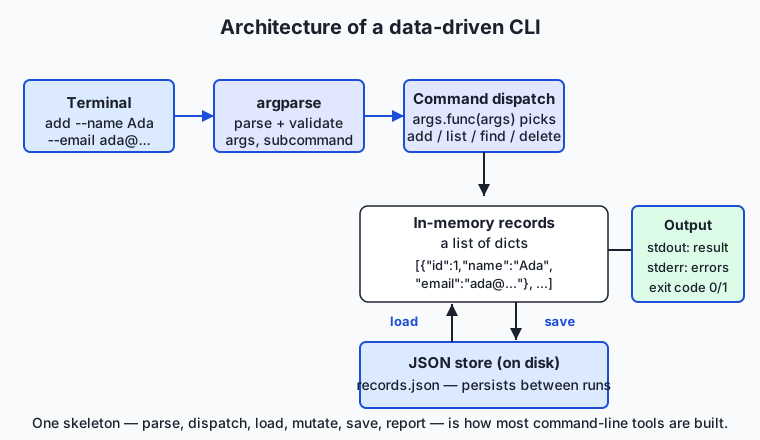
Follow the diagram left to right and then down. The words you type in the terminal reach argparse, which parses and validates them into a tidy object: the global --store path, which subcommand you chose, and that subcommand’s own options. From there control reaches command dispatch — a small, elegant trick where each subcommand is associated with a function, and the program simply calls the one that matches. That function works on the in-memory records, which are a list of dictionaries loaded from the JSON store on disk. Read-only commands (list, find) just read; changing commands (add, delete) mutate the list and save it back. Finally the result leaves on standard output, any error leaves on standard error, and the program returns an exit code.
Parsing arguments with argparse
You build a parser, add arguments to it, and let it read sys.argv. Three kinds of arguments cover almost everything. A positional argument is identified by its place (records.py NAME); an option (or flag) is identified by a name that starts with dashes (--email ada@example.com); and a subcommand is a named group with its own arguments, created with add_subparsers. Here is the skeleton, which you will recognize when you read the lab’s records.py:
import argparse

parser = argparse.ArgumentParser(description="Manage JSON-backed records.")
parser.add_argument("--store", default="records.json",
                    help="path to the JSON data file")
subparsers = parser.add_subparsers(dest="command", required=True)

add_parser = subparsers.add_parser("add", help="add a new record")
add_parser.add_argument("--name", required=True)
add_parser.add_argument("--email", required=True)
add_parser.set_defaults(func=cmd_add)
Two features earn special notice. required=True makes argparse reject a missing --name with a clear message and exit code 2 — its own convention for usage errors — before your code runs at all. And set_defaults(func=cmd_add) attaches a function to the subcommand; that is the setup for dispatch.
Command dispatch: choosing what to do
Dispatch is the small idea that ties the tool together. Because each subparser stored a function under args.func, the top-level code does not need a long if command == "add": ... elif command == "list": ... ladder. It calls the function argparse selected:
args = parser.parse_args(sys.argv[1:])
return args.func(args)
This is a dispatch table in miniature: the mapping from a name to the code that handles it lives in the parser itself, and adding a fifth subcommand means writing one more function and one more add_parser block — nothing in the dispatch changes. It is the same pattern, scaled down, that a web framework uses to route a URL to the code that answers it.
JSON persistence and the command loop
The data is a list of dictionaries, and two standard-library functions move it between memory and disk. json.load(file) reads text and returns the list of dicts; json.dump(data, file, indent=2) writes the list of dicts back as readable text. Around them runs the loop the whole lesson is about — command, then load, mutate, save, report:
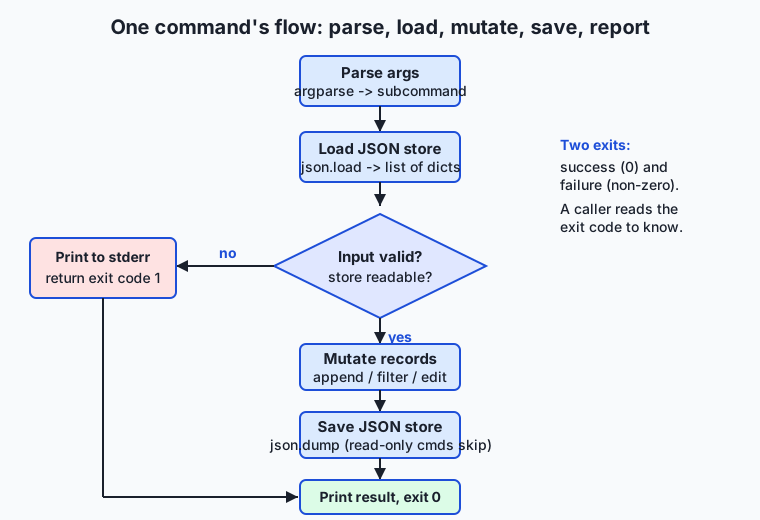
The flow diagram shows one command’s runtime path. Arguments are parsed; the JSON store is loaded (a missing file is treated as an empty list, because the first run is not an error); then a validation decision. If the input is bad or the store is unreadable, the tool takes the error branch — print to standard error, return exit code 1 — and stops. Otherwise it mutates the records, saves them (read-only commands skip the save), prints a result, and returns zero. Every command in the tool follows this same skeleton, which is why, once you have written one, the others are variations on a theme. The load-and-save pair is deliberately whole-file: each command reads the entire list and writes the entire list back, which is simple and correct for one user, and is exactly the behavior you will carry into the Terminal Task Manager.
Exit codes and the two output streams
A command-line tool speaks on two channels and ends with a number. Standard output carries results — the lines a user wants or another program will read. Standard error carries diagnostics — the “no record with id 99” messages — so that piping the tool’s output somewhere keeps the results clean and the errors separate. You write to standard error with print(..., file=sys.stderr). And every run ends with an exit code: your main returns an integer, sys.exit(main(sys.argv)) hands it to the operating system, and the shell exposes it as $?. Zero means success; non-zero means failure. In this tool, find even returns 1 when nothing matched — not because it broke, but so a script can branch on “did we find anything?” That is exit codes used as designed: a machine-readable answer, not an afterthought.
An everyday analogy
Picture the front desk of a small membership office, staffed by one careful clerk, with a single drawer of index cards behind the desk. Each card is a record — a member’s name and contact on one card — and the drawer is your JSON file: the durable place the cards live between visits, so the office remembers its members even after the clerk goes home for the night.
You do not chat with the clerk or answer a stream of questions. You hand over a written request slip with everything filled in — “ADD: name Ada, email ada@example.com” — and that slip is your command-line arguments, complete in one handoff. The clerk reads the slip against a checklist (is this a known kind of request? is a required field blank?) — that is argparse validating your arguments — and refuses a malformed slip immediately, handing it back with a note rather than guessing. A valid slip routes to the right procedure: add a card, read out the whole drawer, find the cards matching a name, pull a card by its number. That routing from request type to procedure is command dispatch.
Every request follows the same careful rhythm. The clerk opens the drawer (load), makes the change on the cards (mutate), closes the drawer with the new state inside (save), and then tells you plainly what happened: “Added card #7” — or, when something is wrong, a separate spoken note, “No card numbered 99,” kept distinct from the results so you never confuse the two. That separation is standard output versus standard error. And the clerk always ends with a clear yes-or-no you can act on — the request succeeded, or it did not — which is the exit code. Read-only requests, like reading out the drawer or finding a card, never change what is in it; they are safe to repeat as many times as you like. Keep this desk in mind and every part of the tool has a place you can point to: the drawer is the file, the slip is the arguments, the checklist is argparse, the routing is dispatch, and the spoken yes-or-no is the exit code.
Examples in practice
Let us build and run the whole tool, end to end. The design, on paper first: the tool manages contact records, each a dictionary {"id", "name", "email"}; the collection is a list of those dictionaries; and it offers four subcommands over a JSON store chosen with a global --store. Here is the add command, which shows the load → mutate → save → report loop in full:
def cmd_add(args):
    records = load_records(args.store)          # load
    validate_new(args.name, args.email)         # check at the boundary
    record = {
        "id": next_id(records),
        "name": args.name.strip(),
        "email": args.email.strip(),
    }
    records.append(record)                       # mutate
    save_records(args.store, records)            # save
    print(f"added #{record['id']}: {record['name']} <{record['email']}>")
    return 0                                      # report + success code
The load_records helper treats a missing file as an empty list — the first run is not an error — and refuses a file that is not valid JSON:
def load_records(path):
    try:
        with open(path, "r", encoding="utf-8") as handle:
            data = json.load(handle)
    except FileNotFoundError:
        return []
    except json.JSONDecodeError as err:
        raise ValueError(f"{path} is not valid JSON ({err})")
    if not isinstance(data, list):
        raise ValueError(f"{path} does not hold a list of records")
    return data
Run the finished tool and it behaves like a real utility. Note that the global --store comes before the subcommand, because it belongs to the top-level parser:
$ python3 records.py --store demo.json add --name "Ada Lovelace" --email ada@example.com
added #1: Ada Lovelace <ada@example.com>

$ python3 records.py --store demo.json add --name "Alan Turing" --email alan@example.com
added #2: Alan Turing <alan@example.com>

$ python3 records.py --store demo.json list
#1: Ada Lovelace <ada@example.com>
#2: Alan Turing <alan@example.com>

$ python3 records.py --store demo.json find --field name --query ada
#1: Ada Lovelace <ada@example.com>

$ python3 records.py --store demo.json find --field name --query zoe ; echo "exit: $?"
no records match name='zoe'
exit: 1

$ python3 records.py --store demo.json delete --id 99 ; echo "exit: $?"
error: no record with id 99
exit: 1
Every promise of the pattern shows up here. The two adds persist across separate runs, because each one saved to demo.json. The list reads the saved file back. The successful find prints a result and exits zero; the empty find prints to standard error and exits 1, so a script could write if ! records.py ... find --query zoe; then .... And the missing-id delete reports the problem clearly and returns a non-zero code. Open demo.json and you would see the list of dictionaries in plain, indented text — data you can read, diff, and back up. The lab has you build this tool from a starter, one exercise at a time, then run an automated suite of 31 checks against your finished version.
Implications: security, privacy, performance, scalability, and cost
Security. The central habit is the one from Day 49, now applied to files: parse and validate input; never execute it. You turn the store’s text into data with json.load, which can only ever produce lists, dicts, strings, and numbers — it cannot run code. The dangerous alternative some beginners reach for, eval(), executes whatever string it is given as Python and must never touch a file’s contents or a user’s argument. Equally important, treat the store as untrusted when you read it: a JSON file can be edited by anyone with access, so the tool checks that it parses and that it holds a list, turning a corrupt file into a clear error rather than a crash. Validating at the boundary — a non-empty name, an email containing @ — keeps bad records out before they are ever saved.
Privacy. A contacts file is personal data, and the tool’s structure makes its data flow auditable: input enters through argparse, is validated in one place, and is written in one place, so you can see exactly what is stored and where. The store is a plain file with normal filesystem permissions — no more, no less protected than any file in that directory — which is worth stating honestly. As you handle real people’s data later, “one obvious place for each concern” is what lets you promise, and check, what happens to it.
Performance. For a small file this is instant. But note the cost model built into the load-mutate-save loop: every command reads the entire file and writes the entire file back. For hundreds or thousands of records that is fine; for millions it is wasteful, because you rewrite everything to change one record. Recognizing that ceiling is the point — it is precisely where a real database, with its indexes and partial updates, earns its keep.
Scalability. The JSON-file design has a hard limit: it assumes a single writer. If two runs mutate the store at the same moment, the second save can overwrite the first — a lost update. That is acceptable for a personal tool and unacceptable for a shared service, which is why multi-user systems use databases with transactions and locking. Knowing where the file design stops scaling is as valuable as knowing how to build it.
Cost. The pattern is free in every sense: argparse and json ship with Python, so there is nothing to buy or install, and a tool driven by arguments is cheap to automate — a scheduler runs it unattended, and its exit code tells the scheduler whether to alert you. The expensive failure mode is the opposite: a tool that only works interactively must be babysat by a human every time, which is the real recurring cost that a good CLI eliminates.
Alternatives: free, open source, and commercial
Argument parsing in Python has three leading tools, and all three are free and open source — the choice is about ergonomics and dependencies, not money.
| Tool | What it is | When to choose it | Cost |
|---|---|---|---|
argparse | The standard-library parser (ships with Python) | Default for anything that must run on a plain Python install with zero dependencies — labs, scripts you share, tools inside larger projects | Free, open source, built in |
click | A third-party library that builds commands from decorators | Larger tools where you want composable commands, prompts, and less boilerplate, and adding a dependency is acceptable | Free, open source (install with pip) |
typer | A newer library that derives the CLI from function type hints | Modern tools where you like defining commands as plain typed functions and want automatic help from the types | Free, open source (install with pip) |
argparse — how to use it, with an example. You declare arguments on a parser and call parse_args(), exactly as this lesson’s tool does. It is the right default because it needs nothing installed, so a script using it runs anywhere Python does:
parser = argparse.ArgumentParser()
parser.add_argument("--name", required=True)
args = parser.parse_args()
print(f"hello {args.name}")
click — how to use it, with an example. click uses decorators to turn a function into a command, which removes much of the setup boilerplate at the price of a dependency:
import click

@click.command()
@click.option("--name", required=True)
def greet(name):
    click.echo(f"hello {name}")
Choose click when a tool grows many subcommands and you want its composability and niceties (colored output, prompts, progress bars) and do not mind installing it.
typer — how to use it, with an example. typer (built on click) reads a function’s type hints to build the interface, so the declaration is the function signature:
import typer

def greet(name: str):
    print(f"hello {name}")

typer.run(greet)
Choose typer for a modern, type-hint-driven style with automatically generated help. For this course — where every lab must run on a plain Python install with nothing to download — argparse is the deliberate choice, and everything you learn with it transfers directly to click and typer when a project justifies the dependency.
Comparison with related concepts
| Concept A | Concept B | Key difference |
|---|---|---|
| CLI (arguments) | Interactive prompt (input()) | A CLI reads instructions from arguments, so it can be scripted, scheduled, and tested; a prompt program waits for a human to type and cannot be automated |
| Subcommand | Separate script per action | Subcommands group related actions under one program with shared parsing and help (records.py add); separate scripts duplicate that plumbing and drift apart |
| JSON file | In-memory data | A JSON file persists between runs and can be read, backed up, and shared; in-memory data vanishes when the program exits |
| Exit code | Printed message | An exit code is a machine-readable success/failure signal a caller can branch on; a printed message is for humans and is invisible to a script’s control flow |
| standard output | standard error | Results go to stdout so they can be piped cleanly; diagnostics go to stderr so they do not corrupt the piped results |
json parsing | eval() | json.load turns text into safe data and can never run code; eval executes the string as Python and must never touch untrusted input |
When to use it — and when not to
Reach for this pattern — argparse subcommands over a JSON store, with the load-mutate-save loop and proper exit codes — whenever you are building a tool that does a few related jobs on a modest amount of data for one user, and that you want to run more than once, automate, or share. That covers an enormous range: personal utilities, project scripts, the wrappers you will later put around models and datasets, and the Week 8 project. The pattern’s cost is small and its payoff — a tool that is scriptable, testable, and durable — is large.
There are honest limits. When many people or processes must write the same data at once, or the data grows past what fits comfortably in memory, or you need fast lookups by key across millions of rows, a JSON file is the wrong store and a real database is right — the file’s single-writer, whole-file-rewrite model does not survive that world. When your program has no state to persist at all — a pure calculator, a formatter — you need the argument parsing but not the store. And when the interface truly must be a rich graphical or web experience for non-technical users, a CLI is not the delivery vehicle, though it very often still lives underneath as the engine the interface calls. The skill is matching the tool to the job: a data-driven CLI is the right answer for a strikingly large fraction of practical programming, which is exactly why it is worth building well today.
This is the last day of Week 8, and the pieces now connect into something whole. Day 50 gave you conditionals and boolean logic — the validation branches in every command; Day 51 gave you loops — the iteration inside list and find; Days 52 through 54 gave you lists, dictionaries, sets, and tuples — and here the records are a list of dictionaries; Day 55 gave you comprehensions — the one-line filter that powers find. The Week 8 project, the Terminal Task Manager, is this exact tool one job larger: add, list, complete, and delete over a JSON file of tasks, each task a dictionary. Everything you build today is the scaffolding that project stands on.
And here is where it points. The same argparse + JSON + dispatch skeleton is how real AI tooling is shipped and run. The script that fine-tunes a model takes a --dataset and a --model and an --epochs, loads data, does the work, writes a result, and exits with a code a scheduler reads. The tool that prepares a dataset reads records, validates and transforms them, and saves the cleaned set. The agent you launch from a terminal parses its instructions, loads its configuration, runs, and reports. A clean command-line interface — arguments in, structured data through, a clear report and an honest exit code out — is the most common way models, datasets, and agents are wrapped so that machines, not just people, can run them. Master this small contacts tool, and you have the shape of the tools that automate the whole field.
Knowledge check
Try these from memory before looking back:
- Name the three defining traits of a data-driven CLI, and give a one-sentence reason each matters for automation.
- Describe the load → mutate → save → report loop, and say which two of the four subcommands (
add,list,find,delete) skip the “save” step and why. - Explain the difference between a positional argument, an option/flag, and a subcommand, giving one example of each from the
records.pytool. - A user runs
find --field name --query zoeand nothing matches. What is printed, to which stream, and what exit code is returned — and why is that exit code a feature, not a bug? - Give one reason JSON is a good store for this tool and one situation where it is the wrong choice, naming what you would use instead.
Hands-on exercise
Time to build a data-driven CLI of your own. In the Day 56 lab you assemble Records CLI — add, list, find, delete over a JSON store — from a starter, one exercise at a time, then run an automated test suite against it. Work in the lab directory; every command below is run from there.
First, read the finished reference so you know the target, then drive it through a short session (the global --store goes before the subcommand):
python3 examples/records.py --store demo.json add --name "Ada Lovelace" --email ada@example.com
python3 examples/records.py --store demo.json list
python3 examples/records.py --store demo.json find --field name --query ada
python3 examples/records.py --store demo.json delete --id 1
Now open starter/records.py and complete its five numbered exercises — load JSON, compute the next id, write the add command’s load-mutate-save-report loop, write find with proper exit codes, and add the main guard — using the reference only when you are stuck. Run your version the same way:
python3 starter/records.py --store mine.json add --name "Grace Hopper" --email grace@example.comFinally, prove one of your functions is importable and testable — the payoff of the main guard — by borrowing it without running the whole tool:
python3 -c "import sys; sys.path.insert(0, 'examples'); from records import next_id; print(next_id([{'id': 4}, {'id': 7}]))"Expected output
A correct session with the reference tool looks exactly like this:
$ python3 examples/records.py --store demo.json add --name "Ada Lovelace" --email ada@example.com
added #1: Ada Lovelace <ada@example.com>

$ python3 examples/records.py --store demo.json list
#1: Ada Lovelace <ada@example.com>

$ python3 examples/records.py --store demo.json find --field name --query zoe ; echo "exit: $?"
no records match name='zoe'
exit: 1

$ python3 examples/records.py --store demo.json delete --id 99 ; echo "exit: $?"
error: no record with id 99
exit: 1

$ python3 -c "import sys; sys.path.insert(0, 'examples'); from records import next_id; print(next_id([{'id': 4}, {'id': 7}]))"
8
Successful commands print to standard output and exit zero; the empty find and the missing-id delete print to standard error and set exit code 1; and the last line proves the module can be imported and its function used without the tool running — because the main guard held it back.
Validate your work
You are done when you can check every box:
-
addon a fresh store printsadded #1: ...and creates the JSON file (cat demo.jsonshows it). -
listprints every record; on an empty or absent store it printsno recordsand exits 0. -
findprints matches and exits 0; with no match it prints to standard error and exits 1 (echo $?shows1). -
delete --id Nremoves a record and exits 0; a missing id prints an error and exits 1. - A bad email (
add --name X --email noatsign) is rejected with a clear message and a non-zero exit code. - Your completed
starter/records.pypasses the same checks as the reference. -
bash tests/run_tests.shends with0 failure(s)and exits0.
Troubleshooting
unrecognized argumentswhen you pass--store. The global--storemust come before the subcommand, because it belongs to the top-level parser:records.py --store demo.json add ..., notrecords.py add --store demo.json ....error: the following arguments are required: --email(exit 2). That isargparserejecting a missing required option, and it exits with code 2 — its own convention for usage errors, distinct from the code 1 your tool uses for validation and data errors.findprinted nothing and$?is 1. That is correct:findreturns exit code 1 when nothing matches. Check the spelling and the--fieldyou searched; the match is a case-insensitive substring.is not valid JSON. The store file exists but its contents are not valid JSON. Fix the file or delete it and start fresh — a missing store is treated as empty.- Your starter runs the tool when you import it. You forgot the
if __name__ == "__main__":guard, or wrote tool-running code at the top level. Only the guardedsys.exit(main(sys.argv))should trigger execution.
Common mistakes
- Prompting with
input()instead of reading arguments. A tool that asks questions on the keyboard cannot be tested or automated. Take every input fromargparse, as the reference does. - Forgetting to save after a mutation.
addanddeletemust callsave_records, or the change lives only in memory and is lost when the process exits. Load, mutate, save, report. - Ignoring the exit code. Printing an error but returning 0 (or not passing
main’s return value tosys.exit) tells callers you succeeded when you failed. Return non-zero on every error path and end withsys.exit(main(sys.argv)).
Practice assignment
Design and build a second data-driven CLI of your own, using the same skeleton, and keep it in your Day 56 lab folder. Choose a genuinely useful one-collection tool — a bookmark manager (add/list/find/delete a URL and a title), a personal expense log (an amount, a category, a date), or a simple inventory (an item, a quantity). Before writing any code, fill in starter/cli-worksheet.md: name the tool and its record shape, list each subcommand with its arguments and exit codes, note at least three bad inputs it must reject and the message and code each produces, and mark which subcommands are idempotent and why. Then implement it with argparse subcommands over a JSON store, a load_records/save_records pair, validation at the boundary that prints to standard error and returns a non-zero exit code, and clean output on standard output. Finally, record in the worksheet one good run and one bad run (with its echo $?), and prove one function is importable with a python3 -c one-liner. Keep the tool; it is a direct rehearsal for the Terminal Task Manager.
Extension challenge
Take your Records CLI one step closer to a professional tool. First, add an update subcommand that changes the email of a record found by its id, reusing load_records, save_records, and the same validation — and returning exit code 1 if the id does not exist. Second, make delete idempotent on request: add a --force flag under which deleting a missing id prints a notice to standard output and exits 0 (idempotent — the end state is “that id is absent” either way), while the default still errors and exits 1; write a comment explaining when each behavior is the right default for a tool that other scripts call. Third, add a global --format option (plain or json) so that list and find can emit machine-readable JSON on standard output with json.dump, ready to pipe into another program — the same output your future model and dataset tools will produce. Finally, write a small tests/test_records.py that imports next_id, validate_new, and load_records and asserts their behavior, printing all tests passed only if every assertion holds, and confirm it exits zero. You have now built, validated, tested, and extended a real command-line tool — the exact shape that ships and automates real AI systems.
Quiz
Q1. What makes a program a "data-driven CLI" in this lesson's sense?
- It has a graphical window and buttons
- It is driven by command-line arguments, keeps its records in a file, and offers subcommands
- It asks the user a series of questions as it runs
- It is written in fewer than fifty lines
Show answer
Answer: B. It is driven by command-line arguments, keeps its records in a file, and offers subcommands
A data-driven CLI reads its instructions from arguments (not interactive prompts), persists a collection of records to a file, and groups related operations as subcommands — the three traits that make it scriptable, durable, and organized.
Q2. Why take input from command-line arguments instead of prompting with input()?
- Arguments are easier to type than answering prompts
- A tool driven by arguments can be scripted, scheduled, and tested without a human, while a prompt program cannot be automated
- input() is deprecated and no longer works
- Arguments are the only way to pass a number to a program
Show answer
Answer: B. A tool driven by arguments can be scripted, scheduled, and tested without a human, while a prompt program cannot be automated
A program that reads sys.argv can be run unattended by a script or scheduler and tested automatically. A program that stops to prompt on the keyboard needs a human every time, so it cannot be automated or tested.
Q3. In the command -> load -> mutate -> save -> report loop, which commands skip the "save" step?
- add and delete, because they only read
- list and find, because they are read-only and do not change the store
- None — every command saves
- find only, because it never touches the file
Show answer
Answer: B. list and find, because they are read-only and do not change the store
list and find are read-only: they load the records and report on them but do not change anything, so there is nothing to save. add and delete mutate the list and must save it back to disk.
Q4. The global `--store` option is defined on the top-level parser. Where must it appear on the command line?
- After the subcommand, for example `records.py add --store demo.json ...`
- Before the subcommand, for example `records.py --store demo.json add ...`
- It can appear anywhere; argparse does not care about order
- It must be the very last argument
Show answer
Answer: B. Before the subcommand, for example `records.py --store demo.json add ...`
A global option belongs to the top-level parser, so it must come before the subcommand: `records.py --store demo.json add ...`. Placing it after the subcommand makes argparse look for it on the subparser, which does not define it.
Q5. A user runs `find --query zoe` and nothing matches. What does the well-designed tool do?
- Crashes with a traceback
- Prints a message to standard error and returns exit code 1, so a script can branch on the result
- Prints an empty line and returns exit code 0
- Silently creates a matching record
Show answer
Answer: B. Prints a message to standard error and returns exit code 1, so a script can branch on the result
find returns exit code 1 when nothing matches — not because it broke, but so a caller can test "did we find anything?". The "no records match" notice goes to standard error to keep standard output clean.
Q6. Why send error messages to standard error instead of standard output?
- Standard error displays text in red automatically
- It keeps results (stdout) separate from diagnostics (stderr), so piping the tool's output stays clean
- Standard output cannot display error messages
- It makes the program run faster
Show answer
Answer: B. It keeps results (stdout) separate from diagnostics (stderr), so piping the tool's output stays clean
Results go to standard output and diagnostics to standard error so that a program piping the tool's output receives only the clean results, while error messages travel on a separate stream — a long-standing command-line convention.
Q7. How does the tool turn the JSON store's text into Python data, and why is that choice safe?
- With eval(), which is the standard way to read data files
- With json.load(), which produces only lists, dicts, strings, and numbers and can never execute code
- With exec(), because JSON is Python code
- By reading the file line by line and guessing the types
Show answer
Answer: B. With json.load(), which produces only lists, dicts, strings, and numbers and can never execute code
json.load parses text into safe Python data structures and cannot run code. eval() and exec() execute their argument as Python, so they must never touch a file's contents or a user's input.
Q8. When is a JSON file the WRONG store for a data-driven tool?
- When the data is small and there is a single user
- When many processes must write the same data at once or the data grows to millions of rows needing fast lookups
- Whenever the tool has more than one subcommand
- When you want the data to persist between runs
Show answer
Answer: B. When many processes must write the same data at once or the data grows to millions of rows needing fast lookups
A JSON file assumes a single writer and rewrites the whole file on each change, so concurrent writers can lose updates and large datasets become slow. Those situations call for a database with transactions and indexes; for small, single-user data a JSON file is ideal.
Glossary
- CLI (command-line interface)
- A program you run by typing its name and instructions in a terminal, which reads its input from command-line arguments rather than a graphical window or interactive prompts, so it can be scripted, scheduled, and tested.
- argparse
- Python's standard-library module for parsing command-line arguments: you declare the arguments and subcommands your tool accepts, and it reads sys.argv, validates them, converts types, generates --help text, and reports usage errors.
- positional argument
- A command-line argument identified by its position rather than a name, such as the FILE in `tool FILE` — the first value is understood to be the file because of where it sits.
- option (flag)
- A named command-line argument that starts with dashes, such as `--email ada@example.com` or a boolean switch like `--force`; options can be required or optional and may take a value or stand alone.
- subcommand
- A named group of arguments that selects one of several operations a tool offers, created with argparse's add_subparsers — for example the add, list, find, and delete in `records.py add ...`, much like `git commit` and `git push`.
- JSON serialization
- Turning in-memory Python data (lists, dicts, strings, numbers) into JSON text with json.dump so it can be stored or sent, and back into Python data with json.load — the encode/decode pair that lets a program save and reload its records.
- persistence
- Keeping data beyond a single run of a program by writing it to durable storage such as a file; a tool that persists its records to JSON remembers them the next time it is launched, unlike data held only in memory.
- exit code
- A small integer a program returns to the operating system when it ends: 0 conventionally means success and any non-zero value means failure, so scripts, pipelines, and schedulers can detect whether the program worked.
- stdout / stderr
- The two output streams of a command-line program: standard output (stdout) carries results meant to be read or piped onward, and standard error (stderr) carries diagnostics and error messages, kept separate so piped results stay clean.
- record (dict)
- One item in a data-driven tool's collection, modelled as a Python dictionary of named fields — for example {"id": 1, "name": "Ada", "email": "ada@example.com"} — with the whole collection held as a list of such dictionaries.
- command dispatch
- Choosing which function handles the chosen subcommand: each subparser stores its handler (set_defaults(func=...)), so the program simply calls args.func(args) instead of a long if/elif ladder — a small dispatch table built into the parser.
- idempotence
- A property of an operation whose repeated application leaves the system in the same state as a single application; read-only commands like list and find are naturally idempotent, and a delete can be made idempotent by treating "already absent" as success.
Sources and further reading
- argparse — Parser for command-line options, arguments and subcommands — Python Software Foundation (accessed 2026-07-13)
- Argparse Tutorial (HOWTO) — Python Software Foundation (accessed 2026-07-13)
- json — JSON encoder and decoder — Python Software Foundation (accessed 2026-07-13)
- Build Command-Line Interfaces With Python's argparse — Real Python (accessed 2026-07-13)
- Command-line interface — Wikipedia (accessed 2026-07-13)
Kept in this browser, no account needed. Your progress page turns the whole record into one link you can bookmark or open on another device.