Programming with Python › Functions and Program Design › Day 58
Day 58: Scope, Closures, and *args/**kwargs
After this lesson you will be able to reason about where a name lives using the LEGB rule, use global and nonlocal deliberately, build closures that capture private state (counters and factories), and write flexible functions with *args, **kwargs, unpacking, and keyword-only arguments — the exact machinery ML and LLM libraries use to pass configuration and register callbacks.
Hands-on lab for this lesson
Lab files on GitHub: https://github.com/ai-roadmap-365/ai-roadmap-365.github.io/tree/main/labs/sections/programming-with-python/day-058-scope-closures-and-args-kwargs
- Get the hands-on files. Clone the labs repository once (you can reuse this clone for every lesson). This works on macOS, Linux, and Windows (PowerShell or WSL):
git clone https://github.com/ai-roadmap-365/ai-roadmap-365.github.io.git cd ai-roadmap-365.github.io - Open this lesson's lab. Move into the directory for this specific day. Every lab lives at the same predictable path — section / subsection / week / day:
cd labs/sections/programming-with-python/day-058-scope-closures-and-args-kwargs - Read the lab guide. Open `README.md` in that directory. It lists the exact commands, what each does, the expected output, and how to check your work — read it before running anything.
- Run it and check your work. Follow the README's "How to run" section: run the example first to see the finished result, then complete the numbered exercises in `starter/`, then run the tests. The tests pass (exit 0) only when your work is correct.
bash tests/run_tests.sh # or the test command named in the lab README
You can also open the lab as a local page (works offline, shows the file tree and expected output).
Learning objectives
By the end of this lesson you will be able to:
- Resolve any name with the LEGB rule (Local, Enclosing, Global, Built-in) and explain why assignment defaults to creating a local
- Use the global and nonlocal keywords to rebind outer names deliberately, and explain why mutating globals is usually the wrong default
- Build closures — inner functions that capture enclosing variables — and use them as factories and stateful helpers with private, remembered state
- Write functions with *args and **kwargs to accept any number of positional and keyword arguments, and unpack sequences and dicts with * and ** at call sites
- Define keyword-only arguments with a bare * so important options must be passed by name
- Explain how **kwargs underpins configuration in ML/LLM APIs and how closures underpin callbacks, hooks, and decorators, and forward arguments with *args/**kwargs
Prerequisites
- Day 57: defining functions, parameters and arguments, return values, and default arguments
- Days 50-56: conditionals and loops, lists, dictionaries, comprehensions, and building a small program
- Comfort running a script from the terminal with python3 and editing a text file
Why this matters
Yesterday you learned to define functions, pass them arguments, and get values back. That is the skeleton of every program you will write. Today you add the muscles that make functions genuinely powerful and reusable: an exact understanding of where a name lives and how Python finds it (scope), how a function can remember values from the place it was created even after that place is gone (closures), and how a function can accept any number of arguments and any set of named options (*args and **kwargs). These are not exotic corners of the language. They are the machinery underneath almost every library you will ever call in your AI work.
Here is the direct payoff. Open the documentation for nearly any machine-learning or large-language-model library and you will see function signatures that end in **kwargs — model.generate(prompt, **kwargs), pipeline(task, **kwargs), fit(X, y, **kwargs). That **kwargs is exactly the feature you learn today: it is how a library lets you pass configuration — the temperature of a text generation, the number of tokens to produce, the learning rate of a training run — without the library author having to list every possible option by hand. When you later write generate(prompt, temperature=0.2, max_tokens=500), you are handing keyword arguments into a **kwargs that some library function scoops up and forwards along. Understanding this today means those signatures stop being mysterious and start being obvious.
Closures matter just as concretely. A closure is a function that has captured some state from around it, and captured state is how callbacks, hooks, and decorators work — the small functions you register to run “when training finishes an epoch,” “when a request arrives,” “before this function is called.” A learning-rate scheduler that remembers the current step, a rate limiter that remembers the last call time, a counter that hands out unique ids: each is a closure. And scope — knowing whether a name is local to a function, borrowed from an enclosing one, shared across the whole module, or built into Python — is the difference between code whose behavior you can predict and code that mysteriously reads a stale value or clobbers something it should not have touched. The concrete consequences are real: a global you mutated by accident corrupts every function that reads it; a closure you built in a loop that captured the wrong variable produces ten functions that all do the same thing. Get these three ideas straight today, and a whole layer of “why did it do that?” simply disappears.
The idea in plain language
Start with scope: the region of your program where a name is visible. When Python meets a name like count, it does not search everywhere at once. It looks in a fixed order, from the most specific place outward, and stops at the first match. That order has a four-letter name, LEGB: Local (inside the function currently running), Enclosing (an outer function that wraps this one), Global (the top level of your file, the module), and Built-in (names Python always provides, like print and len). Search local, then enclosing, then global, then built-in; take the first hit; if nothing has the name, that is a NameError.
Assigning to a name inside a function normally creates a new local name — even if a global with the same name exists — which is a safety feature: a function cannot accidentally change a module-level variable just by using its name. When you genuinely need to reassign an outer name, you say so explicitly: the global keyword lets a function rebind a module-level name, and the nonlocal keyword lets an inner function rebind a variable in its enclosing function. Both are deliberately a little inconvenient, because reaching out to change outer state is exactly the thing that makes programs hard to reason about, and you should do it on purpose or not at all.
A closure is what you get when an inner function refers to variables from its enclosing function, and that inner function is then carried away and used elsewhere. Python keeps those captured variables alive for as long as the inner function exists, so the inner function remembers them. This lets you build a factory: an outer function that manufactures customized inner functions — make_multiplier(3) returns a function that triples, make_multiplier(10) returns one that multiplies by ten, and each remembers its own factor. It lets you build stateful helpers like a counter that hands out 0, 1, 2, ... across calls, keeping its count private. And it is the mechanism a decorator uses — a topic previewed here and met in full later — to wrap one function inside another.
Finally, variadic parameters. Sometimes you do not know in advance how many values a function will receive. Writing def total(*numbers) collects every positional argument into a tuple called numbers, so total(2, 4, 6) and total(5) both work. Writing def build(**options) collects every named argument into a dictionary called options, so build(color="red", size=3) arrives as {"color": "red", "size": 3}. The same two stars work at the call site to unpack: total(*[2, 4, 6]) spreads a list into positional arguments, and build(**{"color": "red"}) spreads a dictionary into keyword arguments. Put a bare * in a signature and every parameter after it becomes keyword-only — it must be passed by name — which makes options readable and hard to mix up.
Historical background
These features did not all arrive at once, and the order tells a small story about what programmers kept needing. Scope itself is as old as structured programming: the idea that a variable inside a procedure should not be visible outside it — lexical scoping, where a name’s meaning is fixed by where it is written in the source, not by who calls it — was worked out in languages like Algol in the 1960s and became the default nearly everywhere. Python has used lexical scoping from the start, but its treatment of nested functions was refined over time.
Python 1.0 (1994) had local and global scope but did not truly support the enclosing scope: an inner function could not see the variables of the function around it, which made closures awkward. That gap was closed in Python 2.1 and 2.2 (2001) with the addition of nested (enclosing) scopes, described in Python Enhancement Proposal (PEP) 227 — the “E” in LEGB became real, and closures started working the way they do today. The read side worked, but there was still no clean way for an inner function to reassign an enclosing variable; people resorted to tricks like wrapping the value in a list. That was fixed by the nonlocal keyword in Python 3.0 (2008), specified in PEP 3104, giving the enclosing scope the same explicit “I mean to rebind this” statement that global had long given the module scope.
Variadic arguments have a longer pedigree. The idea of a function taking a variable number of arguments goes back to C’s printf and earlier; Python has had *args and **kwargs since its early versions, and the specific convention — one star to gather positional arguments into a tuple, two stars to gather keyword arguments into a dictionary — has been stable for decades. Keyword-only arguments, marked by a bare * in the signature, were added in Python 3.0 via PEP 3102, precisely so that library authors could force important options to be passed by name rather than accidentally by position. The closure itself is an old idea from the Lisp and Scheme world of the 1970s, where the term “closure” describes a function together with the environment it closes over. Everything you use today is standard, stable, and battle-tested — no packages to install, no versions to chase.
What it is — and what it is not
Precisely: scope is the set of rules Python uses to decide which variable a name refers to, resolved by the LEGB search. A closure is a nested function that has captured one or more variables from an enclosing scope, together with those captured variables, such that the function keeps working — and keeps seeing those variables — after the enclosing function has returned. *args is a parameter that collects extra positional arguments into a tuple; **kwargs is a parameter that collects extra keyword arguments into a dictionary; and a bare * in a signature marks the parameters after it as keyword-only.
It helps to be clear about what these are not, because each has a common misreading. Scope is not determined by where a function is called from — that would be “dynamic scoping,” which Python does not use; a name’s meaning is fixed by where the function is written. A closure is not a snapshot of values taken at creation time: it captures the variable, not a frozen copy, so if the enclosing variable changes later (before the inner function runs), the closure sees the new value — a subtlety that bites people who build closures in a loop. *args is not a list — it is a tuple, and it holds only the extra positional arguments, after the named parameters are filled. And **kwargs is not a way to accept truly arbitrary anything — it accepts arbitrary keyword arguments only, and each key must be a valid identifier string. The names args and kwargs themselves are pure convention; the stars do the work, and *items or **options are equally valid and often clearer.
| Common misconception | The reality |
|---|---|
| ”A function can see and change any variable it names.” | Assigning inside a function makes a local by default; changing an outer name needs global or nonlocal, on purpose. |
| ”Scope depends on who calls the function.” | Python uses lexical scope: a name’s meaning is fixed by where the function is written, not by the caller. |
| ”A closure captures the value at creation time.” | It captures the variable. If that variable changes before the inner function runs, the closure sees the new value. |
”*args gives me a list of all arguments.” | *args is a tuple of only the extra positional arguments, after the named parameters are bound. |
”**kwargs accepts anything at all.” | It accepts extra keyword arguments only, gathered into a dict; keys must be valid identifiers. |
Why it was created and what problems it solves
Each of these features exists to remove a specific pain that programmers hit again and again.
Scope rules exist to make functions isolated and reusable. Without them, every variable would be visible everywhere, and a function that used a variable named i or total could silently collide with another function’s i or total — the larger the program, the more certain the disaster. By defaulting new assignments to local, Python guarantees that a function’s internal bookkeeping stays private, so you can drop a function into any program without fear that its variables will trample the host’s. The global and nonlocal keywords exist for the rarer, deliberate cases where you truly do want shared, mutable state — and by requiring you to declare that intent, they make those cases visible and searchable, which is exactly what you want for the code most likely to cause bugs.
Closures exist to solve configuration and memory elegantly. Often you want many functions that are the same except for a setting — twenty functions that each multiply by a different factor, a family of validators that each check a different threshold. Without closures you would pass that setting to every call, or store it in a global, or build a class. A closure lets the outer function bake the setting in once and hand back a ready-made specialized function, keeping the setting private and tied to that function alone. And when a function needs to remember something between calls — a running count, the last value it saw — a closure gives it private, persistent state without a global variable and without the ceremony of a class.
Variadic parameters exist to solve flexible, forwardable interfaces. A function like print cannot know how many things you will hand it, so *args lets it accept any number. A library function that wraps another and wants to pass along whatever options the caller gave — without re-listing every one — uses **kwargs to gather them and ** to forward them. This is the single most common reason **kwargs appears in AI libraries: a high-level helper accepts **kwargs and passes them straight down to the real model call, so new options work without the wrapper ever being updated. Keyword-only arguments solve a readability problem: resize(image, 800, 600, True) is a puzzle, while resize(image, width=800, height=600, keep_aspect=True) reads itself.
How it works
Let us walk the machinery, from name lookup to closures to variadic calls.
Name resolution and the LEGB rule
When your code uses a name, Python performs the LEGB search. The picture to hold in your head is a set of nested boxes.
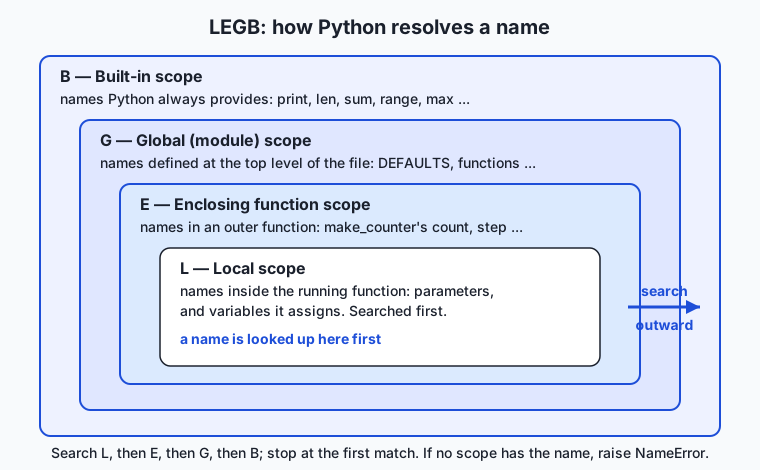
Read the diagram from the inside. The Local box is the function currently running: its parameters and any names it assigns. The Enclosing box is an outer function that wraps it (only relevant for nested functions). The Global box is the top level of your file — the module. The Built-in box is the outermost, holding names Python always supplies: print, len, sum, range, and the rest. Python searches these boxes strictly outward and stops at the first that has the name. This is why a local variable “shadows” a global of the same name inside its function, and why you can use len anywhere without defining it — it lives in the built-in box that every search eventually reaches.
The rule for reading a name is pure LEGB. The rule for assigning is different and is the source of most confusion: an assignment x = ... inside a function creates or updates a local x, full stop — unless you have declared x as global or nonlocal. This is why the following surprises beginners:
total = 0

def add(n):
    total = total + n   # ERROR: total is local here because we assign to it
    return total
Because add assigns to total, Python treats total as local throughout add, so total + n on the right tries to read a local that has no value yet — an UnboundLocalError. The fix is to say what you mean.
The global and nonlocal keywords
To rebind an outer name, declare it:
count = 0

def bump():
    global count       # "count means the module-level count"
    count = count + 1  # now this reassigns the global

def make_counter():
    n = 0
    def step():
        nonlocal n     # "n means make_counter's n, not a new local"
        n += 1
        return n
    return step
global count tells bump that count refers to the module-level variable, so the assignment updates it. nonlocal n tells the inner step that n refers to the n in make_counter, so step can increment the enclosing counter rather than creating its own local. Use both sparingly. Mutating a global from many functions makes behavior depend on call order and hides data flow; the professional habit is to pass values in as arguments and return results out, reaching for global only for genuine module-wide constants-turned-state, and for nonlocal mainly inside closures where captured, private state is the whole point.
Closures: capturing the enclosing scope
A closure forms when an inner function references enclosing variables and is then returned or otherwise carried out of its birthplace. The flow is worth seeing step by step.
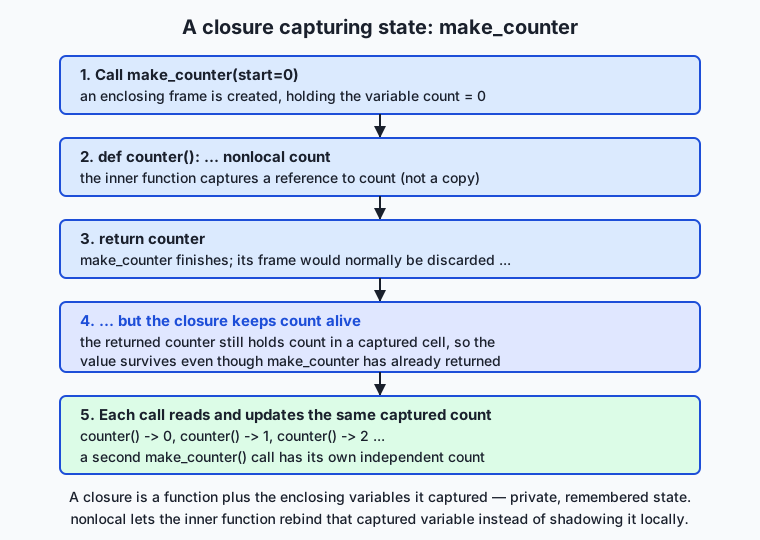
Trace it: calling make_counter() creates an enclosing frame holding count; the inner function counter captures a reference to count; make_counter returns counter and its frame would normally be discarded — but because counter still refers to count, Python keeps count alive in a captured cell. Every later call to the returned function reads and updates that same count, which is why a counter built this way remembers where it left off. Crucially, a second call to make_counter() builds a fresh, independent frame with its own count, so two counters never interfere. That independence — private state per closure — is the feature.
Variadic parameters and unpacking
In a signature, *args gathers extra positional arguments into a tuple and **kwargs gathers extra keyword arguments into a dict. At a call site, the same stars spread a sequence or a mapping back out into arguments. The full order in a signature is: ordinary parameters, then *args, then keyword-only parameters (anything after the *), then **kwargs. A minimal tour:
def demo(first, *args, sep="-", **kwargs):
    return first, args, sep, kwargs

demo(1, 2, 3, sep="+", color="red")
# first=1, args=(2, 3), sep="+", kwargs={"color": "red"}

nums = [10, 20, 30]
demo(*nums)               # spreads the list: first=10, args=(20, 30)

opts = {"sep": "|", "size": 4}
demo(1, **opts)           # spreads the dict: sep="|", kwargs={"size": 4}
The keyword-only sep sits after *args, so it can only be passed by name — you cannot supply it positionally, which keeps its meaning explicit. This gather-and-spread symmetry is the heart of forwarding: a wrapper writes def wrap(*args, **kwargs): return real(*args, **kwargs) and passes everything through untouched.
An everyday analogy
Picture a large office building where you are looking for a document or a tool. You search in a fixed order, from nearest to farthest, and stop the moment you find it. First you check the drawer of your own desk — that is the local scope, the names inside the running function. If it is not there, you check the shared bench in your team’s room — the enclosing scope, the outer function that wraps you. Still nothing? You go to the building’s central stockroom — the global scope, the top level of your file. And if even the stockroom lacks it, you walk to the public hardware store down the street that everyone in the city can use — the built-in scope, the names Python always provides. You never search all four at once; you go outward and take the first hit. That is LEGB.
Now the permission slips. Anything you make at your own desk stays at your desk — that is why assigning a name inside a function creates a local by default, keeping your work private. To change what sits in the building stockroom, you need a signed global slip, filed openly so anyone can see who is altering shared supplies. To change your team’s shared bench from your desk, you need a nonlocal slip. The slips are slightly annoying to fill out on purpose: changing shared things is exactly what causes mix-ups, so the building makes you declare it.
A closure is a contractor who finishes a job in your team’s room and leaves the building — but on the way out packs a toolbox that still holds the team bench’s shared supplies. The room may be locked behind them, yet the toolbox keeps those supplies alive and usable wherever the contractor goes. Hand two contractors their own packed toolboxes and each carries its own supplies; they never mix. That is a closure remembering enclosing variables, each instance private. Finally, *args and **kwargs are an order form with two open-ended sections: “list any number of items” (the positional pile, *args) and “any number of labeled special instructions” (the named options, **kwargs). The clerk accepts however many you write, and if you already have the items on a printed list or the instructions on a sticky note, you can just clip them on — that is unpacking with * and **.
Examples in practice
Let us build the real things this lesson is about and run them. First, a flexible aggregator using *args and a keyword-only option:
def average(*numbers, ndigits=2):
    """Average any count of numbers; ndigits is keyword-only."""
    if not numbers:
        return 0.0
    return round(sum(numbers) / len(numbers), ndigits)

average(10, 20, 30)                 # 20.0
average(1, 2, 3, ndigits=4)         # 2.0
average(*[2, 4, 8], ndigits=1)      # 4.7  (spread a list, round to 1)
*numbers accepts however many values you pass and arrives as a tuple; ndigits, sitting after the star-gathered parameter, is keyword-only, so a stray number can never be mistaken for it. Next, the closure factories — a multiplier and a stateful counter:
def make_multiplier(factor):
    def multiply(n):
        return n * factor        # captures 'factor' from the enclosing scope
    return multiply

triple = make_multiplier(3)
tenfold = make_multiplier(10)
triple(5)     # 15
tenfold(5)    # 50 — each closure remembers its own factor

def make_counter(start=0, step=1):
    count = start
    def counter():
        nonlocal count
        value = count
        count += step
        return value
    return counter

c = make_counter()
c(), c(), c()          # 0, 1, 2 — private state remembered across calls
d = make_counter(100)  # independent: d() -> 100, and c is unaffected
triple and tenfold are two closures over the same code, each holding a different captured factor. c and d are two counters, each with its own count; calling one never disturbs the other. Now the AI-flavored **kwargs pattern — merging caller options over defaults, exactly how a generation call takes configuration:
DEFAULTS = {"temperature": 0.7, "max_tokens": 256, "model": "demo"}

def build_request(prompt, **kwargs):
    """Merge caller kwargs over the defaults — the ML config pattern."""
    config = {**DEFAULTS, **kwargs}     # spread both dicts; later wins
    return {"prompt": prompt, **config}

build_request("hello")
# {"prompt": "hello", "temperature": 0.7, "max_tokens": 256, "model": "demo"}

build_request("hello", temperature=0.2, max_tokens=500)
# temperature and max_tokens overridden; model still "demo"
The double-star in the signature gathers every keyword argument into kwargs; the double-stars in {**DEFAULTS, **kwargs} spread two dictionaries into one, with the caller’s values winning because they come last. This four-line function is the shape of nearly every “pass generation settings” API you will meet: a helper takes **kwargs and merges or forwards them, so new options work without the helper changing. The Day 58 lab has you build and test every one of these — total, average, make_counter, make_multiplier, and build_request — proving the captured state and the kwargs behavior with real assertions.
Implications: security, privacy, performance, scalability, and cost
Security. The relevant habit is the one from earlier lessons, now applied to arguments: a function that forwards **kwargs blindly forwards everything, including options a caller should not be able to set. If a web handler passes user-supplied keyword arguments straight into a database or model call, a caller could set an option that was never meant to be exposed — a “mass assignment” bug. The fix is to validate or allow-list the keys you forward, not to trust the whole kwargs dict. Closures help security in one nice way: state captured in a closure is private — there is no attribute a caller can reach in to modify — so a rate limiter or token bucket built as a closure keeps its counters out of reach.
Privacy. Closures give you genuine data hiding without a class: a captured variable is reachable only through the inner function, so secrets and running state stay encapsulated. The flip side is a gotcha worth stating: because a closure keeps its captured variables alive, a closure that captured a large object keeps that object in memory for as long as the closure exists. If you stash closures in a long-lived registry, be aware of what they are holding.
Performance. Name lookup follows LEGB every time, and local lookups are the fastest because they are found first; global and built-in lookups take a little longer. In tight numerical loops, this is a real, if small, effect — one classic micro-optimization is to bind a global or built-in to a local name before a hot loop. You will rarely need this, but it explains why heavily optimized library code sometimes writes _len = len at the top of a function. Closures themselves are cheap to create and call; the cost to watch is the memory a captured variable keeps alive, noted above.
Scalability. As programs grow, disciplined scope is what keeps them comprehensible. Code that mutates globals from many places scales badly: every new function that touches the shared state is another thing that can break the others, and the order of calls starts to matter in ways no one can track. Passing arguments in and returning values out — and using closures for the rare, genuinely stateful helper — keeps each function’s effects local and testable, which is exactly what lets a codebase grow without collapsing under its own coupling.
Cost. These features are free in every sense: they are core language, nothing to install. The cost they save is developer time and bugs. A flexible **kwargs interface means a wrapper does not need updating every time the wrapped function gains an option, and a closure means you do not write a whole class for one remembered value. The expensive failure mode is the opposite — global-soup code where a change in one function silently breaks three others — which is precisely what disciplined scope prevents.
Alternatives: free, open source, and commercial
These are language features, not products, so “alternatives” means other ways to achieve the same ends — remembered state, flexible arguments, and shared data — and when each is the better choice. All are part of Python itself; none costs anything.
| Approach | What it is | When to choose it | Cost |
|---|---|---|---|
| Closure (function factory) | An inner function capturing enclosing variables | One or two pieces of private, remembered state; a family of specialized functions | Free, built in |
Class with __init__ and methods | An object bundling state and behavior | Several pieces of state, many operations on them, or you need inheritance | Free, built in |
functools.partial | Pre-fills some arguments of a function | You only need to fix arguments, not remember mutable state | Free, standard library |
| Default argument value | A parameter with a fallback value | A single fixed option; simpler than **kwargs when the set is known and small | Free, built in |
*args / **kwargs | Gather or forward arbitrary arguments | Unknown-arity inputs, or wrappers that forward options they do not name | Free, built in |
Closures — how to use them, with an example. Reach for a closure when you need one small function that remembers a setting or a running value. make_multiplier(3) above is the whole pattern: bake the setting in, return the specialized function. It is lighter than a class and keeps the state private.
Classes — how to use them, and when to prefer them. When state grows past a value or two, or you need several methods over it, a class is clearer. A closure counter is elegant; a bank account with a balance, a history, and deposit/withdraw/statement methods wants a class. You meet classes in full in a later week; for today, know that a closure is the right tool for small remembered state and a class for rich state.
functools.partial — how to use it, with an example. When you only need to fix some arguments of an existing function — not remember mutable state — partial is the crisp choice:
from functools import partial

def power(base, exponent):
    return base ** exponent

square = partial(power, exponent=2)
square(5)   # 25
partial and a closure overlap; prefer partial when you are simply pre-filling arguments, and a closure when you need captured, changing state or a computed inner function. For flexible arguments, *args/**kwargs are the only real answer, and the choice is qualitative: use them when arity is unknown or you are forwarding, and prefer explicit named parameters (with defaults) whenever the set of options is small and known, because explicit parameters document themselves and let tools check your calls.
Comparison with related concepts
| Concept A | Concept B | Key difference |
|---|---|---|
| Local scope | Global scope | A local name lives only inside its function and is searched first; a global lives at module level and is searched only if no local (or enclosing) name matches |
global | nonlocal | global rebinds a module-level name from inside a function; nonlocal rebinds an enclosing function’s name from inside a nested function |
| Closure | Class | A closure bundles one function with a little captured state; a class bundles rich state with many methods and supports inheritance |
*args | **kwargs | *args gathers extra positional arguments into a tuple; **kwargs gathers extra keyword arguments into a dict |
* in a signature | * at a call site | In a signature * gathers (or, bare, marks keyword-only); at a call site * spreads a sequence into positional arguments |
| Keyword-only argument | Ordinary parameter | A keyword-only argument (after a bare *) must be passed by name; an ordinary parameter may be passed by position or name |
When to use it — and when not to
Reach for closures when you need a small amount of private, remembered state or a family of specialized functions: counters, accumulators, make_multiplier-style factories, simple decorators, and callbacks that must remember a little context. Reach for *args when a function should accept any number of positional inputs — an aggregator, a wrapper, a print-like tool. Reach for **kwargs when you are forwarding options you do not want to name one by one, or building a configurable interface in the AI-library style. Reach for keyword-only arguments whenever an option’s meaning would be unclear as a bare positional value. And reach for global/nonlocal only when you have decided, deliberately, that shared or captured mutable state is truly what the design needs.
Know equally when not to. Do not use global as a convenient back door to pass data between functions — pass arguments and return values instead; globals mutated from many places are the classic source of unpredictable bugs. Do not reach for a closure when several pieces of state and many operations are involved — that is a class. Do not sprinkle **kwargs on every function “just in case”: it hides a function’s real interface, defeats editor autocomplete and type checks, and makes typos silent (a misspelled temprature vanishes into kwargs instead of raising an error), so prefer explicit named parameters whenever the option set is small and known. The skill is matching the tool to the need: explicit parameters for known options, **kwargs for genuine flexibility and forwarding, closures for small remembered state, classes for rich state, and the global/nonlocal keywords as rare, declared exceptions rather than habits.
Here is where today points, straight at your AI work. When you call model.generate(prompt, temperature=0.2, max_tokens=500), the keyword arguments you pass are gathered by a **kwargs inside the library and forwarded down to the real generation call — the exact pattern of build_request above. When you register a callback to run at the end of each training epoch, or a hook to fire before a layer computes, that callback is almost always a closure remembering the state it needs — the current step, a running average, a file to write to. When a learning-rate scheduler advances its step, or a rate limiter remembers the last request time, closures and captured state are doing the remembering. And every time a function reads a value you did not expect, LEGB — local shadowing a global, or a closure capturing a variable that later changed — is the lens that explains it. You have just learned the argument-passing and state-capturing machinery that the whole ecosystem of training and serving code is built from.
Knowledge check
Try these from memory before looking back:
- Name the four scopes of the LEGB rule in search order, with one sentence on what each contains.
- Explain why
total = total + ninside a function that has a module-leveltotalraises an error, and give two different one-line fixes. - What is a closure? Describe what
make_counter()captures and why two separate counters do not interfere with each other. - Given
def f(a, *args, sep="-", **kwargs), say whata,args,sep, andkwargseach receive when you callf(1, 2, 3, sep="+", color="red"). - Why does
**kwargsappear at the end of so many machine-learning function signatures, and what is one risk of forwarding a wholekwargsdict without checking it?
Hands-on exercise
Time to build flexible functions of your own. In the Day 58 lab you assemble Flexible Functions — a small module with variadic aggregators (total, average), two closure factories (make_counter, make_multiplier), and a **kwargs config merger (build_request) — from a starter, one exercise at a time, then run an automated suite that proves captured state and kwargs behavior. Work in the lab directory; every command below is run from there.
First, read and run the finished reference to see the target, then drive its demo:
python3 examples/flexible.pyNow open starter/flexible.py and complete its five numbered exercises — variadic total, keyword-only average, the make_counter closure with nonlocal, the make_multiplier factory, and the build_request kwargs merge — using the reference only when stuck. Run your version’s demo the same way:
python3 starter/flexible.pyFinally, prove the closures keep independent state by importing them and exercising two instances without running the whole demo:
python3 -c "import sys; sys.path.insert(0, 'examples'); from flexible import make_counter; c = make_counter(); d = make_counter(100); print(c(), c(), d(), c())"Expected output
A correct run of the reference demo and the import check looks exactly like this:
$ python3 examples/flexible.py
total() -> 0
total(2, 4, 6) -> 12
average(10, 20, 30) -> 20.0
average(1, 2, 3, ndigits=4) -> 2.0
counter: 0 1 2 3
second counter is independent: 100
triple(5) -> 15 ; tenfold(5) -> 50
build_request('hello') -> {'prompt': 'hello', 'temperature': 0.7, 'max_tokens': 256, 'model': 'demo'}
build_request('hello', temperature=0.2) -> temperature=0.2, model=demo

$ python3 -c "import sys; sys.path.insert(0, 'examples'); from flexible import make_counter; c = make_counter(); d = make_counter(100); print(c(), c(), d(), c())"
0 1 100 2
The counter prints 0 1 2 3 because its captured count survives between calls; the second counter starts at 100 untouched by the first; the two multipliers each remember their own factor; and build_request fills defaults and lets a keyword override just temperature. The final line — 0 1 100 2 — proves the two closures hold independent state: c advances 0, 1, 2 while d returns 100 in the middle.
Validate your work
You are done when you can check every box:
-
total()returns0andtotal(2, 4, 6)returns12. -
average(10, 20, 30)returns20.0, andndigitscan only be passed by name. -
make_counter()returns a function that yields0, 1, 2, ..., and two counters do not interfere. -
make_multiplier(3)returns a function that triples, independent ofmake_multiplier(10). -
build_request("hello")fills all defaults; passingtemperature=0.2overrides only that key. - Your completed
starter/flexible.pydemo matches the reference demo output. -
bash tests/run_tests.shends with0 failure(s)and exits0.
Troubleshooting
UnboundLocalError: local variable 'count' referenced before assignment. Your innercounterassigns tocountbut is missing thenonlocal countdeclaration, so Python treatscountas a brand-new local. Addnonlocal countas the first line ofcounter.- Both counters advance together. You captured a shared or module-level variable instead of a per-call one. Each
make_countercall must define its owncountinside the function so every returned closure gets its own. average(1, 2, 3, 4)changed the rounding. You madendigitsan ordinary parameter, so the fourth number landed in it. Putndigitsafter*numbersso it becomes keyword-only.build_requestignores my overrides. You merged in the wrong order. Write{**DEFAULTS, **kwargs}so the caller’skwargscome last and win;{**kwargs, **DEFAULTS}would let the defaults clobber the caller.TypeError: build_request() got an unexpected keyword argument. You forgot the**kwargsparameter in the signature, so extra keywords have nowhere to go. Add**kwargsas the last parameter.
Common mistakes
- Assigning to an outer name without
global/nonlocal. The assignment silently creates a local and the outer value never changes (or you get anUnboundLocalError). Declare your intent. - Believing a closure snapshots values. It captures the variable. Building closures in a loop that all reference the loop variable is the classic trap — each ends up seeing the loop variable’s final value. Bind it as a default argument or via a factory if you need the value frozen.
- Overusing
**kwargs. A signature that is just**kwargstells a reader nothing and turns typos into silent no-ops. Name the options you know; reserve**kwargsfor real flexibility and forwarding.
Practice assignment
Design and build a second flexible-functions module of your own, in your Day 58 lab folder, exercising each feature once. Include: (1) a variadic aggregator other than sum or average — for example longest(*words) returning the longest string, or merge(**sections) combining named lists — using *args or **kwargs; (2) a closure factory that captures state — for example make_accumulator() that returns a function adding each call’s argument to a running total and returning the total, or make_limiter(max_calls) that returns a function reporting whether the limit is exceeded; and (3) a **kwargs configuration merger with a DEFAULTS dictionary, in the build_request style, that fills defaults and lets callers override. Before writing code, fill in starter/functions-worksheet.md: name each function, its signature, what it captures or gathers, and one good call plus one edge case (empty input, an override) for each. Then implement them, add a short if __name__ == "__main__": demo that prints one call of each, and run it. Finally, write three assert lines — one proving your closure remembers state across two calls, one proving a keyword-only or override behaves correctly, and one proving an aggregator handles the empty case — and confirm the script exits zero. Keep the module; it rehearses the exact patterns the rest of the course leans on.
Extension challenge
Take your flexible functions one step toward professional code. First, write a minimal decorator — the closure-powered pattern previewed in this lesson — called logged that wraps any function so that calling it prints the arguments it received and the value it returned, then returns the real result; make it forward arbitrary arguments with def wrapper(*args, **kwargs): result = func(*args, **kwargs), so it works on total, average, and build_request alike. Second, make make_counter richer: give the returned function an optional reset behavior by returning two closures from one factory — a next_value function and a reset function that both share the same captured count via nonlocal — and show that resetting through one is visible through the other, proving they close over the same variable. Third, demonstrate the loop-capture trap and its fix: build a list of three functions in a loop that each should multiply by their index, show that the naive version makes all three behave identically (all capture the final loop value), then fix it with a default argument (lambda n, i=i: n * i) or a make_multiplier(i) factory, and write a comment explaining exactly why the naive version failed in terms of “captures the variable, not the value.” You will have built a decorator, shared state across two closures, and diagnosed the single most famous closure bug — the machinery behind hooks, schedulers, and wrappers throughout real AI code.
Quiz
Q1. In what order does Python search scopes to resolve a name (the LEGB rule)?
- Global, Enclosing, Local, Built-in
- Built-in, Global, Enclosing, Local
- Local, Enclosing, Global, Built-in
- Local, Global, Built-in, Enclosing
Show answer
Answer: C. Local, Enclosing, Global, Built-in
Python searches Local first (the running function), then Enclosing (an outer function), then Global (the module top level), then Built-in (names like print and len), stopping at the first match. If no scope has the name, it raises NameError.
Q2. Why does `total = total + n` inside a function raise UnboundLocalError when a module-level `total` exists?
- Because assigning to `total` in the function makes `total` local throughout it, so reading it on the right has no local value yet
- Because module-level variables cannot be read inside functions at all
- Because `+` is not allowed between a global and a parameter
- Because functions must declare every variable they use
Show answer
Answer: A. Because assigning to `total` in the function makes `total` local throughout it, so reading it on the right has no local value yet
An assignment to a name inside a function makes that name local for the whole function body. So `total` on the right-hand side refers to the not-yet-assigned local, not the global. Declaring `global total` (or passing it in and returning the result) fixes it.
Q3. What is the difference between the `global` and `nonlocal` keywords?
- They are interchangeable; both rebind any outer variable
- `global` works only in the main module; `nonlocal` works only in imported modules
- `nonlocal` creates a new variable while `global` reads an existing one
- `global` rebinds a module-level name, while `nonlocal` rebinds a variable in an enclosing function
Show answer
Answer: D. `global` rebinds a module-level name, while `nonlocal` rebinds a variable in an enclosing function
`global x` tells a function that `x` refers to the module-level `x`, so assignment updates it. `nonlocal x` tells a nested function that `x` refers to a variable in the enclosing function, so it can rebind that captured variable instead of shadowing it with a new local.
Q4. A closure captures an enclosing variable. What exactly does it capture?
- Nothing — it copies the function body only
- The variable itself, so if that variable changes before the inner function runs, the closure sees the new value
- A frozen snapshot of the value at the moment the closure is created
- Only variables explicitly marked with `global`
Show answer
Answer: B. The variable itself, so if that variable changes before the inner function runs, the closure sees the new value
A closure captures the variable, not a frozen value. This is why building closures in a loop that all reference the loop variable makes them share its final value — the classic closure trap. To freeze a value, bind it as a default argument or use a factory.
Q5. Given `def f(a, *args, sep="-", **kwargs)`, what does `f(1, 2, 3, sep="+", color="red")` bind?
- a=1, args=[2, 3], sep="-", kwargs={"color": "red", "sep": "+"}
- a=1, args=(2, 3), sep="+", kwargs={"color": "red"}
- a=1, args=(2, 3, "+"), kwargs={"color": "red"}
- a=1, args=(2, 3, "red"), sep="+", kwargs={}
Show answer
Answer: B. a=1, args=(2, 3), sep="+", kwargs={"color": "red"}
`a` takes the first positional (1); `*args` gathers the remaining positionals into the tuple (2, 3); `sep` is keyword-only (it sits after *args) and gets "+"; and `**kwargs` gathers the leftover keyword argument into {"color": "red"}.
Q6. How do you make an argument keyword-only, so it must be passed by name?
- Place it after a bare `*` (or after `*args`) in the function signature
- Prefix its name with two underscores
- Give it a default value of None
- There is no way to force keyword-only arguments in Python
Show answer
Answer: A. Place it after a bare `*` (or after `*args`) in the function signature
Any parameter that appears after a bare `*` (or after a `*args` parameter) becomes keyword-only and can only be supplied by name. This keeps important options explicit and prevents a positional value from being mistaken for them.
Q7. In `config = {**DEFAULTS, **kwargs}`, why do the caller's values win over the defaults?
- Because kwargs is always alphabetically sorted after DEFAULTS
- Because ** only works on the last dictionary in the expression
- Because when merging dicts, later keys overwrite earlier ones, and kwargs is spread last
- Because DEFAULTS is read-only and cannot overwrite anything
Show answer
Answer: C. Because when merging dicts, later keys overwrite earlier ones, and kwargs is spread last
Spreading dictionaries into a new dict applies keys left to right, so a key appearing in a later dict overwrites the same key from an earlier one. Because `**kwargs` is spread after `**DEFAULTS`, the caller's options override the defaults — the standard config-merge pattern.
Q8. Why does `**kwargs` appear at the end of so many machine-learning function signatures?
- It is required syntax for any function that uses a neural network
- It makes the function run faster by skipping argument checks
- It forces the caller to pass every option explicitly
- It lets a function accept and forward arbitrary configuration options without the author listing every one, so new options work without changing the wrapper
Show answer
Answer: D. It lets a function accept and forward arbitrary configuration options without the author listing every one, so new options work without changing the wrapper
A high-level helper takes **kwargs and forwards them (with **kwargs) to the real model or training call, so generation and training options pass straight through and new options work without updating the wrapper. The risk is forwarding untrusted keys blindly, so real code often validates or allow-lists them.
Glossary
- scope
- The region of a program where a given name is visible and can be used. Python decides which variable a name refers to by searching scopes in a fixed order (the LEGB rule) and stopping at the first match.
- local (scope)
- The innermost scope: the names inside the function currently running, including its parameters and any variables it assigns. Assigning to a name inside a function creates a local by default, keeping the function's bookkeeping private.
- enclosing (scope)
- The scope of an outer function that wraps a nested function. A nested function can read the enclosing function's variables, and with nonlocal can rebind them — the mechanism behind closures.
- global (scope)
- The top level of a module (a .py file): names defined outside any function, such as constants and function definitions. It is searched after local and enclosing scopes and before the built-in scope.
- built-in (scope)
- The outermost scope, holding names Python always provides without any import — print, len, sum, range, max, and the rest. Every name search eventually reaches it, which is why these names work anywhere.
- LEGB rule
- The order in which Python resolves a name: Local, then Enclosing, then Global, then Built-in, taking the first scope that defines the name. If no scope has it, Python raises NameError.
- global keyword
- A statement (global name) inside a function declaring that a name refers to the module-level variable, so assigning to it updates the global rather than creating a new local. Used sparingly, because widely mutated globals make programs hard to reason about.
- nonlocal
- A statement (nonlocal name) inside a nested function declaring that a name refers to a variable in the nearest enclosing function, so the inner function can rebind that captured variable instead of shadowing it with a new local. Central to stateful closures.
- closure
- A nested function together with the enclosing variables it has captured, such that it keeps seeing and using those variables even after the enclosing function has returned. Used for factories, stateful helpers like counters, callbacks, and decorators.
- *args
- A parameter written with one star that gathers all extra positional arguments into a tuple, letting a function accept any number of positional inputs. At a call site, one star spreads a sequence back out into positional arguments.
- **kwargs
- A parameter written with two stars that gathers all extra keyword arguments into a dictionary, letting a function accept and forward arbitrary named options — the pattern ML and LLM libraries use to pass configuration. At a call site, two stars spread a dict into keyword arguments.
- keyword-only argument
- A parameter that must be passed by name rather than by position, created by placing it after a bare * (or after *args) in the signature. It keeps important options explicit and prevents a positional value from being mistaken for them.
Sources and further reading
- More on Defining Functions (arbitrary argument lists, keyword arguments) — Python Software Foundation (accessed 2026-07-13)
- Execution model — Naming and binding — Python Software Foundation (accessed 2026-07-13)
- Python Scope & the LEGB Rule — Real Python (accessed 2026-07-13)
- Python args and kwargs: Demystified — Real Python (accessed 2026-07-13)
- Closure (computer programming) — Wikipedia (accessed 2026-07-13)
Kept in this browser, no account needed. Your progress page turns the whole record into one link you can bookmark or open on another device.