Programming with Python › Functions and Program Design › Day 59
Day 59: Modules, Imports, and Project Layout
After this lesson you will be able to grow a program beyond one file: split a script into modules by responsibility, organize them into a package with an __init__.py and a __main__.py entry point, use import, from-import, and import-as (absolute and relative), explain how Python finds and caches modules via sys.path and sys.modules, use the __name__ == "__main__" guard so a file can be both run and imported, and lay out a small project that can be reused and tested.
Hands-on lab for this lesson
Lab files on GitHub: https://github.com/ai-roadmap-365/ai-roadmap-365.github.io/tree/main/labs/sections/programming-with-python/day-059-modules-imports-and-project-layout
- Get the hands-on files. Clone the labs repository once (you can reuse this clone for every lesson). This works on macOS, Linux, and Windows (PowerShell or WSL):
git clone https://github.com/ai-roadmap-365/ai-roadmap-365.github.io.git cd ai-roadmap-365.github.io - Open this lesson's lab. Move into the directory for this specific day. Every lab lives at the same predictable path — section / subsection / week / day:
cd labs/sections/programming-with-python/day-059-modules-imports-and-project-layout - Read the lab guide. Open `README.md` in that directory. It lists the exact commands, what each does, the expected output, and how to check your work — read it before running anything.
- Run it and check your work. Follow the README's "How to run" section: run the example first to see the finished result, then complete the numbered exercises in `starter/`, then run the tests. The tests pass (exit 0) only when your work is correct.
bash tests/run_tests.sh # or the test command named in the lab README
You can also open the lab as a local page (works offline, shows the file tree and expected output).
Learning objectives
By the end of this lesson you will be able to:
- Define a module as a single .py file and a package as a directory of modules marked by __init__.py, and split a program by responsibility
- Use the three import forms — import, from ... import, and import ... as — and choose absolute imports from outside a package versus relative imports between siblings inside it
- Explain what if __name__ == "__main__": does and why it lets one file be both a runnable program and an importable module
- Describe how Python resolves an import: check the sys.modules cache, search sys.path in order, execute the module once, and bind the name
- Use __init__.py to define a package public API and run a package as an entry point with python3 -m
- Lay out a small project (package of responsibility modules, an entry point, a tests directory) and avoid circular imports by keeping dependencies one-directional
- Connect multi-module layout to AI projects, where data, model, training, and serving live as separate importable, testable modules
Prerequisites
- Days 57-58 of this course: functions with arguments and return values, and scope
- Day 56: a data-driven program with named functions, a main(), and the main-guard idiom
- Comfort running a script from the terminal with python3 and editing a text file
Why this matters
For two days you have been sharpening single functions — how they take arguments, return values, and hold their own private scope. But no real program is one function, and almost no real program is one file. The moment your code grows past a screen or two, you face a choice that quietly decides whether it will ever be reusable, testable, or shippable: do you keep piling everything into one enormous script, or do you split it into files that each do one job? Today is about doing the split well, because the difference is not cosmetic — it is the line between code you can build on and code you can only rewrite.
This matters directly, and early, for the AI work ahead. A serious machine-learning project is never a single file. It is a package with parts that have names and jobs: a module that loads and cleans data, a module that defines the model, a module that runs training, a module that serves predictions, and a folder of tests that check all of them. When you read an open-source AI project — a library that fine-tunes models, a framework that runs agents — you are reading a package of modules, and every line begins with import. If you cannot follow how one file pulls in another, the whole codebase is a locked room. Learn imports and layout, and the room opens.
The concrete consequences are the kind you feel in an afternoon. Code trapped in one giant file cannot be imported by a test, so it cannot be tested except by running the whole thing by hand — and untested code is where the expensive bugs hide. Code with no clear layout means every change risks breaking something unrelated, because everything can touch everything. And code that is one long script cannot be reused: the useful function you wrote for one project stays stuck there, uncopyable, instead of becoming a module you import into the next. A notebook that computes something once is a fine sketch; a package you can import, test, and run from a command is a tool. Today you turn a sketch into a tool.
The idea in plain language
Start with the smallest unit. A module is just a single .py file. That is the whole definition: any file of Python — tokens.py, stats.py — is a module, and its name is the filename without the extension. When you write import tokens, you are asking Python to find that file, run it once, and hand you back an object through which you can reach everything it defined. The functions, classes, and variables at the top of tokens.py become tokens.tokenize, tokens.normalize, and so on. Splitting a program into modules is nothing more mysterious than splitting a long document into chapters, each about one thing.
A package is the next unit up: a directory of modules that Python treats as one importable name. A folder called wordstats/ containing tokens.py and stats.py lets you write import wordstats.tokens. The folder becomes a package because it contains a special file, __init__.py — historically the marker that says “this directory is a package,” and the natural place to declare the package’s public face, so a user can write from wordstats import tokenize without knowing which file tokenize actually lives in.
There are three ways to pull names in, and you will use all of them. Plain import module brings in the module and makes you spell out module.name at every use — verbose but unambiguous. from module import name (a from-import) reaches inside and binds just the name you want, so you can write name directly. And import module as alias (an import-as) brings in the module under a shorter name — the reason nearly every data-science file starts import numpy as np. Around all of this sits one runtime idea you must understand: the if __name__ == "__main__": guard, which lets a single file be both a program you run and a module you import, doing its “run” behaviour only in the first case. Get these pieces — module, package, the three imports, and the guard — and you can organize a program of any size.
Historical background
The idea that a program should be built from separate, named, reusable pieces is older than Python and is one of the load-bearing ideas of the whole field. In the late 1960s, as software projects grew large enough to collapse under their own weight (a crisis serious enough to earn the name “the software crisis”), researchers argued that the cure was modular programming: dividing a system into independent parts, each hiding its inner workings behind a small, stable interface. In a 1972 paper, “On the Criteria To Be Used in Decomposing Systems into Modules,” David Parnas made the case that would guide the next fifty years — that modules should be organized around hiding decisions that are likely to change, so that a change stays contained inside one module instead of rippling across the whole program. Every time you put “how we tokenize text” in one file and “how we count words” in another, you are applying Parnas’s rule.
Python built these ideas in from the start. When Guido van Rossum released Python at the beginning of the 1990s, the module system — a file as a module, import to load it, a search path to find it — was already core, and the language shipped with a large standard library of modules precisely so that common jobs came pre-solved and importable (“batteries included,” as the community put it). Packages — directories of modules marked by an __init__.py — followed as projects grew beyond what a flat pile of files could organize. The mechanism has been refined over the decades (Python 3.3, in 2012, even allowed packages without an __init__.py in some cases), but the shape you learn today is the shape professional Python has used for a generation, and it is the shape every AI library on the internet is built in.
What it is — and what it is not
Concretely, for this lesson: a module is a .py file you can import; a package is a directory of modules, marked and given a public interface by an __init__.py; importing is the act of loading a module (running it once) and binding a name to reach its contents; and a project layout is the arrangement of those packages and modules — plus a tests/ directory and an entry point — into a structure a stranger could navigate. The payoff is that each piece can be understood, reused, and tested on its own.
It helps to say what these are not, because the misconceptions cause real errors. An import is not like #include in C or copying and pasting text: it does not paste the file’s source into yours. It runs the module once and gives you a reference to the resulting object — a distinction that explains why a variable changed in one module is seen the same everywhere, and why import-time side effects happen only once. A module is not reloaded every time you import it; the second import is nearly free because Python keeps a module cache. A package is not just any folder of .py files you happen to have; it is a folder Python can find on its search path and treat as an importable unit. And splitting into modules is not about line count for its own sake — a well-split hundred-line package beats a tidy-looking thousand-line file, because the win is separation of concerns, not smallness.
| Common misconception | The reality |
|---|---|
”import pastes the other file’s code into mine.” | It runs the module once and binds a name to the resulting object. Nothing is textually copied. |
”Each import re-runs the file.” | The first import runs and caches it in sys.modules; later imports reuse the cached module — its top-level code runs only once. |
| ”A module and a package are the same thing.” | A module is one .py file; a package is a directory of modules marked by __init__.py. |
”from module import * is the clean way to import.” | It floods your namespace with names you did not choose and hides where things come from. Import the specific names you need. |
| ”More files always means better structure.” | The goal is one responsibility per module and dependencies that point one way — not the largest possible number of files. |
Why it was created and what problems it solves
Modules and packages exist to solve four problems that appear the instant a program grows, and each maps to something you will care about in AI work. The first is reuse: a function worth writing is worth using more than once, and a function stuck in a run-once script can only be copied, which means it drifts and rots. As a module, it is imported — one source of truth, used everywhere. The second is testing: a test is a program that imports your code and checks it, so code that cannot be imported cannot be tested automatically, and today’s guard is precisely what makes your code importable. The third is navigability: names create a map. When “load the data” lives in data.py and “define the model” in model.py, a newcomer — or you, six months later — can find things without reading everything. The fourth is containment: with clear module boundaries, a change to how one part works stays inside that part, exactly Parnas’s argument, so you can improve the tokenizer without touching the counter.
There is a fifth problem, quieter but universal: name collisions. Two files can both define a function called load, and as long as they live in different modules there is no conflict, because each name lives inside its module’s namespace — data.load and model.load are different names. Modules are Python’s answer to “everyone wants to call their function main.” Without them, every large program would be a shouting match of clashing names; with them, each module is a room where names are private until deliberately shared.
How it works
Let’s walk the machinery from the file up to the running program, in the order the pieces fit together.
From a file to a package
A single file, tokens.py, is already a module: import tokens runs it once and gives you tokens.tokenize. To group several modules, you put them in a directory and add an __init__.py. That file can be empty (its mere presence marks the package), but the professional habit is to use it as the package’s front desk: it imports the useful names from the submodules and re-exports them, so users of your package write from wordstats import tokenize and never need to know the internal file layout. The diagram below shows the whole small-project shape at once — the package of responsibility modules, the __init__.py, the __main__.py entry point, and the tests/ directory that sits outside the package and imports it.
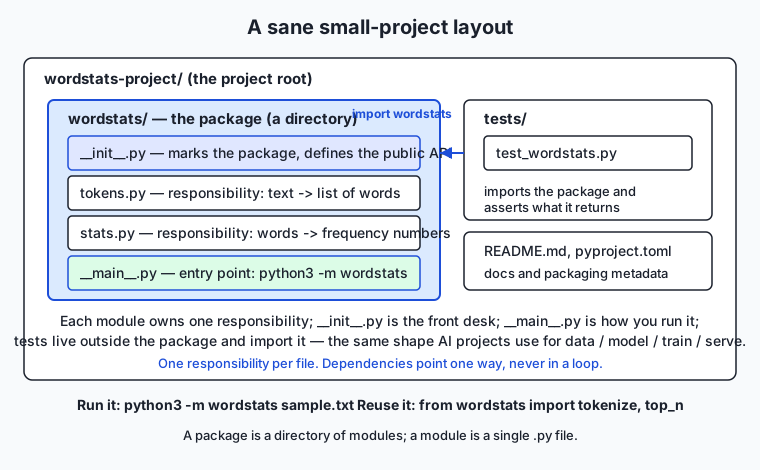
Read it as a set of nested boxes. The outermost is the project root — the folder you would put under version control. Inside it sits the wordstats/ package. Inside that are the modules, each with one job: tokens.py turns text into words, stats.py turns words into counts, __init__.py declares the public API, and __main__.py is the runnable entry point. Alongside the package, not inside it, is tests/, whose files import wordstats and check what it returns. This is the same shape, scaled down, that an AI project uses to hold data, model, train, and serve as separate modules under one package.
The three imports, and absolute versus relative
Inside __main__.py you will see from .tokens import tokenize. The leading dot makes it a relative import: “from the tokens module in this same package.” Relative imports are how one part of a package refers to a sibling without naming the whole package, which keeps the package movable and rename-safe. From outside the package — in a test, or in another project — you use an absolute import instead: from wordstats.tokens import tokenize, the full path from the top. The rule of thumb is simple: use absolute imports from outside the package (they are explicit and unambiguous), and relative imports for siblings referring to each other inside it. Both from-imports here bind a single name; a plain import wordstats.stats would instead give you the whole module to call as wordstats.stats.top_n, and import wordstats.stats as st would shorten that to st.top_n.
How Python finds a module, and the cache
When you run import wordstats.tokens, Python does not scan your disk. It follows a precise procedure, drawn in the flowchart below. First it checks the module cache, a dictionary named sys.modules holding every module already imported in this process. If wordstats.tokens is there, Python hands back the cached object immediately — this is why importing a module a second time is nearly free and why a module’s top-level code runs only once, no matter how many files import it. If it is not cached, Python searches sys.path, an ordered list of directories: for a python3 -m run the current directory comes first, followed by the standard library and installed-package locations. Python walks that list in order and imports the first match it finds. When it finds the file, it executes the module once, stores the result in sys.modules, and finally binds the name in your file.
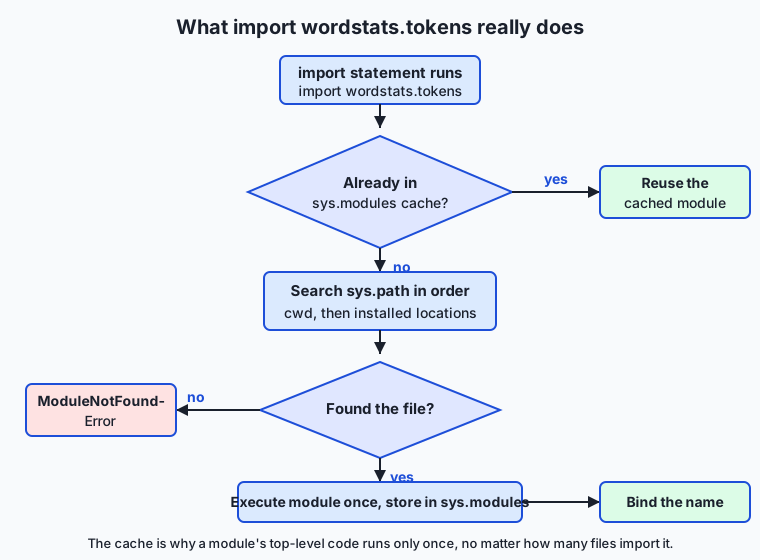
Two consequences fall straight out of this procedure. The first is a whole class of bugs: if you name your own file re.py and it sits earlier on sys.path than the standard library, your file shadows the real re module and gets imported instead — which is why this lesson’s tokenizer module is called tokens.py, not tokenize.py (there is a standard-library tokenize). The second is the meaning of the dreaded ModuleNotFoundError: it does not mean the file is missing from your disk, only that Python did not find it anywhere on sys.path — usually because you ran the command from the wrong directory.
The run-or-import switch
Every module has a built-in variable, __name__. When Python imports a module, it sets that module’s __name__ to the module’s dotted name, such as "wordstats.tokens". But when you run a file directly — python3 -m wordstats, or python3 script.py — Python sets __name__ to the special string "__main__" for that file. The guard if __name__ == "__main__": reads this switch: the code inside it runs only when the file is the one you launched, and is skipped when the file is merely imported. That is the entire trick behind a file that is both a usable program and an importable library. Put the runnable behaviour — read a file, print a report, exit — behind the guard, and keep the reusable functions above it, and the same file serves both masters.
An everyday analogy
Think of a well-run library. A module is a single book: one .py file, one subject, with a spine label — its name. A package is a labeled shelf holding related books, and the little index card at the end of the shelf that lists “what’s here and where” is the __init__.py: a reader can consult the shelf’s card and find the right book without pulling down every volume. To import a book is to request it by its call number. When you ask for a book, the librarian does not run to the stacks blindly — she first checks the reserved cart behind the desk (the module cache): if this book was fetched earlier today, she hands you the same copy already sitting there, rather than making the long trip again. Only if it is not on the cart does she consult the ordered list of rooms to search (sys.path), walk to the first room that has it, bring it back, and — importantly — place a copy on the reserved cart so the next request is instant.
The analogy carries the finer points too. An absolute import is a full call number from the library’s master catalog; a relative import is “the book right next to this one on the same shelf” — shorter, and it still works if the whole shelf is moved to another room. The __name__ == "__main__" guard is a note inside a book that says do the front-desk demonstration only if a reader checks this book out directly — not if another book merely cites you. And a circular import is two books that each open with “before reading me, go read that other book first,” which each in turn says the same about the first: nobody can ever start. The librarian’s fix is the programmer’s fix — pull the shared passage out into a third book that both of the others cite, so neither depends on the other. Keep this library in mind and the whole import system stops feeling like magic.
Examples in practice
Here is the whole idea in one small package, wordstats, that counts word frequencies. First, the “before” — everything crammed into one script, single_file.py, where the real work only happens when the file is run:
import re, sys
from collections import Counter

if __name__ == "__main__":
    text = open(sys.argv[1]).read() if len(sys.argv) > 1 else sys.stdin.read()
    words = re.findall(r"[a-z0-9']+", text.lower())
    ordered = sorted(Counter(words).items(), key=lambda p: (-p[1], p[0]))
    print(f"{len(words)} words, {len(set(words))} unique")
    for rank, (word, count) in enumerate(ordered[:5], start=1):
        print(f"{rank}. {word}: {count}")
It runs, but nothing in it can be imported or tested — the logic is welded to the “run” path. Now the “after,” split by responsibility. The tokenizing module, wordstats/tokens.py:
import re
_WORD_RE = re.compile(r"[a-z0-9']+")

def tokenize(text):
    return _WORD_RE.findall(text.lower())
The counting module, wordstats/stats.py:
from collections import Counter

def count_words(words):
    return dict(Counter(words))

def top_n(words, n=5):
    counts = count_words(words)
    return sorted(counts.items(), key=lambda p: (-p[1], p[0]))[:n]
The package’s front desk, wordstats/__init__.py, using relative from-imports to define the public API:
from .tokens import tokenize
from .stats import count_words, top_n
__version__ = "1.0.0"
And the entry point, wordstats/__main__.py, with the guard:
import sys
from .tokens import tokenize
from .stats import top_n

def report(text, n=5):
    words = tokenize(text)
    lines = [f"{len(words)} words, {len(set(words))} unique"]
    for rank, (word, count) in enumerate(top_n(words, n), start=1):
        lines.append(f"{rank}. {word}: {count}")
    return "\n".join(lines)

def main(argv):
    text = open(argv[1]).read() if len(argv) > 1 else sys.stdin.read()
    print(report(text))
    return 0

if __name__ == "__main__":
    sys.exit(main(sys.argv))
Now watch what the split buys you. You can run it as a program — python3 -m wordstats sample.txt — and, because report is a pure function above the guard, you can also import and test it: from wordstats.__main__ import report; report("a a b") returns the report string without reading a file or launching anything. You can pull the public API straight in — from wordstats import tokenize, top_n — and reuse the pieces in a completely different program. Real AI libraries work exactly this way: you from transformers import pipeline or import torch.nn as nn, reaching into a large package for the one piece you need, precisely because their authors split responsibilities into modules and declared a public API. The lab has you perform this refactor yourself and prove, with tests that import your modules, that it worked.
Implications: security, privacy, performance, scalability, and cost
Security. An import is not passive: Python executes a module’s top-level code the first time it is imported. Importing an untrusted module therefore runs untrusted code — one of the reasons supply-chain attacks target package repositories, slipping malicious code into a popular package’s import path. Two habits follow: read what you import, and be deliberate about sys.path. Because the current directory is searched first for python3 -m, a hostile or careless file in your working directory can shadow a standard-library module (name a file random.py and watch imports of random break in confusing ways). Keep module names distinct from the standard library, and never add untrusted directories to the path.
Privacy. Modules give you a natural boundary for sensitive material. Secrets — API keys, credentials — belong in their own module or, better, in environment variables read by one small module, never scattered through the codebase or hard-coded where they can leak into logs, exports, or version control. A single “configuration” module is easy to audit and easy to keep out of a public release; secrets sprinkled across ten files are neither.
Performance. The module cache makes imports cheap after the first, so importing a module in a loop costs almost nothing — but the first import runs all of the module’s top-level code, so heavy work at module top level (loading a large file, building a big table) makes every program that imports it slow to start. The professional habit is to keep top-level code light — definitions, not actions — and put real work inside functions that run only when called. This is the same instinct as the __main__ guard: nothing expensive should happen merely because a file was imported.
Scalability. Clear module boundaries are what let a codebase grow without seizing up, and what let a team grow. When responsibilities are separated into modules with small interfaces, two people can work on the tokenizer and the counter at once without colliding, and a new module — a new responsibility — is added as one new file plus a couple of import lines, not a risky edit to a giant shared file. This is why every large AI framework is a deep tree of packages: it is the only structure that scales to hundreds of contributors.
Cost. Bad structure has a direct price, and it is paid in the most expensive currency in software: developer time. Untestable code (because it cannot be imported) ships more bugs; tangled code takes longer to change safely; unnavigable code makes every newcomer slow. The hours you save later by splitting responsibilities today dwarf the minutes the split costs. For AI specifically, code you can import and test is code you can put in a pipeline and automate; code you cannot is code a human must babysit.
Alternatives: free, open source, and commercial
“Alternatives” here means the tools and layouts you will actually meet for organizing and importing Python code, and how to choose among them.
| Tool / approach | What it is | When to choose it | Cost |
|---|---|---|---|
Standard import + packages | Python’s built-in module system (this lesson) | Always — it is the foundation everything else builds on | Free, built in |
A flat package (pkg/ of modules) | One package directory, modules by responsibility | Small-to-medium projects and libraries; where you are today | Free, built in |
The src/ layout | Package under a top-level src/ directory | Larger projects and distributable libraries; avoids importing the wrong copy during tests | Free (convention) |
pytest | The standard third-party test runner | Once you have importable modules and want real tests | Free, open source |
pyproject.toml + build tools | Standard packaging metadata and builders (e.g. hatchling, setuptools) | When you want to pip install or publish your package | Free, open source |
| Namespace packages | Packages without __init__.py (PEP 420) | Splitting one logical package across several installs | Free, built in |
The through-line: the plain import system and a package directory are all you need today, and everything commercial or advanced — test runners, build tools, monorepo layouts — sits on top of the same module-and-package foundation, not beside it. Learn the base well and the rest is configuration.
To use the leading options concretely: choosing a flat package means creating a directory, adding __init__.py, and splitting modules by responsibility — exactly the lab. Moving to the src/ layout later means putting that package inside a src/ folder so tests import the installed copy rather than accidentally importing the source directory; you adopt it when you start distributing the package. Adding pytest means writing tests/test_*.py files that import your package and call assert — trivial once your code is importable, impossible while it is one script. That progression, from flat package to tested, packaged project, is the same road every Python AI project travels.
Comparison with related concepts
| Concept A | Concept B | Key difference |
|---|---|---|
| Module | Package | A module is one .py file; a package is a directory of modules marked by __init__.py |
import module | from module import name | The first binds the whole module (module.name); the second binds just name for direct use |
| Absolute import | Relative import | Absolute names the full path from the top (wordstats.tokens); relative uses a leading dot for a sibling (.tokens) |
__name__ == "__main__" | a plain top-level statement | The guarded code runs only when the file is run; a plain statement runs on every import too |
| Module (namespace) | Function scope | Both create separate namespaces, but a module’s namespace is shared across a whole file and reachable by importers; a function’s scope is private and vanishes when it returns |
import | #include (C) | import runs a module once and binds a reference; #include textually pastes a file’s contents |
When to use it — and when not to
Reach for a module the moment a file starts doing two clearly different jobs, or the moment you want to reuse a function somewhere else, or the moment you want to test a piece in isolation — those three itches (mixed responsibilities, reuse, testability) are the signal to split. Reach for a package when you have several related modules that belong together and deserve a shared name and a public API. And add the __main__ guard to any file you might ever both run and import, which in practice is almost every entry point you write.
Know equally when not to over-structure. A genuine ten-line throwaway script does not need a package, an __init__.py, and a tests/ directory; that is ceremony without benefit, and premature structure is its own kind of mess. The judgment is to match the structure to the size: a sketch stays a file, a tool becomes a package, and you promote the sketch to a package the moment it earns it — when a second person, a second use, or a first test appears. The mistake beginners make is leaving a program in one file long after it has outgrown it; the mistake the freshly-taught make is wrapping a two-line snippet in three directories. Aim for the middle: one responsibility per module, dependencies pointing one way, and no more structure than the program has earned.
The AI thread ties back here. Every model you train, dataset you clean, and agent you launch will live in a project with a layout — and the projects whose layout you can read and extend are the ones you will learn from, contribute to, and build on. When you open a machine-learning repository and see data/, models/, train.py, and tests/, you are seeing today’s lesson at production scale: modules by responsibility, imported into one another, run from an entry point, checked by tests that import them. The habit you build on a word-frequency package is the same habit that lets your AI code be reused, tested, and shipped — instead of living, and dying, in one giant notebook.
Knowledge check
Try these from memory before looking back:
- In one sentence each, define module and package, and name the file that turns a directory into a package.
- Explain the difference between
import stats,from stats import top_n, andimport stats as st— what name can you use after each? - A colleague says “every time I import my module its setup code runs again.” Using the module cache, explain why that is not true and what actually happens on the second import.
- You run
python3 -m wordstatsfrom the wrong directory and getModuleNotFoundError. Usingsys.path, explain what went wrong — and why the file is not actually missing. - What does
if __name__ == "__main__":protect, and why does putting your “run” code behind it make the rest of the file testable?
Hands-on exercise
Time to perform the split yourself. In the Day 59 lab you take a working single-file program — starter/single_file.py, a word-frequency tool with tokenizing, counting, reporting, and command-line handling all tangled together — and refactor it into the wordstats/ package: tokens.py (one responsibility, text to words), stats.py (words to counts), an __init__.py that defines the public API with relative imports, and a __main__.py entry point with the if __name__ == "__main__": guard. Six numbered exercises walk you through it; a design worksheet has you plan the split first. Then you run a test suite that imports your modules and asserts what they return — proof that the refactor worked and the payoff of making code importable.
Two commands anchor the work. Run the finished reference as a program from the examples/ directory:
cd examples
python3 -m wordstats sample.txt
and import its public API as a library:
python3 -c "import sys; sys.path.insert(0, 'examples'); from wordstats import tokenize, top_n; print(top_n(tokenize('a a b'), 2))"The first runs the package through its __main__.py; the second reaches into it for two functions and uses them with no file and no terminal — the two abilities that the single-file version could never offer.
Expected output
Running the reference tool on the bundled sample.txt (which holds “The cat sat on the mat.” and two more lines) prints exactly:
19 words, 10 unique
1. the: 6
2. cat: 2
3. dog: 2
4. on: 2
5. sat: 2
The import one-liner prints [('a', 2), ('b', 1)]. The package is deterministic — top_n breaks ties alphabetically — so your output will match on any machine. The full test suite prints 18 checks, 0 failure(s). while the starter is unfinished, and 26 checks, 0 failure(s). once you complete all six exercises.
Validate your work
You are done when you can check every box:
-
cd examples && python3 -m wordstats sample.txtprints the six lines above. -
from wordstats import tokenizesucceeds andtokenize('Hello, HELLO world!')returns['hello', 'hello', 'world']. - Your completed
starter/wordstatsruns aspython3 -m wordstatsfrom thestarter/directory and matches the reference. -
from wordstats import top_nworks fromstarter/(proof your__init__.pypublic API is done). -
bash tests/run_tests.shends with0 failure(s). - You can point to one relative import, one from-import, one import-as, and the
__main__guard in your finished package.
Troubleshooting
No module named wordstats. You ranpython3 -m wordstatsfrom the wrong place. The current directory is first onsys.path, so run it from the directory that contains thewordstats/folder (cd examplesorcd starter).attempted relative import with no known parent package. You ran a file inside the package directly (python3 wordstats/__main__.py). Relative imports need package context — run the package withpython3 -m wordstatsinstead.from wordstats import tokenizefails in the starter. Exercise 5 is not done:starter/wordstats/__init__.pydoes not yet re-export the name. Uncomment its two relative imports. (Importing straight from the submodule,from wordstats.tokens import tokenize, works even before that.)- A
NotImplementedError. That is a deliberate stub for an unfinished exercise — replace theraise NotImplementedError(...)line with the real body described in the comment above it.
Common mistakes
- Making the responsibility modules import each other. If
tokens.pyimportsstats.pyandstats.pyimportstokens.py, you get a circular import that Python cannot resolve. Keep dependencies pointing one way: the entry point imports the responsibility modules, never the reverse loop. - Naming a module after a standard-library one. Calling the tokenizer
tokenize.pycan shadow the standard library’stokenize; this lab usestokens.pyon purpose. Check for a name clash before naming a module. - Doing real work at module top level. Reading a file or printing at the top of a module runs on every import, surprising anyone who imports it and slowing startup. Put actions inside functions and behind the
__main__guard; keep the top level to definitions. - Forgetting the guard. Without
if __name__ == "__main__":, importing your entry-point module runs its whole program (and a test would launch it). Guard the run behaviour so the file can be both imported and run.
Practice assignment
Fill in starter/module-layout-worksheet.md for a different small program of your own — for example a tool that reads a file of numbers and prints their count, sum, and average, or one that reads lines and prints the longest. On paper first: name the program, list its distinct responsibilities and the module each will live in (one job per module), draw the import arrows and confirm they do not form a loop, and note where each import style (import, from-import, import-as, one relative and one absolute) will appear and which function stays pure so it can be tested. Then build it as a real package — a directory with __init__.py, at least two responsibility modules, and a __main__.py entry point with the guard — run it with python3 -m yourpackage, and import one of its functions with a python3 -c "from yourpackage import ..." line. Record the good run and the import in the worksheet’s final section. Keep it; a later lesson builds on this layout.
Extension challenge
Prove to yourself that you understand the module cache and circular imports by making both visible. First, add a line at the very top of tokens.py that prints loading tokens (outside any function), then from the examples/ directory run python3 -c "import wordstats.tokens; import wordstats.tokens; import wordstats.tokens". You will see loading tokens printed exactly once, not three times — the second and third imports came from the sys.modules cache. Remove the print line afterward. Second, deliberately create a circular import: make tokens.py start with from .stats import count_words and stats.py start with from .tokens import tokenize, then run python3 -m wordstats sample.txt, read the ImportError carefully, and fix it by removing one of the two imports and restoring the one-way dependency. Write three or four sentences explaining what the cache demonstration proved about when a module’s top-level code runs, and what the circular import taught you about why package dependencies must point one way — the exact reasoning that keeps a real AI project’s data, model, and train modules from tangling into a knot.
Quiz
Q1. In Python, what exactly is a "module"?
- A single .py file, whose contents you can import into another file
- A directory that contains an __init__.py file
- A function that is imported from the standard library
- Any block of code inside an if __name__ == "__main__": guard
Show answer
Answer: A. A single .py file, whose contents you can import into another file
A module is simply one .py file; its name is the filename without the extension. A directory of modules marked by __init__.py is a package, which is the next unit up, not a module.
Q2. What turns an ordinary directory of .py files into an importable package?
- Naming the directory in all lowercase
- Adding a requirements.txt to the directory
- Including an __init__.py file (which also typically defines the public API)
- Running python3 -m on the directory once
Show answer
Answer: C. Including an __init__.py file (which also typically defines the public API)
An __init__.py marks a directory as a package and is the natural place to re-export the public API. The other options do nothing to make a directory importable as a package.
Q3. You write `import wordstats.stats as st`. Which name do you then use to call `top_n`?
- top_n(...) directly, because import-as brings the function into scope
- st.top_n(...), because import-as binds the module under the alias st
- wordstats.top_n(...), ignoring the alias
- stats.top_n(...), because the alias applies only to the package
Show answer
Answer: B. st.top_n(...), because import-as binds the module under the alias st
`import module as alias` binds the whole module under the alias, so you reach its contents as `st.top_n(...)`. To call `top_n` with no prefix you would need a from-import: `from wordstats.stats import top_n`.
Q4. A module prints "loading" at its top level (outside any function). You import it three times in one program. How many times is "loading" printed, and why?
- Three times — each import re-runs the file
- Zero times — top-level code never runs on import
- Three times — imports are not cached
- Once — after the first import the module is cached in sys.modules and reused
Show answer
Answer: D. Once — after the first import the module is cached in sys.modules and reused
The first import runs the module top to bottom and stores it in the sys.modules cache; later imports return the cached module without re-running it. So top-level code runs exactly once per process.
Q5. Inside a package, one module contains `from .tokens import tokenize`. What does the leading dot mean?
- It imports from the current working directory on disk
- It is a relative import: from the tokens module in this same package
- It imports every name from tokens, like a wildcard
- It is a syntax error in modern Python
Show answer
Answer: B. It is a relative import: from the tokens module in this same package
A leading dot marks a relative import — "the tokens module in this same package." Relative imports let siblings refer to each other without naming the whole package, which keeps the package movable.
Q6. Running `python3 -m wordstats` from the wrong directory gives `ModuleNotFoundError`. What does that actually mean?
- Python searched sys.path and did not find the package there — often because the current directory (searched first) is wrong
- The wordstats files have been deleted from the disk
- The package has a syntax error that hides it
- Python only allows one module to be imported per program
Show answer
Answer: A. Python searched sys.path and did not find the package there — often because the current directory (searched first) is wrong
ModuleNotFoundError means Python did not find the module on sys.path, not that the file is missing. For a -m run the current directory is searched first, so running from the directory that contains the package fixes it.
Q7. Why put a program's run behaviour behind `if __name__ == "__main__":`?
- It makes the program run faster
- It is required or the file will not compile
- It hides the code from other developers
- So the file can be both run (the guarded code executes) and imported (it does not), which is what makes the rest of the file testable
Show answer
Answer: D. So the file can be both run (the guarded code executes) and imported (it does not), which is what makes the rest of the file testable
When a file is run directly, its __name__ is "__main__" and the guarded code runs; when it is imported, __name__ is the module name and the guard is skipped. That lets you import the file's functions for testing without launching the program.
Q8. When should you split a single-file script into a package?
- Always, even for a ten-line throwaway script
- Never — one file is always simpler and better
- When responsibilities have become mixed, you want to reuse a piece elsewhere, or you want to test a piece in isolation
- Only when the file exceeds exactly one thousand lines
Show answer
Answer: C. When responsibilities have become mixed, you want to reuse a piece elsewhere, or you want to test a piece in isolation
Mixed responsibilities, the need to reuse, and the need to test in isolation are the signals to split. A genuine throwaway script needs no package, and there is no magic line count — match the structure to what the program has earned.
Glossary
- module
- A single .py file of Python code, importable by other files; its name is the filename without the extension. Importing a module runs it once and gives you an object through which you reach the functions, classes, and variables it defined.
- package
- A directory of modules that Python treats as one importable name, marked by an __init__.py file. A package groups related modules under a shared name — for example wordstats/ containing tokens.py and stats.py, imported as wordstats.tokens.
- import
- The statement that loads a module (running its top-level code once, then caching it) and binds a name so you can use its contents. `import stats` binds the whole module, reached as stats.top_n.
- from-import
- The `from module import name` form, which reaches inside a module and binds just the chosen name, so you can use it directly — `from stats import top_n` lets you call top_n(...) without the module prefix.
- import as
- The `import module as alias` form, which binds a module (or `from module import name as alias` a name) under a different, usually shorter name — the reason data-science files begin `import numpy as np`.
- __name__
- A built-in variable every module has. Python sets it to the module's dotted name (such as "wordstats.tokens") when the module is imported, and to the special string "__main__" when the file is run directly — the switch the main guard reads.
- __main__
- The value Python assigns to __name__ in the file that was launched directly (via python3 script.py or python3 -m package). Code under `if __name__ == "__main__":` therefore runs only when the file is run, not when it is imported.
- __init__.py
- The file that marks a directory as a package and, by convention, defines the package's public API by re-exporting names from its submodules, so callers can write `from wordstats import tokenize` without knowing which module tokenize lives in.
- sys.path
- The ordered list of directories Python searches to find a module to import. For a `python3 -m` run the current directory comes first, followed by the standard library and installed-package locations; Python imports the first match it finds, which is why file names can shadow standard-library modules.
- module cache
- The dictionary sys.modules holding every module already imported in the current process. Python checks it before searching sys.path, so a module is imported (and its top-level code run) only once no matter how many files import it; later imports reuse the cached object.
- absolute import
- An import that names a module by its full path from the top of the package tree, such as `from wordstats.tokens import tokenize`. Preferred from outside a package because it is explicit and unambiguous about exactly which module is meant.
- relative import
- An import that uses a leading dot to name a module relative to the current package, such as `from .tokens import tokenize` ("the tokens module in this same package"). Used between siblings inside a package; it works only when the file is imported as part of a package.
- circular import
- A situation where two modules each import the other, so neither can finish loading — Python cannot complete module A while it waits on module B, which in turn waits on A. The fix is to keep dependencies pointing one way, or to extract the shared code into a third module both import.
Sources and further reading
- Python tutorial — Modules — Python Software Foundation (accessed 2026-07-13)
- The import system — Python Software Foundation (accessed 2026-07-13)
- Python Modules and Packages — An Introduction — Real Python (accessed 2026-07-13)
- Packaging Python Projects — Python Packaging Authority (accessed 2026-07-13)
- Modular programming — Wikipedia (accessed 2026-07-13)
Kept in this browser, no account needed. Your progress page turns the whole record into one link you can bookmark or open on another device.