Programming with Python › Functions and Program Design › Day 61
Day 61: Writing Readable Code
After this lesson you will be able to write and refactor Python that other people (and your future self) can read: PEP 8 naming and layout, meaningful names and small single-purpose functions, docstrings that say why (PEP 257), type hints as checkable documentation, the Zen of Python (PEP 20) as guiding principles, and the tools that automate style — a formatter (Black) and a linter (Ruff or flake8).
Hands-on lab for this lesson
Lab files on GitHub: https://github.com/ai-roadmap-365/ai-roadmap-365.github.io/tree/main/labs/sections/programming-with-python/day-061-writing-readable-code
- Get the hands-on files. Clone the labs repository once (you can reuse this clone for every lesson). This works on macOS, Linux, and Windows (PowerShell or WSL):
git clone https://github.com/ai-roadmap-365/ai-roadmap-365.github.io.git cd ai-roadmap-365.github.io - Open this lesson's lab. Move into the directory for this specific day. Every lab lives at the same predictable path — section / subsection / week / day:
cd labs/sections/programming-with-python/day-061-writing-readable-code - Read the lab guide. Open `README.md` in that directory. It lists the exact commands, what each does, the expected output, and how to check your work — read it before running anything.
- Run it and check your work. Follow the README's "How to run" section: run the example first to see the finished result, then complete the numbered exercises in `starter/`, then run the tests. The tests pass (exit 0) only when your work is correct.
bash tests/run_tests.sh # or the test command named in the lab README
You can also open the lab as a local page (works offline, shows the file tree and expected output).
Learning objectives
By the end of this lesson you will be able to:
- Apply PEP 8 essentials without pedantry: naming conventions, spacing, line length, and import order, and explain what they buy a reader
- Choose meaningful, searchable names and split a large function into small, single-purpose functions
- Use the Zen of Python (PEP 20) as practical guidance for choosing between competing designs
- Write docstrings (PEP 257) and comments that explain WHY, not what, and tell the two apart
- Add type hints as documentation that tools can check, and describe how a type checker uses them
- Refactor working code in small, safe steps proven by tests, changing readability without changing behaviour
- Run a formatter (Black) and a linter (Ruff or flake8), read their output, and know when a missing optional tool should degrade gracefully
Prerequisites
- Days 57-60 of this course: functions, modules and imports, project layout, and the standard library
- Day 49: the shape of a real program — named functions, a main(), the main-guard idiom, and input validation
- Comfort running a script from the terminal with python3 and editing a text file
Why this matters
For four days you have been learning to build bigger things — functions, modules, project layout, the standard library. You can now make a program work. This lesson is about the other half of the job, the half that separates a script you throw away from software people trust: making a program readable. Readable code is code that another person — a teammate, a reviewer, or your own self six months from now — can understand and safely change without phoning you for an explanation.
This matters directly, and expensively, for the AI work ahead. A machine-learning experiment is only worth something if someone can reproduce it, and reproducing it means reading the code that prepared the data, set the hyperparameters, and logged the results. When a training run costs real money and hours of GPU time, a reviewer who cannot follow your data-cleaning script cannot catch the off-by-one that silently poisoned your dataset — and you will not catch it either, next quarter, when the code has gone cold in your memory. Unreadable code is where subtle, costly bugs hide, precisely because no human eye can rest on them long enough to see them.
There is a second, newer reason, and it will grow through this course. The AI coding assistants you will study later read your code the same way a colleague does: through its names, its structure, its docstrings, and its types. Feed them a tangle of one-letter variables and thousand-line functions and they help you badly, because there is nothing to grip. Feed them small, well-named, typed, documented functions and they help you well, because the intent is on the surface where both humans and machines can find it. Readable code is the shared language of human and machine collaboration; sloppy code degrades both at once. Today you learn to write the language properly — and, just as important, to refactor code you already have into it, in small safe steps that never break what works.
The idea in plain language
Think of your codebase as a workshop you share with a rotating crew: you today, a teammate next week, your future self next year, and — increasingly — an AI assistant looking over your shoulder. None of them can call you at 2 a.m. to ask what a variable means. Everything they need has to be visible in the shop itself. Readable code is a well-run workshop; unreadable code is a bench buried in unlabelled parts.
Making a workshop legible comes down to a handful of habits, and Python names them in short, free documents called PEPs — Python Enhancement Proposals. PEP 8 is the style guide: how to name things, how much to indent, where to put spaces, how long a line should be, how to order your imports — the shop’s rules for keeping benches square and aisles clear. PEP 257 covers docstrings: the laminated card at each station saying what it is for. PEP 20, the Zen of Python, is a short list of guiding principles — “Readability counts”, “Explicit is better than implicit”, “Simple is better than complex” — the shop’s philosophy, printed on the wall.
On top of those conventions sit a few practices that do the real work. You choose meaningful names, so a reader knows what a thing is without hunting for its definition. You write small functions that each do one job, so a station is easy to understand in isolation. You add docstrings and comments that explain why, not what — the note that says “this jig is fragile, don’t force it”, not one that says “this is a jig”. You add type hints, labels stating what kind of value fits where, which document your intent and let tools check it. And you lean on two kinds of automated helper: a formatter, which squares everything up the same way every time, and a linter, which walks the shop pointing at hazards. When you inherit a messy shop, you do not rebuild it overnight; you refactor — reorganise for clarity one small, tested step at a time, so the things it builds never change while it becomes a place a stranger could walk into and work.
Historical background
Python’s readability culture is deliberate and old. When Guido van Rossum designed the language starting in 1989, he made significant whitespace — indentation as syntax — a defining choice, precisely so that code that ran correctly also looked consistent. That single decision is why Python programs from different authors resemble each other far more than, say, C or Perl programs do.
The written conventions came soon after the community grew. PEP 8, the Style Guide for Python Code, was authored by van Rossum, Barry Warsaw, and Nick Coghlan and introduced in 2001; PEP 257, the Docstring Conventions, was written by David Goodger and van Rossum in the same year. Both are living documents, still maintained today. PEP 20, the Zen of Python, is a piece of gentle folklore: Tim Peters distilled the language’s design philosophy into nineteen aphorisms, published as a PEP in 2004 and hidden in the interpreter as an easter egg — type import this at a Python prompt and it prints. It opens with “Beautiful is better than ugly” and includes the line that anchors this whole lesson: “Readability counts.”
The tooling is much younger and has moved fast. Style checkers such as pycodestyle and the linter flake8 were community staples through the 2010s. Black, an opinionated auto-formatter, arrived in 2018 and changed norms almost overnight by ending arguments about layout — it simply reformats your code to one standard, with barely any options to bicker over. Type hints entered the language through PEP 484 in 2014, and the standard-library typing module grew up around them, turning optional annotations into a checkable form of documentation. Most recently, Ruff — a linter and formatter written in Rust, released in 2022 — became popular by doing the work of several older tools at once, and fast enough to run on every keystroke. The conventions are decades old and stable; the robots that enforce them keep getting better.
What it is — and what it is not
Readable code is code whose intent is easy to recover. A reader can tell, quickly and correctly, what a name refers to, what a function does and returns, why a surprising line is there, and what shape of value flows through each step. Readability is a property of the source as a document, judged by a human trying to understand or change it — not by whether it runs, and not by how clever it is.
It is worth being precise about what readability is not, because beginners often chase the wrong thing. It is not the same as short: a dense one-liner that packs five operations onto a line is usually less readable than the four plain lines it replaces. It is not heavy commenting: a comment on every line that merely restates the code is noise that goes stale and actively misleads. It is not blind obedience to PEP 8: the guide itself says “A Foolish Consistency is the Hobgoblin of Little Minds” and tells you to break a rule when following it would hurt readability. And it is not a cosmetic finishing step you sprinkle on at the end — the names and structure are the design, chosen as you write. A formatter can square up your spacing, but no tool can rename d to summarise_scores for you, because only you know what d was for.
| Common misconception | The reality |
|---|---|
| ”Readable means as few lines as possible.” | Terseness often hurts readability. Clarity, not brevity, is the goal; four plain lines usually beat one clever one. |
| ”More comments always help.” | Comments that restate the code are noise and rot when the code changes. Comment the why, not the what, and let good names do the rest. |
| ”Type hints make my code run faster or safer at runtime.” | Python ignores hints at runtime by default. Their payoff is documentation and tool-checking, not speed or enforcement. |
| ”A formatter like Black makes my code correct.” | A formatter fixes layout only. It cannot fix bad names, bad structure, or a bug — it makes wrong code look tidy. |
| ”Following PEP 8 to the letter is the point.” | PEP 8 is guidance for readability, applied with judgement. It explicitly tells you to break a rule when obeying it would reduce clarity. |
Why it was created and what problems it solves
Every habit in this lesson exists to solve a problem that programmers rediscover, painfully, when they skip it.
Without naming conventions and meaningful names, every reader — including you, later — must reconstruct meaning from scratch. A variable called l could be a list, a length, or a loop counter; the reader has to trace its whole life to be sure, and one confident wrong guess becomes a bug. Meaningful names, and PEP 8’s convention of which style signals which kind of thing, let a reader know an identifier’s role at a glance. Without small functions, logic piles into one giant block where everything can touch everything, so you cannot understand, test, or change any part without holding the whole in your head. Decomposing into small single-purpose functions makes each piece understandable and testable on its own. Without docstrings and honest comments, the why of a decision lives only in the author’s memory and is lost the moment they move on. Without type hints, the shape of data is invisible until it crashes — and crashes late, far from the mistake. And without a formatter and linter, teams burn real time arguing over spacing in code review and miss the substantive problems, because the trivial ones are still on the page. The tools automate the trivia so humans can spend review on what matters: correctness and design.
The deep problem all of this solves is collaboration across time and people. Code that only its author can read, on the day they wrote it, is a liability the moment anyone else — or a later, forgetful version of the same person — must touch it. Readability turns a private artifact into a shared one.
How it works
Readable code rests on five pillars, each a habit you can practise deliberately. Picture them holding up a roof.
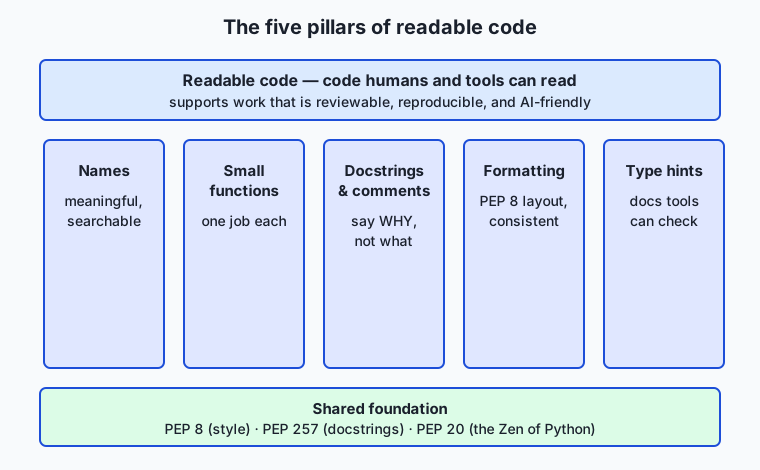
The five pillars — names, small functions, docstrings and comments, formatting, and type hints — all stand on one foundation: the shared conventions of PEP 8, PEP 257, and PEP 20. Let us take them in turn.
Meaningful names and PEP 8 conventions
A name should say what a thing is or does, and its form should say what kind of thing it is. PEP 8’s conventions do the second part for you: snake_case for variables and functions (passing_rate, parse_scores), CapWords for classes (ScoreReport), and UPPER_CASE for module-level constants (PASS_MARK). Follow them and a reader knows, before reading a single definition, that PASS_MARK is a fixed value and parse_scores is an action. Beyond convention, prefer names a reader can search for and pronounce: average over m, scores over l, total over t. Reserve single letters for tiny, conventional scopes — an i in a short index loop is fine; an l holding your program’s central data is not.
PEP 8’s other essentials are quickly stated: indent with 4 spaces (never tabs); put spaces around operators and after commas (total += score, not total+=score); keep lines to a sane width (PEP 8 says 79 characters; many teams relax this to about 88 or 100, the point being that very long lines are hard to scan); leave blank lines between functions; and order imports in three groups — standard library, third party, then your own — each group alphabetised. None of this is arbitrary fussiness: each rule removes a small friction between the reader’s eye and the code’s meaning.
| PEP 8 topic | The convention | Why it helps the reader |
|---|---|---|
| Function / variable names | snake_case | Signals “this is a value or an action” at a glance |
| Class names | CapWords | Distinguishes a type from a value instantly |
| Constants | UPPER_CASE | Marks a fixed value you should not reassign |
| Indentation | 4 spaces, no tabs | Consistent structure; no invisible tab/space mixups |
| Spacing | Around operators, after commas | Groups sub-expressions so the eye parses them correctly |
| Imports | Grouped stdlib / third-party / local, alphabetised | A reader can find a dependency and judge it fast |
Small, single-purpose functions
A function should do one job and be nameable by that job. If you find yourself wanting to write a comment like “now compute the median”, that is usually a sign the block underneath it should be a function called median. Small functions are easier to read (you hold less in your head), easier to name (one job, one name), easier to test (feed inputs, check outputs), and easier to reuse. The discipline is not about a magic line count; it is about a single responsibility. When one function parses input and computes statistics and formats output and prints, splitting it into parse_scores, mean, median, format_report, and a short main that coordinates them turns an opaque block into a table of contents.
Docstrings and comments (say why, not what)
A docstring is a string literal as the first statement of a module, function, or class. PEP 257 asks for a one-line summary in the imperative mood (“Return the arithmetic mean…”), optionally followed by a blank line and more detail. Unlike a comment, a docstring is real data: it becomes the object’s __doc__, and help(mean) prints it. That is why docstrings document the interface — what a function does, what it returns — for a caller who should not have to read the body.
A comment (a # line) is a note to whoever reads the source. The single most useful rule about comments is: explain why, not what. The code already shows what it does; a comment that restates it is noise that goes stale and lies. The valuable comment captures intent a reader cannot recover from the code — “a score at or above this mark counts as passing”, or “we divide by n, not n-1, because these are the whole population”. Say the surprising thing; delete the obvious one.
Type hints as checkable documentation
A type hint annotates the expected type of a parameter or return value: def mean(scores: list[float]) -> float:. By default Python does nothing with hints at runtime — it does not convert or enforce them — so they cost you no speed and no behaviour. Their payoff is twofold. First, they are documentation that cannot drift silently, because a reader sees exactly what mean consumes and produces. Second, a separate type checker (a tool such as mypy or Pyright, or your editor) reads the hints and warns you before you run the code if you pass a string where a list[float] is expected, or forget that a function can return None. Hints turn a class of late, confusing runtime errors into early, obvious ones — and they are exactly the signal an AI assistant uses to understand your intent.
An everyday analogy
Return to the shared workshop, and every pillar has a place you can point to. The names are the labels on the drawers and tools: a drawer marked “10 mm sockets” tells the next person what is inside without opening it, while a drawer marked “stuff” forces them to rummage — that is scores versus l. Small functions are single-purpose stations: a bench for cutting, a bench for sanding, a bench for finishing, each understandable on its own, instead of one chaotic table where every job happens on top of the last. The docstring is the laminated card bolted to each station — “Finishing station: applies two coats, sand between” — telling a newcomer what the station is for without making them reverse-engineer it. A comment is the handwritten sticky note that captures a why: “this clamp is worn, tighten by hand only.” Formatting is the shop rule that benches are squared and aisles kept clear, so nobody trips over clutter while trying to think. Type hints are the labels on the parts bins saying which fastener fits which slot, so you catch the wrong bolt before you strip a thread.
And the two robots have their place too. The linter is the safety inspector who walks through before a shift, pointing: “loose cable here, unlabelled bin there, this outlet is dead” — finding hazards but leaving the fixing to you. The formatter is the closing crew who squares up every bench the same way each night, so the shop looks identical no matter who worked in it. Refactoring, finally, is reorganising the shop for clarity — moving a station, relabelling drawers, splitting the chaotic table into single-purpose benches — without changing what the shop builds. And the way you do that safely is to build one test piece before you start, then rebuild it after every small change, confirming the shop still turns out exactly the same product. Keep this workshop in mind and the abstract advice becomes concrete: every habit is just a way of making the shop legible to the next person who walks in.
Examples in practice
Here is the transformation at the centre of today’s lab. Start with a function that works but is a buried table — one job, d, doing everything, with names that reveal nothing:
import sys
def d(a):
    l=[]
    for i in a:
        l.append(float(i))
    if len(l)==0:
        print("no data")
        return 1
    t=0
    for i in l: t=t+i
    m=t/len(l)
    # ... median, stdev, passing all inline, with 60 hard-coded ...
    return 0
It runs. Given 70 85 90 55 60 it prints mean: 72.00, stdev: 13.64, passing: 80.0%. But a reader cannot see the shape of the computation, cannot test the median in isolation, and cannot tell why 60 is special. Now refactor — in small, tested steps — into small named functions with docstrings and type hints, and a named constant for the magic number:
PASS_MARK = 60.0  # a score at or above this counts as "passing"


def parse_scores(raw_values: list[str]) -> list[float]:
    """Convert the raw command-line strings into a list of floats."""
    return [float(value) for value in raw_values]


def mean(scores: list[float]) -> float:
    """Return the arithmetic mean of a non-empty list of scores."""
    return sum(scores) / len(scores)


def passing_rate(scores: list[float]) -> float:
    """Return the percentage of scores at or above PASS_MARK."""
    passing = sum(1 for score in scores if score >= PASS_MARK)
    return 100 * passing / len(scores)
The behaviour is identical — the lab proves it byte for byte with diff — but now a reader sees the table of contents at a glance, can test mean([70, 85, 90, 55, 60]) on its own, and knows exactly why 60 matters because it has a name. That is readability: not a single number changed, yet the code went from opaque to obvious.
Now watch the automated tools do their part. A formatter applied to the cramped original squares up the spacing for you in one command:
black report.pyBlack rewrites t=t+i to total += score-style spacing, normalises quotes, and wraps long lines — reformatting in place with no arguments to configure. A linter reads the code and reports what a formatter cannot fix. Ruff, run on the messy file, prints one finding per line in a compact form:
messy.py:2:1: E302 expected 2 blank lines, found 0
messy.py:14:9: E701 multiple statements on one line (colon)
messy.py:3:5: F841 local variable 'l' is assigned but never used
Each line names the file, the line and column, a rule code, and a plain-English message — a to-do list you work down. The formatter handles the layout complaints; the linter’s F841-style findings (a real logic smell, like an unused variable) are yours to fix by hand. Together they let you and your reviewer spend attention on design, not on spaces.
Implications: security, privacy, performance, scalability, and cost
Security. Readable code is safer code, for a blunt reason: a reviewer can only catch a vulnerability they can see. A dangerous call — an eval() on user input, a shell command built from a string, a secret hard-coded in a variable — hides easily in a thousand-line function of single-letter names, and stands out immediately in a small, well-named one. Type hints add a second layer: a checker that knows a value is untrusted text can warn when it flows somewhere it should not. Clarity is a security control, not a nicety.
Privacy. When data is personal, you must be able to audit where it goes, and you can only audit code you can read. Named functions with clear boundaries — load_records, anonymise, export — let you point to exactly where private data enters, is transformed, and leaves. A tangle hides those flows, which is how personal data ends up logged, cached, or sent somewhere no one intended.
Performance. Readability and speed are usually allies, not rivals: clear code is easier to profile, and the real hotspot is easier to find and optimise when the structure is legible. The tools themselves are cheap — a formatter and linter run in well under a second on a normal file (Ruff, being compiled, runs in milliseconds), so there is no performance excuse to skip them. And type hints cost nothing at runtime by default.
Scalability. This is where readability pays the most. A one-file script you never share can be as scruffy as you like. But a codebase that grows to many files and many contributors cannot function without shared conventions — every author writing in their own style produces a shop no one can navigate. PEP 8, a formatter, and a linter are what let a large team’s code read as though one careful person wrote it, which is the only way large software stays maintainable.
Cost. The dominant cost of software over its life is not writing it but reading and changing it — study after study puts maintenance well above initial development. Readable code attacks that dominant cost directly: less time spent decoding, fewer bugs from misunderstanding, faster onboarding, shorter reviews. Every tool in this lesson is free and open source, so the only investment is the habit.
Alternatives: free, open source, and commercial
The tools that automate Python style are all free and open source; the choice is about ergonomics and how many jobs you want one tool to do, not about money. The two decisions you will actually make are which formatter and which linter.
Formatter: Black versus autopep8. Both reformat your code so you never argue about layout again. Black is opinionated: it imposes one consistent style with almost no configuration, reflowing whole constructs (it will rewrap your function calls and normalise your quotes). Choose Black when you want the argument over style to simply end — a whole team adopts it and every file looks the same forever. Use it with a bare command:
black report.py          # reformat in place
black --check report.py  # report whether it WOULD change anything (for CI)
autopep8 is conservative: it changes only what is needed to satisfy PEP 8, leaving the rest of your layout as you wrote it. Choose autopep8 when you want to nudge an existing codebase toward PEP 8 without the larger visual churn Black introduces. Use it as autopep8 --in-place report.py. Black is the more common modern default precisely because its lack of options ends debate; autopep8 wins when minimal, targeted change matters more. Both are free and open source.
Linter: Ruff versus flake8 + isort. A linter reads your code without running it and reports problems and style violations. The classic setup was flake8 (which bundles pycodestyle for PEP 8 and pyflakes for logic smells like unused imports) plus isort (a separate tool that sorts and groups your imports) — two tools, two configurations. Ruff is a newer single tool, written in Rust, that does the work of flake8, isort, and many plugins at once, and does it fast enough to run on every keystroke. Choose Ruff for a new project or when speed and one-tool simplicity appeal; choose flake8 + isort when you are maintaining an existing project already built around them, or want a specific plugin from that ecosystem. Using each:
ruff check report.py          # lint (find issues; --fix auto-fixes a subset)
# versus the classic pair:
flake8 report.py              # lint for PEP 8 + logic smells
isort report.py               # sort and group imports
All of these are free and open source — there is no paid tier to any of them. Where money enters the picture is only in the hosted layer built on top: services that run these same open-source checks automatically on every pull request (continuous-integration platforms and code-review bots) may charge for private repositories or larger teams. The tools themselves cost nothing; you pay only if you want someone else to run them for you on a schedule.
Comparison with related concepts
| Concept A | Concept B | Key difference |
|---|---|---|
| Formatter (Black) | Linter (Ruff/flake8) | A formatter rewrites layout to one style; a linter reports likely problems and style violations, generally without rewriting |
| Docstring | Comment | A docstring is a runtime string documenting an object’s interface (via __doc__/help()); a comment is source-only guidance, best used for why |
| Type hint | Runtime type check | A hint is documentation a tool checks before running; a runtime check (e.g. isinstance) actually tests a value while the program runs |
| Refactoring | Rewriting | Refactoring changes structure while preserving behaviour, verified by tests; rewriting starts over and may change behaviour |
| PEP 8 (style) | PEP 20 (Zen) | PEP 8 gives concrete rules for how code should look; PEP 20 gives high-level principles for choosing between designs |
| Readable code | Working code | Working code produces the right output; readable code also lets a human understand and safely change it — both matter |
When to use it — and when not to
Reach for these habits essentially always, and reach for them as you write, not only at the end. Meaningful names and small functions cost nothing extra in the moment and save enormous time later; there is no project too small to deserve a decent variable name. Run a formatter and a linter on anything you will keep, share, or revisit — set your editor to format on save and the habit becomes invisible. Add type hints to any function whose interface others (or tools, or you) will rely on; they are the cheapest documentation you will ever write. And refactor the moment code you must change has become hard to read: the best time to tidy a function is just before you extend it.
Know the honest limits, too, so you apply judgement rather than dogma. In a genuine ten-line throwaway — a one-off you will run once and delete — full docstrings and exhaustive hints can be ceremony that outweighs the benefit; clarity of names still helps, but you need not gold-plate. Do not let a linter’s every complaint become law: PEP 8 itself says to break a rule when following it would hurt readability, and a good linter lets you silence a rule you have judged wrong, with a comment saying why. And never treat a formatter’s tidy output as proof of correctness — Black will happily make a buggy function beautifully spaced. The skill is proportion: invest readability effort in proportion to how long the code will live and how many people (and machines) will read it, which for almost everything you build in this course is “a while” and “more than you think”.
This is where the day points at your future. The reproducible experiment, the reviewable pull request, the model-serving script a teammate can trust, the data pipeline whose privacy you can audit — every one of them rests on code someone other than its author can read. And the AI coding assistants ahead read exactly what a colleague reads: your names, your structure, your docstrings, your types. Write them clearly and both your human and your machine collaborators help you well; write them sloppily and you degrade both at once. Readable, typed, linted code is not a matter of taste. It is the substrate on which serious AI work is built.
Knowledge check
Try these from memory before looking back:
- Name the five pillars of readable code, and give a one-sentence reason each matters to a future reader.
- A colleague writes
# add 1 to counterabove the linecounter += 1. Explain what is wrong with the comment and what a useful comment there might say instead. - What does a type hint do at runtime by default, and what actually makes it valuable? Name the kind of tool that uses it.
- Explain the difference between a formatter and a linter, naming one example of each and one thing each can do that the other cannot.
- Describe the safe way to refactor a working function, and say what role the test suite plays in it.
Hands-on exercise
Time to make messy code readable without breaking it. In the Day 61 lab you take starter/messy.py — a small program that works but is painful to read (one giant function d, single-letter names, no docstrings, no types, a hard-coded 60) — and refactor it into clean, documented, type-hinted code that behaves identically, proven by a test suite. The clean target is shipped as examples/report.py. Work in the lab directory; every command below is run from there.
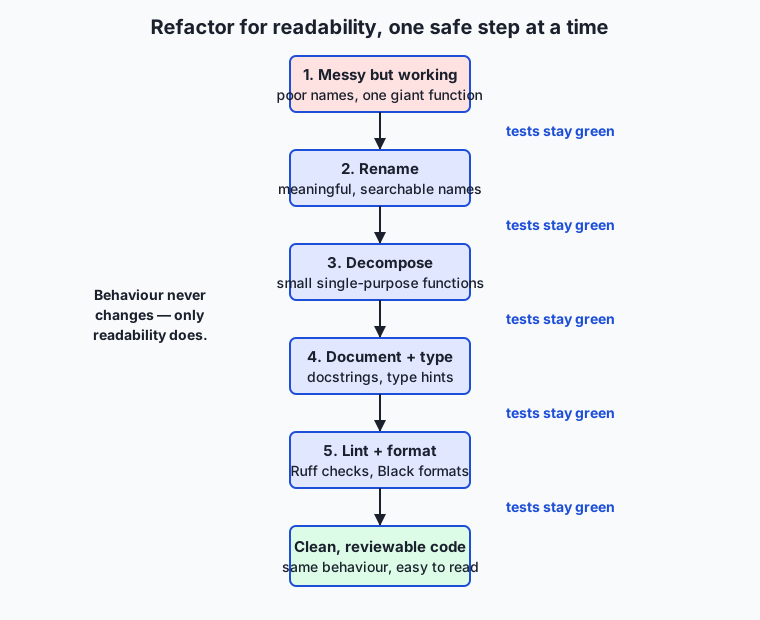
The whole method is captured in one picture: change one thing, run the tests, and only continue when they stay green.
First, see that the messy starter works and that the clean reference behaves identically:
python3 starter/messy.py 70 85 90 55 60
diff <(python3 starter/messy.py 70 85 90 55 60) <(python3 examples/report.py 70 85 90 55 60) && echo IDENTICAL
Establish your safety net before touching anything, then refactor in the five steps the worksheet names — rename, kill the magic number, decompose into small functions, document and type, format:
bash tests/run_tests.shThen edit starter/messy.py one step at a time, re-running the tests after each. If a step turns the tests red, undo that one change and try again smaller.
Expected output
For the input 70 85 90 55 60, both the messy starter and the clean reference print exactly this and exit 0:
count: 5
mean: 72.00
median: 70.00
min: 55.00
max: 90.00
stdev: 13.64
passing: 80.0%
The test suite, with the starter still messy, ends with 10 checks, 0 failure(s), 2 skipped. The two skips are the optional Black and Ruff/flake8 checks, which are not installed by default and are deliberately skipped rather than failed. Once you finish the refactor, the suite additionally holds your cleaned-up starter to the readability standard and ends with 14 checks, 0 failure(s), 2 skipped.
Validate your work
You are done when you can check every box:
-
python3 starter/messy.py 70 85 90 55 60prints the seven summary lines and exits 0. -
diffbetween the starter and the reference on the same input prints nothing (they are identical), andecho IDENTICALfires. -
bash tests/run_tests.shreports10 checks, 0 failure(s), 2 skipped.before you refactor. - After refactoring, your
starter/messy.pyhas meaningful names, aPASS_MARKconstant, several small functions, docstrings, and type hints. - The tests stayed green after every single step — behaviour never changed.
-
bash tests/run_tests.shreports14 checks, 0 failure(s), 2 skipped.once the refactor is complete.
Troubleshooting
- The tests went red after a rename. You changed behaviour, not just a name — likely renamed one use of a variable but not another. Undo the last single change, get back to green, and redo it more carefully. Small steps localise the mistake.
- The
stdevvalue changed. You switched population standard deviation (divide byn) to sample (divide byn - 1). Readability refactoring must keep every number identical; only names and structure change. - The
black/ruffchecks say “skip”. That is expected: those tools are optional and not installed by default. The suite skips them and still passes. Install them withpython3 -m pip install black ruffonly if you want to try them. SyntaxErrormentioninglist[float]. You are on Python older than 3.9. Upgrade, or usefrom typing import ListandList[float].
Common mistakes
- Refactoring and “improving” behaviour at once. Resist changing what the code does while you tidy it. Refactor first (behaviour identical, tests green), then change behaviour as a separate, separately tested step.
- Comments that restate the code. Writing
# loop over scoresabove aforloop adds noise. Comment the why (why60is the pass mark), or say nothing and let the names carry it. - One giant change instead of small ones. Renaming, decomposing, and typing all in a single edit means a red test tells you nothing about which change broke it. One change, one test run.
Practice assignment
Take a piece of your own code — the Records CLI from Day 56, one of your Day 57–60 exercises, or any script you have written — and refactor it for readability using exactly the method from the lab, keeping a short log as you go. Before you start, write (or borrow) a handful of tests or a golden-output check that captures its current behaviour, so you have a safety net. Then work the five steps in order: rename every unclear identifier following PEP 8; replace any magic numbers with named constants; split any function doing more than one job into small single-purpose functions; add a module docstring and a one-line docstring to each function that says why/what-it-returns (not a play-by-play); and add type hints to every function signature. Run your behaviour check after each step and confirm it stays green. If you have Black and Ruff installed, finish by running black and ruff check and resolving or consciously justifying each finding; if not, format by hand to PEP 8. In your log, record one name you improved and why, one function you extracted and the single job it now does, and one comment you deleted because the code already said it. Keep the before and after — the contrast is the lesson.
Extension challenge
Go deeper on the tools and the types. First, install a type checker — python3 -m pip install mypy — and run mypy report.py on the lab’s clean reference; read its output, then deliberately introduce a type error (pass a string where a list[float] is expected) and watch mypy catch it before the code runs, proving the point that hints turn late runtime bugs into early static ones. Second, add a Ruff (or flake8) configuration to a project of your own that sets a line length and enables a useful extra rule, then run it and fix what it flags — experiencing how a linter’s rules are chosen, not just accepted. Third, read the actual Zen of Python by running python3 -c "import this", pick three of its aphorisms, and write a short paragraph on each connecting it to a concrete choice you made while refactoring — “Explicit is better than implicit” when you named PASS_MARK, say, or “Simple is better than complex” when you split d into small functions. You will have used a formatter, a linter, and a type checker on real code, and connected the philosophy to the practice — exactly the toolkit that keeps AI work reproducible and reviewable.
Quiz
Q1. Why do experienced developers deliberately optimise code for readability?
- Because Python executes readable code faster than terse code
- Because the interpreter refuses to run code that violates PEP 8
- Because code is read far more often than it is written, so the time spent reading and changing it dominates the cost of software
- Because readable code always uses less memory
Show answer
Answer: C. Because code is read far more often than it is written, so the time spent reading and changing it dominates the cost of software
Readability is an economic argument, not an aesthetic one: over a program's life it is read and modified many more times than it is first written, so anything that makes reading faster pays off repeatedly. PEP 8 is guidance, not something the interpreter enforces, and formatting does not change speed or memory.
Q2. Which name follows PEP 8's convention for a module-level constant?
- MAX_RETRIES = 5
- maxRetries = 5
- maxretries = 5
- Max_Retries = 5
Show answer
Answer: A. MAX_RETRIES = 5
PEP 8 uses UPPER_CASE_WITH_UNDERSCORES for constants, snake_case for variables and functions, and CapWords for classes. `maxRetries` is camelCase (a JavaScript/Java habit), `maxretries` is unreadable, and `Max_Retries` matches no Python convention.
Q3. How does a docstring differ from a comment?
- A docstring is simply faster to type than a comment
- Comments are shown by help() but docstrings are not
- They are identical; the two words are interchangeable
- A docstring is a string literal kept at runtime (via __doc__ and help()), while a comment is only visible in the source and is ignored by the interpreter
Show answer
Answer: D. A docstring is a string literal kept at runtime (via __doc__ and help()), while a comment is only visible in the source and is ignored by the interpreter
A docstring is the first string literal in a module, function, or class and becomes that object's __doc__, which help() and editors display. A comment (a # line) is guidance for whoever reads the source and is discarded by the interpreter — it is never available at runtime.
Q4. What should a good comment or docstring mainly explain?
- What each line does, step by step, in plain English
- Why the code exists, or a non-obvious decision — the reasoning a reader cannot recover from the code itself
- Which version of Python is required to run the file
- Who wrote the code and on what date
Show answer
Answer: B. Why the code exists, or a non-obvious decision — the reasoning a reader cannot recover from the code itself
Good documentation says WHY, not what: the code already shows what it does, so a comment that restates it adds noise and rots when the code changes. The valuable comment captures intent, trade-offs, and surprises a future reader could not infer.
Q5. What do Python type hints do at runtime, by default?
- They convert each value to the annotated type automatically
- They stop the program with an error whenever a value has the wrong type
- Nothing — they are not enforced at runtime; they document intent for readers and are checked by separate tools such as a type checker
- They make annotated functions run measurably faster
Show answer
Answer: C. Nothing — they are not enforced at runtime; they document intent for readers and are checked by separate tools such as a type checker
Type hints are annotations, not runtime checks: Python does not convert or validate values based on them. Their value is documentation that a reader and a separate type checker (or an editor) can use to catch mismatches before the code ever runs.
Q6. What is the difference between a formatter like Black and a linter like Ruff or flake8?
- A formatter rewrites the code's layout into a consistent style; a linter analyses the code and reports likely problems and style violations, but generally does not rewrite it
- A formatter finds bugs, while a linter only fixes indentation
- They are the same kind of tool under two different names
- A linter runs the program, while a formatter compiles it to machine code
Show answer
Answer: A. A formatter rewrites the code's layout into a consistent style; a linter analyses the code and reports likely problems and style violations, but generally does not rewrite it
A formatter (Black) automatically standardises layout — spacing, quotes, line wrapping — so style is applied by machine. A linter (Ruff, flake8) reads the code without running it and flags issues such as unused imports, undefined names, and PEP 8 violations; it reports rather than rewrites (though some, like Ruff, can auto-fix a subset).
Q7. What is the safest way to refactor a working function?
- Rewrite the whole file at once, then run it to see if it still works
- Change names, structure, and types all together in a single large edit
- Delete the tests first so they do not get in the way
- Make one small change, run the tests, and continue only when they still pass
Show answer
Answer: D. Make one small change, run the tests, and continue only when they still pass
Refactoring means improving structure without changing behaviour, so a passing test suite is your safety net. Small steps — rename, test; extract a function, test — localise any mistake to the last change, which is why it is far safer than one big rewrite.
Q8. Your test suite can optionally run a formatter that is not installed on this machine. What should a well-designed suite do?
- Fail the entire suite, because a tool it mentioned is missing
- Skip that one check cleanly and still pass, since the tool is optional
- Download and install the tool automatically over the network
- Silently report every check as passed without actually running anything
Show answer
Answer: B. Skip that one check cleanly and still pass, since the tool is optional
An optional tool should degrade gracefully: skip its check and report the skip, so a missing convenience never turns the suite red or forces a network install. Silently passing everything (option 3) hides real failures, and hard-failing (option 1) punishes people for not installing an optional extra.
Glossary
- readability
- The quality of code that lets a human understand what it does and why with the least effort — driven by clear names, small functions, consistent layout, and explanations of intent. Code is read far more often than it is written, so readability is a first-class goal, not a finishing touch.
- style guide
- A shared set of conventions for how code should look and be organised, so a team's code reads as if one careful person wrote it. For Python the canonical style guide is PEP 8.
- PEP 8
- Python's official Style Guide for Python Code: conventions for naming (snake_case for functions and variables, CapWords for classes, UPPER_CASE for constants), indentation (4 spaces), spacing around operators, line length, and import order. It is guidance for readability, applied with judgement rather than pedantry.
- PEP 257
- Python's Docstring Conventions: how to write the triple-quoted string that documents a module, function, class, or method — a one-line summary in the imperative, a blank line, then any detail — describing what the object does and why, not a line-by-line account of how.
- PEP 20 (the Zen of Python)
- A short list of guiding aphorisms for Python design — "Readability counts", "Explicit is better than implicit", "Simple is better than complex", "There should be one obvious way to do it" — printed by running `import this`. It is a set of tie-breakers for choosing between competing designs.
- naming convention
- An agreed pattern for choosing identifiers so their form signals their role: in Python, snake_case for variables and functions, CapWords (PascalCase) for classes, and UPPER_CASE for module-level constants. Following the convention lets a reader guess what a name is before reading its definition.
- docstring
- A string literal written as the first statement of a module, function, class, or method, accessible at runtime as the object's `__doc__` and by `help()`. Unlike a comment, it is part of the program's data and is what documentation tools and IDEs display.
- comment vs docstring
- A comment (a line starting with #) is a note to whoever reads the source, ideally explaining WHY a piece of code exists or a non-obvious decision; a docstring is structured documentation of an object's purpose and interface, readable at runtime. Rule of thumb: docstrings say what and why for the caller; comments explain why for the maintainer; neither should merely restate what the code plainly does.
- type hint
- An optional annotation stating the expected type of a variable, parameter, or return value, such as `def mean(scores: list[float]) -> float:`. Python does not enforce hints at runtime, but they document intent for readers and let tools (type checkers, editors) catch mismatches before the code runs.
- linter
- A tool that analyses source code without running it and reports likely problems and style violations — unused imports, undefined names, shadowed variables, lines that break PEP 8. In Python, Ruff and flake8 are popular linters; a linter finds issues but generally does not rewrite your code.
- formatter
- A tool that automatically rewrites code into a consistent layout — indentation, spacing, quote style, line wrapping — so style is machine-applied rather than argued over. Black is the widely used Python formatter; it is deliberately opinionated and has few options.
- refactoring
- Changing the internal structure of code to make it clearer or simpler without changing its external behaviour. Done well, it proceeds in small steps, each verified by tests, so that improved readability never comes at the cost of a hidden bug.
Sources and further reading
- PEP 8 — Style Guide for Python Code — Python Software Foundation (accessed 2026-07-13)
- PEP 257 — Docstring Conventions — Python Software Foundation (accessed 2026-07-13)
- PEP 20 — The Zen of Python — Python Software Foundation (accessed 2026-07-13)
- How to Write Beautiful Python Code With PEP 8 — Real Python (accessed 2026-07-13)
- typing — Support for type hints — Python Software Foundation (accessed 2026-07-13)
Kept in this browser, no account needed. Your progress page turns the whole record into one link you can bookmark or open on another device.