Programming with Python › Functions and Program Design › Day 60
Day 60: A Tour of the Standard Library
After this lesson you will know the map of the Python standard library — which module to reach for by the shape of your need — and be able to build a real tool from pathlib, collections, datetime, and json alone, while exercising the judgement to prefer the standard library before adding a third-party dependency.
Hands-on lab for this lesson
Lab files on GitHub: https://github.com/ai-roadmap-365/ai-roadmap-365.github.io/tree/main/labs/sections/programming-with-python/day-060-a-tour-of-the-standard-library
- Get the hands-on files. Clone the labs repository once (you can reuse this clone for every lesson). This works on macOS, Linux, and Windows (PowerShell or WSL):
git clone https://github.com/ai-roadmap-365/ai-roadmap-365.github.io.git cd ai-roadmap-365.github.io - Open this lesson's lab. Move into the directory for this specific day. Every lab lives at the same predictable path — section / subsection / week / day:
cd labs/sections/programming-with-python/day-060-a-tour-of-the-standard-library - Read the lab guide. Open `README.md` in that directory. It lists the exact commands, what each does, the expected output, and how to check your work — read it before running anything.
- Run it and check your work. Follow the README's "How to run" section: run the example first to see the finished result, then complete the numbered exercises in `starter/`, then run the tests. The tests pass (exit 0) only when your work is correct.
bash tests/run_tests.sh # or the test command named in the lab README
You can also open the lab as a local page (works offline, shows the file tree and expected output).
Learning objectives
By the end of this lesson you will be able to:
- Explain what the standard library is, why Python ships "batteries included", and how it differs from third-party packages installed with pip
- Reach for the right everyday module by need: pathlib for files and paths, datetime for dates and times, collections for counting and grouping, json for structured data, itertools for sequence pipelines
- Use collections.Counter, defaultdict, and namedtuple, and read a tally with most_common
- Use random, math, and statistics for sampling and summarising, and seed random for reproducibility
- Reach os and sys for the environment, command-line arguments, and the interpreter, and use dir() and help() to explore any module
- Apply the standard-library-first judgement: prefer built-in modules, and add a dependency only when it clearly pays for its cost
- Combine pathlib, collections, datetime, and json into one small, reproducible data-audit tool with nothing installed
Prerequisites
- Days 57-59 of this course: named functions and the main guard, modules and imports, and scope
- Day 56: reading and writing JSON with json.load and json.dump, and command-line tools
- Comfort running a script from the terminal with python3 and editing a text file
Why this matters
For three days you have been building the parts of a program: functions that name a piece of work (Day 57), the modules that group those functions into files (Day 58), and the scope rules that decide which names are visible where (Day 59). Today you discover that Python already ships with hundreds of those modules written for you, tested by millions of people, and installed the moment Python is — a collection called the standard library. The Python community’s slogan for this is “batteries included”: the language arrives with the common tools already in the box, so a great deal of everyday work needs no download at all.
This matters for your AI goals in a very concrete, money-and-time way. The daily labor of machine learning is not the model — it is the glue around it: finding the data files on disk, reading and cleaning them, counting how many examples fall into each category, stamping every experiment with the date and time it ran, and writing a small results file you can compare against yesterday’s. Every one of those jobs has a standard-library module built exactly for it. Reaching for them first keeps your project small, fast to set up, and reproducible: a script that uses only the standard library runs on any machine with Python and nothing else, today and in five years.
The opposite habit is expensive. A beginner who has not toured the standard library reinvents it badly — hand-writing a date formatter that breaks on the first leap year, or looping to count categories when one class does it correctly in a single line. Worse is over-installing: pulling in a heavyweight third-party package to do something Python already does, which bloats the environment, invites version conflicts, adds a security surface, and can break a teammate’s setup. Every dependency is a promise you must keep maintained. The professional judgement you build today — standard-library-first, add a package only when it clearly pays — is the same judgement that later keeps your training environments lean and your results reproducible, before you ever add NumPy or pandas in Course 03.
The idea in plain language
The standard library is the set of modules that come bundled with Python. You do not install them; you simply import them. When you write import json or from pathlib import Path, you are opening a drawer of ready-made, professionally built tools that were sitting in your toolbox all along.
There are hundreds of these modules, but you do not memorise them — you learn to reach for the right one by the shape of your need. Need to work with files and folders? That is pathlib. Need dates and times? datetime. Need to count things or group them? collections, which gives you Counter, defaultdict, and namedtuple. Need to read or write the ubiquitous data format? json. Need to combine and slice sequences lazily? itertools. Need randomness for a shuffle or a sample? random. Need an average or a standard deviation? statistics and math. Need to talk to the operating system — environment variables, command-line arguments, the exit code? os and sys. Learn the map — which drawer holds which kind of tool — and you can find the exact tool when the moment comes.
The second idea is a habit of judgement. Before you type pip install — the command that fetches a third-party package from the internet — ask three honest questions. Does the standard library already solve this? If so, which module? And only if the answer is genuinely no: does adding an outside dependency clearly pay for its cost in setup, size, and maintenance? That last phrase is the whole discipline. Some packages pay handsomely — NumPy for fast arrays, pandas for tabular data, requests for friendly HTTP. Many do not: a one-line convenience is not worth a permanent dependency. Today you learn both the map and the judgement, so you reach outside the box deliberately, not reflexively.
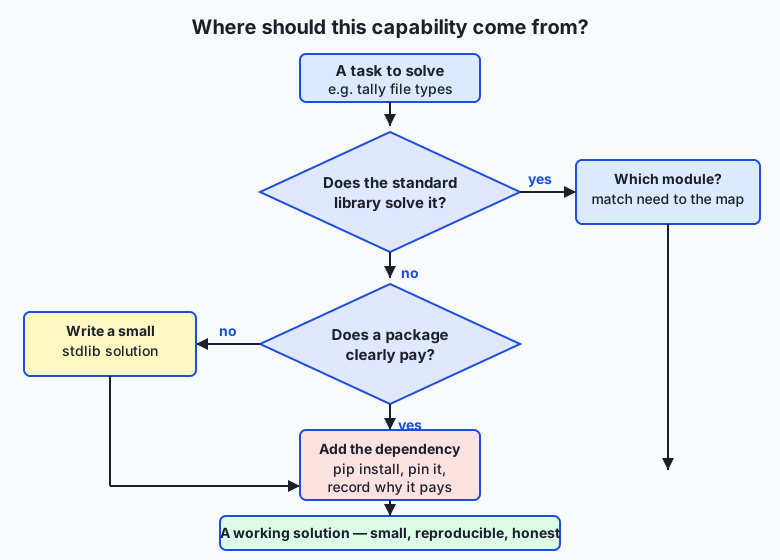
Read the flow as the question you run every time a need arises. Start at the task; ask whether the standard library already answers it; if yes, identify which module and use it with nothing to install; if no, ask honestly whether a package clearly pays before you add the dependency. Most everyday tasks stop at the first “yes.”
Historical background
The “batteries included” philosophy is not an accident; it is a deliberate design choice as old as the language. Python was created by Guido van Rossum, who began work on it in December 1989 and released the first public version in 1991. From early on, the project’s aim was a language whose standard distribution answered most common needs out of the box, so that a working programmer could sit down and be productive without hunting for external libraries. The phrase “batteries included” was popularised in the community and in Python’s own documentation to capture exactly this: the language ships with the batteries so the toy works when you open it.
The individual modules on today’s tour each have their own lineage. The datetime module was added in Python 2.3 (2003) to give the language first-class date and time objects instead of loose integers. The collections module arrived in Python 2.4 (2004) and grew over later releases: defaultdict came with it, namedtuple was added in 2.6 (2008), and Counter in 2.7 (2010). The json module — reflecting JSON’s rise as the common data format of the web — joined the standard library in Python 2.6 (2008). And pathlib, the modern object-oriented way to handle filesystem paths, is the youngest of the group, added in Python 3.4 (2014) to replace decades of string-fiddling with os.path. The point of these dates is not to memorise them but to see the pattern: as a kind of work became common enough, the Python developers built a stable, well-tested tool for it and put it in everyone’s toolbox, once, forever.
What it is — and what it is not
The standard library is the large collection of modules distributed with the Python interpreter itself. A module is a file of Python code you can import to reuse its functions and classes, exactly as you learned on Day 58 — the standard library is simply a vast set of such modules that the core developers wrote, documented, and ship to you pre-installed. Its documentation, “The Python Standard Library,” is a single organised reference you will return to for the rest of your career.
It is important to be precise about what it is not, because beginners blur these lines. It is not the same as the third-party ecosystem on the Python Package Index (PyPI), the online repository from which pip install downloads packages like NumPy or pandas — those are outside the standard library and must be installed. It is not a single giant module you import all at once; you import the specific modules you need. It is not always the best tool for every job — for heavy numerical arrays, NumPy genuinely outpaces the built-in options — but it is the default tool, the one to try first because it costs nothing to reach. And it is not frozen: modules are added, improved, and occasionally deprecated across Python versions, which is why the version of Python you run matters and why the online docs always state which version a feature appeared in.
| Common misconception | The reality |
|---|---|
”I need to pip install something to read a JSON file.” | json is in the standard library — import json and you are done, no install. |
| ”The standard library is one big module.” | It is hundreds of separate modules; you import only the ones you need, such as pathlib or datetime. |
| ”More libraries always means a more capable program.” | Every dependency adds size, setup, and a maintenance burden; fewer, well-chosen dependencies is usually healthier. |
”pathlib and os.path are unrelated.” | Both handle filesystem paths; pathlib is the modern object-oriented replacement, and either can do the job. |
| ”If it is built in, it must be second-rate.” | Standard-library modules are written and reviewed by expert maintainers and used by millions — they are production-grade. |
Why it was created and what problems it solves
Every module on today’s tour exists because, without it, programmers rediscovered the same painful problems one at a time. Consider dates. A date looks simple until you try to compute it: months have different lengths, leap years follow a fiddly rule, time zones shift, and “add thirty days” is genuinely hard to get right. Left to themselves, thousands of programmers wrote thousands of subtly broken date routines. The datetime module solves this once, correctly, for everyone: it knows the calendar so you never have to encode it again.
Counting is the same story. Tallying how many times each value appears in a list is a task you meet constantly — how many files of each type, how many labels of each class. You can write it with a plain dictionary and an if key in counts check every time, and it works, but it is four lines of boilerplate that is easy to get wrong. collections.Counter solves it in one line and does it faster. pathlib solves the endless bugs of building file paths by gluing strings together — a slash in the wrong place, a Windows backslash versus a Unix slash — by giving you real path objects that know how to join, split, and inspect themselves. json solves the problem of moving structured data in and out of files and across programs in a format every language can read. In each case the module exists to turn a recurring, error-prone chore into a single reliable call — and because it lives in the standard library, that solution is available to you with nothing to install and nothing to break.
How it works
You reach into the standard library with the same import you learned on Day 58, then call the module’s functions and classes. Let’s tour the everyday drawers, one small worked example each, so you know what lives where.
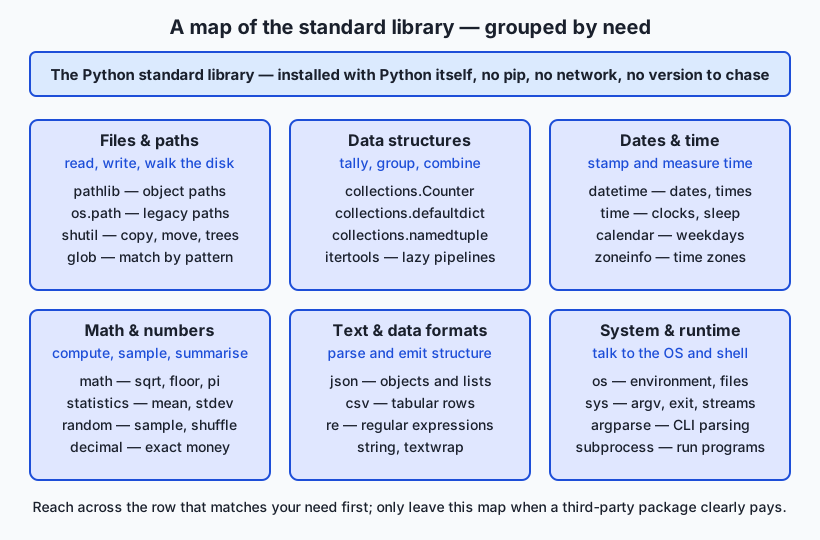
Read the map by need, left to right, top to bottom. Each card is a drawer of the toolbox; when a task arrives, you find the row that matches its shape and open that drawer.
Files and paths: pathlib
pathlib turns a filesystem path into an object you can inspect and combine, instead of a fragile string. You build a path with Path, join with the / operator, and ask it questions:
from pathlib import Path

folder = Path("data")
report = folder / "results.json"     # joins correctly on any OS
print(report.name)                   # results.json
print(report.suffix)                 # .json
print(report.parent)                 # data
for item in folder.glob("*.csv"):    # every .csv in the folder
    print(item)
The / operator reads like a path and works on macOS, Linux, and Windows without you touching a slash. .glob("*.csv") walks the folder for matching files, and .rglob("*.csv") searches recursively into subfolders — the exact move a data-prep script makes to find every dataset on disk.
Dates and time: datetime
datetime gives you real date and time objects that know the calendar. You stamp “now,” format it as text, and do arithmetic across days:
from datetime import datetime, timedelta

now = datetime.now()
print(now.isoformat(timespec="seconds"))   # 2026-07-13T09:15:00
print(now.strftime("%Y-%m-%d"))            # 2026-07-13
deadline = now + timedelta(days=7)          # one week later, correctly
.isoformat() produces a sortable, unambiguous timestamp — exactly what you want when logging when an experiment ran. timedelta does the calendar arithmetic so you never count days by hand.
Data structures: collections
collections holds three tools you will use constantly. Counter tallies any iterable; defaultdict groups items without checking whether a key exists yet; namedtuple makes a tiny record type with named fields:
from collections import Counter, defaultdict, namedtuple

votes = ["cat", "dog", "cat", "bird", "cat", "dog"]
tally = Counter(votes)
print(tally)                    # Counter({'cat': 3, 'dog': 2, 'bird': 1})
print(tally.most_common(1))     # [('cat', 3)]

groups = defaultdict(list)
for word in ["ant", "art", "bee"]:
    groups[word[0]].append(word)   # no "if key in groups" needed
print(dict(groups))             # {'a': ['ant', 'art'], 'b': ['bee']}

Point = namedtuple("Point", ["x", "y"])
p = Point(3, 4)
print(p.x, p.y)                 # 3 4
Counter.most_common even sorts the tally for you — the one-liner that answers “which category is largest?”.
Text and data: json (revisited)
You met json on Day 56. It converts between Python data and JSON text: json.dump writes, json.load reads. It is the standard way to save a small structured result:
import json

result = {"files": 12, "biggest_type": ".py"}
text = json.dumps(result, indent=2)   # to a string, pretty-printed
print(text)
data = json.loads(text)               # back to a dict
print(data["files"])                  # 12
Combining sequences: itertools (revisited)
itertools builds fast, memory-light pipelines over sequences. chain joins iterables end to end; islice takes a slice without building a list; groupby groups adjacent equal items:
import itertools

joined = list(itertools.chain([1, 2], [3, 4]))   # [1, 2, 3, 4]
first3 = list(itertools.islice(range(1000), 3))  # [0, 1, 2] — no huge list
Randomness and numbers: random, math, statistics
random samples and shuffles; math gives constants and functions; statistics summarises data:
import random, math, statistics

random.seed(42)                       # reproducible randomness
print(random.choice(["a", "b", "c"])) # a deterministic pick after the seed
print(math.sqrt(144), math.floor(3.7))# 12.0 3
scores = [7, 8, 8, 9, 10]
print(statistics.mean(scores))        # 8.4
print(statistics.median(scores))      # 8
random.seed matters for AI: seeding makes a “random” split reproducible, so a teammate re-running your experiment gets the same shuffle.
System and runtime: os and sys
os reaches the operating system (environment variables, the current directory); sys reaches the interpreter (command-line arguments, the exit code, the version):
import os, sys

print(sys.version.split()[0])         # 3.14.0 — which Python is running
print(os.getcwd())                    # the current working directory
home = os.environ.get("HOME", "?")    # read an environment variable safely
Reading the docs and asking Python itself
You will not remember every method, and you are not meant to. Two built-in habits find anything. dir(obj) lists the names available on a module or object; help(obj) prints its documentation right in the terminal:
import datetime
print(dir(datetime))     # names inside the module
help(datetime.date)      # full documentation for the date class
Alongside these, “The Python Standard Library” reference online is organised by exactly the need-groups on the map. The skill is not memorising the library; it is knowing it is there and how to look things up quickly.
An everyday analogy
Picture inheriting a master craftsperson’s workshop on your first day. Along one wall stands a tall toolbox with labelled drawers, already stocked: a drawer of files-and-paths tools, a drawer for measuring time, a drawer of counting and sorting jigs, a drawer of number tools, a drawer for reading and writing labelled forms. You did not buy or build any of it — it came with the workshop, the way the standard library comes with Python. Every drawer holds tools that experts made, sharpened, and tested over years.
When a job arrives, a wise apprentice does not immediately drive to the hardware store. First they look at the shape of the job and open the matching drawer. Need to sort screws by size and count each pile? The counting jig — Counter — is right there. Need to stamp today’s date on the finished piece? The date tool — datetime — is in its drawer. Reaching into the toolbox costs nothing and takes a second, because the tools are already in the room.
The hardware store is the Python Package Index, and driving there is pip install. Sometimes the trip is worth it: the workshop’s toolbox has no lathe, so if the job truly needs a lathe — the way real numerical work needs NumPy — you go and get one, and you are glad you did. But you do not drive across town to buy a screwdriver you already own, and you do not clutter the workshop with a specialty gadget you will use once. Each new machine you bring in must be maintained, powered, and kept from conflicting with the others. The craftsperson’s judgement — check the toolbox first, go to the store only when it clearly pays — is exactly the standard-library-first habit. Keep this workshop in mind and every choice on the tour has a place: the drawers are the modules, opening one is an import, and the drive to the store is a dependency you take on with your eyes open.
Examples in practice
Let’s do a real task the way a practitioner would — a small dataset audit that uses four drawers together, which is exactly what today’s lab builds. The job: look at a folder of data files, count how many of each type there are, note the total, stamp the moment, and write a small JSON report you can compare against a later run.
from pathlib import Path
from collections import Counter
from datetime import datetime
import json

folder = Path("data")
files = [p for p in folder.rglob("*") if p.is_file()]   # pathlib: walk
extensions = Counter(p.suffix.lower() or "(none)" for p in files)  # collections: tally

report = {
    "generated_at": datetime.now().isoformat(timespec="seconds"),   # datetime: stamp
    "total_files": len(files),
    "by_extension": dict(extensions.most_common()),                 # sorted tally
}
print(json.dumps(report, indent=2))                                 # json: emit
Every line reaches into a different drawer, and none of them needed installing. rglob("*") walks the folder tree and .is_file() filters out subdirectories; Counter over p.suffix tallies the extensions in one pass, with most_common() returning them largest-first; datetime.now().isoformat() produces a sortable timestamp; and json.dumps turns the whole result into readable, comparable text. On a folder holding, say, seven .csv files, three .json files, and two .txt files, the printed report reads:
{
  "generated_at": "2026-07-13T09:15:00",
  "total_files": 12,
  "by_extension": {
    ".csv": 7,
    ".json": 3,
    ".txt": 2
  }
}
That is a genuine, useful tool — a reproducible inventory of a data directory — built entirely from the standard library in a dozen lines. This is the everyday glue of AI work: before you train anything, you must know what data you have, in what shapes, and be able to prove it did not change out from under you. A stdlib-only script like this runs anywhere Python does, needs no environment to recreate, and will still run untouched years from now.
Implications: security, privacy, performance, scalability, and cost
Security. Every third-party package you install is code from someone else that runs with your program’s privileges, and the supply chain has been attacked through malicious or hijacked packages. Preferring the standard library shrinks this attack surface: standard-library code is maintained and reviewed as part of Python itself. When you do add a dependency, you take on responsibility to know what it is and keep it updated. Fewer, well-chosen dependencies is a security posture, not just a tidiness preference.
Privacy. The tour’s data-glue modules touch real data: pathlib reads your folders, json serialises records that may hold personal information. Nothing here sends data anywhere — these modules are local and offline — but the same care applies as always: know what you are reading and writing, and where the file lands.
Performance. Standard-library tools written in C, like Counter and much of itertools, are typically faster than the hand-rolled Python loop a beginner would write, and they use memory carefully — itertools produces items lazily instead of building giant lists. The honest limit: for large numerical arrays the standard library is not the fastest option, which is exactly where NumPy earns its place. Reaching for the built-in tool first is usually a performance win, not a compromise.
Scalability. A standard-library-only program is trivially portable: it runs on any machine with the right Python version, with no environment to reproduce. That is a real scalability advantage for sharing scripts and for reproducibility. The ceiling is genuine capability — when the job outgrows what the built-ins do well (fast arrays, dataframes, HTTP with retries), a dependency is the right answer.
Cost. The standard library is free in every sense: nothing to buy, nothing to install, nothing to license. The hidden cost lives on the other side — every dependency is a recurring tax in setup time, image size, version conflicts, and maintenance. “Standard-library-first” is the cheapest default, and the discipline is spending a dependency only where it clearly buys more than it costs.
Alternatives: free, open source, and commercial
Here “alternatives” means the third-party packages you might reach for instead of the standard library, and when each genuinely pays. All three below are free and open source; the choice is about capability versus the cost of a dependency.
| Tool | What it is | When to choose it over the standard library | Cost |
|---|---|---|---|
| The standard library | Modules shipped with Python (pathlib, json, collections, datetime, …) | The default for everyday files, data glue, counting, dates, and small results — anything that must run on a plain Python install | Free, built in |
| NumPy | Fast numerical arrays and vectorised math | Heavy numeric work: large arrays, linear algebra, element-wise math at speed — the foundation of scientific Python | Free, open source (pip install) |
| pandas | Labelled tabular data (DataFrames) | Real tabular analysis: CSV/Excel wrangling, joins, grouping, time series at scale — far beyond csv and Counter | Free, open source (pip install) |
| requests | Ergonomic HTTP client | Non-trivial web requests where the built-in urllib is clumsy: sessions, retries, JSON bodies | Free, open source (pip install) |
The standard library — how to use it, with an example. You import the module and call it, as everywhere on this tour. It is the right default because a script using only built-ins runs anywhere Python does, with nothing to install:
from collections import Counter
print(Counter("mississippi"))   # Counter({'s': 4, 'i': 4, 'p': 2, 'm': 1})
NumPy — how to use it, with an example. NumPy pays when you do bulk numeric math: its arrays are far faster than Python lists for element-wise work, which is why nearly all machine learning stands on it. You install it, then vectorise:
import numpy as np
a = np.array([1, 2, 3])
print(a * 2)                    # [2 4 6] — no Python loop
Choose NumPy when the standard library’s numeric tools are too slow for the array sizes you face — a threshold you will cross the moment real datasets arrive in Course 03.
pandas — how to use it, with an example. pandas pays for tabular data with named columns and mixed types, where csv plus dictionaries becomes unwieldy:
import pandas as pd
df = pd.read_csv("data.csv")
print(df.groupby("label").size())   # counts per label, one line
Choose pandas when you are truly analysing tables — grouping, joining, filtering columns — not merely reading a file once. For this course’s early work, where every lab must run on a plain Python install, the standard library is the deliberate choice, and everything you learn with it transfers directly to these packages when a project justifies the dependency.
Comparison with related concepts
| Concept A | Concept B | Key difference |
|---|---|---|
| Standard library | Third-party package (PyPI) | The standard library ships with Python and needs no install; a third-party package is downloaded with pip and must be maintained as a dependency |
pathlib | os.path | Both handle filesystem paths; pathlib uses path objects and the / operator (modern, readable), os.path uses plain strings and functions (older, still common) |
Counter | a plain dict for counting | Counter tallies any iterable in one call and offers most_common; a plain dict needs a manual “if key present” check on every item |
namedtuple | a plain tuple | Both are immutable sequences; a namedtuple also gives its fields names (p.x), so the code reads by meaning rather than by position |
json | Python repr/eval | json is a safe, cross-language text format read by json.load; eval executes text as Python and must never touch untrusted data |
| Standard library | Language built-ins | Built-ins (len, print, dict) are always available with no import; the standard library is imported per module (import json) but still ships with Python |
When to use it — and when not to
Reach for the standard library first, always. For the everyday glue of programming and AI work — locating and reading files, counting and grouping records, stamping and computing dates, writing small structured results, sampling and summarising numbers, reading command-line arguments — a built-in module is almost always the right tool, and trying it first costs you nothing. Make it a reflex: when a need arises, picture the map, find the drawer, and open it before you think about pip. This habit keeps your projects small, portable, and reproducible, which is worth more over a project’s life than almost any single convenience a package offers.
Know equally when the built-in tool is the wrong one. When the job is heavy numerical computation over large arrays, use NumPy; when it is real tabular analysis, use pandas; when it is non-trivial web communication, use requests; when a mature package solves a genuinely hard problem you should not solve yourself — parsing dates from arbitrary human text, say, or scientific plotting — take the dependency, and take it deliberately: install it, pin its version, and be able to say in one sentence why it pays. The mistake to avoid in both directions is reflex — installing a package for something Python already does, or grinding out a hundred fragile lines to avoid a dependency that would genuinely earn its keep. The judgement is the skill: try the toolbox, measure the need honestly, and cross the room to the store only when the trip clearly pays.
This closes a four-day arc on program structure. Day 57 gave you functions, Day 58 gave you modules and imports, Day 59 gave you scope — and today you learned that Python hands you hundreds of expertly built modules for free, and the judgement to prefer them. That judgement is the quiet backbone of good AI engineering. The practitioners whose experiments others can actually reproduce are, again and again, the ones who kept their environments small and their dependencies few — who used pathlib, json, collections, and datetime for the glue and spent a dependency only where it truly bought speed or capability. Tour the standard library, learn its map, and you keep that power in reach before you ever install a thing.
Knowledge check
Try these from memory before looking back:
- What does “the standard library” mean, and how is it different from a package you install with
pip? - Name the standard-library module you would reach for to (a) walk a folder of files, (b) count how many times each value appears, (c) stamp a report with the current time, and (d) write a small structured result to a file.
- Explain the “standard-library-first” judgement in your own words, including the one question you ask before adding a third-party dependency.
- Give one concrete advantage of a script that uses only the standard library over one that depends on three installed packages.
- You need to work with a filesystem path. Name the two standard-library options and say which is the modern, object-oriented one.
Hands-on exercise
Time to build a real tool from the standard library only. In the Day 60 lab you assemble Stdlib Toolkit — a small program that walks a directory with pathlib, tallies file extensions with collections.Counter, stamps the moment with datetime, and writes a JSON report with json — proving you solved a genuine task with nothing installed. Work in the lab directory; every command below is run from there.
First, run the finished reference against the bundled sample folder so you know the target:
python3 examples/toolkit.py --dir sample-data
python3 examples/toolkit.py --dir sample-data --out report.json
cat report.json
Now open starter/toolkit.py and complete its four numbered exercises — walk the directory, tally the extensions, build the stamped report, and write it as JSON — using the reference only when you are stuck. Run your version the same way:
python3 starter/toolkit.py --dir sample-dataFinally, prove one of your functions is importable and testable on its own — the payoff of the main guard from Day 57 — by calling it directly:
python3 -c "import sys; sys.path.insert(0, 'examples'); from toolkit import tally_extensions; print(tally_extensions(['a.csv', 'b.csv', 'c.txt']))"Expected output
A correct run against the sample folder prints a report like this (the generated_at timestamp will differ — that is expected, and the tests do not check it):
{
  "generated_at": "2026-07-13T09:15:00",
  "directory": "sample-data",
  "total_files": 6,
  "by_extension": {
    ".csv": 3,
    ".json": 2,
    ".txt": 1
  }
}
The extensions are counted case-insensitively and returned largest-first; the total is the number of files found by walking the folder recursively; and the whole report is valid JSON you could write to a file and compare against a later run.
Validate your work
You are done when you can check every box:
-
python3 examples/toolkit.py --dir sample-dataprints a JSON report withtotal_files,directory, and aby_extensiontally. -
--out report.jsonwrites the same report to a file (cat report.jsonshows it) and the file is valid JSON. - The
by_extensioncounts are sorted largest-first and are case-insensitive (.CSVand.csvcount together). - A file with no extension is counted under
(none), not dropped. - Your completed
starter/toolkit.pyproduces the same tally as the reference on the sample folder. -
bash tests/run_tests.shends with0 failure(s)and exits0.
Troubleshooting
No such file or directoryfor the sample folder. Run the commands from the lab directory (the folder that containsexamples/andsample-data/), not from the repository root.- The timestamp differs from the expected output. That is correct —
datetime.now()returns the current time, sogenerated_atchanges every run. The tests deliberately ignore it and check only the deterministic fields. NotImplementedErrorwhen you run the starter. That is expected until you finish the exercises; each stub raises it on purpose. Replace eachraise NotImplementedError(...)with the real body described in the comment above it.- Counts split
.CSVfrom.csv. You forgot to lowercase the suffix. Tallyp.suffix.lower()so case does not matter. - A file with no extension vanishes from the tally.
Path("README").suffixis an empty string; map the empty suffix to"(none)"so those files are still counted.
Common mistakes
- Installing a package for this. Everything here is standard library —
pathlib,collections,datetime,json. If you found yourself reaching forpip, stop: the toolbox already has these drawers. - Counting with a plain dictionary and a manual check. It works, but
Counterdoes it in one correct line. Use the tool built for tallying. - Asserting on the timestamp in a test. A volatile value like “now” makes a test fail for no real reason. Make output deterministic by testing the stable fields and ignoring the clock.
Practice assignment
Extend the Stdlib Toolkit into a slightly richer directory auditor, still using only the standard library, and keep it in your Day 60 lab folder. Add two facts to the report, each from a different drawer of the toolbox. First, using pathlib, record the total size in bytes of all files found (sum p.stat().st_size across the files) and add it to the report as total_bytes. Second, using statistics, compute and add the mean file size as mean_bytes (guard against an empty folder, where the mean is undefined — set it to 0). Before writing any code, note in a short comment at the top of your file which module supplies each new fact and why the standard library is enough for this task. Then run your tool against sample-data, confirm the two new fields appear and are correct (you can check total_bytes against du -b sample-data on Linux or by summing the files yourself), and save one example report to my-report.json. This is the real rhythm of data preparation: describe a directory precisely, with reproducible tools, before anything is trained on it.
Extension challenge
Take the toolkit one step toward a professional tool, still standard-library only. First, add a --top N option (parsed with argparse, from the same drawer as sys) so the report includes a top_extensions list of only the N most common extensions, using Counter.most_common(N) — the exact shape of “show me the biggest categories” you will want on real datasets. Second, make the tool robust: if the directory given with --dir does not exist, print a clear message to standard error and exit with a non-zero code (reuse the exit-code discipline from Day 56), rather than crashing with a traceback. Third, add a second output format: a --format option (json or text) where text prints a small human-readable summary — one line per extension with its count, aligned — while json prints the machine-readable report as before. Finally, write a tiny tests/test_toolkit.py that imports tally_extensions and asserts its behaviour on a hand-made list, including the case-insensitive and no-extension cases, printing all tests passed only if every assertion holds and exiting zero. You will have built, validated, tested, and extended a genuine command-line data tool — the everyday glue of AI work — from the batteries that came in the box.
Quiz
Q1. What does "the standard library" mean in Python?
- The set of modules that ship with Python and are available without installing anything
- The most popular packages people download from the Python Package Index
- A single large module you import all at once with "import stdlib"
- The built-in functions like len and print that need no import
Show answer
Answer: A. The set of modules that ship with Python and are available without installing anything
The standard library is the large collection of modules distributed with the Python interpreter itself. You import the ones you need (import json, from pathlib import Path) with nothing to install — distinct from PyPI packages, which you download with pip, and from the always-available built-ins.
Q2. Which standard-library module would you reach for to walk a folder of files and inspect their paths?
- datetime
- pathlib
- random
- statistics
Show answer
Answer: B. pathlib
pathlib gives you filesystem path objects: Path("data") / "results.json" joins correctly on any OS, and .glob / .rglob walk a folder for matching files. It is the modern, object-oriented replacement for string-based os.path work.
Q3. You have a list of file extensions and want to know how many times each appears. What is the cleanest standard-library tool?
- Loop over the list and update a plain dict, checking "if key in counts" each time
- Use itertools.chain to join the list to itself
- collections.Counter(extensions), then most_common() to sort the tally
- json.dumps the list and count the characters
Show answer
Answer: C. collections.Counter(extensions), then most_common() to sort the tally
collections.Counter tallies any iterable in one call and Counter.most_common() returns the counts largest-first. It is both shorter and faster than the manual dict-with-a-check that a plain loop requires.
Q4. Why does random.seed(42) matter for reproducible AI work?
- It makes random numbers cryptographically secure
- It speeds up the random module noticeably
- It is required before you may call random.choice at all
- It fixes the sequence of "random" values, so a teammate re-running the script gets the same shuffle or sample
Show answer
Answer: D. It fixes the sequence of "random" values, so a teammate re-running the script gets the same shuffle or sample
Seeding the random number generator makes its output deterministic: the same seed produces the same sequence. That is what lets a "random" train/test split or shuffle be reproduced exactly by anyone who runs your code — essential for comparable experiments.
Q5. What is the "standard-library-first" judgement?
- Never install any third-party package under any circumstances
- Try a built-in module first, and add a dependency only when it clearly pays for its cost in setup, size, and maintenance
- Always install a package because outside libraries are more capable than built-ins
- Import the entire standard library at the top of every script just in case
Show answer
Answer: B. Try a built-in module first, and add a dependency only when it clearly pays for its cost in setup, size, and maintenance
The discipline is to prefer the standard library for everyday work — files, dates, counting, JSON — because it costs nothing to reach and keeps projects portable, and to spend a dependency (NumPy, pandas, requests) only where the capability genuinely earns its ongoing cost.
Q6. Which pair of functions moves data between a Python object and JSON text?
- json.read and json.write
- json.encode and json.decode
- json.parse and json.stringify
- json.dumps (object to text) and json.loads (text to object)
Show answer
Answer: D. json.dumps (object to text) and json.loads (text to object)
json.dumps serialises a Python object to a JSON string (and json.dump writes to a file); json.loads parses a JSON string back to a Python object (and json.load reads from a file). It is the standard, cross-language way to save and reload small structured results.
Q7. When is the standard library NOT the right tool, so a third-party package genuinely pays?
- Heavy numerical work over large arrays, where NumPy is far faster than the built-in numeric tools
- Reading a small JSON file once
- Counting how many files of each type are in a folder
- Stamping a report with the current date and time
Show answer
Answer: A. Heavy numerical work over large arrays, where NumPy is far faster than the built-in numeric tools
For large numerical arrays and vectorised math, NumPy vastly outperforms plain Python, which is why nearly all machine learning stands on it — a clear case where the dependency pays. The other three are exactly what json, collections, and datetime handle with nothing installed.
Q8. How can you explore a module you have not memorised, right from the terminal?
- You cannot; you must read the printed manual
- Call dir(module) to list its names and help(module) to print its documentation
- Run pip show on the module
- Delete and reinstall Python to see its contents
Show answer
Answer: B. Call dir(module) to list its names and help(module) to print its documentation
dir(obj) lists the names available on a module or object, and help(obj) prints its documentation in the terminal. Together with the online "Python Standard Library" reference, they let you look anything up quickly — the skill is knowing the library is there and how to find things, not memorising it.
Glossary
- standard library
- The large collection of modules distributed with the Python interpreter itself, available with a simple import and no installation — the "batteries included" that let a great deal of everyday work happen with nothing to download.
- module
- A file of Python code you import to reuse its functions and classes; the standard library is a vast, pre-installed set of such modules, and you import only the specific ones you need (import json, from pathlib import Path).
- pathlib
- The standard-library module for filesystem paths as objects rather than strings: Path("data") / "file.json" joins correctly on any operating system, and .glob / .rglob walk folders for matching files. The modern replacement for os.path.
- datetime
- The standard-library module for dates and times as real objects that know the calendar: datetime.now() stamps the current moment, .isoformat() and .strftime() format it, and timedelta does correct date arithmetic across days.
- collections
- A standard-library module of specialised container types, most notably Counter (tally an iterable), defaultdict (group without checking whether a key exists), and namedtuple (a small record type with named fields).
- Counter
- A collections type that tallies how many times each value appears in any iterable in a single call; Counter.most_common(n) returns the counts largest-first, answering "which category is biggest?" in one line.
- defaultdict
- A collections type that supplies a default value for a missing key automatically, so you can append to defaultdict(list)[key] without first checking whether the key exists — removing the "if key in d" boilerplate of grouping.
- json
- The standard-library module for the JSON data format: json.dump / json.dumps turn Python objects into JSON text, and json.load / json.loads turn JSON text back into Python objects — the safe, cross-language way to save and reload structured data.
- itertools
- A standard-library module of fast, memory-light building blocks for iterators, such as chain (join iterables end to end), islice (slice without building a list), and groupby (group adjacent equal items) — lazy pipelines over sequences.
- random
- The standard-library module for pseudo-random choices: random.choice, random.shuffle, and random.sample draw from data, and random.seed(n) fixes the sequence so a "random" result becomes reproducible across runs and machines.
- statistics
- The standard-library module for basic descriptive statistics over plain Python data: statistics.mean, median, and stdev summarise a list of numbers without needing NumPy for small, everyday summaries.
- dependency
- A third-party package your program relies on, installed from the Python Package Index with pip (for example NumPy, pandas, or requests). Every dependency adds capability but also setup, size, security surface, and a maintenance burden — so you add one only when it clearly pays.
Sources and further reading
- The Python Standard Library — Python Software Foundation (accessed 2026-07-13)
- Brief Tour of the Standard Library — Python Software Foundation (accessed 2026-07-13)
- pathlib — Object-oriented filesystem paths — Python Software Foundation (accessed 2026-07-13)
- collections — Container datatypes — Python Software Foundation (accessed 2026-07-13)
- Python's pathlib Module — Real Python (accessed 2026-07-13)
Kept in this browser, no account needed. Your progress page turns the whole record into one link you can bookmark or open on another device.