Programming with Python › Files, Errors, and Object-Oriented Python › Day 64
Day 64: Reading and Writing Files
After this lesson you will be able to read and write files without losing or corrupting data: open files with the right mode and an explicit encoding, use `with` so they always close, choose a reading strategy whose memory cost you have measured rather than guessed, understand the two buffers between a returned write and a durable byte, replace important files atomically so a crash can never leave a fragment, and use pathlib for every path you touch.
Hands-on lab for this lesson
Lab files on GitHub: https://github.com/ai-roadmap-365/ai-roadmap-365.github.io/tree/main/labs/sections/programming-with-python/day-064-reading-and-writing-files
- Get the hands-on files. Clone the labs repository once (you can reuse this clone for every lesson). This works on macOS, Linux, and Windows (PowerShell or WSL):
git clone https://github.com/ai-roadmap-365/ai-roadmap-365.github.io.git cd ai-roadmap-365.github.io - Open this lesson's lab. Move into the directory for this specific day. Every lab lives at the same predictable path — section / subsection / week / day:
cd labs/sections/programming-with-python/day-064-reading-and-writing-files - Read the lab guide. Open `README.md` in that directory. It lists the exact commands, what each does, the expected output, and how to check your work — read it before running anything.
- Run it and check your work. Follow the README's "How to run" section: run the example first to see the finished result, then complete the numbered exercises in `starter/`, then run the tests. The tests pass (exit 0) only when your work is correct.
bash tests/run_tests.sh # or the test command named in the lab README
You can also open the lab as a local page (works offline, shows the file tree and expected output).
Learning objectives
By the end of this lesson you will be able to:
- Explain what a file is (a named byte sequence) and what the cursor is, and predict where the cursor sits after each read or write
- Choose the correct mode from r, w, a, x and their + and b variants, and explain exactly when mode w destroys an existing file
- Always open files with `with` and an explicit encoding, and explain what a context manager guarantees when an exception fires mid-write
- Compare whole-file and streaming reads by measured peak memory, and explain why only streaming scales to files larger than RAM
- Distinguish flush() from os.fsync() and describe what state the data is in between them
- Implement the atomic-write pattern (temp file in the same directory, flush, fsync, os.replace) and explain why each step is required
- Use pathlib for joining, testing, creating, and searching paths, and connect safe file handling to AI work — datasets, checkpoints, prompt logs, and eval results
Prerequisites
- Days 57-63 of this course: functions, scope, modules and imports, the standard library, readable code, recursion, and designing a small program well
- Days 50-56: control flow, lists, dictionaries, comprehensions, and building a data-driven CLI
- Course 01: the difference between volatile RAM and durable disk storage
- Comfort running a script from the terminal with python3 and editing a text file
Why this matters
Everything your programs have done so far has been a conversation that ended when the program did. You built lists and dictionaries, wrote functions, split code into modules, designed a small program well — and then the process exited and every value it held vanished. Back in Course 01 you learned why: RAM is fast and volatile, made of circuits that hold a value only while power flows through them, and the moment the process ends the operating system reclaims every byte. Disks are the opposite bargain — far slower, but the bits stay put when the power goes off. A program that cannot write to a disk cannot remember anything. Today you learn to cross that line deliberately, in both directions, without losing or corrupting data on the way.
This is not a side topic on the road to artificial intelligence; it is the road. Every dataset you will train on is a file. Every model checkpoint you save so a four-hour training run is not wasted is a file. Every prompt log, every evaluation result, every configuration, every cache of embeddings — files. And the failures here are quiet and expensive in a way that arithmetic bugs are not. If you decode a training corpus with the wrong encoding, you do not get an error; you get a few hundred thousand mangled characters silently mixed into your data, and a model that has learned nonsense you will not notice until you are reading its output weeks later. If you write a checkpoint by opening the real file and a crash lands mid-write, you do not get a warning; you get a file that looks present, has a plausible size, and is unloadable — and the four-hour run is gone. If you load a 50 GB corpus with read() instead of iterating it, your laptop does not warn you; it swaps, thrashes, and the process is killed.
The concrete consequences are money, memory, and time. Reading a 2 GB log the careless way costs more than 2 GB of RAM before you have looked at a single line; reading it line by line costs about a hundred kilobytes, which is why streaming reads are what let a laptop process a corpus far larger than its memory. A checkpoint written the safe way costs one extra rename and buys you a training run you never have to repeat. An explicit encoding='utf-8' costs eighteen characters and buys you code that produces identical bytes on your machine and on the server. Today’s habits are small, mechanical, and permanent — you will use every one of them, unchanged, for the rest of this course.
The idea in plain language
A file is a named sequence of bytes that lives on a disk and survives your program ending. That is the whole definition, and its plainness is the point: a file is not a table, not a list of records, not a spreadsheet. It is bytes in a row, with a name. Any structure beyond that — lines, columns, JSON — is a convention that programs agree to read into and out of those bytes.
To use a file, you open it. open() hands you back a file object: a small piece of machinery that knows which file it is attached to, what you are allowed to do with it, how to translate between the characters you work with and the bytes on disk, and — crucially — where you currently are in the file. That position is the cursor, and there is exactly one of it per open file object. Read five characters and the cursor moves forward five. Write a line and the cursor sits just past it. Nothing rewinds unless you rewind it.
Because an open file is a resource the operating system is holding for you, it has to be closed. Python gives you one construct that guarantees this: with open(...) as handle:. Whatever happens inside that block — a clean finish, a return, or an error thrown three functions deep — the file is closed on the way out.
Files come in two flavours of access. Text mode decodes bytes into characters on the way in and encodes characters into bytes on the way out, using an encoding you should always name explicitly. Binary mode hands you the raw bytes and lets you deal with them. Text mode is what you want for logs, configs, and corpora; binary mode is what you want for images, model weights, and anything you must not reinterpret.
Then there is the question of how much you read at once, which is really a question about memory. You can pull the whole file into one string, or you can walk it a line at a time. Both give the same answers; only one of them fits a file bigger than your RAM.
And finally there is the gap between “my program wrote it” and “it is on the disk”. Writes pile up in buffers before they land, so a write that has returned successfully may still be nowhere near permanent — which is why replacing an important file is done not by overwriting it but by writing a new one beside it and swapping them in a single, uninterruptible step.
Historical background
The idea that a file is just bytes is a specific historical choice, not an inevitability. The mainframe systems of the 1960s, IBM’s OS/360 among them, gave you files with structure baked in at the operating-system level: records of a declared length, access methods that knew about keys and blocks, and a program had to be told the shape of a file before it could read it. Powerful, and rigid.
Unix, built by Ken Thompson and Dennis Ritchie at Bell Labs from 1969, threw that away. A Unix file became an unstructured stream of bytes, and the operating system took no interest in what those bytes meant. The interface shrank to a handful of calls — open, read, write, close, and lseek to move the position — and open returned a file descriptor: a small integer the kernel uses as a handle to your open file. Because every file looked the same, the same calls could be pointed at a terminal, a pipe, or a device, which is the origin of the Unix slogan that everything is a file. Python’s open() sits directly on top of that lineage; the file object you get back wraps a file descriptor you can still see with handle.fileno().
The character question has its own history. ASCII, standardized in 1963, gave 128 characters — enough for English, and for nothing else, which produced decades of incompatible national extensions where the same byte meant different letters in different countries. The Unicode Consortium was founded in 1991 to give every character in every script a single number, and UTF-8 — the encoding that turns those numbers into bytes — was designed by Ken Thompson and Rob Pike in September 1992 and presented at the USENIX conference in January 1993. Its elegance is that the 128 ASCII characters keep their single-byte values, so every ASCII file is already valid UTF-8, while other characters expand to two, three, or four bytes. UTF-8 is now the dominant encoding of the web and the sane default for everything you write.
Python’s own contributions come later. The with statement and the context-manager protocol arrived in Python 2.5 (2006) through PEP 343, giving the language a general way to guarantee cleanup. Python 3, released in 2008, made the split between text (str) and bytes (bytes) explicit and refused to blur them — the source of some early pain and of a great deal of later correctness. And pathlib, proposed by Antoine Pitrou in PEP 428 and added in Python 3.4 (2014), replaced decades of treating paths as strings with a proper path object. Everything in this lesson is one of those four ideas: a byte stream, an encoding, a guaranteed close, and a path that knows it is a path.
What it is — and what it is not
File input and output, for this lesson, is: opening a named byte sequence with a stated intent (the mode), moving a single cursor through it, translating between characters and bytes with a stated encoding, reading in a way whose memory cost you have chosen on purpose, writing in a way that cannot leave a half-finished file behind, and closing it reliably.
It is worth being precise about what it is not, because the misconceptions here cause real damage.
| Common misconception | The reality |
|---|---|
”open() reads the file.” | open() only creates a file object and positions the cursor. Not one byte is read until you call read(), readline(), or iterate the handle. |
| ”A text file is made of lines.” | A file is made of bytes. A “line” is just the bytes up to and including a \n character. The file has no idea it has lines. |
”write() adds a newline.” | It does not. handle.write("abc") puts exactly three bytes on disk. Every newline you want, you type. (print() adds one; write() never does.) |
”If write() returned, the data is saved.” | It reached a buffer. It may be in Python’s buffer, or in the operating system’s page cache, and not on the physical disk until flush() and os.fsync() have run. |
| ”Python knows the file’s encoding.” | It cannot. A file is bytes; the encoding is a guess unless you state it. Leaving encoding= off makes Python use a platform-dependent default, so the same code can behave differently on two machines. |
| ”Reading a file twice gives the same result.” | Only if you move the cursor back. After handle.read() the cursor sits at the end, so a second read() returns an empty string until you seek(0). |
”Opening with mode w is how you update a file.” | Mode w truncates the file to zero bytes the instant it opens. If you meant to add to it, you wanted a; if you meant to replace it safely, you wanted the atomic-write pattern. |
Why it was created and what problems it solves
Each piece of this machinery exists because of a specific failure it prevents.
Durable storage exists because RAM forgets. Without a file, every program starts from nothing and ends with nothing; there is no dataset, no result, no configuration, and no way for two programs to hand work to each other. Files are how a computation outlives its process.
The byte-stream model exists because structure imposed by the operating system is structure you cannot change. Making a file “just bytes” pushed all the meaning up into programs, which is why the same open() works for a CSV, a JPEG, and a model checkpoint, and why the tools you learn today apply to every file type you will ever meet.
The cursor exists so that reading and writing can be sequential and cheap. Without a remembered position, every read would have to say where it starts, and streaming through a 50 GB file would be an exercise in bookkeeping. With it, “give me the next line” is a complete instruction.
Explicit encodings exist because the same bytes mean different characters under different rules, and getting it wrong is silent. The byte 0xE9 is é in Latin-1 and is not valid UTF-8 at all. State the encoding and a mismatch becomes a loud UnicodeDecodeError you can handle; leave it implicit and you get a different result on a colleague’s machine with no error anywhere.
Context managers exist because close() gets skipped. A return in the middle, an exception from a helper, an early break — any of them leaks a file descriptor and, for writes, can leave buffered bytes unwritten. with makes closing structural rather than remembered.
Buffering exists because a system call per character would be catastrophically slow; the buffer batches small writes into a few large ones. flush() and os.fsync() exist to give you back the control that buffering took away, for the rare moments you truly need the data on the disk before you continue.
pathlib exists because paths built by gluing strings together break: on separators, on trailing slashes, on .., and on every platform difference. A Path object knows it is a path and does the joining, splitting, and checking correctly.
The atomic write exists because a crash has to land somewhere, and if it lands in the middle of overwriting your only copy, that copy is gone. Writing beside and renaming over turns “any of a thousand bad moments” into “one instant that cannot be interrupted”.
How it works
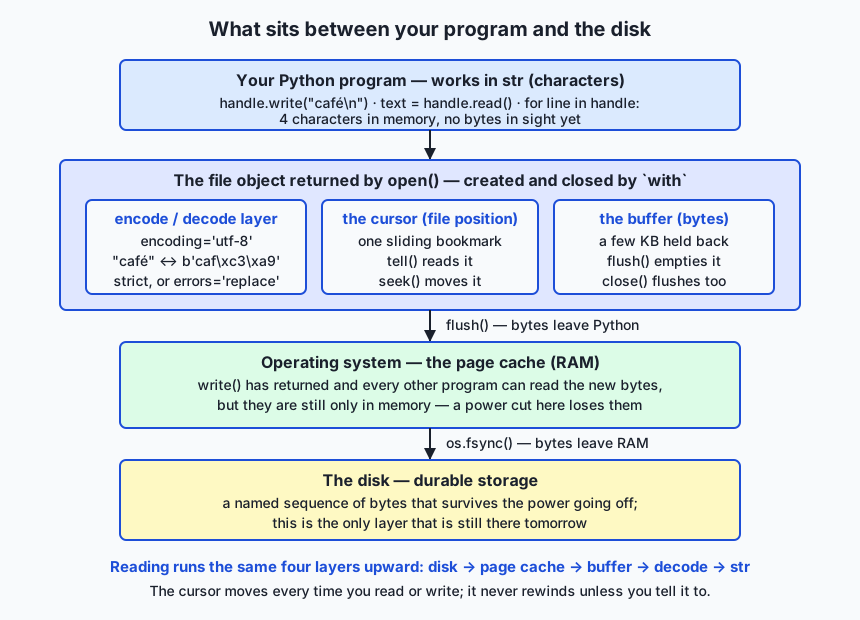
The architecture diagram shows the four layers your data crosses. At the top, your program works in str — characters. Below it, the file object returned by open() does three jobs: it encodes and decodes (turning "café" into the five bytes b'caf\xc3\xa9' and back), it tracks the cursor, and it holds a buffer of bytes not yet handed on. Below that, the operating system’s page cache holds bytes in RAM that every program can already see but that the disk does not have yet. At the bottom is the disk, the only layer still there tomorrow. Reading runs the same four layers upward.
open(), modes, and the cursor
open(path, mode, encoding=...) returns the file object. The mode string is a tiny language with three parts: what you intend to do, whether you also want the other thing (+), and whether you want bytes instead of text (b).
| Mode | Reads? | Writes? | If the file exists | If it does not | Cursor starts at |
|---|---|---|---|---|---|
r | yes | no | opened as-is | FileNotFoundError | the start |
w | no | yes | truncated to zero bytes | created | the start (of an empty file) |
a | no | yes | kept; every write goes to the end | created | the end |
x | no | yes | FileExistsError | created | the start |
r+ | yes | yes | kept, not truncated | FileNotFoundError | the start |
w+ | yes | yes | truncated to zero bytes | created | the start |
a+ | yes | yes | kept; writes go to the end | created | the end |
rb / wb / ab / xb | as above | as above | as above | as above | as above — but bytes, not text |
Two entries deserve a warning label. Mode w truncates at open time, before you have written anything, so open("data.txt", "w") on a file you care about has already destroyed it. And mode x (“exclusive creation”) is the one to reach for when creating a file must fail rather than clobber — a lock file, a first-run marker, an output you must not overwrite twice.
The cursor is a single sliding bookmark, and you can watch it move:
>>> with open("cursor.txt", "r", encoding="utf-8") as f:
...     print(f.tell())            # 0
...     print(repr(f.read(5)))     # 'alpha'   cursor now 5
...     print(repr(f.readline()))  # '\n'      cursor now 6
...     f.seek(0)
...     print(repr(f.read()))      # 'alpha\nbeta\ngamma\n'
tell() reports the position, seek() moves it. Note the second call: after read(5) consumed alpha, the cursor sat just before the newline, so readline() returned the rest of that line — which was only '\n'. There is one bookmark, it moves, and it never goes back on its own.
Why with is the only form you should write
with open("notes.txt", "w", encoding="utf-8") as handle:
    handle.write("first line\n")
with uses the context manager protocol: the object it is given is entered at the top of the block and, no matter how the block ends, exited at the bottom. For a file, “exited” means flushed and closed. That last clause is the one that matters. Consider a write that fails part way:
try:
    with open("cursor.txt", "a", encoding="utf-8") as f:
        f.write("delta\n")
        raise ValueError("boom")
except ValueError as err:
    print("exception escaped:", err)   # exception escaped: boom
print("file closed by with:", f.closed) # file closed by with: True
The exception still propagates — with does not swallow errors, and Day 66 covers handling them properly — but the file was flushed and closed on the way out, so delta\n is safely on disk rather than stranded in a buffer that died with the process. Written the old way, with a bare open() and a close() at the end, that close() never runs and the buffered line is simply lost.
Text mode, binary mode, and the encoding question
In text mode Python decodes bytes to characters for you, and the encoding is the rulebook. Always name it: encoding='utf-8'. Without it Python falls back to a platform-dependent default, so the same script can write different bytes on a laptop and a server. UTF-8 is the right default because it is ASCII-compatible, universal, and what essentially every dataset and API expects.
Characters are not bytes, and UTF-8 makes that visible:
"A"    -> b'A'                            1 character,  1 byte
"café" -> b'caf\xc3\xa9'                   4 characters, 5 bytes
"日本語" -> b'\xe6\x97\xa5\xe6\x9c\xac\xe8\xaa\x9e'  3 characters, 9 bytes
When bytes on disk are not valid UTF-8, a strict read raises UnicodeDecodeError, and the message is precise about where it failed:
UnicodeDecodeError: 'utf-8' codec can't decode byte 0xe9 in position 3: invalid continuation byteThat error is a feature. It is the file telling you it is not what you assumed — usually that it was written by an older program using Latin-1. Your first move is to find out what encoding it really is and use that. When you genuinely cannot, and losing a few characters beats losing the file, errors='replace' swaps each undecodable byte for the replacement character U+FFFD instead of raising, so b'caf\xe9' reads back as 'caf�'. Use it deliberately and log that you did; never leave it on by default, because it converts loud failures into silent data damage.
Binary mode ('rb', 'wb') skips all of this and gives you bytes. Use it for anything that is not text — images, model weights, compressed archives — and for the moments you need to see exactly which bytes are on disk.
Reading strategies and what they cost
Four ways to read the same file, with very different memory bills. The numbers below are measured, not estimated: they come from running each strategy over a real 8,200,020-byte generated log (200,000 lines) with tracemalloc, Python’s built-in allocation tracker, on the machine that authored this lesson.
| Strategy | What it does | Measured peak on an 8.2 MB log | Same ratio on a 2 GB log |
|---|---|---|---|
text = handle.read() | one string holding the whole file, plus a list from splitlines() | 26.0 MB (3.17× the file) | about 6.3 GB — impossible on most laptops |
lines = handle.readlines() | a list holding every line at once | 18.2 MB (2.22× the file) | about 4.4 GB — still impossible |
while True: line = handle.readline() | one line at a time, explicit loop | 157 KB (0.02× the file) | about 157 KB — unchanged |
for line in handle: | one line at a time, the idiomatic form | 149 KB (0.02× the file) | about 149 KB — unchanged |
Read the last column carefully, because it is the whole lesson of this table. The two whole-file strategies scale with the file: the peak is a multiple of its size, so a file larger than your RAM cannot be read at all. (The multiple is above 1 because the decoded string, the list of lines, and the read buffer are alive at the same time.) The two streaming strategies do not scale with the file at all — their peak is the longest single line plus a buffer, so it is the same 150 KB whether the file is 8 megabytes or 2 gigabytes. That is why for line in handle: is the default form for anything log-shaped or corpus-shaped, and why processing a 50 GB corpus on a laptop is not merely possible but routine.
Use read() only when you know the file is small and you genuinely want it whole — a config, a prompt template, a short note. Use read(n) when you want a bounded chunk of a binary file. Never use readlines() when for line in handle: will do; it costs the memory of the whole file to save you nothing.
Writing, newlines, and buffering
Writing has one surprise and one subtlety. The surprise: write() adds nothing. handle.write("abc") writes exactly three bytes; if you want a line, you write "abc\n" yourself. This is the opposite of print(), which appends a newline for you, and forgetting it produces a file that is one enormous line.
The subtlety is buffering. Watch what the disk actually holds during a write:
size on disk before flush: 0
size on disk after flush : 12
size after close         : 12
Those numbers are real: twelve characters were written, and until flush() ran the file on disk was still zero bytes long. flush() pushes Python’s buffer out to the operating system — after which every other program can see the new bytes. But the operating system is also buffering, in its page cache; the bytes are visible but still only in RAM, and a power cut loses them. os.fsync(handle.fileno()) is the call that forces them onto the physical disk. That is the real meaning of “the write returned but the data is not on disk yet”: there are two caches between you and permanence, and only fsync clears both. You will rarely need it — for ordinary output, with flushing on close is plenty — but for a checkpoint or a record store whose survival matters, it is the difference between durable and probably-fine.
pathlib versus os.path
For decades, Python paths were strings and you glued them together by hand. pathlib.Path replaces the string juggling with an object that knows it is a path.
| Task | os.path (strings) | pathlib (objects) |
|---|---|---|
| Join parts | os.path.join(base, "logs", "run.txt") | base / "logs" / "run.txt" |
| Does it exist? | os.path.exists(p) | p.exists() |
| Is it a directory? | os.path.isdir(p) | p.is_dir() |
| Make a directory tree | os.makedirs(p, exist_ok=True) | p.mkdir(parents=True, exist_ok=True) |
| Read a whole small file | open(p, encoding="utf-8").read() | p.read_text(encoding="utf-8") |
| Write a whole small file | open(p, "w", encoding="utf-8").write(s) | p.write_text(s, encoding="utf-8") |
| The file name | os.path.basename(p) | p.name |
| The extension | os.path.splitext(p)[1] | p.suffix |
| The containing directory | os.path.dirname(p) | p.parent |
| Everything in a directory | os.listdir(p) | p.iterdir() |
All .txt files here | glob.glob(os.path.join(p, "*.txt")) | p.glob("*.txt") |
All .txt files anywhere below | os.walk plus manual filtering | p.rglob("*.txt") |
The / operator is the headline: it joins path parts with the correct separator for the platform, so the same code is right on macOS, Linux, and Windows. read_text and write_text are convenience wrappers around open() that are perfect for small files and wrong for big ones — they read the whole thing, so they belong to the read() row of the memory table above.
One distinction to carry: an absolute path starts from the root of the filesystem and means the same thing from anywhere (/home/ada/data/train.txt); a relative path is interpreted from the process’s current working directory (data/train.txt) and therefore means different things depending on where you launched the program. Scripts that write relative paths and are then run from a different directory are one of the most common sources of “where did my output go?”.
The atomic write
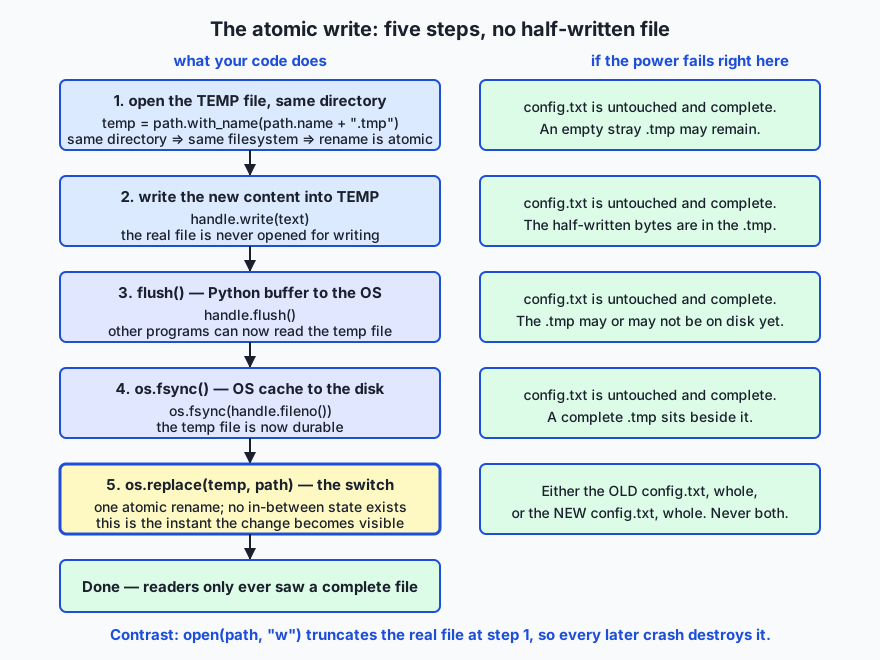
The flow diagram shows the pattern and, in the right-hand column, what a power cut at each step would leave behind. The naive way to update a file is open(path, "w") — but that truncates your only copy at the very first step, so every moment from then until the write finishes is a moment in which a crash destroys the old content and leaves a fragment. The safe way never opens the real file for writing at all:
import os
from pathlib import Path

def atomic_write_text(path, text, encoding="utf-8"):
    path = Path(path)
    temp = path.with_name(path.name + ".tmp")
    with open(temp, "w", encoding=encoding, newline="\n") as handle:
        handle.write(text)
        handle.flush()                 # Python buffer -> operating system
        os.fsync(handle.fileno())      # operating system -> physical disk
    os.replace(temp, path)             # one atomic rename
    return path
Three details carry the guarantee. The temp file must be in the same directory as the target, because a rename is only atomic within one filesystem and a different directory might be a different mount. flush() and fsync() must come before the rename, so that the file being renamed into place is genuinely complete on disk. And os.replace is chosen over os.rename because it overwrites an existing destination consistently on every platform. The result: a reader opening config.txt at any instant gets either the complete old file or the complete new one. There is no in-between state to catch, because the switch is a single operation the operating system will not interrupt.
Building a record store from scratch
Put it all together in about forty lines: a line-oriented, append-only record store that writes records, reads them back, and survives being interrupted mid-write.
import os

def append_record(path, fields):
    """Append one record: fields joined by tabs, then exactly one newline."""
    line = "\t".join(str(f).replace("\t", " ").replace("\n", " ") for f in fields)
    with open(path, "a", encoding="utf-8", newline="\n") as store:
        store.write(line + "\n")
        store.flush()
        os.fsync(store.fileno())

def read_records(path):
    """Yield each complete record as a list of fields, skipping a torn tail."""
    if not os.path.exists(path):
        return
    with open(path, "r", encoding="utf-8", errors="replace") as store:
        for line in store:
            if not line.endswith("\n"):
                break            # a half-written final line: stop, do not guess
            yield line.rstrip("\n").split("\t")

def compact(path, keep):
    """Rewrite the store keeping only records for which keep(record) is true."""
    temp = path + ".tmp"
    with open(temp, "w", encoding="utf-8", newline="\n") as out:
        for record in read_records(path):
            if keep(record):
                out.write("\t".join(record) + "\n")
        out.flush()
        os.fsync(out.fileno())
    os.replace(temp, path)
Every idea from this lesson is in there. Mode a means concurrent appends never overwrite each other and the cursor is always at the end. The explicit encoding and newline mean the bytes are the same on every machine. flush plus fsync mean a returned append_record really is durable. The newline is the record terminator, which is what makes a torn write recoverable: a record is only complete once its \n is on disk, so a reader that stops at the first line without one can never half-parse a truncated record. The generator streams, so the store can outgrow RAM. And compact is the atomic write applied to a rewrite, so a crash during compaction leaves the original store intact.
Driving it for real — writing three records, simulating a crash mid-append, then compacting — produces exactly this:
all records: [['ada', 'prompt', '42'], ['grace', 'eval', '17'], ['ada', 'eval', '9']]
after a torn write, bytes on disk: 51
records still readable: [['ada', 'prompt', '42'], ['grace', 'eval', '17'], ['ada', 'eval', '9']]
after compaction: [['grace', 'eval', '17'], ['ada', 'eval', '9']]
The second and third lines are the payoff. Twelve extra bytes of a torn fourth record are sitting on disk, and the reader returns the same three complete records as before — damaged tail ignored, good data intact. That is what “survives being interrupted” means, and it is roughly how every append-only log, from database write-ahead logs to training-run event files, earns its reliability.
An everyday analogy
Picture your desk and the filing cabinet behind it. The desk is RAM: fast, right in front of you, and swept completely clean every night by a cleaner who throws away anything left on it. The filing cabinet is the disk: slower to reach, but whatever you put in it is still there in the morning. A program that never opens the cabinet is a person who does brilliant work all day and arrives each morning to a bare desk.
Each drawer folder has a name written on the tab, and inside it is one long unbroken scroll of paper — that is a file: a name and a sequence of bytes, with no built-in notion of pages or records. Any structure is one you write onto the scroll yourself, and a newline is simply the mark you draw to say “a record ends here”.
Opening a file is pulling the folder out and laying it flat with one sliding bookmark placed on it. The bookmark is the cursor, and it is the single most useful thing to keep in your head. Reading is moving the bookmark forward along the scroll and copying what you pass. When you have read to the end, the bookmark is at the end, and asking to read again gets you nothing until you slide it back to the start — that is seek(0). The mode you ask for decides how the folder is handed to you: r lays it flat with the bookmark at the beginning and a rule that you may only look; a places the bookmark at the very end so everything you add lands after the existing text; w hands you the folder with every page already shredded — which is why w on a folder you cared about has done its damage before you write a word; and x refuses to hand you the folder at all if one with that name already exists.
The scroll is written in a shorthand, and the encoding is the key to that shorthand. If you read a folder written in one shorthand using the key for another, you do not get a blank page — you get plausible-looking gibberish, which is far worse. Stating encoding='utf-8' is insisting on the key rather than guessing, and UnicodeDecodeError is the honest moment where the shorthand does not fit the key and the machinery tells you so instead of inventing letters.
Now the part people miss. When you write, your pages do not go straight into the cabinet. They land in the out-tray on your desk (Python’s buffer), and are only carried out to the trolley in the corridor (the operating system’s page cache) when someone empties the tray — that is flush(). Anyone walking past can read the trolley, so your colleagues see the new pages, but a fire in the building still loses them. Only when the trolley is wheeled to the cabinet and its contents filed are the pages genuinely safe: that is os.fsync(). And with is the meticulous clerk who empties your out-tray and closes the drawer as you leave the room — even when you leave in a hurry because the fire alarm went off.
Finally, the atomic write. Suppose you must replace the contents of the “config” folder. The reckless way is to shred the pages and start writing the new ones — and if you are interrupted, the old configuration is gone and a fragment is all that remains. The safe way is to take a fresh folder in the same drawer, write the complete new contents into it at your leisure, file it properly, and only then swap the name tabs in one motion. Anyone who opens the “config” folder at any instant during that process finds a complete document — the old one before the swap, the new one after. There is no moment where they can find half of each, because swapping the tabs is a single movement. Keep this cabinet in mind and everything today has a place: the drawer is your disk, the folder is your file, the bookmark is your cursor, the shorthand key is your encoding, the out-tray and trolley are your buffers, the clerk is with, and the tab-swap is os.replace.
Examples in practice
Here is each idea as code you can run, in the order you will meet it in the lab.
Round-trip text with an explicit encoding.
with open("notes.txt", "w", encoding="utf-8", newline="\n") as handle:
    handle.write("Day 64: reading and writing files\ncafé, naïve, 日本語\nthird line\n")

with open("notes.txt", "r", encoding="utf-8") as handle:
    text = handle.read()
Running that on the authoring machine writes 70 bytes for 62 characters — the eight extra bytes are the non-ASCII letters, each of which takes two or three bytes in UTF-8. Characters are not bytes, and now you have seen it.
Stream a big file instead of swallowing it.
longest = 0
with open("big.log", "r", encoding="utf-8") as handle:
    for line in handle:
        length = len(line.rstrip("\n"))
        if length > longest:
            longest = length
On the 8.2 MB log this peaks at 149 KB and gives exactly the same answer as the read() version that peaked at 26.0 MB. Same result, 175 times less memory — and the gap widens with every megabyte the file grows.
Survive a decoding failure on purpose.
def read_text_surviving_bad_bytes(path, encoding="utf-8"):
    try:
        with open(path, "r", encoding=encoding) as handle:
            return handle.read(), False
    except UnicodeDecodeError:
        with open(path, "r", encoding=encoding, errors="replace") as handle:
            return handle.read(), True
Strict first, so a surprise is loud; lenient only as a fallback, and the returned flag tells the caller that recovery happened so it can be logged rather than hidden. Given a file containing the raw bytes b'caf\xe9 was logged by a latin-1 program\n', the strict attempt raises UnicodeDecodeError: 'utf-8' codec can't decode byte 0xe9 in position 3: invalid continuation byte and the fallback returns 'caf� was logged by a latin-1 program\n'.
Prove the atomic write by looking mid-operation. The lab passes a callback into the writer that runs after fsync and before os.replace, and prints what the directory contains at that instant:
before: ['config.txt'] content='version = 1'
during: ['config.txt', 'config.txt.tmp'] content='version = 1'
after : ['config.txt'] content='version = 2'
Both files exist during the write, and a reader of config.txt at that moment still gets the complete old file. Compare the naive write caught the same way, which is holding 'version = 2 wit' — a fragment that would be all you had left after a crash.
Walk a tree with pathlib.
from pathlib import Path

def list_tree(root):
    root = Path(root)
    return sorted(str(p.relative_to(root)) for p in root.rglob("*") if p.is_file())
One expression: rglob("*") walks the whole tree, is_file() drops the directories, relative_to shortens the names. The os.path equivalent needs os.walk, os.path.join, os.path.relpath, and care about separators.
Implications: security, privacy, performance, scalability, and cost
Security. File handling is where untrusted input meets your filesystem. Never build a path by concatenating a name that came from outside your program: a value like ../../.ssh/id_rsa turns “read a file from my data directory” into “read the user’s private key”. Resolve the path and check that it is genuinely inside the directory you meant (Path(base).resolve() in candidate.resolve().parents) before opening it. Mode x is a security tool too — it refuses to overwrite, which is what you want for lock files and one-shot outputs. And treat file contents as untrusted data: parse them with safe converters, never with eval().
Privacy. Files are where personal data comes to rest, and they stay after your program forgets. A log line that seemed harmless is still on the disk months later, in backups you did not think about, readable by anyone with the file. Write only what you need, put personal data where you can find and delete it again, and remember that deleting a file removes the name far more reliably than it removes the bytes. Temporary files inherit whatever permissions the directory gives them — which is one more reason the atomic-write temp file belongs beside its target rather than in a shared temporary directory.
Performance. Disk access is orders of magnitude slower than RAM, which is exactly why buffering exists: it turns thousands of tiny writes into a handful of large ones. Two practical consequences follow. First, do not defeat the buffer — writing one line at a time is fine because the buffer batches it, but calling fsync on every line makes the program crawl, since each call waits for the physical device. Second, the fast way to read a big file is the streaming way, not because iteration is clever but because the alternative spends its time allocating gigabytes.
Scalability. The memory table is the scalability story. A program built on read() has a hard ceiling at the size of your RAM; a program built on for line in handle: has no ceiling at all, and the same twelve lines that process a 10 MB sample will process a 500 GB corpus given time. Choosing the streaming form early is what lets a script survive its data growing by four orders of magnitude.
Cost. Three costs, all real. The cost of a corrupted file is the work that produced it — a training run, a day of collection, a customer’s data — which is why the atomic write is cheap insurance. The cost of a wrongly-decoded corpus is a model trained on damage plus the time to find out; the fix is eighteen characters of encoding='utf-8' typed before the problem. And the cost of whole-file reads is machine size: a pipeline that needs a high-memory instance because it calls read() on files it could stream is paying rent, every hour, for a habit.
Alternatives: free, open source, and commercial
Everything below is free. open, pathlib, os, shutil, tempfile, and sqlite3 ship with Python at no cost and need no account, licence, or network access; pandas is free and open source under the BSD licence and installs with pip. There is no paid tier for reading a file — so rather than inventing pricing, the honest comparison is about fit.
| Option | What it is | When to choose it | Cost |
|---|---|---|---|
Built-in open() | The primitive: a file object with a mode, an encoding, and a cursor | Any time you read or write incrementally, and always for large files you must stream | Free, built in |
pathlib | Object-oriented paths, plus small whole-file helpers | Every time you name, join, test, create, or search for a path; and for whole-file reads and writes of small files | Free, built in |
os / shutil | The lower-level filesystem operations | Renaming (os.replace), syncing (os.fsync), permissions, and bulk copy/move/delete of files and trees (shutil) | Free, built in |
tempfile | Safe creation of temporary files and directories | Scratch space whose name must not collide and whose cleanup must be automatic | Free, built in |
sqlite3 | A complete SQL database in a single file, in the standard library | When you need queries, indexes, partial updates, or concurrent writers — beyond what a flat file can give | Free, built in |
pandas | A third-party data-analysis library with fast readers for tabular formats | Tabular data that fits in memory and needs filtering, grouping, or joining | Free, open source (pip install pandas) |
Built-in open() — how, with an example. The default and the foundation. Choose it whenever the file is large, the processing is line-by-line, or you need the cursor:
with open("train.jsonl", "r", encoding="utf-8") as handle:
    for line_number, line in enumerate(handle, start=1):
        if line_number > 5:
            break
        print(line_number, len(line))
pathlib — how, with an example. Choose it for every path expression and for small whole-file work. It removes an entire class of separator bugs:
from pathlib import Path

runs = Path("results") / "runs"
runs.mkdir(parents=True, exist_ok=True)
(runs / "summary.txt").write_text("accuracy: 0.91\n", encoding="utf-8")
print([p.name for p in runs.glob("*.txt")])   # ['summary.txt']
os and shutil — how, with an example. Choose os for the two operations open() cannot express — the atomic rename and the durability barrier — and shutil for moving whole trees around:
import os, shutil

os.replace("config.txt.tmp", "config.txt")     # atomic swap
shutil.copytree("checkpoints", "backup/checkpoints", dirs_exist_ok=True)
shutil.rmtree("scratch", ignore_errors=True)
tempfile — how, with an example. Choose it when you need scratch space that cannot collide with another process and cleans itself up. Note the deliberate exception: for the atomic-write pattern you do not use tempfile’s default location, because the temp file must share a filesystem with the target — you use tempfile.NamedTemporaryFile(dir=...) pointed at the target’s own directory, or build the .tmp name yourself as the pattern above does:
import tempfile
from pathlib import Path

with tempfile.TemporaryDirectory() as scratch:
    sample = Path(scratch) / "sample.txt"
    sample.write_text("scratch data\n", encoding="utf-8")
    print(sample.exists())     # True
print(sample.exists())         # False — the whole directory is gone
When to reach past files entirely. A flat file is the right answer for append-only logs, one-shot exports, configuration, and anything you stream once. It is the wrong answer when you need to update one record in the middle, query by a key without scanning everything, or let several writers work at once — at which point sqlite3 gives you a real database in one file with no server to install:
import sqlite3

with sqlite3.connect("runs.db") as db:
    db.execute("CREATE TABLE IF NOT EXISTS runs (name TEXT, accuracy REAL)")
    db.execute("INSERT INTO runs VALUES (?, ?)", ("baseline", 0.91))
    print(db.execute("SELECT name FROM runs WHERE accuracy > 0.9").fetchall())
And when the data is tabular, fits comfortably in memory, and the job is analysis rather than streaming, pandas reads a CSV into a dataframe in one line and gives you filtering, grouping, and joins. It is a heavier dependency and it loads the whole file, so it belongs to the read() row of the memory table — excellent for a 200 MB table, wrong for a 50 GB log. Day 65 takes CSV and JSON seriously; today the point is that the built-in tools are the layer everything else is built on.
Comparison with related concepts
| Concept A | Concept B | Key difference |
|---|---|---|
| Text mode | Binary mode | Text mode decodes bytes to str using an encoding and handles newlines; binary mode gives raw bytes and touches nothing. Text for logs and corpora, binary for images and weights |
read() | for line in handle: | read() holds the whole file in memory (peak scales with file size); iteration holds one line (peak is flat). Same answers, completely different ceilings |
readlines() | readline() | readlines() returns a list of every line at once; readline() returns one line and moves the cursor. The plural is the expensive one |
flush() | os.fsync() | flush() moves bytes from Python’s buffer to the operating system, making them visible to other programs; fsync() moves them from the operating system to the physical disk, making them durable |
Mode w | Mode a | w truncates the file to zero bytes at open time; a keeps it and puts the cursor at the end so every write appends |
os.rename | os.replace | Both rename; os.replace overwrites an existing destination consistently across platforms, which is what the atomic-write pattern needs |
pathlib.Path | os.path strings | A Path is an object that knows how to join, split, test, and search; os.path operates on strings and leaves separator correctness to you |
| Absolute path | Relative path | An absolute path means the same thing from anywhere; a relative path is resolved against the current working directory and changes meaning with it |
| A file | A database | A file is an unstructured byte sequence you scan; a database indexes records so you can query and update them without reading everything |
When to use it — and when not to
Use a plain file, read and written with the tools above, for the great majority of what you will do: configuration, logs, datasets, exports, prompt records, checkpoints, and anything that is written once and read in order. Use the streaming form by default and reserve whole-file reads for files you know are small. Use the atomic write whenever losing the existing file would hurt — configs, checkpoints, anything a crash could catch. Use x mode when creating something that must not already exist. Use binary mode the moment the content is not text. And use pathlib for every path you touch, from the first line.
There are places not to reach for a flat file. If you need to change one record in the middle without rewriting the file, or to look something up by key without scanning, or to have several processes writing at once safely, you want a database — sqlite3 first, since it is free, built in, and needs no server. If the data is a table you want to filter and aggregate and it fits in memory, a dataframe library will be both faster to write and faster to run than hand-rolled parsing. If the file must be read by other programs, use a format with a specification rather than one you invented — which is exactly Day 65’s subject. And do not reach for fsync on every write; durability is worth its cost for checkpoints and record stores, and is a needless slowdown for ordinary output.
Two habits are worth making unconditional, because they cost nothing and prevent whole categories of loss: always with, and always an explicit encoding. There is no situation in this course where you are better off without them.
This is the first day of Week 10, “Python in Practice”, and it is the hinge between the language and real work. Everything you have built so far lived and died inside one process. From today your programs can remember. Day 65 puts structure on those bytes with CSV and JSON, Day 66 teaches you to handle the errors that file work throws at you properly, and the rest of the week builds on the assumption that you can get data in and out safely.
And this is the thread to your AI goal. Every dataset you fine-tune on, every checkpoint that saves a training run from being repeated, every prompt log you audit, every evaluation result you compare against last week’s — all of them are files, opened with these calls, decoded with these encodings, streamed with this loop, replaced with this rename. The most expensive failures in machine-learning pipelines are rarely exotic; they are a corpus decoded with the wrong encoding and silently mangled, a checkpoint half-written by a crash and unloadable, a job killed because it read a file it should have streamed. None of those are algorithm problems. They are today’s problems, and from today you know how to prevent all three.
Knowledge check
Try these from memory before looking back:
- What is a file, in one sentence, and what is the cursor?
- What does mode
wdo to an existing file, and at what moment does it do it? - Why must
encoding='utf-8'be explicit, and what doesUnicodeDecodeErrortell you when it fires? - Rank
read(),readlines(), andfor line in handle:by peak memory on a 2 GB log, and say which of them scale with the file size. - What is the difference between
flush()andos.fsync(), and what state is the data in between them? - Name the four steps of the atomic write and say why the temp file must live in the same directory as the target.
Hands-on exercise
Time to make files behave. In the Day 64 lab you build the Safe File I/O Toolkit — six functions that round-trip text with an explicit encoding, compare whole-file and streaming reads on a generated 8 MB log with real memory measurements, survive an undecodable byte, write atomically, and walk a directory tree with pathlib — then run a driver that proves each one. Work in the lab directory; every command below is run from there.
First, drive the finished reference so you know the target:
python3 examples/demo.pyThen look at the evidence it left behind, including the generated log and the tree it walked:
ls -1 workspace workspace/config workspace/tree
head -2 workspace/big.log
wc -l < workspace/big.log
rm -rf workspace
Now open starter/fileio_toolkit.py and complete its five numbered exercises — the round trip, the streaming reader, the decode-failure fallback, the atomic writer, and the pathlib walk — using the docstrings as your contract and the reference only when stuck. Run your version through the same driver:
python3 starter/demo.pyFinally, run the suite, which exercises real files in a throwaway directory:
bash tests/run_tests.shExpected output
A correct run of the reference produces exactly this (captured on the authoring machine; the byte counts are deterministic, the memory peaks vary by a few kilobytes between runs and platforms):
$ python3 examples/demo.py
Safe File I/O Toolkit — workspace: workspace

[1] text round-trip with an explicit encoding
    wrote notes.txt: 70 bytes on disk, 62 characters in memory
    lines read back: 3
    round-trip identical: True

[2] whole-file read vs line-by-line streaming
    generated big.log: 200000 lines, 8200020 bytes (7.82 MiB)
    read() + splitlines()  -> longest line 60 chars, peak memory 24.82 MiB
    for line in handle     -> longest line 60 chars, peak memory 0.14 MiB
    same answer: True
    streaming used 175x less memory

[3] decoding trouble and how to survive it
    strict utf-8 read raised UnicodeDecodeError: 'utf-8' codec can't decode byte 0xe9 in position 3: invalid continuation byte
    errors='replace' read: 'caf� was logged by a latin-1 program'
    recovered: True; U+FFFD present: True

[4] atomic write — proved by looking at the directory mid-operation
    before: ['config.txt'] content='version = 1'
    during: ['config.txt', 'config.txt.tmp'] content='version = 1'
    after : ['config.txt'] content='version = 2'

[5] walking a directory tree with pathlib
    a.txt
    sub/b.txt
    sub/deeper/c.txt
    3 file(s) found by Path.rglob
The four lines to read closely are round-trip identical: True (the bytes came back as the characters that went in), the two memory peaks (same answer, 175 times less memory), the during: line (both files present, and readers of config.txt still get the complete old one), and the three relative paths from rglob.
Validate your work
You are done when you can check every box:
-
python3 examples/demo.pyruns all five parts and exits 0. - Part 1 reports
round-trip identical: Trueand a byte count larger than the character count. - Part 2 reports the same longest-line length from both strategies, with the streaming peak far below the whole-file peak.
- Part 3 raises a real
UnicodeDecodeErrorand then recovers withrecovered: True. - Part 4’s
during:line shows bothconfig.txtandconfig.txt.tmp, withconfig.txtstill holdingversion = 1. - Part 5 lists exactly three relative paths and reports
3 file(s) found by Path.rglob. - You completed all five exercises in
starter/fileio_toolkit.pyandpython3 starter/demo.pymatches the reference. -
bash tests/run_tests.shprints0 failure(s).and exits 0.
Troubleshooting
FileNotFoundError when you open a file for reading. The path is wrong or relative to somewhere you did not expect. Print Path.cwd() to see where the process actually is, and remember that a relative path is resolved from the directory you launched the program in, not the directory the script lives in.
UnicodeDecodeError on a file you did not expect it from. That is the machinery working. Find out what encoding the file really uses before reaching for errors='replace'; look at the raw bytes with open(path, 'rb').read(40) and see whether they look like Latin-1 (single high bytes such as \xe9) or UTF-8 (pairs such as \xc3\xa9).
Your file has one enormous line. You called write() without a \n. write() never adds one; every newline in the file is one you typed.
ValueError: I/O operation on closed file. You used the file object outside its with block. Everything you want to do with the handle must happen inside the block; take the data out, not the handle.
A second read() returns an empty string. The cursor is at the end. handle.seek(0) before reading again — or, better, read once and keep the value.
Part 2’s peak numbers do not exactly match the captured ones. They will not, and they are not supposed to. Allocation peaks vary by a few kilobytes between runs, Python versions, and platforms. What must hold is the shape: identical longest-line answers and a streaming peak far below the whole-file peak. The test suite checks the shape, not the digits.
The starter raises NotImplementedError. Expected until you finish that exercise. Each unfinished function raises on purpose so an empty function can never be mistaken for a working one.
Common mistakes
- Leaving
encoding=off. It works on your machine and produces different bytes on someone else’s. Type it every time. - Using mode
wwhen you meanta.wtruncates at open time, before your first write — the data is gone before the mistake is visible. - Calling
read()on something that might be big. The habit that turns a working script into a killed process the day the data grows. Stream unless you know it is small. - Putting the atomic-write temp file in
/tmp. A rename across filesystems is not atomic, and may fail outright. The temp file goes in the target’s own directory. - Skipping
flush()/fsync()before the rename. Renaming a file whose bytes are still in a buffer can leave you atomically switching to an incomplete file. - Turning on
errors='replace'everywhere. It converts a loud, fixable failure into silent data damage. Strict first, fallback deliberately, and log when you used it. - Forgetting that
withcloses the file, not the block’s variables. The data you want must be assigned inside the block; the handle is useless outside it.
Practice assignment
Build logstats.py, a small program in the Day 63 shape — a pure core plus a thin shell — that reads a log file and reports on it without ever holding the file in memory.
Your spec: given a path to a text log, print the number of lines, the number of non-blank lines, the length of the longest line, and the five most common first words, then write that report to <logfile>.stats using the atomic-write pattern. Requirements: open every file with with and an explicit encoding='utf-8'; stream the log with for line in handle: and never call read() or readlines() on it; survive an undecodable byte by retrying with errors='replace' and noting in the report that recovery was needed; use pathlib for every path; and refuse to run if the input path does not exist, printing a clear message to standard error and exiting non-zero.
Test it against the lab’s generated big.log (200,000 lines) and confirm two things: that the answers are correct, and — using tracemalloc as the lab does — that your peak memory stays in the low hundreds of kilobytes rather than scaling with the file. Then run it a second time and confirm the .stats file was replaced atomically, with no .tmp left behind.
Extension challenge
Extend the from-scratch record store into something that would survive real use.
One: add an index. Keep a companion file mapping each record’s first field to its byte offset in the store, built by recording handle.tell() before each append. Then implement get(path, key) that seek()s straight to the offset and reads one line — a lookup that does not scan the file. Measure the difference with tracemalloc and a timer on a store with 100,000 records, and you will have built, in miniature, the reason databases have indexes.
Two: make the store crash-proof under compaction, then prove it. Write a small script that starts a compaction, kills the process partway through (a raise SystemExit after the temp file is written but before os.replace, or a real kill from another terminal), and then reads the store. Show that every record is still there and that the only trace is a stray .tmp file — and add a startup step that cleans up such strays safely.
Three: handle rotation. When the store passes a size threshold, atomically rename it to store.1 and start a fresh one, so the file never grows without bound. Then make read_records read across the rotated files in order, oldest first. Use Path.glob to find them, and think carefully about what happens if a crash lands between the rename and the creation of the new file — the answer should be “the next run notices and recovers”, which is exactly the reasoning that real logging systems are built on.
Quiz
Q1. What does `open("data.txt", "w")` do to an existing data.txt, and when?
- Nothing until you call write(); the old content stays until then
- It appends to the end of the existing content
- It truncates the file to zero bytes at the moment it opens, before any write
- It raises FileExistsError so you cannot destroy the file by accident
Show answer
Answer: C. It truncates the file to zero bytes at the moment it opens, before any write
Mode w truncates at open time. By the time you notice the mistake the old content is already gone — you have written nothing yet, but the file is empty. Mode a appends, and mode x is the one that refuses to touch an existing file.
Q2. After `text = handle.read()` on an open file, a second `handle.read()` returns an empty string. Why?
- The cursor is now at the end of the file, and nothing rewinds it automatically
- The file was closed by the first read
- read() may only be called once per file object
- The buffer was emptied and must be refilled with flush()
Show answer
Answer: A. The cursor is now at the end of the file, and nothing rewinds it automatically
There is exactly one cursor per open file object and it only moves forward unless you move it. read() consumed everything, so the cursor sits at the end. handle.seek(0) rewinds it — or better, read once and keep the value.
Q3. Why should `encoding="utf-8"` always be stated explicitly?
- It makes reading measurably faster
- Without it Python uses a platform-dependent default, so the same code can produce different bytes on different machines
- Python cannot open a text file at all without it
- It is required whenever the file contains non-ASCII characters
Show answer
Answer: B. Without it Python uses a platform-dependent default, so the same code can produce different bytes on different machines
A file is bytes; the encoding is a rulebook Python cannot infer. Leaving it off falls back to a platform-dependent default, so identical code behaves differently on a laptop and a server — a silent, portable-looking bug.
Q4. On a 2 GB log, which reading strategies have a peak memory cost that scales with the size of the file?
- Only readlines()
- None of them — Python streams everything by default
- Only read()
- Both read() and readlines(); the line-by-line forms stay flat
Show answer
Answer: D. Both read() and readlines(); the line-by-line forms stay flat
read() and readlines() both hold the whole file (measured at 3.17x and 2.22x the file size respectively on an 8.2 MB log), so a file larger than RAM cannot be read at all. Iterating with `for line in handle:` peaks at roughly the longest line plus a buffer — about 150 KB whether the file is 8 MB or 2 GB.
Q5. What is the difference between `flush()` and `os.fsync()`?
- flush() moves bytes from Python's buffer to the operating system; fsync() forces them from the operating system onto the physical disk
- They are aliases; fsync() is the older spelling
- flush() writes to disk; fsync() only closes the file descriptor
- flush() applies to text mode and fsync() to binary mode
Show answer
Answer: A. flush() moves bytes from Python's buffer to the operating system; fsync() forces them from the operating system onto the physical disk
There are two caches between you and permanence. After flush() the bytes are visible to every other program but still only in the operating system page cache, so a power cut loses them. os.fsync(handle.fileno()) is what forces them onto the physical device.
Q6. In the atomic-write pattern, why must the temporary file be created in the same directory as the target?
- So that a reader can find both files while the write is in progress
- Because os.replace refuses to accept absolute paths
- Because a rename is only atomic within a single filesystem, and another directory may be a different mount
- To keep the temporary file hidden from other users
Show answer
Answer: C. Because a rename is only atomic within a single filesystem, and another directory may be a different mount
The guarantee rests on the rename being a single uninterruptible operation, and that only holds within one filesystem. A temp file in /tmp may sit on a different mount, which turns the atomic rename into a copy — losing the guarantee and possibly failing outright.
Q7. A `with open(...) as f:` block raises an exception halfway through writing. What happens to the file?
- The write is rolled back and the file is restored to its previous content
- The file is left open until the process exits
- The exception is suppressed and the block finishes normally
- The file is flushed and closed on the way out, and the exception still propagates
Show answer
Answer: D. The file is flushed and closed on the way out, and the exception still propagates
A context manager guarantees the exit step runs however the block ends. For a file that means flushed and closed, so already-written data reaches the operating system rather than dying in a buffer. `with` does not roll anything back and does not swallow the exception.
Q8. What does `write()` add to the end of the string you give it?
- Nothing at all — every newline in the file is one you typed
- A newline, exactly like print()
- A newline only in text mode
- A platform-appropriate line ending unless newline="" was passed
Show answer
Answer: A. Nothing at all — every newline in the file is one you typed
handle.write("abc") puts exactly three bytes on disk. This is the opposite of print(), which appends a newline for you, and forgetting it is what produces a file that is one enormous line.
Glossary
- file
- A named sequence of bytes that lives on a disk and survives the program that wrote it. A file has no built-in notion of lines, records, or columns — any structure beyond "bytes in a row with a name" is a convention that programs agree to read into and out of those bytes.
- file object
- The object `open()` returns. It knows which file it is attached to, what you are allowed to do with it, how to translate between characters and bytes, and where the cursor currently sits. It also holds a buffer of bytes not yet handed to the operating system.
- file descriptor
- The small integer the operating system kernel uses as a handle to an open file. It comes from the Unix design of the early 1970s, and Python still exposes it: `handle.fileno()` returns the descriptor that `os.fsync()` needs.
- cursor
- The single remembered position within an open file, also called the file position. Reading and writing move it forward; nothing rewinds it on its own. `tell()` reports it and `seek()` moves it — which is why a second `read()` returns an empty string until you `seek(0)`.
- mode string
- The short string passed to `open()` declaring intent: `r` read, `w` write (truncating at open time), `a` append, `x` exclusive creation (fails if the file exists), plus `+` to add the other capability and `b` for bytes instead of text.
- context manager
- An object that is entered at the top of a `with` block and exited at the bottom no matter how the block ends — clean finish, `return`, or an exception thrown three functions deep. For a file, exiting means flushed and closed, which makes closing structural rather than remembered.
- encoding
- The rulebook mapping characters to bytes and back. Python cannot infer it, because a file is only bytes. Naming it explicitly (`encoding="utf-8"`) is what makes the same code produce the same bytes on every machine.
- UTF-8
- The dominant character encoding of the web, designed by Ken Thompson and Rob Pike in September 1992. The 128 ASCII characters keep their single-byte values, so every ASCII file is already valid UTF-8, while other characters expand to two, three, or four bytes — which is why "café" is 4 characters but 5 bytes.
- UnicodeDecodeError
- The error raised when bytes on disk are not valid under the encoding you asked for. It is a feature, not a nuisance: it is the file telling you it is not what you assumed, usually that an older program wrote it in Latin-1.
- buffering
- The batching of small reads and writes into a few large operations, because a system call per character would be catastrophically slow. Its cost is that a write which has returned successfully may still be nowhere near the disk.
- flush
- The call that pushes Python's own buffer out to the operating system. After it, every other program can see the new bytes — but they are still only in RAM, in the page cache, and a power cut still loses them.
- fsync
- `os.fsync(handle.fileno())` — the call that forces bytes from the operating system page cache onto the physical disk. It is the only step that makes data genuinely durable, and it is slow enough that you reserve it for checkpoints and record stores rather than ordinary output.
- atomic write
- The pattern for replacing a file safely: write the complete new content to a temporary file in the same directory, flush, fsync, then `os.replace` it over the target in a single uninterruptible rename. A reader at any instant gets either the complete old file or the complete new one — never a fragment.
- pathlib
- The standard-library module, added in Python 3.4 through PEP 428, that represents paths as objects rather than strings. `Path` joins with the `/` operator using the correct separator for the platform, and offers `exists`, `mkdir`, `read_text`, `iterdir`, `glob`, and `rglob`.
- absolute path
- A path starting from the root of the filesystem, such as `/home/ada/data/train.txt`. It means the same thing no matter which directory the process is running in.
- relative path
- A path interpreted from the process's current working directory, such as `data/train.txt`. It means different things depending on where the program was launched, which is a leading cause of "where did my output go?".
- record terminator
- The byte that marks the end of one record — a newline, in a line-oriented store. It is what makes a torn write recoverable: a record is only complete once its terminator is on disk, so a reader that stops at the first line without one can never half-parse a truncated record.
Sources and further reading
- The Python Tutorial — Reading and Writing Files — Python Software Foundation (accessed 2026-07-19)
- Built-in Functions — open() — Python Software Foundation (accessed 2026-07-19)
- pathlib — Object-oriented filesystem paths — Python Software Foundation (accessed 2026-07-19)
- os — Miscellaneous operating system interfaces — Python Software Foundation (accessed 2026-07-19)
- UTF-8 — Wikipedia (accessed 2026-07-19)
Kept in this browser, no account needed. Your progress page turns the whole record into one link you can bookmark or open on another device.