Programming with Python › Files, Errors, and Object-Oriented Python › Day 65
Day 65: CSV and JSON in the Real World
After this lesson you will be able to read and write real-world CSV and JSON without silently corrupting data: parse messy CSV with the csv module rather than splitting on commas, survive embedded commas, quoted newlines, doubled quotes, byte-order marks and ragged rows, map JSON's six types onto Python's and know exactly what a round trip changes, choose between CSV, JSON and JSON Lines on purpose, and implement the RFC 4180 quoting state machine yourself.
Hands-on lab for this lesson
Lab files on GitHub: https://github.com/ai-roadmap-365/ai-roadmap-365.github.io/tree/main/labs/sections/programming-with-python/day-065-csv-and-json-in-the-real
- Get the hands-on files. Clone the labs repository once (you can reuse this clone for every lesson). This works on macOS, Linux, and Windows (PowerShell or WSL):
git clone https://github.com/ai-roadmap-365/ai-roadmap-365.github.io.git cd ai-roadmap-365.github.io - Open this lesson's lab. Move into the directory for this specific day. Every lab lives at the same predictable path — section / subsection / week / day:
cd labs/sections/programming-with-python/day-065-csv-and-json-in-the-real - Read the lab guide. Open `README.md` in that directory. It lists the exact commands, what each does, the expected output, and how to check your work — read it before running anything.
- Run it and check your work. Follow the README's "How to run" section: run the example first to see the finished result, then complete the numbered exercises in `starter/`, then run the tests. The tests pass (exit 0) only when your work is correct.
bash tests/run_tests.sh # or the test command named in the lab README
You can also open the lab as a local page (works offline, shows the file tree and expected output).
Learning objectives
By the end of this lesson you will be able to:
- Explain why data interchange formats exist and state the four RFC 4180 rules that govern CSV quoting
- Demonstrate how line.split(",") corrupts real data, including the case where the field count still looks correct
- Read messy CSV correctly with csv.DictReader, using encoding="utf-8-sig" and newline="" and explaining what each prevents
- Detect and handle ragged rows, whose missing fields DictReader fills with None rather than raising
- Map the JSON data model onto Python types and name what a round trip changes — tuples become lists, dict keys become strings, and there is no date type
- Choose between CSV, JSON, and JSON Lines for a given job, and explain why JSONL is what training data and evaluation records use
- Implement a CSV field parser from scratch as a quoting state machine and verify it agrees with the standard library
Prerequisites
- Day 64: reading and writing files, explicit encodings, streaming reads, and the atomic-write pattern
- Days 57-63: functions, modules and imports, the standard library, and designing a small program well
- Days 52-55: lists, dictionaries, and comprehensions — the structures these formats parse into
- Comfort running a script from the terminal with python3
Why this matters
Yesterday you learned to move bytes in and out of files safely. Today you learn what to put in them, and the honest answer is that you almost never get to choose. Data arrives from somewhere else — a bank’s export, a colleague’s spreadsheet, a survey tool, a public dataset, an API — and it arrives in one of two formats: CSV or JSON. Your job is not to invent a format. It is to read what you were given without silently corrupting it, and to write what others must read without silently corrupting them.
This is where the road to AI runs straight through data plumbing. Almost every dataset you will fine-tune on ships as CSV or as JSON Lines. Every chat completion, every tool call, every structured output from a model is JSON. Every evaluation harness you will write reads a file of examples and writes a file of results. And the failures here are the quiet kind again — the kind Day 64 warned you about, one layer up. A CSV field containing a comma, split naively, shifts every column after it by one, so your “price” column now holds shipping notes and your model trains on that. A quoted newline turns one record into two, one of them nonsense. A byte-order mark at the front of a spreadsheet export makes your first column name unmatchable, so the lookup that should find order_id finds nothing and your code takes the “missing” branch for every single row.
The concrete consequences are correctness and money. A parsing bug does not crash; it produces a file that loads, has a plausible row count, and is wrong in a way no test you thought to write will catch. Cleaning it up means finding the original data, re-running the pipeline, and re-training whatever learned from the damage. The fix is small and mechanical: never split on commas yourself, always name the encoding, and know the handful of places where JSON’s data model does not match Python’s. Today’s habits cost minutes and save datasets.
The idea in plain language
A data interchange format is an agreement about bytes between two programs that will never meet. One writes, one reads, and the format is the only thing they share. That is the entire problem: without a shared, written-down convention, structure cannot survive the trip through a file.
CSV — comma-separated values — is the simplest agreement that works. One line per record, fields separated by commas, and a first line naming the columns. Its virtue is that everything reads it: every spreadsheet, every database, every language. Its flaw follows immediately from its virtue. Once a comma means “next field”, any comma inside a value has to be escaped somehow, and the answer — wrap the field in quotes — creates a second problem: what about quotes inside a quoted field? The rules that resolve this are real rules, and they are why parsing CSV correctly is not a one-line job.
JSON — JavaScript Object Notation — takes the opposite approach. Instead of a flat grid it describes nested structure directly: objects with named keys, arrays, strings, numbers, booleans, and null. Anything that nests fits naturally. The price is that JSON has no idea what a date is, no comments, and no distinction between an integer and a float — it has exactly six types, and everything else is a convention layered on top.
JSON Lines is the pragmatic hybrid: one complete JSON object per line, no wrapping array. It gives you JSON’s structure with CSV’s streamability, and it is why it has become the default format for training data, evaluation records, and logs.
The skill today is knowing which agreement you are working under, using the module that implements it rather than approximating it by hand, and recognising the specific places where real-world data breaks the naive assumption.
Historical background
CSV is older than the personal computer and was never really designed. Comma-separated data appears in IBM Fortran compilers from 1972, and the convention spread because it was the least anyone could agree on. That is the key historical fact: CSV grew as a folk format, so for decades every program’s version differed slightly — in the delimiter, in how quotes were escaped, in whether a header row existed. It was only in October 2005, more than thirty years in, that Yakov Shafranovich wrote RFC 4180 to describe what most implementations actually did. RFC 4180 is explicitly informational, not a standard everyone must obey, which is exactly why real files still violate it. Its core rules are worth knowing precisely: fields may be enclosed in double quotes; fields containing a comma, a quote, or a line break must be quoted; and a literal double quote inside a quoted field is written as two double quotes.
JSON’s history is much shorter and much more deliberate. Douglas Crockford specified and popularised it in the early 2000s, drawing the syntax from JavaScript object literals, and the design goal was minimalism — a format small enough to describe on a business card. It was standardised as ECMA-404 in 2013 and as RFC 8259. Crockford’s most consequential decision was leaving things out: no comments (he removed them deliberately, having seen them abused to carry parsing directives), no date type, no trailing commas. Every one of those omissions is something you will work around, and each was a choice rather than an oversight.
Python’s support tracks both. The csv module arrived in Python 2.3 through PEP 305 in 2003, written precisely because everyone was getting hand-rolled comma splitting wrong. The json module joined the standard library in Python 2.6 in 2008. JSON Lines has no standards body at all — it is a convention that emerged from log processing and data pipelines, which is fitting for a format whose whole appeal is practicality.
What it is — and what it is not
Working with CSV and JSON means: choosing the format that matches the shape of your data, reading it with a parser that implements the real rules, understanding exactly which types survive the round trip, and writing output that the next program can read without special-casing.
The misconceptions here are expensive, so be precise about what these formats are not.
| Common misconception | The reality |
|---|---|
| ”CSV is a standard.” | RFC 4180 is informational and postdates the format by three decades. Real files use semicolons, tabs, or pipes; some quote everything, some nothing; some have no header. Always look before you parse. |
”I can parse CSV with line.split(',').” | Only if no field ever contains a comma, a quote, or a newline. The moment one does, every field after it shifts, and the row count itself can be wrong. |
| ”One line is one record.” | Not in CSV. A quoted field may contain line breaks, so a single record can span many lines. This is why you must never read a CSV with for line in handle: and split. |
| ”JSON numbers are like Python numbers.” | JSON has one number type. 1 and 1.0 are both just numbers, and very large integers may lose precision in languages that read every number as a float. |
| ”JSON can hold a date.” | It cannot. Dates are strings by convention (ISO 8601), and it is your code that must convert them back. |
| ”A round trip through JSON returns what I put in.” | Not quite. Tuples come back as lists, and non-string dict keys come back as strings. Sets, dates, and custom objects do not serialize at all without help. |
”json.dumps always produces valid JSON.” | By default Python emits NaN, Infinity, and -Infinity for those float values, and none of them are valid JSON. Pass allow_nan=False to get an error instead of a file other parsers will reject. |
| ”The file starts with the first column name.” | A spreadsheet export often begins with a byte-order mark, so the first key is invisibly prefixed and no lookup matches it. |
Why it was created and what problems it solves
CSV exists because two programs needed to exchange a table and neither could depend on the other’s internals. It is the smallest thing that works, its cost is that it carries no type information — everything is text, and interpreting it is the reader’s job.
Quoting exists because a delimiter must be escapable. Once you declare that commas separate fields, values containing commas need a way to say “this comma is data”. Quoting is that mechanism, and doubling a quote to mean a literal quote is how the mechanism escapes itself. Every awkward CSV rule descends from this one necessity.
The csv module exists because hand-rolled splitting is wrong in ways that do not announce themselves. The module implements the state machine that tracks whether you are inside a quoted field, so commas and newlines inside quotes are treated as data. It also handles dialects — the delimiter and quoting conventions of a particular producer.
newline='' exists for a specific, non-obvious reason. The csv module needs to see raw line endings so it can tell a record-ending newline from one inside a quoted field. If you let Python’s universal newline translation interfere, you get spurious blank rows on some platforms. It is not decoration; it is required.
JSON exists because tables cannot express nesting. A configuration with sections, an API response with a list of objects each holding a list — these have no natural CSV shape. JSON describes them directly, and its minimal type set is what made it easy for every language to implement.
JSON Lines exists because a single giant JSON array cannot be streamed. To read the last record of a 40 GB array you must parse the whole thing into memory first — exactly the failure Day 64 taught you to avoid. One object per line means you can process a file of any size with for line in handle:, append to it without rewriting it, and split it across machines by splitting on newlines.
How it works
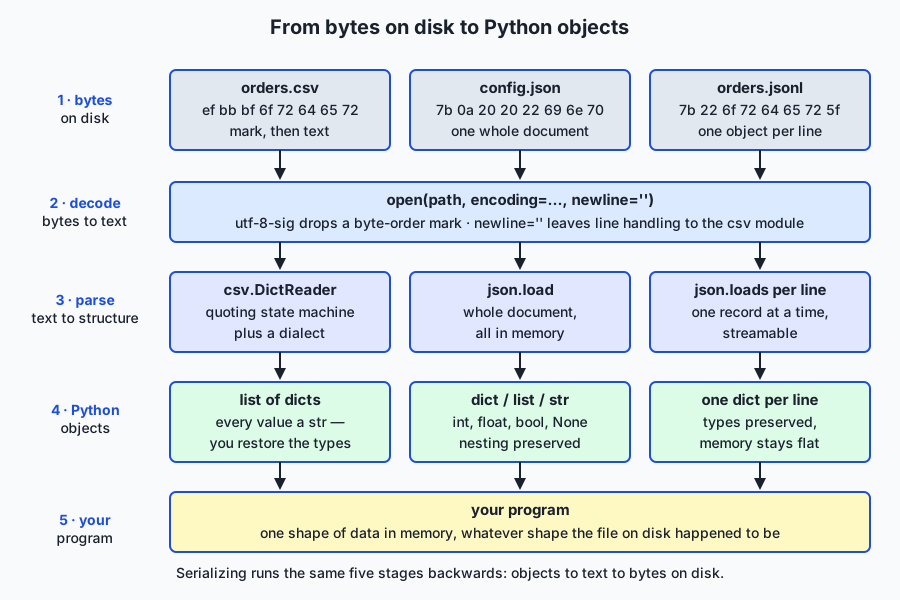
The architecture diagram shows the same four stages for all three formats. At the bottom, the file is a numbered run of bytes — nothing more, exactly as Day 64 described. open() with an encoding decodes those bytes into text. A parser turns the text into structure: the csv module for comma-separated text, the json module for a whole JSON document, or json.loads once per line for JSON Lines. The output is ordinary Python objects — lists, dicts, strings, numbers — and only then does your program work with the data. Notice what this means: choosing a format is choosing a parser, and every format failure happens at that one stage.
The CSV rules that actually matter
Four rules from RFC 4180 cover almost every real file:
- Records are separated by line breaks; fields within a record by commas.
- A field may be wrapped in double quotes.
- A field must be wrapped in double quotes if it contains a comma, a double quote, or a line break.
- Inside a quoted field, a literal double quote is written as two double quotes.
Here is a real file that exercises all four — it is the lab’s data/messy_orders.csv, and every line of it is a case that breaks naive parsing:
order_id,customer,items,notes,total
1001,"Ada Lovelace","widget, large",Priority shipping,49.50
1002,"Grace Hopper","cable, 2 m","Leave at door.
Ring the bell twice.",12.00
1003,"Alan ""Turing"" Jr.",monitor,Fragile,240.00
1004,Katherine Johnson,notebook,,3.25
1005,Barbara Liskov,pen
Six lines, but only six records if you count wrongly — line 3 and line 4 are one record, because the notes field for order 1002 contains a line break inside quotes. Order 1001 has a comma inside items. Order 1003 has doubled quotes that mean one literal quote each. Order 1004 has an empty field. Order 1005 is ragged — it stops after three fields. And the file begins with a byte-order mark that you cannot see here.
Why splitting on commas fails
Run the naive approach over that file and count the fields per line:
lines whose field count is not 5: 3
  line 2: 6 fields
  line 4: 2 fields
  line 7: 3 fields
naive row for order 1001: ['1001', '"Ada Lovelace"', '"widget', ' large"', 'Priority shipping', '49.50']
naive row for order 1003: ['1003', '"Alan ""Turing"" Jr."', 'monitor', 'Fragile', '240.00']
(order 1003 has 5 fields, so the count check passes — and the data is still wrong)
Read the last three lines carefully, because they contain the real lesson. Order 1001 split into six fields: "widget and large" used to be one value, and now every column after it is shifted. That one is at least detectable by counting. Order 1003 is the dangerous case: it has exactly five fields, so a field-count check passes it, and the customer name is still wrong — it reads "Alan ""Turing"" Jr." with the quotes as literal characters instead of Alan "Turing" Jr.. A validation that only counts columns will wave that row straight through into your dataset.
Reading CSV properly
import csv

with open("data/messy_orders.csv", "r", encoding="utf-8-sig", newline="") as handle:
    reader = csv.DictReader(handle)
    records = list(reader)
Three arguments carry the correctness. encoding="utf-8-sig" strips a byte-order mark if one is present and behaves exactly like utf-8 if it is not — which makes it the right default for anything that might have come from a spreadsheet. newline="" hands the module the raw line endings it needs to tell record breaks from quoted ones. And DictReader uses the header row to give you each record as a dictionary keyed by column name, so your code says row["total"] rather than row[4] and stops caring about column order.
Reading the messy file that way gives:
records parsed: 5
first key is 'order_id' (byte-order mark stripped): True
order 1002 notes: 'Leave at door.\nRing the bell twice.'
order 1003 customer: 'Alan "Turing" Jr.'
order 1005 (ragged) total: None
Five records, not six lines. The embedded newline survived as data inside one field. The doubled quotes became one real quote each. And the ragged row’s missing fields came back as None rather than raising — DictReader fills short rows with None and puts extra fields under the restkey, which means you must check for it yourself; a missing value will not announce itself.
Writing CSV properly
with open("out/orders-clean.csv", "w", encoding="utf-8", newline="") as handle:
    writer = csv.DictWriter(handle, fieldnames=["order_id", "customer", "items", "notes", "total"])
    writer.writeheader()
    writer.writerows(records)
DictWriter applies the quoting rules for you: any value containing a comma, a quote, or a newline comes out correctly quoted, and literal quotes come out doubled. This is the half of the round trip people forget — a program that reads CSV carefully and then writes it with an f-string has just created the next person’s parsing bug.
The JSON data model, precisely
JSON has six types, and the mapping to Python is where the surprises live:
| JSON | Python on load | Python on dump | Note |
|---|---|---|---|
| object | dict | dict | keys must be strings — non-string keys are converted |
| array | list | list or tuple | a tuple dumps to an array and comes back a list |
| string | str | str | |
| number | int or float | int or float | JSON itself has one number type |
true / false | bool | bool | |
null | None | None |
Two asymmetries deserve naming because they bite in real pipelines. A tuple does not survive: json.dumps((1, 2)) produces [1, 2], and loading it gives a list, so original == round_tripped is False even though nothing was lost. And dict keys become strings: json.dumps({1: "a"}) produces {"1": "a"}, so an integer-keyed lookup table silently becomes a string-keyed one.
There is no date type. The convention is an ISO 8601 string ("2026-07-19"), written with date.isoformat() and read back with date.fromisoformat() — and it is your code, not the format, that must do it.
The four arguments worth knowing:
import json

json.dumps(data, indent=2)          # human-readable, for configs and small files
json.dumps(data, sort_keys=True)    # stable key order, so diffs are meaningful
json.dumps(data, ensure_ascii=False)  # write "café" as itself, not "café"
json.dumps(data, allow_nan=False)   # raise instead of emitting invalid NaN/Infinity
ensure_ascii=True is the default and it is safe but ugly — it escapes every non-ASCII character to a \uXXXX sequence. Since you are already writing UTF-8 explicitly, ensure_ascii=False gives you a file humans can read. And allow_nan=False is the one to reach for when the output must be read by something that is not Python, because Python’s default of emitting bare NaN produces a file that most other JSON parsers reject.
JSON Lines, and why training data uses it
def write_jsonl(path, records):
    with open(path, "w", encoding="utf-8") as handle:
        for record in records:
            handle.write(json.dumps(record, ensure_ascii=False) + "\n")

def read_jsonl(path):
    with open(path, "r", encoding="utf-8") as handle:
        for line in handle:
            line = line.strip()
            if line:                      # tolerate blank lines
                yield json.loads(line)
That is the whole format. Note what the reader inherits from Day 64: it is a generator over for line in handle:, so its peak memory is one record regardless of file size. A 40 GB JSONL file processes on a laptop; a 40 GB JSON array does not, because json.load must build the entire structure before returning anything. This is precisely why JSONL is the default for training sets, evaluation records, and logs — the three things that grow without bound.
Building a CSV parser from scratch
The rules only truly land when you implement them. A CSV parser is a state machine that looks at one character at a time and decides what to do based on which of four states it is in.
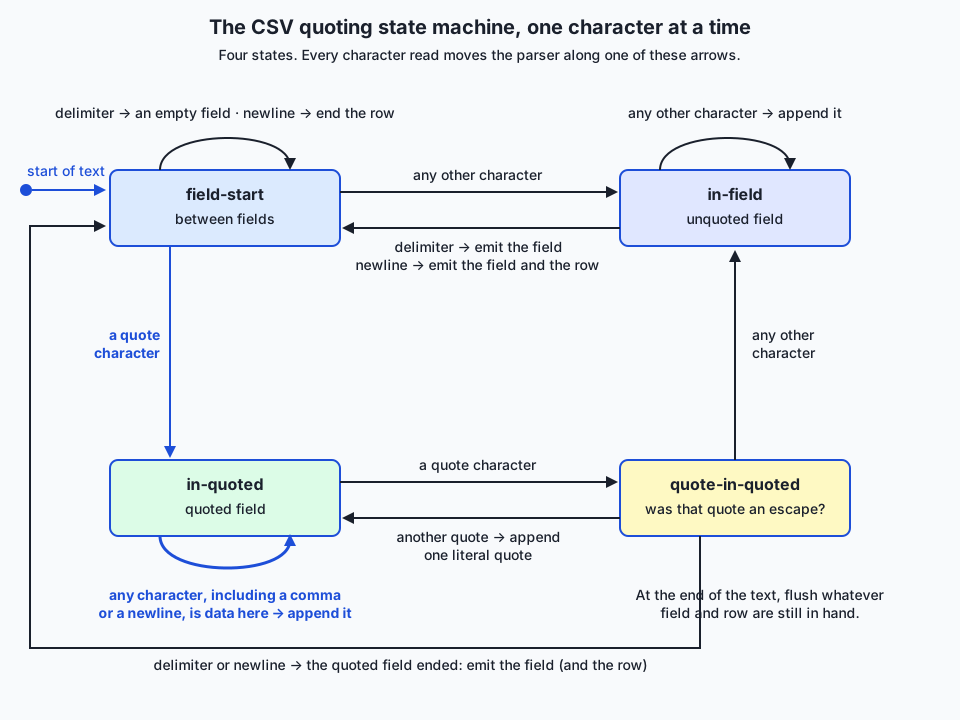
The flow diagram traces every transition. In field-start, a quote means “this is a quoted field” and anything else begins an ordinary one. In in-field, a delimiter or newline ends the field. In in-quoted — and this is the whole point — a comma is just a comma and a newline is just a newline, because inside quotes they are data. A quote character while in-quoted is ambiguous, so it moves to quote-in-quoted to look at the next character: another quote means one literal quote and back to in-quoted; anything else means the quoted section has ended.
def parse_csv(text, delimiter=",", quote='"'):
    """Parse CSV text into rows of fields, implementing the RFC 4180 quoting rules."""
    rows, row, field = [], [], []
    in_quoted = False
    index = 0
    while index < len(text):
        char = text[index]
        if in_quoted:
            if char == quote:
                if index + 1 < len(text) and text[index + 1] == quote:
                    field.append(quote)      # a doubled quote is one literal quote
                    index += 1
                else:
                    in_quoted = False        # the quoted section ends
            else:
                field.append(char)           # commas and newlines are data here
        elif char == quote:
            in_quoted = True
        elif char == delimiter:
            row.append("".join(field))
            field = []
        elif char == "\n":
            row.append("".join(field))
            rows.append(row)
            row, field = [], []
        elif char != "\r":
            field.append(char)
        index += 1
    if field or row:                          # flush whatever is still in hand
        row.append("".join(field))
        rows.append(row)
    return rows
Roughly forty lines, and the proof that it is right is that it agrees with the standard library on the nastiest file we have:
rows parsed by the from-scratch parser: 6
rows parsed by the csv module:          6
  row 0: same  ['order_id', 'customer', 'items', 'notes', 'total']
  row 1: same  ['1001', 'Ada Lovelace', 'widget, large', 'Priority shipping', '49.50']
  row 2: same  ['1002', 'Grace Hopper', 'cable, 2 m', 'Leave at door.\nRing the bell twice.', '12.00']
  row 3: same  ['1003', 'Alan "Turing" Jr.', 'monitor', 'Fragile', '240.00']
  row 4: same  ['1004', 'Katherine Johnson', 'notebook', '', '3.25']
  row 5: same  ['1005', 'Barbara Liskov', 'pen']
agree on every row: True
Every hard case is handled: the comma inside widget, large, the newline inside order 1002’s notes, the doubled quotes in Alan "Turing" Jr., the empty field, and the ragged final row. Having written it once, you will never be tempted to split on commas again — and, just as importantly, you will use the module rather than this, because the module also handles dialects, encodings, and the edge cases this version does not.
An everyday analogy
Think of shipping goods between two warehouses that will never speak to each other.
CSV is a pallet with a packing list. Everything is laid out in a grid: fixed columns, one row per item, and a header telling you what each column holds. It is wonderfully universal — every warehouse in the world can read a packing list — but it assumes everything is flat and rectangular. The delimiter is the painted line between columns on the pallet, and the trouble starts the moment an item’s description contains a painted line: is that a boundary or part of the description? Quoting is the shrink-wrap you put around such an item to say “everything in here is one thing, painted lines included”. And doubling a quote is the awkward but necessary convention for shipping shrink-wrap itself.
JSON is a set of nested boxes with labels on every lid. A box can contain boxes, each labelled, to any depth. Nothing has to be rectangular. The cost is that the labelling vocabulary is deliberately tiny — six kinds of contents and no more — so there is no box marked “date”. If you need to ship a date you write it on a slip of paper in an agreed format and trust the receiver to read it back as a date. That is what an ISO 8601 string is, and it is why a date that survives the trip does so because your code, not the format, put it back together.
JSON Lines is a conveyor belt of individually sealed boxes. Each box is complete on its own and separated from the next by a clean break. You can start processing the first box while the thousandth is still being loaded, add boxes to the end without unpacking anything, and split the belt between two teams by cutting at any break. Compare that with a single giant JSON array, which is one enormous crate: perfectly good, but you cannot inspect anything until the whole crate is open, and a crate bigger than your loading bay simply cannot be opened at all.
The analogy holds all the way to the failure modes. A ragged row is a pallet where someone stopped loading halfway through and left the remaining slots empty — the packing list still says five columns, and you have to notice the gaps yourself, because nothing falls over. A byte-order mark is an invisible sticker on the front of the packing list that makes the first column’s name not quite match the one you were looking for. And naive comma-splitting is reading the painted lines while ignoring the shrink-wrap: you get a confident, complete-looking inventory in which everything after the first wrapped item is off by one.
Examples in practice
Each idea as code you can run, in the order the lab presents them.
Detect a byte-order mark before you trust a header. Look at the first three bytes:
head -c 3 data/messy_orders.csv | xxdefbbbf is the UTF-8 byte-order mark. Once you have seen it, the fix is to open with encoding="utf-8-sig", which strips it when present and is harmless when absent.
Read messy CSV without losing anything.
import csv

with open("data/messy_orders.csv", "r", encoding="utf-8-sig", newline="") as handle:
    for row in csv.DictReader(handle):
        if row.get("total") is None:
            print("ragged row:", row["order_id"])
        else:
            print(row["order_id"], row["customer"], row["total"])
The explicit None check is the habit worth forming: DictReader pads short rows silently, so the only thing standing between a ragged row and a None propagating into your arithmetic is a check you wrote.
Clean and normalise, then round-trip through three formats. The lab writes the same five cleaned records as JSON, JSON Lines, and CSV, and asserts each one reloads identically:
wrote orders.json  (703 bytes)
wrote orders.jsonl (565 bytes, 5 lines)
wrote orders-clean.csv (289 bytes)
round trip lossless: JSON yes, JSONL yes, CSV yes
The byte counts tell their own story. CSV is the most compact at 289 bytes because it names each column once in the header; JSONL costs 565 bytes because every record repeats every key; and pretty-printed JSON costs 703 bytes for the indentation and the wrapping array. That is the real trade-off between them — CSV is compact and flat, JSON is self-describing and nested, JSONL is self-describing and streamable.
Write JSON you will still be able to read next year.
import json

with open("out/orders.json", "w", encoding="utf-8") as handle:
    json.dump(records, handle, indent=2, sort_keys=True, ensure_ascii=False, allow_nan=False)
indent=2 for a human, sort_keys=True so that two versions of the file produce a meaningful diff, ensure_ascii=False so names appear as themselves, allow_nan=False so an accidental float("nan") fails loudly here rather than in whatever reads the file next.
Stream a JSONL file of any size.
import json

total = 0.0
with open("out/orders.jsonl", "r", encoding="utf-8") as handle:
    for line in handle:
        if line.strip():
            total += float(json.loads(line)["total"])
Peak memory is one record. This exact loop — with record["text"] instead of record["total"] — is how you will walk a training corpus later in the course.
Implications: security, privacy, performance, scalability, and cost
Security. Never evaluate data. The single worst way to read a data file is eval() on its contents, because that executes whatever the file contains as Python; json.loads parses without executing and is the correct tool. Be aware of CSV injection (also called formula injection): a field beginning with =, +, -, or @ is interpreted as a formula when the file is opened in a spreadsheet, so a value like =HYPERLINK(...) written into a CSV your colleague opens is an attack on them, not on you. If your CSV may be opened in a spreadsheet, prefix such values with a single quote or reject them. And treat deeply nested JSON from untrusted sources with care — a pathologically nested document can exhaust the parser’s stack.
Privacy. These files are where personal data travels, and both formats are plain text with no access control of their own. A CSV of customer records is readable by anyone who can read the file, and it will be copied into backups, notebooks, and shared drives without ceremony. Write only the columns you actually need, and remember that dropping a column from your analysis does not drop it from the file you were given.
Performance. Parsing is not free, and the difference between formats is real: CSV is compact and fast to scan, JSON costs more because every record repeats every key. But the dominant cost is usually the strategy, not the format — json.load on a large array builds the entire structure in memory before returning, while a JSONL loop returns the first record immediately. When a file is genuinely large and tabular, a dedicated reader such as pandas or a columnar format such as Parquet will beat hand-written parsing by a wide margin.
Scalability. This is the whole argument for JSON Lines. A single JSON array has a hard ceiling at your RAM; a JSONL file has none, appends in constant time, and splits cleanly on newlines so it can be processed in parallel. The same holds for CSV read row by row. Choosing a streamable format early is what lets a pipeline survive its dataset growing a hundredfold.
Cost. The expensive failure here is not compute, it is rework. A silently mis-parsed column means re-running collection, cleaning, and training — plus the time to notice, which is often measured in weeks because nothing crashed. Against that, encoding="utf-8-sig", newline="", and a None check cost a line each.
Alternatives: free, open source, and commercial
Everything below is free. csv, json, and sqlite3 ship with Python at no cost; pandas and PyArrow are free and open source under permissive licences and install with pip. There is no paid tier for reading a data file, so the honest comparison is about fit, not price.
| Option | What it is | When to choose it | Cost |
|---|---|---|---|
csv module | The standard library’s RFC 4180 parser and writer, with dialects | Any flat, tabular text file — reading or writing — especially one you must stream | Free, built in |
json module | The standard library’s JSON parser and serializer | Configuration, API payloads, and any nested structure that fits in memory | Free, built in |
| JSON Lines | A convention: one JSON object per line, no library needed | Training data, evaluation records, logs — anything append-only or larger than memory | Free, no dependency |
sqlite3 | A full SQL database in a single file, in the standard library | When you need queries, indexes, partial updates, or several writers | Free, built in |
| pandas | A third-party data-analysis library with fast tabular readers | Tabular data that fits in memory and needs filtering, grouping, or joining | Free, open source (pip install pandas) |
| Parquet / Arrow | Columnar binary formats with typed schemas | Large analytical datasets where column-selective reads and compression matter | Free, open source (pip install pyarrow) |
csv — how, with an example. Choose it whenever the data is a grid of text. Use DictReader/DictWriter so your code refers to columns by name, and Sniffer when you do not know the dialect:
import csv

with open("unknown.csv", "r", encoding="utf-8-sig", newline="") as handle:
    sample = handle.read(4096)
    handle.seek(0)
    dialect = csv.Sniffer().sniff(sample)          # guesses the delimiter
    for row in csv.DictReader(handle, dialect=dialect):
        print(row)
json — how, with an example. Choose it for nested structures small enough to hold whole. Note load/dump take a file object while loads/dumps take a string — the s is for string:
import json
from pathlib import Path

config = json.loads(Path("data/config.json").read_text(encoding="utf-8"))
config["retries"] = 3
Path("data/config.json").write_text(
    json.dumps(config, indent=2, sort_keys=True) + "\n", encoding="utf-8"
)
JSON Lines — how, with an example. Choose it by default for anything that grows. Appending is a one-liner, which a wrapping array could never be:
import json

with open("eval-results.jsonl", "a", encoding="utf-8") as handle:
    handle.write(json.dumps({"example_id": 42, "correct": True}, ensure_ascii=False) + "\n")
sqlite3 — how, with an example. Choose it when files stop being enough — when you need to look something up without scanning everything, or update one record in place:
import sqlite3

with sqlite3.connect("orders.db") as db:
    db.execute("CREATE TABLE IF NOT EXISTS orders (order_id TEXT PRIMARY KEY, total REAL)")
    db.execute("INSERT OR REPLACE INTO orders VALUES (?, ?)", ("1001", 49.50))
    print(db.execute("SELECT total FROM orders WHERE order_id = ?", ("1001",)).fetchone())
pandas — how, with an example. Choose it when the job is analysis on a table that fits in memory. One line replaces a loop, at the cost of a dependency and of loading the whole file:
import pandas as pd

frame = pd.read_csv("data/messy_orders.csv", encoding="utf-8-sig")
print(frame.groupby("customer")["total"].sum())
It handles the quoting rules correctly, so it is a legitimate alternative to the csv module — but it belongs to the whole-file row of Day 64’s memory table, which makes it the wrong tool for a 50 GB log and an excellent one for a 200 MB table.
Parquet and Arrow — when to reach further. When datasets get genuinely large and analytical, a columnar binary format stores each column together with its type, so reading three columns out of two hundred touches only those three and compression works far better than on text. That is a real step up in complexity, and worth it only once text formats are demonstrably the bottleneck.
Comparison with related concepts
| Concept A | Concept B | Key difference |
|---|---|---|
| CSV | JSON | CSV is a flat grid of untyped text with one header; JSON nests arbitrarily and carries six types. Tables to CSV, structures to JSON |
| JSON | JSON Lines | One document that must be parsed whole, versus one object per line that streams and appends. Same syntax, opposite scaling |
json.load | json.loads | load reads from a file object, loads from a string. The s means string — the same split applies to dump/dumps |
csv.reader | csv.DictReader | reader yields lists indexed by position; DictReader yields dicts keyed by header name, so column order stops mattering |
line.split(",") | csv.reader | Splitting ignores quoting entirely, so any comma, quote, or newline inside a field corrupts the row — silently, and sometimes without changing the field count |
| Tuple in Python | Array in JSON | A tuple serializes to an array and returns as a list, so equality fails after a round trip even though no data was lost |
ensure_ascii=True | ensure_ascii=False | The default escapes non-ASCII to \uXXXX sequences; False writes the characters themselves, which is readable and fine when you write UTF-8 |
| A ragged row | A malformed file | A ragged row parses successfully with None for the missing fields — it is valid CSV and wrong data, which is why you must check |
utf-8 | utf-8-sig | utf-8-sig strips a leading byte-order mark if present and is otherwise identical — the right default for spreadsheet exports |
When to use it — and when not to
Use CSV when the data is genuinely a table, when a human may open it in a spreadsheet, and when compactness matters — and read and write it with the csv module, always with an explicit encoding, newline="", and a check for short rows. Use JSON when the data nests, for configuration and API payloads, and when the file is small enough to hold whole. Use JSON Lines by default for anything that is append-only or that may outgrow memory — training data, evaluation results, logs, event streams — which in practice means most of what you will produce in the second half of this course.
Do not use CSV for nested data; flattening a structure into columns produces names like items.0.price and a format that only your code understands. Do not use a single JSON array for a file that will grow, because you are choosing a ceiling. Do not invent your own delimiter-separated format because your data “has commas in it” — that is the problem quoting already solves, and your format will have no parser but yours. And when you need to query, index, or update records in place, stop reaching for files and use sqlite3.
The through-line from yesterday is exact. Day 64 gave you bytes in and out of files safely; today gives those bytes an agreed structure. Tomorrow, Day 66, handles the errors that both days generate — because a real pipeline meets a ragged row, an undecodable byte, and a malformed JSON document on the same afternoon, and how it responds to them is a design decision rather than an accident.
And this is the thread to your AI goal. The training set you fine-tune on will be JSONL, and every line of it will have been produced by code like today’s. The evaluation harness you write will read examples from a file and append results to another. Every tool call a model makes and every structured output it returns is JSON, parsed with json.loads and validated by you. The most common data bug in machine learning is not exotic — it is a column shifted by one, a field truncated at a comma, or a None from a ragged row that became a zero in someone’s average. You now know how each of those happens and how to make it impossible.
Knowledge check
Try these from memory before looking back:
- Give three things that can appear inside a CSV field and break
line.split(","), and say which of the three a field-count check would fail to catch. - What do
encoding="utf-8-sig"andnewline=""each do, and what goes wrong without them? - What does
DictReaderput in a field that a ragged row never supplied, and why is that dangerous? - Name three things JSON cannot represent, and say how each is conventionally worked around.
- Why does
json.dumps((1, 2))followed byjson.loadsnot return a tuple, and what else changes on a round trip? - Why can a 40 GB JSONL file be processed on a laptop when a 40 GB JSON array cannot?
Hands-on exercise
Time to wrangle real mess. In the Day 65 lab you take a deliberately hostile CSV — embedded commas, a quoted newline, doubled quotes, a byte-order mark, an empty field, and a ragged final row — and prove first that naive splitting mangles it, then that the csv module handles it, then round-trip it losslessly through JSON and JSON Lines, and finally implement the quoting state machine yourself and check it agrees with the standard library on every row.
Work in the lab directory; every command below is run from there.
First, look at the byte-order mark with your own eyes:
head -c 3 data/messy_orders.csv | xxdThen drive the finished reference:
python3 examples/wrangle.py
python3 examples/csv_field_parser.py
cat out/orders.jsonl
Now open starter/wrangle.py and starter/csv_field_parser.py and complete their numbered exercises, using the docstrings as your contract. Run your versions:
python3 starter/wrangle.py
python3 starter/csv_field_parser.py
Finally run the suite:
bash tests/run_tests.shExpected output
A correct run of the reference produces exactly this (captured on the authoring machine; every figure is deterministic):
=== 1. naive line.split(',') ===
lines whose field count is not 5: 3
  line 2: 6 fields
  line 4: 2 fields
  line 7: 3 fields
naive row for order 1001: ['1001', '"Ada Lovelace"', '"widget', ' large"', 'Priority shipping', '49.50']
naive row for order 1003: ['1003', '"Alan ""Turing"" Jr."', 'monitor', 'Fragile', '240.00']
(order 1003 has 5 fields, so the count check passes — and the data is still wrong)

=== 2. csv.DictReader ===
records parsed: 5
first key is 'order_id' (byte-order mark stripped): True
order 1002 notes: 'Leave at door.\nRing the bell twice.'
order 1003 customer: 'Alan "Turing" Jr.'
order 1005 (ragged) total: None

=== 3. clean ===
  1001 Ada Lovelace         49.50
  1002 Grace Hopper         12.00
  1003 Alan "Turing" Jr.   240.00
  1004 Katherine Johnson     3.25
  1005 Barbara Liskov        0.00

=== 4. write and round-trip ===
wrote orders.json  (703 bytes)
wrote orders.jsonl (565 bytes, 5 lines)
wrote orders-clean.csv (289 bytes)
round trip lossless: JSON yes, JSONL yes, CSV yes
And the from-scratch parser:
rows parsed by the from-scratch parser: 6
rows parsed by the csv module:          6
agree on every row: True
The lines to read closely are the two naive rows (order 1001 split into six fields; order 1003 kept five and is still wrong), records parsed: 5 against six lines in the file, the None for the ragged row, and agree on every row: True.
Validate your work
You are done when you can check every box:
-
head -c 3 data/messy_orders.csv | xxdshowsefbbbf— the byte-order mark is really there. - Part 1 reports 3 lines with a field count other than 5, and shows order 1003 passing the count check while still holding wrong data.
- Part 2 reports
records parsed: 5from a six-line file, with the embedded newline preserved inside order 1002’s notes. - Part 2 reports
Nonefor the ragged row’s total rather than raising. - Part 4 reports
round trip lossless: JSON yes, JSONL yes, CSV yes. -
out/orders.jsonlhas exactly 5 lines, each a complete JSON object. -
python3 examples/csv_field_parser.pyreportsagree on every row: True. - Your starter versions produce the same output as the reference.
-
bash tests/run_tests.shprints0 failure(s).and exits 0.
Troubleshooting
Your first column lookup returns None for every row. The byte-order mark. Your header key is not order_id but an invisible prefix plus order_id. Open with encoding="utf-8-sig". Confirm it by printing repr(list(row.keys())[0]).
You get blank rows between every real row. You opened the file without newline="". The csv module needs the raw line endings; without it, line-ending translation produces spurious empty records.
Your row count is 6 instead of 5. You are splitting on lines rather than letting the parser handle a quoted newline. A record can span lines — only the parser knows where records really end.
TypeError: float() argument must be a string or a real number, not 'NoneType'. A ragged row. DictReader filled the missing field with None and you did arithmetic on it. Check for None before converting.
json.decoder.JSONDecodeError: Expecting value. Usually a blank line in a JSONL file, or an attempt to json.loads an entire multi-line file. Skip empty lines, and parse JSONL one line at a time.
Round-trip equality fails but the data looks identical. You had a tuple. It came back as a list. Compare after normalising, or avoid tuples in anything destined for JSON.
The starter raises NotImplementedError. Expected until you finish that exercise. Each unfinished function raises on purpose so an empty function cannot be mistaken for a working one.
Common mistakes
- Splitting on commas. The mistake this whole lesson exists to prevent. Use the
csvmodule, always. - Forgetting
newline="". Silent on macOS and Linux, spurious blank rows elsewhere — a bug that appears only on someone else’s machine. - Forgetting
utf-8-sigon spreadsheet exports. Produces a first column nothing can match, and the symptom looks like missing data rather than an encoding problem. - Trusting a field count as validation. Order 1003 has the right number of fields and the wrong contents.
- Assuming a ragged row will raise. It will not. It parses cleanly with
Nonevalues that flow onward into your numbers. - Writing CSV with an f-string. Reading carefully and then writing carelessly just moves the bug downstream. Use
DictWriter. - Using one giant JSON array for data that grows. You have chosen a memory ceiling. Use JSON Lines.
- Storing a date and expecting it back. JSON has no date type; write
date.isoformat()and parse withdate.fromisoformat().
Practice assignment
Build csvcheck.py, a small program in the Day 63 shape — a pure core plus a thin shell — that audits a CSV file before anyone trusts it.
Your spec: given a path to a CSV file, report the number of records (not lines), the header names exactly as parsed, how many rows are ragged and which line numbers they are on, how many fields contain a comma, a quote, or a newline (so a reader knows quoting matters), and any column that is entirely empty. Then write the audit to <file>.audit.json using the atomic-write pattern from Day 64.
Requirements: open with encoding="utf-8-sig" and newline=""; use csv.DictReader and report reader.line_num for problem rows; never call split(","); make the audit core a pure function that takes parsed records and returns a dictionary, so it can be tested without files; and exit non-zero with a clear message on standard error if the file does not exist or has no header.
Test it against the lab’s data/messy_orders.csv and confirm it reports 5 records from a 6-line file, one ragged row, and the fields that require quoting. Then feed it a file you generate yourself with 100,000 rows and confirm it still streams — peak memory in the low hundreds of kilobytes, using tracemalloc as Day 64’s lab did.
Extension challenge
One: extend the from-scratch parser to handle dialects. Add parameters for the delimiter and the quote character, then run it against semicolon-separated and pipe-separated versions of the messy file. Then implement a miniature Sniffer: given the first few kilobytes, guess the delimiter by counting candidate characters outside quoted regions, and check your guess against csv.Sniffer on several real files.
Two: write a JSONL validator for a training-data file. It should stream the file, report the line number of any line that is not valid JSON, any object missing a required key, and any value of the wrong type — collecting every problem rather than stopping at the first, which is the error-handling design Day 66 formalises. Run it against a file you deliberately corrupt in three different ways and confirm it finds all three.
Three: measure the format trade-off for yourself. Generate the same 100,000 records as pretty JSON, compact JSON, JSONL, and CSV. Compare the four file sizes, then time reading each one end to end, then time reading only the first record from each. The last measurement is the interesting one, and it is the argument for JSONL in one number.
Quiz
Q1. A CSV field contains a comma, so the row is parsed with `line.split(",")`. What is the most dangerous outcome?
- The parser raises a clear error naming the offending line
- The row gains a field, so every column after it shifts — and a row with doubled quotes can keep the right field count while still holding wrong data
- Only the field containing the comma is affected; the rest of the row is fine
- The file cannot be opened at all
Show answer
Answer: B. The row gains a field, so every column after it shifts — and a row with doubled quotes can keep the right field count while still holding wrong data
Nothing raises. A comma inside a field adds a field and shifts every column after it, which a field-count check would at least notice. The worse case is a field with doubled quotes: it keeps the correct field count and still parses to the wrong value, so count-based validation waves it through.
Q2. What does opening a CSV with `encoding="utf-8-sig"` do?
- Signs the file so its integrity can be verified later
- Forces every field to be quoted on write
- Strips a leading byte-order mark if present, and behaves exactly like utf-8 if not
- Automatically detects the delimiter used by the file
Show answer
Answer: C. Strips a leading byte-order mark if present, and behaves exactly like utf-8 if not
Spreadsheet exports often begin with a byte-order mark, which invisibly prefixes the first column name so no lookup matches it. utf-8-sig removes it when present and is harmless when absent, which makes it the right default for files that may have come from a spreadsheet.
Q3. Why must a CSV file be opened with `newline=""`?
- So the csv module sees raw line endings and can tell a record break from a newline inside a quoted field
- To strip trailing whitespace from every field
- Because csv.reader cannot accept a file object otherwise
- It only matters when writing, never when reading
Show answer
Answer: A. So the csv module sees raw line endings and can tell a record break from a newline inside a quoted field
The csv module handles line endings itself, because a quoted field may legitimately contain one. Letting Python's universal newline translation interfere produces spurious blank rows on some platforms — a bug that appears only on someone else's machine.
Q4. `csv.DictReader` reads a row that supplied fewer fields than the header. What happens?
- It raises csv.Error naming the line number
- It skips the row silently
- It repeats the previous row's values for the missing fields
- It parses successfully, filling the missing fields with None
Show answer
Answer: D. It parses successfully, filling the missing fields with None
A ragged row is valid CSV, so nothing raises. DictReader pads the missing fields with None, and those None values flow onward into your arithmetic unless you check for them. This is why a None check is a required habit, not a defensive nicety.
Q5. Which of these can JSON represent directly?
- A date
- A nested object containing an array of objects
- A Python tuple, preserved as a tuple
- A set
Show answer
Answer: B. A nested object containing an array of objects
JSON has exactly six types: object, array, string, number, true/false, and null. Nesting is its strength. Dates are a convention (an ISO 8601 string), tuples serialize to arrays and return as lists, and sets do not serialize at all without help.
Q6. What changes when a Python dict `{1: "a"}` is dumped to JSON and loaded back?
- Nothing; the round trip is exact
- The value becomes a list
- The key becomes the string "1", because JSON object keys must be strings
- json.dumps raises a TypeError on the integer key
Show answer
Answer: C. The key becomes the string "1", because JSON object keys must be strings
JSON object keys are always strings, so Python converts non-string keys on the way out and cannot know to convert them back. An integer-keyed lookup table silently becomes string-keyed — a favourite source of failed lookups after a round trip.
Q7. Why is JSON Lines preferred over one large JSON array for training data and logs?
- JSON Lines files are always smaller on disk
- JSON Lines supports data types that JSON does not
- Each line is a complete object, so the file streams line by line, appends without rewriting, and splits cleanly on newlines
- A JSON array cannot contain objects
Show answer
Answer: C. Each line is a complete object, so the file streams line by line, appends without rewriting, and splits cleanly on newlines
A single array must be parsed whole before any record is available, so its ceiling is your RAM. JSONL gives constant peak memory with `for line in handle:`, appending is one write, and splitting on newlines parallelises trivially. It is actually slightly larger on disk, since every record repeats every key.
Q8. Which `json.dumps` argument makes Python refuse to emit values that are not valid JSON?
- sort_keys=True
- indent=2
- ensure_ascii=False
- allow_nan=False
Show answer
Answer: D. allow_nan=False
By default Python happily writes bare NaN, Infinity, and -Infinity, none of which are valid JSON, producing a file that most non-Python parsers reject. allow_nan=False raises instead, so the problem surfaces where it was created rather than in whatever reads the file next.
Glossary
- data interchange format
- An agreement about bytes between two programs that will never meet. One writes and one reads, and the format is the only thing they share — which is why structure cannot survive a trip through a file without one.
- CSV
- Comma-separated values: one record per line, fields separated by a delimiter, usually with a header row naming the columns. Universal and compact, but untyped, flat, and never formally standardised before the fact.
- RFC 4180
- The 2005 memo by Yakov Shafranovich describing what most CSV implementations actually do. It is explicitly informational rather than a binding standard, which is exactly why real files still violate it.
- delimiter
- The character separating fields within a record — a comma by convention, but semicolons, tabs, and pipes are all common in the wild. Always check before parsing rather than assuming.
- quoting
- Wrapping a field in double quotes so that characters which would otherwise be structural — a delimiter, a newline — are treated as data. RFC 4180 requires it for any field containing a comma, a quote, or a line break.
- escaped quote
- A literal double quote inside a quoted CSV field, written as two consecutive double quotes. It is how the quoting mechanism escapes itself, and it is the case that keeps the right field count while still corrupting data under naive parsing.
- dialect
- The particular combination of delimiter, quote character, and line ending a producer uses. The csv module lets you name one explicitly, and csv.Sniffer will guess one from a sample.
- header row
- The first line of a CSV, naming the columns. DictReader uses it to key each record by column name, so your code stops depending on column order.
- DictReader
- The csv module reader that yields each record as a dictionary keyed by header name. It pads a short row's missing fields with None rather than raising — which is convenient and dangerous in equal measure.
- ragged row
- A record supplying fewer fields than the header declares. It is valid CSV, so nothing raises; the missing values arrive as None and flow onward into your arithmetic unless you check for them.
- byte-order mark
- An invisible byte sequence (EF BB BF in UTF-8) that some programs write at the start of a file. It silently prefixes the first column name, so lookups fail in a way that looks like missing data. Opening with encoding="utf-8-sig" strips it.
- JSON
- JavaScript Object Notation: a minimal format with exactly six types — object, array, string, number, true/false, and null. It nests arbitrarily, which is its strength, and carries no date, comment, or integer/float distinction, which is its cost.
- serialization
- Turning in-memory objects into a sequence of bytes that can be stored or transmitted — what json.dump and csv.DictWriter do.
- deserialization
- The reverse: turning stored bytes back into in-memory objects, as json.load and csv.DictReader do. The round trip is not always exact, which is where tuples and non-string dict keys catch people out.
- JSON Lines
- A convention rather than a standard: one complete JSON object per line, with no wrapping array. It combines JSON's structure with CSV's streamability, which is why training data, evaluation records, and logs use it.
- round trip
- Writing data out and reading it back. A lossless round trip returns exactly what you put in; through JSON, tuples return as lists and non-string dict keys return as strings, so equality can fail even when nothing was lost.
- ensure_ascii
- A json.dumps argument, defaulting to True, that escapes every non-ASCII character to a \\uXXXX sequence. Setting it to False writes the characters themselves, which is readable and perfectly safe when you are already writing UTF-8.
- state machine
- A parser design that holds one piece of state — here, which of four quoting states it is in — and decides what to do with each character based on it. It is what makes correct CSV parsing possible and hand-rolled splitting impossible.
Sources and further reading
- csv — CSV File Reading and Writing — Python Software Foundation (accessed 2026-07-19)
- json — JSON encoder and decoder — Python Software Foundation (accessed 2026-07-19)
- RFC 4180 — Common Format and MIME Type for Comma-Separated Values (CSV) Files — IETF (accessed 2026-07-19)
- Introducing JSON — json.org (accessed 2026-07-19)
- Comma-separated values — Wikipedia (accessed 2026-07-19)
Kept in this browser, no account needed. Your progress page turns the whole record into one link you can bookmark or open on another device.