Programming with Python › Python for Automation and the Web › Day 80
Day 80: Building CLIs with argparse
After this lesson you will be able to treat a command line as the user interface it is: build an argparse parser whose help output is the documentation, split a tool into subcommands dispatched by set_defaults with no branch on the command name anywhere, convert and validate every value at the parser with custom type callables that raise ArgumentTypeError, follow the exit-code convention that automation depends on, keep results on standard output and diagnostics on standard error so the tool composes in a pipeline, read from standard input when an argument is a lone dash, make --dry-run a guarantee you can prove by hashing the file, resolve configuration by the precedence users expect, and test the whole thing both in-process and as a subprocess.
Hands-on lab for this lesson
Lab files on GitHub: https://github.com/ai-roadmap-365/ai-roadmap-365.github.io/tree/main/labs/sections/programming-with-python/day-080-building-clis-with-argparse
- Get the hands-on files. Clone the labs repository once (you can reuse this clone for every lesson). This works on macOS, Linux, and Windows (PowerShell or WSL):
git clone https://github.com/ai-roadmap-365/ai-roadmap-365.github.io.git cd ai-roadmap-365.github.io - Open this lesson's lab. Move into the directory for this specific day. Every lab lives at the same predictable path — section / subsection / week / day:
cd labs/sections/programming-with-python/day-080-building-clis-with-argparse - Read the lab guide. Open `README.md` in that directory. It lists the exact commands, what each does, the expected output, and how to check your work — read it before running anything.
- Run it and check your work. Follow the README's "How to run" section: run the example first to see the finished result, then complete the numbered exercises in `starter/`, then run the tests. The tests pass (exit 0) only when your work is correct.
bash tests/run_tests.sh # or the test command named in the lab README
You can also open the lab as a local page (works offline, shows the file tree and expected output).
Learning objectives
By the end of this lesson you will be able to:
- Explain why hand-parsing sys.argv starts producing silently wrong answers at about the second optional flag, using a working demonstration rather than an assertion
- Distinguish positional arguments, options, flags and subcommands, and follow the conventions users already expect — -h, --help, --version, -v, --quiet, --dry-run, and the bare -- that ends option parsing
- Build an ArgumentParser with prog, description, epilog and per-argument help, and treat the generated help output as a deliverable rather than a side effect
- Use add_subparsers with set_defaults(func=...) as the dispatch pattern, so adding a verb touches one add_parser block and one function and nothing else
- Write custom type= callables that convert and validate, raising argparse.ArgumentTypeError so a bad value becomes a usage message and exit 2 instead of a traceback
- Apply choices, default, required, nargs, action="store_true", action="append", argument groups and mutually exclusive groups, and say what each one buys
- Follow the exit-code convention — 0 success, 1 refusal, 2 usage error — and use parser.error() for usage problems only detectable at run time
- Separate results on standard output from diagnostics on standard error, read from standard input on a lone dash, detect a terminal so the tool explains itself instead of hanging, and flush between streams
- Implement --dry-run as a real guarantee — validated for real, written never — and resolve configuration by the precedence of defaults, config file, environment, then flags
- Make a parser testable by having parse_args take an explicit argument list, and explain what a subprocess test proves that an in-process test cannot, and the reverse
- Compare argparse, click, typer, docopt and plain sys.argv on install cost, style, features and maintenance, and choose deliberately between them
Prerequisites
- Day 56: building a data-driven CLI with sys.argv — this lesson is its direct sequel
- Days 8-14: the command line itself, including pipes, redirection, and what a well-made tool feels like from the outside
- Days 64-66: reading and writing files, JSON, and exception-handling strategy
- Days 71-74: pytest, and Day 74's argument for injecting a boundary rather than reaching for it — which is exactly what parse_args(argv) and an injected Streams object are
- Day 69 and Day 75: type hints on public functions, which the typer comparison builds on
- A terminal, a text editor, and Python 3
Why this matters
On Day 56 you built a data-driven command-line tool by reading sys.argv yourself. It worked. For what it did — one positional argument, no options — it was the right call, and reaching for a parsing library there would have been more machinery than the job needed.
Days 78 and 79 have now given you things worth wrapping in a command: a script that fetches something over HTTP, a script that extracts structured data out of a page. Right now those live as files you edit before each run, with the URL sitting in a variable near the top and the output path a few lines below it. That is fine for a program with one user who is also its author and who remembers, this week, which variable to change. It stops being fine the first time someone else needs to run it, or the first time you need to run it in six months, or the first time it has to run unattended at three in the morning as a scheduled job — which is where Day 81 goes.
The gap between those two states is not a gap in your Python. It is a gap in the interface. And the thing worth internalising today, before any syntax, is this: a command line is a user interface. It is a screen with no pixels. The same care you would give a form — clear labels, sensible defaults, validation at the point of entry, an error message that says what to do rather than what went wrong, a confirmation before anything irreversible — belongs here, and for exactly the same reasons.
The consequences of skipping that care are concrete and they cost money. A tool with no --dry-run on its destructive path deletes the wrong directory once, and once is enough. A tool that prints its errors to standard output instead of standard error poisons every pipeline it appears in, and the corruption is silent — the downstream program receives an error message where it expected data, and does something confident and wrong with it. A tool that always exits 0 cannot be automated at all, because the scheduler has no way to know it failed; you find out days later from the absence of a report nobody was watching for. A tool whose date argument is a string that gets parsed somewhere in the middle produces a traceback at the user, which is a bug report addressed to the wrong person.
Each of those is a line or two of argparse. That is the deal on offer today.
And there is a thread running from here to the AI work later in this course, which is worth flagging now and will be picked up properly at the end. When you eventually expose one of your Python functions to an AI model as a tool — so the model can decide to call it — what you write is a schema: the function’s name, a description of what it does, and for each parameter a name, a type, a description, and whether it is required. That is, structurally, exactly what add_argument is. Learning to describe a callable precisely enough that a stranger can use it correctly from the outside is the habit; argparse is where you build it.
The idea in plain language
A command-line program receives, at the moment it starts, a list of strings. That is all. Everything else — options, flags, subcommands, values, defaults — is a convention built on top of that list, and the whole job of an argument parser is to turn the list into something structured you can reason about.
Those conventions are worth naming precisely, because the words get used loosely and the distinctions matter.
A positional argument is identified by where it appears. In cp source.txt backup.txt, the first path is the source and the second is the destination because of their positions, not their names. Positional arguments are usually required, and there are usually few of them, because a user cannot be expected to remember an order longer than about two.
An option is identified by name, so it can appear anywhere and in any order. Options have a long form (--verbose) and often a short form (-v). An option that takes a value — --store notes.json — is sometimes just called an option; one that takes no value and simply turns something on — --dry-run — is usually called a flag. The distinction is small but it changes how you declare it.
A subcommand is a first positional argument that selects an entire second interface. git commit and git log share the program git but accept completely different options. Once a tool has more than about three verbs, subcommands are how it stays comprehensible, and dispatch is the mechanism that routes a parsed subcommand to the function that implements it.
An exit code is the single number a program hands back to whatever launched it. Zero means it worked. Anything else means it did not. This is not a suggestion; it is the mechanism by which && in a shell decides whether to run the next command, and by which a scheduler decides whether to raise an alarm.
And there are three streams, not two. Standard output is where the program’s result goes — the thing a person or another program actually wanted. Standard error is where diagnostics go: progress notes, warnings, error messages. Standard input is where a value can arrive from another program instead of from the command line. Keeping the first two apart is what allows mytool > results.json to produce a clean file even while the tool is chattering at you on screen.
argparse is Python’s standard-library answer to all of this. You declare your interface — here is a positional called text, here is an option called --on whose value must be a date, here are five subcommands — and argparse does the rest: parsing, type conversion, validation, error messages, exit codes, and the entire --help screen, generated from the same declarations that do the parsing, which is precisely why the help can never drift out of date with the behaviour.
Historical background
The conventions you are about to follow are older than Python, older than most of the people using them, and their oddities are historical rather than designed.
The single-dash short option — -v, -l, -a — comes from Unix at Bell Labs in the early 1970s. Terminals were slow and typing was expensive, so options were single letters, and letters could be clustered: ls -la means the same as ls -l -a. That clustering rule is why short options are single characters to this day, and why -la cannot be a long option name.
The double-dash long option — --verbose — arrived much later, from the GNU project in the 1980s, as a deliberate readability fix. A script full of -x -f -q is unreadable six months on; --extract --file --quiet explains itself. The convention that settled is: offer both, use the short one interactively, use the long one in scripts. GNU also established --help and --version as options every program should have, and the bare -- that means “everything after this is a positional argument, even if it starts with a dash” — which is how you delete a file genuinely named -rf.
The exit code convention is as old as Unix itself: 0 for success, non-zero for failure, with the specific non-zero value free for the program to define. Some conventions grew on top — grep returns 1 for “no lines matched” and 2 for a real error, a distinction it is worth copying because “nothing found” is genuinely not the same event as “something broke”.
Python’s own history here is a story of three libraries. getopt came first, a thin wrapper over the C function of the same name; it parses, and does nothing else — no help, no types, no error messages. optparse arrived in Python 2.3 (2003), written by Greg Ward, and was a large improvement: it generated help text and handled types. But it could not do positional arguments at all, and it could not do subcommands. argparse was written by Steven Bethard to fix exactly those gaps, was accepted through PEP 389, and entered the standard library in Python 3.2, released in 2011. optparse was deprecated in the same release. getopt and optparse both still exist and both still work; neither is what you should reach for now.
That 2011 date is worth holding on to, because it is the strongest practical argument for argparse over anything else: a tool you write with it runs on any Python 3 anyone is likely to have, with no install step, no version pin, and no network.
What it is — and what it is not
argparse is a declarative library for describing a command-line interface. You state what arguments exist, what types they hold, which are required, and what each one means; argparse turns a list of strings into a namespace of typed values, and handles everything that goes wrong in between.
It is not a framework. It does not structure your program, own your main loop, or ask you to inherit from anything. build_parser() returns an object; what you do with the parsed result is entirely your business.
It is not a validation library in general. type= gives you a hook for each argument, which is genuinely useful and where a great deal of the value lives, but argparse knows nothing about relationships between arguments beyond mutual exclusion. “This option is required only when that other one is set” is your code, in the handler, not the parser’s.
It is not an output library. It formats help text and usage errors and nothing else. Colour, tables, progress bars, spinners — none of that is argparse’s concern, and if you want them you are looking at rich or writing escape codes by hand.
It is not the only choice, and today’s Alternatives section takes the competitors seriously rather than dismissing them.
And a command-line interface is not a lesser sibling of a graphical one. It is a different interface with different strengths: it is scriptable, composable, diffable, reviewable, and remotely operable over a connection too slow for anything else. A well-made command-line tool is a better interface than a badly made window, and it stays useful for decades.
| Common misconception | The reality |
|---|---|
| ”argparse is for big programs; my script is small.” | The break-even point is roughly the second optional flag. Below that, sys.argv is fine; above it, hand-parsing starts producing silently wrong answers. |
”I will add --help text later.” | The help is the interface. Users who cannot discover a feature do not have it, and help= costs one string at the moment you already know the answer. |
| ”Exit codes are for shell scripts, not for me.” | Every scheduler, CI system, and && in existence reads them. A tool that always exits 0 cannot be automated at all. |
”Printing errors with print() is fine.” | It is not. It puts diagnostics into the result stream, which corrupts every pipeline the tool ever appears in — silently. |
”--dry-run is a nice-to-have.” | For anything destructive it is the difference between a mistake and an incident. It is also the only feature users check before trusting you. |
| ”Subcommands are complicated.” | add_subparsers plus set_defaults(func=...) is about six lines and removes every branch on the command name from your program. |
Why it was created and what problems it solves
The honest way to make this argument is to run it rather than assert it. The lab ships examples/by_hand.py, a hand-rolled parser for a modest interface — one positional and two options — written the way people really write them:
def parse_by_hand(argv):
    text, tag, dry_run = None, None, False
    i = 0
    while i < len(argv):
        item = argv[i]
        if item == "--dry-run":
            dry_run = True
        elif item == "--tag":
            i += 1
            tag = argv[i]          # IndexError if the user forgot the value
        elif text is None:
            text = item
        i += 1
    return {"text": text, "tag": tag, "dry_run": dry_run}
Nothing there is a straw man. It is about as good as a hand-rolled parser gets before you start writing a real one. Run it against eight command lines a user might type on their first afternoon, and this is the actual captured output:
  $ notes add 'buy milk' --tag=shopping
      text='buy milk' tag=None dry_run=False
      --flag=value form: the tag is silently lost

  $ notes add 'buy milk' -t shopping
      text='buy milk' tag=None dry_run=False
      short form: -t is swallowed as the text

  $ notes add 'buy milk' --drynrun
      text='buy milk' tag=None dry_run=False
      a typo: accepted in silence, and does nothing

  $ notes add 'buy milk' --tag
      IndexError: list index out of range
      a missing value: IndexError, and a traceback

8 ordinary command lines, 4 of them handled wrongly.
Look at the failure modes, not the count. Three of the four are silent. The user typed --tag=shopping, which is standard on every Unix system in the world, and the program cheerfully proceeded with no tag and said nothing. The user typed --drynrun and the program ran for real. Silence is the worst possible failure mode for a user interface, because the user has no signal that anything is wrong and no reason to look.
And this parser, at four wrong answers out of eight, still has no --help, no usage message, no exit code 2, no type conversion, and no way to refuse an option it does not recognise. Every one of those is a line of argparse. Here is the same interface, correctly:
add.add_argument("text")
add.add_argument("-t", "--tag", action="append")
add.add_argument("--dry-run", action="store_true")
Three lines, and all eight command lines are handled correctly — including --tag=shopping, including the clustered short form, including refusing --drynrun with a message and exit 2, including telling the user that --tag expects one argument rather than crashing.
The deeper problem argparse solves is one of placement. In the hand-rolled version, validation happens wherever you remember to put it — which is to say, in some handlers and not others, and never in the one added last. With argparse, conversion and validation happen at the parser, which is the single narrowest point in the program, before any of your logic runs. A value that is wrong never gets inside. This is the same argument Day 70 made for validating in __post_init__ so an invalid object cannot exist; here it is moved out one more layer, to the process boundary.
How it works
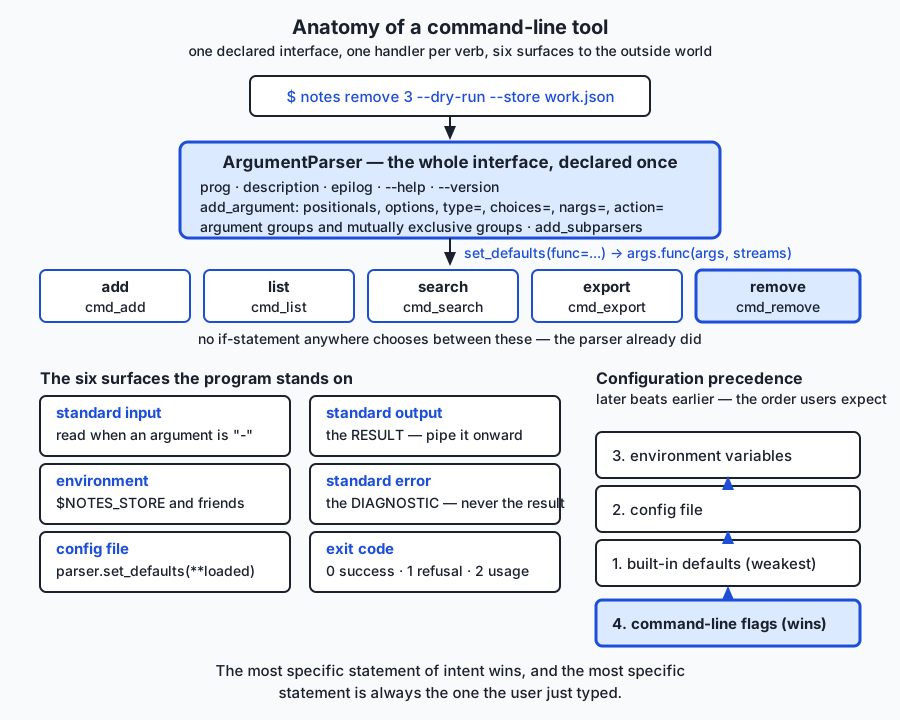
Here is the shape of a properly built tool. Read the top half first — the parser and its handlers — and then the ring of surfaces around it.
The parser is a declaration
parser = argparse.ArgumentParser(
    prog="notes",
    description="Keep short notes in a JSON file you can read with your own eyes.",
    epilog="Examples:\n  notes add 'ring the dentist' --tag health --on 2026-03-01\n",
    formatter_class=argparse.RawDescriptionHelpFormatter,
)
prog is what appears in every usage line. Without it argparse uses the file name, so your users read usage: notes.py — which tells them you never looked. description shows above the options, epilog below them, and RawDescriptionHelpFormatter is what stops argparse from re-wrapping your epilog and destroying its line breaks. Four keywords; the difference between a tool and a script.
add_argument is where the interface actually lives
Every argument is one call, and the keywords each do one job:
| Keyword | What it does | Example |
|---|---|---|
type= | converts the string, and validates it by raising | type=iso_date turns '2026-03-01' into a date |
choices= | restricts to a fixed set, and lists them in the usage line | choices=["table", "json"] |
default= | the value when the option is absent | default="table" |
required= | forces an option to be given (positionals are required by default) | required=True |
nargs= | how many values: a number, "?", "*", or "+" | nargs="+" gives a list of one or more |
action="store_true" | a flag: present means True, absent means False | --dry-run |
action="append" | collects repeats into a list | -t python -t writing gives ["python", "writing"] |
metavar= | what the value is called in the help | metavar="YYYY-MM-DD" |
help= | the one-line description in --help | always write it |
Two of those deserve a longer look.
type= is your validation hook, not just a converter. It takes any callable that accepts a string. Pass int and you get integers; pass your own function and you get anything you like — with the crucial property that raising argparse.ArgumentTypeError inside it produces a proper usage message and exit 2 rather than a traceback:
def iso_date(text: str) -> date:
    try:
        return datetime.strptime(text, "%Y-%m-%d").date()
    except ValueError:
        raise argparse.ArgumentTypeError(
            f"{text!r} is not a date in YYYY-MM-DD form (for example 2026-03-01)"
        ) from None
The captured result of a user getting this wrong:
$ python3 notes.py add 'x' --on 2026-13-01 --store notes.json
usage: notes add [-h] [--store PATH] [-v | -q] [-t TAG] [--on YYYY-MM-DD]
                 [--dry-run]
                 text
notes add: error: argument --on: '2026-13-01' is not a date in YYYY-MM-DD form (for example 2026-03-01)
exit: 2
Read what that gives the user: the usage line reminding them of the shape, the exact argument that was wrong, the exact value that was wrong, and what a right one looks like. Compare it with ValueError: time data '2026-13-01' does not match format '%Y-%m-%d' and a fifteen-line traceback, which is what happens if you let the conversion happen in your handler instead.
default=None is a deliberate choice, not laziness. If --store defaults to "notes.json" you can never tell whether the user said --store notes.json or said nothing. Default it to None and the difference is visible, which is what makes the environment-variable fallback possible at all.
Subcommands, and the dispatch pattern
This is the day’s single most useful technique.
subcommands = parser.add_subparsers(
    title="subcommands", dest="command", metavar="<command>", required=True,
)

add = subcommands.add_parser("add", parents=[parent], help="add one note")
add.add_argument("text")
add.add_argument("--on", type=iso_date, metavar="YYYY-MM-DD")
add.set_defaults(func=cmd_add, parser=add)
set_defaults stores arbitrary values on the namespace that parsing produces. Storing the handler function itself means that after args = parser.parse_args(argv), the attribute args.func is the right function. Dispatch becomes one line, with no branch on the command name anywhere in the program:
return args.func(args, streams)Adding a sixth subcommand touches one add_parser block and adds one function. Nothing else in the program knows the set of commands grew. That is the whole benefit, and it is why every tool of this shape is built this way.
Two details that bite people. required=True on add_subparsers is what makes running bare notes produce a usage message and exit 2; without it, parsing succeeds with no subcommand and your program dies later on AttributeError: 'Namespace' object has no attribute 'func'. And --dry-run on the command line becomes args.dry_run in Python, because a dash is not legal in an identifier.
Shared options, via a parent parser
Five subcommands all needing --store, -v and -q should not mean five copies. Define them once on a parent and inherit:
parent = argparse.ArgumentParser(add_help=False)   # add_help=False is essential
storage = parent.add_argument_group("storage options", "where the notes live ...")
storage.add_argument("--store", metavar="PATH", default=None, help="...")

loudness = parent.add_argument_group("output options").add_mutually_exclusive_group()
loudness.add_argument("-v", "--verbose", action="store_true", help="...")
loudness.add_argument("-q", "--quiet", action="store_true", help="...")
add_help=False matters: a parser gets -h automatically, the child inherits it, and then the child tries to add its own — which raises at import time, before your program does anything.
An argument group changes nothing about parsing. It changes only how --help is laid out, which is reason enough, because your help output is the documentation most users will ever read. A mutually exclusive group does change parsing: passing both members is a usage error, handled for you, with a message naming both options:
$ python3 notes.py list -v -q --store notes.json
usage: notes list [-h] [--store PATH] [-v | -q] [--format {table,json}]
                  [-t TAG] [--since YYYY-MM-DD] [-n N]
notes list: error: argument -q/--quiet: not allowed with argument -v/--verbose
exit: 2
Notice the [-v | -q] in the usage line — argparse documented the exclusion itself. A hand-written if verbose and quiet: check would give you neither the usage line nor the exit code.
The journey of one command line
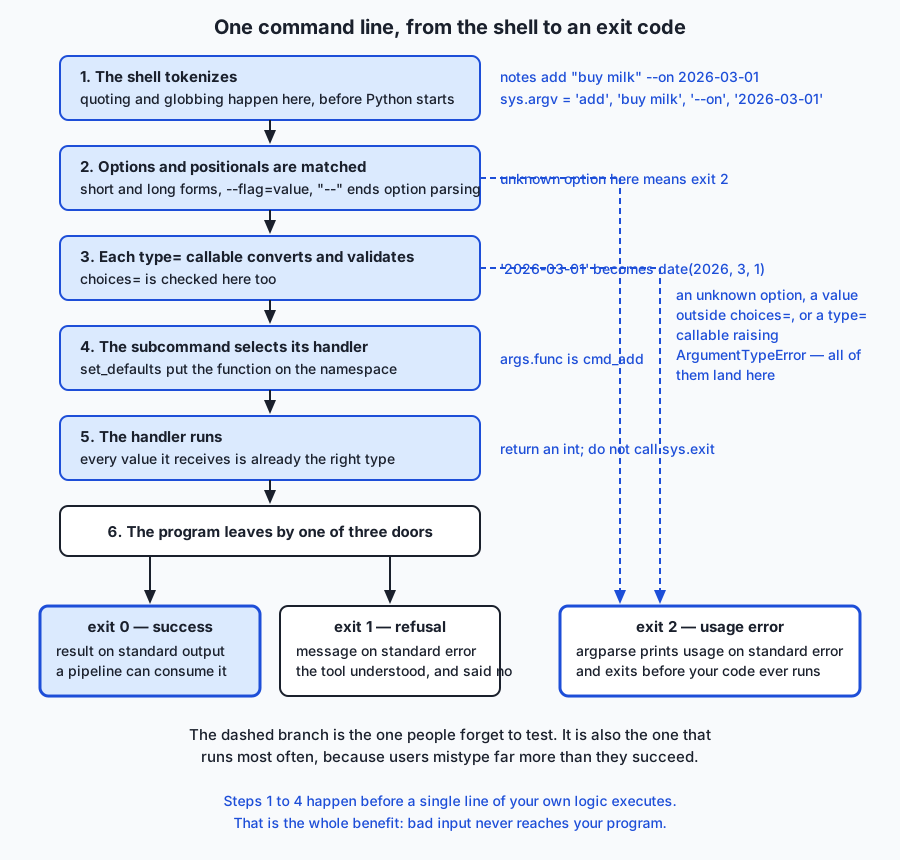
The thing to take from that diagram is the dashed branch. Steps one through four all happen before a single line of your own logic runs, and any of them can end the program with exit 2. That branch runs far more often than the happy path, because users mistype more than they succeed — and it is the branch almost nobody tests.
Exit codes, and parser.error()
The convention this course uses, which is a common and defensible one:
| Code | Meaning | Who produces it |
|---|---|---|
| 0 | it worked | your handler returns 0 |
| 1 | a refusal the tool understood: no such note, unreadable file | your handler, via an exception main catches |
| 2 | a usage error: unknown option, bad value, missing argument | argparse, automatically |
parser.error("message") prints usage plus your message on standard error and exits 2. Use it for usage problems you can only detect at run time — the lab’s example is add - requested when standard input is a terminal, which argparse cannot know at parse time but which is unambiguously a usage error.
The structural rule that makes this testable: handlers return an integer, they do not call sys.exit. Only the very last line of the program does that:
if __name__ == "__main__":
    sys.exit(main())
A handler that calls sys.exit cannot be tested in-process without catching SystemExit everywhere.
Standard input, and detecting a terminal
The convention that a lone - means “read from standard input” is older than Python and is what lets a tool join a pipeline:
if args.text == "-":
    if streams.stdin_is_a_terminal():
        args.parser.error("'-' was given but standard input is a terminal; pipe something in")
    text = streams.stdin.read().strip()
The terminal check is the part people skip, and skipping it produces the worst bug in this whole lesson: with nothing piped in, read() blocks, the program sits there silently, and the user has no idea whether it is working, hung, or waiting. isatty() turns a mystery into a sentence.
This convention has a second use worth knowing: a secret passed as --token abc123 is visible in the process list to every user on the machine and lands in your shell history in plain text. Read it from standard input instead and neither happens.
Two streams, and why the separation is load-bearing
Results go to standard output. Diagnostics go to standard error. Here is that rule made visible, captured from a real run:
$ python3 notes.py list --format json -v --store notes.json > result.json 2> chatter.txt
$ head -4 result.json      # standard output: the RESULT, still valid JSON
[
  {
    "date": "2026-03-01",
    "id": 1,
$ cat chatter.txt          # standard error: the DIAGNOSTIC
2 note(s) from notes.json
-v asked for chatter and got it — on the other stream, leaving the JSON on standard output undisturbed and still parseable. Had the chatter gone to standard output, result.json would be a file that looks like JSON, is not JSON, and fails somewhere downstream with an error message about an unexpected token that names nothing useful.
There is one more wrinkle. Python line-buffers standard output when it is a terminal and block-buffers it when it is a pipe or a file, while standard error is unbuffered. Write to both without flushing in between and the order looks right on screen and scrambles the moment you redirect. Call stdout.flush() before writing a diagnostic. This is why so many build-server logs are interleaved nonsense.
--dry-run as a first-class feature
For anything destructive, --dry-run is not a convenience. Two rules make it a real guarantee rather than a claim:
- Do the reads and the checks for real. A dry run that skips validation will happily promise you an impossible deletion.
- Never reach the write. Return before the save.
if args.dry_run:
    for note_id in doomed:
        streams.stdout.write(f"would remove note {note_id}\n")
    streams.stdout.flush()
    streams.stderr.write(f"dry run: {len(doomed)} note(s) would be removed; {path} was not touched\n")
    return 0
Note the split: the ids go to standard output because they are a result a person could pipe onward; the summary goes to standard error because it is a diagnostic. And note how you prove it — by hashing the file before and after:
$ shasum -a 256 notes.json
c112b7e42cf886f911baa54b62a57b348e501328ddb6ec749f62c5023d70dca0 notes.json

$ python3 notes.py remove 2 --dry-run --store notes.json
would remove note 2
dry run: 1 note(s) would be removed; notes.json was not touched

$ shasum -a 256 notes.json
c112b7e42cf886f911baa54b62a57b348e501328ddb6ec749f62c5023d70dca0 notes.json
Identical hashes. A --dry-run that has never been checked this way is a claim, and it is the kind of claim people trust right up until it turns out to be false.
Configuration precedence
When the same setting can come from four places, users expect one order, and it is the order of increasing specificity:
built-in defaults → config file → environment variables → command-line flags.
The flag wins because it is the most specific statement of intent — the user typed it just now, for this run. The environment is next because it is per-session. The config file is per-project. The built-in default is what you get when nobody has said anything.
parser.set_defaults(**values_from_config) slots a config file straight in, which is neater than any hand-rolled merge. The environment layer needs the default=None trick from earlier:
def store_path(args):
    if args.store is not None:        # the flag: most specific
        return Path(args.store)
    if os.environ.get("NOTES_STORE"): # the environment
        return Path(os.environ["NOTES_STORE"])
    return Path("notes.json")         # the built-in default
Testing a command line
parse_args taking an explicit list is what makes all of this testable:
def parse_args(argv=None):
    return build_parser().parse_args(argv)
Defaulting to None means argparse falls back to sys.argv[1:], so the real program stays convenient. But every test passes its own list and never touches a global. That is Day 74’s injection argument, applied to the command line — and the same idea one layer further gives you a Streams object so io.StringIO can stand in for the terminal.
You need both kinds of test, and they prove different things. A subprocess test is the only honest way to observe an exit code or to prove the two streams are separate — you capture them to two different files and assert on each. An in-process test is a hundred times faster, gives a real traceback, and can assert on the parsed namespace, which a subprocess can never see.
An everyday analogy
Think of your program as the trade counter at a busy hardware shop.
The counter itself is the interface. Customers do not come behind it. Everything they want has to be expressible across that counter, which means the way the counter is arranged determines what is possible.
The department is the subcommand. You do not walk in and describe your problem in general. You go to Timber, or to Fixings, or to Returns — and each has its own forms, its own staff, its own rules. notes add and notes remove are two different departments that happen to share a shopfront.
What you hand over is a positional argument. At Returns you put the item on the counter. Nobody needs a label saying “this is the item”; its position on the counter says so. That is why positionals are unlabelled, and why more than two of them starts going wrong — a counter covered in unlabelled objects is a counter where the clerk has to guess.
The form you fill in holds the options. Each box has a name, so the order you fill them in does not matter. Some boxes are tick-only — “gift receipt: yes/no” is action="store_true". Some have a fixed list of allowed answers printed beside them, which is choices=. Some can take more than one entry, which is action="append". And the form has a default at the bottom: leave it blank and you get the standard option, which is default=.
Validation happens at the counter, not in the stockroom. The clerk checks the form before walking away: the date is a date, the quantity is a number greater than zero, the finish you asked for is one they stock. This is type= and choices=, and the reason it matters is that a form with a wrong date, waved through, becomes a problem three rooms away where nobody can see the customer to ask. A good clerk hands the form back with the specific box circled and an example of what should be in it. A bad one disappears into the stockroom and comes back an hour later with a Latin phrase.
The sign on the wall is --help. Written once, kept accurate because it is generated from the same rules the clerk follows, and read by every customer who is not already an expert.
Goods come over the counter; conversation happens beside it. The clerk hands you the timber — that is standard output, the thing you came for. While doing it they might say “we only had the two-metre lengths left” — that is standard error. If they wrote that remark on the delivery note and slid it into the stack of timber, the next person down the line would try to build with it. That is precisely what printing an error to standard output does to a pipeline.
The stamped docket is the exit code. Green stamp, everything went through. Red stamp, it did not. The customer’s accounting system reads the stamp, not the conversation, which is why a tool that always exits 0 is a counter that stamps everything green including the refusals.
--dry-run is asking “can you just check whether you have it, before you cut anything?” The clerk does all the real checks — stock, dimensions, price — and cuts nothing. Every good counter offers this. It is also the thing that makes customers trust the counter with the irreversible jobs.
Configuration precedence is the order of authority. The shop has standard practice (built-in defaults). Your firm has an account with agreed terms (the config file). Today you are on a particular job with particular instructions (environment variables). And what you just said out loud, standing at the counter, overrides all of it (command-line flags) — because it is the most specific thing anybody has said, and it was said most recently.
The analogy has one honest limit, worth naming so you do not over-extend it. A shop clerk can ask a clarifying question; a command-line tool, when run from a script, cannot. Everything must be expressible in the one line the user types. That constraint is exactly why the interface has to be so carefully designed, and why the help has to be so good.
Examples in practice
The lab builds notes, a tool with five subcommands over a small JSON store. Here is what the finished thing looks like from the outside — all of it captured from real runs.
The help screen, which is the tool’s entire user manual and which you did not write by hand:
$ python3 notes.py --help
usage: notes [-h] [--version] <command> ...

Keep short notes in a JSON file you can read with your own eyes.

options:
  -h, --help  show this help message and exit
  --version   print the version and exit

subcommands:
  <command>
    add       add one note
    list      list notes
    search    find notes containing text
    export    write every note to standard output
    remove    delete notes by id

Examples:
  notes add 'ring the dentist' --tag health --on 2026-03-01
  echo 'from a pipe' | notes add - --tag inbox
  notes list --format json | python3 -m json.tool
  notes remove 3 --dry-run

Exit codes: 0 success, 1 refusal, 2 usage error.
A subcommand’s help, showing the argument groups doing their job:
$ python3 notes.py add --help
usage: notes add [-h] [--store PATH] [-v | -q] [-t TAG] [--on YYYY-MM-DD]
                 [--dry-run]
                 text

Add one note. Use '-' as the text to read it from standard input.

positional arguments:
  text             the note text, or '-' to read standard input

options:
  -h, --help       show this help message and exit
  -t, --tag TAG    attach a tag; repeat the option for more than one
  --on YYYY-MM-DD  the date to file the note under (default: today)
  --dry-run        say what would happen without writing anything

storage options:
  where the notes live. Precedence: --store, then $NOTES_STORE, then
  ./notes.json

  --store PATH     path to the JSON store (default: $NOTES_STORE or
                   ./notes.json)

output options:
  -v, --verbose    explain what is happening, on standard error
  -q, --quiet      print nothing on success
Every word of that came from the add_argument calls that also do the parsing. There is no separate documentation to fall out of date, which is a property worth a great deal over a tool’s life.
Adding notes, including one that arrives through a pipe:
$ python3 notes.py add 'ring the dentist' --tag health --on 2026-03-01 --store notes.json
added note 1

$ python3 notes.py add 'argparse turns a script into a tool' -t python -t writing --on 2026-03-02 --store notes.json
added note 2

$ echo 'from a pipe' | python3 notes.py add - --tag inbox --on 2026-03-03 --store notes.json
added note 3
Note the two -t flags on the second command: action="append" collected them into ["python", "writing"].
Listing, in two formats:
$ python3 notes.py list --store notes.json
ID  DATE        TAGS            TEXT
------------------------------------
 1  2026-03-01  health          ring the dentist
 2  2026-03-02  python,writing  argparse turns a script into a tool
 3  2026-03-03  inbox           from a pipe

$ python3 notes.py export --format csv --store notes.json
id,date,tags,text
1,2026-03-01,health,ring the dentist
2,2026-03-02,python;writing,argparse turns a script into a tool
3,2026-03-03,inbox,from a pipe
And the failures, which are where the design shows. Three different problems, three different exit codes:
$ python3 notes.py frobnicate --store notes.json
usage: notes [-h] [--version] <command> ...
notes: error: argument <command>: invalid choice: 'frobnicate' (choose from add, list, search, export, remove)
exit: 2

$ python3 notes.py remove 99 --store notes.json
notes: no note with id 99 in notes.json
exit: 1

$ python3 notes.py search kangaroo --store notes.json
exit: 1
The first is a usage error argparse caught, and it lists the legal choices — that is choices= doing three jobs at once. The second is a refusal the tool itself understood, so it exits 1 with a plain sentence and no traceback. The third is grep’s convention: nothing matched, which is not an error, so no message at all, but a non-zero code so a script can branch on it.
Implications: security, privacy, performance, scalability, and cost
Security. The command line is a trust boundary. Sometimes the stranger passing arguments is a scheduled job assembling them from somewhere else. Every type= callable is a gate on that boundary, and validating at the parser means a dangerous shape never exists inside your program at all.
Three rules matter more than the rest. First: never build a shell command by formatting user input into a string. subprocess.run(["grep", pattern, path]) passes a list, the operating system hands the arguments to the program directly, and no shell ever sees them. subprocess.run(f"grep {pattern} {path}", shell=True) means a pattern containing a semicolon is not a pattern any more, it is a second command. Second: treat path arguments with suspicion — a path from a less trusted source can be ../../.ssh/config or a symbolic link, and a tool that accepts one should resolve it and confirm it lands where it should. Third: secrets do not belong in arguments, because arguments are visible in the process list to every user on the machine and land in shell history in plain text; use an environment variable, a --token-file, or standard input.
Privacy. A tool that logs the arguments it was invoked with — which is a reasonable thing to want — will log whatever was in them. If that includes a customer identifier, a file path containing a person’s name, or a search query, it is now in a log file with a different retention policy and a different audience. Decide deliberately what gets logged, and consider redacting known-sensitive options.
Performance. argparse is not a performance concern. Building a parser with five subcommands and thirty arguments takes well under a millisecond, and it happens once. The cost that is worth knowing is Python’s interpreter startup, roughly tens of milliseconds — irrelevant for a tool you run by hand, and worth measuring if something calls your tool in a loop ten thousand times. In that case the answer is usually to give the tool a mode that processes many inputs in one run, not to make the parser faster.
Scalability. Here scalability means interface scalability: how the tool copes with growing from three commands to thirty. Subcommands plus set_defaults scale well, because each new verb is one add_parser block and one function, and nothing else in the program changes. Two things scale badly and are worth avoiding early: more than about two positional arguments, because users cannot remember the order; and flags whose meaning depends on other flags, because that combinatorial space cannot be documented in a help screen.
Cost. argparse is free, in the only two senses that matter. It costs nothing to license, and it costs nothing to depend on — no install, no version pin, no supply-chain surface, no dependency that might be abandoned in three years. For a tool you intend to still work in a decade, that second kind of free is the more valuable one.
Alternatives: free, open source, and commercial
Four real options, plus the honest “no library at all” case. Everything here is free and open source; there is no paid tier in this space, which is itself worth noting — nobody sells you a command-line parser.
Two notes on what was actually verified on the authoring machine, so you can weigh the examples: argparse and sys are standard library, so they are always present. click is installed here at version 8.4.2 — it arrived indirectly as a dependency of uvicorn, which Week 12 installs for Day 82 — so the click output below is a genuine capture. typer and docopt are not installed here, so the code shown for them is described from their documented interfaces and no output is quoted for either. That distinction is deliberate: it is better to say plainly which examples were run than to present all of them as if they were.
argparse — standard library, free
What it is. Python’s built-in declarative argument parser, in the standard library since Python 3.2 (2011).
When to choose it. When you want zero dependencies; when the tool must run on a machine you do not control; when you are writing something that has to still work in ten years; when the tool is part of a larger project that is trying to keep its dependency list short. This is the default choice, and it should take a positive reason to move off it.
How to use it. Build a parser, declare arguments, parse, dispatch — as throughout this lesson.
Worked example (real capture, from the lab):
$ python3 notes.py --version
notes 1.0.0
$ python3 notes.py add 'x' --on 2026-13-01 --store notes.json ; echo "exit $?"
notes add: error: argument --on: '2026-13-01' is not a date in YYYY-MM-DD form (for example 2026-03-01)
exit 2
Free vs paid. Free, open source, part of Python itself. No paid tier exists.
click — free and open source
What it is. A third-party library that builds the interface from decorators on your handler functions rather than from a separate parser object. Created by Armin Ronacher, the author of Flask.
When to choose it. When the tool is large enough that keeping the parser declaration and the handler in the same place is a real readability win; when you want its extras — prompting for missing values, confirmation prompts, coloured output through click.secho, progress bars, and generated shell completion for bash, zsh and fish, which argparse does not provide at all. Also when you are already in an ecosystem that uses it.
How to use it. Decorate a function with @click.command() (or @click.group() for subcommands), then one @click.option or @click.argument per parameter. The decorated function’s parameters are the parsed values.
Worked example (real capture, click 8.4.2 on the authoring machine):
@click.group()
@click.version_option("1.0.0", prog_name="notes")
def cli():
    """Keep short notes in a JSON file you can read with your own eyes."""

@cli.command()
@click.argument("text")
@click.option("-t", "--tag", multiple=True, help="attach a tag; repeatable")
@click.option("--on", type=click.DateTime(formats=["%Y-%m-%d"]))
@click.option("--dry-run", is_flag=True)
def add(text, tag, on, dry_run):
    """Add one note."""
    click.echo(f"add text={text!r} tags={list(tag)} on={on} dry_run={dry_run}")
$ python3 click_demo.py add "buy milk" -t shopping --on 2026-03-01
add text='buy milk' tags=['shopping'] on=2026-03-01 00:00:00 dry_run=False
$ python3 click_demo.py add "x" --on 2026-13-01 ; echo "exit $?"
Error: Invalid value for '--on': '2026-13-01' does not match the format '%Y-%m-%d'.
exit 2Two things to notice from that capture. click exits 2 on a bad value, exactly as argparse does — the conventions are shared, not invented per library. And click.DateTime gives you a datetime, not a date, which is why the output shows 00:00:00; the argparse version with a custom iso_date gives you exactly the type you asked for. Neither is wrong; they are different defaults.
Free vs paid. Free, open source, BSD licence. Installed with pip install click. No paid tier.
typer — free and open source
What it is. A library built on top of click that derives the entire interface from Python type hints on your function signature. Created by Sebastián Ramírez, the author of FastAPI — which is why it will feel familiar when FastAPI arrives on Day 82.
When to choose it. When your team already writes thorough type hints and runs mypy (Day 75), because then the interface declaration is already written and typer just reads it. It is the least duplication of the four options. Choose against it when you need to run somewhere you cannot install two packages, or when you want the argument declaration to be visibly separate from the function’s Python signature.
How to use it. Annotate the function; typer reads the annotations. A str parameter with no default is a required positional; one with a default becomes an option; a bool becomes a flag; an enum becomes choices; a datetime gets parsed for you.
import typer

app = typer.Typer()

@app.command()
def add(text: str, tag: list[str] = typer.Option([]), dry_run: bool = False) -> None:
    """Add one note."""
    typer.echo(f"add {text!r} tags={tag} dry_run={dry_run}")
That is the whole declaration: text is a required positional because it has no default, --tag is repeatable because it is a list, and --dry-run is a flag because it is a bool. Connect this back to Day 75 — the type hints you were writing for the type checker turn out to be a machine-readable description of the function, and typer is one of several things that can read it. Hold that thought for the end of this lesson.
Not verified here: typer is not installed on this machine, so no output is quoted for it. The code above follows typer’s documented interface; run it yourself after pip install typer if you want to see it work.
Free vs paid. Free, open source, MIT licence. Installed with pip install typer, which brings click with it. No paid tier.
docopt — free and open source, but largely dormant
What it is. An inversion of the usual idea: you write the help text in the module docstring, in the standard Unix usage format, and docopt parses that to derive the interface. The documentation is the specification.
When to choose it. Honestly: rarely, now. The idea is genuinely elegant and worth understanding, and for a small script with a fixed interface it produces very readable source. But the original Python package has seen little activity for years, and choosing a dormant dependency for something as load-bearing as your argument parsing is a decision to make with open eyes rather than by accident. Community forks exist; check the state of whichever one you would actually install rather than trusting a name.
How to use it.
"""notes.

Usage:
  notes add <text> [--tag=<tag>] [--dry-run]
  notes list [--format=<fmt>]

Options:
  --tag=<tag>      attach a tag
  --format=<fmt>   output format [default: table]
"""
from docopt import docopt

arguments = docopt(__doc__)
arguments comes back as a dictionary keyed by the strings in the usage text — arguments["<text>"], arguments["--dry-run"]. Note the consequence: there is no type conversion and no custom validation hook, so everything is a string and every check is yours to write.
Not verified here: docopt is not installed on this machine, so no output is quoted.
Free vs paid. Free, open source, MIT licence. No paid tier.
Plain sys.argv — always available, sometimes correct
What it is. Reading the list yourself, as on Day 56.
When to choose it. When the script takes at most one or two positional arguments and no options at all, and you are the only user. python3 report.py sales.csv genuinely does not need a parser, and adding one would be ceremony.
How to use it.
import sys

if len(sys.argv) != 2:
    print(f"usage: {sys.argv[0]} INPUT.csv", file=sys.stderr)
    raise SystemExit(2)
path = sys.argv[1]
Note that even this minimal version does the three things that matter: a usage message, on standard error, with exit 2. If you are going to hand-roll, hand-roll that much.
When to stop. The moment you want a second optional flag. That is the point by_hand.py demonstrates, and it is not a matter of taste — it is where silent wrong answers begin.
Free vs paid. Free; it is a list.
Choosing between them
argparse | click | typer | docopt | sys.argv | |
|---|---|---|---|---|---|
| Install needed | none | pip install click | pip install typer | pip install docopt | none |
| Style | declarative calls | decorators | type hints | usage text | manual |
| Subcommands | yes | yes | yes | yes | by hand |
| Type conversion | type= callable | rich built-ins | from annotations | none | by hand |
| Shell completion | not provided | generated | generated | not provided | no |
| Prompts and colour | not provided | built in | built in | not provided | no |
| Maintenance | Python core | active | active | largely dormant | not applicable |
| Best for | anything that must just run | large interactive tools | typed codebases | small fixed scripts | one-argument scripts |
Comparison with related concepts
Command-line arguments versus environment variables. Arguments are per-invocation and explicit; they appear in the shell history and the process list, which makes them auditable and makes them a bad place for secrets. Environment variables are per-session and implicit; they are inherited by child processes, invisible in the command you typed, and consequently much harder to debug when they are wrong. The working rule: arguments for what changes per run, environment for what changes per machine or per session, and a config file for what changes per project.
A command-line interface versus a graphical one. The CLI is scriptable, composable, remotely operable, and its invocations can be recorded in a file, reviewed in a pull request, and replayed exactly. The GUI is discoverable — you can find a feature you did not know existed by looking. Neither dominates. The pairing that works is a good CLI with a good --help, which buys back much of the discoverability without giving up any of the scriptability.
A CLI versus a web API. Day 82 builds an HTTP API, and the two are more alike than they look. Both take structured input from an untrusted caller, validate it at the boundary, do work, return a result and a status code. --format json is Accept: application/json; exit codes are HTTP status codes; --help is the OpenAPI schema. The differences are that a CLI runs as a process and dies, while an API runs as a service and persists, and that a CLI’s caller is usually on the same machine. If today’s design discipline feels familiar in two days, that is why.
argparse versus logging. They meet at -v and -q. The clean arrangement is for the flags to set the level, and for every message in the program to go through logging at an appropriate level, rather than for the flags to be checked at each print site. That way adding a third verbosity level is a change in one place.
Parsing versus validating. type=int parses; positive_int parses and validates. Getting the shape right is not the same as getting the value right, and the second failure is usually the more expensive one. This is the same distinction Day 82’s pydantic models will make at the HTTP boundary.
| Concept | Belongs to | Fails how | Right response |
|---|---|---|---|
| Unknown option | the parser | exit 2, usage on standard error | refuse; never ignore |
| Wrong-shaped value | type= callable | exit 2, usage on standard error | ArgumentTypeError naming the value |
| Value outside a fixed set | choices= | exit 2, legal values listed | choices= does it for you |
| Two options that conflict | mutually exclusive group | exit 2, both named | let argparse do it |
| A rule spanning arguments | your handler | exit 1 or parser.error() | your check, stated once |
| Something the world refused | your handler | exit 1, message on standard error | a domain exception main catches |
When to use it — and when not to
Use argparse when the program has more than one optional flag; when anyone other than you will run it; when it needs to run unattended, where exit codes are the only thing anyone can react to; when it belongs in a pipeline; when it does anything destructive and therefore needs --dry-run; when you want zero dependencies; or when the tool will outlive your memory of it, which is sooner than you think.
Reach for click or typer instead when the tool is large and interactive — prompts, confirmations, coloured output, progress bars — or when you need generated shell completion, or when your codebase is thoroughly typed and typer would let the annotations you already write do double duty. These are positive reasons to add a dependency, and they are real.
Skip the parser entirely when the script takes one or two positional arguments and nothing else, and you are its only user. Write the three-line usage check shown earlier and move on. Ceremony that buys nothing is still a cost.
Do not use a CLI at all when the interaction is genuinely conversational and exploratory, where a notebook serves better; when the audience cannot be expected to open a terminal; or when the thing needs to run continuously and be called by other machines, which is a web service and is Day 82.
And two habits to resist. Do not add options “in case someone wants them” — every option is a permanent commitment, a line of help text, and a combination someone will eventually pass alongside another one you never considered. And do not invent conventions. If every other tool spells it -v, spell it -v. A clever interface that nobody can guess is a worse interface than a dull one that everybody can, and following convention is not a lack of imagination; it is respect for the fact that your user has forty other tools to remember.
Knowledge check
Answer these before opening the lab. The quiz that ships with this lesson covers the same ground with explanations.
- What is the difference between a positional argument and an option, and why should a tool have very few positionals?
- What does
set_defaults(func=cmd_add)make possible, and what does it remove from your program? - Why should a custom
type=callable raiseargparse.ArgumentTypeErrorrather thanValueError? - A command fails. When should it exit 1, and when should it exit 2?
- Your tool writes a JSON result and also a progress message. Which goes where, and what breaks if you get it wrong?
- What does
default=Noneon--storebuy you thatdefault="notes.json"does not? - What must a
--dry-runimplementation still do, and what must it never do? - Why does
parse_argstake an explicit list rather than readingsys.argvitself?
Hands-on exercise
Build the parser for a small tool from nothing, in one file, in about fifteen minutes. This is deliberately smaller than the lab: the goal is to feel the four core pieces — a parser, a subcommand, a custom type, and dispatch — with nothing else in the way.
Create tiny.py:
#!/usr/bin/env python3
"""tiny — a two-subcommand tool, to feel the shape of argparse."""

import argparse
import sys


def even_int(text: str) -> int:
    """A custom type= that converts AND validates."""
    try:
        value = int(text)
    except ValueError:
        raise argparse.ArgumentTypeError(f"{text!r} is not a whole number") from None
    if value % 2 != 0:
        raise argparse.ArgumentTypeError(f"{value} is not even")
    return value


def cmd_double(args) -> int:
    print(args.number * 2)
    return 0


def cmd_halve(args) -> int:
    if args.dry_run:
        print(f"would halve {args.number}", file=sys.stderr)
        return 0
    print(args.number // 2)
    return 0


def build_parser() -> argparse.ArgumentParser:
    parser = argparse.ArgumentParser(
        prog="tiny", description="Double or halve an even number."
    )
    parser.add_argument("--version", action="version", version="%(prog)s 1.0.0")
    subcommands = parser.add_subparsers(dest="command", required=True)

    double = subcommands.add_parser("double", help="double the number")
    double.add_argument("number", type=even_int, help="an even whole number")
    double.set_defaults(func=cmd_double)

    halve = subcommands.add_parser("halve", help="halve the number")
    halve.add_argument("number", type=even_int, help="an even whole number")
    halve.add_argument("--dry-run", action="store_true", help="say what would happen")
    halve.set_defaults(func=cmd_halve)

    return parser


def main(argv=None) -> int:
    args = build_parser().parse_args(argv)
    return args.func(args)


if __name__ == "__main__":
    sys.exit(main())
Then run these seven commands, checking $? after each one:
python3 tiny.py --help          ; echo "exit $?"
python3 tiny.py double 10       ; echo "exit $?"
python3 tiny.py halve 10        ; echo "exit $?"
python3 tiny.py halve 10 --dry-run  ; echo "exit $?"
python3 tiny.py double 7        ; echo "exit $?"
python3 tiny.py frobnicate 10   ; echo "exit $?"
python3 tiny.py                 ; echo "exit $?"
Expected output
$ python3 tiny.py double 10
20
exit 0

$ python3 tiny.py halve 10 --dry-run
would halve 10
exit 0

$ python3 tiny.py double 7
usage: tiny double [-h] number
tiny double: error: argument number: 7 is not even
exit 2

$ python3 tiny.py
usage: tiny [-h] [--version] {double,halve} ...
tiny: error: the following arguments are required: command
exit 2
Two things to look at closely. double 7 was rejected by your function, and argparse turned that rejection into a usage message with the right exit code — you wrote the rule, argparse wrote the presentation. And bare tiny.py produced a usage error rather than an AttributeError, which is required=True doing its job.
Validate your work
python3 tiny.py --helpexits 0 and lists both subcommands.python3 tiny.py double 10prints20and exits 0.python3 tiny.py double 7exits 2 and the message says7 is not even.python3 tiny.py double 7 2>/dev/nullprints nothing at all — the error was on standard error, where it belongs. Check this one; it is the whole stream-separation rule in a single command.python3 tiny.py halve 10 --dry-run > out.txtleavesout.txtempty, because the dry-run message is a diagnostic.python3 tiny.py frobnicate 10exits 2 and lists the legal choices.python3 tiny.pyexits 2, not with a traceback. Deleterequired=Trueand run it again to see what that keyword prevents, then put it back.
Troubleshooting
AttributeError: 'Namespace' object has no attribute 'func' — either a set_defaults(func=...) is missing from a subparser, or required=True is missing from add_subparsers and you ran the program with no subcommand.
TypeError: 'int' object is not callable — you wrote type=even_int() with parentheses, which calls the function immediately. Pass the function itself: type=even_int.
A traceback instead of a usage message — you raised ValueError where ArgumentTypeError was needed, or the conversion is happening in your handler rather than in a type= callable.
usage: tiny.py instead of usage: tiny — prog="tiny" is missing from the ArgumentParser call.
double 7 is accepted — type=even_int is missing from that subparser’s add_argument. Each subparser declares its own arguments; they are not shared unless you use a parent parser.
Common mistakes
- Calling
sys.exit()inside a handler. Return an integer and letmainbe the only place that exits. A handler that exits cannot be tested in-process. - Writing errors with
print(). That is standard output. Usefile=sys.stderr, or a stream you were handed. - Forgetting
help=. It costs one string, at the exact moment you already know the answer, and it is the only documentation most users will read. - Assuming
--dry-runbecomesargs.dry-run. It becomesargs.dry_run; a dash is not legal in a Python identifier. - Validating in the handler instead of at the parser. Everything you check at the parser is something no handler ever has to think about again.
- Inventing option names.
-vmeans verbose and-qmeans quiet everywhere else; make them mean that here too.
Practice assignment
Complete the lab: build notes, a five-subcommand tool over a JSON store, working through the eight numbered exercises in starter/notes.py. The suite goes from 76 checks to 133 when you finish, because it then holds your file to exactly the same standard as the reference.
The parts that will teach you the most, and what to watch for in each:
- The two custom types (
iso_date,positive_int). Give each failure its own message. “Not a whole number” and “not at least 1” are different problems and a user should not have to guess which one they hit. - The parent parser and its two group kinds. An argument group changes only the help layout; a mutually exclusive group changes parsing. Know which you used and why. Remember
add_help=False. - The five subparsers and the dispatch. When you finish, search your file for
if args.command. There should be none. If there is one,set_defaultsis not being used properly. - Reading from standard input on
add -. Implement the terminal check first, before the read. Then runpython3 starter/notes.py add -with nothing piped in and confirm it exits 2 with a sentence rather than hanging. --dry-runonremove. Return before the write; keep the validation. Then prove it withshasum -a 256before and after, exactly as the lesson does.
Then answer these three in writing, in a comment at the top of your file — they are the design questions the code cannot answer for you:
- Your
searchexits 1 when nothing matched. Argue for or against that choice in two sentences. (There is a real argument both ways.grepdoes it; many tools do not.) - The tool puts shared options after the subcommand (
notes add x --store s.json).gitputs some before (git --no-pager log). Which did you prefer, and what would it cost to support both? - Name one option you were tempted to add and decided not to. Say why. Restraint in an interface is a design act, and it is the one nobody writes down.
Extension challenge
Pick one. Each is a genuine step past the lab, and each produces something you would keep.
1. Wrap Day 78 or Day 79 in a real command. Take the script you wrote for requests or for scraping and give it a proper interface: a positional for the target, --output with a - convention meaning standard output, --format, --timeout with a type=positive_float, -v/-q, and a --dry-run that reports what it would fetch without fetching. Then run it in a pipeline: yourtool --output - | python3 -m json.tool. If that works, the tool is composable, which is the property that makes it worth having.
2. Add a config file, in the right layer. Implement ~/.notesrc as a small JSON file and slot it into the precedence chain: defaults, then config file, then $NOTES_STORE, then --store. Use parser.set_defaults(**from_config) rather than a hand-rolled merge, and write a test for each of the four layers that proves the one above it wins. The tests are the interesting part: precedence is exactly the kind of thing everyone believes they implemented correctly.
3. Write the same tool twice. Implement three of the five subcommands in click and, if you install it, in typer. Then write down, honestly, what each version cost you and what it bought: lines of code, dependency count, how the help output differs, how the error messages differ, how hard each was to test. Having built the same interface three ways, you will have an opinion worth holding rather than one you inherited.
4. Build the completion by hand. argparse generates no shell completion. Write a bash completion function that offers the five subcommand names, install it in your own shell, and use it. Then read what argcomplete would have done for you and decide, explicitly, whether the dependency is worth it. Deciding not to add a dependency is a real engineering act, and it is one you should have practised at least once.
Where this leads: the AI thread
Return to the thing flagged at the very start.
Later in this course you will give an AI model access to your own functions — a search over your documents, a lookup in your database, a call to an internal service. The mechanism for that is a tool schema: a machine-readable description you hand to the model, saying here is a function called search_notes, here is what it does, here are its parameters, and for each one a name, a type, a human-readable description, and whether it is required.
Look at that list again and then look back at add_argument. They are the same list. prog and description are the tool’s name and purpose. Each add_argument is a parameter with a type=, a help= description, a default=, and a required-or-not. choices= is an enumeration. The generated --help output is the schema in human-readable form; the schema is the same thing in a form a model can read.
The parallel goes further than the shape. The reason a tool schema has to be precise is that the model, like a stranger at your counter, has only the description to go on. It cannot read your source, cannot ask a clarifying question mid-call, and will make its best guess from whatever words you gave it. A parameter documented as help="the date" will be passed dates in six formats. A parameter documented as help="the date to file the note under, as YYYY-MM-DD" will not. That is the identical discipline as writing help text for a human who will never read your code — and today is where you build the habit, on a user who complains, before applying it to one who does not.
The validation argument transfers wholesale too. You would not let an unvalidated --limit reach a database query; you should not let an unvalidated model-supplied limit reach it either. In both cases the defence is the same and sits in the same place: convert and validate at the boundary, so that nothing past the boundary has to wonder.
Day 75’s type hints, today’s add_argument declarations, Day 82’s pydantic models, and the tool schemas you will write later are four dialects of one sentence: describe the callable precisely enough that something on the outside can use it correctly. Today you said that sentence to a person typing at a terminal. The next few weeks say it to a type checker, then to an HTTP client, and eventually to a model. Learn it once, properly, here — where the feedback is immediate and the stakes are a usage message rather than a wrong answer delivered with confidence.
Quiz
Q1. A user types `mytool add "buy milk" --tag=shopping` at a hand-rolled parser that only checks for `--tag` as a separate token. What is the worst thing about the result?
- It fails silently: the tag is dropped, the command succeeds, and nothing tells the user
- It crashes with an IndexError, which is confusing
- It is slow, because the argument list is scanned twice
- It works, but only on Linux
Show answer
Answer: A. It fails silently: the tag is dropped, the command succeeds, and nothing tells the user
Silence is the worst failure mode a user interface can have. The `--flag=value` form is standard on every Unix system, so the user has no reason to suspect anything went wrong — the command exited 0 and printed a success message, and the tag simply is not there. A crash would at least be a signal. This is the specific failure `examples/by_hand.py` demonstrates, and it is why the break-even point for argparse is roughly the second optional flag.
Q2. What does `subparser.set_defaults(func=cmd_add)` make possible?
- It sets the default value of the --func option
- It makes cmd_add run automatically during parsing
- It stores the handler function on the parsed namespace, so dispatch is `args.func(args)` with no branch on the command name
- It marks cmd_add as the fallback when no subcommand is given
Show answer
Answer: C. It stores the handler function on the parsed namespace, so dispatch is `args.func(args)` with no branch on the command name
set_defaults puts arbitrary values on the namespace that parsing produces, and storing the function itself means `args.func` IS the right handler after parsing. Dispatch collapses to one line and adding a sixth verb touches one add_parser block and one function — nothing else in the program learns that the set of commands grew. It does not run anything during parsing, and it is not a fallback: making a missing subcommand an error is what `required=True` on add_subparsers does.
Q3. Why should a custom `type=` callable raise `argparse.ArgumentTypeError` rather than letting a `ValueError` escape from your handler?
- ArgumentTypeError is faster to construct
- ValueError cannot carry a message string
- Handlers are not allowed to raise exceptions in argparse
- argparse converts it into a usage message on standard error and exits 2, instead of showing the user a traceback
Show answer
Answer: D. argparse converts it into a usage message on standard error and exits 2, instead of showing the user a traceback
A traceback is a bug report addressed to the wrong person. Raising ArgumentTypeError inside a type= callable makes argparse print the usage line, name the exact argument, quote the exact value, and exit 2 — which tells the user what to do. Letting the conversion happen in your handler instead gives them fifteen lines of stack trace. Note that argparse also converts TypeError and ValueError raised inside a type= callable; the point stands about where the conversion happens.
Q4. Your tool writes a JSON result and also a progress message. A user runs `mytool > result.json`. What must be true for `result.json` to be valid JSON?
- The progress message must go to standard error, not standard output
- The progress message must be written last
- The tool must exit 0
- The progress message must be a JSON comment
Show answer
Answer: A. The progress message must go to standard error, not standard output
Standard output carries the RESULT; standard error carries DIAGNOSTICS. Redirection with `>` captures only standard output, so anything written there ends up in the file. A progress message printed to standard output lands in the middle of the JSON and produces a file that looks like JSON, is not JSON, and fails downstream with an error naming nothing useful. Ordering does not help, the exit code is unrelated, and JSON has no comment syntax.
Q5. Why does the lab declare `--store` with `default=None` rather than `default="notes.json"`?
- Because None is faster to compare than a string
- Because argparse rejects string defaults on options with metavar
- So the code can tell "the user did not say" apart from "the user said the default", which is what makes the environment-variable fallback possible
- Because a default of None makes the option required
Show answer
Answer: C. So the code can tell "the user did not say" apart from "the user said the default", which is what makes the environment-variable fallback possible
The precedence rule is flag, then $NOTES_STORE, then ./notes.json. With `default="notes.json"` the value is never None, so `store_path` can never tell whether the user typed `--store notes.json` or said nothing at all — and the environment variable could never be consulted. None is the sentinel for "unstated". It does not make the option required; that is `required=True`.
Q6. A command fails. When should it exit 1 rather than 2?
- Whenever the message is short enough to fit on one line
- When the command line was well formed but the tool refused the request — no such note, an unreadable file
- Whenever the failure happened after any file was opened
- Exit 1 and exit 2 are interchangeable; only zero versus non-zero matters
Show answer
Answer: B. When the command line was well formed but the tool refused the request — no such note, an unreadable file
The convention this course follows: 2 means the command line itself was wrong, which argparse detects and reports before your code runs; 1 means the command line was fine and the tool understood the request but refused it. The distinction matters to whatever is calling you — a script can retry after a refusal but should never retry after a usage error, because the command line will be just as wrong the second time.
Q7. Which pair of properties makes `--dry-run` a guarantee rather than a claim?
- It prints in a different colour and asks for confirmation
- It runs the command twice and compares the results
- It skips all validation to be fast, and logs what it skipped
- It performs the reads and checks for real, and returns before ever reaching the write
Show answer
Answer: D. It performs the reads and checks for real, and returns before ever reaching the write
Both halves are needed. Skipping validation would let a dry run cheerfully promise an impossible deletion, so the checks must be genuine — `remove 999 --dry-run` still exits 1. And it must return before the save, which is the half people get wrong by falling through. The way you prove both is to hash the target file before and after and demand the hashes match, paired with a control that runs the same command WITHOUT --dry-run and demands the hash changes.
Q8. What can a subprocess test of a CLI prove that an in-process test calling `main(argv, streams)` cannot?
- That the parser assigns the right values to the namespace
- That a custom type= callable raises ArgumentTypeError
- The actual process exit code, and that standard output and standard error are genuinely separate streams
- Nothing — a subprocess test is strictly slower and weaker
Show answer
Answer: C. The actual process exit code, and that standard output and standard error are genuinely separate streams
An exit code is a property of a process, so only a process can report one; and only capturing the two streams to two different destinations can prove a program did not simply print everything to standard output. Both are the contract a SHELL sees. The in-process test proves the complementary things — it can assert on the parsed Namespace, which a subprocess can never observe, and it is far faster with real tracebacks. A serious suite has both, which is why the lab ships both.
Glossary
- Command-line interface
- A user interface made of text: the program receives a list of strings when it starts, and returns text plus a number when it finishes. It is a screen with no pixels, and it deserves the same care as one — clear labels, sensible defaults, validation at entry, and a confirmation before anything irreversible.
- Positional argument
- An argument identified by where it appears rather than by a name. In `cp source.txt backup.txt` the first path is the source because it is first. Usually required, and there should be very few — a user cannot reliably remember an order longer than about two.
- Option
- An argument identified by name, so it can appear in any order: `--store notes.json`. Conventionally offered in a long form (`--store`) and often a short one (`-s`). The long form is for scripts, where readability matters six months later; the short form is for typing.
- Flag
- An option that takes no value and simply turns something on, such as `--dry-run` or `-v`. Declared with `action="store_true"`, so its presence means True and its absence means False.
- Subcommand
- A first positional argument that selects an entire second interface, as in `git commit` versus `git log`. Built with `add_subparsers` and `add_parser`, and the way any tool with more than about three verbs stays comprehensible.
- Dispatch
- Routing a parsed subcommand to the function that implements it. The argparse pattern is `subparser.set_defaults(func=cmd_add)`, which puts the handler on the namespace so `args.func(args)` is the whole of dispatch and no branch on the command name exists anywhere in the program.
- Exit code
- The single number a program hands back to whatever launched it. Zero means success and anything else means failure. This is the mechanism `&&` in a shell and every scheduler and CI system reads — a tool that always exits 0 cannot be automated at all.
- Standard output
- The stream carrying the program's RESULT — the thing the caller actually wanted. Redirected by `>` and consumed by the next program in a pipeline, which is why nothing but the result may go here.
- Standard error
- The stream carrying DIAGNOSTICS: progress notes, warnings, error messages. Keeping it separate from standard output is what lets `mytool > results.json` produce a clean file while the tool chatters on screen, and what stops an error message from being fed to a downstream program as if it were data.
- Standard input
- The stream a value can arrive on from another program instead of from the command line. By a convention older than Python, an argument of a lone `-` means "read this from standard input" — which is how a tool joins a pipeline, and also how a secret is kept out of the process list and the shell history.
- Pipeline
- Several programs joined so that each one's standard output becomes the next one's standard input, as in `notes export --format json | python3 -m json.tool`. A tool composes in a pipeline only if its result is machine-readable and its diagnostics are somewhere else.
- Dry run
- A mode, conventionally `--dry-run`, in which a destructive command reports exactly what it would do and changes nothing. It must still perform its reads and checks for real — otherwise it can promise an impossible deletion — and must return before ever reaching the write. Prove it by hashing the target before and after.
- Usage message
- The short synopsis argparse prints when a command line is malformed, showing the shape of a correct invocation followed by the specific error, on standard error, with exit code 2. It is generated from the same declarations that do the parsing, so it cannot drift out of date with the behaviour.
- Argument parsing
- Turning the list of strings a program receives into structured, typed values: matching options and positionals, converting through `type=`, checking `choices=`, applying defaults, and refusing anything that does not fit. In argparse all of it happens before a single line of your own logic runs.
- Configuration precedence
- The order in which competing sources of a setting override one another: built-in defaults, then a config file, then environment variables, then command-line flags. It is the order of increasing specificity, and users expect it because the most specific statement of intent is always the one they just typed.
- Terminal detection
- Asking, with `isatty()`, whether a stream is connected to a terminal or to a pipe or file. Checking it on standard input before reading is what stops `mytool add -` from silently hanging forever when nothing was piped in; checking it on standard output is how tools decide whether to emit colour.
- ArgumentTypeError
- The exception a custom `type=` callable raises to reject a value. argparse catches it and turns it into a usage message on standard error with exit code 2, naming the argument and quoting the offending value — rather than the traceback a bare ValueError would produce.
- Mutually exclusive group
- A set of options of which at most one may be given, created with `add_mutually_exclusive_group()`. argparse both enforces it — passing two is exit 2 with a message naming both — and documents it, showing `-v | -q` in the usage line, neither of which a hand-written check would do.
Sources and further reading
- argparse — Parser for command-line options, arguments and subcommands — Python Software Foundation (accessed 2026-08-16)
- POSIX Utility Conventions (Base Specifications, Chapter 12) — The Open Group (accessed 2026-08-16)
- GNU Coding Standards — Command-Line Interfaces — Free Software Foundation (accessed 2026-08-16)
- Click documentation — Pallets (accessed 2026-08-16)
- Typer documentation — Sebastián Ramírez (accessed 2026-08-16)
- PEP 389 — argparse: New Command Line Parsing Module — Python Software Foundation (accessed 2026-08-16)
Kept in this browser, no account needed. Your progress page turns the whole record into one link you can bookmark or open on another device.