Programming with Python › Python for Automation and the Web › Day 81
Day 81: Scheduling and Background Jobs
After this lesson you will be able to choose between an in-process loop, an in-process scheduler, an operating-system scheduler and an external queue by asking what each one survives; read and write cron, launchd and systemd timer schedules including the day-of-month and day-of-week rule that catches everybody; anticipate the minimal environment a scheduled job actually gets; and — the real point — build the five properties that decide whether a job can be trusted while nobody is watching: idempotence, a non-blocking lock, a time budget, a structured log with meaningful exit codes, and an alert on silence rather than only on failure. Because the clock arrives as a parameter, every one of those is testable in milliseconds instead of overnight.
Hands-on lab for this lesson
Lab files on GitHub: https://github.com/ai-roadmap-365/ai-roadmap-365.github.io/tree/main/labs/sections/programming-with-python/day-081-scheduling-and-background-jobs
- Get the hands-on files. Clone the labs repository once (you can reuse this clone for every lesson). This works on macOS, Linux, and Windows (PowerShell or WSL):
git clone https://github.com/ai-roadmap-365/ai-roadmap-365.github.io.git cd ai-roadmap-365.github.io - Open this lesson's lab. Move into the directory for this specific day. Every lab lives at the same predictable path — section / subsection / week / day:
cd labs/sections/programming-with-python/day-081-scheduling-and-background-jobs - Read the lab guide. Open `README.md` in that directory. It lists the exact commands, what each does, the expected output, and how to check your work — read it before running anything.
- Run it and check your work. Follow the README's "How to run" section: run the example first to see the finished result, then complete the numbered exercises in `starter/`, then run the tests. The tests pass (exit 0) only when your work is correct.
bash tests/run_tests.sh # or the test command named in the lab README
You can also open the lab as a local page (works offline, shows the file tree and expected output).
Learning objectives
By the end of this lesson you will be able to:
- Explain why a time.sleep loop drifts by the work duration every run, measure the accumulated lateness exactly, and fix it by sleeping to a deadline against a monotonic clock rather than for a fixed span
- Drive sched.scheduler with an injected time source and delay function so a six-hour schedule runs in microseconds, and state precisely when an in-process scheduler is legitimate and when it is a single point of failure nobody is watching
- Read and write five-field cron expressions including lists, ranges and steps, convert between cron and Python weekday numbering, and apply the rule that cron ORs the day-of-month and day-of-week fields when both are restricted
- List what a cron job does not inherit — the PATH, the shell profile, the working directory, the virtual environment, the terminal — write the crontab lines that compensate, and reproduce cron's environment for debugging with env -i
- Read a launchd plist and a systemd .service and .timer pair field by field, and name the specific things systemd timers provide that cron does not: journal logging, catch-up with Persistent, dependency ordering, an enforced timeout, and overlap protection
- Make a job idempotent with a key derived from the unit of work, a completeness check that survives a truncated file, and an atomic write via a same-directory temporary file and os.replace — then prove two runs leave exactly one result
- Prevent overlapping runs with fcntl.flock and LOCK_NB, explain both bugs in the naive "if the lock file exists, exit" version, and justify failing fast rather than queueing
- Bound a job with signal.setitimer and SIGALRM, state that mechanism's three honest limits, and reach for a supervised child process with start_new_session and os.killpg when they matter
- Choose a catch-up policy — run once on return, backfill every missed period, or skip — by asking whether each period's work is a distinct artefact, and design the job so backfill is possible at all
- Schedule in UTC, and demonstrate from the operating system's own time zone database why a local schedule has a 23-hour day and a 25-hour day, a wall-clock time that never happens, and one that happens twice
- Log one structured JSON line per run with a run id, status, duration and exit code, choose exit codes that already mean something (0, 1, 75 from sysexits, 124 from GNU timeout), and explain why an idempotent no-op must exit 0
- Build a dead man's switch that alerts on the absence of a success rather than the presence of a failure, choose a staleness budget of roughly two intervals, and explain why the watchdog must be a separate process on its own schedule
Prerequisites
- Day 74: the clock as an injected boundary — the single idea that makes every schedule, staleness and daylight-saving question in this lesson testable in milliseconds
- Day 80: argparse, subcommands, and exit codes as a public interface
- Days 64 to 66: reading and writing files, JSON and CSV, and a deliberate exception strategy
- Day 69: dataclasses and type hints, used on every value in the lab
- Days 71 to 73: pytest, fixtures, parametrization, and reading a failure report
- Day 60: the standard library tour, where sched, signal and subprocess first appeared
- Day 43: creating a virtual environment with python3 -m venv
Why this matters
You have spent three days building things that are obviously worth running more than once. Day 78 wrote a fetcher that pulls data over HTTP. Day 79 wrote a scraper that turns a page into rows. Day 80 wrapped a program in a command-line interface so it could be run without editing the source. Every one of them is the kind of thing you would want to happen at two in the morning, every morning, without you.
Making that happen is easy. It is one line in a file:
30 2 * * * /usr/bin/python3 /opt/reports/job.pyThat line is the entire subject of about half the tutorials written about this topic, and it takes ten minutes to learn. Then you go to bed, and the next morning the report is there, and you feel like an engineer.
The problem arrives later, and it arrives quietly. Six weeks in, the job takes longer than usual because the upstream feed is slow, and while it is still running the scheduler starts a second copy — which reads the same file, writes the same file, and produces a report with every row counted twice. Three months in, somebody edits the crontab to add a different job, fat-fingers a line, and yours disappears; nothing fails, because nothing runs, and you find out in November when someone asks why the October numbers stop on the 12th. Six months in, the job hangs on a network call with no timeout, holds its lock for eleven days, and every scheduled run after it exits immediately without doing anything — again, in silence, because “did not run” is not an error. And twice a year, on the mornings the clocks change, a job scheduled at 02:30 local time either runs twice or does not run at all, depending on the direction.
None of those is a scheduling problem. They are all operating problems, and they are the reason this lesson spends about a fifth of its length on cron syntax and the rest on everything else. The through-line for today is one sentence: scheduling is easy and operating a scheduled job is hard, so we will spend our time on the second thing.
The payoff is not confined to report generators. Every serious machine-learning system is a collection of scheduled jobs: nightly retraining, hourly feature refreshes, a weekly evaluation run, batch inference over yesterday’s records, a daily data-quality check. Every failure mode in this lesson is a way a model pipeline goes quietly wrong. A non-idempotent retry double-counts training examples, and the model gets subtly worse in a way no test catches. Two overlapping retraining runs write the same model file and produce something that is neither. A feature refresh that silently stopped two weeks ago leaves a model serving predictions from stale inputs while every dashboard stays green, because the serving system is fine — it is the data that died. When Course 08 covers MLOps, it will be building on top of exactly this material; today is its operational half.
The idea in plain language
There are only four places something can live if it is going to happen later, and they differ in one property: what they survive.
Inside your program. You write a loop that does the work and then sleeps. This survives nothing. Close the terminal and it is gone. Deploy a new version and it is gone. Reboot and it is gone — and in none of those cases does anything tell you.
Inside your program, but properly. You use a scheduler object that knows about several future events and runs them in time order. Better behaved than a sleep loop, and genuinely the right answer when the program is a long-lived service that is going to be running anyway. It still dies with the process.
Inside the operating system. You register the job with a service whose entire purpose is to start things at the right time and which is itself started at boot: cron everywhere, launchd on macOS, systemd timers on Linux. This survives your process exiting, your logging out, and a reboot. It does not survive the machine going away, and — importantly — it hands your job an environment that is almost nothing like the one you tested in.
Outside the machine entirely. A queue with workers, or a managed scheduler run by somebody else. This survives the machine. It costs you another system to run, secure, monitor and often pay for.
Most useful work belongs in the third category, and this lesson goes down that stack in order so that you know why.
But choosing the layer is the small decision. The large one is the set of properties the job itself needs, and they are the same at every layer:
- Idempotence. Running it twice produces the same result as running it once. This is the most important property on the list, because everything else on the list eventually causes a second run.
- Mutual exclusion. Two copies must not run at the same time. A job that usually takes forty seconds will one day take six minutes.
- A time limit. A job that hangs is worse than a job that crashes, because a crash is reported and a hang is not.
- A log with enough context. You will not be watching. The log line is the only evidence that will exist.
- An honest exit code. The scheduler sees a number and nothing else.
- An alert on silence. Not just on failure — on the absence of success, which is the only signal a job that stopped running produces.
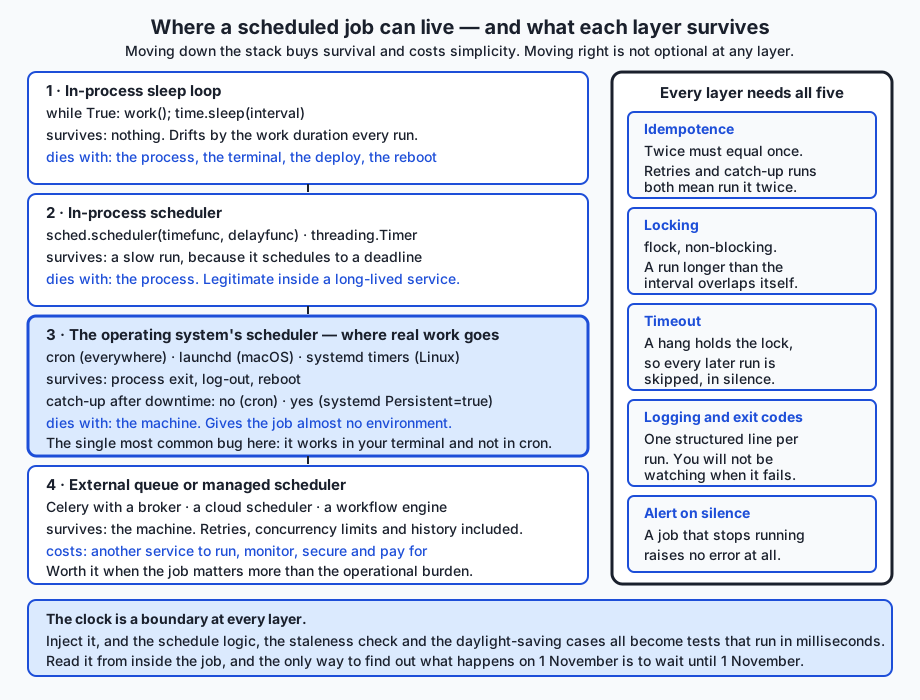
And underneath all of it sits Day 74’s lesson, which is why that day was placed where it was. The clock is a boundary. If your job reads datetime.now() from somewhere deep inside its logic, then “what does this do on the day the clocks change?” and “what does the watchdog say the morning after the job dies?” are questions you can only answer by waiting. If the clock arrives as a parameter, they are unit tests that run in under a millisecond. Everything in today’s lab is testable for exactly that reason.
Historical background
The word cron comes from the Greek chronos, time. The program appeared in early Unix, and the implementation that most Linux systems descend from is Paul Vixie’s, first released in 1987 and still commonly called Vixie cron; the widely used cronie package is a fork of it. The five-field crontab format and the crontab command are standardised by POSIX, which is why a line you learn today works on a machine you have never seen. Its sibling at, for running something once at a specified time rather than repeatedly, is standardised alongside it and is much less used than it deserves.
Two things about that history matter. The first is that cron is genuinely ancient and genuinely everywhere, which is a real engineering advantage: it is present, it is understood, and it will still be there in ten years. The second is that it was designed for a world of always-on multi-user machines, which is why it has no concept of a run that was missed because the computer was switched off. A laptop that is closed at 02:30 simply never runs the 02:30 job, and cron neither knows nor tells you.
launchd was introduced by Apple in Mac OS X 10.4 (Tiger, 2005). It was an unusually ambitious consolidation: one system replacing init, the startup item scripts, inetd/xinetd, cron and at. A launchd job is described by a property list — a plist — which is XML (or, since later versions, other encodings) rather than a line of text, and the same file format describes both “run this at boot and keep it running” and “run this every day at 02:30”. Because launchd is aware of when the machine was asleep, it will run a job whose scheduled time passed while the Mac was asleep, which is a real difference from cron and a common source of surprise in both directions.
systemd was started by Lennart Poettering and Kay Sievers in 2010 and is now the init system on most major Linux distributions. Its answer to cron is a pair of units: a .service that says what to run and a .timer that says when. Splitting them looks like bureaucracy until the first time you want to run the job by hand exactly as the scheduler would (systemctl start myjob.service — same environment, same user, same working directory, logged the same way), and then it looks like good design.
Three smaller threads join here, and each explains a specific piece of today’s code.
Exit code 75. In the mid-1980s, Eric Allman’s sendmail shipped a header called sysexits.h giving names to a set of conventional exit codes. EX_TEMPFAIL is 75 and means “temporary failure, the caller should try again later”. It is exactly the right meaning for “another copy of me is already running”, and using it costs nothing and tells anyone who reads it something true. Separately, GNU timeout exits 124 when it kills a command for overrunning, which is why that number appears in today’s lab.
The time zone database. The IANA time zone database — the tz database, founded by Arthur David Olson — records the actual historical and current rules for every zone on earth, including every daylight-saving transition ever legislated. Python gained direct access to it through the zoneinfo module in Python 3.9 (PEP 615, by Paul Ganssle). Before that, PEP 495 (Alexander Belopolsky and Tim Peters, Python 3.6) added the fold attribute to datetime, which exists solely to distinguish the first 01:30 from the second 01:30 on the morning the clocks go back. Those two additions are why today’s lab can ask the operating system what really happens on 1 November 2026 instead of asserting it.
The dead man’s switch. The name comes from railway and industrial control: a handle the operator must actively hold, which triggers the brakes when they stop holding it. It is the correct model for monitoring a scheduled job, and it inverts the usual instinct. You do not watch for a signal that something went wrong. You watch for the absence of a signal that everything went right.
What it is — and what it is not
A scheduler is a component that starts a program at a specified time or interval. That is all it does. It does not know what your program is for, whether it succeeded, whether it did the same work twice, or whether it should have run at all. Everything beyond “start this now” is your job.
That boundary is where most of the misunderstanding lives.
| Common belief | What is actually true |
|---|---|
| ”I scheduled it, so it runs.” | You arranged for it to be started. Whether it ran to completion, and whether it did the right thing, is a separate question with a separate answer, and you currently have no way of asking it. |
| ”If it fails I will get an email.” | Only if the scheduler is configured to mail output, the machine can send mail, the address is right, and you read that mailbox. Four assumptions, each of which is false on plenty of real systems. Modern practice is to make the job report for itself. |
| ”cron runs it as me, so it has my environment.” | It runs it as you and gives it almost none of your environment. Different PATH, no shell profile, a different working directory. This is the single most common cron bug. |
| ”A job that stops failing is a job that got better.” | A job that stops producing failures has very often stopped producing anything. Silence is ambiguous, and ambiguity in monitoring resolves in the worst direction. |
| ”The schedule is the hard part.” | The schedule is five numbers. Idempotence, overlap, hangs and monitoring are the hard part, and they are all in your program, not in the crontab. |
| ”I will notice if it breaks.” | You will notice if something you look at every day breaks. A nightly job is by definition something you do not look at. |
| ”Timers are precise.” | A scheduler fires within a minute (cron) or within its configured accuracy (systemd defaults to a one-minute window unless you set AccuracySec). If you need sub-second timing, a scheduler is the wrong tool entirely. |
A scheduler is also not a workflow engine. If your problem is “run A, then B and C in parallel, then D if both succeeded, and retry B up to three times”, you have outgrown a timer and want something that understands dependencies. Recognising that boundary early is worth more than any individual technique in this lesson.
Why it was created and what problems it solves
Take the problems one at a time; each is concrete.
Work that must happen while nobody is there. Backups, log rotation, certificate renewal, cache warming, a nightly report. The defining feature is that the useful moment is a moment when no human is available to press the button.
Work that is too slow to do in front of a user. A web request that would take four minutes is not a web request. Push it to a background job, hand the user a receipt, and let them come back. This is the origin of most task-queue systems.
Work that should be batched. Sending one email per event is expensive and annoying; sending one digest per day is cheap and welcome. Retraining a model on every new row is absurd; retraining nightly on everything that arrived is reasonable.
Work that keeps a system honest. Reconciliation jobs, integrity checks, alerting on data that stopped arriving. These produce nothing when everything is fine, which makes them exactly the jobs most likely to break unnoticed — the monitoring is itself the thing that needs monitoring.
Work that must survive the process that asked for it. This is the deep reason to leave your own process. A schedule that exists only in a running Python program is a schedule with a single point of failure that nobody is watching, and the failure mode is not a crash — it is silence.
The operating system schedulers were created to answer that last point once, at the system level, so that every program does not have to. cron’s design decision was to be a single always-running service, started at boot, that reads a text file and starts commands. That is a small enough idea to be reliable, and it has been reliable for four decades.
How it works
Level one: the sleep loop, and why it is worse than it looks
Everybody writes this first:
import time

while True:
    generate_report()
    time.sleep(60)
Three things are wrong with it, in increasing order of seriousness.
It drifts. The interval is measured from when the work finished, not from when it was supposed to start. If the work takes five seconds, the gap between starts is sixty-five seconds, and nobody wrote sixty-five anywhere. Worse, the error accumulates: run 100 begins 495 seconds — more than eight minutes — after where its author believes it does, and the gap grows without limit. Today’s lab measures this exactly:
  work(); sleep(60) with 5s of work
      gap between runs : 65s (you wrote 60)
      run 100 is late by: 495s
  sleep until the next deadline instead
      gap between runs : 60s
      run 100 is late by: 0s
The fix is three lines, and it is worth internalising because the same mistake appears in retry loops and polling loops: sleep until the next deadline, not for a fixed duration.
next_due = time.monotonic()
while True:
    generate_report()
    next_due += 60
    time.sleep(max(0.0, next_due - time.monotonic()))
Note time.monotonic() rather than time.time(). The wall clock can jump — a time sync, a manual correction, a daylight-saving change — and a loop that measures intervals against it can sleep for an hour or not at all. monotonic only ever goes forwards.
Note also what the corrected version does when a run overruns the interval entirely: the remaining time is negative, the sleep is zero, and the next run starts immediately. That is now a decision you have made on purpose. It may be the wrong one — see the section on overlap below — but at least it is visible.
It has no catch-up. If the process was not running at 02:30, nothing happened, and nothing will mention it.
It dies with the process. Every deploy, every crash, every reboot, every accidentally closed terminal ends the schedule. And because the loop produces no output when it stops, there is no event to notice.
Level two: sched and threading.Timer
Python’s standard library has an event scheduler, sched, and it has one design feature that makes it far more interesting than it first appears:
import sched

scheduler = sched.scheduler(timefunc=time.monotonic, delayfunc=time.sleep)
scheduler.enter(delay=3600, priority=1, action=refresh_cache)
scheduler.enter(delay=7200, priority=1, action=send_digest)
scheduler.run()
The time source and the delay function are constructor arguments. That is dependency injection, in the standard library, decades before the phrase became common — and it means you can hand sched a fake clock and run a six-hour schedule in microseconds. Today’s lab does exactly that, and the captured result is worth looking at:
2. sched with an injected clock: six hours of schedule, no waiting
==================================================================
      event 0 fired at t+3600s
      event 1 fired at t+7200s
      event 2 fired at t+21600s
      total time 'waited': 21600s of fake time, 0s of real time
sched runs events in time order regardless of the order you added them, and it has no concept of repetition — a recurring job re-enters itself at the end of each run, which is where you apply the deadline correction from above.
threading.Timer is the other in-process tool: one callback, once, after a delay, on its own thread.
from threading import Timer

timer = Timer(30.0, send_reminder)
timer.start()
# timer.cancel() if you change your mind
It is a reasonable way to say “do this one thing in thirty seconds” inside a running program. It is not a scheduler: each timer is a whole thread, they do not coordinate, and a program that creates them in a loop will surprise you.
When is an in-process scheduler legitimate? When the process is going to be running anyway and the work is small and internal. A web service that refreshes a cache every five minutes, a long-running data pipeline that flushes a buffer every thirty seconds — these are fine in-process, because the schedule and the process have the same lifetime by definition. The mistake is using an in-process scheduler for work whose lifetime is longer than the program’s.
Level three: cron, and the five fields
A crontab is a text file, one job per line, five schedule fields followed by a command:
minute  hour  day-of-month  month  day-of-week   command
0-59    0-23  1-31          1-12   0-6           anything the shell can run
Each field is one of:
| Syntax | Meaning | Example |
|---|---|---|
* | every value | * * * * * — every minute |
n | exactly that value | 30 2 * * * — 02:30 every day |
a,b,c | a list | 0 9,13,17 * * * — at 09:00, 13:00, 17:00 |
a-b | an inclusive range | 0 9-17 * * * — hourly through the working day |
*/n | every n-th value | */15 * * * * — at 0, 15, 30, 45 past |
a-b/n | every n-th value of a range | 0 8-18/2 * * * — every two hours, 08:00 to 18:00 |
Day-of-week runs 0 to 6 with Sunday as 0, and 7 is also accepted for Sunday. Python’s own weekday() puts Monday at 0, which is a conversion worth writing down once rather than rediscovering.
Now the gotcha, and it is a real one that catches experienced people:
When both the day-of-month and the day-of-week fields are restricted, cron treats them as OR, not AND.
So 0 0 13 * 5 does not mean “Friday the 13th”. It means “the 13th of any month, or any Friday” — which fires about thirty-seven times more often than the author intended — around sixty-two firings a year against the 1.7 you asked for. If only one of the two fields is restricted, the fields are ANDed as you would expect. This is the behaviour standardised by POSIX and implemented by the common crons, and today’s lab pins it with a test:
schedule = parse("0 0 13 * 5")
assert schedule.matches(at(2026, 11, 13))  # Friday the 13th: both
assert schedule.matches(at(2026, 7, 13))   # a Monday: day-of-month only
assert schedule.matches(at(2026, 7, 17))   # a Friday: day-of-week only
assert not schedule.matches(at(2026, 7, 14))  # neither
Editing your crontab is crontab -e; listing it is crontab -l; replacing it wholesale from a file is crontab myfile. The dangerous one is crontab -r, which deletes the whole thing without asking, and sits one key away from -e on most keyboards. Keep your crontab in version control and install it from the file.
The environment a cron job actually gets — the single most common bug
This is the part to read twice. You test a command in your terminal, it works, you put it in a crontab, and it fails — usually silently. The reason is that your terminal is a rich environment built by your shell’s startup files, and cron gives your job almost none of it.
| What you have interactively | What a cron job gets |
|---|---|
A long PATH including /opt/homebrew/bin, ~/.local/bin, a virtual environment’s bin | A short default PATH, often just /usr/bin:/bin |
Everything exported by .bashrc, .zshrc, .profile | None of it. Cron does not run a login shell and does not source your profile. |
| Your current working directory, which is your project | Your home directory |
| An active virtual environment | No virtual environment |
| A terminal, so programs behave interactively | No terminal at all; anything that prompts will hang or fail |
Your locale and TZ settings | Possibly neither |
The practical consequences are specific. python3 may resolve to a different interpreter than the one you tested with, or to nothing at all. A relative path like data/readings.csv resolves against your home directory and is not found. A tool installed by Homebrew is missing because /opt/homebrew/bin is not on the path. An API_TOKEN you exported in .zshrc does not exist.
The fixes are all boring and all mandatory:
SHELL=/bin/sh
PATH=/usr/local/bin:/usr/bin:/bin
TZ=UTC
MAILTO=

# min hour day-of-month month day-of-week  command
30 2 * * * cd /opt/reports && /usr/bin/python3 /opt/reports/job.py >> /var/log/reports/daily.log 2>&1
Every element of that line is deliberate. Absolute paths to the interpreter and the script, because PATH is not yours. An explicit cd, because the working directory is not yours. TZ set explicitly, so the schedule means what you think. And the redirection: >> appends standard output to a file and 2>&1 sends standard error to the same place. Without it, output goes to cron’s mail mechanism, which on a modern laptop usually means it goes nowhere at all.
The best way to debug a cron job that “works in my terminal” is to make your terminal look like cron rather than the other way round:
env -i /bin/sh -c 'cd /opt/reports && /usr/bin/python3 job.py'env -i clears the environment completely. If the command works under that, it will work under cron.
launchd, field by field
macOS jobs are described by a plist. Here is the shape, with the keys that matter:
<key>Label</key>
<string>com.example.dailyreport</string>

<key>ProgramArguments</key>
<array>
  <string>/usr/bin/python3</string>
  <string>/opt/reports/job.py</string>
  <string>--output-dir</string>
  <string>/opt/reports/out</string>
</array>

<key>StartCalendarInterval</key>
<dict>
  <key>Hour</key><integer>2</integer>
  <key>Minute</key><integer>30</integer>
</dict>

<key>RunAtLoad</key>
<false/>

<key>WorkingDirectory</key>
<string>/opt/reports</string>
<key>EnvironmentVariables</key>
<dict>
  <key>PATH</key><string>/usr/local/bin:/usr/bin:/bin</string>
  <key>TZ</key><string>UTC</string>
</dict>

<key>StandardOutPath</key>
<string>/var/log/reports/com.example.dailyreport.out.log</string>
<key>StandardErrorPath</key>
<string>/var/log/reports/com.example.dailyreport.err.log</string>Labelis the unique name launchd knows the job by, reverse-DNS by convention, and the file should be named after it.ProgramArgumentsisargv, one element per array entry. This is not a shell command line: there is no shell, so there is no globbing, no pipes, and no quoting rules to get wrong. That is a genuine improvement on cron, where everything goes through/bin/sh.StartCalendarIntervaltakesMinute,Hour,Day,WeekdayandMonth. Omitting a key means “every”. An array of dictionaries gives several times.RunAtLoaddecides whether loading the job also runs it immediately. Leaving it true and forgetting is a classic installation surprise.WorkingDirectoryandEnvironmentVariablesexist because launchd, like cron, gives a job a minimal environment.StandardOutPathandStandardErrorPathare the ones people forget. Omit them and your job’s output is discarded, so a failing job leaves no trace whatsoever.
User agents live in ~/Library/LaunchAgents. You would install one with launchctl load (or the newer launchctl bootstrap) and inspect it with launchctl list. Today’s lab does not run any of those commands, and neither should you until you are on a machine you intend to schedule something on.
The important behavioural difference from cron: if the scheduled moment passes while the Mac is asleep, launchd runs the job when the machine wakes. That is usually what you want on a laptop, and it is occasionally a surprise when nine missed runs do not turn into nine catch-up runs — launchd runs it once, not once per missed occurrence.
systemd timers, and why they are genuinely nicer
Linux splits the job in two. A .service unit says what to run:
[Unit]
Description=Daily station report
After=network-online.target

[Service]
Type=oneshot
WorkingDirectory=/opt/reports
Environment=PATH=/usr/local/bin:/usr/bin:/bin
Environment=TZ=UTC
ExecStart=/usr/bin/python3 /opt/reports/job.py --output-dir /opt/reports/out
TimeoutStartSec=600
StandardOutput=journal
StandardError=journal
SyslogIdentifier=dailyreport
And a .timer unit says when:
[Unit]
Description=Run the daily station report

[Timer]
OnCalendar=*-*-* 02:30:00
Persistent=true
RandomizedDelaySec=60
AccuracySec=1s
Unit=dailyreport.service

[Install]
WantedBy=timers.target
Four things here are straightforwardly better than cron, and it is worth being specific rather than tribal about it.
Logging is solved. Everything the job prints goes to the journal, tagged, timestamped and queryable: journalctl --user -u dailyreport.service -n 50. You do not have to invent a log file, rotate it, or wonder where cron’s mail went.
Catch-up exists. Persistent=true means that if the machine was off when the timer should have fired, systemd runs the job once as soon as it comes back. cron has no equivalent, and this single line removes an entire category of “the laptop was closed” bugs.
Dependencies exist. After=network-online.target means the job does not start before the network is up. cron’s answer to this problem is a sleep at the top of your script, which is not really an answer.
Running it by hand is running it for real. systemctl --user start dailyreport.service runs the job with exactly the environment, user, working directory and logging the timer would give it. Compare with cron, where “run it by hand” gives you a different environment and therefore tests something else.
Two more useful knobs: RandomizedDelaySec spreads a fleet of machines out so they do not all hit the same server at 02:30:00, and AccuracySec tells systemd how precise to be (it defaults to a one-minute window so it can batch wake-ups and save power). OnCalendar syntax is checked by systemd-analyze calendar "*-*-* 02:30:00", which will also tell you when it next fires — a genuinely useful habit before installing anything.
The cost of all this is that systemd is Linux-only and two files instead of one line.
And on Windows. The counterpart is Task Scheduler, driven from the graphical Task Scheduler application, from the schtasks command, or from PowerShell’s scheduled-task cmdlets. It is closer to launchd than to cron in spirit: a task is a structured object (exportable as XML) with triggers, actions, conditions and settings, rather than a line of text, and it can be told what to do about a run missed while the machine was off. The engineering half of this lesson — idempotence, locking, timeouts, logging and alerting on silence — is entirely unchanged there; only the registration mechanism differs. Today’s lab is POSIX-only because fcntl.flock is, so run it under WSL on a Windows machine.
The properties that make a job survivable
Idempotence — the one that matters most
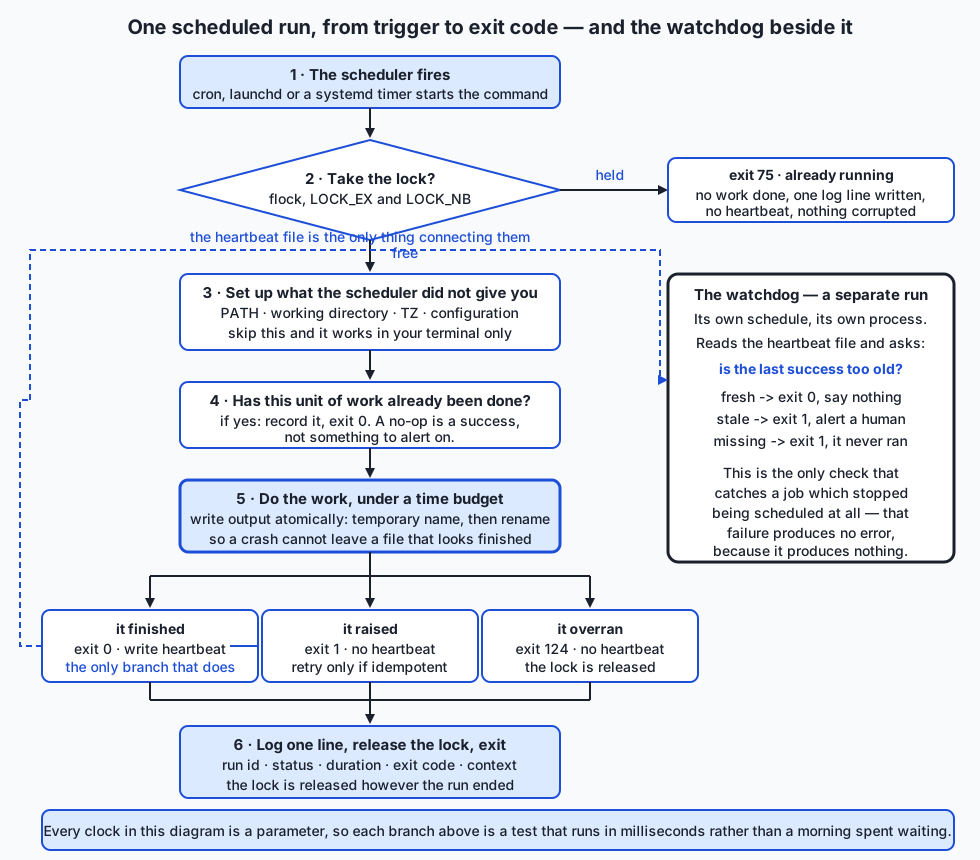
A job is idempotent if running it twice has the same effect as running it once. This is the single most important property a scheduled job can have, and the reason is arithmetic: every other mechanism in this lesson eventually causes a second run. A retry is a second run. A catch-up run is a second run. An operator who is not sure the job worked and types the command again is a second run. Daylight saving is, twice a year, literally a second run.
If the job is idempotent, all of those are harmless and you can be relaxed about retries. If it is not, every one of them is a bug waiting for the right morning.
The technique is usually the same: derive a key from the unit of work, and check for it before doing anything. In today’s lab the key is the output filename:
def report_path(output_dir, report_date):
    return Path(output_dir) / f"report-{report_date.isoformat()}.json"

def generate_daily_report(*, source, output_dir, report_date, generated_at):
    if already_written(output_dir, report_date):
        return "skipped", report_path(output_dir, report_date)
    ...
Two subtleties make the difference between this working and only appearing to work.
The check must be for a complete result, not merely a file. A job killed halfway through leaves a truncated JSON file. If “the file exists” is your test, every future run skips, and the truncated file lives for ever. So the check parses the file and looks for a marker:
def already_written(output_dir, report_date):
    path = report_path(output_dir, report_date)
    if not path.exists():
        return False
    try:
        payload = json.loads(path.read_text(encoding="utf-8"))
    except (json.JSONDecodeError, UnicodeDecodeError):
        return False
    return payload.get("report_date") == report_date.isoformat()
The write must be atomic, so that a partial file cannot exist under the real name at all. Write to a temporary name in the same directory, then os.replace, which is an atomic rename on POSIX:
handle = tempfile.NamedTemporaryFile(
    "w", encoding="utf-8", dir=destination.parent,
    prefix=destination.name + ".", suffix=".partial", delete=False,
)
with handle:
    json.dump(report.as_dict(), handle, indent=2, sort_keys=True)
    handle.flush()
    os.fsync(handle.fileno())
os.replace(handle.name, destination)
Same directory matters: os.replace is only atomic within one filesystem, and /tmp is frequently a different one.
Not every job can be made idempotent this cheaply. Sending an email, charging a card, and posting to an external system are all naturally once-only. The standard answer is an idempotency key: you generate a stable identifier for the unit of work, send it with the request, and the receiving system agrees to ignore a repeat. Payment APIs do this precisely because retries are unavoidable. If neither approach is available, then that job must not be retried automatically, and that decision needs writing down where the next person will find it.
Catch-up after downtime — and whether you want it
If the machine was off from Friday evening to Monday morning, three daily runs did not happen. There are three possible policies, and choosing between them is a judgement about the job, not a technical question:
| Policy | Right for | Wrong for |
|---|---|---|
Run once on return (Persistent=true) | Refreshes, syncs, caches — anything where only the latest state matters | Anything where each period’s work is distinct |
| Run once per missed period (backfill) | Reports, aggregates, billing — anything where Saturday’s numbers are a separate artefact from Sunday’s | Anything with side effects, unless idempotent |
| Skip entirely | Alerts, notifications, anything time-sensitive | Anything whose output is expected to be complete |
Backfill — deliberately running the job for a range of past periods — is the general form of the middle option, and it is worth building deliberately rather than discovering under pressure. A job that takes the period as a parameter (--date 2026-07-19) can be backfilled; a job that computes “yesterday” internally cannot, and you will find this out on the morning you need it most. This is the same injected-clock argument as everywhere else in this lesson, wearing a different hat.
The third policy deserves defending, because it feels like giving up. A notification that something needed attention at 09:00 on Saturday is not useful at 09:00 on Monday; it is noise, and worse, it is noise that trains people to ignore the channel.
Overlapping runs and locking
Here is the failure in slow motion. Your job runs every five minutes and usually takes forty seconds. One morning the upstream feed is slow and it takes six minutes. At minute five the scheduler starts a second copy — because that is what you told it to do — and now two processes are reading the same input and writing the same output. If the feed stays slow, a third starts at minute ten. Twenty minutes later there are four copies competing for the same resources, each making the others slower.
Neither cron nor launchd nor a systemd timer stops this by default. (systemd is the partial exception: because the timer activates a unit, and a oneshot unit that is already active will not be started again, systemd gives you overlap protection for free. It is one of the better arguments for timers.) In general, the job must stop itself.
The obvious implementation is wrong:
if lock_file.exists():
    sys.exit(75)
lock_file.write_text(str(os.getpid()))
Two bugs. First, there is a window between the check and the create in which a second process can pass the same check — a race condition, and one that is hard to trigger deliberately and therefore reaches production. Second, if the process is killed with SIGKILL or the machine loses power, the file remains, and every future run exits immediately for ever. You have replaced “runs twice” with “never runs again”, which is worse because it is silent.
fcntl.flock has neither problem. It is an advisory lock held by the kernel on an open file descriptor: acquiring it is atomic, and the kernel releases it when the process exits, however it exits.
@contextlib.contextmanager
def job_lock(path):
    handle = open(path, "a+")
    try:
        try:
            fcntl.flock(handle.fileno(), fcntl.LOCK_EX | fcntl.LOCK_NB)
        except OSError:
            raise AlreadyRunning(path) from None
        ...
        yield path
    finally:
        handle.close()
LOCK_NB is non-blocking, and that choice is deliberate. A scheduled job that waits for the lock just queues copies of itself, and a queue of overdue jobs is how a slow morning becomes an outage. Fail fast, exit 75, and let the next scheduled run try.
flock is POSIX, so macOS and Linux have it and Windows does not; the Windows equivalents are msvcrt.locking and named mutexes. flock is also advisory — it stops cooperating programs, not determined ones — which is exactly the right level for a problem whose adversary is your own job started twice.
Timeouts
A job with no time limit can hang for ever. If it holds the lock while hanging, every subsequent run exits 75 and does nothing. The job has stopped working, and nothing has failed. This is the failure that hides longest.
The in-process mechanism is SIGALRM:
def on_alarm(signum, frame):
    raise JobTimeout("exceeded the budget")

signal.signal(signal.SIGALRM, on_alarm)
signal.setitimer(signal.ITIMER_REAL, seconds)
try:
    do_the_work()
finally:
    signal.setitimer(signal.ITIMER_REAL, 0)   # always cancel
Be honest about its three limits: it is POSIX-only, it works only in the main thread of the main interpreter, and it interrupts Python at the next opportunity — a call blocked deep inside a C library may not notice. Cancelling the timer in a finally is not optional; an alarm left armed fires later in unrelated code, which is a memorably confusing bug.
When those limits matter, supervise the job as a child process instead:
process = subprocess.Popen(argv, start_new_session=True, ...)
try:
    process.communicate(timeout=timeout)
except subprocess.TimeoutExpired:
    os.killpg(os.getpgid(process.pid), signal.SIGTERM)
    ...  # wait a grace period, then SIGKILL
start_new_session=True puts the child in its own process group so os.killpg reaches any helpers it started. Without that, subprocess’s own timeout kills the child and orphans its grandchildren, which keep running — the exact failure that leaves mystery processes on a server for weeks. Escalate politely: SIGTERM, a short grace period, then SIGKILL, which cannot be caught or ignored.
At the scheduler level, systemd’s TimeoutStartSec= enforces a limit from outside the job entirely, and the GNU timeout command does the same for a cron line: timeout 600 /usr/bin/python3 job.py. Belt and braces is reasonable here.
Time zones and daylight saving
Schedule in UTC. That is the conclusion; here is the reason.
A wall-clock schedule in a zone with daylight saving is broken twice a year. On the spring-forward morning some wall-clock times do not exist; on the autumn morning some happen twice. Both of these are facts about the world recorded in the IANA time zone database, and Python will tell you about them:
      2026-03-08 02:30 America/New_York -> skipped
        2026-03-08 02:30 never appears on the wall clock in America/New_York;
        the clocks jump over it. Python resolves it to 03:30 EDT, an hour later
        than intended.
      2026-11-01 01:30 America/New_York -> repeated
        2026-11-01 01:30 happens twice in America/New_York: once at 05:30 UTC
        (EDT) and again an hour later at 06:30 UTC (EST). A job scheduled then
        runs twice unless it is idempotent.
That second case is worth sitting with, because the doubled run is the more dangerous of the two. A job that misses a run leaves a visible gap. A job that runs twice leaves no gap at all, and its damage — a doubled total, a second invoice, a second notification — looks like data rather than like a fault.
The same effect shows up as a schedule that is not actually daily:
      hours between daily 12:00 runs, local: [24.0, 23.0, 24.0, 24.0]
      hours between daily 12:00 runs, UTC  : [24.0, 24.0, 24.0, 24.0]
A “daily” local job has a 23-hour day in spring and a 25-hour day in autumn. If anything downstream assumes 24 hours between runs — a rate limit, an aggregation window, a data-freshness check — it is wrong on those two days.
So: set TZ=UTC in the crontab, TZ in the plist’s environment, TZ in the service unit; keep every timestamp in your logs and outputs timezone-aware and in UTC; and convert to local time only at the moment you show something to a human. If a job genuinely must run at 09:00 local because that is when people arrive at work, then accept the two broken mornings explicitly, make the job idempotent so the doubled run is harmless, and write down that you decided this.
Two Python habits follow. Use aware datetimes everywhere — a naive datetime means “whatever this machine thinks local time is”, which is precisely the ambiguity we are removing. And use zoneinfo rather than fixed offsets: ZoneInfo("America/New_York") knows the transition rules, whereas a hard-coded -05:00 is wrong for half the year.
Logging, exit codes, retries and alerting
Log one structured line per run. You will not be watching. The line is the entire record:
{"action": "written", "duration_seconds": 0.0, "exit_code": 0,
 "finished_at": "2026-07-20T02:30:00+00:00", "job": "daily-report",
 "output": "/tmp/reports/report-2026-07-19.json", "report_date": "2026-07-19",
 "run_id": "daily-report-20260720T023000+0000",
 "started_at": "2026-07-20T02:30:00+00:00", "status": "ok"}
One JSON object per line — sometimes called JSON Lines — is the right shape because it can be processed with grep and json.loads together. A multi-line traceback in the middle of the stream cannot. Include a run id so that several lines about one invocation can be tied together, the duration so you can see the day it started getting slower, and enough domain context (here, which date’s report) to answer “what did it actually do?” months later.
Choose exit codes that mean something. The scheduler sees a number and nothing else, so make it informative. Today’s lab uses:
| Code | Meaning | Where it comes from |
|---|---|---|
| 0 | The work is done, or was already done | The universal convention |
| 1 | The work raised an exception | The universal convention |
| 75 | Another copy holds the lock; nothing was done | EX_TEMPFAIL from BSD sysexits.h |
| 124 | The work exceeded its timeout and was interrupted | The code GNU timeout uses |
Note that an idempotent no-op exits 0. A skipped run is a success, and alerting on it would train people to ignore alerts — which is the most expensive thing you can do to a monitoring system.
Retry carefully. Retrying is only safe if the job is idempotent; retrying a non-idempotent job converts a transient failure into permanent bad data. When you do retry, back off exponentially with a little randomness, so that a whole fleet does not retry in lockstep and turn a blip into a stampede. And bound the retries: a job that retries for ever is a job that hangs, wearing a disguise.
Alert on failure, and alert on silence. The first is easy and everybody does it. The second is the one that matters, and this is the sentence to take away from the whole lesson:
A job that stops running produces no error. It produces nothing. If your only alerting is on failure signals, a job that disappears is invisible.
The three ways a job stops without failing are all ordinary: somebody edits the crontab and drops the line; a machine is rebuilt and the timer is not re-enabled; a hung run holds the lock so every later run exits 75, quietly, because 75 is not a crash. In every case the monitoring stays green.
The fix is a dead man’s switch. Each success writes down when it succeeded — a heartbeat file, a row in a table, a ping to a service — and a separate check alerts when that record gets too old:
verdict = check_heartbeat(
    heartbeat_path=path,
    clock=clock,
    max_age=dt.timedelta(hours=26),
)
$ python3 examples/job.py --now 2026-08-01T09:00:00+00:00 watch --heartbeat-file ... --max-age-minutes 1560
STALE: last success was 12.3d ago (budget 26.0h) — the job has stopped running
exit: 1Two design points. The check must be a separate process on its own schedule, because a watchdog inside the job it watches cannot report that the job never started. And the staleness budget wants to be roughly two intervals plus the job’s normal runtime: too tight and a single slow run pages somebody at four in the morning; too loose and the job can be dead for a day before anyone hears. Two intervals tolerates exactly one missed run and no more.
The observability point behind all of this is uncomfortable and true: a job nobody watches is a job that silently stopped months ago. The default state of unmonitored automation is not “working” — it is “unknown”, and unknown resolves badly.
Testing all of it, in milliseconds
Everything above is testable without waiting for a single scheduled moment, and the technique is entirely Day 74’s: inject the clock and inject the work.
def run_job(*, name, work, clock, lock_path, log,
timeout_seconds=None, heartbeat_path=None):
started = clock()
...work is a zero-argument callable, so a test can pass a two-line fake and check the lock, the timeout, the log and the exit code without ever generating a report. clock is a zero-argument callable returning an aware datetime, so a test can freeze it, or hand it a version that advances two seconds per read and assert that the logged duration is exactly 2.0.
The result is a suite that covers daylight-saving transitions, an eleven-day-stale watchdog, a hundred iterations of a drifting loop and a six-hour sched schedule — and finishes in half a second:
$ pytest examples -q
61 passed in 0.54sThe only test in the whole suite that waits for anything is the timeout test, which waits 0.2 seconds for a job that asked to sleep for 30 — and that is the point of having a timeout.
An everyday analogy
Think of a scheduled job as the night cleaner in an office building.
Nobody is there when they work. That is the entire arrangement: the work has to happen, and it has to happen when the building is empty, so it is done by someone who arrives after everyone has left and is gone before anyone returns. Every difficulty in this lesson is a difficulty of that arrangement.
The keys are the environment. The cleaner does not have your desk, your logins, or the drawer you keep things in. They have a key to the front door and nothing else. If your instructions say “use the supplies in my cupboard”, and they cannot open your cupboard, the work does not happen — and you find out in the morning. This is exactly the cron environment problem: the job runs as you, and has almost nothing of yours. The fix is the same in both cases: write instructions that assume nothing, and state where everything is.
One set of keys is the lock. There is one key to the supply room. If a second cleaner arrives while the first is still inside, they cannot get in, and they go home rather than waiting in the corridor for an hour. That is LOCK_NB: refuse immediately rather than queue. And when the first cleaner leaves — whether they finished, or gave up, or were called away — the key comes back automatically, which is why flock beats a note on the door saying “in use”.
Doing the same room twice is idempotence. If a cleaner does a room that has already been cleaned, nothing bad happens; it is a small waste of time. That is what you want. Compare a task like “put out the recycling”: doing it twice means two bins on the pavement, and now there is a problem. The first task is naturally idempotent and the second is not, and the second is the one that needs a checklist by the door — a record of what has already been done tonight, which is precisely the output-file key in today’s lab.
The shift end is the timeout. The building alarm arms at six. A cleaner still working at six is a problem for everybody, so the shift has a hard end, and someone comes to check. A cleaner who is simply stuck somewhere, indefinitely, with the supply-room key in their pocket, blocks every night that follows — which is exactly what a hung job holding a lock does.
The note on the desk is the log. You were not there. What you have in the morning is whatever they wrote down: when they arrived, what they did, what they could not do, and why. If the note says only “done”, it is useless the first time something goes wrong. If it says “arrived 22:04, third floor skipped, door locked, left 01:12”, you can act on it.
The sign-in sheet is the heartbeat, and the supervisor is the watchdog. Here is the part everyone gets wrong. If the cleaner does not turn up at all, there is no note. There is no complaint, no mess, no alarm — just an empty page and a building that looks fine for a while. The only way to notice is for somebody whose job is not cleaning to look at the sign-in sheet each morning and ask: is there an entry for last night? That is a dead man’s switch, and it is the only mechanism in the whole building that can detect an absence.
The analogy holds all the way down, including in the places it gets uncomfortable. If the supervisor also only comes at night, and also stops turning up, nobody notices either of them. Monitoring is not free of the problem it solves — which is why external services exist whose only job is to expect a ping and complain when it does not arrive.
Examples in practice
Running the job by hand, twice
The lab’s job takes an injected clock and generates one day’s report. Run it, then run it again:
$ python3 examples/job.py --now 2026-07-20T02:30:00+00:00 run --output-dir /tmp/reports
{"action": "written", "duration_seconds": 0.0, "exit_code": 0, ... "status": "ok"}
exit: 0
$ python3 examples/job.py --now 2026-07-20T02:35:00+00:00 run --output-dir /tmp/reports # again
{"action": "skipped", "duration_seconds": 0.0, "exit_code": 0, ... "status": "skipped"}
exit: 0Two runs, one report, and the second exits 0 because a no-op is a success. The file on disk still carries the first run’s generated_at, which is how you know the second run did not rewrite it.
The refusal, and the hang
Hold the lock in one terminal and run the job in another, and the second run declines to work:
status : already-running
exit code: 75 (another copy holds the lock; nothing was done)
work done: FalseAnd a job that hangs is cut short rather than allowed to block the next twenty runs:
$ python3 examples/job.py ... run --date 2026-07-17 --simulate-hang 30 --timeout 1
daily-report: timeout -> exit 124 (the work exceeded its timeout and was interrupted)
{"duration_seconds": 0.0, "error": "JobTimeout", "exit_code": 124, ... "timeout_seconds": 1.0}
exit: 124The lock is released on the way out, so the next scheduled run starts normally. That single behaviour — a hang that does not poison the future — is worth the whole timeout mechanism.
The stronger form, for work that SIGALRM cannot interrupt, supervises a child process and kills its whole group:
$ python3 examples/supervise.py --timeout 1 -- sleep 30
supervise: killed after 1.0s -> exit 124
exit: 124The watchdog noticing an absence
Nothing has failed here. The job simply stopped running, and only the missing success says so:
$ python3 examples/job.py --now 2026-08-01T09:00:00+00:00 watch --heartbeat-file ... --max-age-minutes 1560
STALE: last success was 12.3d ago (budget 26.0h) — the job has stopped running
exit: 1One schedule, three dialects
The lab’s generator takes a single schedule definition and writes cron, launchd and systemd files from it — and installs none of them:
label          : com.example.dailyreport
cron           : 30 2 * * *
launchd        : StartCalendarInterval Hour=2 Minute=30
systemd        : OnCalendar=*-*-* 02:30:00
reads as       : minute 30 · hour 2 · day-of-month any · month any · day-of-week any
next three (from 2026-07-19 00:00 UTC): 2026-07-19 02:30, 2026-07-20 02:30, 2026-07-21 02:30

NOTHING was installed. To install, you would run — deliberately, yourself:
  cron    : crontab -l > my.cron && cat ...dailyreport.cron >> my.cron && crontab my.cron
Seeing the three side by side is the fastest way to learn any of them, and generating them from one definition removes the commonest cause of a schedule drifting out of sync with its documentation.
The AI connection
Point all of this at a machine-learning system and nothing changes except the stakes.
A nightly retraining job is the canonical case. It reads yesterday’s labelled data, trains, evaluates, and — if the evaluation passes — writes a new model artefact. Every property in this lesson applies directly. It must be idempotent, or a retry trains on doubled data and you get a model that is quietly worse with no error anywhere. It must hold a lock, or two overlapping runs write the same artefact path and produce a file that is neither model. It needs a timeout, because training on a bad batch can take arbitrarily long and a training job that hangs holds a GPU as well as a lock. It needs a log with a run id, the row count, the metrics and the duration, because “the model got worse last Tuesday” is a question you will be asked and can only answer from records. And it needs a watchdog, because a retraining job that silently stopped six weeks ago leaves a system that looks completely healthy while serving an increasingly stale model.
Batch inference adds the idempotency-key problem in its sharpest form: if the job writes predictions to a table and is retried, it must not write them twice, and the answer is a natural key per input record rather than an append. A data refresh adds the freshness question: the only signal that yesterday’s feature pipeline died is that today’s data looks like yesterday’s, which no error handler will ever catch — only a check that asserts the data is newer than a threshold. Scheduled evaluation runs are the honest version of “we monitor the model”: a nightly job that scores the model against a fixed set and alerts on drift, which is itself a scheduled job that can silently stop, and therefore needs its own dead man’s switch.
There is a broader point here that is easy to miss while learning the mechanics. Most production machine-learning failures are not model failures. They are pipeline failures — a job that stopped, a job that ran twice, a job that ran on stale input — and they are exactly the failures this lesson is about. The modelling is the interesting part; the scheduling is the part that breaks.
Implications: security, privacy, performance, scalability, and cost
Security. A scheduled job is a program that runs unattended, often with your privileges, often for years, and nobody re-reads it. Run it as a dedicated user with the least privilege that works: a cron job running as root because that was convenient is a root shell waiting for a bug in your CSV parser. Keep secrets out of the schedule file — crontabs are often world-readable and end up in backups and screenshots — and out of the command line, because command lines are visible to every user on the machine through ps. Read credentials from a mode-0600 file or a secret manager instead. And treat anything that can write a schedule file as able to run arbitrary code as you, on a timer: your crontab, ~/Library/LaunchAgents and the systemd unit directories are all sensitive paths, and this is a well-worn persistence technique for anyone who gets a foothold.
The minimal environment cron gives you is a security feature as much as an inconvenience. A job that only works because your shell profile exported something is a job whose behaviour depends on a file it never mentions.
Privacy. Logs written unattended are read later, by more people than you expect, and kept longer than you intended. Log identifiers, counts and statuses; do not log request bodies, personal data or credentials “just in case”. If the job handles personal data, its retention policy applies to its logs too — a scheduled job that writes a line per record for three years has quietly built a second copy of the dataset.
Performance. The scheduler’s own cost is negligible; the job’s is not. The two things worth designing for are the thundering herd and the long tail. A hundred machines all scheduled at 0 2 * * * hit the same database at exactly 02:00:00; spread them with a random delay (RandomizedDelaySec in systemd, or a short randomised sleep at the top of the job). And a job whose runtime creeps towards its interval will start overlapping — which is why logging the duration matters, because it turns a cliff into a trend you can see coming.
Scalability. Single-machine schedulers have a hard ceiling: one machine. Beyond it you need either a leader election (so exactly one of several machines runs the job) or a queue-based system where a scheduler enqueues and any worker dequeues. Do not build distributed locking on a shared filesystem; network filesystems make guarantees about locking that are much weaker than local ones, and the failure mode is two jobs both believing they hold the lock.
Cost. cron, launchd and systemd are free and already installed, which is a real advantage worth defending: a scheduling system with no operational cost of its own means every hour you spend goes into the job rather than the infrastructure. Managed schedulers and queue systems charge in money and in operational attention — another service to run, secure, upgrade and monitor. They are frequently worth it, and the decision should be made explicitly, when the job’s reliability requirement justifies it, rather than by default at the start of a project.
The cost that surprises people is the compute the job itself consumes. An hourly job that takes four minutes is running seven per cent of the time, permanently. A nightly training job on rented GPUs is a fixed monthly bill whether or not anyone looks at the output — and a job whose output nobody uses is one of the more common forms of waste in a mature system.
Alternatives: free, open source, and commercial
Everything in the first four rows below is installed on the authoring machine or ships with the operating system. Everything in the last three is described from its published documentation and is not installed here; the lab imports none of them, and where their syntax appears it is written from their documented interfaces rather than captured from a run.
sched and threading.Timer — Python standard library, free
What they are. sched is a general-purpose event scheduler: you enter events at a delay or an absolute time and call run(). threading.Timer runs one callback once, after a delay, on its own thread.
When to choose them. When the schedule belongs to a process that is going to be running anyway, and the work is small and internal — a cache refresh inside a service, a buffer flush inside a pipeline.
How to use them. sched.scheduler(timefunc, delayfunc), then enter(delay, priority, action) or enterabs(time, priority, action), then run(). Repetition is your responsibility: the action re-enters itself.
Worked example. Because the time source is injected, a six-hour schedule is testable instantly:
fake = FakeTime()
scheduler = sched.scheduler(timefunc=fake.time, delayfunc=fake.sleep)
scheduler.enter(3600, 1, record, argument=(0,))
scheduler.enter(21600, 1, record, argument=(2,))
scheduler.run()
# fires at t+3600 and t+21600; total real time elapsed: none
Cost. Free, and already present.
cron — free, ubiquitous, POSIX-standard
What it is. A system service that reads a table of five-field schedules and runs commands.
When to choose it. Almost always, for a recurring job on a single always-on machine, and especially when the job must work on a system you do not control or cannot predict. Nothing else has cron’s reach.
How to use it. crontab -e to edit, crontab -l to list, crontab file to install from a file (which is what you should do, keeping the file in version control). Set PATH, SHELL and TZ at the top; use absolute paths; redirect output.
Worked example.
PATH=/usr/local/bin:/usr/bin:/bin
TZ=UTC
30 2 * * * cd /opt/reports && /usr/bin/python3 job.py >> /var/log/reports/daily.log 2>&1
Cost. Free, installed everywhere, no dependencies. Its weaknesses are real: no catch-up, no dependency handling, no built-in logging, no overlap protection, and a syntax with a genuine trap in it.
launchd — macOS, free, built in
What it is. Apple’s single system for launching and supervising everything, including timed jobs.
When to choose it. For anything scheduled on a Mac, particularly a laptop, because launchd understands sleep and will run a job whose moment passed while the machine was asleep.
How to use it. Write a plist, put it in ~/Library/LaunchAgents for a user agent, load it with launchctl, inspect with launchctl list. ProgramArguments is argv, not a shell line.
Worked example. The StartCalendarInterval dictionary is the whole schedule:
<key>StartCalendarInterval</key>
<dict>
  <key>Hour</key><integer>2</integer>
  <key>Minute</key><integer>30</integer>
</dict>
Cost. Free, built in. Downsides: XML is verbose, the documentation is thin, and a job that fails to load can be frustrating to diagnose.
systemd timers — Linux, free, built in
What they are. A .timer unit that activates a .service unit.
When to choose them. On any systemd-based Linux where the job matters: you get journal logging, catch-up with Persistent=true, dependency ordering, resource limits, an enforced TimeoutStartSec, and free overlap protection.
How to use them. Write both units, systemctl --user daemon-reload, systemctl --user enable --now name.timer, watch with systemctl --user list-timers and journalctl --user -u name.service.
Worked example.
[Timer]
OnCalendar=*-*-* 02:30:00
Persistent=true
RandomizedDelaySec=60
Cost. Free, built in. Linux-only, and two files rather than one line.
The schedule library — free and open source, not installed here
What it is. A small third-party library offering a readable in-process API: schedule.every().day.at("02:30").do(job), driven by your own loop calling schedule.run_pending().
When to choose it. When you want a legible schedule inside a long-running Python process and do not need persistence. It is a nicer way to express what a sleep loop does badly.
How to use it. Declare the jobs, then run a loop that calls run_pending() and sleeps briefly.
Worked example (from the project’s documented interface; not run here):
schedule.every().day.at("02:30").do(generate_report)
while True:
    schedule.run_pending()
    time.sleep(1)
Cost. Free and open source. The honest limitation is the one it shares with every in-process scheduler: it dies with the process, it has no catch-up, and it has no persistence. It makes an in-process schedule prettier; it does not make it survivable.
APScheduler — free and open source, not installed here
What it is. A considerably larger Python scheduling framework: cron-style, interval and one-off triggers; several job stores including persistent ones backed by a database; and both blocking and background schedulers.
When to choose it. When a Python application genuinely needs to own its own schedules — jobs added and removed at run time, per-user schedules, jobs that must survive a restart because they are stored in a database.
How to use it. Create a scheduler, add jobs with a trigger, start it.
Worked example (from the project’s documented interface; not run here):
scheduler = BackgroundScheduler()
scheduler.add_job(generate_report, "cron", hour=2, minute=30)
scheduler.start()
Cost. Free and open source. The trade-off is real complexity: job stores, executors, misfire handling and coalescing are all things you now have to understand. For a job that a crontab line would express, it is more machinery than the problem deserves.
Related: croniter is a small free library for parsing cron expressions and iterating over their occurrences — the job today’s lab does by hand in about a hundred and fifty lines. Writing it once is the better way to learn it; using croniter is the better way to ship it.
Queue-based and managed options — mixed, not installed here
Celery with a broker (RabbitMQ or Redis) is the standard Python answer when jobs must survive the machine. A scheduler component (celery beat) enqueues tasks on a schedule and any worker picks them up; you get retries, concurrency limits, routing and result storage. When to choose it: when work must be distributed across machines, or when a web request needs to hand off work and return immediately. How to use it: define tasks with a decorator, configure a beat schedule, run workers. Cost: Celery and both common brokers are free and open source, but you are now running and monitoring a broker and a worker fleet, and beat itself is a single point of failure that needs its own watching. Do not reach for this because you have one nightly report.
Cloud schedulers and workflow engines — the managed timer services offered by cloud providers, and orchestrators such as Airflow, Dagster, Prefect and Argo Workflows — sit at the far end. The managed timers remove the “who runs the scheduler?” problem entirely. The orchestrators add what a timer fundamentally lacks: dependencies between tasks, retries with policy, backfill as a first-class operation, and a user interface showing what ran and what did not. When to choose them: when you have a graph of scheduled work rather than a list, or when backfilling a range of past dates is a routine operation rather than an emergency. Cost: the open-source orchestrators are free to use and substantial to operate; the managed services charge, and pricing changes often enough that quoting a figure here would be misleading — check the provider’s current pricing page.
Comparison with related concepts
| Concept | What it does | How it differs from a scheduled job |
|---|---|---|
| Task queue (Celery, RQ) | Runs work asynchronously when something asks for it | Triggered by an event, not by time. Often paired with a scheduler that does the enqueuing. |
| Workflow orchestrator (Airflow, Dagster, Prefect) | Runs a dependency graph of tasks, with retries, backfill and a user interface | Understands that B follows A. A timer only knows “now”. Choose this when your problem is a graph. |
| Daemon / long-running service | Stays up and responds continuously | A scheduled job starts, works, and exits. If your “job” runs for 24 hours, it is a service and needs supervision instead. |
at | Runs a command once, at a specified future time | One-shot rather than recurring. Underused; at 03:00 tomorrow is often what you actually want. |
| Watchdog timer (hardware/embedded) | Resets a device if software stops petting it | Same shape as a dead man’s switch, and the origin of the idea. Detects absence, not failure. |
| Polling loop | Repeatedly checks for something new | Time-triggered like a scheduled job, but its purpose is to notice a change rather than to do periodic work. Same drift and overlap problems. |
| Event-driven trigger (a file appearing, a webhook) | Runs when something happens | Reacts to reality rather than guessing when reality happened. Usually better than a schedule when available — but needs the same idempotence, because events get delivered twice. |
| Batch window | A period reserved for heavy work | A policy about when work may run, not a mechanism for running it. |
And the comparison that decides most real choices:
| cron | launchd | systemd timers | |
|---|---|---|---|
| Platform | Anything POSIX | macOS | Linux with systemd |
| Configuration | One line of text | An XML plist | Two unit files |
| Catch-up after downtime | No | Yes, once, on wake | Yes, with Persistent=true |
| Logging | Whatever you redirect; otherwise mail | Files you name, or nothing | The journal, automatically |
| Overlap protection | None | None by default | Yes — a oneshot unit will not start twice |
| Dependencies | None | Limited | Yes (After=, Requires=) |
| Enforced timeout | Only if you wrap it | No | Yes (TimeoutStartSec=) |
| Run it by hand exactly as scheduled | Hard | Awkward | Easy (systemctl start) |
| Ubiquity | Total | macOS only | Most Linux |
When to use it — and when not to
Use an operating-system scheduler when the work is periodic and time-based; the job finishes rather than running for ever; it must survive the process that arranged it; and one machine is enough. That covers reports, backups, syncs, cleanups, refreshes, retraining and evaluation runs — the overwhelming majority of scheduled work.
Use an in-process scheduler when the process is going to be running anyway and the work is internal to it. A cache refresh inside a web service does not need a crontab entry; it needs a sched event or a background thread, and it dies with the service exactly as it should.
Do not use a scheduler when:
- The work is a reaction, not a rhythm. If something can tell you when it happened — a webhook, a queue message, a file-system event — react to that instead of polling on a timer. Every polling schedule is a trade-off between latency and load that an event does not have to make.
- The timing must be precise. Schedulers fire within a minute, or within their configured accuracy window. Sub-second timing needs something else entirely.
- The task never finishes. A “job” that runs for days is a service. Run it under a supervisor that keeps it alive and restarts it, rather than a timer that starts a second copy.
- The work is a dependency graph. Once you are writing “run A, then B and C, then D only if both succeeded, and retry B three times”, a timer is the wrong shape and you want an orchestrator.
- You cannot make it safe to run twice, and cannot use an idempotency key. Then automatic scheduling with retries is dangerous, and that needs to be a conscious, documented decision rather than something discovered during an incident.
- Nobody will ever look at whether it worked. This is the one people skip. If there is no monitoring, no alert, and no dead man’s switch, then you have not automated the task — you have arranged for it to happen for a while and then stop, at a time nobody will notice.
A last piece of judgement. The right order to add these properties to a job you have inherited is: idempotence first, because it makes everything else safe; then the lock, because overlap is the failure that corrupts data; then the timeout, because a hang is the failure that hides longest; then logging, because you will need it while fixing the others; and alerting on silence last but not optional, because it is the only thing that will tell you when all of the above stops mattering.
Knowledge check
Answer these before opening the lab. Each has a definite answer somewhere above.
- A sleep loop calls work that takes five seconds and then sleeps for sixty. How far behind the intended schedule is the hundredth run, and what is the three-line fix?
- What does the cron expression
0 0 13 * 5actually mean, and how often does it fire compared with what its author probably intended? - Name four ways a cron job’s environment differs from your interactive terminal, and give the single command that best reproduces cron’s environment for debugging.
- Why is
if lock_file.exists(): sys.exit()not equivalent toflockwithLOCK_NB? Give both of its bugs. - A daily job is scheduled at 01:30 local time in a zone with daylight saving. What happens on the morning the clocks go back, and why is that more dangerous than what happens in spring?
- Why does an idempotent no-op exit 0 rather than a distinct code?
- Your job has stopped running entirely because somebody deleted the crontab line. Which of your monitoring signals fires? What mechanism would have caught it?
- Which two systemd timer features have no cron equivalent, and what problem does each solve?
Hands-on exercise
Work through the Day 81 lab, A Job That Survives Being Ignored, in labs/sections/programming-with-python/day-081-scheduling-and-background-jobs/.
Before anything else, read the safety rule at the top of the lab’s README: this lab installs nothing into your crontab, launchd or systemd, and leaves no background process running. It generates schedule files, shows you the install command, and runs the job by hand. Section 8 of the test suite asserts all of that directly, by reading your real crontab and your user agent and unit directories and failing if this lab’s job appears in any of them.
Then:
- Run
python3 examples/demo.pyand read all eight sections. Nothing in it waits, and everything in it is real. - Run the job twice for the same date and confirm that one report exists and the second run reports
action: skipped. - Hold the lock with
examples/hold_lock.pyin one terminal and run the job in another. Confirm exit 75 and that no report was written. - Run the job with
--simulate-hang 30 --timeout 1. Confirm exit 124 in about a second, then run the job normally and confirm the lock was released. - Complete exercises 1 to 4 in
starter/myjob.py: idempotence with an atomic write, aflocklock, aSIGALRMtime budget, and structured logging. Delete each@pytest.mark.skipline as you go. - Generate the schedule files, read all four, and answer exercises 5 and 6 in
starter/NOTES.mdin sentences.
Expected output
$ python3 examples/job.py --now 2026-07-20T02:30:00+00:00 run --output-dir /tmp/reports
{"action": "written", ... "status": "ok"}
exit: 0

$ python3 examples/job.py --now 2026-07-20T02:35:00+00:00 run --output-dir /tmp/reports
{"action": "skipped", ... "status": "skipped"}
exit: 0
$ pytest examples -q
61 passed in 0.54s
$ bash tests/run_tests.sh
...
56 checks, 0 failure(s).Validate your work
- Two runs for the same date leave exactly one
report-*.json, and itsgenerated_atis still the first run’s timestamp. - A run under a held lock exits 75, logs
"status": "already-running", and writes nothing. --simulate-hang 30 --timeout 1exits 124 in about a second, and the next run succeeds — the hang did not poison the future.job.py watchexits 0 against a fresh heartbeat and 1 against a stale one, saying “the job has stopped running”.pytest examples -qreports61 passedin under a second.crontab -lshows exactly what it showed before you started, andpgrep -f 'examples/job.py'prints nothing.pytest starter -qpasses with every exercise completed, andbash tests/run_tests.shends with0 failure(s).
Troubleshooting
ModuleNotFoundError: No module named 'runner'— the modules are importable only when their directory is on the path. Run scripts by path (python3 examples/demo.py) or usePYTHONPATH=examples python3.ModuleNotFoundError: No module named 'fcntl'— you are on native Windows.fcntlis POSIX-only; use WSL.- Unexpected exit 75 — something still holds the lock. Check with
pgrep -f examples/job.py. - Unexpected exit 124 —
job.py rundefaults to a 60-second timeout. Pass--timeout 0to disable it, though in real life you should not. --nowrejected — it needs an offset:2026-07-20T02:30:00+00:00. A naive timestamp is refused rather than guessed at, because guessing is the bug.- An empty report — the job defaults to the day before
--now, and the sample data covers 2026-07-17 to 2026-07-20 only.
The lab’s own troubleshooting.md has the full list, including the three reasons a SIGALRM timeout can fail to fire.
Common mistakes
- Testing the schedule instead of the job. Getting
30 2 * * *right takes a minute. Getting idempotence right takes an afternoon and prevents the actual outage. - Using the file’s existence as the idempotence key. A truncated file from a crashed run then looks finished for ever. Check that it parses.
- Writing output in place. Without a temporary file and
os.replace, a crash mid-write leaves a partial file under the real name. - Waiting for the lock instead of refusing it. Blocking acquisition queues copies of the job, which turns a slow morning into an outage.
- Leaving the alarm armed.
signal.setitimermust be cancelled in afinally, or it fires later somewhere unrelated. - Alerting on the skip. An idempotent no-op is a success. Alert on it and people will start ignoring the channel.
- Using a naive datetime anywhere. It means “whatever this machine thinks local time is”, which is the ambiguity the whole timezone section exists to remove.
- Believing that no news is good news. It is the specific thing this lesson says it is not.
Practice assignment
Take one of your own programs from the past week — Day 78’s fetcher, Day 79’s scraper, or Day 80’s command-line tool — and make it schedulable without scheduling it.
Produce five things:
- An idempotent entry point that takes the period as a parameter (
--date, not “yesterday computed internally”) and derives an idempotence key from it. Write a test that runs it twice and asserts one result. - A lock, with a documented exit code for “already running”, and a test that proves the second run does no work.
- A time budget, with a documented exit code, and a test that a hung job is interrupted in well under its requested time.
- A structured log line carrying a run id, a status, a duration, an exit code, and enough domain context to answer “what did it do?” six months later. Test it against an injected clock so the timestamps are deterministic.
- A watchdog command that reads a heartbeat file and exits non-zero when the last success is older than a budget you justify in a comment.
Then write, in SCHEDULING.md, no more than a page covering: which layer you would run it at and why; the exact schedule expression in all three dialects; what environment the job needs that the scheduler will not provide; what should happen to runs missed while the machine was off; and how you would find out within a day if it stopped running. Generate the schedule files. Do not install them.
Extension challenge
Three, in increasing order of difficulty.
One: make catch-up real. Add a --since option that runs every missing period between a date and yesterday, skipping the ones already done. Then write a paragraph answering the question the feature raises: for a report job, backfilling three missed days is obviously right; for a job that emails a customer, it is obviously wrong. What property of the job decides it, and where in your code is that property recorded?
Two: build the alerting you do not have. Your watchdog currently exits 1. That is only useful if something runs it and reacts. Design — and implement as far as your environment allows without any paid service — a path from “the watchdog exited 1” to “a human knows within an hour”. Write down every assumption in that path that could silently fail, including the one about the watchdog itself. This is a design exercise more than a coding one, and the list of assumptions is the deliverable.
Three: prove the race. Replace the flock in your job with the naive if lock_file.exists(): sys.exit(75) and write a test that reliably catches two runs slipping through the gap between the check and the create. You will find it harder to trigger than you expect — which is precisely why this bug reaches production and survives there. Then write one sentence explaining why flock has no such window, and put the real implementation back.
Today closes the loop that Day 74 opened. The clock was the first boundary that lesson named, and it was the abstract one — an example chosen to make a point about testability. Today it turned out to be the whole subject: every property that makes a scheduled job trustworthy is a claim about time, and every one of those claims is testable in milliseconds precisely because you learned to pass the clock in rather than reach for it. Tomorrow you build a web API, where the boundary moves from the clock to the request — and the same discipline applies again.
Quiz
Q1. A loop calls `work()` (which takes 5 seconds) and then `time.sleep(60)`. How far behind the intended once-a-minute schedule is the hundredth run?
- Not at all — the sleep is exactly 60 seconds
- About 5 seconds, because only the first run is delayed
- 495 seconds, because the work duration is added to every interval and accumulates
- It cannot be predicted; drift is random
Show answer
Answer: C. 495 seconds, because the work duration is added to every interval and accumulates
The interval is measured from when the work *finished*, so the gap between starts is 65 seconds, not 60 — and nobody wrote 65 anywhere. The error is 5 seconds per run and it accumulates without limit: run 100 begins 99 × 5 = 495 seconds late. The fix is to sleep until the next deadline rather than for a fixed span: track `next_due += 60` and sleep `max(0, next_due - time.monotonic())`. Use `monotonic`, not `time.time()`, because the wall clock can jump.
Q2. What does the cron expression `0 0 13 * 5` actually match?
- Friday the 13th only
- The 13th of any month, OR any Friday — because cron ORs the two day fields when both are restricted
- The 13th of any month, AND only if it is a Friday
- It is invalid, because you cannot restrict both day fields
Show answer
Answer: B. The 13th of any month, OR any Friday — because cron ORs the two day fields when both are restricted
This is the classic trap. When BOTH day-of-month and day-of-week are restricted, cron treats them as OR, not AND — so this fires on the 13th of every month and on every Friday, about thirty-seven times more often than "Friday the 13th" — roughly sixty-two firings a year against 1.7. If only one of the two fields is restricted, the fields are ANDed as you would expect: `0 0 * * 5` really is just Fridays. To get Friday the 13th you have to test the day inside the job.
Q3. Your command works perfectly in your terminal and fails silently under cron. What is the most likely cause?
- cron cannot run Python programs without a wrapper script
- The crontab syntax is wrong, so the job never fired
- cron gives the job a minimal environment: a short PATH, no shell profile, and your home directory as the working directory
- cron runs the job as a different user
Show answer
Answer: C. cron gives the job a minimal environment: a short PATH, no shell profile, and your home directory as the working directory
cron runs the job as you, and gives it almost nothing of yours. It does not source `.bashrc` or `.zshrc`, so anything you exported there is gone; `PATH` is short, so a Homebrew or virtual-environment binary is not found; and the working directory is your home directory, so relative paths resolve somewhere unexpected. The fixes are absolute paths, an explicit `cd`, and `PATH`, `SHELL` and `TZ` set at the top of the crontab. To reproduce the failure interactively, run the command under `env -i /bin/sh -c ...`, which clears the environment completely.
Q4. Why is `if lock_file.exists(): sys.exit(75)` not a substitute for `fcntl.flock` with `LOCK_NB`?
- It is equivalent; flock is just shorter
- It has a race between the check and the create, and a killed process leaves a file that blocks every future run
- It only works on Linux
- It cannot report which process holds the lock
Show answer
Answer: B. It has a race between the check and the create, and a killed process leaves a file that blocks every future run
Two separate bugs. First, a second process can pass the same `exists()` check in the window before the first one creates the file — a race that is hard to trigger deliberately and therefore reaches production. Second, if the process is killed with SIGKILL or the machine loses power, the file remains and every future run exits immediately, for ever; you have replaced "runs twice" with "never runs again", which is worse because it is silent. `flock` is atomic to acquire, and the kernel releases it when the process exits however it exits.
Q5. A daily job is scheduled at 01:30 local time in a zone with daylight saving. What happens on the morning the clocks go back — and why is that worse than the spring case?
- It is skipped, which is worse because the data has a visible gap
- It runs twice, which is worse because a doubled result looks like data rather than like a fault
- It runs at 02:30 instead, which is worse because the offset is wrong
- Nothing changes; the scheduler corrects for it
Show answer
Answer: B. It runs twice, which is worse because a doubled result looks like data rather than like a fault
01:30 happens twice on the fall-back morning — once as daylight time and again an hour later as standard time — so the job runs twice. That is more dangerous than the spring case, where 02:30 does not exist and a run is skipped, because a missing run leaves a visible gap while a doubled run leaves a doubled total that looks like an ordinary number. A local daily schedule also has a 23-hour day and a 25-hour day, which breaks anything downstream assuming 24 hours. The answer is to schedule in UTC and convert only for display.
Q6. Your job finds that today's work has already been done and exits without doing anything. What exit code should it use?
- 0 — an idempotent no-op is a success
- 75, to distinguish it from real work
- 1, so somebody investigates
- 124, because nothing ran
Show answer
Answer: A. 0 — an idempotent no-op is a success
0. A skipped run is a success: the desired state has been reached, which is exactly what you asked for. Using a non-zero code would generate an alert on a perfectly healthy outcome, and alerts that fire on healthy outcomes train people to ignore the channel — which is the most expensive damage you can do to a monitoring system. 75 (`EX_TEMPFAIL`) is reserved here for "another copy holds the lock" and 124 for "the timeout killed it", both of which are genuinely different situations.
Q7. Somebody edits the crontab and accidentally deletes your job's line. Which monitoring signal tells you?
- The failure alert, because a missing job counts as a failure
- The non-zero exit code from the next run
- The scheduler logs a warning when a job disappears
- None of the usual ones — the job produces no error because it produces nothing; only a check on the absence of a success will catch it
Show answer
Answer: D. None of the usual ones — the job produces no error because it produces nothing; only a check on the absence of a success will catch it
This is the central point of the lesson. A job that stops running does not fail: there is no run, no exception, no non-zero exit, and no log line. Every alert that watches for failure signals stays quiet, and the system looks healthy. The only mechanism that catches it is a dead man's switch: each success records when it succeeded, and a separate check on its own schedule alerts when that record is older than a budget of roughly two intervals. The same failure shape covers a rebuilt machine whose timer was not re-enabled, and a hung run that holds the lock so every later run exits 75.
Q8. Which pair of systemd timer features has no cron equivalent at all?
- Minute-level scheduling and day-of-week fields
- Running as a specific user and redirecting output to a file
- `Persistent=true` for catch-up after downtime, and automatic journal logging with `journalctl`
- Absolute paths and environment variables
Show answer
Answer: C. `Persistent=true` for catch-up after downtime, and automatic journal logging with `journalctl`
`Persistent=true` runs the job once as soon as the machine comes back if the scheduled moment passed while it was off — cron simply never runs a missed job and never mentions it. And a systemd service's output goes to the journal automatically, tagged and queryable, whereas cron either mails the output (usually nowhere on a modern machine) or discards it unless you redirect it yourself. Two more systemd advantages worth knowing: `After=` for dependency ordering, and free overlap protection, because a `oneshot` unit that is already active will not be started again.
Glossary
- Scheduler
- A component whose only job is to start a program at a specified time or interval. It does not know what your program is for, whether it succeeded, or whether it did the same work twice. Everything beyond "start this now" belongs to you.
- cron
- The POSIX-standard Unix scheduling service, named from the Greek chronos (time). It reads a table of five-field schedules and runs commands. The implementation most Linux systems descend from is Paul Vixie's, first released in 1987. Ubiquitous and reliable, with no catch-up, no dependency handling, no built-in logging and no overlap protection.
- Cron expression
- Five whitespace-separated fields — minute, hour, day-of-month, month, day-of-week — each of which may be *, a number, a comma-separated list, an a-b range, or a step written */n. Day-of-week runs 0 to 6 with Sunday as 0, and 7 also means Sunday. When both day fields are restricted, cron ORs them rather than ANDing them.
- launchd
- Apple's single system for launching and supervising processes, introduced in Mac OS X 10.4 (Tiger, 2005), replacing init, startup items, inetd, cron and at. A job is described by a property list whose ProgramArguments key is argv rather than a shell command line, and it runs a job whose scheduled moment passed while the Mac was asleep.
- systemd timer
- A Linux .timer unit that activates a .service unit at a time given by OnCalendar. Splitting when from what buys journal logging, catch-up with Persistent=true, dependency ordering with After=, an enforced TimeoutStartSec, free overlap protection, and the ability to run the job by hand exactly as the timer would.
- Idempotence
- The property that running something twice has the same effect as running it once. The most important property a scheduled job can have, because every other mechanism in this area — retries, catch-up runs, an operator repeating a command, a daylight-saving repeat — eventually causes a second run.
- Idempotency key
- A stable identifier for a unit of work, sent with a request so that the receiving system can ignore a repeat. The standard answer for work that is naturally once-only, such as sending an email or charging a card; payment APIs support it precisely because retries are unavoidable.
- Atomic write
- Writing output to a temporary name in the same directory and then renaming it into place with os.replace, which is atomic on POSIX. Without it a crash mid-write leaves a truncated file under the real name, which the next run mistakes for a finished result. Same directory matters: the rename is only atomic within one filesystem.
- Catch-up
- Running a job whose scheduled moment passed while the machine was unavailable. systemd offers it with Persistent=true and launchd does it on wake; cron has no equivalent and never mentions the missed run. Whether catch-up is correct depends on whether each period's work is a distinct artefact or merely the latest state.
- Backfill
- Deliberately running a job for a range of past periods. Only possible if the job takes its period as a parameter rather than computing "yesterday" internally — which is the injected-clock argument again, and a thing you discover on the morning you need it most.
- Overlapping run
- A second copy of a job started by the scheduler while the first is still working, which happens the first time a job takes longer than its interval. Two copies reading and writing the same data is how a scheduled job corrupts its own output. Neither cron nor launchd prevents it by default.
- Lock file
- A file used to ensure only one copy of a job runs at a time. Done properly with fcntl.flock and LOCK_NB, which is atomic to acquire and is released by the kernel when the process exits however it exits. Done naively as "if the file exists, exit", it has a race between check and create and leaves a stale file that blocks every future run.
- Drift
- The accumulating lateness of a loop that sleeps for a fixed duration after doing work, because the interval is measured from when the work finished rather than from when it should have started. Five seconds of work in a sixty-second loop is really a sixty-five-second schedule, and run 100 is 495 seconds late.
- Timeout
- A wall-clock budget after which a job is interrupted. In process, signal.setitimer with SIGALRM — POSIX-only, main thread only, and unable to interrupt a call blocked inside a C library. Around a child process, subprocess with start_new_session and os.killpg, escalating SIGTERM to SIGKILL. Without one, a hang holds the lock and silently stops every later run.
- Exit code
- The number a program returns, and the only thing the scheduler sees. Conventions worth reusing: 0 success, 1 an exception, 75 (EX_TEMPFAIL, from BSD sysexits.h) "already running, try later", and 124 (as GNU timeout uses) "killed for overrunning". An idempotent no-op exits 0, because a skipped run is a success.
- Watchdog
- A separate check, on its own schedule and in its own process, that asks whether the thing that should have happened has happened. It must be separate, because a watchdog inside the job it watches cannot report that the job never started.
- Dead man's switch
- A mechanism that acts when a signal stops arriving rather than when a bad signal arrives — named from the railway handle that applies the brakes when the driver lets go. Applied to scheduled jobs: each success writes a heartbeat, and an alert fires when the heartbeat gets too old. The only mechanism that detects a job which stopped running, because that failure produces no error at all.
- Heartbeat
- The record a successful run leaves behind — a file, a database row, a ping to a service — carrying the time of the last success. The staleness budget for it is usually about two intervals plus the job's normal runtime: tight enough to notice, loose enough to tolerate exactly one missed run.
- Time zone
- A named set of rules mapping instants to local wall-clock times, recorded in the IANA time zone database and reachable from Python through zoneinfo. A fixed offset is not a time zone: it is wrong for half the year in any zone that observes daylight saving.
- Daylight saving
- The twice-yearly clock change that makes some local wall-clock times not exist and others happen twice. A daily local schedule therefore has one 23-hour day and one 25-hour day per year, and a job scheduled during the repeated hour runs twice. Scheduling in UTC removes the problem entirely; converting to local time for display keeps the human benefit.
- Structured logging
- Writing one machine-readable object per event — here one JSON object per line — rather than free-form prose. One line per event is what makes a log processable with grep and json.loads together; a multi-line traceback in the middle of the stream is not. Include a run id, a status, a duration, an exit code and enough domain context to answer "what did it do?" months later.
Sources and further reading
- sched — Event scheduler — Python Software Foundation (accessed 2026-08-16)
- crontab(5) — Linux manual page — man7.org (accessed 2026-08-16)
- systemd.timer — Timer unit configuration — freedesktop.org (accessed 2026-08-16)
- sysexits — preferable exit codes for programs — The FreeBSD Project (accessed 2026-08-16)
- PEP 615 — Support for the IANA Time Zone Database in the Standard Library — Python Software Foundation (accessed 2026-08-16)
- PEP 495 — Local Time Disambiguation — Python Software Foundation (accessed 2026-08-16)
Kept in this browser, no account needed. Your progress page turns the whole record into one link you can bookmark or open on another device.