Programming with Python › Python for Automation and the Web › Day 83
Day 83: Packaging and Distributing Python Code
After this lesson you will be able to turn a directory of your own Python into something another person can install: a complete pyproject.toml with standardised metadata, a src layout that makes your tests exercise the installed package rather than your working directory, a console script that turns a function into a command, and two built artifacts — an sdist and a wheel — that you can open, read, and install into a fresh environment offline. You will also be able to describe publishing accurately, including the one rule with no exceptions: a published version can never be reused.
Hands-on lab for this lesson
Lab files on GitHub: https://github.com/ai-roadmap-365/ai-roadmap-365.github.io/tree/main/labs/sections/programming-with-python/day-083-packaging-and-distributing-python-code
- Get the hands-on files. Clone the labs repository once (you can reuse this clone for every lesson). This works on macOS, Linux, and Windows (PowerShell or WSL):
git clone https://github.com/ai-roadmap-365/ai-roadmap-365.github.io.git cd ai-roadmap-365.github.io - Open this lesson's lab. Move into the directory for this specific day. Every lab lives at the same predictable path — section / subsection / week / day:
cd labs/sections/programming-with-python/day-083-packaging-and-distributing-python-code - Read the lab guide. Open `README.md` in that directory. It lists the exact commands, what each does, the expected output, and how to check your work — read it before running anything.
- Run it and check your work. Follow the README's "How to run" section: run the example first to see the finished result, then complete the numbered exercises in `starter/`, then run the tests. The tests pass (exit 0) only when your work is correct.
bash tests/run_tests.sh # or the test command named in the lab README
You can also open the lab as a local page (works offline, shows the file tree and expected output).
Learning objectives
By the end of this lesson you will be able to:
- Use the packaging vocabulary precisely — module, package, distribution package, project, distribution name versus import name — and explain why the last pair differs constantly in real projects
- State what is inside an sdist and what is inside a wheel, why a wheel installs by unpacking while an sdist may need a build step, and why a pure-Python project should ship both
- Write a complete pyproject.toml field by field, distinguishing the standardised build-system and project tables from tool-specific tables, and declare a console entry point with project.scripts
- Explain the genuine argument for the src layout — that it makes it impossible to import your package from the working directory instead of the installed copy — and demonstrate it by comparing the resolved module file in both layouts
- Choose between an application pinning exact versions and a library specifying compatible ranges, and describe the asymmetric failure mode of getting each one backwards
- Single-source a version number, read it back with importlib.metadata, and describe semantic versioning honestly, including that many projects do not keep its promise
- Build both artifacts with python -m build, open the wheel as the zip archive it is, and read its METADATA, entry_points.txt and RECORD files
- Explain what an editable install actually puts into site-packages, and why a passing suite under an editable install is not evidence that a wheel is correct
- Describe publishing accurately without performing it — a test index as rehearsal, twine, API tokens kept in an environment variable or keyring rather than a repository, and the permanence of a published version
- Judge when not to publish, and name the legitimate alternatives: a private index, a git URL, a local directory of wheels, or a wheel handed over directly
- Connect the same metadata discipline to reproducibility in machine learning, where a model nobody can rebuild is an anecdote rather than a result
Prerequisites
- Day 43 — virtual environments and installing packages with pip, from the consumer side of the same transaction
- Day 59 — modules, imports and project layout, which the src layout answers properly
- Day 77 — the pyproject.toml you wrote to configure pytest, mypy, Ruff and coverage; today the same file carries package metadata
- Day 80 — argparse and the habit of writing main(argv) -> int, which is exactly what a console script calls
- Day 79 — where you installed beautifulsoup4 and imported bs4, the lesson's running example of the two-name split
- Comfort running bash commands, editing a TOML file, and reading a directory listing
Why this matters
You have written a lot of Python by now. On Day 80 you built a command-line tool with argparse, and on Day 82 you built a web API. Both of them work. Both of them work on your machine, in a directory you cd into, run with python3 something.py, from a virtual environment you created yourself and would have to explain to anyone else.
That last sentence is the whole problem, and it has a name. “It works on my machine” is usually told as a joke about a careless developer. It is not. It is an accurate report about hidden state, and today you are going to remove that state deliberately, one piece at a time.
Think about what actually has to travel for your code to run somewhere else. Not the code — the code is the easy part, and you could email it. What has to travel is: the code, and the list of other packages it needs, and the metadata that says what it is called and which Python versions it works on, and some way for a user to actually invoke it that is not “remember the path to the file and type python3 in front of it”. Miss any one of those four and the thing does not work for anyone but you.
The stakes are practical and immediate. Right now, sharing your Day 80 tool with a colleague means writing them a paragraph of instructions that will go stale. After today it means one line: pip install yourtool, and then they type yourtool and it runs. That difference is the difference between a script and software.
And the stakes get much larger the moment you start doing machine learning, which is where this course is going. In Course 08 you will train models, and the single most common failure in that work is not a bad model — it is a model nobody can rebuild, because nobody recorded which versions of which packages produced it. A result that cannot be reproduced is not a result. It is an anecdote with a number attached. The metadata discipline you learn today — declare your dependencies, pin what needs pinning, version every artifact, never overwrite a published thing — is exactly the discipline that makes an experiment repeatable six months later when you have forgotten everything about it.
There is one more reason today matters. Day 77 had you write a pyproject.toml to configure pytest, mypy, Ruff and coverage in one place. That file has been sitting in your projects doing a modest job. Today the very same file becomes the thing that describes your project to the entire Python ecosystem. You are not learning a new file. You are learning what the file was always for.
The idea in plain language
Packaging is the act of turning a directory on your computer into a thing that can be installed.
That is genuinely all it is, and the reason it feels complicated is not the concept. It is the vocabulary, which is a mess for historical reasons, and which the next few paragraphs will untangle properly because almost every confusion in this area is a vocabulary confusion wearing a technical costume.
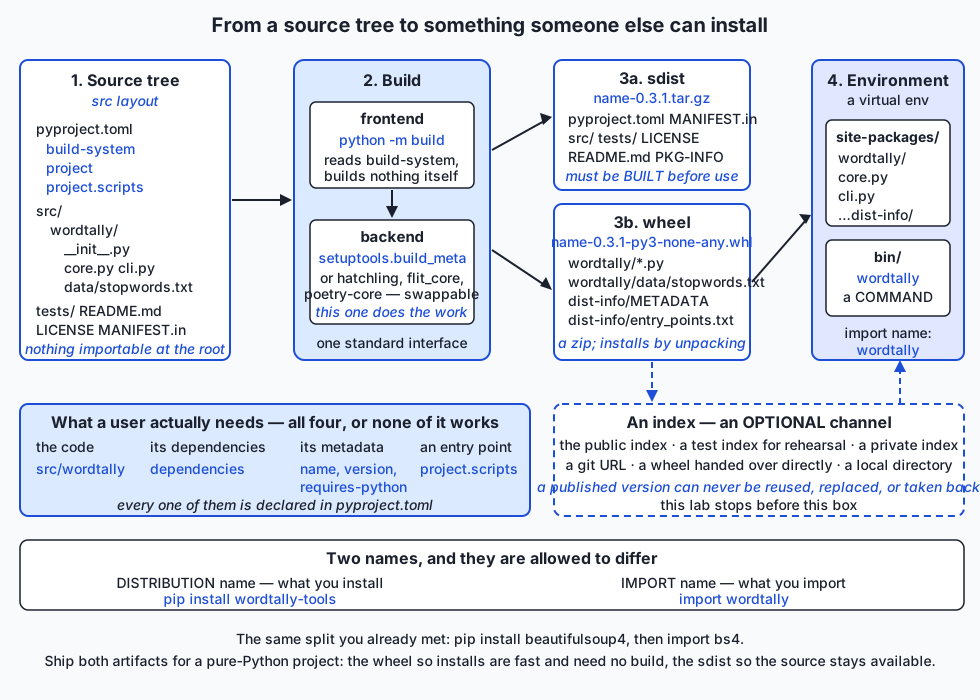
Here is the shape of the thing. You have a directory with your code in it. You add one file, pyproject.toml, that says what the project is called, what version it is, which Python it needs, what other packages it depends on, and — if it has a command-line interface — what the command should be called. Then you run one command, python -m build, and you get two files in a dist/ directory. Those two files are the distribution. You can hand either of them to someone, or put them on a server, and pip install will turn them back into a working, importable, runnable package inside their environment.
The two files are different on purpose. One is a source distribution — an sdist — which is a compressed archive of your project roughly as you have it: the source, the tests, the licence, the instructions for building. The other is a wheel, which is your project already built: no instructions needed, just files ready to be dropped into place. Installing an sdist means building it first. Installing a wheel means unpacking it. For a pure-Python project like yours the two contain nearly the same code and the difference is mostly ceremony — but the ceremony matters enormously once compiled extensions are involved, and it is the reason installing NumPy takes seconds rather than twenty minutes and a C compiler.
The other half of the idea is the environment. Day 43 taught you virtual environments from the consumer side: python3 -m venv .venv, then pip install things into it. Today you are on the producer side of the same transaction. When someone installs your wheel, pip unpacks your package into that environment’s site-packages directory and, if you asked for it, writes a small executable into the environment’s bin directory. That executable is why wordtally becomes a command they can type, and it is one line of configuration away from what you already have.
Historical background
Python packaging has a reputation for being confusing, and the reputation is deserved, but the confusion is legible once you know the order things happened in. Almost every strange corner is a fossil.
distutils arrived in the Python standard library in 2000, largely the work of Greg Ward. It introduced the pattern that dominated for two decades: a file called setup.py at the root of your project, which you ran — python setup.py install — and which called a function named setup() with your project’s details as keyword arguments. Notice the crucial property: the metadata was expressed as executable Python. To find out what a package was called, you had to run its code.
PyPI, the Python Package Index, launched in 2003 following PEP 301 by Richard Jones. It gave the ecosystem a single well-known place to publish to and install from, which is the precondition for everything that followed.
setuptools appeared in 2004, written by Phillip J. Eby, as a third-party extension to distutils. It added dependency declaration, an installer called easy_install, and a distribution format called the egg. Eggs were an important step and are now entirely obsolete; if you meet the word in an old tutorial, it is a wheel’s ancestor. setuptools is still, twenty years later, the most widely used build backend in Python, which tells you something about how durable good-enough infrastructure is.
pip was created in 2008 by Ian Bicking (who had also written virtualenv the year before) as a replacement for easy_install, with the specific virtues of being able to uninstall things and of installing from source in a way you could actually inspect. It became the default installer shipped with Python from 3.4 onward.
The wheel was specified in 2012 by Daniel Holth in PEP 427, alongside PEP 425’s compatibility tags. This is the single most important improvement in the history of Python packaging, and its insight is simple: an install should not require a build. A wheel is a zip archive with a defined layout and a filename that encodes exactly which Pythons and platforms it suits. Installing one is unpacking one. The py3-none-any you will see in this lesson’s artifacts is a compatibility tag meaning “any Python 3, no particular binary interface, any platform” — a pure-Python wheel.
Then came the standardisation of the configuration itself, in two steps. PEP 518 (2016, Brett Cannon, Nathaniel Smith and Donald Stufft) introduced pyproject.toml and the [build-system] table, solving a genuine chicken-and-egg problem: setup.py needed setuptools to run, but nothing said so anywhere a machine could read before running it. PEP 517 (Nathaniel Smith and Thomas Kluyver) defined a standard interface between a build frontend and a build backend, which is what made it possible to use something other than setuptools at all. PEP 621 (Brett Cannon and others, accepted 2020) then standardised the [project] table, so that a package’s name, version, dependencies and entry points are declared as data rather than computed by running code.
That last change is the one this lesson is really about. For twenty years, reading a Python package’s metadata meant executing arbitrary Python. Now it means parsing a TOML file. The practical consequences — for security, for tooling, for how fast an installer can resolve dependencies — are enormous.
Two footnotes. distutils was deprecated by PEP 632 (Steve Dower, 2020) and removed from the standard library in Python 3.12, so a very old tutorial may reference a module that no longer exists. And semantic versioning, which the versioning section below discusses, is not a Python idea at all: Tom Preston-Werner published the specification, whose 2.0.0 release dates from 2013, as a general convention for the whole software industry.
What it is — and what it is not
Before anything else, the vocabulary. This is the part people get wrong, and getting it right makes everything downstream easier.
| Term | What it means | Example |
|---|---|---|
| Module | A single .py file that Python can import | core.py, imported as wordtally.core |
| Package (import sense) | A directory of modules with an __init__.py, importable as a unit | wordtally/ |
| Distribution package | An artifact you can install — the archive, plus its metadata | wordtally_tools-0.3.1-py3-none-any.whl |
| Project | The whole thing: source tree, tests, docs, licence, history | your wordtally-tools directory |
| Distribution name | What you type after pip install; what an index lists | wordtally-tools |
| Import name | What you type after import | wordtally |
The confusing part is that “package” means two entirely different things depending on who is speaking, and the two are not required to line up. One distribution package can install several import packages; one import package can be spread across several distribution packages. The community usually says “distribution” or “distribution package” for the installable artifact and just “package” for the importable directory, and this lesson follows that convention.
The distribution name and the import name are allowed to differ, and in practice they differ constantly. On Day 79 you ran pip install beautifulsoup4 and then wrote import bs4. That is not an oddity; it is the normal state of affairs. pip install pillow gives you import PIL. pip install scikit-learn gives you import sklearn. pip install python-dateutil gives you import dateutil. The reason is that the two names solve different problems: a distribution name has to be unique across the entire index and is often chosen for searchability, while an import name has to be a valid Python identifier and is often chosen for brevity. Today’s lab makes the split concrete on purpose: you install wordtally-tools and you import wordtally, and there is no module called wordtally_tools at all.
Now the two artifact types, which is the other half of the vocabulary.
| sdist | wheel | |
|---|---|---|
| Filename | name-version.tar.gz | name-version-py3-none-any.whl |
| What it is | a gzipped tar of the project | a zip archive with a defined layout |
| Contains | source, tests, licence, pyproject.toml, MANIFEST.in, PKG-INFO | the importable package, package data, and a .dist-info metadata directory |
| To install it, pip must | build it first, running the project’s build backend | unpack it |
| Needs a compiler for a C extension | yes, on the installing machine | no — already compiled |
| Layout preserved | yes: src/wordtally/core.py | no: flattened to wordtally/core.py |
| Runs the publisher’s code on install | yes, during the build | no |
| Good for | keeping source available, letting people build for platforms you did not | fast, predictable, inert installs |
A wheel is a built distribution. That is the entire distinction, and the name of the format is a joke about the Cheese Shop, an old nickname for the package index — a wheel of cheese.
Ship both for a pure-Python project. The wheel makes installs fast and removes the build step entirely. The sdist keeps your source available for people on platforms or Python versions your wheels do not cover, for distribution maintainers packaging your project for an operating system, and for anyone who wants to read what they are installing. Building both is the default of python -m build, and there is no good reason to turn it off.
Some things packaging is not:
It is not a way to hide your source. A wheel is a zip; anyone can open it, and the lab does exactly that. If you ship pure Python, you ship the source.
It is not the same as freezing an application into a standalone executable. That is a different tool category with different tools, and it answers a different question — “how does someone without Python run this?” rather than “how does someone with Python install this?”.
It is not dependency locking. Declaring requests>=2.31 in your package metadata says what your library is compatible with. Pinning requests==2.34.2 in a lock file says what your application will actually install. These are different jobs, and the section on dependency specifiers below is about why confusing them causes real pain.
It is not publishing. You can build, install, and use a package your whole life without ever contacting an index — and this lesson’s lab does precisely that.
Why it was created and what problems it solves
Each piece of the modern arrangement exists to defeat a specific failure. It is worth taking them one at a time, because “packaging is complicated” is much less useful than “packaging solves these six problems”.
Without declared metadata, nothing can be automated. A tool that wants to know your package’s name, version and dependencies has to be able to find them out without running your code. Before PEP 621 it could not, which is why dependency resolution used to be so slow and so fragile: the resolver had to download and execute candidate packages to discover what they needed. A resolver that can read metadata from a static file can consider a thousand candidates in the time the old one considered one.
Without declared dependencies, installation is a treasure hunt. The alternative to dependencies = ["requests>=2.31"] is a paragraph in a README that a human reads, mostly understands, and then satisfies by hand, badly. Declared dependencies mean the installer does it, transitively, every time, the same way.
Without a built distribution format, every install is a build. In the pre-wheel era, pip install numpy meant compiling NumPy on your laptop. This was slow when it worked and baffling when it did not, because a failure surfaced as a C compiler error inside a package you had never heard of. Wheels moved that work to the publisher, once, and the entire scientific Python ecosystem became usable by people who do not own a compiler.
Without a standard build interface, the build tool is a monopoly. PEP 517 means the frontend (build, or pip) and the backend (setuptools, hatchling, flit, poetry-core) talk through a defined interface. You can change backends without changing how anyone builds or installs your project. That is why the Alternatives section below is a real choice rather than a religious argument.
Without entry points, a library cannot become a command. A user who installs your package gets importable code. They do not get anything to type — unless you declare a console script, at which point the installer writes an executable into their environment for you. This is the single highest-value line in the whole file for anyone who has built a CLI, and it is the direct payoff for Day 80.
Without immutable versions, you cannot trust anything you installed yesterday. If a published version could be silently replaced, then a lock file pinning requests==2.34.2 would guarantee nothing. Every reproducible build in the world rests on the rule that a given name-and-version means one specific set of bytes, forever.
How it works
Here is the whole architecture on one page. Read it left to right: source tree, build, artifacts, environment.
pyproject.toml, table by table
One file. Three kinds of table in it, and knowing which is which explains most of the confusion people have when they copy a configuration from somewhere and it does not work.
[build-system]
requires = ["setuptools>=68"]
build-backend = "setuptools.build_meta"
[build-system] answers “who builds this, and what do they need first?”. It is read by the frontend — python -m build, or pip when it installs from source. requires is the list of packages that must exist before the build can begin; build-backend is the import path of the object implementing the standard build interface. By default the frontend creates a fresh, isolated environment, installs exactly what requires names, and runs the backend there. That isolation is a good default: your build cannot accidentally depend on something you happen to have installed.
[project]
name = "wordtally-tools"
version = "0.3.1"
description = "Count and rank the words in a text file, from Python or from the command line."
readme = "README.md"
requires-python = ">=3.10"
license = "MIT"
license-files = ["LICENSE"]
authors = [{ name = "365 Days of AI Mastery" }]
classifiers = [
  "Environment :: Console",
  "Operating System :: OS Independent",
  "Programming Language :: Python :: 3",
]
dependencies = []
[project] is the standardised metadata table, and it means the same thing to every backend. Field by field:
name— the distribution name. Required. It is normalised before comparison, sowordtally-tools,wordtally_toolsandWordtally.Toolsare the same name to an installer; the filenames of built artifacts use the underscore form.version— required, and the subject of its own section below.description— one line. It becomes theSummaryin the metadata and the sentence an index shows under your project’s name in search results. Write it as a sentence, not as a slogan.readme— a path. The file’s contents become the long description, which is the body of your project’s page on an index.README.mdgetsDescription-Content-Type: text/markdownset automatically.requires-python— a version specifier for the interpreter. This one is load-bearing in a way people underestimate: an installer reads it and refuses to install a version of your package that cannot run, and more usefully it will fall back to an older release of your package that does. Writing>=3.10is a promise, and the honest way to keep it is to actually test on 3.10.licenseandlicense-files— the licence expression and the file or files carrying its text. A package with no licence is legally not open source, whatever the README says.authors— a list of tables withnameand optionallyemail. There is alsomaintainersfor the common case where those people differ.classifiers— strings from a fixed, published list: development status, intended audience, supported Python versions, topics. They are how people filter an index. They are not free-form: an invented classifier will be rejected on upload, which is a small mercy.urls— a free-form table of labels to links, rendered as the sidebar of your project’s page. Conventional labels are Homepage, Documentation, Source, Changelog, Issues.dependencies— the packages your code imports at runtime. Note what is written above: an empty list, deliberately.wordtallyimports nothing outside the standard library, and saying so explicitly is better than omitting the key, because an empty list is a claim and a missing key is a shrug.
[project.optional-dependencies]
dev = ["pytest>=8", "build>=1.2"]
Extras. pip install wordtally-tools installs nothing extra; pip install "wordtally-tools[dev]" also installs pytest and build. The classic uses are development tooling, optional backends (a database driver, a plotting library), and heavy dependencies most users do not want. In the built metadata they appear as Provides-Extra: dev and Requires-Dist: pytest>=8; extra == "dev" — conditional, so the plain install genuinely skips them.
[project.scripts]
wordtally = "wordtally.cli:main"
The console script. The value is "import.path:callable" — the module to import, a colon, the function to call. When your wheel is installed, the installer reads this and writes a small executable named wordtally into the environment’s bin/ directory. Its entire body is “import that function, call it, and exit with what it returns”. That last detail is why Day 80’s advice to write main(argv) -> int rather than calling sys.exit() inside your logic pays off exactly here: the function is testable and the launcher does the right thing.
Everything after that is tool-specific:
[tool.setuptools.packages.find]
where = ["src"]

[tool.setuptools.package-data]
wordtally = ["data/*.txt"]
[tool.<name>] tables are the same mechanism Day 77 used for [tool.pytest.ini_options] and [tool.mypy]. They are not standardised and they do not travel between backends. The two above are setuptools’ way of saying “the importable code is under src/” and “these data files belong in the wheel”.
That second one deserves emphasis, because it is the most common packaging bug in existence. A file inside your package directory is not included in the wheel just because it is there. Your data file works perfectly on your machine — where Python is reading your source tree — and vanishes the moment somebody installs the package elsewhere. The lab’s harness checks for wordtally/data/stopwords.txt inside the built wheel for exactly this reason, and the starter project deliberately ships without the declaration so you can watch it happen.
The src layout, and the real argument for it
There are two ways to arrange a project:
flat layout                    src layout
project/                       project/
  pyproject.toml                 pyproject.toml
  wordtally/                     src/
    __init__.py                    wordtally/
    core.py                          __init__.py
  tests/                             core.py
                                 tests/
The argument for the src layout is not aesthetic and it is not about tidiness. It is this:
When Python starts, it puts a directory at the front of sys.path — the script’s directory, or the current working directory for python -c and for an interactive session. In the flat layout, that directory contains an importable wordtally. So import wordtally finds your working copy, and it finds it in preference to anything installed. Your tests then pass against source that has never been packaged, installed, or checked. Every packaging mistake in the previous section — the missing data file, the module you forgot to include, the subpackage the backend never found — is invisible to your test suite, because your test suite is not looking at the installed package.
In the src layout there is no importable wordtally in the project root. There is only src/, which is not itself a package. So import wordtally cannot find a working-directory copy, and resolves to the installed one. Your tests test what your users get.
The lab proves this rather than asserting it. It installs the same wheel into one environment, then runs the same one-line command from a src-layout project and from a flat-layout copy of the identical code:
--- 1. src layout, wheel installed, standing inside the project ---------
$ ../tryout/bin/python -c 'import wordtally; print(wordtally.__file__)'
<repo>/…/workspace/tryout/lib/python3.14/site-packages/wordtally/__init__.py

--- 2. flat layout, same wheel installed, standing inside the project ---
$ ../tryout/bin/python -c 'import wordtally; print(wordtally.__file__)'
<repo>/…/workspace/flat/wordtally/__init__.py
Same command, same installed package, different answer. The second one is the accident; nothing warns you about it, and it is why the harness’s __file__ assertion is the most valuable check in the lab.
The costs of the src layout are real but small: you cannot run your code from the project root without installing it first, and paths in a few tools are one level deeper. The usual answer to the first is pip install -e ., which is the next section.
Editable installs
pip install -e .An editable install puts your project into the environment without copying the code. Historically this worked by writing a .pth file — a file site-packages reads at startup, each line of which adds a directory to sys.path — pointing back at your src/ directory. Modern backends use a slightly more sophisticated version of the same trick, but the effect is unchanged: the package is importable from anywhere, and edits to your source take effect immediately with no reinstall.
Here is the real capture from the lab’s environment, taken while standing in the project directory:
$ ls ../editable/lib/python3.14/site-packages/
__editable__.wordtally_tools-0.3.1.pth
pip
pip-25.2.dist-info
wordtally_tools-0.3.1.dist-info
$ ../editable/bin/python -c 'import wordtally; print(wordtally.__file__)'
<repo>/…/workspace/demo/src/wordtally/__init__.py
Note what is in site-packages: a .pth file and a .dist-info directory, and no copy of your code. The import resolves to your source tree. That is correct and desirable during development — and it is also exactly why an editable install is not a test of your packaging. An editable install can succeed while your wheel is broken, because the editable path never goes through the wheel at all. Develop with -e; verify with a real install into a fresh environment, which is what the lab does.
Versions, honestly
version = "0.3.1" is three numbers separated by dots, and the convention that gives them meaning is semantic versioning: MAJOR.MINOR.PATCH, where you increment MAJOR for a change that breaks existing users, MINOR for new functionality that does not, and PATCH for a bug fix that does not.
That is the promise. Now the honest part: many projects do not keep it. Sometimes deliberately, because they use a different scheme — calendar versioning (2026.7.1), or a single incrementing number. Sometimes because a “bug fix” turned out to be load-bearing behaviour for someone. Sometimes because breaking changes accumulated in a minor release and nobody noticed until the complaints arrived. The 0.x range is a particular grey area: the specification says anything may change before 1.0.0, and in practice 0.x projects vary from “genuinely unstable” to “entirely stable, the author simply never felt like declaring 1.0”.
The practical stance is: follow semantic versioning in what you publish, because it is a real service to your users and it costs you nothing but attention. Do not rely on other projects following it, because you will occasionally be wrong. Read changelogs. Pin your applications.
Single-sourcing the version means writing it in exactly one place. Two copies drift; it is not a question of discipline, it is a question of time. The cleanest arrangement writes the version only in pyproject.toml and reads it back at runtime from the installed metadata:
from importlib.metadata import PackageNotFoundError, version

try:
    __version__ = version("wordtally-tools")
except PackageNotFoundError:      # running from a source tree, never installed
    __version__ = "0.0.0.dev0"
Note the argument: version("wordtally-tools"), the distribution name, inside a module whose import name is wordtally. The two-name split is not academic; it shows up in your own code.
The alternative direction — define __version__ in your package and have the backend read it — is also supported, through dynamic = ["version"] plus a backend-specific setting. Either is fine. Two hard-coded copies is not.
Dependency specifiers, and the distinction people get wrong
A dependency is written as a name plus an optional version specifier:
| Specifier | Means |
|---|---|
requests | any version |
requests>=2.31 | that version or newer |
requests>=2.31,<3 | at least 2.31, and before the next major version |
requests==2.34.2 | exactly that version |
requests~=2.31.0 | ”compatible release”: at least 2.31.0, but stay in 2.31.x |
requests>=2.31; python_version < "3.11" | conditional on an environment marker |
requests[socks]>=2.31 | that package, plus its socks extra |
Now the distinction that matters, and that is frequently got wrong:
A library specifies ranges. An application pins exact versions.
A library is installed alongside other things, into an environment you do not control. If your library pins requests==2.34.2 and another library pins requests==2.33.0, the two cannot coexist, and you have made your users’ problem unsolvable for no benefit. A library should state the widest range it genuinely works with — usually a lower bound from the feature you need, and often an upper bound at the next major version — and then let the application decide.
An application is deployed, not installed alongside anything. It should know exactly what it runs, because “it worked in testing” is only meaningful if the thing in production is the thing that was tested. Applications pin exact versions in a lock file — the requirements.txt with == on every line that every lab in this course ships.
The failure mode of getting it backwards is asymmetric, which is why it is worth remembering. A library with over-tight pins breaks other people’s environments. An application with loose pins breaks itself, quietly, on a Tuesday, when a transitive dependency you have never heard of releases a patch.
Also worth knowing: an upper bound is a real cost, not free safety. Capping requests<3 when requests 3 does not exist yet means that when it does, every project depending on you is blocked until you cut a release — even if your code would have worked fine. There is a genuine argument in the community on both sides of this. The defensible position is to cap when you use something likely to change across a major version, and not to cap reflexively.
Building, and what comes out
python -m buildThat is the whole build. build is a frontend: it reads [build-system], creates an isolated environment, installs what requires names, calls the backend, and writes both artifacts into dist/.
The lab runs python3 -m build --no-isolation, which reuses the setuptools already installed instead of fetching a fresh one. That is a deliberate deviation, for two honest reasons: it makes the lab work offline, and it makes the captured output reproducible. A real release omits the flag.
The result:
$ ls dist/
wordtally_tools-0.3.1-py3-none-any.whl
wordtally_tools-0.3.1.tar.gz
The declared version appears in both filenames. That is not decoration — the filename is part of the artifact’s identity, and it is what an installer matches against a requirement.
Now open the wheel. It is a zip, so unzip works:
$ unzip -l dist/wordtally_tools-0.3.1-py3-none-any.whl
      912  wordtally/__init__.py
     2775  wordtally/cli.py
     2427  wordtally/core.py
      132  wordtally/data/stopwords.txt
     1079  wordtally_tools-0.3.1.dist-info/licenses/LICENSE
     1656  wordtally_tools-0.3.1.dist-info/METADATA
       91  wordtally_tools-0.3.1.dist-info/WHEEL
       49  wordtally_tools-0.3.1.dist-info/entry_points.txt
       10  wordtally_tools-0.3.1.dist-info/top_level.txt
      846  wordtally_tools-0.3.1.dist-info/RECORD
Ten entries, and every one of them earns its place. The four wordtally/ files are what lands in site-packages — note that the src/ prefix is gone, because a wheel is unpacked directly into place. The .dist-info directory is the metadata: METADATA is your [project] table rendered into the standard format an index displays, WHEEL describes the archive itself, entry_points.txt is the console-script declaration, RECORD lists every installed file with a hash so that uninstalling is exact rather than approximate.
And the sdist, listed with tar:
wordtally_tools-0.3.1/pyproject.toml
wordtally_tools-0.3.1/MANIFEST.in
wordtally_tools-0.3.1/README.md
wordtally_tools-0.3.1/LICENSE
wordtally_tools-0.3.1/PKG-INFO
wordtally_tools-0.3.1/src/wordtally/core.py
wordtally_tools-0.3.1/src/wordtally/data/stopwords.txt
wordtally_tools-0.3.1/tests/test_core.py
wordtally_tools-0.3.1/tests/test_cli.py
Different contents, on purpose. The sdist has pyproject.toml (build instructions, which the wheel no longer needs), MANIFEST.in, the tests, and the src/ prefix intact. The wheel has none of those and has a .dist-info the sdist does not.
MANIFEST.in and data files
MANIFEST.in controls the sdist only. It is a small line-based language: include, exclude, recursive-include, graft (a whole directory tree), global-exclude.
include MANIFEST.in
graft tests
recursive-include src/wordtally/data *.txt
global-exclude __pycache__ *.py[cod]
The trap is thinking MANIFEST.in gets your data into the wheel. It does not, at least not reliably, because the wheel is built from a different mechanism. Data your installed code reads at runtime must be declared as package data — for setuptools, [tool.setuptools.package-data]. Say it in both places and you are covered either way.
The other half of shipping data is reading it correctly. Do not build a path from __file__:
# fragile
path = os.path.join(os.path.dirname(__file__), "data", "stopwords.txt")
Use importlib.resources, which works whether the package was installed from a wheel, installed editable, or is sitting in a source tree:
from importlib import resources

data = resources.files("wordtally").joinpath("data/stopwords.txt")
text = data.read_text(encoding="utf-8")
Publishing — described, not performed
Everything so far has been local. Publishing is the step where your artifact leaves your machine, and it is the one step this lesson deliberately stops short of. The commands are shown here so you know them; the lab does not run them, and neither should you until you have a project you actually mean to release.
The tool is twine, and the sequence is:
python -m build
python -m twine check dist/*
python -m twine upload --repository testpypi dist/*
python -m twine upload dist/*
twine check validates that your metadata will render properly — it catches a malformed long description before an index does. The third line targets TestPyPI, a completely separate service with separate accounts that exists precisely so a first release can be a rehearsal. Use it. Install from it afterwards and confirm the thing actually works before touching the real index.
Authentication uses an API token, not a password. Scope the token to a single project rather than your whole account. Put it in an environment variable (TWINE_USERNAME=__token__, TWINE_PASSWORD=<the token>) or in your operating system’s keyring — never in the repository. A token committed to git is a leaked token even after you delete the line, because the history still has it. Better still, where your build system supports it, use a trusted-publishing arrangement in which the build proves its identity to the index directly and no long-lived token exists to leak at all.
And then the rule that has no exceptions:
A published version can never be reused. You may be able to hide a release (yanking it, so resolvers skip it unless something pins it exactly) and you may be able to delete it, but you can never upload different bytes under the same version. Anyone who installed it keeps what they got; any lock file pinning it keeps pointing at it.
So: a bad release is fixed by publishing a new version. Never by quietly replacing the old one. This is not bureaucracy — it is the property that makes every lock file, every reproducible build and every deployment in the Python world mean anything at all. If versions were mutable, requests==2.34.2 would be a wish rather than a guarantee.
Finally, the honest note: not everything should be published. A public index is one distribution channel among several, and it is the right one only for code you intend strangers to use and that you intend to keep maintaining. The alternatives are all legitimate:
- a private index, self-hosted or provided by your organisation, for internal packages;
- a git URL —
pip install git+https://…@v1.2.3— which needs no index at all and pins to a tag; - a local directory of wheels with
pip install --find-links ./wheels --no-index; - a wheel handed over directly, by email, by shared drive, by whatever you already use.
Publishing something internal to a public index is not generosity; it is a support obligation you did not intend to sign, plus an information disclosure you may not have thought about.
An everyday analogy
Think of your project as a workshop, and packaging as shipping what you make in it.
Right now your code is a tool sitting on your bench. It works beautifully — for you, in this room, with the jig you built to hold it and the offcut you use to prop it up. Someone who wants one cannot simply be shown a photograph. They need the object, in a box, with everything it needs.
Building is boxing it up, and you can box it two ways. The flat-pack kit is the sdist: every part, the instructions, the licence card, and “some assembly required” on the outside. It is honest and complete, and it means the recipient needs the right tools and a free afternoon. The assembled item is the wheel: already put together, wrapped, ready to lift out and use. For a simple wooden stool the difference is minor. For something with a motor in it — a compiled extension — it is the difference between “unpack and go” and “you will need a lathe”.
The label on the box is the metadata. What it is called, which model, what revision, what it is for, what it needs to work with, who made it. Nobody in a warehouse opens boxes to find out what is in them; they read the label. This is exactly why metadata became static data rather than a program you have to run: the whole point of a label is that reading it is cheap.
The catalogue and the courier are the index. Optional, and enormously useful when you want strangers to be able to find and receive your work. You can also hand the box to a colleague directly, or keep a private catalogue for your organisation, and both are perfectly ordinary ways to ship.
The recipient’s house is their virtual environment. Your box gets unpacked into their storage — site-packages — and, if the label said so, the tool also gets placed in the drawer they already reach into without thinking. That drawer is bin/ on their PATH, and the console script is what puts your tool in it. Without that declaration, your tool arrives and sits in the cupboard where they have to know its exact shelf.
The model and revision number is the version. The rule the whole industry runs on is that a revision number, once shipped, means one exact thing forever. You do not get to send out a different item under the same model number and revision. If you shipped a bad batch you ship a new revision and tell people — which is why a bad release is fixed by publishing a new version, never by quietly swapping the contents.
And the src layout is the workshop’s one piece of discipline: you never test the tool that is still clamped to the bench. You take a boxed one off the shelf, unpack it like a customer would, and test that. Otherwise the day comes when a screw you have been holding in place with your thumb for six months goes out in every box.
Examples in practice
Here is what today looks like end to end, on real files, with real output.
The whole build, start to finish
Standing in the project directory, with pyproject.toml complete:
python3 -m build --no-isolationThe frontend reads [build-system], calls setuptools, and writes both artifacts. The last line of a successful run:
Successfully built wordtally_tools-0.3.1.tar.gz and wordtally_tools-0.3.1-py3-none-any.whlReading the metadata an index would show
unzip -p dist/wordtally_tools-0.3.1-py3-none-any.whl \
  wordtally_tools-0.3.1.dist-info/METADATA
Metadata-Version: 2.4
Name: wordtally-tools
Version: 0.3.1
Summary: Count and rank the words in a text file, from Python or from the command line.
Author: 365 Days of AI Mastery
License-Expression: MIT
Project-URL: Documentation, https://packaging.python.org/en/latest/
Keywords: text,words,counting,cli
Classifier: Development Status :: 4 - Beta
Classifier: Environment :: Console
Classifier: Intended Audience :: Developers
Classifier: Operating System :: OS Independent
Classifier: Programming Language :: Python :: 3
Classifier: Topic :: Text Processing :: Linguistic
Requires-Python: >=3.10
Description-Content-Type: text/markdown
License-File: LICENSE
Provides-Extra: dev
Requires-Dist: pytest>=8; extra == "dev"
Requires-Dist: build>=1.2; extra == "dev"Every line came from [project]. Read it as a checklist of what you did and did not declare — the starter project’s version of this file is five lines long, and the difference is visible at a glance.
The one line that creates a command
unzip -p dist/wordtally_tools-0.3.1-py3-none-any.whl \
  wordtally_tools-0.3.1.dist-info/entry_points.txt
[console_scripts]
wordtally = wordtally.cli:mainInstalling into a fresh environment and running it
python3 -m venv workspace/tryout
workspace/tryout/bin/pip install --no-index \
  examples/wordtally-tools/dist/wordtally_tools-0.3.1-py3-none-any.whl
workspace/tryout/bin/wordtally --version
workspace/tryout/bin/wordtally count sample.txt
workspace/tryout/bin/wordtally top sample.txt -n 2
wordtally 0.3.1
12
3 mat
1 cat--no-index forbids pip from contacting any package index. Nothing was downloaded; the entire install came from one local file. And wordtally is now a command — nothing put it there but [project.scripts].
The two names, in one environment
$ pip list --format=freeze | grep -i wordtally
wordtally-tools==0.3.1
$ python -c "import wordtally; print('ok')"
ok
$ python -c "import wordtally_tools"
ModuleNotFoundError: No module named 'wordtally_tools'The distribution is called one thing, the module another, and neither is a mistake.
What a missing field actually does
Delete the name line from [project] and build:
ValueError: invalid pyproject.toml config: `project`.
configuration error: `project` must contain ['name'] properties
ERROR Backend subprocess exited when trying to invoke get_requires_for_build_sdistExit code 1, and no dist/ directory at all. This is the behaviour you want: an artifact without a name or a version is an artifact nobody can install, depend on, or supersede, so the build refuses rather than guessing.
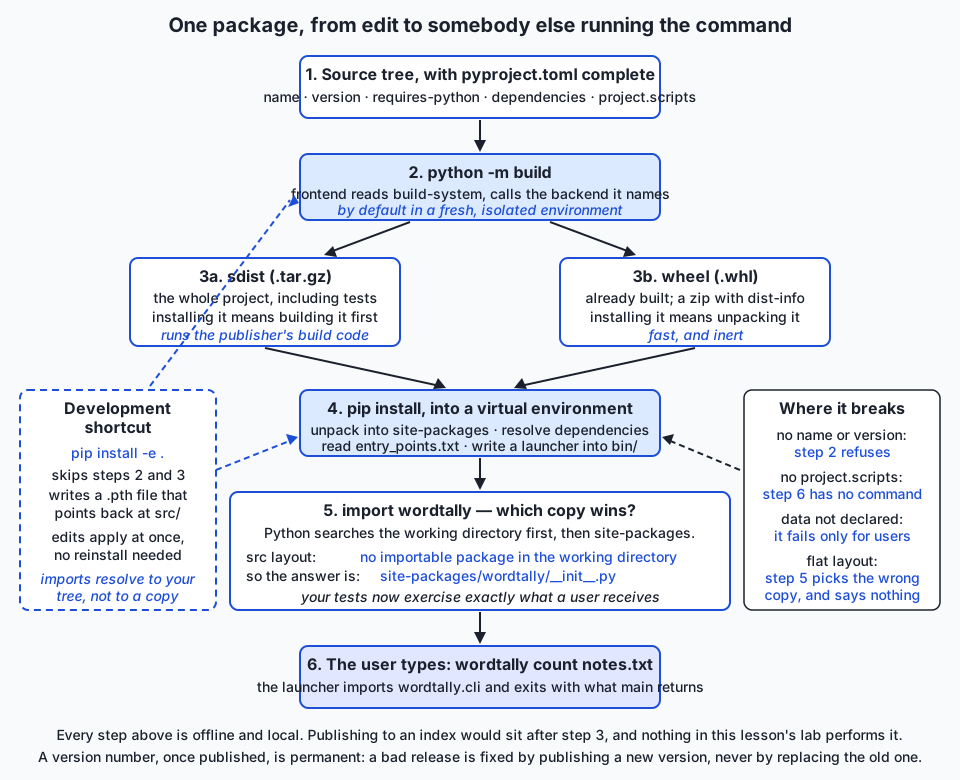
The flow, end to end
Implications: security, privacy, performance, scalability, and cost
Security: installing a package runs someone else’s code. This is the single most important fact in this section, and it is easy to forget because installing feels passive. A wheel is largely inert — installing one unpacks files and writes a launcher. An sdist is not: building it executes the project’s build backend, and in an older project it can execute a setup.py that is arbitrary Python. So pip install something on a source distribution runs code written by a stranger, with your user’s permissions, before you have imported anything.
The mitigations are concrete. Prefer wheels; pip install --only-binary :all: <name> refuses to build from source at all. Install into a virtual environment always, so that undoing the install is deleting a directory. Read the name you typed — typosquatting, registering a name one keystroke from a popular package, is a recurring real attack, and so is dependency confusion, where a public package is published under the name of an organisation’s internal one so that a misconfigured installer prefers it. If you have private packages, configure the index explicitly rather than letting the resolver choose.
On the publishing side: scope API tokens to one project, keep them in an environment variable or a keyring, and never in the repository. A leaked token lets someone publish under your name, which is the worst kind of supply-chain compromise because it arrives through the front door.
Privacy: packaging is publication. Everything in your sdist becomes public the instant you upload — and an sdist is built from your working directory, which is exactly where a stray .env, an API key in a test fixture, or a customer’s data file might be sitting. This is a genuine and common accident. Look inside your sdist before you release one: tar -tzf dist/*.tar.gz takes two seconds. Note also that your name and email in authors are published permanently and are not retractable.
Performance: wheels are the whole story. A wheel install is an unzip plus some bookkeeping. An sdist install is a build, and for a compiled project that can be minutes and can fail on a machine that lacks a compiler. This is why publishing wheels is a courtesy that costs you nothing for a pure-Python project. There is a second performance dimension in the metadata itself: static metadata is what allows a resolver to consider candidates without downloading and executing them, which is the main reason modern installers are fast.
Scalability: the index is a public good with real limits. An index is serving files to the entire world for free. Do not use one as a build cache, do not run install loops against one in continuous integration without caching, and prefer a lock file so that your build fetches exactly what it needs once. Also think about the number of artifacts you produce: a pure-Python project ships two files per release, while a compiled project can ship dozens — one wheel per Python version per platform — which is a build-matrix problem you should know exists before you meet it.
Cost: essentially zero, until it is not. Building is free. Publishing to the public index is free, including for commercial projects. The costs that do arise are elsewhere: a private index is either something you host or something you pay for, and the maintenance obligation of a published package is real and unpriced. Once people depend on your package, a breaking change costs them time, and that is a cost you have chosen to impose. The cheapest way to avoid it is to be slower and more deliberate about your first 1.0.0 than feels natural.
Alternatives: free, open source, and commercial
Everything in this section is free and open source. There is no paid tier of any of it. The paid case in this area is elsewhere — private index hosting, and commercial support contracts around the scientific stack — and neither is needed to build, install, or publish a Python package.
A note on honesty first. Of the tools below, only setuptools (83.0.0) and the build frontend (1.5.0) are installed on the machine this lesson was written on, along with pip 25.2 and pytest 9.1.1 on Python 3.14.0. hatch, hatchling, flit, poetry, uv, pipx and conda are not installed here. They are therefore described from their documented behaviour and their published interfaces, and no output, timing or benchmark figure is quoted for any of them. Where this lesson shows a command for one of them, treat it as the shape of the command, not as a transcript.
setuptools with pyproject.toml
What it is. The oldest and most widely used build backend, now driven by declarative configuration rather than by an executable setup.py.
When to choose it. When you want the option with the largest amount of documentation, the most Stack Overflow answers, and the widest feature surface — in particular, if you have or may have compiled extensions, or need any of the many corner-case behaviours that twenty years of use have accumulated. Also the safest default when other people will maintain the project after you.
How to use it. Two lines in [build-system], plus [tool.setuptools.*] tables for anything setuptools-specific:
[build-system]
requires = ["setuptools>=68"]
build-backend = "setuptools.build_meta"
[tool.setuptools.packages.find]
where = ["src"]Worked example. This lesson’s entire lab. python3 -m build --no-isolation produced wordtally_tools-0.3.1-py3-none-any.whl with a ten-entry listing, and installing it created a wordtally command that exited 0.
Free or paid. Free and open source, MIT licensed.
hatchling (and hatch)
What it is. hatchling is a modern build backend; hatch is the larger project-management tool built around it, handling environments, scripts, versioning and publishing. You can use the backend without the tool, and many projects do.
When to choose it. When you want a backend with sensible modern defaults and less configuration than setuptools typically needs — it infers a great deal, including src layouts — or when you want one tool covering environments and release tasks as well as building.
How to use it. As a backend, it is a two-line change:
[build-system]
requires = ["hatchling"]
build-backend = "hatchling.build"The [project] table is unchanged, because that table is standardised — which is the whole point of PEP 517 and PEP 621. Hatch-specific settings go under [tool.hatch.*].
Worked example. Swapping the two [build-system] lines above into this lab’s pyproject.toml and deleting the [tool.setuptools.*] tables would be, in principle, the entire migration for a project this simple. That claim is not verified here, because hatchling is not installed on this machine — trying it is extension exercise 5 in the lab, and comparing the two wheels file by file is the interesting part.
Free or paid. Free and open source.
flit
What it is. A deliberately minimal backend (flit_core) plus a small command-line tool, aimed at simple pure-Python packages.
When to choose it. When your project is one package of pure Python with no build steps, and you value a configuration you can read in ten seconds. Its scope is narrow by design; that is the feature.
How to use it.
[build-system]
requires = ["flit_core>=3.2"]
build-backend = "flit_core.buildapi"Flit conventionally takes the version and description from your module’s __version__ and docstring rather than repeating them in the TOML — a different answer to the single-sourcing question.
Worked example. flit build produces an sdist and a wheel; flit publish uploads. Not run here.
Free or paid. Free and open source.
poetry
What it is. A project manager covering dependency resolution, lock files, virtual environments, building and publishing, with poetry-core as its build backend. It was for several years the most visible alternative to the setuptools world.
When to choose it. When you want a lock file and environment management integrated with packaging in one tool, and when your team is happy adopting a workflow rather than a component. It is particularly popular for applications, where its lock file is doing real work.
How to use it. poetry new, poetry add requests, poetry install, poetry build, poetry publish. Its build backend is declared the same standard way:
[build-system]
requires = ["poetry-core>=1.0"]
build-backend = "poetry.core.masonry.api"Worked example. poetry add requests writes the dependency into pyproject.toml, resolves the full graph, and records the exact resolved versions in poetry.lock. Not run here.
A caveat worth knowing. Poetry historically used its own [tool.poetry] metadata table rather than the standardised [project] table, so older Poetry projects look quite different from everything else in this lesson. Newer versions support [project]. If you read a Poetry project and the metadata is in an unfamiliar place, that is why.
Free or paid. Free and open source.
uv
What it is. A newer, very fast package and project manager written in Rust, from Astral — the same people who make Ruff, which you met on Day 76. It aims to cover installing, resolving, locking, environments, running tools and building, in one binary.
When to choose it. When install and resolve speed matters — large dependency graphs, continuous-integration pipelines that install repeatedly, machine-learning environments that are enormous. Its interface is deliberately familiar: uv pip install mirrors pip’s.
How to use it. uv venv creates an environment, uv pip install -r requirements.txt installs into it, uv add and uv lock manage a project’s dependencies, uv build builds artifacts.
Worked example. uv pip install -r requirements/requirements.txt in place of pip install -r … is the smallest useful trial. Not run here — uv is not installed on this machine, and no speed figure is quoted for it in this lesson, because a benchmark you did not run is a rumour.
Free or paid. Free and open source; the company behind it also offers commercial services, which is not required to use the tool.
pipx — for installing applications
What it is. A tool for installing Python applications rather than libraries. It creates one isolated environment per application and exposes only the commands on your PATH.
When to choose it. Whenever you want a Python-based command-line tool available globally and you do not want its dependencies mixed with anything else. This is the right answer to “how do I install a CLI tool” almost every time, and it is much better than the two common wrong answers: installing into your system Python (which can break your operating system’s own tooling) and installing into whichever virtual environment you happened to be standing in.
How to use it. pipx install <name>, pipx list, pipx upgrade <name>, pipx uninstall <name>. pipx run <name> runs a tool once in a temporary environment without installing it at all.
Worked example. A package like today’s, with a [project.scripts] entry, is exactly what pipx is for: pipx install wordtally-tools would give you a wordtally command globally with its own private environment behind it. Not run here.
Free or paid. Free and open source.
conda — for the scientific stack
What it is. A package and environment manager originally from Continuum Analytics (now Anaconda), and a parallel ecosystem to pip and the Python index. Crucially, conda packages are not restricted to Python: it can install compilers, C and Fortran libraries, CUDA toolkits and R.
When to choose it. When your problem is not really a Python problem — when you need specific non-Python libraries, particular numerical or GPU stacks, or a reproducible cross-language environment. It remains common in scientific computing and in some machine-learning work for exactly this reason.
How to use it. conda create -n myenv python=3.11, conda activate myenv, conda install numpy. Environment definitions live in an environment.yml. The community-maintained conda-forge channel is where most packages people actually use come from.
Worked example. Installing a package that needs a specific system-level numerical library is the case where conda does something pip cannot: it installs the library too, as a managed dependency.
Free or paid. The conda tool is free and open source, and conda-forge is a free community channel. Anaconda, the company, sells commercial products and support, and the terms attached to their distribution and default channels have changed over time for large organisations — so if you are adopting conda at work, read the current terms for the channel you actually use rather than assuming. The tool itself and conda-forge are not the paid part.
Choosing, briefly
| If you… | Use |
|---|---|
| want the safest, best-documented default | setuptools |
| want modern defaults and less configuration | hatchling |
| have one small pure-Python package | flit |
| want packaging and locking in one workflow | poetry |
| care most about install and resolve speed | uv |
| are installing an application, not a library | pipx |
| need non-Python libraries in your environment | conda |
The reassuring part: because [build-system] and [project] are standards, changing backend is a two-line edit plus whatever tool-specific tables you were using. This is not a decision that locks you in.
Comparison with related concepts
Packaging versus virtual environments (Day 43). A virtual environment is a place to install things. A package is a thing to install. They are complements, not alternatives, and the relationship is worth stating clearly because beginners often conflate them: a virtual environment does not make your code installable, and packaging your code does not isolate anything. You need both.
Packaging versus a requirements.txt. A requirements.txt describes an environment to reproduce — usually with exact pins, usually for an application, usually generated. [project] dependencies describes what your library needs in order to work, in ranges, by hand. It is entirely normal for one project to have both: the metadata for what the library is compatible with, the pinned file for what the test run and the deployment actually use.
Packaging versus containers. A container ships an entire filesystem: your code, its dependencies, the interpreter, the system libraries, sometimes the operating system’s user-space. A wheel ships your code and a declaration of what else is needed. They operate at different layers and compose well — a very common arrangement is a container whose build step installs a wheel from a private index. If someone tells you containers make packaging unnecessary, ask them what the container’s build step runs.
Packaging versus freezing. Freezing bundles your program and a Python interpreter into a standalone executable for people who do not have Python at all. It answers a different question and produces a much larger artifact. Packaging targets people who already have Python; freezing targets people who do not.
Wheel versus egg. The egg was setuptools’ built-distribution format from 2004. Wheels replaced it and standardised the ideas. If a tutorial mentions eggs, it predates 2013 and its advice about everything else should be treated with the same suspicion. You will still occasionally see an *.egg-info directory appear in your source tree during a setuptools build; that is a build artifact and should not be committed.
Console script versus python -m. Any package can be run with python -m yourpackage if it has a __main__.py. A console script gives you a bare command instead. Both are useful; the module form works without an entry point and is handy for tools that also want to be importable, and the console script is what a user expects a program to look like. Many projects offer both.
A build frontend versus a build backend. The frontend (build, or pip) knows how to ask. The backend (setuptools, hatchling, flit_core, poetry-core) knows how to do. Keeping them separate is what makes the ecosystem pluggable — and it is why pip install . and python -m build produce the same artifact even though they are different programs.
When to use it — and when not to
Package your code when:
- more than one person will run it, especially if that person is future you on a different machine;
- it has a command-line interface and typing a path is beneath its dignity;
- another project of yours needs to import it — this is the moment
sys.pathmanipulation stops being a shortcut and starts being a liability; - you need reproducibility, which in practice means every machine-learning experiment you intend to trust;
- you want your tests to exercise the installed artifact rather than your working directory.
Do not package when:
- it is a single throwaway script that will never leave the machine. A file in a directory is a perfectly good delivery mechanism, and adding a
pyproject.tomlto a twenty-line script is ceremony; - the project is one Jupyter notebook. Notebooks have their own reproducibility problems, and packaging solves none of them;
- you are still exploring and the module boundaries change hourly. Package when the shape has settled, not before.
Do not publish to a public index when:
- the code is internal. Use a private index, a git URL, or a directly handed-over wheel;
- the name is generic, in which case you are claiming a name other people would use better;
- you do not intend to maintain it. Publishing is an implicit offer of support, and an abandoned package with a good name is a small harm to everyone who finds it;
- you have not looked inside the sdist. Do that first, always.
Build locally and install locally in far more cases than people assume. pip install ./dist/yourthing.whl and pip install git+https://…@v1.2.3 are complete, professional distribution mechanisms. The index is convenience, not correctness.
And the AI connection, which is where all of this is going. Reproducibility is the whole game in machine learning, and it is a packaging problem long before it is a modelling problem. A model is a function of code, data, hyperparameters and library versions. Change the version of a numerical library and your results move; nobody can tell you by how much unless they can rebuild both. In Course 08 you will run experiments where the difference between a result and an anecdote is whether the environment was declared — which library versions, which Python, which random seed, which commit. That is the same metadata discipline you practised today, applied to a different artifact. A model that cannot be rebuilt because nobody recorded what produced it is not a result. The habit of writing down exactly what a thing is, versioning it, and never overwriting a published version is what turns “it worked when I ran it” into something you can stand behind six months later.
Knowledge check
- A colleague says “just put the version in
__init__.pyand also inpyproject.tomlso both are right”. What is wrong with that, and what would you do instead? pip install beautifulsoup4gives youimport bs4. Which of those is the distribution name and which is the import name, and why are they allowed to differ?- You open a wheel and there is no
pyproject.tomlinside it. Is that a bug? Explain what the wheel does have instead and why. - Your package reads a
.txtfile that lives next to your module. It works perfectly when you run it from your project, and raisesFileNotFoundErrorfor the first person who installs it. What did you forget, and in which file do you fix it? - Explain the difference between what a library should write in
dependenciesand what an application should write in itsrequirements.txt, and describe the failure mode of getting each one backwards. - In a flat layout, with your package installed,
import yourpackagefrom the project root finds the working-directory copy. Why, and what does thesrclayout change about it? - What exactly does
pip install -e .put intosite-packages, and why is a passing test suite under an editable install not evidence that your wheel is correct? - You published version
1.2.0and immediately noticed a serious bug. What are your options, and which one is not available to you?
Hands-on exercise
Build a real package, look inside both artifacts, install it into a throwaway environment, and prove that the installed copy is the one Python imports.
The full lab is in labs/sections/programming-with-python/day-083-packaging-and-distributing-python-code/. Nothing is uploaded anywhere: every install passes --no-index, and the harness checks that claim mechanically.
Work through it in this order.
1. Set up and look at the finished project. Install the requirements as the lab README describes, then read examples/wordtally-tools/pyproject.toml all the way through. Every table is commented. Note which tables are standardised ([project]) and which belong to one tool ([tool.setuptools.*]).
2. Build it.
cd examples/wordtally-tools
python3 -m build --no-isolation
ls dist/Two files, both carrying the declared version 0.3.1.
3. Open both artifacts and compare them.
tar -tzf dist/wordtally_tools-0.3.1.tar.gz
unzip -l dist/wordtally_tools-0.3.1-py3-none-any.whlFind three files that are in the sdist and not in the wheel, and be able to say why for each.
4. Read the metadata and the entry point.
unzip -p dist/wordtally_tools-0.3.1-py3-none-any.whl \
wordtally_tools-0.3.1.dist-info/METADATA
unzip -p dist/wordtally_tools-0.3.1-py3-none-any.whl \
wordtally_tools-0.3.1.dist-info/entry_points.txt5. Install into a fresh environment and run the command.
cd ../..
mkdir -p workspace
python3 -m venv workspace/tryout
workspace/tryout/bin/pip install --no-index \
examples/wordtally-tools/dist/wordtally_tools-0.3.1-py3-none-any.whl
workspace/tryout/bin/wordtally --version6. Prove the src layout. From inside the project directory:
cd examples/wordtally-tools
../../workspace/tryout/bin/python -c "import wordtally; print(wordtally.__file__)"7. Then do the ten numbered exercises in starter/wordtally-tools/pyproject.toml, which walk the same path from a two-field metadata block to a complete one — including breaking the metadata on purpose and watching the build refuse.
Expected output
Building:
Successfully built wordtally_tools-0.3.1.tar.gz and wordtally_tools-0.3.1-py3-none-any.whlThe wheel, opened:
912 wordtally/__init__.py
2775 wordtally/cli.py
2427 wordtally/core.py
132 wordtally/data/stopwords.txt
1079 wordtally_tools-0.3.1.dist-info/licenses/LICENSE
1656 wordtally_tools-0.3.1.dist-info/METADATA
91 wordtally_tools-0.3.1.dist-info/WHEEL
49 wordtally_tools-0.3.1.dist-info/entry_points.txt
10 wordtally_tools-0.3.1.dist-info/top_level.txt
846 wordtally_tools-0.3.1.dist-info/RECORDThe installed command, and the import that proves the layout:
wordtally 0.3.1
12
     3  mat
     1  cat
<repo>/…/workspace/tryout/lib/python3.14/site-packages/wordtally/__init__.pyAnd the harness:
87 checks, 0 failure(s).Validate your work
dist/holds exactly two files and both names contain0.3.1.unzip -ton the wheel reports no errors.- The wheel listing contains
wordtally/data/stopwords.txtand does not containpyproject.tomlortests/test_core.py; the sdist listing contains all three. workspace/tryout/bin/wordtally --versionprintswordtally 0.3.1and exits 0.- Run from inside the project,
wordtally.__file__is a path insideworkspace/tryout/lib/, not inside the project. - Removing the
nameline makes the build exit non-zero, print a message naming the missing field, and leave nodist/behind. bash tests/run_tests.shprints87 checks, 0 failure(s).and exits 0.
Troubleshooting
No module named build. The requirements are not installed for the interpreter you invoked. python3 on your PATH and .venv/bin/python are different interpreters. Use .venv/bin/python -m build, or set PYTHON=.venv/bin/python for the harness.
Backend 'setuptools.build_meta' is not available. You passed --no-isolation and setuptools is not installed in that environment. Install the requirements, or drop the flag and let the frontend build its own isolated environment — which needs a network.
error: Multiple top-level packages discovered in a flat-layout. setuptools found more than one importable directory at the project root and refuses to guess. Move the code under src/, or declare [tool.setuptools.packages.find] where = ["src"].
The wheel built but there is no command after installing. [project.scripts] is missing or the value is malformed. It is "module.path:function" — a colon before the function name, not a dot. Check entry_points.txt inside the wheel; if the file is absent, the declaration never reached the build.
FileNotFoundError about stopwords.txt after installing. The data file was not declared as package data. Add [tool.setuptools.package-data], rebuild, and confirm with unzip -l dist/*.whl | grep stopwords.
import wordtally gives a path inside the project. You are in a flat layout, or there is a stray wordtally/ directory in your working directory. This is the failure the src layout prevents, and section 6 of the harness reproduces it deliberately.
Everything else is in the lab’s troubleshooting.md.
Common mistakes
- Two copies of the version number. They drift. Write it once in
pyproject.tomland read it back withimportlib.metadata. - Assuming a data file ships because it is in the package directory. It does not. Declare it, and then check the built wheel rather than trusting it.
- Testing under an editable install and calling that verified. An editable install imports your source tree; it never goes through the wheel. Install a real wheel into a fresh environment before you believe anything.
- Confusing the distribution name with the import name — particularly in
importlib.metadata.version(), which wants the distribution name. - Pinning exact versions in a library’s
dependencies. That is an application’s job. A library that pins makes other people’s environments unsolvable. - Building without deleting
dist/first, then installingdist/*.whland being surprised which version arrives. - Never looking inside the sdist. It is built from your working directory, and it is the classic route by which a stray secret becomes public.
- Treating a failing build as an obstacle. A build that refuses because metadata is missing is doing its job. The alternative is an artifact nobody can install.
Practice assignment
Package the command-line tool you built on Day 80 — or, if you would rather start clean, any small module of yours with at least two functions worth calling.
Requirements:
- Convert it to a src layout. Move the importable package under
src/, and choose a distribution name that deliberately differs from the import name. Write one sentence in your README explaining the choice. - Write a complete
pyproject.toml. Every field covered in this lesson:name,version,description,readme,requires-python,licenseandlicense-files,authors,classifiers,urls,dependencies, and at least one entry under[project.optional-dependencies]. - Add a console script with
[project.scripts], pointing at amain(argv) -> int. - Single-source the version with
importlib.metadata, and expose--versionon the command line. - Ship one data file — a default configuration, a word list, a template — read with
importlib.resourcesand declared as package data. Prove it is in the wheel. - Build both artifacts, then write a short note listing three files that are in your sdist and not in your wheel, and three in the wheel and not in the sdist, with a one-line reason for each.
- Install the wheel into a fresh virtual environment with
--no-index, run your command, and captureyourpackage.__file__from inside the project directory. Paste the path into your note and explain why it is where it is. - Break it on purpose, twice. Once by removing a required metadata field, once by deleting the package-data declaration. Record what fails, when it fails, and — for the second — note that it fails only after installation, which is why the fresh environment matters.
Do not upload anything.
Success looks like: a colleague can be handed one .whl file, run pip install on it in a fresh environment, and type your command.
Extension challenge
Pick two of these. Each is a real thing practitioners do, and each teaches something the basic path does not.
1. Swap the backend. Rebuild your project with hatchling instead of setuptools: replace the two [build-system] lines, remove the [tool.setuptools.*] tables, add whatever [tool.hatch.*] settings are needed. Then compare the two wheels entry by entry. How similar are they? Anything that differs is a place where a backend’s opinion leaks into the artifact — write down what you find.
2. Publish to nowhere, properly. Build a local index: a directory of wheels, and pip install --find-links ./wheels --no-index yourpackage from a fresh environment. Then do it a second way, with pip install git+…@v0.1.0 against a tagged commit of a local repository. You now have two complete distribution channels that involve no public index at all. Write a paragraph on when each beats publishing.
3. Make the package a proper dependency of something else. Create a second, separate project that declares your first one in its dependencies, and install it from a local directory of wheels. Then change the first package’s version, rebuild, and watch what the specifier you wrote does — try ==, >=, and ~= and record the difference. This is the fastest way to make version specifiers stop being abstract.
4. Add a second entry point. Give your package two console scripts, and then read about the more general entry-point mechanism — the one plugin systems use, where a package advertises objects under a named group that another package discovers at runtime. Write a two-paragraph explanation of how a plugin system built on this differs from a plugin system built on imports.
5. Test the matrix claim. Your requires-python says something like >=3.10. Verify it: create an environment on the oldest Python you claim to support, install your wheel, and run your test suite there. If you cannot, weaken the claim. An unverified compatibility promise is a promise that quietly stops being true.
6. Audit an sdist you did not write. Download the sdist of a small package you use, unpack it, and read what is inside: its pyproject.toml, its build backend, whether it ships tests, what its PKG-INFO says. Then compare it with its wheel. Twenty minutes of this teaches more about real-world packaging than any amount of reading, and it is also the habit that makes the security section of this lesson concrete rather than theoretical.
Quiz
Q1. You run `pip install beautifulsoup4` and then write `import bs4`. What is going on?
- `beautifulsoup4` is the distribution name and `bs4` is the import name; the two are separate identifiers and are allowed to differ
- The package was installed incorrectly and the import should have been `beautifulsoup4`
- `bs4` is an alias created by pip during installation
- The project renamed itself and the old import name is kept for compatibility
Show answer
Answer: A. `beautifulsoup4` is the distribution name and `bs4` is the import name; the two are separate identifiers and are allowed to differ
The distribution name is what an index lists and what you type after `pip install`; it must be unique across the whole index and is often chosen for searchability. The import name must be a valid Python identifier and is usually chosen for brevity. Nothing requires them to match, and in practice they often do not: `pillow` gives you `PIL`, `scikit-learn` gives you `sklearn`, `python-dateutil` gives you `dateutil`. Today's lab makes the split deliberate — you install `wordtally-tools` and import `wordtally`, and there is no module named `wordtally_tools` at all.
Q2. What is the essential difference between an sdist and a wheel?
- The sdist is compressed and the wheel is not
- The wheel is already built, so installing it means unpacking it; the sdist must be built on the installing machine
- The sdist contains only source code and the wheel contains only compiled bytecode
- The wheel is for applications and the sdist is for libraries
Show answer
Answer: B. The wheel is already built, so installing it means unpacking it; the sdist must be built on the installing machine
A wheel is a BUILT distribution — that is the whole distinction, and it is why `pip install numpy` takes seconds today and used to require a C compiler and twenty minutes. Both are compressed (a gzipped tar and a zip respectively). A wheel does not contain bytecode; for a pure-Python project it contains the same `.py` files, flattened out of `src/` and accompanied by a `.dist-info` metadata directory. Installing an sdist runs the publisher's build backend on your machine, which is also a security difference worth knowing.
Q3. Your package reads a `.txt` file that sits inside the package directory. It works perfectly for you and raises `FileNotFoundError` for the first person who installs it. What went wrong?
- The file needs to be added to `dependencies` in `pyproject.toml`
- `importlib.resources` cannot read text files from an installed package
- The data file was never declared as package data, so the build did not put it in the wheel
- The file must be moved outside the package directory before building
Show answer
Answer: C. The data file was never declared as package data, so the build did not put it in the wheel
This is the most common packaging bug there is, and its signature is exactly that: perfect on your machine, broken for everyone else. A file inside your package directory is NOT included in the wheel just because it is there — you declare it, for setuptools with `[tool.setuptools.package-data]`. It works for you because Python is reading your source tree, where the file obviously exists. It fails after installation because the wheel never carried it. The lab's starter project ships without the declaration on purpose so you can watch it happen, and the harness checks the built wheel for the file rather than trusting the source tree.
Q4. Why does the `src` layout make your tests more trustworthy?
- It makes pytest collect tests faster because there are fewer directories to search
- It forces you to write tests before you write the package
- It allows the same package to be installed several times in one environment
- There is no importable package in the working directory, so `import yourpackage` resolves to the installed copy instead of your working copy
Show answer
Answer: D. There is no importable package in the working directory, so `import yourpackage` resolves to the installed copy instead of your working copy
Python puts the working directory near the front of its search path. In a flat layout that directory contains an importable copy of your package, so it wins over anything installed — and your suite then passes against source that has never been packaged, installed, or checked. Every packaging mistake becomes invisible: the missing data file, the subpackage the backend never found, the module you forgot to include. With `src/` there is nothing importable at the root, so the installed copy wins and your tests exercise what users get. The lab proves this by running the identical one-line command in both layouts with the same wheel installed, and getting two different answers.
Q5. A colleague's library declares `dependencies = ["requests==2.34.2"]`. What is the problem?
- Exact pins are invalid syntax in `[project] dependencies` and the build will fail
- A library is installed alongside other packages, so an exact pin can make a user's environment unsolvable for no benefit
- Nothing — exact pins are the correct choice for a library
- It will silently install the newest version anyway, because libraries ignore pins
Show answer
Answer: B. A library is installed alongside other packages, so an exact pin can make a user's environment unsolvable for no benefit
The rule is: a library specifies ranges, an application pins exact versions. A library goes into an environment you do not control, alongside other libraries. If yours pins `requests==2.34.2` and another pins `requests==2.33.0`, the two cannot coexist and you have created an unsolvable problem for someone else. State the widest range you genuinely work with. An application is different — it is deployed rather than installed alongside anything, and it should know exactly what it runs, which is what the pinned `requirements.txt` in every lab of this course is for. The failure modes are asymmetric: an over-pinned library breaks other people, a loosely pinned application breaks itself, quietly, later.
Q6. You installed your project with `pip install -e .`, and the whole test suite passes. What has that NOT proved?
- That the code in your source tree behaves as your tests assert
- That the package is importable from outside the project directory
- That your wheel is correct — an editable install imports your source tree and never goes through the wheel at all
- That your dependencies resolve, since editable installs skip dependency resolution
Show answer
Answer: C. That your wheel is correct — an editable install imports your source tree and never goes through the wheel at all
An editable install writes a path file into `site-packages` pointing back at your `src/` directory; there is no copy of your code there. So imports resolve to your working tree, which is exactly what you want while developing — and exactly why it cannot verify packaging. A missing package-data declaration, a subpackage the backend never discovered, a broken `[project.scripts]` value: an editable install sails past all of them. Develop with `-e`; verify by installing a real wheel into a fresh environment, which is what the lab does. Editable installs do resolve dependencies normally.
Q7. You published version 1.2.0 and immediately found a serious bug. Which option is NOT available to you?
- Publishing 1.2.1 with the fix
- Yanking 1.2.0 so that resolvers skip it unless something pins it exactly
- Documenting the bug and advising users to upgrade
- Uploading corrected files under the same version number, 1.2.0
Show answer
Answer: D. Uploading corrected files under the same version number, 1.2.0
A published version can never be reused. You may be able to yank a release, and you may even be able to delete it, but you can never upload different bytes under the same name and version — and anyone who already installed it keeps what they got. This is not bureaucracy; it is the property that makes every lock file, reproducible build and deployment in the Python world mean anything. If `requests==2.34.2` could refer to different bytes on different days, a pin would be a wish rather than a guarantee. So the rule is simply: a bad release is fixed by publishing a new version, never by quietly replacing the old one.
Q8. Which statement about `[build-system]` and `[project]` in `pyproject.toml` is correct?
- Both tables are specific to setuptools and mean nothing to other backends
- `[build-system]` names who builds the project and is read by the frontend; `[project]` is standardised metadata that means the same thing to every backend
- `[project]` configures the build tool while `[build-system]` describes the package
- Both are optional; a package with neither still builds and installs normally
Show answer
Answer: B. `[build-system]` names who builds the project and is read by the frontend; `[project]` is standardised metadata that means the same thing to every backend
`[build-system]` answers "who builds this and what do they need first" — `requires` lists what must exist before the build begins, `build-backend` names the object implementing the standard interface. It is read by the FRONTEND (`python -m build`, or pip), which then creates an isolated environment and calls the backend there. `[project]` is the standardised metadata table from PEP 621: name, version, dependencies, scripts and the rest, identical across backends. That is precisely why switching from setuptools to hatchling is a two-line edit. Tool-specific settings live in `[tool.<name>]` tables — the same mechanism Day 77 used for pytest and mypy — and those do not travel between backends.
Glossary
- Module
- A single Python file that can be imported — `core.py`, imported as `wordtally.core`. The smallest unit Python's import system deals in, and the first of the three things the word "package" gets confused with.
- Package
- In the import sense, a directory of modules with an `__init__.py`, importable as one unit. This is what you write `import` in front of. It is not the same thing as a distribution package, and the two are not required to share a name.
- Distribution package
- The installable artifact — an archive plus its metadata, such as `wordtally_tools-0.3.1-py3-none-any.whl`. This is what an index lists, what `pip install` fetches, and what the word "package" means when a packaging document says it. The community shortens it to "distribution".
- Import name
- The name you type after `import`. It must be a valid Python identifier, and it is usually short. For this lesson's package it is `wordtally`.
- Distribution name
- The name you type after `pip install`, and the name an index lists. It must be unique across the whole index and is often chosen for searchability rather than brevity. For this lesson's package it is `wordtally-tools`. It differs from the import name constantly in real projects: `beautifulsoup4` installs `bs4`, `pillow` installs `PIL`, `scikit-learn` installs `sklearn`.
- sdist
- A source distribution: a gzipped tar archive of the project roughly as the maintainer has it — source with its directory layout intact, tests, licence, `pyproject.toml`, `MANIFEST.in` and a `PKG-INFO`. Installing one means building it first, which runs the publisher's build backend on the installing machine.
- Wheel
- A built distribution: a zip archive with a defined layout, holding the importable package, its package data, and a `.dist-info` metadata directory. Installing one means unpacking it — no build, no compiler, and none of the publisher's build code executed. Specified by PEP 427 in 2012, and the single largest improvement in the history of Python packaging.
- Build backend
- The component that actually turns a source tree into artifacts — setuptools, hatchling, flit_core, poetry-core. Named in `[build-system] build-backend`. It is distinct from the build FRONTEND (`python -m build`, or pip), which knows how to ask but builds nothing itself. PEP 517 defined the interface between them, which is why swapping backends is a two-line edit.
- Entry point
- A declaration in a package's metadata that advertises an object under a named group, so that other software can discover it without importing the package first. Console scripts are the most familiar group; plugin systems use the same mechanism for their own groups.
- Console script
- An entry point in the `console_scripts` group, declared as `[project.scripts] name = "module.path:function"`. Installing the package writes a small executable of that name into the environment's `bin/` directory, whose whole job is to import the function, call it, and exit with what it returns. This is how `pip install` gives a user a COMMAND rather than merely a module.
- Editable install
- `pip install -e .` — installs the project into an environment without copying its code, by writing a path file that points back at your source tree. Edits take effect with no reinstall, which is right for development. It is not a test of your packaging: the import path never goes through the wheel, so an editable install can succeed while the wheel is broken.
- src layout
- Putting the importable package under `src/` rather than at the project root. The argument is not tidiness: Python puts the working directory near the front of its search path, so a flat layout lets an uninstalled working copy win over the installed one silently. With `src/` there is nothing importable in the working directory, so your tests exercise the installed package — the thing your users actually get.
- Semantic versioning
- The convention that a version is `MAJOR.MINOR.PATCH`, incremented respectively for a breaking change, a backwards-compatible addition, and a backwards-compatible fix. Published by Tom Preston-Werner, with version 2.0.0 of the specification dating from 2013. It is a real service to your users when you follow it — and many projects do not, so read changelogs rather than trusting the numbers.
- Dependency specifier
- A package name plus an optional version constraint, such as `requests>=2.31,<3` or `requests~=2.31.0`, optionally with extras and an environment marker. It states what your code is compatible with. A library should specify the widest range it genuinely works with; an application should pin exact versions in a lock file instead.
- Extras
- Named optional dependency groups, declared under `[project.optional-dependencies]` and installed with bracket syntax: `pip install "wordtally-tools[dev]"`. In the built metadata they appear as `Provides-Extra` plus `Requires-Dist` lines conditional on the extra, so a plain install genuinely skips them. Typical uses are development tooling, optional backends, and heavy dependencies most users do not want.
- Index
- A server that lists distributions and serves their files — the public Python Package Index, a separate test index used for rehearsal, or a private one inside an organisation. It is an OPTIONAL channel: a git URL, a local directory of wheels, or a wheel handed over directly are all complete distribution mechanisms that involve no index at all.
- Virtual environment
- An isolated directory with its own `site-packages` and its own `bin/`, created with `python3 -m venv`. Introduced on Day 43 as the place you install things into; today it is the place your package gets installed TO. Packaging and virtual environments are complements: one makes code installable, the other gives it somewhere to go.
- Reproducibility
- The property that a result can be rebuilt from a recorded description — the code at one commit, the exact dependency versions, the interpreter, the data. It is a packaging problem before it is a modelling problem: a machine-learning result nobody can rebuild because nobody recorded what produced it is an anecdote with a number attached. The rule that a published version can never be reused is what makes every lock file in the ecosystem mean anything.
Sources and further reading
- Python Packaging User Guide — Python Packaging Authority (accessed 2026-08-16)
- Specification — pyproject.toml — Python Packaging Authority (accessed 2026-08-16)
- PEP 517 — A build-system independent format for source trees — Python Software Foundation (accessed 2026-08-16)
- PEP 518 — Specifying Minimum Build System Requirements for Python Projects — Python Software Foundation (accessed 2026-08-16)
- PEP 621 — Storing project metadata in pyproject.toml — Python Software Foundation (accessed 2026-08-16)
- PEP 427 — The Wheel Binary Package Format 1.0 — Python Software Foundation (accessed 2026-08-16)
- Semantic Versioning 2.0.0 — Tom Preston-Werner (accessed 2026-08-16)
Kept in this browser, no account needed. Your progress page turns the whole record into one link you can bookmark or open on another device.