Programming with Python › Python for Automation and the Web › Day 84
Day 84: Shipping an Automation Toolkit
After this lesson you will be able to assemble a week of separate techniques — HTTP, responsible collection, argparse, scheduling, a service, and packaging — into one installable, configurable, observable automation that is safe to run twice: a pure core with every boundary pushed to the edges, configuration resolved through defaults, file, environment and flags, secrets read only from the environment and redacted on the way out, structured logs that name which run and which item, a failure policy that retries what is transient, skips and reports what is not, and stops for what makes continuing meaningless, an atomically written state file, a first-class dry run, and a watchdog that alerts on silence rather than only on error — plus the judgement to decide whether the automation was worth building at all.
Hands-on lab for this lesson
Lab files on GitHub: https://github.com/ai-roadmap-365/ai-roadmap-365.github.io/tree/main/labs/sections/programming-with-python/day-084-shipping-an-automation-toolkit
- Get the hands-on files. Clone the labs repository once (you can reuse this clone for every lesson). This works on macOS, Linux, and Windows (PowerShell or WSL):
git clone https://github.com/ai-roadmap-365/ai-roadmap-365.github.io.git cd ai-roadmap-365.github.io - Open this lesson's lab. Move into the directory for this specific day. Every lab lives at the same predictable path — section / subsection / week / day:
cd labs/sections/programming-with-python/day-084-shipping-an-automation-toolkit - Read the lab guide. Open `README.md` in that directory. It lists the exact commands, what each does, the expected output, and how to check your work — read it before running anything.
- Run it and check your work. Follow the README's "How to run" section: run the example first to see the finished result, then complete the numbered exercises in `starter/`, then run the tests. The tests pass (exit 0) only when your work is correct.
bash tests/run_tests.sh # or the test command named in the lab README
You can also open the lab as a local page (works offline, shows the file tree and expected output).
Learning objectives
By the end of this lesson you will be able to:
- Define what "shipping" means for a personal tool — installable, configurable, observable, and safe to run twice — and name the specific failure each property prevents
- Lay out a toolkit as one package with several commands over a shared pure core, pushing the network, the clock, the filesystem and subprocesses to the edges so the interesting decisions are testable without any of them
- Resolve configuration through four layers in a written-down order, filter unsupplied flags so they do not silently override a file, record the provenance of every setting, and place a configuration file where a user expects to find it
- Read secrets from the environment and nowhere else, justify rejecting both a configuration file and a command-line flag, redact credentials on the way out of the logger, and state the correct order of operations when a token leaks
- Emit structured logs on stdout with a run id and per-item context, choose the right level for each kind of event, and explain why letting the supervisor capture stdout is usually right
- Classify every failure as retry, skip-and-report, or stop-everything, and give partial success its own exit code rather than reporting 0 and hoping
- Make a job idempotent with a durable state file, write that file atomically so an interruption leaves the previous state intact, and prevent overlapping runs with an exclusive lock
- Treat a dry run as a first-class feature of anything that mutates the world, and explain why a dry run that skips the work tells you nothing
- Build the observability a personal tool actually needs — a run summary, a last-success timestamp, and a watchdog on a separate schedule that alerts on silence
- Package the toolkit with console entry points, write a schedule entry for cron, launchd or systemd, and name the three reasons a scheduled job that works by hand does nothing on a schedule
- Compare the ways people ship small automations — a script plus cron, a packaged CLI with pipx, a long-running service, a Makefile, a container image, and hosted platforms — and choose the simplest one that meets the need
- Judge whether to automate at all using arithmetic that includes maintenance, write a runbook somebody else can recover from, and recognise when the right move is to delete the automation
Prerequisites
- Days 78-83 of this course: HTTP with requests, responsible collection, argparse CLIs, scheduling and background jobs, a FastAPI service, and packaging with console entry points — this lesson assembles them and re-teaches none of them
- Week 11 (Days 71-77): pytest, fixtures, testing at boundaries, and the discipline of one command returning one exit code
- Days 64-66: reading and writing files, JSON, and an exception-handling strategy — the state file and its atomic write build directly on all three
- Day 69 (type hints), Day 70 (modelling a domain with objects), and Day 43 (virtual environments)
- Comfort running a bash script, editing a TOML file, and reading a crontab line
Why this matters
For six days you have been handed parts. Day 78 gave you HTTP with requests — sessions, status codes, a timeout on every call, retries with backoff. Day 79 gave you the ethics and the technique of collecting from the web without being a nuisance. Day 80 gave you argparse: subcommands, exit codes, help output treated as a user interface, and --dry-run. Day 81 gave you schedules, and with them the uncomfortable engineering that follows a schedule around — idempotence, catch-up, overlapping runs, timezones. Day 82 gave you a service with validated inputs. Day 83 gave you packaging, and the console entry point that turns a path into a command.
Six parts. Today you assemble them, and in doing so you meet the distinction the whole week has been circling.
An automation is not a script that ran once and worked. It is something that runs unattended, on someone else’s machine, when you are asleep, on a Tuesday you will not remember, against a server that will be down one morning in March. And the difference between the script and the automation is almost entirely in the parts that are not the happy path.
Here is the shape of the failure, and it is so common it is almost a rite of passage. You write a twenty-line script that pulls something down and writes it to a file. You run it. It works. You put it in a schedule and forget about it. Four months later you discover that it stopped on the eleventh of the previous month, because the source added a field, or a certificate expired, or the machine rebooted and the working directory changed, or the disk filled — and you did not find out, because nothing was watching. The four months of data you thought you had is one month of data and three months of nothing. The script did not fail loudly; it failed quietly, which is the only kind of failure that really costs you.
The stakes are concrete and they are not about elegance. A job that silently stops costs you the data you thought you were collecting. A job that is not idempotent costs you duplicates, and duplicates in a dataset are worse than gaps because gaps are visible. A job that puts a credential in a log costs you a credential, and every hour between the leak and the rotation is an hour somebody else has your access. A job that exits 0 while dropping a third of its work costs you your ability to trust any of your own automations, which is the most expensive loss of the four because it is the one you cannot fix with code.
And there is a reason this lesson closes Week 12 rather than opening it. Every data pipeline and every model pipeline you build later in this course has exactly this shape: fetch, validate, transform, store, report, on a schedule, with retries and partial-failure handling. The nouns change — a training set instead of a feed, a model artefact instead of a JSON file — and not one of the operational lessons changes at all. The habits you build today are precisely what separates a notebook that worked once on your laptop from a pipeline that has been running for a year and that somebody other than you can fix.
The idea in plain language
Shipping a personal tool means four things, and they are worth stating as a checklist because each one is a specific failure you are pre-empting.
Installable. It is a package, not a file path. You type feedkit, not python3 /Users/you/projects/scratch/thing_v2_final.py. This matters far more than it sounds. A schedule entry that names an absolute path into a directory you might reorganise is a schedule entry that will break, silently, on the day you tidy up. A command name is stable; a path is a hostage to your filing habits.
Configurable. The things that differ between one run and another, or between your laptop and a server, are inputs, not edits. Nobody should have to open a source file to change how many items to fetch, and nobody should ever have to open a source file to change a credential. The moment configuration lives in the code, every machine runs a slightly different program and you have lost the ability to say what any of them do.
Observable. When it runs unattended, the only thing you have afterwards is what it wrote down. Not what it did — what it wrote down. If the log does not say which run this was and which item failed, the log is decoration. If nothing records the time of the last successful run, you cannot tell “working fine” from “stopped a month ago”, and those look identical from the outside.
Safe to run twice. This is the one people underestimate. Runs get repeated: a scheduler catches up after downtime, you re-run something by hand while debugging, two runs overlap because the first was slower than usual. If running twice does the work twice, then every one of those ordinary events becomes a data-integrity incident. If running twice is harmless, all of them become non-events.
Everything in this lesson is in service of those four properties. The architecture, the configuration precedence, the structured logging, the retry policy, the state file and its atomic write, the dry run, the watchdog — each one exists to make one of those four true, and you can check any design decision by asking which of the four it serves. If a piece of machinery serves none of them, it is decoration and you should delete it.
Historical background
Unattended work is older than interactive computing. The first computers ran batch jobs — a deck of cards submitted to an operator, run when the machine was free, output collected later — and every concern in this lesson existed then. Did the job complete? Which cards failed? Can it be resubmitted safely? What happens if it runs twice? The vocabulary changed and the questions did not.
cron — the scheduler that still runs most of the world’s small automations — appeared in Version 7 Unix in 1979, from Bell Labs. It was rewritten many times; the version most Linux distributions descend from is Vixie cron, written by Paul Vixie and first released in 1987. Its design decision that matters most for us is a negative one: cron does not catch up. If the machine is off when a job was due, that run simply does not happen. It is not deferred, and nothing tells you. Everything about idempotence and watchdogs in this lesson is downstream of that fact.
Two later schedulers made different choices. launchd, created by Dave Zarzycki at Apple and introduced in Mac OS X 10.4 (2005), will run a missed interval job shortly after the machine wakes. systemd, first released in 2010 by Lennart Poettering and Kay Sievers, provides timer units with an explicit Persistent=true for exactly the same catch-up behaviour. Both of those features are only safe because of idempotence: a scheduler that catches up on a job which cannot be run twice is a scheduler that will corrupt your data on the first Monday after a long weekend.
Idempotence itself is a much older idea, borrowed from mathematics. The word was coined by Benjamin Peirce in his 1870 work Linear Associative Algebra, for an operation that gives the same result when applied repeatedly. In an automation it means: running this again does not change the outcome. It is the single most valuable property a scheduled job can have.
Exponential backoff — doubling the wait between retries — comes from networking, not from web clients. Robert Metcalfe and David Boggs described binary exponential backoff in their 1976 Communications of the ACM paper on Ethernet, as the way stations on a shared wire recover from a collision without all retrying in lockstep and colliding again. The insight transfers exactly: a hundred clients that all retry a struggling server after one second are a hundred clients that will all collide again after one second.
Structured logging grew out of syslog, written by Eric Allman in the 1980s as part of the Sendmail project, and later standardised as RFC 5424 in 2009. Syslog’s contribution was not the file format; it was the idea that a log record has fields — a severity, a facility, a timestamp, a host — rather than being a line of prose. Everything modern logging does is that idea taken further.
The rule that secrets belong in the environment was popularised by the Twelve-Factor App, written by Adam Wiggins and published in 2011 while he was at Heroku. Its third factor, “store config in the environment”, is the reason your credentials do not live in a file next to your code, and it has aged better than almost anything else written about deployment that decade.
And the discipline of operating things you built — runbooks, alerting on symptoms, the honest arithmetic of automation — was written down at length in Site Reliability Engineering (O’Reilly, 2016, edited by Betsy Beyer, Chris Jones, Jennifer Petoff and Niall Richard Murphy). Much of that book is about systems far larger than anything you will run personally. The parts about toil — repetitive manual work that scales with the size of a service — apply directly and are worth reading when you are deciding whether to automate something at all.
What it is — and what it is not
An automation toolkit is one installed package that provides several related commands over a shared core, is configured from outside the code, records what it did in a form you can read later, keeps a durable record of what it has already processed, and reports its outcome through an exit code a machine can act on.
It is not a bigger script. The difference is not size. You can write a four-hundred-line script that is still a script, and a hundred-line toolkit that is not. The difference is that the toolkit’s behaviour is inspectable from outside: you can ask it what it thinks its configuration is, you can ask it when it last succeeded, you can ask it what it would do, and you can read a machine-readable account of what it did. A script only tells you things while you are watching it.
It is not a framework, and it does not need one. Everything in today’s lab is standard library plus one HTTP client. There is no scheduling library, because the operating system already schedules things and does it better. There is no configuration library, because tomllib has been in the standard library since Python 3.11 and the precedence logic is thirty lines. There is no logging library, because logging is already there and the ten lines that matter are the redaction filter you would have had to write anyway. Each of those absences is a decision, and each one is a dependency you will not be maintaining in a year.
It is not a distributed system, and pretending otherwise is a real hazard. The lock in today’s lab is a file created with an exclusive flag. That is entirely reliable for “two runs on one machine must not overlap” and entirely unreliable for anything involving two machines or a network filesystem. Knowing the boundary of your own mechanism is part of shipping it.
It is not, by itself, monitoring. The toolkit can tell you that a run failed. It fundamentally cannot tell you that a run never started, because it was not running. That gap is why the watchdog is a separate thing, on a separate schedule, and it is the most commonly skipped piece of the whole design.
And it is not free. Every automation has a maintenance cost that arrives later than the benefit and is paid by whoever owns it — usually you, usually at an inconvenient moment. The last section of this lesson is entirely about that arithmetic, because it is the judgement that keeps this whole subject from being a checklist.
| It is | It is not |
|---|---|
| An installable package with several commands over one core | A longer script with more if statements |
| Configured from outside, in a written-down order | Configured by editing constants at the top of a file |
| Observable: a run summary, a log with run ids, a last-success timestamp | Something whose behaviour you learn by watching it run |
| Safe to run twice, because it records what it has already done | Something you must be careful not to re-run |
| Honest about partial success, with an exit code that says so | Something that exits 0 whenever it did not crash |
| Aware of exactly one machine’s concurrency | A distributed job runner |
| A thing you might delete in a year, on purpose | A permanent fixture nobody is allowed to question |
Why it was created and what problems it solves
Each property earns its place by defeating a specific, recognisable failure. It is worth walking them one at a time, because “best practice” is not a reason and “this is what I have been burned by” is.
Without installability, the schedule entry rots. A cron line pointing at /Users/you/dev/scratch/fetch.py works until the day you rename scratch. Then it fails, quietly, and the failure message goes wherever cron sends mail, which on a modern laptop is very often nowhere at all. A console entry point survives reorganisation because the name is the interface.
Without external configuration, every machine runs a different program. The moment a value that differs between environments is a constant in the source, you have two choices, both bad: edit the file on each machine (and now your machines have diverged, invisibly), or add a branch on hostname (and now your program contains a map of your infrastructure). The environment is where deployment facts belong, and the reason is that it is the one place every supervisor, container runtime and deployment tool already knows how to populate.
Without secrets kept out of the repository, the credential leaks eventually. Not on purpose. On the day somebody runs git add -A in a hurry, or pastes a config file into a support ticket, or a backup of a laptop is restored somewhere unexpected. Once a secret is in a repository’s history it is in every clone, every fork, and every backup, and removing it requires rewriting history and rotating the credential anyway — so the rotation was always going to happen and the history rewrite bought nothing.
Without structured logs carrying context, an unattended failure is unreadable. Consider the difference. Timeout tells you nothing: which run, which item, how long did it wait, was it the first attempt or the third, and is this the only one? Now consider {"run_id": "5a1ffd4e", "source": "broken", "attempt": 3, "status": 500}. That line is a complete incident report, and — because it is one JSON object per line — you can pull every line belonging to one run out of a month of output with a single filter.
Without a considered failure policy, one bad item costs you all the good ones. The naive loop stops at the first exception. A source that has been broken for a week therefore means you have collected nothing for a week from the four sources that were fine. Skipping and reporting turns a total outage into a partial one plus a note.
Without partial success being visible, the report is a lie. This is the one worth being severe about. A batch job that processes forty items, fails on three, and exits 0 has told the machine that everything is fine. The scheduler believes it. The watchdog believes it. You believe it, for months. The correct behaviour is unglamorous and easy: give partial success its own exit code, name every failure in the summary, and let the person who owns the job decide whether three out of forty matters.
Without idempotence, ordinary events become incidents. Re-running is not exotic. A scheduler catches up, a laptop wakes, you re-run something manually while debugging, a run takes longer than its interval and overlaps the next. Each of those is a Tuesday. Without idempotence, each of them duplicates data.
Without an atomic write, the record of what you have done is one power cut from gone. The naive save — open the file for writing, then serialise into it — truncates the real file first. Interrupt it there and you have a zero-byte file where your entire processing history used to be. The next run then re-processes everything, which is the exact failure idempotence was supposed to prevent, arriving through the back door.
Without a dry run, you cannot safely try anything. Any tool that mutates the world needs a mode that answers “what would you do?” without doing it — and needs it most on the day you are least confident, which is the day you are most likely to skip building it.
Without a watchdog, silence is indistinguishable from success. This is the deepest one. Every supervisor can tell you a job failed. None of them can tell you a job was never triggered, because from the supervisor’s point of view nothing happened, and nothing happening produces no event. The only way to detect it is to check, from somewhere else, that something did happen recently.
How it works
Here is the whole architecture. One installed package, a pure core, adapters at every edge, configuration flowing in, and logs, state, a summary and an exit code flowing out.
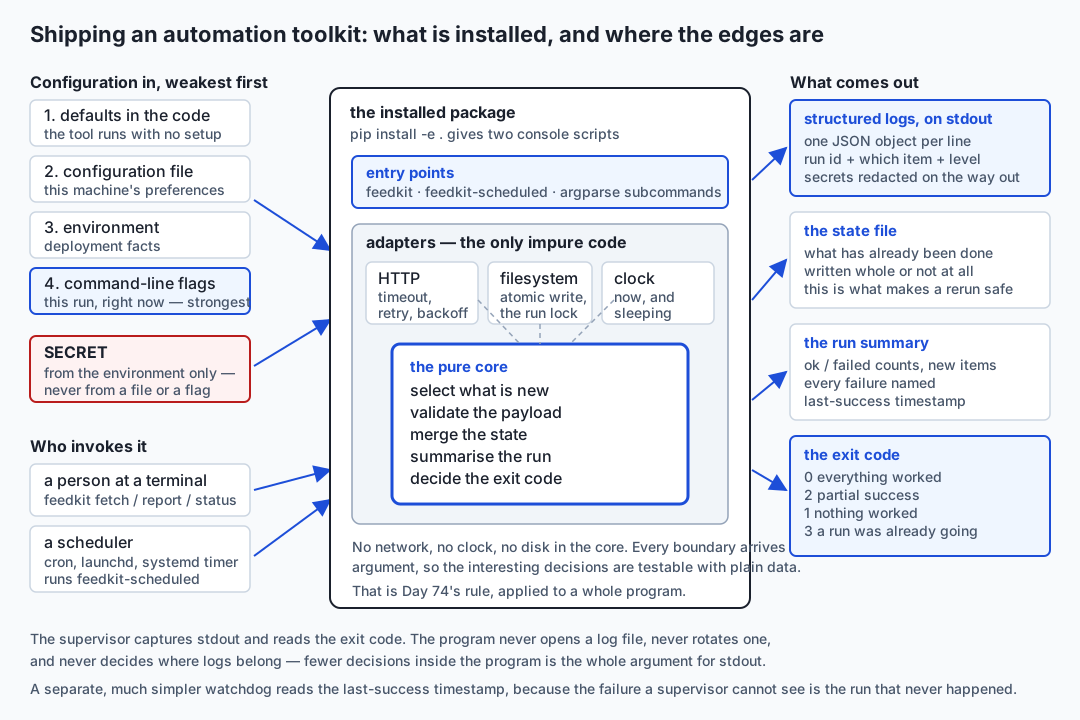
Read it from the outside in. Configuration enters on the left through four layers. The secret enters through exactly one of them. Two kinds of caller — a person at a terminal, a scheduler at three in the morning — arrive at the same entry points. Inside the package, the impure code forms a ring around a pure centre. And on the right, four separate outputs, each aimed at a different reader.
Architecture: a pure core with the boundaries pushed out
Day 74 argued that boundaries should be injected rather than imported, so that a test can supply a fake. Today that argument becomes structural: it decides how the whole program is laid out.
The rule is simple to state. A module either touches the outside world or it does not, and the ones that do are as small and as few as possible. In the lab’s package:
| Module | Touches | Why it is separate |
|---|---|---|
core.py | Nothing | Selecting what is new, validating a payload, merging state, summarising a run, deciding an exit code. These are the interesting decisions, and they are testable with two lists and no server |
config.py | Nothing, in resolve | The precedence is a pure function over four dictionaries; only the thin load wrapper reads a file and the environment |
state.py | The filesystem | The atomic write and the lock — the two places where being interrupted matters |
adapters.py | The network, the clock, sleeping | The only genuinely impure module. It is also the shortest one worth reading twice |
runner.py | Nothing directly | It knows the order of a run and receives every boundary as an argument |
cli.py | Argument parsing, process exit | The outermost shell: parse, build the real adapters, call the runner, print, return a code |
The payoff is not architectural purity for its own sake. It is that the questions this lesson cares about — does running twice process each item once? is partial success reported honestly? — are answered by functions that need no server, no clock and no disk to test. When the answers to your hardest questions live in pure functions, testing them costs milliseconds, so you actually do it.
Watch how it shows up in one constructor:
class HttpFetcher:
    def __init__(
        self,
        session: requests.Session,
        base_url: str,
        token: str = "",
        timeout: float = 5.0,
        retries: int = 3,
        backoff_seconds: float = 0.5,
        sleeper: Callable[[float], None] = time.sleep,
        logger: Any = None,
    ) -> None:
The session is injected, as Day 78 argued. So is the timeout, so is the retry policy — and so is sleeper. That last one is the giveaway of somebody who has written this before. Injecting the sleep function is what lets a test exercise three retries with two backoffs in microseconds instead of a second and a half, without anybody patching time.sleep globally and hoping nothing else in the process wanted it.
Configuration: four layers, in a written-down order
Every program with configuration has a precedence. Most of them have it by accident, spread across a dozen or expressions, and nobody can say what wins without reading the source. Write it down instead, weakest first:
- Defaults in the code. So the tool runs with no setup at all. A tool that cannot start without configuration is a tool nobody tries.
- A configuration file. This machine’s long-lived preferences.
- The environment. Deployment-specific facts, and secrets.
- Command-line flags. This one run, right now.
The order is not arbitrary. It runs from the most permanent to the most immediate, and each layer belongs to a different owner: the author, the machine, the deployment, and the person typing.
In the lab this is one pure function over four dictionaries, which is why the test can assert all four levels rather than just the ends:
for layer_name, layer in (
    ("default", DEFAULTS),
    ("file", file_values),
    ("environment", environment),
    ("flag", {key: value for key, value in flags.items() if value is not None}),
):
    for key, value in layer.items():
        merged[key] = coerce(value, kind_of(key), key)
        provenance[key] = layer_name
Three details in there decide whether it is correct or merely plausible.
The if value is not None filter. argparse leaves every unsupplied option as None. Without that filter, every flag you did not pass overrides the configuration file with nothing, and your carefully written file is silently ignored. This is the single most common bug in hand-rolled configuration, and it is invisible because the program still works — with the defaults.
The coerce call. A value from a file, an environment variable or a flag is a string or a raw TOML value. FEEDKIT_MAX_ITEMS=20 is the string "20", and "20" > 5 raises in Python 3. Convert at the boundary, once, and everything downstream can assume its types.
The provenance dictionary. This is the part almost nobody builds, and it repays itself the first time you use it. Recording which layer supplied each value lets the tool answer “why is it doing that?” in one command:
$ feedkit status --explain-config
configuration file: <the working directory>/feedkit.toml

  setting              value                        came from
  max_items            40                           flag
  retries              3                            default
  state_file           feedkit-state.json           default
  token                set (never printed)          environment
That is a real capture. Note the last line: the tool confirms the token is set without printing it, which is exactly what you want at three in the morning when the question is “did the credential reach the process?” and the answer must not be a credential in your scrollback.
Where the file lives is its own small decision. The order that matches what users expect: the path given to a flag, then a path named in the environment, then a file in the working directory, then the user’s configuration directory — $XDG_CONFIG_HOME/yourtool/ or ~/.config/yourtool/ on Linux and macOS. For a real personal installation the last one is the right home: it survives reinstalling the package, it is not inside a directory you might delete during a clear-out, and it is not inside a repository you might publish.
And a typo in a configuration file must be an error, not a shrug. If max_itmes = 10 is silently ignored, you will spend an afternoon wondering why your setting does nothing. Three lines of validation buys that afternoon back:
$ feedkit status
feedkit: configuration error: unknown setting in configuration file: 'max_itmes'
exit: 1
Secrets: the environment, and nowhere else
The rule is short. A credential comes from the environment. Never from a file in the repository, never from a command-line flag.
The reasons, in the order they actually bite people:
- A flag ends up in your shell history, and in
psoutput, where anyone who can list processes on that machine can read it. - A configuration file ends up in version control, on the day somebody stages everything at once. And a file that is currently ignored is one careless
--forceaway from being committed. - The environment is where every deployment mechanism already puts secrets. systemd’s
EnvironmentFile, a mode-600 file sourced by a wrapper script, a keychain lookup — they all hand the value over the same way, so your program needs to know about exactly one of them: none.
Then a second rule, which is the one that saves you when the first one has been followed and something still goes wrong. Redact on the way out. A filter on the log handler that replaces known secret values with a placeholder — in the message, in the arguments, in the structured fields, and inside an exception’s own text:
class RedactingFilter(logging.Filter):
    PLACEHOLDER = "***REDACTED***"

    def filter(self, record: logging.LogRecord) -> bool:
        record.msg = self._scrub(record.msg)
        if record.args:
            record.args = self._scrub(record.args)
        ...
Be honest about what this is. It is a seatbelt, not a licence. It only knows about secrets it was told about, and it cannot help with a token that arrives in a shape it does not recognise. But one day somebody will log a whole response object, or an exception message that quotes a URL with a token in the query string, and the difference between an awkward afternoon and a credential rotation is whether that string reached the file.
The lab proves the property rather than asserting it, and the way it does so is worth copying. It invents a token, makes the fixture server genuinely require it — every request without it is refused with 401, which the suite checks separately — and then greps the captured log, the state file and the --explain-config output for that exact string and demands zero matches. Without the “genuinely required” half, a tool that simply never sent the token would pass the leak test while being completely broken.
When a token does leak, the order of operations matters and most people get it backwards:
- Revoke it at the provider. First, before anything else. A leaked credential that still works is the only part of this that is an emergency.
- Issue a replacement and put it where the running job reads from.
- Assume it was used. Read the provider’s access logs for the window between exposure and revocation.
- Only then clean up the log file, the commit, the screenshot.
- Fix the path that leaked it, so the next one does not follow.
Scrubbing first and revoking second is the instinct, and it is wrong. Rewriting a repository’s history does not un-publish anything already cloned, and every minute spent on it is a minute the credential still works.
Structured logging: what a run says about itself
An unattended run leaves nothing behind except what it wrote down. So the log is not a debugging aid, it is the only artefact, and it should be designed like one.
One JSON object per line, on stdout. Two decisions there, both arguable and both worth arguing.
JSON lines rather than prose, because prose is readable by you at your desk and JSON is readable by you, by grep, by jq, by a log shipper, and by whatever the supervisor writes it into. The cost is that it is slightly less pleasant to read raw. The benefit is that “show me every error from run 5a1ffd4e” is one command rather than an afternoon of regular expressions.
stdout rather than a file the program opens, because writing to stdout means the program never has to know about log paths, permissions, rotation, or disk-full behaviour. cron mails it. systemd hands it to the journal. launchd redirects it where the plist says. A human running the command by hand simply sees it. Fewer decisions inside the program is the entire argument, and it is the same argument as configuration-from-outside, applied to output.
Levels, and what belongs at each. This is where most logging goes wrong, in one of two directions: everything at info until the log is unreadable, or almost nothing until a failure tells you only that it failed.
| Level | What belongs there | The test |
|---|---|---|
debug | The request that was made, the payload’s shape, the decision that was taken and why | Would this help me reconstruct one specific run? Off by default; on when investigating |
info | Run started; each item started and finished with its count; state written; run finished with the summary | Would I want to see exactly this, once, for every scheduled run? |
warning | A retry, a skipped item, an unusual but handled condition | Something is not right, and the run continued |
error | An item failed after every retry; the run could not do part of its job | A human should look, but the process handled it |
critical | The run cannot continue at all: the state file is unreadable, the configuration is invalid | Nothing was done, and nothing will be until somebody acts |
Every record must carry enough context to identify which run and which item. Not “timeout” — run_id, source, attempt, status. The run id is a short random label generated once per run and stamped on every line, and it is the thing that lets you separate one 03:00 run from the thirty around it. One subtlety worth noting because it is easy to ship without seeing: the id on the log lines and the id recorded in the state file must be the same string. Generating one in each place is a small bug that makes an incident twice as slow to investigate.
Here is what an ordinary failing run looks like when this is done. A real capture:
{"ts": "2026-07-19T19:09:13", "level": "info", "run_id": "5a1ffd4e", "event": "source started", "source": "broken"}
{"ts": "2026-07-19T19:09:13", "level": "warning", "run_id": "5a1ffd4e", "event": "fetch attempt failed", "source": "broken", "attempt": 1, "status": 500}
{"ts": "2026-07-19T19:09:13", "level": "warning", "run_id": "5a1ffd4e", "event": "fetch attempt failed", "source": "broken", "attempt": 2, "status": 500}
{"ts": "2026-07-19T19:09:14", "level": "warning", "run_id": "5a1ffd4e", "event": "fetch attempt failed", "source": "broken", "attempt": 3, "status": 500}
{"ts": "2026-07-19T19:09:14", "level": "error", "run_id": "5a1ffd4e", "event": "source failed", "source": "broken", "status": "failed"}
Read the timestamps on the three warnings: :13, :13, :14. That gap is the backoff doubling from half a second to a full second, visible in a capture rather than described in a comment.
Failure design: retry, skip, or stop
Every failure in an automation falls into one of three buckets, and putting each one in the right bucket is the design. Getting it wrong in either direction is expensive: too much retrying turns a small problem into a self-inflicted outage, too little turns a blip into a lost day.
Retry what is transient and likely to resolve on its own. A connection reset. A timeout. HTTP 429, 500, 502, 503, 504 — the server saying “not now” rather than “no”. Retry bounded and with backoff, doubling the wait each time. Bounded, because unbounded retries against a struggling dependency are how a client turns somebody else’s degraded service into their outage. Backing off, for Metcalfe and Boggs’ reason: a hundred clients retrying in lockstep after one second are a hundred clients colliding again after one second.
Skip and report what has failed for good but affects only one item. A 404. A 401. A payload that does not parse. These will not resolve on a retry — a 404 will be a 404 in three seconds — and retrying them is noise you pay for in somebody else’s server logs. Record the failure, name it in the summary, and continue with the other items.
Stop everything when continuing would mean guessing about something fundamental. The configuration is invalid. The state file is unreadable. Another run holds the lock. In each case, doing part of the job is worse than doing none of it, because it produces a state that is neither the old one nor the new one and nobody can tell which.
Notice that the decision is about what went wrong, not about how annoying it is. A 401 and a 503 are both “the request failed”, and they belong in different buckets — which is why the fetcher branches on the status code rather than on the exception type alone:
last_error = f"HTTP {response.status_code}"
if response.status_code not in RETRYABLE_STATUS:
    raise FetchError(f"{last_error} (not retryable)")
Partial success is the normal case for a batch job. Not the exception — the normal case. Once you accept that, the design follows: it needs its own exit code, and every failure needs to be named where a human will see it.
| Exit code | Meaning | What the scheduler should do |
|---|---|---|
| 0 | Everything succeeded | Nothing |
| 1 | Nothing succeeded, or the run could not start | Alert |
| 2 | Reserved — argparse uses it for a usage error | Fix the command line, not the job |
| 3 | Partial success: some items done, some failed | Report; alert if it repeats |
| 75 | A run was already in progress | Nothing — this is normal under catch-up |
The temptation to return 0 for partial success is strong, because “most of it worked” feels like success. It is the single most common way an automation lies to the person who owns it. The scheduler reads the exit code and nothing else; if you tell it everything is fine, everything is fine as far as every downstream thing is concerned, forever.
Notice which number is missing, and why. The obvious choice for partial success is 2 — it is the next one along. You cannot have it. This tool is built on argparse, and argparse exits 2 on a usage error, all by itself, before your code runs at all. Try it: feedkit fetch --bogus exits 2 and nothing of yours was consulted. If partial success were also 2, then a crontab line with a typo in it and a run where three of forty items failed would be indistinguishable to the only thing that reads exit codes — and the typo, which is silent because cron mails nobody by default, is exactly the failure you most need to tell apart. So partial success takes 3, and 2 stays where argparse put it.
75 is not arbitrary either. It is EX_TEMPFAIL from sysexits.h, the same code Day 81 used for “another copy of me holds the lock”. Reusing it here costs nothing and means anyone who reads the number already knows what it says: nothing is wrong, try again later. Choosing codes that already mean something is cheaper than documenting codes that do not.
Idempotence, state, and the atomic write
Idempotence means running the job again does not change the outcome. For a collector like the lab’s, that reduces to one question: what have I already processed? And the answer has to live somewhere durable, because the process exits between runs.
That makes the state file the most valuable thing the toolkit owns. Losing it is worse than a failed run — a failed run is visible, and a corrupted state file quietly re-processes everything or silently skips it.
Which is why the write is atomic, exactly as Days 64 and 65 described:
handle = tempfile.NamedTemporaryFile(dir=str(path.parent), delete=False, ...)
with handle:
    handle.write(payload)
    handle.flush()
    os.fsync(handle.fileno())
os.replace(tmp_path, path)
Four details, each load-bearing:
- The temporary file is in the same directory as the target.
os.replaceis only atomic within one filesystem, and the system temporary directory is very often a different one. Writing to/tmpand replacing into your home directory silently degrades to a copy, which is not atomic at all. flushthenfsync. Flush pushes Python’s buffer into the operating system;fsyncasks the operating system to put it on the disk. Without the second, a crash can leave you with a complete file name pointing at incomplete content.os.replace, notos.rename. They behave the same on POSIX;replacealso overwrites on Windows, whererenameraises.- Clean up on any exception, including
BaseException. AKeyboardInterruptis not anException, and catching onlyExceptionleaves a stray temporary file behind every time somebody presses Ctrl-C.
The guarantee this buys is precise and worth stating exactly: any reader sees either the complete old file or the complete new one, never a half-written mixture. If the machine loses power between the write and the replace, the previous state is still there and the temporary file is garbage the next run tidies up.
Compare the naive version — open(path, "w") then json.dump — which truncates the real file first. Interrupt that and the record of everything you have ever processed is a zero-byte file. The lab proves the difference by injecting a simulated power cut between the write and the replace and asserting the old file is byte-identical afterwards.
Overlapping runs get the same treatment. A lock file created with O_CREAT | O_EXCL — a flag combination the operating system guarantees will succeed for exactly one caller — holding the process id so a human can tell a live run from a lock left by a crash:
fd = os.open(self.path, os.O_CREAT | os.O_EXCL | os.O_WRONLY, 0o600)And the honest limitation, stated where somebody will read it: this is reliable for one machine and one local filesystem. It is not a distributed lock and must not be used as one.
Dry run and preview: first-class, not an afterthought
Anything that mutates the world needs a mode that answers “what would you do?” without doing it.
The important part is what a dry run must still do. It must resolve the configuration, acquire the lock, load the state, fetch the items, and compute exactly what would change — and then not write. A dry run that skips the work tells you nothing, because the work is where the surprises are. The lab’s version fetches everything, reports what it found, and leaves the state file byte-identical:
$ feedkit --sources notes,links,papers,flaky fetch --dry-run
run 433bb5af: ok  (dry run — nothing was written)
  sources: 4 ok, 0 failed, 4 total
  new entries: 1
  retried: flaky succeeded on attempt 3
The harness checks this the only way worth checking it: it hashes the state file before and after and requires the same hash. “It looked like it didn’t write anything” is not a test.
Observability for a personal tool
Full monitoring infrastructure is not the answer for something only you run. Three things are, and together they cost about twenty lines.
A run summary, printed at the end of every run and readable in three seconds — counts, and every failure by name:
run 5a1ffd4e: partial
  sources: 2 ok, 1 failed, 3 total
  new entries: 0
  FAILED: broken: HTTP 500 after 3 attempts
A last-success timestamp, recorded in the state file. Note success, not run: it is only updated when everything succeeded. A last-success that counted partial runs cannot see a single source that has been failing for a month, which is precisely the failure it exists to catch.
A watchdog that alerts on silence. This is the piece people skip, and it is the one that catches the failure nothing else can. Every supervisor can tell you a run failed. None of them can tell you a run never happened, because from the supervisor’s point of view no event occurred at all — the plist was unloaded, the timer was masked, the laptop was shut for a week, the crontab went with the machine.
So status can fail:
$ feedkit status --max-age-minutes 0
last success: 2026-07-19T19:09:11Z
watchdog:     STALE (allowance 0s)
exit: 2
And the watchdog runs on its own schedule, from a different entry, because a watchdog that shares a fate with the thing it watches is not a watchdog. If the same timer that stopped firing was also responsible for checking that it fired, you have learned nothing.
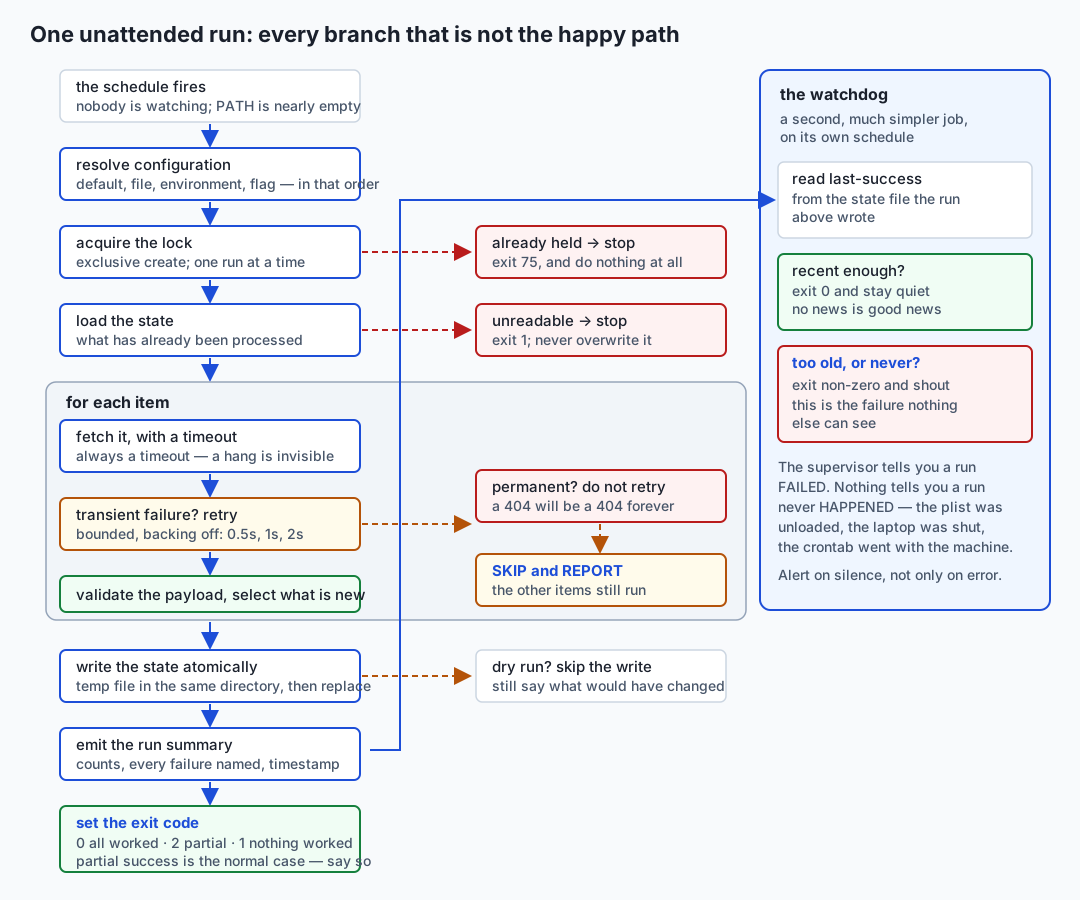
Packaging and the scheduled invocation
The last piece is Day 83’s, used for real. Two console entry points in pyproject.toml:
[project.scripts]
feedkit = "feedkit.cli:main"
feedkit-scheduled = "feedkit.cli:scheduled_main"
After pip install -e . those are commands on your PATH, and the schedule entry becomes short enough to read at midnight. feedkit-scheduled is a deliberately thin wrapper — a fetch with the settings a machine wants rather than the settings a human wants. Thin on purpose: a scheduled run that behaves differently from the one you tested by hand is a scheduled run you have not tested.
And then the schedule entry itself, which fails for three reasons and almost never for a fourth:
PATH. A scheduler does not read your shell profile, soPATHis nearly empty and a bare command name is not found. Use the absolute path.- The working directory. A relative
state_fileis relative to wherever the supervisor started the job, which is not where you think. Use an absolute path, or set the working directory explicitly. - The environment. Your variables are not there. Each supervisor has its own place to put them, and the token belongs in a mode-600 file that the entry sources rather than in the entry itself.
The three supervisors differ in one way that matters for the design. cron does not catch up — a missed run is simply gone. launchd will run a missed interval job shortly after wake. systemd does it explicitly with Persistent=true. Catch-up is a feature, and it is only a safe one because the job is idempotent. Which is the whole argument of this lesson arriving back where it started.
An everyday analogy
Think of shipping an automation as handing your job to a night-shift colleague you will never speak to. They arrive after you have gone home. They cannot phone you. Whatever they need to know, they need to know from what you left behind.
The written instructions on the bench are your configuration. Not what you told somebody last week, not what you assume is obvious — what is written down, where they will look. And instructions have a precedence exactly like a program’s: the standing procedure in the folder, the shift-specific note pinned above it, and the sticky note on tonight’s crate saying “this batch only, do it differently”. Everybody understands, without being told, that the sticky note wins over the folder. That is defaults, file, environment, flag.
The key to the store room is the secret. You leave it in the safe whose code they already have — not taped to the instruction sheet, and definitely not written on the sheet itself, because the sheet gets photocopied and pinned to a noticeboard and included in a training pack. And when a key goes missing, you change the lock first and work out how it went missing second.
The logbook is the structured log. A logbook entry reading “problem with delivery” is worthless in the morning. “03:12, shift 5a1ffd4e, crate 4 from supplier B, third attempt, refused at the gate” is a complete account: which shift, which item, how many tries, what happened. That is the difference between a level and a message, and a record with fields.
The tally sheet is the state file, and it is the thing you would be most upset to lose. It says which crates have been processed. It is what makes it safe for the night worker to come in twice — because the second time, they read the sheet and see there is nothing to do. And you would never let somebody update the tally by rubbing out the old numbers and writing new ones on top, because if they are interrupted halfway you have no numbers at all. You would have them write a fresh sheet and swap it for the old one in one movement. That is the atomic write, and the reason it matters is exactly as physical as it sounds.
The morning note is the run summary. “Twelve crates in, nine done, three refused at the gate — details in the logbook” is a night’s work reported honestly in one line. What you never want is a note reading “all fine” when three crates are still on the loading dock, because you will not check, and by the time you find out the supplier’s paperwork is a month stale.
One crate refused is not a reason to abandon the shift. The night worker who stops entirely because one supplier’s paperwork was wrong has cost you eleven good crates to save themselves a note. But the one who tries the same refused crate two hundred times, all night, while the other eleven wait, has cost you the whole shift in a different way. Retry a couple of times, back off, then set it aside and write it down.
Walking the route with the clipboard but touching nothing is a dry run — and note that they still walk the whole route. A dry run where they stay in the office and imagine the route tells you nothing, which is exactly why a dry run that skips the fetching is useless.
And the shift that nobody turned up for is the failure that no logbook can record. There is no entry, because there was nobody to write one. The absence of bad news is not good news. The only way to catch it is for somebody else, on a different schedule, to look at the tally sheet each morning and ask when it was last updated — which is the watchdog, and the reason it must not be the night worker’s own job.
The analogy holds one more way. After a year, somebody should be able to read the instructions, the logbook and the tally sheet and take over the shift without you. If they cannot, you do not have an automation; you have a thing that only works while you remember how it works.
Examples in practice
Everything below is a real capture from the Day 84 lab, running against a fixture server on 127.0.0.1 with no internet involved.
Idempotence, demonstrated by doing nothing the second time. Three sources, seven entries:
$ feedkit fetch
run 6e1d3577: ok
  sources: 3 ok, 0 failed, 3 total
  new entries: 7
exit: 0

$ feedkit fetch
run 3d3af43a: ok
  sources: 3 ok, 0 failed, 3 total
  new entries: 0
exit: 0
The second run did the same amount of work — it fetched all three sources — and processed nothing, because the state file already had every id. That is the property that makes catch-up safe, manual re-runs safe, and overlapping runs merely wasteful rather than damaging.
Retry recovering, with the backoff visible. The fixture server answers one source with 503 twice and then 200:
{"level": "warning", "run_id": "433bb5af", "event": "fetch attempt failed", "source": "flaky", "attempt": 1, "status": 503}
{"level": "warning", "run_id": "433bb5af", "event": "fetch attempt failed", "source": "flaky", "attempt": 2, "status": 503}
{"level": "info", "run_id": "433bb5af", "event": "source finished", "source": "flaky", "attempt": 3, "status": "ok", "count": 1}
run 433bb5af: ok  (dry run — nothing was written)
  sources: 4 ok, 0 failed, 4 total
  new entries: 1
  retried: flaky succeeded on attempt 3
The summary reports the retry rather than hiding it. A source that needed three attempts today is a source worth watching, and a run that quietly recovered tells you nothing about a dependency that is degrading.
Partial success, reported honestly. One source broken, two fine:
$ feedkit --sources notes,broken,papers fetch
run 5a1ffd4e: partial
  sources: 2 ok, 1 failed, 3 total
  new entries: 0
  FAILED: broken: HTTP 500 after 3 attempts
exit: 2
Exit code 2, not 0. The two good sources did their work and their results were written. The failure is named, with its cause and its attempt count. Nothing was silently dropped.
Not retrying what will not change. Remove the credential and every request is refused:
$ env -u FEEDKIT_TOKEN feedkit --sources notes fetch
run 03711452: failed
  sources: 0 ok, 1 failed, 1 total
  FAILED: notes: HTTP 401 (not retryable)
exit: 1
One attempt, not three. A 401 is a statement about your credentials, and no amount of waiting will change it.
All four configuration layers, on one setting:
=== layer 1: nothing configured — the default wins ===
  max_items            5                            default
=== layer 2: the configuration file beats the default ===
  max_items            10                           file
=== layer 3: the environment beats the file ===
  max_items            20                           environment
=== layer 4: a flag beats the environment ===
  max_items            40                           flag
The leak check. The token is invented by the harness, is genuinely required by the server, and appears nowhere:
$ feedkit --log-level debug --sources notes,broken fetch 2>&1 | grep -c lab-token-9f2b7c41d0
0
And the whole thing behind one command:
52 checks, 0 failure(s).The tools actually being used here, rather than named: requests provides the Session and the timeout; argparse provides three subcommands and a --dry-run flag; tomllib reads the configuration file; logging with a custom formatter and filter produces the JSON lines; tempfile and os.replace give the atomic write; os.open with O_CREAT | O_EXCL gives the lock; setuptools builds the package and generates the console scripts; pytest asserts the properties; and cron, launchd and systemd are described from real, annotated unit files that this lab explicitly does not install.
Implications: security, privacy, performance, scalability, and cost
Security. An automation runs unattended with your permissions, which means every weakness in it is a weakness that gets exercised at three in the morning with nobody watching. The credential rules above are the largest part of this. Beyond them: pin your dependencies, because a tool that runs unattended for a year should not change underneath you because something released on a Tuesday. Run the job as your own user, never as root — nothing here needs privilege, and a scheduled job with more privilege than it needs is a standing invitation. Give the schedule entry the smallest possible view of the filesystem where your supervisor supports it; the lab’s systemd reference shows ProtectSystem=strict, ProtectHome=read-only, NoNewPrivileges=true and an explicit list of writable paths, none of which is exotic and all of which is free. And treat anything your job fetches as untrusted input: validate the shape at the boundary, never execute it, and be extremely careful about interpolating it into a shell command or a query.
Privacy. A collector accumulates. That is what it is for, and it is also the risk: a job that runs hourly for a year has a year of somebody’s data in a file on your laptop, which you did not decide to keep so much as fail to decide to delete. Three habits help. Collect the minimum the job actually needs rather than everything the source offers. Give the state file a retention policy — a prune command is a twenty-line addition and it is the difference between a record and a hoard. And remember that logs are data too: a log line containing a user identifier is a record about a person, held under exactly the same obligations as the database you were careful about.
Performance. For a personal automation, wall-clock speed is almost never the constraint, and optimising it is almost always the wrong instinct. The numbers that matter are different ones. How long does a failing run take before it gives up? Three sources times three retries times a growing backoff, plus a five-second timeout each, is a run that can take minutes to fail — which matters if the interval is shorter than that, because now runs overlap and the lock does its job by refusing most of them. Bound your worst case deliberately: cap the retries, cap the timeout, and know the product. And be a good citizen about the other side of the connection: reuse one session across items, do not run at the top of the hour like everybody else, and back off when told to.
Scalability. The design in this lesson scales comfortably to tens of sources on one machine and stops scaling in three specific, predictable places. A JSON state file rewritten in full on every run becomes slow somewhere in the low tens of megabytes — that is the point at which SQLite (Week 13) starts to pay for itself. A file lock stops working the moment two machines are involved. And a run whose duration approaches its interval is a run that will start overlapping under any load spike. Each of those has a well-understood answer, and each answer costs complexity that is not worth paying until a measurement demands it.
Cost. In money, essentially nothing. Python, cron, launchd, systemd, requests, pytest and setuptools are all free, and the electricity to run a job hourly is unmeasurable. Hosted automation platforms charge, and their pricing and free-tier limits change often enough that any number quoted in a lesson is a number that may already be wrong — read the vendor’s current pricing page rather than trusting this one. The real cost is not money at all. It is your attention, spent in small unpredictable amounts, months after you wrote the thing, on a morning when you had other plans. That cost is the subject of the last section, and it is the one that decides whether the automation was a good idea.
Alternatives: free, open source, and commercial
Six ways people actually ship small automations. The honest headline first: the simplest option that meets the need is usually right, and reaching for the heaviest one is a common and expensive mistake.
| Approach | What it is | When to choose it | Cost |
|---|---|---|---|
| A script plus cron | One file, one crontab line | Genuinely often. A job with one step, no state, and no credential | Free; already installed |
| A packaged CLI installed with pipx | An installable package with console entry points, in its own isolated environment | Several commands, shared logic, real configuration, something you will still run next year | Free and open source |
| A long-running service with a scheduler inside | A process that stays up and triggers its own work | Sub-minute intervals, or work that must react to events rather than a clock | Free; you now own a process that must be kept alive |
| A Makefile or shell wrapper | A thin layer over commands you already have | Composing existing tools where the logic really is “run these in order” | Free; already installed |
| A container image | The tool plus its entire runtime, pinned as one artefact | Reproducibility across machines matters more than simplicity, or the deployment target expects one | Free tooling; registry hosting may not be |
| A hosted automation platform | Somebody else’s scheduler, runners and web interface | You want no machine of your own, or you want other people to see and edit the workflow | Paid, generally with a free tier |
A script plus cron — and be honest about this one. Write the file, make it executable, add a crontab line. It is the correct answer far more often than the industry’s enthusiasm for machinery suggests. The genuine crontab entry is one line:
17 * * * * /home/you/bin/collect.py >> /home/you/logs/collect.log 2>&1Choose it when the job is one step with no state to keep and no credential to protect. Move on from it at a specific, recognisable moment: when you find yourself wanting a second command that shares logic with the first, or when the job starts needing to remember what it did last time. Those two needs are what a toolkit is for, and neither is a reason to reach for anything larger.
A packaged CLI installed with pipx. pipx installs a Python application into its own isolated virtual environment and puts its console scripts on your PATH, so the tool’s dependencies cannot collide with anything else on the machine. It is free and open source, and it is what today’s design is aimed at:
pipx install ./feedkit
feedkit status
Choose it when you have several related commands over a shared core, real configuration, and an expectation that this will still be running next year. Skip it while the job is one step: the packaging is a real cost and it buys nothing until there is something to share. Worth knowing precisely: pipx is for applications; pip install into a project’s own environment remains right for a library.
A long-running service with a scheduler inside it. The process stays up and triggers its own work — sched from the standard library, a sleep loop, or a library like APScheduler. Concretely, the standard library version is small:
import sched, time

scheduler = sched.scheduler(time.monotonic, time.sleep)

def tick() -> None:
    run_once()
    scheduler.enter(3600, 1, tick)

scheduler.enter(0, 1, tick)
scheduler.run()
Choose it when you need intervals shorter than a minute (cron’s finest granularity), or when the work is triggered by events rather than by a clock. Understand what you have taken on: a process that must be kept alive, restarted after a crash, restarted after a reboot, and monitored — which is to say, you have re-implemented a small part of what the operating system’s supervisor already does, and you now maintain it. For an hourly personal job this is almost always the wrong trade. Free and open source either way.
A Makefile or shell wrapper. A thin layer over commands that already exist:
.PHONY: collect
collect:
	feedkit fetch
	feedkit report --limit 20 > today.txt
Choose it when the logic genuinely is “run these three things in order” and each of them already works. make gives you stop-at-first-failure for free, which is often what you want in a composition. Do not choose it as a substitute for the toolkit: a Makefile has no configuration precedence, no state, no structured logging and no exit-code vocabulary beyond zero and not-zero. Free; already on your machine.
A container image. Docker packages the tool together with its entire runtime — interpreter, dependencies, files — into one artefact that runs the same way everywhere that can run containers. The workflow is a Dockerfile, a docker build, and a docker run, and the schedule entry becomes a docker run line instead of a command:
FROM python:3.12-slim
COPY . /app
RUN pip install --no-cache-dir /app
ENTRYPOINT ["feedkit-scheduled"]
Docker is not installed on the authoring machine and nothing in this course builds or runs an image, so no output is shown for it here — describing a command’s output that was never produced is exactly the habit this course refuses. Choose containers when reproducibility across machines genuinely matters, when the deployment target expects an image, or when the tool has awkward system-level dependencies. Skip them for a personal hourly job on your own laptop, where they add a build step, an image to store, and a layer of indirection between you and a problem at three in the morning. The tooling is free and open source; hosting images in a private registry may not be.
Hosted automation platforms. Services that run scheduled workflows on somebody else’s machines, with a web interface, stored credentials, and a catalogue of integrations. Some are general-purpose runners attached to a code-hosting service; some are no-code workflow builders. Choose one when you do not want to own a machine at all, when other people need to see or edit the workflow, or when the value is in the pre-built connectors rather than in the code. The trade-offs are real and worth naming: your credentials live on somebody else’s infrastructure, your logic is partly expressed in their interface rather than in your repository, debugging happens through their console, and moving away later means rewriting. On price, the accurate statement is that these services generally offer a free tier and charge beyond it, and that both the tiers and the prices change; check the vendor’s current pricing page rather than trusting a figure written in any lesson, including this one.
The honest summary. Start at the top of that table and move down only when a specific need pushes you. Most personal automations should be a script and a cron line. A few genuinely benefit from being a packaged toolkit, and today’s lab is what that looks like when it is done properly. Almost none need a container, a hosted platform, or a process that never exits — and the cost of discovering that the hard way is measured in the evenings you spend maintaining infrastructure for a job that saves you four minutes a week.
Comparison with related concepts
| Concept A | Concept B | Key difference |
|---|---|---|
| A script | An automation | A script is something you run and watch. An automation runs when nobody is watching, so everything it will ever tell you must already be written into it |
| Idempotent | Repeatable | Repeatable means you can run it again. Idempotent means running it again changes nothing. Only the second makes catch-up and manual re-runs safe |
| Retry | Skip and report | Retry a failure that is likely to resolve on its own; skip one that will not. A 503 and a 404 are both failures and belong in different buckets |
| Partial success | Failure | Partial success is the normal case for a batch job. Collapsing it into either “success” or “failure” throws away the only information that would have told you something is degrading |
| Exit code | Log output | The log is for a human, later. The exit code is for the machine, now. The scheduler reads only the second |
| Structured log | Print statement | A print statement is prose for whoever is watching. A structured record has fields, so it can be filtered by run and by item months later |
| A state file | A cache | Losing a cache costs you time. Losing a state file costs you correctness — the next run cannot tell what it has already done |
| Atomic write | Ordinary write | An ordinary write truncates first, so an interruption destroys the old content. An atomic write leaves either the complete old file or the complete new one |
| Dry run | Test | A test checks behaviour against fixtures. A dry run tells you what this invocation would do to this real state, right now |
| Watchdog | Error alert | An error alert fires when a run fails. A watchdog fires when a run does not happen, which no supervisor can detect |
| Lock file | Mutex in a process | A lock file coordinates separate processes on one machine. Neither coordinates across machines |
| Configuration | Secret | Configuration can live in a file you commit. A secret cannot, ever, and the environment is where it belongs instead |
| cron | systemd timer or launchd | cron does not catch up on missed runs; the other two can, which is only safe if the job is idempotent |
| Console entry point | A path to a script | A command name survives you reorganising your directories; an absolute path does not |
When to use it — and when not to
Everything above is mechanism. This section is judgement, and it is the part that keeps the lesson from being a checklist.
When to automate at all: the honest arithmetic
The naive calculation is: this takes me ten minutes a week, automating it takes four hours, so it pays back in twenty-four weeks. That calculation is wrong, and it is wrong in the direction that makes you build things you should not have built.
What it leaves out is maintenance, which is the real cost and which arrives later than the benefit. Sources change their format. Credentials expire. A dependency releases a breaking version. The machine gets replaced and the schedule does not come with it. An operating system upgrade moves something. None of these are large; all of them arrive unannounced, on a morning you had other plans, and each costs you the context-switch as well as the fix.
A more honest version: build time, plus a recurring maintenance cost of somewhere between one and several hours a year, against the time actually saved. And then two adjustments that usually dominate the arithmetic.
Adjusted upward, in favour of automating, when the manual task is error-prone in a way that matters, when it must happen on a schedule you will not reliably keep, when the value is in the record rather than the time saved, or when it is genuinely unpleasant and you avoid doing it. A task you skip half the time has a real cost that the ten-minutes-a-week figure does not capture.
Adjusted downward when the task is rare, when it requires a judgement you would have to encode badly, when the source is unstable enough that you will be fixing the automation more often than you would have done the task, or when doing it manually keeps you usefully in touch with something you should be paying attention to.
The automation that costs more than the manual task is extremely common and rarely admitted. The recognisable signs: you have spent more evenings fixing it than the task ever took; the thing it produces is now used only by the automation itself; you find yourself running the manual version anyway because you do not trust the automated one; nobody has looked at its output in three months.
Two more traps worth naming. The automation that never finishes — the version that handles ninety percent of cases while the remaining ten always need you, so you now do the manual work and maintain the machinery. And the automation you build to avoid a decision, where the honest fix was to stop doing the task at all. Before automating anything, ask whether the task needs doing.
The automation nobody understands after six months
Including you. This is the failure mode with the longest tail, because it does not announce itself: everything works, right up until the morning it does not and nobody can safely change it.
It happens because context evaporates. You knew, when you wrote it, why that retry count is three and why that source is fetched last and why the state file lives in that directory. Six months later you know none of it, and neither does the person who inherits it. What survives is what you wrote down.
Guard against it with three cheap things. Explain your decisions in comments rather than your mechanics — # 17 past the hour, not on the hour, because everybody's job runs on the hour is worth more than a comment restating what the line does. Make the tool explain itself: --explain-config exists precisely so that nobody has to read the source to answer “where did that value come from?”. And write the runbook.
The runbook
A runbook is one page that lets somebody who is not you operate and fix the thing. It is not documentation of the code; it is documentation of the job. Six sections:
- What it does, and why it exists. Two sentences. Including who would notice if it stopped — and if the answer is nobody, you have learned something important.
- When it runs, and where. The schedule, the machine, the supervisor, and how to see whether it is enabled.
- What each exit code means, and which ones deserve a human.
- What to check first when it fails, in order. For most jobs: the last run’s log, the last-success timestamp, then whether the source is reachable at all.
- How to run it by hand, including the dry run — the exact commands, copy-pasteable, with the environment it needs.
- How to turn it off, and how to remove it entirely.
The test for a runbook is not whether it is complete; it is whether somebody else can recover from a failure using only that page. Hand it to a person and watch. Whatever they had to ask you is what the runbook is missing.
That last section — how to turn it off — is the one people leave out, and it is the one that gets used at the worst moment. An automation you cannot confidently disable is an automation that will keep doing the wrong thing while you work out how to stop it.
Knowing when to delete it
Automations accumulate. They are cheap to add and nobody ever schedules a review, so a laptop after three years has a dozen jobs running of which perhaps four still matter.
Delete one when nothing consumes its output any more, when the manual version is genuinely easier now, when the thing it works around has been fixed at the source, or when it has failed for a month and you did not notice — that last one is not an argument for fixing it, it is proof that nobody needed it.
Deleting properly means removing the schedule entry, removing the package, archiving or deleting the state and the logs, and telling anyone who might be relying on it. Half-deleting — disabling the schedule and leaving everything else — produces a machine full of things that might or might not be running, which is worse than either state.
And build the review in. Once a year, list every scheduled job on your machine, and for each one write a single sentence saying who would notice if it stopped. The ones where you cannot write that sentence are the ones to delete. That habit costs twenty minutes a year and is the single highest-return operational practice in this lesson.
Where this goes next in AI work
This is the shape of every data and model pipeline you will build in the rest of this course.
A training pipeline fetches data, validates it, transforms it, stores it, reports what it did, and runs on a schedule. An evaluation pipeline pulls a model, runs a fixed set of cases against it, compares the results against a threshold, and returns an exit code. A retrieval pipeline crawls a corpus, chunks it, embeds it, writes to an index, and must not re-embed what it embedded yesterday. Every one of those is today’s diagram with the nouns changed.
And every operational lesson transfers without modification. Idempotence becomes “do not re-embed documents that have not changed”, which is the difference between a nightly job that costs pennies and one that costs real money in inference calls. Partial success becomes “eleven thousand of twelve thousand documents were processed”, which must never be reported as success, because a model trained on a silently truncated dataset is a model you will debug for a week from entirely the wrong end. The state file becomes a manifest of what has been ingested, and it needs the same atomic write for the same reason. Structured logging with a run id becomes the only way to answer “which run produced this artefact?”, which is the first question anyone asks about a model that has started behaving strangely. The watchdog becomes the thing that notices your nightly refresh stopped three weeks ago, which is not a hypothetical failure — it is the most common way a production model quietly starts serving stale results. And the honest arithmetic becomes the question of whether this pipeline is worth its maintenance, which nobody asks often enough about machine-learning infrastructure.
The one genuinely new thing later is that some of these steps are non-deterministic and expensive, which raises the stakes on all of the above rather than changing any of it. When a re-run costs money rather than milliseconds, idempotence stops being tidy engineering and starts being a line on an invoice.
A notebook that worked once is not a pipeline. The distance between them is exactly the distance this lesson has covered.
Knowledge check
Try these from memory before looking back:
- State the four properties of a shipped personal tool, and for each one name the specific failure it prevents.
- Give the four configuration layers in order, and explain the bug that occurs if an unsupplied argparse flag is not filtered out before merging.
- For each of these, say which bucket it belongs in — retry, skip and report, or stop everything — and why: HTTP 503, HTTP 404, a JSON payload missing a required field, an unreadable state file, another run holding the lock.
- Why must partial success have its own exit code? Describe what goes wrong, over months, if it returns 0.
- Explain the atomic write in four steps, and say precisely what the naive
open(path, "w")version loses when it is interrupted. Why must the temporary file be in the same directory? - What can a watchdog detect that no supervisor and no error alert can? Why must it run on a different schedule from the job it watches?
- Why is a secret read from the environment rather than from a configuration file or a flag? Give a distinct reason for rejecting each of the two alternatives, and state the first thing you do when a token leaks.
- You have a task taking fifteen minutes a week. Automating it will take five hours. Write the honest arithmetic, including the terms the naive payback calculation leaves out, and name three circumstances that would change your answer.
Hands-on exercise
Time to assemble the week into one installable tool and then prove the properties that make it safe to leave running. In the Day 84 lab you build feedkit: a package with three subcommands over a shared pure core, a scheduled entry point, four-layer configuration, structured logging with secret redaction, an atomically written state file, and a --dry-run. Work in the lab directory; every command below is run from there.
Install once (this is the only step needing the network):
python3 -m venv .venv
.venv/bin/pip install -r requirements/requirements.txt
.venv/bin/pytest --version
Run the whole harness. It starts a fixture server on 127.0.0.1 on a port the operating system chooses, runs everything, and kills the server in a trap:
bash tests/run_tests.sh
echo "exit code: $?"
Then drive the toolkit by hand. Start the server in one terminal:
.venv/bin/python tests/fixture_server.py --token demo-token-valueIn a second terminal, using the port it printed:
cd examples
export FEEDKIT_BASE_URL="http://127.0.0.1:PORT"
export FEEDKIT_TOKEN="demo-token-value"
export PYTHONPATH="$PWD/src"
alias fk="../.venv/bin/python -m feedkit.cli"

fk fetch; echo "exit: $?"            # 7 new entries
fk fetch; echo "exit: $?"            # 0 new entries — idempotence

shasum feedkit-state.json
fk --sources notes,links,papers,flaky fetch --dry-run
shasum feedkit-state.json            # identical

fk --sources notes,broken,papers fetch; echo "exit: $?"   # 2, not 0
fk status --explain-config
fk status --max-age-minutes 0; echo "exit: $?"            # the watchdog can fail
Read the three schedule references, none of which this lab installs:
cat schedule/feedkit.cron
cat schedule/feedkit.service
Then install it properly and use the console script:
cd ..
.venv/bin/pip install -e examples --no-build-isolation --no-deps
cd examples && ../.venv/bin/feedkit --version && ../.venv/bin/feedkit fetch
Finally, build it yourself. starter/src/feedkit/ ships the same package with seven numbered gaps: the idempotence rule, the exit-code mapping, the precedence loop, the redaction filter, the atomic write, the retry policy, and the skip-and-report loop. Each one names the test that checks it. Work through them in order and run the harness after each.
Expected output
The harness ends with a real captured line:
52 checks, 0 failure(s).A first fetch over the three configured sources reports new entries: 7 and exits 0; the same command again reports new entries: 0 and exits 0. A --dry-run leaves the state file’s hash unchanged while still reporting what it would have collected. A run over notes,broken,papers prints:
run 5a1ffd4e: partial
  sources: 2 ok, 1 failed, 3 total
  new entries: 0
  FAILED: broken: HTTP 500 after 3 attempts
exit: 2
The flaky source succeeds on attempt 3 after two 503s, and the summary says retried: flaky succeeded on attempt 3. Removing FEEDKIT_TOKEN makes every request fail with HTTP 401 (not retryable) after exactly one attempt. status --explain-config shows 5 default, 10 file, 20 environment and 40 flag as each layer is added. And a grep of any captured log for the token prints 0.
Validate your work
bash tests/run_tests.shends with52 checks, 0 failure(s).and exits 0.- Two consecutive
fetchruns givenew entries: 7thennew entries: 0, both exiting 0. shasum feedkit-state.jsonis identical before and after a--dry-run, and the dry run still reports one new entry fromflaky.- A run including the
brokensource exits 2 and names the failure; a run of onlybrokenexits 1; a run with the lock file present exits 3 and writes nothing. status --explain-configresolvesmax_itemsto5 default,10 file,20 environmentand40 flagas you add each layer.grep -c "$FEEDKIT_TOKEN"over any captured log prints0, and unsetting the token makes every request 401 — proving it was genuinely being sent.status --max-age-minutes 0printsSTALEand exits 2; in a fresh directorystatusprintslast success: neverand exits 2.- After the editable install,
feedkit --versionprintsfeedkit 1.0.0andfeedkit fetchexits 0. pgrep -fl fixture_server.pyfinds nothing after the harness finishes, and your crontab,~/Library/LaunchAgentsand systemd units are untouched.
Troubleshooting
The lab’s troubleshooting.md has the full list. The four you are most likely to meet: no base URL configured, which is the toolkit refusing to guess a deployment fact rather than a bug; new entries: 0 when you expected more, which is idempotence working and is fixed by deleting the state file; exit code 3, which is partial success being honest and is not a failure of the tool; and exit code 75 with “another run is in progress”, which is a lock file left behind by a killed run — check whether the recorded process id is still alive before deleting it. Two more entries are worth reading even when nothing is broken: why a scheduled job that works by hand does nothing on a schedule (PATH, then the working directory, then the environment, in that order of likelihood), and what state.json is not valid JSON. Refusing to overwrite it. is protecting you from.
Common mistakes
- Exiting 0 on partial success. The most consequential mistake in the whole lesson, and the easiest to make, because “most of it worked” feels like success.
- Retrying a 404 or a 401. They will not change. Retrying them wastes your time and somebody else’s server.
- Unbounded retries. A client that retries forever turns a struggling dependency into an outage it caused.
- Writing the state file with
open(path, "w"). It truncates first. One interruption and the record of everything you have processed is gone. - Putting the temporary file in the system temporary directory. Different filesystem, so
os.replaceis no longer atomic — and nothing tells you. - Letting an unsupplied flag override the configuration file. argparse leaves it as
None; filter it out before merging, or your file is silently ignored. - Logging the whole response object. The token is in the headers. This is exactly the case the redaction filter exists for, and exactly the case you should not rely on it for.
- A dry run that skips the fetching. It tells you nothing, because the work is where the surprises are.
- No watchdog. Everything works until the day the job stops running, and then everything continues to look like it works.
- Assuming the scheduler’s environment is yours. It has almost no
PATH, none of your variables, and a working directory you did not choose.
Practice assignment
Take a task you genuinely do by hand — a file you download weekly, a report you assemble, a folder you tidy, a backup you keep meaning to make — and ship it as a toolkit.
Before writing any code, write the arithmetic down. How long does the manual task take, how often, and how long do you think the automation will take to build? Add an honest maintenance estimate. Then write the sentence “if this stopped, the person who would notice is ___”. If you cannot finish that sentence, stop here: you have just saved yourself five hours, and that outcome is a pass, not a failure.
If it survives that test, build it with everything from today. A package with at least two subcommands over a shared pure core. Configuration resolved through all four layers, with a command that prints the provenance of each setting. Any credential from the environment only. Structured logging on stdout carrying a run id and, on every line about an item, which item. A failure policy where you can say, for each kind of error, which bucket it is in and why. A state file written atomically, and a lock so two runs cannot overlap. A --dry-run that does everything except the writing. A run summary and a last-success timestamp. Console entry points, and a schedule file for your platform — which you may install, deliberately, on your own machine.
Then earn it. Run it twice and confirm the second run does nothing. Break one item on purpose and confirm the others still succeed, the failure is reported, and the exit code is the partial one. Interrupt a state write and confirm the previous state survived. Grep every log you have produced for your credential.
Your deliverable is the tool plus a one-page runbook covering the six sections above. Then the real test: hand the runbook to somebody else, break the automation without telling them how, and ask them to diagnose it using only that page. Whatever they had to ask you is what the runbook is missing. Fix it, and note what you missed — the gap is almost always context you did not know you were carrying.
Extension challenge
Three extensions, each forcing a judgement rather than more typing.
Build the watchdog properly, and then argue about where it lives. Write a second scheduled entry that runs status --max-age-minutes N and alerts you when it fails — a mail, a notification, a file on your desktop, whatever will actually reach you. Now answer the hard questions in writing. What watches the watchdog? What happens when the machine itself is off for a week — should that alert, and how would you tell a shut laptop from a broken job? And what is the right value of N: too small and you will be alerted by every blip until you stop reading the alerts, too large and a failure sits undetected for days. Pick a number and justify it from the job’s actual interval and your actual tolerance, not from a round figure.
Break each safety property on purpose, one at a time, and watch the test catch it. Make the exit code always 0. Ignore the seen-ids when selecting. Replace the atomic write with open(path, "w") and json.dump. Remove the token from the redaction filter’s secret list. Let an unsupplied flag override the file. Run the harness after each. Five defects, five red checks, and you now know — rather than hope — that each property is genuinely asserted. This is the highest-value twenty minutes in the lab, and it is the same lesson Day 77 made about gates: a check that cannot fail is a check that is not checking.
Do the arithmetic on something you already run, and then act on it. Pick one automation you actually have. Work out, as honestly as you can, how much time it has saved you and how much time you have spent building and maintaining it. Include the context switches, not just the fixes. Then do one of three things and write down which and why: keep it as it is; invest in it properly, because it is valuable and fragile; or delete it. If your answer is never the third one, that is worth examining — a portfolio of automations that only ever grows is a portfolio nobody is choosing, and knowing when to remove a thing is the same skill as knowing what to build.
Quiz
Q1. A nightly batch job processes forty items. Three fail; the other thirty-seven succeed and are saved. What exit code should it return, and why?
- 0, because the run completed and the failures are recorded in the log
- 1, because any failure means the run did not do what it was asked to do
- Whatever code the first failing item produced, so the cause is visible
- A distinct code such as 3, because partial success is neither success nor failure and the scheduler reads only the exit code
Show answer
Answer: D. A distinct code such as 3, because partial success is neither success nor failure and the scheduler reads only the exit code
Partial success is the normal case for a batch job, not an exception, and collapsing it into either success or failure throws away the only information that would tell you something is degrading. Returning 0 is the most consequential mistake in the lesson: the scheduler, the watchdog and you all believe everything is fine, potentially for months. Returning 1 is nearly as bad in the other direction — it hides that thirty-seven items were genuinely processed, and it trains you to ignore the alert. A distinct code lets the owner decide whether three out of forty matters, and the log is where the detail lives; the exit code is what the machine can act on.
Q2. Your fetcher receives HTTP 404 for one item. What should it do?
- Retry with exponential backoff, like any other failure
- Skip that item, record the failure, and continue with the rest — a 404 will not become a 200 on a retry
- Stop the entire run, because a missing item means the configuration is wrong
- Retry once immediately, then skip if it fails again
Show answer
Answer: B. Skip that item, record the failure, and continue with the rest — a 404 will not become a 200 on a retry
The retry decision is about WHAT went wrong, not about how annoying it is. A 503 is the server saying "not now" and is worth another attempt; a 404 and a 401 are statements that will be just as true in three seconds, so retrying them wastes your time and adds noise to somebody else's server logs. Skipping and reporting keeps the other items working — the naive loop that stops at the first exception means one broken source costs you every good one. Stopping everything is reserved for failures where continuing would mean guessing about something fundamental: an invalid configuration, an unreadable state file, or a lock held by another run.
Q3. Why must the temporary file in an atomic state write live in the same directory as the file it will replace?
- So that the two files sort next to each other and are easier to find when debugging
- Because os.replace is only atomic within one filesystem, and the system temporary directory is often a different one
- Because Python refuses to move files between directories
- So the temporary file inherits the target file's permissions
Show answer
Answer: B. Because os.replace is only atomic within one filesystem, and the system temporary directory is often a different one
os.replace is atomic within a single filesystem: any reader sees either the complete old file or the complete new one, never a mixture. Across filesystems the operation silently degrades to a copy followed by a delete, which is not atomic at all and can leave a half-written file — and nothing warns you, which is what makes this mistake so durable. Writing to /tmp and replacing into your home directory is the usual way it happens. The full recipe is: temporary file in the same directory, write, flush, fsync, then os.replace, cleaning up on any BaseException so a Ctrl-C does not leave debris.
Q4. An argparse-based tool merges configuration from defaults, a file, the environment and flags. What goes wrong if the merge does not filter out flags whose value is None?
- Every option the user did not pass overrides the configuration file with nothing, so the file is silently ignored and the defaults win
- The program crashes on startup with a TypeError
- The environment layer is skipped entirely
- Flags are applied twice, doubling numeric settings
Show answer
Answer: A. Every option the user did not pass overrides the configuration file with nothing, so the file is silently ignored and the defaults win
argparse leaves every unsupplied option as None. If None is treated as a value rather than as "this layer has no opinion", the flag layer overwrites everything beneath it for every option the user did not type — which is nearly all of them. The failure is invisible because the program still works: it just quietly runs on defaults while your carefully written configuration file does nothing. This is the single most common bug in hand-rolled configuration, and the fix is one filter expression applied before the merge.
Q5. Your scheduled job has an error alert wired up: any run that fails sends you a message. What failure can this arrangement never detect?
- A run that fails on every single item
- A run that never happened at all, because the timer was disabled, the plist was unloaded, or the machine was off
- A run that succeeded but collected nothing new
- A run that took longer than its interval
Show answer
Answer: B. A run that never happened at all, because the timer was disabled, the plist was unloaded, or the machine was off
Every supervisor can tell you a run failed, because a failure is an event. None of them can tell you a run was never triggered, because from the supervisor's point of view nothing happened and nothing produces no event. The absence of bad news is not good news. The only way to detect it is to check, from somewhere else, that something did happen recently — which is what a last-success timestamp plus a watchdog on its own schedule does. The watchdog must not live inside the job it watches: one that shares a fate with the thing it is checking has told you nothing.
Q6. Why is an access token read from an environment variable rather than from a command-line flag?
- Environment variables are encrypted by the operating system
- argparse cannot handle long string arguments reliably
- Flags are evaluated before the configuration file, which would break precedence
- A flag ends up in your shell history and in ps output, where anyone who can list processes on that machine can read it
Show answer
Answer: D. A flag ends up in your shell history and in ps output, where anyone who can list processes on that machine can read it
Environment variables are not encrypted; the argument is about exposure, not cryptography. A credential passed as a flag is written into your shell history and is visible in the process table to anyone who can run ps on that machine. The other rejected option — a configuration file — leaks differently: it ends up in version control on the day somebody stages everything at once, and once a secret is in a repository's history it is in every clone, fork and backup. The environment is also where every deployment mechanism already puts secrets, so the program needs to know about none of them.
Q7. What must a --dry-run still do, if it is to be worth having?
- Nothing at all beyond printing the command it would have run
- Write to a copy of the state file so the difference can be inspected afterwards
- Everything except the writes: resolve configuration, take the lock, load state, fetch the items, and report exactly what would change
- Skip the network entirely, so it is fast enough to run before every real invocation
Show answer
Answer: C. Everything except the writes: resolve configuration, take the lock, load state, fetch the items, and report exactly what would change
A dry run that skips the work tells you nothing, because the work is where the surprises are — the source that has changed shape, the item that now fails, the credential that has expired. The value of the mode is that it answers "what would you do to this real state, right now?" without doing it. That is also why a dry run is not a test: a test checks behaviour against fixtures, while a dry run reports on this invocation against the actual world. The right way to verify one is to hash the state file before and after and require the same hash.
Q8. You spend fifteen minutes a week on a manual task and estimate five hours to automate it. What is missing from the naive twenty-week payback calculation?
- Nothing — twenty weeks is the correct break-even point
- Only the time spent learning the tools, which is a one-off cost
- The recurring maintenance cost, which arrives later than the benefit: format changes, expired credentials, breaking dependency releases, and a replaced machine — each with a context switch attached
- The cost of the hosting, which every automation requires
Show answer
Answer: C. The recurring maintenance cost, which arrives later than the benefit: format changes, expired credentials, breaking dependency releases, and a replaced machine — each with a context switch attached
Maintenance is the term the naive calculation always omits, and it is the one that decides most of these questions. Sources change format, credentials expire, dependencies release breaking versions, machines get replaced and schedules do not come with them — none large, all unannounced, and each costing the context switch as well as the fix. Two adjustments then usually dominate: revise upward when the task is error-prone, must happen on a schedule you will not keep, or is one you avoid doing; revise downward when it is rare, needs a judgement you would encode badly, or the source is unstable enough that you will fix the automation more often than you would have done the task. And before any of that, ask whether the task needs doing at all.
Glossary
- Automation
- Something that runs unattended, on a schedule, when nobody is watching — as opposed to a script, which is something you run and observe. The difference is not size or sophistication: it is that everything an automation will ever be able to tell you must already have been designed into it before it ran.
- Toolkit
- One installed package providing several related commands over a shared core, configured from outside the code, with a durable record of what it has already done. The step up from a script that most personal automations should take once a second command needs to share logic with the first.
- Entry point
- A name declared under [project.scripts] in pyproject.toml that becomes a command on your PATH when the package is installed. It matters for automation because a command name survives you reorganising your directories, while the absolute path in a schedule entry does not.
- Configuration precedence
- The written-down order in which layers of settings override each other: defaults in the code, then a configuration file, then the environment, then command-line flags. Every program has one; the difference between a good tool and a confusing one is whether anybody can say what it is without reading the source.
- Provenance
- A record of which configuration layer supplied each setting, printable on demand. It turns "why is it doing that?" from an afternoon of reading code into a five-second question, and it is the part of a configuration system almost nobody builds.
- Secret
- A credential — a token, a password, a key. It is read from the environment and from nowhere else, because a command-line flag lands in your shell history and in ps output while a configuration file lands in version control. When one leaks, revoke it first and clean up second; a rewritten repository history does not un-publish anything already cloned.
- Structured logging
- Writing log records as data with named fields rather than as lines of prose — in practice, one JSON object per line. The idea descends from syslog, written by Eric Allman in the 1980s: a record has a severity, a timestamp and fields, so it can be filtered by run and by item months later.
- Log level
- The severity attached to a record, deciding what is shown and what is stored. Debug reconstructs one specific run; info records the beginning, the per-item outcomes and the end of every run; warning marks a retry or a skipped item; error marks an item that failed after every attempt; critical marks a run that cannot continue at all.
- Run id
- A short random label generated once per run and stamped on every log line and on the state record for that run. It is what lets you pull the lines belonging to one 03:00 run out of a month of output. Generating a different one in the logger and in the state file is a small bug that doubles the time an investigation takes.
- Idempotence
- The property that running an operation again does not change the outcome. The term comes from mathematics, coined by Benjamin Peirce in 1870. For a scheduled job it is the single most valuable property there is: it makes catch-up after downtime, manual re-runs during debugging, and overlapping runs into ordinary events rather than data-integrity incidents.
- State file
- The durable record of what an automation has already processed, read at the start of every run and written at the end. It is what makes idempotence possible, which makes it the most valuable file the tool owns: losing a cache costs time, while losing state costs correctness, because the next run cannot tell what it has already done.
- Atomic write
- Writing a whole new file to a temporary name in the same directory, flushing and fsyncing it, then replacing the old name with os.replace — so any reader sees either the complete old file or the complete new one, never a mixture. The naive alternative truncates the real file first, so one interruption destroys the record of everything ever processed.
- Lock file
- A file created with the O_CREAT and O_EXCL flags, which the operating system guarantees will succeed for exactly one caller, used to stop two runs of the same job overlapping. It holds the process id so a human can distinguish a live run from a lock left behind by a crash. It is reliable on one machine and one local filesystem, and it is not a distributed lock.
- Backoff
- Waiting longer before each successive retry, usually by doubling. Described by Robert Metcalfe and David Boggs in their 1976 Ethernet paper as the way stations recover from a collision without colliding again in lockstep — the same reason a hundred clients that all retry after exactly one second will all collide again after exactly one second.
- Partial success
- A run in which some items succeeded and some failed. It is the normal case for a batch job rather than an exception, and it needs its own exit code: returning 0 because most of it worked is the most common way an automation lies to the person who owns it, and the lie can go undetected for months.
- Exit code
- The number a process returns when it finishes: zero for success, anything else for a specific kind of failure. It is the machine-readable half of a run — the scheduler, the watchdog and any wrapping script read it and nothing else, so the vocabulary you choose for it is a real interface.
- Dry run
- A mode that does everything a real run does except the writes, and reports exactly what would have changed. It must still fetch, validate and compute, because the work is where the surprises are; a dry run that skips the work tells you nothing. It is not a test: a test checks behaviour against fixtures, while a dry run reports on this invocation against the actual world.
- Run summary
- A few lines printed at the end of every run: how many items succeeded, how many failed, how many were new, and every failure named with its cause. It is what a human reads in three seconds, as opposed to the log, which is what a human reads when something has gone wrong.
- Watchdog
- A second, much simpler scheduled check that reads the last-success timestamp and raises the alarm when it is too old — including when there has never been one. It catches the failure nothing else can: the run that never happened, which produces no event for any supervisor to report. It must run on its own schedule, because a watchdog that shares a fate with the thing it watches is not a watchdog.
- Adapter
- A small module wrapping one boundary — the network, the clock, the filesystem, a subprocess — so that everything inside it can be pure and testable. Injecting adapters rather than importing them is Day 74's rule applied to a whole program; injecting the sleep function alongside them is what lets a test exercise three retries in microseconds.
- Runbook
- One page that lets somebody who is not you operate and fix the job: what it does and who would notice if it stopped, when and where it runs, what each exit code means, what to check first when it fails, how to run it by hand including the dry run, and how to turn it off. The test is not whether it is complete but whether somebody else can recover from a failure using only that page.
- Toil
- Repetitive manual operational work that produces no lasting value and grows with the size of what you run. The term was popularised by Google's Site Reliability Engineering (2016). It is the thing automation is meant to remove — and the reason to check, before automating, that the task needs doing at all rather than merely needing doing faster.
Sources and further reading
- Requests: HTTP for Humans — Kenneth Reitz and contributors (accessed 2026-08-16)
- argparse — Parser for command-line options, arguments and subcommands — Python Software Foundation (accessed 2026-08-16)
- sysexits — preferable exit codes for programs — The FreeBSD Project (accessed 2026-08-16)
- RFC 5424 — The Syslog Protocol — IETF (accessed 2026-08-16)
- The Twelve-Factor App — Adam Wiggins (accessed 2026-08-16)
- systemd.timer — Timer unit configuration — freedesktop.org (accessed 2026-08-16)
Kept in this browser, no account needed. Your progress page turns the whole record into one link you can bookmark or open on another device.