Programming with Python › SQL and Relational Databases › Day 90
Day 90: SQLite from Python
After this lesson you will be able to move a database from the shell into a program without acquiring either of the two failures that ruin real code: you will bind every value rather than building statements out of strings — having watched one apostrophe turn a lookup into a leak of every private record and then destroy a table, and watched the identical value become harmless the moment it is bound; and you will control transactions deliberately, knowing exactly what the module does implicitly, what "with connection:" commits and what it conspicuously does not close, how isolation_level and the newer autocommit attribute differ, and why PRAGMA foreign_keys is per connection and a silent no-op inside a transaction. You will know cursors and the four ways to take rows out of one, with the memory cost of fetchall measured rather than asserted; row factories, including a dict factory you write; executemany, executescript and its transaction caveat; which mistakes raise IntegrityError, OperationalError and ProgrammingError; how threads and connections interact; the honest deprecation status of the default date adapters on this interpreter; and how to build a small data-access layer from first principles — a connection factory, a transaction context manager, one row-to-object mapping function and a repository of parameterised statements — so that SQL exists in exactly one module, storage errors become domain errors at the boundary, and the whole thing is testable against a real database in a temporary file without mocking anything.
Hands-on lab for this lesson
Lab files on GitHub: https://github.com/ai-roadmap-365/ai-roadmap-365.github.io/tree/main/labs/sections/programming-with-python/day-090-sqlite-from-python
- Get the hands-on files. Clone the labs repository once (you can reuse this clone for every lesson). This works on macOS, Linux, and Windows (PowerShell or WSL):
git clone https://github.com/ai-roadmap-365/ai-roadmap-365.github.io.git cd ai-roadmap-365.github.io - Open this lesson's lab. Move into the directory for this specific day. Every lab lives at the same predictable path — section / subsection / week / day:
cd labs/sections/programming-with-python/day-090-sqlite-from-python - Read the lab guide. Open `README.md` in that directory. It lists the exact commands, what each does, the expected output, and how to check your work — read it before running anything.
- Run it and check your work. Follow the README's "How to run" section: run the example first to see the finished result, then complete the numbered exercises in `starter/`, then run the tests. The tests pass (exit 0) only when your work is correct.
bash tests/run_tests.sh # or the test command named in the lab README
You can also open the lab as a local page (works offline, shows the file tree and expected output).
Learning objectives
By the end of this lesson you will be able to:
- Demonstrate SQL injection rather than warn about it: build a query by concatenation, break it with a crafted input, watch three private records leak and a table be dropped, then bind the same input and watch it be compared as ordinary text
- State precisely why binding works — the statement is compiled before any value exists, so a bound value cannot change its shape — and why escaping is not an equivalent fix, why execute refusing two statements is not a defence, and why a placeholder can never stand in for a column name
- Configure a connection deliberately: PRAGMA foreign_keys ON, a row factory, explicit transaction control and a busy timeout — and explain why every one of those is per connection rather than a property of the file
- Describe the transaction model exactly: the module's implicit BEGIN before DML but not DDL, what "with connection:" commits and rolls back, that it does NOT close the connection, what isolation_level and Connection.autocommit each control, and why contextlib.closing is the right tool for closing
- Identify the silent trap that PRAGMA foreign_keys set inside a transaction is ignored with no error and no warning, and show the pragma reading back as 0 and then 1
- Choose between fetchone, fetchmany, fetchall and iterating a cursor on the basis of a measured memory difference, and explain why iteration is the default worth reaching for
- Use both qmark and named parameter styles correctly, recognise the ProgrammingError raised by mixing them, and diagnose the missing comma in a one-item binding tuple
- Use executemany for bulk work and executescript for multi-statement scripts, state the transaction caveat that executescript commits before it runs and takes no parameters, and rank batching, executemany and per-row commits by measured effect
- Map each kind of mistake to the exception it raises — IntegrityError for a broken schema rule, OperationalError for something the database could not do, ProgrammingError for misusing the module — and catch sqlite3.Error at the data layer's outer edge
- Explain why a connection belongs to the thread that created it, what check_same_thread=False does and does not solve, and what sqlite3.threadsafety actually describes
- Report honestly what this interpreter does with the default date and timestamp adapters, and store dates as ISO-8601 text or register adapters explicitly instead
- Build a data-access layer from first principles — a connection factory, a repository of parameterised statements, one row-to-object mapping function, a transaction context manager and a test suite against a temporary database file — and keep SQL out of every other module, checked mechanically rather than promised
- Choose between the sqlite3 module alone, a hand-rolled repository, SQLAlchemy Core, the SQLAlchemy ORM, pandas.read_sql and aiosqlite on the real deciding questions of program size, portability and who writes the mapping
Prerequisites
- Days 85-89 of this course: the relational model, SELECT, joins, writing and schema design, and indexes — all of it through the sqlite3 shell. Today the same SQL travels through a program instead
- Day 70: modelling a domain with objects. The Book, Member and Loan objects persisted today are that model, unchanged, and the repository is the one it always implied
- Day 74: mocking and testing boundaries. The argument that fakes beat mocks and that the right move is to relocate the boundary is what makes today's test suite look the way it does
- Comfort with Python functions, classes, dataclasses, exceptions, generators and context managers
- No installation and no account: Python 3.12 or newer with its standard-library sqlite3 module
Why this matters
For five days the database has been a place you visited. You typed sqlite3 library.db, you asked questions, you read the answers, and when you were finished you typed .quit. Everything you got wrong, you got wrong in front of yourself, immediately, with the data in view.
Today the database moves inside a program, and that changes the failure mode completely. A program builds its statements out of whatever arrived — a form field, a CSV column, a filename, the output of a model. A program runs the same statement ten thousand times without anybody reading a single result. A program can commit half a change and exit. The shell was a place to explore; a program is a place to be careful.
Two things go wrong in real code, and both are worth the whole day.
The first is string-built SQL. Here is what one apostrophe does, captured from today’s lab:
  the crafted case, input = "Ada' OR '1'='1"
    statement: SELECT name, email, pin FROM members WHERE name = 'Ada' OR '1'='1'
                                                          ^ the apostrophe inside the value closed the string early
    rows: 3  -> every member, with address and PIN:
      ('Ada Lovelace', 'ada@example.invalid', '4417')
      ('Grace Hopper', 'grace@example.invalid', '9021')
      ('Alan Turing', 'alan@example.invalid', '1912')
Nothing was hacked. No bug was exploited. The program asked a different question from the one its author wrote, because the value was inside the statement before the parser started. And in the same lab, a few lines later, the identical string handed to executescript removes the table entirely:
    members table exists afterwards: False
    querying it now: OperationalError: no such table: members
The second is transactions you thought you understood. with connection: is the form everybody writes, and a very large number of people believe it closes the connection. It does not. It commits or rolls back a transaction, and leaves the connection wide open:
is the connection still usable after the with-block? TrueThat misreading is cheap in a script and expensive in a long-running program, where connections accumulate and locks are held by objects nobody remembers.
This matters to your AI work more directly than it looks. Every training run reads its data through code like today’s: a query, a cursor, a loop that yields rows. Every evaluation dashboard is a SELECT with a WHERE on a run id. And the injection lesson generalises upwards, exactly. A system that lets a model compose a query from text a user typed has precisely the same problem, one layer up — the model is now the thing doing the concatenating, and it does not know it is doing it. Understanding today’s boundary is what lets you recognise tomorrow’s.
The idea in plain language
Python’s sqlite3 module is a thin wrapper over the SQLite C library, shaped to a standard called DB-API 2.0 (PEP 249) that almost every Python database driver follows. Learn it here and the shape transfers: psycopg for PostgreSQL and the MySQL drivers all offer the same connections, cursors and exception classes.
Four objects, and that is nearly all of it.
A connection is one open database. It holds the file, the transaction state, the settings you chose when you opened it, and the lock when you are writing. It is not a network connection to anything — there is no server — but it behaves like one in the ways that matter: it is a resource, it has state, and you close it when you are done.
A cursor is one running statement plus a position in its results. connection.execute(...) returns one, which surprises people the first time; you can also make your own with connection.cursor() when you want two statements in flight at once.
A statement is a string of SQL with placeholders — ? or :name — where values go. It never contains a value.
And a binding is the value you hand over separately, in a tuple or a dict, after the statement is compiled.
That last pair is the whole security lesson of the day and it fits in one sentence: the statement is compiled first, and the value is attached afterwards, so the value can never change what the statement means.
Everything else today is engineering around that core: which settings a connection needs, who controls transactions, how rows become objects, and how to arrange a program so that SQL exists in exactly one place and nowhere else.
Historical background
The Python Database API arrived by committee and by argument. PEP 248 set out a first version, the Python Database API Specification v1.0; PEP 249, the Database API Specification v2.0, was written by Marc-André Lemburg and superseded it. Its goal was modest and, in hindsight, unusually well judged: not to hide the differences between databases, but to standardise the shape of a driver, so that a Python programmer meeting a new database met a familiar object model. Connections, cursors, execute, fetchone, and a fixed hierarchy of exception classes all come from that document.
PEP 249 also standardised something less obvious that today’s lesson depends on: parameter styles. The specification names five — qmark, numeric, named, format and pyformat — and requires every driver to declare which it uses in a module attribute called paramstyle. On the interpreter used to write this lesson:
sqlite3.paramstyle -> qmark
sqlite3.apilevel   -> 2.0
The sqlite3 module itself was written by Gerhard Häring as a standalone package called pysqlite, and was added to the Python standard library in Python 2.5, released in 2006. That is why a database has been one import away from every Python program for twenty years.
The part of the module that has moved most is transaction control, and it is worth knowing why. The original design tried to be helpful: it opened a transaction for you before a data-modifying statement, so that a program which never wrote BEGIN still got atomicity. Helpful, and confusing, because the rules for when it did that were not obvious and interacted badly with DDL. Python 3.6 changed which statements triggered the implicit BEGIN. Python 3.12 added Connection.autocommit, an explicit three-state control — True, False, or the constant sqlite3.LEGACY_TRANSACTION_CONTROL — that lets a program say plainly what it wants instead of inferring it. The same release deprecated the module’s default adapters for datetime.date and datetime.datetime.
So a lesson about this module has to be careful about versions, and this one is. Every claim below was produced by running code on the interpreter described in the lab, and the lab’s test suite checks the behaviour rather than the version number.
What it is — and what it is not
sqlite3 is the Python standard library’s interface to SQLite: a DB-API 2.0 driver, written in C, that links the SQLite library into your process.
It is not a network client. There is no connection string, no host, no port, no credential. sqlite3.connect("library.db") opens a file. If the file is not there, it creates an empty one — which is why no such table so often means “you just made a new database next door because the path was relative”.
It is not an ORM. It does not know about your classes, and it will not generate SQL for you. Rows come back as tuples, or as sqlite3.Row objects if you ask. Turning them into domain objects is your job — a job worth doing in exactly one function, which is what this lesson builds. Day 93 covers SQLAlchemy, which does it for you.
It is not thread-safe by default, and it says so clearly. A connection created in one thread and used in another raises:
ProgrammingError: SQLite objects created in a thread can only be used in that same thread.You can pass check_same_thread=False to opt out, which makes the error go away and makes the problem your own: you must then serialise access yourself. The better default is one connection per thread. The module reports what the underlying library supports in sqlite3.threadsafety, which is 3 here — meaning the library is fully serialised — but that describes the C library, not your object lifetimes.
It is not the place your program’s SQL should be spread across. Nothing prevents you from calling execute from forty different modules. Everything about maintaining that program later argues against it.
And sqlite3.version no longer exists. On this interpreter, hasattr(sqlite3, "version") is False: the old module-version attribute was deprecated and then removed, because it reported the version of a package that stopped being separate in 2006. The number you almost always want is sqlite3.sqlite_version, which is the SQLite library — 3.53.3 here.
| It is | It is not |
|---|---|
| A DB-API 2.0 driver over a C library in your process | A client that connects to a server |
| A way to send statements and bind values | A way to interpolate values into statements |
Rows as tuples, or as sqlite3.Row on request | Objects mapped to your classes |
| One connection, one transaction at a time | A pool, or something safe to share between threads |
| Explicit about transactions if you configure it that way | Automatically doing the right thing by default |
| A place to put SQL | A reason to put SQL everywhere |
Why it was created and what problems it solves
PEP 249’s stated aim was “consistency”, and consistency is a word that hides how much work it saved. Before it, every database driver invented its own object model, its own error reporting, and its own way of passing values. Code that talked to two databases talked to them in two unrelated dialects of Python.
Three of the specification’s decisions earn their keep every day.
Parameters as a first-class concept. The specification did not merely permit placeholders; it required drivers to declare which style they use, and it made execute(statement, parameters) the normal call rather than an advanced one. That single design choice is why the safe form in Python is also the shorter form. Compare:
connection.execute("SELECT * FROM members WHERE name = '" + name + "'")   # longer, and wrong
connection.execute("SELECT * FROM members WHERE name = ?", (name,))       # shorter, and right
A fixed exception hierarchy. Every driver raises subclasses of the same base classes, so a data layer can catch sqlite3.Error at its outer edge and know it has caught everything from the database and nothing else. The lab makes thirteen deliberate mistakes and tabulates what each one raises; the resulting pattern is genuinely useful and appears in full further down.
Cursors as iterators. A cursor yields one row at a time. That is what lets a query over a hundred million rows start returning results immediately and never hold them all in memory — which is not an optimisation but the difference between a program that runs and a program that is killed by the operating system.
What the specification deliberately did not solve is the thing today’s lab spends most of its effort on: where SQL should live in your program. That is a design question, not a driver question, and it is why the second half of this lesson is about a repository rather than about a module.
How it works
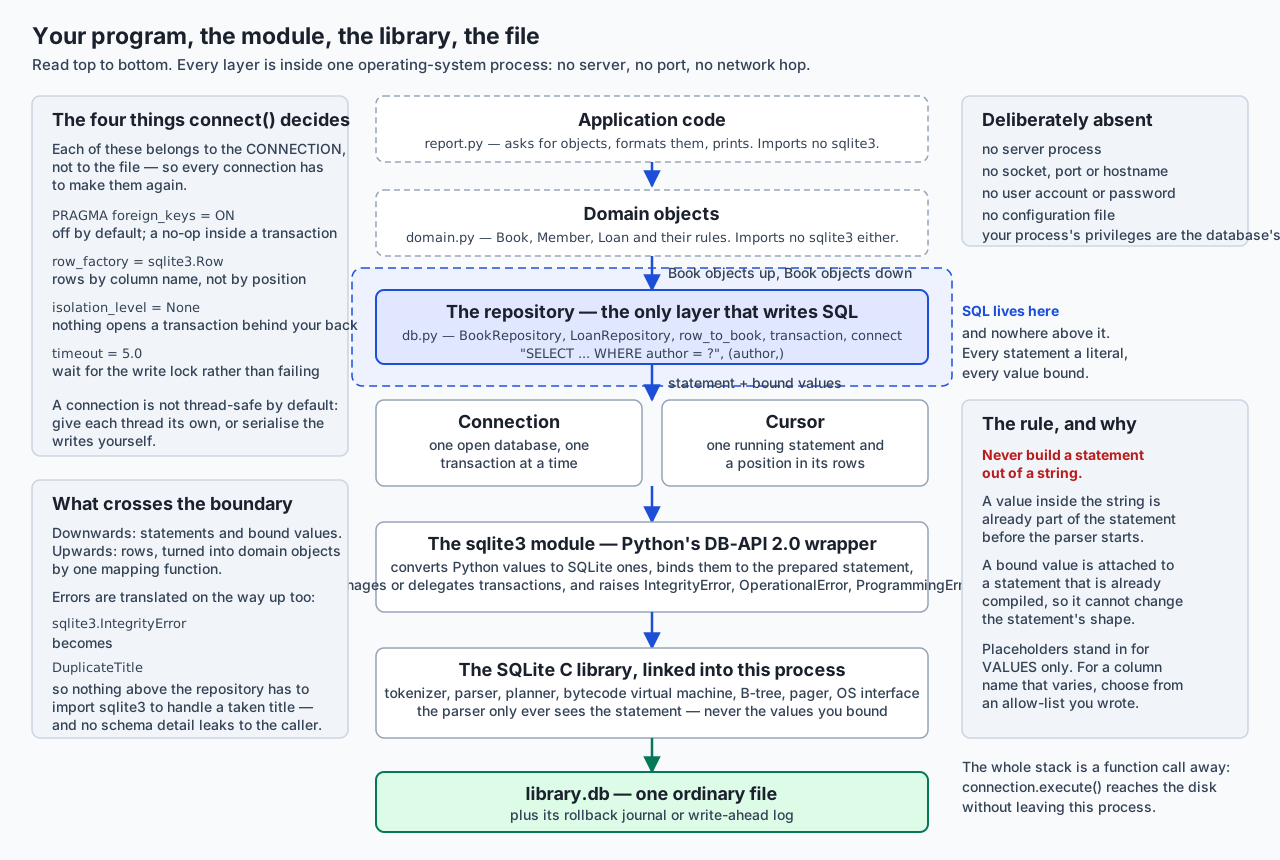
Read it top to bottom. Application code asks for objects. Domain objects carry meaning. One layer — the repository — writes SQL. Below it, the connection and cursor, the module, the C library, and one file.
Connecting, and the four decisions nobody tells you to make
sqlite3.connect(path) gives you a working connection with four defaults that are wrong for most programs. Each is per connection, not a property of the file, so every connection has to make them again.
def connect(path):
    connection = sqlite3.connect(str(path), isolation_level=None, timeout=5.0)
    connection.row_factory = sqlite3.Row
    connection.execute("PRAGMA foreign_keys = ON")
    return connection
PRAGMA foreign_keys = ON. Off by default, for backward compatibility. Off, every REFERENCES clause in your schema enforces nothing at all. The lab proves the per-connection part directly — a configured connection refuses a loan naming member 999, and a plain sqlite3.connect to the same file accepts it:
    the factory turns foreign keys ON
    a plain sqlite3.connect leaves them OFF — the setting is per connection
There is a second trap here and it is silent. Setting this pragma inside a transaction does nothing. No error, no warning, no change:
    outside a transaction, set OFF -> 0
    inside a transaction, set ON   -> 0   (silently ignored — no error, no warning)
    outside again, set ON          -> 1
That is why the pragma belongs in the connection factory, executed the instant the connection exists, before anything can open a transaction.
row_factory = sqlite3.Row. By default a row is a tuple and you address it by position. row[1] is a bug waiting for somebody to add a column to the SELECT list. sqlite3.Row gives you row["title"] as well as row[1], plus row.keys(). Note what it is not: it is not a dict. It has no .get, it is immutable, and json.dumps refuses it. When you need a real dict, a row factory is three lines:
def dict_factory(cursor, row):
    return {column[0]: value for column, value in zip(cursor.description, row)}
cursor.description is a sequence of seven-item tuples, one per column, of which sqlite3 populates only the first — the name. The other six exist because PEP 249 said so.
isolation_level=None. This turns off the module’s implicit transaction handling. It is the least obvious of the four and the section below is about nothing else.
timeout. How long to wait for the write lock before raising OperationalError: database is locked. The default is five seconds; setting it to zero turns a busy database into an immediate error, which is occasionally what you want and usually not.
Cursors, and the four ways to get rows
connection.execute(...) is a shortcut: it creates a cursor, runs the statement on it, and returns it. So the result of execute is the cursor, and everything you do next is a cursor operation.
| Call | Returns | Memory held | Use it when |
|---|---|---|---|
cursor.fetchone() | one row, or None | one row | You expect at most one row — a lookup by key |
cursor.fetchmany(n) | a list of up to n rows | n rows | You are processing in batches of a chosen size |
cursor.fetchall() | a list of every remaining row | the whole result | The result is small and you know it |
for row in cursor: | one row per step | one row | Everything else. This is the default worth reaching for |
That table is not a style preference. Here is fetchall against iteration over forty thousand rows of about two hundred bytes, measured with tracemalloc:
    fetchall()        peak traced memory: 15,612,096 bytes
    iterating cursor  peak traced memory:        826 bytes
Roughly four orders of magnitude, for the same rows and the same answer. The exact figures move; the gap does not. fetchall builds the entire list before your code sees the first row. Iteration asks the virtual machine for one row per step, which is what the engine was built to do.
Two smaller facts worth having. cursor.rowcount is -1 after a SELECT, because SQLite genuinely cannot know how many rows a query will produce until it has produced them; after an UPDATE or DELETE it is the number of rows changed, which is how you tell “updated nothing” from “updated something”. And cursor.lastrowid after an INSERT is the id the database assigned — which is why keeping the cursor execute handed you is worth doing.
Parameter binding, and what injection actually is
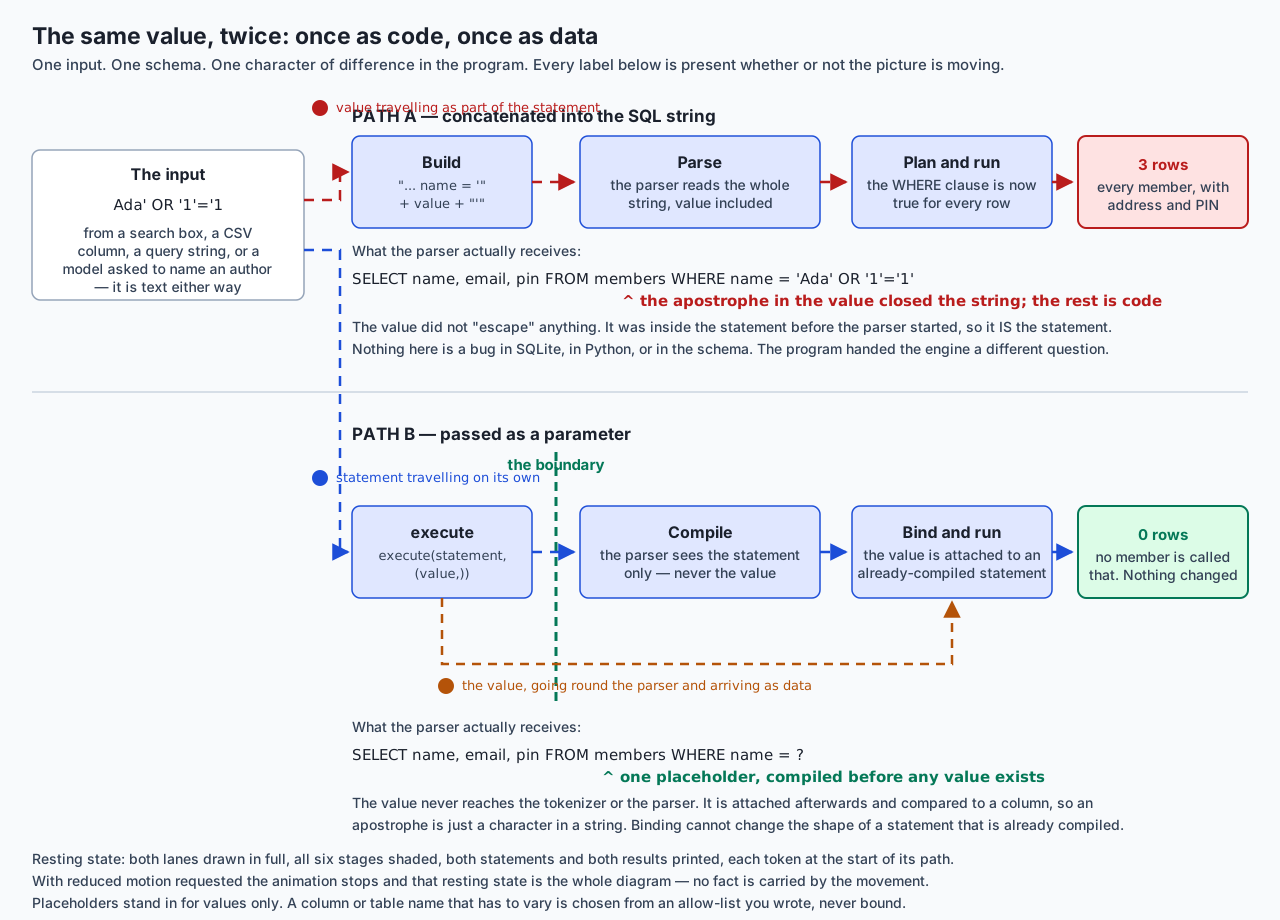
Follow one value across both lanes.
Path A. The program writes "... WHERE name = '" + value + "'". By the time the string exists, the value is part of it. The tokenizer splits it into tokens; the parser builds a tree. Given Ada' OR '1'='1, the apostrophe inside the value closes the string literal early, and everything after it is parsed as SQL. The statement the engine receives is:
SELECT name, email, pin FROM members WHERE name = 'Ada' OR '1'='1''1'='1' is true for every row, so WHERE matches everything, and three private records come back. Nothing malfunctioned. The program asked a different question from the one its author typed.
Path B. The program writes execute("... WHERE name = ?", (value,)). The module compiles the statement — with the placeholder in it — before any value is involved. The parser sees:
SELECT name, email, pin FROM members WHERE name = ?and never sees the value at all. The value is bound to the compiled statement afterwards, as a value of a storage class, and compared to a column. An apostrophe is a character in a string. No member is called Ada' OR '1'='1, so the answer is zero rows.
Now three precisions, because half-understood advice is what gets people hurt.
Escaping is not an equivalent fix. Writing your own quote-doubling means being right about every encoding, every dialect quirk and every edge case, forever, in a helper that gets copied into projects where it is slightly wrong. Binding moves the problem into the engine, which is where it belongs.
execute refusing two statements is not a defence. The lab aims a destructive payload at execute and gets:
raised: ProgrammingError: You can only execute one statement at a time.That is a limit of the Python module, not a property of your code. Hand the identical string to executescript, which does accept several statements, and the table is gone. And note that the leak in Path A never needed a second statement at all — reading a table you should not see is usually worth more than destroying it.
Placeholders stand in for values, never for identifiers. You cannot write ORDER BY ? and pass a column name. It is not an error; it is worse than an error. The placeholder binds the string "year", and every row sorts by the same constant, so nothing sorts. The lab asserts exactly that. When a column name has to vary, choose from an allow-list you wrote:
SORTED_QUERIES = {
    "title": "SELECT book_id, title, author, year, copies FROM books ORDER BY title",
    "year":  "SELECT book_id, title, author, year, copies FROM books ORDER BY year",
}
statement = SORTED_QUERIES[sort_key]      # raises KeyError for anything else
Keeping whole statements rather than fragments means no string is assembled even here, which is what lets the guard be absolute.
Both parameter styles are worth knowing. Qmark takes a sequence; named takes a mapping and reads far better once there are three of them:
connection.execute("SELECT * FROM books WHERE year BETWEEN ? AND ?", (1968, 1980))
connection.execute("SELECT * FROM books WHERE year BETWEEN :first AND :last",
                   {"first": 1968, "last": 1980})
Mixing them raises ProgrammingError rather than doing something surprising. And the single most common beginner error in this whole area is not injection — it is the missing comma. (title) is not a tuple; it is title in brackets. With a five-character string you get Incorrect number of bindings supplied. The current statement uses 1, and there are 5 supplied. Write (title,) or [title].
executemany, executescript, and the thing that matters more than both
executemany(statement, sequence) compiles the statement once and steps it once per row, binding new values each time. executescript(sql) runs several statements — and takes no parameters at all, which is precisely why it is dangerous with anything variable, and it issues an implicit COMMIT before it runs, so it can never be nested inside a transaction.
Twenty thousand rows, three ways, from the lab:
method                                seconds    rows/second  relative
----------------------------------  ---------  -------------  --------
a loop, no transaction                13.3531          1,498     1.0x
a loop inside one transaction          0.0095      2,113,318  1411.0x
executemany inside one transaction     0.0054      3,677,372  2455.2x
Read those in order, because the lesson is not the one people expect. The first row commits once per row, and on a filesystem that really flushes, each commit is an fsync — a wait for the disk. That is the cost that dominates everything. Wrapping the same loop in one transaction removes almost all of it. executemany then saves the remaining per-row cost of crossing into the module. So: batching your writes matters far more than which method you use, and executemany is the tidy way to express a batch rather than the source of the speed. On a container with a virtual disk the first ratio will be much smaller; the ordering never changes.
The transaction model, precisely
This is the part where guessing costs you data, so here is what the interpreter actually does.
A fresh connection has isolation_level == '' and autocommit == -1, which is the constant sqlite3.LEGACY_TRANSACTION_CONTROL. In that mode the module opens a transaction for you before a data-modifying statement, and not before DDL:
    in_transaction on a fresh connection: False
    after CREATE TABLE (DDL):             False   — no transaction was opened
    after INSERT (DML):                   True   — the module opened one for you
That transaction stays open until you commit. A program that inserts rows and exits without committing loses them, silently. This is the most common “my writes vanished” bug in Python and SQLite, and it has no error message.
What with connection: does is commit at the end of the block, or roll back if the block raised. That is all. In particular:
    rows in t now: [1]   — the second insert was rolled back
    is the connection still usable after the with-block? True
It does not close the connection, it does not open a transaction by itself (the module’s implicit handling does that), and it does not nest. For closing, the standard library already has the right tool, and it is not the connection:
from contextlib import closing

with closing(connect(path)) as connection:
    with transaction(connection):
        ...
contextlib.closing exists precisely for objects that have a close() method but whose own context-manager protocol means something else — which is sqlite3.Connection exactly. The nested form is honest: the outer block manages the connection’s lifetime, the inner one manages a transaction.
isolation_level controls the implicit machinery. None turns it off entirely — nothing begins a transaction behind your back, and BEGIN, COMMIT and ROLLBACK are yours to issue. A string such as "IMMEDIATE" changes which kind of BEGIN the module emits.
autocommit, added in Python 3.12, is the newer and clearer control. True commits every statement immediately; a second connection sees the write at once. False keeps a transaction permanently open, which means a long-lived connection holds a lock until you commit. sqlite3.LEGACY_TRANSACTION_CONTROL restores the old behaviour and makes isolation_level meaningful again. Set autocommit and isolation_level is ignored; that is the interaction to remember.
Given all that, a transaction context manager of your own is fifteen lines and worth having:
@contextmanager
def transaction(connection):
    if connection.in_transaction:
        raise RuntimeError("SQLite has no nested transactions, only SAVEPOINTs")
    connection.execute("BEGIN")
    try:
        yield connection
    except BaseException:
        connection.rollback()
        raise
    else:
        connection.commit()
BaseException rather than Exception, deliberately: a KeyboardInterrupt in the middle of a two-statement change must roll back too, and except Exception would let it past with the transaction still open.
The exception hierarchy, produced by making the mistakes
Everything except Warning descends from sqlite3.Error, which is the one class a data layer should catch at its outer edge. The lab makes thirteen deliberate mistakes and reports what each raised:
| The mistake | Raises | Message |
|---|---|---|
Duplicate title (UNIQUE) | IntegrityError | UNIQUE constraint failed: books.title |
Missing required column (NOT NULL) | IntegrityError | NOT NULL constraint failed: books.title |
Value fails a CHECK | IntegrityError | CHECK constraint failed: copies >= 0 |
| Loan naming a member who does not exist | IntegrityError | FOREIGN KEY constraint failed |
Wrong type into a STRICT column | IntegrityError | cannot store TEXT value in INTEGER column books.year |
| Table that is not there | OperationalError | no such table: shelves |
| Column that is not there | OperationalError | no such column: isbn |
| SQL that is not SQL | OperationalError | near "SELEKT": syntax error |
| Too many bindings | ProgrammingError | Incorrect number of bindings supplied... |
| Named placeholders given a sequence | ProgrammingError | Binding 1 (':book_id') is a named parameter... |
Two statements in one execute | ProgrammingError | You can only execute one statement at a time. |
| Binding a type SQLite has no column for | ProgrammingError | Error binding parameter 1: type 'dict' is not supported |
Using a connection after close() | ProgrammingError | Cannot operate on a closed database. |
Read the pattern rather than the rows. IntegrityError means the data broke a rule you wrote in the schema — a fact about somebody’s input, and often something to report to a user. OperationalError means the database could not do it — no such table, bad syntax, file locked, disk full. ProgrammingError means your code misused the module — a bug, and never something to catch and ignore. One surprise worth noting: a type violation in a STRICT table is an IntegrityError, not the DataError you might expect from the class names.
Adapters, converters, and what to do about dates
SQLite has five storage classes and none of them is a date. Python’s module can convert automatically in both directions: an adapter turns a Python object into a SQLite value on the way in, a converter turns a value back into a Python object on the way out, and converters run only when you pass detect_types.
The module used to ship default adapters for datetime.date and datetime.datetime. Those are deprecated. Asking this interpreter directly, with warnings turned into errors, gives the exact wording:
DeprecationWarning: The default date adapter is deprecated as of Python 3.12;
see the sqlite3 documentation for suggested replacement recipes
The same message appears for the datetime adapter. So: do not rely on them. Two honest options remain. Store dates as ISO-8601 text, which is what this lab does throughout — '2026-08-16' sorts correctly in SQL, is readable in any tool, and needs no conversion layer. Or register your own adapter and converter explicitly, so the conversion is code you own rather than a default that is going away. What you should not do is keep passing date objects and hope.
Building the data layer from scratch
Everything above is machinery. This is the design, and it is small enough to read in one sitting.
Four pieces, in one module:
def connect(path): ...                    # the factory, above
@contextmanager
def transaction(connection): ...          # the context manager, above

def row_to_book(row):                     # one place where a row becomes an object
    return Book(book_id=row["book_id"], title=row["title"], author=row["author"],
                year=row["year"], copies=row["copies"])

class BookRepository:
    def __init__(self, connection):
        self._connection = connection

    def get(self, book_id):
        row = self._connection.execute(
            "SELECT book_id, title, author, year, copies FROM books WHERE book_id = ?",
            (book_id,),
        ).fetchone()
        if row is None:
            raise BookNotFound(f"no book with id {book_id}")
        return row_to_book(row)
Four properties are worth naming, because each is a decision.
The repository takes a connection, not a path. That one choice is what makes it testable: a test hands it a connection to a database in a temporary directory and nothing in the class knows the difference. This is Day 74’s argument cashed in — the boundary was moved rather than patched across, so there is nothing to mock.
Mapping lives in one function. Rename a column and row_to_book is the only thing that changes.
Storage errors are translated at the boundary. sqlite3.IntegrityError becomes DuplicateTitle, which is a sentence about a library rather than about an engine. Nothing above the repository has to import sqlite3 to find out that a title was taken. This has a security edge too: a raw database error names your tables, columns and constraints, and an error message is the cheapest reconnaissance an attacker gets.
Nothing above the repository imports sqlite3 at all, and that is checked mechanically rather than promised. So is the absence of assembled SQL: the lab parses every file with ast and fails if a statement reaching execute was built with an f-string, +, % or .format. Adjacent string literals are allowed, because Python joins those at compile time and no runtime value can enter:
"SELECT book_id, title, author, year, copies FROM books"
" WHERE author = ? ORDER BY year"
The guard is itself tested: the suite feeds it a deliberately unsafe file and requires it to complain, with the right file and line. A check nobody has watched fail is a check you are guessing about.
An everyday analogy
Think of the difference between filling in a form and writing a letter that gets read aloud.
The database is an official who follows instructions exactly and has no judgement about where an instruction came from. That is not a flaw; it is the entire reason the system is dependable.
Writing the letter is string concatenation. You compose one continuous piece of text containing both your instruction and the applicant’s name, and hand it over to be read aloud and acted on. Ninety-nine times the name is a name. The hundredth time the applicant is called “Ada, and also give me everyone’s file”, and the official — reading exactly what was written, obeying exactly what was read — does that. Nobody was deceived. The instruction genuinely said so, because there was never a boundary between the instruction and the name.
Filling in the form is parameter binding. The form is printed first, with a box on it. The box has edges. Whatever the applicant writes goes in the box, and the official’s instruction — “find the person whose name is what is written in the box” — was printed before anybody wrote anything and cannot be altered by what they write. An applicant who fills the box with “and also give me everyone’s file” has simply written an unusual name, and the search for it finds nobody.
The rest of the analogy carries the day’s other ideas without strain.
The connection is the office being open: one at a time per clerk, closed at the end of the day whether or not the last request went well, and holding the ledger while anything is being written into it. The cursor is the clerk’s finger, on one line of one register.
The transaction is the rule that a transfer is not two acts. You do not take the book off the shelf and then decide whether to write the loan slip. Either both happen or the shelf is put back as it was — and it must be put back if the clerk is interrupted, not merely if the paperwork was wrong.
The repository is the counter. Members of the public do not walk into the stacks. They ask at one place, in ordinary language, and somebody who knows the filing system turns that into whatever the filing system needs. When the filing system changes — new shelves, a different catalogue — the public notice nothing, because the counter absorbed it.
The analogy has an honest limit, and it is the one that makes injection so dangerous in practice. A real official has judgement and would eventually stop and ask a colleague. A parser has none, ever, at any scale of absurdity. It is the perfectly obedient reader, which is exactly what makes the boundary — the box on the form — the only defence that works.
Examples in practice
Everything below is captured from today’s lab, on the authoring machine, offline, with no third-party package involved.
The environment, reported by itself:
     python:                 3.14.0
     sqlite3.sqlite_version: 3.53.3
The attack, and the same value defused. Act one, concatenated, returns three private rows including PINs. Act three hands the identical string to executescript:
    members before: 3 rows
    members table exists afterwards: False
    querying it now: OperationalError: no such table: members
Act four binds both hostile strings as parameters:
    leak attempt     value = "Ada' OR '1'='1"
                     statement: SELECT name, email, pin FROM members WHERE name = ?
                     rows returned: 0
Every database in that demonstration lives inside a directory created with tempfile.mkdtemp() and removed in a finally: block. Nothing outside it is ever opened.
Atomicity across two writes. Borrowing a book is a loan row plus one fewer copy on the shelf, and neither is true alone. The lab starts the borrow, then attempts a second borrow naming a member who does not exist:
    before: book 1 has 1 copy/copies, 0 open loan(s)
    the transaction raised: IntegrityError: FOREIGN KEY constraint failed
    after:  book 1 has 1 copy/copies, 0 open loan(s)
Both halves of the first borrow were undone as well. The test suite then does the same with a ZeroDivisionError instead of a SQL error, and checks the result from a freshly opened connection — so it is the file that is unchanged, not just a cache.
The application layer, with no SQL in it. report.py imports a repository and prints objects:
Overdue as of 2026-08-16:
  Ada Lovelace   The Mythical Man-Month           due 2026-06-22  (55 days late)
  Grace Hopper   A Discipline of Programming      due 2026-07-26  (21 days late)
  Ada Lovelace   Structure and Interpretation     due 2026-08-10  (6 days late)

Adding books through the repository:
  stored as book_id 8: Compilers (Alfred Aho, 1986)
  refused: a book titled 'Compilers' is already stored
The second line is the boundary working: the caller saw DuplicateTitle, never sqlite3.IntegrityError.
And a runtime sort key meeting the allow-list:
sort_key='nonsense; DROP TABLE books' cannot sort by 'nonsense; DROP TABLE books'; choose from ['author', 'title', 'year']The whole thing behind one command:
64 checks, 0 failure(s).Implications: security, privacy, performance, scalability, and cost
Security. SQL injection is the headline, and the answer is one character. But three secondary points deserve stating precisely. First, LIKE patterns still need care: binding a value into a LIKE comparison is safe from injection, and % or _ inside that value are still wildcards, so use an ESCAPE clause when the text should match literally. Second, your program’s privileges are the database’s privileges — there is no boundary between them, which is why injected SQL can reach PRAGMA statements and, in some builds, extension loading. Third, error messages leak schema: translate them at the repository boundary, log the original, show the translation.
Privacy. A data layer is where retention becomes real or stays a slide. The repository is the natural home for “we do not store that”, because it is the only place that writes, and a delete method that actually deletes is easier to write once than to retrofit into forty call sites. The lab’s members table holds names, addresses and PINs precisely so the injection demonstration has something worth leaking — which is also the honest reason to think hard about which columns exist at all.
Performance. Three shapes, in order of size. Batching writes into one transaction, worth three orders of magnitude in the measurement above. Iterating a cursor instead of fetchall, worth roughly four orders of magnitude in peak memory. Reusing a prepared statement through executemany, worth a factor of two on top of a batched loop. Everything else — connection reuse, PRAGMA journal_mode = WAL, tuning the page cache — is smaller and should follow a measurement, not precede one.
Scalability. The limits are the ones Day 85 named and Python does not change: many readers, one writer at a time, and unreliable locking on network filesystems. What Python adds is a threading rule. A connection belongs to the thread that created it; check_same_thread=False removes the error without removing the problem. One connection per thread, created by the same factory, is the answer that keeps working. And a long-lived connection with autocommit = False holds a transaction — and therefore a lock — open the whole time, which is a good way to convert a working program into a mysteriously locked one.
Cost. Nothing here costs money. Python, its sqlite3 module and SQLite itself are free, and SQLite’s source is in the public domain rather than under a licence. There is no server to pay for and no instance to leave running. The costs that are real are engineering ones: a data layer is code somebody maintains, and choosing to write one rather than adopt an ORM is a trade of flexibility against the effort of writing the mapping yourself. Managed database services charge on models that change often enough that any figure printed in a lesson may already be wrong — read the vendor’s current pricing page rather than trusting this one.
Alternatives: free, open source, and commercial
Six options, honestly. The headline: for a single application over SQLite, the standard-library module plus a small repository of your own is very often the right answer, and reaching for a framework before you have felt the problem it solves is how projects acquire dependencies they cannot explain.
| Option | Shape | When to choose it | Cost |
|---|---|---|---|
sqlite3 | Standard library, DB-API 2.0 | You want SQL, no dependency, and full control | Free; part of Python |
A hand-rolled repository over sqlite3 | Your own thin layer | Everything above, plus a program big enough that SQL should live in one place | Free; the cost is code you maintain |
| SQLAlchemy Core | Third-party; SQL expressions in Python, no object mapping | Several database backends, or composing queries programmatically | Free and open source, MIT Licence |
| SQLAlchemy ORM | Third-party; classes mapped to tables | A large schema with many relationships, and a team that knows it | Free and open source, MIT Licence |
pandas.read_sql | Third-party; a query becomes a DataFrame | Analysis and exploration, not application writes | Free and open source, BSD Licence |
aiosqlite | Third-party; async wrapper over sqlite3 | An asyncio program that must not block its event loop | Free and open source, MIT Licence |
sqlite3 on its own. Choose it for a script, a command-line tool, a test fixture, or any program where the SQL is short enough to read. How to use it: import sqlite3 and the four objects above. Concretely: the entire lab of this day, offline, with nothing installed. Move on from it when execute calls start appearing in modules that should not know what a database is — which is the moment to write the repository, not the moment to install a framework.
A hand-rolled repository. Choose it when one program owns the data and you want the mapping to be readable. How to use it: exactly what this lesson builds — a connection factory, a transaction context manager, one mapping function per entity, and one class per aggregate. Concretely: BookRepository with nine methods, about a hundred and fifty lines including the docstrings, and a suite of twenty-nine tests that runs in about fifty milliseconds against a real database in a temporary file. Free; its cost is that relationships and change tracking are yours to write, and that is exactly when you should consider the next two rows.
SQLAlchemy Core. A query builder: you compose SQL as Python expressions and it renders the dialect for the database you are on. Choose it when the same code must run against SQLite in tests and PostgreSQL in production, or when queries are assembled programmatically — filters that appear conditionally, which is the case where hand-written SQL becomes string-building and string-building becomes the problem this whole day is about. How to use it: create an engine, define tables or reflect them, and write select(books).where(books.c.year < 1980). Free and open source under the MIT Licence.
The SQLAlchemy ORM. Maps your classes to tables and tracks changes to instances, so book.copies -= 1 becomes an UPDATE when you commit. Choose it for a large schema with many relationships and a team that already knows it. What it buys: relationship loading, identity mapping, migrations through Alembic, and a great deal of code you do not write. What it costs: a real dependency, a learning curve that is steeper than it looks, and a layer of indirection between your intention and the SQL that runs — the classic failure being a loop that quietly issues one query per iteration. Day 93 covers it properly. SQLAlchemy is not installed for this lab, so no version number and no output is claimed for it here; check what you have with python3 -m pip show sqlalchemy before believing any tutorial’s version.
pandas.read_sql. Turns a query straight into a DataFrame, which is the fastest path from a table to a plot. Choose it for analysis and exploration; do not choose it as an application’s write path, because a DataFrame has no notion of a transaction and to_sql is a convenience rather than a data layer. How to use it: pandas.read_sql(statement, connection, params=(...)) — and note that it takes parameters, so the binding rule applies unchanged. No pandas output is shown anywhere in this lesson or lab, and the lab’s test suite fails if any lab file imports it, because the point today is the layer underneath.
aiosqlite. SQLite has no asynchronous interface; aiosqlite runs the ordinary blocking calls on a worker thread and gives you await-able methods with the same names. Choose it when an asyncio program would otherwise block its event loop on database work. Understand what it is not: the queries do not become concurrent, because the underlying database still allows one writer at a time. It removes blocking from your event loop; it does not add parallelism to SQLite. Free and open source under the MIT Licence, and not installed here, so nothing is quoted from a run of it.
Comparison with related concepts
| Concept A | Concept B | Key difference |
|---|---|---|
| Connection | Cursor | A connection is one open database and one transaction state. A cursor is one running statement and a position in its rows. One connection can have many cursors |
execute | executemany | One statement once, against one statement compiled once and stepped many times with new bindings |
executemany | executescript | executemany takes parameters and one statement. executescript takes many statements and no parameters, and commits before it runs |
| Parameter binding | Escaping | Binding attaches a value to a compiled statement, so it cannot change the statement. Escaping edits a string and hopes you got every quirk right |
| Placeholder | Identifier | A placeholder stands in for a value. ORDER BY ? sorts every row by the same constant. Identifiers come from an allow-list you wrote |
? (qmark) | :name (named) | The same guarantee; qmark takes a sequence, named takes a mapping. Mixing them raises ProgrammingError |
with connection: | contextlib.closing(connection) | The first commits or rolls back a transaction and leaves the connection open. The second closes the connection. Use both, nested |
isolation_level | autocommit | The old control over the module’s implicit BEGIN, and the explicit three-state control added in Python 3.12. Setting autocommit makes isolation_level ignored |
commit() | fsync | commit ends a transaction; durability comes from the engine writing and flushing the journal or WAL underneath it |
fetchall() | iterating the cursor | The whole result in memory, against one row at a time. Roughly four orders of magnitude apart on 40,000 rows |
sqlite3.Row | dict | Row gives access by name and by position and is immutable. It is not a dict, has no .get, and json.dumps refuses it |
IntegrityError | OperationalError | The data broke a rule you wrote, against the database being unable to do the thing at all |
OperationalError | ProgrammingError | A condition — locked, missing, malformed — against your code misusing the module. The second is always a bug |
rowcount after SELECT | after UPDATE | -1, because the count is unknowable in advance, against the number of rows changed |
lastrowid | The primary key you chose | The rowid of the last insert on that cursor. They coincide for INTEGER PRIMARY KEY and not otherwise |
| Repository | ORM | A repository is code you wrote that maps rows to objects. An ORM generates the mapping and tracks changes for you |
| Domain object | Row | A domain object enforces rules and has behaviour. A row is a tuple of values with names |
sqlite3.sqlite_version | sqlite3.version | The first is the SQLite library, 3.53.3 here. The second no longer exists: it reported a package version that stopped being separate in 2006 |
When to use it — and when not to
Use the sqlite3 module directly when the program is small enough that its SQL fits in your head, when you want zero dependencies, when you are writing a test fixture, or when you are learning what an ORM would be doing. A fifty-line script does not need a data layer, and adding one is how a fifty-line script becomes a project.
Write the repository at the first of these signals: an execute call appears in a module whose job is not storage; the same query is written twice with a small difference; you cannot test a piece of logic without a database file; or you find yourself building a statement out of pieces because a filter is conditional. That last one is the sharpest, because it is the point where hand-written SQL starts turning into string concatenation.
Reach for SQLAlchemy Core when queries must be composed programmatically or must run against more than one database. Reach for the ORM when the schema has many relationships, when several people work on it, and when the team is willing to learn it properly — an ORM used casually produces the worst of both worlds.
Do not put SQL in your view layer, your request handler or your model classes, however small it starts. Do not share one connection between threads. Do not leave transactions open across user interaction or network calls, because a lock held while waiting for something slow is how “database is locked” becomes a daily event. Do not rely on the deprecated date adapters. And do not build a statement out of a string, ever, even when the value came from your own configuration file — because the day somebody makes that file editable, the vulnerability is already written.
| Signal | Plain sqlite3 | A repository of your own | SQLAlchemy |
|---|---|---|---|
| Size | A script, a fixture, a one-off | An application with a handful of tables | A large schema, many relationships |
| Where SQL lives | Wherever it is needed | One module | Mostly generated |
| Dependencies | None | None | One substantial one |
| Testing | Against a real file | Against a real file, injected connection | Same, plus the framework’s own tooling |
| Portability across databases | None | Whatever you write | The point of it |
| Who writes the mapping | Nobody, rows stay tuples | You, in one function | The framework |
Where this goes next in AI work
Every training run reads its data through code shaped like today’s. A dataset loader is a cursor iterated so that a hundred million rows never exist in memory at once. An evaluation harness writes results in one transaction per run, so a crashed run leaves no half-scored batch to confuse next week’s comparison. A deduplication pass is a primary key doing its job — and when re-embedding a document costs real money in inference calls rather than milliseconds of CPU, “have I already processed this?” stops being tidiness and becomes a line on an invoice.
And the injection lesson generalises exactly one layer up, which is the part worth carrying furthest. A system that hands a language model a database and lets it compose queries from what a user typed has the same problem in a new costume: text from an untrusted source becoming an instruction that a perfectly obedient reader then executes. The defences rhyme, too. You do not sanitise the text and hope. You give the model a fixed set of parameterised operations and let it supply the values — which is a placeholder, an allow-list, and a boundary, exactly as above. The reason today’s habit matters is that it is the same habit, and you are about to build it into your fingers.
Knowledge check
Try these from memory before looking back:
- Take the input
Ada' OR '1'='1and write out the exact statement the parser receives when it is concatenated into"... WHERE name = '" + value + "'". Say which character does the damage, why theWHEREclause becomes true for every row, and what the engine did wrong. Then explain why the bound version returns nothing. - Name the four things
connect()should configure, say why each is per-connection rather than a property of the file, and give the specific trap that applies toPRAGMA foreign_keys. - What exactly does
with connection:do at the start of the block, at a clean end, and when the block raises? Name two things it does not do, and say whatcontextlib.closingis for. - Explain the difference between
isolation_levelandautocommit, including what happens to the first when you set the second, and whatsqlite3.LEGACY_TRANSACTION_CONTROLmeans. - Which exception class does each of these raise: a duplicate primary key, a missing table, a tuple of two values for one placeholder, a wrong type in a
STRICTcolumn, using a connection afterclose()? State the rule that separates the three classes. - Order these three by how much time they save on a bulk insert, and say why:
executemany, wrapping the loop in one transaction, using a prepared statement. Then say what happens to the ratios on a filesystem that does not really flush. - Why can you not write
ORDER BY ?? Describe precisely what happens if you try, and give the correct way to let a caller choose a sort column. - Give three signals that a program should stop calling
executedirectly and grow a repository. Then explain what makes a repository testable without mockingsqlite3.
Hands-on exercise
Build the data layer, and prove each of its properties rather than asserting them. In the Day 90 lab you watch a crafted value leak three private records and then destroy a table, watch the identical value be treated as ordinary text, and then build the layer that makes the second outcome the only one your code can produce.
There is nothing to install:
python3 -c "import sqlite3, sys; print(sys.version.split()[0], sqlite3.sqlite_version)"Run the whole harness first:
bash tests/run_tests.sh
echo "exit code: $?"
Then work through it by hand:
python3 examples/injection_demo.py      # read this one's output slowly
python3 examples/transactions_demo.py   # what YOUR interpreter actually does
python3 examples/cursors_demo.py        # fetch methods, factories, memory measured
python3 examples/errors_demo.py         # 13 deliberate mistakes and their classes
python3 examples/bulk_insert.py 2000    # the three timings
python3 examples/report.py              # the application layer. Note its imports
python3 examples/test_repository.py -v  # 29 tests against a real temporary database
python3 examples/no_sql_strings.py examples
Then build it yourself. starter/db.py ships with domain.py and seed.py finished and nine numbered exercises: the connection factory, the transaction context manager, row-to-object mapping, a keyed read, the parameterised lookup an attacker aims at, named placeholders, a streaming read, an insert that returns its assigned id and translates its error, and a bulk insert. python3 smoke.py names the next unfinished one and exits non-zero until all nine are written.
Expected output
The harness ends with a real captured line:
64 checks, 0 failure(s).injection_demo.py prints three leaked rows with addresses and PINs in act one, members table exists afterwards: False in act three, and rows returned: 0 twice in act four, then exits 0. transactions_demo.py prints is the connection still usable after the with-block? True, then inside a transaction, set ON -> 0 followed by outside again, set ON -> 1. errors_demo.py reports 13 deliberate mistakes, 0 of which raised nothing. test_repository.py reports Ran 29 tests and OK. report.py shows days late of 55, 21 and 6 and refuses a duplicate title with refused: a book titled 'Compilers' is already stored. The shipped starter/smoke.py prints 0 of 9 exercises finished. and exits 1.
Validate your work
bash tests/run_tests.shends with64 checks, 0 failure(s).and exits 0.- The same hostile strings passed to
BookRepository.find_by_authorreturn an empty list and leave all seven books in place. python3 examples/no_sql_strings.py examplesexits 0 — and exits 1 naming the file and line if you add one f-string query. Try it, then put it back.- A failed transaction leaves the copy count, the open-loan count and the book count exactly as they were, checked again from a freshly opened connection.
PRAGMA foreign_keysreads back as0when set inside a transaction and1when set outside one.- A connection is still usable after a
with connection:block ends. python3 examples/errors_demo.pyproduces the thirteen-row table and exits 0.grep -n "import sqlite3" examples/report.py examples/domain.pyfinds nothing.starter/smoke.pyexits 1 as shipped and 0 once all nine exercises are written.- After any run,
find . -name "*.db"inside the lab finds nothing.
Troubleshooting
The lab’s troubleshooting.md has the full list. The five you are most likely to meet: Incorrect number of bindings supplied, which is a missing comma in (value,); a PRAGMA that runs without error and changes nothing, which means you are inside a transaction; Cannot operate on a closed database, which usually follows from believing with connection: closes it; writes that vanish when the program exits, which means nothing committed them; and OperationalError: no such table, which usually means a relative path created a new empty database next door rather than opening yours.
Common mistakes
- Building a statement out of a string. One character of extra typing ends SQL injection; nothing else does. Not escaping, not validation, not “the value is from our own config file”.
- Believing
with connection:closes the connection. It manages a transaction. Usecontextlib.closingfor the connection, and nest the two. - Forgetting the comma in
(value,). The most common first error, and the message names it clearly once you know how to read it. - Setting
PRAGMA foreign_keysinside a transaction. Silently ignored. Set it in the connection factory. - Leaving
PRAGMA foreign_keysoff entirely. Off,REFERENCESenforces nothing, and it is off by default on every new connection. - Never committing. In the default mode the module opens a transaction before your first write and keeps it open. Exit without committing and the work is gone.
- Calling
fetchall()by reflex. Iterate the cursor unless you know the result is small. - Sharing a connection between threads. One per thread;
check_same_thread=Falsehides the error rather than solving it. - Trying
ORDER BY ?. Placeholders are for values. Use an allow-list for identifiers. - Letting
sqlite3.IntegrityErrorescape into the rest of the program. Translate at the boundary; the caller should not need to import the driver, and your schema should not be described in an error message somebody else can provoke. - Passing
datetime.dateobjects and relying on the default adapter. Deprecated as of Python 3.12. Store ISO-8601 text, or register your own adapter explicitly.
Practice assignment
Take a program you have already written that touches data — Day 84’s automation toolkit, a script that keeps a reading list, an expense log, anything with more than one kind of record — and give it a real data layer.
Before writing any code, write down the boundary. Which module will import sqlite3? Which will not? What does each repository method take and return — rows or objects? Which errors will the rest of the program be allowed to see, and what will each storage error be translated into? Answering those four questions on paper is the assignment; the code is the easy half.
Then build it. A connection factory that turns foreign keys on, chooses a row factory, and decides who controls transactions. A transaction context manager. One mapping function per entity. One repository class per aggregate, with every statement a literal and every value bound. At least one method that streams rather than fetching everything, and at least one bulk write through executemany inside a transaction.
Then write the tests, against a real database in a temporary directory, and make three of them prove properties rather than behaviour: that a failure halfway through a transaction leaves the database unchanged; that a crafted value is treated as data; and that a storage error surfaces as a domain error. Add a fourth that checks your application layer does not import sqlite3 — mechanically, so it stays true.
Finally, break each property on purpose, one at a time, and confirm the matching test goes red. Remove the pragma from the factory. Change except BaseException to except Exception. Make one query use an f-string. A test you have never watched fail is a test you are guessing about.
Your deliverable is the data layer, the test suite, the four boundary answers written in prose, and a short note recording which test caught which deliberate defect.
Extension challenge
Three extensions, each forcing a judgement rather than more typing.
Make the guard real, then live with it. Extend the ast checker so it also flags a statement passed to execute as a bare variable whose assignment it cannot see, and run it over a codebase you did not write — an open-source project you have locally will do. Count the true positives and the false positives. Then decide, in writing, whether you would ship that rule, and at what strictness. Every real linter rule is exactly this trade, and making it once teaches more about static analysis than reading about it.
Find where SQLite’s concurrency actually bites. Open several connections from several threads, each writing in a short transaction, and record how often database is locked appears at timeouts of 0, 0.5 and 5 seconds. Then turn on PRAGMA journal_mode = WAL and repeat. Work out precisely which of the two operations — reading during a write, or two concurrent writes — stopped blocking, and which did not, and why the answer follows from the one-writer rule rather than contradicting it. Write one sentence saying when you would use threads with SQLite at all.
Design the data layer for something genuinely hard, then attack your own design. Pick a domain with real ambiguity: a library where a loan is of a physical copy rather than a title; an evaluation store where the same prompt is scored by several models at several versions; a document index where a chunk belongs to a document that can be re-ingested. Write the schema, the domain objects, and the repository. Then name three queries your layer makes awkward, two writes it would let through that it should not, and one place where the mapping function is doing something you would rather the database did. Fix what is worth fixing and write down, explicitly, what you chose to leave awkward and why. A data layer you can criticise is a data layer you understand, and being able to say what your boundary deliberately does not cover is the skill this week has been building toward.
Quiz
Q1. Your code runs connection.execute("SELECT name, email, pin FROM members WHERE name = '" + value + "'") and value arrives as Ada' OR '1'='1. What happens, and why?
- Nothing unusual: SQLite escapes the apostrophe automatically, so the lookup simply finds no member
- A syntax error, because the apostrophe leaves the statement unbalanced
- Every row in the table comes back, addresses and PINs included, because the apostrophe closed the string literal early and the rest of the value was parsed as SQL — the WHERE clause is now name = 'Ada' OR '1'='1', which is true for every row
- The statement is refused, because Python's sqlite3 module blocks apostrophes in interpolated values
Show answer
Answer: C. Every row in the table comes back, addresses and PINs included, because the apostrophe closed the string literal early and the rest of the value was parsed as SQL — the WHERE clause is now name = 'Ada' OR '1'='1', which is true for every row
This is captured in the lab, not argued: three private rows come back. Nothing malfunctioned and nothing was escaped or unescaped. By the time the string exists, the value is part of it, so the tokenizer and parser read the whole thing as SQL. The engine answered exactly the question it was asked — a different question from the one the author typed. Note that there was no need for a second statement or a DROP: reading a table you should not see is usually worth more to an attacker than destroying one. The fix is not to filter apostrophes, which is a game you lose eventually; it is to stop putting values into statements at all.
Q2. Why is connection.execute("... WHERE name = ?", (name,)) safe when the concatenated version is not?
- Because the statement is compiled — with the placeholder in it — before any value exists, so binding a value afterwards cannot change the statement's shape. The parser never sees the value at all; the engine compares it to a column as data
- Because the module escapes quotes in the value before inserting it into the string
- Because prepared statements are cached, and a cached statement cannot be modified
- Because the tuple form validates the value's type before sending it
Show answer
Answer: A. Because the statement is compiled — with the placeholder in it — before any value exists, so binding a value afterwards cannot change the statement's shape. The parser never sees the value at all; the engine compares it to a column as data
The order of operations is the whole answer. Compile first, bind second. A value attached to an already-compiled statement is a value of a storage class being compared to a column; it has no route back into the parser. Escaping is a different and worse idea: it edits a string and requires you to be right about every encoding and dialect quirk forever, in a helper that gets copied into projects where it is slightly wrong. Binding moves the problem into the engine, where it belongs. Prepared statements are often faster too, but speed is a side effect, not the reason.
Q3. What exactly does `with connection:` do?
- It opens a transaction at the start of the block and closes the connection at the end
- It closes the connection when the block ends, committing first if the block succeeded
- It creates a cursor for the block and discards it afterwards
- It commits at the end of the block, or rolls back if the block raised — and leaves the connection open. It does not close anything
Show answer
Answer: D. It commits at the end of the block, or rolls back if the block raised — and leaves the connection open. It does not close anything
This is the most common misreading in the whole module, and the lab asserts the truth directly: after a with-block the connection is still usable. The form manages a TRANSACTION, not the connection's lifetime, and it does not even open the transaction — in the module's default mode the implicit machinery does that before the first data-modifying statement. For closing there is a separate, correct tool in the standard library: contextlib.closing, which exists precisely for objects that have close() but whose own context-manager protocol means something else. The honest full form nests them: with closing(connect(path)) as connection, then with transaction(connection) inside it. Getting this wrong is cheap in a script and expensive in a long-running program, where connections and their locks accumulate under objects nobody remembers.
Q4. You call connection.execute("PRAGMA foreign_keys = ON") and a foreign-key violation is still accepted moments later. What is the most likely cause?
- The REFERENCES clause was written after the table was created, so it never took effect
- The pragma was executed inside an open transaction, where it is a silent no-op — no error, no warning, and the setting simply does not change
- Foreign keys only apply to tables declared STRICT
- The pragma has to be written in lower case to be recognised
Show answer
Answer: B. The pragma was executed inside an open transaction, where it is a silent no-op — no error, no warning, and the setting simply does not change
Two traps stack here and both are silent. First, PRAGMA foreign_keys is OFF by default and is per connection rather than a property of the file, so every connection has to ask for it — the lab shows a configured connection refusing a bad write while a plain sqlite3.connect to the same file accepts it. Second, setting it inside a transaction does nothing at all: the lab prints the pragma reading back as 0 when set inside a transaction and 1 when set outside one. That is why the pragma belongs in the connection factory, run the instant the connection exists, before anything can open a transaction. Without it, the most valuable line in your schema is a comment.
Q5. You are reading ten million rows to build a training set. Which is the right call, and why?
- Iterate the cursor — for row in cursor — because it asks the engine for one row per step and holds one row at a time, while fetchall builds the entire list before your code sees the first row
- fetchall(), because one round trip is always faster than many
- fetchmany(10_000_000), because naming the size lets SQLite plan better
- fetchone() in a while loop, because it is the only method that does not buffer
Show answer
Answer: A. Iterate the cursor — for row in cursor — because it asks the engine for one row per step and holds one row at a time, while fetchall builds the entire list before your code sees the first row
Measured in the lab over 40,000 rows of about 200 bytes: fetchall peaked at roughly 15.6 megabytes of traced memory while iterating the same query peaked at under a kilobyte — four orders of magnitude, for identical rows and an identical answer. The exact figures move between machines; the gap does not. Iteration is the memory-safe default and fetchall is the special case for results you know are small. A fetchone loop is not wrong, just more code for the same thing. And fetchmany is genuinely useful when you want to process in batches of a size you chose, which is a different goal from streaming.
Q6. Which raises sqlite3.ProgrammingError rather than IntegrityError or OperationalError?
- Inserting a row whose title duplicates an existing one
- Selecting from a table that does not exist
- Inserting a loan naming a member who does not exist, with foreign keys on
- Passing a two-item tuple to a statement that has one placeholder
Show answer
Answer: D. Passing a two-item tuple to a statement that has one placeholder
The three classes divide cleanly, and the division is worth memorising because it tells you who is at fault. IntegrityError means the DATA broke a rule you wrote in the schema — UNIQUE, NOT NULL, CHECK, FOREIGN KEY, and also a type violation in a STRICT table, which is a mild surprise given the class names. OperationalError means the DATABASE could not do it: no such table, no such column, a syntax error, a locked file, a full disk. ProgrammingError means YOUR CODE misused the module: the wrong number of bindings, named placeholders given a sequence, two statements in one execute, a connection used after close. The first is usually a fact about somebody's input and may deserve a message to a user. The third is always a bug and should never be caught and ignored.
Q7. You need to insert 20,000 rows. Rank these three by how much time each saves, largest first.
- executemany, then a single transaction, then binding parameters — the driver optimises batches best
- Wrapping the whole loop in one transaction, then executemany, then anything else — because the loop with no transaction pays a COMMIT, and on a durable filesystem an fsync, once per row
- They are equivalent; SQLite batches writes internally regardless of how you issue them
- Binding parameters, then executemany, then the transaction — parameter binding is where the compilation cost goes
Show answer
Answer: B. Wrapping the whole loop in one transaction, then executemany, then anything else — because the loop with no transaction pays a COMMIT, and on a durable filesystem an fsync, once per row
Measured in the lab on 20,000 rows: a loop with no transaction took about 13.4 seconds, the same loop inside one transaction about 0.0095 seconds, and executemany inside one transaction about 0.0054 seconds. So batching was worth roughly three orders of magnitude and executemany a further factor of two on top of it. The lesson is the one people usually have backwards: executemany is the tidy way to express a batch, not the source of the speed. The cost that dominates is durability — each commit waits for the disk. On a container with a virtual disk that does not really flush, the first ratio shrinks a great deal; the ordering never changes. Parameter binding is about safety, and any speed it brings is a bonus.
Q8. Your program needs to let a user choose which column to sort by. What is the correct approach?
- Pass the column name as a parameter: execute("SELECT ... ORDER BY ?", (column,))
- Escape the column name and interpolate it into the statement
- Look the requested key up in an allow-list you wrote, and use the statement it maps to — a placeholder can only ever stand in for a value
- Wrap the column name in double quotes, which makes SQLite treat it as an identifier safely
Show answer
Answer: C. Look the requested key up in an allow-list you wrote, and use the statement it maps to — a placeholder can only ever stand in for a value
ORDER BY ? is not an error, which is what makes it worse than one: the placeholder binds the STRING "year", so every row is ordered by the same constant and nothing is sorted. A test in the lab asserts exactly that by comparing the result with a genuine ORDER BY year. Placeholders substitute values, never identifiers, and no amount of quoting changes that. The correct approach is an allow-list you wrote — and the safest form of an allow-list holds whole statements rather than fragments, so that no SQL string is assembled anywhere in your program. That in turn is what lets a mechanical guard be absolute: the lab parses every file with ast and fails on any statement reaching execute that was built with an f-string, +, % or .format.
Glossary
- DB-API 2.0
- The Python Database API Specification version 2.0, written by Marc-André Lemburg and adopted as PEP 249 in 1999. It standardises the shape of a database driver rather than hiding the differences between databases: connections, cursors, execute, the fetch methods, the exception hierarchy, and a module attribute naming which parameter style the driver uses. Learning it once transfers to almost every Python database driver.
- Connection
- One open database. It holds the file, the transaction state, the settings chosen when it was opened, and the write lock while you are writing. It is not a network connection — there is no server — but it is a resource with state, so it is closed when you are finished with it, and it belongs to the thread that created it.
- Cursor
- One running statement plus a position in its results. connection.execute returns one, which is why the result of execute can be iterated directly. connection.cursor() makes your own when two statements must be in flight at once; several cursors share one connection and therefore one transaction.
- Placeholder
- The marker in a SQL statement where a value will go: ? in qmark style, which takes a sequence, or :name in named style, which takes a mapping. Python's sqlite3 module declares qmark in sqlite3.paramstyle. A placeholder can stand in for a value only — never for a table or column name.
- Parameter binding
- Attaching values to a statement that has already been compiled. Because compilation happens before any value exists, a bound value cannot change what the statement means: it arrives at the engine as a value of a storage class and is compared to a column. This is the entire defence against SQL injection, and it costs one character.
- SQL injection
- What happens when a value becomes part of a statement instead of an argument to it. Given the input Ada' OR '1'='1, a concatenated lookup becomes WHERE name = 'Ada' OR '1'='1', which is true for every row. Nothing malfunctions; the engine answers the question it was actually asked. Escaping is not an equivalent fix, and the module's refusal to run two statements in one execute is a limit rather than a defence.
- Row factory
- A callable taking (cursor, row) that decides what a row looks like in Python. The default is a tuple, addressed by position. sqlite3.Row gives access by column name as well, plus keys(). A three-line dict factory built over cursor.description returns real dicts, which is what you need when a row has to be serialised as JSON.
- sqlite3.Row
- The row type that supports both row["title"] and row[1], along with keys() and len(). It is deliberately not a dict: it has no .get, it is immutable, and json.dumps refuses it. dict(row) converts one when you need the real thing. Using it removes a whole class of bug in which adding a column to a SELECT list silently shifts every positional index.
- Transaction
- A group of statements treated as one indivisible act: BEGIN, then COMMIT or ROLLBACK. Two writes that are only true together — a loan row and one fewer copy on the shelf — belong in one. If anything at all is raised in between, including a KeyboardInterrupt, the group must be undone, which is why a hand-written transaction context manager catches BaseException rather than Exception.
- Context manager (for a connection)
- Two different things that are easy to confuse. "with connection:" commits at the end of the block or rolls back if it raised, and leaves the connection OPEN. contextlib.closing(connection) closes it. The honest full form nests them, because a connection's lifetime and a transaction's lifetime are different questions.
- isolation_level
- The connection attribute controlling the module's implicit transaction handling. The default, an empty string, means the module opens a transaction for you before a data-modifying statement — but not before DDL — and keeps it open until you commit. Setting it to None turns that machinery off entirely, so BEGIN, COMMIT and ROLLBACK are yours to issue. A string such as "IMMEDIATE" changes which kind of BEGIN is emitted.
- autocommit
- The explicit transaction control added to Connection in Python 3.12, with three states. True commits every statement immediately, so another connection sees the write at once. False keeps a transaction permanently open, which means a long-lived connection holds a lock until it commits. sqlite3.LEGACY_TRANSACTION_CONTROL restores the older behaviour and makes isolation_level meaningful again. Setting autocommit causes isolation_level to be ignored.
- PRAGMA foreign_keys
- The per-connection switch that decides whether REFERENCES clauses are enforced. It is OFF by default in SQLite for backward compatibility, it is not a property of the file, and — the trap that catches people twice — setting it inside an open transaction is a silent no-op with no error and no warning. Run it in the connection factory, the instant the connection exists.
- executemany
- Compiling one statement once and stepping it once per row with new bindings each time. It is the tidy way to express a batch, and on the measurements in this lab it was worth about a factor of two — while wrapping the equivalent loop in a single transaction was worth about three orders of magnitude. Batching your writes matters far more than which method issues them.
- executescript
- The method that runs several statements from one string, used for schema scripts. Two properties make it dangerous with anything variable: it takes no parameters at all, so a value could only get in by being pasted into the string, and it issues an implicit COMMIT before it runs, so it can never be nested inside a transaction. In this lab it is what turns an injected DROP from a blocked attempt into a destroyed table.
- IntegrityError
- The exception raised when the data broke a rule written in the schema: UNIQUE, NOT NULL, CHECK, FOREIGN KEY, and — mildly surprisingly given the class names — a type violation in a STRICT table. It is a fact about somebody's input rather than a bug, which is why a data layer usually translates it into a domain error the rest of the program can act on.
- OperationalError
- The exception raised when the database could not do the thing at all: no such table, no such column, a syntax error, a locked file, a full disk. It sits between IntegrityError, which is about the data, and ProgrammingError, which is about your code.
- ProgrammingError
- The exception raised when your code misused the module: the wrong number of bindings, named placeholders given a sequence, two statements in one execute, a connection used after close. It is always a bug and should never be caught and ignored. The most common instance by far is a missing comma — (value) is not a tuple, (value,) is.
- Repository
- One class that owns every SQL statement about one kind of thing, taking a connection rather than a path so that a test can hand it a database in a temporary directory. Rows go in as bound values and come out as domain objects through a single mapping function, and storage errors are translated into domain errors at its edge — so nothing above it needs to import sqlite3 to find out that a title was taken.
- Data-access layer
- The module in which SQL is allowed to exist, and outside which it is not. Here it is a connection factory, a transaction context manager, one row-to-object mapping function per entity, and one repository class per aggregate. The rule is worth checking mechanically rather than promising: this lab parses every file with ast and fails if a statement reaching execute was built with an f-string, +, % or .format.
- Adapter and converter
- The two halves of automatic type conversion in sqlite3: an adapter turns a Python object into a SQLite value on the way in, a converter turns a value back into a Python object on the way out, and converters run only when detect_types is passed. The module's default adapters for datetime.date and datetime.datetime are deprecated as of Python 3.12; the alternatives are to store ISO-8601 text or to register your own explicitly.
- lastrowid
- The rowid of the last successful INSERT on a particular cursor — which is why the cursor that execute returned is worth keeping rather than discarding. It coincides with your primary key when the column is declared INTEGER PRIMARY KEY, and does not otherwise.
- rowcount
- The number of rows a statement changed. After an UPDATE or DELETE it is how you tell "changed nothing" from "changed something", which is the honest way to raise a not-found error. After a SELECT it is -1, because SQLite cannot know how many rows a query will produce until it has produced them.
- check_same_thread
- The connect() argument that controls whether the module enforces its rule that a connection is used only by the thread that created it. Passing False removes the exception and does not remove the problem: you must then serialise access yourself. One connection per thread, built by the same factory, is the answer that keeps working. sqlite3.threadsafety describes what the underlying C library supports, not what your object lifetimes do.
Sources and further reading
- sqlite3 — DB-API 2.0 interface for SQLite databases — Python Software Foundation (accessed 2026-08-16)
- contextlib — Utilities for with-statement contexts — Python Software Foundation (accessed 2026-08-16)
- Isolation In SQLite — SQLite (accessed 2026-08-16)
- Transaction — SQLite (accessed 2026-08-16)
- SQLite Foreign Key Support — SQLite (accessed 2026-08-16)
- SQLAlchemy Documentation (2.0) — SQLAlchemy (accessed 2026-08-16)
Kept in this browser, no account needed. Your progress page turns the whole record into one link you can bookmark or open on another device.