Math, Statistics, and Data › pandas and Data Wrangling › Day 121
Day 121: Loading and Inspecting Data
After this lesson you will be able to name the exact reason a country-code column reads "NA" for Namibia as a missing value by default, and fix it with keep_default_na=False; explain why an identifier column of "00123" silently becomes the integer 123 unless you pin dtype={"col": "str"}; show, with a captured value, why an integer past 2**53 is exact as int64 but corrupted by a float64 cast; state what parse_dates changes about a date column's dtype and construct a case where a string-sorted date column gives the wrong chronological order; diagnose an encoding mismatch as either a UnicodeDecodeError or silent mojibake and fix it with the correct encoding= argument; read a file larger than memory with chunksize and confirm a chunk-by-chunk aggregate equals the whole-file answer exactly; demonstrate, with a real round-trip, that CSV loses dtypes and Parquet preserves them exactly; run the eight-command inspection battery on an unfamiliar frame and say what each command is for; and convert a low-cardinality string column to category and report the memory reduction as a ratio rather than a byte count.
Hands-on lab for this lesson
Lab files on GitHub: https://github.com/ai-roadmap-365/ai-roadmap-365.github.io/tree/main/labs/sections/math-statistics-and-data/day-121-loading-and-inspecting-data
- Get the hands-on files. Clone the labs repository once (you can reuse this clone for every lesson). This works on macOS, Linux, and Windows (PowerShell or WSL):
git clone https://github.com/ai-roadmap-365/ai-roadmap-365.github.io.git cd ai-roadmap-365.github.io - Open this lesson's lab. Move into the directory for this specific day. Every lab lives at the same predictable path — section / subsection / week / day:
cd labs/sections/math-statistics-and-data/day-121-loading-and-inspecting-data - Read the lab guide. Open `README.md` in that directory. It lists the exact commands, what each does, the expected output, and how to check your work — read it before running anything.
- Run it and check your work. Follow the README's "How to run" section: run the example first to see the finished result, then complete the numbered exercises in `starter/`, then run the tests. The tests pass (exit 0) only when your work is correct.
bash tests/run_tests.sh # or the test command named in the lab README
You can also open the lab as a local page (works offline, shows the file tree and expected output).
Learning objectives
By the end of this lesson you will be able to:
- Explain why read_csv() reading the string "NA" as a missing value by default is not a bug, and fix it with keep_default_na=False when a literal "NA" value must survive
- Preserve a leading-zero identifier column with dtype={"col": "str"} instead of letting it silently become a shorter integer
- Demonstrate that an integer above 2**53 survives read_csv()'s int64 inference exactly, but is silently corrupted by a float64 cast, and show the exact differing digit
- State what parse_dates changes about a date column's dtype, and construct a case where a string-sorted date column returns the wrong chronological order
- Diagnose an encoding mismatch as UnicodeDecodeError or silent mojibake, and fix it by naming the correct encoding= argument
- Read a file larger than memory with chunksize, and confirm a chunk-by-chunk aggregate equals the whole-file aggregate exactly
- Demonstrate with a real round-trip that CSV loses dtypes -- specifically that a nullable Int64 column with a missing value becomes float64 -- while Parquet preserves every dtype and value exactly
- Run the eight-command inspection battery (.head, .info, .dtypes, .describe, .isna().sum(), .nunique(), .value_counts(), memory_usage(deep=True)) on an unfamiliar frame and state what each command is for
- Convert a low-cardinality string column to category and report the memory reduction as a ratio, never a byte count
- Choose among CSV, JSON, Parquet, SQL and Excel for a given loading task, and state when to prefer each, including which is free versus paid
- Read a file with the stdlib csv module and say when it beats pandas: streaming, exact control, no type inference
- Trace how a silently truncated ID or a silently missing country code, introduced at load time, can corrupt a feature column months before a model trained on it shows any symptom
Prerequisites
- Day 120 -- pandas Series and DataFrames: the index, dtypes including the pandas-3.0 str default and Int64/int64 promotion, and Copy-on-Write. Not re-taught here.
- Days 92-98 -- data formats and pipelines, and the habit of reading data before trusting it
- Week 13 -- SQL and SQLite, which this lesson's read_sql() example uses directly
- A working python3 on your PATH; the lab creates its own virtual environment with pandas 3.0.5 pinned exactly
Why this matters
Run this on pandas 3.0.5 and read it twice before moving on:
>>> df = pd.read_csv("country_codes.csv")
>>> df
  code        country
0  NaN        Namibia
1   US  United States
2   FR         France
The file on disk says NA,Namibia. The DataFrame says NaN,Namibia. Nothing raised. Nothing warned. read_csv() ran, returned a plausible-looking three-row table, and quietly deleted the fact that Namibia’s ISO country code is the two letters “N” and “A” — because pandas’ default list of strings that mean “missing data” happens to include the literal string "NA". Namibia does not disappear loudly. It disappears the way every silent load-time failure disappears: as a value that now looks exactly like ordinary missing data, and every downstream count of “how many rows are missing a country code” is wrong in a way no test catches unless you already knew to look for it.
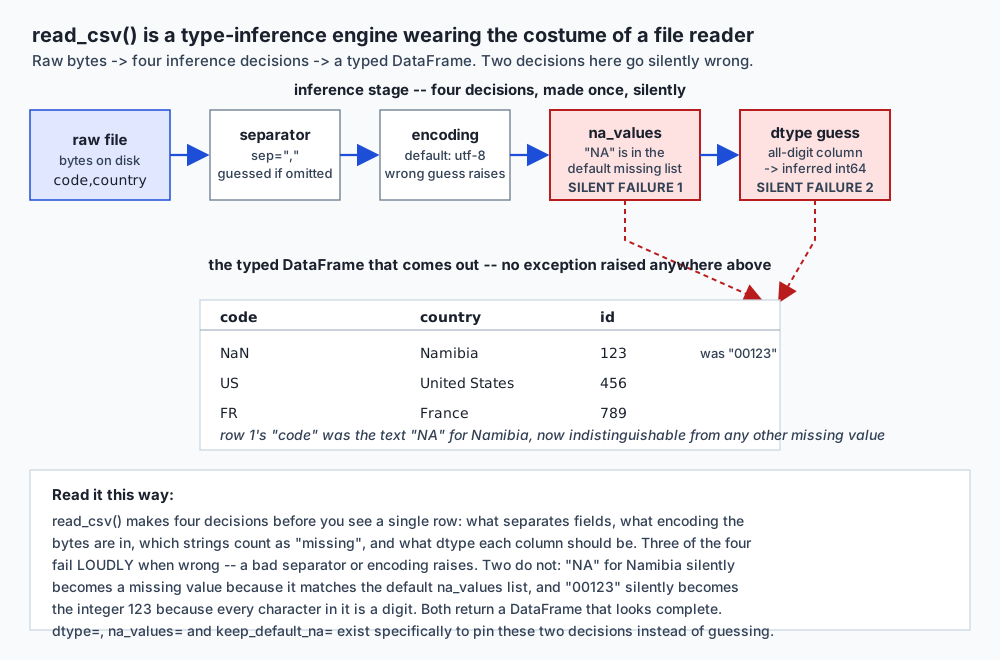
This is the entire subject of this lesson, stated as bluntly as it deserves: read_csv() is not a file reader. It is a type-inference engine wearing the costume of a file reader. A CSV file has no types at all — every byte in it is plain text. Before you see a single row, read_csv() has already made four separate decisions on your behalf: what character separates fields, what encoding the bytes are in, which strings count as “missing”, and what dtype each column should be. Two of those four decisions — the separator and the encoding — fail loudly when pandas guesses wrong, with a real exception you cannot miss. The other two — na_values and dtype inference — fail silently, returning a DataFrame that parses cleanly, prints cleanly, and is quietly, permanently wrong in a specific cell.
Here is the second failure, and it is one you will meet at work within a month of touching real data:
>>> pd.read_csv(io.StringIO("id,name\n00123,Alice\n")).loc[0, "id"]
np.int64(123)
An identifier column of 00123 — the kind that shows up as a ZIP code, an account number, a product SKU — is read, by default, as the integer 123. Every character in it was a digit, so read_csv()’s inference engine did exactly what it is designed to do: it inferred a number. The leading zeros are gone. The join against another system that still stores this identifier as the text "00123" will fail, silently, one row at a time, and nothing in the traceback will point at the moment the zeros were lost — because there is no traceback. Nothing failed. The join just found no match.
Day 120 built the foundation this lesson stands on: a DataFrame is aligned Series sharing an index, dtypes carry real information (including pandas 3.0’s str default and the int64-to-float64 promotion the moment a missing value enters an integer column), Copy-on-Write is unconditional, and .loc/.iloc disagree about their slice endpoints in a way that catches everyone once. Every one of those facts assumed the DataFrame already existed, correctly typed, in memory. This lesson is about the moment before that — the moment a file becomes a DataFrame, where every one of Day 120’s dtype rules is first decided, and where a guess made once, silently, at load time, can corrupt a column before a single line of analysis code has run.
The AI-practice stakes are exactly what they were on Day 120, pushed one step earlier in the pipeline: a feature column is only as trustworthy as the load that produced it. An ID silently truncated by float conversion, or a category silently read as missing, does not raise an exception during training. It produces a model trained on subtly wrong data, and the failure surfaces months later as unexplained drift that nobody can trace back to a read_csv() call from a data pipeline nobody has looked at since. Today’s inspection battery — eight commands, run in order, on every unfamiliar frame — is the cheapest insurance available anywhere in this course.
The idea in plain language
Here is the plain version, with no code yet.
A CSV file is not a table. It is text — rows of characters separated by commas, with no more inherent structure than a letter. pandas.read_csv()’s job is to turn that text into a typed table, and to do that, it has to guess what every column is: numbers, dates, text, true/false, missing. It is usually right. When you write a normal-looking spreadsheet of prices and dates and names, read_csv() correctly infers float64 for the prices, str for the names, and leaves the dates as text unless you tell it otherwise. Most of the time, this guessing is completely invisible, because it is completely correct, and that is exactly what makes the times it is wrong so dangerous — you have had no practice noticing.
Look at the architecture diagram below. Raw bytes enter on the left. Four gates decide what comes out on the right: the separator (usually a comma, but sometimes a guess), the encoding (usually UTF-8, but not always what the file actually is), which text strings count as “missing” (na_values), and what dtype each column becomes. The first two gates are drawn as ordinary white boxes because when they guess wrong, they say so — a wrong separator produces an obviously malformed table, and a wrong encoding raises UnicodeDecodeError. The last two gates are drawn in red, flagged, because when they guess wrong, the result looks completely normal. "NA" becomes a missing value. "00123" becomes 123. The DataFrame that comes out the other end has the right shape, the right column names, and two cells that are quietly, permanently different from what the file actually said.
The fix, in every case this lesson covers, is the same shape of fix: name the decision instead of letting pandas guess it. keep_default_na=False says “no string means missing unless I tell you so.” dtype={"id": "str"} says “this column is text, don’t infer a number.” parse_dates=["date"] says “this column is a date, don’t leave it as a string.” encoding="latin-1" says “these bytes are latin-1, don’t assume UTF-8.” None of these are exotic — they are the ordinary arguments to an ordinary function call — and the entire discipline this lesson teaches is knowing which five or six of read_csv()’s roughly fifty parameters actually prevent real damage, and reaching for them by habit rather than by accident, after the damage has already shipped.
Watch the animated version of the two failures side by side: the same raw column — "00123" and "NA" — flows through two different calls to read_csv() on the identical file. In the top path, an unguarded call guesses, and both values change: "00123" collapses to 123, "NA" becomes missing. In the bottom path, the same file is read again with dtype and keep_default_na pinned, and both values arrive on the right exactly as the file wrote them.
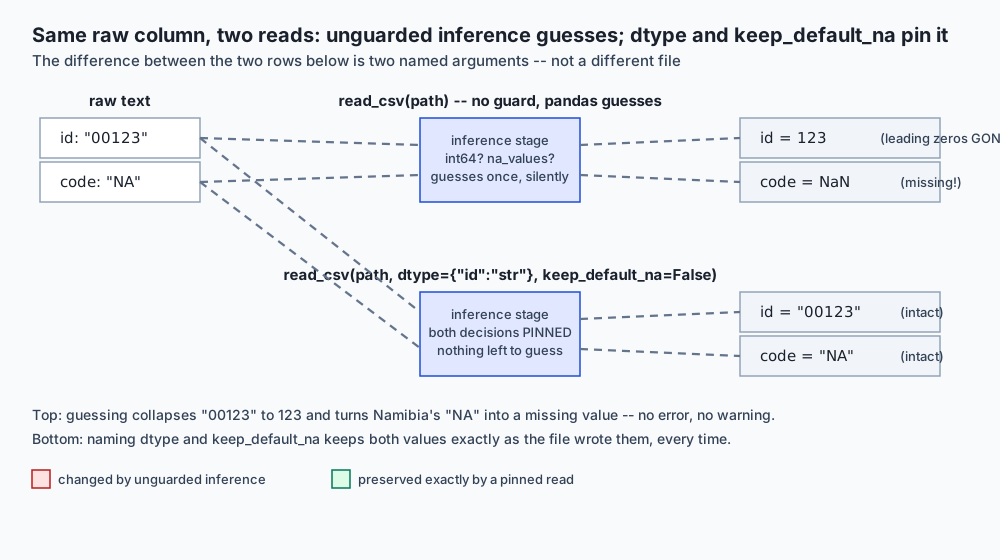
The everyday-analogy section below carries this further, but the short version: think of read_csv() as a new hire filling out an intake form by guessing the meaning of every field from its handwriting, rather than being told which field is which. Most guesses land right. The ones that don’t look identical to the ones that do, on the finished form — the only way to catch them is to know the specific fields where guessing is dangerous, and check those by hand every time.
Historical background
The problem this lesson exists to solve — turning a text file of unknown structure into a correctly typed table — is not new to pandas; it is as old as the CSV format itself. RFC 4180, published in October 2005 by the Internet Engineering Task Force, was the first attempt at a formal specification for what “comma-separated values” actually means, codifying conventions — quoting, escaping embedded commas, line endings — that had already existed as folklore for over two decades of ad hoc implementations across spreadsheet programs and database export tools. Even with RFC 4180 in place, the specification says nothing at all about types. A CSV file, formally, is untyped text; every reader of one has always had to supply its own answer to “what does this column actually contain,” and different tools have historically supplied different answers to the exact same file.
pandas’ read_csv(), covered from Day 120’s history section as part of Wes McKinney’s original 2008 project at AQR Capital Management, inherited this ambiguity directly and built an increasingly sophisticated C-based parsing engine to resolve it — the same engine, incidentally, that both object and the pandas-3.0 str dtype are built on top of, tying this lesson directly to Day 120’s dtype discussion. The chunksize parameter, covered in this lesson’s “how it works” section, predates pandas 1.0 by several years, added specifically because financial and scientific datasets routinely exceeded the memory of the machines analyzing them — a problem that has only grown more common as datasets have grown faster than typical RAM.
Apache Parquet, this lesson’s answer to CSV’s dtype-loss problem, was released as an open-source project in March 2013, a joint effort between Twitter and Cloudera, explicitly designed to solve the opposite problem CSV has: a columnar, typed, binary storage format built for exactly the workloads — large-scale, repeated analytical reads — where re-inferring types on every read is both wasteful and, as this lesson’s exercise 7 demonstrates directly, lossy. Parquet became part of the Apache Arrow project’s ecosystem, the same project, referenced throughout Day 120, whose Python bindings (pyarrow) now back several of pandas’ own default dtypes as of pandas 2.0 and 3.0 — Parquet and pandas’ modern dtype system share real, non-coincidental ancestry.
The version installed for this lesson, checked directly rather than assumed:
>>> import pandas; pandas.__version__
'3.0.5'
Everything below that depends on this specific version says so explicitly. The Namibia trap, the leading-zeros trap, and the precision-loss trap are all driven by read_csv()’s inference defaults, which have been broadly stable across recent pandas majors — but the dtype names those defaults print (str versus object, most visibly in the inspection battery’s .dtypes output) are pandas-3.0-specific, exactly as Day 120 established. expected-output/FIELDS.md in this lesson’s lab states precisely which captured values are version-specific and which are not.
What it is — and what it is not
Data loading, in the sense this lesson uses the term, is the process of turning a file on disk — plain text, JSON, a binary columnar format, or a database table — into an in-memory pandas DataFrame with correctly assigned dtypes on every column. pandas.read_csv() is the leading tool for the plain-text case and the one this lesson spends most of its length on, precisely because plain text carries the least information about itself and therefore requires the most guessing.
It is not a validation step. read_csv() succeeding — returning a DataFrame with no exception raised — is not evidence that the data is correct. It is evidence only that the bytes were parseable as some table under the separator, encoding, and inference rules in effect for that call. A file with every date silently misread as text, every ID silently truncated by float promotion, and every "NA" country code silently erased will still “succeed” at read_csv(), print a clean-looking .head(), and pass every check that only tests “did it load.”
It is not idempotent across formats. Day 120 established that a DataFrame is not a spreadsheet; this lesson adds that a DataFrame reconstructed from a CSV is not guaranteed to be the same DataFrame that was written to that CSV. df.to_csv() followed by pd.read_csv() is not, in general, the identity function — dtypes can and do change across that round-trip, which exercise 7 and this lesson’s “How it works” section demonstrate directly, side by side with Parquet, where the round-trip is the identity function.
It is, specifically, the layer where every downstream guarantee this course has built — index alignment, dtype-aware arithmetic, .isna()’s reliability — either holds or silently fails to hold, because every one of those guarantees assumes the dtypes are already correct. If the load got a dtype wrong, everything built on top of it is built on a false premise, and nothing downstream will say so.
Why it was created and what problems it solves
Before a dedicated, careful loading discipline, the alternative was either trusting read_csv()’s defaults unconditionally — which works until the exact moment it silently doesn’t — or hand-writing bespoke parsing code for every file, using the stdlib csv module or raw string splitting, reimplementing type inference badly and slowly for every project that needed it. read_csv() exists to make the common case fast and correct without hand-written parsing, and its dozens of parameters exist because “the common case” is not actually one case: financial data has thousands separators and different decimal marks depending on locale; scientific data has dates in a dozen formats; identifier columns routinely contain values that look numeric but must not be treated as numbers; and real files are written in encodings other than UTF-8 far more often than any tutorial admits.
The specific problem dtype, na_values, keep_default_na and parse_dates solve, concretely: read_csv()’s inference has to commit to an answer with only the evidence inside one column, with no knowledge of what that column means to you. It cannot know that "00123" is an identifier rather than a number, because nothing in the file says so — every character genuinely is a digit, and “infer numbers as numbers” is the objectively reasonable default for the overwhelming majority of numeric-looking columns that are not identifiers. It cannot know that your particular dataset uses the literal string "NA" to mean the country Namibia rather than “missing”, because "NA" legitimately means “missing” in a huge fraction of real-world data, which is exactly why it is in the default list in the first place. These parameters exist because the file alone cannot resolve this ambiguity — only you, the person who knows what the column is supposed to mean, can.
The problem chunksize solves is different in kind: not ambiguity, but scale. A file that does not fit in memory cannot be loaded by pd.read_csv(path) at all — the process runs out of memory and is killed, or, more insidiously on a machine with enough swap, it slows to a crawl without failing outright. chunksize reframes the problem from “load the whole table” to “process the table exactly once, one bounded piece at a time,” which is the only shape of solution that scales past available RAM regardless of how large the file eventually grows.
The problem Parquet solves is, again, different: CSV’s total lack of embedded type information means every read is a fresh inference, and every inference is an opportunity to guess wrong — the Namibia trap and the leading-zeros trap are not edge cases of CSV, they are inherent to a format with no type system at all. Parquet’s answer is structural rather than procedural: write the dtype into the file itself, once, at write time, so every subsequent read is a lookup rather than a guess. This is why exercise 7’s round-trip comparison is this lesson’s single strongest practical argument: it is not a claim about Parquet being generally “better,” it is a demonstrable fact about which format can and cannot lose information on a write-then-read cycle.
How it works
read_csv()’s type-inference engine, and the parameters that actually matter
read_csv() accepts dozens of parameters. Most days, most projects, need six of them, and this lesson covers exactly those six — not as a parameter dump, but each paired with the specific damage it prevents.
dtype — a dict mapping column names to the dtype read_csv() should assign, overriding inference for that column entirely. This is the fix for the leading-zeros trap:
>>> pd.read_csv(io.StringIO("id,name\n00123,Alice\n00456,Bob\n")).dtypes
id      int64
name      str
dtype: object
>>> pd.read_csv(io.StringIO("id,name\n00123,Alice\n00456,Bob\n"), dtype={"id": "str"}).dtypes
id      str
name    str
dtype: object
>>> pd.read_csv(io.StringIO("id,name\n00123,Alice\n"), dtype={"id": "str"}).loc[0, "id"]
'00123'
The damage dtype prevents: any identifier that is not, semantically, a number — account numbers, ZIP codes, product SKUs, phone numbers — silently losing structurally meaningful leading zeros, and every downstream join against a system that kept those zeros silently failing to match.
na_values and keep_default_na — na_values extends or replaces the list of strings treated as missing; keep_default_na=False disables the default list ("NA", "N/A", "null", "NaN", and several more) so nothing is treated as missing unless you say so yourself. This is the fix for the Namibia trap:
>>> pd.read_csv(io.StringIO("code,country\nNA,Namibia\nUS,United States\n"))
  code        country
0  NaN        Namibia
1   US  United States
>>> pd.read_csv(io.StringIO("code,country\nNA,Namibia\nUS,United States\n"), keep_default_na=False)
  code        country
0   NA        Namibia
1   US  United States
The damage this prevents: any dataset that happens to use a legitimate short code — "NA" for Namibia, "OR" for Oregon in a context where "OR" might otherwise mean something else, "IN" for Indiana or India — colliding with pandas’ default missing-value vocabulary and disappearing into an undercount of “real” missing data.
parse_dates — a list (or dict) of columns to parse as datetime64 rather than leaving as text. Covered fully in its own subsection below; the damage it prevents is a date column that sorts in the wrong order the instant its formatting is inconsistent.
sep — the field separator, inferred as a comma by default but overridable for tab-separated (sep="\t"), semicolon-separated (common in European exports, where the comma is the decimal separator), or any other delimiter. Getting this wrong is one of the loud failures: the resulting DataFrame has one giant garbled column instead of several clean ones, obvious on the first .head().
encoding — covered fully in its own subsection below; defaults to UTF-8, and a mismatch either raises loudly (UnicodeDecodeError) or, worse, fails silently (mojibake).
thousands and decimal — locale-sensitive number formatting. A price column written as "1.234,56" (thousands separator ., decimal separator ,, common outside the US) is silently misread as the number one-point-two-three-four if these are not set correctly: pd.read_csv(path, thousands=".", decimal=","). The damage this prevents is exactly the same shape as the precision-loss trap below — a number silently becoming a different, wrong number, with no exception anywhere.
usecols and nrows — not correctness parameters but performance and memory ones: usecols=["id", "price"] reads only the named columns, and nrows=1000 reads only the first N rows, both letting you inspect the shape of a large file without paying to load all of it. The connection to the rest of this lesson: run these first, on any unfamiliar file, before running the full inspection battery on the whole thing.
The precision trap: an integer larger than 2**53
This is the sharpest, most surprising trap in the lesson, because unlike the Namibia and leading-zeros traps, it does not happen inside read_csv() at all — it happens the moment afterward, when a perfectly correctly-inferred int64 column meets a float64 cast.
>>> big_id = 2**53 + 1
>>> big_id
9007199254740993
>>> df = pd.read_csv(io.StringIO(f"order_id\n{big_id}\n"))
>>> df.dtypes
order_id    int64
dtype: object
>>> int(df.loc[0, "order_id"]) == big_id
True
So far, everything is exact. int64 has 64 bits of precision and represents this ID perfectly. The corruption happens the instant something — a join, an arithmetic operation, a naive “cast everything numeric to float” cleanup pass, or, as Day 120 covered, a missing value entering the column and forcing promotion — casts this column to float64:
>>> promoted = df.astype({"order_id": "float64"})
>>> int(promoted.loc[0, "order_id"])
9007199254740992
One digit different. float64 stores every number as a sign, an 11-bit exponent, and a 52-bit mantissa (53 bits of precision including the implicit leading bit), following the IEEE 754 standard Day 120’s NaN-semantics section also depends on. That 53-bit mantissa can represent every integer from 0 up to 2**53 exactly — and 2**53 + 1 is one past that boundary, the smallest integer float64 genuinely cannot represent exactly. It does not raise. It does not round to the nearest representable neighbor and warn you it did so. It silently returns the nearest representable value, which happens to be 2**53 itself — one less than the true ID, with every other digit identical:
exact:     9007199254740993
corrupted: 9007199254740992
The general rule, worth carrying forward past this specific example: any identifier column that is genuinely just a label — an order ID, an account number, a database primary key — should never be allowed to become float64, at any point in its life, because the moment it does, every value past 2**53 (about nine quadrillion — reachable by any system using 64-bit auto-incrementing keys, UUIDs mapped to integers, or timestamp-derived IDs) is one silent cast away from being a different, wrong ID that collides with its neighbor. read_csv()’s int64 inference does not cause this on its own; the danger is entirely in what happens after the load, which is exactly why this trap is easy to miss — the loading code looks completely correct in isolation.
Dates: what parse_dates changes, and why a string date lies
Left unparsed, a date column is just the pandas-3.0 str dtype, Day 120’s default for text — and text sorts the only way text can sort: character by character, left to right.
>>> df = pd.read_csv(io.StringIO("event,date\nfirst,2024-01-05\nsecond,2024-01-20\nthird,2024-1-9\n"))
>>> df.dtypes
event    str
date     str
dtype: object
>>> df.sort_values("date")["event"].tolist()
['first', 'second', 'third']
That looks completely reasonable, and it is completely wrong. "third" is 2024-1-9 — January 9th, chronologically between "first" (January 5th) and "second" (January 20th). Written without a leading zero on the month digit, it sorts as the string "2024-1-9", and at the sixth character, "2024-1" (from "third"’s date) has the digit 1, where "2024-01-... (from "first" and "second"’s dates) has the digit 0. '1' > '0', so "2024-1-9" sorts after both of the other two dates as text — landing last, even though it belongs in the middle chronologically. parse_dates fixes this by converting the column to a real datetime64 dtype, which sorts by actual chronological value rather than by character:
>>> parsed = pd.read_csv(io.StringIO("event,date\nfirst,2024-01-05\nsecond,2024-01-20\nthird,2024-1-9\n"), parse_dates=["date"])
>>> parsed.dtypes
event               str
date     datetime64[us]
dtype: object
>>> parsed.sort_values("date")["event"].tolist()
['first', 'third', 'second']
first, third, second — the correct chronological order. Notice what makes this trap genuinely dangerous rather than an obvious bug waiting to be caught: it is invisible as long as every date in the column happens to share the same width and formatting. It only surfaces the moment formatting becomes inconsistent — a data-entry system that drops leading zeros for single-digit months, a merge of two files with slightly different date conventions, a manual edit — and by the time it surfaces, the sort has already been run, the report already generated, and the wrong order already looks like a plausible chronological list to anyone who has not independently verified it.
Encoding: what pandas assumes, and what happens when it is wrong
read_csv()’s encoding parameter defaults to UTF-8. Most files today genuinely are UTF-8, which is why this default is invisible almost all the time — until it meets a file written in something else, most commonly latin-1 (ISO-8859-1), still common in older exports from Windows systems and legacy databases.
>>> path.write_text("name,city\nJosé,São Paulo\n", encoding="latin-1")
>>> pd.read_csv(path, encoding="utf-8")
Traceback (most recent call last):
  ...
UnicodeDecodeError: 'utf-8' codec can't decode byte 0xe9 in position 3: unexpected end of data
This is the good outcome, and it is worth being explicit about why: it fails loudly. The byte 0xE9 — latin-1’s encoding of é — is not a valid standalone byte under UTF-8’s rules, so decoding raises immediately, with a clear message naming the exact problem byte and position. Naming the correct encoding round-trips the text exactly:
>>> pd.read_csv(path, encoding="latin-1")
   name       city
0  José  São Paulo
But UnicodeDecodeError is not the only possible outcome of an encoding mismatch, and this is the fact almost every introductory treatment of encoding leaves out. Some byte sequences that are valid latin-1 are also valid — but different — UTF-8. When that happens, decoding does not fail at all: it silently produces mojibake, visibly garbled but syntactically valid text, with no exception anywhere to signal that anything went wrong. Whether a given file produces a loud UnicodeDecodeError or silent mojibake depends entirely on the specific bytes it happens to contain — you cannot know in advance which failure mode you will get, which is precisely why “the read succeeded without an error” can never, on its own, be treated as proof the encoding was correct. 05_encoding.py in this lesson’s lab captures the loud failure mode directly, on this specific example, and says so honestly rather than claiming the more dramatic mojibake case occurred when it did not.
Reading in chunks: a file larger than memory, in bounded pieces
chunksize turns read_csv() from a function that returns one DataFrame into a function that returns an iterator of DataFrames, each holding at most chunksize rows, so a file far larger than available memory can be processed by never holding more than one chunk of it in memory at a time.
>>> whole_sum = pd.read_csv(path)["value"].sum()
>>> chunk_sum = sum(chunk["value"].sum() for chunk in pd.read_csv(path, chunksize=1000))
>>> whole_sum == chunk_sum
True
The claim worth stating with total precision: chunking changes how the data arrives, never what it adds up to. An aggregate accumulated chunk by chunk equals the whole-file aggregate exactly, for any chunk size, whether or not that chunk size divides the row count evenly — this lesson’s lab confirms this with both a round chunk size (1000, dividing 50,000 rows evenly into 50 chunks) and a deliberately odd one (777, which does not), specifically to rule out any suspicion that the equality is a coincidence of tidy division.
The format argument: CSV loses dtypes, Parquet keeps them
This is the day’s headline claim, and it deserves to be demonstrated rather than merely asserted. Build a DataFrame with a nullable Int64 column that genuinely contains a missing value — the dtype Day 120 established as the correct choice for any identifier column that might ever meet a NaN — and round-trip it through both formats:
>>> df = pd.DataFrame({"order_id": pd.array([1001, 1002, pd.NA], dtype="Int64")})
>>> df.dtypes
order_id    Int64
dtype: object
Through CSV:
>>> df.to_csv(csv_path, index=False)
>>> pd.read_csv(csv_path).dtypes
order_id    float64
dtype: object
>>> pd.read_csv(csv_path)
   order_id
0    1001.0
1    1002.0
2       NaN
Through Parquet:
>>> df.to_parquet(pq_path)
>>> pd.read_parquet(pq_path).dtypes
order_id    Int64
dtype: object
>>> pd.read_parquet(pq_path)
   order_id
0      1001
1      1002
2      <NA>
The CSV round-trip is not a subtle regression — it silently changes the dtype from the nullable integer type to a float, and every ID that survives now prints with a trailing .0, exactly the symptom Day 120’s dtype-promotion section warned about, arriving here one step earlier, from disk rather than from a reindex. The Parquet round-trip changes nothing at all: same dtype, same missing-value marker (pd.NA, not NaN), same values. This is not because Parquet is “better” in some vague sense — it is because Parquet is a typed, columnar binary format that writes the dtype into the file itself, so reading it back is a lookup rather than a fresh guess, while CSV is plain text with zero embedded type information, so reading it back is unconditionally a fresh guess, every single time, no matter how carefully it was written. This is the strongest practical argument in this entire lesson for not using CSV as an interchange format between your own programs: if two pieces of code you control both need the same data, and dtype correctness matters, Parquet — or any other format that embeds its own schema — removes an entire category of silent corruption that CSV cannot avoid by construction.
Other formats: JSON, SQL, and Excel
JSON, via pd.read_json(), reads a list of records (or several other JSON shapes) directly into a DataFrame, inferring dtypes from JSON’s own richer type system — JSON distinguishes numbers, strings, booleans and null natively, so read_json() does not face the Namibia trap or the leading-zeros trap in quite the same form, though it still infers numeric-looking strings as numbers unless told otherwise:
>>> pd.read_json(json_path)
   id   name  active
0   1  Alice    True
1   2    Bob   False
>>> pd.read_json(json_path).dtypes
id        int64
name        str
active     bool
dtype: objectSQL, via pd.read_sql() against a real connection — here, the standard library’s sqlite3, the same tool Week 13 covered — runs the filtering inside the database rather than loading everything and filtering in pandas afterward:
>>> conn = sqlite3.connect(db_path)
>>> pd.read_sql("SELECT * FROM orders WHERE amount > 10", conn)
   order_id  amount
0         1   19.99
1         2   44.50
Only the two matching rows were ever loaded into pandas — a strategy that scales the same way chunksize does, but by pushing the reduction to the source rather than reading everything and discarding what does not match.
Excel, via pd.read_excel(), needs the openpyxl package (for modern .xlsx files) as a backend, and is not installed in this environment — described here from pandas’ own documentation, and no output attributed to it is reproduced anywhere in this lesson or its lab. From the documentation: pd.read_excel(path, sheet_name="Sheet1") reads one named sheet into a DataFrame, applying the same kind of type inference read_csv() does, with the same Namibia-shaped and leading-zeros-shaped traps possible — an Excel cell formatted as text that looks numeric is just as capable of losing leading zeros on read as a CSV column is.
The inspection battery: eight commands, in order
Run these, in this order, on any DataFrame you have not personally verified — the cost is seconds, and together they catch the overwhelming majority of the silent failures this lesson describes.
| # | Command | What question it answers |
|---|---|---|
| 1 | .head() | Did this load the way I expected? The fastest sanity check, before anything else. |
| 2 | .info() | How many rows, which columns, how many non-null values per column, and what dtype is each — one compact block. |
| 3 | .dtypes | What kind of thing is actually in each column — the fastest way to catch a numeric-looking identifier that silently became a number. |
| 4 | .describe() | Summary statistics for the numeric columns — count, mean, std, quartiles — the same numbers Day 116 computed by hand. |
| 5 | .isna().sum() | Exactly how much is missing, per column — run this immediately after any join, and immediately after any load whose row counts you have not independently verified. |
| 6 | .nunique() | How many distinct values per column — a categorical column reporting far more distinct values than expected is a strong signal that inconsistent formatting (extra whitespace, inconsistent casing) is silently fragmenting what should be one category into several. |
| 7 | .value_counts() | The actual distribution of a categorical column, most frequent first — the fastest way to confirm the values are what you expect and see which one dominates. |
| 8 | memory_usage(deep=True) | The real byte cost per column, including string storage — the only way to see the true cost of a text column, as opposed to deep=False’s pointer-only estimate. |
On a small frame with known properties — an eight-row table with one missing region value and one missing amount value — every one of these eight commands is checked against an independently known answer in this lesson’s lab:
>>> df.isna().sum()
region    1
amount    1
>>> df.nunique()
region    3
amount    5
>>> df["region"].value_counts()
region
north    4
south    2
east     1
.isna().sum() finds exactly the one missing value per column that was built into the test frame; .nunique() reports the three distinct non-missing regions and five distinct non-missing amounts, correctly excluding the missing entries from the count; .value_counts() correctly identifies "north" as the most frequent region, appearing four times. None of this is exotic statistics — it is the same discipline Day 120’s four-command list introduced, extended here to the two additional commands (.isna().sum() and .nunique()) that matter most specifically at load time, before any transformation has had a chance to change what the raw data actually contained.
Memory: converting a low-cardinality column to category
A column with few distinct values repeated many times — region names, status flags, product categories — pays a real, measurable memory cost as a string column, because each repeated occurrence of "north" is stored as its own independent string. category stores each distinct value once, in a lookup table, and represents every row as a small integer code pointing into it:
>>> df["region"].memory_usage(deep=True)
250204
>>> df["region"].astype("category").memory_usage(deep=True)
20183
On this run — 20,000 rows, 4 distinct region values — that is a 12.40x reduction. Reported as a ratio and a shape, exactly as Day 120 insisted on reporting the vectorised-versus-.apply gap, because the specific byte counts above are a fact about this machine’s string-object overhead, this NumPy build’s random values, and this pandas 3.0.5 install, on one day — not a portable number. The lab’s own assertion clears a comfortable 5x floor, well below the 12.40x measured here, so the claim holds broadly rather than depending on this exact run reproducing exactly.
An everyday analogy
Carry one picture through the rest of this lesson: read_csv() is a new hire filling out an intake form by guessing the meaning of every field from its handwriting, because nobody labelled the fields for them.
Imagine a stack of paper forms arriving from a dozen different offices, each filled out by hand, with no header row identifying which blank is which. A conscientious new hire, transcribing them into a database, has to guess: a blank containing five digits is probably a ZIP code; a blank containing a dollar sign is probably a price; a blank reading “NA” is probably marking a question the respondent skipped. Most of the time, this guessing is fast and correct, because most forms really are unambiguous once you have seen a few hundred of them. But occasionally a form has a ZIP code that happens to start with a zero — "00123" — and the new hire, going purely on pattern, transcribes it as the number 123, because nothing on the form said “this is text, not arithmetic.” And occasionally a form has “NA” written in the state field, meaning the respondent lives in Namibia, not that they skipped the question — and the new hire, following the same reasonable pattern that correctly identifies ninety-nine other blank-meaning “NA”s, marks this one as skipped too.
The fix, in the real office, is not to fire the new hire or distrust every transcription. It is to label the ambiguous fields in advance: tell them, explicitly, “the ID field is always text, transcribe it exactly as written, zeros and all,” and “the country field uses the two-letter code list, NA means Namibia there, never blank.” That is precisely what dtype={"id": "str"} and keep_default_na=False do — not distrust of read_csv() in general, but a specific, targeted correction for the specific fields where the general-purpose guessing rule is known, in advance, to be wrong for this particular form.
Push the analogy one step further, into the format comparison. Handing the new hire a photocopy of the original form — CSV — means every future transcription starts from scratch, guessing all over again from the same ambiguous handwriting, with the same chance of the same mistake recurring. Handing them a form that was filled out on a computer with labelled fields to begin with — Parquet — means the field types were recorded once, correctly, at creation time, and every future reader simply reads the label instead of re-guessing the handwriting. The photocopy is not a worse document; it just carries strictly less information than the original had, and every regeneration of it from scratch re-introduces the chance of misreading it.
The analogy has an honest limit, worth stating rather than glossing over: a real intake clerk can ask a colleague, “wait, is this really a ZIP code or a phone number?” when something looks odd. read_csv() cannot — it has no access to context beyond the bytes in front of it, which is exactly why the parameters this lesson covers are not optional polish. They are the only mechanism available for supplying the context a human transcriber would ask for out loud.
Examples in practice
A feature pipeline silently trained on the wrong country. An analytics team builds a customer-segmentation model using a country_code feature, loaded via pd.read_csv() with every default left in place. Every Namibian customer’s country code reads as missing, and the very next line in the pipeline — completely ordinary, defensible-looking code — is df["country_code"] = df["country_code"].fillna("UNKNOWN"). The model trains on an "UNKNOWN" bucket that silently contains every Namibian customer plus every genuinely unknown one, and any country-specific signal Namibia might have carried is gone before the first line of feature engineering runs. Nobody sees an error. The model simply performs slightly worse on a segment nobody knew was corrupted.
A join that silently drops every match. A finance system exports transaction IDs as zero-padded ten-digit strings — "0000012345" — into a CSV, because the source system treats them as fixed-width text. A downstream analyst reads the export with pd.read_csv() and no dtype argument, and every ID silently loses its leading zeros, becoming a plain integer. The subsequent .merge() against the original system, which still has the zero-padded strings, matches nothing at all — a 0-row result, or worse, matches with an entirely different set of transactions that happen to share the same numeric value once the padding is dropped from both sides inconsistently across two exports. The fix, decided before the load rather than after the merge fails: dtype={"transaction_id": "str"} on the very first read_csv() call.
A report re-sorted “by date” that was never actually parsed as one. A recurring weekly report reads a CSV of event logs and sorts by a date column with .sort_values("date"), without parse_dates. For months, every date happens to be written with consistent zero-padding, so the string sort and the chronological sort agree, and nobody notices the column was never actually parsed as a date. A new upstream system starts writing single-digit months and days without zero-padding, and the report silently starts printing events out of chronological order — passing every existing test, because no test ever checked the order, only that the report ran and produced the expected number of rows.
Implications: security, privacy, performance, scalability, and cost
Correctness and data governance are the same failure here. A silently-erased country code or a silently-truncated identifier is not a performance nit; it is a data-integrity failure that happens to look identical to ordinary, expected missing data. Any organization required to report accurate country-level statistics — for regulatory, tax, or compliance reasons — that loads its data with read_csv() defaults and a country-code column containing "NA" is producing a report with a specific, silent, and entirely avoidable undercount, and the report will pass every review that does not specifically check for this.
Performance and scalability: chunksize is not optional past a certain file size, and it is not free either way. Loading a file that does not fit in memory with the default pd.read_csv(path) either crashes the process outright or, on a machine with generous swap, degrades into thrashing that can be far slower than an honest out-of-memory error would have been. chunksize trades a small amount of per-chunk overhead for a hard, predictable memory ceiling — a trade worth making the moment a file’s size is close to, or exceeds, comfortably available RAM.
Storage cost and format choice compound over the life of a dataset. CSV’s total lack of embedded schema means every one of potentially hundreds of future reads pays the same re-inference cost and carries the same re-inference risk that exercise 7 demonstrates directly. Parquet’s typed, columnar storage additionally tends to compress substantially better than plain text for numeric data — a cost saving on top of the correctness argument, though this lesson does not claim a specific compression ratio without having measured one directly.
Memory: category is a real, measurable saving for the columns it fits, and a real cost for the columns it does not. The 12.40x reduction measured above is specific to a genuinely low-cardinality column repeated many times; converting a column with mostly-unique values to category adds the lookup-table overhead without meaningfully reducing storage, and can in some cases increase it. The technique is not “always convert strings to category” — it is “measure .nunique() relative to row count first, then convert the columns where the ratio favours it,” exactly the discipline the inspection battery’s sixth command exists to support.
Privacy: the encoding trap has a quieter downstream cost. Mojibake — the silent failure mode of an encoding mismatch — does not merely look ugly. A customer name or address silently corrupted into garbled but syntactically valid text can fail downstream identity-matching, deduplication, or compliance checks in ways that are far harder to trace than an outright load failure, because the record still looks like a record; it simply no longer matches the same person’s other records elsewhere in the system.
Alternatives: free, open source, and commercial
pandas’ read_csv() / read_json() / read_parquet() / read_sql() / read_excel() — free, BSD 3-Clause. The subject of this lesson, and the default entry point for tabular data in Python. When to choose it: almost always, as the first tool reached for; its dozens of format-specific readers cover the overwhelming majority of real-world sources. How: the function calls throughout this lesson. Free vs paid: entirely free, no tier.
The stdlib csv module — free, part of the Python standard library, ran directly in this lesson’s lab. When to choose it over pandas: streaming a file row by row with a hard memory ceiling smaller than even one chunksize chunk would use, needing exact control over quoting and escaping edge cases, or specifically wanting zero type inference — every field arrives as exactly the string the file contained, with no risk of the leading-zeros trap, because nothing is ever inferred as a number in the first place. How: csv.DictReader(open(path)) yields one dict per row, every value a plain str. Concrete example, captured from this lesson’s lab: reading "id,code\n001,00A\n" with csv.DictReader returns {"id": "001", "code": "00A"} — the leading zeros survive by construction, because the module never attempts to interpret the string as a number at all. Free vs paid: free, part of every Python installation, nothing to install.
sqlite3 and SQL generally, Week 13’s subject — free; SQLite specifically is public domain. When to choose SQL over read_csv(): the data already lives in a database, the question is naturally a filter or an aggregate that the database can compute far more efficiently than loading everything into pandas first, or more than one process needs concurrent access. How: pd.read_sql("SELECT ... WHERE ...", conn), demonstrated directly in this lesson’s lab against a real sqlite3 connection. Concrete example: filtering to amount > 10 inside the query loads only the matching rows, never touching the excluded ones. Free vs paid: SQLite is free with no server; PostgreSQL and MySQL are free and open source with paid managed-hosting options; commercial warehouses (Snowflake, BigQuery) are usage-priced and outside this lesson’s scope.
Apache Parquet, via pyarrow — free, Apache 2.0, ran directly in this lesson’s lab. When to choose it: any data your own programs write and later read back, where dtype correctness matters and CSV’s re-inference risk is unacceptable — this lesson’s single strongest recommendation. How: df.to_parquet(path) / pd.read_parquet(path), both demonstrated in exercise 7. Free vs paid: entirely free; several commercial data platforms (Databricks, Snowflake) build on Parquet as their native or preferred storage format without charging for the format itself.
openpyxl (for Excel), via pandas.read_excel() — free, MIT licence, docs-only here. When to choose it: the data source is genuinely an Excel workbook — common in business contexts where CSV or Parquet are not realistic options for the people producing the data. How, from documentation: pd.read_excel(path, sheet_name="Sheet1"). The honest catch: not installed in this lesson’s environment; no output attributed to it is reproduced anywhere here, and Excel’s own type-inference quirks (dates stored as serial numbers, numbers formatted as text) introduce a related but distinct set of silent-failure risks this lesson does not verify directly. Free vs paid: openpyxl itself is free; Microsoft Excel, the program that produces most .xlsx files, is commercial.
polars’ scan_csv() — free, MIT licence, docs-only here. Where pandas’ chunksize processes a file eagerly, one bounded chunk at a time, polars’ scan_csv() builds a lazy query plan without reading any data at all until the plan is actually executed — so a filter or column selection applied after scan_csv() can, in principle, avoid reading data that would be discarded anyway, a different and in some cases more efficient answer to “a file larger than memory” than eager chunking. When to choose it: a workload where the eventual query only needs a fraction of a very large file, and deferring the read until the full query is known can skip real work. This lesson does not run polars — it is not installed in the authoring environment — and no output attributed to it above is anything but a description of its documented behaviour, stated plainly as such, consistent with how Day 120 treated it.
Comparison with related concepts
| Format / tool | Type information | Read cost per access | Best fit |
|---|---|---|---|
CSV (read_csv) | None — re-inferred every read | Re-parses and re-infers every time | Human-readable interchange, one-off loads, maximum tool compatibility |
JSON (read_json) | Partial — JSON’s own types (number, string, bool, null) | Re-parses every time, less ambiguity than CSV | API responses, nested or semi-structured records |
Parquet (to_parquet/read_parquet) | Full — dtype embedded in the file | Lookup, not inference; often faster and smaller than CSV | Interchange between your own programs; repeated analytical reads |
SQL / SQLite (read_sql) | Full — the database’s own schema | Query-time filtering happens in the database, not in pandas | Data already in a database; filtering before loading |
stdlib csv module | None — every field is a plain str | Streams row by row, no bulk inference step at all | Exact control, streaming, deliberately avoiding inference |
Excel (read_excel, docs-only) | Partial — Excel’s own cell formatting, imperfectly | Re-parses every time, plus Excel-specific quirks (serial-number dates) | Data that genuinely originates in Excel |
The comparison worth dwelling on is CSV versus Parquet, because it is the pair on this table representing the same logical data with the sharpest difference in what survives a round-trip — every other row differs by what kind of source the data came from in the first place, while CSV and Parquet can hold the literal same DataFrame and disagree, provably, about what comes back out.
When to use it — and when not to
Reach for pd.read_csv() with careful, explicit parameters when the source is genuinely CSV — an export from another system, a manually maintained spreadsheet, a public dataset — and you are willing to name dtype, na_values/keep_default_na, and parse_dates explicitly for any column where the default inference is not obviously safe, rather than trusting the defaults blindly.
Reach for chunksize when a file’s size is close to, or exceeds, comfortably available memory — do not wait for an out-of-memory crash to discover this; check the file size against your machine’s RAM before the first load attempt on an unfamiliar large file.
Reach for Parquet instead of CSV when the data is an interchange format between your own programs, dtype correctness matters, and nothing external requires human-readable plain text — this is the single highest-leverage format decision in this lesson.
Reach for SQL/read_sql() instead of loading a whole table when the eventual analysis only needs a filtered or aggregated subset that the database can compute more cheaply than pandas can after the fact.
Always run the eight-command inspection battery on any DataFrame you did not personally construct, before trusting a single number computed from it — this single habit, costing seconds, catches the overwhelming majority of the silent load-time failures this lesson describes, before they reach anything downstream.
Never trust “the load succeeded with no error” as evidence the data is correct. Every trap in this lesson — the Namibia trap, the leading-zeros trap, the precision trap, the unparsed-date trap, and silent mojibake — produces a DataFrame that loads cleanly, prints cleanly, and passes every check that only verifies the load did not raise.
Where this goes next in AI work
A feature pipeline is only as trustworthy as the load that produced it, and every failure this lesson covers happens before a single line of feature-engineering or model-training code has run — which is exactly why these failures are so easy to miss in review. A silently-erased country code, a silently-truncated customer ID, or a date column silently sorted in the wrong order does not raise an exception during training, and it does not show up as an obviously bad number in a quick .describe() either, because .describe() summarizes numeric columns, and the damage in this lesson’s sharpest examples is precisely in columns that were never numeric to begin with, or that became the wrong kind of numeric silently. A model trained on data corrupted at load time learns a slightly wrong relationship, quietly, and the only symptom is underperformance nobody can trace to a specific cause, because the corruption happened upstream of every diagnostic anyone thinks to run during training or evaluation.
The discipline this lesson installs is not “never trust read_csv()” — its defaults are reasonable, and reaching for every parameter defensively on every load is its own kind of waste. The discipline is: know, for every column in a file you did not personally generate, whether the default inference is obviously safe for what that column actually means, and name the decision explicitly the moment it is not — an identifier column is always a dtype question; a date column is always a parse_dates question; any column of short codes is always an na_values question. Week 18’s project, the Messy Dataset Rescue, is built directly on this habit: a genuinely messy public dataset, loaded and inspected with this lesson’s full battery before a single cleaning decision is made, with every load-time choice documented rather than left to whatever read_csv() happened to guess.
Knowledge check
Try these from memory before looking back.
- Why does a country-code column containing “NA” for Namibia become a missing value by default, and what single argument fixes it?
- What does
pd.read_csv()do, by default, to an identifier column written as"00123", and what parameter prevents it? - State exactly why
2**53 + 1survivesread_csv()’sint64inference exactly but is corrupted by a.astype("float64")cast. What is the corrupted value, and by how much does it differ from the true one? - Construct a date example — two rows is enough — where a string sort and a
parse_dates-then-sort give genuinely different orderings. Why does the disagreement only appear under inconsistent formatting? - Name the two possible outcomes of reading a latin-1 file with
encoding="utf-8", and explain why “the read succeeded with no exception” is not, on its own, proof the encoding was correct. - What must be true of an aggregate computed with
chunksize, compared to the same aggregate computed on the whole file at once — and why does this hold regardless of chunk size? - State the day’s headline claim about CSV versus Parquet round-trips precisely — for a nullable
Int64column with a missing value, what dtype does each format return the column as? - List the eight commands in the inspection battery, in order, and say in one phrase what each answers.
- Why should a memory-usage comparison for the
categorydtype be reported as a ratio rather than a specific byte count? - When does the stdlib
csvmodule beatpandas.read_csv(), and why does it never fall into the leading-zeros trap? - When should you prefer
pd.read_sql()over loading a whole table and filtering it in pandas afterward? - Why is polars’
scan_csv()described as “lazy,” and how does that differ from whatchunksizedoes? - Give one concrete example of how a load-time corruption — a silently-erased value or a silently-truncated ID — can degrade a machine-learning model with no exception raised anywhere in training.
- Why is “the load succeeded” never, by itself, sufficient evidence that a DataFrame is correct?
- Which two of
read_csv()’s decisions fail loudly when wrong, and which two fail silently? Why does that asymmetry matter more than the fact that pandas is guessing at all?
Hands-on exercise
The Day 121 lab, Read It Right, is nine numbered exercises plus one supplementary reference script, each proving one of the claims above by running real pandas 3.0.5 code and checking the real result — never by reading source or trusting a comment. Every file the lab reads is written by the lab itself into a temporary directory and deleted before the script exits; nothing is downloaded, and nothing is left behind. Work from the lab directory; every command below runs from there.
Set up the lab’s own environment first, since this day’s captured output is tied to the exact pinned versions:
cd labs/sections/math-statistics-and-data/day-121-loading-and-inspecting-data
python3 -m venv .venv
.venv/bin/pip install -r requirements/requirements.txt
Confirm the harness is green before touching anything:
bash tests/run_tests.sh
echo "exit code: $?"
Then find out where you stand on the nine exercises:
.venv/bin/python3 starter/check_progress.pyIt reports 0 of 9 exercises complete. and names the exact _FILL_THIS_IN marker each unfinished exercise is waiting on. Open starter/exercises.py, replace each marker with real pandas code — one function per exercise, matching the nine ideas covered above in order — and re-run the checker as you go.
When you have attempted every exercise yourself — and only then — read the fully worked reference in examples/, one script per exercise, each ending with a printed line confirming every internal assertion held:
cd examples
../.venv/bin/python3 01_the_namibia_trap.py
../.venv/bin/python3 02_leading_zeros.py
../.venv/bin/python3 03_precision_loss.py
../.venv/bin/python3 04_dates.py
../.venv/bin/python3 05_encoding.py
../.venv/bin/python3 06_chunking.py
../.venv/bin/python3 07_csv_vs_parquet.py
../.venv/bin/python3 08_inspection_battery.py
../.venv/bin/python3 09_category_memory.py
../.venv/bin/python3 10_other_formats.py
cd ..
Expected output
The harness ends with a real captured line:
42 checks, 0 failure(s).and exits 0. starter/check_progress.py reports 0 of 9 exercises complete. with exit 1 on the untouched checkout, and 9 of 9 exercises complete. with exit 0 once every marker is correctly replaced.
The day’s two sharpest facts, exactly as captured on pandas 3.0.5:
default read:  "NA" for Namibia -> NaN (missing)
keep_default_na=False:  "NA" for Namibia -> 'NA' (the literal string)
order_id (nullable Int64, one missing value):
after CSV round-trip: float64 -- 1001.0, 1002.0, NaN
after Parquet round-trip: Int64 -- 1001, 1002, <NA> (exact)Validate your work
bash tests/run_tests.shends with42 checks, 0 failure(s).and exits 0.- The default read of a country-code CSV turns Namibia’s
"NA"into a real missing value;keep_default_na=Falsekeeps it as the string'NA'. - The default read of
idcolumn"00123"gives the integer123;dtype={"id": "str"}gives'00123'exactly. - An integer past
2**53survivesint64inference exactly, and loses exactly its last digit through afloat64cast. - A date column left unparsed is the
strdtype and sorts lexically, getting the chronological order wrong the moment one date drops a leading zero;parse_dates=[...]gives thedatetime64dtype and sorts correctly. - Reading a latin-1 file with
encoding="utf-8"raisesUnicodeDecodeErroron this lesson’s specific example; the correct encoding round-trips the text exactly. - An aggregate computed chunk-by-chunk (
chunksize=1000, and again with an oddchunksize=777) equals the whole-file aggregate exactly. - A CSV round-trip changes at least one dtype (a nullable
Int64column with a missing value becomesfloat64); a Parquet round-trip preserves every dtype, and every value, exactly. - The inspection battery reports exact, known values on a constructed frame: 1 missing value per column,
"north"as the top.value_counts()entry with count 4. - Converting a low-cardinality string column to
categoryreducesmemory_usage(deep=True)by at least 5x (this run measured roughly 12.4x — a ratio, not a promise).
Troubleshooting
troubleshooting.md in the lab directory has the full list, grouped by the message you actually see. The ones you are most likely to meet: Exercise 1’s code column doesn’t come back as missing for Namibia — check whether keep_default_na=False was passed by accident, or whether an older pandas has a different na_values default. Exercise 3’s precision numbers look “off by more than one” — confirm 2**53 + 1 is computed in Python itself, not truncated by a shell arithmetic context. Exercise 5 doesn’t raise UnicodeDecodeError — some byte sequences are valid under both encodings and mojibake silently instead; that is the other, more dangerous half of the trap. A .csv/.parquet/.db file is left behind after a run — a script was likely interrupted before its finally: cleanup ran; re-run the harness, which checks specifically for this.
Common mistakes
- Trusting “
read_csv()ran with no error” as proof the data loaded correctly. Two of its four core inference decisions fail silently; a clean run proves only that the bytes were parseable, not that every column means what you think it does. - Treating an identifier column as numeric because every character in it happens to be a digit.
dtype={"col": "str"}is not defensive over-engineering for a genuine identifier — it is the correct default the moment leading zeros, or any non-arithmetic meaning, could plausibly matter. - Casting an ID column to
float64anywhere in a pipeline “just to be safe” or “to normalize types.” The cast is exactly where the precision-loss trap fires; an identifier should stay in an integer family (int64or, if it might meet a missing value,Int64) for its entire life. - Leaving a date column unparsed and sorting it as text “because it happens to look sorted already.” The disagreement between string order and chronological order only appears the moment formatting becomes inconsistent — by which point the wrong sort has already shipped.
- Assuming a clean read proves the encoding was correct. Some encoding mismatches decode without error into mojibake; only independently verifying a known value (an accented name, a currency symbol) confirms the encoding was actually right.
- Reporting a category-memory reduction as a specific byte count rather than a ratio — the exact bytes are one machine’s measurement on one day, exactly as Day 120 insisted for timing comparisons.
- Using CSV as the interchange format between two of your own programs when dtype correctness matters, when Parquet would preserve every dtype exactly with no more effort than an extra
import pyarrow. - Skipping the inspection battery on a file “because it’s probably fine.” The battery costs seconds; every trap in this lesson is caught by at least one of its eight commands, run before a single downstream computation.
Practice assignment
Take a real CSV file you have access to — an export from a system you use, a public dataset, or a file you construct yourself with at least one identifier column, one date column, and one column that might plausibly contain a legitimate short code — and produce a short, honest inspection report before doing anything else with it.
First, run the full eight-command inspection battery, in order, and write down what each command told you: row and column counts, dtypes, missing-value counts per column, distinct-value counts per column, the top few values of any categorical column, and the memory cost per column.
Then, for every column whose dtype you did not explicitly specify, ask deliberately: could this column’s default inference be wrong for what it actually means? Check specifically for the three traps this lesson names — a numeric-looking identifier that should stay text, a date column left unparsed, and a short-code column that might collide with the default na_values list. Re-load the file with dtype, parse_dates, and na_values/keep_default_na set explicitly wherever the check reveals a real risk, and compare the two loads column by column.
Then, if the file has any column you would ever join against another system on, check whether it could ever contain, or come to contain, a value past 2**53, and confirm it is declared in an integer family (int64 or Int64) rather than float64 anywhere in your pipeline.
Your deliverable is the inspection battery’s full output, a list of every column where you changed the default inference and exactly what you changed, and one paragraph stating honestly whether you would have caught each specific risk before this lesson, and what check you are adding to your own workflow because of it.
Extension challenge
Build a small, from-scratch CSV type-inferrer in plain Python — no pandas — that reproduces, deliberately, both the leading-zeros trap and its fix, to prove to yourself that the behaviour is a specific, implementable algorithm rather than something mysterious read_csv() does internally.
Write a function that takes a list of raw string values from one column and returns (inferred_dtype, converted_values) using this rule: if every value consists only of digit characters, infer "int" and convert each to a Python int (dropping any leading zeros, exactly as read_csv()’s default does); otherwise, infer "str" and leave every value unchanged. Test it against ["00123", "00456"] and confirm your from-scratch inferrer produces ("int", [123, 456]) — losing the leading zeros exactly as pandas’ real default does.
Then add a second, explicit function that accepts a force_str flag: when set, it skips the digit-only check entirely and always returns ("str", values), unchanged. Confirm this reproduces dtype={"id": "str"}’s real behaviour: ("str", ["00123", "00456"]), zeros intact. Having built the exact mechanism yourself, in fewer than twenty lines, is the fastest way to stop finding read_csv()’s silent inference mysterious and start finding it, correctly, obvious — and exactly as narrow, and exactly as fixable, as this lesson has argued it is.
Quiz
Q1. A CSV of country codes contains the row "NA,Namibia". What does pd.read_csv() do to that row by default, with no extra arguments?
- Reads code as a missing value (NaN), because "NA" is in the default na_values list
- Reads code as the string 'NA', unchanged
- Raises a ValueError, refusing to guess
- Reads the whole row as a comment and skips it
Show answer
Answer: A. Reads code as a missing value (NaN), because "NA" is in the default na_values list
pandas' default na_values list includes several strings that mean "missing", and "NA" is one of them. The row does not disappear and no exception is raised -- the code cell simply becomes NaN, silently, and Namibia is now indistinguishable from any genuinely missing country. The fix is keep_default_na=False, which disables the default list entirely.
Q2. An identifier column contains "00123". Read with pd.read_csv(path) and no other arguments, what does that cell become?
- The string '00123', unchanged
- The integer 123, with the leading zeros silently dropped
- A ValueError, because "00123" looks ambiguous
- The float 123.0
Show answer
Answer: B. The integer 123, with the leading zeros silently dropped
Every character in "00123" is a digit, so read_csv()'s inference engine reads the column as int64, and int64 has no concept of a leading zero -- 00123 and 123 are the same integer. Nothing raises. dtype={"id": "str"} is the fix, forcing the column to stay text.
Q3. An integer column holds 2**53 + 1 (9007199254740993). What happens to that exact value if the column is cast to float64?
- Nothing -- float64 can represent any integer exactly
- It's silently rounded to the nearest value float64 CAN represent -- 9007199254740992, one less
- A ValueError is raised, because the value is too large for float64
- It becomes a Python int automatically to preserve precision
Show answer
Answer: B. It's silently rounded to the nearest value float64 CAN represent -- 9007199254740992, one less
float64's mantissa has 53 bits, so it represents every integer up to 2**53 exactly, and not beyond. 2**53 + 1 falls just past that boundary and silently rounds down to the nearest representable value, 2**53 -- with no error, no warning, and a value one different from the true ID.
Q4. A date column is left as plain text (not passed to parse_dates) and contains "2024-01-20" and "2024-1-9" (no leading zero on the day). Sorted with .sort_values(), which comes first?
- '2024-1-9', because it is the earlier date chronologically
- '2024-01-20', because string comparison puts '0' before '1' at that character position
- Both sort identically since pandas normalizes date-like strings automatically
- A TypeError is raised, since the two strings have different lengths
Show answer
Answer: B. '2024-01-20', because string comparison puts '0' before '1' at that character position
Left unparsed, the column is plain text and sorts character by character. At the fifth character, "2024-01-20" has '0' and "2024-1-9" has '1' -- '0' < '1', so "2024-01-20" sorts FIRST even though January 9th is chronologically earlier than January 20th. parse_dates=['date'] converts the column to a real datetime64 dtype, which sorts correctly.
Q5. A file was written in latin-1 encoding. Read with pd.read_csv(path, encoding="utf-8"), what is the most honest description of what can happen?
- It always raises UnicodeDecodeError, loudly, every time
- pandas auto-detects the correct encoding and reads it correctly regardless
- It always silently succeeds with garbled text ("mojibake"), never an error
- It either raises UnicodeDecodeError on an invalid byte sequence, or silently produces mojibake if the bytes happen to also be valid (but different) UTF-8
Show answer
Answer: D. It either raises UnicodeDecodeError on an invalid byte sequence, or silently produces mojibake if the bytes happen to also be valid (but different) UTF-8
Which of the two happens depends on the specific bytes. Some latin-1 byte sequences are not valid UTF-8 at all and raise UnicodeDecodeError -- the loud, easier-to-catch failure. Others happen to also be valid (but different) UTF-8 and decode without error into visibly wrong characters, which is the more dangerous outcome because nothing signals anything went wrong.
Q6. Reading a 50,000-row CSV with chunksize=1000 and summing one column chunk by chunk, how does the result compare to reading the whole file at once and summing it directly?
- It is always slightly different, due to floating-point accumulation order
- It depends on whether 50,000 divides evenly by 1,000
- It is always exactly equal -- chunking changes how the data arrives, never what it adds up to
- chunksize is only for reading, not for aggregation, so summing it this way is undefined behaviour
Show answer
Answer: C. It is always exactly equal -- chunking changes how the data arrives, never what it adds up to
chunksize turns read_csv() into an iterator of DataFrames instead of one big DataFrame -- a mechanism for staying inside memory, not a different computation. An aggregate accumulated across every chunk equals the whole-file aggregate exactly, regardless of chunk size or whether it divides the row count evenly, which this lesson's lab confirms with both a round chunk size and an odd one.
Q7. A DataFrame with a nullable Int64 column containing one missing value is round-tripped through CSV, and separately through Parquet. What is the most accurate description of the result?
- CSV re-infers the column as float64, losing the exact Int64 dtype; Parquet preserves Int64 exactly, missing value and all
- CSV preserves the dtype exactly; Parquet re-infers it and gets it wrong
- Neither format can represent a nullable integer column at all
- Both formats preserve the Int64 dtype and the missing value exactly
Show answer
Answer: A. CSV re-infers the column as float64, losing the exact Int64 dtype; Parquet preserves Int64 exactly, missing value and all
CSV is plain text -- every value becomes a string on disk, and read_csv() re-infers the dtype from scratch on the way back in, landing on float64 because a missing value forces int64-family promotion. Parquet is a typed, columnar binary format that writes the dtype into the file itself, so reading it back is a lookup, not a guess -- Int64 and its missing value both survive exactly.
Q8. Converting a string column with only 4 distinct values, repeated across 20,000 rows, to the category dtype and comparing memory_usage(deep=True) before and after, how should the reduction be reported?
- As an exact byte count: 'saves 230,021 bytes'
- As a ratio, with the understanding that the exact bytes are one machine's measurement on one day: "at least 5x smaller here, measured at roughly 12x"
- It shouldn't be measured at all, since category is always better regardless of the data
- As a percentage of total DataFrame size, ignoring the specific column
Show answer
Answer: B. As a ratio, with the understanding that the exact bytes are one machine's measurement on one day: "at least 5x smaller here, measured at roughly 12x"
The exact byte counts depend on the specific random values generated, the platform's string-object overhead, and the pandas/NumPy build -- a fact about one machine on one day, exactly like the vectorised-vs-.apply timing comparison from Day 120. Reporting a ratio with a comfortable margin below the measured value is a claim that holds broadly; a specific byte count is not.
Glossary
- type inference
- The process by which read_csv() decides, per column, what dtype the file's plain text should become -- int64, float64, bool, str, a date -- based on what the values in that column look like, without being told. It is a guess, made once, silently, and it is usually right.
- na_values
- The list of literal strings read_csv() treats as a missing value by default, including "NA", "N/A", "null", "NaN" and several others. Any cell whose text matches one of these entries becomes a missing value on read, whether or not that was the intent -- the country code "NA" for Namibia is the textbook case.
- keep_default_na
- A read_csv() argument that, set to False, disables the default na_values list entirely, so no string is treated as missing unless explicitly listed in na_values yourself. The fix for the Namibia trap.
- dtype (as a read_csv argument)
- A dict mapping column names to the dtype read_csv() should assign them, overriding inference entirely for that column. dtype={"id": "str"} is the fix for an identifier column whose leading zeros or non-numeric-looking values matter.
- parse_dates
- A read_csv() argument naming which columns to parse as datetime64 rather than leaving them as plain text. Without it, a date column is the pandas-3.0 str dtype and sorts lexicographically, which silently disagrees with chronological order the moment date formatting is inconsistent.
- precision loss (integer-to-float)
- The silent rounding that occurs when an integer larger than 2**53 is represented as a float64, because float64's 53-bit mantissa cannot address every integer beyond that boundary exactly. A column read as int64 is exact; the same column cast to float64 is not.
- encoding (text)
- The byte-to-character mapping a file was written with -- UTF-8, latin-1 (ISO-8859-1), and others. read_csv()'s encoding argument defaults to UTF-8; reading a file written in a different encoding either raises UnicodeDecodeError on an invalid byte sequence or, worse, silently decodes into wrong characters ("mojibake") when the bytes happen to also be valid under the assumed encoding.
- mojibake
- Text that decodes without error under the wrong encoding, producing visibly garbled but syntactically valid characters -- the silent failure mode of an encoding mismatch, as opposed to UnicodeDecodeError, which is the loud one.
- chunksize
- A read_csv() argument that turns the function into an iterator of DataFrames, each holding chunksize rows, instead of one DataFrame holding the whole file. Lets a file larger than available memory be processed one piece at a time; an aggregate computed chunk by chunk must equal the whole-file aggregate exactly.
- Parquet
- A typed, columnar binary file format from the Apache Arrow project. Unlike CSV, a Parquet file stores each column's dtype explicitly, so reading it back is a lookup rather than a re-inference -- the reason a Parquet round-trip preserves dtypes exactly where a CSV round-trip does not.
- columnar storage
- A file layout that stores all values of one column contiguously, rather than row by row. Parquet is columnar; CSV is row-oriented plain text. Columnar storage is what lets a typed format record one dtype per column instead of re-guessing it on every read.
- round-trip
- Writing data to a file and reading it back, then comparing the result to the original. A round-trip that preserves every dtype and value exactly is lossless; one that does not -- as CSV's is not, for a nullable Int64 column with a missing value -- silently changes the data's type on the way through.
- .isna().sum()
- A DataFrame method chain reporting how many missing values each column holds. The second command in the inspection battery, run immediately after any load whose row counts have not been independently verified.
- .nunique()
- A DataFrame or Series method reporting the count of distinct non-missing values per column -- answers "how many different things are actually in here", distinct from .value_counts(), which also says how often each one appears.
- .value_counts()
- A Series method returning the distribution of distinct values, sorted most frequent first. The fastest way to see whether a categorical column's values are what you expect, and which one dominates.
- memory_usage(deep=True)
- A DataFrame method reporting the real byte cost per column, including the cost of the objects a pointer-based dtype refers to (deep=True) rather than only the pointers themselves (the default, deep=False). The only way to see the true cost of a text column's storage.
- category dtype
- A pandas dtype that stores each distinct value once, in a lookup table, and represents every row as a small integer code pointing into it. Converting a low-cardinality string column to category trades repeated string storage for one lookup table plus one integer per row, measured here as a memory-usage ratio rather than a fixed byte count.
- inspection battery
- The ordered sequence of eight commands this lesson recommends running on any unfamiliar DataFrame -- .head(), .info(), .dtypes, .describe(), .isna().sum(), .nunique(), .value_counts(), memory_usage(deep=True) -- each answering a different question and together catching most of the silent load-time failures this lesson covers, in seconds.
- read_sql
- A pandas function that runs a SQL query against a database connection (here, a sqlite3 connection) and returns the result as a DataFrame. The filtering happens inside the database, not in pandas, so only the matching rows are ever loaded.
- scan_csv (polars)
- polars' lazy CSV-reading entry point, which builds a query plan without immediately loading data, deferring the actual read until the plan is executed -- a different answer to "a file larger than memory" than pandas' chunksize, described here from documentation only, since polars is not installed in this environment.
Sources and further reading
- IO tools (text, CSV, HDF5, ...) — pandas Development Team (accessed 2026-08-19)
- pandas.read_csv — pandas Development Team (accessed 2026-08-19)
- Reading and writing Parquet files — Apache Arrow Project (accessed 2026-08-19)
- sqlite3 -- DB-API 2.0 interface for SQLite databases — Python Software Foundation (accessed 2026-08-19)
- csv -- CSV File Reading and Writing — Python Software Foundation (accessed 2026-08-19)
Kept in this browser, no account needed. Your progress page turns the whole record into one link you can bookmark or open on another device.