Math, Statistics, and Data › Working with Real Data › Day 135
Day 135: From API to DataFrame
After this lesson you will be able to turn a paginated, nested JSON API response into a DataFrame you actually trust. You will flatten the same nested payload two different ways with `pandas.json_normalize` -- one row per parent and one row per child -- and prove with real numbers that the wrong choice silently inflates a customer-level total by duplicating it once per child record. You will use `record_path` and `meta` correctly, state exactly which columns `meta` duplicates and by how much, and contrast that with `DataFrame.explode`, which keeps a row for an empty list where `record_path` drops one -- measured directly on pandas 3.0.5. You will pin dtypes on a frame where every value arrived as a JSON string, a bare number, or `None`, and count how many values you actually coerced. You will detect schema drift across paginated responses -- a field introduced partway through a run -- and name both the field and the page it first appeared on rather than discovering it later as an inexplicable column of nulls. You will persist raw API responses to JSONL before transforming them, and prove a replay from that raw copy touches the network zero times. You will build an idempotent ingestion step keyed on a natural key, and prove that running it twice leaves the frame byte-for-byte unchanged. You will write a contract on the assembled frame that raises and names the exact rule a corrupted payload breaks. And you will fetch incrementally by a watermark, choosing the inclusive boundary on purpose and explaining precisely why a harmless duplicate beats a silently dropped record.
Hands-on lab for this lesson
Lab files on GitHub: https://github.com/ai-roadmap-365/ai-roadmap-365.github.io/tree/main/labs/sections/math-statistics-and-data/day-135-from-api-to-dataframe
- Get the hands-on files. Clone the labs repository once (you can reuse this clone for every lesson). This works on macOS, Linux, and Windows (PowerShell or WSL):
git clone https://github.com/ai-roadmap-365/ai-roadmap-365.github.io.git cd ai-roadmap-365.github.io - Open this lesson's lab. Move into the directory for this specific day. Every lab lives at the same predictable path — section / subsection / week / day:
cd labs/sections/math-statistics-and-data/day-135-from-api-to-dataframe - Read the lab guide. Open `README.md` in that directory. It lists the exact commands, what each does, the expected output, and how to check your work — read it before running anything.
- Run it and check your work. Follow the README's "How to run" section: run the example first to see the finished result, then complete the numbered exercises in `starter/`, then run the tests. The tests pass (exit 0) only when your work is correct.
bash tests/run_tests.sh # or the test command named in the lab README
You can also open the lab as a local page (works offline, shows the file tree and expected output).
Learning objectives
By the end of this lesson you will be able to:
- Flatten a nested JSON payload two different ways with pandas.json_normalize -- customer grain and order grain -- and state which question each grain answers correctly
- Use record_path and meta together, and state exactly which columns meta duplicates and by how much
- Use DataFrame.explode on a nested list column, and state precisely how it treats an empty list differently from record_path -- as measured on pandas 3.0.5
- Pin dtypes on a frame that arrived from JSON, where numbers are strings, dates are strings, and a field absent from some records becomes an all-NaN column rather than an error
- Detect schema drift across paginated API responses and name both the field and the first page it appeared on
- Persist raw API responses before transforming them, and prove that a replay from that raw copy touches the network zero times
- Build an idempotent ingestion step with a natural key and an upsert, and prove that running it twice leaves the frame unchanged
- Write a contract on an assembled frame -- columns, dtypes, key uniqueness, row-count bounds -- that raises and names the exact rule a corrupted payload breaks
- Fetch incrementally by a watermark, and explain which side of the boundary off-by-one to choose and why
- Say precisely what pandas.read_json can and cannot do with a nested payload, and what a pydantic model would validate that a DataFrame contract does not
Prerequisites
- Day 134 -- finding data, open datasets and APIs, pagination, rate limits and licences; this lesson assumes a page and a cursor already exist
- Day 121 -- loading and inspecting data, and its dtype-pinning discipline, applied here to JSON's extra wrinkle of an absent (not merely empty) field
- Day 126 -- the reproducible cleaning pipeline: contracts, a manifest, and the raw-then-transform discipline this lesson applies to ingestion rather than cleaning
- Course01 Days 22-28 -- HTTP fundamentals: status codes, urllib.request, and reading a response body as JSON
- A working python3 on your PATH; the lab needs the standard library plus pandas and pytest
Why this matters
You call an API for customer orders. It hands back JSON: each customer is an object, and each customer carries a list of their own orders. You want one number — total revenue by customer — so you write the first line that occurs to you:
df = pd.json_normalize(payload["customers"])
revenue = df["total_amount_due"].sum()
That runs. It returns a number. It looks exactly as confident as the
correct answer, because pandas has no way to tell you that you asked for
customer-level totals and got them — which, on three customers with two,
one and three orders respectively, is 1550.0. Good.
Now a colleague asks a slightly different question: “break this down by
order.” You reach for the tool built exactly for that — record_path and
meta — and write:
df = pd.json_normalize(
    payload["customers"], record_path="orders",
    meta=["customer_id", "name", "total_amount_due"],
)
revenue = df["total_amount_due"].sum()
Also one line. Also runs without error. Also returns a number:
2650.0 — eleven hundred dollars more than the true total, on the
same three customers, because two of them had their balance repeated
once for every order they placed. Nothing crashed. Nothing warned you.
pandas.json_normalize did precisely what you told it to do, twice, and
the second time you told it something you did not mean.
This is the entire risk of this day compressed into two working lines of code. JSON is a tree — a customer contains a list of orders, which is a perfectly natural way to model the world. A DataFrame is a rectangle, where every row has the same shape. Getting from one to the other always throws something away or repeats something, and pandas will not tell you which, because both operations are individually correct. The only question that matters, and the only one pandas cannot answer for you, is: what does one row in your output mean?
Get that wrong on this lesson’s numbers and you overcount revenue by
71% — 2650 against a true 1550. Get it wrong on a real dataset with
uneven order counts per customer, and the error is not a clean 71%; it is
a silent, data-dependent bias that reweights every customer by how many
orders they happened to place, and nobody will notice until the number
disagrees with an invoice. This is also, not incidentally, one of the
oldest and least discussed sources of bias in the datasets that train
machine learning models — see the AI thread at the end of this lesson for
why.
The idea in plain language
Every ingestion pipeline is a translation from a tree to a table, and a translation always makes a choice you have to own.
Think of the JSON tree as a filing cabinet: one folder per customer, and inside each folder, a stack of receipts — the orders. A DataFrame is a spreadsheet, where every row has to be the same kind of thing. There are two honest ways to turn the cabinet into a spreadsheet. You can make one row per folder, in which case the receipts inside stay bundled together (perhaps as a list in one cell) and every folder-level fact — the customer’s name, their running balance — appears exactly once. Or you can make one row per receipt, in which case every folder-level fact has to be copied onto every receipt that came out of that folder, because a spreadsheet row cannot point back to a folder; it can only repeat what the folder said.
Neither choice is wrong. A receipt-grain spreadsheet is exactly what you want if the question is “what did we sell last Tuesday.” A folder-grain spreadsheet is exactly what you want if the question is “how much does each customer owe us.” What is wrong is asking a folder-grain question of a receipt-grain spreadsheet — summing a copied-and-repeated balance as if it appeared once — which is precisely the mistake the opening example made.
Pandas has a name for “how many receipts came out of this folder”: the
grain of the row. The discipline this lesson teaches is small enough
to say in one sentence and easy enough to skip that skipping it is the
default: decide what one row means before you flatten, and assert it
afterwards. “Decide before” stops you writing the wrong json_normalize
call. “Assert after” catches you when the API’s shape changes underneath
you and your old assumption quietly stops being true.
The filing-cabinet analogy will carry the rest of this lesson. Nested
lists and explode are what happens when you decide to spread one
folder’s receipts across several spreadsheet rows without copying the
folder’s own details onto each one. Untyped arrival is the fact that
every value pulled out of a paper folder is, until you say otherwise,
just ink on a page — a number that looks like "200.00" is a string, not
a float, until you tell pandas to read it as one. Schema drift is what
happens when folder 47 starts including a form that folders 1 through 46
never had. Raw-then-transform is the rule that you photocopy the folder
before you start cutting it up, so a mistake in the cutting does not
mean asking the filing office to send the folder again. And the contract
at the end is the clerk at the door who checks the spreadsheet against a
checklist before it leaves the building.
Historical background
pandas.json_normalize began life outside pandas entirely, as
pandas.io.json.json_normalize, contributed to the pandas project in
2013 by Jonathan Whitmore, and it existed for years as a semi-official
helper before being promoted to the top-level pandas namespace in
pandas 1.0.0, released on 29 January 2020. The motivation was
unglamorous and specific: REST APIs — the dominant way software services
exchange data since the mid-2000s — return nested JSON almost
universally, and analysts kept hand-writing the same flattening loops
over and over. json_normalize turned a common fifteen-line loop into a
one-line library call, which is exactly the kind of consolidation that
earns a function a permanent home in a widely used library.
JSON itself — JavaScript Object Notation — was formalized by Douglas Crockford in the early 2000s and standardized as ECMA-404 in 2013 and RFC 8259 in 2017, but it was already the de facto data-interchange format for web APIs a decade earlier, having overtaken XML for most new services by the early 2010s because it is lighter to parse and maps directly onto the data structures — objects, arrays, strings, numbers — that most programming languages already have. That directness is exactly why the grain problem exists: JSON’s native shape is a tree of nested objects and arrays, which is a natural way to represent a customer-with-orders relationship, and a DataFrame’s native shape is a flat rectangle, which is not. The tension between the two is not a design flaw in either format; it is the necessary cost of two data structures optimized for different jobs — one for representing arbitrary hierarchical relationships compactly over a network, the other for column-oriented computation.
DataFrame.explode arrived later and for a related but distinct reason:
it was added in pandas 0.25.0 (July 2019) specifically to handle a column
holding list-like objects — the case where a single cell contains
["vip", "early-adopter"] and you want each tag on its own row without
disturbing anything else about that row. It solves a narrower problem
than json_normalize’s record_path, and — as this lesson’s lab
measures directly — it makes a different choice about empty lists, which
is the detail most tutorials never mention because it rarely comes up
until it costs someone a silently dropped row.
What it is — and what it is not
What it is: ingestion is the deliberate, checked process of turning an API’s nested JSON response into a tabular DataFrame whose row grain you chose on purpose, whose dtypes you pinned rather than inherited, and whose shape you verify against a written-down contract before anything downstream trusts it.
What it is not:
- It is not “call
pd.json_normalizeand move on.” That is the first half of one step, and it is the half that gives you no warning when it is wrong. - It is not
pandas.read_json.read_jsonexpects a flat-ish JSON structure (or a very specific set oforientconventions) and will either mangle a nestedorderslist or refuse it outright; it is the wrong tool for exactly the payload this lesson is built around, and the “Tools” section below says precisely where it does earn its keep. - It is not idempotent by default. Calling a
flattenfunction twice on the same input, or re-running an ingestion job, does not automatically give you the same table twice unless you build that property in with a natural key and an upsert. - It is not “the schema is whatever the JSON says it is right now.”
Today’s page 1 says the schema is
{customer_id, name, total_amount_due, orders}. Page 3 addsloyalty_tier. Neither page is wrong; the schema simply was not fixed, and treating your first observation of it as permanent is the schema-drift bug this lesson names and tests for.
Why it was created and what problems it solves
json_normalize, explode, and the discipline built around them exist
because three failure modes recur constantly in real ingestion code, and
each one is invisible at the moment it happens:
The silent grain error. As the opening example showed, choosing the
wrong flattening produces a number, not an error. json_normalize cannot
know which grain you meant; it can only do exactly what you asked. The
fix is not a smarter function — it is a habit: decide the grain first,
write it down (even just as a comment or a variable name like
orders_df versus customers_df), and assert the row count afterward.
Silent dtype loss. JSON has exactly six types: object, array, string,
number, boolean, and null. It has no concept of “this string is really a
date” or “this number is really a currency value with two decimal
places.” Every API that wants to be safe about large integers, or that
generates its JSON from a system where a monetary amount is a decimal
type, tends to serialize numbers as strings — "200.00", not 200.00 —
precisely to avoid floating-point surprises on the wire. Your DataFrame
inherits that string-ness whether you wanted it or not, and pandas will
quietly let you sum a column of strings via str.cat-style concatenation
mistakes, or refuse a numeric operation with an error that does not say
“you forgot to parse this.”
Silent schema drift. A paginated API is not one snapshot; it is many
snapshots stitched together, sometimes fetched hours apart, sometimes
served by different backend replicas during a rolling deploy. A field
added to the API between your page-1 fetch and your page-7 fetch does not
raise an error — it produces a column that is NaN for the first six
pages and populated from the seventh onward, and pandas’ concat will
paper over the difference without comment.
The tools and habits in this lesson exist specifically to convert these three silent failures into loud, early, nameable ones.
How it works
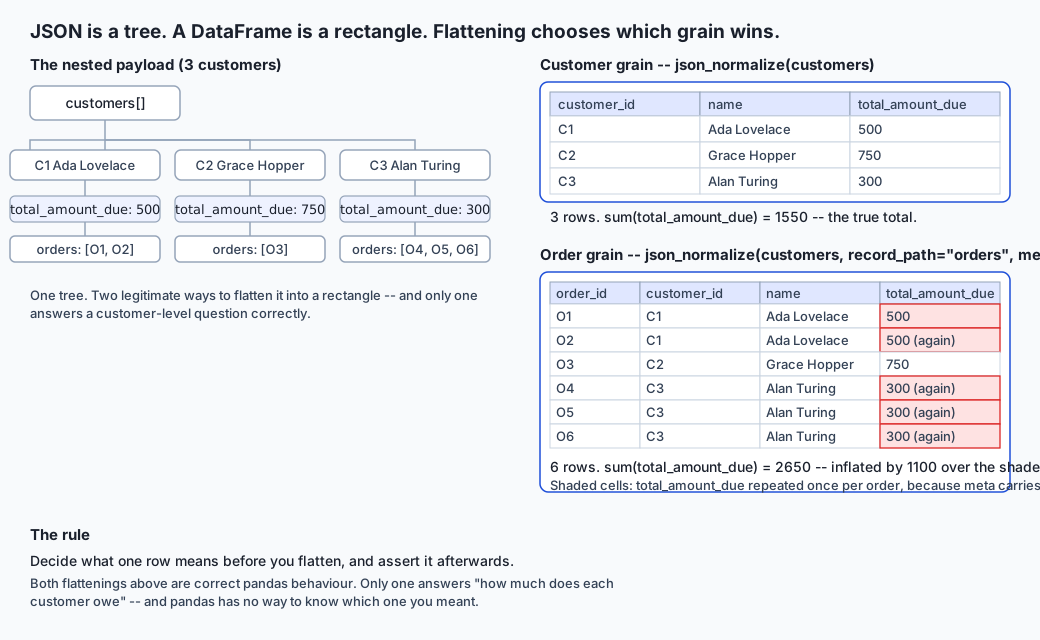
The grain trap, in full
Take this lesson’s running example: three customers, each with a
total_amount_due and a list of orders.
customers = [
    {"customer_id": "C1", "name": "Ada Lovelace", "total_amount_due": 500.00,
     "orders": [{"order_id": "O1", "amount": "200.00"},
                {"order_id": "O2", "amount": "300.00"}]},
    {"customer_id": "C2", "name": "Grace Hopper", "total_amount_due": 750.00,
     "orders": [{"order_id": "O3", "amount": "750.00"}]},
    {"customer_id": "C3", "name": "Alan Turing", "total_amount_due": 300.00,
     "orders": [{"order_id": "O4", "amount": "100.00"},
                {"order_id": "O5", "amount": "100.00"},
                {"order_id": "O6", "amount": "100.00"}]},
]
pandas.json_normalize(customers) with no record_path produces the
customer grain: three rows, one per customer, with orders sitting
untouched as a Python list inside each cell.
customer_id         name  total_amount_due
         C1 Ada Lovelace             500.0
         C2 Grace Hopper             750.0
         C3  Alan Turing             300.0
.sum() on total_amount_due here gives 1550.0 — the true total,
because every customer’s balance appears exactly once.
pandas.json_normalize(customers, record_path="orders", meta=["customer_id", "name", "total_amount_due"]) produces the order grain: six rows, one
per order, because record_path names which nested list becomes the new
grain, and meta names which of the parent’s fields to carry down onto
every child row.
order_id amount customer_id         name total_amount_due
      O1 200.00          C1 Ada Lovelace            500.0
      O2 300.00          C1 Ada Lovelace            500.0
      O3 750.00          C2 Grace Hopper            750.0
      O4 100.00          C3  Alan Turing            300.0
      O5 100.00          C3  Alan Turing            300.0
      O6 100.00          C3  Alan Turing            300.0
.sum() on total_amount_due here gives 2650.0. C1’s 500.0 appears
twice (once per order), and C3’s 300.0 appears three times — that is
500×2 + 750×1 + 300×3 = 2650, against a true total of
500 + 750 + 300 = 1550. The gap, 1100.0, is not noise; it is the
exact amount of double- and triple-counting the order grain introduces
for C1 and C3. This is the number a reader of this lesson’s lab will
compute directly, not take on faith — every one of these figures was
captured from a real run of examples/ingest.py on pandas 3.0.5.
meta is not a bug for doing this. Carrying the parent’s fields onto
every child row is exactly what makes the order-grain frame usable — you
need customer_id on every order row to know whose order it was. The bug
is entirely downstream, in treating a meta column as if it still meant
“this customer’s total” once it has been duplicated. meta columns are
safe to filter and group on. They are not safe to sum, unless you first
drop duplicates back down to one row per parent.
Nested lists and explode
json_normalize’s record_path is one way to turn a list into rows, but
it has a specific behavior worth knowing before you rely on it: a
customer with an empty orders list contributes zero rows to the
order-grain frame. That customer disappears from the table entirely,
which is correct if your question is “list every order” (a customer with
no orders has no orders to list) but disastrous if your question is
“list every customer and their orders, including customers with none.”
DataFrame.explode solves a related problem with the opposite default.
Given a DataFrame that already has one row per customer, with a list-like
column such as tags:
tagged = pd.DataFrame({
    "customer_id": ["C1", "C2", "C3"],
    "tags": [["vip", "early-adopter"], ["vip"], []],
})
tagged.explode("tags", ignore_index=True)
produces:
customer_id          tags
         C1           vip
         C1 early-adopter
         C2           vip
         C3           NaN
Four rows: two for C1, one for C2, and — this is the detail worth
underlining — one for C3, whose empty list becomes a single row with
NaN in the tags column, rather than zero rows. Measured directly on
pandas 3.0.5: explode never removes a row for having an empty list; it
always keeps exactly one row per original row, filling with NaN where
there was nothing to expand. This is the opposite of what record_path
did with C4’s empty orders list two paragraphs up, and the contrast is
worth holding in your head as a rule of thumb: record_path drops an
empty child list; explode keeps it as one null row. Neither is
“correct” in general — they answer different questions — but conflating
them is a real source of silently-vanishing rows in production code.
Everything from JSON arrives untyped
JSON’s number type does not distinguish an integer from a currency value,
and many APIs deliberately serialize monetary amounts as strings — often
"200.00", sometimes with a currency symbol stripped, occasionally
padded — precisely so a JavaScript client’s floating-point number type
(which cannot represent 0.1 exactly) never touches the value. Whatever
the reason, the practical consequence is uniform: a column that looks
like money is, until you say otherwise, a column of str objects.
order_grain["amount"].apply(type).value_counts()
# <class 'str'>    6
Day 121’s dtype-pinning discipline applies here with one wrinkle JSON adds
that CSV mostly does not: a field absent from some records (rather
than present-but-empty) produces a column that is silently all-NaN for
those rows once the frame is assembled, with no error and no warning.
Pinning has to tolerate a missing column gracefully — checking
if column not in df.columns: continue rather than assuming every column
you expect is guaranteed to exist.
def pin_dtypes(df):
    out = df.copy()
    coerced = 0
    for column in ("total_amount_due", "amount"):
        if column not in out.columns:
            continue
        before = pd.to_numeric(out[column], errors="coerce")
        was_string = out[column].apply(lambda v: isinstance(v, str))
        coerced += int((was_string & before.notna()).sum())
        out[column] = before
    if "updated_at" in out.columns:
        out["updated_at"] = pd.to_datetime(out["updated_at"], utc=True, format="ISO8601")
    return out, coerced
Run against the six order-grain amount values above, this coerces all
six from str to float64 and reports coerced=6 — a real count you
can compare against how many rows you expected to change, which is the
whole point of returning a count rather than a silent side effect.
Schema drift across pages
This is the ingestion bug that reaches production the most often, because it requires nothing to go wrong — it requires only that an API evolve while you are paginating through it, which is completely normal operation for any service under active development.
This lesson’s lab dataset makes it concrete: seven customers, paginated
two per page across four pages. The first six customers (pages 1 and 2)
carry no loyalty_tier field at all — not null, absent. The last
three customers (pages 3 and 4) carry it. Assemble all four pages with a
plain pandas.concat of each page’s json_normalize output, and pandas
does exactly what you would hope and exactly what makes the bug
dangerous: it aligns columns by name, backfills the missing ones with
NaN, and produces a perfectly clean-looking seven-row frame. Nothing
in the frame itself flags that four rows have real data in
loyalty_tier and three have an absence dressed up as a null.
A drift detector does not need to be clever. It needs to walk the pages in order, track which fields have been seen so far, and record the first page a new field appears on:
def detect_schema_drift(pages):
    seen_by_page = [{k for r in page for k in r} for page in pages]
    all_fields = set().union(*seen_by_page)
    drift = {}
    for field in sorted(all_fields):
        first_page = next(i + 1 for i, f in enumerate(seen_by_page) if field in f)
        if first_page > 1 and any(field not in f for f in seen_by_page):
            drift[field] = first_page
    return drift
On this lesson’s dataset, detect_schema_drift(pages) returns exactly
{"loyalty_tier": 3} — the field is named, and the page it first showed
up on is named with it. That is the difference between a bug someone
finds by accident three weeks later, staring at an inexplicable pile of
nulls, and a bug your pipeline reports to you the moment it happens.
Raw-then-transform
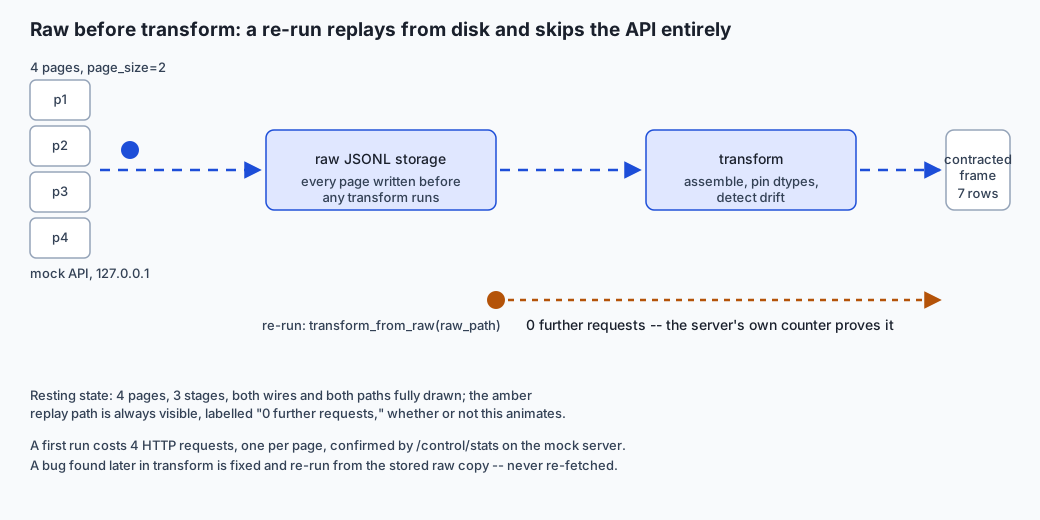
Day 126 built this discipline for a cleaning pipeline: persist the raw input before you touch it, so a bug in your transformation logic never means going back to the source. For ingestion, the source is a live API, which makes the discipline more valuable, not less — an API can rate-limit you, go down, or (worse) silently change its response the second time you ask.
The rule in code is small: fetch every page, write each raw response as one line of JSONL, and only then run any parsing or flattening logic, reading from the stored file rather than the network.
def fetch_raw_pages(base_url, page_size, raw_path):
    requests_made, page, total_pages = 0, 1, 1
    with raw_path.open("w") as fh:
        while page <= total_pages:
            payload = fetch_json(f"{base_url}/api/customers?page={page}&page_size={page_size}")
            requests_made += 1
            total_pages = payload["total_pages"]
            fh.write(json.dumps(payload) + "\n")
            page += 1
    return requests_made

def transform_from_raw(raw_path):
    pages = [json.loads(line)["customers"] for line in raw_path.open()]
    pinned, _ = pin_dtypes(assemble_pages(pages))
    return pinned
Measured directly in this lesson’s lab: fetching all seven customers at
page_size=2 costs exactly 4 HTTP requests, confirmed independently
by the mock server’s own request counter. Once those four raw pages are
on disk, transform_from_raw rebuilds the full seven-row, dtype-pinned
frame with the server stopped — there is nothing listening, so a
zero-request replay is not merely counted, it is the only thing that
could possibly happen. If your flattening logic has a bug tomorrow, you
fix the function and re-run it against yesterday’s raw JSONL. You never
have to ask the API for the same data twice, and yesterday’s ingestion
is exactly reproducible.
Idempotent ingestion
An ingestion job that runs once a day, or that gets retried after a
timeout, must not duplicate rows the second time it sees the same page.
The mechanism is unglamorous: pick a natural key — here, customer_id —
and merge new data in by replacing any existing row with that key rather
than appending blindly.
def upsert(existing, incoming, key):
    if existing.empty:
        merged = incoming.copy()
    else:
        stays = existing[~existing[key].isin(incoming[key])]
        merged = pd.concat([stays, incoming], ignore_index=True)
    return merged.sort_values(key, ignore_index=True)
Run upsert once with a two-customer page, then run it again with the
identical page: the row count is 2 both times, and
pandas.testing.assert_frame_equal on the two results passes — not
approximately equal, byte-for-byte equal. Change one field on that same
page (say, a customer’s balance updates) and upsert again: the row count
stays at 2, and the changed row’s new value wins, because upsert always
prefers the incoming data for a key it already has.
The contract on the assembled frame
Day 126 introduced the idea of checking a frame’s shape at the boundary rather than trusting it. Applied to an ingested frame, the checklist is short and specific:
REQUIRED_COLUMNS = {"customer_id", "name", "updated_at", "total_amount_due"}
MIN_ROWS, MAX_ROWS = 1, 10_000

def check_contract(df):
    missing = REQUIRED_COLUMNS - set(df.columns)
    if missing:
        raise ContractViolation(f"missing required columns: {sorted(missing)}")
    if df["customer_id"].duplicated().any():
        dupes = sorted(df.loc[df["customer_id"].duplicated(), "customer_id"].unique())
        raise ContractViolation(f"duplicate customer_id: {dupes}")
    if not pd.api.types.is_numeric_dtype(df["total_amount_due"]):
        raise ContractViolation("total_amount_due is not numeric -- pin_dtypes must run first")
    if (df["total_amount_due"] < 0).any():
        raise ContractViolation("total_amount_due contains a negative balance")
    if not (MIN_ROWS <= len(df) <= MAX_ROWS):
        raise ContractViolation(f"row count {len(df)} is outside [{MIN_ROWS}, {MAX_ROWS}]")
A healthy, pinned, seven-row frame passes silently. A frame with one row
duplicated — the exact shape a retried, non-idempotent fetch would
produce — raises ContractViolation("duplicate customer_id: ['C1']").
A frame missing total_amount_due entirely raises naming that column. A
frame with a negative balance raises naming that rule. Each message names
the specific rule broken, in a fixed check order, which is what turns
“the pipeline broke” into “the pipeline broke because of duplicate
customer_id values” — the difference between a two-minute fix and a
two-hour investigation.
Incremental fetch by watermark
Re-fetching every customer on every run works for seven customers and
stops working somewhere between a thousand and a million. The standard
fix is a watermark: remember the updated_at of the most recent record
you have seen, and ask the API only for records updated since then.
The detail every tutorial glosses over is the boundary. Should “since”
mean strictly-after (>) or at-or-after (>=)? Both are one-character
changes, and they fail in opposite directions:
- Exclusive (
>) never re-fetches a record you already have. But if two records share the exact sameupdated_attimestamp — entirely possible with second-resolution timestamps and a busy system — and one of them is exactly your watermark, the other one, updated in the same instant, is silently skipped forever. You will never know it is missing, because nothing errors. - Inclusive (
>=) guarantees you never silently drop a record that shares a timestamp with your watermark. Its cost is that the watermark record itself comes back a second time on the next call.
This lesson’s lab chooses inclusive, and for a specific reason: a
duplicate is a solved problem — the idempotent upsert from a moment ago
absorbs it for free, since re-upserting the same key with the same values
changes nothing. A silently dropped record is not a solved problem; there
is no downstream mechanism that can notice data that was never fetched.
Given a choice between “occasionally re-does harmless work” and
“occasionally loses data with no symptom,” the harmless-duplicate side is
the only defensible default. Measured directly: fetching incrementally
from the beginning of time returns all seven customers with a watermark
equal to the last customer’s updated_at; fetching again with since
set to that exact watermark returns that same customer, once, again —
proof the boundary really is inclusive rather than a claim about it.
An everyday analogy
Carry the filing-cabinet picture from earlier all the way through. The
API is the filing office: you ask for folders in batches (pages), and the
office hands them over a few at a time. json_normalize is the clerk who
turns folders into spreadsheet rows — ask for one row per folder, and the
receipts inside stay bundled and every folder-level fact appears once;
ask for one row per receipt (record_path), and the folder’s own facts
get photocopied onto every receipt, because that is the only way a flat
spreadsheet can keep track of which receipt came from which folder.
explode is a different clerk, one who already has a spreadsheet with
one row per folder and a column listing that folder’s tags — “VIP”,
“early adopter” — and who is asked to give each tag its own row without
touching anything else. If a folder has no tags at all, this clerk still
leaves you a row for it, with the tags column blank, because the folder
existed and deserves a place in the spreadsheet even with nothing to
report. The receipt-clerk, asked the same question about a folder with no
receipts, simply has nothing to copy and produces no row — the folder
vanishes from the receipts spreadsheet, correctly, because there were no
receipts to list.
Untyped arrival is the fact that everything in the folder is handwritten:
a number that looks like "$200.00" is still just ink until someone
transcribes it into the spreadsheet’s numeric column. Schema drift is the
filing office adding a new form to every folder starting sometime this
month, without telling you — the older folders in your stack simply don’t
have that form, and your spreadsheet needs to say so rather than leave a
blank cell that looks the same as a form that was filled in and said
“none.”
Raw-then-transform is photocopying every folder the moment it arrives, before doing any of your own cutting, sorting or summarizing — so a mistake in your summarizing never means calling the filing office to ask for the folder again. The contract is the clerk stationed at the exit door with a checklist, refusing to let a spreadsheet leave the building with a duplicate customer number, a missing balance column, or a customer who apparently owes negative money. And the watermark is simply asking the filing office each morning, “give me everything filed today or later” — choosing “or later” over “strictly after today” on purpose, so a folder filed in the same minute as yesterday’s last folder is never the one that got lost.
Examples in practice
Example 1 — the grain trap, resolved. A support team wants “average
orders per customer.” That is unambiguously a customer-grain question: the
denominator is the number of customers, so start from
flatten_customer_grain, and compute orders.apply(len).mean() on the
list column rather than flattening to order grain and dividing rows by
nunique() — both give the same answer here, but the customer-grain path
makes the “per customer” denominator visible in the code instead of
implicit in a groupby.
Example 2 — meta duplication, used correctly. A billing report needs
“total paid, by order status, per customer.” This is an order-grain
question — status lives only at the order level — so record_path and
meta=["customer_id", "name"] is exactly right. The trap this lesson
opened with only bites if you then sum a meta column like
total_amount_due across the order-grain rows; summing amount (an
order-level field) across the same rows is completely correct, because
amount was never duplicated — it is native to that grain.
Example 3 — drift caught before it costs anything. A weekly ingestion
job runs detect_schema_drift on every batch of pages before assembling
them, and logs a warning with the field name and page number whenever it
finds something. Six weeks after this lesson’s dataset shape was locked
in, the upstream API adds a preferred_channel field starting on page 12
of a 40-page pull. The very first run after the change logs
{"preferred_channel": 12} in the ingestion log, and a human decides in
thirty seconds whether that field matters — instead of a data analyst
three months later wondering why a third of preferred_channel values
are blank.
Implications: security, privacy, performance, scalability, and cost
Security. A JSON response is input from someone else’s machine, no
different in kind from a query parameter or a form field. check_contract
is this lesson’s version of validating that input before anything
downstream trusts it — refusing a frame with an impossible negative
balance is refusing to let a malformed or malicious upstream response
propagate silently into a report.
Privacy. Raw API responses persisted to disk (the raw-then-transform step) may contain personal data — names, contact details, order history. Treat the raw JSONL store with the same access controls as any other copy of that data, and decide its retention period deliberately rather than by accident; “we keep raw ingestion files forever because nobody deleted them” is a common and avoidable compliance liability.
Performance. json_normalize on a deeply nested payload with a large
record_path list is doing real work — for every child record, it copies
every meta field. On a few thousand rows this is invisible; on a
million-row order-grain flattening of a payload with ten meta columns,
the duplicated data becomes a meaningful fraction of your memory
footprint, and it is worth asking whether you need all ten columns
duplicated or only the join key.
Scalability. Pagination and incremental fetch exist for the same reason: no reasonable API hands you its entire dataset in one response, and no reasonable pipeline re-fetches everything on every run once the dataset is large. The watermark pattern turns an O(total records) job into an O(records changed since last run) job, which is the difference between a nightly sync that finishes in seconds and one that does not finish before the next one starts.
Cost. Every HTTP request against a metered or rate-limited API has a cost, sometimes measured in dollars, sometimes in a rate-limit budget that runs out and blocks you for the rest of the day. The raw-then- transform discipline converts “re-run to fix a bug” from “N more API calls” into “zero more API calls,” which is not a micro-optimization on a real integration — it is frequently the difference between an ingestion bug costing you an afternoon of debugging and costing you an afternoon of debugging plus a support ticket to raise your rate limit.
Alternatives: free, open source, and commercial
pandas.json_normalize (free, open source, part of pandas). The
default choice for turning nested JSON into a DataFrame in Python. Choose
it whenever the nesting is one or two levels deep and you can name the
record_path explicitly. Ran throughout this lesson and its lab.
pandas.read_json (free, open source, part of pandas). Choose it
when your JSON is already close to tabular — a flat array of flat
objects, or one of pandas’ specific orient layouts ("records",
"split", "index", and others). It is genuinely faster and simpler than
json_normalize for that shape. It is the wrong tool the moment nesting
appears: pointed at this lesson’s customers payload, read_json leaves
the orders column as a column of raw Python lists with no flattening at
all — it does not error, it just does not do the job json_normalize
does, which is honestly the more dangerous failure mode of the two
because it looks like it worked. Ran on this lesson’s payload for
comparison; the “too blunt” verdict above is a direct, measured result on
pandas 3.0.5, not received wisdom.
urllib.request (free, part of the Python standard library). Used
throughout this lesson’s lab to fetch every page from the mock API — no
third-party HTTP client was needed or used here, which is worth noting
given how often requests is reached for by default. urllib.request
is verbose compared to requests (Day 78) for anything involving
retries, sessions, or streaming, but for “fetch a URL, read the JSON
body,” it is complete, dependency-free, and exactly what this lab uses.
json (free, part of the standard library). json.loads and
json.dumps are what every raw-then-transform step in this lesson’s lab
is built on — reading a response body into Python objects, and writing
each page back out as one JSONL line.
pydantic (free and open source for the core library; a paid Logfire
observability product exists alongside it). The leading choice for
validating individual JSON records against a declared schema, closer to
the wire than this lesson’s check_contract, which validates the
assembled DataFrame instead. pydantic was not installed in this
lesson’s authoring environment and no pydantic code was run for this
lab — everything said about it here is drawn from its documentation,
stated plainly as such. Where it earns its place: define a
Customer(BaseModel) with typed fields, and pydantic will raise a
detailed, field-by-field ValidationError on a record that violates the
schema — string where you expected a number, a field of the wrong shape —
before that record ever reaches pandas at all, which is a defense one
layer earlier than check_contract operates.
Comparison with related concepts
| Tool / concept | Grain it targets | Handles nested lists? | Handles schema drift? | Where it runs relative to the API call |
|---|---|---|---|---|
pandas.json_normalize (no record_path) | one row per top-level record | keeps nested lists as list-valued cells | no — silently produces NaN for missing fields | after fetch, on decoded JSON |
pandas.json_normalize (with record_path) | one row per nested-list element | flattens exactly one named nested list, drops empty lists | no | after fetch, on decoded JSON |
DataFrame.explode | one row per list element in an already-flat frame | yes, and keeps a row for an empty list as NaN | no | after json_normalize, on an already-tabular frame |
pandas.read_json | whatever the source JSON’s top level already is | no — leaves nested structures as objects/lists in cells | no | after fetch, replacing decode + normalize in one step |
a hand-written check_contract | the assembled frame as a whole | n/a (checks, does not transform) | can be extended to check for it | after assembly, before downstream use |
| pydantic (docs only, not run here) | one record | validates nested structures per-field | n/a (per-record, not per-batch) | before or instead of pandas entirely |
When to use it — and when not to
Use json_normalize with an explicit record_path when you have
genuinely decided the child-level grain is what you need — order-level
reporting, event-level logs, line-item detail. Use it with no
record_path when the parent-level grain is what you need — one row per
customer, one row per account, one row per whatever entity owns the
nested lists.
Use explode when you already have a flat frame and one column happens
to hold a list you want spread across rows — tags, categories, a handful
of associated IDs — and you specifically want to preserve a row for the
case where that list is empty.
Do not reach for json_normalize at all when your payload is already
flat; pandas.read_json (or, more often, pd.DataFrame(payload)
directly) does the job with less code and less risk of an accidental
record_path mismatch.
Do not skip the contract check “because the pipeline has always worked so far.” “Always worked so far” is exactly the condition under which schema drift, an API’s silent field addition, or a retried request producing a duplicate row does the most damage — because nobody is watching for it.
Knowledge check
Take the eight-question quiz for this day. It checks the parts people
most often get half-right: which flattening a given question actually
needs, what meta duplicates and why, how explode treats an empty
list differently from record_path, what schema drift looks like once
it has already happened, and which side of the incremental-fetch
boundary to err on and why.
Hands-on exercise
Build the “One Row Means One Thing” ingestion pipeline against a small mock customer-and-orders API, running entirely on your own machine.
- Change into the lab directory and install the two pinned dependencies
(pandas and pytest) into a virtual environment, as
README.mddescribes. - Read
starter/00_brief.mdfor the full brief, then openstarter/ingest.py. Seven functions are stubbed withraise NotImplementedError, each with a docstring explaining exactly what it must do. - Work through the nine exercises in order: the two flattenings and their
row counts,
metaduplication,explode, dtype pinning, schema-drift detection, raw-then-transform (provided, read it), idempotent upsert, the contract, and the incremental watermark (provided, read it). - Run
pytest starter -qafter each function you finish — an exercise’s tests go from skipped to passing the moment itsNotImplementedErroris gone.
Expected output
pytest examples -q (the complete reference pipeline) reports
12 passed. pytest starter -q reports 8 skipped before you start and
8 passed once every exercise is finished. bash tests/run_tests.sh ends
with 39 checks, 0 failure(s). and exits 0 — see
expected-output/FIELDS.md for every number involved, including the
1550.0 true total, the 2650.0 inflated total, and the exact page
(3) loyalty_tier first appears on.
Validate your work
.venv/bin/pytest starter -q
bash tests/run_tests.sh
The second command re-derives the grain-trap numbers directly (not just
via pytest), proves idempotence and the contract outside the test
framework as well, and confirms that copying the reference ingest.py
into starter/ turns every exercise green — so you can check your own
implementation’s behavior against the reference at any point by running
the same comparison yourself.
Troubleshooting
If pytest cannot import api_server or ingest, you are not running it
from the lab’s own directory — both examples/ and starter/ rely on a
conftest.py that adds the right directories to the import path, and
that only works when pytest is invoked from the lab root. See
troubleshooting.md for the full list, including the specific symptom of
summing an order-grain meta column and getting an inflated total (you
have found this lesson’s grain trap, and the fix is to flatten to the
customer grain instead).
Common mistakes
- Calling
record_path="orders"when the question was customer-level, and not noticing the inflated total until it disagrees with an invoice. - Assuming a field present in your first few pages will be present in every page — schema drift bites hardest on exactly this assumption.
- Summing a
metacolumn on an order-grain frame without first deduplicating back to one row per parent. - Skipping
pin_dtypesand getting aTypeError(or worse, a silently wrong string-concatenation “sum”) from a column that looks numeric but is not. - Choosing the exclusive (
>) watermark boundary because it “feels cleaner,” and silently losing any record that shares a timestamp with the watermark.
Practice assignment
Take any public JSON API you can reach without an API key (or the mock
API in this lesson’s lab, run standalone with
python3 examples/api_server.py) and build a small ingestion script that:
persists every raw page to JSONL before transforming anything; flattens
to the grain your chosen question actually needs, and states that
question in a comment; pins every numeric and datetime column, printing
how many values were coerced; runs detect_schema_drift across the pages
you fetched, even if it finds nothing (report “no drift detected across N
pages” as a real, positive finding); and runs a contract check on the
assembled frame before printing a final summary. Submit the script and
its output for two consecutive runs, showing the row count and total are
identical both times.
Extension challenge
Extend check_contract with a referential-integrity rule: every
order_id in an order-grain frame should be unique across the entire
dataset, not just unique within one customer’s list. Write a test that
constructs a payload with a duplicate order_id shared between two
different customers (a plausible upstream bug — a retried write that
generated two records) and confirms your extended contract names that
specific violation. Then extend detect_schema_drift to also report a
field that disappears after being present — the mirror image of the
case this lesson covers — and explain in one paragraph why a
disappearing field is arguably more dangerous than an appearing one.
AI thread
Training data for a language or vision model is, almost without
exception, the output of an ingestion pipeline exactly like the one this
lesson builds — JSON API responses, scraped nested documents, database
exports — flattened into the tabular or sequence format a training loop
consumes. The grain trap from the opening example is not merely a
data-analysis inconvenience in that context; it is a silent reweighting
of the training distribution. If a dataset-construction pipeline flattens
“users and their posts” to post-grain without noticing, a user who posted
five hundred times contributes five hundred times the gradient signal of
a user who posted twice, and every property of that prolific user — their
writing style, their opinions, their errors — is disproportionately
reinforced in whatever the model learns, entirely as an artifact of a
record_path call nobody scrutinized. This is a documented, real
mechanism behind duplication-driven bias in trained models: the fix is
never a smarter model architecture, because the distortion happened
upstream, in ingestion, before a single training step ran. The grain
assertion this lesson insists on — decide what one row means, then check
it — is one of the cheapest guards available against exactly this
failure, and it costs nothing more than writing down, once, what you
already had to decide anyway.
Quiz
Q1. A payload has customers, each with a list of orders. `pandas.json_normalize(customers)` (no `record_path`) gives 3 rows and a total of 1550.0 on the `total_amount_due` column. `pandas.json_normalize(customers, record_path="orders", meta=["total_amount_due"])` gives 6 rows and a total of 2650.0 on the same column. What is the correct explanation?
- The second call has a bug in pandas; the two totals should always agree
- The second call sums total_amount_due once per order, so any customer with more than one order has their balance counted multiple times
- The first call is wrong because it ignores the orders entirely
- The difference is floating-point rounding error accumulated across six rows
Show answer
Answer: B. The second call sums total_amount_due once per order, so any customer with more than one order has their balance counted multiple times
Both calls are correct pandas behaviour, doing exactly what they were asked. record_path with meta carries the parent's fields onto every child row by design, so a customer with two orders has their total_amount_due duplicated twice, and summing it counts that customer's balance twice. The fix is not a bug report -- it is choosing the customer-grain flattening (no record_path) for a customer-level question.
Q2. A customer has an empty `orders: []` list. Which statement about how the two flattening approaches handle this is accurate, as measured on pandas 3.0.5?
- json_normalize(record_path=...) drops the customer (zero rows); DataFrame.explode on an already-flat frame keeps one row with NaN
- Both json_normalize(record_path=...) and DataFrame.explode drop the customer entirely
- Both keep exactly one row for the customer, with NaN in the exploded or nested column
- json_normalize raises a ValueError on an empty list, while explode silently drops the row
Show answer
Answer: A. json_normalize(record_path=...) drops the customer (zero rows); DataFrame.explode on an already-flat frame keeps one row with NaN
Measured directly: record_path finds nothing to expand from an empty list and contributes zero rows for that customer, so the customer disappears from the order-grain frame. explode, applied to a frame that already has one row per customer, keeps that row and fills the exploded column with NaN. The two functions solve related but different problems and make opposite choices about empty lists.
Q3. A field named `loyalty_tier` is absent from customers on pages 1 and 2 of a paginated API, and present from page 3 onward. After assembling all pages with pandas.concat, what happens to loyalty_tier for the page-1 and page-2 rows?
- pandas raises a KeyError because the column is inconsistent across pages
- Those rows get the string "missing" so the gap is visible
- Those rows get NaN silently, with no error or warning, because concat aligns columns by name and backfills the rest
- Those pages are silently dropped from the assembled frame
Show answer
Answer: C. Those rows get NaN silently, with no error or warning, because concat aligns columns by name and backfills the rest
This is the schema-drift bug in its most common shape. pandas.concat is doing exactly what it is supposed to do -- aligning by column name and filling what is missing with NaN -- but nothing in the resulting frame flags that the NaN represents "this field did not exist yet" rather than "this field was checked and found empty." A deliberate schema-drift detector is what turns this into a named, dated finding instead of a mystery discovered weeks later.
Q4. Why does raw-then-transform (persisting each page's raw JSON before any flattening or cleaning) matter for an ingestion pipeline specifically, beyond the general case Day 126 made for cleaning?
- It is required by every API's terms of service
- It makes the API respond faster on subsequent calls
- It automatically fixes any schema drift in the stored data
- A bug found in your flattening logic can be fixed and re-run against the stored raw copy, touching the network zero more times, instead of re-fetching from a live, possibly rate-limited or already-changed API
Show answer
Answer: D. A bug found in your flattening logic can be fixed and re-run against the stored raw copy, touching the network zero more times, instead of re-fetching from a live, possibly rate-limited or already-changed API
An API is a live system: it can rate-limit you, go down, or -- more subtly -- return a slightly different response the second time you ask, if the underlying data changed between calls. Persisting the raw response first means a transformation bug costs you a bug fix and a replay from disk, never a second round of network calls against a source that may not even be identical to what you first saw.
Q5. Ingesting the same page of results twice should not duplicate rows. What mechanism does this lesson use to guarantee that, and what does "idempotent" mean here precisely?
- A natural key (such as customer_id) plus an upsert that replaces any existing row sharing that key; running the ingestion step twice with the same input produces byte-for-byte identical output both times
- A random UUID is generated per row so duplicates are easy to filter out afterward
- The API itself guarantees it will never be called twice with the same page
- Deduplication runs as a nightly cleanup job separate from ingestion
Show answer
Answer: A. A natural key (such as customer_id) plus an upsert that replaces any existing row sharing that key; running the ingestion step twice with the same input produces byte-for-byte identical output both times
Idempotence here is proved, not assumed: the lab runs upsert once, runs it again with the identical incoming data, and asserts the two resulting frames are exactly equal with pandas.testing.assert_frame_equal. The mechanism is a natural key that identifies "the same real-world entity" plus replace-on-conflict logic, which is what makes a retried or rescheduled ingestion job safe to re-run.
Q6. A contract check on an assembled frame raises `ContractViolation("total_amount_due contains a negative balance")` rather than a generic exception. Why does naming the specific broken rule matter?
- It does not matter -- any exception stops the pipeline equally well
- It turns "the pipeline broke" into "the pipeline broke because of this specific, checkable rule," which is the difference between a two-minute fix and an open-ended investigation
- It is required so the exception can be caught by type in a try/except block
- Named exceptions run faster than generic ones in Python
Show answer
Answer: B. It turns "the pipeline broke" into "the pipeline broke because of this specific, checkable rule," which is the difference between a two-minute fix and an open-ended investigation
A contract that raises ValueError("something is wrong") forces whoever sees the failure to re-diagnose from scratch. A contract that names the exact rule -- missing columns, duplicate keys, a non-numeric column, a negative balance, an out-of-range row count -- turns an incident into an immediately actionable fact, which is the entire value of checking at a boundary rather than trusting what arrives.
Q7. An incremental fetch uses a watermark: "give me everything updated since my last watermark." Between an exclusive (`>`) and an inclusive (`>=`) boundary, which does this lesson choose, and why?
- Exclusive (>), because it never re-fetches a record you already have
- It does not matter which is chosen, because both are mathematically equivalent over a sorted timestamp column
- Exclusive (>), because inclusive boundaries are not supported by most real APIs
- Inclusive (>=), because a record sharing the exact same updated_at timestamp as the watermark record would otherwise be silently and permanently skipped, and the resulting harmless duplicate is absorbed for free by the idempotent upsert
Show answer
Answer: D. Inclusive (>=), because a record sharing the exact same updated_at timestamp as the watermark record would otherwise be silently and permanently skipped, and the resulting harmless duplicate is absorbed for free by the idempotent upsert
The two conventions fail in opposite directions. Exclusive risks a permanently, silently lost record whenever two records share a timestamp with the watermark. Inclusive risks only a harmless duplicate, which the natural-key upsert this lesson already built absorbs at no cost. Given the asymmetry between "occasionally re-does harmless work" and "occasionally loses data with no symptom," inclusive is the only defensible default.
Q8. Pointed at this lesson's nested customers-with-orders payload, what does pandas.read_json actually do with the orders field, measured directly on pandas 3.0.5?
- It raises a JSONDecodeError because nested arrays are not supported
- It automatically calls json_normalize internally and flattens the orders into their own rows
- It leaves orders as a column of raw Python list objects, with no flattening at all, and does not error -- which is precisely why it is the wrong tool for this payload
- It converts orders into a single concatenated string per customer
Show answer
Answer: C. It leaves orders as a column of raw Python list objects, with no flattening at all, and does not error -- which is precisely why it is the wrong tool for this payload
This is the "too blunt" verdict the lesson states plainly rather than assuming: read_json is built for JSON that is already close to tabular, and on a genuinely nested payload it does not fail loudly -- it just does not do the flattening job, leaving nested structure untouched in each cell. That makes it a more dangerous failure mode than an outright error, because the resulting frame looks like it worked.
Glossary
- grain
- What one row in a table means. A customer-grain table has exactly one row per customer; an order-grain table has one row per order. Neither is more correct in general -- they answer different questions -- but choosing the wrong grain for a given question produces a number that is silently wrong rather than an error, which is why deciding the grain before flattening is this lesson's core discipline.
- the grain trap
- The specific failure of flattening a nested payload to a finer grain than a question needs, and then aggregating a field that belongs to the coarser grain. On this lesson's example, summing total_amount_due on an order-grain frame (six rows) counts a two-order customer's balance twice, inflating a true total of 1550.0 to 2650.0.
- pandas.json_normalize
- A pandas function that flattens nested JSON (a list of dicts, possibly with nested lists and dicts) into a DataFrame. Called with no record_path, it produces one row per top-level record, leaving nested lists untouched inside each cell. Called with record_path, it produces one row per element of the named nested list instead.
- record_path
- The json_normalize argument that names which nested list becomes the new row grain. Passing record_path="orders" tells json_normalize to produce one row per order rather than one row per customer. A customer whose orders list is empty contributes zero rows when record_path targets that list.
- meta
- The json_normalize argument, used together with record_path, that names parent-level fields to carry down onto every child row. meta columns are duplicated once per child record by design -- that duplication is what makes the child-grain frame usable, and it is also exactly what makes summing a meta column produce an inflated total.
- DataFrame.explode
- A pandas method that turns a single row whose column holds a list-like value into one row per list element, leaving every other column's value repeated across the new rows. Unlike record_path, explode applied to a row whose list is empty keeps one row with NaN rather than dropping the row -- a difference measured directly on pandas 3.0.5 and worth knowing before relying on either.
- untyped arrival
- The fact that every value decoded from a JSON API response is, until explicitly parsed, one of JSON's six native types -- and numeric-looking or date-looking values are frequently serialized as plain strings by the API on purpose, to avoid floating-point precision loss on the wire. A DataFrame built directly from such a response inherits that string-ness until dtypes are pinned.
- dtype pinning
- Explicitly converting a column to its intended type -- numeric, datetime, categorical -- rather than trusting whatever pandas inferred on load. For ingested JSON, pinning must tolerate a column that is entirely absent from some records, which becomes a fully-NaN column once the frame is assembled rather than raising an error.
- schema drift
- A field that is absent from earlier pages of a paginated API response and present on later ones (or the reverse). Assembling the pages with a plain concatenation produces a column that is silently NaN for the earlier rows, with no error or warning, because pandas aligns columns by name and backfills the rest. A deliberate detector names the field and the first page it appeared on.
- raw-then-transform
- The discipline of persisting every raw API response (as JSONL or Parquet) before running any parsing or flattening logic on it. A bug found later in the transformation step can be fixed and re-run against the stored raw copy, touching the network zero additional times, rather than requiring the API to be re-fetched.
- idempotent ingestion
- An ingestion step that produces the same result whether it runs once or is accidentally run twice with the same input -- typically achieved with a natural key (an identifier that names the same real-world entity across runs) and an upsert that replaces, rather than appends, any row sharing that key.
- upsert
- A merge operation that inserts a new row for a key not already present, and replaces the existing row for a key that is already present, rather than appending a duplicate. The mechanism this lesson uses to make ingestion idempotent.
- contract (on a DataFrame)
- A set of checks -- required columns present, key column unique, columns holding the expected dtype, row count within an expected range -- run against an assembled frame before anything downstream trusts it, raising an exception that names the specific rule broken rather than a generic error.
- watermark
- The timestamp (or other ordering value, such as a cursor) of the most recently seen record in an incremental fetch, used as the lower bound for the next fetch so that only new or updated records are requested rather than the entire dataset every time.
- inclusive vs. exclusive boundary
- The choice of whether an incremental fetch's "since" filter includes records exactly at the watermark timestamp (inclusive, >=) or excludes them (exclusive, >). Exclusive risks silently and permanently dropping a record that shares a timestamp with the watermark record; inclusive risks only a harmless duplicate that an idempotent upsert absorbs for free -- which is why this lesson chooses inclusive.
- pandas.read_json
- A pandas function that reads JSON directly into a DataFrame, appropriate when the source JSON is already close to tabular. Pointed at a genuinely nested payload, it does not flatten nested structures and does not raise an error either -- it leaves them as raw Python objects inside each cell, which is why this lesson calls it too blunt for the customers-with-orders shape it is built around.
Sources and further reading
- pandas.json_normalize — pandas (NumFOCUS / pandas core team) (accessed 2026-08-20)
- pandas.DataFrame.explode — pandas (NumFOCUS / pandas core team) (accessed 2026-08-20)
- json — JSON encoder and decoder — Python Software Foundation (accessed 2026-08-20)
- urllib.request — Extensible library for opening URLs — Python Software Foundation (accessed 2026-08-20)
- IO tools (text, CSV, HDF5, …) — pandas (NumFOCUS / pandas core team) (accessed 2026-08-20)
Kept in this browser, no account needed. Your progress page turns the whole record into one link you can bookmark or open on another device.