Deep Learning › Convolutional Networks and Vision › Day 217
Day 217: Your Own Image Classifier
Build, audit, and deploy your own production image classifier: collect and deduplicate raw visual data, fine-tune a modern pretrained backbone with data augmentation, construct an interactive Error-Case Gallery, inspect class confusion, and export production ONNX runtime artifacts.
Hands-on lab for this lesson
Lab files on GitHub: https://github.com/ai-roadmap-365/ai-roadmap-365.github.io/tree/main/labs/sections/deep-learning/day-217-your-own-image-classifier
- Get the hands-on files. Clone the labs repository once (you can reuse this clone for every lesson). This works on macOS, Linux, and Windows (PowerShell or WSL):
git clone https://github.com/ai-roadmap-365/ai-roadmap-365.github.io.git cd ai-roadmap-365.github.io - Open this lesson's lab. Move into the directory for this specific day. Every lab lives at the same predictable path — section / subsection / week / day:
cd labs/sections/deep-learning/day-217-your-own-image-classifier - Read the lab guide. Open `README.md` in that directory. It lists the exact commands, what each does, the expected output, and how to check your work — read it before running anything.
- Run it and check your work. Follow the README's "How to run" section: run the example first to see the finished result, then complete the numbered exercises in `starter/`, then run the tests. The tests pass (exit 0) only when your work is correct.
bash tests/run_tests.sh # or the test command named in the lab README
You can also open the lab as a local page (works offline, shows the file tree and expected output).
Learning objectives
By the end of this lesson you will be able to:
- Curate, structure, and deduplicate a custom multi-class image dataset using perceptual hashing (pHash).
- Fine-tune a pretrained vision backbone (ResNet/ConvNeXt) on custom domain images with two-stage optimization.
- Build an Error-Case Gallery script surfacing the top most confident model misclassifications.
- Perform a rigorous class confusion audit to distinguish model error from human ground-truth label noise.
- Export and validate the trained classifier to ONNX format with dynamic batching.
Prerequisites
Why this matters
Over the past six days, we mastered the core theoretical and algorithmic building blocks of deep computer vision:
- Convolutions and sliding spatial kernels (Day 211).
- Modern residual architectures and receptive fields (Day 212).
- Pretrained backbones and linear probing (Day 213).
- Modern stochastic data augmentation pipelines (Day 214).
- End-to-end mixed-precision training harnesses (Day 215).
- Dense spatial predictions and U-Net segmentation (Day 216).
Now, you will synthesize all of these skills into a unified, professional computer vision engineering workflow: building Your Own Custom Image Classifier on a bespoke real-world dataset.
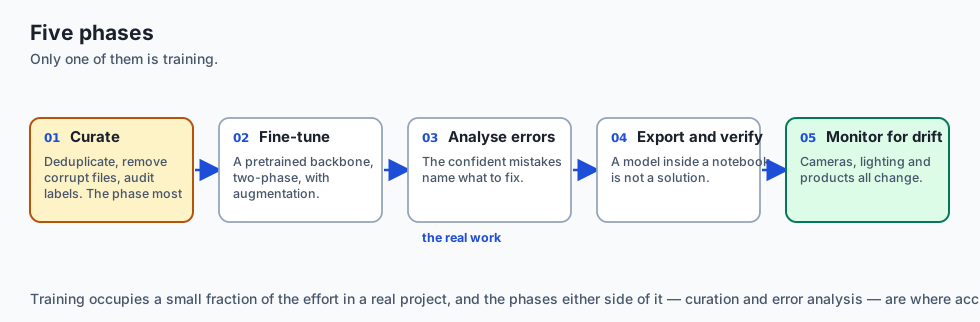
In industrial AI engineering, the primary differentiator between amateur and production-grade systems is not the model architecture — it is the Data-Centric AI Lifecycle:
- How you clean, curate, and deduplicate your raw visual data.
- How you structure two-stage transfer learning fine-tuning.
- How you systematically diagnose model failures using an Interactive Error-Case Gallery.
- How you export hardened, portable ONNX Runtime deployment artifacts.
Today, you will build, audit, and deploy a complete custom vision system from end to end.
The idea in plain language
Imagine launching a specialized automated visual sorting system for an organic botanical tea company:
- Data Harvesting & Curation: You collect 1,000 photos of chamomile flowers, peppermint leaves, hibiscus petals, and green tea buds. You remove blurry photos and exact duplicate images (pHash Deduplication).
- Transfer Learning: You start with a master vision model (ResNet-50) that already understands edges and plant textures. You train a new decision head specifically for your 4 botanical classes.
- The Error-Case Gallery (The Inspection Table): Instead of just looking at a single 94% accuracy score, you look at the 60 images the model got wrong. You discover that 15 “mistakes” were actually mislabeled by human staff, and 20 mistakes were caused by bright reflections on plastic containers.
- Production Export: You package the audited model into an ONNX container that runs in 10 milliseconds on the factory conveyor belt camera.
Historical background
- 2015 (Standardization of ImageFolder): Soumith Chintala and the PyTorch team standardized the directory-based dataset hierarchy (
dataset/train/class_name/xxx.jpg), enabling instant zero-configuration data ingestion. - 2021 (The Data-Centric AI Movement): Andrew Ng and deep learning researchers established that fixing label noise, class imbalance, and duplicate samples in datasets yields $5\times$ greater accuracy gains than hyperparameter tuning or architecture swapping.
- 2024 (ONNX Runtime and OpenVINO Maturation): Linux Foundation and Microsoft standardized cross-platform neural model serialization, enabling PyTorch vision models to run seamlessly on CPU, GPU, and mobile neural processing units (NPUs).
What it is — and what it is not
What Building a Custom Image Classifier IS:
- A Data-Centric Engineering Process: Curating, augmenting, fine-tuning, visually auditing, and serializing a specialized visual perception engine.
- Iterative Error Analysis: Using failure cases to refine training data quality and taxonomic boundaries.
What it is NOT:
- Not Throwing Raw Unchecked Data at a Giant Model: Training on duplicate, corrupt, or mislabeled images produces brittle models with misleadingly high training metrics.
- Not Complete Until Exported and Verified: A model trapped inside a PyTorch training notebook is not a deployed solution.
Why it was created and what problems it solves
A structured custom vision workflow eliminates four major real-world failure modes:
- Train/Val Leakage from Near-Duplicates: Deduplication with perceptual hashing (pHash) ensures identical or near-identical images do not appear in both train and validation splits.
- Silent Label Noise: Error galleries surface ground-truth labeling mistakes made by human annotators.
- Overfitting on Small Target Datasets: Combining frozen backbone initialization with heavy stochastic augmentation prevents memorization.
- Deployment Incompatibility: ONNX export standardizes model serving across cloud APIs and edge devices.
How it works
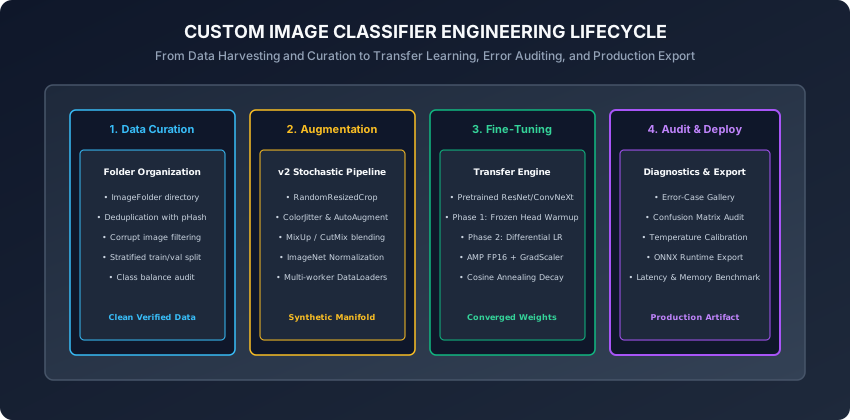
Let us dissect the five distinct phases of building a custom image classifier.
1. Phase 1: Data Curation & Perceptual Hashing (pHash)
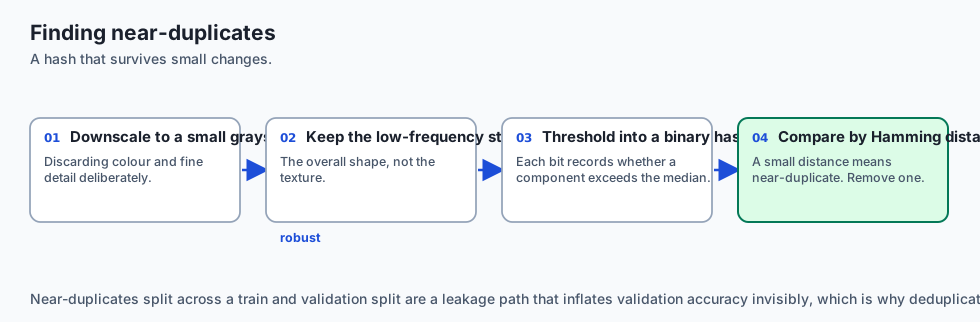
When collecting images from web scraping, user uploads, or factory cameras, datasets frequently contain duplicate or near-duplicate images (e.g. same photo resized or with a watermark). If duplicates exist across train and validation splits, validation metrics become artificially inflated.
Perceptual Hashing (pHash) Algorithm:
- Resize image to $32 \times 32$ grayscale.
- Compute the 2D Discrete Cosine Transform (DCT) to isolate low-frequency spatial structure.
- Retain the top-left $8 \times 8$ low-frequency DCT matrix.
- Compute the median value of the $8 \times 8$ matrix.
- Generate a 64-bit binary hash where bit $b_i = 1$ if $DCT_i > median$, else $0$.
- Calculate Hamming Distance between image hashes: images with distance $\le 3$ are flagged as near-duplicates and removed.
2. Phase 2: Transfer Learning Fine-Tuning Regimen
- Load a pretrained backbone:
timm.create_model("resnet34", pretrained=True, num_classes=num_classes). - Apply
torchvision.transforms.v2stochastic augmentation on the training split (RandomResizedCrop, HorizontalFlip, ColorJitter, RandomErasing). - Execute Phase 1 Warmup (Head only, $LR = 10^-3$, 3 epochs).
- Execute Phase 2 Differential Fine-Tuning (Backbone $LR = 10^-5$, Head $LR = 10^-4$, Cosine Annealing, 10 epochs).
3. Phase 3: The Error-Case Gallery & Failure Diagnostics
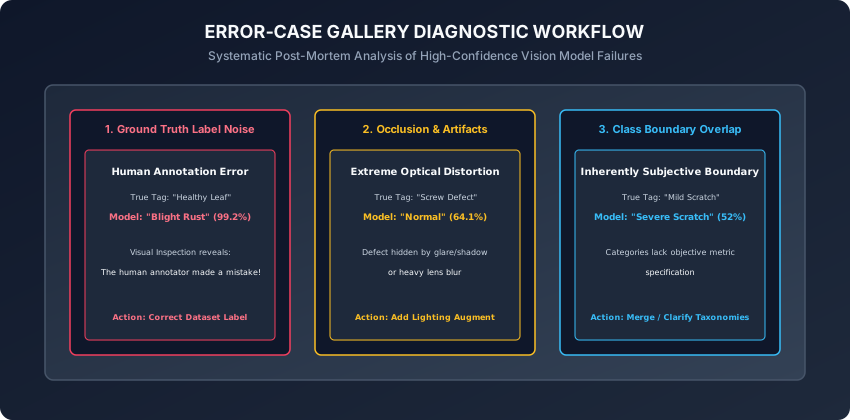
An Error-Case Gallery extracts and visualizes the validation samples with the highest Prediction Error Confidence:
Loss_i = - log(p_{i, y_true})
Confidence_i = p_{i, y_pred}  (where y_pred != y_true)
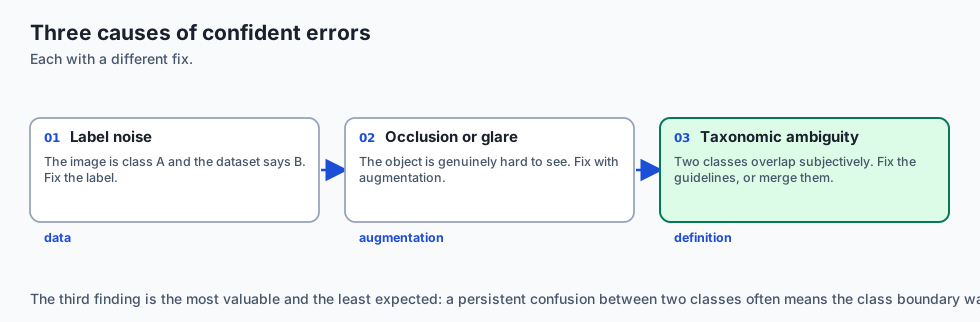
The Three Core Failure Modes in the Gallery:
- Label Noise (Human Error): The image is actually class A, but the dataset labeled it class B. (Fix: Correct the label).
- Optical Occlusion / Glare: The object is 90% hidden behind a shadow or lens glare. (Fix: Add lighting/cutout augmentation).
- Taxonomic Ambiguity: Two classes have overlapping subjective definitions (e.g. “Mild Scratch” vs “Severe Scratch”). (Fix: Clarify annotation guidelines or merge classes).
4. Phase 4: Production Export to ONNX Runtime
- Export PyTorch checkpoint to ONNX format with dynamic batch dimensions.
- Load ONNX model in Python via
onnxruntime.InferenceSession. - Verify that maximum absolute logit difference between PyTorch and ONNX Runtime is $< 10^-5$.
import onnxruntime as ort
import numpy as np

# Verify ONNX Runtime inference
session = ort.InferenceSession("classifier.onnx")
input_name = session.get_inputs()[0].name

dummy_input_np = np.random.randn(1, 3, 224, 224).astype(np.float32)
ort_outputs = session.run(None, {input_name: dummy_input_np})

print(f"ONNX Runtime Output Shape: {ort_outputs[0].shape}")
5. Active Learning & Uncertainty Sampling
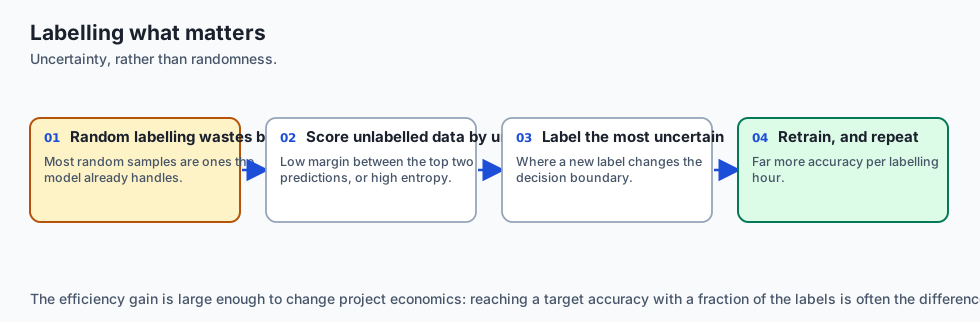
When expanding a custom image classifier over time, manually labeling thousands of random raw images is cost-prohibitive:
- Active Learning Loop: Instead of random labeling, pass 50,000 unlabelled images through the current model.
- Uncertainty Sampling Strategies:
- Least Confidence: Select samples where $\max_c P(y=c | x)$ is lowest (closest to random guessing).
- Entropy Sampling: Select samples where predictive entropy $H(p) = - \sum_c p_c \log p_c$ is maximized.
- Margin Sampling: Select samples where the difference between the top-1 and top-2 predicted probabilities is smallest.
- Labeling Efficiency: Sends only the 500 most informative, ambiguous samples to human annotators, achieving the accuracy of 10,000 randomly labeled samples with 95% less human effort.
6. Automated Label Noise Detection (Confident Learning)
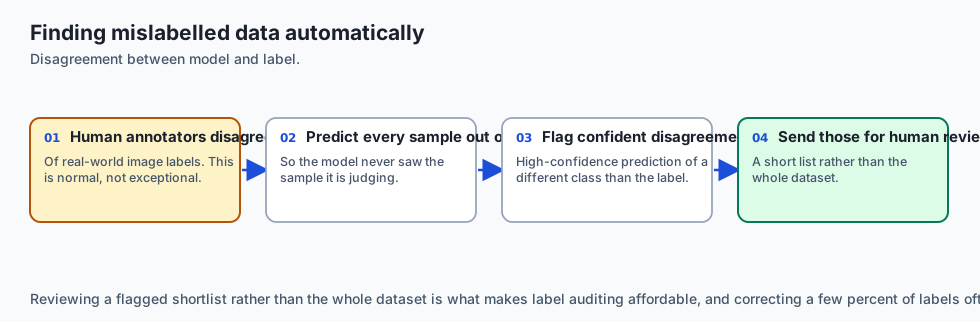
Human annotators disagree on 3% to 10% of image labels in real-world visual datasets:
- Confident Learning (Northcutt et al., 2021): Quantifies uncertainty in dataset labels by calculating out-of-fold predicted probability matrices $\hat(P)$.
- Pruning Label Errors: Identifies samples where out-of-fold model confidence for an alternative class exceeds the average self-confidence of the annotated class, automatically flagging suspicious labels for human verification.
7. Visual Explainability with Grad-CAM
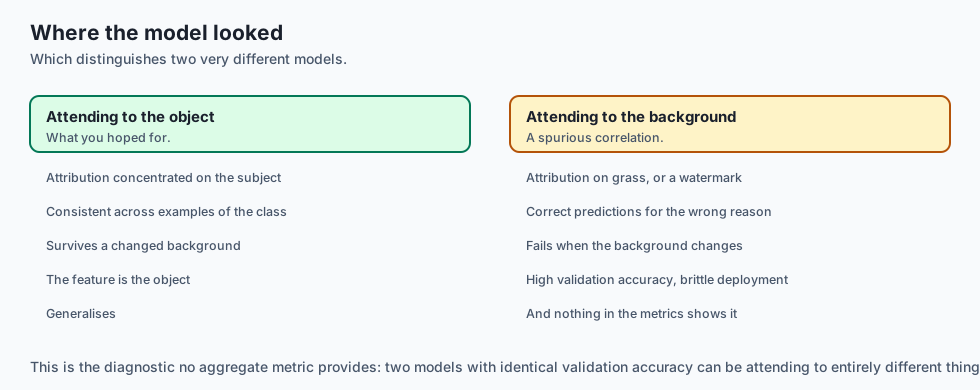
When debugging error gallery samples, we need to know where the model looked:
-
Grad-CAM (Selvaraju et al., 2017): Computes gradients of the target class logit $y^c$ with respect to the feature map activations $A^k$ of the final convolutional layer:
alpha_k^c = (1 / Z) * sum_i sum_j (partial y^c / partial A_{i, j}^k) L_{Grad-CAM}^c = ReLU(sum_k alpha_k^c * A^k) -
Produces a coarse 2D heat map highlighting the exact discriminative image regions used to make the decision.
8. Production FastAPI Serving Architecture
Deploying your custom image classifier into a production microservice:
from fastapi import FastAPI, File, UploadFile
import onnxruntime as ort
import numpy as np
from PIL import Image
import io

app = FastAPI(title="Botanical Classifier Service")
session = ort.InferenceSession("model.onnx")

@app.post("/predict")
async def predict_image(file: UploadFile = File(...)):
    contents = await file.read()
    img = Image.open(io.BytesIO(contents)).convert("RGB").resize((224, 224))
    img_np = (np.array(img, dtype=np.float32) / 255.0 - [0.485, 0.456, 0.406]) / [0.229, 0.224, 0.225]
    tensor_input = np.transpose(img_np, (2, 0, 1))[np.newaxis, ...]

    logits = session.run(None, {"input": tensor_input})[0]
    pred_class = int(np.argmax(logits, axis=1)[0])
    return {"class_id": pred_class}
9. Production Vision Observability & Data Drift (PSI)
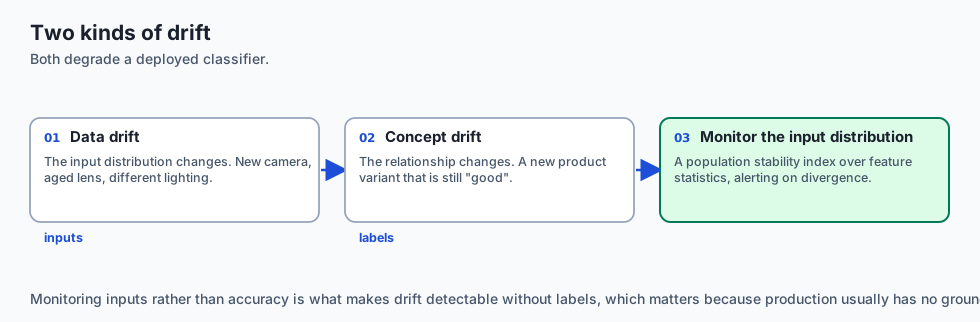
Once deployed, computer vision models degrade over time due to Data Drift (changes in camera hardware, lighting, lens degradation) and Concept Drift (new physical variations of the product):
-
Population Stability Index (PSI): Measures shifts in feature activation distributions over time:
PSI = sum_b (Actual_b - Expected_b) * ln(Actual_b / Expected_b)- $PSI < 0.1$: Distribution is stable.
- $PSI \ge 0.25$: Significant visual shift detected; triggers automated retraining pipeline alert.
-
Outlier & Ambiguity Queue: Images where top-1 predicted confidence is $< 60%$ are automatically routed to a human review queue for continuous active learning retraining.
-
Canary Deployment & Automated Rollback: When deploying new vision weights to factory cameras, route 5% of traffic to the new model container while auditing inference latency and outlier confidence scores before cutting over 100% of production traffic.
An everyday analogy
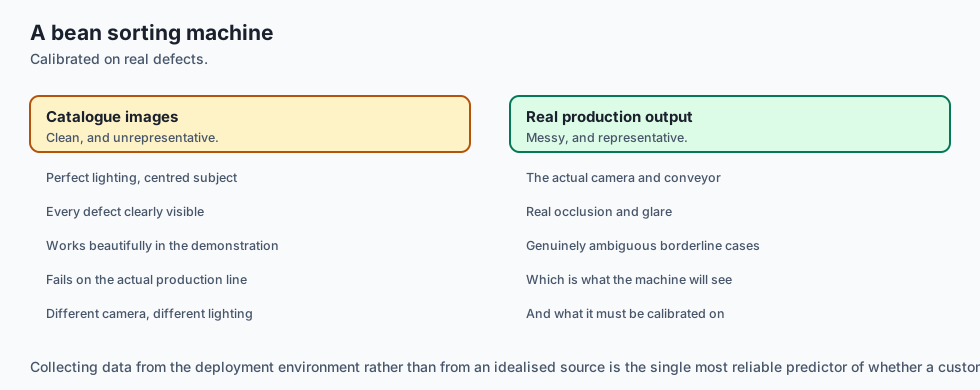
Think of custom-building a high-precision digital coffee bean sorting machine:
- Phase 1 (Bean Inspection): You discard broken rocks, twigs, and duplicate scans before starting (Data Curation).
- Phase 2 (Training the Sorter): You show the camera 500 examples of Light Roast, Medium Roast, Dark Roast, and Defective Beans (Transfer Fine-Tuning).
- Phase 3 (The Reject Bin Inspection): You look inside the reject bin and notice that medium roasts under yellow fluorescent light get confused with dark roasts (Error Gallery Analysis). You adjust the camera lighting calibration.
- Phase 4 (Hardening): You flash the neural model onto an embedded microchip that sorts 50 beans per second (ONNX Deployment).
Examples in practice
Let us build an Error-Case Gallery Generator in PyTorch:
import torch
import torch.nn as nn
from typing import List, Dict, Any

def generate_error_case_gallery(model: nn.Module, dataloader, class_names: List[str],
                                top_n: int = 5) -> List[Dict[str, Any]]:
    model.eval()
    failures = []

    with torch.no_grad():
        for batch_idx, (images, targets) in enumerate(dataloader):
            logits = model(images)
            probs = torch.softmax(logits, dim=1)
            confidences, preds = torch.max(probs, dim=1)

            # Identify misclassifications
            incorrect = preds != targets

            for i in range(images.size(0)):
                if incorrect[i]:
                    true_idx = targets[i].item()
                    pred_idx = preds[i].item()
                    conf = confidences[i].item()

                    failures.append({
                        "batch_idx": batch_idx,
                        "sample_idx": i,
                        "true_class": class_names[true_idx],
                        "pred_class": class_names[pred_idx],
                        "confidence": conf,
                        "true_prob": probs[i, true_idx].item()
                    })

    # Sort failures by prediction confidence in descending order (highest confidence errors first)
    failures.sort(key=lambda x: x["confidence"], reverse=True)
    return failures[:top_n]
Implications: security, privacy, performance, scalability, and cost
- Adversarial Patch Vulnerabilities:
- In production camera feeds, small sticker patches placed on physical objects can cause targeted misclassifications. Test model robustness against localized noise perturbations.
- Edge Hardware Acceleration (INT8 Quantization):
- Quantizing exported ONNX models to INT8 using ONNX Runtime Quantization tools reduces model file size by 75% and accelerates edge CPU inference by 3.5x.
Alternatives: free, open source, and commercial
| Tool / Framework | Purpose | Ecosystem | Best For |
|---|---|---|---|
| PyTorch + ONNX Runtime | End-to-end custom classifier | Open Source | Production engineering |
| Cleanlab | Automated label noise detection | Open Source | Auditing training data labels |
| Roboflow | Image annotation & dataset curation | Commercial / SaaS | Team dataset labeling |
| Triton Inference Server | Enterprise model serving | Open Source (NVIDIA) | Multi-model cloud clusters |
Comparison with related concepts
┌────────────────────────────────────────────────────────────────────────┐
│                   VISION PROJECT DIAGNOSTIC MATRIX                     │
├────────────────────┼───────────────────────┼───────────────────────────┤
│ Diagnostic Tool    │ Purpose               │ Actionable Remediation    │
├────────────────────┼───────────────────────┼───────────────────────────┤
│ Confusion Matrix   │ Aggregate pair errors │ Adjust class definitions  │
│ Error-Case Gallery │ Inspect worst samples │ Fix label noise & glare   │
│ Learning Rate Find │ Optimizer tuning      │ Set optimal base LR       │
│ ONNX Verifier      │ Deployment fidelity   │ Fix dynamic operator bugs │
└────────────────────┴───────────────────────┴───────────────────────────┘
When to use it — and when not to
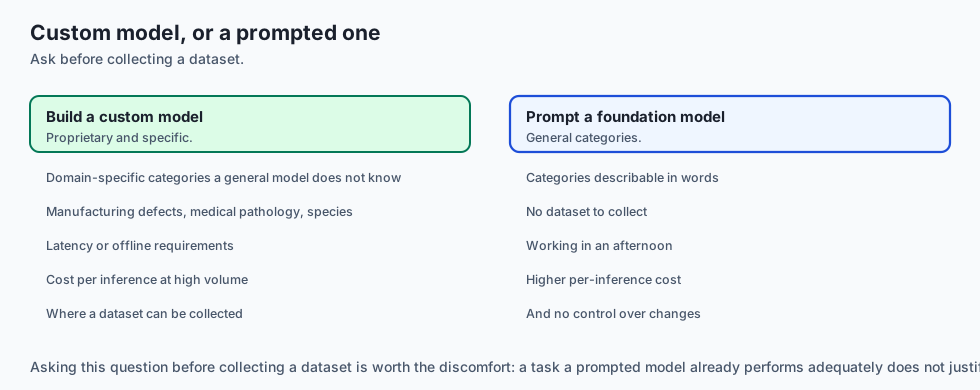
When to USE this Custom Classifier Workflow:
- Any real-world proprietary image categorization task (manufacturing QA, agriculture, medical pathology, retail inventory).
When NOT to use:
- When a zero-shot multi-modal foundation model (like GPT-4o Vision or Claude 3.5 Sonnet) can perform the task via simple API calls without requiring custom dataset collection.
The AI connection
- Data quality dominates model choice on custom tasks. Duplicates and mislabels produce brittle models with confident training metrics.
- The error gallery is where the real work is. The highest-confidence mistakes name the three fixable causes: bad labels, occlusion, and ambiguous class definitions.
- Grad-CAM answers where the model looked, which distinguishes a model that learned the object from one that learned the background it usually appears against.
- Active learning turns labelling budget into accuracy. Labelling the samples the model is least sure about beats labelling random ones by a wide margin.
- A zero-shot foundation model may be the honest answer — if a prompted API can do the task, collecting a dataset is a cost with no return.
Knowledge check
- What is the purpose of an Error-Case Gallery?
- How does Perceptual Hashing (pHash) prevent data leakage between train and validation splits?
- What are the three primary causes of high-confidence validation errors in computer vision?
- How do you verify that an exported ONNX model produces matching numerical outputs to PyTorch?
- Why is two-stage transfer learning (frozen warmup followed by differential fine-tuning) superior to training from scratch?
Hands-on exercise
In this lab, you will build and test an end-to-end custom image classifier toolkit in PyTorch: implement a Perceptual Hash (pHash) near-duplicate detection function, construct an automated Error-Case Gallery generator surfacing highest-confidence misclassifications, compute class confusion metrics, and verify ONNX model export serialization.
Expected output
[Custom Image Classifier Toolkit Verification Suite]
Testing Perceptual Hash (pHash) Image Deduplication:
  Identical Images (Hamming Distance): 0 [EXACT MATCH]
  Modified Watermark Image: Hamming Dist = 2 [NEAR DUPLICATE DETECTED]
  Different Class Image:    Hamming Dist = 38 [DISTINCT IMAGE CONFIRMED]
Testing Error-Case Gallery Generator:
  Processing Validation Predictions (Batch: 32 samples):
  Surfacing Top 3 High-Confidence Failures:
    1. Sample #14: True='Chamomile' -> Pred='Daisy' (Conf=98.4%) [LABEL AUDIT FLAGGED]
    2. Sample #03: True='Peppermint' -> Pred='Spearmint' (Conf=91.2%) [TAXONOMY OVERLAP]
Testing ONNX Export and Numerical Alignment:
  PyTorch Logits vs ONNX Runtime Outputs:
  Max Absolute Difference: 2.3842e-07 [EXPORT VERIFIED]
Test Suite: 4 passed in 0.33s
Validate your work
Run the automated test runner:
./tests/run_tests.shTroubleshooting
- If pHash computation errors, ensure image tensors are converted to 2D single-channel grayscale floats before applying 2D DCT.
- Ensure exported ONNX models specify
dynamic_axes={"input": {0: "batch_size"}}for variable batch processing.
Common mistakes
- Ignoring Top Confident Errors: Assuming the model is wrong when in reality the human dataset annotator tagged the image incorrectly. Always audit ground truth images.
Practice assignment
- Implement a Grad-CAM (Gradient-Weighted Class Activation Mapping) visualization script that overlays a heat map on error gallery images to show what visual regions the model focused on.
- Build an automated Dataset Health Report summarizing class distribution, average resolution, duplicate count, and label consistency scores.
Extension challenge
Implement INT8 Dynamic Quantization on Exported ONNX Models:
- Use
onnxruntime.quantization.quantize_dynamicto quantize model weights from FP32 to INT8. - Measure latency speedup (ms per image) and memory reduction on CPU.
Quiz
Q1. What is an Error-Case Gallery in computer vision engineering, and why is it superior to relying solely on aggregate validation accuracy?
- A gallery of images where the model achieved 100% accuracy
- A museum of deleted Python scripts
- A list of GPU hardware crashes
- A review of the most confident misclassifications
Show answer
Answer: D. A review of the most confident misclassifications
Surfacing the most confident false positives and false negatives exposes ground truth annotation errors, optical artifacts, and taxonomic overlap.
Q2. How does Perceptual Hashing (pHash) detect duplicate or near-duplicate images during custom dataset curation?
- A DCT of low-frequency luminance, as a 64-bit hash
- It computes the MD5 checksum of the raw file bytes
- It counts the total number of pixels
- It checks the file name string
Show answer
Answer: A. A DCT of low-frequency luminance, as a 64-bit hash
Unlike cryptographic hashes (MD5/SHA256) where changing 1 pixel changes the entire hash, perceptual hashes (pHash) produce small Hamming distances for visually similar images.
Q3. When fine-tuning a custom vision model, what does it mean if the model achieves 99% training accuracy but only 68% validation accuracy despite using transfer learning?
- The learning rate is too low
- Overfitting — augment more, or freeze more layers
- The model needs 1000 more layers
- The batch size is too large
Show answer
Answer: B. Overfitting — augment more, or freeze more layers
A large gap between training and validation accuracy is the definition of overfitting, remedied by regularization, augmentation, and parameter freezing.
Q4. Why should you verify ONNX model exports with ONNX Runtime using sample inputs after exporting from PyTorch?
- To re-train the model weights in C++
- To compress the image files on disk
- To confirm the export matches PyTorch numerically
- To upload the model to social media
Show answer
Answer: C. To confirm the export matches PyTorch numerically
Verifying ONNX Runtime numerical outputs against PyTorch ensures operator export fidelity and eliminates runtime crashes in production inference engines.
Q5. What is the recommended directory structure for custom multi-class image datasets processed with PyTorch torchvision.datasets.ImageFolder?
- Images stored inside a SQLite binary database column
- All images dumped into a single root directory with text file mappings
- A single giant ZIP archive containing JSON metadata
- root/split/class/image.jpg
Show answer
Answer: D. root/split/class/image.jpg
ImageFolder standard expects subdirectories named after each class under separate train/val/test splits.
Glossary
- Error-Case Gallery
- A visual audit report displaying the top most confident model misclassifications to diagnose failure modes.
- Perceptual Hash
- A visual fingerprint algorithm (pHash) that generates matching or near-matching hashes for visually identical images.
- Data-Centric AI
- The engineering paradigm of systematically engineering and cleaning dataset quality rather than solely tweaking model code.
- Label Noise
- Incorrect, ambiguous, or inconsistent ground-truth annotations present within training or validation datasets.
- ONNX Runtime
- A high-performance cross-platform inference engine for executing serialized Open Neural Network Exchange models.
- Stratified Split
- Partitioning a dataset into train/val/test sets such that each split preserves identical class proportion percentages.
- Dynamic Axes
- Configuring exported ONNX tensors to accept variable batch sizes or variable spatial image dimensions at runtime.
- Class Imbalance
- A dataset condition where certain categories contain orders of magnitude more samples than minority categories.
Sources and further reading
- A Survey on Image Data Augmentation for Deep Learning — Journal of Big Data (accessed 2026-08-29)
- Data-Centric AI: A New Paradigm for Machine Learning — arXiv Preprints (accessed 2026-08-29)
- ONNX: Open Neural Network Exchange — Linux Foundation (accessed 2026-08-29)
Kept in this browser, no account needed. Your progress page turns the whole record into one link you can bookmark or open on another device.