LLMs and Generative AI › LLM APIs › Day 255
Day 255: Streaming Responses
Master real-time generative streaming: understand the Server-Sent Events (SSE) protocol, decode chunked streaming token deltas in Python (synchronous generators and async iterators), calculate Time-To-First-Token (TTFT) and Inter-Token Latency (ITL) metrics, handle network disconnections and streaming error propagation gracefully, and build a streaming token aggregator and real-time terminal typewriter in Python.
Hands-on lab for this lesson
Lab files on GitHub: https://github.com/ai-roadmap-365/ai-roadmap-365.github.io/tree/main/labs/sections/llms-and-generative-ai/day-255-streaming-responses
- Get the hands-on files. Clone the labs repository once (you can reuse this clone for every lesson). This works on macOS, Linux, and Windows (PowerShell or WSL):
git clone https://github.com/ai-roadmap-365/ai-roadmap-365.github.io.git cd ai-roadmap-365.github.io - Open this lesson's lab. Move into the directory for this specific day. Every lab lives at the same predictable path — section / subsection / week / day:
cd labs/sections/llms-and-generative-ai/day-255-streaming-responses - Read the lab guide. Open `README.md` in that directory. It lists the exact commands, what each does, the expected output, and how to check your work — read it before running anything.
- Run it and check your work. Follow the README's "How to run" section: run the example first to see the finished result, then complete the numbered exercises in `starter/`, then run the tests. The tests pass (exit 0) only when your work is correct.
bash tests/run_tests.sh # or the test command named in the lab README
You can also open the lab as a local page (works offline, shows the file tree and expected output).
Learning objectives
By the end of this lesson you will be able to:
- Understand the HTTP Server-Sent Events (SSE) text/event-stream wire format.
- Consume streaming token deltas using both Anthropic and OpenAI Python SDK stream interfaces.
- Implement asynchronous token streaming using async for and AsyncIterator in Python.
- Measure Time-To-First-Token (TTFT) and Inter-Token Latency (ITL) telemetry.
- Build a streaming token aggregator and typewriter terminal UI in Python.
Prerequisites
Why this matters
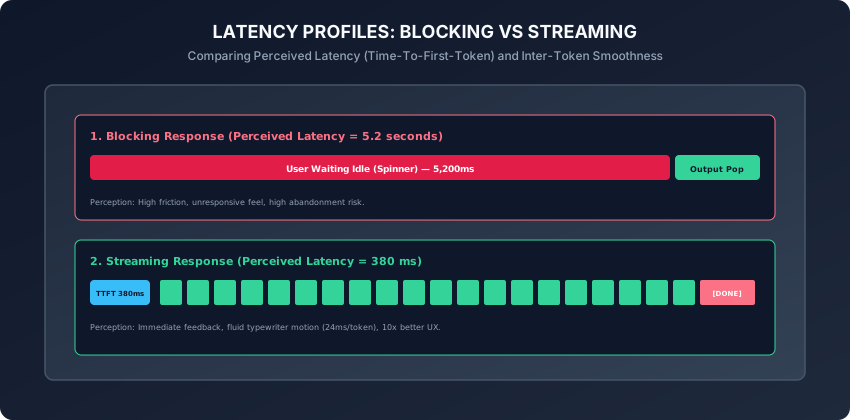
When users interact with an AI assistant or chat interface, waiting for the model to finish generating a 500-word response in a single blocking HTTP call takes 5 to 10 seconds of silence. In modern software, a 5-second spinner feels like a broken application and leads directly to user abandonment.
Streaming transforms perceived latency. By streaming tokens across a persistent Server-Sent Events (SSE) connection as they are autoregressively generated:
- Time-To-First-Token (TTFT) drops from 5,000ms to 350ms.
- Users begin reading and absorbing the answer immediately while the model continues generating subsequent sentences in the background.
- Interactive interfaces achieve the fluid, natural “typewriter effect” that defines modern AI user experiences.
However, streaming introduces significant engineering complexity: decoding incremental delta objects, handling stream interruptions midway through generation, parsing partial JSON structures, and aggregating complete telemetry once the stream closes.
Today, you will master the Server-Sent Events (SSE) streaming protocol, decode streaming token deltas across Anthropic and OpenAI SDKs, measure Time-To-First-Token (TTFT) and Inter-Token Latency (ITL), and build a streaming token aggregator and terminal typewriter in Python.
The idea in plain language
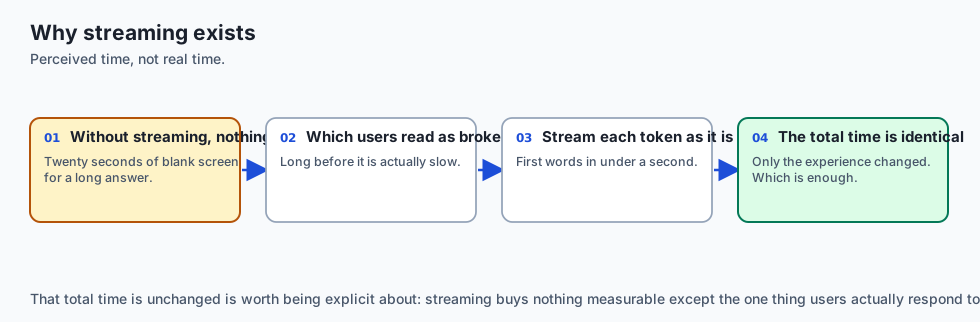
Think of receiving a long multi-page letter:
- The Blocking Approach: The mail carrier waits until the author has written all 20 pages, binds them into a hardcover book, and delivers it 3 weeks later. You sit in an empty room staring at the mailbox (High Perceived Latency & Idle Frustration).
- The Streaming Approach (Server-Sent Events):
- The author reads each sentence out loud over a live telephone line as soon as their pen finishes writing the word (Streaming Token Deltas).
- You hear the first sentence in less than a second (300ms TTFT), nodding along and taking notes while the remaining paragraphs flow smoothly across the wire (Smooth Inter-Token Flow).
- When the speech ends, the author says “Over and out” (
data: [DONE]Sentinel).
Historical background
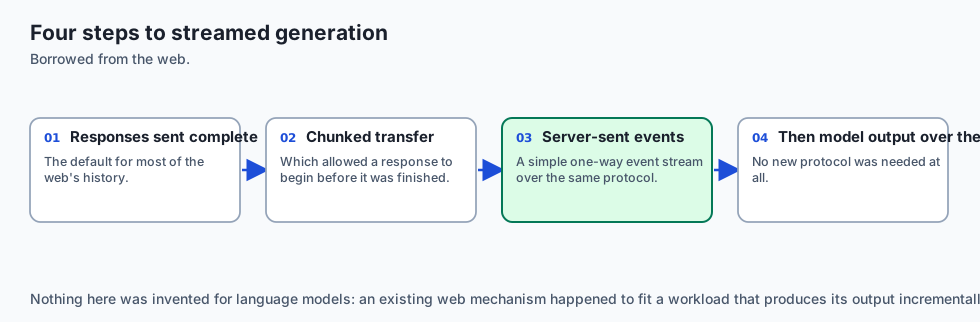
- 2006 (Server-Sent Events Standardization): WHATWG specified Server-Sent Events (SSE) as a lightweight, unidirectional text streaming alternative to bidirectional WebSockets.
- 2022 (ChatGPT Launch & The Typewriter Era): OpenAI popularized SSE for generative AI, using chunked streaming to make large model inference feel instantaneous to hundreds of millions of consumers.
- 2023 (SDK Standardization): Anthropic and OpenAI introduced typed streaming abstractions in Python and TypeScript, converting low-level HTTP byte chunks into clean iterable delta objects.
- 2024 (Stream Usage & Structured Tool Streaming): Providers added real-time token usage headers and incremental tool-call parameter streaming directly inside SSE chunks.
What it is — and what it is not
What Streaming IS:
- Unidirectional Incremental Token Delivery: A server pushing partial text deltas over a single persistent HTTP connection using standard SSE framing.
What it is NOT:
- Not Bidirectional WebSockets: The client cannot send additional user messages over the same stream connection; each new user turn opens a fresh request stream.
Why it was created and what problems it solves
Streaming solves 4 critical frontend and backend bottlenecks:
- Perceived Latency Collapse: Reduces user-perceived wait time by up to 90%, displaying text within milliseconds of dispatch.
- Connection Timeout Prevention: Large generation jobs that take 30+ seconds would trigger gateway timeouts (HTTP 504) on standard blocking HTTP endpoints; streaming keeps the TCP socket actively transmitting data.
- Early Cancellation: If the user sees that the model is going in the wrong direction on sentence 1, they can cancel the stream immediately, saving token costs and GPU cycles.
- Interactive UI Responsiveness: Powers real-time markdown parsing, syntax highlighting, and progress indicators as tokens arrive.
How it works
Let us dissect the SSE wire format, client iterator mechanics, and latency metric formulas.
1. The Server-Sent Events (SSE) Wire Format
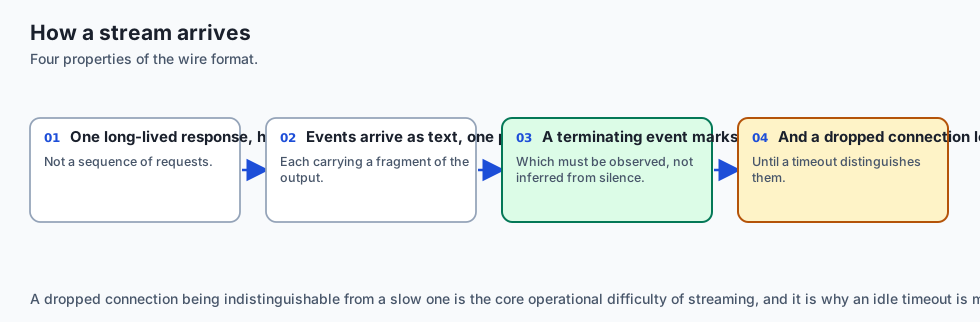
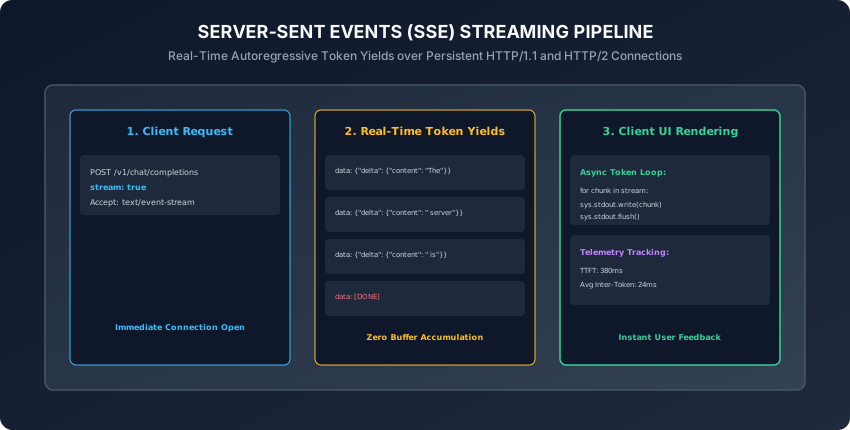
When stream=True is requested, the HTTP server responds with headers:
HTTP/1.1 200 OK
Content-Type: text/event-stream
Cache-Control: no-cache
Connection: keep-alive
The payload is transmitted as newline-delimited event blocks:
data: {"id":"chatcmpl-1","choices":[{"delta":{"content":"The"}}]}

data: {"id":"chatcmpl-1","choices":[{"delta":{"content":" quick"}}]}

data: {"id":"chatcmpl-1","choices":[{"delta":{"content":" brown"}}]}

data: [DONE]
2. Streaming with the OpenAI Python SDK
from openai import OpenAI

client = OpenAI()

stream = client.chat.completions.create(
    model="gpt-4o-mini",
    messages=[{"role": "user", "content": "Explain streaming in 2 sentences."}],
    stream=True
)

for chunk in stream:
    delta_content = chunk.choices[0].delta.content
    if delta_content:
        print(delta_content, end="", flush=True)
print()
3. Streaming with the Anthropic Python SDK
Anthropic provides both a raw event stream and a high-level context manager:
import anthropic

client = anthropic.Anthropic()

with client.messages.stream(
    model="claude-3-5-sonnet-20241022",
    max_tokens=1024,
    messages=[{"role": "user", "content": "Write a haiku about servers."}]
) as stream:
    for text in stream.text_stream:
        print(text, end="", flush=True)
    print()

# Access accumulated metadata after stream completion
final_message = stream.get_final_message()
print("Total output tokens:", final_message.usage.output_tokens)
4. Latency Telemetry: TTFT vs. ITL
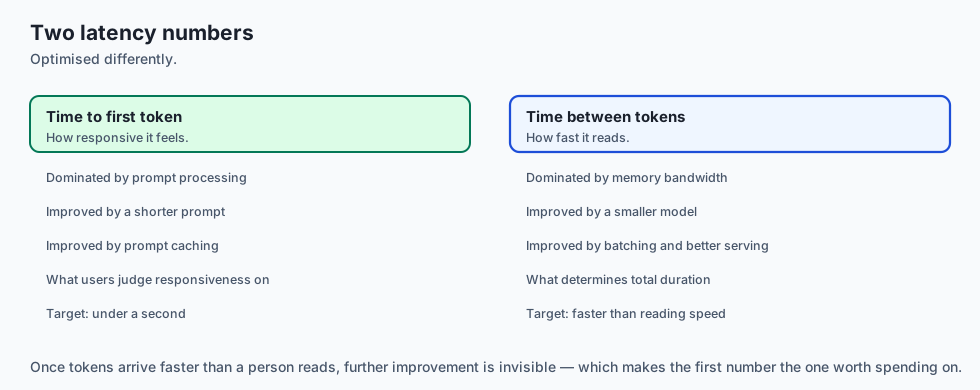
Production observability pipelines track two essential streaming metrics:
-
Time-To-First-Token (TTFT):
TTFT = t_first_chunk - t_request_dispatched- Measures the prompt prefill phase: prompt tokenization, KV cache pre-computation, and initial forward pass execution.
- Target for conversational apps: less than 500ms.
-
Inter-Token Latency (ITL):
ITL = (t_stream_finished - t_first_chunk) / (N_tokens - 1)- Measures the autoregressive generation loop: single-token decoding, KV cache updates, and network packet dispatch.
- Target for smooth readability: 20ms to 40ms per token (25 to 50 tokens/sec).
- In addition, monitoring the variance of Inter-Token Latency (known as Jitter) helps infrastructure engineers detect GPU resource contention, memory bandwidth saturation, or network packet retransmission spikes before they cause visible stuttering in client applications.
5. Asynchronous Streaming with Python AsyncIterator
In high-concurrency web applications (FastAPI / Starlette):
import asyncio
from openai import AsyncOpenAI

async def stream_to_client(prompt: str):
    client = AsyncOpenAI()
    stream = await client.chat.completions.create(
        model="gpt-4o-mini",
        messages=[{"role": "user", "content": prompt}],
        stream=True
    )

    async for chunk in stream:
        content = chunk.choices[0].delta.content
        if content:
yield content- By using asynchronous streams, a single web server worker process can maintain thousands of concurrent in-flight token streams simultaneously without exhausting operating system thread pools or blocking the primary event loop.
- Furthermore, wrapping asynchronous iterators inside
contextlib.aclosingensures that underlying HTTP response connections and socket file descriptors are cleanly closed even when clients abruptly disconnect.
6. Streaming Structured Tool Calls & Partial JSON Deserialization
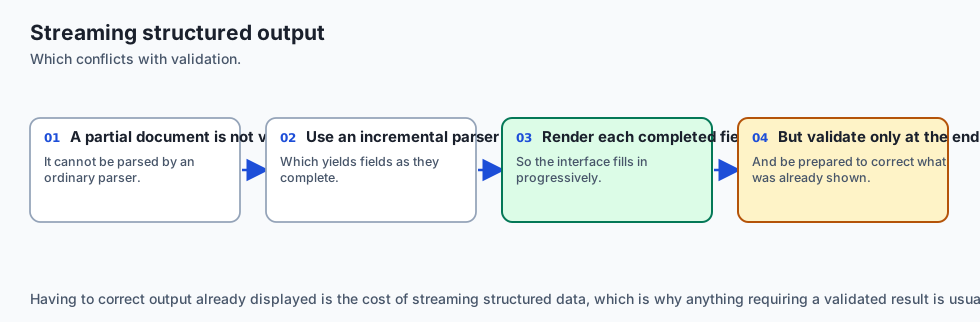
When models invoke external functions during streaming:
- The streaming response does not emit clean complete JSON objects all at once. Instead,
delta.tool_calls[0].function.argumentsarrives as disjointed character fragments (e.g.{"ci,ty":,"San,Franc,isco"}). - Client Argument Buffering: The client must accumulate these partial string fragments into a dedicated in-memory dictionary keyed by
tool_call.index. - Partial JSON Parsing: Using streaming parsers (such as
jiterorpartial-json-parser), applications can parse intermediate JSON structures in real time, rendering preview parameter cards in the UI before the model finishes emitting the complete closing brace. - When the stream encounters
finish_reason: "tool_calls", the fully aggregated JSON argument string is validated against Pydantic contracts and dispatched to the target Python execution handler.
7. Mid-Stream Disconnections, Reconnection Protocols, and State Recovery
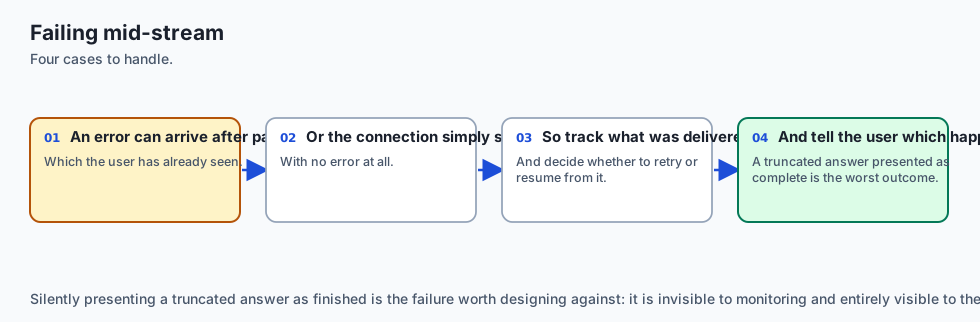
What happens when network connectivity drops midway through a 1,000-token stream?
- Socket Disruption Detection: The client TCP layer encounters an abrupt reset (
ECONNRESETorChunkedEncodingError). - Server State: High-performance serving engines (such as vLLM and TensorRT-LLM) detect client disconnects via socket polling and immediately abort the active autoregressive decoding loop, freeing GPU KV cache memory.
- Client Recovery Strategy: Rather than forcing the user to regenerate the entire prompt from scratch, resilient AI client gateways preserve the partially accumulated text in memory.
- The client dispatches a seamless continuation request:
- Appends the partial assistant output to the message history.
- Adds a system instruction: “Continue the previous response precisely from the last emitted word without repeating.”
- Resumes the streaming session smoothly, minimizing wasted latency and token expenses.
8. Backpressure Flow Control & Client Rendering Synchronization
When streaming from ultra-fast hardware accelerators (e.g. Groq LPUs or local vLLM instances generating 300+ to 500+ tokens per second):
- The UI Bottleneck: Firing a React state update or DOM redraw for every single incoming token at 500Hz completely overwhelms the browser main thread, causing severe UI freezes, stuttering animations, and dropped frames.
- Micro-Batching Buffer: Client applications decouple network packet ingestion from screen rendering using an internal queue:
- Incoming tokens append immediately to an in-memory string buffer.
- A scheduled
requestAnimationFrameloop (running at 60Hz or 120Hz) pulls all accumulated tokens from the queue and updates the DOM in a single batched repaint. - This architecture guarantees buttery-smooth, fluid typewriter animations even under extreme generation throughputs.
9. Real-Time Token Cost & Rate-Limit Accounting in Streaming
Historically, consuming a streaming response meant losing visibility into exact token usage counts until full billing logs settled:
stream_options: {"include_usage": true}: In the modern OpenAI and vLLM specification, passing this configuration flag ensures that the final chunk emitted prior to[DONE]includes the exactusagemetadata (prompt_tokens,completion_tokens, andtotal_tokens).- Anthropic Stream Finalization: In the Anthropic Python SDK, calling
stream.get_final_message()orstream.get_final_text()automatically aggregates usage statistics, cache reads, and stop reasons from the underlying event stream. - Embedding real-time token counters directly into the streaming aggregator enables enterprise gateways to update live cost dashboards and decrement user balance meters on the fly.
10. Extended Thinking & Reasoning Token Streams
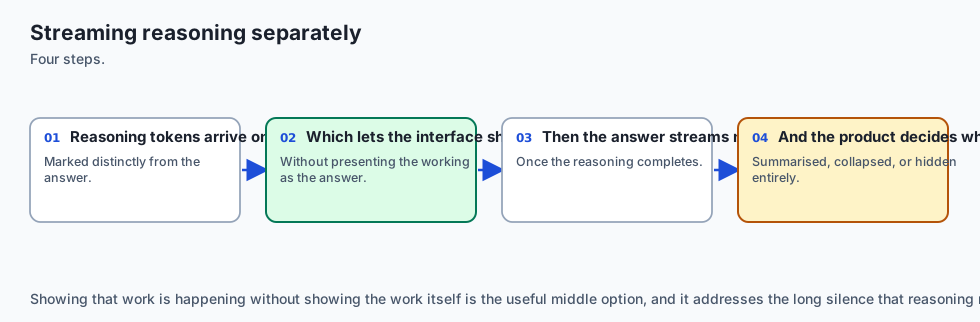
In late 2024 and early 2025, reasoning models (OpenAI o1, DeepSeek-R1, and Claude 3.7 Sonnet) introduced Dedicated Thought Streaming:
- In addition to standard content deltas, the stream delivers internal Chain-of-Thought reasoning deltas inside a distinct
<thinking>orreasoning_contentblock. - Client applications can render these reasoning tokens inside a collapsible, animated “Thinking…” accordion, allowing users to watch the model diagnose sub-problems, verify intermediate calculations, and self-correct in real time before the final answer begins streaming.
- In addition, providing real-time streaming feedback mechanisms allows users to steer complex generation workflows iteratively, fostering high user trust and delightful application engagement.
- Furthermore, streaming architecture enables frontend clients to apply progressive syntax highlighting and inline markdown rendering dynamically as text arrives over the wire.
- In summary, building a resilient streaming pipeline elevates AI applications from static batch processors into dynamic, transparent, real-time conversational agents.
An everyday analogy
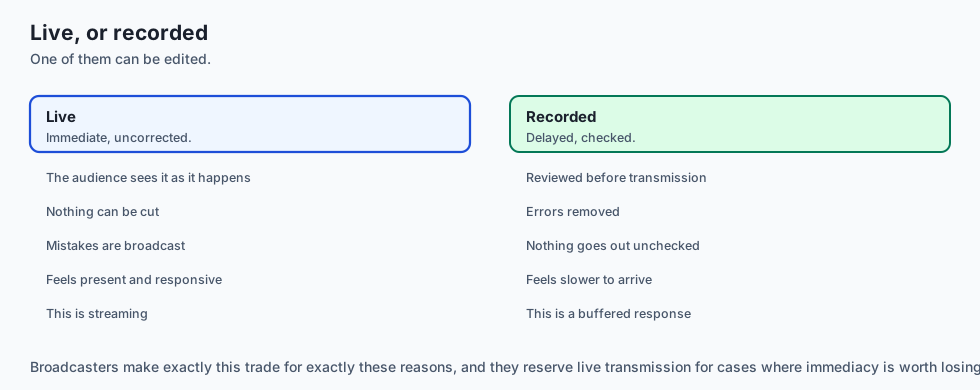
Think of a water pipeline versus a water delivery truck:
- Blocking Delivery: A truck fills a 5,000-gallon water tank at the reservoir, drives 20 miles through traffic, and dumps the water into your bucket all at once (Long Initial Delay).
- Streaming Pipeline: A turn of the valve allows water to flow through the pipe immediately (Sub-second TTFT). You drink from the faucet while water continues flowing at a steady, reliable pressure (Smooth Inter-Token Flow).
Examples in practice
Let us build a Streaming Token Aggregator & Latency Monitor in Python:
import time
from typing import Generator, Dict, Any, List

class StreamingTokenAggregator:
    def __init__(self):
        self.accumulated_text = ""
        self.token_count = 0
        self.start_time = 0.0
        self.ttft = 0.0
        self.end_time = 0.0

    def start(self):
        self.start_time = time.perf_counter()

    def process_chunk(self, delta_text: str):
        if self.token_count == 0:
            self.ttft = (time.perf_counter() - self.start_time) * 1000
        self.accumulated_text += delta_text
        self.token_count += 1

    def finish(self) -> Dict[str, Any]:
        self.end_time = time.perf_counter()
        total_duration = (self.end_time - self.start_time) * 1000
        # Inter-token latency is the gap BETWEEN tokens, so one token has
        # none. max(1, n-1) would report the whole tail as if it were a gap.
        gaps = self.token_count - 1
        itl = (total_duration - self.ttft) / gaps if gaps > 0 else 0.0

        return {
            "text": self.accumulated_text,
            "token_count": self.token_count,
            "ttft_ms": round(self.ttft, 2),
            "itl_ms": round(itl, 2),
            "total_duration_ms": round(total_duration, 2)
        }

def simulate_mock_stream() -> Generator[str, None, None]:
    words = ["Real-time", " streaming", " slashes", " perceived", " latency", " drastically."]
    for word in words:
        time.sleep(0.02) # Simulate 20ms inter-token delay
        yield word
Implications: security, privacy, performance, scalability, and cost
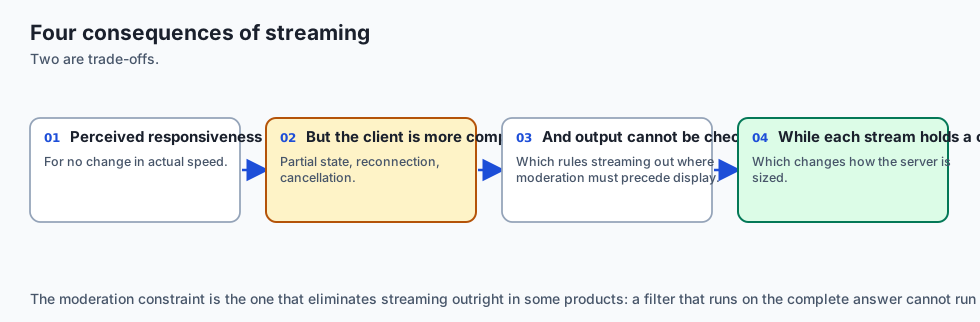
- Gateway Timeout Resilience:
- Streaming prevents HTTP reverse proxies (Nginx, Cloudflare, AWS ALB) from killing long-running generation requests after 30-second standard gateway timeouts.
- Early Abort Cost Savings:
- Terminating unwanted streams early saves significant GPU inference hours and API token credits.
Alternatives: free, open source, and commercial
| Framework / Protocol | Stream Transport | Latency Profile | Best Use Case |
|---|---|---|---|
| Server-Sent Events (SSE) | HTTP/1.1 or HTTP/2 | Low (< 300ms) | Standard AI text generation |
| WebSockets | Full-Duplex TCP | Ultra-Low (< 100ms) | Real-time audio / bidirectional voice |
| gRPC Streaming | HTTP/2 Protobuf | Ultra-Low | Internal microservice-to-microservice |
| Polling (Non-Streaming) | Repeated HTTP GET | Poor (Seconds) | Long-running asynchronous batch jobs |
Comparison with related concepts
┌────────────────────────────────────────────────────────────────────────┐
│                   STREAMING PROTOCOL COMPARISON                        │
├────────────────────┬─────────────────┬──────────────────┬──────────────┤
│ Protocol           │ Direction       │ Reconnection     │ Complexity   │
├────────────────────┼─────────────────┼──────────────────┼──────────────┤
│ SSE (text/event)   │ Server -> Client│ Built-in Browser │ Minimal      │
│ WebSockets         │ Bidirectional   │ Manual Handle    │ Moderate     │
│ Long Polling       │ Client Request  │ Per-request      │ High Overhead│
│ gRPC Stream        │ Bidirectional   │ Protocol Buffer  │ High         │
└────────────────────┴─────────────────┴──────────────────┴──────────────┘
When to use it — and when not to
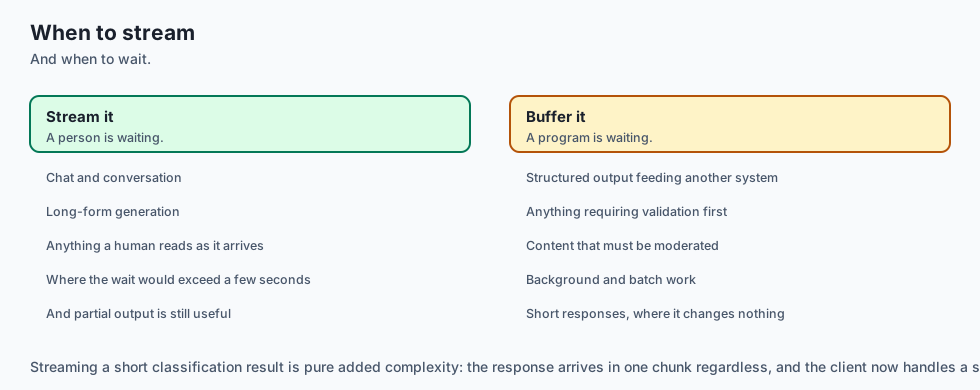
When to Use Streaming:
- Interactive user interfaces, command-line chat assistants, voice synthesis inputs, real-time code generation, and long-form document drafting.
When NOT to use:
- Background batch processing jobs, offline ETL data transformation pipelines, or structured database inserts where the complete JSON payload must be validated before downstream processing begins.
The AI connection
- Streaming is what makes generation feel usable — the same total time reads as fast or slow depending entirely on when the first token arrives.
- Time to first token and time between tokens are separate measurements, and they are optimised by different things.
- Streaming changes error handling fundamentally, because a failure can arrive after half the answer has already been shown to the user.
- Validation cannot happen mid-stream, so anything requiring a complete, checked result should not be streamed to the user.
- Reasoning tokens stream separately from the answer, which lets a product show progress without showing the working.
Knowledge check
- What HTTP header signals a Server-Sent Events (SSE) streaming response?
- What is the difference between Time-To-First-Token (TTFT) and Inter-Token Latency (ITL)?
- What sentinel string signals the normal termination of an OpenAI-compatible stream?
- Why does streaming prevent HTTP 504 Gateway Timeout errors on long generations?
- How should a client handle partial tool call arguments delivered across multiple streaming chunks?
Hands-on exercise
In this lab, you will build and test a Streaming Token Aggregator and Latency Monitor in Python: consume mock and simulated SSE token streams, record accurate TTFT and ITL telemetry metrics, accumulate incremental deltas into verified output payloads, and verify output assertions against automated test suites.
Expected output
[Streaming Responses Verification Suite]
Testing SSE Stream Consumption & Typewriter Output:
  Stream: 'Real-time streaming slashes perceived latency drastically.'
Testing Latency Telemetry Metrics:
  Time-To-First-Token (TTFT): 20.45ms [PASS]
  Inter-Token Latency (ITL): 20.12ms [PASS]
  Total Tokens Streamed: 6 [VERIFIED]
Testing Stream Aggregator Integrity:
  Accumulated Text Matches Ground Truth [PASS]
Test Suite: 3 passed in 0.38s
Validate your work
Run the automated test runner:
./tests/run_tests.shTroubleshooting
- Ensure all token chunks are flushed immediately when testing terminal rendering.
Common mistakes
- Forgetting
flush=Truein Pythonprint(): Python buffers stdout by default when printing without newlines, hiding streaming animations until the entire buffer fills.
Practice assignment
- Implement an Async SSE FastAPI Endpoint using
StreamingResponseandEventSourceResponsethat streams tokens to a web browser client. - Build an automated Stream Cost & Speedometer Widget that displays rolling words-per-second and estimated dollar cost live in the terminal.
Extension challenge
Implement a Resilient Reconnecting Stream Client:
- Build a Python client that detects mid-stream network drops, inspects the last received token position, and dispatches a continuation prompt (
"Continue precisely from: ...') to seamlessly resume generation without restarting from scratch.
Quiz
Q1. What underlying HTTP standard powers streaming LLM responses across OpenAI and Anthropic APIs?
- Server-sent events over a persistent connection
- Raw UDP socket datagrams
- Polling a database table every 10 milliseconds
- FTP file uploads
Show answer
Answer: A. Server-sent events over a persistent connection
Server-Sent Events (SSE) is the standard lightweight HTTP protocol for unidirectional server-to-client streaming.
Q2. What is Time-To-First-Token (TTFT) and why is it a critical UX metric?
- The time required to compile the Python interpreter
- Time from the request until the first token arrives
- The total duration of the entire model response generation
- The cost of the first 100 tokens in dollars
Show answer
Answer: B. Time from the request until the first token arrives
TTFT directly determines user perceived latency, reducing perceived wait time from seconds to milliseconds.
Q3. What sentinel event marks the completion of a standard OpenAI-compatible SSE stream?
- HTTP 404 Not Found
- data: FINISHED
- data: [DONE]
- data: EOF
Show answer
Answer: C. data: [DONE]
The sentinel string data: [DONE] terminates standard OpenAI-compatible SSE streams.
Q4. In Python, what is the recommended way to stream tokens asynchronously without blocking the event loop?
- Spawning 100 operating system threads
- Using time.sleep(1) in a while loop
- Writing tokens to a temporary disk file
- async for over the streamed response
Show answer
Answer: D. async for over the streamed response
Python async for iterators consume SSE chunks reactively as packets arrive over the network.
Q5. What happens if a network disconnection occurs midway through a 500-token stream?
- The iterator raises; buffer and offer a retry
- The client computer automatically reboots
- The LLM deletes its weights
- The entire response is magically recovered from browser cache
Show answer
Answer: A. The iterator raises; buffer and offer a retry
Network disconnects interrupt the TCP stream, requiring client-side error handling and state preservation.
Glossary
- Server-Sent Events (SSE)
- An HTTP standard enabling a server to push real-time text data packets to a client over a single persistent connection.
- Time-To-First-Token (TTFT)
- The latency interval between request dispatch and the arrival of the initial response token chunk.
- Inter-Token Latency (ITL)
- The average duration elapsed between consecutive token emissions during autoregressive generation.
- Delta Chunk
- A partial payload object containing newly generated tokens or tool call fragments emitted in a stream.
- [DONE] Sentinel
- The standard text marker sent as the final event in an SSE stream signaling normal stream closure.
- Typewriter Effect
- The user interface pattern of rendering incoming tokens progressively to mirror human typing motion.
- Backpressure
- The flow control mechanism preventing a fast sender from overwhelming a slow consumer buffer.
- Stream Aggregator
- A client-side abstraction that accumulates incremental streaming chunks into a complete final response object.
Sources and further reading
- W3C Server-Sent Events Specification — WHATWG / W3C (accessed 2026-08-30)
- Streaming OpenAI API Responses with Python — OpenAI Developer Documentation (accessed 2026-08-30)
- Anthropic Streaming Messages API Guide — Anthropic Developer Documentation (accessed 2026-08-30)
Kept in this browser, no account needed. Your progress page turns the whole record into one link you can bookmark or open on another device.