AI Engineering: Agents and Applications › The Model Context Protocol › Day 295
Day 295: What MCP Is and Why It Exists
Master the architecture, motivation, and JSON-RPC 2.0 protocol mechanics of Anthropic's open-standard Model Context Protocol (MCP) connecting AI clients to local and remote tools, resources, and prompts.
Hands-on lab for this lesson
Lab files on GitHub: https://github.com/ai-roadmap-365/ai-roadmap-365.github.io/tree/main/labs/sections/ai-engineering/day-295-what-mcp-is-and-why-it
- Get the hands-on files. Clone the labs repository once (you can reuse this clone for every lesson). This works on macOS, Linux, and Windows (PowerShell or WSL):
git clone https://github.com/ai-roadmap-365/ai-roadmap-365.github.io.git cd ai-roadmap-365.github.io - Open this lesson's lab. Move into the directory for this specific day. Every lab lives at the same predictable path — section / subsection / week / day:
cd labs/sections/ai-engineering/day-295-what-mcp-is-and-why-it - Read the lab guide. Open `README.md` in that directory. It lists the exact commands, what each does, the expected output, and how to check your work — read it before running anything.
- Run it and check your work. Follow the README's "How to run" section: run the example first to see the finished result, then complete the numbered exercises in `starter/`, then run the tests. The tests pass (exit 0) only when your work is correct.
bash tests/run_tests.sh # or the test command named in the lab README
You can also open the lab as a local page (works offline, shows the file tree and expected output).
Learning objectives
By the end of this lesson you will be able to:
- Deconstruct the N-times-M integration dilemma solved by the Model Context Protocol.
- Analyze the JSON-RPC 2.0 transport layers: Standard I/O (stdio) vs Server-Sent Events (SSE).
- Differentiate the three core MCP primitives: Tools, Resources, and Prompts.
- Implement a standards-compliant JSON-RPC 2.0 MCP protocol parser in pure Python.
- Evaluate security boundaries, privilege isolation, and capability negotiation in MCP sessions.
Prerequisites
Why this matters
Before the advent of standard open protocols, connecting an AI model to enterprise infrastructure was a painful, highly fragmented engineering effort. If an organization wanted to give an AI assistant access to PostgreSQL databases, Jira issue trackers, GitHub repositories, and internal Slack channels, developers had to write custom API wrappers for every individual client application (such as Claude Desktop, VS Code plugins, custom chat frontends, and terminal tools).
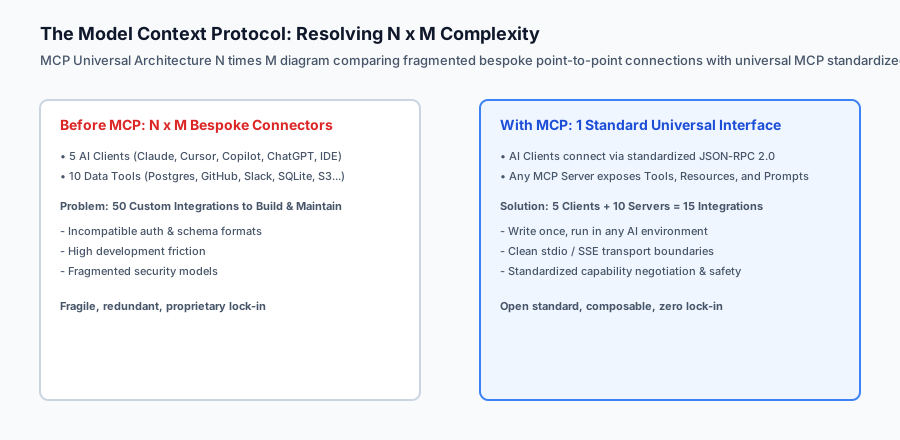
This created the classic $N \times M$ integration problem: $N$ AI client applications multiplied by $M$ enterprise tools required maintaining $N \times M$ separate point-to-point connectors. Every time a database schema changed or a new model launched, engineering teams faced cascading code rewrites.
In late 2024, Anthropic open-sourced the Model Context Protocol (MCP) to solve this architectural crisis. MCP is to AI tool integration what LSP (Language Server Protocol) was to code editors and compilers. By establishing an open, universal standard based on JSON-RPC 2.0, MCP allows any data provider, SaaS platform, or developer to write a single MCP server that seamlessly exposes Tools, Resources, and Prompts to any compatible AI client without modifying a single line of client code.
The idea in plain language
Think of the Model Context Protocol like USB-C for artificial intelligence:
- The Proprietary Past (Pre-MCP): In the early 2000s, every cell phone manufacturer used a proprietary charging cable. Nokia had a circular pin, Sony Ericsson had a wide ribbon, Motorola had a mini-plug, and Apple had a 30-pin connector. If you bought a new phone, all your old chargers, docks, and car adapters were instantly useless.
- The Standardized Present (MCP as USB-C): USB-C created a universal physical and electrical specification. Now, whether you connect a smartphone, an external SSD, a 4K monitor, or a studio microphone, any USB-C port negotiates power and data protocols automatically.
MCP does exactly this for AI software: an MCP server exposes its capabilities over a universal interface, and any MCP client (Claude Desktop, Cursor, Zed, Windsurf, or custom enterprise agents) plugs into it instantly.
Historical background
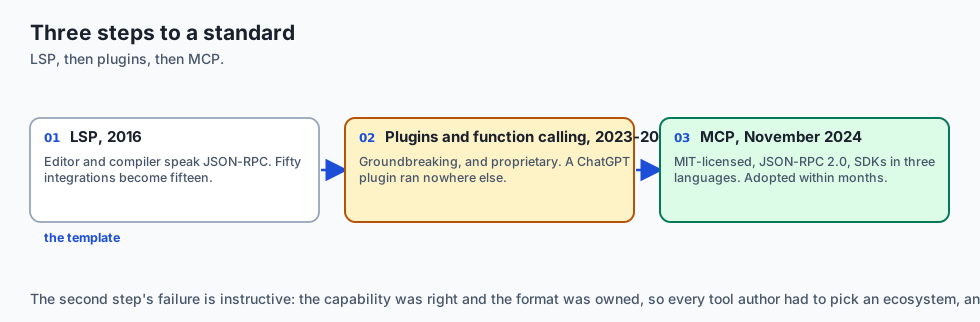
The technological evolution toward standardized agent communication occurred across three key stages:
1. The Language Server Protocol (LSP) Paradigm (Microsoft, 2016)
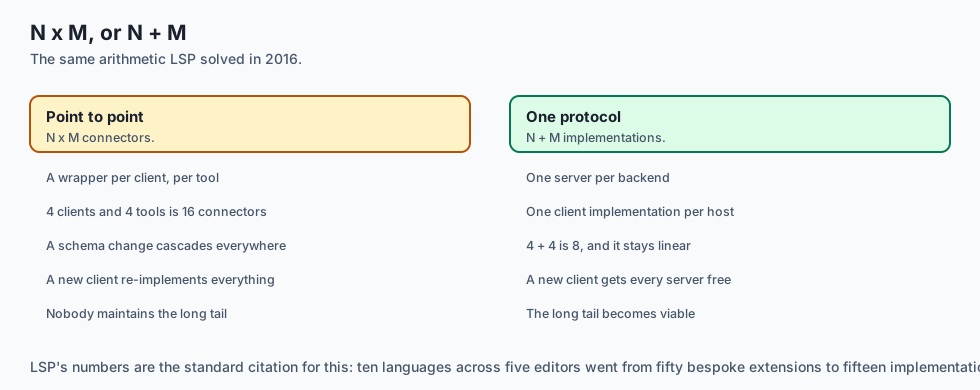
In 2016, Microsoft introduced LSP for Visual Studio Code. Prior to LSP, adding auto-complete and syntax highlighting for 10 programming languages across 5 different text editors required 50 bespoke extensions. LSP standardized editor-compiler communication over JSON-RPC, reducing 50 integrations to $10 + 5 = 15$.
2. Ad-Hoc Function Calling and Plugins (2023–2024)
In 2023, OpenAI introduced ChatGPT Plugins and Function Calling APIs. While groundbreaking, every ecosystem created proprietary JSON formats and isolated hosting environments. An OpenAPI plugin written for ChatGPT could not be used inside Claude Desktop or a local VS Code coding assistant without manual rewriting.
3. The Open MCP Standard (Anthropic, November 2024)
Anthropic released the Model Context Protocol as an open-source specification under the MIT license, accompanied by official SDKs in TypeScript, Python, and Kotlin. Within months, dozens of major developer tools—including PostgreSQL, GitHub, Brave Search, Slack, and Google Drive—released official MCP servers, making MCP the de facto industry standard for AI tool and data interoperability.
What it is — and what it is not
Let us define the strict architectural boundaries of the Model Context Protocol:
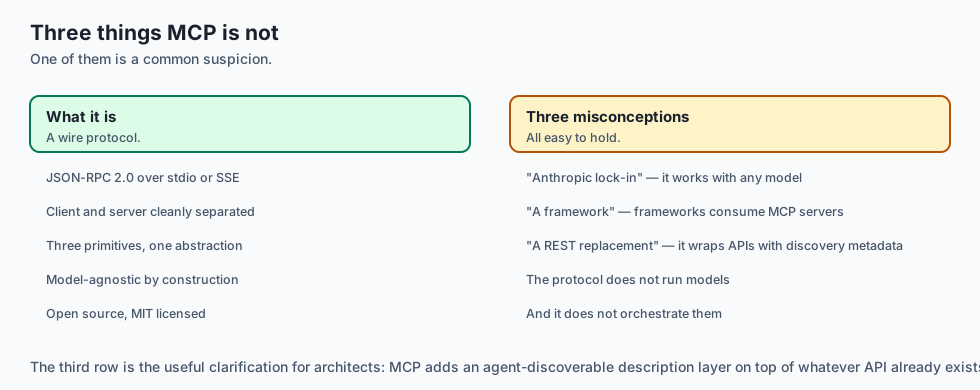
What MCP Is:
- An open, bidirectional protocol using JSON-RPC 2.0 framing over standard I/O (stdio) or Server-Sent Events (SSE).
- A client-server architecture cleanly separating AI host applications (clients) from data/tool providers (servers).
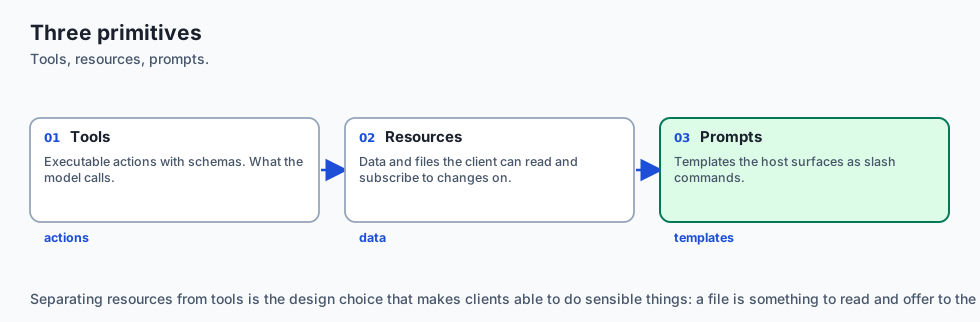
- A unified abstraction for three distinct primitives: Tools (executable actions), Resources (data/files), and Prompts (slash command templates).
What MCP Is Not:
- A proprietary Anthropic-only lock-in (MCP is fully open-source and model-agnostic; it works with OpenAI, Gemini, Claude, Ollama, and custom local models).
- A runtime LLM framework like LangChain or LlamaIndex (MCP is a wire protocol; frameworks can use MCP servers as tool backends).
- A direct replacement for raw REST APIs (MCP wraps backend APIs with standardized agent discovery metadata).
+-------------------------------------------------------------------------------+
|                       MCP PRIMITIVES TAXONOMY                                 |
+-------------------+-----------------------+-----------------------------------+
| Primitive Name    | Control Model         | Primary Purpose                   |
+-------------------+-----------------------+-----------------------------------+
| Tools             | Model-Controlled      | Executable functions with side    |
|                   |                       | effects and argument validation   |
| Resources         | Application-Controlled| Passive read-only data (logs,     |
|                   |                       | files, database rows, schemas)    |
| Prompts           | User-Controlled       | Reusable slash commands and       |
|                   |                       | structured multi-turn templates   |
+-------------------+-----------------------+-----------------------------------+
Why it was created and what problems it solves
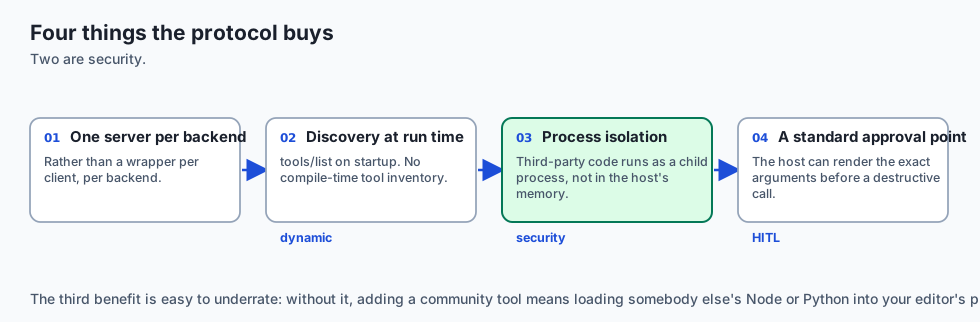
The Model Context Protocol resolves four systemic pain points in AI engineering:
1. Elimination of Bespoke Integration Glue Code
Instead of writing and maintaining hundreds of custom API wrapper classes, engineers write a single MCP server per backend service. Any compliant AI application immediately gains access.
2. Dynamic Tool and Resource Discovery
MCP clients do not need hardcoded tool lists at compile time. During initialization, the client queries tools/list and resources/list, dynamically adapting its system prompt and tool declarations to whatever servers are active.
3. Strict Process and Security Isolation
Local MCP servers run as isolated child processes communicating over stdio. The AI host application does not need to load untrusted third-party Python or Node.js code into its own memory space, preventing memory corruption and isolating crashes.
4. Human-in-the-Loop Approval by Design
The protocol standardizes structured tool call requests, allowing host clients to inspect arguments and render interactive approval dialogs to users before dangerous operations (such as SQL mutations or file deletions) are dispatched.
How it works
Deep Dive: JSON-RPC 2.0 Framing & Transport Topologies
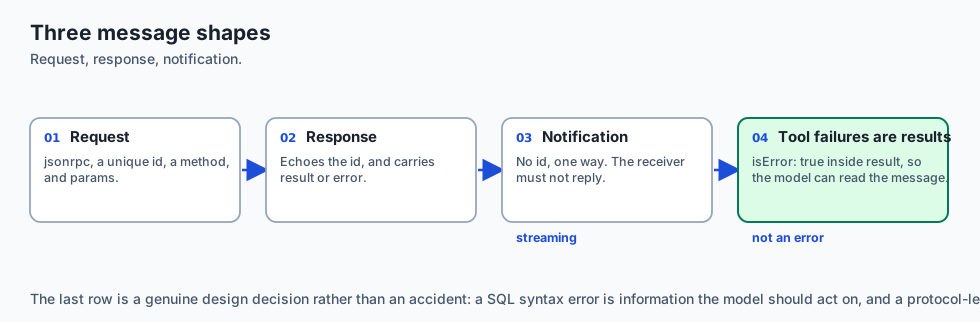
Under the hood, the Model Context Protocol strictly mandates JSON-RPC 2.0 (RFC standard) for all message exchanges. Every packet transmitted across the wire must belong to one of three categories:
-
Request Object: A request must contain
"jsonrpc": "2.0", a unique numerical or string"id", a"method"string, and an optional"params"object.{ "jsonrpc": "2.0", "id": 101, "method": "tools/call", "params": { "name": "query_database", "arguments": { "query": "SELECT count(*) FROM telemetry" } } } -
Response Object: A response echoes the caller’s
"id"and provides either a"result"object (on success) or an"error"object (on transport/protocol failure). Notice that tool execution failures (like SQL syntax errors) do NOT return JSON-RPC errors; they return"result": {"isError": true}so the model can inspect the error message directly.{ "jsonrpc": "2.0", "id": 101, "result": { "content": [ {"type": "text", "text": "sqlite3.OperationalError: no such table: telemetry"} ], "isError": true } } -
Notification Object: A one-way message without an
"id"field, used for state updates and streaming events. The receiver must not reply:{ "jsonrpc": "2.0", "method": "notifications/resources/updated", "params": { "uri": "postgres://analytics/schema" } }
Transport Mechanisms: Stdio vs Server-Sent Events (SSE)
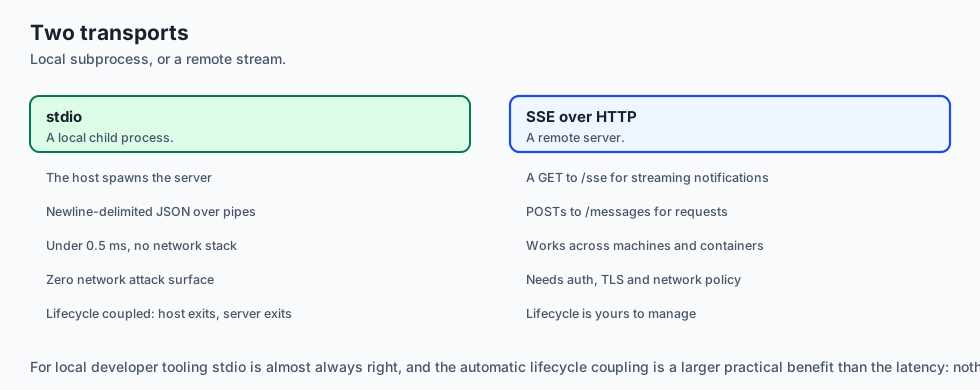
MCP standardizes two primary transport layers:
- Standard Input/Output (stdio): The host client spawns the server as a local child subprocess and writes JSON lines to
stdinwhile reading fromstdout. This provides near-zero latency ($< 0.5ms$), zero network attack surface, and automatic lifecycle coupling (when the host closes, the subprocess exits). - Server-Sent Events (SSE) over HTTP: Used for remote servers running on different machines or cloud containers. The client opens an HTTP GET connection to
/sseto receive streaming notifications from the server, and issues HTTP POST requests to/messagesto send client-to-server RPC requests.
+-------------------------------------------------------------------------------+
|                       MCP TRANSPORT COMPARISON MATRIX                         |
+-------------------+---------------------------+-------------------------------+
| Feature           | Standard I/O (stdio)      | SSE over HTTP                 |
+-------------------+---------------------------+-------------------------------+
| Deployment Scope  | Local Workstation         | Remote Cloud / Docker Network |
| Process Model     | Child Subprocess          | Independent Daemon / Service  |
| Latency Overhead  | < 0.5 ms                  | 5 ms - 50 ms (Network hop)    |
| Authentication    | OS-level user permissions | Bearer Tokens / mTLS          |
| Multiplexing      | Single client to server   | Multiple clients to one server|
+-------------------+---------------------------+-------------------------------+
The Model Context Protocol operates as a stateful client-server session governed by JSON-RPC 2.0:
+-----------------------+                         +-----------------------+
|      MCP Client       |                         |      MCP Server       |
| (e.g. Claude Desktop) |                         |  (e.g. SQLite Server) |
+-----------------------+                         +-----------------------+
           │                                                  │
           │  1. Request: "initialize" (protocolVersion)      │
           ├─────────────────────────────────────────────────>│
           │  2. Response: capabilities {tools, resources}    │
           │<─────────────────────────────────────────────────┤
           │                                                  │
           │  3. Notification: "notifications/initialized"    │
           ├─────────────────────────────────────────────────>│
           │                                                  │
           │  4. Request: "tools/list"                        │
           ├─────────────────────────────────────────────────>│
           │  5. Response: [read_query, list_tables]          │
           │<─────────────────────────────────────────────────┤
           │                                                  │
           │  6. Request: "tools/call" {"name": "read_query"} │
           ├─────────────────────────────────────────────────>│
           │  7. Response: {"content": [{"type": "text"...}]} │
           │<─────────────────────────────────────────────────┤
           │                                                  │
1. Transport Mechanisms
MCP specifies two official transport mechanisms:
- Standard I/O (
stdio): The client spawns the server as a child subprocess (python -m my_server). Communication flows over stdin/stdout using newline-delimited JSON-RPC messages. This is the gold standard for local development and desktop tools. - Server-Sent Events (
SSE): For remote network architectures, the client establishes an HTTP connection receiving streaming SSE messages from the server and posts requests back over standard HTTP POST endpoints.

2. JSON-RPC 2.0 Message Formatting
Every message exchanged across the transport conforms to JSON-RPC 2.0:
{
  "jsonrpc": "2.0",
  "id": 1,
  "method": "tools/call",
  "params": {
    "name": "query_database",
    "arguments": {
      "sql": "SELECT COUNT(*) FROM users;"
    }
  }
}
An everyday analogy
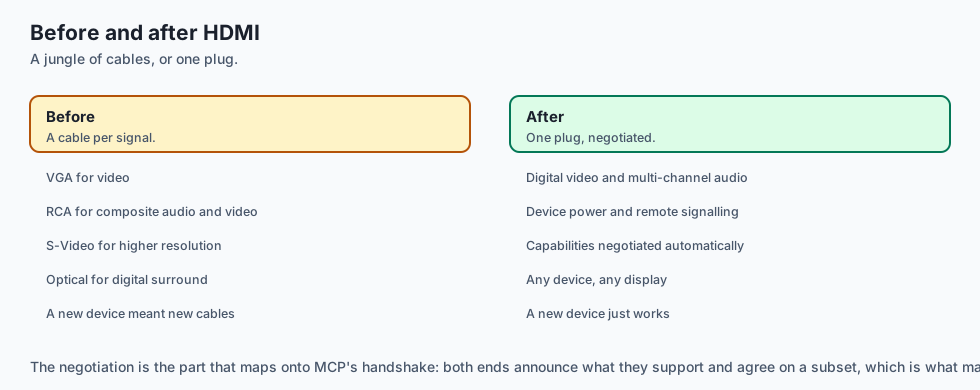
Think of MCP like the HDMI standard for audiovisual electronics:
- Before HDMI, connecting a home theater required a jungle of specialized cables: VGA for video, RCA yellow/red/white for composite audio/video, S-Video for high resolution, and Optical TOSLINK for digital surround sound.
- HDMI unified digital video, multi-channel audio, device power, and remote-control signaling (CEC) into a single plug.
MCP is the HDMI cable connecting AI language models to databases, filesystems, and web APIs.
Examples in practice
Let us inspect a pure-Python implementation of a lightweight JSON-RPC 2.0 MCP Protocol Parser and Stdio Dispatcher:
import sys
import json
from typing import Dict, Any, Optional

class MCPProtocolHandler:
    def __init__(self, server_name: str = "demo-server", server_version: str = "1.0.0"):
        self.server_name = server_name
        self.server_version = server_version
        self.tools: Dict[str, Dict[str, Any]] = {}

    def register_tool(self, name: str, description: str, input_schema: Dict[str, Any], handler_fn):
        self.tools[name] = {
            "definition": {
                "name": name,
                "description": description,
                "inputSchema": input_schema
            },
            "handler": handler_fn
        }

    def handle_message(self, raw_message: str) -> Optional[str]:
        try:
            msg = json.loads(raw_message.strip())
        except json.JSONDecodeError:
            return json.dumps({
                "jsonrpc": "2.0",
                "id": None,
                "error": {"code": -32700, "message": "Parse error"}
            })

        method = msg.get("method")
        msg_id = msg.get("id")

        # 1. Handle initialize request
        if method == "initialize":
            return json.dumps({
                "jsonrpc": "2.0",
                "id": msg_id,
                "result": {
                    "protocolVersion": "2024-11-05",
                    "capabilities": {
                        "tools": {"listChanged": False}
                    },
                    "serverInfo": {
                        "name": self.server_name,
                        "version": self.server_version
                    }
                }
            })

        # 2. Handle notifications/initialized (no response needed for notifications)
        elif method == "notifications/initialized":
            return None

        # 3. Handle tools/list
        elif method == "tools/list":
            tool_list = [t["definition"] for t in self.tools.values()]
            return json.dumps({
                "jsonrpc": "2.0",
                "id": msg_id,
                "result": {
                    "tools": tool_list
                }
            })

        # 4. Handle tools/call
        elif method == "tools/call":
            params = msg.get("params", {})
            tool_name = params.get("name")
            tool_args = params.get("arguments", {})

            if tool_name not in self.tools:
                return json.dumps({
                    "jsonrpc": "2.0",
                    "id": msg_id,
                    "error": {"code": -32601, "message": f"Tool not found: {tool_name}"}
                })

            try:
                handler = self.tools[tool_name]["handler"]
                result_text = handler(tool_args)
                return json.dumps({
                    "jsonrpc": "2.0",
                    "id": msg_id,
                    "result": {
                        "content": [
                            {"type": "text", "text": str(result_text)}
                        ],
                        "isError": False
                    }
                })
            except Exception as e:
                return json.dumps({
                    "jsonrpc": "2.0",
                    "id": msg_id,
                    "result": {
                        "content": [
                            {"type": "text", "text": f"Execution error: {str(e)}"}
                        ],
                        "isError": True
                    }
                })

        # Unknown method
        if msg_id is not None:
            return json.dumps({
                "jsonrpc": "2.0",
                "id": msg_id,
                "error": {"code": -32601, "message": f"Method not found: {method}"}
            })
        return None
Implications: security, privacy, performance, scalability, and cost
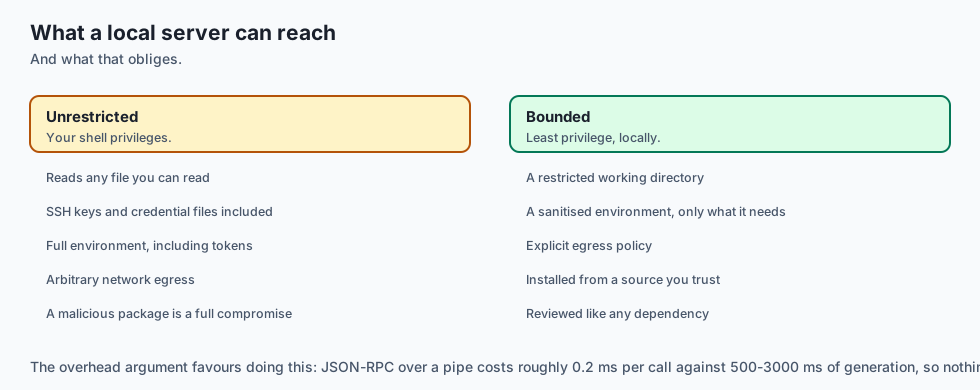
1. Process Sandboxing & Secret Exposure
Because MCP servers execute on the local machine with the user’s shell privileges, a vulnerable or malicious MCP server could read SSH keys, delete directories, or exfiltrate environment variables. Production deployments must restrict child process working directories and sanitize environment variables.
2. Latency Overhead of JSON-RPC
JSON-RPC serialization over stdio pipes adds sub-millisecond overhead (~0.2ms per call), which is negligible compared to LLM generation latency (typically 500ms–3000ms).
Alternatives: free, open source, and commercial
| Protocol / Standard | Framing Mechanism | Open Standard | Ecosystem Support |
|---|---|---|---|
| Model Context Protocol (MCP) | JSON-RPC 2.0 (stdio / SSE) | Yes (MIT License) | Claude, Cursor, Zed, Windsurf, LangChain |
| OpenAI Plugins / Actions | HTTP REST + OpenAPI | Proprietary / Web | ChatGPT Web only |
| Custom Function Calling | Model-specific JSON | No | Direct SDK implementations |
| gRPC Microservices | Binary Protobuf / HTTP2 | Yes | Enterprise backend clusters |
Comparison with related concepts
+-----------------------+-----------------------+-----------------------+
| Dimension             | Language Server (LSP) | Model Context (MCP)   |
+-----------------------+-----------------------+-----------------------+
| Target Consumer       | Text Editor IDE       | AI Language Model     |
| Protocol Basis        | JSON-RPC 2.0          | JSON-RPC 2.0          |
| Core Primitives       | Hover, Definition, Lint| Tools, Resources, Prompt|
| Execution Model       | AST / Compiler analysis| Function invocation & data|
+-----------------------+-----------------------+-----------------------+
When to use it — and when not to
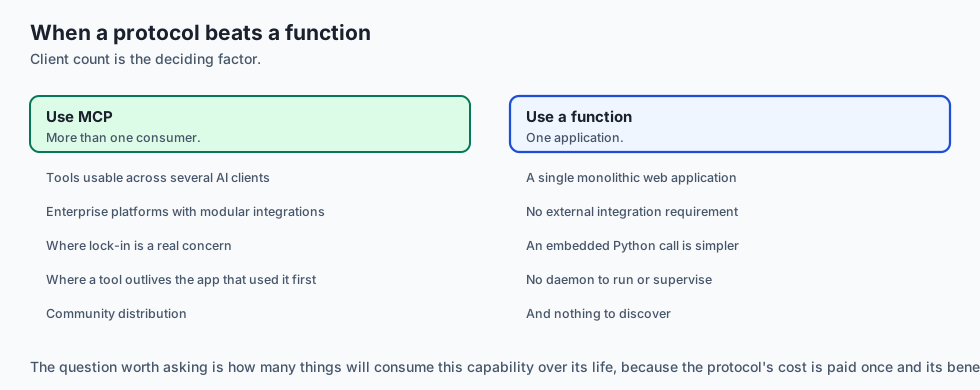
Choose MCP when:
- You want your database, internal API, or filesystem tools to be usable across multiple AI clients (Claude Desktop, Cursor, IDEs) with zero vendor lock-in.
- You are architecting enterprise developer platforms where data integrations must be modular and decoupled from the active LLM.
Do NOT use MCP when:
- You are building a single monolithic web application where an embedded Python function call has zero external integration requirements.
The AI connection
-
MCP is LSP’s lesson applied to AI: N clients times M tools collapses to N + M once both sides speak one protocol.
-
Discovery at run time is the property frameworks lacked. A client queries
tools/liston startup rather than compiling a tool inventory into its prompt. -
Tool failures are results, not protocol errors. A SQL syntax error returns
isError: trueso the model can read it — Day 289’s self-healing, in the wire format. -
Process isolation is a real security boundary. A stdio server is a child process, so third-party tool code never enters the host application’s memory.
-
The protocol standardises the approval point, which is what makes a host client able to show a human the exact arguments before a destructive call runs.
Knowledge check
- How does MCP solve the $N \times M$ integration problem? By establishing a single open protocol bus: clients implement 1 MCP client interface, and servers implement 1 MCP server interface.
- What are the three core primitives of MCP? Tools (model actions), Resources (context data), and Prompts (workflow templates).
- Why is stdio preferred for local MCP execution? It eliminates port collisions, avoids localhost network security risks, and terminates cleanly with the parent process.
Hands-on exercise
In this lab, you will implement a Pure-Python JSON-RPC 2.0 Model Context Protocol Engine. Your implementation will:
- Parse and validate JSON-RPC 2.0 messages (
initialize,tools/list,tools/call). - Implement schema validation and dispatch for registered mathematical and string tools.
- Return compliant MCP result payloads with
contentandisErrorflags. - Verify handshake parity and error handling across automated pytest suites.
Expected output
============================= test session starts ==============================
collected 5 items

tests/test_mcp_protocol.py .....                                         [100%]

============================== 5 passed in 0.02s ===============================
[MCP SERVER] Initialized 'math-mcp-server' v1.0.0
[HANDSHAKE] Handshake verified with protocolVersion: 2024-11-05
[DISCOVERY] Exposed 2 tools: ['calculate_add', 'calculate_multiply']
[EXECUTION] tools/call calculate_add (a=15, b=27) -> Result: 42
Validate your work
Run the pytest test suite:
pytest tests/run_tests.shTroubleshooting
- Parse error code -32700: Verify incoming string is valid JSON without trailing characters.
- Missing protocolVersion: Ensure
initializeresult includes"protocolVersion": "2024-11-05".
Common mistakes
- Responding to JSON-RPC notifications (notifications have no
idand must not receive responses). - Returning raw strings instead of the required
content: [{"type": "text", "text": "..."}]array.
Practice assignment
Add support for a dynamic resources/list and resources/read handler returning file contents keyed by URI file:///workspace/data.txt.
Extension challenge
Implement an asynchronous stdio event loop using asyncio that handles concurrent tools/call requests in parallel.
Quiz
Q1. What is the primary industry problem solved by the Model Context Protocol (MCP)?
- The N x M integration problem
- It replaces HTML with XML in browsers
- It reduces Python memory usage to zero bytes
- It compiles CUDA kernels for AMD GPUs
Show answer
Answer: A. The N x M integration problem
MCP standardizes the interface between AI host applications (Claude Desktop, IDEs) and data providers/tools into a universal 1-to-N protocol.
Q2. Which messaging protocol serves as the foundation for Model Context Protocol communication?
- gRPC binary protobuf
- JSON-RPC 2.0 over stdio or HTTP with SSE
- SOAP XML over SMTP
- Raw TCP sockets with custom byte headers
Show answer
Answer: B. JSON-RPC 2.0 over stdio or HTTP with SSE
MCP uses JSON-RPC 2.0 framing over stdio for local subprocesses and SSE for remote network servers.
Q3. What are the three fundamental primitives exposed by an MCP Server?
- Models, Weights, and Hyperparameters
- Tables, Views, and Stored Procedures
- Tools, resources, and prompts
- Files, Folders, and Sockets
Show answer
Answer: C. Tools, resources, and prompts
MCP formally standardizes Tools (dynamic functions), Resources (URI-addressable data/files), and Prompts (reusable workflow templates).
Q4. How does capability negotiation operate during the initial MCP initialization handshake?
- The client sends a raw binary seed
- The client downloads the server's source code
- The server encrypts the hard drive
- The client sends initialize; the server replies
Show answer
Answer: D. The client sends initialize; the server replies
The `initialize` and `notifications/initialized` handshake establishes protocol version parity and feature availability before tools are dispatched.
Q5. Why is stdio (standard input/output) the preferred default transport for local MCP servers?
- No ports, no CORS, and lifecycle tied to the process
- Stdio is faster than CPU L1 cache
- Stdio enables wireless Bluetooth communication
- Stdio prevents Python imports
Show answer
Answer: A. No ports, no CORS, and lifecycle tied to the process
Stdio provides sandboxed process boundaries, zero port collision risk, and immediate cleanup when the client terminates.
Glossary
- Model Context Protocol (MCP)
- An open universal protocol standardizing how AI applications connect to external tools, data resources, and prompts.
- JSON-RPC 2.0
- A lightweight remote procedure call specification encoding requests, responses, and notifications in JSON format.
- MCP Host / Client
- The AI application (such as Claude Desktop, Cursor, or an IDE) that manages connections to MCP servers.
- MCP Server
- A lightweight program exposing tools, resources, and prompts to MCP clients via standard interfaces.
- Stdio Transport
- A local communication channel routing JSON-RPC messages across the standard input (stdin) and output (stdout) streams of a subprocess.
- SSE Transport
- Server-Sent Events over HTTP used for streaming JSON-RPC messages from remote MCP servers.
- MCP Tools
- Executable functions exposed by an MCP server that the AI model can invoke with validated JSON arguments.
- MCP Resources
- URI-addressable data sources (files, database tables, logs) that can be read by clients and attached to prompts.
Sources and further reading
- Introducing the Model Context Protocol (Anthropic, 2024) — Anthropic (accessed 2026-08-30)
- Model Context Protocol Specification (MCP Working Group, 2024) — Model Context Protocol Org (accessed 2026-08-31)
- JSON-RPC 2.0 Specification (JSON-RPC Working Group, 2010) — JSON-RPC Working Group (accessed 2026-08-30)
Kept in this browser, no account needed. Your progress page turns the whole record into one link you can bookmark or open on another device.