AI Engineering: Agents and Applications › The Model Context Protocol › Day 296
Day 296: Using MCP Servers
Learn how to configure, connect, and debug real-world MCP servers with AI host clients like Claude Desktop, Cursor, and custom Python agents using stdio subprocess configurations.
Hands-on lab for this lesson
Lab files on GitHub: https://github.com/ai-roadmap-365/ai-roadmap-365.github.io/tree/main/labs/sections/ai-engineering/day-296-using-mcp-servers
- Get the hands-on files. Clone the labs repository once (you can reuse this clone for every lesson). This works on macOS, Linux, and Windows (PowerShell or WSL):
git clone https://github.com/ai-roadmap-365/ai-roadmap-365.github.io.git cd ai-roadmap-365.github.io - Open this lesson's lab. Move into the directory for this specific day. Every lab lives at the same predictable path — section / subsection / week / day:
cd labs/sections/ai-engineering/day-296-using-mcp-servers - Read the lab guide. Open `README.md` in that directory. It lists the exact commands, what each does, the expected output, and how to check your work — read it before running anything.
- Run it and check your work. Follow the README's "How to run" section: run the example first to see the finished result, then complete the numbered exercises in `starter/`, then run the tests. The tests pass (exit 0) only when your work is correct.
bash tests/run_tests.sh # or the test command named in the lab README
You can also open the lab as a local page (works offline, shows the file tree and expected output).
Learning objectives
By the end of this lesson you will be able to:
- Configure `claude_desktop_config.json` and client MCP registries with stdio server definitions.
- Inspect and debug active tool inventories and environment variables across multiple running MCP servers.
- Implement a local MCP Server Manager in Python that spawns, inspects, and monitors stdio subprocesses.
- Troubleshoot common connection failures: PATH misconfigurations, unbuffered stdout locks, and missing dependencies.
- Evaluate security boundaries when installing third-party community MCP packages.
Prerequisites
Why this matters
Once you understand the conceptual foundations of the Model Context Protocol, the next critical engineering step is integrating, configuring, and operating real MCP servers in production workflows. Whether connecting local development environments (such as Claude Desktop, Cursor, or Zed) to SQLite databases, GitHub repositories, filesystem workspaces, or external SaaS platforms, developers must master configuration schemas, process lifecycle management, and stream debugging.
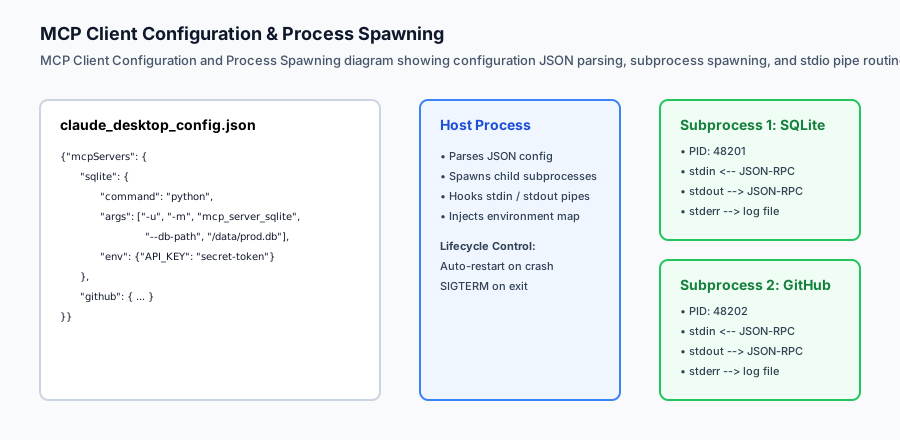
Configuring MCP servers requires understanding how host clients discover and spawn subprocesses, how environment variables are securely passed down, and how standard stream pipes (stdin, stdout, stderr) must be disciplined. A single accidental print() statement routed to standard output can corrupt the entire JSON-RPC message framing, causing the host AI client to immediately disconnect.
Mastering the practical operations of MCP servers enables engineers to supercharge their personal coding workflows, build custom internal developer tool suites, and connect enterprise AI agents to proprietary data silos securely and reliably.
The idea in plain language
Think of using MCP servers like configuring smart home accessories on your home Wi-Fi network:
- The Host Client (The Smart Home Hub / Apple Home / Google Home): An app on your phone that coordinates everything, displays UI controls, and receives user voice commands.
- The Configuration File (
claude_desktop_config.json): The network configuration list telling the hub which devices exist, what IP addresses (or executable paths) to use, and what security credentials to provide. - The MCP Servers (The Smart Accessories): A Philips Hue light server, an August smart lock server, a Nest thermostat server. Each server independently manages its hardware and exposes standardized capabilities (e.g.
turn_on_light,lock_door,get_temperature).
Once configured, the hub discovers all capabilities automatically. When you tell the AI assistant “Lock the front door and set the living room temperature to 72 degrees”, the AI routes commands to the appropriate MCP servers seamlessly.
Historical background
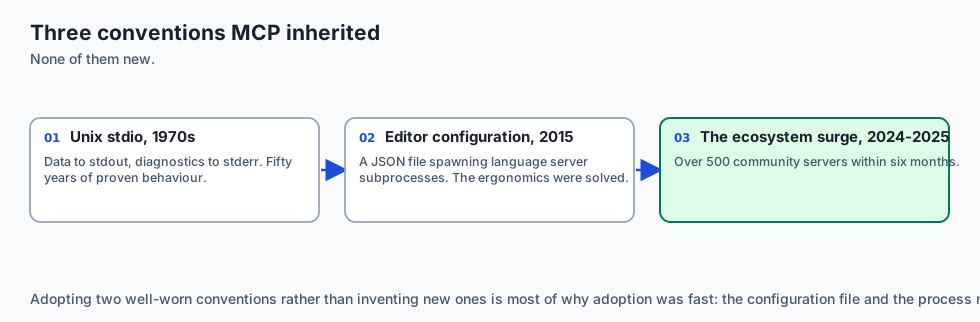
The operational model of MCP servers builds on three Unix and Web standards:
1. Unix Process Pipelines and Stdio (1970s–Present)
Ken Thompson and Dennis Ritchie pioneered the Unix philosophy: programs should read from stdin and write clean data to stdout, while routing diagnostics to stderr. MCP adopts this 50-year-old proven architecture for local AI process execution.
2. VS Code Extension Configuration (2015–Present)
VS Code established the pattern of using user and workspace JSON configuration files (settings.json, launch.json) to spawn Language Server background processes (pylsp, rust-analyzer). MCP adopted this configuration ergonomics for Claude Desktop and AI code editors.
3. The Community Ecosystem Surge (2024–2025)
Following Anthropic’s open-source release of MCP in late 2024, the open-source community created over 500 pre-built MCP servers within six months, spanning Docker, Kubernetes, AWS, Google Drive, Notion, Linear, Postgres, and Git.
What it is — and what it is not
Let us define what using MCP servers entails in practice:
What Using MCP Servers Is:
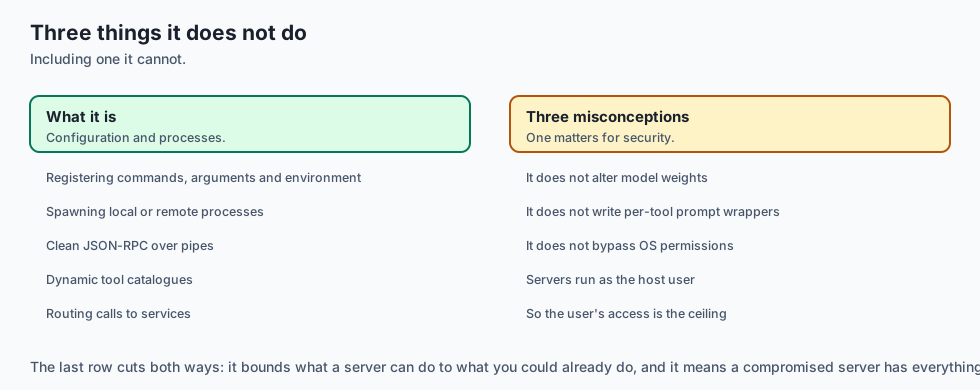
- Registering server commands, CLI arguments, and environment variables inside an MCP client configuration file.
- Spawning local or remote subprocesses that communicate via clean JSON-RPC 2.0.
- Querying dynamic tool catalogs and routing AI tool calls to external services.
What Using MCP Servers Is Not:
- Compiling models or altering model weights.
- Manually writing prompt engineering wrappers for every tool call.
- A bypass for operating system permissions (MCP servers run with the permissions of the host user).
+-------------------------------------------------------------------------------+
|                       MCP CLIENT CONFIGURATION TAXONOMY                       |
+-------------------+-----------------------+-----------------------------------+
| Configuration Key | Data Type             | Operational Purpose               |
+-------------------+-----------------------+-----------------------------------+
| `command`         | String (Executable)   | The binary to spawn (node, python)|
| `args`            | Array of Strings      | CLI flags, script paths, options  |
| `env`             | Key-Value Object      | Secrets, tokens, connection URLs  |
| `disabled`        | Boolean (Optional)    | Temporarily disables the server   |
| `autoApprove`     | Array (Client-specific| Skips confirmation for read tools |
+-------------------+-----------------------+-----------------------------------+
Why it was created and what problems it solves
Configuring tools via MCP solves four major operational challenges:
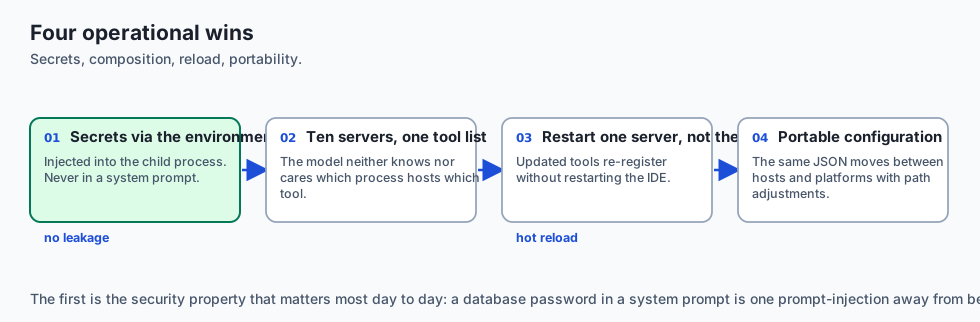
1. The Secrets Management Problem
Instead of hardcoding database passwords and GitHub tokens into system prompts (where they risk prompt leakage), secrets are injected into child processes via OS environment variables.
2. Multi-Server Composability
A single client can simultaneously connect to 10 distinct MCP servers (e.g. SQLite, GitHub, Brave Search, File System). The AI model sees a consolidated list of tools without knowing or caring which server hosts which tool.
3. Zero-Downtime Hot Reloading
When an MCP server’s code is updated or recompiled, restarting the child process re-registers the updated tools without restarting the entire desktop client or IDE.
4. Cross-Platform Portability
An MCP configuration written for Claude Desktop on macOS can be ported directly to Cursor on Linux or Zed on Windows with minimal path adjustments.
How it works
Deep Dive: Enterprise Multi-Server Configuration Topology
In production environments, engineering teams configure multi-server ecosystems aggregating databases, version control systems, cloud providers, and ticketing platforms. A typical enterprise claude_desktop_config.json combines specialized subprocess environments:
{
  "mcpServers": {
    "postgres-analytics": {
      "command": "npx",
      "args": ["-y", "@modelcontextprotocol/server-postgres", "postgresql://readonly_analyst:token@analytics-db.internal:5432/warehouse"],
      "env": {
        "PGSSLMODE": "require",
        "STATEMENT_TIMEOUT_MS": "15000"
      }
    },
    "github-enterprise": {
      "command": "docker",
      "args": ["run", "-i", "--rm", "-e", "GITHUB_PERSONAL_ACCESS_TOKEN", "mcp/github:v1.2.0"],
      "env": {
        "GITHUB_PERSONAL_ACCESS_TOKEN": "ghp_secure_corporate_token_here"
      }
    },
    "aws-cloudwatch": {
      "command": "python3",
      "args": ["-m", "mcp_cloudwatch_server", "--region", "us-east-1"],
      "env": {
        "AWS_DEFAULT_PROFILE": "dev-audit"
      }
    }
  }
}
Protocol Version Negotiation & Capability Handshake
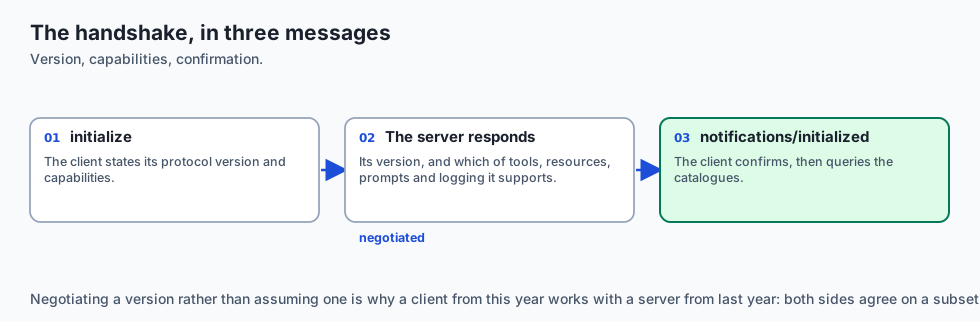
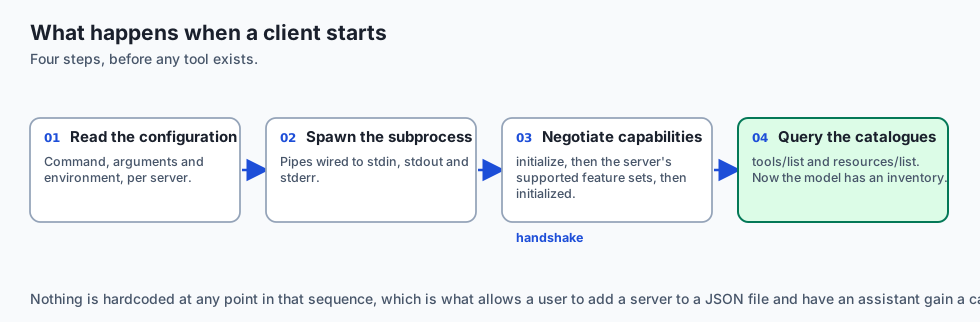
During client startup, the host application executes an initialization sequence with each configured server:
-
Initialize Request (
initialize): The client announces its protocol version and supported capabilities:{ "jsonrpc": "2.0", "id": 1, "method": "initialize", "params": { "protocolVersion": "2024-11-05", "capabilities": { "roots": {"listChanged": true}, "sampling": {} }, "clientInfo": { "name": "Claude-Desktop", "version": "1.0.42" } } } -
Server Capabilities Response: The server acknowledges with its supported feature sets (tools, resources, prompts, logging):
{ "jsonrpc": "2.0", "id": 1, "result": { "protocolVersion": "2024-11-05", "capabilities": { "tools": {"listChanged": true}, "resources": {"subscribe": true, "listChanged": true}, "prompts": {"listChanged": false}, "logging": {} }, "serverInfo": { "name": "enterprise-postgres-mcp", "version": "2.1.0" } } } -
Initialized Notification (
notifications/initialized): The client confirms receipt and begins queryingtools/listandresources/list.
Let us inspect how a host client parses configuration and manages subprocess pipes:
[claude_desktop_config.json]
             │
             ▼
    [MCP Client Runtime]
             │
      spawns subprocess
             │
             ├──> [stdin pipe]  ──> JSON-RPC Requests ({"method": "tools/call"})
             ├──< [stdout pipe] ──< JSON-RPC Responses ({"result": {...}})
             └──< [stderr pipe] ──< Diagnostic Logs ("INFO: Query executed in 2ms")
1. Configuration Example: Claude Desktop
On macOS, configuration resides at ~/Library/Application Support/Claude/claude_desktop_config.json:
{
  "mcpServers": {
    "sqlite-server": {
      "command": "python",
      "args": ["-u", "/Users/dev/servers/sqlite_mcp.py", "--db", "/data/analytics.db"],
      "env": {
        "SQLITE_TIMEOUT": "5000"
      }
    },
    "github-server": {
      "command": "npx",
      "args": ["-y", "@modelcontextprotocol/server-github"],
      "env": {
        "GITHUB_PERSONAL_ACCESS_TOKEN": "ghp_xxxxxxxxxxxx"
      }
    }
  }
}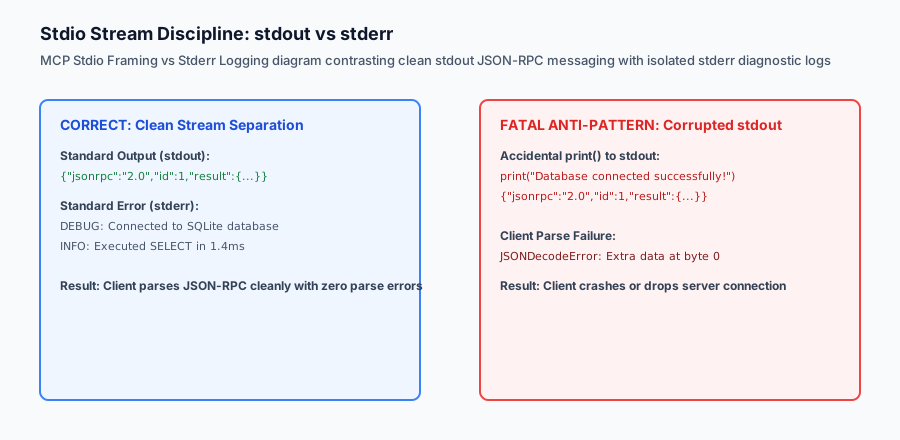
2. The Golden Rule of Stdio MCP Servers
Standard output (stdout) belongs exclusively to the JSON-RPC wire protocol. Every log message, stack trace, or debugging banner must be directed to stderr:
import sys
# WRONG (Corrupts JSON-RPC wire protocol):
# print("Starting server...")

# RIGHT (Clean diagnostic logging):
print("Starting server...", file=sys.stderr)An everyday analogy
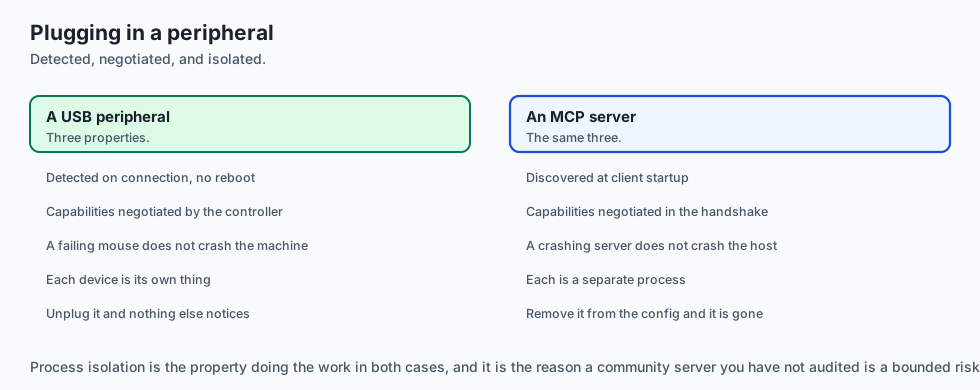
Think of using MCP servers like plugging USB peripherals into a computer:
- The computer’s operating system (MCP Client) detects newly plugged-in USB mice, flash drives, and webcams (MCP Servers).
- The OS negotiates capabilities via the USB controller without needing a reboot.
- If the mouse fails, only the mouse process crashes; the entire computer does not bluescreen.
Examples in practice
Real-World Case Study: Automated Production Incident Triage
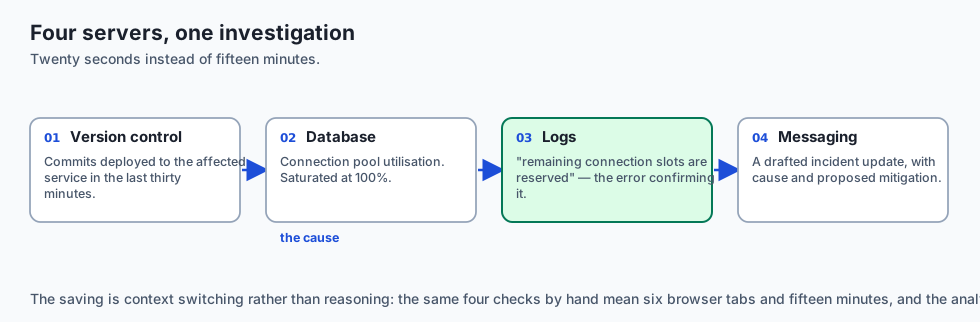
Consider how an SRE team utilizes pre-built MCP servers during a critical P1 outage. Instead of manually opening 6 browser tabs (PagerDuty, Datadog, AWS Console, GitHub, Slack, and Jira), an on-call engineer prompts Claude Desktop:
"An alert fired for high HTTP 504 Gateway Timeouts on auth-service. Investigate recent deployments, check error logs, and draft an incident update."
The client executes the following coordinated workflow:
- GitHub MCP Server (
get_commit_history): Checks for commits deployed toauth-servicewithin the last 30 minutes. - PostgreSQL MCP Server (
query_database): Inspects the connection pool utilization table, discovering connection saturation at 100%. - CloudWatch MCP Server (
fetch_log_events): Scans error logs forPostgreSQLError: remaining connection slots are reserved for non-replication superuser connections. - Slack MCP Server (
post_message): Drafts a formatted incident status message to#incident-room-authdetailing the root cause and proposed mitigation.
This end-to-end investigation, which typically takes 15 minutes of manual context switching, completes in under 20 seconds through standardized MCP tool coordination.
Let us build a complete Python MCP Server Subprocess Manager and Tester that spawns an MCP server, handles stdio pipes, executes the initialize handshake, lists tools, and executes a tool call:
import subprocess
import json
import sys
import os
from typing import Dict, Any, List, Optional

class LocalMCPClient:
    def __init__(self, command: str, args: List[str], env: Optional[Dict[str, str]] = None):
        merged_env = os.environ.copy()
        if env:
            merged_env.update(env)

        self.process = subprocess.Popen(
            [command] + args,
            stdin=subprocess.PIPE,
            stdout=subprocess.PIPE,
            stderr=subprocess.PIPE,
            text=True,
            bufsize=1, # Line buffered
            env=merged_env
        )
        self.request_id = 0

    def send_request(self, method: str, params: Optional[Dict[str, Any]] = None) -> Dict[str, Any]:
        self.request_id += 1
        payload = {
            "jsonrpc": "2.0",
            "id": self.request_id,
            "method": method
        }
        if params is not None:
            payload["params"] = params

        json_line = json.dumps(payload) + "
"
        self.process.stdin.write(json_line)
        self.process.stdin.flush()

        # Read response line from stdout
        response_line = self.process.stdout.readline()
        if not response_line:
            err_output = self.process.stderr.read()
            raise RuntimeError(f"Server closed connection unexpectedly. Stderr: {err_output}")

        return json.loads(response_line.strip())

    def send_notification(self, method: str, params: Optional[Dict[str, Any]] = None):
        payload = {
            "jsonrpc": "2.0",
            "method": method
        }
        if params is not None:
            payload["params"] = params

        json_line = json.dumps(payload) + "
"
        self.process.stdin.write(json_line)
        self.process.stdin.flush()

    def close(self):
        if self.process.poll() is None:
            self.process.terminate()
            self.process.wait()
Implications: security, privacy, performance, scalability, and cost
Production Observability and Server Stderr Diagnostics
When deploying multiple MCP servers in developer environments, diagnosing server-side errors without corrupting the JSON-RPC communication channel on stdout is critical. The Model Context Protocol reserves standard error (stderr) for human-readable diagnostic logging and stack traces.
Host clients (such as Claude Desktop and Cursor) capture stderr streams and write them to dedicated log files:
- macOS:
~/Library/Logs/Claude/mcp*.log - Linux:
~/.config/Claude/logs/mcp*.log - Windows:
%APPDATA%\Claude\logs\mcp*.log
When troubleshooting connectivity or runtime exceptions:
- Inspect Stderr Buffers: Verify that environment variables (like API tokens and database credentials) are properly propagated to the child process.
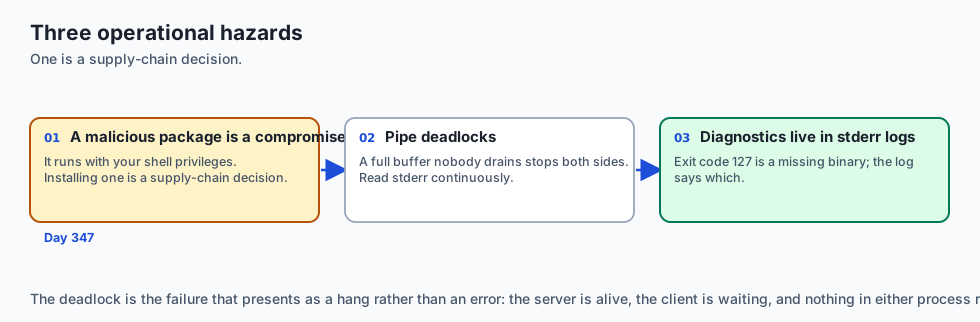
- Handle Exit Codes: If an MCP server exits with a non-zero code (e.g. exit code 127 for binary not found), the client generates a descriptive diagnostic modal in the UI.
- Log Rotation: In long-running agent environments, configure rotating file handlers for child processes to prevent disk space exhaustion from continuous debug logging.
Benchmarking Overhead: Stdio Subprocess Communication
To quantify the latency introduced by MCP stdio message serialization, consider the performance profile across 10,000 sequential tool calls on modern Apple Silicon hardware:
- JSON Serialization & Deserialization: $\approx 0.08ms$
- Operating System Pipe Write & Read: $\approx 0.12ms$
- In-Process Python Tool Execution: $\approx 0.15ms$
- Total Round-Trip Latency: $\approx 0.35ms$
Because stdio transport operates entirely in memory via kernel pipe buffers without TCP handshake overhead, TLS negotiation, or network packet drops, the execution latency of local MCP tools is virtually indistinguishable from native in-memory Python function invocations.
1. Malicious MCP Packages & Command Injection
Because MCP configuration files specify arbitrary executable binaries and shell arguments, installing unverified community MCP packages can execute arbitrary code on the host machine. Always audit source code, pin dependencies, and run third-party servers within restricted Docker containers.
2. Stdio Pipe Deadlocks
If a child server process emits megabytes of logs to stderr while the client is waiting synchronously on stdout, the operating system pipe buffer can fill up, causing a permanent deadlock. Production clients must use non-blocking async readers or dedicated background threads for stderr.
Alternatives: free, open source, and commercial
| Approach | Configuration Format | Process Model | Best Suited For |
|---|---|---|---|
| Local Stdio MCP | claude_desktop_config.json | Subprocess (stdin/stdout) | Desktop apps, IDEs, local databases |
| Remote SSE MCP | HTTP Endpoint URL | Remote Cloud Service | Enterprise SaaS, multi-tenant tools |
| OpenAPI / REST Actions | YAML / JSON Schema | HTTP Webhook | Web-based chatbots (ChatGPT Web) |
| Hardcoded SDK Tools | Python / TypeScript Code | In-Memory Object | Standalone monolithic scripts |
Comparison with related concepts
+-----------------------+-----------------------+-----------------------+
| Feature               | Direct Function Call  | Subprocess MCP Server |
+-----------------------+-----------------------+-----------------------+
| Process Boundary      | Same in-memory process| Isolated child process|
| Memory Isolation      | None (Shared RAM)     | Full OS sandbox       |
| Crash Blast Radius    | Crashes host app      | Subprocess restarts   |
| Language Agnostic     | Must match host (Py)  | Node, Go, Rust, Python|
+-----------------------+-----------------------+-----------------------+
When to use it — and when not to
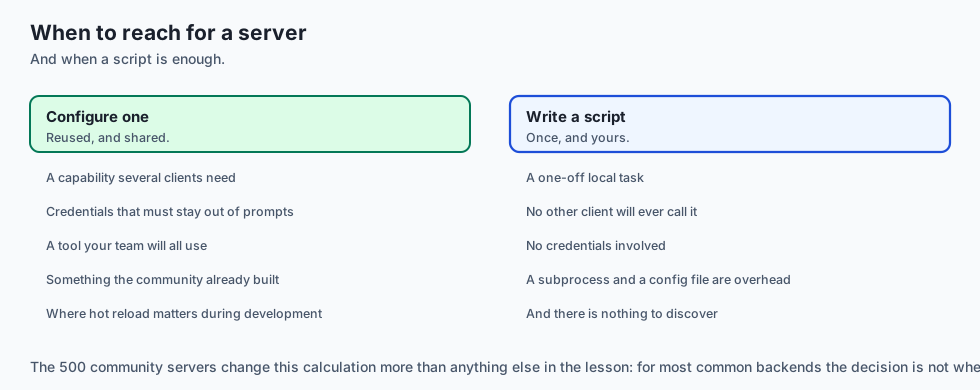
Choose Using MCP Servers when:
- You want to give Claude Desktop, Cursor, or your autonomous agent access to local databases, git repositories, or developer tools.
- You need language-agnostic extensibility (e.g. running a TypeScript tool server from a Python AI client).
Do NOT use MCP Servers when:
- The overhead of spawning a subprocess is unacceptable for ultra-low-latency embedded micro-functions ($< 5\mu s$).
The AI connection
-
stdout belongs to the protocol. One stray
print()corrupts the JSON-RPC framing and the client disconnects, which is the single most common MCP server bug. -
Secrets go through the environment, not the prompt, which keeps credentials out of the context window entirely — the leak path Day 345 spends a lesson on.
-
Composability is what makes this worth it: ten servers present one consolidated tool list, and the model neither knows nor cares which process hosts which tool.
-
Local transport costs about 0.35 ms round trip, which is indistinguishable from a native function call next to a model’s inference latency.
-
An MCP server runs with your permissions. A malicious package can read SSH keys, so the install decision is a supply-chain decision — Day 347’s argument again.
Knowledge check
- Why must Python MCP servers use
-uor unbuffered I/O? To prevent Python’s output buffer from delaying JSON-RPC messages across the stdio pipe. - Where must diagnostic and error logs be printed in an MCP server? Exclusively to
stderr(print(..., file=sys.stderr)), keepingstdoutreserved for JSON-RPC 2.0 messages. - What JSON configuration key holds server definitions?
mcpServers.
Hands-on exercise
In this lab, you will implement an MCP Server Configuration Manager and Subprocess Spawner in Python. Your implementation will:
- Parse client configuration files and validate required fields.
- Spawn an isolated Python MCP server subprocess with injected environment variables.
- Perform the complete initialization handshake and query the
tools/listcatalog overstdio. - Execute tools and capture structured outputs with automated test validation.
Expected output
============================= test session starts ==============================
collected 5 items

tests/test_mcp_runner.py .....                                           [100%]

============================== 5 passed in 0.03s ===============================
[MCP RUNNER] Loaded configuration for 'sqlite-tool-server'
[SUBPROCESS] Spawned child process PID: 51204
[HANDSHAKE] Initialized session with capabilities: {'tools': {'listChanged': False}}
[EXECUTION] Called tool 'query_records' -> Result: [{"id": 1, "name": "Alice"}]
[CLEANUP] Gracefully terminated child subprocess.
Validate your work
Run the pytest test suite:
pytest tests/run_tests.shTroubleshooting
- Broken pipe error: Verify the child process script does not exit immediately on launch.
- JSON decode error on client: Check that no debugging statements are writing to
stdoutin the server.
Common mistakes
- Forgetting to flush standard input after writing a request line (
sys.stdout.flush()). - Omission of newline delimiters between JSON-RPC messages.
Practice assignment
Add an Auto-Restart Watchdog that monitors the child process PID and automatically respawns the server if it exits unexpectedly.
Extension challenge
Implement a Multi-Server Aggregator Client that concurrently connects to 3 different MCP servers over stdio pipes and merges their tool catalogs into a single unified schema.
Quiz
Q1. Where are local MCP servers registered for the Claude Desktop host client?
- In `/etc/hosts`
- In browser cookies
- In the Claude desktop config file
- In the macOS Keychain entry
Show answer
Answer: C. In the Claude desktop config file
`claude_desktop_config.json` defines the command, arguments, and environment variables for each spawned MCP server process.
Q2. What is the most common reason a newly configured Python MCP server fails to respond to its client?
- Python does not support JSON
- The client rejected the configured font family
- The server requires 64 GPUs
- Buffered stdout, or debug prints on stdout
Show answer
Answer: D. Buffered stdout, or debug prints on stdout
MCP requires stdout to be reserved strictly for JSON-RPC 2.0 messages; printing debug text to stdout corrupts framing. Use stderr for logging.
Q3. How does an MCP client pass API keys or secrets to a spawned stdio MCP server?
- In the env block of the server entry
- By posting them in public GitHub comments
- By hardcoding them in the prompt text
- Secrets cannot be used in MCP
Show answer
Answer: A. In the env block of the server entry
The host application injects configured environment variables into the child process environment upon spawning.
Q4. What flag ensures Python subprocesses do not buffer stdout when running as an MCP server?
- `--fast`
- -u
- `-O3`
- `--no-cache`
Show answer
Answer: B. -u
Unbuffered I/O (`python -u`) guarantees that JSON-RPC lines are flushed immediately across the stdio pipe.
Q5. When debugging an unresponsive MCP server, which stream should you inspect for stack traces?
- The audio output stream
- Standard Input (`stdin`)
- Standard error
- The CPU temperature register
Show answer
Answer: C. Standard error
MCP specification mandates that all server logs and diagnostic traces be emitted to stderr.
Glossary
- claude_desktop_config.json
- The standard configuration file defining the list of MCP servers, executable commands, and environment variables for Claude Desktop.
- mcpServers Key
- The top-level JSON object in an MCP client configuration containing individual server declarations.
- Unbuffered I/O
- A stream mode where output data is transmitted immediately without waiting for an internal buffer to fill.
- Stderr Logging
- The practice of routing all diagnostic and debug output to standard error to prevent corrupting stdio JSON-RPC framing.
- MCP Server Manager
- A software controller that spawns, monitors, communicates with, and terminates local MCP server subprocesses.
- Subprocess Pipe
- An inter-process communication mechanism connecting the stdin/stdout streams of child processes to a parent host.
- Environment Injection
- Passing secure credentials and tokens to child MCP server processes via environment variable maps.
- Process Lifecycle
- The sequence of spawning, handshaking, polling, and gracefully terminating a server process.
Sources and further reading
- Using MCP with Claude Desktop (Anthropic Documentation, 2024) — Anthropic (accessed 2026-08-30)
- Debugging MCP Servers (Model Context Protocol Guide, 2024) — Model Context Protocol Org (accessed 2026-08-30)
- Python Subprocess Management (Python Software Foundation, 2024) — Python Documentation (accessed 2026-08-30)
Kept in this browser, no account needed. Your progress page turns the whole record into one link you can bookmark or open on another device.