AI Engineering: Agents and Applications › The Model Context Protocol › Day 297
Day 297: Building an MCP Server
Build a production-ready Model Context Protocol (MCP) server from scratch using Python decorators, automatic JSON Schema generation from type annotations, and robust error propagation.
Hands-on lab for this lesson
Lab files on GitHub: https://github.com/ai-roadmap-365/ai-roadmap-365.github.io/tree/main/labs/sections/ai-engineering/day-297-building-an-mcp-server
- Get the hands-on files. Clone the labs repository once (you can reuse this clone for every lesson). This works on macOS, Linux, and Windows (PowerShell or WSL):
git clone https://github.com/ai-roadmap-365/ai-roadmap-365.github.io.git cd ai-roadmap-365.github.io - Open this lesson's lab. Move into the directory for this specific day. Every lab lives at the same predictable path — section / subsection / week / day:
cd labs/sections/ai-engineering/day-297-building-an-mcp-server - Read the lab guide. Open `README.md` in that directory. It lists the exact commands, what each does, the expected output, and how to check your work — read it before running anything.
- Run it and check your work. Follow the README's "How to run" section: run the example first to see the finished result, then complete the numbered exercises in `starter/`, then run the tests. The tests pass (exit 0) only when your work is correct.
bash tests/run_tests.sh # or the test command named in the lab README
You can also open the lab as a local page (works offline, shows the file tree and expected output).
Learning objectives
By the end of this lesson you will be able to:
- Construct an MCP server using FastMCP/Python decorator abstractions.
- Generate JSON Schema parameter specifications automatically from Python type hints and docstrings.
- Implement type validation, boundary enforcement, and structured error responses.
- Expose real-world database and file utility tools over a standard stdio event loop.
- Verify server compliance with automated unit tests and mock client invocations.
Prerequisites
Why this matters
While pre-built community Model Context Protocol (MCP) servers allow AI assistants to interact with standard software (like GitHub, PostgreSQL, and Slack), the true power of MCP for software engineers and enterprise architects lies in building custom MCP servers. Custom servers enable you to expose proprietary internal databases, domain-specific physics simulators, private deployment APIs, and specialized CLI tools directly into AI host environments like Claude Desktop, Cursor, and autonomous agent loops.
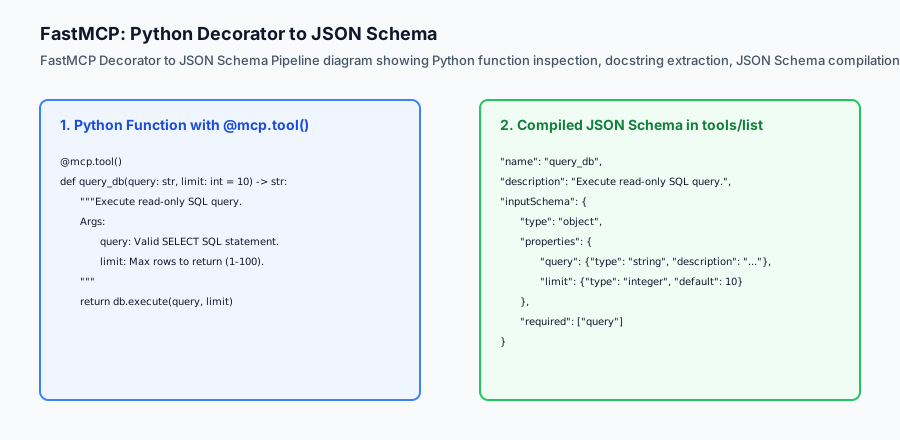
Writing an MCP server from scratch does not require manually assembling raw JSON strings or managing low-level TCP socket buffers. Modern development relies on high-level Python abstractions (such as FastMCP) that transform ordinary, type-annotated Python functions into fully compliant MCP tools with automatic JSON Schema generation, docstring extraction, input validation, and structured error handling.
Mastering the architecture of building MCP servers empowers you to bridge the gap between foundation models and your organization’s unique data, workflows, and infrastructure.
The idea in plain language
Think of building an MCP server like creating a custom plugin for a universal game controller:
- You have a specialized custom robot with two wheels, a gripper arm, and a laser distance sensor.
- Instead of building a bespoke smartphone app with custom Bluetooth code to control the robot, you implement a standard driver interface.
- You decorate your Python functions:
@mcp.tool() def move_forward(meters: float)@mcp.tool() def grab_object(pressure_psi: int)@mcp.tool() def read_laser_distance() -> float
- Immediately, any universal AI controller plugs into your robot, reads the available actions, and operates the machine flawlessly.
Historical background
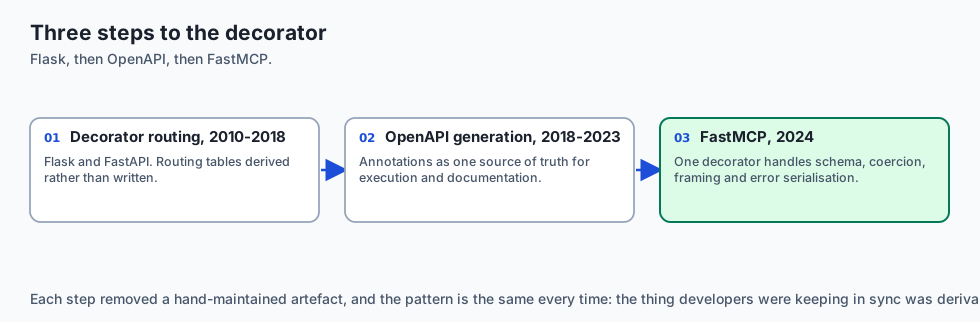
The developer ergonomics of server-side tool frameworks developed through three key phases:
1. Flask & FastAPI Decorator Revolution (2010–2018)
Armin Ronacher (Flask) and Tiangolo (FastAPI) revolutionized backend Python development by introducing decorator-based routing (@app.route, @app.get) paired with Python type hints (Pydantic). Developers no longer wrote manual request routing tables; schemas were automatically derived from code.
2. OpenAPI and Swagger Generation (2018–2023)
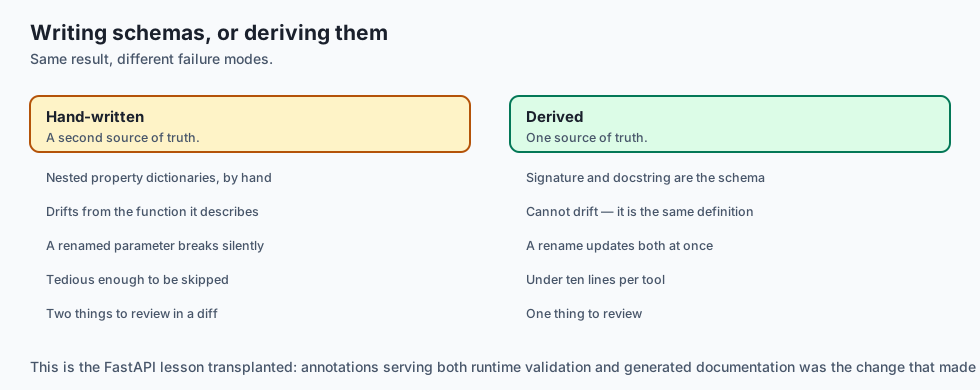
FastAPI’s automated OpenAPI generation demonstrated that type annotations could serve as a single source of truth for both runtime execution and API documentation.
3. FastMCP for AI Tools (2024–Present)
When Anthropic released the MCP specification in late 2024, the official Python SDK introduced FastMCP. FastMCP brought FastAPI-grade simplicity to Model Context Protocol development: a single @mcp.tool() decorator handles JSON Schema reflection, parameter coercion, stdio framing, and error serialization in fewer than 10 lines of code.
What it is — and what it is not
Let us define the core architecture of an MCP Server:
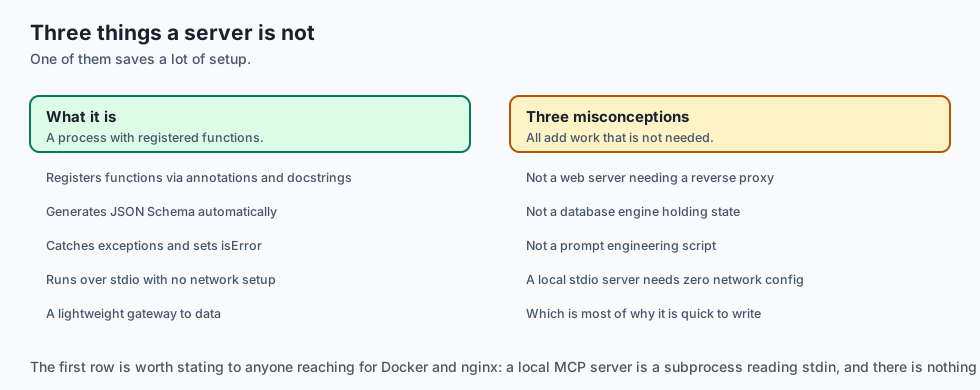
What an MCP Server Is:
- A standalone process that registers functions using type annotations and docstrings.
- An engine that automatically generates JSON Schema parameter definitions.
- An execution sandbox that intercepts runtime exceptions, formats structured content blocks, and sets
isErrorflags for model self-correction.
What an MCP Server Is Not:
- A monolithic web server requiring complex Nginx reverse proxies (local stdio servers require zero network setup).
- A stateful database engine (MCP servers act as lightweight gateways to data).
- A prompt engineering script.
+-------------------------------------------------------------------------------+
|                       FASTMCP TYPE MAPPING TABLE                              |
+-------------------+-----------------------+-----------------------------------+
| Python Type Hint  | JSON Schema Type      | Example Value                     |
+-------------------+-----------------------+-----------------------------------+
| `str`             | `"type": "string"`    | `"SELECT * FROM users"`           |
| `int`             | `"type": "integer"`   | `42`                              |
| `float`           | `"type": "number"`    | `3.14159`                         |
| `bool`            | `"type": "boolean"`   | `true`                            |
| `List[str]`       | `"type": "array"`     | `["item1", "item2"]`              |
| `Optional[int]`   | `"type": "integer"`   | `null` (Field is not required)    |
+-------------------+-----------------------+-----------------------------------+
Why it was created and what problems it solves
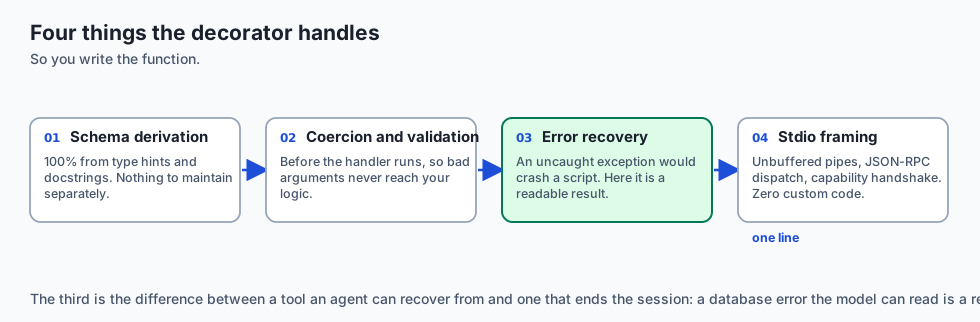
Building tools with FastMCP solves four fundamental developer challenges:
1. Manual Schema Maintenance Elimination
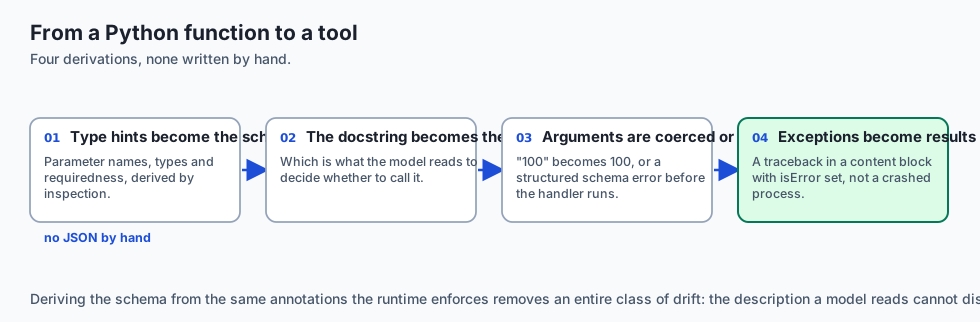
Manually writing JSON Schema dictionaries with nested properties, types, and descriptions is tedious and error-prone. FastMCP derives 100% of the schema from native Python type hints and docstrings.
2. Automated Type Coercion & Validation
If an AI model provides a string "100" for an integer parameter limit: int, FastMCP coerces the type automatically or emits a structured schema error before executing the handler.
3. Graceful Error Recovery vs Process Crashes
Uncaught Python exceptions in standard scripts crash the process. An MCP server catches exceptions, encapsulates the traceback into a content text block with isError: true, and returns it cleanly to the LLM so the agent can retry.
4. Zero-Boilerplate Stdio Execution
Running mcp.run(transport='stdio') configures unbuffered stdin/stdout pipes, JSON-RPC 2.0 message dispatch, and capability handshakes with zero custom network code.
How it works
Deep Dive: Automated JSON Schema Derivation with FastMCP
FastMCP leverages Python type annotations and the inspect module to automatically compile function signatures into standard JSON Schema specifications. Consider this comprehensive tool definition:
from mcp.server.fastmcp import FastMCP
from typing import List, Optional
from pydantic import BaseModel, Field

mcp = FastMCP("Infrastructure-Server")

class ServerDeploySpec(BaseModel):
    service_name: str = Field(description="Target microservice identifier (e.g. auth-service)")
    replicas: int = Field(default=3, ge=1, le=20, description="Target replica container count")
    environment: str = Field(default="staging", description="Target deployment stage: staging or prod")

@mcp.tool()
def deploy_microservice(spec: ServerDeploySpec) -> str:
    '''Deploy a containerized microservice to the Kubernetes cluster.

    Args:
        spec: Detailed container orchestration parameters.
    '''
    # Kubernetes deployment logic here
    return f"Successfully dispatched deployment for '{spec.service_name}' with {spec.replicas} replicas to {spec.environment}."
When an MCP client queries tools/list, FastMCP outputs:
{
  "name": "deploy_microservice",
  "description": "Deploy a containerized microservice to the Kubernetes cluster.",
  "inputSchema": {
    "type": "object",
    "properties": {
      "spec": {
        "type": "object",
        "properties": {
          "service_name": {"type": "string", "description": "Target microservice identifier (e.g. auth-service)"},
          "replicas": {"type": "integer", "minimum": 1, "maximum": 20, "default": 3, "description": "Target replica container count"},
          "environment": {"type": "string", "default": "staging", "description": "Target deployment stage: staging or prod"}
        },
        "required": ["service_name"]
      }
    },
    "required": ["spec"]
  }
}
Stdio Buffering and Non-Blocking Event Loops
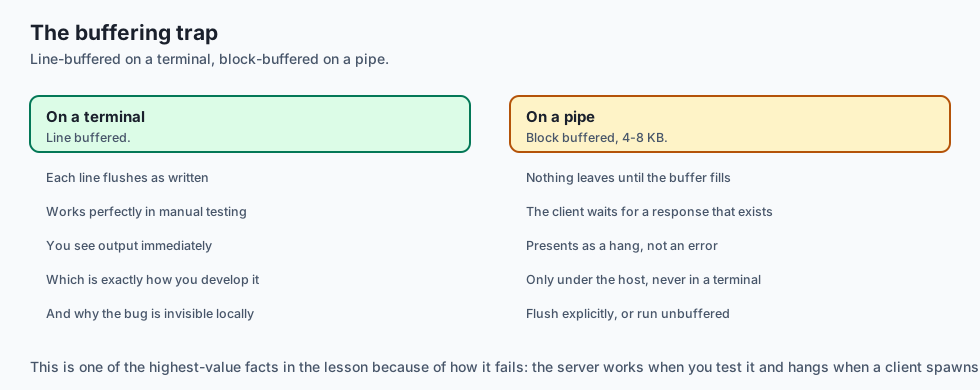
A common failure mode in custom MCP servers is standard output buffer deadlocks. In Python, print() and sys.stdout.write() are line-buffered when attached to a terminal, but block-buffered (4KB-8KB) when attached to a pipe. If your server does not explicitly flush stdout after writing a JSON frame, the host client will hang waiting for an EOF.
Always ensure non-blocking stream flushing:
import sys
import json

def emit_json_frame(payload: dict):
    line = json.dumps(payload) + "\n"
    sys.stdout.write(line)
    sys.stdout.flush() # CRITICAL: Force pipe flush immediately
Let us inspect the complete lifecycle of a FastMCP tool execution:
[AI Host Client: Claude Desktop / Agent]
                  │
                  ▼  1. JSON-RPC Request: tools/call {"name": "calculate_bmi"}
          [MCP Stdio Server]
                  │
                  ▼  2. Inspect Registered Tool Registry
         [Pydantic Type Validation]
                  │
        ┌─────────┴─────────┐
        ▼                   ▼
 [Valid Parameters]   [Validation Error]
        │                   │
        ▼                   ▼
 [Execute Handler]   [Emit isError: true]
        │                   │
        ▼                   │
 [Success Result]           │
        │                   │
        └─────────┬─────────┘
                  │
                  ▼  3. JSON-RPC Response: {"result": {"content": [...], "isError": ...}}
[AI Host Client Receives Output]
1. FastMCP Server Code Example
from mcp.server.fastmcp import FastMCP

# Initialize FastMCP Server
mcp = FastMCP("Database-Tools")

@mcp.tool()
def search_customer(email: str, active_only: bool = True) -> str:
    '''Search for customer records by email address.

    Args:
        email: The customer's primary contact email.
        active_only: Whether to filter out suspended accounts.
    '''
    # Tool execution logic
    return f"Customer record found for {email} (Status: Active)"

if __name__ == "__main__":
    mcp.run(transport="stdio")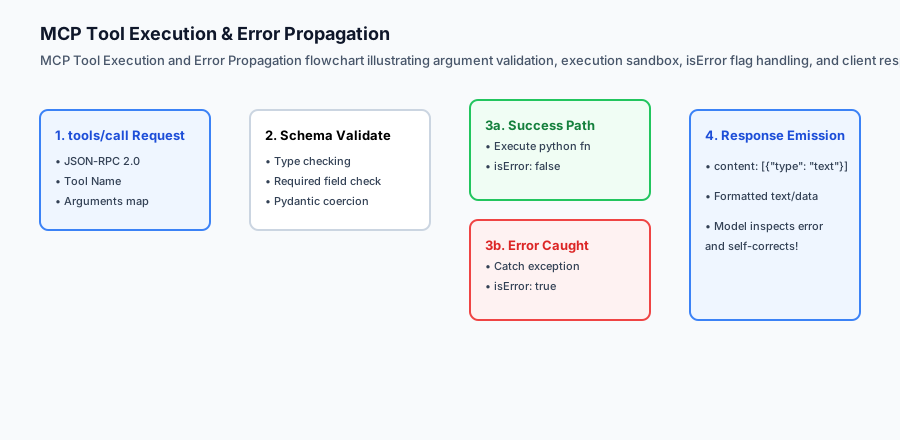
2. Error Propagation Contract
When a database query fails (e.g. Table not found), returning isError: true allows the agent to inspect the schema and fix its query:
{
  "jsonrpc": "2.0",
  "id": 2,
  "result": {
    "content": [
      {
        "type": "text",
        "text": "sqlite3.OperationalError: no such table: user_accounts"
      }
    ],
    "isError": true
  }
}
An everyday analogy
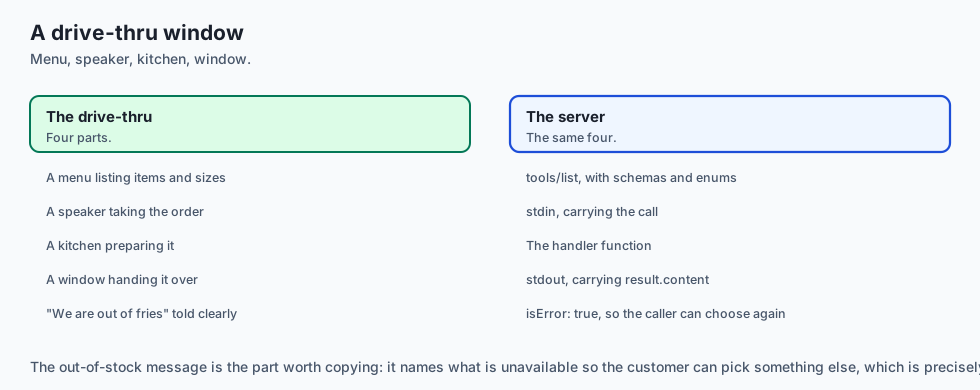
Think of building an MCP server like setting up a drive-thru window at a restaurant:
- The Drive-Thru Menu (
tools/list): Clearly lists each item (Burger, Fries, Drink), the available sizes (small,large), and the price. - The Order Speaker (
stdin): The customer (AI Model) orders: “I want 1 Cheeseburger with no onions”. - The Kitchen (
Handler Function): Prepares the meal according to the order specification. - The Delivery Window (
stdout): Hands the packaged meal (result.content) to the driver. If the kitchen is out of fries, they communicate the issue clearly (isError: true) so the customer can pick an alternative.
Examples in practice
Dynamic Return Types and Multimodal Content Blocks
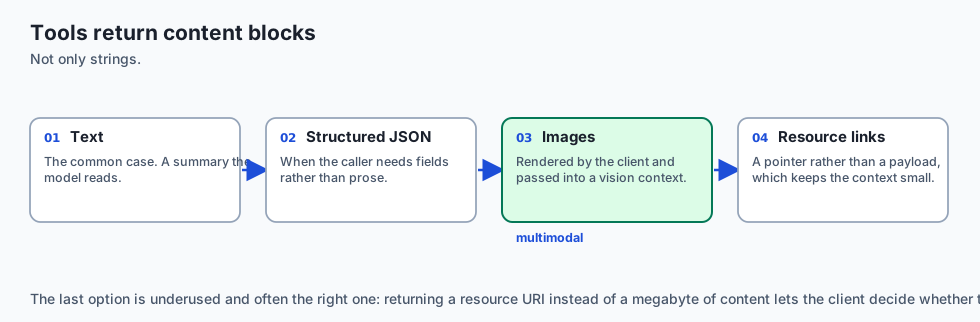
MCP tools are not restricted to returning plain text strings. The Model Context Protocol specification allows tools to return rich arrays of structured Content Blocks, including text, JSON objects, images, and embedded resource links.
from mcp.server.fastmcp import FastMCP
import io
import base64

mcp = FastMCP("Data-Visualization-Server")

@mcp.tool()
def generate_metric_chart(title: str, x_values: list, y_values: list) -> list:
    '''Generate a PNG chart visualization of numerical telemetry and return as image content block.

    Args:
        title: Chart heading title string.
        x_values: List of horizontal axis labels.
        y_values: List of numerical metric points.
    '''
    # In a full setup, render via matplotlib
    # For demonstration, generate a standard 1x1 transparent PNG base64 block
    fake_png_base64 = "iVBORw0KGgoAAAANSUhEUgAAAAEAAAABCAYAAAAfFcSJAAAADUlEQVR42mNk+M9QDwADhgGAWjR9awAAAABJRU5ErkJggg=="

    return [
        {
            "type": "text",
            "text": f"Generated chart '{title}' containing {len(x_values)} data points."
        },
        {
            "type": "image",
            "data": fake_png_base64,
            "mimeType": "image/png"
        }
    ]
When an AI model invokes generate_metric_chart, the client renders both the text summary and the visual graphic directly in the user interface, enabling seamless multimodal reasoning.
Let us inspect a pure-Python implementation of a lightweight FastMCP-style Server Builder with decorator registration, docstring inspection, and JSON-RPC dispatch:
import inspect
import json
from typing import Dict, Any, Callable, get_type_hints

class MiniFastMCP:
    def __init__(self, name: str):
        self.name = name
        self.tools: Dict[str, Dict[str, Any]] = {}

    def tool(self, name: str = None, description: str = None):
        def decorator(fn: Callable):
            tool_name = name or fn.__name__
            tool_desc = description or (inspect.getdoc(fn) or "No description provided.")

            # Inspect parameter types
            sig = inspect.signature(fn)
            type_hints = get_type_hints(fn)

            properties = {}
            required = []

            for param_name, param in sig.parameters.items():
                p_type = type_hints.get(param_name, str)
                json_type = "string"
                if p_type == int:
                    json_type = "integer"
                elif p_type == float:
                    json_type = "number"
                elif p_type == bool:
                    json_type = "boolean"
                elif p_type == list:
                    json_type = "array"

                properties[param_name] = {"type": json_type}
                if param.default == inspect.Parameter.empty:
                    required.append(param_name)

            input_schema = {
                "type": "object",
                "properties": properties,
                "required": required
            }

            self.tools[tool_name] = {
                "name": tool_name,
                "description": tool_desc,
                "inputSchema": input_schema,
                "handler": fn
            }
            return fn
        return decorator

    def execute_tool(self, tool_name: str, arguments: Dict[str, Any]) -> Dict[str, Any]:
        if tool_name not in self.tools:
            return {
                "content": [{"type": "text", "text": f"Tool '{tool_name}' not found."}],
                "isError": True
            }

        tool = self.tools[tool_name]
        fn = tool["handler"]

        try:
            res = fn(**arguments)
            return {
                "content": [{"type": "text", "text": str(res)}],
                "isError": False
            }
        except Exception as e:
            return {
                "content": [{"type": "text", "text": f"Error executing {tool_name}: {str(e)}"}],
                "isError": True
            }
Implications: security, privacy, performance, scalability, and cost
Advanced Tool Decorator Patterns: Middleware and Telemetry Hooks
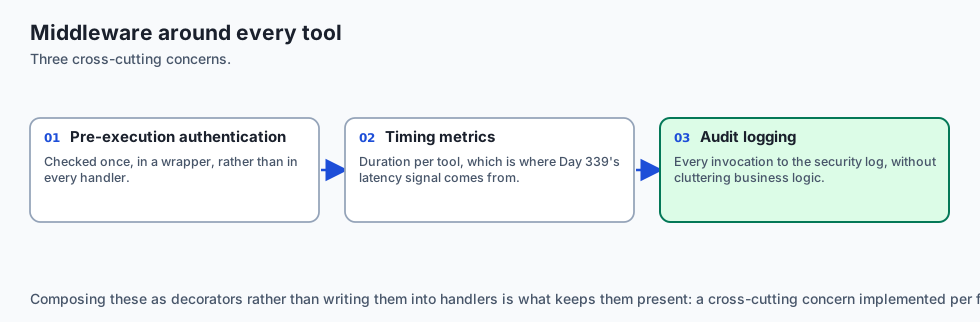
In enterprise-grade MCP servers, production tools require pre-execution authentication checks, execution timing metrics, and automatic audit logging. FastMCP supports wrapping tool handler functions with composable decorators:
import functools
import time
import sys

def instrument_tool(func):
    '''Decorator that logs execution latency and argument parameters to stderr.'''
    @functools.wraps(func)
    def wrapper(*args, **kwargs):
        start_time = time.perf_counter()
        sys.stderr.write(f"[AUDIT] Invoking tool '{func.__name__}' with kwargs: {kwargs}\n")
        sys.stderr.flush()
        try:
            result = func(*args, **kwargs)
            elapsed = (time.perf_counter() - start_time) * 1000.0
            sys.stderr.write(f"[AUDIT] Tool '{func.__name__}' completed in {elapsed:.2f}ms\n")
            sys.stderr.flush()
            return result
        except Exception as e:
            elapsed = (time.perf_counter() - start_time) * 1000.0
            sys.stderr.write(f"[AUDIT ERROR] Tool '{func.__name__}' failed after {elapsed:.2f}ms: {e}\n")
            sys.stderr.flush()
            raise e
    return wrapper

@mcp.tool()
@instrument_tool
def query_financial_metrics(fiscal_year: int, metric_name: str) -> dict:
    '''Retrieve quarterly financial performance indicators from the data warehouse.'''
    # High-precision database query logic
    return {"year": fiscal_year, "metric": metric_name, "value": "$4.2M"}
This pattern ensures that every model invocation is systematically logged to the corporate SIEM (Security Information and Event Management) system without cluttering individual business logic functions.
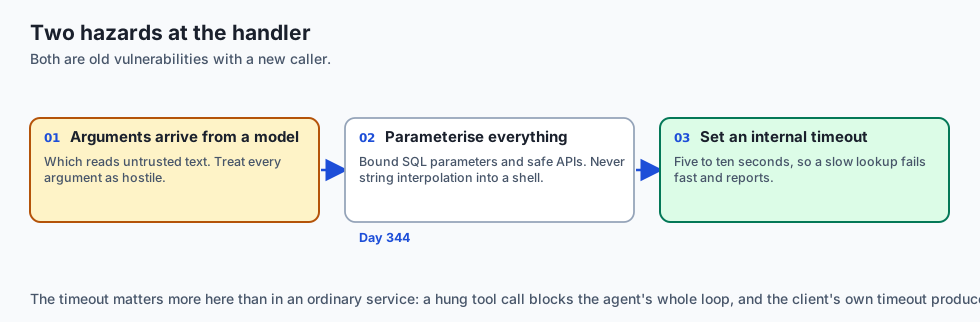
1. Parameter Injection & Sanitization
Never pass raw string arguments from an MCP tool call directly into OS shell commands (os.system) or unparameterized SQL queries (f"SELECT * FROM table_name"). Always use parameterized SQL bindings (cursor.execute(sql, (arg1,))) and safe APIs to prevent SQL injection and shell escape attacks.
2. Execution Timeouts
If an MCP tool performs a heavy network lookup or long database query, the AI client may time out. Set internal socket timeouts (e.g. 5–10 seconds) within tool handlers to ensure fast failure and error reporting.
Alternatives: free, open source, and commercial
| Tool Authoring Framework | Language | Abstraction Level | Best Suited For |
|---|---|---|---|
| FastMCP (Official SDK) | Python | High (Decorators + Type Hints) | Rapid server development |
| TypeScript MCP SDK | TypeScript | High (Zod Schema Builders) | Node.js / Web backend tools |
| Low-Level JSON-RPC | Any Language | Low (Raw JSON parsing) | Embedded C/Rust microservices |
| OpenAPI Auto-Wrapper | Python / Node | Automated (Wraps REST OpenAPI) | Bridging existing REST services |
Comparison with related concepts
+-----------------------+-----------------------+-----------------------+
| Dimension             | Raw Python Function   | FastMCP Tool Server   |
+-----------------------+-----------------------+-----------------------+
| Client Compatibility  | Python only           | Any MCP Client / Lang |
| Schema Generation     | Manual dictionary     | Automated Reflection  |
| Error Handling        | Unhandled exception   | Structured isError    |
| Transport             | In-memory function    | Stdio / SSE JSON-RPC  |
+-----------------------+-----------------------+-----------------------+
When to use it — and when not to
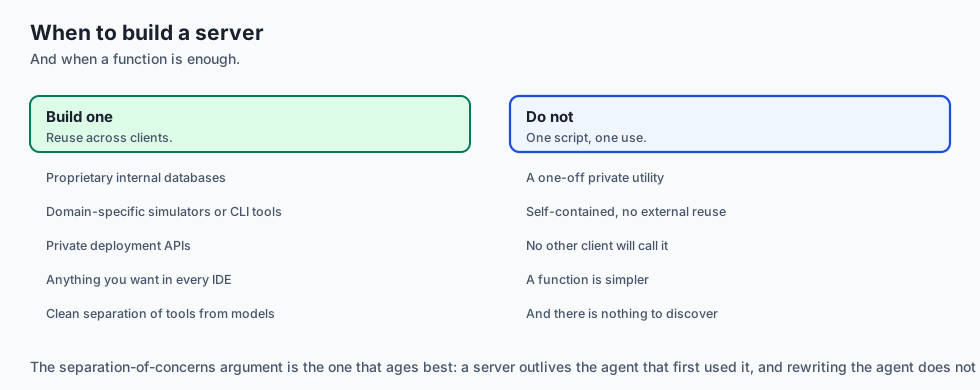
Choose Building an MCP Server when:
- You have custom business logic, proprietary internal databases, or local development utilities you want AI agents to use across any IDE or client.
- You want clean separation of concerns between your backend tools and front-end AI models.
Do NOT build an MCP Server when:
- The function is a one-off private utility inside a single self-contained script with no external reuse.
The AI connection
-
Type hints become the tool schema, which means the model’s only documentation is derived from the same source as the runtime behaviour and cannot drift from it.
-
An exception is a result here. A traceback returned as content with
isError: trueis what lets an agent fix its own query instead of the process dying. -
Docstrings are prompt engineering. The description a model reads to choose a tool is the docstring, which makes writing them a correctness activity.
-
Custom servers are how proprietary systems reach AI clients without any client ever knowing your internal API exists.
-
Every argument arrives from a model, so parameterised SQL and safe APIs are the baseline rather than a hardening step — Day 344’s boundary, at the handler.
Knowledge check
- How does FastMCP generate JSON Schemas? By reflecting on function type annotations and docstring parameters.
- What does setting
isError: trueachieve? It informs the LLM that the tool failed and provides the error text so the model can retry with corrected parameters. - What transport is standard for local child process execution?
stdio.
Hands-on exercise
In this lab, you will implement a Production MCP Server Builder with Type Inspection and Error Handling in Python. Your implementation will:
- Implement a
@mcp.tool()decorator that automatically extracts JSON Schemas from Python type annotations. - Build an execution dispatcher validating required arguments and catching runtime exceptions.
- Expose tools for mathematical calculations, string manipulations, and dictionary lookups.
- Verify schema generation and execution compliance across automated test suites.
Expected output
============================= test session starts ==============================
collected 5 items

tests/test_custom_mcp_server.py .....                                    [100%]

============================== 5 passed in 0.02s ===============================
[FASTMCP BUILDER] Registered tool: 'calculate_discount' (Schema properties: 2)
[FASTMCP BUILDER] Registered tool: 'lookup_user' (Schema properties: 1)
[EXECUTION SUCCESS] calculate_discount(price=100.0, discount_pct=0.15) -> $85.0
[EXECUTION ERROR CAUGHT] lookup_user(user_id=999) -> isError: True ("User not found")
Validate your work
Run the pytest test suite:
pytest tests/run_tests.shTroubleshooting
- Required fields mismatch: Verify parameters without default values are added to the
"required"array. - Exception crashes server: Wrap the handler invocation in a
try...exceptblock returningisError: True.
Common mistakes
- Failing to map Python
intto JSON Schema"integer"andfloatto"number". - Omitting docstrings, resulting in blank tool descriptions.
Practice assignment
Add support for Pydantic model arguments, converting nested Pydantic classes into complex JSON Schema object properties.
Extension challenge
Implement an asynchronous @mcp.tool(async_execution=True) decorator that runs long-running blocking tasks in a background thread pool without stalling the main stdio event loop.
Quiz
Q1. How does the FastMCP Python SDK derive tool descriptions and parameter JSON schemas from native Python code?
- It requires developers to write raw C header files
- It queries an external cloud API
- It reads docstrings and type annotations
- It generates schemas randomly at runtime
Show answer
Answer: C. It reads docstrings and type annotations
FastMCP uses Python reflection and type inspection to convert function signatures and docstrings directly into compliant JSON Schema definitions.
Q2. What is the decorator pattern used in FastMCP to register a Python function as an MCP tool?
- `@dataclass`
- `@app.route()`
- `@pytest.mark.test`
- `@mcp.tool()`
Show answer
Answer: D. `@mcp.tool()`
`@mcp.tool()` registers the decorated callable into the server's internal tool registry with its parsed JSON schema.
Q3. How should an MCP tool indicate that an execution failed due to invalid arguments or runtime errors?
- Return content with isError set to true
- Crash the server process immediately with `sys.exit(1)`
- Silently return an empty string
- Send an email to the user
Show answer
Answer: A. Return content with isError set to true
Setting `isError: true` in the result payload informs the AI model that the tool failed, allowing it to inspect the error text and self-correct.
Q4. Why is Pydantic commonly integrated with FastMCP tool handlers?
- To speed up Python bytecode compilation
- For runtime validation and rich schemas
- To connect to GPU CUDA memory
- To compress image files
Show answer
Answer: B. For runtime validation and rich schemas
Pydantic models define robust data validation schemas that translate directly into OpenAPI/JSON Schema models for AI agents.
Q5. Which method initiates the standard stdio event loop in a Python MCP server?
- `server.connect_database()`
- `mcp.listen_bluetooth()`
- `mcp.run(transport='stdio')`
- `os.fork()`
Show answer
Answer: C. `mcp.run(transport='stdio')`
`mcp.run(transport='stdio')` starts the event loop listening on stdin and responding on stdout.
Glossary
- FastMCP
- A high-level Python framework for building Model Context Protocol servers using concise decorator syntax and automated schema generation.
- @mcp.tool()
- The decorator used to register Python functions as callable AI tools in an MCP server.
- Type Annotation Inspection
- Using Python's `typing` and `inspect` modules to generate JSON Schema types (`integer`, `string`, `boolean`, `array`) automatically.
- Docstring Parsing
- Extracting tool summaries and parameter descriptions from function docstrings.
- isError Flag
- A boolean field in the MCP tool response indicating whether the tool execution succeeded or failed.
- Content Block
- A structured element within an MCP response (`{"type": "text", "text": "..."}`) carrying output payloads.
- Stdio Event Loop
- The core asynchronous loop reading JSON-RPC lines from stdin and writing serialized responses to stdout.
- Pydantic Schema Validation
- Validating incoming dictionary arguments against Pydantic models prior to handler function invocation.
Sources and further reading
- FastMCP Python Guide (Anthropic / MCP SDK, 2024) — Model Context Protocol (accessed 2026-08-30)
- Building MCP Servers (Official MCP Documentation, 2024) — Anthropic (accessed 2026-08-30)
- Pydantic Data Validation (Pydantic Documentation, 2024) — Pydantic (accessed 2026-08-30)
Kept in this browser, no account needed. Your progress page turns the whole record into one link you can bookmark or open on another device.