Computing Foundations › Inside the Machine › Day 2
Day 2: The CPU: Fetch, Decode, Execute
After this lesson you will be able to open up the CPU in your mind — control unit, ALU, registers, program counter — trace any simple program through the fetch-decode-execute cycle by hand, and use clock speed, instruction sets, and pipelining to reason about real hardware choices, including why GPUs beat CPUs at bulk math.
Hands-on lab for this lesson
Lab files on GitHub: https://github.com/ai-roadmap-365/ai-roadmap-365.github.io/tree/main/labs/sections/computing-foundations/day-002-the-cpu-fetch-decode-execute
- Get the hands-on files. Clone the labs repository once (you can reuse this clone for every lesson). This works on macOS, Linux, and Windows (PowerShell or WSL):
git clone https://github.com/ai-roadmap-365/ai-roadmap-365.github.io.git cd ai-roadmap-365.github.io - Open this lesson's lab. Move into the directory for this specific day. Every lab lives at the same predictable path — section / subsection / week / day:
cd labs/sections/computing-foundations/day-002-the-cpu-fetch-decode-execute - Read the lab guide. Open `README.md` in that directory. It lists the exact commands, what each does, the expected output, and how to check your work — read it before running anything.
- Run it and check your work. Follow the README's "How to run" section: run the example first to see the finished result, then complete the numbered exercises in `starter/`, then run the tests. The tests pass (exit 0) only when your work is correct.
bash tests/run_tests.sh # or the test command named in the lab README
You can also open the lab as a local page (works offline, shows the file tree and expected output).
Learning objectives
By the end of this lesson you will be able to:
- Name the main parts of a CPU core — control unit, ALU, registers, program counter, instruction register, flags — and state each one's role in the instruction cycle
- Trace the fetch-decode-execute-write-back cycle by hand for a short assembly-style program, predicting every register value and output before running it
- Explain why the program counter advances at fetch time and why that mechanism is what makes jumps and loops possible
- Distinguish clock speed (GHz) from instructions per cycle, and explain why gigahertz alone stopped predicting performance after the mid-2000s
- Compare the x86 and ARM instruction sets — design philosophy, strongholds, and licensing — and explain why Apple Silicon's 2020 transition mattered for the industry
- Describe how pipelining overlaps instruction stages to raise throughput, and what branch prediction and speculative execution add and risk
- Diagnose a "CPU-bound" AI workload: explain why a GPU starves when sequential CPU work cannot keep pace, and name the standard remedies
Prerequisites
- Day 1 (How a Computer Works): transistors, logic gates, the von Neumann architecture, and the first look at the instruction cycle
- A terminal with bash for the lab (macOS, Linux, or WSL on Windows)
Why this matters
Yesterday you walked the whole stack from transistors to programs. Today we stop at the layer where everything actually happens: the central processing unit. Every line of code you will ever write — every Python script, every training loop, every web request — ultimately becomes a stream of instructions marching through one small loop inside this chip: fetch, decode, execute. Understand that loop and you own the single most reused mental model in computing.
The payoff for an AI career is direct. When practitioners say a data pipeline is “CPU-bound,” they mean the processor’s instruction loop is the bottleneck while an expensive GPU sits idle waiting to be fed — one of the most common and most fixable performance failures in real machine-learning work. When you read that Apple’s M-series chips upended the laptop market, or that a cloud provider offers ARM instances at a lower price than x86, those are instruction-set stories, and instruction sets are today’s topic. When a spec sheet advertises 3.8 GHz, you will know precisely what is being counted — and why that number stopped being the whole story two decades ago, which is the same reason the industry turned to parallel hardware and, eventually, to the GPUs that power modern AI.
There is also a quieter payoff. The CPU is where “the computer is not magic” becomes something you can verify with your own eyes. In today’s lab you will run a toy CPU that shows every fetch, every decode, every register change — and you will predict its behavior on paper before running it. Once you have been the CPU yourself, no layer above it can intimidate you again.
The idea in plain language
A CPU is a machine that repeats one short ritual forever. First it fetches: it looks at a special counter — the program counter — that holds the address of the next instruction, and asks memory for the contents of that address. Second it decodes: a circuit called the control unit examines the instruction’s bit pattern and works out what is being asked — which operation, which values. Third it executes: the arithmetic logic unit (ALU) does the actual work of adding, comparing, or moving data, and the result is written into one of a handful of ultra-fast storage slots called registers. Then the ritual begins again with the next instruction.
That is the entire job description. There is no planning, no memory of yesterday, no understanding — just this cycle, repeated billions of times per second, paced by a metronome called the clock. Everything a computer appears to “do” is an arrangement of these tiny steps, the way a film’s motion is an arrangement of still frames.
Two ideas give the cycle its power. The first is that the program counter is itself just a register holding a number, so instructions can change it — that is how programs loop and make decisions, as we glimpsed yesterday. The second is that the set of instructions a CPU understands — its instruction set — is a published contract. Software compiled for that contract runs on any chip that honors it, which is why decades-old programs still run on new processors, and why the industry’s two great contracts, x86 and ARM, shape everything from your phone’s battery life to the economics of cloud computing.
Historical background
The fetch-decode-execute cycle is as old as the stored-program idea itself. Von Neumann’s 1945 EDVAC report, which you met yesterday, described a machine with a central arithmetic organ, a control organ, memory, and input/output — and the cycle is simply what the control organ does all day. The first electronic computers to actually run stored programs made the idea concrete: the small experimental “Baby” machine at the University of Manchester ran its first stored program in June 1948, and Cambridge’s EDSAC followed in 1949 as a practical stored-program computer doing real scientific work. From the very beginning, these machines worked instruction by instruction, exactly as today’s lesson describes.
For the first decades, a “CPU” was a cabinet — racks of vacuum tubes, then transistors, then circuit boards. The turning point came in 1971, when Intel squeezed a complete central processing unit onto one chip: the 4004, with about 2,300 transistors ticking along at 740 kHz. In 1978 Intel shipped the 8086, whose instruction set — extended again and again but never abandoned — became x86, the contract that still runs most desktop and server software today. That relentless backward compatibility is x86’s superpower and its burden: modern x86 chips carry decades of accumulated instruction baggage, with instructions of varying lengths and complexity.
In the early 1980s, researchers asked a heretical question: what if most of that complexity was dead weight? Measurements showed compilers used a small fraction of the available instructions most of the time. The answer was RISC — reduced instruction set computer — a philosophy of few, simple, uniform instructions that a chip could decode trivially and execute fast, championed in influential university projects at Berkeley and Stanford and in IBM’s research labs. One small British company took the idea and ran: Acorn Computers in Cambridge designed the Acorn RISC Machine, and its first processor, ARM1, appeared in 1985. ARM’s simple, power-frugal design turned out to be perfect for battery-powered devices; today ARM-based chips sit in essentially every smartphone on Earth. The circle closed in 2020, when Apple began replacing Intel’s x86 chips in Macs with its own ARM-based M1 — proof that the “phone architecture” could outperform the incumbent on its home turf, largely on performance per watt.
Meanwhile the cycle itself was being accelerated. Pipelining — starting the fetch of one instruction while the previous one is still decoding, like an assembly line — appeared in 1960s mainframes and reached mainstream microprocessors with chips like the Intel 486 in 1989; the 1993 Pentium could issue two instructions at once. Clock speeds climbed from megahertz to gigahertz through the 1990s, then hit the heat wall you learned about yesterday: since the mid-2000s, clocks have hovered in the same few-gigahertz band, and progress has come from doing more per tick — deeper pipelines, cleverer prediction, more cores — rather than ticking faster. That pivot from faster clocks to more parallelism is the road that leads directly to GPUs and modern AI hardware.
What it is — and what it is not
The CPU is the component that executes instructions: a package containing one or more cores, where each core is a complete fetch-decode-execute machine with its own control unit, ALU, and registers. When this course says “the CPU does X,” it means one of those cores stepping through the cycle. Everything else in the computer — memory, disks, network, screen — exists to feed instructions and data to the cores and to carry their results away.
It is worth being equally clear about what the CPU is not, because everyday language blurs it badly.
| Common misconception | The reality |
|---|---|
| ”The CPU is the box under the desk.” | The CPU is one chip on the motherboard; the box contains memory, storage, power, and much else. |
| ”More gigahertz means a faster computer.” | Clock speed counts ticks, not work: instructions completed per tick, memory speed, and core count matter as much — a 3 GHz chip can beat a 4 GHz chip. |
| ”The decode step means the CPU understands the program.” | Decoding is pattern-matching in wiring: bits activate circuits. No meaning is involved at any point. |
| ”A CPU with 8 cores runs everything 8 times faster.” | Only work that can be split across cores speeds up; a stubbornly sequential program uses one core while seven idle. |
| ”GPUs are just faster CPUs.” | A GPU core is far simpler and slower than a CPU core; GPUs win only when thousands of them can do the same operation on different data at once. |
| ”x86 and ARM chips can run each other’s programs.” | Machine code is written for one instruction set; running it elsewhere needs translation or emulation, which is why Apple shipped Rosetta 2 during its transition. |
One more boundary: the CPU is not where your data lives. Its registers hold only a few dozen values at any instant. Everything else waits in the memory hierarchy — tomorrow’s lesson — and much of CPU design is an elaborate campaign to hide how slow that waiting is.
Why it was created and what problems it solves
The problem the CPU solves is sequencing. A pile of adder circuits and memory cells — everything you met yesterday — can compute, but something must decide which circuit acts on which values in which order, step after step, without a human throwing switches. Early machines like ENIAC made humans do exactly that: reprogramming meant days of rewiring plugboards. The control unit was invented to replace the human: a circuit that reads the next instruction from memory and throws the right internal switches automatically, millions and then billions of times per second. The fetch-decode-execute cycle is that automation, distilled.
The program counter solves the “what next?” problem with beautiful economy: next is simply the following address, unless an instruction says otherwise. The registers solve a speed problem: the ALU computes in a fraction of a nanosecond, but memory takes on the order of a hundred nanoseconds to answer, so a small set of storage slots was built directly into the processor where the ALU can reach them instantly. And the instruction set solves a human coordination problem: by fixing the catalogue of operations and their bit encodings, it lets hardware teams and software teams work independently for decades — the same contract idea that later gave us stable programming languages and network protocols.
Each part of today’s machine, in other words, is a crisp answer to a crisp problem: what order? (control unit and PC), how fast can operands be reached? (registers), who agrees on what the bits mean? (the instruction set). Hold onto that framing; it recurs at every layer of computing you will ever study.
How it works
Let’s open the package, then run the cycle in slow motion.
The parts inside a core
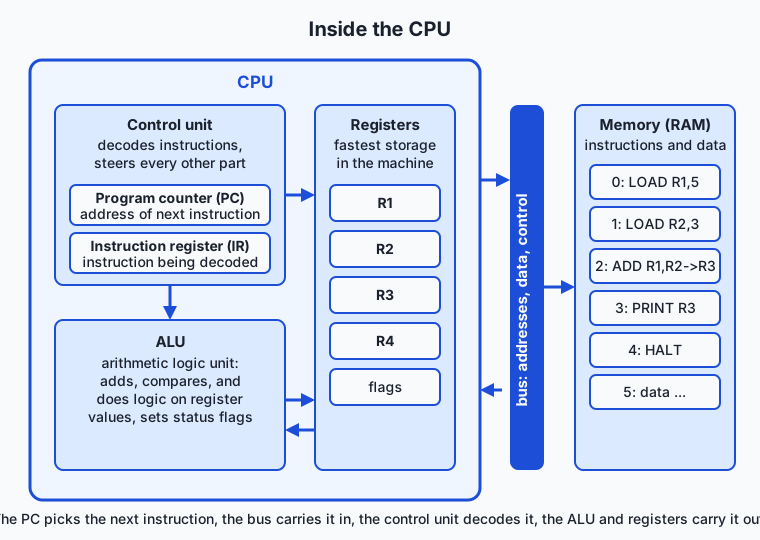
Read the diagram left to right. The control unit is the conductor: it drives the cycle, decodes each instruction, and steers every other component. Inside it live two special registers. The program counter (PC) holds the memory address of the next instruction — it is the machine’s finger on the recipe. The instruction register (IR) holds the instruction currently being decoded, parked where the decoding circuitry can examine its bits. The ALU — arithmetic logic unit — is the calculating heart: a block of gate circuitry, built from yesterday’s adders and comparators, that takes values in and pushes results out, also setting flags, single bits recording facts like “the result was zero” or “the result was negative” that later instructions can test. The registers — a small named set; our toy machine calls them R1 through R4 — are the fastest storage in the machine, holding the values in play right now. And the bus is the shared wiring that carries addresses, data, and control signals between the CPU and memory.
| Part | Role in the cycle | Size and speed |
|---|---|---|
| Program counter (PC) | Supplies the address for each fetch, then advances | One address; updated every cycle |
| Instruction register (IR) | Holds the fetched instruction while it is decoded | One instruction |
| Control unit | Decodes the IR and steers all other parts | Pure circuitry; no storage of its own |
| Registers (R1–R4 in our toy) | Hold operands and results the ALU uses | Dozens of values; accessed within a cycle |
| ALU | Performs arithmetic and logic; sets flags | One or a few operations per cycle |
| Flags | Record facts about the last result for later decisions | A handful of bits |
| Bus | Carries instructions and data to and from memory | Far slower to answer than registers |
The cycle, in slow motion
Our vehicle for the rest of the lesson is a toy CPU with four registers and just four instructions — LOAD Rn,value, ADD Ra,Rb->Rc, PRINT Rn, HALT — written one per line in a program file. It is the same machine you will run in today’s lab, and its output makes each phase of the cycle visible. Here is the real trace of a five-instruction program that adds 5 and 3 (this is genuine simulator output, abridged to the first and third instructions):
PC=0  FETCH    LOAD R1,5
      DECODE   opcode=LOAD  dest=R1  value=5
      EXECUTE  R1 <- 5
      REGS     R1=5 R2=0 R3=0 R4=0

PC=2  FETCH    ADD R1,R2->R3
      DECODE   opcode=ADD  src1=R1  src2=R2  dest=R3
      EXECUTE  R3 <- R1 + R2 = 5 + 3 = 8
      REGS     R1=5 R2=3 R3=8 R4=0
Walk through one full turn for the ADD:
- Fetch. The PC holds 2. The control unit places that address on the bus; memory answers with the instruction stored there; the instruction lands in the IR. The PC immediately advances to 3 — before execution, a detail that matters enormously later, because an instruction that overwrites the PC is how jumps and loops work.
- Decode. The control unit examines the IR. The opcode field says “addition”; the operand fields say sources R1 and R2, destination R3. Decoding physically routes R1 and R2’s outputs to the ALU’s inputs and aims the ALU’s output at R3 — think of railway points being switched, not of anything being understood.
- Execute. The ALU’s adder combines 5 and 3; 8 emerges; the flags note that the result was not zero.
- Write back. The 8 is stored into R3. Many textbooks fold this into execute; we keep it separate because it becomes its own pipeline stage shortly.
In a real chip, the same story plays out with bit patterns rather than readable text. In one plausible toy encoding, ADD R1,R2->R3 might be the sixteen bits 0001 0001 0010 0011 — opcode 0001 meaning add, then three register numbers. The control unit’s decoder is wiring that recognizes 0001 and activates the addition path; nothing more.
The clock: what gigahertz measures
Every step above must finish before the next begins, so the whole chip marches to a shared metronome: the clock, a crystal-driven signal ticking billions of times per second. One tick is a clock cycle — the chip’s indivisible unit of time. A speed of 3 GHz means three billion cycles per second, which makes one cycle about a third of a nanosecond: in that sliver of time, light itself travels only about ten centimeters. That is a real design constraint — at these speeds, the physical distance a signal must travel across the chip matters.
What gigahertz does not measure is instructions. A complex instruction may take many cycles; a modern core can also complete several instructions in one cycle under the right conditions. Engineers therefore separate two quantities: cycles per second (the clock) and instructions per cycle (IPC). Real performance is roughly their product, and since clocks plateaued in the mid-2000s at a few gigahertz — pushing them higher melts the chip, as Day 1’s heat discussion explained — nearly all progress has come from raising IPC and adding cores. That is why a laptop chip at 3.2 GHz today vastly outperforms a 3.2 GHz chip from 2004, and why comparing CPUs by clock speed alone is like comparing writers by typing speed.
Instruction sets: the contract between software and silicon
The instruction set architecture (ISA) is the published catalogue of everything a processor family promises to execute: the operations, the registers visible to programs, the bit encodings. Machine code targets an ISA, not a particular chip — which is why the contract, once popular, becomes almost immortal.
Two contracts dominate the world:
| x86 (and x86-64) | ARM (and its 64-bit form) | |
|---|---|---|
| Origin | Intel 8086, 1978 | Acorn RISC Machine, 1985 |
| Design philosophy | CISC: many instructions, some very complex, variable length | RISC: fewer, simpler, uniform instructions |
| Instruction length | Varies from 1 to 15 bytes | Fixed size, simple to decode |
| Historical stronghold | Desktops, laptops, servers | Phones, tablets, embedded devices |
| Licensing model | Made by Intel and AMD | ARM licenses designs; many companies build chips |
| Notable recent shift | Still dominant in cloud datacenters | Apple Silicon Macs; ARM servers in every major cloud |
The philosophical fight — complex instructions decoded by elaborate circuitry versus simple instructions executed fast — softened over time; modern x86 chips internally translate their complex instructions into simpler micro-operations, borrowing RISC’s playbook. But the contracts remain incompatible: a program compiled to x86 machine code is gibberish to an ARM core. This is why Apple Silicon mattered beyond one company’s product line. When Apple moved Macs from Intel x86 to its own ARM-based M1 in 2020, it demonstrated that the power-efficient architecture honed in phones could beat high-end x86 laptops outright while using far less energy — and it bridged the contract gap with Rosetta 2, software that translates x86 machine code to ARM on the fly. Cloud providers drew the obvious conclusion; ARM-based server chips now offer attractive performance per dollar, and performance per watt has become the metric that decides datacenter economics — for AI clusters above all, where the electricity bill rivals the hardware bill.
Pipelining: doing more per tick
If each instruction takes four steps, must instruction 2 wait for instruction 1 to finish all four? No — and this is the single biggest reason modern CPUs are fast. The four phases use largely different circuitry: fetch uses the PC and bus, decode uses the control unit, execute uses the ALU, write-back uses the registers. So while instruction 1 is decoding, the fetch circuitry would otherwise sit idle — let it fetch instruction 2 now.
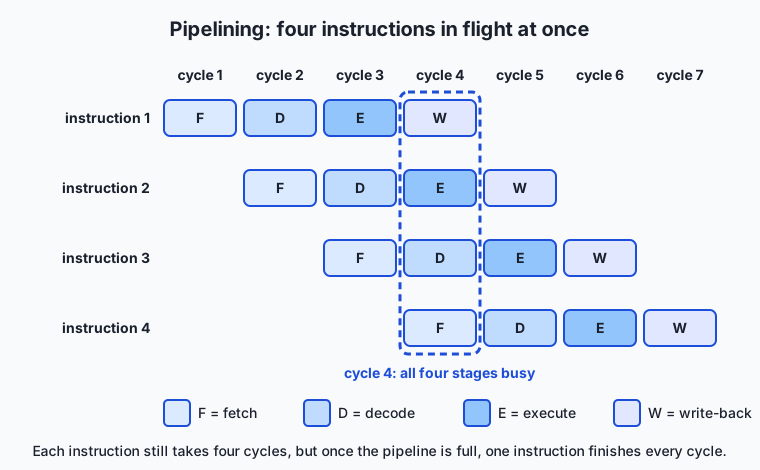
Follow the staircase. In cycle 1, instruction 1 is fetched. In cycle 2, instruction 1 decodes while instruction 2 is fetched. By cycle 4, all four stages are busy with four different instructions — and from then on, one instruction completes every cycle, even though each individual instruction still takes four cycles from start to finish. The pipeline multiplied throughput fourfold without making any single step faster: the same trick as a laundromat where the washer, dryer, and folding table all work on different loads simultaneously, rather than finishing one load entirely before starting the next.
Real pipelines run deep — commonly a dozen or more stages — and real chips are superscalar, running multiple pipelines side by side so several instructions can complete per cycle. But the assembly line has a weakness: it only flows when the CPU knows what to fetch next. A conditional jump — “if the flag is set, go elsewhere” — leaves the fetch stage guessing. Modern CPUs respond with branch prediction, betting on the likely direction and speculatively executing along it; a correct bet costs nothing, a wrong one forces the pipeline to throw away the speculative work and restart from the right address, wasting many cycles. Prediction accuracy above ninety-something percent is routine, which tells you how repetitive real programs are. Keep speculation in mind: it returns with teeth in the security section.
Zoom out and the design logic is continuous with AI hardware: pipelining and superscalar issue are the CPU wringing parallelism out of one instruction stream while preserving the illusion of strict order. A GPU abandons that illusion — thousands of simple cores, no heroics about single-stream speed — and wins whenever the workload really is thousands of identical operations on different data. Neural networks are exactly that workload. CPUs stay unbeatable at the sequential, branchy, unpredictable work that surrounds the math: parsing files, running the operating system, orchestrating the training job.
An everyday analogy
Return to yesterday’s restaurant kitchen and zoom in on the chef — because the chef, it turns out, is a small team. The hands are the ALU: they chop, mix, and combine, and they are the only part that transforms ingredients. The eyes and voice of the head cook are the control unit: reading the recipe card aloud, one line at a time, and directing the hands — “take the onion from spot two, the butter from spot three, result goes in the pan.” The metal card holder on the counter is the instruction register, gripping the card currently being read. The clip marking the next card in the stack is the program counter, sliding forward as each card is taken. The numbered spots on the counter — just four of them in our toy kitchen — are the registers: tiny, instantly reachable, always in use.
The clock is the kitchen timer ticking relentlessly; every action must fit its beats. And pipelining is how a real kitchen actually works during service: while one dish is being plated (write-back), the next is on the stove (execute), a third is being read aloud (decode), and a runner is already pulling the card for a fourth (fetch). No cook finishes a dish faster this way — but a finished plate leaves the pass every beat, which is what the dining room measures. When a diner suddenly changes an order — a conditional jump guessed wrong — dishes in progress get scraped into the bin and the line restarts: that is a branch misprediction, paid in wasted cycles.
The analogy also locates the CPU’s limits honestly. This kitchen has one virtuoso line producing one plate per beat. If a stadium orders ten thousand identical omelettes, virtuosity is the wrong tool — you want a hall of short-order cooks all cracking eggs at once. That hall is the GPU, and the moment your workload turns into “the same simple operation, ten thousand times,” the head chef’s talents are wasted on it.
Examples in practice
Start with the machine you can hold: your phone contains an ARM-based CPU precisely because ARM’s simple, uniform instructions cost little energy to decode and execute, and a phone’s whole design revolves around the battery. Your laptop contains either an x86 chip (most Windows machines) or an ARM-based one (every Apple Silicon Mac); you can ask directly — uname -m in a terminal prints arm64 on Apple Silicon and x86_64 on Intel or AMD. That one word determines which machine code your computer can natively run, which Docker images match it, and why some tools ship two downloads.
Next, watch the cycle’s speed do arithmetic for you. A single core at 3 GHz completing even one instruction per cycle executes three billion instructions per second — so a Python loop over ten million items that feels instant is, underneath, tens of billions of fetch-decode-execute turns, because each Python statement expands into many machine instructions. When that loop feels slow instead, you have met the interpreter’s overhead: the same reason numerical libraries push bulk math down into compiled machine code rather than looping in Python.
Now the AI-relevant failure mode: the CPU-bound training job. A practitioner rents a machine with a powerful GPU, launches training, and finds the GPU utilization meter idling at thirty percent. The GPU is not the bottleneck — the CPU is. Loading images from disk, decompressing them, augmenting them, tokenizing text, batching tensors: all of that is sequential, branchy CPU work, and if it cannot keep pace, the GPU starves. The standard fixes — more data-loader worker processes, moving preprocessing to compiled code, caching preprocessed data — are all, at bottom, “stop making the fetch-decode-execute loop the slowest station on the line.” The reverse situation is GPU-bound (the desirable state for training), and diagnosing which side of the line you are on is a bread-and-butter skill this course will return to repeatedly.
Finally, the toy trace you will produce in the lab is itself the practice example: a five-line program becomes five fetches, five decodes, five executions, and a final register state you predicted in advance. Small as it is, that is the identical skill a systems engineer uses reading a real instruction trace — only the alphabet is bigger.
Implications: security, privacy, performance, scalability, and cost
Security
The pipeline section’s cleverest trick — speculative execution — produced one of the most consequential security episodes in hardware history. In January 2018, researchers disclosed Spectre and Meltdown: attacks showing that a CPU’s speculative work, even when discarded after a wrong guess, leaves measurable traces in the cache — traces an attacker can read like footprints, leaking data the program should never have been able to see, including across the boundaries between programs. The industry’s fixes cost real performance on affected workloads and forced a rethink of how aggressively CPUs may speculate. The permanent lesson for you: performance optimizations are attack surface, and security reasoning has to reach below software, into the cycle itself.
Privacy
Everything the CPU touches passes through its registers and caches in the clear — encryption protects data on disks and networks, but at the moment of computation the values are naked inside the core. That is why attackers prize code execution on the same machine as the secrets, and why cloud vendors now offer confidential computing: hardware modes that seal a computation’s memory even against the machine’s own operator. For AI work the stakes are concrete — prompts, training data, and model weights all take their turn in those registers, and “who else runs code on this hardware?” is a privacy question, not a paranoia question.
Performance
Today’s ideas give you a working vocabulary for why code is fast or slow on one core: clock speed times IPC, pipelines that reward predictable code, branch predictors that penalize erratic jumps. They also explain a counterintuitive rule of numerical computing: code that processes data in regular, uniform sweeps — the shape of matrix arithmetic — flows through pipelines beautifully, while pointer-chasing, branch-heavy code stalls them. Neural-network math is the friendliest workload imaginable by this measure, which is half the reason specialized hardware accelerates it so well. The other half — memory — is tomorrow’s lesson, and it is the reason a stalled pipeline is often waiting, not computing.
Scalability
One core’s speed has hard ceilings — the heat wall on clocks, diminishing returns on IPC — so scaling means more cores, and more cores only help if the work splits. A single instruction stream is inherently sequential: each fetch depends on the last PC value. Workloads scale when they can be cut into many independent streams (a web server handling separate requests) or into bulk data parallelism (the same arithmetic over millions of numbers — the GPU’s home turf). AI training scales spectacularly precisely because its core computation is the second kind; the surrounding orchestration — the CPU’s share — is what engineers fight to keep off the critical path as clusters grow.
Cost
Instruction-set economics now shape real budgets. ARM’s licensing model and power efficiency brought competing chips into every major cloud, and ARM instances frequently undercut x86 for the same throughput — free money for workloads that recompile cleanly. Deeper still, performance per watt rules datacenter cost: electricity and cooling are ongoing bills that dwarf many hardware line items at scale, which is exactly the pressure that pushed Apple to ARM laptops and pushes AI operators toward accelerators. When you later choose cloud instances for preprocessing pipelines, the analysis will be this paragraph with numbers attached: which contract, how many cores, how many watts, per dollar.
Alternatives: free, open source, and commercial
As with Day 1, “alternatives” here means other excellent ways to learn and explore this material.
| Resource | Type | What it offers | Cost |
|---|---|---|---|
| The Day 2 lab in this course | Free | A toy CPU you run, trace by hand, and program yourself | Free |
| Crash Course Computer Science (PBS Digital Studios) | Free video series | Short visual episodes on the ALU, registers, the instruction cycle, and clock speed | Free |
| Wikipedia: “Instruction cycle” and “Central processing unit” | Free reference | Well-cited walkthroughs of the cycle and of CPU organization, with history | Free |
| From Nand to Tetris (Schocken & Nisan) | Open course materials | You build a working CPU from gates, then write programs for it | Free materials; optional companion book |
| ”Code” by Charles Petzold (2nd ed.) | Book (commercial) | Chapters that assemble a CPU conceptually, wire by wire, at beginner pace | Book purchase |
| A CPU visualizer or simulator app of your choice | Free/open source tools | Many educational simulators animate registers and the cycle graphically | Typically free |
If today’s lesson left you wanting to see the machinery drawn and animated, the Crash Course episodes on the CPU are the gentlest next step; if it left you wanting to build the machinery, Nand to Tetris is the definitive project and pairs perfectly with this section of the course.
Comparison with related concepts
| Concept A | Concept B | Key difference |
|---|---|---|
| Control unit | ALU | The control unit decides and steers each step; the ALU performs the arithmetic and logic the step requires |
| Program counter | Instruction register | The PC holds the address of the next instruction; the IR holds the instruction itself while it is decoded |
| Clock speed (GHz) | IPC | Cycles per second versus instructions completed per cycle — performance is roughly their product |
| Machine code | Assembly language | Machine code is the raw bit patterns; assembly is a human-readable notation for the same instructions (our ADD R1,R2->R3 is assembly-style) |
| x86 | ARM | Two incompatible instruction-set contracts: complex variable-length instructions versus simple fixed-size ones, with different power and licensing histories |
| Pipelining | Multicore | Pipelining overlaps stages of one instruction stream; multicore runs separate streams on duplicated hardware |
| CPU core | GPU | A core maximizes speed on a single sequential stream; a GPU maximizes throughput on thousands of identical parallel operations |
When to use it — and when not to
Reach for today’s model whenever a performance question has the shape “why is this one thing slow?” A CPU-bound data pipeline, a training job with a starving GPU, an interpreter loop crawling through millions of items, a benchmark where the 3.4 GHz machine loses to the 3.0 GHz one — all of these resolve into cycle-level questions: how many instructions, how many per cycle, is the pipeline flowing or stalling, is the work parallel or sequential. Reach for it too when choosing hardware or cloud instances: the x86-versus-ARM decision, core counts, and performance-per-watt claims all read differently once you know what the contract and the clock actually are. And reach for it in the lab today, literally, by being the CPU with pencil and paper — hand-tracing is the fastest known cure for fuzzy mental models.
Leave the model in the toolbox when you are writing ordinary application code. You will essentially never count cycles or hand-write assembly in an AI career; compilers and library authors do that better than any of us, and clear, correct high-level code is worth more than clever code tuned by instinct. The professional pattern is the one Day 1 set: write clearly, measure honestly, and descend to this layer only when a measurement points here. The difference after today is that when the measurement does point down — a hot loop, an idle GPU, a mispredicted branch storm — the bottom of the stack is a place you have been, not a rumor.
Knowledge check
Try these from memory before looking back:
- Name the five main parts inside a CPU core covered today and give each one’s one-sentence job description.
- The program counter advances immediately after fetch, before execution. Explain why that ordering is what makes jumps and loops possible.
- A 4.0 GHz processor benchmarks slower than a 3.2 GHz processor on the same task. Give two distinct explanations using today’s vocabulary.
- In the four-stage pipeline diagram, why does the machine complete one instruction per cycle from cycle 4 onward, even though every instruction takes four cycles? What everyday system works the same way?
- Your training job shows 25% GPU utilization and one CPU core pinned at 100%. Diagnose the situation in two sentences, using the term CPU-bound correctly.
Hands-on exercise
Today you run a CPU you can see inside. The Day 2 lab directory contains toy_cpu.sh, a simulator for a four-instruction machine — LOAD Rn,value, ADD Ra,Rb->Rc, PRINT Rn, HALT, over registers R1–R4 — that prints every fetch, decode, and execute step, plus the register file after each instruction. From the lab directory, run the demonstration program:
bash examples/toy_cpu.sh examples/programs/add-two-numbers.txtRead the trace against the lesson: find the PC advancing, find the decode line naming opcode and operands, find the write-back landing in R3. Then open starter/trace-worksheet.md and — before running anything else — hand-trace the three worksheet programs, predicting every register value, every OUTPUT: line, and the final instruction count. Only then check yourself:
bash examples/toy_cpu.sh examples/programs/trace-01.txt
bash examples/toy_cpu.sh examples/programs/trace-02.txt
bash examples/toy_cpu.sh examples/programs/trace-03.txt
Finally, run and then extend your own program:
bash examples/toy_cpu.sh starter/my_program.txt
bash tests/run_tests.sh
Expected output
The demonstration program produces exactly this (a real captured run):
=== Toy CPU ===
Program: examples/programs/add-two-numbers.txt (5 instructions in memory)
Registers start at: R1=0 R2=0 R3=0 R4=0

PC=0  FETCH    LOAD R1,5
      DECODE   opcode=LOAD  dest=R1  value=5
      EXECUTE  R1 <- 5
      REGS     R1=5 R2=0 R3=0 R4=0

PC=1  FETCH    LOAD R2,3
      DECODE   opcode=LOAD  dest=R2  value=3
      EXECUTE  R2 <- 3
      REGS     R1=5 R2=3 R3=0 R4=0

PC=2  FETCH    ADD R1,R2->R3
      DECODE   opcode=ADD  src1=R1  src2=R2  dest=R3
      EXECUTE  R3 <- R1 + R2 = 5 + 3 = 8
      REGS     R1=5 R2=3 R3=8 R4=0

PC=3  FETCH    PRINT R3
      DECODE   opcode=PRINT  reg=R3
      EXECUTE  send R3 to the output
OUTPUT: 8
      REGS     R1=5 R2=3 R3=8 R4=0

PC=4  FETCH    HALT
      DECODE   opcode=HALT
      EXECUTE  stop the clock

HALT reached after 5 instructions.
Final registers: R1=5 R2=3 R3=8 R4=0
Line by line: each PC= line is a fetch, and the PC values count 0 through 4 in order because nothing ever overwrites the counter; each DECODE line shows the control unit’s reading of the instruction; each EXECUTE line is the ALU or data movement doing the work; OUTPUT: 8 is the one visible result; and the final line is the register file at halt.
Validate your work
You are done when you can check every box:
- You ran the demonstration program and can point at one fetch, one decode, one execute, and one write-back in its output.
- You completed all three worksheet traces on paper before running the programs.
- Your predicted
OUTPUT:lines, final registers, and instruction counts matched the simulator for all three programs — or you wrote a one-sentence “why” for each miss. - Your extended
starter/my_program.txtuses at least oneADD, prints at least two values, and ends atHALT reached after N instructions.with no errors. -
bash tests/run_tests.shreports27 checks, 0 failure(s).
Troubleshooting
unknown opcode 'load'— opcodes are uppercase:LOAD,ADD,PRINT,HALT. The machine is strict because real decoders are stricter: one wrong bit is a different instruction.unknown register 'R5'or'R0'— the machine has exactly R1 through R4, a fixed register set baked into its design, just like real silicon.ADD needs the form: ADD Ra,Rb->Rc— check for the comma between sources and the two-character arrow->before the destination; an arrow pasted from a word processor (→) will not decode.the program ended without HALT— every program must end withHALT; a real CPU never decides it is finished, it just keeps fetching whatever bits come next. Add the instruction and rerun.program file not found— run commands from the lab directory so relative paths likeexamples/programs/trace-01.txtresolve.
Common mistakes
- Using a register’s new value one instruction too early. In
ADD R2,R2->R2, the ALU reads the old R2 twice, adds, and only then writes back. Worksheet program 2 exists to catch exactly this. - Treating
PRINTas showing the final value.PRINTemits the register’s value at that instant; program 3 prints the same register twice and gets two different numbers. The trace is a timeline, not a summary. - Forgetting that the PC has already advanced. After fetching the instruction at address 2, the PC reads 3 during that instruction’s execution. It feels like a bookkeeping triviality; it is actually the mechanism that will make jumps, loops, and every control structure possible.
- Reading the trace without predicting first. Watching output confirms nothing about your mental model — predictions do. The worksheet’s order (predict, then run) is the whole exercise.
Practice assignment
Complete starter/trace-worksheet.md in full: every cell of all three trace tables, every predicted OUTPUT: line, every predicted final-register line and instruction count — on paper first, simulator second. Mark each prediction right or wrong, and for every wrong cell write the one-sentence “why.” Then extend starter/my_program.txt into a program of your own that uses at least one ADD and at least two PRINTs; before running it, write down its full predicted output — every OUTPUT: line, the final registers, and the instruction count — and then verify with the simulator and bash tests/run_tests.sh. Keep the finished worksheet: Day 3 builds directly on the register-versus-memory distinction it drills.
Extension challenge
The toy machine has no multiply instruction — so build multiplication out of what it has. Write a program that computes 5 × 6 using only LOAD, ADD, PRINT, and HALT, and predict its instruction count before running it. (Hint: multiplication is repeated addition; chain sums through one register. It takes more instructions than you first guess.) Then reflect in two or three sentences: real instruction sets include multiply — and much more — precisely because doing common work in one instruction is faster than looping over many; that trade-off between rich instructions and simple hardware is the CISC-versus-RISC argument you now understand from the inside. Finally, identify your own machine’s side of the contract divide: run uname -m in a terminal, note whether you are on arm64 or x86_64, and write one sentence on what that means for the machine code your computer runs natively. Tomorrow we follow the data: registers were the fastest memory in the machine — Day 3 descends the whole hierarchy beneath them.
Quiz
Q1. During the fetch phase of the instruction cycle, what does the program counter (PC) hold?
- The instruction currently being executed
- The result of the last ALU operation
- The memory address of the next instruction to fetch
- The number of instructions executed so far
Show answer
Answer: C. The memory address of the next instruction to fetch
The PC is a special register holding the address of the next instruction. The control unit places that address on the bus to fetch the instruction, then advances the PC — it is an address pointer, not a tally.
Q2. Which component examines a fetched instruction's bit pattern and steers the other parts of the CPU accordingly?
- The control unit
- The ALU
- The instruction register
- The bus
Show answer
Answer: A. The control unit
Decoding is the control unit's job: it reads the instruction held in the instruction register and routes operands, selects the operation, and aims the result — like railway points being switched.
Q3. A CPU runs at 3 GHz. What exactly happens three billion times per second?
- Three billion instructions complete
- The clock ticks — the chip's shared timing signal cycles
- Three billion values move from RAM into registers
- The program counter resets to zero
Show answer
Answer: B. The clock ticks — the chip's shared timing signal cycles
Gigahertz counts clock cycles, not instructions. An instruction may take many cycles, and a modern core can also complete several instructions in one cycle — which is why performance is roughly clock speed times instructions per cycle (IPC).
Q4. Why does the program counter advancing at fetch time (before execution) matter so much?
- It lets the CPU skip instructions that contain errors
- It makes the fetch phase run at a higher clock speed
- It keeps the instruction register from being overwritten
- An instruction can overwrite the already-advanced PC, which is how jumps and loops work
Show answer
Answer: D. An instruction can overwrite the already-advanced PC, which is how jumps and loops work
Because the PC is just a register holding the next address, an instruction that writes a different address into it redirects the machine — jumping backward creates loops, and conditional jumps create decisions.
Q5. In a four-stage pipeline (fetch, decode, execute, write-back) that is full, how often does an instruction finish?
- Every four cycles, because each instruction takes four stages
- Every cycle, even though each instruction still takes four cycles end to end
- Twice per cycle, because stages overlap
- It depends on the clock speed
Show answer
Answer: B. Every cycle, even though each instruction still takes four cycles end to end
Pipelining overlaps the stages of consecutive instructions: while one instruction executes, the next decodes and a third is fetched. Once all stages are busy, one instruction completes per cycle — throughput rises fourfold with no stage running faster.
Q6. Which statement correctly contrasts the x86 and ARM instruction sets?
- x86 grew from Intel's 1978 8086 with many variable-length instructions; ARM follows the RISC philosophy of fewer, simpler, fixed-size instructions
- ARM programs run natively on x86 chips because both use the same machine code
- x86 was designed for phones and ARM for desktop computers
- ARM chips are made only by Intel and AMD, while x86 is licensed to many companies
Show answer
Answer: A. x86 grew from Intel's 1978 8086 with many variable-length instructions; ARM follows the RISC philosophy of fewer, simpler, fixed-size instructions
x86 is the CISC-lineage contract descending from the 8086, with instructions from 1 to 15 bytes; ARM began in 1985 as the Acorn RISC Machine with simple uniform instructions, is licensed broadly, and dominates phones — the licensing and origin claims in the other options are reversed or false.
Q7. Why did Apple's 2020 move of Macs from Intel x86 to its own ARM-based M1 chips matter beyond Apple?
- It proved x86 processors could no longer run desktop software
- It was the first time any computer had used a RISC processor
- It doubled the clock speed of laptop processors industry-wide
- It showed the power-efficient phone architecture could outperform high-end x86 laptops, accelerating ARM's move into laptops and cloud servers
Show answer
Answer: D. It showed the power-efficient phone architecture could outperform high-end x86 laptops, accelerating ARM's move into laptops and cloud servers
Apple Silicon demonstrated ARM's performance-per-watt advantage at the high end, not just in phones — and cloud providers drew the same conclusion, expanding ARM server offerings where energy is a dominant cost.
Q8. A training job shows the GPU 30% utilized while one CPU core is pinned at 100%. What is the most likely situation?
- The GPU is defective and should be replaced
- The job is CPU-bound: sequential work like data loading and preprocessing cannot keep pace, so the GPU starves waiting for batches
- The clock speed of the GPU is set too low
- The job is GPU-bound, which is why the GPU shows less than full utilization
Show answer
Answer: B. The job is CPU-bound: sequential work like data loading and preprocessing cannot keep pace, so the GPU starves waiting for batches
CPU-bound means the CPU's instruction stream is the bottleneck. The branchy, sequential work of feeding data cannot match the GPU's appetite, so the expensive parallel hardware idles — fixed by more loader workers, compiled preprocessing, or cached data, not by touching the GPU.
Glossary
- ALU
- The arithmetic logic unit — the block of gate circuitry inside a CPU core that performs arithmetic and logic operations on register values and sets the status flags.
- control unit
- The part of the CPU that runs the instruction cycle: it fetches each instruction, decodes its bit pattern, and steers the ALU, registers, and bus to carry it out.
- register
- One of a small, fixed set of ultra-fast storage slots inside the CPU that hold the values being worked on at this instant — the fastest memory in the machine.
- program counter
- The special register holding the memory address of the next instruction; it advances at fetch time, and instructions that overwrite it create jumps and loops.
- instruction register
- The register that holds the instruction currently being decoded, parked where the control unit's decoding circuitry can examine its bits.
- flags
- Single bits set by the ALU recording facts about the last result — such as "it was zero" or "it was negative" — that later instructions can test to make decisions.
- instruction set
- The published catalogue of operations, visible registers, and bit encodings a processor family promises to execute — the contract between software and silicon.
- machine code
- The raw binary instructions, encoded per an instruction set, that a CPU executes directly.
- assembly language
- A human-readable notation for machine instructions, one line per instruction, like the toy machine's ADD R1,R2->R3.
- clock cycle
- One tick of the CPU's shared timing signal — the chip's indivisible unit of time, within which each pipeline stage must finish its step.
- gigahertz
- A billion clock cycles per second; a 3 GHz CPU's clock ticks three billion times each second, making one cycle about a third of a nanosecond.
- IPC
- Instructions per cycle — how many instructions a core completes per clock tick on a given workload; performance is roughly clock speed times IPC.
- pipeline
- The assembly-line organization of the instruction cycle in which the fetch, decode, execute, and write-back stages of consecutive instructions overlap, so one instruction can finish every cycle.
- branch prediction
- The hardware's educated bet on which way a conditional jump will go, made so the pipeline can keep fetching; a wrong bet forces the speculative work to be discarded.
- x86
- The instruction-set family descending from Intel's 1978 8086 — complex, variable-length instructions — that still dominates desktop and much server computing.
- ARM
- The RISC instruction-set family begun as the Acorn RISC Machine in 1985 — simple, uniform, power-frugal instructions — that powers essentially all smartphones and, since Apple Silicon, a growing share of laptops and servers.
- CPU-bound
- Describes a workload whose speed is limited by the CPU's instruction stream rather than by memory, disk, network, or an accelerator — as when a starving GPU idles because sequential preprocessing cannot keep up.
Sources and further reading
- Crash Course Computer Science — PBS Digital Studios (accessed 2026-07-12) — Free video series; the episodes on the ALU, registers and RAM, the CPU, and instructions cover this lesson visually.
- Instruction cycle — Wikipedia (accessed 2026-07-12) — Reference walkthrough of the fetch-decode-execute cycle and the registers involved.
- Central processing unit — Wikipedia (accessed 2026-07-12) — Well-cited overview of CPU organization, history, clock rates, and parallelism.
- From Nand to Tetris — Shimon Schocken and Noam Nisan (accessed 2026-07-12) — Free course in which you build a working CPU from logic gates and then program it.
- Code: The Hidden Language of Computer Hardware and Software (2nd ed.) — Charles Petzold / Microsoft Press (accessed 2026-07-12) — Assembles a CPU conceptually, wire by wire, at beginner pace.
Kept in this browser, no account needed. Your progress page turns the whole record into one link you can bookmark or open on another device.