Computing Foundations › Inside the Machine › Day 3
Day 3: Memory Hierarchy: Registers, RAM, and Storage

After this lesson you will be able to place every level of the memory hierarchy — registers, caches, RAM, SSD, HDD, and network storage — in order with approximate sizes and latencies, explain why the hierarchy exists, and use it to reason about swapping, caching, and why model weights must fit in fast memory.
Hands-on lab for this lesson
Lab files on GitHub: https://github.com/ai-roadmap-365/ai-roadmap-365.github.io/tree/main/labs/sections/computing-foundations/day-003-memory-hierarchy-registers-ram-and-storage
- Get the hands-on files. Clone the labs repository once (you can reuse this clone for every lesson). This works on macOS, Linux, and Windows (PowerShell or WSL):
git clone https://github.com/ai-roadmap-365/ai-roadmap-365.github.io.git cd ai-roadmap-365.github.io - Open this lesson's lab. Move into the directory for this specific day. Every lab lives at the same predictable path — section / subsection / week / day:
cd labs/sections/computing-foundations/day-003-memory-hierarchy-registers-ram-and-storage - Read the lab guide. Open `README.md` in that directory. It lists the exact commands, what each does, the expected output, and how to check your work — read it before running anything.
- Run it and check your work. Follow the README's "How to run" section: run the example first to see the finished result, then complete the numbered exercises in `starter/`, then run the tests. The tests pass (exit 0) only when your work is correct.
bash tests/run_tests.sh # or the test command named in the lab README
You can also open the lab as a local page (works offline, shows the file tree and expected output).
Learning objectives
By the end of this lesson you will be able to:
- Order the levels of the memory hierarchy from registers to network storage and attach an approximate order-of-magnitude size and latency to each
- Explain the speed/size/cost trade-off that makes the hierarchy necessary, and why no single memory technology can be fast, large, and cheap at once
- Define temporal and spatial locality of reference and explain how cache lines and prefetching exploit them to make loops run at near-cache speed
- Describe caching as the recurring idea in computing and identify it at three different scales (CPU cache, OS page cache, content delivery network)
- Explain virtual memory, pages, swap, and thrashing in plain language, and diagnose the symptoms of a machine that has run out of RAM
- Measure your own machine's L1 and L2 cache sizes from the terminal and demonstrate the OS page-cache effect by timing a cold versus warm file read
- Connect the hierarchy to model deployment: compute whether a model fits in GPU or unified memory, estimate the token-rate ceiling set by memory bandwidth, and explain what quantization changes
Prerequisites
- Day 1 (the layered stack and your machine profile) and Day 2 (the CPU's fetch-decode-execute cycle)
- A terminal on macOS or Linux (Windows users: WSL), with your Day 1 worksheet at hand
Why this matters
On Day 1 you met the memory hierarchy in one paragraph; on Day 2 you watched the CPU fetch and execute instructions billions of times per second. Today those two threads collide, because there is an uncomfortable truth hiding in that picture: a modern processor can execute an instruction in well under a nanosecond, but fetching one number from RAM takes on the order of a hundred nanoseconds. Left alone, the fastest chip on Earth would spend more than 99% of its life waiting for memory. The memory hierarchy — the layered arrangement of registers, caches, RAM, and storage — is how computers hide that gap, and it is arguably the single most consequential design idea in practical computing.
It is also the idea that will follow you through this entire course. When your future self asks “why is my data pipeline slow?”, the answer will usually live in this lesson, not in the code’s arithmetic. When you meet large models, the very first question practitioners ask — “does it fit in GPU memory?” — is a memory-hierarchy question. Why does generating text from a large model stress memory bandwidth more than raw compute? Memory hierarchy. Why does quantization (storing each model weight in fewer bits) speed models up, not just shrink them? Memory hierarchy. Why did Apple’s unified-memory Macs become weirdly popular machines for running models locally? Memory hierarchy. Even the price differences between cloud machine types mostly trace back to how much fast memory sits how close to the processors.
Engineers have a name for the widening gap between processor speed and memory speed: the memory wall. Understanding it now, on Day 3, with nothing but a terminal and a stopwatch, will make dozens of later topics feel obvious instead of mysterious.
The idea in plain language
Here is the whole lesson in four sentences. Fast memory is expensive and must be tiny; big memory is cheap but slow — physics and economics allow no single memory that is fast, huge, and affordable at once. So computers stack several kinds of memory in layers: a handful of registers inside the CPU, small caches next to the cores, gigabytes of RAM on the memory bus, terabytes of persistent storage below that, and effectively unlimited network storage at the bottom. Each layer is roughly 10 to 1000 times bigger and 10 to 1000 times slower than the one above it. The system works because programs don’t touch their data randomly: they reuse what they touched recently and march through data in order, so a small fast layer can hold “the data of the moment” and satisfy most requests at top speed.
That tendency of programs is called locality of reference, and it comes in two flavors. Temporal locality: what you used a moment ago, you will probably use again soon (think of a loop reusing the same counter). Spatial locality: near what you just used sits what you will need next (think of reading an array element by element). Hardware exploits both automatically — when RAM is asked for one number, it hands over the whole neighboring chunk (a cache line) on the bet that neighbors will be wanted next, and caches keep recently used lines around on the bet that they will be reused.
Keeping a small fast copy of something in front of a large slow source is called caching, and once you can see it, you will find it everywhere: CPU caches in front of RAM, RAM (as the operating system’s page cache) in front of the disk, your browser’s cache in front of the internet, a content delivery network in front of a distant server. Different layers, one identical trick. Today you learn the trick once, deeply, so every later appearance is a reunion rather than an introduction.
Historical background
The hierarchy is as old as the stored-program computer itself. In their 1946 design papers for the machine that became the blueprint for modern computers, Burks, Goldstine, and von Neumann already noted that they would ideally want a memory both very large and very fast, that no such memory could be built, and that a hierarchy of memories — each larger and slower than the last — was the practical answer. The earliest machines made do with exotic devices: mercury delay lines that stored bits as sound pulses traveling through tubes of liquid, and cathode-ray tubes that stored bits as spots of charge on a screen. In the early 1950s magnetic-core memory — tiny ferrite rings threaded on wires, each ring holding one bit — became the workhorse RAM of the industry for two decades, which is why old-timers still call a memory dump a “core dump.”
Two inventions in the 1960s created the modern shape of the hierarchy. In 1962, the Atlas computer at the University of Manchester introduced virtual memory: it automatically shuttled data between small fast core memory and a large slow drum, letting programmers pretend they had one big memory while the machine handled the layers behind the scenes. And in 1968 IBM announced the System/360 Model 85, the first commercial computer with a cache — a small fast buffer memory that automatically kept recently used data close to the processor. Both ideas were about the same thing: making a hierarchy look like a single simple memory.
Then the layers themselves changed material. In 1970 Intel shipped the 1103, the first commercially successful DRAM chip, and semiconductor memory swiftly killed magnetic core. Hard disk drives — invented by IBM in 1956 as a refrigerator-sized unit storing a few megabytes — became the persistent layer for half a century. Flash-memory SSDs went mainstream in the 2000s and were transformative precisely in hierarchy terms: an SSD answers a random read in about a tenth of a millisecond where a spinning disk needs several milliseconds, closing part of the enormous gap between RAM and storage.
Meanwhile the top and bottom of the hierarchy drifted apart. Processor speeds roughly doubled every couple of years through the 1980s and 1990s; DRAM latency improved far more slowly. In a famous 1995 note, Wulf and McKee projected the consequences of that divergence and popularized the term “memory wall.” The industry’s response was more hierarchy: two, then three levels of cache on the CPU die, smarter prefetching, and — in the machine-learning era — high-bandwidth memory stacked directly on top of GPU packages, plus designs like Apple’s unified memory that put one large pool close to CPU and GPU alike. Sixty years on, the answer to the memory problem is still the one from 1946: layers.
What it is — and what it is not
The memory hierarchy is the organization of all the places a computer can keep data, arranged by speed, size, and cost: registers, then L1, L2, and (usually) L3 caches on the CPU chip, then RAM, then persistent storage (SSD or HDD), then storage reached over a network. Two properties define the arrangement. Going down, each level is larger, slower, and cheaper per byte — order-of-magnitude jumps, not small steps. And the levels cooperate: each fast level holds a subset of what the level below holds, refreshed continuously so that the subset is, with luck, exactly the data the program needs right now.
It is worth being precise about what the hierarchy is not. It is not one component you can point at on a motherboard — it is a relationship among many components. Cache is not “extra RAM”: it is a different, faster kind of memory (SRAM, roughly six transistors per bit) physically located on the CPU die, invisible to your programs and managed entirely by hardware. Virtual memory is not “using disk as RAM” in any pleasant sense: it is an addressing illusion the OS maintains, and leaning on the disk portion of that illusion (swapping) is a performance disaster precisely because of the latencies in today’s tables. And the hierarchy is not optional or ignorable: every program that has ever run on your machine lives inside it, whether its author knew or not.
| Common misconception | The reality |
|---|---|
| ”Cache is a small amount of bonus RAM.” | Cache is a different memory technology on the CPU die itself, roughly 100 times faster than RAM and managed by hardware, not by your code. |
| ”My machine has 36 GB of memory, so a 36 GB file fits.” | The OS, other programs, and the program’s own working structures share that RAM; the usable slice is always smaller. |
| ”An SSD is about as fast as RAM now.” | A fast SSD is still roughly a thousand times slower than RAM for a random access — the gap is smaller than with spinning disks, but still enormous. |
| ”Virtual memory means I never run out of memory.” | You run out of fast memory just the same; the system merely degrades (swapping) instead of stopping. |
| ”Doubling CPU speed doubles program speed.” | Programs that wait on memory — most programs — speed up far less, because the wait, not the arithmetic, dominates. |
Why it was created and what problems it solves
The hierarchy exists because three desirable properties of memory — fast, large, cheap — form a triangle you cannot have all of. The physics is unforgiving: fast memory (SRAM) needs about six transistors per bit and must sit millimeters from the compute circuits, so it is expensive and small; dense memory (DRAM) uses one transistor and one capacitor per bit and sits centimeters away across a bus, so it is big, cheaper, and slower; flash storage packs bits densest and cheapest of all and remembers without power, but answering a read takes microseconds; magnetic disks and network storage are cheaper and bigger still, and slower again. These are order-of-magnitude gaps baked into the technologies, not engineering sloppiness awaiting a fix.
The problem the hierarchy solves is making a machine that feels like it has memory that is simultaneously register-fast and disk-huge, at a price people will pay. The solution leans entirely on locality of reference: since programs concentrate their attention on a small working set of data at any moment, a machine that keeps the working set in the small fast levels delivers nearly the speed of its fastest memory at nearly the price of its cheapest. When the bet pays off — a cache hit — the data is already upstairs. When it fails — a cache miss — the hardware fetches the data from below, pays the latency once, and keeps a copy in case it is wanted again.
The same reasoning was rediscovered at every scale. The OS caches disk contents in spare RAM (the page cache) because disk is to RAM what RAM is to cache. Databases cache query results; websites cache pages near users. Whenever two storage layers differ wildly in speed and access patterns show locality, someone inserts a cache between them — it is the single most reused idea in systems design.
How it works
The levels, one by one
Hold onto orders of magnitude, not exact figures — every number here is an honest approximation, and real hardware varies by vendor and generation. The far-right column rescales everything to human time: imagine a register access stretched to one second.
| Level | Typical size | Approximate latency | If a register access took 1 second |
|---|---|---|---|
| Registers | ~1 KB total per core | ~0.5 ns (a CPU cycle) | 1 second |
| L1 cache | 32–192 KB per core | ~1 ns | ~2 seconds |
| L2 cache | 0.25–16 MB | ~4 ns | ~8 seconds |
| L3 cache | 8–128 MB, shared | ~15 ns | ~30 seconds |
| RAM | 8–192 GB | ~100 ns | ~3 minutes |
| SSD (random read) | 0.25–8 TB | ~100 µs | ~2 days |
| Datacenter network hop | — | ~0.5 ms | ~12 days |
| Hard disk seek | up to ~20 TB | ~5–10 ms | ~6 months |
| Internet round trip | effectively unlimited | ~100 ms | ~6 years |
Read that last column twice. From the CPU’s point of view, RAM is a three-minute errand, an SSD is a two-day trip, and a spinning disk is half a year away. This is why a single design goal shapes so much of computing: stay high in the pyramid.
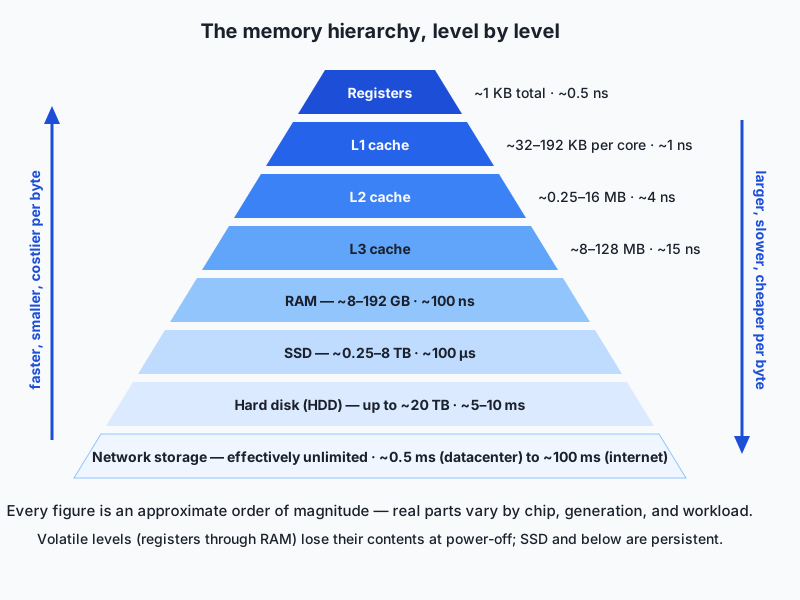
A few notes on the individual levels. Registers you met on Day 2 — the few dozen named slots the ALU computes on directly; the compiler decides what lives there. The L1 cache is split per core, usually into an instruction half and a data half, and is the hardware’s first stop for every memory access. L2 is bigger and slightly farther; L3, where present, is bigger again and typically shared among all cores (Apple’s chips skip a classic L3 and instead use large L2 caches plus a shared system-level cache — same idea, different labels). RAM (DRAM) is the first level off the CPU chip, reached over the memory bus; it is volatile, meaning contents vanish at power-off. SSDs and hard disks are persistent; they are where files actually live. And network storage — a file server, cloud object storage — bottoms out the pyramid: effectively unlimited, but every access is a round trip through cables and switches.
Two different figures of merit matter at every level, and beginners often blur them. Latency is how long one access takes — the numbers above. Bandwidth is how many bytes per second the level can stream once transfers are flowing — RAM in a laptop might sustain on the order of 100 GB/s, a fast SSD several GB/s, a home internet connection a few hundred MB/s at best. A level can have decent bandwidth and terrible latency (network storage is the classic case). Latency punishes scattered small accesses; bandwidth limits big sequential ones. Keep both words; you will need them within weeks.
Locality and cache lines: why the bet pays off
When your program reads one 8-byte number from RAM, the hardware does not fetch 8 bytes — it fetches the entire 64-byte cache line containing it and parks the line in cache. That is spatial locality made mechanical: if you are reading element 0 of an array, elements 1 through 7 arrive in the same line for free, and reading them costs a nanosecond each instead of a hundred.
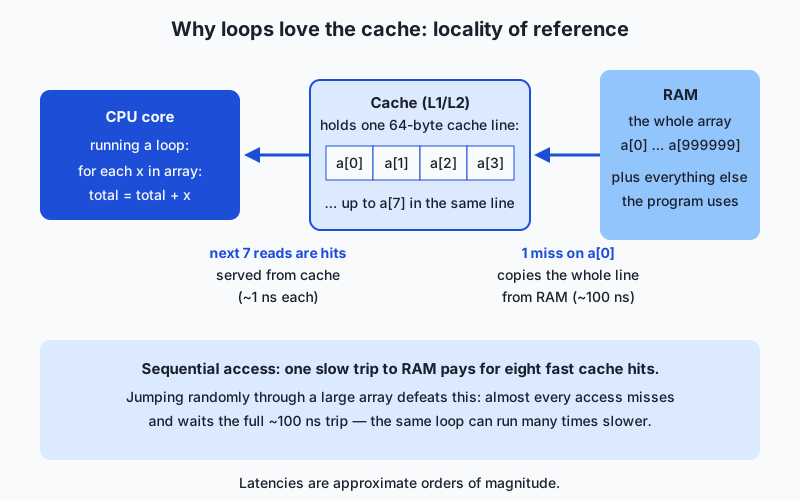
Follow the diagram’s loop summing a million-element array. The first access misses: the line is copied from RAM, ~100 ns. The next seven accesses hit: ~1 ns each. Then the pattern repeats — one miss buys seven hits, and the hardware’s prefetcher, noticing the regular march, starts fetching the next line before it is asked. The result is that a well-behaved sequential loop runs at nearly cache speed even though the data lives in RAM. Now imagine visiting the same million elements in random order: nearly every access misses, nearly every access pays the full trip, and the identical arithmetic can run an order of magnitude slower or worse. Same data, same instructions, different order — vastly different speed. That is the memory hierarchy asserting itself, and it is why data layout and access order are performance topics in every serious computing field, very much including machine learning, where “keep the processors fed” is half the game.
Virtual memory and swapping, in plain language
One more illusion completes the picture. Programs do not use real RAM addresses. Each program is handed its own private make-believe address space, and the OS plus a piece of hardware (the memory management unit) translate make-believe addresses to real RAM locations, in chunks called pages (commonly 4 or 16 KB). This is virtual memory, and it buys three things: programs cannot read or corrupt each other’s memory (protection — a security cornerstone); every program can be written as if it owned a simple private memory (convenience); and the OS gains freedom to place, share, and shuffle pages behind everyone’s back (flexibility).
That third freedom has a sharp edge. When programs collectively want more pages than RAM can hold, the OS evicts the least-recently-used pages to a reserved area of disk — swap — and brings them back on demand. Touching a swapped-out page triggers a page fault: the program simply freezes until the page returns from the SSD, a ~hundred-microsecond stall repeated thousands of times. A machine “thrashing” — swapping pages in and out continuously — has effectively demoted its RAM to SSD speed: the beach-ball cursor, the unresponsive window, the training job that mysteriously runs fifty times slower than yesterday. The cure is always the same: shrink the working set (process data in chunks, close the browser with 90 tabs) or buy more RAM.
The OS also runs the trick in the opposite, happy direction: any RAM not otherwise needed becomes the page cache, a cache of recently read disk contents. Read a big file twice and the second read often runs many times faster — it never touches the disk at all. Today’s lab measures exactly this on your machine.
An everyday analogy
Return to the Day 1 kitchen, now with the full staff. The chef’s two hands are the registers — whatever they hold is being worked on right now, and there is room for almost nothing. The tray beside the cutting board is L1: a dozen ingredients, reachable without looking up. The counter behind the chef is L2, and the kitchen’s shared shelf is L3 — bigger, a few steps away, shared by all the cooks. The pantry downstairs is RAM: everything for tonight’s service, a minute’s round trip. The warehouse across town is the SSD — you send a runner and plan around the delay — and the supplier in another city, reachable only by placing orders, is network storage.
A good kitchen runs on locality. The chef preps tonight’s tray before service (prefetching), keeps the salt within arm’s reach because it is used constantly (temporal locality), and when the runner goes to the pantry for one onion, he brings the whole bag, because whoever wanted one onion will want another (a cache line). Watch a bad kitchen for contrast: the chef needs items in no predictable order, the tray holds all the wrong things, and every second dish sends the runner downstairs — the chef, the most expensive resource in the building, stands idle. That kitchen is your program with poor locality.
And swapping? The pantry is full, so the staff starts shuttling tonight’s ingredients back and forth to the warehouse across town mid-service. Technically the kitchen still functions — the manager’s ledger (virtual memory) tracks where everything is, and every dish eventually goes out. But service has slowed from minutes to hours, and no one in the dining room knows why. When your laptop thrashes, this is the scene inside.
Examples in practice
Start with a machine on the author’s desk, measured with the same commands you will run in the lab. An Apple M4 Max laptop reports 128 KB of L1 data cache per performance core, a 16 MB L2 cache shared by a performance-core cluster (the efficiency cores have 64 KB and 4 MB respectively), and 36 GB of RAM — with a 926 GB SSD below. Notice the shape: each level roughly a hundred times bigger than the one above, exactly the pyramid, sitting on your desk. Your numbers will differ; the shape will not.
Second, the loop-order classic. Summing a large two-dimensional table row by row visits memory sequentially — cache lines and the prefetcher do their best work. Summing the same table column by column skips through memory in big strides, wasting most of every cache line it fetches. Identical arithmetic, identical result, and the second version is commonly several times slower on large data. Libraries you will use later handle their loops in cache-friendly order internally — one big reason the standard numerical tools are so much faster than naive hand-written loops.
Third, the page cache in everyday life. The first launch of a big application after reboot is slow (its files come from the SSD); the second launch is snappy (they come from RAM). Photo apps feel instant while browsing recent pictures and stutter on a years-old album. Your own lab measurement of a cold versus warm file read is this exact effect, quantified.
Now the connection this course cares most about: models. A neural network’s weights are just numbers, and at fp16 precision each weight is 2 bytes — a 7-billion-parameter model is about 14 GB of weights. Rule one of deployment is the pyramid’s rule: those 14 GB must sit in the fast memory attached to the processor doing the math (a GPU’s onboard memory, or a unified pool). Spill out of it, and weights stream from the level below at a catastrophic discount, exactly like a chef cooking from the warehouse. Rule two is bandwidth: generating each token of text requires reading essentially all the weights once, so a machine with (order of magnitude) 400 GB/s of memory bandwidth can read a 14 GB model at most roughly 30 times per second — an approximate ceiling of ~30 tokens per second no matter how fast the arithmetic units are. Inference is usually a memory-bandwidth problem wearing a math costume. And that explains rule three: quantization, storing each weight in 8 or 4 bits instead of 16, shrinks the same model to 7 or 3.5 GB — it now fits where it didn’t, and each token needs a quarter of the bytes moved, so the bandwidth ceiling roughly quadruples. This is also why Apple’s unified-memory machines punch above their weight for running models locally: CPU and GPU share one large pool (up to 128 GB or more on high-end configurations) with respectable bandwidth, so mid-sized models fit entirely in fast memory on a laptop — while a typical discrete gaming GPU, despite ferocious compute, offers only 8–16 GB of onboard memory and simply cannot seat larger models at all. Dedicated datacenter GPUs answer with stacked high-bandwidth memory delivering terabytes per second — the memory hierarchy, as ever, is where the money goes.
Implications: security, privacy, performance, scalability, and cost
Security
The hierarchy’s speed differences are measurable — and anything measurable leaks information. Cache-timing attacks infer secrets (like encryption keys) by observing which memory accesses are fast (cached) versus slow (evicted), without ever reading the secret directly. The Spectre and Meltdown class of vulnerabilities disclosed in 2018 turned this into headline news: processors speculatively execute instructions ahead of time, speculation leaves footprints in the cache, and attackers learned to read those footprints. Mitigations cost real performance and are still being refined years later. The deeper lesson generalizes: shared levels of the hierarchy (caches shared between programs, RAM shared between virtual machines) are shared surfaces, and isolation there is a security boundary someone is always probing.
Privacy
Data changes protection as it moves down the pyramid. Registers, caches, and RAM are volatile and hold data in usable, unencrypted form because the CPU must compute on it. Below RAM, data persists — and so do secrets. Swapping quietly writes whatever was in memory, passwords included, onto disk, where it can outlive the program by years unless swap is encrypted (modern macOS and most full-disk-encryption setups handle this — verify before assuming). “Deleted” files usually persist until overwritten. Caches at every scale retain copies their owners forget: browser caches, CDN caches, page caches on shared servers. A useful professional habit begins today: for any sensitive data, ask which levels of which hierarchies has this touched, and who can read them?
Performance
Most slow software is not compute-bound; it is waiting on some level of the hierarchy. The practical toolkit follows directly from today’s tables. Measure before guessing — is time going to arithmetic, RAM, disk, or network? Improve locality — process data in chunks that fit in cache, visit memory sequentially, reuse rather than refetch. Stay above the cliffs — the working set exceeding cache is a slowdown; exceeding RAM (swapping) is a catastrophe; a per-item network round trip in a loop is a six-year errand run a million times. And respect the difference between latency and bandwidth: batching many small accesses into fewer large ones is often the single biggest win available, at every level from cache lines to cloud storage requests.
Scalability
Scaling out means adding hierarchy levels, not escaping them. A cluster is a memory hierarchy whose bottom levels happen to be other computers: a node’s own RAM, then a neighbor’s RAM over the datacenter network, then shared storage. Distributed caches (an in-memory tier in front of a database) are the page-cache idea at building scale. Content delivery networks are caches placed near users, converting a 100 ms intercontinental round trip into a 10 ms local one. And when a model is too large for one GPU’s memory, practitioners shard it across many GPUs — whereupon the interconnect between GPUs becomes the new critical level, which is why datacenter GPU systems advertise their inter-chip links as loudly as their compute. Every scaling story is a hierarchy story with bigger boxes.
Cost
The pyramid is drawn in dollars as much as nanoseconds: per byte, each step down is roughly an order of magnitude cheaper, which is why your laptop has gigabytes of RAM but terabytes of SSD, and why no vendor sells a terabyte of L1 cache. Cloud pricing mirrors this directly — machines are priced substantially by how much RAM and how much accelerator memory they carry, and high-memory or GPU instances command steep premiums because fast memory close to compute is the scarce good. The engineering trade-off is honest on both sides: renting more fast memory is expensive, but so are engineer-hours spent squeezing a working set, and idle processors waiting on slow tiers burn money too. Knowing the hierarchy lets you buy exactly the level you need — the recurring cost question of a machine-learning career, “which GPU and how much memory?”, is settled by the arithmetic you did two sections ago.
Alternatives: free, open source, and commercial
As on Day 1, “alternatives” for a concepts lesson means other excellent routes into the same material.
| Resource | Type | What it offers | Cost |
|---|---|---|---|
| The Day 3 lab in this course | Free | Measure your own machine’s cache sizes and page-cache effect | Free |
| Operating Systems: Three Easy Pieces (Arpaci-Dusseau) | Free book | Superb plain-English chapters on caching, virtual memory, and swapping | Free online |
| Colin Scott’s interactive latency page | Free visualization | ”Latency numbers every programmer should know,” animated year by year | Free |
| Crash Course Computer Science (PBS Digital Studios) | Free video series | Short visual episodes on memory, caches, and storage technologies | Free |
| Wikipedia: memory hierarchy and CPU cache articles | Free reference | Well-cited overviews with real chip parameters | Free |
| Computer Systems: A Programmer’s Perspective (Bryant & O’Hallaron) | Book (commercial) | The standard university treatment; its memory-hierarchy chapter is famous | Book purchase |
| Every Programmer Should Know About Memory (Drepper) | Free paper | Deep, canonical, and dense — keep for a second pass in a later month | Free |
If you read one thing beyond this course today, make it the virtual-memory chapters of Operating Systems: Three Easy Pieces — free, funny, and rigorous.
Comparison with related concepts
| Concept A | Concept B | Key difference |
|---|---|---|
| Cache | RAM | Cache is small, on the CPU die, ~100× faster, managed by hardware; RAM is the large off-chip main memory programs actually address |
| RAM | Storage (SSD/HDD) | RAM is volatile working memory (~100 ns); storage is persistent (~100 µs for SSD, ~ms for HDD) and holds data across power-off |
| SSD | HDD | An SSD is silent flash memory with ~100 µs random reads; an HDD has moving heads on spinning platters, ~ms seeks, but cheaper per byte |
| Latency | Bandwidth | Latency is how long one access takes; bandwidth is bytes per second once flowing — a truck of disks has huge bandwidth and terrible latency |
| Virtual memory | Physical memory | Physical memory is the actual RAM chips; virtual memory is the per-program illusion of a private address space, translated page by page |
| Swap | Page cache | Swap uses disk to back overflowing RAM (slow, a symptom of pressure); the page cache uses spare RAM to front the disk (fast, a gift) |
| Unified memory | Discrete GPU memory | Unified: one pool shared by CPU and GPU, large but moderate bandwidth; discrete: a separate on-card pool, smaller but often far faster |
When to use it — and when not to
Reach for hierarchy thinking whenever performance surprises you: a program fast on small inputs and disproportionately slow on large ones has almost certainly crossed a level boundary (out of cache, out of RAM, into per-item network calls). Reach for it when sizing hardware — laptop RAM, GPU memory, cloud instance type — because “will the working set fit in the fast level?” is the entire question. Reach for it when you design anything with repeated access to slow data: the answer is nearly always a cache, plus honest thought about staleness. And reach for it throughout this course: batch sizes, quantization, model sharding, embedding stores, and data-loading pipelines are all hierarchy problems in domain clothing.
Know when to put it away, too. Do not contort readable code for imagined cache effects before measuring — modern compilers, libraries, and prefetchers are excellent, and the professional order of operations is correct first, measured second, optimized third, exactly where the measurement points. Do not hand-roll caching where the platform already provides it: the OS page cache, database buffer pools, and HTTP caching are mature; adding an amateur cache on top often adds bugs (stale data, memory bloat) faster than speed. A famous industry joke says there are only two hard things in computer science: cache invalidation and naming things. The joke is a warning label — caching is the recurring idea in computing, and knowing when the trick is already being done for you is as valuable as knowing the trick.
Knowledge check
Try these from memory before looking back:
- Draw the pyramid from registers to network storage and attach an approximate latency to each level. Which single gap is the largest, and roughly how large is it?
- Explain temporal and spatial locality with one everyday example each, and state which one cache lines exploit.
- A program sums a large table row by row in 2 seconds; summing column by column takes 11 seconds. Explain why, using the terms cache line and miss.
- Your laptop has 16 GB of RAM and becomes almost unusable when you open a 20 GB dataset, though it worked fine at 10 GB. Name the mechanism and describe what is happening at the level of pages.
- A 7-billion-parameter model is stored at 2 bytes per weight on a machine with roughly 400 GB/s of memory bandwidth. Estimate the ceiling on tokens generated per second, and explain what 4-bit quantization does to both the model’s footprint and that ceiling.
Hands-on exercise
Time to measure your own pyramid. This exercise is worked through fully in the Day 3 lab directory; here is the core of it. First, ask your machine for its cache sizes. On macOS:
sysctl hw.l1dcachesize hw.l2cachesizePrints the L1 data cache and L2 cache sizes in bytes. On Apple Silicon Macs, performance and efficiency cores have different caches, so also try:
sysctl hw.perflevel0.l1dcachesize hw.perflevel0.l2cachesizeperflevel0 is the performance-core cluster (the plain names above typically report the efficiency cores’ figures). On Linux:
lscpu | grep -i cacheLists L1d, L1i, L2, and (if present) L3 sizes. Convert bytes to KiB or MiB by dividing by 1024 once or twice, and note how each level slots between the ones above and below it in size.
Second, feel the page cache. The lab provides measure_read_speed.sh, which creates a ~200 MB test file inside the lab directory with dd, then times reading it twice with the shell’s built-in timer:
bash examples/measure_read_speed.shThe first (cold) read may come from the SSD; the second (warm) read is served from RAM by the OS page cache. The script prints both times and the speed-up, then deletes the test file. Your task in the starter version is to fill in four numbered exercises — the cache-size queries and the two timed reads — each of which names the exact command to use.
Expected output
A real run on an Apple Silicon Mac (your numbers will differ — that is the point):
=== Memory Hierarchy Measurements ===
Generated on: 2026-07-12
Operating system kernel: Darwin
L1 data cache: 131072 bytes (128 KiB)
L2 cache: 16777216 bytes (16 MiB)
RAM: 38654705664 bytes (36 GiB)
Creating a 200 MB test file with dd (inside this lab directory) ...
Cold read (first pass):  0.023 s (8695 MB/s)
Warm read (second pass): 0.022 s (9090 MB/s)
Warm read speed-up over cold: 1.0x
=== End of measurements ===
Test file removed.
Read the shape, not the digits: L1 in the hundreds of KiB, L2 in the MiB, RAM in the GiB — three jumps of roughly a hundred-fold each. And notice what this particular machine just taught us: both reads ran at multi-GB/s — RAM speed, not SSD speed — because on a machine with ample free RAM the file was still in the page cache from being written, so even the “cold” read never touched the SSD. A speed-up near 1.0x is therefore itself evidence of the page cache at work; on a memory-constrained machine (or with a file much larger than RAM) the cold read drops to storage speed and the gap opens wide. The lab’s troubleshooting file shows how to observe a truly cold read.
Validate your work
You are done when you can check every box:
- You can state your L1 data cache size and convert it to KiB.
- You can state your L2 (and L3, if present) cache size and convert to MiB.
- You can place both between registers and RAM in the pyramid, with sizes ordered correctly.
- Your
measure_read_speed.shrun printed both a cold and a warm read time, and the warm read was at least as fast as the cold one. - You can explain, in one sentence, which level of the hierarchy served the warm read.
- The lab’s automated tests pass (
bash tests/run_tests.shreports 0 failures).
Troubleshooting
sysctl: unknown oid 'hw.perflevel0.l1dcachesize'. You are on an Intel Mac or an older macOS — the plainhw.l1dcachesize/hw.l2cachesizenames are the right ones there. On Linux, uselscpu.lscpushows totals, not per-core sizes. Some versions sum caches across cores (e.g. “L1d: 512 KiB (8 instances)”) — divide by the instance count for the per-core figure.- Cold and warm reads take the same time. Almost always the file was still in the page cache from being written. This is the page cache working, not the lab failing. The troubleshooting file shows options: use a larger test file, or on Linux drop caches via the documented (privileged) interface — the lab itself deliberately never requires elevated privileges.
dd: operation not permittedor a permissions error. You are probably running from a directory you cannot write to. Run from inside the lab directory, which the script requires precisely so it only ever writes there.
Common mistakes
- Comparing your L1 to a friend’s L3 and concluding one machine is “broken.” Levels only compare like for like; different vendors also split and label levels differently (Apple’s shared system-level cache plays L3’s role without the name).
- Reading
hw.l1dcachesizeon Apple Silicon and reporting it as “the” L1. That figure is typically the efficiency cores’; the performance cores (hw.perflevel0.…) are usually twice as large. State which cores you measured. - Treating the measured MB/s as a property of the SSD alone. The cold read mixes SSD speed, page-cache effects, and file-system behavior; it is a demonstration of the hierarchy, not a certified disk benchmark.
- Forgetting the units. Cache sizes print in bytes: 131072 bytes is 128 KiB (divide by 1024), 16777216 bytes is 16 MiB (divide by 1024 twice). Mixing KiB and KB (1000) muddles comparisons.
Practice assignment
Open starter/hierarchy-worksheet.md in the Day 3 lab and complete it with your machine’s real numbers: L1, L2 (and L3 or system-level cache if reported), RAM from your Day 1 profile, free disk, and your measured cold and warm read times. Then write the story paragraph at the bottom: starting at the registers and descending to your SSD, describe your pyramid using your measured sizes, an approximate latency for each level from today’s table, and one sentence on where a dataset bigger than your RAM would force the system to operate. Keep the worksheet with your Day 1 machine profile — Week 1’s project assembles both into your annotated machine teardown.
Extension challenge
Three ascents, in increasing order of effort. First, rescale today’s human-time table for your own machine: assuming a register access is one second, compute how long your measured warm read (RAM) and cold read (SSD-ish) would take at human scale, and write the two sentences that make your machine’s pyramid visceral. Second, do the deployment arithmetic for hardware you actually own: your RAM size divided by 2 bytes per weight gives the largest fp16 model that could theoretically sit in memory; divide by 4 for the practical answer after the OS and the computation take their share, then redo it at 4 bits per weight and note the difference quantization makes. Third, make the cold read honestly cold: grow the test file to several times your RAM (mind free disk space — and delete it afterward) so the page cache cannot hold it, rerun the measurement, and compare the gap with your first run. If you can explain every difference you see using only today’s vocabulary — cache, page cache, locality, latency, bandwidth — you have genuinely internalized the hierarchy, and you are three days into the course.
Quiz
Q1. Why do computers use a hierarchy of memories instead of one single memory?
- Because no memory technology is simultaneously fast, large, and cheap, so systems layer small fast memories over large slow ones
- Because operating systems can only address one type of memory at a time
- Because older computers had many memory types and modern ones keep them for compatibility
- Because programs must be stored separately from the data they use
Show answer
Answer: A. Because no memory technology is simultaneously fast, large, and cheap, so systems layer small fast memories over large slow ones
Speed, size, and cost form a triangle: SRAM is fast but expensive and small, DRAM is bigger and slower, storage is bigger and slower again. Layering them — and relying on locality of reference — delivers nearly the speed of the fastest at nearly the price of the cheapest.
Q2. Which sequence orders the levels from fastest (lowest latency) to slowest?
- Registers, RAM, L1 cache, SSD, HDD
- L1 cache, registers, RAM, HDD, SSD
- Registers, L1 cache, RAM, SSD, HDD
- RAM, registers, L1 cache, SSD, HDD
Show answer
Answer: C. Registers, L1 cache, RAM, SSD, HDD
Registers respond in about a CPU cycle (~0.5 ns), L1 cache in ~1 ns, RAM in ~100 ns, an SSD random read in ~100 µs, and a hard disk seek in several milliseconds — each step roughly an order of magnitude or more.
Q3. A loop reads a large array element by element and runs at nearly cache speed even though the array lives in RAM. What best explains this?
- RAM automatically becomes as fast as cache when accessed by a loop
- Each miss loads a whole 64-byte cache line, so one slow RAM trip pays for several fast cache hits on the neighboring elements, and the prefetcher fetches upcoming lines early
- The compiler moves the entire array into the CPU's registers before the loop starts
- The operating system pauses all other programs so the loop gets the full memory bus
Show answer
Answer: B. Each miss loads a whole 64-byte cache line, so one slow RAM trip pays for several fast cache hits on the neighboring elements, and the prefetcher fetches upcoming lines early
Sequential access has strong spatial locality: a miss on a[0] brings a[1]..a[7] along in the same cache line, and hardware prefetching notices the regular pattern and stays ahead of the loop. Random access defeats both and can be many times slower.
Q4. What is the difference between latency and bandwidth for a memory or storage level?
- They are two names for the same measurement
- Latency applies only to disks, while bandwidth applies only to RAM
- Latency is measured in bytes and bandwidth in seconds
- Latency is how long one access takes; bandwidth is how many bytes per second the level can stream once transfers are flowing
Show answer
Answer: D. Latency is how long one access takes; bandwidth is how many bytes per second the level can stream once transfers are flowing
A level can pair high bandwidth with poor latency (network storage is the classic case). Latency punishes many small scattered accesses; bandwidth caps large sequential transfers — which is why batching small accesses into large ones is such a common optimization.
Q5. What actually happens when a machine starts swapping (thrashing)?
- The CPU overheats and reduces its clock speed until memory cools down
- The operating system compresses the CPU caches to make room for more programs
- RAM is full, so the OS moves least-recently-used memory pages to disk and stalls programs with page faults whenever they touch a page that must be fetched back
- The SSD takes over executing instructions while RAM is cleared
Show answer
Answer: C. RAM is full, so the OS moves least-recently-used memory pages to disk and stalls programs with page faults whenever they touch a page that must be fetched back
Virtual memory lets the OS back overflowing RAM with disk, but every touched-and-missing page costs a ~hundred-microsecond (or worse) trip. Sustained swapping effectively demotes RAM to SSD speed, which users feel as the machine becoming unresponsive.
Q6. Why is the second read of a large file often several times faster than the first?
- The SSD physically speeds up once its circuits warm to operating temperature
- The operating system kept the file's contents in spare RAM (the page cache), so the second read never touches the disk
- The file becomes smaller after it has been read once
- The first read defragments the file so later reads are sequential
Show answer
Answer: B. The operating system kept the file's contents in spare RAM (the page cache), so the second read never touches the disk
The OS uses otherwise-idle RAM as a cache of recently read disk contents. A warm read is served at RAM speed — the same caching trick as CPU caches, applied one level down the pyramid. Today's lab measures this directly.
Q7. A 7-billion-parameter model stored at 2 bytes per weight runs on hardware with roughly 400 GB/s of memory bandwidth. Why does 4-bit quantization speed up token generation?
- Quantization increases the memory bandwidth of the hardware
- Quantized weights are stored in the CPU's registers permanently
- Quantization lets the model skip reading most of its weights for each token
- Generating each token reads essentially all the weights, so shrinking the model from ~14 GB to ~3.5 GB moves a quarter of the bytes per token, roughly quadrupling the bandwidth-set ceiling
Show answer
Answer: D. Generating each token reads essentially all the weights, so shrinking the model from ~14 GB to ~3.5 GB moves a quarter of the bytes per token, roughly quadrupling the bandwidth-set ceiling
Token generation is usually memory-bandwidth-bound: the ceiling is approximately bandwidth divided by model size. Quantization shrinks the bytes that must stream through memory for every token — and also lets larger models fit in fast memory at all.
Q8. What makes unified memory (as on Apple Silicon Macs) interesting for running models locally?
- The CPU and GPU share one large memory pool, so models that exceed a typical discrete GPU's 8–16 GB of onboard memory can still sit entirely in fast memory
- Unified memory is faster than the high-bandwidth memory used in datacenter GPUs
- Unified memory is persistent, so models stay loaded after the machine powers off
- Unified memory eliminates the need for caches on the CPU
Show answer
Answer: A. The CPU and GPU share one large memory pool, so models that exceed a typical discrete GPU's 8–16 GB of onboard memory can still sit entirely in fast memory
Unified memory trades the raw bandwidth of dedicated GPU memory for one large shared pool — often far larger than a consumer GPU's onboard memory — so mid-sized models fit in fast memory on a laptop instead of spilling to a slower tier.
Glossary
- memory hierarchy
- The layered arrangement of all the places a computer keeps data — registers, caches, RAM, storage, network — with each level larger, slower, and cheaper per byte than the one above.
- cache
- A small, fast memory that holds copies of recently or soon-to-be-used data from a larger, slower level so most accesses are served at the fast level's speed.
- L1 cache
- The smallest, fastest cache, private to each CPU core and usually split into instruction and data halves; typically tens to a couple of hundred KB, reached in about a nanosecond.
- L2 cache
- The second cache level — larger and slightly slower than L1 (typically hundreds of KB to several MB), private to a core or shared by a cluster of cores.
- L3 cache
- The largest on-chip cache level, typically shared by all cores; some designs (such as Apple's) use a shared system-level cache in the same role under a different name.
- cache line
- The fixed-size chunk (commonly 64 bytes) that moves between RAM and cache: a miss on one byte loads the whole line, so neighboring data arrives for free.
- latency
- The time one access takes to complete, from request to first data — about 1 ns for L1 cache, ~100 ns for RAM, ~100 µs for an SSD random read (approximate orders of magnitude).
- bandwidth
- The rate at which a memory or storage level can move data once transfers are flowing, measured in bytes per second — distinct from latency, which measures a single access.
- locality of reference
- The tendency of programs to reuse recently touched data (temporal locality) and to touch data near recently touched data (spatial locality) — the property that makes caching work.
- virtual memory
- The illusion, maintained by the OS and the memory management unit, that each program has its own private address space, translated to real RAM in fixed-size pages.
- page
- The fixed-size unit (commonly 4 or 16 KB) in which virtual memory is mapped, protected, and, when necessary, moved between RAM and disk.
- swap
- Disk space the OS uses to hold memory pages evicted from full RAM; heavy, sustained swapping (thrashing) makes a machine crawl because disk is thousands of times slower than RAM.
- page cache
- The OS's use of otherwise-free RAM to keep copies of recently read disk contents, so repeated file reads are served at RAM speed instead of storage speed.
- SSD
- A solid-state drive: persistent storage built from flash memory with no moving parts, answering random reads in roughly a tenth of a millisecond.
- HDD
- A hard disk drive: persistent storage on spinning magnetic platters read by a moving head, cheap per byte but needing several milliseconds per seek.
- unified memory
- A design in which CPU and GPU share one physical memory pool, so a model or dataset can be large without being copied between separate CPU and GPU memories.
- memory wall
- The long-running growth gap between processor speed and memory speed, which makes data movement — not arithmetic — the bottleneck for much of modern computing.
Sources and further reading
- Memory hierarchy — Wikipedia (accessed 2026-07-12)
- CPU cache — Wikipedia (accessed 2026-07-12) — Well-cited reference for cache levels, cache lines, and real chip parameters.
- Interactive latency numbers — Colin Scott (accessed 2026-07-12) — The classic "latency numbers every programmer should know," animated year by year.
- Crash Course Computer Science — PBS Digital Studios (accessed 2026-07-12) — Free video series; the memory, storage, and files episodes complement this lesson.
- Operating Systems: Three Easy Pieces — Arpaci-Dusseau (free book) (accessed 2026-07-12) — Free textbook; its virtual-memory chapters are the recommended further reading for this day.
Kept in this browser, no account needed. Your progress page turns the whole record into one link you can bookmark or open on another device.