Computing Foundations › Inside the Machine › Day 4
Day 4: Binary and Data Representation: Bits, Bytes, and Numbers
After this lesson you will be able to convert numbers between decimal, binary, and hexadecimal by hand, add and negate binary numbers the way the hardware does, and explain overflow, floating point, and quantization well enough to size an AI model from its bit format.
Hands-on lab for this lesson
Lab files on GitHub: https://github.com/ai-roadmap-365/ai-roadmap-365.github.io/tree/main/labs/sections/computing-foundations/day-004-binary-and-data-representation-bits-bytes
- Get the hands-on files. Clone the labs repository once (you can reuse this clone for every lesson). This works on macOS, Linux, and Windows (PowerShell or WSL):
git clone https://github.com/ai-roadmap-365/ai-roadmap-365.github.io.git cd ai-roadmap-365.github.io - Open this lesson's lab. Move into the directory for this specific day. Every lab lives at the same predictable path — section / subsection / week / day:
cd labs/sections/computing-foundations/day-004-binary-and-data-representation-bits-bytes - Read the lab guide. Open `README.md` in that directory. It lists the exact commands, what each does, the expected output, and how to check your work — read it before running anything.
- Run it and check your work. Follow the README's "How to run" section: run the example first to see the finished result, then complete the numbered exercises in `starter/`, then run the tests. The tests pass (exit 0) only when your work is correct.
bash tests/run_tests.sh # or the test command named in the lab README
You can also open the lab as a local page (works offline, shows the file tree and expected output).
Learning objectives
By the end of this lesson you will be able to:
- Explain place value in bases 2, 10, and 16 and read any byte by summing the place values under its 1-bits
- Convert numbers between decimal, binary, and hexadecimal by hand using the subtraction, division, and bit-grouping methods
- Add two 8-bit binary numbers column by column, tracking carries, and verify the result in decimal
- Negate a number in two's complement (flip the bits, add 1) and explain why one adder circuit then handles both addition and subtraction
- Describe integer overflow, including the Ariane 5 flight 501 conversion failure and the Year 2038 problem, and state the range limits of 8-, 16-, and 32-bit integers
- Explain in plain language why 0.1 + 0.2 ≠ 0.3 in floating point and what the sign, exponent, and mantissa fields of a float32 each control
- Compute the memory footprint of a model from its parameter count and numeric format (float32, float16, bfloat16, int8), and distinguish KiB/MiB/GiB from kB/MB/GB
Prerequisites
- Day 1 (How a Computer Works) — transistors, registers, and the adder circuit are assumed
- Comfort opening a terminal, as practiced in the Day 1 lab
- Primary-school column addition — the carry rule is reused unchanged in base 2
Why this matters
On Day 1 you learned that a computer is billions of on/off switches, and that everything it touches — numbers, text, model weights — is patterns of 1s and 0s. Today we stop waving at those patterns and learn to read them. This is not trivia. The single most practical skill in all of low-level computing is the ability to look at a number and know how it lives in memory: how many bits it occupies, what its largest value is, what happens one step past that value, and how much precision it carries.
Every one of those questions shows up, constantly, in an AI career. When practitioners say a 7-billion-parameter model “needs 28 GB in float32 but only 7 GB in int8,” they are doing byte arithmetic you will be able to do by the end of this lesson. When a training run produces NaN losses, someone is about to reason about floating-point exponents. When a file is “1 TB” on the box but your operating system reports 931 GiB, nothing is broken — two different meanings of the same prefix are colliding, and you will know exactly why. And when software fails catastrophically because a number silently wrapped around — as it did aboard the Ariane 5 rocket in 1996, destroying about 370 million dollars of hardware in forty seconds — the root cause is the material of today’s lesson.
There is also a quieter payoff. Hexadecimal numbers — 0x7ffee4c0, #1d4ed8, a 64-character hash — decorate error messages, stack traces, color pickers, and security tools everywhere. After today they stop being noise and become the compact, readable notation for raw bits that engineers designed them to be. You will never again skim past a hex number as if it were static.
The idea in plain language
You already know how to read the number 3,507. Without thinking, you decompose it: 3 thousands, 5 hundreds, 0 tens, 7 ones. Each position is worth ten times the position to its right, because our everyday system is base 10 — almost certainly an accident of having ten fingers. The digits only mean something because of where they sit. That idea is called place value, and it is the whole secret of today.
Binary is the same game with two digits instead of ten. Each position is worth two times the position to its right, so the place values run 1, 2, 4, 8, 16, 32, 64, 128 instead of 1, 10, 100, 1000. The binary number 101010 means one 32, no 16, one 8, no 4, one 2, no 1 — which adds to 42. Nothing else changes: the counting rules, the addition rules, even the “carry the one” you learned in primary school all work identically. Binary is not a different kind of mathematics; it is ordinary arithmetic written in the only alphabet a two-state switch can store.
One binary digit is a bit. Eight bits make a byte, which can hold 256 different patterns — enough for one character of English text, one color channel of a pixel, or one small number. Groups of bytes make the “words” a processor handles at once — 32 or 64 bits on modern machines. And because long strings of bits are miserable for humans to read, engineers write them in base 16, hexadecimal, where each single digit stands for exactly four bits. Everything else in this lesson — negative numbers, fractions, overflow, the sizes of AI models — is built from these few moves.
Historical background
Binary numbers are far older than computers. Gottfried Leibniz — the same Leibniz who built a mechanical calculator, met on Day 1 — published a paper in 1703, the Explication de l’Arithmétique Binaire, laying out arithmetic with 0 and 1 and marveling that all numbers could be built from nothing and one. He connected it to the broken and unbroken lines of the ancient Chinese I Ching hexagrams, which encode 64 symbols in what is recognizably a six-bit pattern. For two centuries binary remained a curiosity.
The next thread came from logic. In 1854, George Boole published The Laws of Thought, showing that logical reasoning — AND, OR, NOT — could be carried out as algebra over two values, true and false. Boole was doing philosophy; he never saw a machine run his algebra. The threads fused in 1937, when a 21-year-old MIT graduate student named Claude Shannon wrote what is often called the most influential master’s thesis ever: he showed that electrical relay circuits could implement Boolean algebra, and therefore that circuits could calculate. Two-valued logic, two-valued arithmetic, two-state switches — suddenly they were the same subject.
Builders followed quickly. Konrad Zuse’s Z3, completed in Berlin in 1941, was a working programmable calculator that used binary throughout, including a form of binary floating point — a design choice years ahead of its time. American wartime machines like ENIAC initially computed in decimal, but John von Neumann’s 1945 EDVAC report argued firmly for binary, and the stored-program machines that followed settled the question. Hardware for two states is smaller, cheaper, and far more reliable than hardware for ten.
The vocabulary came later. The word byte was coined by Werner Buchholz in 1956 during the design of IBM’s Stretch computer (spelled with a y so it would not be misread as bit), and IBM’s System/360 family, announced in 1964, standardized the byte at eight bits — before that, machines used six-, seven-, and nine-bit chunks. Fractions took longest to tame: through the 1970s every manufacturer’s floating point behaved differently, and the same program could give different answers on different machines. The IEEE 754 standard of 1985, driven substantially by Berkeley’s William Kahan (who received the Turing Award for it), defined the binary formats essentially every processor uses today — including the float32 that stores neural network weights. One loose end lingered into the internet era: does “kilobyte” mean 1,000 or 1,024 bytes? In 1998 the International Electrotechnical Commission gave the powers of two their own names — kibibyte, mebibyte, gibibyte — a fix the world has adopted only partially, which is why your disk still seems to shrink between the store and your screen.
What it is — and what it is not
Binary is a positional numeral system with base 2: a way of writing numbers, exactly as decimal and Roman numerals are ways of writing numbers. The quantity forty-two is the same quantity whether written 42, 101010, 0x2A, or XLII. What makes binary special is not mathematical — it is physical. A transistor is either conducting or not, a capacitor charged or not, a magnetic domain oriented one way or the other. Two-symbol notation is the only notation such devices can hold natively, and it tolerates noise superbly: a voltage that sags from 1.0 to 0.7 still reads unambiguously as “on,” whereas a ten-level scheme would have long since misread it.
Equally important is what binary is not. It is not “the computer’s language” in the sense of something the machine understands — Day 1’s lesson stands: the machine understands nothing. It is also not inherently about numbers. A byte like 01000001 has no built-in meaning at all; it is the letter A if the software treats it as ASCII text, the number 65 if treated as an integer, a brightness level if it sits in an image, part of an instruction if the program counter points at it. Meaning lives entirely in conventions — the encodings — that people agreed on. Data representation is the study of those agreements.
| Common misconception | The reality |
|---|---|
| ”Binary numbers are a different kind of math.” | Same arithmetic, different notation; carries and place value work exactly as in decimal. |
| ”A byte inherently stores a number.” | A byte is just 8 bits; number, letter, pixel, or instruction is decided by the encoding the software applies. |
| ”Programmers read long binary strings fluently.” | Nobody does; that is precisely why hexadecimal exists — one hex digit per four bits. |
| ”Computers store decimals like 0.1 exactly.” | 0.1 is infinitely repeating in binary, so floats store a close approximation — the source of 0.1 + 0.2 ≠ 0.3. |
| ”A kilobyte is definitely 1,024 bytes.” | Storage marketing uses 1,000 (kB); operating systems often use 1,024 (KiB); the mismatch is the ‘missing’ disk space. |
Why it was created and what problems it solves
Each layer of today’s material exists because it solved a concrete engineering problem.
Binary itself solves reliability. Early designers knew decimal electronics were possible — ENIAC ran decimal — but distinguishing ten voltage levels in the presence of heat, noise, and aging components is fragile, while distinguishing two is robust. Fewer distinctions per component also means simpler circuits: the entire multiplication table of binary is 0×0=0, 0×1=0, 1×0=0, 1×1=1.
Two’s complement solves negative numbers. Circuits have no minus sign, and the obvious fix — reserve one bit to mean “negative” — creates ugly problems: two different zeros (+0 and −0) and an adder that must special-case subtraction. Two’s complement, standard in essentially every processor since the 1960s, represents −n as the bit pattern of 2ᵏ − n. The payoff is enormous: one adder circuit handles positive and negative numbers identically, with no special cases, and zero is unique. The cost is a strange-looking asymmetric range (−128 to +127 for a byte) and wrap-around behavior you must understand — we will work it by hand below.
Hexadecimal solves human readability. A 32-bit address written in binary is 32 characters of visual porridge; in hex it is 8 characters, and because 16 = 2⁴, the translation is a mechanical digit-by-digit substitution with no arithmetic at all. Hex is not a computer feature — processors never see it — it is an ergonomic notation for people who must read raw bits.
Floating point solves range. Science and engineering need 0.000000000067 and 602,000,000,000,000,000,000,000 in the same program, and no fixed-position scheme can hold both. Floating point stores numbers the way scientific notation does — a sign, some significant digits, and an exponent that slides the point — trading exactness for astonishing range. IEEE 754 then solved the portability of that trade, so every machine rounds the same way.
How it works
Roll up your sleeves — this is a pencil-and-paper section, and the lab drills everything you see here.
Place value in three bases
Decimal digit positions are worth powers of 10; binary positions, powers of 2; hexadecimal positions, powers of 16. Reading any of them is the same act: multiply each digit by its place value and add.
| Position (from right) | 3 | 2 | 1 | 0 |
|---|---|---|---|---|
| Base 10 place value | 1000 | 100 | 10 | 1 |
| Base 2 place value | 8 | 4 | 2 | 1 |
| Base 16 place value | 4096 | 256 | 16 | 1 |
Hexadecimal needs sixteen digit symbols, so after 9 it borrows letters: A=10, B=11, C=12, D=13, E=14, F=15. The hex number 2A is 2×16 + 10×1 = 42. By convention, hex is written with the prefix 0x (so 0x2A) so nobody mistakes it for decimal.
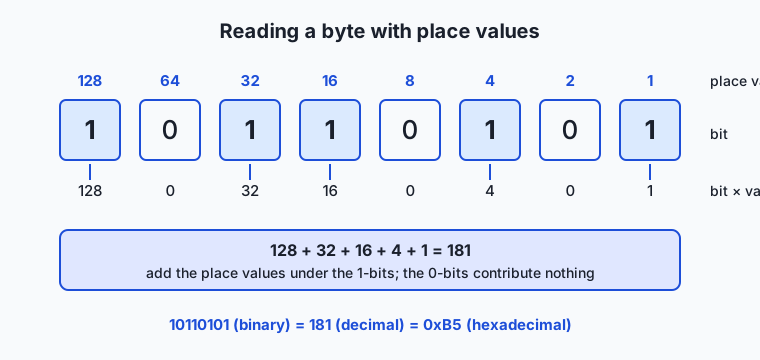
Here is a full byte decoded. Memorize the eight place values — 128, 64, 32, 16, 8, 4, 2, 1 — the way you know your times tables; they are the working vocabulary of this whole field.
Converting between bases, by hand
Binary to decimal is the diagram above: add the place values under the 1s. 10110101 = 128 + 32 + 16 + 4 + 1 = 181.
Decimal to binary has two equally good methods. The subtraction method: repeatedly subtract the largest power of 2 that fits. The division method: divide by 2 repeatedly and read the remainders bottom-to-top. Both, worked for 42:
Subtraction method for 42:            Division method for 42:
  42 - 32 = 10   -> bit 32 is 1         42 / 2 = 21  remainder 0
  10 - 16?  no   -> bit 16 is 0         21 / 2 = 10  remainder 1
  10 -  8 =  2   -> bit  8 is 1         10 / 2 =  5  remainder 0
   2 -  4?  no   -> bit  4 is 0          5 / 2 =  2  remainder 1
   2 -  2 =  0   -> bit  2 is 1          2 / 2 =  1  remainder 0
   0 -  1?  no   -> bit  1 is 0          1 / 2 =  0  remainder 1
  read the bits: 101010                 read remainders upward: 101010
Hex to binary and back is the easiest conversion in computing: each hex digit is four bits, independently of its neighbors. 0x2F → 2 is 0010, F is 1111 → 00101111. In reverse, group bits in fours from the right: 10110100 → 1011 0100 → 0xB4. No arithmetic, just table lookup — which is exactly why programmers write bits in hex.
Binary addition, with carries
Add column by column from the right, exactly as in decimal, except the columns overflow at two instead of ten: 1 + 1 = 10 in binary, so you write 0 and carry 1. Here is 93 + 38, which produces a satisfying chain of carries:
  carries:  1 1 1 1 1
             0 1 0 1 1 1 0 1   (93)
           + 0 0 1 0 0 1 1 0   (38)
           -----------------
             1 0 0 0 0 0 1 1   (131)

column 1:  1 + 0         = 1
column 2:  0 + 1         = 1
column 3:  1 + 1         = 10  -> write 0, carry 1
column 4:  1 + 0 + carry = 10  -> write 0, carry 1
column 5:  1 + 0 + carry = 10  -> write 0, carry 1
column 6:  0 + 1 + carry = 10  -> write 0, carry 1
column 7:  1 + 0 + carry = 10  -> write 0, carry 1
column 8:  0 + 0 + carry = 1
Check: 128 + 2 + 1 = 131 ✓
This is precisely what the adder circuit from Day 1 does — one gate cluster per column, each passing its carry to the next.
Negative numbers: two’s complement
To negate a number in two’s complement, flip every bit, then add 1. Worked for −44 in 8 bits:
  44        = 0 0 1 0 1 1 0 0
  flip bits = 1 1 0 1 0 0 1 1
  add 1     = 1 1 0 1 0 1 0 0   <- this pattern means -44

Proof it works: add 44 and -44 and you must get zero.
     0 0 1 0 1 1 0 0   (+44)
   + 1 1 0 1 0 1 0 0   (-44)
   -----------------
   1 0 0 0 0 0 0 0 0
   ^ the ninth bit does not exist in an 8-bit register — it falls off,
     leaving 0 0 0 0 0 0 0 0 = 0 ✓
That “falling off the end” is the elegance of the scheme: ordinary addition automatically does subtraction. Reading a two’s-complement byte is simple once you know the trick: the leftmost bit’s place value is negative 128 instead of +128. So 11010100 = −128 + 64 + 16 + 4 = −44, and 11111111 = −128 + 64 + 32 + 16 + 8 + 4 + 2 + 1 = −1. An 8-bit signed byte therefore runs from −128 (10000000) to +127 (01111111) — asymmetric, because zero occupies one of the 256 patterns on the positive side. The leftmost bit is called the sign bit: 0 means the number is non-negative, 1 means negative.
Overflow: when the register runs out
Every register has a fixed width, and arithmetic that exceeds it wraps around silently. Unsigned 8-bit: 255 + 1 = 0. Signed 8-bit: 127 + 1 = −128 — the pattern 01111111 plus one becomes 10000000, and the sign bit flips. The hardware raises a status flag, but unless software checks it, the wrong number simply flows onward.
The canonical cautionary tale is Ariane 5, flight 501, launched on 4 June 1996 — the maiden flight of the European Space Agency’s new heavy rocket. Its inertial reference system reused well-tested software from the smaller Ariane 4. Inside that software, an alignment routine converted a 64-bit floating-point value — a quantity called the horizontal bias, related to the rocket’s sideways velocity — into a 16-bit signed integer, which can hold at most 32,767. On Ariane 4’s gentler trajectory the value could never get that large, and the designers had, after analysis, deliberately left that particular conversion unprotected to save processor time. Ariane 5 climbed faster and drifted horizontally more quickly than its predecessor; about 37 seconds after ignition the horizontal bias exceeded what 16 bits could hold, the conversion raised an operand-error exception, and the error handling shut the inertial reference computer down — then shut down its identical backup, which had failed the same way milliseconds earlier, because both ran the same code on the same trajectory. The flight computer, now fed diagnostic bit patterns that it interpreted as flight data, swiveled the nozzles hard over; aerodynamic forces began tearing the vehicle apart, and it self-destructed, taking four scientific satellites with it. Total loss is commonly put around 370 million US dollars. The inquiry board’s report is a classic of engineering literature, and the lesson for you is compact: a number’s representation has edges, and software that never asks “does this value still fit?” is trusting that physics will stay polite. A subtler cousin haunts calendars: 32-bit signed counters of seconds since 1970 overflow on 19 January 2038 — a representation deadline the industry is still engineering its way out of.
Fractions: floating point in plain language
How do you store 3.14159 in bits? The scheme every modern machine uses is binary scientific notation. A float32 splits its 32 bits into three fields: 1 sign bit, 8 exponent bits, and 23 fraction bits (the fraction is traditionally called the mantissa or significand). The value is roughly sign × 1.mantissa × 2^(exponent − 127) — some significant digits, and an exponent saying where the binary point sits. The same 32 bits mean wildly different things depending on which convention you apply:
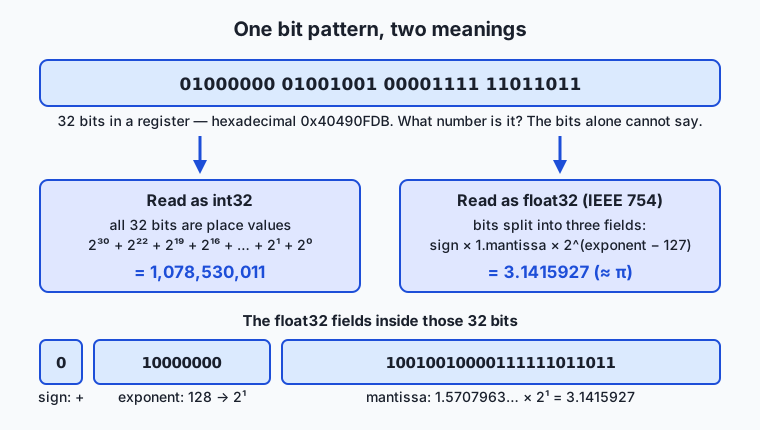
That bit pattern — 0x40490FDB — is the number 1,078,530,011 if read as an int32, and π (well, 3.1415927, the closest float32 to π) if read under IEEE 754. Same bits; meaning by agreement. This is the deepest sentence in today’s lesson, so it bears repeating: bits have no intrinsic meaning; representation is a contract.
Floating point’s trade is exactness for range. A float32 spans magnitudes from about 10⁻³⁸ to 10³⁸ but carries only about 7 decimal digits of precision, and — crucially — it can only represent numbers whose fractional part is a sum of halves, quarters, eighths… Just as 1/3 has no finite decimal expansion, 1/10 has no finite binary expansion:
0.1 in binary = 0.000110011001100110011...  (0011 repeats forever)

so the machine stores the nearest representable value:
  0.1  is stored as  0.10000000000000000555...
  0.2  is stored as  0.20000000000000001110...
  add them and round:  0.30000000000000004441...
which is why, in nearly every language:  0.1 + 0.2  ->  0.30000000000000004
Nothing is broken. The machine adds its two approximations flawlessly; the surprise exists only because we asked it a decimal question in a binary world. The practical rules follow directly: never compare floats with exact equality (test “closer than some tolerance” instead), and never use binary floats for money (use integer cents, or decimal types built for the purpose).
Bits and model weights: what precision means in practice
Now connect this to the machine-learning world you are heading toward. A neural network is, at rest, a gigantic array of numbers, and someone must choose their representation. The industry’s standard choices:
| Format | Bits | Layout (sign/exponent/fraction) | Bytes per number | Character |
|---|---|---|---|---|
| float32 | 32 | 1 / 8 / 23 | 4 | Full precision; training default for years |
| float16 | 16 | 1 / 5 / 10 | 2 | Half the memory; small exponent overflows easily |
| bfloat16 | 16 | 1 / 8 / 7 | 2 | Keeps float32’s range, drops precision; built for machine learning |
| int8 | 8 | two’s complement integer | 1 | Weights mapped onto 256 levels via a scale factor |
Read the bfloat16 row through today’s lens and it explains itself: bfloat16 keeps float32’s eight exponent bits — the field that controls range, whose exhaustion causes overflow — and sacrifices mantissa bits, the ones that control fine precision. Neural networks, it turns out, tolerate coarse values far better than they tolerate overflow. Quantization to int8 goes further: it maps each weight onto one of 256 integer levels (a two’s-complement byte, plus a stored scale factor for converting back), literally throwing away all but one byte per number. The arithmetic is the same byte arithmetic you can now do: 7 billion parameters × 4 bytes = 28 GB in float32; × 2 bytes = 14 GB in half precision; × 1 byte = 7 GB in int8. Whether a model fits on your hardware is a multiplication problem, and you now own every term in it.
One last unit trap. Prefixes like kilo/mega/giga officially mean powers of 1,000, and drive manufacturers use them that way: a “1 TB” disk holds 10¹² bytes. Memory and many operating systems count in powers of 1,024: 1 KiB = 1,024 bytes, 1 MiB = 1,024², 1 GiB = 1,024³. Since 10¹² ÷ 1,024³ ≈ 931, your “1 TB” drive honestly reports about 931 GiB — a 7% gap at the tera scale that is pure units, not missing hardware. When precision matters, write KiB/MiB/GiB for the binary units and let kB/MB/GB mean powers of ten.
An everyday analogy
Picture a car’s mechanical odometer with just three decimal digits — it can show 000 through 999. That little window is a 3-digit register, and it teaches every hard idea of this lesson.
Drive one mile past 999 and the odometer reads 000. Nothing warned you; the machinery happily rolled over. That is overflow — Ariane 5’s 16-bit window was showing its version of 999 while the rocket’s real “mileage” kept climbing.
Now the stranger trick. Suppose the odometer reads 000 and you could roll it backward one mile: it would show 999. So within this three-digit world, 999 behaves exactly like −1: add it to anything and you get one less (007 + 999 rolls around to 006). Likewise 998 acts like −2, and 997 like −3. Congratulations — you have discovered two’s complement, in base 10. Computers do precisely this in base 2: they nominate the top half of the patterns to stand for negatives, and then a single “roll forward” mechanism does both addition and subtraction. There is no minus sign inside the register, just as there is none inside the odometer — only the convention that 999 shall mean −1.
The analogy even covers hexadecimal. An odometer that showed miles in groups — one dial for thousands, one for the rest — would be easier to read at a glance than six spinning digits. Hex is that grouping for bits: four binary dials condensed into one sixteen-position dial, purely for the human at the dashboard.
Examples in practice
Start with worked micro-examples you can verify by hand. The ASCII agreement assigns capital A the number 65 = 01000001 = 0x41; lowercase a is 97 = 0x61 — exactly one bit different (the 32 bit), which is why case conversion is blindingly fast. The web color #1d4ed8 — this course’s accent blue — is three bytes: red 0x1d = 29, green 0x4e = 78, blue 0xd8 = 216, each channel one byte from 0 to 255. A SHA-256 hash prints as 64 hex characters because 64 × 4 bits = 256 bits. A memory address like 0x7ffee4c0 in a crash log is just a byte number written compactly — you can now read all of these cold.
Overflow stories are everywhere once you know to look. In December 2014, the view counter on the music video “Gangnam Style” approached 2,147,483,647 views — the largest 32-bit signed integer, 01111111 11111111 11111111 11111111 — and YouTube publicly noted it had moved the counter to 64 bits. The venerable game Pac-Man breaks on level 256 because the level number lives in one byte: an internal calculation overflows and garbles half the screen. The Year 2038 problem sits in the same family, and so did the Ariane disaster. Floating point supplies its own genre: type 0.1 + 0.2 into the console of nearly any language and read the trailing 4; financial systems dodge the entire issue by counting integer cents.
And the representation-is-a-contract principle runs the modern AI economy. Model files you will download later in this course are described as “fp16 weights” or “8-bit quantized” — phrases that fix the bytes-per-parameter and thus whether the file fits your GPU. One more contract hides below even these: when a multi-byte number is stored, machines must agree which byte comes first in memory — least-significant-byte first (“little-endian,” used by x86 and most ARM systems) or most-significant first (“big-endian,” traditional in network protocols). Endianness bugs appear exactly when data crosses between systems that assumed different orders — one more reminder that in computing, meaning never lives in the bits alone.
Implications: security, privacy, performance, scalability, and cost
Security
Integer overflow is not just a reliability bug; it is one of the classic gateways to exploitation. A program that computes length + header_size for a memory allocation can be fed a length so large the sum wraps around to a tiny number — the program allocates a small buffer, then writes the attacker’s enormous payload into it, overrunning memory. Overflow-driven buffer bugs have ranked for decades among the most dangerous software weaknesses, and languages and compilers now offer checked arithmetic precisely because humans keep forgetting that registers have edges. Hex literacy is a defensive skill, too: security advisories, exploit write-ups, and packet dumps are written in it.
Privacy
Everything sensitive is bits, and bits are promiscuous: they survive in places their owners forget. The GB/GiB story has a privacy cousin — “deleting” data usually edits the encoding’s bookkeeping, not the bits themselves, as Day 1 noted. Representation also leaks: file sizes, message lengths, and even the timing of bit patterns can reveal content without decoding it (encrypted traffic analysis works this way). And because text encodings map numbers to characters, subtle representation tricks — look-alike characters with different code numbers — power phishing domains. Understanding that data is numbers under agreements is the first step in reasoning about where those numbers actually go.
Performance
Fewer bits move faster. Day 1 established that data movement, not arithmetic, bottlenecks modern machines; today gives that teeth. Halving numeric width (float32 → float16/bfloat16) halves the bytes streaming through the memory hierarchy, roughly doubling the useful bandwidth — the entire logic of mixed-precision training and quantized inference. Processors also do binary tricks constantly: shifting bits left by one is multiplication by two, and compilers quietly rewrite multiplications by powers of two into shifts. None of this requires you to write bit tricks yourself; it requires you to understand why the people who chose your data types made the choices they did.
Scalability
Representation limits are scale deadlines. A 32-bit counter feels infinite at a thousand events per day and overflows in weeks at a hundred thousand per second; system designers now reach for 64 bits by default for identifiers, timestamps, and counters (the Gangnam Style fix, applied preemptively). Floating point has a subtler scale trap: adding a tiny number to a huge one can leave the huge one unchanged (the small value falls below the mantissa’s resolution), so summing a billion small values naively drifts — numerical software orders and compensates its arithmetic to survive scale. The 2038 deadline shows what postponing a representation decision costs: the fix is conceptually trivial and operationally global.
Cost
Bytes are billable. Cloud storage, memory, and network transfer are priced per byte, so representation choices are line items: storing a billion timestamps as 8-byte integers versus 30-byte text strings is nearly a 4× storage bill difference for identical information. In AI the effect dominates hardware purchasing — the difference between a model in float32 and int8 is literally a factor of four in memory, which can be the difference between renting a datacenter GPU and running on the laptop you already own. Marketing units matter at invoice time too: a petabyte contract specified in powers of ten delivers about 11% fewer bytes than one specified in powers of two — the same 1,000-vs-1,024 gap, compounded five times. Reading the units is free; not reading them is not.
Alternatives: free, open source, and commercial
As with Day 1, “alternatives” here means other excellent routes into the same material, at different depths and formats.
| Resource | Type | What it offers | Cost |
|---|---|---|---|
| The Day 4 lab in this course | Free | Conversion drills by hand plus a shell toolkit you complete yourself | Free |
| Crash Course Computer Science, episodes 4 and 5 (PBS Digital Studios) | Free video | Binary, hexadecimal, and how the ALU adds — visual and fast | Free |
| Wikipedia: “Binary number”, “Two’s complement”, “IEEE 754” | Free reference | Rigorous, well-cited treatments of exactly today’s three pillars | Free |
| ”Code” by Charles Petzold (2nd ed.), middle chapters | Book (commercial) | The gentlest deep telling of binary, bytes, and codes in print | Book purchase |
| From Nand to Tetris (Schocken & Nisan) | Open course | Build the adder and ALU that execute this lesson’s arithmetic | Free materials |
A programmer’s calculator (macOS Calculator’s Programmer view, or bc) | Built-in software | Instant dec/hex/bin conversion for checking your hand work | Free |
If you read only one thing beyond this lesson, make it Petzold’s chapters on binary codes — and check every hand conversion you ever do against a programmer’s calculator until the two of you always agree.
Comparison with related concepts
| Concept A | Concept B | Key difference |
|---|---|---|
| Bit | Byte | A bit is one 0/1; a byte is 8 bits — the smallest unit most machines address in memory |
| Binary | Hexadecimal | Both describe the same bits; hex packs four bits per digit purely for human readability |
| Unsigned integer | Two’s complement integer | Same adder circuit; the convention reassigns the top bit’s place value to −2ᵏ⁻¹, buying negatives at the cost of half the positive range |
| Integer | Floating point | Integers are exact within their range; floats trade exactness for enormous range via an explicit exponent field |
| float16 | bfloat16 | Both 16 bits; float16 spends them on precision (10-bit fraction), bfloat16 on range (float32’s 8-bit exponent) — range wins for machine learning |
| kB / MB / GB | KiB / MiB / GiB | Powers of 1,000 (marketing, disks, networks) versus powers of 1,024 (memory, many OS displays); a 7% gap at tera scale |
When to use it — and when not to
Reach for today’s skills whenever a number crosses a boundary — that is where representation bites. Choosing a column type in a database, parsing a binary file, reading a hex dump or crash address, sizing a model for a GPU, debugging a negative number that should have been huge (a classic two’s-complement misread), or auditing arithmetic near a type’s maximum: these are hand-conversion and bit-layout moments, and doing a quick 255 + 1 = ? sanity check in your head is faster than any tool. Reach for it, too, when reading spec sheets and invoices, where the kB/KiB distinction quietly moves real money, and whenever floating-point equality or accumulating error could corrupt results — tests for “close enough,” money in integer cents.
Do not, however, become the person who writes cryptic bit tricks in application code. High-level languages, compilers, and libraries handle representation superbly almost all the time, and clarity beats cleverness: x * 8 says what it means, and the compiler will emit the shift for you. Do not hand-roll decimal-money arithmetic with floats to “keep it simple,” and do not reinvent quantization schemes that battle-tested libraries already implement. The professional posture mirrors Day 1’s: work at the highest layer that solves the problem, but read the layer below fluently — because when a number is wrong at a boundary, the explanation is almost always in the bits, and now the bits are yours to read.
Knowledge check
Try these from memory before looking back:
- Convert 77 to binary using either the subtraction or division method, showing each step, then convert your answer to hexadecimal by grouping bits.
- Add the bytes
00110101and01001011by hand, tracking every carry, and check your work in decimal. - The byte
11101100is a two’s-complement signed integer. What decimal number is it? Explain the role the leftmost bit played in your answer. - In one paragraph, retell the Ariane 5 failure: what representation was converted to what, why the value went out of range on Ariane 5 but never on Ariane 4, and why the backup computer did not save the flight.
- A colleague stores prices as floats and cannot reproduce a customer’s total. Explain, using 0.1’s binary expansion, what is happening and what representation to use instead.
- A “2 TB” external drive shows up as roughly 1.8 TiB. Show the arithmetic proving the drive is not defective.
Hands-on exercise
Time to make the machine confirm your hand work. Your shell already contains two perfectly good base-conversion tools: printf, which formats numbers between decimal and hex, and bc, an arbitrary-precision calculator that speaks any base from 2 to 16. The Day 4 lab builds a full toolkit from these; here you will run the core moves. Open a terminal (macOS, Linux, or WSL — identical commands) and type each line, pressing Return after each.
Decimal to hexadecimal and back with printf:
printf '%X\n' 42
printf '%d\n' 0xFF
The first prints 2A — the %X format says “render this value in hex.” The second prints 255, because printf understands 0x-prefixed hex input, and %d says “render in decimal.”
Decimal to binary and back with bc:
echo 'obase=2; 42' | bc
echo 'ibase=2; 101010' | bc
obase sets the output base, ibase the input base. The first prints 101010; the second prints 42. For hex input to bc, set obase first and use uppercase digits — echo 'obase=2; ibase=16; FF' | bc prints 11111111.
Finally, inspect a character’s byte — the full chain from symbol to bits:
printf '%d\n' "'A"
echo 'obase=2; 65' | bc
The strange-looking "'A" is a POSIX printf feature: a leading apostrophe means “give me the character’s code number.” You get 65, then 1000001 — pad it to 01000001 and you are looking at the byte your machine stores for the letter A.
Expected output
A real run, exactly as the terminal shows it:
$ printf '%X\n' 42
2A
$ printf '%d\n' 0xFF
255
$ echo 'obase=2; 42' | bc
101010
$ echo 'ibase=2; 101010' | bc
42
$ printf '%d\n' "'A"
65
$ echo 'obase=2; 65' | bc
1000001
Note that bc prints 1000001 (7 digits), not 01000001 — like all calculators it drops leading zeros, which carry no numeric value. When you want fixed-width bytes, you pad: the lab’s toolkit does this with printf '%08d'.
Validate your work
You are done when you can check every box:
-
printf '%X\n' 42printed2A, and you can show by hand why 42 = 2×16 + 10. -
printf '%d\n' 0xFFprinted255, and you can show by hand why0xFF= 15×16 + 15. - Both
bcconversions printed101010and42, matching the worked example in “How it works.” - The character inspection printed
65, and you can write A’s full byte,01000001, from thebcoutput. - You converted one number of your own choosing (try your age) to binary by hand and
bcagreed with you.
Troubleshooting
bc: command not found.bcships with macOS and most Linux distributions, but some minimal server or container images omit it. Install it with your package manager (Debian/Ubuntu:sudo apt install bc; Fedora:sudo dnf install bc); the lab’s requirements file covers this.bcprints the wrong number for hex input. Two classic causes: you setibase=16beforeobase, so the2ofobase=2was itself read in the new base — always setobasefirst; or you typed lowercaseff—bcrequires uppercase hex digits.printf '%d\n' "'A"prints 0 or an error. The apostrophe must sit inside the quotes, directly before the character:"'A". In PowerShell this feature does not exist — use WSL, or[byte][char]'A'as the PowerShell equivalent.- Numbers echo back unchanged. If
echo 'obase=2; 42' | bcprints42, the quotes were probably dropped and the shell mangled the semicolon; keep the whole expression inside single quotes.
Common mistakes
- Reading bit strings left-to-right as place value 1, 2, 4, 8… Place values grow from the right, exactly as in decimal (the ones column is rightmost).
1000001is 65, not 65 backwards; misreading direction is the single most common drill error. - Forgetting that
bcdrops leading zeros. A byte is always 8 bits in this course’s drills; re-padbc’s output before comparing with a hand answer. - Mixing bases mid-problem. Writing “42” while thinking “the bit pattern 42” causes silent nonsense; say the base out loud (forty-two decimal; one-zero-one-zero-one-zero binary) until it is habit.
- Trusting the tool over the hand method too early. The point of today is that you can do the conversion; use
printfandbcto check your work, not to replace it — the drills in the lab are done on paper first.
Practice assignment
Open starter/conversion-drills.md in the Day 4 lab directory. It contains twelve drills: four decimal-to-binary conversions, three binary-to-decimal, two hex-to-binary, two eight-bit additions with carries, and one two’s-complement negation — each with working space. Complete all twelve by hand, showing your steps, then verify every answer using the printf/bc commands from the hands-on exercise (the drill sheet tells you which command checks which drill). Finish by completing the four exercises in starter/binary_toolkit.sh so that the lab’s test suite passes, and keep your drill sheet — Day 5 builds directly on these bytes when we turn them into text, images, and sound.
Extension challenge
Three probes, in rising order of depth. First, quantization arithmetic: take a model size you have heard of — say 70 billion parameters — and compute its memory footprint in GiB at float32, bfloat16, int8, and 4 bits per weight, remembering to divide bytes by 1,024³. Which versions fit in the RAM you measured on Day 1? Second, precision archaeology: using printf '%.20f\n' 0.1 (and the same for 0.2 and for the sum typed as 0.3), print what your machine actually stores for each, and identify which decimal digit is the first to go wrong. Third, the deep one: bfloat16 was created because float16’s 5-bit exponent caps its largest value near 65,504, while gradients and activations in training routinely exceed that. Write a short paragraph explaining, purely in terms of exponent bits and place value, why adding three exponent bits (5 → 8) multiplies the representable range so dramatically while costing only three bits of mantissa — and why that trade is exactly the one a noisy statistical process like learning can afford. You will meet this trade again, with money on the table, the first time you load a model onto a GPU.
Quiz
Q1. What decimal number does the binary pattern 101010 represent?
- 52, because the digits sum with place values 16, 8, 4
- 20, because there are two 1-bits and a trailing zero
- 42, because the 1-bits sit on the place values 32, 8, and 2
- 84, because each 1-bit doubles the previous total
Show answer
Answer: C. 42, because the 1-bits sit on the place values 32, 8, and 2
Binary place values run 1, 2, 4, 8, 16, 32 from the right; 101010 has 1-bits under 32, 8, and 2, and 32 + 8 + 2 = 42.
Q2. Why do engineers write bit patterns in hexadecimal?
- Each hex digit corresponds to exactly four bits, so long binary strings compress into a short, mechanically translatable form for humans
- Processors compute faster on hexadecimal numbers than on binary ones
- Hexadecimal can represent negative numbers while binary cannot
- Hexadecimal avoids the rounding errors that binary introduces
Show answer
Answer: A. Each hex digit corresponds to exactly four bits, so long binary strings compress into a short, mechanically translatable form for humans
Hex is purely a human convenience: because 16 = 2⁴, each hex digit stands for one four-bit group, so conversion is table lookup with no arithmetic. The processor itself only ever sees bits.
Q3. In 8-bit two's complement, how do you form the representation of −44 from 44 (00101100)?
- Set the leftmost bit to 1, giving 10101100
- Reverse the order of the bits, giving 00110100
- Subtract the pattern from 11111111, giving 11010011
- Flip every bit and add 1, giving 11010100
Show answer
Answer: D. Flip every bit and add 1, giving 11010100
Two's complement negation is invert-then-increment: 00101100 flips to 11010011, and adding 1 gives 11010100. Adding that to 00101100 produces a ninth bit that falls off the register, leaving exactly zero.
Q4. What actually went wrong in the software aboard Ariane 5 flight 501 in 1996?
- A floating-point division by zero crashed the main flight computer
- A 64-bit floating-point value was converted to a 16-bit signed integer it could not fit, raising an unhandled exception that shut down both inertial reference computers
- Cosmic radiation flipped a bit in the guidance program's memory
- The engines were commanded in imperial units while guidance computed in metric
Show answer
Answer: B. A 64-bit floating-point value was converted to a 16-bit signed integer it could not fit, raising an unhandled exception that shut down both inertial reference computers
Alignment code reused from Ariane 4 converted the horizontal-bias value to a 16-bit signed integer. Ariane 5's faster, flatter ascent pushed the value past 32,767 about 37 seconds after ignition; the operand-error exception halted both identical inertial units, and the vehicle broke up and self-destructed.
Q5. Why does 0.1 + 0.2 print as 0.30000000000000004 in most programming languages?
- The addition circuit in the ALU has a known rounding defect
- One tenth has no finite binary expansion, so the machine adds two close approximations and the rounded sum differs microscopically from 0.3
- The decimal point character is being misread as a thousands separator
- Floating-point numbers can only store values greater than 1 exactly
Show answer
Answer: B. One tenth has no finite binary expansion, so the machine adds two close approximations and the rounded sum differs microscopically from 0.3
0.1 in binary is 0.000110011001100… repeating forever, just as 1/3 repeats in decimal. Floats store the nearest representable values, and the sum of those approximations rounds to a number a hair above 0.3. The hardware adds flawlessly; the inputs were never exactly 0.1 and 0.2.
Q6. A 7-billion-parameter model is quantized from float32 to int8. What happens to its memory footprint for weights?
- It drops from about 28 GB to about 7 GB, because each weight shrinks from 4 bytes to 1 byte
- It halves from about 28 GB to about 14 GB, because int8 stores two weights per byte
- It stays the same, because quantization only changes computation speed, not storage
- It drops to about 875 MB, because int8 uses one bit per weight
Show answer
Answer: A. It drops from about 28 GB to about 7 GB, because each weight shrinks from 4 bytes to 1 byte
Quantization to int8 stores each weight in a single two's-complement byte (with a scale factor for reconstruction) instead of four bytes: 7 billion × 4 bytes ≈ 28 GB becomes 7 billion × 1 byte ≈ 7 GB.
Q7. Both float16 and bfloat16 use 16 bits. What is the key difference, and why does machine learning generally prefer bfloat16?
- bfloat16 stores two numbers per 16 bits, doubling effective memory capacity
- float16 is an integer format while bfloat16 is a floating-point format
- bfloat16 keeps float32's 8 exponent bits, preserving its range at the cost of mantissa precision — and training tolerates coarse values far better than overflow
- bfloat16 rounds decimal fractions like 0.1 exactly, avoiding accumulation error
Show answer
Answer: C. bfloat16 keeps float32's 8 exponent bits, preserving its range at the cost of mantissa precision — and training tolerates coarse values far better than overflow
float16 spends its bits on precision (10-bit mantissa, 5-bit exponent); bfloat16 spends them on range (7-bit mantissa, 8-bit exponent, matching float32). Gradients and activations routinely exceed float16's ~65,504 ceiling, so keeping the exponent field is the safer trade for learning.
Q8. A drive sold as "1 TB" shows about 931 GiB in the operating system. Why?
- The filesystem permanently reserves 7% of every drive for error correction
- The drive shipped partly full of preinstalled recovery software
- The operating system is misreading the drive's firmware and the true size is 1,024 GiB
- The manufacturer counts in powers of 1,000 (1 TB = 10¹² bytes) while the OS counts in powers of 1,024, and 10¹² ÷ 1,024³ ≈ 931
Show answer
Answer: D. The manufacturer counts in powers of 1,000 (1 TB = 10¹² bytes) while the OS counts in powers of 1,024, and 10¹² ÷ 1,024³ ≈ 931
Both numbers describe the same bytes. Marketing prefixes are decimal (kilo = 1,000), while KiB/MiB/GiB are binary (kibi = 1,024); the gap compounds to about 7% at the tera scale. No storage is missing.
Glossary
- bit
- A single binary digit, 0 or 1 — the smallest unit of information, physically realized as one two-state switch.
- byte
- A group of 8 bits, able to hold 256 distinct patterns; the smallest unit of memory most machines address, standardized at 8 bits by IBM's System/360 in 1964.
- nibble
- Half a byte — 4 bits — which is exactly the amount of information one hexadecimal digit represents.
- word
- The natural chunk of bits a processor handles in one operation, typically 32 or 64 bits on modern machines.
- place value
- The worth of a digit position in a positional numeral system: powers of 10 in decimal, powers of 2 in binary, powers of 16 in hexadecimal.
- hexadecimal
- Base-16 notation using digits 0–9 and A–F, written with the 0x prefix; each digit encodes exactly four bits, making it the standard human-readable shorthand for raw binary.
- two's complement
- The standard representation of signed integers, in which −n is the bit pattern of 2ᵏ − n (flip the bits, add 1); it gives one unique zero and lets a single adder circuit perform both addition and subtraction.
- sign bit
- The leftmost bit of a signed integer; in two's complement it carries a negative place value (−128 in a byte), so a 1 there makes the whole number negative.
- overflow
- What happens when an arithmetic result exceeds what a fixed-width register can hold: the value silently wraps around, as when an unsigned byte computes 255 + 1 = 0.
- floating point
- Binary scientific notation for storing fractional numbers as a sign, a mantissa, and an exponent, standardized by IEEE 754 in 1985; it trades exactness for enormous range.
- mantissa
- The significant-digits field of a floating-point number (also called the significand or fraction), which controls precision; float32 gives it 23 bits.
- exponent
- The field of a floating-point number that scales the mantissa by a power of two, controlling range; when it cannot hold a needed power, the number overflows.
- quantization
- Reducing the bits used per number — for example mapping float32 model weights onto 256 int8 levels plus a scale factor — shrinking memory and data movement at a small cost in precision.
- endianness
- The convention for which byte of a multi-byte number is stored first in memory: least-significant first (little-endian, x86 and most ARM) or most-significant first (big-endian, traditional in network protocols).
- gibibyte
- The binary giga-unit, GiB = 1,024³ bytes, defined by the IEC in 1998 to end the ambiguity with the decimal gigabyte (GB = 10⁹ bytes) that makes a "1 TB" drive report about 931 GiB.
Sources and further reading
- Binary number — Wikipedia (accessed 2026-07-12) — Place value, base conversion methods, binary arithmetic, and the Leibniz history.
- Two's complement — Wikipedia (accessed 2026-07-12) — The invert-and-add-one construction, the asymmetric range, and why one adder serves both signs.
- IEEE 754 — Wikipedia (accessed 2026-07-12) — The 1985 floating-point standard: field layouts of the binary formats and rounding behavior.
- Code: The Hidden Language of Computer Hardware and Software (2nd ed.) — Charles Petzold / Microsoft Press (accessed 2026-07-12) — The gentlest thorough treatment of binary codes, bytes, and hexadecimal in print.
- Crash Course Computer Science — PBS Digital Studios (accessed 2026-07-12) — Episode 4 covers binary and data representation; episode 5 builds the ALU that adds it.
Kept in this browser, no account needed. Your progress page turns the whole record into one link you can bookmark or open on another device.