Computing Foundations › Inside the Machine › Day 5
Day 5: Text, Images, and Sound as Data
After this lesson you will understand how text, images, and sound are all reduced to numbers — and why that is exactly the form modern AI models consume.
Hands-on lab for this lesson
Lab files on GitHub: https://github.com/ai-roadmap-365/ai-roadmap-365.github.io/tree/main/labs/sections/computing-foundations/day-005-text-images-and-sound-as-data
- Get the hands-on files. Clone the labs repository once (you can reuse this clone for every lesson). This works on macOS, Linux, and Windows (PowerShell or WSL):
git clone https://github.com/ai-roadmap-365/ai-roadmap-365.github.io.git cd ai-roadmap-365.github.io - Open this lesson's lab. Move into the directory for this specific day. Every lab lives at the same predictable path — section / subsection / week / day:
cd labs/sections/computing-foundations/day-005-text-images-and-sound-as-data - Read the lab guide. Open `README.md` in that directory. It lists the exact commands, what each does, the expected output, and how to check your work — read it before running anything.
- Run it and check your work. Follow the README's "How to run" section: run the example first to see the finished result, then complete the numbered exercises in `starter/`, then run the tests. The tests pass (exit 0) only when your work is correct.
bash tests/run_tests.sh # or the test command named in the lab README
You can also open the lab as a local page (works offline, shows the file tree and expected output).
Learning objectives
By the end of this lesson you will be able to:
- Explain how text becomes numbers through character encodings, from ASCII to Unicode code points to UTF-8 bytes
- Describe why UTF-8 became dominant and what mojibake is
- Represent a small image as a grid of RGB pixel values and explain color depth and resolution
- Distinguish raster from vector images and lossless from lossy compression
- Explain how sound is digitized with sampling rate and bit depth (PCM)
- Connect these representations to AI: tokenized text, images as tensors, audio as waveform arrays
Prerequisites
- Day 4 (binary, bytes, and hexadecimal)
- A terminal for the hands-on byte inspection
Why this matters
An AI model has never seen a word, a photograph, or heard a sound. Language models eat sequences of numbers called tokens, which are built on top of text encodings. Vision models eat grids of numbers — exactly the pixel arrays you will meet today. Speech models eat long lists of numbers sampled from a microphone thousands of times per second. Every impressive thing a model does begins with the unglamorous conventions in this lesson: how human media becomes numbers, and how numbers become bytes.
This is not background trivia; it is daily working knowledge. When a training dataset shows café where café should be, you are looking at an encoding bug — and you will fix it in minutes if you know what UTF-8 bytes look like, or lose an afternoon if you do not. When an image dataset is fifty times larger raw than compressed, the difference is the pixel arithmetic you will do below. When a speech pipeline insists on 16,000 samples per second, that number comes from the sampling theory in this lesson. When a file upload “is a PNG” but will not open, the first four bytes settle the argument.
There is also a deeper payoff. Once you have seen that a photo is just a grid of red-green-blue numbers and a sound is just a list of pressure readings, the claim that neural networks “process images” or “understand speech” loses its mystery: they transform arrays of numbers into other arrays of numbers. Yesterday you learned how computers represent numbers themselves. Today you learn how everything humans care about gets turned into those numbers — the final piece of the data story, and the exact doorway through which all data enters AI.
The idea in plain language
A computer can store only bit patterns. So to store text, images, or sound, humans invented conventions — public, agreed-upon rulebooks that say which numbers stand for which characters, colors, or air-pressure levels. The machine never knows the difference between a love letter and a spreadsheet; it faithfully keeps the numbers, and software applies the convention to turn them back into something human.
For text, the convention is a numbered catalog of characters. Capital A is 65. The é in café is 233. The party-popper emoji is 127,881. Unicode is the catalog; UTF-8 is the clever scheme that turns each catalog number into one to four bytes.
For images, the convention is a grid. Cut the picture into tiny squares called pixels; describe each pixel’s color as three numbers — how much red, green, and blue light to mix, each from 0 to 255. A 12-megapixel photo is simply 36 million of these numbers in a row.
For sound, the convention is rapid measurement. Sound is a pressure wave in air; measure its height tens of thousands of times per second and store each measurement as a number. Play the numbers back through a speaker at the same rate and the wave — music, speech, birdsong — reappears.
Video is images plus sound plus time: many pictures per second, with an audio track alongside. And file formats are the packaging: agreed layouts that say where the numbers live in the file, usually announced by a few signature bytes at the very start so software can recognize the format from the content itself.
Historical background
Turning human symbols into numbers predates computers. Nineteenth-century telegraphy did it with Morse code, and by 1874 the Baudot code was encoding each letter as exactly five on/off signals — bits, before the word existed. But every equipment maker had its own code, and machines that could not agree could not talk.
The landmark answer came in 1963: ASCII, the American Standard Code for Information Interchange — a 7-bit code assigning numbers 0–127 to the English letters, digits, punctuation, and control characters like “new line.” ASCII was a triumph of standardization and a monument to its era’s blind spot: it had room for $ but not for é, ñ, ß, or any character beyond basic English. As computing spread worldwide, vendors and countries filled the 8th bit with their own incompatible extensions — dozens of “code pages” where the same byte meant é in one country and a box-drawing character in another. Files crossing borders arrived scrambled; the garbled text got a name, borrowed from Japanese: mojibake.
The fix was audacious: one catalog for every character in every human writing system. The Unicode project published its first standard in 1991, assigning each character a unique number — a code point — with room for over a million. But a catalog is not an encoding: how should those numbers be stored as bytes? In 1992, Ken Thompson and Rob Pike of Bell Labs sketched UTF-8, a variable-length scheme with a masterstroke of backward compatibility: every ASCII file is already a valid UTF-8 file, unchanged. That single property let the existing computing world adopt Unicode without converting anything, and UTF-8 went on to conquer the web — surveys of web pages have put its share above ninety-five percent for years.
Media encodings matured in parallel. Philips and Sony fixed CD audio at 44,100 sixteen-bit samples per second in 1982, putting pulse-code modulation — digitized telephony’s technique from mid-century — into living rooms. The GIF image format arrived in 1987, the JPEG photographic standard in 1992, and PNG in 1996, created by internet volunteers largely because the compression algorithm inside GIF was patented. The MP3 audio format, developed principally at Germany’s Fraunhofer Institute in the early 1990s, shrank music by an order of magnitude and reshaped an industry. Different committees, different decades, one recurring plot: agree on the convention, and the data flows.
What it is — and what it is not
An encoding is a published, mechanical, reversible convention that maps human-meaningful things — characters, colors, sound-pressure levels — to numbers, and numbers to bytes. Every word earns its place. Published: anyone can implement it, which is why your phone, a web server, and a fifty-year-old protocol can exchange text. Mechanical: no judgment involved; software applies the rules identically every time. Reversible: the bytes decode back to the same characters or pixels (lossy compression deliberately bends this, discarding detail it judges you will not miss — but by rule, not by whim).
Equally important is what an encoding is not. It is not meaning: the bytes 63 61 66 c3 a9 are only “café” to software applying the UTF-8 convention; to the hardware they are voltages. It is not encryption: encodings are designed to be read by everyone, secrecy plays no part. And no encoding is “what the data really is” — the same photo can live as PNG bytes, JPEG bytes, or raw pixels, three different byte strings for one image.
| Common misconception | The reality |
|---|---|
| ”Unicode and UTF-8 are the same thing.” | Unicode assigns each character a catalog number (code point); UTF-8 is one scheme for storing those numbers as bytes. UTF-16 and UTF-32 store the same catalog differently. |
| ”The .png extension makes it a PNG.” | The extension is part of the file’s name. The content decides: real PNGs start with the bytes 89 50 4E 47. Rename a text file to .png and it is still text. |
| ”Lossy compression just lowers the resolution.” | JPEG and MP3 keep the pixel count and sample rate; they discard fine detail within the data that human eyes and ears barely notice. |
| ”An emoji is a little picture file inside your text.” | An emoji is a character with a Unicode code point, encoded as ordinary bytes (usually four in UTF-8). The colorful picture is your device’s font rendering it. |
| ”Digital audio is choppy because it’s made of samples.” | Sampled audio perfectly captures every frequency below half the sampling rate — for CDs, everything up to about 22 kHz, beyond adult hearing. |
Why it was created and what problems it solves
The driving problem is interoperability. A file is useless if only the machine that wrote it can read it, and early computing was exactly that: every telegraph company, then every computer vendor, with a private code. ASCII existed so that any terminal could talk to any computer; Unicode and UTF-8 exist so that a message written in Hindi, Greek, or emoji renders identically in Mumbai, Athens, and São Paulo. Standard image and audio formats exist so a photo taken on one company’s phone opens in another company’s browser. Every encoding in this lesson is a peace treaty in a war of incompatibility that actually happened.
The second problem is scarcity. Raw media is enormous — you will compute below that an uncompressed photo is tens of megabytes and uncompressed video is hundreds of megabytes per minute. Early disks and networks could not carry that, so compression conventions (PNG, JPEG, MP3, and video codecs) were invented to squeeze the numbers, either perfectly reversibly or by discarding what humans barely perceive. Even today, with vast disks, the economics survive at scale: training datasets, streaming services, and cloud bills are all measured in bytes.
The third problem is self-description. Handed a bag of bytes, how does software know which treaty applies? File formats answer with structure — headers that state “here is my width, my height, my sample rate” — and most announce themselves with magic bytes, a fixed signature at offset zero. Conventions all the way down.
How it works
Three media, one pattern: choose what to measure, number it, store the numbers as bytes.
Text: catalog numbers, encoded
ASCII assigns 0–127: capital A is 65, lowercase a is 97, the digit 0 is 48, and a newline is 10. One character, one byte, and you can watch it happen — here is Hi! through a hex dump:
$ printf 'Hi!' | xxd
00000000: 4869 21                                  Hi!

48 hex = 72 = 'H'    69 hex = 105 = 'i'    21 hex = 33 = '!'
Unicode keeps ASCII’s numbers and extends the catalog past a million slots, written U+ plus hex: é is U+00E9 (233), € is U+20AC (8,364), the party popper is U+1F389 (127,881). UTF-8 then stores each code point in one to four bytes, using the leading bits of the first byte to announce the sequence length:
| Code point range | Bytes | Byte pattern | Example |
|---|---|---|---|
| U+0000 – U+007F | 1 | 0xxxxxxx | A → 41 |
| U+0080 – U+07FF | 2 | 110xxxxx 10xxxxxx | é → C3 A9 |
| U+0800 – U+FFFF | 3 | 1110xxxx 10xxxxxx 10xxxxxx | € → E2 82 AC |
| U+10000 – U+10FFFF | 4 | 11110xxx 10xxxxxx ×3 | 🎉 → F0 9F 8E 89 |
The design is quietly brilliant. ASCII text needs no conversion — every byte under 128 is its ASCII self, so the entire pre-Unicode world was already valid UTF-8. Continuation bytes always start 10, so software landing mid-character knows it and can resync — no cascading corruption. And there is no byte-order ambiguity to argue about, a genuine headache with UTF-16. These properties, plus compactness for the ASCII-heavy text of programming and the web, are why UTF-8 won.
Watch the layers for one character:
$ printf 'café' | xxd
00000000: 6361 66c3 a9                             caf..

c    a    f    é
63   61   66   c3 a9      ← four characters, five bytes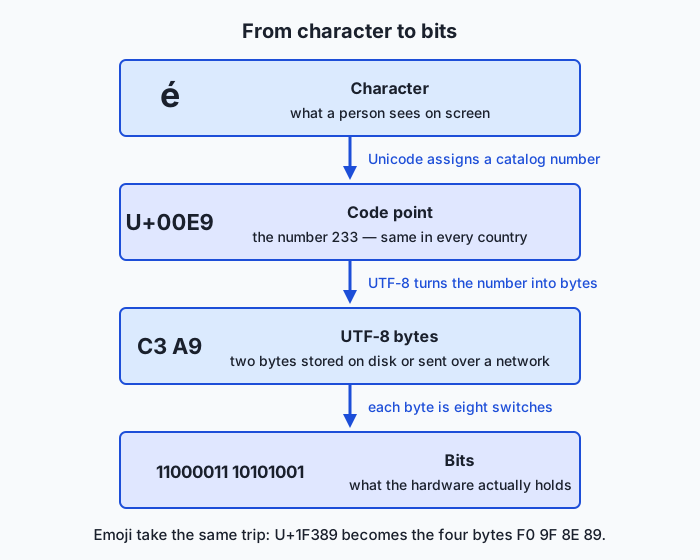
And mojibake? It is what you see when bytes written under one convention are read under another. Decode those five UTF-8 bytes as Latin-1 — the old Western European code page, where every byte is its own character — and c3 renders as à while a9 renders as ©:
bytes on disk:            63 61 66 c3 a9
read correctly as UTF-8:  café
read wrongly as Latin-1:  café
Every é you have ever seen on a menu or in a CSV file is exactly this: correct bytes, wrong treaty.
Images: a grid of measured light
Zoom into any screen and the picture dissolves into pixels — tiny squares each showing one color. Screens make color by mixing red, green, and blue light, so each pixel is three numbers, one per channel, conventionally one byte each: 0 (none) to 255 (full). That is 8 bits × 3 channels = 24-bit color, about 16.8 million mixtures — finer than human eyes can distinguish. Here is a complete 2×2 image, every byte accounted for:
                 R    G    B
pixel (0,0):   255,   0,   0     ← pure red
pixel (0,1):     0, 255,   0     ← pure green
pixel (1,0):     0,   0, 255     ← pure blue
pixel (1,1):   255, 255, 255     ← white (all light maxed)

12 numbers → 12 bytes of pixel data. Grayscale needs one channel;
transparency adds a fourth (alpha) channel.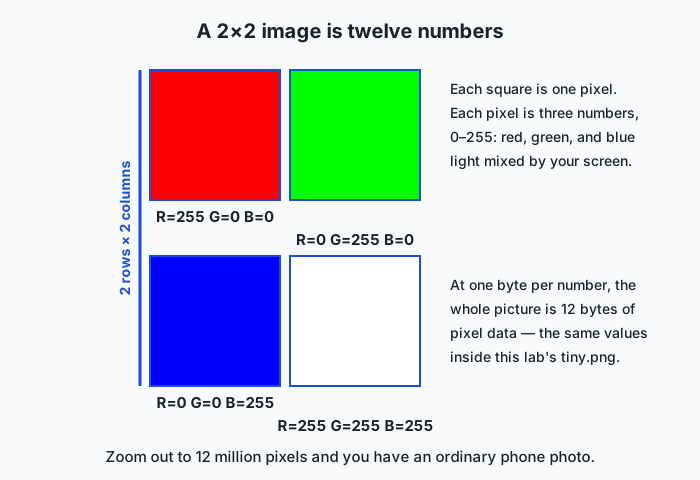
Resolution is just the grid size, and the arithmetic escalates fast: a 4,000 × 3,000 photo (12 megapixels) is 36 million pixels × 3 bytes = 108 million bytes — over 100 MB raw. Yet the file on your phone is 3–5 MB. That gap is compression. Lossless compression (PNG) finds redundancy — runs of identical sky-blue pixels, repeating textures — and re-describes it compactly; every original byte is recoverable, which is why PNG suits screenshots, diagrams, and text-heavy graphics with large flat areas. Lossy compression (JPEG) goes further: it splits the image into small blocks, transforms each into gentle-versus-sharp variations, and throws away the sharp ones your eyes barely register, storing only the rest. Photographs shrink 10–20× with no visible harm — but the discarded detail is gone forever, and re-saving a JPEG repeatedly compounds the damage like a photocopy of a photocopy.
There is a second way to be an image at all. Raster formats (PNG, JPEG) store the grid of pixels. Vector formats store drawing instructions — “circle of radius 50 centered here, filled blue” — and the renderer redraws them at any size with perfect crispness. The two diagrams in this lesson are SVG, a vector format that is literally readable text:
<svg viewBox="0 0 100 100">
  <circle cx="50" cy="50" r="40" fill="#1d4ed8"/>
</svg>
Logos and icons ship as SVG because one tiny file is sharp at every size; photographs cannot, because the real world does not arrive as drawing instructions.
Sound: slicing a wave into numbers
Sound is a smooth, continuous pressure wave — nothing digital about it. Pulse-code modulation (PCM) digitizes it with two decisions. Sampling rate: measure the wave’s height at strict regular intervals — 44,100 times per second for CDs. The Nyquist–Shannon sampling theorem guarantees this captures every frequency up to half the sampling rate (~22 kHz for CDs, just past the edge of human hearing; that is precisely why 44.1 kHz was chosen). Bit depth: store each measurement with a fixed precision — 16 bits gives 65,536 possible levels, enough that quantization error sits below audibility. The result is astonishing in its plainness: digital audio is a long list of integers.
CD-quality stereo, one minute:

  44,100 samples/s × 2 bytes/sample × 2 channels × 60 s
  = 10,584,000 bytes  ≈ 10.6 MB per minute
A WAV file is essentially that raw PCM list in a labeled box (a RIFF header stating the sample rate, bit depth, and channel count, then the samples). MP3 is the JPEG of audio: a psychoacoustic model predicts what your ear will not perceive — quiet sounds masked by loud ones at nearby frequencies, frequencies beyond hearing — and spends its bits only on the rest. At the common 128 kilobits per second, that same minute costs about 1 MB: roughly a tenth of the WAV, with differences most listeners cannot pick out.
Video: images, sound, and time
Video stacks everything so far: a sequence of frames (images) at 24–60 per second, plus an audio track. Uncompressed, the numbers are brutal — one 1080p frame is 1920 × 1080 × 3 ≈ 6.2 MB, so 30 frames per second means about 187 MB per second. Video codecs rescue this with the observation that consecutive frames are nearly identical: they store occasional full frames and, in between, mostly differences — this block of pixels moved three pixels left — on top of JPEG-style compression within frames. A note on packaging that confuses everyone once: MP4 is a container (a box holding video, audio, and subtitles together); H.264 or AV1 is the codec (the compression convention for the video stream inside). Two different conventions, nested.
File formats: conventions with a signature
A format is the complete packaging agreement: header fields, data layout, and usually a signature. The first bytes of many formats are fixed magic bytes that identify the format from content alone:
| Format | First bytes (hex) | As ASCII |
|---|---|---|
| PNG | 89 50 4E 47 0D 0A 1A 0A | .PNG.... |
| JPEG | FF D8 FF | ... |
| GIF | 47 49 46 38 | GIF8 |
25 50 44 46 | %PDF | |
| ZIP | 50 4B | PK |
| WAV | 52 49 46 46 … 57 41 56 45 | RIFF…WAVE |
(PNG’s odd-looking signature is engineering: the first byte has its high bit set to trip 7-bit channels, and the embedded newline pair detects line-ending corruption in transit.) The file extension — .png, .mp3 — is merely a naming custom that helps humans and operating systems guess. The file command on Unix ignores the name and reads the magic bytes, which is why it cannot be fooled by renaming. Today’s lab makes you the file command: you will read these signatures yourself with a hex dumper.
What models actually eat
Close the loop with AI. Language models tokenize text — chop it into frequent chunks and number each chunk — and modern tokenizers operate on UTF-8 bytes, so any text in any language (or emoji, or code) is representable; a rare character simply becomes its individual bytes. Vision models take images as tensors: a 224 × 224 RGB input is an array of 224 × 224 × 3 = 150,528 numbers, the very pixel values above, rescaled. Speech models consume PCM waveform arrays, typically resampled to 16,000 samples per second because speech lives comfortably below 8 kHz. Every representation in this lesson is the input layer of a model family. Learn the conventions once and no “multimodal” anything will ever look magical again.
An everyday analogy
Imagine you and a friend can communicate only by reading numbers aloud over the telephone, yet you want to send her a postcard — picture, message, and a snippet of a song.
For the message, you both own the same numbered alphabet chart: “72 is H, 105 is i.” You read numbers; she looks them up and writes letters. That chart is ASCII. If she picks up the wrong chart — hers says 233 is à — your café greeting arrives as gibberish: mojibake is exactly a wrong-chart accident. A world catalog thick enough to number every character in every language, agreed by everyone, is Unicode; the compact habit of saying common numbers in one breath and rare ones in up to four is UTF-8.
For the picture, you lay a fine grid over it and, for each square, read three dial settings: red, green, blue. “Square one: 255, 0, 0.” She has a matching grid and three-color lamp and repaints square by square — paint-by-numbers with a bigger vocabulary. A finer grid (resolution) means a truer copy and a much longer call. When you notice four hundred consecutive squares are identical sky, you say “the next 400 squares: 135, 206, 235” — you have invented lossless compression. When you decide the faint gradient in the clouds is not worth reading precisely and round it off, that is lossy compression: the call gets much shorter, and she will never miss what you dropped.
For the song, you hold a pressure meter to the speaker and read its needle 44,100 times a second. She feeds the numbers to a machine that pushes a speaker cone to match. And before each part of the call you announce, “picture coming, grid convention” — the magic bytes that tell the receiver which rulebook to grab.
Examples in practice
Do the technical version yourself — the lab ships three sample files, and their bytes tell today’s whole story. Pure ASCII first:
$ xxd examples/samples/hello.txt
00000000: 4865 6c6c 6f2c 2077 6f72 6c64 210a       Hello, world!.

14 bytes for 14 characters (13 visible + the invisible newline, 0a).
Then UTF-8 with mixed byte lengths — 32 bytes but only 24 characters, and you can point at exactly why:
$ xxd examples/samples/unicode.txt
00000000: 6361 66c3 a920 636f 7374 7320 3320 e282  caf.. costs 3 ..
00000010: ac0a 72c3 a973 756d c3a9 0af0 9f8e 890a  ..r..sum........

c3 a9 = é (twice more in résumé)   e2 82 ac = €   f0 9f 8e 89 = 🎉
Then a real 145-byte PNG, signature first: 89 50 4e 47 0d 0a 1a 0a, with the chunk names IHDR, IDAT, IEND readable right inside the binary. Its four pixels are the red, green, blue, and white of the diagram above.
Now the everyday sightings. That restaurant menu offering crème brûlée? UTF-8 bytes read as Latin-1 — you can now name the exact bytes at fault. The rule of thumb “screenshots as PNG, photos as JPEG” is the lossless/lossy trade-off: screenshots are flat regions and text (PNG’s best case, and JPEG smears its sharp edges), photos are continuous gradients (JPEG’s best case, and PNG barely shrinks them). A company logo is an SVG so one file is crisp on a business card and a billboard. A meme re-uploaded through five apps grows blurry halos — generation loss from repeated lossy re-encoding. And in AI work, the classic dataset bug: a CSV of customer names saved on an old Windows machine, read as UTF-8, turns every José into Jos� — files do not record their own encoding, so data pipelines must be told or must guess. Half of applied machine learning is data plumbing, and this is the plumbing.
Implications: security, privacy, performance, scalability, and cost
Security
Every format needs a parser, and parsers of complex binary formats have been a rich source of vulnerabilities: a malformed image or audio file that exploits a decoder bug can turn “viewing a picture” into running an attacker’s code — media-parsing flaws have repeatedly forced emergency patches across browsers and phones. Extensions make the problem social: an attachment named invoice.pdf.exe counts on humans (and sloppy software) trusting names over content. Defenders therefore verify magic bytes on upload, not filenames — exactly the check you will perform in the lab. Encodings themselves get weaponized too: over-long or malformed UTF-8 sequences have historically slipped past naive security filters that checked the characters before decoding, and invisible Unicode characters can disguise malicious links or source code. The professional habit: treat all incoming bytes as untrusted until parsed by hardened code.
Privacy
Files carry more than their visible payload. Photos embed EXIF metadata — camera model, timestamp, and often precise GPS coordinates; posting an un-scrubbed photo can publish your home address (major social networks strip EXIF on upload, but chat apps and email do not always). Documents may retain author names and revision history. Screenshots leak whatever was in the pixels — notification previews, address-bar contents, other tabs. For AI practitioners the duty compounds: datasets of images, audio, and text inherit every embedded secret, so scrubbing metadata and auditing samples is part of responsible data collection, not paranoia.
Performance
Compression trades CPU time for bytes moved — usually a spectacular trade, since networks and disks are far slower than processors, but decode cost is real: a webpage with a hundred images spends measurable time just turning JPEG bytes back into pixels, and ML training jobs routinely bottleneck on image decoding rather than the GPU math (which is why serious pipelines pre-decode or use accelerated decoders). Text has its own trap: in UTF-8, “how many bytes” and “how many characters” are different questions, so byte-slicing a UTF-8 string can cut an é in half and produce garbage — a bug class every programming language forces you to confront eventually. Choosing representations to fit the need is free performance: speech models use 16 kHz mono, not CD stereo, because the discarded fidelity carries no words.
Scalability
Media dominates the world’s byte flows — video alone is most of consumer internet traffic, which is why streaming services encode each title dozens of times (multiple resolutions and codecs) and adapt quality second by second to your connection. At dataset scale the same arithmetic bites: a million 12-megapixel photos are ~36 terabytes raw but 3–5 TB as JPEG, and web-scale text corpora are feasible partly because UTF-8 keeps common text compact. Format choices made once multiply by billions.
Cost
Cloud pricing is denominated in bytes: stored bytes per month, transferred bytes out. An organization keeping lossless masters where lossy derivatives would serve pays a large multiple forever — recall the 10:1 gap between one minute of WAV and MP3, or the 20:1 between raw pixels and JPEG. Sensible teams archive one high-quality master and serve compressed derivatives, and AI teams mirror this: store the original dataset once, train from efficiently encoded copies. Knowing where quality genuinely matters — and where it is invisible expense — is a budgeting skill built directly on this lesson.
Alternatives: free, open source, and commercial
For a concepts lesson, “alternatives” means other excellent ways to learn and explore the material — including tools that let you touch encodings directly.
| Resource | Type | What it offers | Cost |
|---|---|---|---|
| The Day 5 lab in this course | Free | Hex-dump real text and image files; verify every claim in this lesson | Free |
| Crash Course Computer Science (PBS Digital Studios) | Free video series | Short visual episodes on data compression, files, and formats | Free |
| Joel Spolsky’s Unicode essay | Free article | The classic developer-facing telling of the character-encoding story | Free |
| Wikipedia: Character encoding, UTF-8, Pulse-code modulation | Free reference | Well-cited technical depth on today’s three pillars | Free |
| GIMP | Open source software | Zoom to individual pixels, inspect RGB channels, export as PNG vs JPEG and compare | Free |
| Audacity | Open source software | See real waveforms; resample and requantize audio and hear the effect | Free |
| Inkscape | Open source software | Draw vector graphics and read the SVG text it produces | Free |
| Adobe Photoshop / Audition | Commercial | Industry-standard image and audio tools; same concepts, deeper toolchains | Subscription |
The single best complement to this lesson is an hour of play: open a photo in GIMP and zoom until you see pixels; open a song in Audacity and zoom until you see samples.
Comparison with related concepts
| Concept A | Concept B | Key difference |
|---|---|---|
| Unicode | UTF-8 | Unicode numbers the characters (code points); UTF-8 is one convention for storing those numbers as bytes |
| Encoding | Encryption | Encoding is public and meant for everyone to read; encryption deliberately hides content from anyone without the key |
| Lossless compression | Lossy compression | Lossless (PNG, ZIP, FLAC) restores every original byte; lossy (JPEG, MP3) permanently discards imperceptible detail for much smaller files |
| Raster graphics | Vector graphics | Raster stores the pixel grid (photos); vector stores drawing instructions (logos) that stay crisp at any size |
| Sampling rate | Bit depth | Sampling rate = how often sound is measured (frequency range captured); bit depth = how precisely each measurement is stored |
| Container (MP4) | Codec (H.264) | The container is the box holding video, audio, and subtitle streams; the codec is the compression convention for a stream inside it |
When to use it — and when not to
Reach for this mental model whenever data crosses a boundary — between programs, machines, languages, or teams — because boundaries are where conventions clash: garbled text, images that will not open, uploads rejected, CSVs that ruin every non-English name. Reach for it when choosing formats, where the right defaults are almost policy: UTF-8 for all text, always; PNG or SVG for screenshots, diagrams, and logos; JPEG for photographs; WAV or FLAC while editing audio, compressed formats for distribution. Reach for it when sizing anything — the pixel and sample arithmetic in this lesson turns “how much storage will the dataset need?” from a guess into a calculation. And reach for it constantly in AI work, where tokenizers, image tensors, and waveform arrays are these conventions wearing work clothes.
Know also when to put it down. Never hand-roll encoders and decoders for real systems — battle-tested libraries handle UTF-8, PNG, and MP3 correctly, including the hostile edge cases that security depends on; your job is to choose conventions wisely, not reimplement them. Do not micro-optimize formats before measuring — shaving 3% off image sizes is wasted cleverness if your pipeline’s bottleneck is elsewhere. And resist gold-plating fidelity: 96 kHz audio for a speech dataset or lossless masters for thumbnail delivery spend real money on imperceptible quality. The professional habit, as ever, is layered thinking: trust the libraries day to day, and descend to the bytes deliberately — the moment text garbles or a “PNG” refuses to open, you now know exactly which layer to inspect.
Knowledge check
Try these from memory before looking back:
- Trace the full journey of é from screen to hardware: its Unicode code point, its UTF-8 bytes, and the bits of those bytes. Why does an ASCII-only file need no conversion to be valid UTF-8?
- A friend’s browser shows
caféon a webpage. Explain precisely what went wrong, naming the bytes involved and the two conventions that collided. - A 4,000 × 3,000 photo is stored raw at one byte per channel. How many bytes is it, and why is the JPEG on your phone roughly twenty times smaller? What was given up?
- CD audio uses 44,100 samples per second at 16 bits. What does each number control — which frequencies survive, and how finely each measurement is stored? Why was ~44 kHz chosen rather than 10 kHz or 100 kHz?
- You receive
report.pngbutxxd -l 4shows25 50 44 46. What is the file really, and why is the content’s verdict more trustworthy than the name’s?
Hands-on exercise
Time to see real bytes — worked through fully in the Day 5 lab directory, which ships three tiny sample files. The star tool is xxd, a hex dumper: offsets on the left, bytes in the middle (two hex digits each), and on the right, each byte rendered as ASCII when printable and a dot when not. It is preinstalled on macOS and nearly every Linux distribution (hexdump -C is an equivalent; Windows users should work inside WSL).
Pipe some text straight into it and read the ASCII codes:
printf 'Hi!' | xxdThen watch UTF-8 byte lengths change mid-word:
printf 'café' | xxdThen dump a four-byte emoji:
printf '🎉' | xxdNow inspect the lab’s real PNG — first its signature, then what file deduces from content alone:
cd labs/sections/computing-foundations/day-005-text-images-and-sound-as-data
xxd -l 8 examples/samples/tiny.png
file examples/samples/tiny.png
Finally, run the rename experiment from the lab’s reference script — copy hello.txt to a name ending .png and ask file what it sees.
Expected output
Real captured runs (your byte values will be identical — that is the point of conventions):
$ printf 'Hi!' | xxd
00000000: 4869 21                                  Hi!

$ printf 'café' | xxd
00000000: 6361 66c3 a9                             caf..

$ printf '🎉' | xxd
00000000: f09f 8e89                                ....

$ xxd -l 8 examples/samples/tiny.png
00000000: 8950 4e47 0d0a 1a0a                      .PNG....

$ file examples/samples/tiny.png
examples/samples/tiny.png: PNG image data, 2 x 2, 8-bit/color RGB, non-interlaced
Read each line back: 48 69 21 are the ASCII codes 72, 105, 33. In café, three one-byte characters are followed by the two-byte sequence c3 a9 — five bytes, four characters, and xxd prints dots because c3 and a9 are not printable ASCII on their own. The emoji is the four-byte sequence f0 9f 8e 89. And the PNG opens with its eight magic bytes, where the ASCII column plainly shows PNG.
Validate your work
You are done when you can check every box:
- You can point at the hex byte for
Hand state its decimal ASCII code. - You can circle the exact bytes of é in the
cafédump and explain why byte count ≠ character count. - You can read the emoji’s four bytes and say what the leading
f0announces to a decoder. - You can recite the first four PNG magic bytes and name the three letters hiding in them.
- You have seen
fileidentify a renamed file by its content, and can say why.
Troubleshooting
command not found: xxd. Install it (sudo apt install xxdon Debian/Ubuntu) or substitutehexdump -C— same information, slightly different formatting.- The é or emoji came out as different bytes or several question marks. Your terminal is probably not in a UTF-8 locale, so it handed different bytes to
printf. Checklocale; the guaranteed-identical route is to write explicit bytes:printf 'caf\xc3\xa9' | xxd. - The emoji prints as a box or blank in the terminal. A font limitation, not a data problem — the dump still shows
f0 9f 8e 89, which is what actually matters. No such file or directoryfor tiny.png. You are not in the lab directory; run thecdcommand shown above from the repository root.
Common mistakes
- Counting hex digits as bytes. Every byte is two hex digits; xxd groups them in pairs of bytes (
4869), so4869 21is three bytes, not five things. - Assuming one character is one byte. True only for ASCII.
wc -ccounts bytes andwc -mcounts characters; on the lab’s UTF-8 sample they disagree (32 vs 24) — and both are correct answers to different questions. - Reading the dots in xxd’s right column as corruption. A dot just means “this byte is not printable ASCII”; the bytes themselves are perfectly healthy parts of multi-byte characters or binary data.
- Trusting extensions. After today, when a file misbehaves, your reflex should be
fileandxxd -l 16— content first, name second.
Practice assignment
Open the Day 5 lab and complete it end to end. First run the reference walkthrough (bash examples/inspect_bytes.sh) and read its annotated output. Then complete the four exercises in starter/inspect_bytes.sh — dumping the ASCII file, hunting the multi-byte UTF-8 sequences, reading the PNG signature, and running the rename experiment. Then fill in all ten answers in starter/byte-detective-worksheet.md, each backed by a command you actually ran, and finish with bash tests/run_tests.sh showing zero failures. Keep the worksheet: it is your first forensic report on raw bytes, and later lessons on tokenization will refer back to exactly these UTF-8 sequences.
Extension challenge
Do the size arithmetic on your own media, then verify it against reality. Pick a photo on your machine and find its pixel dimensions (any image viewer’s info panel). Compute its raw size — width × height × 3 bytes — then compare with the actual file size to get its compression ratio. Do the audio version too: time a voice memo, compute its CD-quality PCM cost at 44,100 × 2 bytes × channels × seconds, and compare with the file’s real size. Write three or four sentences on where the missing bytes went and whether you could hear or see them.
Then connect it to the road ahead: a vision model with 224 × 224 RGB inputs consumes 150,528 numbers per image. How many of your photo’s original numbers is that — what fraction survives the resize? And using Day 1’s estimate of your machine’s RAM, how many such image tensors could you hold in memory at once at four bytes per number? You have just reasoned about a training pipeline’s data budget — with nothing but today’s conventions and arithmetic.
Quiz
Q1. What does a Unicode code point represent?
- The number of bytes a character takes on disk
- A unique number assigned to a character, independent of how it is stored
- The color of a pixel
- The compression ratio of a file
Show answer
Answer: B. A unique number assigned to a character, independent of how it is stored
A code point (like U+0041 for A) is the identity Unicode gives a character; encodings such as UTF-8 then decide how to store it as bytes.
Q2. Why did UTF-8 become the dominant text encoding on the web?
- It uses exactly one byte for every possible character
- It is backward-compatible with ASCII and stores common characters compactly
- It stores text without any bytes at all
- It only works for English
Show answer
Answer: B. It is backward-compatible with ASCII and stores common characters compactly
UTF-8 keeps the original ASCII bytes for English text and uses two to four bytes for everything else, so old ASCII files stay valid while all of Unicode is supported.
Q3. A file renamed from photo.png to photo.jpg still opens as a PNG. Why?
- The extension determines the real format
- The file's magic bytes identify its true format, not the extension
- PNG and JPEG are identical formats
- The operating system converted it automatically
Show answer
Answer: B. The file's magic bytes identify its true format, not the extension
Programs read the leading magic bytes (PNG starts with 89 50 4E 47) to detect the real format; the filename extension is only a hint.
Q4. How is a single pixel most commonly represented in a color image?
- As one bit, on or off
- As red, green, and blue channel values
- As a sampling rate
- As a Unicode code point
Show answer
Answer: B. As red, green, and blue channel values
A color pixel is typically three numbers — its red, green, and blue intensities — often 0 to 255 each.
Q5. What is the key difference between lossless and lossy compression?
- Lossless is always smaller than lossy
- Lossy can reconstruct the original exactly; lossless cannot
- Lossless reconstructs the original exactly; lossy discards some detail permanently
- They are two names for the same thing
Show answer
Answer: C. Lossless reconstructs the original exactly; lossy discards some detail permanently
Lossless (PNG, ZIP) restores the exact original; lossy (JPEG, MP3) throws away detail to save space and cannot be perfectly reversed.
Q6. What does the sampling rate of digital audio measure?
- How loud the sound is
- How many times per second the sound wave is measured
- How many colors the audio contains
- The size of the file in bytes
Show answer
Answer: B. How many times per second the sound wave is measured
Sampling rate (for example 44,100 Hz) is how often the continuous waveform is measured to turn it into a sequence of numbers.
Q7. Why does an emoji often take four bytes in a UTF-8 file?
- Emoji are stored as images inside the text
- Its Unicode code point is high, so UTF-8 needs a multi-byte sequence
- UTF-8 always uses four bytes per character
- Emoji cannot be stored in UTF-8
Show answer
Answer: B. Its Unicode code point is high, so UTF-8 needs a multi-byte sequence
UTF-8 uses more bytes for higher code points; emoji sit high in the Unicode range and so require a three- or four-byte sequence.
Q8. How do AI models most directly consume images and audio?
- As filenames
- As grids or arrays of numbers (tensors and waveforms)
- As compressed ZIP archives only
- As Unicode text
Show answer
Answer: B. As grids or arrays of numbers (tensors and waveforms)
Because all media is already numbers, a model receives an image as a tensor of pixel values and audio as an array of samples — the same representations this lesson describes.
Glossary
- ASCII
- An early 7-bit character encoding that maps 128 codes to English letters, digits, punctuation, and control characters.
- Unicode
- A universal standard that assigns a unique number (a code point) to every character in every writing system, plus emoji.
- code point
- The unique number Unicode assigns to a character, written like U+0041 for the letter A.
- UTF-8
- The dominant variable-length encoding of Unicode: it stores common characters in one byte and others in two to four bytes, staying backward-compatible with ASCII.
- mojibake
- Garbled text that appears when bytes are decoded with the wrong character encoding.
- pixel
- The smallest element of a raster image, holding a single color value.
- RGB
- A color model that represents a pixel as red, green, and blue channel values, commonly 0-255 each.
- resolution
- The number of pixels in an image, usually given as width by height.
- raster image
- An image stored as a grid of pixels (for example PNG or JPEG), as opposed to a vector image.
- vector image
- An image described as shapes and coordinates (for example SVG) that scales to any size without losing sharpness.
- lossless compression
- Compression that lets the original data be reconstructed exactly (for example PNG or ZIP).
- lossy compression
- Compression that discards some detail to shrink data further, which cannot be perfectly reversed (for example JPEG or MP3).
- sampling rate
- How many times per second a sound wave is measured when digitizing audio, in hertz (for example 44,100 Hz).
- bit depth
- How many bits represent each audio sample or color channel, setting how finely a value can be recorded.
- magic bytes
- A short signature at the start of a file that identifies its true format regardless of the filename extension.
Sources and further reading
- Character encoding — Wikipedia (accessed 2026-07-12)
- UTF-8 — Wikipedia (accessed 2026-07-12)
- The Absolute Minimum Every Software Developer Absolutely, Positively Must Know About Unicode and Character Sets (No Excuses!) — Joel Spolsky (accessed 2026-07-12) — The classic, readable introduction to why encodings matter.
- Pulse-code modulation — Wikipedia (accessed 2026-07-12)
- Crash Course Computer Science — PBS Digital Studios (accessed 2026-07-12) — Episodes on files, compression, and how media is stored as data.
Kept in this browser, no account needed. Your progress page turns the whole record into one link you can bookmark or open on another device.