Computing Foundations › How the Internet Works › Day 19
Day 19: HTTPS and TLS: Encryption on the Wire
After this lesson you will be able to explain how HTTPS secures a web connection — the handshake, the mix of symmetric and public-key encryption, and the certificate chain of trust — and use openssl and curl to inspect any site's certificate and diagnose common TLS errors.
Hands-on lab for this lesson
Lab files on GitHub: https://github.com/ai-roadmap-365/ai-roadmap-365.github.io/tree/main/labs/sections/computing-foundations/day-019-https-and-tls-encryption-on-the
- Get the hands-on files. Clone the labs repository once (you can reuse this clone for every lesson). This works on macOS, Linux, and Windows (PowerShell or WSL):
git clone https://github.com/ai-roadmap-365/ai-roadmap-365.github.io.git cd ai-roadmap-365.github.io - Open this lesson's lab. Move into the directory for this specific day. Every lab lives at the same predictable path — section / subsection / week / day:
cd labs/sections/computing-foundations/day-019-https-and-tls-encryption-on-the - Read the lab guide. Open `README.md` in that directory. It lists the exact commands, what each does, the expected output, and how to check your work — read it before running anything.
- Run it and check your work. Follow the README's "How to run" section: run the example first to see the finished result, then complete the numbered exercises in `starter/`, then run the tests. The tests pass (exit 0) only when your work is correct.
bash tests/run_tests.sh # or the test command named in the lab README
You can also open the lab as a local page (works offline, shows the file tree and expected output).
Learning objectives
By the end of this lesson you will be able to:
- Explain the three protections TLS provides — confidentiality, integrity, and authentication — and why plaintext HTTP is dangerous without them
- Distinguish symmetric from public-key (asymmetric) encryption and explain why TLS combines them: slow public-key setup, fast symmetric bulk encryption
- Trace the TLS handshake step by step, from ClientHello through certificate exchange and key agreement to the encrypted session
- Describe certificates, Certificate Authorities, and the chain of trust, and explain how a browser decides whether to trust a certificate
- State what the padlock does and does not mean, and explain HSTS, certificate expiry, and common certificate errors
- Use openssl s_client and curl -v to inspect a real certificate's subject, issuer, and validity dates and the negotiated TLS version
- Connect HTTPS to online service practice: why API calls travel over HTTPS to protect keys and data, and why deploying a service needs a TLS certificate
Prerequisites
- Day 18 — HTTP: Requests, Responses, and Methods (TLS wraps ordinary HTTP)
- Comfort running commands in a terminal (Days 8–14)
- A computer running macOS, Linux, or Windows with openssl and curl available and a working internet connection
Why this matters
Yesterday you learned that an HTTP request is just text — a method, a path, some headers, maybe a body — sent across the network to a server. Today comes the uncomfortable follow-up question: who else can read that text on its way there? The honest answer for plain HTTP is everyone on the path. Your home router, your internet provider, the coffee-shop Wi-Fi, every network in between — each one handles your bytes and, with plain HTTP, can read them, change them, or pretend to be the server you meant to reach.
That is not an abstract worry once you start working with online services. The moment you call a hosted model’s API, you send two things that must never leak: the prompt (which may contain private data, customer records, source code) and your API key (which is effectively a password that spends real money on your account). Send those over plain HTTP and any network in between can copy the key and run up your bill, or quietly read every prompt your application makes. This is exactly why every serious API — model providers included — refuses plain HTTP and requires HTTPS. When you later deploy your own service, you will not be able to skip this either: browsers and client libraries now treat “no certificate” as “do not connect.”
So today you learn how the web defends itself: how HTTPS turns a readable postcard into a sealed, tamper-evident letter that only the intended server can open, and how your browser decides, in a fraction of a second, that the server on the other end really is who it claims to be. Get this mental model right and a whole category of confusing errors — expired certificates, “your connection is not private,” broken API clients — stops being mysterious and becomes diagnosable.
The idea in plain language
HTTPS is just HTTP running inside a protective wrapper called TLS — Transport Layer Security. Everything you learned about HTTP yesterday still applies: the same methods, the same headers, the same status codes. TLS sits underneath, between HTTP and the raw network, and does three jobs at once. It provides confidentiality (nobody in the middle can read the contents), integrity (nobody in the middle can change the contents without being detected), and authentication (you can be confident the server is the real one, not an impostor). Miss any one of those and the other two are close to worthless — encryption to an impostor just means the attacker reads everything.
To do this, TLS uses two different styles of encryption and — this is the key insight of the whole lesson — deliberately combines them. Symmetric encryption uses one shared secret key that both sides use to lock and unlock messages; it is extremely fast but requires both sides to somehow already share that secret. Public-key (asymmetric) encryption uses a matched pair of keys — one public, one private — so two strangers can establish a secret without ever having met; it solves the sharing problem but is much slower. TLS uses the slow public-key method briefly, at the start, purely to agree on a fresh shared secret, and then switches to fast symmetric encryption for the actual conversation. Best of both: the safety of public-key setup, the speed of symmetric bulk encryption.
The last piece is trust. Encrypting a conversation with a server is pointless if that “server” is really an attacker who intercepted your connection. So each website presents a certificate: a digital ID card, signed by a trusted third party called a Certificate Authority, that binds a domain name to a public key. Your browser ships with a built-in list of authorities it trusts, and it checks the certificate’s signature against that list before it trusts the connection. That check is what the padlock in your address bar represents.
Historical background
The web was born without any of this. When Tim Berners-Lee released the first web software at CERN around 1990–1991, HTTP sent everything as plain text, which was fine for sharing physics papers but hopeless for anything private. As soon as people wanted to send credit-card numbers, the gap became urgent.
The fix came from Netscape, maker of the dominant early browser. In 1994–1995 Netscape designed SSL (Secure Sockets Layer) to encrypt web traffic. SSL 1.0 was never released; SSL 2.0 shipped in 1995 with serious flaws, and SSL 3.0 in 1996 was a substantial redesign. SSL 3.0’s designers included Paul Kocher, working with Netscape engineers, and it became the template for everything that followed.
In 1999 the Internet Engineering Task Force standardized and renamed the protocol TLS 1.0, to make it a vendor-neutral internet standard rather than a Netscape product. The name changed but the lineage is direct — people still loosely say “SSL” when they mean TLS. TLS 1.1 followed in 2006 and TLS 1.2 in 2008, each closing weaknesses found in the field. The old SSL versions and even TLS 1.0 and 1.1 were eventually deprecated as attacks accumulated; modern systems use TLS 1.2 or TLS 1.3. TLS 1.3, published in 2018, is a major cleanup: it removed old, weak options and made the handshake faster, typically completing in a single round trip.
Two changes made HTTPS the default rather than the exception. First, in 2015 the non-profit Let’s Encrypt (run by the Internet Security Research Group) began issuing certificates for free and automatically, removing the cost and paperwork that had kept small sites on plain HTTP. Second, browser makers began actively marking plain-HTTP pages as “Not Secure.” Together these flipped the web: what was once a feature for banks became the baseline for everyone.
What it is — and what it is not
TLS is a protocol that wraps an ordinary network connection in encryption and authentication, and HTTPS is simply HTTP carried inside that wrapper (conventionally on port 443 rather than HTTP’s port 80). A certificate is a signed statement — “the holder of this private key controls this domain name” — that a browser can verify without contacting anyone at the moment of connection, because it already trusts the signer.
It is just as important to be clear about what these things are not. HTTPS protects data in transit, between your machine and the server; it does nothing about data once it arrives. A site served flawlessly over HTTPS can still store your data carelessly, sell it, or get breached — the padlock says nothing about any of that. The padlock also does not mean the site is honest or safe: a scam site can obtain a valid certificate for its own domain in minutes, because a certificate proves control of a domain, not the good character of its owner. HTTPS does not hide which site you are visiting from your network — the domain name is typically visible even when the contents are not — nor does it hide your IP address. And TLS is not specific to the web: the same protocol secures email delivery, database connections, and API calls of every kind.
| Common misconception | The reality |
|---|---|
| ”The padlock means this site is safe and trustworthy.” | It means the connection is encrypted and the domain’s identity is verified — nothing about the site’s honesty or how it treats your data. |
| ”HTTPS keeps my whole browsing private.” | It hides the contents of each page, but the domain you visit and your IP address are generally still visible to the network. |
| ”SSL and TLS are different things.” | TLS is the modern name for the same protocol; “SSL” persists out of habit, but the actual SSL versions are obsolete and insecure. |
| ”Encryption alone makes me safe.” | Without authentication, you might be encrypting straight to an attacker; TLS pairs encryption with certificate checks for exactly this reason. |
| ”HTTPS costs money and is hard to set up.” | Certificates from Let’s Encrypt are free and issued automatically; HTTPS is now the cheap default, not a premium add-on. |
Why it was created and what problems it solves
Plain HTTP has three fatal weaknesses, and TLS was created to close all three. The first is eavesdropping: because the data is plain text, anyone who can see the packets — a compromised router, a shared Wi-Fi network, an internet provider — can read passwords, messages, and session cookies. The second is tampering: an attacker in the middle can silently alter the data in flight, injecting ads, changing a bank account number, or slipping malicious code into a downloaded file. The third is impersonation: with nothing proving identity, an attacker can pose as the real server, and you would never know you were talking to the wrong machine. These three combine into the classic man-in-the-middle attack, where an attacker sits between you and the server, reading and rewriting everything while both sides believe they have a private line.
TLS solves eavesdropping with encryption, tampering with integrity checks (each message carries a cryptographic tag that fails to verify if even one bit is altered), and impersonation with certificates and the authority system. The design problem that made this hard is the one public-key cryptography exists to solve: how do two computers that have never communicated before agree on a shared secret over a wire that an attacker is already watching? Solve that, and everything else follows.
How it works
Let’s walk through a single HTTPS connection from the first byte, then look at how trust is actually decided.
The two kinds of encryption
Symmetric encryption is the intuitive kind: there is one key, and the same key both locks (encrypts) and unlocks (decrypts). It is fast enough to encrypt gigabytes without slowing anything noticeably, which is why TLS uses it for the actual data. Modern TLS commonly uses the AES cipher for this. The catch is obvious once you say it out loud: both sides need the same secret key, and handing that key across a network the attacker is watching would give the attacker the key too.
Public-key cryptography breaks that deadlock with a clever asymmetry. Each party has a key pair: a public key it can publish to the world, and a private key it keeps secret. The two are mathematically linked so that something scrambled with the public key can only be unscrambled with the matching private key, and a signature made with the private key can be checked by anyone holding the public key — yet knowing the public key does not reveal the private one. This lets two strangers cooperate: the server publishes its public key (inside its certificate), and the browser can use it to help establish a shared secret that only the real server — the holder of the private key — could complete. The cost is speed: public-key math is far slower than symmetric encryption, so TLS uses it only for the brief setup.
The TLS handshake
The setup conversation is called the handshake, and its job is to authenticate the server and agree on a shared symmetric key. Simplified but accurate, it goes like this:
- ClientHello. Your browser opens the connection and says, in effect, “Hello. Here are the TLS versions and cipher suites I support, and here is some random data.” A cipher suite is a named bundle of algorithms — one for key agreement, one for bulk encryption, one for integrity.
- ServerHello and certificate. The server picks a TLS version and cipher suite both sides support, adds its own random data, and sends its certificate — which contains its domain name, its public key, an expiry date, and the signature of the authority that issued it.
- Verify the certificate. Your browser checks the certificate before trusting anything: is it signed by an authority the browser trusts, is it still within its validity dates, and does the domain name on it match the site you asked for? (We look at how this check works next.)
- Key agreement. Using public-key math and the random values exchanged, both sides independently derive the same fresh secret key, without that key ever crossing the wire in a form an eavesdropper could use. Because only the real server holds the matching private key, only the real server can complete this step — which is what ties the encryption to the verified identity.
- Encrypted session. Both sides confirm the handshake succeeded, and from here on every HTTP request and response is encrypted with the fast symmetric key. The slow public-key work is over; the rest of the connection is quick.
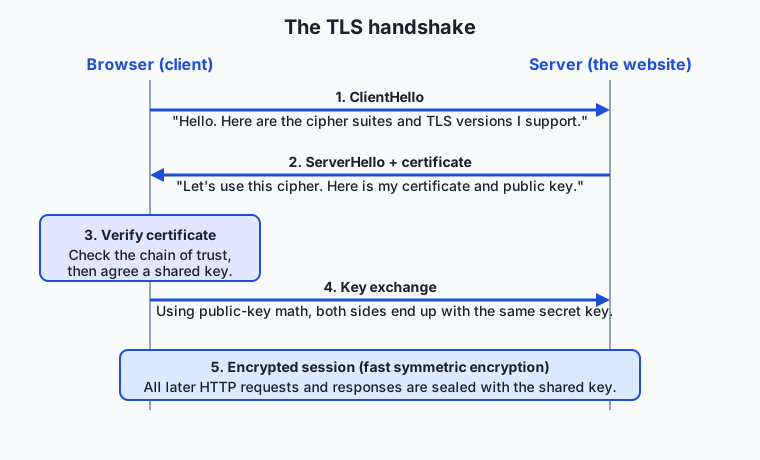
Notice the shape of it: public-key cryptography appears once, to authenticate the server and bootstrap a shared secret; symmetric encryption does all the heavy lifting afterward. That mix is the central engineering idea of TLS.
Certificates and the chain of trust
Step 3 above hides the deepest part of the system. How does your browser decide a certificate is trustworthy? It cannot phone the website’s owner. Instead it relies on a pre-arranged web of trust built from digital signatures.
A Certificate Authority (CA) is an organization whose job is to verify that whoever asks for a certificate for example.com actually controls example.com, and then to issue a certificate signed with the CA’s private key. Your browser and operating system ship with a built-in trust store: a curated list of the public keys of a few dozen root authorities they trust by default. When a certificate arrives, the browser checks whose signature is on it and works upward.
In practice there are usually three links. A root CA certificate sits at the top; it is self-signed and its public key lives in your trust store. Roots are kept offline and precious, so they rarely sign site certificates directly. Instead a root signs one or more intermediate CA certificates, which are kept online and do the day-to-day work of signing individual site certificates (also called leaf certificates). When you connect, the server sends its leaf certificate and usually the intermediate too; the browser verifies the leaf’s signature against the intermediate, the intermediate’s signature against the root, and the root against its own trusted copy. This is the chain of trust: each certificate vouched for by the one above it, up to a root the browser already believes.
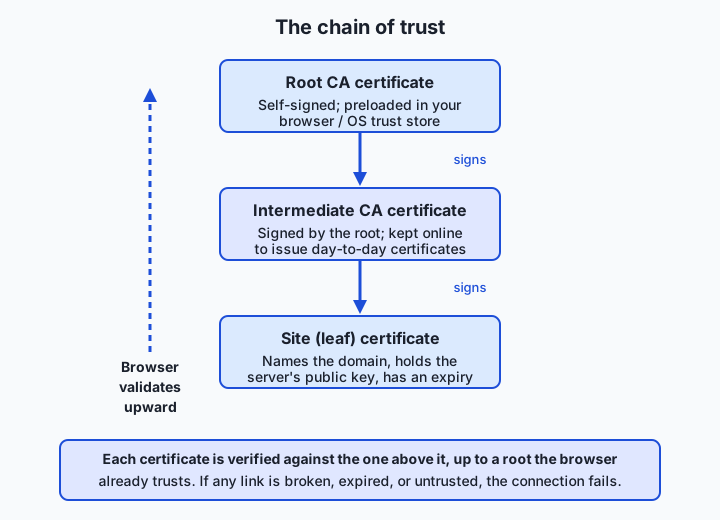
If any link fails — an expired certificate, a signature that does not verify, a domain name that does not match, or a root the browser has never heard of — the whole chain is rejected and you see a security warning. There is deliberately no “trust it anyway by default,” because a broken chain is exactly what a man-in-the-middle attack looks like.
HSTS: refusing to fall back
There is a subtle gap even with all this in place. If you type example.com without the https://, your browser’s very first request may go out over plain HTTP before being redirected to HTTPS — and an attacker could hijack that first unprotected moment. HSTS (HTTP Strict Transport Security) closes it. A site sends a header, Strict-Transport-Security, telling the browser “for the next N seconds, only ever contact me over HTTPS, and never let the user click through a certificate warning for me.” After the browser has seen that header once, it upgrades every future request to HTTPS before it leaves the machine. Major sites are also included in a preload list shipped inside browsers, so the protection applies even on the very first visit.
An everyday analogy
Think of sending a letter through a postal system where you do not trust any of the couriers. A plain HTTP request is a postcard: every courier, sorting office, and mail carrier who handles it can read the message, and a dishonest one could rub out a line and write a new one, or drop their own postcard into your envelope pretending it came from you. That is the internet without TLS.
Now you want to send something private. You and the recipient could share identical keys to a small lockbox — that is symmetric encryption, fast and simple. But there is a bootstrapping problem: how do you get a copy of the key to someone across the country without mailing it, where a courier could copy it in transit? Public-key cryptography solves this elegantly. Imagine the recipient publishes, for anyone to use, a special mail slot that locks shut the instant you drop something in and can only be reopened with a private key the recipient keeps at home. Anyone can drop a message in; only the holder of the private key can take it out. So you use that public slot once to safely pass along a lockbox key, and then you both switch to the fast lockbox for the rest of your correspondence. That is precisely the handshake-then-symmetric structure of TLS.
One danger remains: how do you know the mail slot really belongs to your intended recipient and not to an impostor who put up a slot with the same name? You ask a notary you already trust. The recipient’s slot comes with a notarized certificate — a stamped statement from a well-known notary confirming “this slot belongs to the party at this address.” Your browser is born knowing the signatures of a set of reputable notaries (the trust store); when a notarized certificate arrives, it checks the stamp against the notaries it knows, following the chain if a junior notary was vouched for by a senior one. The padlock is your confirmation that the notarization checked out. Crucially, notarization proves who owns the slot — it does not promise the owner is a nice person. A con artist can get a genuinely notarized slot for their own address; the notary only confirms the address, never the honesty of the resident.
Examples in practice
You do not need to take any of this on faith — you can watch it happen with tools already on your machine. Each tool below has a job it does best.
openssl s_client is the specialist for inspecting a certificate in detail. Use it when you want to see exactly what a server presents. This one command connects and prints the certificate’s subject, issuer, and validity window:
openssl s_client -connect example.com:443 -servername example.com </dev/null 2>/dev/null \
  | openssl x509 -noout -subject -issuer -dates
A real run prints something like:
subject=CN=example.com
issuer=C=US, O=SSL Corporation, CN=Cloudflare TLS Issuing ECC CA 3
notBefore=May 31 21:39:12 2026 GMT
notAfter=Aug 29 21:41:26 2026 GMT
The subject is who the certificate is for (the domain), the issuer is the intermediate CA that signed it, and the two dates are the validity window — outside it, browsers reject the certificate. The </dev/null matters: s_client otherwise waits for you to type an HTTP request and appears to hang, so feeding it empty input makes it disconnect cleanly.
curl -v is the tool for watching the handshake as part of a normal request. Use it when you care about the whole exchange, not just the certificate. The -v (verbose) flag prints the TLS negotiation, with lines like:
* (OUT), TLS handshake, Client hello (1):
* (IN), TLS handshake, Server hello (2):
* (IN), TLS handshake, Certificate (11):
* SSL connection using TLSv1.3 / AEAD-CHACHA20-POLY1305-SHA256
*  subject: CN=example.com
*  issuer: C=US; O=SSL Corporation; CN=Cloudflare TLS Issuing ECC CA 3
*  SSL certificate verify ok.
Read top to bottom, that is the handshake from this lesson: the client hello, the server hello, the certificate arriving, the negotiated TLS version and cipher, and finally SSL certificate verify ok — curl confirming the chain of trust checked out.
The browser certificate inspector is the friendliest tool and the one to reach for day to day. Click the padlock in the address bar, choose the “connection is secure” or “certificate” option, and the browser shows the certificate’s domain, issuer, validity dates, and the full chain from leaf to root — the same facts openssl prints, in a readable panel. It is the fastest way to answer “who issued this and when does it expire?”
Let’s Encrypt is the tool for the other side of the fence: getting a certificate for a site you run. It is a Certificate Authority that issues certificates for free and fully automatically. A client program (such as Certbot) proves to Let’s Encrypt that you control your domain — typically by placing a specific file or DNS record where only the domain’s controller could — and Let’s Encrypt then issues a 90-day certificate and renews it automatically. Because HTTPS is now free and scriptable, there is no longer a cost reason to run any public site on plain HTTP.
Implications: security, privacy, performance, scalability, and cost
Security. TLS closes the eavesdropping, tampering, and impersonation holes of plain HTTP, but it is not a magic shield. Its guarantees depend on the trust store being sound: if an attacker can slip their own root into your machine’s trust store (through malware or a misconfigured corporate device), they can issue certificates your browser will accept, defeating the whole system. This is also how some workplaces legitimately inspect encrypted traffic — by installing a company root on managed machines. The lesson is that TLS moves the security question to “do I trust the roots on this device, and is my private key safe?”
Privacy. Encryption hides the contents of your traffic but not all of its metadata. The domain you are visiting is often still visible to the network (the server’s name appears in parts of the handshake, and in the preceding DNS lookup from an earlier lesson), and your IP address is inherently visible because packets must be routed. So HTTPS protects what you say to a site far better than the fact that you visited it. Ongoing improvements like encrypted DNS and encrypted handshake extensions chip away at this, but “HTTPS equals total anonymity” was never true.
Performance. The handshake adds a small, one-time cost at the start of a connection — a round trip or two of setup before data flows — and TLS 1.3 cut this to a single round trip, with session resumption making repeat visits cheaper still. The bulk encryption is fast enough on modern hardware to be effectively free. In exchange for that modest setup cost you get confidentiality and integrity, which is why the industry long ago stopped treating HTTPS as a performance luxury.
Scalability. Terminating TLS — doing the handshake and encryption work — costs server CPU, so large services often handle it at a dedicated layer such as a load balancer or content-delivery network that manages certificates and encryption for many backend servers at once. This is why deploying behind a managed platform frequently gives you HTTPS “for free”: the platform owns the certificate and the TLS work, and your application speaks plain HTTP privately behind it.
Cost. The certificate itself is now typically free (Let’s Encrypt and many hosting platforms include it), so the real costs are operational: renewing certificates before they expire, keeping private keys secret, and the modest CPU of encryption. The classic outage in this area is not an attack at all — it is a certificate that quietly expired because nobody automated its renewal, taking a whole service offline until someone notices.
Alternatives: free, open source, and commercial
For a protocol as standardized as TLS, “alternatives” splits into two questions: alternative tools for working with it, and alternative ways to obtain certificates.
| Option | Type | What it offers | Cost |
|---|---|---|---|
| OpenSSL | Free, open source | The standard toolkit for inspecting, testing, and generating certificates from the command line | Free |
curl (with -v) | Free, open source | Makes HTTPS requests and shows the handshake; the everyday debugging workhorse | Free |
| Browser certificate inspector | Free, built in | Readable view of any site’s certificate and full chain | Free |
| Let’s Encrypt / Certbot | Free, non-profit CA + open-source client | Automated, no-cost certificates with auto-renewal for any domain you control | Free |
| Commercial CAs (for example DigiCert, Sectigo) | Commercial | Paid certificates, sometimes with extended validation, warranties, and support | Paid |
| Managed platforms and CDNs (for example Cloudflare, many cloud hosts) | Free tier and commercial | Handle certificates and TLS termination for you, so your app need not manage them | Often free tier; paid tiers for scale |
For learning and for most real sites, the free stack is complete: OpenSSL and curl to inspect and debug, Let’s Encrypt to issue. Paid certificates and managed platforms earn their keep at organizational scale, where support, warranties, and offloading the operational burden matter more than the price of the certificate.
Comparison with related concepts
| Concept A | Concept B | Key difference |
|---|---|---|
| HTTP | HTTPS | Same protocol for structuring requests; HTTPS wraps it in TLS for confidentiality, integrity, and authentication |
| Symmetric encryption | Public-key encryption | Symmetric uses one shared key and is fast; public-key uses a public/private pair, solves key sharing, but is slow |
| TLS | SSL | TLS is the current standard; SSL is its obsolete, insecure predecessor, though the name lingers in casual use |
| Certificate | Certificate Authority | The certificate is the signed ID card; the CA is the trusted party whose signature makes it believable |
| Encryption | Authentication | Encryption hides the contents; authentication proves who you are talking to — TLS needs both to be safe |
| Root CA | Intermediate CA | The root is the trusted anchor in your device, kept offline; the intermediate is signed by the root and does the routine issuing |
When to use it — and when not to
The modern default is simple: use HTTPS for everything on a public network, without exception. Any site that handles logins, personal data, payments, or API keys must use it, but so should a plain blog, because browsers now flag plain HTTP as insecure and because integrity alone — knowing nobody injected content into your page — is worth having everywhere. Since certificates are free and automatic, there is no longer a cost argument for the other side. When you call any web API, expect and require HTTPS; if a client library lets you disable certificate verification to “make an error go away,” treat that as a loud warning rather than a fix, because it silently reopens the man-in-the-middle hole TLS exists to close.
The honest “when not to” is narrow and mostly about not misunderstanding the tool. HTTPS is not the place to solve problems it was never meant to solve: it does not protect data after it arrives, so it is no substitute for encrypting sensitive data at rest, hashing passwords, or writing careful access controls. On a fully trusted, isolated internal network some teams run plain HTTP between services behind a TLS-terminating front door, accepting the trade-off deliberately — but “it is internal” has burned many teams when that network turned out to be less isolated than assumed, so the safer habit is to encrypt internal traffic too. In short: reach for HTTPS by default everywhere, and reserve plain HTTP only for throwaway local experiments where nothing real is at stake.
There is a direct line from all of this to working with online model services. Every call your code makes to a hosted model’s API travels over HTTPS, and that is what keeps your prompt and — critically — your API key from being read or stolen by anything on the network path; the same handshake and certificate check you traced today runs before a single token is sent. When you deploy your own model service, you will need a valid TLS certificate for its domain, because client libraries and browsers will refuse to connect without one. And when an API client suddenly fails with a certificate error, you now have the mental model to diagnose it: an expired certificate, a missing intermediate in the chain, a clock skew that puts you outside the validity window, or a self-signed certificate with no trusted root — the same handful of failures, whether the caller is a browser or your own program.
Knowledge check
Try these from memory before looking back:
- Name the three protections TLS provides, and explain why encryption without authentication leaves you exposed.
- Explain, in your own words, why TLS uses public-key cryptography for the handshake but symmetric encryption for the rest of the connection.
- Your browser receives a site certificate. Walk through how it decides whether to trust it, mentioning the leaf, the intermediate, the root, and the trust store.
- A friend says “the padlock means this website is safe, so I can enter my details.” What is wrong with that reasoning?
- A service that worked yesterday now shows a certificate error to every visitor, though nothing in the code changed. Give the single most likely cause and how you would confirm it.
Hands-on exercise
Time to watch the handshake for yourself. In this exercise — worked through in full in the Day 19 lab directory — you will use openssl and curl to inspect a real certificate and the TLS negotiation for example.com, a stable, well-known test domain. Open your terminal and run each command.
First, pull the certificate’s identity fields:
openssl s_client -connect example.com:443 -servername example.com </dev/null 2>/dev/null \
  | openssl x509 -noout -subject -issuer -dates
This connects on port 443, hands the certificate to openssl x509, and prints the subject (the domain), the issuer (the signing CA), and the not-before / not-after validity dates. The -servername flag tells the server which site you want, since one server may host many; the </dev/null sends empty input so the command exits instead of waiting.
Now watch the same connection as a request, and pick out the TLS lines:
curl -vI https://example.com 2>&1 | grep -Ei "SSL connection|subject:|issuer:|expire date|verify"curl -vI makes a headers-only (-I) verbose (-v) request; the grep keeps only the lines about the TLS version, the certificate’s subject and issuer, its expiry, and whether verification succeeded.
Expected output
Your dates and issuer may differ as certificates are renewed, but the shape will match. A real run:
$ openssl s_client -connect example.com:443 -servername example.com </dev/null 2>/dev/null \
    | openssl x509 -noout -subject -issuer -dates
subject=CN=example.com
issuer=C=US, O=SSL Corporation, CN=Cloudflare TLS Issuing ECC CA 3
notBefore=May 31 21:39:12 2026 GMT
notAfter=Aug 29 21:41:26 2026 GMT

$ curl -vI https://example.com 2>&1 | grep -Ei "SSL connection|subject:|issuer:|expire date|verify"
* SSL connection using TLSv1.3 / AEAD-CHACHA20-POLY1305-SHA256
*  subject: CN=example.com
*  expire date: Aug 29 21:41:26 2026 GMT
*  issuer: C=US; O=SSL Corporation; CN=Cloudflare TLS Issuing ECC CA 3
*  SSL certificate verify ok.
Line by line: the certificate is for example.com (subject), was signed by an intermediate CA (issuer), and is valid only between the two dates shown. The curl output adds the negotiated protocol — TLSv1.3 — and the reassuring SSL certificate verify ok, which means curl walked the chain of trust up to a root it trusts and everything checked out.
Validate your work
You are done when you can check every box:
- You printed a certificate’s subject, issuer, and both validity dates with
openssl. - You can state the domain the certificate is for and the CA that issued it.
- You can state the expiry date and say whether the certificate is currently valid.
- You saw the negotiated TLS version in the
curloutput (for exampleTLSv1.3). - You saw a line confirming certificate verification succeeded.
Troubleshooting
openssl s_clientseems to hang. It is waiting for input; the</dev/nullat the end is what makes it disconnect. Make sure you included it.unable to load certificateor empty output. The connection failed before a certificate arrived — usually no network, a proxy, or a firewall. Check that plaincurl -I https://example.comworks first.- Slightly different
opensslflags. Syntax varies a little across OpenSSL and LibreSSL versions (macOS has shipped both). If a flag is rejected, runopenssl x509 -helpandopenssl s_client -helpto see your version’s exact spelling. curlprints no TLS lines. Yourgreppattern may not match your curl’s wording; drop thegrepand read the fullcurl -vI https://example.comoutput to see the handshake lines directly.
Common mistakes
- Reading the issuer as the site owner. The issuer is the CA that signed the certificate, not the company running the site. The site is named in the subject.
- Treating a valid certificate as proof the site is trustworthy. Verification proves the domain’s identity and that the connection is encrypted — never that the site is honest or safe to hand data to.
- Panicking at an expiry a few weeks out. Certificates are short-lived by design (Let’s Encrypt issues 90-day ones) and normally auto-renew; a near expiry is only a problem if renewal is not automated.
Practice assignment
Open the TLS worksheet in the starter directory of the Day 19 lab and complete it for two different HTTPS sites of your choice (any well-known public sites). For each, use the commands above to record: the certificate’s subject (domain), its issuer (the CA), its not-before and not-after dates, and the TLS version curl negotiated. Then write one short paragraph (4–6 sentences) explaining, for one of the sites, what would happen to a visitor if that certificate’s not-after date passed with no renewal — which of TLS’s three protections would still hold, which warning the visitor would see, and why “just click through it” is dangerous advice. Keep the worksheet; it is the model artifact for this lab.
Extension challenge
Go one level up the chain. Re-run the connection but ask openssl to show the whole certificate chain the server sends, not just the leaf:
openssl s_client -connect example.com:443 -servername example.com -showcerts </dev/null 2>/dev/null \
  | grep -E "s:|i:"
The s: (subject) and i: (issuer) lines trace the chain: the leaf certificate’s issuer should match the subject of the next certificate up, and so on toward the root. Write two or three sentences identifying how many certificates the server sent, and explain why a server that forgets to send its intermediate certificate can cause “certificate not trusted” errors for some visitors even though its own certificate is perfectly valid — a genuinely common real-world misconfiguration.
Quiz
Q1. What are the three protections that TLS provides to an HTTP connection?
- Compression, caching, and load balancing
- Confidentiality, integrity, and authentication
- Speed, redundancy, and anonymity
- Encryption, compression, and error correction
Show answer
Answer: B. Confidentiality, integrity, and authentication
TLS provides confidentiality (nobody in the middle can read the data), integrity (nobody can alter it undetected), and authentication (you can be confident the server is genuine). All three are needed together — encryption to an impostor is worthless.
Q2. Why does TLS use public-key cryptography for the handshake but symmetric encryption for the rest of the connection?
- Public-key encryption is illegal for bulk data in most countries
- Symmetric encryption cannot protect data at all, so it is only used as a backup
- Public-key math safely establishes a shared secret between strangers but is slow, while symmetric encryption is fast for the bulk of the data
- Symmetric encryption is more secure than public-key encryption for the handshake
Show answer
Answer: C. Public-key math safely establishes a shared secret between strangers but is slow, while symmetric encryption is fast for the bulk of the data
Public-key cryptography solves the problem of two strangers agreeing on a secret over a watched wire, but it is slow. So TLS uses it briefly to bootstrap a shared symmetric key, then switches to fast symmetric encryption for the actual traffic — the best of both.
Q3. What does a Certificate Authority (CA) actually vouch for when it issues a certificate?
- That the website is honest and safe to give your data to
- That the certificate holder controls the domain named in the certificate
- That the website will never be hacked
- That the website loads quickly and is well designed
Show answer
Answer: B. That the certificate holder controls the domain named in the certificate
A CA verifies that whoever requested the certificate controls the domain, then signs a certificate binding that domain to a public key. It certifies identity (control of the domain), not the honesty, safety, or quality of the site.
Q4. A browser receives a site (leaf) certificate. How does it decide whether to trust it?
- It contacts the website owner by email to confirm
- It trusts any certificate that is not expired, regardless of who signed it
- It verifies the leaf against the intermediate, the intermediate against the root, and the root against its built-in trust store
- It asks the user to approve every certificate manually
Show answer
Answer: C. It verifies the leaf against the intermediate, the intermediate against the root, and the root against its built-in trust store
The browser follows the chain of trust upward: each certificate must be validly signed by the one above it, ending at a root CA whose public key is already in the browser or OS trust store. If any link fails, the connection is rejected.
Q5. Which statement about the padlock icon in the address bar is correct?
- It guarantees the website is trustworthy and safe to share data with
- It means the connection is encrypted and the domain identity was verified, but says nothing about the site's honesty
- It means the website cannot be hacked
- It appears only on websites owned by large companies
Show answer
Answer: B. It means the connection is encrypted and the domain identity was verified, but says nothing about the site's honesty
The padlock confirms the connection is encrypted and the certificate for that domain checked out. It says nothing about whether the site is honest or handles your data well — even a scam site can obtain a valid certificate for its own domain.
Q6. What is the purpose of HSTS (HTTP Strict Transport Security)?
- It compresses HTTPS traffic to make pages load faster
- It tells the browser to only ever contact a site over HTTPS, closing the gap of an initial plaintext request
- It replaces certificates with passwords
- It lets a site work without any certificate
Show answer
Answer: B. It tells the browser to only ever contact a site over HTTPS, closing the gap of an initial plaintext request
HSTS is a header a site sends telling the browser to use only HTTPS for that site in future and not to allow clicking through certificate warnings, which prevents an attacker from hijacking an initial unprotected HTTP request.
Q7. What is the relationship between SSL and TLS?
- They are competing protocols made by different companies today
- SSL is the modern, secure version and TLS is obsolete
- TLS is the modern standard; SSL is its obsolete, insecure predecessor, though people still loosely say "SSL"
- They are completely unrelated technologies
Show answer
Answer: C. TLS is the modern standard; SSL is its obsolete, insecure predecessor, though people still loosely say "SSL"
TLS is the standardized successor to Netscape's SSL. The actual SSL versions are obsolete and insecure, but the name persists in casual usage; when people say "SSL certificate" they almost always mean TLS.
Q8. A service that worked yesterday now shows a certificate error to every visitor, though the code did not change. What is the most likely cause?
- The website's content was rewritten
- The certificate reached its expiry date and was not renewed
- The visitors all changed browsers at once
- HTTP was upgraded to HTTPS overnight
Show answer
Answer: B. The certificate reached its expiry date and was not renewed
Certificates are valid only within a not-before / not-after window. A very common outage is a certificate quietly expiring because renewal was not automated, which makes every browser reject the connection until it is renewed.
Glossary
- HTTPS
- HTTP carried inside a TLS-encrypted connection (conventionally on port 443), giving web traffic confidentiality, integrity, and server authentication.
- TLS
- Transport Layer Security, the protocol that wraps a network connection in encryption and authentication; the modern successor to SSL.
- encryption
- Scrambling data with a key so that only someone with the right key can turn it back into readable form.
- symmetric key
- A single shared secret key used to both encrypt and decrypt messages; fast, but both sides must already share the same key.
- public-key cryptography
- Encryption using a matched public/private key pair so two strangers can establish a secret without pre-sharing one; also called asymmetric encryption, and slower than symmetric.
- certificate
- A signed digital document that binds a domain name to a public key and carries an expiry date, presented by a server to prove its identity.
- Certificate Authority
- A trusted organization (CA) that verifies control of a domain and signs certificates for it; browsers ship with a list of trusted CA roots.
- chain of trust
- The sequence of signatures from a site certificate up through one or more intermediate CAs to a root the browser already trusts; if any link fails, the certificate is rejected.
- handshake
- The opening exchange of a TLS connection that authenticates the server and agrees a shared symmetric key, after which data is encrypted symmetrically.
- HSTS
- HTTP Strict Transport Security, a header telling a browser to contact a site only over HTTPS and never allow clicking through its certificate warnings.
- cipher
- An algorithm used to encrypt and decrypt data; TLS negotiates a cipher suite (a bundle of algorithms for key agreement, bulk encryption, and integrity) during the handshake.
- man-in-the-middle attack
- An attack in which someone secretly sits between you and a server, reading or altering traffic while both sides believe the line is private; authentication in TLS is designed to prevent it.
- root CA
- A self-signed Certificate Authority certificate that anchors the chain of trust; its public key is preloaded in the browser or operating system trust store and kept offline for safety.
Sources and further reading
- Transport Layer Security — Wikipedia (accessed 2026-07-12)
- What is HTTPS? — Cloudflare (accessed 2026-07-12)
- How HTTPS works — DNSimple (accessed 2026-07-12)
- High Performance Browser Networking — Transport Layer Security (TLS) — Ilya Grigorik (accessed 2026-07-12)
- Let's Encrypt — How It Works — Let's Encrypt / ISRG (accessed 2026-07-12)
Kept in this browser, no account needed. Your progress page turns the whole record into one link you can bookmark or open on another device.