Programming with Python › SQL and Relational Databases › Day 85
Day 85: Relational Databases and SQLite
After this lesson you will be able to say precisely why a JSON file stops being an adequate store — measured in bytes rewritten, constraints absent, updates lost and scans repeated — and replace it with a real database: a schema whose primary keys, foreign keys, NOT NULL, UNIQUE and CHECK constraints the engine enforces on every write from every program; SQL as a declarative language whose plan the engine chooses and may change without changing your answers; SQLite end to end from the tokenizer, parser and code generator through the bytecode virtual machine to the B-tree, the pager and the single database file with its journal or write-ahead log; SQLite's dynamic typing, type affinity and the STRICT tables that fix it; what each letter of ACID actually buys you and which failure an atomic file write could never prevent; when SQLite is the right answer and when PostgreSQL, MySQL, MariaDB, DuckDB or a managed service is; and a query engine you have written yourself in twelve lines, so that SELECT is a request for a loop you already understand.
Hands-on lab for this lesson
Lab files on GitHub: https://github.com/ai-roadmap-365/ai-roadmap-365.github.io/tree/main/labs/sections/programming-with-python/day-085-relational-databases-and-sqlite
- Get the hands-on files. Clone the labs repository once (you can reuse this clone for every lesson). This works on macOS, Linux, and Windows (PowerShell or WSL):
git clone https://github.com/ai-roadmap-365/ai-roadmap-365.github.io.git cd ai-roadmap-365.github.io - Open this lesson's lab. Move into the directory for this specific day. Every lab lives at the same predictable path — section / subsection / week / day:
cd labs/sections/programming-with-python/day-085-relational-databases-and-sqlite - Read the lab guide. Open `README.md` in that directory. It lists the exact commands, what each does, the expected output, and how to check your work — read it before running anything.
- Run it and check your work. Follow the README's "How to run" section: run the example first to see the finished result, then complete the numbered exercises in `starter/`, then run the tests. The tests pass (exit 0) only when your work is correct.
bash tests/run_tests.sh # or the test command named in the lab README
You can also open the lab as a local page (works offline, shows the file tree and expected output).
Learning objectives
By the end of this lesson you will be able to:
- Measure rather than assert the four points at which a JSON file stops paying — whole-file rewrites for a one-field change, no constraint on a typo'd foreign key, two atomic writers losing an update, and a question that costs a full parse and scan every time
- Define the relational model precisely: a relation as a set of tuples, rows and typed columns, primary and candidate keys, and what a key actually guarantees — then explain why "relational" does not mean "tables relate to each other"
- Write a schema as a promise the engine keeps, using PRIMARY KEY, NOT NULL, UNIQUE, CHECK and REFERENCES, and watch each one refuse a bad write while leaving the data untouched
- Explain SQL as a declarative language by naming what you did not write, read EXPLAIN QUERY PLAN, and show the planner choosing differently for the same query while returning identical rows
- Trace SQLite's architecture from your program to the disk — interface, tokenizer, parser, code generator and planner, bytecode, virtual machine, B-tree, pager, OS interface — and name the layer where every ACID guarantee is made
- Prove a database is one ordinary file by reading the documented 16-byte header, the page size and the page count, and checking they agree with the engine and the file length
- Describe SQLite's type system honestly — five storage classes, affinity as a preference rather than a rule, a TEXT value living in an INTEGER column, and the silent comparison failure that follows — then fix it with a STRICT table and say exactly what STRICT does not change
- State what each letter of ACID buys you, and identify the failure isolation prevents that Day 84's atomic file write could not
- Turn PRAGMA foreign_keys on in every connection, and explain why a REFERENCES clause without it is a comment
- Pass values as parameters rather than building SQL strings, and state the two precisions that half-understood injection advice leaves out
- Build a query engine from first principles — restrict, project and order_by over a list of dicts — and assert mechanically that the equivalent SELECT returns exactly the same rows in the same order
- Choose between SQLite, PostgreSQL, MySQL or MariaDB, DuckDB and the commercial or managed tier on the real deciding questions — how many writers, where they run, who operates it — rather than on data volume
Prerequisites
- Days 64-66 of this course: reading and writing files, JSON, and an exception-handling strategy. The JSON file this lesson dismantles is the one you have been writing since then
- Day 70: modelling a domain with objects. A table is that model, written down somewhere the engine can enforce it
- Day 84: the automation toolkit and its atomically written JSON state file — this lesson is the direct answer to that lab's fifth extension exercise
- Comfort at a terminal, and enough Python to read a loop, a dict comprehension and a context manager
- No installation and no account: Python 3.11 or newer with its standard-library sqlite3 module, and the sqlite3 command-line shell
Why this matters
Yesterday you shipped a toolkit that kept its state in a JSON file, written atomically. That was the right decision, and today you find out exactly where it stops being the right decision — not by argument, but by measurement.
Here is the state file from Week 12, grown up a little. It holds loans: which book, which member, when it was borrowed, when it is due, whether it has come back. A member returns a book, so one field on one record changes from null to a date. Twenty-seven bytes.
This is what it costs to change those twenty-seven bytes, measured on the authoring machine by examples/json_pain.py in today’s lab:
       10 loans: file     1,712 bytes | changed  27 bytes | read+wrote      3,416 bytes to do it
    1,000 loans: file   170,584 bytes | changed  27 bytes | read+wrote    341,160 bytes to do it
   50,000 loans: file 8,622,249 bytes | changed  27 bytes | read+wrote 17,244,490 bytes to do it
Seventeen megabytes moved to change twenty-seven bytes. And that is the cheerful failure, because at least it is only slow. Three more, from the same run:
Nothing stops a lie. Store a loan naming member 999, when there is no member 999, and json.dump writes it without hesitation: stored happily: member_id=999. It has no opinion about what a member id means, because a file has no idea what a member is. That row will sit in your data until some report six months from now produces a blank name and nobody can work out why.
Two writers, one lost update. Writer A reads the file and marks a loan returned. Writer B reads the same file a millisecond later and adds a new loan. Both write the whole file back, both atomically, both apparently successfully. Afterwards: loan 1 returned_on: None. A’s work is gone. The atomic write from Day 84 protected the file from being torn in half; it never claimed to protect two readers who raced over it, and it cannot.
And a question with no cheap answer. “Which loans are overdue?” means parsing 8,622,241 bytes and examining every one of 50,000 records, every time you ask, whether three rows match or thirty thousand. There is no shortcut available, because the file has no index — and it has no index because it does not know that due_on is a date, or that dates have an order, or that you will ever want to ask.
Four failures, and they are not four different problems. They are one problem: the file does not know what the data means. Everything a database gives you follows from telling it.
This is the beginning of Week 13, and it matters to your AI work for a reason that only sounds like a slogan until you have hit it: every dataset you will train on, every embedding you will search, every evaluation log you will compare against last week’s, and every fine-tuning corpus you will version lives in a database before it reaches a model. And the retrieval half of retrieval-augmented generation — the R — is a query. Learning to write one is not a detour from AI. It is most of the plumbing.
The idea in plain language
A relational database stores your data as tables. That is the whole of the plain-language version, and the interesting part is what a table turns out to mean.
A table has columns, which are named and have a declared type, and rows, each of which supplies one value per column. The books table you build today has columns book_id, title, author, year and copies, and one row per book. Nothing surprising so far — it is a spreadsheet.
The three ideas that make it more than a spreadsheet are these.
Every row is identified by a key. The book_id column is the table’s primary key: no two rows may share a value, and no row may leave it empty. That is not a naming convention or a comment. It is a rule the engine enforces on every write, from every program, forever, including the script somebody writes next year that has never heard of your validation code.
Tables refer to each other by key. The loans table does not contain a copy of the book’s title. It contains a book_id, declared to reference books, so a loan of a book that does not exist is a write the database refuses. That refusal is the single most valuable thing on this page, because it is the failure from the last section — stored happily: member_id=999 — turned into an error at the moment it happens rather than a mystery six months later.
You ask for what you want, not how to find it. This is the part that feels like a trick the first time. You write:
SELECT title, author, year FROM books WHERE year < 1980 ORDER BY year;and you have described a result, not a procedure. Nowhere did you say whether to scan every row or consult an index, in what order to test the conditions, or how to sort. The engine decides all of that, decides it again tomorrow when the data has changed shape, and may reach a different conclusion — while returning exactly the same rows. That is what declarative means, and it is the whole reason SQL has outlived every language it was supposed to be replaced by.
The formal word for a table is a relation, and it is where “relational” comes from. It does not mean “tables relate to each other”, which is the guess almost everybody makes. A relation, in the mathematical sense Codd borrowed, is a set of tuples: an unordered collection of rows, each of which is a fixed sequence of values drawn from named domains. Unordered matters. A table has no first row unless you ask for one with ORDER BY, and a query that appears to return rows in insertion order is a query getting lucky.
Historical background
Before 1970, data on a computer was reached by following it. The dominant designs — the hierarchical model, exemplified by IBM’s IMS, and the network model standardised by CODASYL — stored explicit pointers from record to record, and a program navigated them one link at a time. It worked, and it had a defect that got worse every year: the program’s code encoded the physical arrangement of the data. Reorganise the storage to make one report faster and every program that touched it needed rewriting.
Edgar F. Codd, a British-born mathematician working at IBM’s San Jose Research Laboratory, published the paper that ended that arrangement: “A Relational Model of Data for Large Shared Data Banks”, in Communications of the ACM, in June 1970. Its proposal was radical in an unusual direction — it removed things. No pointers. No navigation. Data as relations, in the mathematical sense, and queries expressed as operations on sets. The reader would say what they wanted and the system would work out how to get it.
The key phrase in the paper’s own framing is data independence: the idea that how data is stored should be changeable without breaking the programs that use it. Every index you will ever add is an exercise of that freedom. You change the storage; no query changes; the answers are identical and the work is different.
IBM built a research system called System R to find out whether the idea could be made fast. Along the way, Donald D. Chamberlin and Raymond F. Boyce designed a query language for it called SEQUEL — Structured English Query Language — which was renamed SQL after a trademark conflict, and which is the language you are about to write. Around the same time, at the University of California, Berkeley, Michael Stonebraker and Eugene Wong built Ingres, an independent relational system whose descendants include PostgreSQL.
Codd received the Turing Award in 1981. SQL became an ANSI standard in 1986 and an ISO standard the following year, and has been revised many times since; in practice every engine implements the standard’s core and then diverges, which is why “SQL” is better understood as a family than as a language.
SQLite — the engine you will use today — was written by D. Richard Hipp and first released in 2000. Its design goal was almost the opposite of System R’s: not a large shared data bank, but a database that needed no server at all, that lived in one file, and that could be linked directly into a program. Hipp placed the source code in the public domain rather than licensing it, which is unusual even among free software and is part of why it ended up in more or less everything: browsers, phones, aircraft, and the Python installation on your machine.
That last fact is worth pausing on. You already have a relational database. You have had one since Day 1 of this course. It shipped with Python.
What it is — and what it is not
A relational database is a system that stores data as tables of typed columns, enforces a written-down set of rules about that data on every write, and answers declarative queries about it. SQLite is one implementation of that: an embedded, serverless, zero-configuration, single-file relational database that runs inside your own process.
It is not a server. There is no daemon to start, no port to open, no user account, no password, no configuration file anywhere on your machine. sqlite3 library.db on a path that does not exist creates the database on the first write, and rm library.db removes it completely. This is the property that surprises people who learned databases from PostgreSQL first, and it is the reason SQLite is a sensible first database rather than a toy one.
It is not a toy, either. SQLite’s own documentation makes the comparison precisely: it does not compete with client-server databases, it competes with fopen(). The question it answers is not “should this application use SQLite or PostgreSQL” but “should this application write its own file format or use a database”. Framed that way, an enormous amount of software should be using it and is not.
It is not statically typed, and this genuinely does surprise people. A column declared INTEGER will accept the text 'not-a-number' and store it as text, quietly, in a column whose declared type says otherwise. There is a fix — STRICT tables — and there is a section below about exactly what happens and why.
It is not a spreadsheet, though the picture is similar. A spreadsheet’s cell can hold anything, its rules live in your head, and its ordering is part of its meaning. A table’s column has a type and constraints, its rules are enforced by the engine, and its rows have no order at all until a query gives them one.
It is not the only shape a database can take, and the Alternatives section takes that seriously. Document stores, key-value stores, column stores and graph databases all exist because the relational model is a trade, not a law.
| It is | It is not |
|---|---|
| A set of tables with typed columns and enforced rules | A file format with a schema written in a comment |
| A promise the engine keeps on every write, from every program | A convention the current code happens to follow |
| Declarative: you state the result you want | A loop you write and maintain yourself |
An ordinary file you can copy, mail, and delete with rm | A service with a port, a password and a process |
| Dynamically typed by default, strictly typed on request | A system that checks every value against its column, unless you ask |
| Transactional: a group of writes lands whole or not at all | A guarantee that each individual statement succeeded |
| Concurrent for readers, serialised for writers | A distributed system, or safe on a network filesystem |
Why it was created and what problems it solves
Each property below earns its place by defeating one of the four failures the first section measured. It is worth walking them in that order, because “best practice” is not a reason and “I watched this cost me a day” is.
The schema defeats the lie. member_id INTEGER NOT NULL REFERENCES members(member_id) is not documentation. Attempt the write that JSON accepted without comment and the engine answers:
Runtime error: FOREIGN KEY constraint failed (19)The lab does this seven times, once for each kind of rule — a foreign key twice, NOT NULL, UNIQUE, two CHECK constraints and a duplicate primary key — and then counts the rows to prove that a refused write changes nothing at all. This is validation that applies to every writer, which is a category of guarantee that application code fundamentally cannot provide.
The page defeats the rewrite. A database file is divided into fixed-size pages; on both SQLite builds on the authoring machine, 4,096 bytes each. Changing one field rewrites the page holding that row, not the file. That is the difference between 4 kilobytes and 8.6 megabytes, and it is why the cost of an update stops depending on how much data you have.
The transaction defeats the lost update. Two writers do not both get the whole file. One takes a write lock, makes its change, commits; the other then works from the result. And a group of writes becomes one indivisible act:
inside the transaction:  loans 8, copies_of_book_3 2
after ROLLBACK:          loans 7, copies_of_book_3 3
Borrowing a book is two facts — a new loan row, and one fewer copy on the shelf — and neither is true on its own. A transaction is how you say that.
The index defeats the scan. An index is an ordered structure the engine maintains alongside the table, so that finding the matching rows is a descent through a tree rather than a walk through everything. Crucially, adding one changes no answer. In the lab you can watch the planner change its mind about the same query while the four rows it returns stay identical:
QUERY PLAN
|--SCAN books
`--USE TEMP B-TREE FOR ORDER BY
QUERY PLAN
`--SEARCH books USING INDEX books_year (year>? AND year<?)That is Codd’s data independence, sixty years on and visible in one command.
How it works
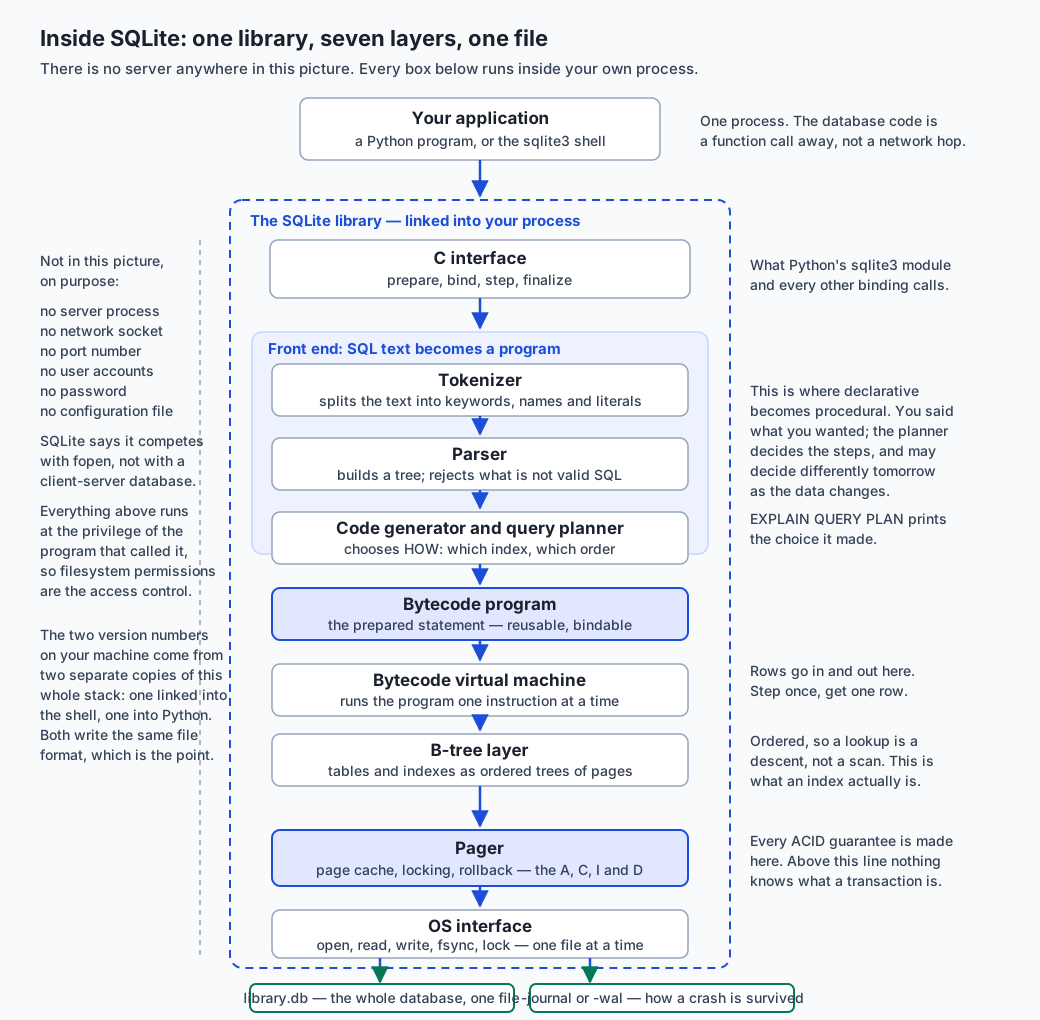
Read it top to bottom. Your program calls a library, in its own process. Inside the library, a front end turns text into a program; a virtual machine runs that program; underneath, three storage layers turn row requests into byte ranges on a disk. At the bottom, two files.
The layers, one at a time
The interface is the set of C functions everything else calls: prepare a statement, bind values to it, step it, finalise it. Python’s sqlite3 module is a thin wrapper over exactly these, which is why cursor.execute(...) followed by iteration maps so cleanly onto “prepare, then step until done”.
The tokenizer splits SQL text into keywords, identifiers, operators and literals. The parser assembles those tokens into a tree and rejects anything that is not valid SQL. A syntax error never reaches any of the layers below.
The code generator, together with the query planner, is where declarative becomes procedural. It decides which index to use, in which order to test conditions, how to perform a sort. Its output is a small program in SQLite’s own bytecode, and that program is what a prepared statement actually is — which is why preparing once and running many times with different bound values is faster: you skip six layers on every repeat.
The virtual machine executes that bytecode one instruction at a time. It is a register machine with instructions for opening a cursor on a table, seeking, reading a column, comparing, and emitting a row. Every step runs instructions until one row is ready, which is why a query over ten million rows can start returning results immediately and never hold them all in memory.
The B-tree layer is where a table stops being rows and starts being pages. Both tables and indexes are stored as B-trees — ordered trees whose nodes are pages — which is what makes a keyed lookup a short descent rather than a scan.
The pager caches pages in memory, decides what to write and when, takes the locks, and implements rollback. Every ACID guarantee is made here. Nothing above the pager knows what a transaction is.
The OS interface performs the actual open, read, write, fsync and locking calls, and is the layer that gets swapped out to make SQLite run on an operating system it has never met.
And beneath all of it, the artefacts: library.db, plus either a rollback journal (library.db-journal) or a write-ahead log (library.db-wal), depending on mode. The rollback journal, which is the default, holds the original content of the pages a transaction is about to change, so an interrupted commit can be undone. A write-ahead log inverts it: new content is appended to the log first and folded back into the database later, which lets readers carry on while a writer works.
The file, proved rather than asserted
The file format is documented, so you can check it yourself rather than believe a lesson. The first sixteen bytes of every SQLite database are the ASCII string SQLite format 3 followed by one NUL byte; bytes 16 and 17 are the page size, big-endian; bytes 28 to 31 are the page count. examples/file_facts.py opens the file in binary mode and reads them:
first 16 B:  b'SQLite format 3\x00'
hex:         53 51 4c 69 74 65 20 66 6f 72 6d 61 74 20 33 00
matches the documented magic string: True

page size (header bytes 16-17):  4,096 bytes
page count (header bytes 28-31): 7
pages * page size:               28,672 bytes
Seven pages, 28,672 bytes, and ls -l agrees. Three tables, three indexes, twenty rows: one ordinary file you could copy with cp and mail to somebody.
Types: dynamic, with affinity
Most databases refuse a value whose type does not match its column. SQLite does not. A column’s declared type is an affinity — a preference the engine applies when it can and abandons when it cannot — and the value keeps its own storage class regardless. There are five storage classes:
| Storage class | Holds | Notes |
|---|---|---|
NULL | Nothing, meaningfully | Not zero, not an empty string: the absence of a value |
INTEGER | A signed integer | Stored in 1, 2, 3, 4, 6 or 8 bytes depending on magnitude |
REAL | A floating-point number | An 8-byte IEEE 754 value |
TEXT | A string | Stored in the database’s encoding |
BLOB | Bytes, exactly as given | The engine does not interpret them at all |
And five affinities — TEXT, NUMERIC, INTEGER, REAL and BLOB — which a column gets from the rules SQLite applies to its declared type name. The consequences are best seen than described. Five inserts into a table whose year column is declared INTEGER:
┌────┬──────────────┬────────────┬─────────────────────────┬─────────────┐
│ id │     year     │ year_class │          title          │ title_class │
├────┼──────────────┼────────────┼─────────────────────────┼─────────────┤
│ 1  │ 1970         │ integer    │ converted to integer    │ text        │
│ 2  │ not-a-number │ text       │ stored as text          │ text        │
│ 3  │ 1975         │ integer    │ float that fits         │ text        │
│ 4  │ 1975.5       │ real       │ float that does not fit │ text        │
│ 5  │ 1968         │ integer    │ 42                      │ text        │
└────┴──────────────┴────────────┴─────────────────────────┴─────────────┘
Row 1: the text '1970' was converted, because the conversion is lossless. Row 2: 'not-a-number' could not be, so it was stored as text — in a column declared INTEGER, with no error, no warning and no log line. Row 3: the float 1975.0 fits in an integer, so it became one. Row 4: 1975.5 does not, so it stayed real. Row 5: the integer 42 went into a TEXT column and became the string '42'.
Row 2 is the one that costs you an afternoon, and here is how:
rows_matching_year_lt_2000 = 4
rows_total                 = 5
In SQLite’s sort order, every INTEGER sorts before every TEXT. So the row holding 'not-a-number' can never satisfy year < 2000. Five rows in, four rows out, and nothing anywhere said so. This is not a bug — it is documented, deliberate, and the reason SQLite runs on devices with no room for a type system. But it means a SELECT can silently give you an incomplete answer.
The fix is a STRICT table, added to SQLite in version 3.37.0. Every column must be declared as one of INT, INTEGER, REAL, TEXT, BLOB or ANY, and the engine enforces it:
Runtime error: cannot store TEXT value in INTEGER column tight.year (19)Note carefully what STRICT does not change: the lossless conversion still happens, so '1970' still becomes the integer 1970. STRICT refuses values that genuinely are not the declared type, not values that can be converted without losing anything.
ACID, one letter at a time
| Letter | What it promises | What it buys you here |
|---|---|---|
| Atomicity | A transaction happens entirely or not at all | The loan row and the decremented copy count land together, or neither does |
| Consistency | A transaction moves the database from one valid state to another | Every constraint holds before and after; a write that would break one is refused, not repaired later |
| Isolation | Concurrent transactions do not see each other’s partial work | The lost update from the first section cannot happen: one writer at a time, and readers never see a half-finished change |
| Durability | Once committed, it survives a crash | The journal or WAL plus fsync mean a power cut at the wrong instant leaves the old state or the new one, never a mixture |
Isolation is the one worth dwelling on, because it names the exact failure that Day 84’s atomic write could not prevent. An atomic write protects a file from being torn in half. Isolation protects two transactions from each other. They are different problems and only one of them can be solved with os.replace.
Be honest about the limits. SQLite gives you many concurrent readers and one writer at a time, for the whole database, not per table. PRAGMA journal_mode = WAL lets readers proceed while a writer works, which helps enormously and does not change the one-writer rule. And SQLite’s locking depends on the operating system’s file locking, which is unreliable on network filesystems — its own documentation says so, and a database on a network share is a database you will eventually corrupt.
The life of one query
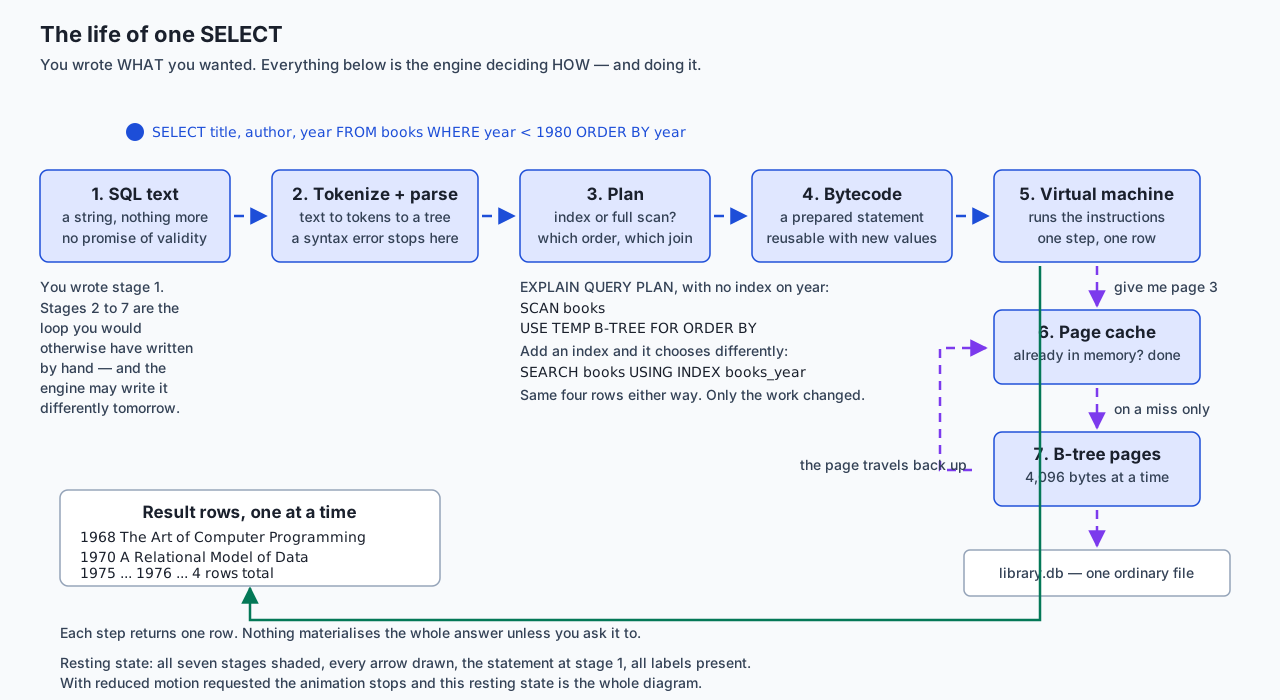
Follow one statement across it. SELECT title, author, year FROM books WHERE year < 1980 ORDER BY year arrives as a string with no guarantee of being valid. It is tokenized and parsed. The planner chooses — with no index on year, it chooses SCAN books plus a temporary B-tree for the sort; add an index and it chooses SEARCH books USING INDEX books_year instead, for the same four rows. The choice is compiled to bytecode. The virtual machine runs it, asking the pager for pages; the pager answers from its cache or reads 4,096 bytes from the file. Rows come back one at a time, one per step.
You wrote the first box. Everything after it is the loop you would otherwise have written by hand — which brings us to writing it by hand.
Building the engine from scratch
The fastest way to stop finding SQL mysterious is to implement the part of it you actually use. Almost every SELECT you will write this week is three operations, and they are the ones Codd’s relational algebra calls restriction and projection, plus a sort:
def restrict(rows, predicate):
    """WHERE. One pass, every row, no cleverness."""
    kept = []
    for row in rows:
        if predicate(row):
            kept.append(row)
    return kept


def project(rows, columns):
    """The column list after SELECT."""
    return [{column: row[column] for column in columns} for row in rows]


def order_by(rows, key, descending=False):
    """ORDER BY — and NULLs have to be decided, not assumed."""
    return sorted(
        rows,
        key=lambda row: (row[key] is None, row[key] if row[key] is not None else 0),
        reverse=descending,
    )
Three details in those twelve lines are worth more than the lines themselves.
restrict calls the predicate on every row, always, whether one matches or all of them do. That is what “full table scan” means, and writing it makes the cost visible in a way that reading about indexes does not.
order_by cannot simply sort, because Python refuses to compare None with an integer. Somebody has to decide where NULLs go. The version above puts them last; SQLite’s own default in an ascending sort puts them first. Neither is wrong, and the difference is exactly the kind of thing that makes two “identical” queries disagree.
And the pipeline order — restrict, then project, then sort — is a cost decision, not a correctness one. Sorting four rows after filtering is cheaper than sorting fifty thousand before it. Choosing that order is precisely the job you hand to the query planner the moment you write SQL instead.
Then the payoff. The lab runs the hand-written scan and the equivalent SELECT over the same six books and requires them to match:
by hand (table_scan.py)                      | by SQL (SELECT ...)
---------------------------------------------+---------------------------------------------
1968  The Art of Computer Programming        | 1968  The Art of Computer Programming
1970  A Relational Model of Data             | 1970  A Relational Model of Data
1975  The Mythical Man-Month                 | 1975  The Mythical Man-Month
1976  A Discipline of Programming            | 1976  A Discipline of Programming

IDENTICAL: 4 rows, same values, same order.
Not “similar”. Identical, asserted mechanically, exiting non-zero if they ever differ. SQL is not a different kind of answer. It is your loop, written by somebody who has spent twenty-five years making it fast.
The walkthrough
Everything above is one file and four commands. The shell’s dot-commands — .tables, .schema, .mode, .headers, .quit — are instructions to the shell program, not SQL: no semicolon, no trailing comment on the same line, and no other SQLite client understands them.
sqlite> .tables
books    loans    members

sqlite> .mode box
sqlite> .headers on
sqlite> SELECT title, year FROM books ORDER BY year;
And then the question the JSON file could not answer cheaply, answered in one statement across three tables:
┌──────────────┬──────────────────────────────┬────────────┬───────────┐
│   borrower   │             book             │    due     │ days_late │
├──────────────┼──────────────────────────────┼────────────┼───────────┤
│ Ada Lovelace │ The Mythical Man-Month       │ 2026-06-22 │ 55        │
│ Grace Hopper │ A Discipline of Programming  │ 2026-07-26 │ 21        │
│ Ada Lovelace │ Structure and Interpretation │ 2026-08-10 │ 6         │
└──────────────┴──────────────────────────────┴────────────┴───────────┘
You never said how. (The JOIN that spans the three tables is Day 87’s subject; it appears today because the point of today is that spanning them is still one request.)
An everyday analogy
Think of the difference as the gap between a notebook and a properly run lending library.
The notebook is your JSON file. One book, lines written in order, everything about everything. It has real virtues: you can read it with your own eyes, it needs no training to use, and there is exactly one thing to carry home. It is the right tool for a small collection and a single librarian, and reaching past it too early is a genuine mistake, not a cautious one.
Its limits arrive together, and each one maps onto a measurement from the first section. To correct a single entry cleanly you copy the whole book out again — that is the 8.6 megabytes. Nothing stops you writing a borrower’s card number that belongs to nobody, because the notebook is paper and paper has no opinions — that is member_id=999. If two assistants both take the notebook home to update it, one of their evenings is lost when the books are reconciled — that is the lost update, and note that each of them wrote perfectly carefully. And to find every overdue loan you read every line, every time, because the notebook has no order but the order things happened in.
The library is the database, and it is not one artefact but a system with rules.
The shelves are the tables: books here, membership records there, loan slips somewhere else, each holding one kind of thing. The membership number is the primary key — the thing that identifies a person even when two of them are called Ada, and the thing a loan slip records rather than copying out a name and address that will be wrong within a year.
The rules at the desk are the constraints, and the crucial thing about them is where they live. They are not in the head of the librarian on duty. They are the procedure: no loan without a valid membership number, no two members on one number, no due date before the borrowing date. The relief member of staff on a Saturday follows the same rules, because the rules belong to the library and not to whoever is standing at the desk. That is the difference between validation in your application code and a constraint in your schema.
The card catalogue is the index. It contains no books. Every fact it holds is also on the shelves, and removing it would change nothing about what the library contains — only about how long it takes to find anything. This is why adding an index never changes an answer, and it is worth sitting with, because it is the piece people find genuinely surprising.
The stamped slip and the counter are the transaction. A loan means both a slip in the tray and a mark against the shelf copy, and a borrowing that did one without the other has left the library in a state that is not true. You do them as one act, and if the second cannot be done, you undo the first.
And the reading room is the concurrency model. Any number of people may read at once, and while somebody is reshelving that section, only one of them may be doing it. Which is exactly SQLite: many readers, one writer.
The analogy has one honest limit, and it is worth naming rather than hiding. A library is a building with staff — a shared service, which is what a client-server database is. SQLite is not that. SQLite is more like a private study whose entire contents are one box file, run under the same rules, that you carry with you and hand to somebody else complete. All the rules hold; the building does not exist.
Examples in practice
Everything below is a real capture from today’s lab, on the authoring machine, offline.
Both SQLite versions, and why they differ. Run these two commands right now:
$ sqlite3 --version
3.51.0 2025-06-12 13:14:41 f0ca7bba1c5e232e5d279fad6338121ab55af0c8c68c84cdfb18ba5114dcaapl (64-bit)

$ python3 -c "import sqlite3; print(sqlite3.sqlite_version)"
3.53.3
Two different SQLite libraries on one machine, and nothing is misconfigured. The shell is a program that links its own copy; the Python module is a different program that links its own. Both read and write the same file format — a database written by one is opened by the other with no conversion, which is exactly the guarantee the documented file format exists to provide. The version that matters is whichever belongs to the program you are running. The lab’s test suite reports both and deliberately does not assert they are equal; writing that assertion would have meant either a failing suite or a false claim.
The schema refusing seven writes, each naming its rule:
=== 1. A typo in a member id. There is no member 999. ===
Runtime error: FOREIGN KEY constraint failed (19)
=== 3. A member with no name ===
Runtime error: NOT NULL constraint failed: members.name (19)
=== 4. A second member with an address already in use ===
Runtime error: UNIQUE constraint failed: members.email (19)
=== 5. A negative number of copies ===
Runtime error: CHECK constraint failed: copies >= 0 (19)
And then the count, which is the part that matters: 6 / 4 / 7 / 2 — books, members, loans, and the copy count of book 1, all exactly as before. A refused write changes nothing.
The rule that is switched off until you ask. SQLite defaults PRAGMA foreign_keys to OFF, for backward compatibility, per connection. The lab runs the identical rejected statement with the pragma off and requires it to be accepted:
ok: with foreign_keys OFF the SAME bad write is accepted — the rule is opt-inWrite PRAGMA foreign_keys = ON; at the top of every script and connection.execute("PRAGMA foreign_keys = ON") in every Python connection. Without it, REFERENCES is a comment.
A transaction undoing itself:
inside the transaction:  loans 8, copies_of_book_3 2
after ROLLBACK:          loans 7, copies_of_book_3 3
after COMMIT:            loans 8, copies_of_book_3 2
And from Python, atomicity across a failure. with connection: commits on success and rolls back on any exception. One good insert followed by one that violates a foreign key:
transaction refused: FOREIGN KEY constraint failed
loans before: 7, after: 7
The good write was undone with the bad one. Atomicity is not “each statement worked”; it is “the group did”.
A hostile value, passed as a parameter:
looking up a member whose name is an attempted injection:
  value: "Ada'; DROP TABLE loans; --"
  rows returned: 0
  loans table still has 7 rows
The value was never parsed as SQL. It was a string, and the engine compared it to a column. That is the entirety of SQL injection defence, and it costs one character: ? instead of an f-string. Two precisions, because half-understood advice is what gets people hurt. Escaping is not the fix — writing your own quote-doubling means being right about every dialect quirk forever. And parameters are for values, not identifiers: you cannot write ORDER BY ?, and if a column name must be chosen at runtime, validate it against an allow-list you wrote.
The whole thing behind one command:
44 checks, 0 failure(s).Implications: security, privacy, performance, scalability, and cost
Security. The single largest item is SQL injection, and it has one answer: pass values as parameters and never build a statement out of a string. Everything else is secondary, and worth knowing precisely. A SQLite database has no users, no roles and no passwords — filesystem permissions are the access control, so chmod 600 a database holding anything private. It is not encrypted; the contents are readable with strings, and encrypted builds exist as separate products. Deleting a row does not scrub its bytes — the space is marked free and reused later; VACUUM rebuilds the file and PRAGMA secure_delete = ON overwrites, neither on by default. And opening a database file from an untrusted source is not the innocent act that opening a text file is: the format is complex, and a deliberately corrupted file is an attack surface. Treat one you were sent the way you would treat any other untrusted input.
Privacy. A schema is a written-down decision about what you keep, which makes it the best place you will ever get to make that decision deliberately. A database makes accumulation cheap and querying cheaper, so the discipline has to come from you: store the fields you need rather than the fields you were offered, decide how long rows live before you write the first one, and remember that a members table with names and addresses carries every obligation any other record about a person does — including being able to delete it, which is a schema question as much as a policy one, because a foreign key from loans decides whether you can.
Performance. For anything the size of today’s lab, everything is instant and reasoning about speed is a waste of your attention. What is worth internalising instead are the shapes. An unindexed WHERE is a full scan, and its cost grows with the table. An indexed lookup is a descent, and its cost grows with the logarithm of the table — which is why the gap between them widens forever. An index costs space and makes every write slower, because the index must be maintained too, so indexing everything is its own mistake. Reads are cheap and writes take a lock. And EXPLAIN QUERY PLAN is how you find out what is actually happening rather than what you assume: use it before optimising anything.
Scalability. SQLite scales further than its reputation and stops in specific, knowable places. The documented limits are enormous — a database may hold terabytes — and the practical ceilings arrive long before them. Write concurrency is the real one: one writer at a time for the whole database. WAL mode lets readers continue during a write and does not change that. The network filesystem is the other: SQLite relies on the operating system’s file locking, which is unreliable over NFS and SMB, and a database on a network share is a database you will eventually corrupt. The moment you need several machines writing, or per-user access control, or a connection over a network, you have described a client-server database and should use one.
Cost. SQLite is free, and unusually so: its source is in the public domain rather than under a licence, so there is no attribution requirement and nothing to comply with. Python and its sqlite3 module are free. There is no server to pay for and no instance to leave running by accident — which, over a year, is a larger saving than it sounds for a personal project. PostgreSQL, MySQL, MariaDB and DuckDB are all free and open source too; you pay for hardware, or for somebody to run them for you. Managed and commercial database services charge, on models that change often enough that any figure printed in a lesson may already be wrong: read the vendor’s current pricing page rather than trusting this one.
Alternatives: free, open source, and commercial
Five options, honestly. The headline first: for a single application on a single machine, SQLite is very often the correct answer, and reaching past it is a common and expensive mistake.
| Option | Shape | When to choose it | Cost |
|---|---|---|---|
| SQLite | Embedded, one file, in your process | One machine, one application, moderate write concurrency | Free; public domain |
| PostgreSQL | Client-server, general purpose | Several clients, users and permissions, network access, strict typing | Free and open source |
| MySQL / MariaDB | Client-server, general purpose | Same, especially where the hosting or ecosystem expects it | Free and open source |
| DuckDB | Embedded, column-oriented, analytical | Aggregating over millions of rows on one machine | Free and open source |
| Oracle, SQL Server, managed cloud services | Commercial or hosted | Somebody else operates it, or you need vendor support and tooling | Paid; check current pricing |
SQLite. Choose it when one application on one machine owns the data: a desktop or mobile app, a command-line tool’s state, a website with modest write traffic, an analysis you want to be able to hand to somebody as a file, or — as Day 84’s fifth extension exercise suggests — the state file of an automation that has outgrown JSON. How to use it: nothing to install, and
sqlite3 library.db < schema.sqlConcretely: today’s whole lab, from an empty directory to three tables and a three-table query, with no server, no port and no credential. Move on from it when several machines must write, when you need per-user permissions inside the database, or when the data must be reached over a network. Free; public domain, which means no licence obligations at all.
PostgreSQL. A client-server relational database with a reputation for correctness, strict typing, rich extensions and an unusually good implementation of the SQL standard. Choose it when several clients write concurrently, when you need roles and permissions inside the database, when the data outlives any one application, or when you want types that actually enforce themselves without opting in. How to use it — it is a service, so there is a server to run and then:
psql --host=127.0.0.1 --port=5432 --username=you libraryConcretely: a web application whose data must survive redeploys and be readable by a separate analytics job. Its cost is operational rather than financial: a process to keep alive, back up, upgrade and secure. Free and open source, under the PostgreSQL Licence.
MySQL and MariaDB. MySQL is a long-established client-server database; MariaDB is a community fork of it and the two remain broadly compatible. Choose either when your hosting, framework or team already assumes it — which is a genuinely good reason and not a lazy one, because the operational knowledge around you is worth more than a feature comparison. How to use it:
mysql --host=127.0.0.1 --user=you --password libraryConcretely: a WordPress or Django site on shared hosting, where MySQL is what the host provides. Both are free and open source; MySQL is also sold under a commercial licence by its owner, which matters if you intend to embed it in a product you distribute.
DuckDB. The most interesting contrast with SQLite, because it makes almost the same trade in almost the opposite direction. Like SQLite it is embedded, serverless, and lives in one file or in memory. Unlike SQLite it stores data by column rather than by row, which is the right layout for analysis: summing one column across ten million rows touches only that column’s data. Choose it when your questions are analytical — aggregate, group, join large tables, read Parquet or CSV directly — and when they are about many rows and few columns. How to use it:
duckdb analysis.duckdbConcretely: computing statistics over an evaluation log with millions of rows, on your laptop, without a cluster. Choose SQLite instead when the work is transactional — many small reads and writes touching whole rows, which is what an application does. The rule of thumb worth remembering: SQLite for the application, DuckDB for the analysis, and it is entirely normal to use both. Free and open source, under the MIT Licence.
Oracle Database, Microsoft SQL Server, and managed cloud offerings. The commercial tier splits in two. Oracle and SQL Server are long-established commercial engines with deep tooling, formal support contracts and large existing installations — you meet them because an organisation already runs one, and the reason to choose one is usually that reason. Managed cloud services take an engine, often PostgreSQL or MySQL, and run it for you: provisioning, backups, patching, failover and monitoring become somebody else’s job. Choose the managed route when operating a database is not work you want to own, and understand the trade: your data lives on somebody else’s infrastructure, some administrative control is not yours, and moving away later is real work. All of these are paid, on licensing and usage models that change; several offer free tiers with conditions. No price, tier or allowance is quoted here because none was verified — read the vendor’s current pricing page.
Comparison with related concepts
| Concept A | Concept B | Key difference |
|---|---|---|
| Relation | Table | The same thing. “Relation” is the mathematical term — a set of tuples — and is where “relational” comes from; it does not mean “tables relate to each other” |
| Row | Tuple | The same thing again, from two vocabularies. A tuple is ordered by column position; a row is usually addressed by column name |
| Primary key | Candidate key | A candidate key is any column set that uniquely identifies a row. The primary key is the one you chose. email is a candidate key; member_id is the primary key, because a key should not change and an address does |
| Primary key | Unique index | UNIQUE also forbids duplicates, but permits NULL and does not identify the row. A primary key is a statement of identity |
| Schema | Validation code | Both check writes. Only the schema checks writes made by programs you have never seen, including next year’s |
| Constraint | Index | A constraint changes which writes are allowed. An index changes only how long a read takes — no answer moves |
| Declarative | Imperative | SQL says what result you want; a loop says what steps to take. The engine may choose different steps tomorrow for the identical query |
| Type affinity | Static typing | An affinity is a preference the engine applies when it can. A static type is a rule. STRICT turns the first into the second |
| Storage class | Declared type | The storage class is what a value actually is; the declared type is what the column asked for. typeof() reports the first |
| NULL | Zero or empty string | NULL means “no value”. It is not equal to anything, including itself, which is why you write IS NULL and not = NULL |
| Transaction | Atomic file write | An atomic write stops a file being torn in half. A transaction stops two writers seeing each other’s half-finished work. Day 84 had the first; only a database gives the second |
| ACID | Durability alone | fsync gives you the D. Atomicity, consistency and isolation need a transaction manager, which is what the pager is |
| Rollback journal | Write-ahead log | A journal stores the old pages so a change can be undone; a WAL stores new pages so readers can keep using the old ones. WAL allows readers during a write; neither allows two writers |
| SQLite | PostgreSQL | Embedded in your process against a server you connect to. SQLite’s own position is that it competes with fopen, not with Postgres |
| SQLite | DuckDB | Row-oriented and transactional against column-oriented and analytical. Application against analysis |
| Page | Row | A page is the fixed-size unit the engine reads and writes — 4,096 bytes here. A row lives inside one, and one page usually holds many rows |
| B-tree | Sorted list | Both are ordered. A B-tree is arranged in pages so a lookup is a short descent with few disk reads, which a sorted list in memory does not need to care about |
When to use it — and when not to
Use a database — any database — the moment more than one of these is true. The data outlives the program that wrote it. More than one thing writes it. It has rules you would otherwise enforce by hand in every writer. You will ask questions of it that you cannot enumerate today. It is larger than you want to hold in memory. Or you need a change to be all-or-nothing.
Keep the file when none of those hold. A configuration file is a file. A single-run script’s output is a file. A cache you can rebuild is a file. Something a human is expected to read and edit is a file, and turning it into a database makes it worse. Day 84’s feedkit state file was the right choice for feedkit, and it would have been wrong to open this course’s automation week by reaching for SQLite.
The honest signal for the switch is not size. It is the first time you write a loop over the whole file to answer a question, or the first time you find yourself validating a relationship by hand.
Choose SQLite over a server when one application on one machine owns the data. That covers vastly more cases than the industry’s habits suggest: desktop and mobile applications, command-line tools, a personal or small-team website, a data analysis you want to hand over as a single file, and every automation whose state has outgrown JSON. The deciding question is not “how much data” but “how many writers, and where do they live”.
| Signal | SQLite | A client-server database |
|---|---|---|
| Writers | One process, or a few on one machine | Many, and concurrently |
| Where they run | The same machine as the file | Anywhere on a network |
| Access control | The filesystem’s permissions are enough | You need users and roles inside the database |
| Operations you want to own | None: no process to keep alive | You accept running, backing up and upgrading a service |
| Data lifetime | Tied to one application, or portable as a file | Outlives any one application; several read it |
| Deployment | Copy the file | Provision, configure, secure, monitor |
| Analytics over millions of rows | Consider DuckDB instead | Or a warehouse, depending on scale |
Do not use SQLite when several machines must write; when you need per-user permissions inside the database; when the file would live on a network filesystem, where the locking it depends on is unreliable and corruption is a matter of time; or when write concurrency is the workload rather than an occasional event. Each of those is a description of a client-server database, and the right response is to use one rather than to work around SQLite’s design.
And do not use a relational database at all when your data genuinely is not relational: a pure key-value cache, a document with no fixed shape and no cross-references, or a graph whose whole purpose is traversal depth. Those models exist because the relational trade is a trade. But be suspicious of reaching for them early — a very large amount of “our data is not relational” turns out, on inspection, to be a schema nobody wanted to write down.
Where this goes next in AI work
Every dataset you train on is a table before it is a tensor. Every evaluation run you compare against last week’s is rows with a run id, a timestamp and a score — which is Day 84’s structured log, given a schema and made queryable. Every fine-tuning corpus needs versioning, deduplication and the ability to answer “which examples went into this model”, and all three of those are queries. Every feature store is a database with a fashionable name.
And the retrieval half of retrieval-augmented generation is, precisely, a query. A vector search finds candidate chunks by similarity; then something has to filter them by permission, by date, by document, by tenant — and that something is a WHERE clause. The systems that do this well are relational databases with a vector index bolted on, not the reverse, and the reason is exactly the reason this lesson exists: the hard parts of a retrieval system are constraints, joins and transactions, all of which were solved in 1970 and none of which need solving again.
There is one thing that genuinely changes. In an AI pipeline, re-running a step can cost real money in inference calls rather than milliseconds of CPU — so “which documents have I already embedded?” stops being a tidiness question and becomes a line on an invoice. That is a primary key doing its job, and it is the same primary key you are about to declare on books.
Knowledge check
Try these from memory before looking back:
- Name the four failures of a JSON file that a database fixes, and for each one name the database feature that fixes it and roughly what it costs.
- What does the word “relational” actually refer to? Define a relation, a tuple and a candidate key, and explain why
emailwas not chosen as the primary key ofmembers. - Explain what “declarative” means by describing something you did not write when you wrote a
SELECT. Then say whatEXPLAIN QUERY PLANshows you and why the same query may be planned differently tomorrow. - Walk the seven layers of SQLite from your program to the disk, and say which layer makes the ACID guarantees.
- A column is declared
INTEGERand you insert the text'not-a-number'. What happens, what doestypeof()report afterwards, and what happens when you then runWHERE year < 2000? What exactly does aSTRICTtable change, and what does it not change? - Give the four letters of ACID and one concrete consequence of each for the
loanstable. Which one names a failure that Day 84’s atomic write could not prevent, and why not? PRAGMA foreign_keysdefaults to OFF. What is the consequence, what is the scope of the setting, and where must you turn it on?- Give three signals that a project should move from a file to a database, and three signals it should move from SQLite to a client-server database. Then name a case where the file is still correct.
Hands-on exercise
Build a database from an empty directory, and prove what it gives you that a file did not. In the Day 85 lab you make the JSON file fail with measurements, write a schema for books, members and loans, read the file header’s bytes yourself, implement WHERE, the column list and ORDER BY by hand, and assert mechanically that SQL returns exactly what your loop does.
There is nothing to install. Check what you have:
sqlite3 --version
python3 -c "import sqlite3; print(sqlite3.sqlite_version)"
Read both numbers, and notice whether they agree. On the authoring machine they do not, and that is normal — two programs, two copies of the library, one file format.
Run the whole harness first:
bash tests/run_tests.sh
echo "exit code: $?"
Then work through it by hand, in a scratch copy:
mkdir -p scratch && cp examples/* scratch/ && cd scratch

python3 json_pain.py                       # measure the four costs first

sqlite3 library.db < schema.sql            # the database did not exist a moment ago
sqlite3 library.db < seed.sql
ls -l library.db
python3 file_facts.py library.db           # read the 16-byte header yourself

sqlite3 library.db < queries.sql           # dot-commands, then real SQL
sqlite3 library.db < constraints_demo.sql  # seven refusals; exits 1 on purpose
sqlite3 typing.db < typing_demo.sql        # affinity, then STRICT; also exits 1

python3 table_scan.py                      # the engine you wrote
python3 scan_vs_sql.py library.db          # and the proof they agree
python3 library_py.py library.db           # parameters, rows, transactions
Then build it yourself. starter/schema.sql ships with the books table written out as a worked model and eight numbered exercises: the members table, the candidate-key question, the loans table with its two REFERENCES clauses, a CHECK, an index, a STRICT table, a seeded transaction, and the overdue query. starter/table_scan.py has three: restrict, project and order_by. Each one names the check in tests/run_tests.sh that will confirm it.
Expected output
The harness ends with a real captured line:
44 checks, 0 failure(s).file_facts.py prints matches the documented magic string: True, a page size of 4,096, a page count of 7, and a product of 28,672 bytes that equals what ls -l reports. constraints_demo.sql produces seven Runtime error lines naming FOREIGN KEY, NOT NULL, UNIQUE and CHECK, then reports 6 / 4 / 7 / 2 — unchanged. typing_demo.sql shows not-a-number stored with a typeof of text in a column declared INTEGER, a WHERE year < 2000 matching 4 of 5 rows, and then:
Runtime error: cannot store TEXT value in INTEGER column tight.year (19)scan_vs_sql.py prints IDENTICAL: 4 rows, same values, same order. and exits 0. The overdue query returns three rows with days_late of 55, 21 and 6.
Validate your work
bash tests/run_tests.shends with44 checks, 0 failure(s).and exits 0.- Both version commands print a
3.xnumber; they need not print the same one. - Page size times page count equals the size
ls -lreports, and the first sixteen bytes areb'SQLite format 3\x00'. - Seven bad writes are refused, and the row counts afterwards are
6 / 4 / 7 / 2. - Re-running the foreign-key write with
PRAGMA foreign_keys = OFFaccepts it. - The
STRICTtable refuses'not-a-number'and still accepts'1970'as an integer. python3 scan_vs_sql.py library.dbexits 0 — and exits 1 if you break one line ofrestrict,projectororder_by. Try it, then put it back.- A
ROLLBACKof a two-statement transaction restores both the loan count and thecopiescolumn. python3 library_py.py library.dbreportsloans before: 7, after: 7after a failedwith connection:block.find . -name "*.db"inside the lab finds nothing after cleanup.
Troubleshooting
The lab’s troubleshooting.md has the full list. The five you are most likely to meet: the two SQLite version numbers disagreeing, which is normal and not a fault; UNIQUE constraint failed: books.book_id, which means you applied seed.sql twice — delete the file and start again; FOREIGN KEY constraint failed, which is the lab working, while the same write being accepted means PRAGMA foreign_keys is off on that connection; a query returning fewer rows than you expect, which is almost always type affinity and is diagnosed with SELECT year, typeof(year) FROM books; and no such table, which usually means sqlite3.connect created an empty database next door because the path was relative. Also worth reading before you need it: Usage: .headers on|off, which means you put a -- comment on the same line as a dot-command.
Common mistakes
- Leaving
PRAGMA foreign_keysoff. The most consequential mistake here. Off,REFERENCESenforces nothing, and it is off by default, per connection. - Building SQL with an f-string. One character of extra typing ends SQL injection; nothing else does.
- Trusting a declared type.
INTEGERis an affinity, not a rule. UseSTRICTwhen you want a rule. - Comparing with
= NULL. NULL is not equal to anything, including itself. UseIS NULL. - Using double quotes for a string. In SQL, double quotes mean an identifier.
'Ada'is text;"Ada"is a column that probably does not exist. - Assuming row order without
ORDER BY. A relation is a set. Rows arriving in insertion order is luck, and it will change the day the planner picks a different index. - Putting the database on a network filesystem. SQLite depends on the operating system’s file locking, which is unreliable there. This corrupts data eventually.
- Indexing everything. An index costs space and slows every write. Measure with
EXPLAIN QUERY PLANfirst. - Using
date('now')in a fixture. It makes today’s capture stop matching tomorrow. Write the date down.
Practice assignment
Take something you currently keep in a file — Day 84’s feedkit-state.json is the obvious candidate, but a personal expense log, a reading list, a workout record or a collection of anything will do — and move it into SQLite properly.
Before writing any SQL, write the schema out in prose. What are the things? What identifies each one? Which facts about them are you keeping, and which are you choosing not to keep? Which relationships exist, and in which direction? Which values must never be missing, and which are legitimately unknown? That last distinction is the one people skip, and it is the difference between a NOT NULL column and one where NULL means something specific.
Then build it. Every table gets a primary key. Every reference between tables gets a REFERENCES clause, and PRAGMA foreign_keys = ON at the top of every script. At least one CHECK that expresses a rule you would otherwise have written in Python. At least one column where you deliberately chose STRICT over affinity, and a comment saying why. Seed it inside a single transaction.
Then migrate your real data in, from the file, with a Python script that reads the old format and writes the new one — using parameters, never string formatting. Expect the migration to fail on rows the old file was happy to hold. Those failures are the point. Keep a list of them; that list is the argument for this whole lesson, written by your own data.
Finally, ask it three questions you could not cheaply ask the file, and write down for each what the file version would have cost. Then run EXPLAIN QUERY PLAN on all three, add an index, and run them again — noting carefully that the answers did not move.
Your deliverable is the schema file, the migration script, the list of rows that failed to migrate, and the three queries with their before-and-after plans.
Extension challenge
Three extensions, each forcing a judgement rather than more typing.
Break the type system on purpose, and then defend against it. Take a table with an INTEGER column and write a small script that inserts a mixture of good integers and plausible-looking rubbish — '12', '12 ', 'twelve', '', None, 12.0, 12.5. Predict each result before you run it, then check with typeof(). Now write a SELECT with a WHERE on that column and work out precisely which rows have gone missing and why. Then convert the table to STRICT and repeat, and record which of your seven values are now refused. Finally, answer the design question in writing: given that STRICT exists, why is it not the default, and what would break if it were?
Find the point where the index starts to matter, by measuring it. Generate loan tables of 1,000, 100,000 and 1,000,000 rows. Time the overdue query with no index, then with one, then look at EXPLAIN QUERY PLAN for both. Plot or tabulate the four numbers. Then do the other half, which is the half people skip: time an INSERT of 10,000 rows with the index present and absent. You now have both sides of the trade in numbers you produced. Write one sentence saying at what size you would add that index to a real project, and why.
Design the schema for something genuinely hard, and defend it. Pick a domain with real ambiguity: a library where a title has several physical copies and a loan is of a copy rather than a title; a recipe collection where an ingredient appears in many recipes with different quantities; a course where a student may enrol twice in different years. Write the tables. Then attack your own design: name three facts your schema cannot express, three writes it would wrongly allow, and one question it makes needlessly expensive. Fix what is worth fixing and write down, explicitly, what you chose to leave broken and why. A schema you can criticise is a schema you understand, and being able to say what your model deliberately does not capture is the skill this whole week is building toward.
Quiz
Q1. A JSON file holds 50,000 loan records. One loan is returned, so one field changes from null to a date — 27 bytes. What does the update cost, and what does a database do instead?
- The whole file is read and written again: on the authoring machine, over 17 megabytes moved to change 27 bytes. A database rewrites only the fixed-size page holding that row
- Only the changed bytes are written, because json.dump seeks to the right offset
- The cost is the same in both cases; databases are faster only for reads
- The file grows by 27 bytes and nothing else is touched
Show answer
Answer: A. The whole file is read and written again: on the authoring machine, over 17 megabytes moved to change 27 bytes. A database rewrites only the fixed-size page holding that row
This is measured in the lab, not argued: 8,622,249 bytes read and 8,622,241 written to change a 27-byte field. JSON is a single serialised document, so there is no such thing as changing part of it — you parse it all, edit in memory, and serialise it all back. A database file is divided into fixed-size pages (4,096 bytes on both SQLite builds used here), so an update touches the page holding the row. The consequence is not just speed: the cost of an update stops depending on how much data you already have, which is what lets a store keep growing without every write getting slower.
Q2. Two processes both read a JSON state file, both make a different change, and both write it back with the atomic write from Day 84. What happens, and which ACID letter names the missing guarantee?
- Both changes survive, because each write was atomic
- The second write fails, because the file changed underneath it
- One update is silently lost. Atomicity protects a file from being torn in half; ISOLATION is what protects two transactions from each other, and os.replace cannot provide it
- The file is corrupted, which is exactly what the atomic write was designed to prevent
Show answer
Answer: C. One update is silently lost. Atomicity protects a file from being torn in half; ISOLATION is what protects two transactions from each other, and os.replace cannot provide it
Both writes succeed and both are genuinely atomic — the file is never half-written. And one update vanishes anyway, because each writer built its whole new file from a snapshot taken before the other wrote. This is the sharpest distinction in the lesson: an atomic file write is about one file's integrity, while isolation is about two concurrent transactions not seeing or clobbering each other's work. They are different problems, and only the second requires a transaction manager — which in SQLite is the pager. It is also why "we write the file atomically" is not an answer to "what happens when two things write".
Q3. A column is declared INTEGER. You insert the text 'not-a-number'. What happens?
- SQLite raises an error, because the column is declared INTEGER
- It is accepted and stored with storage class text; typeof() then reports text, and WHERE year < 2000 will never match that row — silently
- It is converted to the integer 0
- It is accepted but the row is flagged, and PRAGMA integrity_check reports it
Show answer
Answer: B. It is accepted and stored with storage class text; typeof() then reports text, and WHERE year < 2000 will never match that row — silently
A declared type in SQLite is an AFFINITY — a preference applied when a lossless conversion is possible and abandoned when it is not. The text '1970' becomes the integer 1970; 'not-a-number' cannot, so it is stored as text in a column the schema calls INTEGER, with no error, no warning and no log line. The expensive consequence comes later: in SQLite's sort order every integer sorts before every text value, so that row can never satisfy year < 2000. In the lab, five rows go in and a count returns four, and nothing anywhere says so. Diagnose it with SELECT year, typeof(year); fix it with a STRICT table, which refuses values that genuinely are not the declared type while still allowing the lossless conversion.
Q4. Your schema declares loans.member_id as REFERENCES members(member_id). You insert a loan naming member 999, who does not exist, and SQLite accepts it. What is wrong?
- The members table needs a UNIQUE constraint on member_id as well
- Foreign keys only apply to STRICT tables
- The REFERENCES clause must name the table before it is created
- PRAGMA foreign_keys is off. SQLite defaults it to OFF for backward compatibility, per connection — and without it a REFERENCES clause enforces nothing at all
Show answer
Answer: D. PRAGMA foreign_keys is off. SQLite defaults it to OFF for backward compatibility, per connection — and without it a REFERENCES clause enforces nothing at all
This is the single most consequential default in SQLite. Foreign key enforcement is off unless you turn it on, it is a per-connection setting rather than a property of the file, and it is not remembered between sessions. So the same schema can enforce the rule in one script and ignore it in the next. The lab proves it directly: the identical write that is refused with the pragma on is accepted with it off, and a check asserts exactly that. Write PRAGMA foreign_keys = ON at the top of every SQL script and connection.execute("PRAGMA foreign_keys = ON") in every Python connection. Without it, the most valuable line in your schema is a comment.
Q5. You add an index to a table. What changes?
- How long some queries take, and how much space and write cost the table carries. No answer to any query changes
- Which rows some queries return, because indexed columns are searched more thoroughly
- The order rows are returned in, permanently
- Nothing measurable until the table exceeds one million rows
Show answer
Answer: A. How long some queries take, and how much space and write cost the table carries. No answer to any query changes
An index is a promise about speed, never about meaning — this is Codd's data independence, and it is why you can tune storage without touching a single query. The lab shows the planner changing its mind about the identical statement (SCAN books plus a temporary B-tree for the sort, versus SEARCH books USING INDEX books_year) while the same four rows come back in the same order. Note the other half of the trade, which people forget: an index costs disk space and makes every INSERT, UPDATE and DELETE slower, because the index must be maintained too. Indexing everything is its own mistake. Measure with EXPLAIN QUERY PLAN before adding one.
Q6. Which of these is the honest reason to move from SQLite to a client-server database such as PostgreSQL?
- The database has grown past a few hundred megabytes
- You need transactions, or foreign keys, or ACID guarantees
- Several machines must write to it, or you need user accounts and permissions inside the database, or it would have to live on a network filesystem
- You have started writing joins across more than two tables
Show answer
Answer: C. Several machines must write to it, or you need user accounts and permissions inside the database, or it would have to live on a network filesystem
The deciding question is never data volume — SQLite handles far more than its reputation suggests, and it has full transactions, foreign keys and ACID already. The real limits are structural: one writer at a time for the whole database (WAL mode lets readers continue during a write but does not change that); no users, roles or passwords inside the file, so filesystem permissions are the entire access control; and a dependence on operating-system file locking that is unreliable over NFS and SMB, which makes a database on a network share a database you will eventually corrupt. Each of those is a description of a client-server database. SQLite's own position is that it competes with fopen(), not with Postgres — the question is usually "database or custom file format", not "SQLite or Postgres".
Q7. In Python, why write connection.execute("SELECT * FROM members WHERE name = ?", (name,)) rather than an f-string?
- It is faster, because the driver caches the compiled statement
- Because the value is never parsed as SQL — it is bound to the prepared statement and compared as data, so it cannot become part of the statement
- Because f-strings do not escape single quotes correctly on Windows
- It is purely a style convention; both are equally safe once you validate the input
Show answer
Answer: B. Because the value is never parsed as SQL — it is bound to the prepared statement and compared as data, so it cannot become part of the statement
The statement is compiled once, with a placeholder, before any value is involved. Binding a value afterwards cannot change the statement's structure, so a hostile input like "Ada'; DROP TABLE loans; --" is simply a string that matches no member name — which the lab demonstrates, leaving the loans table intact. Two precisions matter. Escaping is not an equivalent fix: writing your own quote-doubling means being right about every encoding and dialect quirk forever, while parameters move the problem to the engine, which is where it belongs. And parameters are for VALUES, not identifiers — you cannot write ORDER BY ?, so if a column name must be chosen at runtime, validate it against an allow-list you wrote. Prepared statements are also often faster, but that is a bonus, not the reason.
Q8. You are aggregating over an evaluation log of twenty million rows on your laptop — summing and grouping a few columns at a time. Which tool fits best, and why?
- PostgreSQL, because twenty million rows requires a server
- SQLite, because it is embedded and there is nothing to install
- A managed cloud data warehouse, because this is analytical work
- DuckDB: like SQLite it is embedded, serverless and file-based, but it stores data by column rather than by row, which is the right layout for reading a few columns across very many rows
Show answer
Answer: D. DuckDB: like SQLite it is embedded, serverless and file-based, but it stores data by column rather than by row, which is the right layout for reading a few columns across very many rows
DuckDB is the analytical counterpart to SQLite and makes almost the same trade in the opposite direction. Both are embedded, serverless and free — no process, no port, no credential. The difference is physical layout: SQLite stores rows together, which suits an application doing many small reads and writes of whole records; DuckDB stores columns together, so summing one column across twenty million rows touches only that column's data instead of walking every record. The rule of thumb worth keeping is SQLite for the application, DuckDB for the analysis, and using both in one project is entirely normal. A server or a warehouse would work, but neither is needed for one laptop and one file, and both cost operational effort or money that this workload does not require.
Glossary
- Relational model
- The way of organising data that Edgar F. Codd published in Communications of the ACM in June 1970: data held as relations rather than reached by following pointers, and queries expressed as operations on sets. Its central promise is data independence — you can change how data is stored without rewriting the programs that use it.
- Relation
- The formal name for a table: a set of tuples, each drawn from the same named columns. Two consequences follow from the word "set". A relation has no duplicate rows if a key is enforced, and it has no order — a table has no first row until a query supplies one with ORDER BY. "Relational" refers to this mathematical relation, not to tables relating to each other.
- Tuple
- One row, in the vocabulary of the relational model: a fixed sequence of values, one per column, each drawn from that column's domain. "Row" and "tuple" name the same thing from two traditions; a tuple is usually thought of as ordered by position, a row as addressed by column name.
- Schema
- The written-down structure of a database — its tables, their columns and types, and the constraints on them. The important word is "written down": a schema is enforced by the engine on every write from every program, including programs that do not exist yet, which is what makes it different in kind from validation code.
- Primary key
- The column or columns chosen to identify each row. It guarantees two things on every write: no two rows share the value, and no row leaves it empty. It is a statement of identity rather than merely a uniqueness rule, and a good one names something that never needs to change.
- Candidate key
- Any column or set of columns that uniquely identifies a row. A table may have several; the primary key is the one you chose. In the lab, both member_id and email are candidate keys for members, and member_id is the primary key — because an address can change and everything referring to a row would have to change with it.
- Foreign key
- A column declared to REFERENCES a key in another table, so the engine refuses a row pointing at something that does not exist. In SQLite it is enforced only when PRAGMA foreign_keys is ON, which is OFF by default, per connection — so a REFERENCES clause on a connection that has not asked for it enforces nothing.
- SQL
- The language for querying and modifying relational data, designed at IBM as SEQUEL by Donald D. Chamberlin and Raymond F. Boyce and renamed after a trademark conflict. It became an ANSI standard in 1986 and an ISO standard the following year. In practice it is a family rather than one language: every engine implements the core and then diverges.
- Declarative query
- A statement of the result you want rather than the steps to produce it. Writing SELECT ... WHERE ... ORDER BY says nothing about whether to use an index, in what order to test conditions, or how to sort. The engine decides, decides again as the data changes, and may reach a different conclusion tomorrow while returning identical rows.
- Query planner
- The part of the engine that turns a parsed statement into a strategy — which index to use, which order to join, whether to sort with a temporary structure. EXPLAIN QUERY PLAN prints the choice it made. Its output is a description for humans, not an interface, and it may legitimately change between versions.
- Bytecode program
- What SQLite compiles a statement into: a small program in its own instruction set, executed by a virtual machine. This is what a prepared statement actually is, which is why preparing once and running many times with different bound values skips the tokenizer, parser, planner and code generator on every repeat.
- Type affinity
- A column's declared type in SQLite, understood correctly: a preference the engine applies when a conversion is lossless and abandons when it is not. Insert the text '1970' into an INTEGER column and it becomes the integer 1970; insert 'not-a-number' and it is stored as text, in that same column, with no error.
- Storage class
- What a value in SQLite actually is, as opposed to what its column asked for. There are five: NULL, INTEGER, REAL, TEXT and BLOB. The typeof() function reports the storage class, which is the tool for diagnosing a query that silently returns fewer rows than you expect.
- STRICT table
- A table declared with the STRICT keyword, added in SQLite 3.37.0, in which every column must be one of INT, INTEGER, REAL, TEXT, BLOB or ANY and the engine enforces it. It refuses values that genuinely are not the declared type; it still permits the lossless conversion, so '1970' remains acceptable in an INTEGER column.
- NULL
- The absence of a value — not zero, not an empty string, and not equal to anything including itself. That last property is why you write IS NULL rather than = NULL, and why sorting has to decide where NULLs go: SQLite places them first in an ascending sort, and a hand-written sort must choose deliberately.
- ACID
- The four guarantees a transaction makes. Atomicity: the group of writes happens entirely or not at all. Consistency: every constraint holds before and after. Isolation: concurrent transactions do not see each other's partial work. Durability: once committed, it survives a crash. In SQLite all four are implemented by the pager.
- Transaction
- A group of statements treated as one indivisible act, opened with BEGIN and ended with COMMIT or ROLLBACK. Borrowing a book is a new loan row and one fewer copy on the shelf, and neither is true alone. In Python, "with connection:" commits on success and rolls back on any exception.
- Page
- The fixed-size unit a database engine reads and writes — 4,096 bytes on both SQLite builds used for this lesson. A row lives inside a page and a page usually holds many rows, which is why changing one field rewrites four kilobytes rather than the whole file. Bytes 16 and 17 of the file header record the size.
- B-tree
- The ordered, page-based tree structure in which SQLite stores both tables and indexes. Because it is ordered and arranged in pages, finding a row by key is a short descent reading a handful of pages rather than a walk through everything — which is what an index actually is, underneath the word.
- Pager
- The SQLite layer that caches pages in memory, takes locks, decides what is written when, and implements rollback. Every ACID guarantee is made here; nothing above it knows what a transaction is. It is also where SQLite's concurrency model lives: many readers at once, one writer at a time.
- Rollback journal
- SQLite's default crash-recovery file, written beside the database as name-journal. Before changing a page, the engine copies the ORIGINAL page into the journal, so an interrupted commit can be undone. It is part of the database: copying the database file and leaving the journal behind can lose data.
- Write-ahead log
- The alternative crash-recovery mode, enabled with PRAGMA journal_mode = WAL and stored beside the database as name-wal. It inverts the journal: new page content is appended to the log first and folded into the database later, which lets readers carry on while one writer works. It does not permit two writers.
- Full table scan
- Reading every row to answer a query, because no index applies. Its cost grows with the size of the table whether one row matches or all of them do. Writing restrict() by hand in the lab makes this concrete: the predicate is called once per row, always. EXPLAIN QUERY PLAN reports it as SCAN.
- Parameterised query
- A statement compiled with placeholders — ? in Python's sqlite3 module — to which values are bound afterwards. Because the statement is compiled before any value is present, a value cannot become part of the statement. This is the whole of SQL injection defence; it applies to values only, never to table or column names.
Sources and further reading
- Architecture of SQLite — SQLite (accessed 2026-08-16)
- Appropriate Uses For SQLite — SQLite (accessed 2026-08-16)
- Datatypes In SQLite — SQLite (accessed 2026-08-16)
- sqlite3 — DB-API 2.0 interface for SQLite databases — Python Software Foundation (accessed 2026-08-16)
- Relational model — Wikipedia (accessed 2026-08-16)
- Edgar F. Codd — Wikipedia (accessed 2026-08-16)
Kept in this browser, no account needed. Your progress page turns the whole record into one link you can bookmark or open on another device.