Programming with Python › Data Formats and Pipelines › Day 95
Day 95: Dates, Times, and Time Zones
After this lesson you will be able to tell an instant from a wall clock and never confuse the two again — naming what a naive datetime actually is and why the standard library still lets you build one; attaching a zone with zoneinfo and reading the offset the IANA database says was in force; arguing, rather than asserting, that UTC is the storage format and local time a rendering concern, with a sort that proves it; measuring the 23-hour day and the 25-hour day and explaining why subtracting two local midnights cannot; producing the two distinct instants that both render as 01:30 on one October night and separating them with fold; finding the wall-clock reading in March that never happened and watching a round trip through UTC fail to come home; writing RFC 3339 rather than merely ISO 8601 and saying why lexicographic order equals chronological order for one of those and not the other; naming the two traps in strptime — %Z parsing almost nothing and discarding what it parses, and a date string that parses two ways two months apart with no error raised; choosing between a wall clock and a monotonic clock for a duration and saying what the wrong one reports on the night the clocks change; explaining why "add one month" is not a timedelta and why the standard library refuses to choose the policy for you; and finally writing the offset resolver from scratch over a rule table, in both directions, classifying every wall reading as normal, ambiguous or nonexistent, and checking it against the real database on twenty-six comparisons — so that zoneinfo stops being magic and becomes thirty lines you have already written.
Hands-on lab for this lesson
Lab files on GitHub: https://github.com/ai-roadmap-365/ai-roadmap-365.github.io/tree/main/labs/sections/programming-with-python/day-095-dates-times-and-time-zones
- Get the hands-on files. Clone the labs repository once (you can reuse this clone for every lesson). This works on macOS, Linux, and Windows (PowerShell or WSL):
git clone https://github.com/ai-roadmap-365/ai-roadmap-365.github.io.git cd ai-roadmap-365.github.io - Open this lesson's lab. Move into the directory for this specific day. Every lab lives at the same predictable path — section / subsection / week / day:
cd labs/sections/programming-with-python/day-095-dates-times-and-time-zones - Read the lab guide. Open `README.md` in that directory. It lists the exact commands, what each does, the expected output, and how to check your work — read it before running anything.
- Run it and check your work. Follow the README's "How to run" section: run the example first to see the finished result, then complete the numbered exercises in `starter/`, then run the tests. The tests pass (exit 0) only when your work is correct.
bash tests/run_tests.sh # or the test command named in the lab README
You can also open the lab as a local page (works offline, shows the file tree and expected output).
Learning objectives
By the end of this lesson you will be able to:
- Define naive and aware datetimes precisely, explain why the standard library permits a naive one at all, and state the two conditions the documentation gives for an object being aware
- Load a zone with zoneinfo, read its offset and abbreviation at a given instant, and show where the data came from — the search path, the database version, and the fact that neither is part of Python
- Argue that zone rules are data rather than code, using a real historical change read out of the database by bisection, and draw the operational conclusion for a container image that is never rebuilt
- Measure the true length of a local calendar day, produce the 23-hour and 25-hour cases, and explain why subtracting two local midnights returns 24 hours on every day of the year including those two
- Produce two distinct instants that render as the same wall-clock string, separate them with fold, and explain why comparing the two aware datetimes with == returns True when the instants are an hour apart
- Detect a nonexistent wall-clock reading with a round trip through UTC, state what fold selects in that case, and explain why Python constructs the object without complaining
- Argue from the sorting property — not by assertion — that UTC is the storage format and local time a display concern, and show that local text sorts wrongly even when the offset is attached
- Distinguish ISO 8601 from RFC 3339, name what each allows, and say which one to write into a file another program will read
- Use fromisoformat, strftime and strptime correctly, and name the two traps: %Z parsing almost nothing and returning a naive result, and the day-first against month-first ambiguity that raises no error
- Choose between wall-clock and monotonic time for any given question, and state what a wall-clock stopwatch reports across a real transition — including the case where it reports a negative duration
- Explain why "add one month" is not a timedelta, name the three defensible policies, and say why the standard library provides calendar.monthrange but chooses none of them
- Explain what a leap second is, why datetime cannot represent one, and what that implies for anything that needs true elapsed time
- Implement a zone-offset resolver from scratch over a transition table, in both directions, classify a wall reading as normal, ambiguous or nonexistent, and verify it against the real database
- Compare zoneinfo, pytz, dateutil, arrow, pendulum and the three storage choices — epoch integers, ISO text and a native database type — with when to choose each and what each costs
- Identify time leakage in a training set: splitting by time, computing features as of an instant, and joining events across sources whose clocks disagree
Prerequisites
- Day 43 — a working python3 on your PATH; this lesson needs the standard library only
- Day 70 — floating point, which is why datetime.timestamp() has a precision ceiling worth knowing
- Day 81 — scheduling and background jobs, whose drift measurement this day corrects with a monotonic clock
- Day 91 — storing timestamps as ISO 8601 text in UTC in a database with no date type; that day used the sorting property, and this day proves it and shows exactly what breaks it
- Day 92 — key-value stores, where a sortable text key is the only ordering you get
- Comfort reading a Python traceback and running a script from the shell
Why this matters
A subscription business runs one job every night. It reconciles the day’s payments, writes a partition of rows into the warehouse, and emails a summary. It has run at 01:30 every night for two years. The schedule entry says exactly that: 01:30, Europe/London.
On the night of 25 October 2026, every customer was charged twice.
Nobody had deployed anything. Nobody had touched the scheduler. The job ran at 01:30, finished, and ran again at 01:30 — and both runs were legitimate, because the local clock in London genuinely read 01:30 twice that night, one hour apart.
Here are the bytes, from a real run on the authoring machine:
  the local clock read 01:30 2 times:
    2026-10-25T00:30:00+00:00 UTC  =  01:30 BST (fold=0)
    2026-10-25T01:30:00+00:00 UTC  =  01:30 GMT (fold=1)
Two instants. One string. The scheduler was matching the string.
Five months earlier the same schedule entry had failed in the opposite direction, and nobody noticed for three months. On 29 March 2026 the clocks went forward at 01:00, so the local clock went straight from 00:59 to 02:00 and never showed 01:30 at all:
firings on 2026-03-29: 0No exception. No alert. The daily partition for that date is simply absent, and it was found in June by somebody building a chart that had a gap in it.
And the monitoring, which measured how long the job took by subtracting two readings of the local clock, reported this on the October night:
  a task ending after the clocks go back
    (starts 01:50 BST, ends 20 real minutes later at 01:10 GMT)
    real elapsed time                0:20:00
    local clock at start / end       01:50:00 / 01:10:00
    a naive local stopwatch reports  -1 day, 23:20:00
    wrong?                           True
Minus forty minutes, for twenty minutes of work. That figure went into the average.
Three failures, one cause, and it is the sentence this whole lesson exists to make true for you:
A timestamp without a time zone is not a time. It is a rumour.
Rumours are the right word because of how they fail. They are plausible, they are specific, they are confidently repeated, and they are correct most of the time — which is exactly what stops anybody checking them. 2026-10-25 01:30:00 looks like a fact. It is a fragment of one.
The cost lands in four places, and each one is worth naming precisely because you will meet all four.
Money moves twice, or not at all. The October failure charged real cards. The March failure skipped a day of reconciliation. Neither raised anything, so neither was caught by the tests, the type checker, the linter or the monitoring — all of which were passing that night.
Wrong numbers look right. A duration of minus forty minutes is at least obviously nonsense. A duration of eighty-five minutes for a twenty-five minute job is not: it goes into a dashboard, drags an average, and eventually somebody is paged for a latency regression that never happened.
Some data is destroyed rather than merely misfiled. When two instants an hour apart are written down as the same local string, no later query and no cleverer comparator can separate them. The information is gone at the moment of writing. This is the failure mode that cannot be fixed after the fact, and it is why the storage decision matters more than the display decision.
And the failure schedule is the worst one available. These bugs are correct on 363 days a year. Your test suite passes. Your staging environment passes. Your load test passes. The bug is scheduled, published years in advance, and arrives at 02:00 on a Sunday.
The AI connection is not a stretch, and it is the reason this day sits in the middle of a data-engineering week rather than in a footnote. Every training set has a time axis, and a leaky one silently invalidates the model built on it. Splitting train from validation by time, computing a feature “as of” a moment, joining events from two systems whose clocks disagree — all three are this problem wearing different clothes. A model evaluated on data that leaked backwards through a time-zone bug looks excellent and is worthless, and the gap between the two is discovered in production by your users. We will come back to this properly at the end, with the specific mechanism.
By the end of today you will have reproduced every one of those failures on your own machine with real output, and then written the thirty lines that zoneinfo runs when it answers the question — so it stops being magic and becomes something you have already built.
The idea in plain language
Here is the whole subject in one picture, and then we will spend the rest of the day earning it.
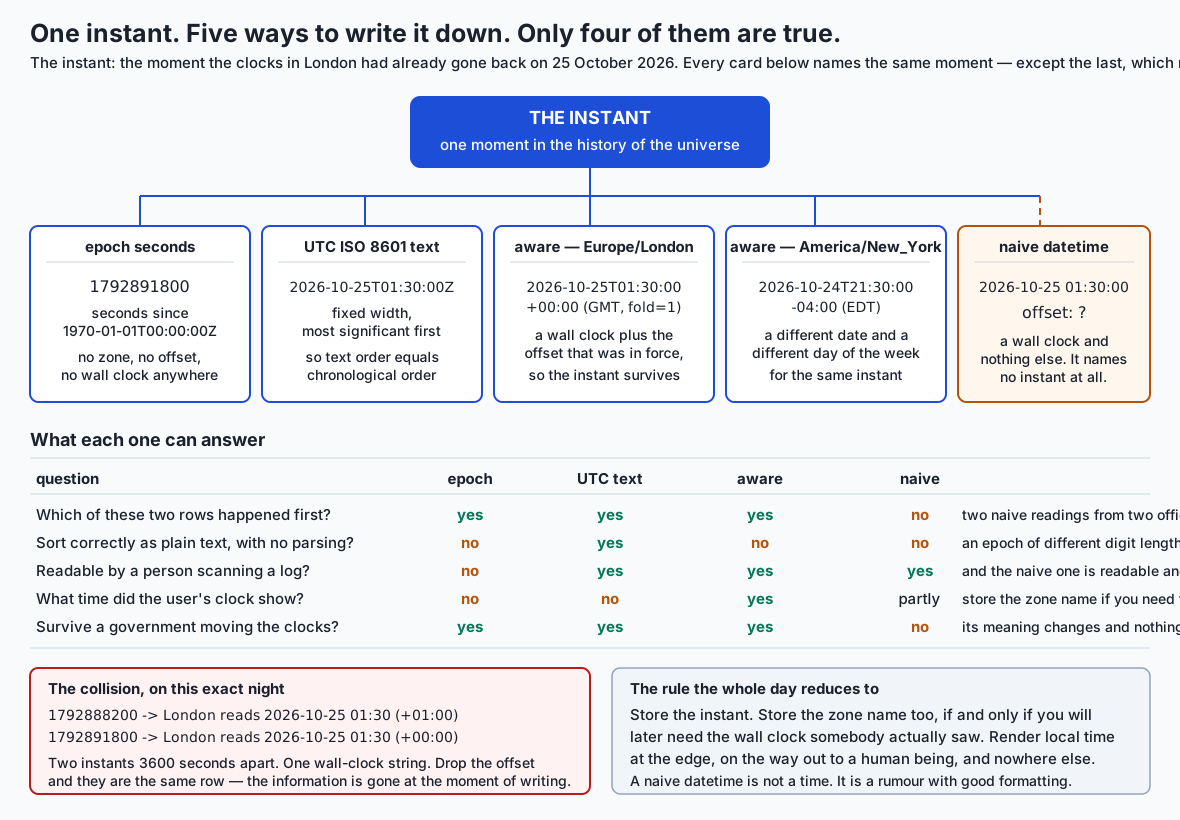
There are exactly two kinds of thing in this material, and almost every bug is a confusion between them.
An instant is a moment in the history of the universe. It happened once, everywhere, at the same time. The Apollo 11 landing was an instant. The moment your card was charged was an instant. Instants can be ordered, subtracted, and compared, and everybody everywhere agrees about the answer.
A wall-clock reading is what a particular clock in a particular place showed. 01:30 is a wall-clock reading. So is 2026-10-25 01:30:00, and so is Tuesday morning. A wall-clock reading is a label, and labels are assigned by governments, which change their minds.
The confusion is easy to make because the two look identical when written down, and one of them contains the other. An aware datetime is a wall-clock reading plus the offset that was in force, and that combination names an instant. A naive datetime is a wall-clock reading with the offset missing — and it names an instant the way “the third house” names an address.
The analogy: the tape measure and the labels
I am going to use one image for the whole day, because it maps cleanly onto every single case and it does not break.
Real time is a tape measure being pulled out at a constant rate. It never stops, never reverses, and never repeats a position. Every instant is a position on that tape.
A local clock is a set of labels stuck onto the tape. In London the labels read 01:00, 01:30, 02:00 and so on, and normally the labelling is regular and boring.
Twice a year, somebody re-labels a stretch of tape while it is still moving.
- In October they go back and stick a second
01:00–01:59set of labels over the next stretch, so that stretch of tape now carries labels that were already used. Two different tape positions, one label. This is an ambiguous time. - In March they skip a set of labels entirely, jumping straight from
00:59to02:00. Those labels are never used at all. This is a nonexistent time.
Now every part of the day drops straight into that picture:
| The thing | In the analogy |
|---|---|
| An instant | a position on the tape |
| A naive datetime | a label with no tape attached |
| An aware datetime | a label plus the note saying which stretch it was on |
| A UTC timestamp | the tape’s own markings, which nobody re-labels |
| An offset | how far this label is from the tape’s own marking |
| A time zone | one region’s whole history of re-labelling decisions |
| The IANA database | the book recording every re-labelling anybody has ever done |
fold | which of two identical labels you meant |
time.monotonic() | a stopwatch that measures tape, ignoring labels entirely |
| ISO 8601 in UTC | writing tape positions in a fixed-width way, so they sort |
The reason the analogy is worth carrying is that it makes the right answer obvious in each case. If you want to know how far apart two events were, measure the tape. If you want to know what somebody’s clock said, read the label. If you write down only the label, you have not recorded where on the tape you were — and on two nights a year, that is unrecoverable.
The rule that follows
Store instants. Render labels.
Store UTC, in a format that sorts. Convert to local time at the very edge of the system, on the way out to a human being, and nowhere else. If you will later need to know what somebody’s own clock said — for a meeting invitation, a recurring alarm, an opening hour — store the zone name alongside, never the offset, because an offset is a property of a zone at a moment and will be wrong six months later.
That is the whole recommendation. The rest of the lesson is the argument for it, because a rule you have merely been told is a rule you will abandon under deadline pressure, and a rule you have watched fail three times is one you keep.
Historical background
The problem is older than computing, and knowing where the pieces came from explains why the API looks the way it does.
Local time used to be genuinely local. Before the railways, a town set its clocks by the sun, and noon in one town was a few minutes off noon in the next. That was harmless until two trains could be in the same place at the same time. Standardised time zones exist because a timetable needs one clock, and the fact that they were invented for scheduling rather than for astronomy is a useful thing to remember: they are an administrative convenience, imposed by decision, and they change by decision.
Daylight saving was a policy choice and remains one. It is not a natural phenomenon and it is not uniform: the dates differ by country, the size of the shift is usually an hour but not always, and whether a country observes it at all changes over time. There is no algorithm. There is only a record of what each government decided, and a note of what each has announced for next year.
That record is the IANA Time Zone Database. It is public-domain, maintained collaboratively, and released several times a year under names such as 2026c — which is exactly what was installed on the machine this lesson was written on:
IANA database version: 2026c (from /usr/share/zoneinfo/+VERSION)The IANA page describes it as containing “code and data that represent the history of local time for many representative locations worldwide”, updated “to reflect changes made by political bodies to time zone boundaries, UTC offsets, and daylight-saving rules”. The word doing the work in that sentence is history. The database is not a formula; it is a record, and it grows every time a legislature acts.
ISO 8601 was first published in 1988, with revisions in 1991, 2000, 2004 and 2019 and an amendment in 2022. Its central design decision is stated plainly in the standard: the fields are arranged so that “the greatest temporal term (typically a year) is placed at the left and each successively lesser term is placed to the right”, with the consequence that “the lexicographical order of the representation thus corresponds to chronological order”. That property is the reason Day 91 could store timestamps as text in a database with no date type and still write ORDER BY, and we will prove it and then break it later today.
RFC 3339 arrived in July 2002, written by G. Klyne and C. Newman, and it is deliberately much smaller. It describes itself as “a profile of the ISO 8601 standard”, narrowing the sprawling original to what internet protocols actually need: a date, a separator, a time, and — this is the important part — a mandatory offset to UTC. Z is defined there as “a suffix which, when applied to a time, denotes a UTC offset of 00:00”.
In Python, the pieces arrived over two decades. datetime has been in the standard library since Python 2.3. The fold attribute, which is the single bit that distinguishes the two instants sharing one wall-clock label, arrived in Python 3.6 through PEP 495. And zoneinfo — the module that reads the IANA database directly — arrived only in Python 3.9, through PEP 615, written by Paul Ganssle and created in February 2020.
That last date is worth pausing on, because it explains a decade of Python code you will meet. Until 3.9 the standard library could tell you about UTC and about fixed offsets, and it could not tell you when the clocks change in Berlin. Everybody used the third-party pytz, whose unusual localize() API exists because it predates fold and had to solve the ambiguous hour without any help from the language. We will come back to that in the alternatives, because understanding why pytz is shaped the way it is makes it obvious why you should no longer use it.
PEP 615 also made a decision that is easy to miss and turns out to be the most operationally important fact in the whole module: zoneinfo ships no data. It reads whatever the operating system has. The PEP is explicit that the tzdata PyPI package is “unnecessary (and may be undesirable) on systems that deploy time zone data”, and that bundling would complicate standard-library updates. The consequence is a live dependency between your Python program and your operating system’s patching schedule, and we are going to look straight at it.
What it is — and what it is not
Let us be precise about the objects, because the whole subject collapses into confusion without it.
A naive datetime
The documentation gives the test exactly. A datetime object d is aware if and only if d.tzinfo is not None and d.tzinfo.utcoffset(d) does not return None. Anything else is naive.
A naive datetime holds seven numbers — year, month, day, hour, minute, second, microsecond — and nothing else. It is a label with no tape.
The obvious question is why the standard library lets you build one at all, given the trouble they cause. The answer is that a great many times genuinely have no zone, and forbidding naive datetimes would make them unrepresentable:
- An alarm for 07:00 means seven in the morning wherever you wake up. It is not an instant; it is a wall-clock intent.
- A shop that opens at 09:00 opens at nine in each branch, in each branch’s own local time. There is no single instant.
- A birthday is a date, not an instant. Nobody was born at a UTC offset.
- A local report boundary — “sales for Tuesday” — is a calendar concept whose translation into instants depends on where you are asking.
Those are legitimate uses, and a naive datetime (or date, or time) is the correct type for them. The failure is not naive datetimes existing. The failure is a naive datetime crossing a boundary — being stored, compared with an aware one, converted, or transmitted — as though it named an instant.
Python catches exactly one of those for you, and it is a gift:
>>> from datetime import datetime, timezone
>>> datetime(2026, 8, 16, 12, 0) - datetime(2026, 8, 16, 11, 0, tzinfo=timezone.utc)
TypeError: can't subtract offset-naive and offset-aware datetimes
That is the only place the language stops you. Everywhere else — sorting a mixed list, writing one to a database column, comparing to a string — the naive value passes silently.
An aware datetime
An aware datetime is a wall-clock reading plus a tzinfo that can supply an offset. Two flavours matter:
from datetime import datetime, timezone, timedelta
from zoneinfo import ZoneInfo

fixed = datetime(2026, 10, 25, 1, 30, tzinfo=timezone.utc)          # a fixed offset
zoned = datetime(2026, 10, 25, 1, 30, tzinfo=ZoneInfo("Europe/London"))  # a real zone
timezone.utc and timezone(timedelta(hours=1)) are fixed offsets: they answer “what is the offset?” with the same number forever. ZoneInfo("Europe/London") is a zone: it answers by looking the instant up in a database of rules, so it gives +00:00 in January and +01:00 in July.
That distinction is not pedantry. Storing “the offset was +01:00” is not the same as storing “this happened in London”, and the difference shows up the first time you need to compute a future occurrence.
What UTC is not
UTC is not a time zone in the interesting sense. It has no daylight saving, no politics and no history of change. It is the reference every offset is stated against, and it is what makes instants comparable.
It is also not datetime.utcnow(). That function returns a naive datetime holding UTC field values — the worst of both worlds, because it looks exactly like a local time and compares wrongly against one with no error raised. It has been deprecated since Python 3.12. Write this instead:
datetime.now(timezone.utc) # aware, correct, and impossible to misreadWhat a time zone is not
A time zone is not an offset, and it is not an abbreviation.
Europe/London is a name for a region’s entire history of decisions. +01:00 is one answer that name gives, at one moment. And BST, IST, CST are display labels, not identifiers: IST is India, Ireland and Israel; CST is used by at least three different places. There is no lookup from abbreviation to zone, because the mapping is not a function. This is why strptime’s %Z directive is nearly useless, as we will see.
What zoneinfo is not
It is not a database. It is a reader. The data lives on your disk, zoneinfo.TZPATH says where it looks, and if nothing on that path provides the zone you asked for you get ZoneInfoNotFoundError, which is a subclass of KeyError.
Here is that search path on the machine this lesson was written on:
zoneinfo.TZPATH — searched in this order, first match wins:
  present  /usr/share/zoneinfo
  absent   /usr/lib/zoneinfo
  absent   /usr/share/lib/zoneinfo
  absent   /etc/zoneinfo

IANA database version: 2026c  (from /usr/share/zoneinfo/+VERSION)

zones available here: 598
598 zones, from files. Not one of those rules is in Python.
Why it was created and what problems it solves
Take the pieces in the order they solve problems, because each one exists because the previous one was not enough.
datetime exists because dates and times are not numbers. Months have different lengths, years have different lengths, and the sequence of days is not arithmetic. A type that knows 31 January plus one day is 1 February saves you from writing that logic and getting it wrong.
Offsets exist because a wall-clock reading is not portable. Two colleagues writing 09:00 in a shared document mean two different instants, and nothing in the string says so.
zoneinfo and the IANA database exist because offsets are not stable. If you store +01:00 for London you have recorded something true in July and false in January, and the only way to know which applies is to know the rules — which are not derivable, because they are decisions.
fold exists because even a zone plus a wall-clock reading is not always enough. That is the sharp end of the whole subject, and it deserves the space.
The thing that is genuinely hard
Converting an instant to a local time is easy: one instant, one answer, always. Look up the offset in force at that instant, add it, done.
Converting a local time to an instant is not, because the mapping is not one-to-one. On most days it is. Twice a year it is not:
- On the autumn transition, one wall-clock reading maps to two instants.
- On the spring transition, a whole hour of wall-clock readings maps to none.
There is no clever algorithm that avoids this, because the ambiguity is in the world rather than in the code. The information was destroyed when somebody wrote down the label without the tape position. fold is Python’s answer: one extra bit on the datetime object saying “I meant the first one” or “I meant the second one”.
The documentation is exact about what it means: fold=0 represents the earlier of the two moments with the same wall time, and fold=1 the later. PEP 495 also defines what it does in the gap, where there is no moment at all: fold=0 uses the offset in force before the gap, and fold=1 the offset after it.
Here is all of that, measured:
====================================================================
AMBIGUOUS — the same wall clock, two different instants
====================================================================
wall reading: 2026-10-25T01:30:00  zone: Europe/London

  fold=0
    local     2026-10-25T01:30:00+01:00
    offset    +01:00  (BST)
    the UTC instant it means  2026-10-25T00:30:00+00:00
    epoch seconds             1792888200
  fold=1
    local     2026-10-25T01:30:00+00:00
    offset    +00:00  (GMT)
    the UTC instant it means  2026-10-25T01:30:00+00:00
    epoch seconds             1792891800

  They are 1:00:00 apart. Same string, same zone, different moments.
Two epoch numbers, 3600 apart. That is the entire problem, in four lines, and every failure in the opening section follows from it.
time.monotonic() exists for a different reason, and it is the last piece. Even a perfectly correct UTC clock is adjustable: NTP nudges it, an administrator can set it, a laptop waking from sleep re-syncs it. If you measure a duration by subtracting two readings of an adjustable clock, an adjustment between the readings corrupts the measurement. A monotonic clock is one that only ever moves forward and is never adjusted. It cannot tell you the date — that is not a limitation, it is the whole design.
How it works
Now the mechanism, in the order the machine executes it.
Where the data comes from
A compiled zone file is, in essence, a sorted list of UTC instants at which the offset changes, plus the offset (and abbreviation) in force after each one, plus a rule string for extrapolating past the last stored transition into the future.
You do not have to take that on faith. You can discover a zone’s rules from the outside, by asking the database for the offset at two instants and bisecting when they differ:
def find_transition(zone, low, high):
    """Bisect for the instant in (low, high] where the offset changes."""
    before = low.astimezone(zone).utcoffset()
    if high.astimezone(zone).utcoffset() == before:
        return None
    while high - low > timedelta(seconds=1):
        middle = low + (high - low) / 2
        if middle.astimezone(zone).utcoffset() == before:
            low = middle
        else:
            high = middle
    return high.replace(microsecond=0)
Run that over London in the late 1960s and the database tells you something genuinely surprising:
A zone is not a constant. Europe/London at noon on 1 January:
  1967: offset +00:00  name GMT   daylight saving 0:00:00
  1969: offset +01:00  name BST   daylight saving 0:00:00
  1970: offset +01:00  name BST   daylight saving 0:00:00
  1971: offset +01:00  name BST   daylight saving 0:00:00
  1972: offset +00:00  name GMT   daylight saving 0:00:00
  2026: offset +00:00  name GMT   daylight saving 0:00:00
  For three winters London sat at +01:00 with no daylight saving in
  force: Britain ran an experiment with year-round summer time.
  Bisecting the database for the two boundary instants:
    clocks went forward  1968-02-18T02:00:00+00:00
    and did not go back until  1971-10-31T02:00:00+00:00
  Three years and eight months between one spring forward and the
  next autumn back. No code models that; a file records it.
Read those two instants again. Three years and eight months between one spring forward and the next autumn back. No formula produces that. It is in a file because somebody recorded what Parliament decided, and it is on your disk right now.
Notice also the daylight saving 0:00:00 on the 1969–1971 rows next to an offset of +01:00. The database is recording that those years were standard time at +01:00, not summer time — a distinction that matters if you have ever written if is_dst: anywhere.
Instant to local: the easy direction
Given an instant, find the last transition at or before it and adopt its offset:
def offset_at_instant(instant, rules):
    offset = rules.base_offset
    for transition in rules.transitions:
        if instant >= transition.instant:
            offset = transition.offset
        else:
            break
    return offset
One instant, one answer. Always. This is the argument for storing instants in a single sentence: the direction that has a unique answer is the direction you want to be doing at query time.
Local to instant: the direction that has 0, 1 or 2 answers
Chop the timeline into segments — stretches of UTC during which the offset does not change, bounded by the transitions. For London in 2026 there are three: before 29 March at +00:00, between the two transitions at +01:00, and after 25 October at +00:00.
Now, for each segment: assume its offset applies, compute the UTC instant that would produce the wall reading you were given, and keep the candidate only if that instant actually falls inside that segment.
That last clause is the whole trick. A candidate landing outside its own segment is a self-contradiction — it says “the offset was +01:00 at a moment when the offset was not +01:00” — and is discarded. What survives is one, two, or zero answers:
- One — the ordinary case. Unique instant, no ambiguity.
- Two — the wall reading occurred twice.
foldselects, 0 for the earlier. - Zero — the wall reading never occurred. It fell in the gap.
Here is the implementation, which is the from-scratch build of the day:
def candidates(wall, rules):
    """Every UTC instant whose local reading in this zone is `wall`."""
    found = []
    for start, end, offset, name in segments(rules):
        instant = wall.replace(tzinfo=UTC) - offset
        if (start is None or instant >= start) and (end is None or instant < end):
            found.append((instant, offset, name))
    return found
And the classification on top of it:
def resolve(wall, rules, fold=0):
    found = candidates(wall, rules)
    if len(found) == 1:
        return found[0][1], "normal"
    if len(found) == 2:
        return found[fold][1], "ambiguous"     # segments are in time order
    # zero candidates: the reading is in a gap. fold=0 takes the offset
    # before the gap, fold=1 the offset after it.
    ...
Roughly thirty lines, over a three-line rule table. Then check it against the real database on thirteen wall readings and both folds:
rule table: base +00:00 GMT
            at 2026-03-29T01:00:00+00:00 -> +01:00 BST
            at 2026-10-25T01:00:00+00:00 -> +00:00 GMT

wall clock           fold  mine     zoneinfo  kind         agree
----------------------------------------------------------------
2026-03-29T00:59:00  0     +00:00   +00:00    normal       yes
2026-03-29T01:00:00  0     +00:00   +00:00    nonexistent  yes
2026-03-29T01:00:00  1     +01:00   +01:00    nonexistent  yes
2026-03-29T01:30:00  0     +00:00   +00:00    nonexistent  yes
2026-03-29T01:30:00  1     +01:00   +01:00    nonexistent  yes
2026-03-29T02:00:00  0     +01:00   +01:00    normal       yes
2026-10-25T01:00:00  0     +01:00   +01:00    ambiguous    yes
2026-10-25T01:00:00  1     +00:00   +00:00    ambiguous    yes
2026-10-25T01:30:00  0     +01:00   +01:00    ambiguous    yes
2026-10-25T01:30:00  1     +00:00   +00:00    ambiguous    yes
2026-10-25T02:00:00  0     +00:00   +00:00    normal       yes

cases: 13 wall readings x 2 folds = 26 comparisons
disagreements with zoneinfo: 0
cases classified wrongly:    0
Twenty-six comparisons, zero disagreements. (The table above is abridged; the lab prints all twenty-six rows.)
What does the real zoneinfo add? Every zone in the database rather than one, every recorded change each has ever made rather than the two in 2026, a compiled binary file and a cache of loaded zones rather than a table typed by hand and scanned from the top, the rule string that extrapolates into the future, and correct handling of the historical oddities. The algorithm, though, is the one above. That is the whole trick, and you have now written it.
The consequence, drawn out
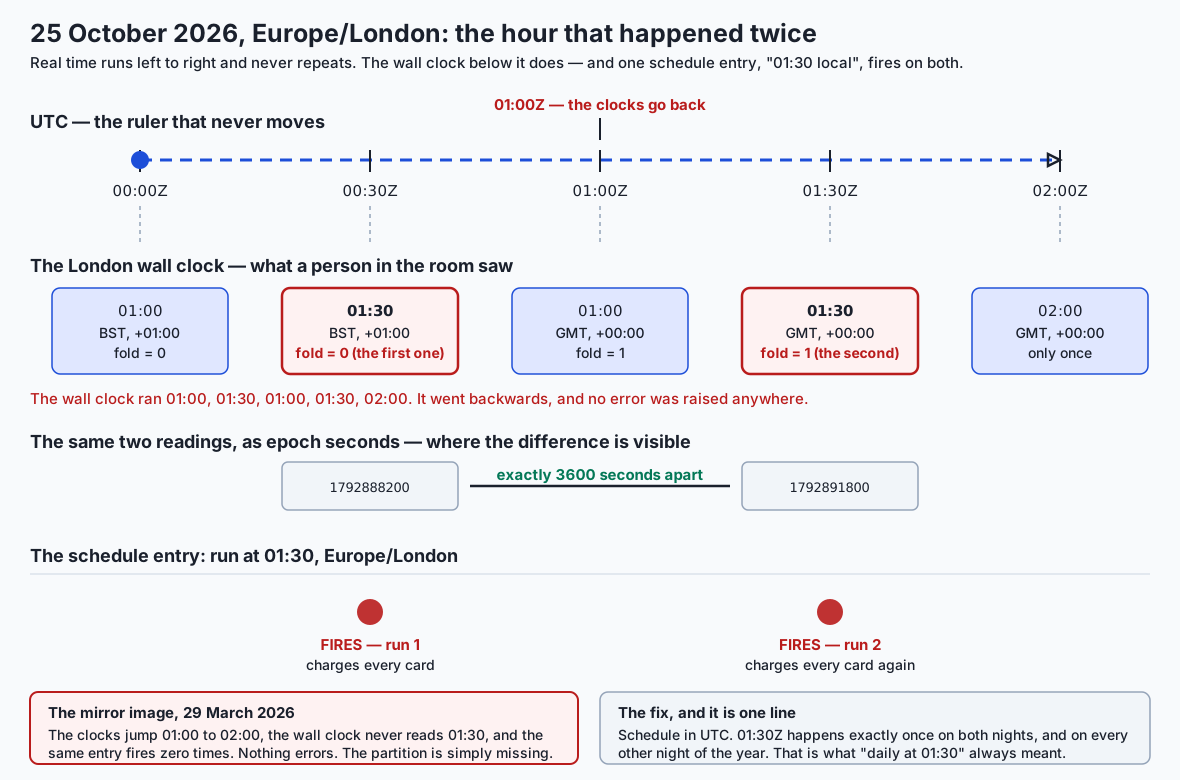
The top row is the tape: UTC, running left to right, never repeating. The row below is the labels, and it reads 01:00, 01:30, 01:00, 01:30, 02:00. The wall clock went backwards, and nothing anywhere raised an error. The row below that shows the same two 01:30 readings as epoch seconds, where the difference the label hides becomes a plain 3600. And the bottom row is the schedule entry firing twice.
An everyday analogy
Let us push the tape-and-labels image a little harder, because it earns its keep on the cases people find counter-intuitive.
Why is a naive datetime allowed to exist? Because a label detached from the tape is sometimes exactly what you mean. “Take this pill at 08:00” is a label. It is not a position on the tape, and forcing it to be one would make it wrong the moment the patient flies to another country. The type is correct; the mistake is gluing it to the tape later while pretending you knew where it went.
Why does adding a timedelta behave the way it does? Because datetime + timedelta moves along the labels, not along the tape. Adding two hours to 00:30 on the October night gives you the label 02:30 — which, that night, is three hours of tape away:
  start                      2026-10-25T00:30:00+01:00
  + timedelta(hours=2)       2026-10-25T02:30:00+00:00
  + two hours of real time   2026-10-25T01:30:00+00:00
  a whole hour apart: 1:00:00
Both answers are correct; they answer different questions. “The meeting is at 09:00 next Tuesday” is label arithmetic and you want the first. “The token expires in one hour” is tape arithmetic and you want the second — convert to UTC, add, convert back.
Why does == say two instants an hour apart are equal? Because when both operands carry the same tzinfo, the documentation says the tzinfo and fold attributes are ignored and the base datetimes are compared — that is, it compares the labels. Two labels reading 01:30 are the same label, and they are. The tape positions are not:
    first == second            -> True
    same instant?              -> False
    first.timestamp() equal?   -> False
This is documented, deliberate, and the reason for a rule worth memorising: convert to UTC before you compare, sort, deduplicate, or use a datetime as a dictionary key.
Why is a future local time a prediction rather than a fact? Because the labelling for next March has not happened yet. It has been announced, which is why the database has an entry, but an announcement is a statement of intent by a government that is entirely free to change it — and several do, most years, sometimes with a few weeks’ notice. Your image’s copy of the label book is as current as your last rebuild.
And why is a monotonic clock a different instrument entirely? Because it measures tape and ignores labels. It cannot tell you the date, in the same way a tape measure cannot tell you which house you are standing outside. That is not a gap in its capability; it is what makes it trustworthy for the one job it has.
The analogy has one honest limit worth naming. The tape is not perfectly uniform: UTC itself occasionally has a second inserted to keep it in step with the Earth’s rotation, and Python’s datetime does not model that at all. We will get to leap seconds shortly.
Examples in practice
Everything in this section is captured from a real run. Nothing is illustrative.
How long is a day?
Not 24 hours, twice a year. And the way you measure decides whether you can see it:
zone                 local date         real       wall  what happened
----------------------------------------------------------------------
Europe/London        2026-03-29        23.0h      24.0h  spring forward
Europe/London        2026-10-25        25.0h      24.0h  autumn back
Europe/London        2026-06-15        24.0h      24.0h  an ordinary day
America/New_York     2026-03-08        23.0h      24.0h  spring forward
America/New_York     2026-11-01        25.0h      24.0h  autumn back
Australia/Lord_Howe  2026-10-04        23.5h      24.0h  forward by half an hour
Australia/Lord_Howe  2026-04-05        24.5h      24.0h  back by half an hour
The wall column reads 24.0 on every row, including the two that are not. That column is what you get from subtracting two local midnights, and it is why a report that measures a day that way is wrong twice a year and right the rest of the time.
The correct measurement converts both midnights to UTC first:
start = datetime.combine(day, time(0, 0), tzinfo=zone)
end   = datetime.combine(day + timedelta(days=1), time(0, 0), tzinfo=zone)
elapsed = end.astimezone(UTC) - start.astimezone(UTC)
Note the last two rows. Lord Howe Island moves by thirty minutes, so its short day is 23.5 hours and its long day 24.5. Any code that special-cases “plus or minus exactly one hour” is already wrong there, and there are other such zones historically. Do not encode the size of the shift; ask the database.
The hour that never happened
wall reading: 2026-03-29T01:30:00  zone: Europe/London

  fold=0
    local     2026-03-29T01:30:00+00:00  offset +00:00
    as UTC    2026-03-29T01:30:00+00:00
    back to London  2026-03-29T02:30:00+01:00  <- NOT what you started with
  fold=1
    local     2026-03-29T01:30:00+01:00  offset +01:00
    as UTC    2026-03-29T00:30:00+00:00
    back to London  2026-03-29T00:30:00+00:00  <- NOT what you started with
Python constructed both objects without complaining. It has to: a naive wall reading plus a zone is a request, and refusing every request that cannot be honoured would break the perfectly reasonable case of parsing user input you then want to validate. The failure shows in the round trip. Out to UTC and back is the standard detection idiom, and it is two lines:
aware = wall.replace(tzinfo=zone)
nonexistent = aware.astimezone(UTC).astimezone(zone).replace(tzinfo=None) != wall
There is a neat detail here that the lab makes you find. Both cases — ambiguous and nonexistent — give different instants at fold=0 and fold=1, so testing != cannot tell them apart. The order can:
| Case | fold=0 gives | fold=1 gives | Test |
|---|---|---|---|
| Ambiguous | the earlier instant | the later instant | first < second |
| Nonexistent | the later instant | the earlier instant | first > second |
| Ordinary | the same instant | the same instant | first == second |
One comparison classifies all three.
Sorting: the argument for UTC, made rather than asserted
Four events, each a real instant, each recorded by an office in a different country. Store them as UTC ISO text and sort the strings — no parsing, no key function:
  2026-08-16T11:30:00Z  ordered
  2026-08-16T15:00:00Z  packed
  2026-08-16T16:00:00Z  dispatch
  2026-08-16T18:00:00Z  checkout

  sorted as text     == sorted as instants : True
Now store the same four events as each office’s local clock:
  2026-08-16T14:00:00  checkout
  2026-08-16T17:00:00  dispatch
  2026-08-16T17:00:00  ordered
  2026-08-16T20:30:00  packed

  sorted as text     : ['checkout', 'dispatch', 'ordered', 'packed']
  sorted as instants : ['ordered', 'packed', 'dispatch', 'checkout']
  same order?        : False
The exact reverse. Every one of those strings is well-formed ISO 8601 and every one of them is true; they are simply measured against different rulers.
And here is the case that catches careful people, because it looks like it should be fine. Attach the offset to each local string, so nothing is lost and any parser can recover every instant exactly:
  2026-08-16T14:00:00-04:00  checkout
  2026-08-16T17:00:00+01:00  dispatch
  2026-08-16T17:00:00+05:30  ordered
  2026-08-16T20:30:00+05:30  packed

  sorted as text     : ['checkout', 'dispatch', 'ordered', 'packed']
  sorted as instants : ['ordered', 'packed', 'dispatch', 'checkout']
  same order?        : False
Still wrong. The comparison walks the characters left to right and reaches a decision long before it gets to the offset on the end. Losslessness and sortability are different properties. UTC ISO text has both, which is the entire reason it is the storage format — for a SQLite column, for a key in a key-value store, for a filename in a partitioned bucket, for a log line you will one day sort from the shell.
The third failure is the one you cannot recover from at all:
  2026-10-25T00:30:00Z  ->  London local  2026-10-25T01:30:00
  2026-10-25T01:30:00Z  ->  London local  2026-10-25T01:30:00

  identical local strings? True
Two instants an hour apart, one string. No sort can order them and no query can separate them, because the information is gone at the moment of writing.
ISO 8601, RFC 3339, and what Python parses
One instant, several legal renderings:
    isoformat()              2026-10-25T01:30:00+00:00
    strftime Z form          2026-10-25T01:30:00Z
    basic ISO 8601 form      20261025T013000Z
    ordinal date (ISO 8601)  2026-298T01:30:00Z
    ISO week date            datetime.IsoCalendarDate(year=2026, week=43, weekday=7)
All of those are ISO 8601. Only the first two are RFC 3339. That gap is why “we use ISO 8601” is a much weaker statement than people intend: the standard also permits the basic form with no separators, week dates, ordinal dates, durations and intervals.
What Python actually accepts, on 3.14.0:
    fromisoformat('2026-10-25T01:30:00+00:00'     ) -> 2026-10-25T01:30:00+00:00
    fromisoformat('2026-10-25T01:30:00Z'          ) -> 2026-10-25T01:30:00+00:00
    fromisoformat('2026-10-25 01:30:00Z'          ) -> 2026-10-25T01:30:00+00:00
    fromisoformat('20261025T013000Z'              ) -> 2026-10-25T01:30:00+00:00
    fromisoformat('2026-W43-7'                    ) -> 2026-10-25T00:00:00
    fromisoformat('2026-10-25T01:30:00+0100'      ) -> 2026-10-25T01:30:00+01:00
    fromisoformat('Sun, 25 Oct 2026 01:30:00 GMT' ) -> ValueError: ...
Two things to take from that. fromisoformat was strict before Python 3.11 — the trailing Z raised ValueError, which produced years of text.replace("Z", "+00:00") in real codebases — and from 3.11 it accepts most of ISO 8601. And look at the week-date line: it parses, and it silently becomes a naive midnight. Permissive parsing has a cost, and the cost is that malformed input sometimes succeeds.
The last line is RFC 2822, the email date format, which fromisoformat correctly refuses; email.utils.parsedate_to_datetime is the standard-library function for that one.
The two strptime traps
  Trap 1 — %Z parses almost nothing, and throws the zone away:
    UTC  -> datetime.datetime(2026, 10, 25, 1, 30)
         tzinfo is None — the zone name is gone
    GMT  -> datetime.datetime(2026, 10, 25, 1, 30)
         tzinfo is None — the zone name is gone
    BST  -> ValueError: does not match the format
    EST  -> ValueError: does not match the format
%Z accepted only UTC and GMT here, and even then produced a naive datetime — the zone was parsed and discarded. That is not really a Python defect: an abbreviation cannot identify a zone, because the mapping is not a function.
  Trap 2 — the order of the numbers is a cultural convention:
    05/03/2026 parsed as %d/%m/%Y -> 2026-03-05
    05/03/2026 parsed as %m/%d/%Y -> 2026-05-03
Both parse. Both succeed. They are two months apart and no error is raised in either direction. This is precisely the failure ISO 8601 was written to end, and it is why the format matters more when the data crosses an organisational boundary than when it stays inside one.
Which clock, and what the wrong one does
  clock            monotonic  adjustable  implementation
  time             False      True        clock_gettime(CLOCK_REALTIME)
  monotonic        True       False       mach_absolute_time()
  perf_counter     True       False       mach_absolute_time()
  process_time     True       False       clock_gettime(CLOCK_PROCESS_CPUTIME_ID)
The library will tell you which clock is which, and the adjustable column is the hazard stated in one word. On an undisturbed machine the two agree closely — 0.042173 seconds against 0.042173 seconds in the run captured for this lesson — and that agreement is exactly what makes the bug invisible in testing.
The difference appears only when the clock moves:
  a task spanning the whole repeated hour
    (starts 01:00 BST, ends 01:15 GMT)
    real elapsed time                1:15:00
    a naive local stopwatch reports  0:15:00

  a task ending after the clocks go back
    (starts 01:50 BST, ends 20 real minutes later at 01:10 GMT)
    real elapsed time                0:20:00
    a naive local stopwatch reports  -1 day, 23:20:00

  spring forward in London: a task over the gap
    (starts 00:45 GMT, ends 25 real minutes later)
    real elapsed time                0:25:00
    a naive local stopwatch reports  1:25:00
Three failures, three shapes. Under-reporting by an hour turns a 75-minute job into a logged 15. A negative duration makes while elapsed < timeout never terminate. Over-reporting by an hour pages somebody for a healthy job. All three are one line of time.monotonic() away from correct.
The rule, in six words: wall clock for when, monotonic for how long.
| Question | Use | Why |
|---|---|---|
| How long did this take? | time.monotonic() | never adjusted |
| Has the timeout expired? | time.monotonic() | never goes backwards |
| How fast is this function? | time.perf_counter() | highest resolution |
| How much CPU did it use? | time.process_time() | excludes time asleep |
| When did this happen? | datetime.now(timezone.utc) | a calendar instant |
| What should the log line say? | datetime.now(timezone.utc) | comparable across hosts |
Durations, months, and leap seconds
timedelta stores days, seconds and microseconds only. It has no months or years field, deliberately, because those have no fixed length:
  start                       2026-01-31
  + timedelta(days=30)        2026-03-02
  + timedelta(days=31)        2026-03-03
Neither is “one month later”. 31 January + 1 month has at least three defensible answers — 28 February if you clamp to the month end, 3 March if you overflow, or an error because the caller has not said which they meant — and the standard library gives you calendar.monthrange to inform the decision while pointedly making none of them for you. Choose, write it down, and put it in a named function. Billing systems and subscription renewals live or die on this choice and it is not the same for every business.
And leap seconds:
datetime(2016, 12, 31, 23, 59, 60) -> ValueError: second must be in 0..59, not 60A leap second is a real second inserted into UTC to keep it in step with the Earth’s rotation, which is neither constant nor predictable. During one, a UTC minute genuinely contains sixty-one seconds. Python’s datetime documentation is explicit that it models “an idealized time… assuming that every day has exactly 24*60*60 seconds. (There is no notion of ‘leap seconds’ here.)” So an epoch count silently repeats or stretches a second when one occurs, and many large operators now smear the extra second across a whole day so that no clock ever shows :60.
The practical position: unless you are doing metrology or reconciling trades to the microsecond, treat “a day has 86400 seconds” as true, know that it is an approximation, and use a monotonic clock for any duration you actually care about.
Epoch seconds and their two ceilings
    epoch seconds        1792891800
    the epoch itself     1970-01-01T00:00:00+00:00
    signed 32-bit limit  2038-01-19T03:14:07+00:00
An epoch count is unambiguous by construction: no zone, no offset, no wall clock anywhere in it. It is also unreadable by construction, which is a genuine cost — nobody notices that 1792891800 is a month wrong while scanning a log, and everybody notices that 2026-11-25T01:30:00Z is.
Two ceilings are worth carrying. The famous one is above: a signed 32-bit count of seconds runs out in January 2038, and code storing seconds in an int32 still exists in plenty of places. The quieter one is that Python’s timestamp() returns a float, with 53 bits of mantissa:
    2026-08-16T09:00:00.123456+00:00
      -> 1786870800.123456
      -> 2026-08-16T09:00:00.123456+00:00
    smallest representable step near now: 3.975e-07 s
Microseconds survive the round trip. Nanoseconds do not — which is exactly why time.time_ns() exists and returns an integer. This is Day 70’s floating point arriving in a place you would not have looked for it.
Implications: security, privacy, performance, scalability, and cost
Security — expiry and validity windows. A token that expires “one hour from now”, checked against an adjustable wall clock, can be handed an extra hour by a clock adjustment; a session that should have ended can be extended by moving the clock. Certificate and signature validity windows are absolute instants, and comparing them against a naive local datetime makes the comparison wrong by the offset — in one direction that accepts something already expired. Lockout windows have the same shape: “three failures in five minutes” measured on a wall clock covers sixty-five real minutes on one night of the year. Durations belong on a monotonic clock; absolute expiry belongs on an aware UTC instant.
Security — parsing. fromisoformat and strptime raise ValueError on rubbish, which is correct and also means an unhandled one is a denial of service on a request handler. Catch it. And prefer the library parsers to a hand-rolled regular expression over date text, which is one of the more reliable ways to write a catastrophically backtracking pattern.
Privacy — timestamps are personal data more often than people expect. A precise timestamp plus a local zone is a location signal: storing Europe/London next to somebody’s activity says roughly where they are, and a change in that field says they moved. A sequence of timestamps is a behavioural profile — when somebody logs in, how long they stay, whether they work at 02:00 — and none of that is anybody’s name while all of it identifies a person quite well. Microsecond-precision timestamps are a strong fingerprint for correlating one person’s records across two systems that share nothing else.
The design conclusion is that precision is a decision made at collection time. If your feature needs “which day did this happen”, storing the second and the microsecond is data you have chosen to hold and must now protect, retain and delete correctly. Round at the point of collection; you cannot un-collect later. And storing UTC instants and rendering in the viewer’s zone at display time gives you the same product with none of the location inference stored.
Performance. ZoneInfo("Europe/London") is cached — construct it twice and you get the same object back — so the cost is a one-time file read per zone. available_timezones() is the opposite: the documentation warns it may open many files and is recomputed on every call, so it belongs in a startup check rather than in a loop. Conversions themselves are cheap: a lookup in a sorted table.
The performance question that actually bites is a data one. A UTC ISO text column supports an index and a range scan directly, because text order is chronological order. A local-time column does not: correct ordering requires converting every row, which means a full scan and no index. That is not a small constant factor — it is the difference between a range scan and a table scan on every time-filtered query you will ever write.
Scalability. UTC removes an entire class of cross-machine disagreement. Two servers in two regions writing UTC produce a stream that merges and sorts correctly with no coordination at all; two servers writing local time produce a stream that needs each row’s origin decoded before it can be ordered. This is why every distributed log format, every cloud provider’s audit trail, and every sensible partitioning scheme is in UTC.
Partitioning deserves its own note. If your warehouse partitions by date(local_timestamp), then on the October night one hour of rows collides with another hour and on the March night an hour is missing — and the partition boundary itself is a different instant in each region. Partition on UTC and carry local time as a derived column if a human needs it.
Cost. Storage: an epoch integer is 8 bytes, an ISO text timestamp is 20, and at a billion rows that difference is real but almost never the binding constraint. The dominant costs are elsewhere and are all engineering costs. A backfill to repair a leaked split. A duplicate-charge incident and the refunds, the support load and the trust. A month of a data scientist’s time chasing a model that was validated against leaked data. Set against those, the price of doing it right is that everybody on the team learns one rule and one library module.
The operational cost with a name. Your container images have an expiry date you did not set. A two-year-old image holds a two-year-old opinion about when the clocks change, and it will be confidently wrong for exactly the window a government moved. Add the zone database version to your build’s recorded metadata, the way you already record your Python version, and rebuild on a schedule rather than on incident.
Alternatives: free, open source, and commercial
Every option below is free and open source. There is no paid tier in this space at all, which is itself worth noticing: correct time handling is public infrastructure, funded by nobody and depended on by everybody.
Honesty note up front. Only zoneinfo, datetime, time and calendar — all standard library — are installed on the machine this lesson was written on, and only those produced the outputs quoted above. Everything else in this section is described from its documentation, and no output is reproduced for any of it. Where I state a version number or a behaviour I have not run, I say so.
zoneinfo — the standard library
Choose it for all new code on Python 3.9 or newer. It is the reference implementation of the model in this lesson, it has no dependencies, and it is the one everything else is now measured against.
from zoneinfo import ZoneInfo
from datetime import datetime
london = datetime(2026, 10, 25, 1, 30, tzinfo=ZoneInfo("Europe/London"), fold=1)
Free, PSF licence, nothing to install — except on Windows, where the IANA database does not exist and you add the first-party tzdata package from PyPI. That is not a workaround; PEP 615 designed it that way, so that systems which already ship the data are not made to carry a second copy.
Cost: it reads whatever data your system has, so keeping it current is your operations problem rather than your dependency manager’s.
pytz — the older approach, and why it looked like that
Choose it essentially never for new code. Understand it because you will meet it, and because why it is shaped the way it is explains the whole design of fold.
pytz predates PEP 495 by many years. Without a fold bit on the datetime object, there was nowhere to record which of two identical wall-clock readings you meant — so pytz put the information in the tzinfo object instead. Its zone objects are not a single zone; they are a factory producing one fixed-offset object per historical offset, and localize() is the call that picks the right one:
# pytz's shape — NOT run here, quoted from its documentation
import pytz
london = pytz.timezone("Europe/London")
aware = london.localize(datetime(2026, 10, 25, 1, 30), is_dst=True)
That is why passing a pytz zone directly as tzinfo= famously gives an offset like -00:01 or +00:53: you get the object for the region’s first recorded offset, which is often a pre-standardisation local mean time. It is not a bug so much as the visible edge of a design constraint that no longer exists.
Free, MIT licence. Its maintainer now recommends zoneinfo for new code, and the reason is exactly the above: the language grew the bit that made the workaround unnecessary.
dateutil — parsing, recurrence, and relative deltas
Choose it for three things the standard library genuinely does not do. First, dateutil.parser.parse will make a decent attempt at nearly any human-written date, which is invaluable for messy input and dangerous for anything else — it will guess, and a guess that succeeds is worse than an error. Second, relativedelta, which is the “add one month” policy the standard library refuses to choose, implemented and documented. Third, rrule, a full implementation of the iCalendar recurrence rules — “the last Thursday of every month” — which is a genuinely hard problem you should not solve yourself.
# NOT run here — quoted from the dateutil documentation
from dateutil.relativedelta import relativedelta
new = old + relativedelta(months=+1)Free, Apache 2.0 / BSD dual licence. Cost: the permissive parser is a liability on untrusted input, and its own tz implementation is now largely superseded by zoneinfo.
arrow — one object, a friendlier surface
Choose it when a team keeps making the same mistakes and you want an API that makes the correct thing the default. arrow replaces datetime with a single always-aware type that defaults to UTC, and adds humanised output (“an hour ago”) and easy shifting and range generation.
Free, Apache 2.0. Cost: it is a parallel type, so it does not compose with libraries expecting datetime without conversion at every boundary, and “always aware, defaults to UTC” silently converts things you may have wanted to keep naive.
pendulum — a drop-in with stricter semantics
Choose it when you want arrow’s ergonomics with better standards behaviour and a type that subclasses datetime, so existing code keeps working. Its distinguishing feature is that it takes the ambiguous and nonexistent cases seriously and lets you choose the policy explicitly rather than defaulting silently.
Free, MIT licence. Cost: another dependency to keep current, on a subject where being out of date is the specific failure mode; and because it subclasses datetime, a pendulum object escaping into a library that does exact type checks can behave in ways neither party expected.
The storage question: three options, and it is a real trade-off
This is the decision that outlives every library choice, because it is baked into your data.
| Option | Sorts as text | Human-readable | Space | The real cost |
|---|---|---|---|---|
| Epoch integer | no (varying digit lengths) | no | 8 bytes | unreadable in logs and dumps; second- or millisecond-precision must be agreed and is often not |
| ISO 8601 UTC text | yes | yes | ~20 bytes | slightly larger; needs a CHECK constraint or equivalent to stop malformed values |
| Native database type | yes | yes | 8 bytes | not portable, and every engine has its own opinions about zones — PostgreSQL’s timestamptz stores an instant and converts on the way out, timestamp does not, and confusing the two is its own genre of bug |
Choose the native type when your database has a good one and your data will not leave it. PostgreSQL’s timestamptz is a genuinely good design.
Choose ISO 8601 UTC text when there is no native type (SQLite, as in Day 91), when the data must be readable in a dump or a log, or when it crosses systems. You give up eight bytes a row and gain readability, portability and a format that sorts.
Choose epoch integers when space or arithmetic speed genuinely dominates, and accept that every dump, log and bug report will need a conversion before a human can read it. Then write the precision down: seconds and milliseconds look identical until they are three orders of magnitude apart.
There is a fourth option that is not a real option: storing local time. The lab demonstrates in three ways why it is not, and the third — two instants collapsing into one string — is unrecoverable.
Comparison with related concepts
| Concept | What it is | What it is not | The confusion it causes |
|---|---|---|---|
| Instant | one moment, everywhere | not a reading, not a label | ”the timestamp” said of a naive value |
| Wall-clock reading | what one clock showed | not a moment | two offices’ 09:00 treated as equal |
| Offset | zone’s distance from UTC at a moment | not a property of the zone | storing +01:00 for London and being wrong in January |
| Time zone | a region’s whole rule history | not an offset, not an abbreviation | IST used as an identifier when it names three places |
Abbreviation (BST, CST) | a display label | not unique, not parseable | %Z appearing in a format string |
| UTC | the reference for offsets | not a zone with rules; not utcnow() | naive UTC values compared to local ones |
| GMT | a zone name and a historical standard | not a synonym for UTC in every context | used interchangeably until a legal document disagrees |
fold | which of two identical readings | not a daylight-saving flag | assuming fold=1 means “DST” |
dst() | how much of the offset is daylight saving | not the offset | if dst(): used to decide the offset |
timedelta | days, seconds, microseconds | not months or years | timedelta(days=30) called “a month” |
| Wall-clock arithmetic | moving along the labels | not elapsed time | ”expires in an hour” done with + timedelta(hours=1) |
time.time() | the current instant, adjustable | not a stopwatch | measuring durations with it |
time.monotonic() | a stopwatch | not a calendar; no meaning across processes | trying to log it, or compare it between machines |
| Epoch seconds | an instant as a count | not readable; not always seconds | a milliseconds field parsed as seconds, giving 1970 |
| ISO 8601 | a large standard | not a single format | ”it’s ISO 8601” said of a week date |
| RFC 3339 | a small profile with a mandatory offset | not all of ISO 8601 | assuming any ISO 8601 string is a timestamp |
| Leap second | a real inserted second in UTC | not representable in datetime | expecting 23:59:60 to parse |
Two rows in that table are worth expanding, because they are subtle.
fold is not a daylight-saving flag. It says which of two identical wall-clock readings you meant, in terms of order — earlier or later. On the autumn transition the earlier one happens to be the daylight-saving one, which makes the misreading easy, but the concept is about ordering rather than about summer time. In the gap it means something different again: which side of the missing hour to take the offset from.
dst() is not the offset. utcoffset() gives the total distance from UTC; dst() gives how much of that is daylight saving. The 1969–1971 London rows above show why the distinction is real: offset +01:00, daylight saving 0:00:00, because that hour was standard time that year. Code branching on if dst(): to decide what the offset is will be wrong there and in every similar case.
When to use it — and when not to
Always store instants in UTC for: log lines, audit records, event streams, created_at and updated_at, metrics, message timestamps, anything ordered, anything joined across systems, anything that will be partitioned. This is the default and it should require an argument to depart from.
Store the zone name as well when you will later need the wall clock somebody actually saw:
- a meeting invitation — “09:00 Paris” must stay 09:00 in Paris across the transition;
- a recurring schedule a human set in local terms — “every weekday at 08:00”;
- opening hours, which are per-branch wall-clock facts;
- user preferences for rendering, so a report says what its reader expects;
- anything where a regulator or contract specifies a local time.
For those, store the local time and the zone name — never the offset — and compute the next occurrence as a UTC instant after each firing, so that a database update or a rule change is picked up rather than baked in.
Store a naive date or time deliberately when there genuinely is no instant: a birthday, a public holiday, an alarm, a shop’s opening time. Give the column a name that says so, so nobody later “fixes” it by attaching a zone.
Use a monotonic clock for every duration, timeout, retry window and rate limit. No exceptions worth carving out.
Do not store local time as your primary representation. Do not store an offset where you mean a zone. Do not use an abbreviation as an identifier. Do not schedule a job at a local time near a transition — 01:00 to 03:00 local is a minefield in most of the world, and if the requirement really is local, make the job idempotent and give it a key so a second firing is a no-op. Do not measure elapsed time with time.time(). Do not put datetime.now() in a test that asserts anything about dates.
And one more, because it is the failure this lesson opened with: do not assume your tests cover this. They do not, unless they pin the instants. A suite that reads the clock passes on 363 days a year, and the two days it fails on are the two days production fails on.
Knowledge check
Work through the questions in the quiz sidecar. Before you do, try these three from memory, because they are the ones that separate having read this from having understood it:
- Two aware datetimes in the same zone compare equal, but their
timestamp()values differ by 3600. What are they, and what rule does this teach about comparison? - You must schedule “every Tuesday at 09:00 Paris time” so it survives the next transition and the next database update. What exactly do you store, and what do you recompute, and when?
- A colleague proposes storing local time with the offset attached, arguing that nothing is lost. They are right that nothing is lost. Why is it still the wrong storage format?
Hands-on exercise
The lab is labs/sections/programming-with-python/day-095-dates-times-and-time-zones/, and it is called The Hour That Happened Twice.
Start by proving the harness is green, then read the brief, then find out where you stand:
cd labs/sections/programming-with-python/day-095-dates-times-and-time-zones
bash tests/run_tests.sh
echo "exit code: $?"

# read starter/00_brief.md — it is the incident from the top of this lesson

bash starter/02_check.sh
Then work down the ten exercises in starter/01_timezones.py. They build in order: the zone count, the storage format, the day length, the two offsets of an ambiguous reading, the round-trip test for a nonexistent one, the fold-order test that separates the two cases, the text sort, the choice of clock, and finally the two directions of the resolver.
The last two are the day’s from-scratch build. You are handed a three-line rule table — a base offset and two transitions — and you write the lookup zoneinfo performs against the real database. When you are done, the checker runs your resolver against zoneinfo on thirteen wall readings and both values of fold, and every one of the twenty-six comparisons must agree.
Try each exercise before opening the matching example. This is a subject where nearly everybody has to be wrong once before the distinction lands, and reading a correct answer to a question you have not yet asked yourself teaches almost nothing.
Expected output
An untouched starter:
   1. not started   zone_count
   2. not started   to_utc_text
   ...
0 of 10 exercises complete.
with exit code 1. When you have finished, the same command reports:
10 of 10 exercises complete.with exit code 0. The full suite ends with a line captured from a real run:
75 checks, 0 failure(s).and exits 0. The measurements the lesson quotes are all reproducible from the examples: the 23-hour and 25-hour days from examples/02_odd_days.py, the two instants and the job firing twice from examples/03_fold.py, the three sorts from examples/04_sorting.py, the clock comparison from examples/05_clocks.py, and the twenty-six-way agreement from examples/06_resolver.py.
Validate your work
bash tests/run_tests.shends with75 checks, 0 failure(s).and exits 0.python3 -c "import zoneinfo; print(len(zoneinfo.available_timezones()))"prints a number over 100 — it printed 598 on the authoring machine, and a different number on yours is fine and is part of the lesson.- Europe/London on 2026-03-29 measures 23.0 hours and on 2026-10-25 25.0 — and subtracting the two local midnights says 24.0 on both.
2026-10-25 01:30in Europe/London gives+01:00atfold=0and+00:00atfold=1, naming instants exactly one hour apart.- Those two aware datetimes compare equal with
==, and their UTC conversions do not. 2026-03-29 01:30does not survive a round trip through UTC: it returns as02:30+01:00.- A schedule matching local
01:30fires twice on 25 October and zero times on 29 March. - Four events sorted by UTC text come out chronological; by local text they come out in the exact reverse; and by local text with offsets they are still wrong.
examples/06_resolver.pyreportsdisagreements with zoneinfo: 0across 26 comparisons.- After the run,
find . -type d -name __pycache__finds nothing.
Troubleshooting
ZoneInfoNotFoundError— your machine, or more likely your container image, has no IANA database wherezoneinfolooks. Install your system’stzdatapackage, or add thetzdataPyPI package.troubleshooting.mdhas the fix per platform.ValueError: Invalid isoformat string: '...Z'— you are on Python 3.10 or older, wherefromisoformatdid not accept the trailingZ. Upgrade, or replace the suffix with+00:00first.TypeError: can't subtract offset-naive and offset-aware datetimes— the one mistake Python catches for you. Make the naive value aware by attaching the zone it actually came from, not the machine’s local zone because that is easiest.- Every day measures 24 hours — you subtracted two local datetimes. Convert both to UTC first.
is_ambiguousreturns True for the March hour too —!=cannot separate the two cases; the fold order can. Testfirst < second.AttributeErrorfromdataclasseswhen the checker loads your file — a module loaded by path must be registered insys.modulesbefore@dataclassruns. The checker does this and comments why.
Common mistakes
- Comparing aware datetimes without converting to UTC. Documented behaviour, invisible for 363 days a year, and the cause of duplicated rows and mis-sorted reports on the two days it matters.
- Storing an offset where a zone name belongs.
+01:00is true for London today and false in January. It is the single most common way a “fixed” bug returns six months later. - Using an abbreviation as an identifier.
ISTnames three countries. - Measuring durations with
time.time(). It agrees with monotonic almost always, which is precisely why it survives review. - Calling
timedelta(days=30)a month. Then discovering that 31 January plus a month is 2 March, and that your billing dates walk. - Letting a test read the clock. A time-zone test that uses
now()is not a test; it is a scheduled outage. - Assuming the transition is always one hour. Lord Howe Island moves by thirty minutes, and the lab measures it.
- Assuming the zone database is current. It is exactly as current as your last image rebuild.
Practice assignment
Take a real piece of code you have written — from Day 81’s scheduler, Day 90’s repository, or Day 91’s library report — and perform a time audit on it. Produce a short written deliverable, not just a patch.
- Inventory. List every place the code touches time. For each one, write down which of the two kinds it is: an instant or a wall-clock reading. Be strict; the ones you are unsure about are the interesting ones.
- Classify every duration. For each subtraction or elapsed-time measurement, say which clock it uses and which it should use. Convert every genuine duration to
time.monotonic(). - Find the naive values. Grep for
datetime.now(),utcnow(),date.today()andfromtimestamp(without atzargument. For each hit, decide whether it should be aware, and if it should, fix it. - Check the storage. For every persisted timestamp, state the format and whether text order equals chronological order for it. If not, write the migration you would need — you do not have to run it.
- Write the transition test. Pick one behaviour in the code and write a test that pins an instant on the wrong side of a real transition. Watch it fail. Fix the code. Watch it pass. This is the deliverable that proves the audit was real.
- Write a paragraph naming the one change that removed the most risk, and one place where you deliberately kept a naive datetime and why.
Then, separately, implement add_months(instant, n, policy) with at least two policies — clamp to the month end and overflow into the next month — using calendar.monthrange. Find a case where they differ by more than three days, and write a short argument for which one a subscription-billing system should use. There is a defensible answer and it is not the same for every business.
Extension challenge
Pick one. Each is genuinely harder than the lab, and each ends in something you could show somebody.
1. Extend the resolver into the past and find where it breaks. Add Europe/London’s transitions for 1968 to 1972 to your rule table, discovering the boundary instants by bisection rather than by looking them up. Re-run your resolver against zoneinfo for wall readings across those years. Then answer: how many segments does your table have now, does the classification still hold at the very first one, and what happens to a wall reading before your table’s base offset begins?
2. Build a transition explorer. Write a tool that takes a zone name and a year range and prints every transition in it — instant, offset before, offset after, and the size of the jump — discovered entirely by bisection against zoneinfo. Run it across all 598 zones for the current year and answer three questions with real numbers: how many zones change their clocks at all, what is the largest single jump you can find, and how many transitions are something other than exactly one hour.
3. Reproduce the incident end to end. Write a small scheduler that fires a callable when a local wall clock matches a target, driven by a simulated clock you advance yourself rather than by real time. Show it firing twice on 25 October 2026 and zero times on 29 March 2026 in Europe/London. Then fix it two ways — by scheduling in UTC, and by keeping local scheduling but making the job idempotent with a firing key — and write down which fix you would ship and what each one assumes about the job.
4. Audit a dataset for temporal leakage. Take any dataset with timestamps and at least two sources. Compute the distribution of “time between event and ingestion”, look for the negative tail, and find out what it means. Then build a train/validation split two ways — by local wall clock and by UTC instant — and measure exactly how many rows land on different sides of the boundary. That number is your leakage, and writing it down is the point.
5. Write the storage comparison for real. Take a million-row table of events and store the timestamps three ways: epoch integers, ISO 8601 UTC text, and your database’s native type. Measure the size on disk, the time for a range query with an index, and the time for the same query on a local-time column. Report what you measured on your machine, on your data, on one day — including anything that contradicted your expectations, because on this subject something usually does.
The AI thread
Every training set has a time axis, whether or not anybody chose it. The moment a row was created, the moment it was ingested, the moment a label was applied, the moment a feature was computed — those are four different instants, and a model is only honest if it was built from the ones that were actually available at prediction time.
This is where a time-zone bug stops being an inconvenience and becomes an epistemological problem. Consider the three places it enters.
The split. You divide train from validation at “midnight on 1 June”. If your timestamps are local and your data comes from three regions, that boundary is three different instants, hours apart. Events that happened after the cutoff in one region are filed as before it, and the model is trained on some of the future it is then asked to predict. Validation accuracy rises. Production accuracy does not. Nothing errors, and the gap between the two numbers is discovered by your users.
The features. “As of” is the hardest phrase in feature engineering. A feature computed as of a moment must use only what existed at that moment, and the join that computes it has to compare instants — not wall clocks, not local dates. A customer’s “number of orders in the last 30 days” computed with a local-date boundary against UTC-stored orders includes or excludes hours of activity depending on the region, systematically, in a way that correlates with geography and therefore with everything geography correlates with.
The joins. Two systems, two clocks, two conventions. One writes UTC, the other writes local time with no offset, and a join on “the nearest event within five minutes” quietly matches things an hour apart or fails to match things that are simultaneous. You will not see an error. You will see a feature with less signal than it should have, and you will conclude that the feature is weak.
The mechanism these three share is worth stating plainly, because it is what makes the failure so persistent: a temporal leak produces a better-looking model. Every other data bug you meet makes your metrics worse, and a metric getting worse is a thing people investigate. This one makes them better. It is rewarded by exactly the process meant to catch it, and it survives review because the reviewer is looking at a number that went up.
The defences are unglamorous and they work. Store instants in UTC. Cut at an instant, never at a local date. Record the ingestion time as well as the event time, and check the distribution of the difference — the negative tail is your leak, in rows you can count. Compute every feature strictly as of the cutoff instant, and test that by recomputing a sample at a later instant and asserting the values did not change. And pin every instant in every test, because a temporal test that reads the clock is testing the day you ran it.
There is a broader point underneath, and it is the reason this day sits where it does in the course. Day 91 argued that the questions you can ask cheaply later are fixed by the schema you choose now. Today is the sharper version of the same claim: the questions you can answer honestly later are fixed by whether you recorded an instant or a rumour. A model cannot recover a distinction the data destroyed. When two events an hour apart were written down as the same local string, no architecture, no amount of compute and no cleverer loss function will separate them again — and the model will confidently learn something from the merged row, because that is what models do with whatever they are given.
Quiz
Q1. Your service stores every event timestamp as ISO 8601 text in UTC — for example 2026-10-25T01:30:00Z — in a database with no date type, and orders reports with a plain text ORDER BY. Why does that give the right chronological order?
- Because the database recognises the format and silently parses it into a date before comparing
- Because ISO 8601 puts the fields in most-significant-first order at fixed widths and the offset is identical on every row, so comparing the characters left to right gives the same answer as comparing the instants
- Because UTC has no daylight saving, and any format at all sorts correctly once daylight saving is out of the picture
- Because text comparison in most databases falls back to numeric comparison when both operands look like numbers
Show answer
Answer: B. Because ISO 8601 puts the fields in most-significant-first order at fixed widths and the offset is identical on every row, so comparing the characters left to right gives the same answer as comparing the instants
Two properties do the work together, and both are required. The format is fixed-width and most-significant-first — year, then month, then day, then hour — so the first character where two strings differ is the most significant place where the instants differ, which is exactly what a chronological comparison needs. That is a deliberate design choice in the standard rather than a happy accident. And the offset is the same on every row, so no row needs adjusting before the comparison. Option 2 is the tempting near-miss and is false: the lab sorts the same four events as local text WITH their offsets attached, which is unambiguous, lossless, daylight-saving-free per row, and still comes out in the wrong order — because the sort compares the digits left to right and never reaches the offset on the end. Losslessness and sortability are different properties, and UTC ISO text is the format that has both. Option 0 is wrong: a text column is compared as text. Option 3 describes a coercion that does not apply here and would not help if it did.
Q2. A job takes just over an hour, starting at 01:50 BST on 25 October 2026 in London and ending twenty real minutes later. Your monitoring measures duration by subtracting two readings of the local clock. What does it report, and which clock should it have used?
- Twenty minutes, correctly — daylight saving cancels out over a short interval
- Eighty minutes, and it should have used datetime.now(timezone.utc) at both ends
- Minus forty minutes, and it should have used time.monotonic()
- It raises an exception, because the two local datetimes are not comparable
Show answer
Answer: C. Minus forty minutes, and it should have used time.monotonic()
The clocks went back at 01:00 UTC, so the local clock read 01:50 at the start and 01:10 at the end: subtracting gives minus forty minutes for twenty minutes of real work, and the lab prints exactly that. Nothing raises, which is the problem — a retry loop written as `while elapsed < timeout` never terminates on a negative elapsed, and a latency metric computed this way goes into the dashboard as a negative number once a year. The fix is time.monotonic(), which time.get_clock_info reports as monotonic and NOT adjustable: it only moves forward, it is never corrected by NTP or by daylight saving, and it has no relationship to any calendar. Option 1 names a real improvement — UTC instants at both ends would give the right answer here — but it is still the wrong tool, because a UTC wall clock is still adjustable and an NTP correction between the two readings still corrupts the measurement. The rule is short: wall clock for WHEN, monotonic for HOW LONG.
Q3. In Europe/London, what is the difference between 2026-10-25 01:30 and 2026-03-29 01:30 as wall-clock readings?
- The October one names two instants an hour apart; the March one names no instant at all
- Both name two instants, but only the October one can be disambiguated with fold
- The October one is invalid and Python raises; the March one is merely ambiguous
- Neither is unusual — both are ordinary readings, and fold only matters for zones outside Europe
Show answer
Answer: A. The October one names two instants an hour apart; the March one names no instant at all
October is the repeated hour: the clocks went back at 02:00 local, so 01:30 arrived, an hour passed, and 01:30 arrived again. Those are two instants — epoch 1792888200 and 1792891800, exactly 3600 seconds apart — and fold=0 selects the earlier while fold=1 selects the later. March is the deleted hour: the clocks jumped from 01:00 to 02:00 and no clock in the country ever showed 01:30. Python builds that object anyway and raises nothing, because a wall reading plus a zone name is a request rather than a fact; the failure only shows in the round trip, where converting to UTC and back returns 02:30+01:00 instead of what you asked for. Both cases have two folds and both give two different instants, which is why `!=` cannot distinguish them and the ORDER can: an ambiguous reading gives the earlier instant at fold=0, a nonexistent one gives the later. Option 2 is a common expectation and simply is not what the library does.
Q4. You attach Europe/London to 2026-10-25 01:30 twice, once with fold=0 and once with fold=1, then compare the two aware datetimes with ==. What happens?
- False, because they represent instants an hour apart
- A TypeError, because objects with different fold values cannot be compared
- True, because Python normalises both to the fold=0 instant before comparing
- True, because two aware datetimes with the same tzinfo are compared by their wall-clock fields and fold is ignored
Show answer
Answer: D. True, because two aware datetimes with the same tzinfo are compared by their wall-clock fields and fold is ignored
This is documented and it surprises everybody once. When both operands are aware and carry the same tzinfo attribute, the documentation says the tzinfo and fold attributes are ignored and the base datetimes are compared — that is, the wall-clock fields. So two objects naming instants exactly one hour apart test equal, while their timestamp() values differ by 3600 and their UTC conversions are plainly different. The practical consequence is bigger than the curiosity: anything that sorts, deduplicates, groups by, or uses aware datetimes as dictionary keys inherits this, and it will behave correctly for 363 days a year. The habit that removes the whole class of problem is to convert to UTC at the boundary of your system and compare instants, never wall clocks. Option 2 describes a normalisation Python does not perform, and if it did it would still be lossy.
Q5. A container image built two years ago runs a scheduler and has never been rebuilt. A government has since moved its country's daylight-saving date by two weeks. What happens, and what does it tell you about zone rules?
- Nothing — Python computes daylight saving from an algorithm, so it is always current
- The scheduler fires an hour out for those two weeks, because zoneinfo reads a tzdata database that is data on disk and the image's copy is stale
- zoneinfo raises ZoneInfoNotFoundError once the stored rules expire, so the failure is loud
- Only historical timestamps are affected; future ones are recomputed from the current rules at runtime
Show answer
Answer: B. The scheduler fires an hour out for those two weeks, because zoneinfo reads a tzdata database that is data on disk and the image's copy is stale
Python contains no time zone rules at all. zoneinfo is a reader for the IANA database that the operating system installs, and zoneinfo.TZPATH lists exactly where it looks — on the authoring machine, /usr/share/zoneinfo, holding version 2026c. That database is public-domain, maintained collaboratively, released several times a year, and updated whenever a legislature changes its mind, sometimes with a few weeks' notice. A two-year-old image holds a two-year-old opinion about the future and will be confidently, silently wrong for exactly the window the rules moved. This is why the lesson insists that a FUTURE local time is a prediction rather than a fact: 09:00 next March in a given city is a promise about what a government will have decided, and the only thing that can keep that promise current is updating the data. Option 2 would at least be loud; the actual failure is silent, which is worse.
Q6. A meeting invitation says "every Tuesday at 09:00, Europe/Paris", and it must survive the next daylight-saving change. What should the system store?
- The next occurrence as a UTC instant, and recompute the following one after each occurrence, storing the local time and the zone name
- A list of the next fifty-two occurrences precomputed as UTC instants
- The local wall-clock time 09:00 with no zone, and let each attendee's client interpret it
- The UTC offset that applies today, +02:00, stored alongside 09:00
Show answer
Answer: A. The next occurrence as a UTC instant, and recompute the following one after each occurrence, storing the local time and the zone name
This is the case where UTC alone is not enough, and it is worth being precise about why. The user's intent is a wall-clock intent — nine in the morning in Paris, whatever the offset happens to be that week — so the durable record has to be the local time plus the ZONE NAME, from which the next instant is computed. Storing the next occurrence as a UTC instant is right for the scheduler, because that is what fires exactly once; recomputing after each occurrence is what makes it survive both the transition and a later database update. Option 1 fails precisely at the transition: fifty-two precomputed instants encode today's rules, and every one after a rule change is an hour out with nothing to correct it. Option 3 is the same mistake in miniature — an offset is a property of a zone at a moment, not of the zone. Option 2 gives up on identifying an instant at all, which is fine for an alarm clock and useless for a meeting between cities.
Q7. What does datetime.strptime("2026-10-25 01:30:00 BST", "%Y-%m-%d %H:%M:%S %Z") do, and what is the general lesson?
- Returns an aware datetime in Europe/London, since BST identifies that zone
- Returns a naive datetime and discards the zone name
- Raises ValueError on this machine, because %Z accepts almost nothing — and even where it succeeds it returns a naive datetime, because an abbreviation cannot identify a zone
- Returns an aware datetime with a fixed +01:00 offset that will be wrong in winter
Show answer
Answer: C. Raises ValueError on this machine, because %Z accepts almost nothing — and even where it succeeds it returns a naive datetime, because an abbreviation cannot identify a zone
Run it and it raises ValueError: %Z matched only UTC and GMT on the authoring machine and rejected both BST and EST. That is the small trap. The large one is what happens when it succeeds — parsing "UTC" works and yields a datetime whose tzinfo is None, so the zone information you carefully included has been read and thrown away, leaving a naive value that looks parsed and is not located. And this is not a Python defect so much as an honest reflection of reality: an abbreviation cannot identify a zone, because IST is India, Ireland and Israel, and CST is used by at least three places. The abbreviation is a display label, never an identifier. Use %z with a numeric offset when you must parse legacy text, prefer fromisoformat on RFC 3339 text, and store the IANA zone NAME whenever you need to know where somebody was.
Q8. A fraud model is trained on events from three regions. The training-and-validation split is made at "midnight on 1 June" using timestamps that each region recorded in its own local time. Validation accuracy is excellent; production accuracy is not. What is the most likely cause?
- The model is overfitting, and the split should be random rather than by time
- The regions have different fraud rates, so the validation set is not representative
- The split is a different instant in each region, so hours of post-cutoff events leaked into training — a time-zone bug producing textbook temporal leakage
- Daylight saving added a duplicate hour of events, and the duplicates inflated the training set
Show answer
Answer: C. The split is a different instant in each region, so hours of post-cutoff events leaked into training — a time-zone bug producing textbook temporal leakage
One boundary expressed as a local wall clock is three different instants. "Midnight on 1 June" in three zones can be many hours apart, so events that came AFTER the cutoff in one region were filed as before it — and the model was trained on some of the future it was then asked to predict. The evaluation is measuring memorisation of leaked labels, so it reports a number the model cannot reproduce on live data, and nothing in the pipeline errors. Option 0 gets the diagnosis exactly backwards: a random split would be worse, because for time-ordered data it leaks the future everywhere rather than at one seam. Option 3 names a real phenomenon of the wrong size — a duplicated hour is one hour, not the multi-hour skew described here — though it is worth knowing that the same night genuinely produces duplicate wall-clock labels, and a pipeline keyed on local time will silently overwrite one hour with another. The rule that removes all of it: store instants in UTC, cut at an instant, and compute every feature strictly as of that instant.
Glossary
- Instant
- A single moment in the history of the universe, independent of any calendar, clock or place. Everything else in this lesson is a way of writing one down. An epoch count is an instant, a UTC timestamp is an instant, an aware datetime is an instant; a naive datetime is not.
- Naive datetime
- A datetime whose tzinfo is None, or whose tzinfo returns None from utcoffset(). It carries year, month, day, hour, minute, second and microsecond and no offset, so it names a wall-clock reading rather than an instant. The standard library allows it because plenty of times genuinely have no zone — an alarm at 07:00 wherever you wake up, a shop that opens at 09:00 in every branch — and forbidding it would make those unrepresentable. The cost is that a naive value converted, compared or stored as though it were an instant is silently wrong.
- Aware datetime
- A datetime whose tzinfo is not None and whose tzinfo.utcoffset() returns a value. It carries a wall-clock reading and the offset that was in force, which together name exactly one instant. The documentation gives those two conditions explicitly; anything else is naive.
- UTC
- Coordinated Universal Time — the reference against which every offset is stated. It has no daylight saving and never jumps, which is what makes it the right storage format: an instant recorded in UTC means the same thing on every machine, in every year, under every government. In Python it is timezone.utc, and datetime.now(timezone.utc) is the correct way to ask for the current instant.
- Offset
- The signed difference between a local wall clock and UTC at a given instant, returned by utcoffset() as a timedelta. Not a property of a zone but of a zone at a moment: Europe/London is +00:00 in January and +01:00 in July. Offsets are not always whole hours — Asia/Kolkata is +05:30 and Asia/Kathmandu +05:45 — which is why the type is a timedelta rather than an integer count of hours.
- Time zone
- A named region with a shared history of offsets and a shared set of rules for changing them — Europe/London, America/New_York. A zone is not an offset: it is the whole rule set that decides which offset applies at which instant, including every change the region has ever made. The name is the durable identifier; an abbreviation such as IST or CST is not, because several places use each one.
- IANA time zone database
- The public-domain database of every recorded and scheduled change of local time worldwide, maintained collaboratively and published by IANA under version names such as 2026c. It is updated whenever a government changes its mind, sometimes with a few weeks' notice. Python's zoneinfo contains none of this data: it reads whatever your operating system has installed, which means a stale container image holds a stale opinion about the future.
- zoneinfo
- The standard-library module, added in Python 3.9 through PEP 615, that reads the system IANA database. ZoneInfo("Europe/London") loads and caches a zone, zoneinfo.TZPATH lists the directories searched in order, available_timezones() returns every key available, and ZoneInfoNotFoundError — a subclass of KeyError — is raised when nothing on the path provides the requested zone.
- DST transition
- The instant at which a region changes its offset, usually by an hour and usually twice a year. The two directions are not symmetric in their consequences: going forward deletes a stretch of wall-clock readings, going back duplicates one. Not every transition is an hour — Lord Howe Island moves by thirty minutes — so code that special-cases plus or minus exactly one hour is already wrong somewhere.
- Fold
- The single-bit datetime attribute, added in Python 3.6 through PEP 495, that disambiguates a wall-clock reading which occurs twice. fold=0 means the earlier of the two instants and fold=1 the later. On a nonexistent reading it selects instead between the offset in force before the gap and the one after it. It is ignored when two aware datetimes with the same tzinfo are compared, which is documented and is the source of a memorable class of bug.
- Ambiguous time
- A wall-clock reading that occurred twice, because the clocks went back across it. 01:30 on 25 October 2026 in Europe/London names two instants an hour apart — epoch 1792888200 and 1792891800 — and the string alone cannot tell you which. Detect it by converting both folds to UTC and testing whether the fold=0 instant is the earlier of the two.
- Nonexistent time
- A wall-clock reading that never occurred, because the clocks jumped over it. 01:30 on 29 March 2026 in Europe/London is one: no clock in the country showed it. Python builds the object without complaining, because a wall reading plus a zone is a request rather than a fact; the failure shows in the round trip, where converting to UTC and back does not return the value you started with.
- Wall-clock arithmetic
- Adding a timedelta to an aware datetime, which adds to the calendar fields and then re-derives the offset from the result. Two hours of wall-clock arithmetic can be one, two or three hours of elapsed time across a transition. It is the correct behaviour for "the meeting is at 09:00 next Tuesday" and the wrong one for "the token expires in one hour" — for elapsed time, convert to UTC, add, and convert back.
- ISO 8601
- The international date and time standard, first published in 1988 and revised several times since, which orders fields from the most significant leftwards so that lexicographic order corresponds to chronological order. It is large: it also permits the basic form with no separators, week dates, ordinal dates, durations and intervals, so "valid ISO 8601" is a much weaker statement than people mean by it.
- RFC 3339
- The 2002 internet profile of ISO 8601 by Klyne and Newman, which narrows it to a date, a separator, a time and a mandatory offset to UTC. Z denotes a zero offset. Every RFC 3339 timestamp is valid ISO 8601 and the reverse is not true — 2026-W43-7 is ISO 8601 and is not a timestamp at all. RFC 3339 with a Z is the intersection that every parser reads, and it is what to write.
- Epoch
- A count of seconds since a fixed instant, conventionally 1970-01-01T00:00:00Z. Unambiguous by construction, since no zone, offset or wall clock appears in it, and unreadable by construction, since nobody spots that 1792891800 is a month wrong while scanning a log. Two limits are worth carrying: a signed 32-bit count runs out at 2038-01-19T03:14:07Z, and Python's timestamp() returns a float, so microseconds survive a round trip and nanoseconds do not.
- Monotonic clock
- A clock that only ever moves forward and is never adjusted, exposed as time.monotonic(). It has no relationship to any calendar and cannot tell you the date, which is the entire design. Use it for every duration, timeout and retry window, because the wall clock is adjustable and can move — or go backwards — between two readings of it.
- Wall clock
- time.time() and the local clock generally: the reading a person would see, adjustable by NTP, by an administrator, by a laptop waking from sleep and by daylight saving. time.get_clock_info("time") reports it as adjustable and not monotonic, which is the documented statement of exactly that hazard. Correct for recording when something happened; wrong for measuring how long anything took.
- Leap second
- An extra second inserted into UTC to keep it in step with the Earth's rotation, which is neither constant nor predictable. During one, a UTC minute genuinely contains sixty-one seconds and is labelled 23:59:60. Python's datetime cannot represent it — datetime(2016, 12, 31, 23, 59, 60) raises ValueError — because it implements an idealised time in which every day has exactly 86400 seconds. Many large operators now smear the extra second across a day so no clock ever shows :60.
- POSIX time
- The time model Python's datetime implements: every day contains exactly 86400 seconds, by definition rather than by observation. It is why leap seconds are unrepresentable, and why an epoch count silently repeats or stretches a second when one occurs. Accurate enough for everything except metrology and the very highest-precision reconciliation.
- timedelta
- A duration, stored internally as days, seconds and microseconds only. It deliberately has no months or years field, because those have no fixed length: a month is 28, 29, 30 or 31 days depending on which one and which year. So "add one month" is not a timedelta but a policy — clamp to the month end, overflow into the next month, or refuse — and the standard library provides calendar.monthrange to inform the choice while making none.
- Temporal leakage
- The failure mode where information from after a prediction's cutoff reaches the features used to make it, so an evaluation reports a score the model cannot reproduce in production. A time-zone bug is one of its quietest causes: a split at "midnight local" against timestamps recorded in another zone moves hours of the future into the past, and the resulting model looks excellent and is worthless.
Sources and further reading
- datetime — Basic date and time types — Python Software Foundation (accessed 2026-08-16)
- zoneinfo — IANA time zone support — Python Software Foundation (accessed 2026-08-16)
- Time Zone Database — IANA (accessed 2026-08-16)
- RFC 3339 — Date and Time on the Internet: Timestamps — RFC Editor (accessed 2026-08-16)
- ISO 8601 — Wikipedia (accessed 2026-08-16)
- PEP 615 — Support for the IANA Time Zone Database in the Standard Library — Python Software Foundation (accessed 2026-08-16)
Kept in this browser, no account needed. Your progress page turns the whole record into one link you can bookmark or open on another device.