Programming with Python › Data Formats and Pipelines › Day 96
Day 96: Concurrency and async Basics
After this lesson you will be able to look at a slow piece of code and answer the one question that decides everything about making it concurrent — is this work waiting, or is it computing? — and then pick the model that suits it rather than the one you used last time: threads and an event loop for waiting work, processes for computing work, and nothing at all when the honest answer is that concurrency will not help. You will be able to state precisely what the global interpreter lock protects (the interpreter own state, not your data) and why I/O releasing it is the reason threads help with waiting; report the GIL status of the interpreter in front of you rather than the one in a book; use concurrent.futures as one interface over both kinds of pool; explain asyncio from first principles as coroutines that pause, await as the pause point and the event loop as a scheduler; recognise and repair the single most expensive mistake in async Python, a blocking call inside a coroutine, having measured both the collapse and the fix; apply timeouts and describe cancellation accurately as an exception delivered inside the task so that finally blocks still run; reproduce a lost-update race, fix it with a lock, and explain why a queue is usually the better answer; produce and remove a deadlock; build a cooperative scheduler out of generators so that async and await stop being magic; and report every performance claim the way this lesson does — several runs, the spread stated, the machine named, and a ratio rather than a stopwatch reading.
Hands-on lab for this lesson
Lab files on GitHub: https://github.com/ai-roadmap-365/ai-roadmap-365.github.io/tree/main/labs/sections/programming-with-python/day-096-concurrency-and-async-basics
- Get the hands-on files. Clone the labs repository once (you can reuse this clone for every lesson). This works on macOS, Linux, and Windows (PowerShell or WSL):
git clone https://github.com/ai-roadmap-365/ai-roadmap-365.github.io.git cd ai-roadmap-365.github.io - Open this lesson's lab. Move into the directory for this specific day. Every lab lives at the same predictable path — section / subsection / week / day:
cd labs/sections/programming-with-python/day-096-concurrency-and-async-basics - Read the lab guide. Open `README.md` in that directory. It lists the exact commands, what each does, the expected output, and how to check your work — read it before running anything.
- Run it and check your work. Follow the README's "How to run" section: run the example first to see the finished result, then complete the numbered exercises in `starter/`, then run the tests. The tests pass (exit 0) only when your work is correct.
bash tests/run_tests.sh # or the test command named in the lab README
You can also open the lab as a local page (works offline, shows the file tree and expected output).
Learning objectives
By the end of this lesson you will be able to:
- Distinguish concurrency (a property of program structure: several things in progress) from parallelism (a property of hardware: several things executing at one instant), and say which one a given problem actually requires
- Classify a workload as waiting or computing, and select threads, processes or an event loop from that classification rather than from familiarity
- State accurately what the global interpreter lock does — it must be held to execute Python bytecode, it protects interpreter state rather than your data structures, and it is released during I/O — and derive from those three facts why threads help with waiting and not with computing
- Check the GIL status of the interpreter actually in use with sysconfig.get_config_var("Py_GIL_DISABLED"), and describe what PEP 703 changed and what it did not
- Use concurrent.futures as one interface over both pool kinds, swapping ThreadPoolExecutor for ProcessPoolExecutor in a single word, and name the four behaviours that matter: input-order results from map, deferred exceptions, the waiting shutdown, and the picklability requirement for process targets
- Explain asyncio from first principles — a coroutine is a function that can pause, await is the only pause point, the event loop is a scheduler, and async def alone makes nothing concurrent — and drive coroutines with asyncio.run, asyncio.gather and asyncio.TaskGroup
- Choose between asyncio.gather with return_exceptions and asyncio.TaskGroup on the question of whether partial success is a real answer, and read an ExceptionGroup with except*
- Recognise a blocking call inside a coroutine, measure both the serialisation it causes and the starvation it inflicts on unrelated tasks, and repair it with await asyncio.sleep or asyncio.to_thread
- Apply asyncio.timeout, and describe cancellation precisely as a CancelledError raised inside the task at its next suspension point — so finally blocks run, resources are released, and swallowing the exception produces a task that cannot be stopped
- Reproduce a lost-update race on a shared counter, repair it with a threading.Lock, and argue why per-worker locals handed down a queue.Queue is usually the better answer than any lock
- Produce a deadlock from two locks taken in opposite orders, detect it with a timeout, and remove it with a consistent global lock ordering
- Build a cooperative scheduler from generators — a ready queue, a sleeping list and a loop that advances each task one step — and map every part of it onto what asyncio does for you
- Report a performance measurement honestly: several runs, the median rather than the mean, the spread printed, the machine and interpreter named, and the claim stated as a ratio because a millisecond figure is a fact about one machine on one day
- Write tests for concurrent code that assert shapes rather than durations, and explain why a passing race-condition test is evidence rather than assurance
- Compare threading, multiprocessing, concurrent.futures and asyncio against trio, anyio, gevent and a distributed task queue, and identify the boundary at which in-process concurrency stops being the right subject
Prerequisites
- Day 43 — a working python3 on your PATH; the lab needs the standard library only
- Day 63 onwards — functions, generators and yield, which the from-scratch event loop is built out of
- Day 70 — how a measurement can mislead, which is why every number here is run more than once and reported with its spread
- Day 82 — a first web API, and the local fixture-server pattern that stands in for the internet here
- Day 84 — running a fixture server inside a test harness and shutting it down cleanly
- Day 90 — SQLite from Python, which supplies this lesson concrete example of a library object that refuses to be shared across threads
Why this matters
Here is a true story shape that repeats in every team that touches Python, and it costs weeks each time.
A pipeline is slow. Somebody profiles it, sees it spending its life in a function that parses and checksums records, and says the obvious thing: “let’s make it concurrent”. They reach for ThreadPoolExecutor, because that is the one everybody has used, and because six weeks earlier the same three-line change made a batch of HTTP requests fourteen times faster. They wrap the loop, the tests still pass, the answers are still right, and they ship it.
It is 1.01 times faster. That is not an estimate; it is what this lesson’s lab measured on the machine it was written on:
  sequential (one at a time)         runs:  1.417,  1.418,  1.413   median  1.417s   spread 0.005s
  threads (ThreadPoolExecutor 4)     runs:  1.412,  1.405,  1.410   median  1.410s   spread 0.007s
Four workers. Fourteen idle cores. Seven milliseconds of improvement, which is inside the noise.
Now the mirror image, which is worse because it is invisible. A team writes an inference service with async def on every handler, because that is what modern Python services look like. Inside one handler is a call to a synchronous database driver, or requests.get, or a tokenizer that reads a file. Under load the service does not error. It does not crash. Its CPU sits near zero. It simply serves requests one at a time while every graph on the dashboard says it is healthy, and the only symptom is that the ninety-ninth-percentile latency is a straight multiple of the number of concurrent users.
That one is also measured in this lab. Five tasks that each wait 0.2 seconds, gathered on one event loop:
  async def + time.sleep  (broken)   runs:  1.019,  1.019,  1.021   median  1.019s
  async def + await asyncio.sleep    runs:  0.202,  0.202,  0.202   median  0.202s
One second against two tenths. The code said gather. It ran in sequence. Nothing raised, and every answer was correct — which is precisely why the bug survives code review and is found months later by a latency graph.
The cost of getting this wrong lands in four places, and none of them announces itself. Money: you buy sixteen-core machines for a workload that will never use more than one of them, or you scale a service horizontally to work around a bug that one line would fix. Weeks: the fix is often architectural rather than local, because the wrong model has been threaded through the whole codebase by the time anyone measures. Correctness: the moment you have two threads and one shared object, you have a class of bug that does not reproduce, does not appear in a stack trace, and gets closed as “could not reproduce” three times before somebody catches it. And confidence: a team that has been burned by concurrency once tends to stop reaching for it entirely, which costs them the eighteen-fold speed-up that was genuinely available on the other half of their workload.
Every one of those failures traces back to a single unanswered question. Not “should this be concurrent?” — a vague question with no testable answer. This one:
Is this work waiting, or is it computing?
Answer that, and the tool follows mechanically. Skip it, and you will pick by familiarity, which is how a ThreadPoolExecutor ends up wrapped around a checksum.
The idea in plain language
Two words get used as though they mean the same thing. They do not, and the difference is the whole day.
Concurrency is a property of your program’s structure. It means several things are in progress at once. It says nothing about how many are executing at any given instant. You cook dinner concurrently: the rice is on, the oven is on, and you are chopping — three things in progress, one person.
Parallelism is a property of the hardware. It means several things are executing at the same instant, which requires several execution units. Two cooks, two chopping boards.
You can have concurrency without parallelism — that is exactly what an event loop is, and it is not a compromise but a design. You can have parallelism without concurrency in any interesting sense, which is what a vectorised numeric kernel does. Most of the time you want concurrency, and only sometimes do you actually need parallelism.
The reason this distinction is not academic is that Python’s three tools sit in different places on it, and picking the wrong one produces a program that is beautifully concurrent and exactly as slow as it was before.
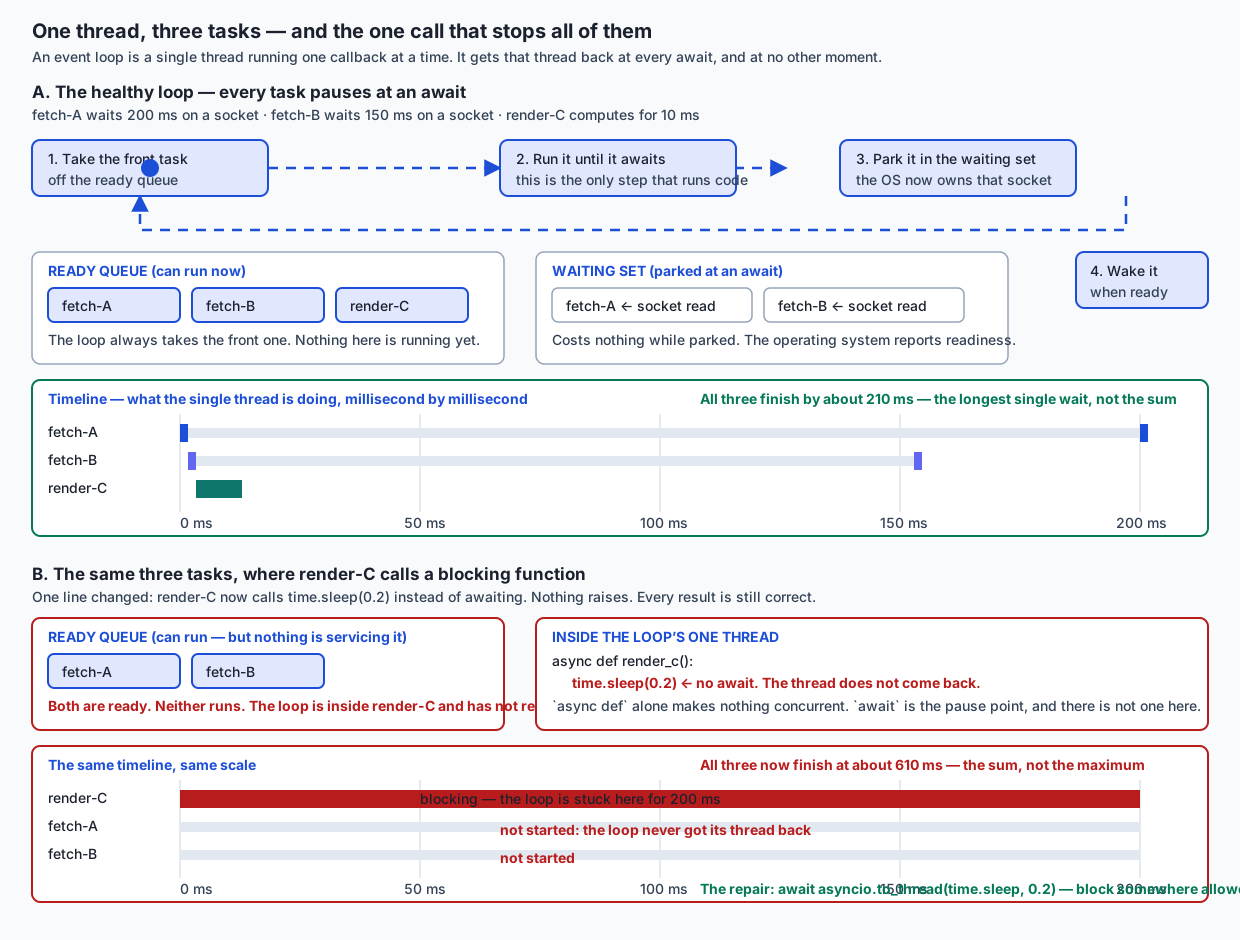
Look at the two timelines in that diagram, because they are the shape of everything below. In the top half, three tasks overlap and the total is the longest single wait. In the bottom half, one line changed, the three tasks did not overlap at all, and the total is the sum. Same code shape. Same correct answers. Three times the latency.
The decision procedure is short enough to memorise:
- The work waits — on a socket, a disk, a database, a subprocess, a lock, a human. While it waits, the CPU has nothing to do. Overlapping the waiting is free money. Use threads, or an event loop if you have hundreds or thousands of these and every library in the path cooperates.
- The work computes — arithmetic, parsing, compressing, encoding, model inference on the CPU. The CPU is fully occupied. There is no idleness to overlap, so the only way to go faster is to use more CPUs. Use processes.
And one hard rule that the rest of the lesson earns rather than asserts: in CPython, threads do not make computing work faster. Not “not much”. Measurably, reliably, and for a reason you can name.
Historical background
The dates matter here more than usual, because Python’s concurrency story is a stack of layers added over twenty-five years, each one visible in the API you use today.
Generators arrived in Python 2.2, in 2001, through PEP 255. A generator is a function that runs until yield, hands control back to its caller, and remembers exactly where it stopped. That is a function that can pause — and a function that can pause is the entire mechanism underneath everything called “async” today. PEP 342, in Python 2.5, extended generators so values could be sent into them, which made them coroutines in all but name. PEP 380 added yield from in Python 3.3, which is what let coroutines delegate to one another and made the whole thing composable.
The multiprocessing module arrived in Python 2.6, in 2008. Its purpose was stated plainly at the time and has not changed: side-step the global interpreter lock by using processes rather than threads, each with its own interpreter.
concurrent.futures arrived in Python 3.2, in 2011 — the standard library documentation still records “Added in version 3.2” at the top of its page. This is the layer most people should be using and the one most people skip. Its insight is that “run these callables and give me the results” is the same problem whether the workers are threads or processes, so it should be the same interface. ThreadPoolExecutor and ProcessPoolExecutor differ by one word at the call site.
asyncio arrived in Python 3.4, in 2014, having been developed under the name Tulip. At that point coroutines were still written as decorated generators using yield from. The async and await keywords arrived in Python 3.5, in 2015, through PEP 492, which gave coroutines a syntax of their own with rules a compiler could enforce, rather than leaving them as a convention layered on generators.
Python 3.11, in 2022, added structured concurrency to the standard library: asyncio.TaskGroup and asyncio.timeout, alongside the exception groups and except* syntax from PEP 654 that TaskGroup needs in order to report several failures at once. The idea — that concurrent tasks should have a lexical scope that they cannot outlive — came from the trio library, where it is called a nursery.
And then the foundation moved. PEP 703, “Making the Global Interpreter Lock Optional in CPython”, was written by Sam Gross, created in January 2023, and resolved in October 2023. Its status today is Final, and its target was Python 3.13. Its motivation section is worth reading for this course in particular, because four of its stated motivations are about parallelism being hard to express, about library usability, about GPU-heavy workloads needing multiple cores, and — in its own words — about the GIL making deploying Python AI models difficult.
Since Python 3.13 there is therefore an optional free-threaded build in which the interpreter lock can be disabled and threads genuinely execute Python bytecode in parallel. It is a build-time option, not a runtime flag, and it is not what you get by default.
Which is why this lesson checked, rather than remembered. The interpreter every measurement here was made on reports:
python 3.14.0 cpu_count 14 Py_GIL_DISABLED 0Py_GIL_DISABLED is 0. This is a standard build with the lock. Every number in this lesson is a number from that build, and the lesson says so wherever it matters. If you are reading this on a free-threaded build, some of what follows will not reproduce — and the lab detects that and tells you rather than failing you for it.
What it is — and what it is not
Precision first, because almost every word in this area is used loosely somewhere.
- A thread is an independent sequence of execution inside one process, scheduled by the operating system. Threads in a process share memory: the same objects, the same module globals, the same everything.
- A process is an independent program image with its own memory. Two processes share nothing unless you arrange it, and anything you send between them is serialised and copied.
- A coroutine is a function that can suspend itself and be resumed later, keeping its local state across the suspension. In Python it is written
async def, and it suspends atawait. - An event loop is a scheduler: a loop that keeps a set of tasks, runs one until it suspends, and then runs the next one that is ready.
- A task is a coroutine that the event loop has taken responsibility for running. A future is a placeholder for a result that is not available yet.
- An executor is a pool of workers plus a queue, presented as “give me a callable, take back a future”.
Now the things it is not, because these misconceptions are what actually cost people time.
| The belief | Why it is wrong | What is true instead |
|---|---|---|
”async makes code fast” | async def alone does nothing concurrent. A coroutine with no await in it runs exactly like a normal function, plus loop overhead. Measured here: asyncio on CPU work was 0.98x — marginally slower than plain sequential code | Concurrency comes from having several tasks and from each of them yielding at await. The keyword is a pause point, not an accelerator |
| ”The GIL means Python cannot do concurrency” | It constrains parallel execution of Python bytecode. It is released during I/O, so threads overlap waiting perfectly well. Measured here: 12.2x on waiting work | The GIL limits parallelism, not concurrency. Processes remove even that limit |
| ”The GIL makes my code thread-safe” | It protects the interpreter’s own state so a data race cannot corrupt CPython’s memory. It says nothing about your invariants | counter = counter + 1 across threads can still lose updates. The lab loses 290,878 of 400,000 |
| ”asyncio is strictly better than threads” | It is better at high fan-out I/O. It requires every library in the call path to cooperate, and one blocking call anywhere stops everything | Threads tolerate blocking libraries. That is a real advantage, not a consolation prize |
| ”More workers is more speed” | For computing work you are bounded by cores. For waiting work you are bounded by whatever you are waiting on — and hammering it is often rude or rate-limited | Pick the pool size from the constraint, not from optimism |
| ”A race condition will show up in testing” | Its visibility is a timing property, not a correctness property. This lab’s unprotected counter lost zero increments in 20 trials at default settings and ~70% when the thread switch interval changed | You reason about the invariant, or you remove the shared mutable state. Tests give you evidence, never assurance |
| ”Threads are the dangerous one; asyncio is safe” | asyncio removes preemptive interleaving, which is a genuine and large win. It does not remove interleaving. Anything you await in the middle of a multi-step update is a point where another task can observe the half-finished state | Keep invariant-breaking sequences free of await, or protect them with asyncio.Lock |
That second-to-last row is the one worth sitting with. It is the reason this lesson refuses to end the shared-state discussion at “use a lock”.
Why it was created and what problems it solves
Each of the three models exists because of a specific pressure, and knowing which pressure produced which tool is most of knowing when to use it.
Threads exist because waiting is wasteful and memory is expensive. If a program spends 95% of its life blocked on sockets, running one request at a time leaves the machine almost entirely idle. You could run twenty copies of the program, but then you pay for twenty copies of its memory. Threads let one process have many independent sequences of execution over one copy of the data. The price is that “one copy of the data” also means “everybody can write to it”, which is where every threading bug comes from.
Processes exist because of the interpreter lock. CPython’s memory management, and in particular its reference counting, was built on the assumption that only one thread manipulates interpreter state at a time. The global interpreter lock enforces that assumption, and the enforcement is what makes single-threaded CPython fast and C extensions straightforward to write. multiprocessing sidesteps it in the only way available: if the constraint is one lock per interpreter, use more interpreters. You get true parallelism, and you pay for it in start-up time and in the fact that nothing is shared any more.
The event loop exists because threads do not scale to very high fan-out, and because preemption is hard to reason about. Ten thousand simultaneous connections means ten thousand threads and ten thousand stacks, and the operating system’s scheduler starts to be the bottleneck. More subtly: a thread can be interrupted between any two bytecodes, so every shared data structure needs a story. A coroutine can only be interrupted at await, and await is visible in the source. That is a dramatic reduction in the number of places you have to think about — and it is the actual argument for asyncio, more than the performance is.
And concurrent.futures exists because the first two look far more different than they need to. Most concurrent code is “run this function over these inputs and give me the results”. That is one problem, so it deserves one interface, with the choice of thread or process as a detail. This is the layer that gives most people most of the value, and it is the one this lesson pushes hardest.
How it works
The interpreter lock, stated precisely
Almost everything written about the GIL is either wrong or imprecise, so here is the careful version, and then the evidence.
The global interpreter lock is a mutex inside CPython that a thread must hold in order to execute Python bytecode. The threading documentation states the consequence directly: the GIL “limits the performance gains of threading when it comes to CPU-bound tasks, as only one thread can execute Python bytecode at a time.”
Three precise statements follow, and every one of them matters:
1. It protects interpreter state, not your data. Its job is that CPython’s own internals — reference counts, the object allocator, interpreter structures — cannot be corrupted by two threads at once. It makes no promise whatsoever about the consistency of your objects. total = total + 1 is a read, an addition and a write; the GIL does not weld those three into one step. Anybody who tells you “the GIL makes Python thread-safe” has confused the interpreter’s invariants with yours.
2. It is released while a thread waits on I/O. When a thread makes a blocking system call — a socket read, a file read, time.sleep — CPython releases the lock before the call and reacquires it after. So during a socket read, that thread is holding nothing, and any other thread is free to run. This single fact is the entire reason threads help with waiting work.
3. A thread that is computing holds it. A tight arithmetic loop in pure Python makes no blocking calls, so it keeps the lock, releasing it only when the interpreter’s switch interval expires and it is asked to yield. Four threads doing arithmetic take turns on one lock. Four threads take exactly as long as one thread doing all four pieces of work, plus the cost of switching between them.
Here is the evidence, from the lab, on the interpreter named above:
| Workload | Sequential | Threads | Processes | asyncio |
|---|---|---|---|---|
| Waiting — 20 requests, 0.100 s each | 2.101 s | 0.172 s (12.2x) | not applicable | 0.117 s (17.9x) |
| Computing — 4 prime counts to 500,000 | 1.417 s | 1.410 s (1.01x) | 0.490 s (2.89x) | 1.440 s (0.98x) |
Read that table across, then down. Across the top row, everything helps. Across the bottom row, only one thing helps. Same code shape in every cell. In concurrent.futures the top-row threaded cell and the bottom-row threaded cell are literally the same three lines with a different function passed in.
Those are seconds from one machine on one day, and you should not carry them anywhere. What you should carry is the sign of each comparison, and the fact that the sign flips between the rows.
The three models, side by side
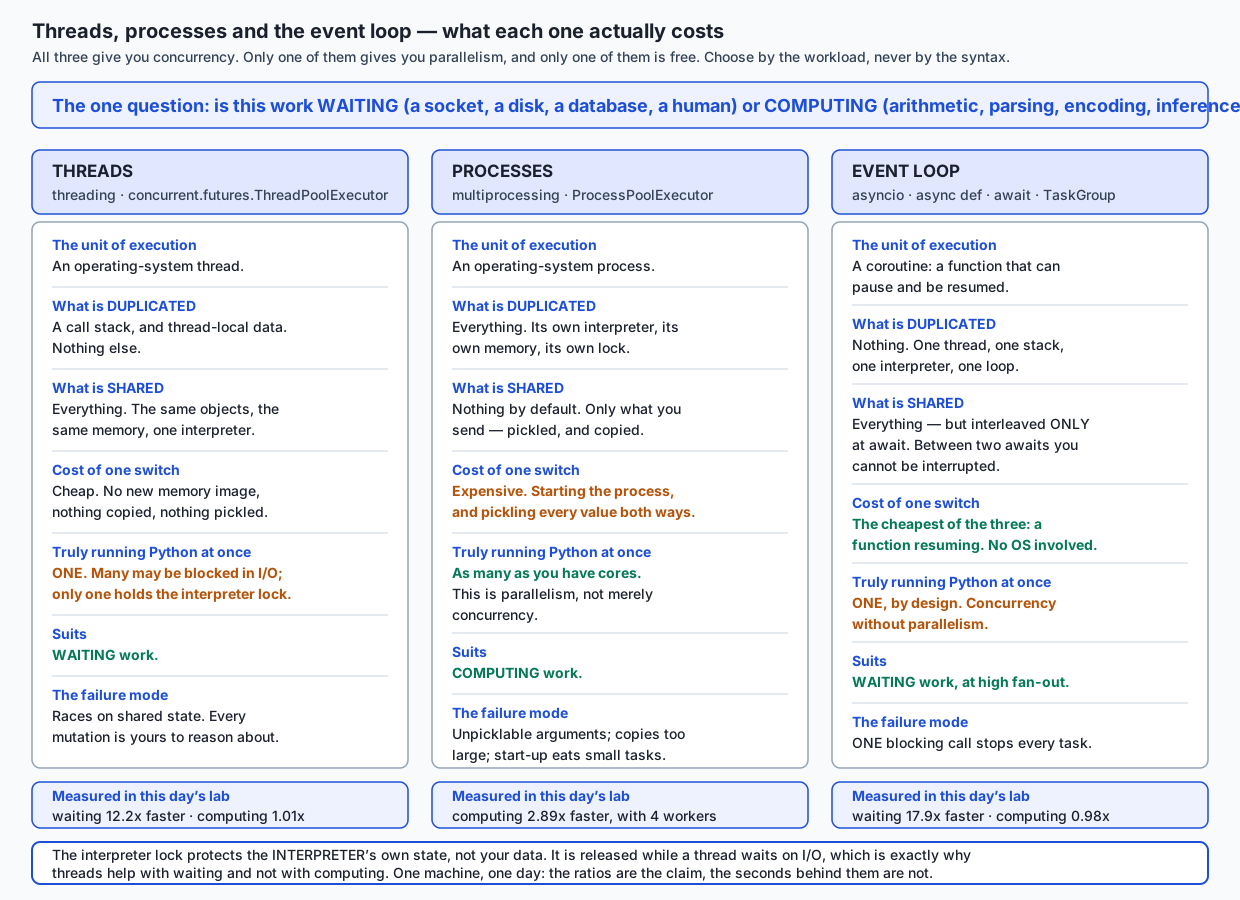
The column that repays the most attention is “what is shared”, because it predicts the bugs. Threads share everything, so their failure mode is races. Processes share nothing, so their failure mode is the cost and awkwardness of moving data across the boundary — including arguments that cannot be pickled at all. The event loop shares everything but interleaves only at await, so its failure mode is a call that never reaches an await.
concurrent.futures, the layer to reach for first
This is the highest-value thing in the lesson for most working code, and it is three lines.
from concurrent.futures import ThreadPoolExecutor

with ThreadPoolExecutor(max_workers=20) as pool:
    bodies = list(pool.map(fetch, urls))
Now the same work when it is computing rather than waiting:
from concurrent.futures import ProcessPoolExecutor

with ProcessPoolExecutor(max_workers=4) as pool:
    counts = list(pool.map(count_primes, limits))
One word. That is the whole edit, and it is deliberate: the module’s premise is that the shape of “map this over that, in parallel” should not change when the workers do.
Four things worth knowing about it before you use it in anger:
pool.mapreturns results in input order, not completion order. That is usually what a caller expects. When you want them as they land — for a progress bar, or to start using early results — useconcurrent.futures.as_completed.- Exceptions are deferred. A worker that raises stores the exception in its future; you see it when you consume the result, not when you submit the work. A
mapwhose results you never iterate can hide a failure completely. - The
withblock waits. Leaving it callsshutdown(wait=True), so the pool is drained before you continue. This is what makes the pattern safe by default. ProcessPoolExecutorneeds picklable targets. Child processes do not inherit your function; they import the module it lives in and look the name up. So the target must be a module-level function with a real name. A lambda, a closure, or a function defined inside another function raises a pickling error — the single most common first failure with process pools, and one worth meeting deliberately rather than in production.
On sizing: ThreadPoolExecutor’s default max_workers is documented, as of Python 3.13, as min(32, (os.process_cpu_count() or 1) + 4) — a value the documentation explains as preserving at least 5 workers for I/O-bound tasks while capping CPU use on many-core machines. That default is a compromise for unknown workloads. When you know your workload, size it from the constraint: for computing work, the number of cores; for waiting work, whatever the thing you are waiting on will tolerate.
asyncio, from first principles
Four ideas, in order. Each one is small; the confusion comes from meeting all four at once.
A coroutine is a function that can pause. async def defines one. Calling it does not run it — it builds a coroutine object, which is why RuntimeWarning: coroutine 'fetch' was never awaited is such a common first error. Something must drive it.
await is the pause point, and it is the only one. When a coroutine reaches await, it hands control back to the loop and says “resume me when this is done”. Between two awaits, a coroutine runs to completion without interruption. This is the property that makes async code so much easier to reason about than threads: every place another task can run is visible in your source code, spelled await.
The event loop is a scheduler. It holds a queue of ready tasks and a set of suspended ones. It takes the front ready task, runs it until it suspends, parks it, and takes the next. When the operating system reports that a socket is readable, the loop moves the task waiting on it back to the ready queue. asyncio.run creates a loop, runs one coroutine to completion, and closes it — it is the boundary between synchronous code and the loop, used once, at the top.
async def alone does nothing concurrent. This is the one people skip. Concurrency requires several tasks and pause points. A coroutine with no await inside it is a slow normal function. Two coroutines awaited one after another are strictly sequential:
# Sequential. The second does not start until the first finishes.
a = await fetch_async(url_a)
b = await fetch_async(url_b)

# Concurrent. Both start; both are in flight together.
a, b = await asyncio.gather(fetch_async(url_a), fetch_async(url_b))
asyncio.gather takes awaitables, runs them together, and returns their results in argument order. With return_exceptions=True a failure comes back as a value in the results list instead of propagating, so siblings run to completion.
asyncio.TaskGroup, added in 3.11, is the modern alternative and usually the better default:
async with asyncio.TaskGroup() as group:
    task_a = group.create_task(fetch_async(url_a))
    task_b = group.create_task(fetch_async(url_b))
# the await is implicit when the context manager exits
print(task_a.result(), task_b.result())
Two properties make it worth preferring. It cannot leak a task: the async with block does not exit until every child has finished, so a task cannot outlive the scope that created it. And if one child raises, the rest are cancelled, and the failures arrive together in an ExceptionGroup, caught with except*.
Choosing between them is a design decision rather than a style preference, and it has a one-line test: is partial success a real answer? “Fetch nine feeds and tell me which ones worked” — gather. “Do these four things or do none of them” — TaskGroup. Here is the lab’s measurement of the difference, three tasks where the second raises:
2. asyncio.gather(return_exceptions=True): one failure, others survive
   [0] result     a ok
   [1] ValueError b could not be fetched
   [2] result     c ok
   2 of 3 finished; the failure came back as a value

3. asyncio.TaskGroup: one failure cancels its siblings
   caught in the ExceptionGroup: b could not be fetched
   log: b about to fail
   log: a was cancelled
   log: c was cancelled
The one rule you must not break
Never call a blocking function inside a coroutine.
An event loop is one thread running one callback at a time, and it gets that thread back only at await. A coroutine that calls something which blocks does not suspend — it holds the only thread there is, and every other task stops.
The lab does it on purpose and measures the collapse. Five coroutines, each waiting 0.2 seconds, all handed to gather:
  async def + time.sleep  (broken)   runs:  1.019,  1.019,  1.021   median  1.019s
  async def + await asyncio.sleep    runs:  0.202,  0.202,  0.202   median  0.202s
  async def + asyncio.to_thread      runs:  0.213,  0.207,  0.207   median  0.207s
1.019 seconds is exactly the serial floor: five times two tenths. The word gather bought nothing.
And the damage is not confined to the offender. The lab also runs an unrelated heartbeat task that asks to tick every 10 milliseconds, and measures how late it actually runs:
  largest heartbeat gap while a coroutine BLOCKED :   211.3 ms
  largest heartbeat gap while a coroutine AWAITED :    11.4 ms
The heartbeat had nothing to do with the sleeping task. It was starved anyway, for the full duration of the block, because there is one thread and somebody else was standing on it. In a real service that heartbeat is every other user’s request.
The repair, when the code is yours, is to use the awaitable version: await asyncio.sleep(...), an async database driver, an async HTTP client.
The repair, when the code is not yours, is asyncio.to_thread:
result = await asyncio.to_thread(slow_synchronous_function, arg1, arg2)It runs the function in a worker thread and gives you a coroutine to await. The blocking still happens — it just happens somewhere that is allowed to block, so the loop keeps its thread. This is the standard answer for a synchronous library you cannot rewrite, and it is why “we can’t use asyncio, our database driver is synchronous” is usually not true.
Finding these in code you did not write is a mechanical scan: inside any async def, a call that is not preceded by await and is not obviously pure computation is a suspect. The four usual offenders are time.sleep, a synchronous HTTP client, a synchronous database driver, and a file read from a slow or network filesystem.
Cancellation and timeouts
Starting concurrent work is the easy half. Stopping it is where the bugs are, and where availability problems come from — without a timeout, a slow or hostile upstream decides how long you hold a connection, a thread, or a slot in a pool.
try:
    async with asyncio.timeout(0.15):
        body = await fetch_async(url)
except TimeoutError:
    body = None
The lab points that at a fixture server which takes 0.40 seconds, with a budget of 0.15:
   TimeoutError raised: yes
   gave up after 0.151s, not after 0.40s
   log: report started
   log: report received CancelledError
   log: report cleaned up
Read the log lines, because they show what cancellation actually is. Cancellation in asyncio is an exception — CancelledError — raised inside the task at its next suspension point. It is not a kill. Ordinary Python cleanup works: finally blocks run, context managers exit, sockets close. That is why the task above got to clean up rather than leaking its connection.
Two consequences follow. Re-raise it. A except CancelledError that swallows the exception produces a task that cannot be stopped, which is its own availability problem. And a task that never awaits cannot be cancelled, because there is no point at which to deliver the exception — the same one-rule failure, wearing a different hat.
Shared state, and the race this lesson could not reproduce
Here is where the lesson has to report something that contradicts the textbook, because that is what was measured.
The classic demonstration is a counter incremented by several threads. Read, add, write. If a thread switch lands between the read and the write, one increment is silently overwritten. Eight threads, fifty thousand increments each, expecting 400,000.
On the interpreter this was written on, that lost nothing. Not “rarely” — zero lost increments across 20 dedicated trials at the interpreter’s default 5 millisecond thread switch interval:
1. the naive counter at the interpreter's DEFAULT switch interval
   run 1: 400,000   lost 0
   run 2: 400,000   lost 0
   run 3: 400,000   lost 0
The temptation is to write the demonstration that “should” work and quietly not run it. What the lab does instead is state that result plainly and then change one thing that is not the code: the interval at which the interpreter considers switching threads, from 5 milliseconds down to 1 microsecond.
2. the same code with the switch interval at 1e-06 s
   run 1: 111,226   lost 288,774
   run 2: 109,122   lost 290,878
   run 3: 123,945   lost 276,055
Roughly seventy percent of the increments, gone, on every run, with not one character of the buggy code changed. The read-modify-write window was always there. It was simply narrower than one thread’s time slice, so the switch rarely landed inside it.
This is the most important thing on the page, and it is not “use a lock”:
A concurrency bug’s visibility is a property of timing, not of correctness. You cannot test your way to confidence about one. Your tests passing tells you the window did not land today, on this machine, under this load.
The direct fix makes the three steps indivisible:
with lock:
    counter.write(counter.read() + 1)
Exact, at the switch interval that destroyed the unprotected version. But the better fix is usually not a lock at all — it is to stop sharing:
def worker():
    subtotal = 0
    for _ in range(per_thread):
        subtotal += 1        # a local: no other thread can see it
    outbox.put(subtotal)     # one handoff, through a queue that is already safe
A queue.Queue is internally synchronised, so you do not have to be. There is no lock to forget, no lock ordering to get wrong, and nothing to deadlock. Prefer passing messages to sharing memory, and reach for a lock only when you genuinely cannot restructure.
Deadlock, in one paragraph. Two locks, two threads, opposite orders: thread one takes A and asks for B; thread two takes B and asks for A. Neither can proceed and neither will give up what it holds. Nothing is busy, nothing errors, the program simply stops. The lab produces this reliably and detects it with a timeout — which is a detector, not a fix, since in production it turns a hang into a mysterious slow path. The fix is a rule: every thread takes the locks in the same global order, so a cycle of waiting cannot form.
Building the event loop, so it stops being magic
The best cure for await feeling like magic is to write the loop. Here is a cooperative scheduler in about forty lines, using generators — which, as the history section noted, is what coroutines were built on in the first place. yield is our await.
PAUSE = None                       # a task yields this to give up its turn

class Scheduler:
    def __init__(self):
        self.ready = deque()       # tasks that can run now
        self.sleeping = []         # tasks waiting for a tick
        self.tick = 0

    def spawn(self, name, task):
        self.ready.append((name, task))     # queued, NOT started

    def run(self):
        while self.ready or self.sleeping:
            if not self.ready:
                # everybody is waiting; a real loop would block in select()
                self.tick = min(entry[0] for entry in self.sleeping)
                self._wake()
            name, task = self.ready.popleft()
            try:
                instruction = next(task)    # resume it; runs to its next yield
            except StopIteration as finished:
                self.results[name] = finished.value
                continue
            if instruction is PAUSE:
                self.ready.append((name, task))       # back of the queue
            else:
                _kind, ticks = instruction
                self.sleeping.append((self.tick + ticks, name, task))
            self.tick += 1
            self._wake()
Three tasks of three, two and one steps, run through it:
   trace:  alpha:0 beta:1 gamma:2 alpha:3 beta:4 alpha:5
   order:  alpha beta gamma alpha beta alpha
Each ran one step and gave the loop back. That interleaving is concurrency, in one thread, with no lock anywhere — and note why no increment could be lost here: nothing can interrupt a task between two yields.
Now run a task that never yields until it has finished all its work:
trace: greedy:0 greedy:0 greedy:0 greedy:0 polite:1 polite:2 polite:3polite did not run once until greedy was done. Nothing errored. Nothing was slow. The loop simply never got the thread back, because next(task) does not return until the task reaches a yield. That is the blocking call from two sections ago, seen from inside the loop instead of from outside it — and once you have written the while loop, that failure is not a rule you memorised, it is a line of code you can point at.
Everything asyncio adds on top of this — socket readiness from the operating system via selectors, cancellation, timeouts, TaskGroup, thread offloading — is machinery around this idea, not a different idea.
An everyday analogy
A coffee shop, and one prop: the baton.
The shop has a rule. Only the person holding the baton may operate the shop’s own procedures — ringing the till, updating the stock sheet, writing on the board. There is exactly one baton. It exists because the shop’s books have to stay consistent, and two people writing on the stock sheet at once would ruin them.
A barista is a thread. The baton is the global interpreter lock.
Now watch what happens across a shift.
Waiting work. A barista starts the kettle. The kettle does not need the barista. So they put the baton down and take the next order while the water heats. Twenty orders that each involve two minutes of kettle do not take forty minutes; they take a bit over two, because all the waiting overlapped. This is why threads help with I/O: a blocked socket read releases the lock. The lab measures it at 12.2x.
Computing work. Now every order requires the barista to hand-count a jar of beans — four minutes of concentration, needing the baton the whole time. Hire three more baristas and the queue does not move faster, because there is still one baton and they simply take turns holding it. This is why threads do not help with CPU-bound work. The lab measures it at 1.01x.
Parallelism is opening a second shop across the street, with its own till, its own stock sheet and its own baton. Genuinely twice the throughput. The costs are exactly the costs of processes: you had to build the second shop (start-up), and the two shops share nothing, so anything one needs from the other has to be carried across the street (pickling and copying).
The event loop is a single exceptionally disciplined barista who never stands idle. Kettle on — turn to the next customer. Milk steaming — take another order. They are never doing two things at once; they are simply never waiting. That is concurrency without parallelism, and for a shop whose work is nearly all waiting it is the best arrangement there is.
The blocking call is that same barista deciding to hand-count a jar of beans while standing at the till. The queue does not move for four minutes. Nobody is served incorrectly; everybody is served late. No alarm sounds. And asyncio.to_thread is sending the jar to an assistant in the back room: the counting still takes four minutes, but it happens somewhere that is allowed to stop.
The race condition is the part the analogy makes sharpest. The baton keeps the shop’s books consistent. It does not keep your count consistent. Two baristas both glance at the board — “3 croissants left” — both sell one, and both write “2”. One croissant has been sold and not recorded. Neither did anything wrong individually. The shop’s own ledger was never corrupted; your inventory is simply now a lie. The interpreter lock protects interpreter state, not your data.
The lock is a rule that you must be holding the croissant tin to update the croissant number. The queue is the better arrangement: each barista keeps their own tally slip and they are added up at close, so there is nothing to contend over. And the deadlock is two baristas at the machine, one holding the milk jug and waiting for the steam wand, the other holding the steam wand and waiting for the milk jug. Both are perfectly willing to work. Nothing will happen again, ever.
Where the analogy stops, and you should know: a real barista notices they are stuck. An event loop does not. And a real shop can hire a fifth barista in a minute; starting a process costs milliseconds, which is fast for a shop and slow for a function you call in a loop.
Examples in practice
Reading a measurement honestly
Every number in this lesson came from a run you can repeat, and it is worth being explicit about the discipline, because performance claims are where technical writing is least trustworthy.
Each measurement here was run three times, and all three samples are printed alongside the median and the spread:
  sequential (one at a time)         runs:  2.101,  2.099,  2.117   median  2.101s   spread 0.017s
  threads (ThreadPoolExecutor 20)    runs:  0.172,  0.142,  0.172   median  0.172s   spread 0.031s
  asyncio (one thread, one loop)     runs:  0.117,  0.114,  0.176   median  0.117s   spread 0.062s
Three things to notice. The median is the headline rather than the mean, because a mean over three samples with one outlier is a lie with a decimal point on it. The spread is printed, and the asyncio row’s spread of 0.062 s is larger than its own median — one of the three runs took half as long again as the others, and hiding that would misrepresent how stable the result is. And three runs is a small sample; it shows you variation exists, and it is not a rigorous benchmark, and this lesson says so rather than dressing it up.
Three runs on one machine on one day. That is the honest description, and it is the description you should attach to your own numbers too. What generalises is not the seconds — it is the shape: waiting work overlaps, computing work does not until you use processes. The lab’s tests assert only that shape, with wide margins. Not one test asserts a duration.
The trap that makes all of this hard
Look again at the three approaches to the blocking-call problem:
correctness — all three produce the same answers, which is the trap
  blocking    [0, 1, 2, 3, 4]  correct: yes
  awaiting    [0, 1, 2, 3, 4]  correct: yes
  to_thread   [0, 1, 2, 3, 4]  correct: yes
Every version is correct. The broken one is five times slower and produces identical output. There is no test you can write against the results that catches it, no exception, no log line, no type error. This is the defining property of concurrency bugs and the reason they are worth a whole day: they do not manifest as wrong answers. They manifest as latency, as throughput, as a number that drifts, or as nothing at all until the load doubles.
A shared object that refuses to be shared
Concurrency shows up in ordinary library APIs constantly, and the sqlite3 module is a good example because its safety story is explicit and checkable. Its connection objects default to check_same_thread=True, which the documentation describes as raising ProgrammingError if the connection is used by a thread other than the one that created it. Here is that happening, captured on this machine:
sqlite3.threadsafety = 3
ProgrammingError: SQLite objects created in a thread can only be used in that same thread.
The object was created in thread id 8493620608 and this is thread id 6175518720.
Two lessons in one error. First, a well-designed library tells you loudly rather than corrupting quietly — this is the friendly version of the failure. Second, the documented escape hatch is worth reading carefully: setting check_same_thread=False allows the connection to be accessed from multiple threads, and the documentation adds that write operations may then need to be serialised by the user to avoid data corruption. That is the library handing the invariant back to you, in writing. “Is this object safe to share between threads?” has a documented answer far more often than people check.
Where this bites in AI work, specifically
Both halves of this lesson show up in a typical model-serving stack, on opposite sides.
Serving is almost entirely waiting. A request arrives, and the server waits: for a GPU to finish a batch, for a vector database to return neighbours, for an upstream model API, for a cache. The CPU work in the handler is trivial next to it. So an inference server is close to the ideal event-loop workload — thousands of concurrent requests, nearly all of them idle at any instant. And it is precisely the workload where one blocking call is catastrophic, because the whole point was that thousands of requests share one thread. A synchronous tokenizer load, a synchronous database driver, or a requests.get to a metadata service in one handler will serialise every request on that worker while every dashboard shows a healthy, near-idle process.
Data loading for training is the exact mirror. Decoding JPEGs, resampling audio, tokenising text, augmenting images — pure CPU, no waiting. Threads will do nothing for it, and this is why data-loading APIs in the major training frameworks are built on worker processes rather than worker threads. If your input pipeline is starving your accelerator, and you “fixed” it with a thread pool, you have very likely measured 1.01x and moved on.
The rule holds on both sides: serving waits, preprocessing computes. One codebase, two answers, and the only way to know which is which is to ask the question.
Implications: security, privacy, performance, scalability, and cost
Security. A race condition is a security bug, not merely a correctness one. The lost update in this lab is a toy — two threads read a counter, both add one, one write wins. Replace “counter” with “account balance”, “remaining quota”, “licences in use” or “has this token already been redeemed” and it becomes a time-of-check-to-time-of-use flaw. The pattern to recognise is any check, then act sequence where the state can change in between:
if user.has_permission(document):   # the check
    send(document)                  # the act — permission may have been revoked
And this lab’s own finding is the sharpest possible argument for taking it seriously: the unprotected counter lost nothing in 20 trials at default settings, and 70% of its increments when only the timing changed. The bug was equally present in both cases. Only its visibility changed.
A blocked event loop is a denial of service you inflict on yourself. One slow synchronous call in one handler stops every other request on that worker — the lab measures 211 milliseconds of starvation for an unrelated task. No error is raised, no alert fires, and the metric that shows it is tail latency rather than error rate. An attacker who finds the one endpoint that blocks does not need a botnet.
Privacy. Concurrency adds a way for data to cross boundaries it was not meant to. Thread-local state exists because request-scoped data — a user id, a tenant, an auth token — leaks disastrously when it is stored in a module global and two requests are in flight. In asyncio the same job is done by contextvars, and asyncio.to_thread propagates the current context to the worker thread precisely so that this does not break when you offload. Get it wrong and one user’s data is attached to another user’s request, which is the kind of bug that is discovered by a customer.
Performance. The headline is the one measured above, but three secondary effects matter. Process pools pay a start-up cost and a serialisation cost on every argument and every result, so small tasks can be made slower by parallelising them. Threads are cheap but not free, and thousands of them cost stacks and scheduler attention. And an event loop’s costs are the lowest of the three — a resumed function, no operating system involvement — which is exactly why it scales to fan-out that threads cannot reach.
Scalability. Threads and the event loop scale within one machine and one process. Processes scale to the cores of one machine. Beyond that you are in a different subject: work that must outlive a process and spread across machines needs a broker and a durable queue, which is where Celery and its relatives live. Recognising that boundary is worth as much as anything else here, because reaching for a distributed task queue when a thread pool would do buys you an operational burden you did not need — and reaching for a thread pool when the work must survive a restart loses the work.
Cost. Two directions. Choosing threads for computing work means buying cores you will never use — a sixteen-core machine running a workload with a hard ceiling of one. Choosing processes for tiny tasks means paying start-up and copying costs larger than the work. And the cost nobody budgets for is the debugging: a bug that reproduces once a week under load is not four times cheaper than one that reproduces daily. It is far more expensive, because every fix is a hypothesis you cannot test.
Alternatives: free, open source, and commercial
Everything in the standard library is free and open source under the PSF licence, with no paid tier and no account. The four external libraries below are all free and open source too; none of them is installed on the machine this lesson was written on, so no output from any of them is reproduced here — they are described from their documentation, and labelled as such.
threading — standard library. Ran here.
Choose it when the work waits, the library you are calling is synchronous, and you want the simplest thing that overlaps waiting. Also when you need one background thread for something long-lived.
How to use it: prefer concurrent.futures.ThreadPoolExecutor over raw Thread objects unless you need something a pool cannot express; use threading.Lock for shared mutable state and queue.Queue in preference to a lock wherever you can restructure to it.
Example: with ThreadPoolExecutor(max_workers=20) as pool: list(pool.map(fetch, urls)) — measured here at 12.2x over sequential on 20 waiting requests.
Cost: free.
multiprocessing — standard library. Ran here.
Choose it when the work computes and you want more than one core.
How to use it: through ProcessPoolExecutor for the map-shaped case. Keep targets at module level so they can be pickled; keep arguments and results small, because everything crossing the boundary is copied.
Example: with ProcessPoolExecutor(max_workers=4) as pool: list(pool.map(count_primes, limits)) — measured here at 2.89x over sequential, with four workers on a fourteen-core machine.
Cost: free.
concurrent.futures — standard library. Ran here.
Choose it when your problem is “run this callable over these inputs” — which is most of the time. It is the layer this lesson recommends reaching for first.
How to use it: submit for one job, map for many in input order, as_completed for results as they land. Remember exceptions surface when you consume the future.
Example: the two blocks above, differing by one word.
Cost: free.
asyncio — standard library. Ran here.
Choose it when you have high fan-out I/O — hundreds or thousands of concurrent waits — and every library in the call path has an async version. Also when you want interleaving to be visible in the source rather than preemptive.
How to use it: asyncio.run once at the top; TaskGroup in preference to bare create_task; asyncio.timeout on anything that talks to something you do not control; asyncio.to_thread for the synchronous library you cannot replace.
Example: twenty concurrent fetches through a TaskGroup, measured here at 17.9x over sequential.
Cost: free.
trio — third party, free and open source. Not installed here; no output reproduced.
Choose it when you are starting fresh and value strictness over ecosystem size. Trio’s design principle is structured concurrency: tasks live in a nursery and cannot outlive it, so a task cannot be accidentally leaked. asyncio.TaskGroup is the standard library adopting that idea, which is a strong signal about its merit.
How you would use it: trio.run(main) in place of asyncio.run, and async with trio.open_nursery() as nursery: nursery.start_soon(...) in place of a TaskGroup.
Trade-off: a smaller ecosystem of compatible libraries than asyncio’s.
Cost: free.
anyio — third party, free and open source. Not installed here; no output reproduced.
Choose it when you are writing a library rather than an application, and you do not want to force your users onto one event loop. AnyIO provides one API that runs on either asyncio or trio.
How you would use it: write against anyio’s task groups and streams; your callers pick the backend.
Trade-off: one more abstraction layer between you and the loop when you are debugging.
Cost: free.
gevent — third party, free and open source. Not installed here; no output reproduced.
Choose it when you have a large existing synchronous codebase and cannot rewrite it with async/await. Gevent takes the opposite approach: it monkey-patches the standard library so that ordinary blocking calls become cooperative, giving you concurrency without changing the call sites.
Trade-off: that is a very large amount of action at a distance. Patching the standard library beneath libraries that were not written with it in mind is powerful and correspondingly hard to debug, and it is why new projects generally choose asyncio or trio instead.
Cost: free.
Celery — third party, free and open source; commercial hosting available for the brokers it needs. Not installed here; no output reproduced.
Choose it when the work must outlive the process or spread across machines rather than cores: video transcoding, nightly retraining, sending email, anything that must survive a deploy or a crash.
How you would use it: a broker such as Redis or RabbitMQ, worker processes on one or more machines, and functions decorated as tasks and called with .delay(...).
Trade-off: it is infrastructure. You now operate a broker, and you inherit retries, idempotency, visibility timeouts and dead-letter handling as design problems. Do not reach for it when a ThreadPoolExecutor would do — but do reach for it rather than pretending an in-process pool can survive a restart.
Cost: the library is free; the broker is a service you run or buy. No prices are quoted here because they change and none was verified.
Comparison with related concepts
| Concept | What it actually is | How it relates to today | The confusion to avoid |
|---|---|---|---|
| Concurrency | A structure: several things in progress | The whole topic | It is not a performance technique. It is a way of organising work that sometimes yields performance |
| Parallelism | A hardware fact: several things executing at one instant | What processes give you and threads do not | You can be concurrent without it, and usually are |
| Asynchronous | ”I do not block waiting for this to finish” | The event loop’s premise | It does not mean parallel, and it does not mean fast |
| Preemptive scheduling | The scheduler can interrupt you anywhere | What threads get from the operating system | This is why every shared mutation in threaded code needs a story |
| Cooperative scheduling | You are interrupted only where you say | What coroutines get at await | It does not remove interleaving — it makes every interleaving point visible |
| Green threads | Lightweight threads scheduled in user space | What gevent provides; what a coroutine resembles | They are not OS threads and do not give you cores |
| A lock | Mutual exclusion over a critical section | The direct fix for a race | It is a claim you must maintain everywhere, forever. A queue is usually better |
| A queue | A handoff channel, internally synchronised | The better answer to most sharing | It does not remove the need to think; it removes most of the places you have to |
| The GIL | A mutex protecting interpreter state | Why threads do not parallelise Python bytecode | It is not a thread-safety guarantee for your data |
async / await | Syntax for functions that can pause | asyncio’s user interface | The syntax is not the concurrency. Several tasks plus pause points are |
| Distributed systems | Concurrency across machines with a network between them | The boundary where today’s tools stop | Different failure model entirely — see below |
That last row deserves a paragraph, because it is the honest limit of this day.
Everything above happens inside one machine, where memory is reliable, a function call cannot half-succeed, and there is a single authoritative clock. Cross a network and none of that holds. The CAP theorem is the standard statement of the resulting constraint: a distributed data store cannot simultaneously guarantee consistency, availability and partition tolerance, and since partitions happen whether you plan for them or not, real systems trade consistency against availability.
Nothing in today’s toolkit addresses that, and today’s toolkit does not need to. A threading.Lock works because both threads are in the same memory; it has no distributed equivalent that is anywhere near as cheap or as reliable. When your concurrency crosses a machine boundary you have changed subject — which is exactly the boundary at which Celery, and the reasoning that goes with it, becomes the right answer rather than an over-engineered one.
When to use it — and when not to
The decision table. Find your row, take the answer, and then measure it to confirm — because the point of this whole day is that the measuring is not optional.
| Your situation | Use | Why | Watch out for |
|---|---|---|---|
| A handful of HTTP requests, files, or database queries | ThreadPoolExecutor | Waiting overlaps; works with synchronous libraries; nothing to rewrite | Sizing the pool by what the other end tolerates, not by optimism |
| Hundreds or thousands of concurrent connections | asyncio with TaskGroup | Threads stop scaling at that fan-out; loop switches are the cheapest | Every library in the path must be async, or offload it with to_thread |
| CPU-bound work: parsing, checksums, image or audio processing, CPU inference | ProcessPoolExecutor | The only way to get more than one interpreter lock | Picklable targets; small arguments; tasks big enough to earn the start-up |
| Mixed: an async service that must do one CPU-heavy step | asyncio + run_in_executor on a process pool | Keeps the loop responsive while the heavy work happens elsewhere | Do not do the CPU step inline in the handler. That is the blocking rule |
| A synchronous library inside an async service | await asyncio.to_thread(...) | Blocks somewhere that is allowed to block | It is a repair, not a licence to keep adding synchronous calls |
| One long-lived background job in a running program | A single threading.Thread, or asyncio.create_task held in a variable | A pool is the wrong shape for one continuous task | Keep a reference to the task, or it can be garbage collected mid-flight |
| Work that must survive a restart, or span machines | A task queue such as Celery | In-process pools die with the process | You are adopting infrastructure. Budget for it |
| The work is fast and there is not much of it | Nothing. Stay sequential | Concurrency is not free in complexity, and the debugging cost is real | This row is chosen far too rarely |
| You have not measured yet | Nothing. Measure first | You do not yet know whether it waits or computes | The wrong answer here is the mistake this whole day exists to prevent |
Three situations where the answer is emphatically do not:
Do not add concurrency to something you have not profiled. Half the time the bottleneck is one accidentally quadratic loop or a missing database index, and concurrency turns a two-second problem into a two-second problem with a race condition in it.
Do not use threads to speed up pure Python computation. This is the specific mistake this lesson opened with, it is worth 1.01x, and it is the single most common concurrency error in Python.
Do not introduce shared mutable state because it was convenient. Every shared mutable object is a permanent obligation to reason about every path that touches it, and — as this lesson measured — your tests will not tell you when you have got it wrong. Pass messages instead, and keep the number of things you must be right about small.
Knowledge check
Work through these before the quiz. Each has a defensible answer you can reach from what is above.
- A colleague says “we made it async, so it should be faster now”. What is the first question you ask, and what is the second?
- Explain, in two sentences, why the same three-line
concurrent.futureschange gives 12.2x on one workload and 1.01x on another. - Your service uses
async defeverywhere and its CPU usage under load is 3%, but latency scales linearly with concurrent users. What is your first hypothesis, and how would you confirm it? - Why does
async defalone make nothing concurrent? What are the two ingredients that actually produce concurrency on an event loop? - The GIL is often described as making Python thread-safe. What does it actually protect, and give a concrete example of something it does not.
- A test for a race condition passes a thousand times. What have you learned, and what have you not?
- When would you choose
asyncio.gather(return_exceptions=True)overasyncio.TaskGroup, and when the reverse? - You must call a synchronous database driver from an async handler. Name the repair, and say what it does and does not fix.
- Why is a
queue.Queueusually a better answer than athreading.Lock, and when is it not available to you? - You measure a 3.4x speed-up from a process pool. What three things must you state alongside that number for it to mean anything to somebody else?
Hands-on exercise
Work through the lab: Waiting Versus Computing. It is the measuring half of this lesson, and the parts of the lesson that read as assertions are things the lab makes you observe.
Eight exercises in starter/01_exercises.py, checked by bash starter/02_check.sh, which reports N of 8 exercises complete. and names each one still open:
fetch_all_sequentially— the baseline everything else is measured against.fetch_all_with_threads— waiting work with a thread pool. Must be at least 2.5x faster.fetch_all_with_asyncio— the same work on one event loop. Must be at least 2.5x faster.count_primes_with_threads— computing work with a thread pool. Must be correct, and the checker prints the ratio so you can see it is not faster.count_primes_with_processes— the same work with a process pool. Must be at least 1.4x faster.wait_without_blocking_the_loop— repair a blocking call withasyncio.to_thread.counter_that_loses_nothing— the checker runs your counter at a 1 microsecond thread switch interval, where unprotected code loses increments every run.round_robin— write the event loop: adeque,popleft,next(task), and put it back unless it finished.
The waiting is real: a fixture HTTP server on 127.0.0.1, on a port the operating system picks, sleeping a fixed time per request. No network, no key, no account, and no third-party package — the test suite parses every import and fails if one appears.
Start by reading starter/00_brief.md, then run the harness before you change anything.
Expected output
The starter, before you begin:
  [open] 1. fetch_all_sequentially
         not started
  [open] 2. fetch_all_with_threads
         not started
  ...
0 of 8 exercises complete.
with exit code 1. As you work, the checker reports behaviour and ratios:
  [ok  ] 1. fetch_all_sequentially
         12 bodies in order, 0.658s
  [ok  ] 2. fetch_all_with_threads
         4.3x faster than sequential (0.152s); needs >= 2.5x
  [ok  ] 4. count_primes_with_threads
         counts correct; 1.01x sequential — threads do not help here, and are not required to
  [ok  ] 5. count_primes_with_processes
         counts correct; 2.61x sequential (0.390s); needs >= 1.4x
Read exercise 4’s line and exercise 5’s line together. That contrast is the entire day.
Finished, and the full harness:
8 of 8 exercises complete.

58 checks, 0 failure(s).
Your seconds will differ from these and your ratios should not. expected-output/FIELDS.md lists exactly which values must match on any machine — the prime counts, the counter totals, the scheduler’s interleaving order — and which are expected to differ, which is every single elapsed time.
Validate your work
bash tests/run_tests.shends with58 checks, 0 failure(s).and exits 0.- Threads and asyncio are each at least 4x faster than sequential on the twenty waiting requests, and all three return twenty well-formed bodies in input order.
- Threads are below 1.5x on the computing work; processes are at least 1.5x; and every approach still answers 41538.
- Five gathered blocking coroutines take the serial time; both repairs are at least 2.5x faster.
- The blocked loop starves an unrelated heartbeat by at least 3x the healthy gap, while all three versions return identical correct results.
- The unprotected counter loses more than a thousand increments; the locked and queued versions total exactly 400000.
- Two locks in opposite orders deadlock; in one consistent order they do not.
- Your
round_robinreturns['a', 'b', 'c', 'a', 'b', 'a']for tasks of 3, 2 and 1 steps. - A timeout fires at the caller’s 0.15 s budget rather than the work’s 0.40 s, and the cancelled task’s
finallyblock appears in the log. - After the harness finishes, no
__pycache__directory and no temporary file survives.
Troubleshooting
Can't pickle <function <lambda>>—ProcessPoolExecutorchildren import the module to find your target, so it must be a module-level function with a real name. Not a lambda, not a closure.RuntimeError: asyncio.run() cannot be called from a running event loop—asyncio.runis the boundary between synchronous code and the loop. Once, at the top. Inside a coroutine youawaitinstead.RuntimeWarning: coroutine 'fetch_async' was never awaited— calling a coroutine function builds an object; it does not run anything. Await it, or hand it togatherorcreate_task.- A task created with
create_tasknever runs —create_taskschedules; it does not start. Nothing starts until the current coroutine gives the thread back at anawait. This exact bug appeared while writing this lab, and the fix is a comment inexamples/03_blocking_coroutine.py. - Your async version is exactly as slow as sequential — something in the call path blocks. Total time equal to the sum rather than the maximum, with CPU near zero, is the signature.
- The threaded version is not faster — if the work never waits, that is the correct result and it is exercise 4.
- The process version is not faster — the tasks may be too small for the start-up and pickling cost, the arguments may be too large, or the machine may have too few cores.
SyntaxErroronexcept*— your interpreter predates 3.11. UsePYTHON=/path/to/python3 bash tests/run_tests.sh.- Your unsafe counter loses nothing — that is a real observation, not a broken lab. See the honest discussion above, and
troubleshooting.md.
Common mistakes
- Reaching for threads because they worked last time. Last time the work waited. Ask the question every time.
- Believing
async defdid something. Withoutawait, and without several tasks, it did not. - Awaiting sequentially and calling it concurrency.
await athenawait bruns a then b. Usegatheror aTaskGroup. - Blocking inside a coroutine. The one rule. It is silent, it is measurable, and it is the most expensive mistake here.
- Swallowing
CancelledError. Catch it to clean up, then re-raise. Otherwise you have built a task that cannot be stopped. - Sharing mutable state because it was convenient, then adding a lock, then adding a second lock, then deadlocking. Prefer a queue and per-worker locals.
- Reporting a speed-up from one run. One run is an anecdote. Say how many runs, what the spread was, and which machine.
- Asserting milliseconds in a test. It will be flaky on somebody else’s machine and it teaches nothing. Assert the shape.
Practice assignment
Take a real script of your own — one you actually run — and put it through this day’s discipline. Produce a short written report; the writing is the assignment as much as the code is.
- Profile it first. Find where the time actually goes before changing anything. If the answer is “one slow query” or “an accidentally quadratic loop”, fix that and stop; report that you stopped and why. This is a legitimate and common outcome.
- Classify every hot section as waiting or computing, and write one sentence of justification for each. Sections that are genuinely both are the interesting ones; say what fraction you think is which and how you would find out.
- Predict, in writing, before you measure, what speed-up each candidate model would give each section. Commit to numbers.
- Implement the best candidate for each section using
concurrent.futureswhere it fits. - Measure properly. At least five runs per variant. Report the median and the full spread, not the best sample. State the machine, the interpreter version, its
Py_GIL_DISABLEDvalue, and the core count. - Compare your predictions with the measurements, and account for every gap. The gaps are the part with the learning in them.
- Write down what would break if you doubled the concurrency. What does the other end tolerate? What shared state now exists that did not before? Where would a race live?
The deliverable is a page: what the work turned out to be, what you tried, what you measured, and one honest paragraph on what surprised you. If the answer is “concurrency did not help and I removed it”, that is an excellent report and you should write it up exactly that way.
Extension challenge
Pick one. Each will take a couple of hours and each teaches something the lab deliberately left on the table.
-
Give your scheduler real sockets. The generator scheduler in
examples/05_scheduler.pycheats: when every task is asleep it jumps its clock forward. Replace that withselectors.DefaultSelector. Let a task yield a socket it wants to read from; register it; block inselect()until the operating system reports readiness; wake the task. That single change turns a toy into the thing asyncio actually is, and you will understand theadd_readerfamily of methods afterwards in a way no amount of reading provides. -
Make the race land at the default switch interval. The lab had to lower
sys.setswitchintervalto 1 microsecond to make the lost-update race reproduce. Get it to lose increments without that: more threads, a longer read-modify-write, a property with a side effect, real work between the read and the write. Record how many trials each variant needed. Then write a paragraph on what your results imply about relying on tests to catch this class of bug — that paragraph is the actual deliverable. -
Build a rate-limited async fetcher, and prove the arithmetic. Twenty concurrent requests is fine against your own fixture server and rude against somebody else’s API. Add an
asyncio.Semaphoreallowing five in flight, predict the new total time from first principles before running it, then measure. Then explain precisely why a semaphore is the right tool and aThreadPoolExecutor(max_workers=5)is a different thing that happens to look similar. -
Find the process-pool crossover, and name what it is measuring. Shrink the prime limit until
ProcessPoolExecutoris slower than sequential code, and find the break-even size. Then decompose the overhead: time a pool created once and reused against one created per call, and time large arguments against small ones. Report which of start-up, argument pickling and result pickling dominates, and at what size each stops mattering. -
Take the free-threaded build for a drive — and report honestly. If you can install a free-threaded Python 3.13 or later, run this lab’s
examples/02_computing.pyon it and compare. The lab’sPy_GIL_DISABLEDcheck will report1, and the test suite will skip its “threads do not help” check. Write up what the threaded row actually did, whether the single-threaded columns changed, and what you would need to verify before recommending it for real work. Do not report what PEP 703 predicts — report what your machine did, which is the discipline this entire day is about.
Quiz
Q1. Your service resizes uploaded images. Profiling shows almost all the time inside a pure-Python resampling loop with no I/O in it at all. You want to use the four idle cores on the machine. Which model fits, and why?
- ThreadPoolExecutor — a pool of four threads will use the four cores, since threads are what the operating system schedules onto cores
- ProcessPoolExecutor — only separate processes have separate interpreters, and therefore separate interpreter locks, so only they can execute Python bytecode on four cores at once
- asyncio with a TaskGroup — an event loop schedules four tasks and the operating system spreads them across the cores
- Any of the three; they are three spellings of the same capability and the choice is a matter of taste
Show answer
Answer: B. ProcessPoolExecutor — only separate processes have separate interpreters, and therefore separate interpreter locks, so only they can execute Python bytecode on four cores at once
The one question decides it: this work is COMPUTING, not waiting, so there is no idleness to overlap and the only route to going faster is more CPUs actually executing Python. In CPython a thread must hold the global interpreter lock to execute Python bytecode, so four threads doing pure-Python arithmetic take turns on one lock and finish in about the time one thread would have taken — this lesson measured exactly that, at 1.01x with four workers on a fourteen-core machine. Option 0 is the single most common concurrency mistake in Python and is wrong for that reason: the operating system will happily schedule four threads onto four cores, and three of them will be waiting for the lock. Option 2 is worse still, because an event loop is explicitly concurrency WITHOUT parallelism — it runs one task at a time on one thread, and this lesson measured asyncio on the same CPU-bound workload at 0.98x, marginally slower than plain sequential code. Processes win because each one has its own interpreter and therefore its own lock; the measured result was 2.89x, less than 4x because starting the processes and pickling arguments and results are real costs paid at the edges.
Q2. Inside an async request handler, a developer calls a synchronous database driver: `rows = db.query(sql)`, with no `await`. The service returns correct results and raises nothing. What actually happens on the event loop?
- The loop detects the blocking call and automatically moves it to its default thread executor
- The coroutine is suspended at that call like any other, and other tasks run while the query is in flight
- Nothing raises, but the loop cannot run any other task until the query returns, so every other request on that worker is stalled for the duration
- The call raises RuntimeError, because blocking calls are not permitted inside a coroutine
Show answer
Answer: C. Nothing raises, but the loop cannot run any other task until the query returns, so every other request on that worker is stalled for the duration
This is the one rule of async Python and the most expensive mistake in the subject, precisely because it is silent. An event loop is a single thread running one callback at a time, and it gets that thread back only at `await`. A call with no `await` in front of it does not suspend anything — it holds the only thread there is. The measurement in this lesson is unambiguous: five coroutines each waiting 0.2 seconds and handed to `asyncio.gather` took 1.019 seconds, which is exactly the serial floor of five times two tenths, while the awaiting version took 0.202 seconds. Worse, the damage reaches tasks that have nothing to do with the offender: an unrelated heartbeat asking to tick every 10 milliseconds was measured running 211.3 milliseconds late while a coroutine blocked, against 11.4 milliseconds on a healthy loop. Options 0 and 3 both describe a Python that would be much easier to use but does not exist — nothing detects this and nothing complains, which is why the bug survives code review and is found by a latency graph months later. Option 1 describes what `await` would have done. The repair when you own the code is an awaitable version; when you do not, it is `await asyncio.to_thread(db.query, sql)`, which was measured at 0.207 seconds — the blocking still happens, it just happens somewhere allowed to block.
Q3. The global interpreter lock is often summarised as "the GIL makes Python thread-safe". What does it actually protect?
- The interpreter own internal state — reference counts, allocator and interpreter structures — so that CPython memory cannot be corrupted by two threads; it makes no promise about the consistency of your data structures
- Every Python object, so that any single statement operating on any object is atomic across threads
- Only objects that are explicitly shared between threads; thread-local objects are outside its scope
- Nothing at runtime; it is a compile-time check that rejects unsafe threaded code
Show answer
Answer: A. The interpreter own internal state — reference counts, allocator and interpreter structures — so that CPython memory cannot be corrupted by two threads; it makes no promise about the consistency of your data structures
The distinction between the interpreter invariants and yours is the whole point, and confusing them is how people ship races believing they cannot have any. The lock exists so that CPython own memory management — reference counting in particular — cannot be corrupted when several threads run. It says nothing about whether YOUR multi-step update is indivisible. `total = total + 1` is a read, an addition and a write, and the lock does not weld those into one operation, which is why this lesson lost 290,878 of 400,000 increments from eight threads sharing one counter. Option 1 is the belief being corrected: statement-level atomicity is not what the lock provides, and relying on it is relying on an implementation detail of how a particular expression compiles. Option 2 inverts the situation — thread-local data needs no protection precisely because nobody else can see it, while shared data is exactly what the lock does not protect. Option 3 is simply not what it is; it is a runtime mutex. Two further facts complete the picture and explain the day measurements: the lock is RELEASED while a thread waits on I/O, which is why threads gave a 12.2x speed-up on waiting work; and a thread doing pure computation holds it, which is why the same code gave 1.01x on computing work.
Q4. A developer converts every function in a data-processing module to `async def`, changes nothing else, and reports that the module is now asynchronous. What have they actually changed about how it runs?
- It now runs concurrently, because coroutines are scheduled cooperatively by the event loop
- It now runs in parallel across cores, because the event loop distributes coroutines to available CPUs
- It will now raise at import, because `async def` functions cannot be called from synchronous code
- Nothing useful: without several tasks AND `await` points inside them, each coroutine still runs start to finish before the next one begins, plus the overhead of running a loop
Show answer
Answer: D. Nothing useful: without several tasks AND `await` points inside them, each coroutine still runs start to finish before the next one begins, plus the overhead of running a loop
Concurrency on an event loop needs two ingredients, and `async def` supplies neither on its own. You need SEVERAL TASKS in flight — one coroutine awaited after another is strictly sequential, so `a = await fetch(x)` followed by `b = await fetch(y)` does not overlap anything and `asyncio.gather` or a `TaskGroup` is what makes them concurrent. And you need PAUSE POINTS inside them: a coroutine with no `await` in its body runs to completion exactly like an ordinary function, because there is nowhere for the loop to take the thread back. This lesson measured that directly: four CPU-bound tasks run through `asyncio.run` came out at 0.98x of plain sequential code, marginally SLOWER, because an event loop that never gets an await is sequential execution plus the cost of running a loop. Option 1 misdescribes asyncio at the deepest level — it is concurrency without parallelism by design, one thread, one task executing at any instant. Option 2 is wrong but points at a real error nearby: calling a coroutine function does not raise, it quietly builds a coroutine object that never runs, which is why `RuntimeWarning: coroutine was never awaited` exists.
Q5. You fetch nine independent data feeds concurrently. One of them is reliably broken and raises. You want the other eight results, and you want to know which one failed. Which construct fits, and what is the deciding question?
- asyncio.TaskGroup — it collects every failure into an ExceptionGroup, which is the structured way to report several errors
- asyncio.gather with return_exceptions=True — the failure comes back as a value in the results list, so the eight siblings run to completion; the deciding question is whether partial success is a real answer
- Neither; you must await the nine coroutines one at a time inside a try/except so that a failure cannot affect the others
- asyncio.TaskGroup wrapped in try/except, which behaves identically to gather but with better error messages
Show answer
Answer: B. asyncio.gather with return_exceptions=True — the failure comes back as a value in the results list, so the eight siblings run to completion; the deciding question is whether partial success is a real answer
The choice is a design decision with a one-line test: IS PARTIAL SUCCESS A REAL ANSWER? Here it plainly is — eight feeds out of nine is a useful result and you want to report the ninth as failed — so `gather(return_exceptions=True)` is right. It runs everything, and a raising task contributes its exception object to the results list as a value rather than propagating, so siblings are unaffected. The lesson measured that shape: with three tasks where the second raises, two of three finished and the failure came back as a ValueError sitting in the results. Option 0 is the right tool for the OPPOSITE requirement, and picking it here would be an active mistake: when a child of a TaskGroup raises, its siblings are CANCELLED, so a task that had asked for half a second was measured being cancelled mid-flight. That is exactly what you want for "do these four things or do none of them", and exactly what you do not want for "fetch nine and tell me which worked". Option 3 misstates that behaviour — wrapping a TaskGroup in try/except does not stop the sibling cancellation, which has already happened by the time the ExceptionGroup reaches you. Option 2 gives up concurrency entirely and takes the sum of the nine waits.
Q6. An `asyncio.timeout` block expires while a task is mid-request. What has the runtime actually done to that task?
- Terminated its thread, so the task stops immediately wherever it was
- Marked it as abandoned and left it running in the background until it finishes on its own
- Discarded its result, but the task continues to completion and its finally blocks run afterwards
- Raised CancelledError inside the task at its next suspension point, so ordinary Python cleanup runs — finally blocks execute and context managers exit
Show answer
Answer: D. Raised CancelledError inside the task at its next suspension point, so ordinary Python cleanup runs — finally blocks execute and context managers exit
Cancellation in asyncio is an EXCEPTION, not a kill, and understanding that changes how you write cleanup code. When a timeout fires, `CancelledError` is raised inside the coroutine at its next `await`, and from there it propagates exactly like any other exception — so `finally` blocks run, `async with` blocks exit, and sockets get closed. This lesson captured that happening: a task cancelled at a 0.15 second budget against 0.40 seconds of work logged "received CancelledError" and then "cleaned up", and the run ended after 0.151 seconds rather than 0.40. Two consequences follow that the options above are designed to separate. Because it is delivered AT A SUSPENSION POINT, a task that never awaits cannot be cancelled at all — the same blocking-call failure wearing a different hat, since there is no moment at which to deliver the exception. And because it is an ordinary exception, you can catch it — which means you can also swallow it, and swallowing it produces a task that refuses to stop, an availability problem of its own. The correct pattern is to catch it only to clean up and then re-raise. Option 0 describes a thread kill, which Python does not offer and which would leave resources in an unknown state precisely because no cleanup would run.
Q7. A team writes a stress test for a suspected race condition on a shared counter. It passes a thousand consecutive times. What can they legitimately conclude?
- The code is thread-safe; a thousand passes is well beyond any reasonable standard of evidence
- The race exists but is benign, since a thousand runs would have surfaced any consequence that mattered
- Very little about correctness: a race condition visibility is a property of TIMING, so a passing test says the window did not land under those conditions, not that there is no window
- The test is broken, because a genuine race condition fails deterministically once enough iterations are used
Show answer
Answer: C. Very little about correctness: a race condition visibility is a property of TIMING, so a passing test says the window did not land under those conditions, not that there is no window
This lesson demonstrates the point rather than asserting it, and the demonstration is the reason the question is here. Eight threads incrementing one unprotected shared counter fifty thousand times each lost ZERO increments across twenty dedicated trials at the interpreter default 5 millisecond thread switch interval — the classic textbook race, refusing to appear. The code was not safe. The read-modify-write window was always there; it was simply narrower than one thread time slice, so a switch rarely landed inside it. Changing one thing that is not the code — dropping the switch interval to 1 microsecond — made the same unmodified code lose roughly 70% of its increments on every single run, up to 290,878 of 400,000. Option 0 draws exactly the conclusion that ships the bug. Option 1 is worse, because "benign" is a claim about consequences on a machine you have not run on, under a load you have not seen. Option 3 has it backwards: determinism is what races lack. The practical consequence is the one to carry away — you cannot test your way to confidence here. You reason about the invariant, or, better, you remove the shared mutable state so there is nothing to reason about: per-worker locals handed down a queue.Queue beat a lock on both safety and speed in this lab.
Q8. You switch a working ThreadPoolExecutor to a ProcessPoolExecutor and immediately get a pickling error on the function you are mapping. What is the cause?
- Child processes do not inherit your function — they import the module it lives in and look its name up — so the target must be a module-level function with a real name, not a lambda, a closure, or a function defined inside another function
- Process pools require every argument to be a primitive type, and your function takes an object
- ProcessPoolExecutor cannot be used with map; you must submit each call individually and collect the futures
- The pool was not given an explicit max_workers, so it could not decide how many copies of the function to serialise
Show answer
Answer: A. Child processes do not inherit your function — they import the module it lives in and look its name up — so the target must be a module-level function with a real name, not a lambda, a closure, or a function defined inside another function
This is the most common first failure with process pools, and it follows directly from what a process IS. Threads share your memory, so a thread pool can call any callable you hand it, including a lambda defined two lines earlier. Processes share nothing: the target has to be reconstructed on the other side of the boundary, and the mechanism is pickle, which serialises a function by module and qualified name rather than by its code. A lambda has no importable name, a closure carries captured variables that live only in the parent, and a nested function cannot be found by name from the module top level — so all three fail. The lab is arranged around this deliberately: `count_primes` sits at module level in a shared module precisely so the one-word swap from ThreadPoolExecutor to ProcessPoolExecutor works, and the exercise notes say so. Option 1 overstates a real neighbouring constraint — arguments and results must be picklable, which most ordinary objects are, and the practical concern is their SIZE, since everything crossing the boundary is copied and a large copy can cost more than the computation. Options 2 and 3 describe restrictions that do not exist; `map` works identically on both pool types, which is the entire premise of concurrent.futures.
Glossary
- Concurrency
- A property of a program structure: several pieces of work are in progress at the same time. It says nothing about how many are executing at any given instant. Cooking rice while the oven heats and you chop is concurrency with one cook. It is a way of organising work, not a performance technique — it sometimes yields performance and sometimes does not, and which it is depends entirely on whether the work waits or computes.
- Parallelism
- A property of the hardware: several pieces of work are executing at the same instant, which requires several execution units. Two cooks at two boards. In CPython you get it from processes and not from threads, because a thread must hold the interpreter lock to execute Python bytecode. Concurrency without parallelism is normal and often ideal; an event loop is exactly that, by design.
- Thread
- An independent sequence of execution inside one process, scheduled preemptively by the operating system, which may interrupt it between any two bytecodes. Threads in a process share all memory — the same objects, the same module globals — which is what makes them cheap and what makes every shared mutation something you must reason about. In CPython they overlap WAITING perfectly and cannot overlap Python bytecode execution.
- Process
- An independent program image with its own memory, its own interpreter and — the point — its own interpreter lock. Two processes share nothing by default, so anything passed between them is serialised with pickle and copied. That isolation is the source of both its value (true parallelism) and its costs (start-up time, copying, and targets that must be importable by name).
- GIL (global interpreter lock)
- A mutex inside CPython that a thread must hold in order to execute Python bytecode. Three facts define its behaviour and every consequence follows from them: it protects the INTERPRETER own state — reference counts, the allocator, interpreter structures — and not your data structures; it is RELEASED while a thread waits on I/O, which is why threads help with waiting; and a thread doing pure computation HOLDS it, which is why threads do not help with computing. It is not a thread-safety guarantee for your code, and believing it is one is how races get shipped.
- Free-threaded build
- An optional CPython build, available from Python 3.13 following PEP 703, in which the global interpreter lock is disabled so threads can execute Python bytecode in parallel. It is a build-time option rather than a runtime flag, and it is not the default. Check which one you have with sysconfig.get_config_var("Py_GIL_DISABLED"): 0 means the lock is present. Every measurement in this lesson was made on a build reporting 0, and says so.
- Coroutine
- A function that can suspend itself and be resumed later, keeping its local state across the suspension. Written with async def in Python. Calling one does not run it — it builds a coroutine object, which is why "coroutine was never awaited" is such a common first error. The mechanism underneath is the same one generators have had since Python 2.2: a function that runs to a pause point, hands control back, and remembers where it stopped.
- Event loop
- A scheduler: a single thread holding a queue of ready tasks and a set of suspended ones, which takes the front ready task, runs it until it suspends, parks it, and takes the next. When the operating system reports a socket ready, the loop moves the task waiting on it back to the ready queue. asyncio.run creates one, runs a coroutine to completion and closes it, and is the boundary between synchronous code and the loop.
- await
- The pause point, and the only one. When a coroutine reaches await it hands the thread back to the loop and asks to be resumed when the awaited thing is done. Between two awaits a coroutine cannot be interrupted, which is the property that makes async code so much easier to reason about than threads: every place another task could run is visible in your source. It is not an accelerator, and a coroutine containing no await is an ordinary function wearing a keyword.
- Blocking call
- A function that does not return until its work is finished and that does not yield to any scheduler while it waits. time.sleep, a synchronous HTTP client, a synchronous database driver, a read from a slow filesystem. Inside a coroutine it is the single most expensive mistake in async Python: it holds the loop only thread, so every other task stops, nothing is raised, and every result is still correct. Measured here at five times slower with 211 milliseconds of starvation inflicted on an unrelated task. The repair for code you do not own is asyncio.to_thread.
- Race condition
- A bug whose outcome depends on the relative timing of concurrent operations. The classic instance is a lost update: two threads read a counter, both add one, one write overwrites the other. Its defining and dangerous property is that its VISIBILITY is a timing matter rather than a correctness one — this lesson unprotected counter lost nothing in 20 trials at the interpreter default switch interval and roughly 70% of its increments at a shorter one, with not one character of the code changed. You cannot test your way to confidence about one.
- Lock
- A mutual-exclusion primitive that makes a critical section indivisible: only one thread may be inside it at a time. threading.Lock, used as a context manager, is the direct fix for a lost-update race. It is also a claim you have to maintain everywhere and forever, because a single code path that touches the shared state without taking the lock reintroduces the bug silently — which is why a queue is usually the better answer.
- Deadlock
- A cycle of waiting from which nothing can escape: thread one holds lock A and wants B, thread two holds B and wants A. Nothing is busy, nothing errors, and the program simply stops. A timeout on acquisition detects it but does not fix it — in production it converts a hang into a mysterious slow path. The fix is a rule rather than a mechanism: every thread takes locks in the same global order, so a cycle cannot form.
- Task
- A coroutine that the event loop has taken responsibility for running, created with asyncio.create_task or TaskGroup.create_task. Creating one SCHEDULES it; it does not start it. Nothing on a loop starts until the currently running coroutine gives the thread back at an await — a subtlety that produces silent no-op bugs, since unlike a forgotten await there is no warning for it.
- Future
- A placeholder for a result that is not available yet, together with the machinery to wait for it and to carry an exception if the work failed. It is what an executor hands back from submit, and what a task is built on in asyncio. The practical consequence worth remembering: a worker exception is stored in its future rather than raised at submission time, so a map whose results you never consume can hide a failure completely.
- Executor
- A pool of workers plus a queue, presented through one small interface: give me a callable, take back a future. concurrent.futures provides ThreadPoolExecutor and ProcessPoolExecutor behind the identical API, which is the module central insight — "run this over these inputs" is one problem whether the workers are threads or processes, so choosing between them should be a one-word edit rather than a rewrite.
- Waiting work versus computing work
- The classification that decides everything on this day. Work that WAITS — on a socket, a disk, a database, a subprocess, a human — leaves the CPU idle, so overlapping it is nearly free: use threads or an event loop. Work that COMPUTES — arithmetic, parsing, encoding, CPU inference — occupies the CPU fully, so there is no idleness to overlap and the only route to speed is more CPUs: use processes. Measured here: the same three-line change gave 12.2x on the first and 1.01x on the second.
- Structured concurrency
- The principle that a concurrent task must not outlive the lexical scope that created it, so concurrency has the same block structure as ordinary control flow. asyncio.TaskGroup implements it: the async with block does not exit until every child has finished, a child that raises causes its siblings to be cancelled, and failures arrive together in an ExceptionGroup. The idea came from the trio library, where the same construct is called a nursery.
- Cancellation
- In asyncio, stopping a task by raising CancelledError inside it at its next suspension point. It is an exception rather than a kill, which is why ordinary Python cleanup still works — finally blocks run, context managers exit, sockets close. Two consequences: a task that never awaits cannot be cancelled, because there is nowhere to deliver the exception; and catching CancelledError without re-raising it produces a task that refuses to stop.
- Cooperative versus preemptive scheduling
- Preemptive means the scheduler can interrupt you anywhere, which is what threads get from the operating system and why every shared mutation in threaded code needs a story. Cooperative means you are interrupted only where you say, which is what coroutines get at await. Cooperative scheduling does not remove interleaving; it makes every interleaving point visible in the source, which is a large reduction in what you must hold in your head — and the reason one task that never yields stops everything.
- Switch interval
- How long CPython lets a thread run before considering handing execution to another, controlled by sys.setswitchinterval and defaulting to 0.005 seconds. It is process-wide, so anything that changes it must restore it in a finally block. This lesson lowers it to 1 microsecond in order to make a latent lost-update race land on every run rather than once in a very long while — a diagnostic technique, not a fix, and one that changes nothing about the buggy code itself.
- asyncio.to_thread
- A coroutine that runs a blocking function in a worker thread and can be awaited, propagating the current context variables to that thread. It is the standard repair for a synchronous library you cannot rewrite: the blocking still happens, it simply happens somewhere that is allowed to block, so the event loop keeps its thread. Measured here at 4.9 times faster than calling the same function inline in a coroutine. It is a repair, not a licence to keep adding synchronous calls.
- Pickling (in the concurrency sense)
- The serialisation that every value crossing a process boundary must undergo. It has two practical consequences that catch people. Functions are pickled by module and qualified name rather than by code, so a process pool target must be a module-level function — a lambda, a closure or a nested function raises. And arguments and results are COPIED, so sending large data to a worker and getting large data back can cost more than the computation you were parallelising.
- Shape versus duration (in a performance claim)
- The distinction that makes a measurement portable. A duration — "it took 172 milliseconds" — is a fact about one machine on one day and is worthless to a reader and flaky in a test. A shape — "threaded I/O is at least four times faster than sequential; threaded CPU work is not meaningfully faster" — is a fact about the program and reproduces elsewhere. This lesson tests assert only shapes, with wide margins, and every reported figure names the machine, the number of runs and the spread.
Sources and further reading
- asyncio — Asynchronous I/O — Python Software Foundation (accessed 2026-08-16)
- concurrent.futures — Launching parallel tasks — Python Software Foundation (accessed 2026-08-16)
- threading — Thread-based parallelism — Python Software Foundation (accessed 2026-08-16)
- PEP 703 — Making the Global Interpreter Lock Optional in CPython — Python Software Foundation (accessed 2026-08-16)
- sqlite3 — DB-API 2.0 interface for SQLite databases — Python Software Foundation (accessed 2026-08-16)
- CAP theorem — Wikipedia (accessed 2026-08-16)
Kept in this browser, no account needed. Your progress page turns the whole record into one link you can bookmark or open on another device.