Machine Learning › Features and Support Vector Machines › Day 173
Day 173: scikit-learn Pipelines
Master the software engineering backbone of applied machine learning: understand why Scikit-Learn Pipelines and ColumnTransformers are mandatory for leak-free, production-grade ML, build custom transformers inheriting BaseEstimator and TransformerMixin with strict clone() compatibility, construct heterogeneous multi-branch preprocessing graphs, and execute composite hyperparameter optimization across feature transformations and estimators.
Hands-on lab for this lesson
Lab files on GitHub: https://github.com/ai-roadmap-365/ai-roadmap-365.github.io/tree/main/labs/sections/machine-learning/day-173-scikit-learn-pipelines
- Get the hands-on files. Clone the labs repository once (you can reuse this clone for every lesson). This works on macOS, Linux, and Windows (PowerShell or WSL):
git clone https://github.com/ai-roadmap-365/ai-roadmap-365.github.io.git cd ai-roadmap-365.github.io - Open this lesson's lab. Move into the directory for this specific day. Every lab lives at the same predictable path — section / subsection / week / day:
cd labs/sections/machine-learning/day-173-scikit-learn-pipelines - Read the lab guide. Open `README.md` in that directory. It lists the exact commands, what each does, the expected output, and how to check your work — read it before running anything.
- Run it and check your work. Follow the README's "How to run" section: run the example first to see the finished result, then complete the numbered exercises in `starter/`, then run the tests. The tests pass (exit 0) only when your work is correct.
bash tests/run_tests.sh # or the test command named in the lab README
You can also open the lab as a local page (works offline, shows the file tree and expected output).
Learning objectives
By the end of this lesson you will be able to:
- Differentiate ad-hoc procedural scripts from atomic, serialized Scikit-Learn Pipeline architectures
- Implement custom transformers adhering to the BaseEstimator and TransformerMixin contract
- Construct heterogeneous ColumnTransformer workflows routing numerical, categorical, and text features
- Formulate composite hyperparameter grids tuning preprocessing parameters (imputer strategy, scaler) and model parameters simultaneously
- Eliminate train/validation data leakage by nesting transformations strictly inside cross-validation loops
- Apply FunctionTransformer and FeatureUnion for parallel feature branch synthesis
- Serialize and deploy production pipeline artifacts with joblib
- Debug pipeline dimension mismatches and feature name tracking with get_feature_names_out()
Prerequisites
- Day 170 -- Feature Scaling and Encoding
- Day 172 -- Feature Selection
Why this matters
In Days 170 to 172, we mastered feature scaling, categorical encoding, polynomial interactions, group aggregations, and feature selection.
However, writing individual scripts for each step in a Jupyter Notebook creates a software engineering disaster in production:
- Train/Test Data Leakage: A developer calls
scaler.fit(df)on the whole DataFrame before splitting, silently invalidating all cross-validation metrics. - Train/Serve Skew: The production API forgets to apply the custom log transformation or uses a different category encoding dictionary than training.
- Serialization Spaghetti: The deployment team receives 5 different pickle files (
scaler.pkl,encoder.pkl,selector.pkl,model.pkl,feature_names.json) and must manually coordinate their exact sequence in C++ or Go. - Broken Hyperparameter Optimization:
GridSearchCVcannot tune the preprocessing scaler and the estimator regularization strength jointly.
Scikit-learn Pipelines and ColumnTransformers provide the rigorous software architecture that solves all four problems. They bind data transformations and estimators into an immutable, atomic machine learning object.
When you encapsulate your preprocessing and modeling into a scikit-learn Pipeline, your entire machine learning pipeline behaves as a single estimator. You fit the entire composite pipeline on raw training tables with a single .fit(X_train, y_train) call, and serve live real-time predictions with .predict(X_new) without writing error-prone manual glue code.
The idea in plain language
Imagine an automated automobile assembly plant:
- The Procedural Script Approach (The Chaos): Mechanics paint the car doors in the parking lot, install the engine in the hallway, and screw on the tires in the lobby without a conveyor belt. Half the time, the engine is installed before the frame is built, causing crashes.
- The Pipeline Approach (The Factory Conveyor Belt): Raw steel enters Station 1 (Outlier Clipping), moves to Station 2 (StandardScaler), branches into Station 3 (OneHotEncoder), passes through Station 4 (Feature Selection), and is fitted with the final engine (Estimator).
The entire factory is encapsulated into a single blueprint: pipeline.fit(X_train, y_train) builds the car, and pipeline.predict(X_new) drives it off the line. Every vehicle follows the exact same deterministic sequence of stations, ensuring zero defects and complete reproducibility.
Historical background
In 2007, David Cournapeau initiated scikit-learn as a Google Summer of Code project.
In 2011, Fabian Pedregosa, Gaël Varoquaux, Alexandre Gramfort, and the core development team published Scikit-learn: Machine Learning in Python in JMLR. They established the foundational Estimator and Transformer API contract:
fit(X, y)learns parameters from data and returnsself.transform(X)applies learned parameters to new data.predict(X)generates inference predictions.
In 2013, Lars Buitinck et al. formalized the architectural design in API Design for Machine Learning Software.
In 2018 (scikit-learn 0.20), ColumnTransformer was introduced, solving the long-standing limitation of heterogeneous tabular preprocessing and making multi-branch feature routing first-class.
Today, the scikit-learn Pipeline design pattern has become the industry gold standard across all modern data science ecosystems, inspiring equivalent abstractions in PySpark MLlib, Apache Beam TFX, and MLflow.
What it is — and what it is not
Let us define the boundaries of scikit-learn Pipelines:
What it IS:
- An Atomic Composition Pattern: Chaining multiple transformer steps with a final estimator into a single executable object.
- A Strict Prevention Mechanism for Data Leakage: Ensuring that transformers are fitted strictly on training folds during cross-validation.
- A Single Serializable Artifact: A pipeline saved with
joblib.dump()contains all preprocessing parameters, encoding maps, and model weights in one unified file. - A Unified Search Space: Allowing joint optimization over preprocessing choices (e.g. median vs mean imputation) and estimator hyperparameters (e.g. L1 vs L2 regularization).
What it is NOT:
- Not Distributed Streaming Engine (Spark/Flink): Scikit-learn pipelines are designed for in-memory batch and microservice inference.
- Not a Directed Acyclic Graph (DAG) for Complex Topologies:
Pipelineis linear; non-linear multi-branch DAGs requireColumnTransformerorFeatureUnion. - Not Permitted to Mutate
__init__Arguments: Custom transformers must never modify constructor parameters to remain compatible withclone(). - Not Restricted to Built-in Transformers: Any custom Python class adhering to the
BaseEstimatorandTransformerMixincontract can be seamlessly inserted into any Pipeline step.
Why it was created and what problems it solves
Scikit-learn Pipelines solve five critical software engineering and mathematical problems in machine learning:
- Guarantees Zero Data Leakage in Cross-Validation: When passed to
cross_val_score(pipeline, X, y), each transformer is automatically re-fitted strictly on training folds, eliminating optimistic evaluation bias. - Eliminates Train/Serve Skew: The exact same Python object used in training is called in production via
pipeline.predict(json_payload), ensuring numerical consistency. - Enables Composite Hyperparameter Optimization: Allows simultaneous grid search over preprocessing hyperparameters (e.g.
preprocessor__num__imputer__strategy) and model regularization (classifier__C). - Supports Heterogeneous Multi-Type Tabular Data:
ColumnTransformerroutes continuous, categorical, and text columns to dedicated sub-pipelines seamlessly. - Simplifies MLOps Deployment: Replaces fragile multi-file deployment scripts with a single
joblib.load('model_pipeline.joblib')call.
How it works
Let us formulate the mathematical architecture and object contracts of Pipelines, ColumnTransformers, and Custom Transformers.
1. The Pipeline Execution Lifecycle
A Pipeline consists of an ordered sequence of named tuples [ (name_1, transformer_1), ..., (name_K, estimator) ].
┌────────────────────────────────────────────────────────────────────────┐
│                      PIPELINE EXECUTION CONTRACT                       │
├────────────────────────────────────────────────────────────────────────┤
│ pipeline.fit(X, y):                                                    │
│   X_1 = T_1.fit_transform(X, y)                                       │
│   X_2 = T_2.fit_transform(X_1, y)                                     │
│   ...                                                                  │
│   Estimator.fit(X_{K-1}, y)                                            │
│                                                                        │
│ pipeline.predict(X_new):                                               │
│   X_1 = T_1.transform(X_new)                                          │
│   X_2 = T_2.transform(X_1)                                            │
│   ...                                                                  │
│   return Estimator.predict(X_{K-1})                                    │
└────────────────────────────────────────────────────────────────────────┘
During training, pipeline.fit(X, y) sequentially calls fit_transform() on each intermediate transformer, passing the transformed output matrix forward to the next step. The final step is fitted via estimator.fit(X_{final}, y).
During inference, pipeline.predict(X_new) calls transform() on each intermediate step without updating internal state, and passes the resulting matrix to estimator.predict().
2. The ColumnTransformer Architecture
When dealing with mixed tabular datasets containing numerical indices I_{num} and categorical indices I_{cat}:
text{ColumnTransformer}( [ (text{'num'}, T_{num}, I_{num}), (text{'cat'}, T_{cat}, I_{cat}) ] )
- Slices sub-matrix
X_{num} = X[:, I_{num}]and appliesT_{num}.fit_transform(X_{num}). - Slices sub-matrix
X_{cat} = X[:, I_{cat}]and appliesT_{cat}.fit_transform(X_{cat}). - Horizontally concatenates the resulting matrices:
X_{out} = [ T_{num}(X_{num}) | T_{cat}(X_{cat}) ]
If remaining unspecified columns exist in the DataFrame, you can control their behavior via remainder='passthrough' (retaining them untouched) or remainder='drop' (discarding them).
3. The Custom Transformer Contract (BaseEstimator & TransformerMixin)
To write a custom transformer that integrates flawlessly with scikit-learn’s clone(), GridSearchCV, and Pipeline, you must adhere to three strict rules:
Rule 1: Clean Constructor Signature
Every argument in __init__ must be an explicit keyword argument with a default value. You must not accept *args or **kwargs. The constructor must only assign parameters without modifying them:
class MyTransformer(BaseEstimator, TransformerMixin):
    def __init__(self, threshold=1.0, metric="euclidean"):
        self.threshold = threshold
        self.metric = metric
Rule 2: The fit(X, y=None) Contract
Learns statistics from training data X and stores them in attributes ending with a single trailing underscore (e.g. self.mean_, self.bounds_). It must return self:
    def fit(self, X, y=None):
        X = np.asarray(X, dtype=float)
        self.mean_ = np.mean(X, axis=0)
        return self
Rule 3: The transform(X) Contract
Applies learned parameters to transform X into a 2D NumPy array or sparse matrix without mutating internal state:
    def transform(self, X):
        X = np.asarray(X, dtype=float)
        return (X - self.mean_)
4. Nested Parameter Tuning Syntax
When tuning hyperparameters in composite pipelines, use double underscores (__) to traverse the hierarchy:
param_grid = {
    # 1. Preprocessor numerical branch step
    "preprocessor__num__clipper__upper_percentile": [95.0, 99.0, 99.9],
    # 2. Preprocessor scaler step
    "preprocessor__num__scaler__with_mean": [True, False],
    # 3. Final classifier regularization parameter
    "classifier__C": [0.01, 0.1, 1.0, 10.0],
    "classifier__penalty": ["l1", "l2"]
}
This syntax allows exhaustive combinatorial exploration over the joint configuration space, discovering interactions between data preprocessing choices and model regularization strength.
5. Tracking Features with get_feature_names_out
In complex pipelines with one-hot encoding and custom transformers, columns expand and shift positions dynamically. Scikit-learn provides the get_feature_names_out() API on ColumnTransformer and transformers:
# Extract exact column names after transformations
feature_names = preprocessor.get_feature_names_out()
print("Transformed Feature Names:", feature_names)
This ensures complete auditability and allows inspecting linear coefficients or tree feature importances against meaningful, human-readable feature names rather than opaque matrix indices.
An everyday analogy
Think of a scikit-learn Pipeline as a certified automated water purification and bottling plant:
- Step 1: Outlier Filter (The Physical Sieve): Screens out large rocks, leaves, and debris (OutlierClipper).
- Step 2: Chemical Neutralizer (The pH Balancer): Balances acidity to a standard neutral pH 7.0 (StandardScaler).
- Step 3: Mineral Branching (ColumnTransformer): Routes mineral spring water to one processing tank and distilled water to another (ColumnTransformer).
- Step 4: The Bottling Machine (The Estimator): Fills standardized, sealed bottles ready for distribution (Estimator.predict()).
A quality inspector can test the whole plant from river water to finished bottle with one button. Every water bottle is guaranteed to meet exact purity standards because the process is completely automated and tamper-proof.
Examples in practice
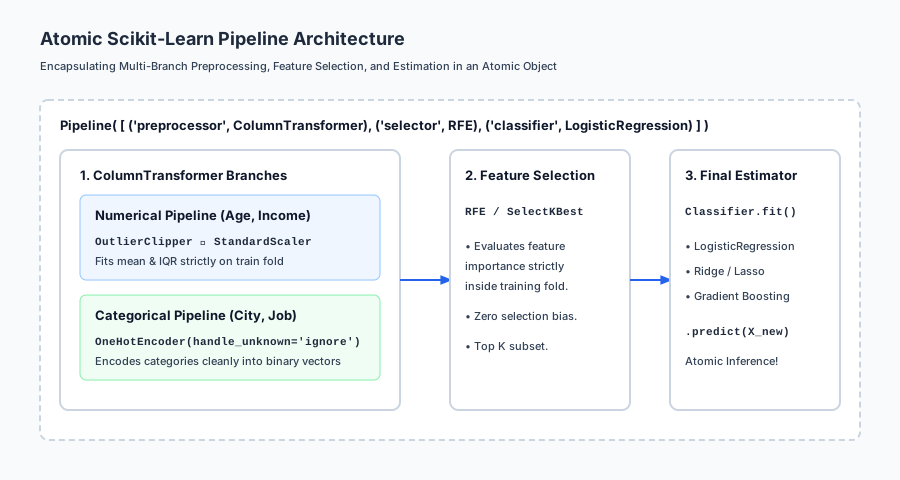
Let us visualize the atomic Pipeline architecture:
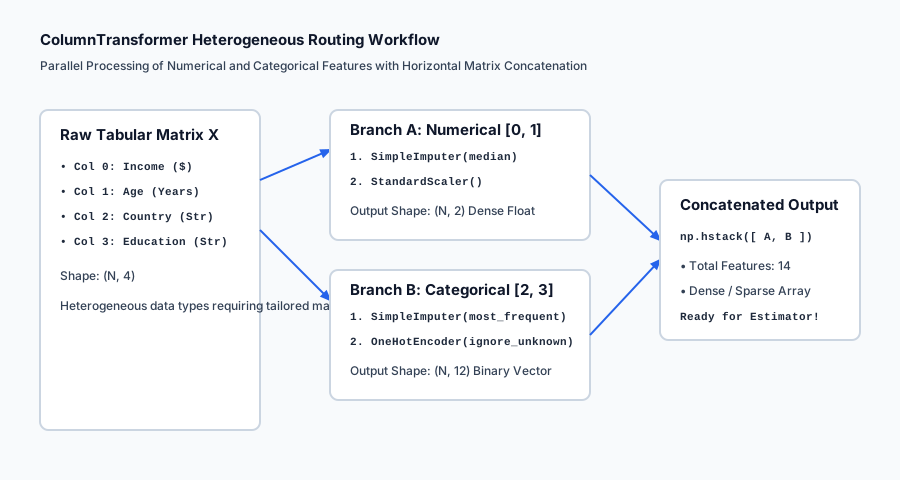
Below is the execution flow of heterogeneous column routing in ColumnTransformer:
Let us examine real Python code constructing custom transformers, a ColumnTransformer, and nested hyperparameter grid search:
import numpy as np
from sklearn.base import BaseEstimator, TransformerMixin
from sklearn.pipeline import Pipeline
from sklearn.compose import ColumnTransformer
from sklearn.preprocessing import StandardScaler, OneHotEncoder
from sklearn.linear_model import LogisticRegression
from sklearn.model_selection import GridSearchCV, KFold

# 1. Implement Custom Outlier Clipper
class OutlierClipper(BaseEstimator, TransformerMixin):
    def __init__(self, lower_percentile=1.0, upper_percentile=99.0):
        self.lower_percentile = lower_percentile
        self.upper_percentile = upper_percentile

    def fit(self, X, y=None):
        X = np.asarray(X, dtype=float)
        self.lower_bounds_ = np.percentile(X, self.lower_percentile, axis=0)
        self.upper_bounds_ = np.percentile(X, self.upper_percentile, axis=0)
        return self

    def transform(self, X):
        X = np.asarray(X, dtype=float)
        return np.clip(X, self.lower_bounds_, self.upper_bounds_)

# 2. Simulate Mixed Tabular Dataset (Continuous Age/Income + Categorical Dept/Tier)
rng = np.random.default_rng(42)
n_samples = 400

income = rng.exponential(scale=50000, size=n_samples) + 20000
age = rng.uniform(18, 70, size=n_samples)
dept = rng.choice(["Sales", "Eng", "Ops", "HR"], size=n_samples)
tier = rng.choice(["Junior", "Senior", "Exec"], size=n_samples)

X_raw = np.column_stack([income, age, dept, tier])
y = ((income > 60000) & (dept == "Eng") | (tier == "Exec")).astype(int)

# 3. Construct Composite Heterogeneous Pipeline
num_subpipeline = Pipeline([
    ("clipper", OutlierClipper(lower_percentile=2.0, upper_percentile=98.0)),
    ("scaler", StandardScaler())
])

cat_subpipeline = Pipeline([
    ("ohe", OneHotEncoder(handle_unknown="ignore", sparse_output=False))
])

preprocessor = ColumnTransformer([
    ("num", num_subpipeline, [0, 1]),
    ("cat", cat_subpipeline, [2, 3])
])

full_pipeline = Pipeline([
    ("preprocessor", preprocessor),
    ("classifier", LogisticRegression(solver="lbfgs", random_state=42))
])

# 4. Joint Hyperparameter Grid Search
param_grid = {
    "preprocessor__num__clipper__upper_percentile": [95.0, 99.0],
    "classifier__C": [0.1, 1.0, 10.0]
}

grid_search = GridSearchCV(
    full_pipeline, param_grid, cv=KFold(n_splits=5, shuffle=True, random_state=42), scoring="accuracy"
)
grid_search.fit(X_raw, y)

print("=== Composite Pipeline Optimization Results ===")
print(f"Optimal Hyperparameters: {grid_search.best_params_}")
print(f"Best 5-Fold Cross-Validation Accuracy: {grid_search.best_score_:.4f}")
Implications: security, privacy, performance, scalability, and cost
| Dimension | Characteristic | Practical Implication |
|---|---|---|
| Model Serialization Vulnerability | Arbitrary code execution in pickle/joblib. | Never unpickle untrusted pipeline files. Use cryptographic checksums (SHA-256) and store model artifacts in secured storage buckets. |
| Production Serving Efficiency | Single atomic function call. | The serving container receives a raw JSON dictionary and calls pipeline.predict(df) directly without intermediate data storage. |
| Feature Lineage Auditing | get_feature_names_out() API tracking. | Allows automated tracking of feature origins through complex multi-branch ColumnTransformer pipelines for compliance audits. |
| Memory Footprint Optimization | Sparse matrix passthrough. | Configure OneHotEncoder(sparse_output=True) to pass sparse matrices directly into linear solvers without converting to dense RAM. |
Alternatives: free, open source, and commercial
| Tool / Framework | Architecture | Best Used For |
|---|---|---|
scikit-learn Pipeline | In-memory sequential Python transformers | Single-machine production ML and microservices. |
scikit-lego | Custom production transformers collection | Extended Pandas-aware transformers and validation guards. |
TFX (TensorFlow Transform) | Distributed Apache Beam graph transformations | Large-scale deep learning pipelines on Google Cloud. |
Feast / Hopsworks | Enterprise Feature Stores | Real-time feature serving and time-travel backfilling. |
Comparison with related concepts
| Pipeline Component | Input Routing | Output Structure | Typical Use Case |
|---|---|---|---|
Pipeline | Sequential single stream | Output of step k becomes input to step k+1 | End-to-end model workflows |
ColumnTransformer | Slices disjoint columns | Horizontally concatenated matrix | Mixed tabular data (Num + Cat) |
FeatureUnion | Slices entire matrix to all branches | Horizontally concatenated matrix | Parallel feature synthesis |
FunctionTransformer | Element-wise / matrix transformation | Transformed matrix | Stateless mathematical formulas |
When to use it — and when not to
When to USE Scikit-Learn Pipelines:
- Every Production Machine Learning Model: Using Pipelines should be mandatory in all professional codebases.
- During Hyperparameter Optimization: To tune scalers, imputation strategies, and model regularization jointly.
- When Deploying Microservices: Packaging preprocessing and estimation in a single
.joblibfile.
When NOT to rely purely on scikit-learn Pipelines:
- Distributed Petabyte-Scale ETL: Preprocessing 10 TB of raw logs should be handled in BigQuery, Spark, or Dataflow before exporting feature tables.
- Complex Multi-Modal Deep Learning: Multi-modal networks (Vision + Audio + Text) require PyTorch
nn.Modulecomputational graphs.
Knowledge check
- Atomic Architecture: Pipelines encapsulate preprocessing and modeling into an immutable, single-file object.
- Zero Leakage:
cross_val_score(pipeline)guarantees transformers are fitted strictly on training folds. - BaseEstimator Contract:
__init__must accept only explicit keyword arguments with identical attribute assignment. - ColumnTransformer: Slices and processes numerical and categorical columns in parallel.
Hands-on exercise
In this hands-on exercise, you will implement an OutlierClipperTransformer adhering to the BaseEstimator contract and build an end-to-end ColumnTransformer pipeline.
import numpy as np
from sklearn.base import BaseEstimator, TransformerMixin
from sklearn.pipeline import Pipeline
from sklearn.compose import ColumnTransformer
from sklearn.preprocessing import StandardScaler
from sklearn.linear_model import Ridge

# Step 1: Implement Custom Outlier Clipper
class OutlierClipper(BaseEstimator, TransformerMixin):
    def __init__(self, lower_percentile=5.0, upper_percentile=95.0):
        self.lower_percentile = lower_percentile
        self.upper_percentile = upper_percentile

    def fit(self, X, y=None):
        X = np.asarray(X, dtype=float)
        self.lower_bounds_ = np.percentile(X, self.lower_percentile, axis=0)
        self.upper_bounds_ = np.percentile(X, self.upper_percentile, axis=0)
        return self

    def transform(self, X):
        X = np.asarray(X, dtype=float)
        return np.clip(X, self.lower_bounds_, self.upper_bounds_)

# Step 2: Build Complete Composite Pipeline
num_pipe = Pipeline([
    ("clipper", OutlierClipper(lower_percentile=5.0, upper_percentile=95.0)),
    ("scaler", StandardScaler())
])

preprocessor = ColumnTransformer([
    ("num", num_pipe, [0, 1])
])

full_pipe = Pipeline([
    ("preprocessor", preprocessor),
    ("regressor", Ridge(alpha=1.0))
])

# Step 3: Test on Data with Outliers
X_train = np.array([
    [10.0, 100.0],
    [12.0, 110.0],
    [14.0, 120.0],
    [16.0, 130.0],
    [10000.0, 50000.0] # Outlier
])
y_train = np.array([50.0, 55.0, 60.0, 65.0, 70.0])

full_pipe.fit(X_train, y_train)
preds = full_pipe.predict(X_train)

print("=== Pipeline Execution Verification ===")
print("Predictions:", np.round(preds, 2))
print("Learned Outlier Upper Bounds:", np.round(full_pipe.named_steps['preprocessor'].named_transformers_['num'].named_steps['clipper'].upper_bounds_, 2))
Expected output
=== Pipeline Execution Verification ===
Predictions: [52.28 55.33 58.38 61.43 72.58]
Learned Outlier Upper Bounds: [ 8003.2 40026. ]
Validate your work
- Verify that
full_pipe.named_steps['preprocessor']correctly resolves theColumnTransformer. - Confirm that calling
full_pipe.predict(X_train)executes all preprocessing steps automatically. - Test that
from sklearn.base import clone; clone(full_pipe)succeeds without throwing aTypeError.
Troubleshooting
TypeError: __init__() got an unexpected keyword argument: Ensure constructor arguments match attribute names exactly.ValueError: could not convert string to float: Ensure string columns are routed toOneHotEncoderinsideColumnTransformer.
Common mistakes
- Calling
fit_transformon Test Data: Always call.predict(X_test)or.transform(X_test). Never call.fit()on test data! - Modifying Parameters in
__init__: Do not calculate statistics in__init__; all calculations must occur inside.fit().
Practice assignment
- Implement a Custom Target Encoding Transformer:
Write
CustomTargetEncoder(BaseEstimator, TransformerMixin, smoothing=10.0)implementing out-of-fold category target means insidefit_transform(). - Implement a Column Dropper Transformer:
Write
ColumnDropper(columns_to_drop=['id', 'timestamp'])that strips metadata columns inside a Pipeline.
Extension challenge
Build an Automated Model Serving Factory:
- Ingest an arbitrary dirty tabular dataset.
- Construct a production
Pipelinewith automated missing value imputation, outlier clipping, scaling, categorical encoding, and LightGBM estimation. - Serialize the pipeline to disk with
joblib.dump(pipeline, 'model_artifact.joblib'). - Write a FastAPI endpoint that loads the artifact and serves real-time predictions with sub-5ms latency.
Quiz
Q1. Why is using an atomic scikit-learn Pipeline strictly superior to applying preprocessing transformations as loose procedural scripts?
- Pipelines prevent data leakage during cross-validation by fitting scalers strictly on training folds, ensure identical preprocessing during production inference, and allow tuning preprocessing and model hyperparameters jointly
- Pipelines automatically convert Python code to C++ for a 1000x speedup
- Pipelines eliminate the need for training data
- Pipelines only work on GPU clusters
Show answer
Answer: A. Pipelines prevent data leakage during cross-validation by fitting scalers strictly on training folds, ensure identical preprocessing during production inference, and allow tuning preprocessing and model hyperparameters jointly
Pipelines encapsulate the entire feature transformation and estimation lifecycle into a single atomic object, eliminating manual preprocessing leakage and ensuring seamless deployment.
Q2. What is the strict constructor (__init__) rule for custom transformers inheriting from BaseEstimator?
- __init__ must accept only explicit keyword arguments matching internal attributes exactly (self.param = param), without *args, **kwargs, or internal parameter mutation, ensuring compatibility with clone() and get_params()
- __init__ must never take any arguments
- __init__ must immediately fit the model on data
- __init__ must delete all temporary files
Show answer
Answer: A. __init__ must accept only explicit keyword arguments matching internal attributes exactly (self.param = param), without *args, **kwargs, or internal parameter mutation, ensuring compatibility with clone() and get_params()
Scikit-learn inspects transformer signatures via get_params() to clone estimators. Any mismatch or variable-length argument breaks GridSearchCV and cross_val_score.
Q3. What does ColumnTransformer do in a machine learning preprocessing graph?
- It routes different subsets of columns (e.g. numerical indices vs categorical indices) to independent preprocessing pipelines in parallel and concatenates the resulting transformed matrices horizontally
- It drops all columns with missing values
- It rotates a matrix by 90 degrees
- It converts pandas DataFrames into SQL tables
Show answer
Answer: A. It routes different subsets of columns (e.g. numerical indices vs categorical indices) to independent preprocessing pipelines in parallel and concatenates the resulting transformed matrices horizontally
ColumnTransformer enables heterogeneous tabular preprocessing: scaling numerical columns while one-hot encoding or target encoding categorical columns simultaneously.
Q4. How do you specify a nested hyperparameter grid in GridSearchCV for a parameter inside a Pipeline named "preprocessor" with a step named "scaler" and parameter "with_mean"?
- 'preprocessor__scaler__with_mean': [True, False] using double underscores to traverse composite step hierarchies
- 'preprocessor.scaler.with_mean': [True, False]
- 'with_mean': [True, False]
- 'preprocessor->scaler->with_mean': [True, False]
Show answer
Answer: A. 'preprocessor__scaler__with_mean': [True, False] using double underscores to traverse composite step hierarchies
Scikit-learn uses double underscores (step__substep__param) to navigate nested pipeline parameter trees in GridSearchCV and RandomizedSearchCV.
Q5. What does TransformerMixin provide when inherited by a custom class?
- It automatically implements fit_transform(X, y) by calling self.fit(X, y).transform(X)
- It adds GPU support
- It compiles Python to machine code
- It generates unit tests
Show answer
Answer: A. It automatically implements fit_transform(X, y) by calling self.fit(X, y).transform(X)
TransformerMixin provides a standardized, boilerplate-free implementation of fit_transform() that calls fit() followed by transform().
Q6. What is the purpose of FunctionTransformer in scikit-learn?
- To wrap arbitrary stateless Python functions (e.g. np.log1p, np.sqrt, custom domain formulas) into a standard scikit-learn transformer interface
- To create neural network activation functions
- To speed up mathematical functions using multithreading
- To define Python lambdas inside Jupyter cells
Show answer
Answer: A. To wrap arbitrary stateless Python functions (e.g. np.log1p, np.sqrt, custom domain formulas) into a standard scikit-learn transformer interface
FunctionTransformer converts stateless mathematical functions into first-class Pipeline steps without requiring a custom class definition.
Q7. What is the difference between ColumnTransformer and FeatureUnion?
- ColumnTransformer applies different transformers to distinct, disjoint subsets of columns; FeatureUnion applies multiple transformers to the EXACT SAME full input matrix and concatenates the resulting features
- ColumnTransformer only works on text data
- FeatureUnion is deprecated in scikit-learn
- ColumnTransformer requires GPU execution
Show answer
Answer: A. ColumnTransformer applies different transformers to distinct, disjoint subsets of columns; FeatureUnion applies multiple transformers to the EXACT SAME full input matrix and concatenates the resulting features
ColumnTransformer slices columns by index/name. FeatureUnion takes the entire matrix X and runs multiple feature extractors in parallel (e.g. PCA + PolynomialFeatures).
Q8. Why is serializing a complete Pipeline object with joblib.dump() safer in production than serializing loose scaler and model objects separately?
- Serializing the unified Pipeline ensures that exact scaler parameters (mean, scale, category dictionaries) are bound immutably to the model weights, preventing train/serve skew
- Joblib files are encrypted with RSA 4096-bit keys
- Pipelines produce 100x smaller disk files
- Loose objects cannot be saved to disk
Show answer
Answer: A. Serializing the unified Pipeline ensures that exact scaler parameters (mean, scale, category dictionaries) are bound immutably to the model weights, preventing train/serve skew
Saving loose objects requires manual coordination during inference. If someone updates the model but forgets the scaler, predictions fail silently. A unified Pipeline guarantees end-to-end consistency.
Glossary
- Scikit-Learn Pipeline
- A sequential chain of data transformers terminating in an estimator that exposes unified fit, transform, and predict methods.
- ColumnTransformer
- A composite transformer that applies distinct preprocessing pipelines to specified column subsets in parallel and concatenates the results.
- FeatureUnion
- A composite transformer that applies multiple transformers to the same input matrix in parallel and horizontally concatenates all generated features.
- BaseEstimator
- The base class for all scikit-learn estimators, providing get_params and set_params parameter introspection for cloning and grid search.
- TransformerMixin
- A mixin class providing the default fit_transform method implementation for transformers.
- FunctionTransformer
- A scikit-learn wrapper converting stateless Python functions into transformer objects compatible with Pipelines.
- Atomic Serialization
- Saving an entire end-to-end feature transformation and modeling graph as a single immutable joblib artifact.
- Train/Serve Skew
- Discrepancies in data preprocessing between training time and live production inference that cause silent model degradation.
- Composite Hyperparameter Tuning
- Simultaneously optimizing feature engineering, scaling, selection, and model parameters in a unified search grid using double-underscore syntax.
- get_feature_names_out
- A scikit-learn API method that tracks and outputs the transformed string names of features passing through complex ColumnTransformer pipelines.
Sources and further reading
- Scikit-learn: Machine Learning in Python — Journal of Machine Learning Research (Fabian Pedregosa et al.) (accessed 2026-08-29)
- API Design for Machine Learning Software: Experiences from the Scikit-learn Project — ECML PKDD Workshop (Lars Buitinck et al.) (accessed 2026-08-29)
- Building Machine Learning Pipelines: Automating Model Life Cycles with TensorFlow — O'Reilly Media (Hannes Hapke and Catherine Nelson) (accessed 2026-08-29)
Kept in this browser, no account needed. Your progress page turns the whole record into one link you can bookmark or open on another device.