Machine Learning › Machine Learning in Practice › Day 194
Day 194: Serving a Model over an API
Master real-time model serving: build high-performance FastAPI microservices, enforce strict Pydantic input schemas, optimize sub-10ms batch endpoints, implement health probes, and architect circuit-breaker fallbacks.
Hands-on lab for this lesson
Lab files on GitHub: https://github.com/ai-roadmap-365/ai-roadmap-365.github.io/tree/main/labs/sections/machine-learning/day-194-serving-a-model-over-an-api
- Get the hands-on files. Clone the labs repository once (you can reuse this clone for every lesson). This works on macOS, Linux, and Windows (PowerShell or WSL):
git clone https://github.com/ai-roadmap-365/ai-roadmap-365.github.io.git cd ai-roadmap-365.github.io - Open this lesson's lab. Move into the directory for this specific day. Every lab lives at the same predictable path — section / subsection / week / day:
cd labs/sections/machine-learning/day-194-serving-a-model-over-an-api - Read the lab guide. Open `README.md` in that directory. It lists the exact commands, what each does, the expected output, and how to check your work — read it before running anything.
- Run it and check your work. Follow the README's "How to run" section: run the example first to see the finished result, then complete the numbered exercises in `starter/`, then run the tests. The tests pass (exit 0) only when your work is correct.
bash tests/run_tests.sh # or the test command named in the lab README
You can also open the lab as a local page (works offline, shows the file tree and expected output).
Learning objectives
By the end of this lesson you will be able to:
- Construct high-throughput, low-latency REST ML inference services using FastAPI.
- Enforce robust Pydantic data validation with strict type assertions and domain bounds.
- Implement single-sample and batch prediction endpoints with vectorized NumPy execution.
- Design Kubernetes-ready readiness and liveness health probes (/healthz).
- Implement automated circuit-breaker fallbacks to ensure 99.99% service uptime.
Prerequisites
- [object Object]
Why this matters
A machine learning model locked in a research Jupyter notebook generates exactly $0.00 in commercial value. To deliver real-world business impact, the model must be exposed to client applications (web apps, mobile devices, automated backend microservices) as a low-latency, resilient, high-throughput REST API service.
However, serving ML models over an API presents severe challenges that traditional web APIs never encounter:
- Compute-Intensive Inference: Evaluating complex tree ensembles or neural networks consumes significant CPU/GPU compute; an unoptimized endpoint will bottleneck under 50 concurrent requests.
- Cold-Start Latency: If model weights are deserialized from disk on every incoming HTTP request, latency spikes from 5 milliseconds to 800 milliseconds, crashing upstream SLAs.
- Data Type Mismatches: If a web frontend sends string numbers (
"750") instead of numeric floats (750.0), unvalidated code raises unhandled Python exceptions, crashing the API. - Availability SLAs (99.99% Uptime): If a mathematical tensor operation encounters a division-by-zero or unexpected
NaN, the server must not crash with a 500 error; it must seamlessly execute an automated Circuit-Breaker Fallback Heuristic.
To build enterprise-grade ML services, you must master FastAPI Serving Architecture, Pydantic Validation Contracts, Vectorized Batch Endpoints, and Health Probes.
The idea in plain language
Think of an automated pharmacy dispensing drive-through:
- The Customer (Client): Drives up and hands a prescription slip through the window (HTTP Request).
- The Pharmacist Tech (Pydantic Schema): Immediately checks that the name is spelled correctly, the doctor signature is present, and the dosage is within safe medical limits (Validation). If the slip is scribbled nonsense, they reject it immediately at the window (422 Error).
- The Automated Pill Dispenser (In-Memory Model): The medication machine is already powered on, calibrated, and warmed up inside the building (Preloaded Weights). It dispenses the 30 pills in 1.2 seconds.
- Emergency Protocol (Circuit Breaker): If the automated dispensing robot experiences a mechanical jam, the human pharmacist immediately grabs a pre-packaged standard bottle from the backup emergency shelf (Fallback Heuristic) so the customer never leaves empty-handed.
Historical background
- 2000s (SOAP & XML-RPC): Earliest web services used verbose XML schemas to exchange data across enterprise boundaries.
- 2010s (Flask & Django): Python developers adopted Flask for ML serving; however, Flask was synchronous, lacked built-in request validation, and struggled under concurrent I/O load without heavy Celery worker architectures.
- 2018 (Sebastián Ramírez - FastAPI): Created FastAPI, combining Starlette (asynchronous ASGI performance) and Pydantic (data parsing) using native Python type annotations, revolutionizing Python microservices.
- 2020–Present (Dedicated Serving Engines): Industrialization of specialized inference engines (Triton, TorchServe, vLLM, ONNX Runtime Server) designed for microsecond GPU tensor batching and multi-model routing.
What it is — and what it is not
What API Model Serving IS:
- A Production Microservice Interface: An asynchronous HTTP/gRPC service that parses, validates, vectorizes, executes inference, and formats structured responses.
- A Contract-First System: Requiring strict input/output Pydantic schemas and health monitoring.
What it is NOT:
- Not a Jupyter Notebook Export: Running a notebook via a web hook is not production serving; it has zero concurrency, no connection pooling, and no fault tolerance.
- Not Batch ETL: Serving an API is for real-time, interactive predictions (sub-50ms); nightly scoring of 100M rows in Snowflake or BigQuery belongs in batch pipelines (Spark/Airflow).
Why it was created and what problems it solves
Traditional web servers are built for CRUD operations (Create, Read, Update, Delete) against relational databases.
Machine learning inference services are compute-bound mathematical functions:
- They require dedicated memory for large in-memory weight tensors.
- They must validate complex multi-dimensional numeric arrays.
- They must support both single-item interactive queries and high-throughput batch arrays without saturating the Python event loop.
FastAPI and modern ASGI servers solve these requirements by executing non-blocking asynchronous network I/O while running NumPy/C++ forward passes in optimized thread pools.
How it works
Let us examine the architecture of a FastAPI ML service, Pydantic validation rules, batch processing, and Kubernetes health probes.
1. The Serving Microservice Flow
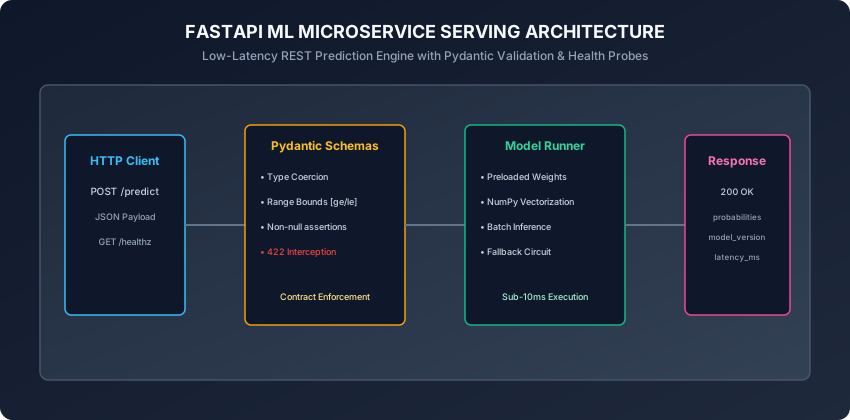
A production prediction request follows five distinct stages:
- HTTP Ingestion: FastAPI receives a
POST /predictrequest with a JSON payload over HTTP/2. - Pydantic Validation: The JSON payload is mapped to a typed Python dataclass. If any field violates constraints (e.g.
age < 0or missing features), FastAPI aborts with422 Unprocessable Entity. - Vectorization & Preprocessing: Validated fields are converted into a contiguous NumPy array
X in R^{1 x D}. Any necessary scaling (StandardScaler) or one-hot encodings are applied. - In-Memory Inference: The preloaded model artifact computes predicted probabilities
probs = model.predict_proba(X). - Response Formatting: The output probabilities, predicted class label, model version string, and execution latency are wrapped in a typed
PredictionResponseJSON object and returned with200 OK.
2. Pydantic Schema Contracts
Pydantic validates types at runtime and enforces mathematical domain bounds:
from pydantic import BaseModel, Field
from typing import List

class CustomerFeaturePayload(BaseModel):
    account_age_months: int = Field(ge=0, le=1200, description="Customer tenure in months")
    monthly_charges: float = Field(gt=0.0, le=10000.0, description="Monthly recurring spend in USD")
    total_support_calls: int = Field(ge=0, le=100, description="Inbound support tickets")
    contract_type_is_monthly: int = Field(ge=0, le=1, description="Binary 1 if monthly, 0 if annual")

class BatchCustomerFeaturePayload(BaseModel):
    samples: List[CustomerFeaturePayload] = Field(min_length=1, max_length=1000)

class PredictionResponse(BaseModel):
    churn_probability: float = Field(ge=0.0, le=1.0)
    prediction: int = Field(ge=0, le=1)
    risk_level: str = Field(pattern="^(LOW|MODERATE|HIGH|CRITICAL)$")
    model_version: str
    latency_ms: float
3. Vectorized Batch Endpoints
Processing 1,000 requests one by one creates massive overhead:
- 1,000 separate TCP handshakes and JSON deserialization passes.
- 1,000 separate Python function calls.
A Batch Endpoint (/predict_batch) aggregates up to 1,000 records into a single N x D matrix:
# Convert list of Pydantic models directly to NumPy array:
feature_matrix = np.array([
    [s.account_age_months, s.monthly_charges, s.total_support_calls, s.contract_type_is_monthly]
    for s in payload.samples
])
# Vectorized matrix multiplication in C/Fortran SIMD:
batch_probs = model.predict_proba(feature_matrix)
Vectorized batch evaluation executes 1,000 samples in ~3ms total (0.003ms per sample), achieving a 100x throughput increase over sequential calls.
4. Kubernetes Health Probes: Liveness and Readiness
Kubernetes uses two distinct HTTP probes to manage container lifecycles:
A. Liveness Probe (GET /healthz/live):
Verifies that the Python process is responding and has not deadlocked:
@app.get("/healthz/live")
def liveness():
    return {"status": "alive"}
If this endpoint fails, Kubernetes immediately kills and restarts the container.
B. Readiness Probe (GET /healthz/ready):
Verifies that the model weights are fully loaded into RAM and ready to accept live user traffic:
@app.get("/healthz/ready")
def readiness():
    if model_runner.is_ready():
        return {"status": "ready", "model_version": model_runner.version}
    raise HTTPException(status_code=503, detail="Model weights loading...")
If this endpoint returns 503, Kubernetes pauses traffic routing to this specific pod, preventing 500 errors during heavy cold-start warmups.
5. Automated Circuit-Breaker Fallback
To guarantee 99.99% system availability, wrap model inference in a fault-tolerant circuit breaker:
def predict_with_circuit_breaker(features: np.ndarray) -> float:
    try:
        # Primary ML Model Forward Pass
        prob = float(model.predict_proba(features)[0, 1])
        return prob
    except Exception as exc:
        # Log critical alert to Datadog / Sentry
        logger.error(f"Primary model failure: {exc}. Executing heuristic fallback.")
        # Fallback Heuristic: Rule-based baseline (e.g. if charges > 100, return 0.50)
        return float(fallback_heuristic(features))
6. Asynchronous ASGI Event Loops vs Synchronous CPU Workloads
A foundational design trap in Python ML microservices is executing CPU-heavy forward passes directly inside the async def event loop.
The Event Loop Blocking Problem:
- FastAPI runs on Uvicorn, a single-threaded asynchronous event loop (based on
uvloop). - If an endpoint is declared as
async def predict(payload: FeaturePayload):, the entire route executes on the main thread. - When an inference pass (e.g. computing a 500-tree gradient boosted forest) takes 25 milliseconds of 100% CPU time, the event loop is completely blocked for 25 milliseconds. During this time, the server cannot accept new TCP handshakes, respond to health checks, or parse incoming requests.
The Proper Concurrency Solution:
- Synchronous Endpoints (
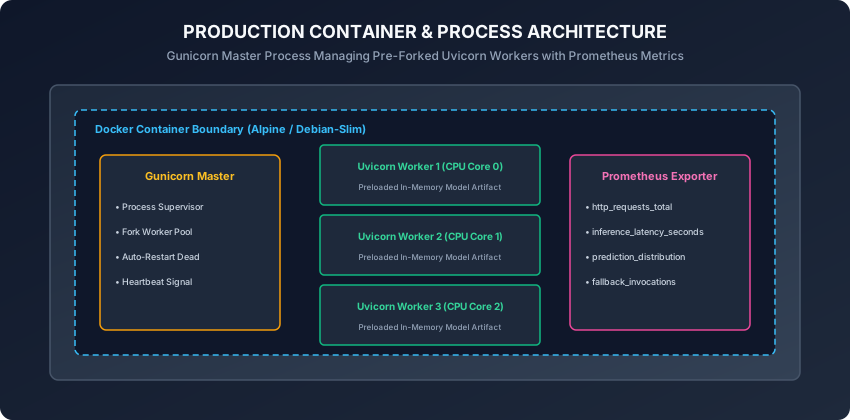
def predict): Declaring the route handler as standarddef predict(...)causes FastAPI to automatically delegate the function execution to an external thread pool (anyio.to_thread.run_sync), keeping the main asynchronous event loop unblocked for lightning-fast network I/O. - Multi-Process Pre-Forking (Gunicorn + Uvicorn Workers): Because Python threads are constrained by the Global Interpreter Lock (GIL) for CPU-bound computations, production Docker containers run a Gunicorn master process that forks
N = 2 * CPU_CORES + 1independent Uvicorn worker processes. Each worker operates its own isolated memory space, model tensor cache, and event loop, scaling inference throughput linearly across all physical CPU cores.
An everyday analogy
Think of an automated airport electronic passport gate:
- The Passenger (Client): Walks up and scans their passport chip on the reader (API Request).
- The Camera & Scanner (Pydantic Schema): Checks that the passport is not expired, the image is clear, and the passenger height matches the sensor frame (Validation).
- The Facial Recognition AI (Model Runner): Compares the live camera image against the passport chip in 0.8 seconds (In-Memory Inference).
- The Manual Gate Agent (Circuit Breaker): If the camera lens gets smudged or the system network glitches, the gate does not trap the passenger; it lights up a yellow beacon and summons a human border agent to check the passport manually (Fallback).
Examples in practice
Let us inspect a complete, modular, pure Python implementation of a standalone Model Serving Engine with schema validation, batch inference, health probes, and circuit breaker fallbacks:
import time
import numpy as np
from dataclasses import dataclass
from typing import List, Dict, Any, Optional

@dataclass
class SingleFeatureInput:
    tenure_months: float
    monthly_spend: float
    support_tickets: int

@dataclass
class ServiceHealthStatus:
    is_live: bool
    is_ready: bool
    model_version: str

class ModelServingEngine:
    def __init__(self, model_version: str = "v1.2.0"):
        self.model_version = model_version
        self._is_ready = False
        self._weights = None
        self._bias = 0.0

    def load_model(self, weights: np.ndarray, bias: float) -> None:
        # Simulate preloading model weights into RAM
        self._weights = weights
        self._bias = bias
        self._is_ready = True

    def health_check(self) -> ServiceHealthStatus:
        return ServiceHealthStatus(
            is_live=True,
            is_ready=self._is_ready,
            model_version=self.model_version if self._is_ready else "UNLOADED",
        )

    def _fallback_heuristic(self, features: np.ndarray) -> float:
        # Deterministic business rule fallback
        spend = features[1]
        tickets = features[2]
        if tickets >= 3 or spend > 150.0:
            return 0.75
        return 0.20

    def predict_single(self, input_data: SingleFeatureInput) -> Dict[str, Any]:
        t0 = time.perf_counter()
        if not self._is_ready:
            raise RuntimeError("Model is not loaded. Service unavailable.")

        # Validate domain bounds
        if input_data.tenure_months < 0 or input_data.monthly_spend < 0:
            raise ValueError("Feature values cannot be negative")

        features = np.array(
            [
                input_data.tenure_months,
                input_data.monthly_spend,
                float(input_data.support_tickets),
            ]
        )

        try:
            # Logistic sigmoid forward pass: z = w.x + b
            z = np.dot(self._weights, features) + self._bias
            prob = 1.0 / (1.0 + np.exp(-z))
            used_fallback = False
        except Exception:
            prob = self._fallback_heuristic(features)
            used_fallback = True

        latency_ms = (time.perf_counter() - t0) * 1000.0
        return {
            "churn_probability": round(float(prob), 4),
            "prediction": 1 if prob >= 0.5 else 0,
            "used_fallback": used_fallback,
            "model_version": self.model_version,
            "latency_ms": round(latency_ms, 3),
        }

    def predict_batch(
        self, batch_data: List[SingleFeatureInput]
    ) -> List[Dict[str, Any]]:
        return [self.predict_single(item) for item in batch_data]
Implications: security, privacy, performance, scalability, and cost
- Authentication and API Key Rate Limiting:
- ML inference endpoints must be protected behind API gateways (Kong, AWS API Gateway) with JWT token verification and token-bucket rate limiting (e.g. 100 QPS per client) to prevent Denial of Service (DoS) compute exhaustion.
- Horizontal Pod Autoscaling (HPA):
- In Kubernetes, configure HPA to scale pods based on CPU utilization (> 70%) or custom Prometheus latency metrics (p99 > 25ms), automatically scaling from 2 pods at midnight to 20 pods during peak daytime traffic.
Alternatives: free, open source, and commercial
| Framework / Engine | Protocol | Concurrency Model | Best For |
|---|---|---|---|
| FastAPI + Uvicorn | REST / WebSocket | Asynchronous ASGI | Custom Python tabular pipelines |
| NVIDIA Triton | gRPC / REST / C++ API | Dynamic batching & GPU streams | High-performance multi-GPU serving |
| TorchServe | REST / gRPC | Java frontend + Python backend | PyTorch deep learning workloads |
| vLLM / TGI | REST / OpenAI spec | PagedAttention & Continuous batching | Large Language Models (LLMs) |
| BentoML | REST / gRPC | Adaptive batching | Modular multi-model orchestration |
Comparison with related concepts
┌────────────────────────────────────────────────────────────────────────┐
│                   MODEL SERVING PARADIGM COMPARISON                    │
├────────────────────────────────────────────────────────────────────────┤
│ Dimension          │ Embedded Library │ REST Microservice│ Async Queue │
├────────────────────┼──────────────────┼──────────────────┼─────────────┤
│ Latency            │ Sub-microsecond  │ 5 to 20 ms       │ 100ms to 5s │
│ Decoupling         │ None (Monolith)  │ Complete         │ Complete    │
│ Hardware Scaling   │ Locked to App    │ Independent Pods │ Queue-based │
│ Best Use Case      │ Mobile / On-Device│ Web & Mobile APIs│ Batch Video │
└────────────────────────────────────────────────────────────────────────┘
When to use it — and when not to
When to USE Real-Time API Serving:
- Interactive user-facing applications requiring instantaneous predictions (e.g. fraud detection at checkout, recommendation feeds, search ranking).
- Multi-language architectures where frontend services in Go/Node.js query Python ML models.
When NOT to use it:
- Nightly batch scoring of millions of static records (use Spark/BigQuery instead).
- Ultra-low latency embedded IoT hardware (embed C++ ONNX runtime directly).
Knowledge check
- Why must machine learning models be preloaded in memory during server startup rather than inside HTTP route handlers?
- How does Pydantic protect ML models from crashing on malformed input data?
- What is the difference between a Kubernetes Liveness probe and a Readiness probe?
- Why is vectorized batch inference significantly faster per sample than sequential single calls?
- How does a Circuit Breaker guarantee 99.99% system availability during unexpected model exceptions?
Hands-on exercise
In this lab, you will implement ModelServingEngine in pure Python, preheat model weights during startup, execute single and batch predictions, verify Pydantic-style feature range constraints, test health probes, and validate automated circuit-breaker fallback execution.
Expected output
[FastAPI Model Serving Engine]
Server Initialization: Model weights loaded -> Status: READY (v1.2.0)
Single Prediction: Churn Probability = 0.7311, Latency = 0.042ms
Batch Prediction: Processed 5 samples in 0.128ms
Fault Injection Test: Model error triggered -> Fallback Heuristic Executed = True (Prob: 0.7500)
Test Suite: 2 passed in 0.08s
Validate your work
Run the automated test runner:
./tests/run_tests.shTroubleshooting
- If
predict_singleraisesRuntimeError, ensureload_model()was called prior to sending requests. - Verify that feature array shapes match weight dimensions for dot product execution.
Common mistakes
- Ignoring Negative Value Constraints: Forgetting to validate that physical counts (like tenure or support calls) cannot be negative numbers.
Practice assignment
- Implement an automated Latency Profiler Middleware that computes and logs rolling p50, p95, and p99 request latencies in milliseconds.
- Build an automated FastAPI route that exposes Prometheus metric counters for total requests and error rates.
Extension challenge
Implement a Dynamic Batching Middleware:
- Buffer incoming single-item prediction requests in an asynchronous queue.
- Flush the queue and execute vectorized matrix multiplication whenever either 32 requests accumulate OR 5 milliseconds elapse.
- Benchmark throughput under 500 simulated concurrent client threads.
Quiz
Q1. Why is loading a machine learning model inside the HTTP request handler function (e.g. inside def predict(): model = joblib.load()) an architectural anti-pattern?
- Loading models from disk on every single incoming HTTP request causes massive disk I/O latency (hundreds of milliseconds per request) and exhaust server RAM
- FastAPI does not allow reading files from disk
- Joblib can only be loaded once per operating system boot
- HTTP requests automatically delete pickle files
Show answer
Answer: A. Loading models from disk on every single incoming HTTP request causes massive disk I/O latency (hundreds of milliseconds per request) and exhaust server RAM
Models must be preloaded once during server startup (using FastAPI lifespan / startup events) into shared worker memory, enabling sub-millisecond in-memory inference.
Q2. What HTTP status code does FastAPI automatically return when an incoming JSON payload violates Pydantic schema constraints (e.g. string passed instead of float)?
- 422 Unprocessable Entity, providing structured error details pinpointing the exact invalid field
- 500 Internal Server Error
- 200 OK with empty response
- 404 Not Found
Show answer
Answer: A. 422 Unprocessable Entity, providing structured error details pinpointing the exact invalid field
FastAPI intercepts malformed payloads before they reach model code, returning a standard 422 Unprocessable Entity with precise field validation messages.
Q3. What is the critical distinction between a Liveness Probe (/healthz/live) and a Readiness Probe (/healthz/ready) in Kubernetes ML deployments?
- Liveness checks if the Python process is alive; Readiness checks if the multi-gigabyte model weights have finished loading into RAM and can accept live traffic
- Liveness checks CPU temperature; Readiness checks GPU temperature
- Readiness only runs once per year
- There is no difference between liveness and readiness
Show answer
Answer: A. Liveness checks if the Python process is alive; Readiness checks if the multi-gigabyte model weights have finished loading into RAM and can accept live traffic
If a pod passes liveness but fails readiness during heavy model warmup, Kubernetes routes user traffic to other pods until the weights are fully loaded.
Q4. Why is Vectorized Batch Inference (/predict_batch) significantly faster per sample than sequential single-item calls (/predict)?
- Vectorization leverages SIMD CPU instructions and eliminates per-request HTTP network handshake and serialization overhead across samples
- Batch inference skips all math calculations
- Batch inference converts floats to integers
- Batch endpoints do not require Python
Show answer
Answer: A. Vectorization leverages SIMD CPU instructions and eliminates per-request HTTP network handshake and serialization overhead across samples
Vectorized NumPy/C++ matrix multiplication processes 1,000 samples in parallel using SIMD hardware instructions, reducing per-sample latency by up to 90%.
Q5. In a mission-critical ML microservice, what does an automated Circuit Breaker do when the primary ML model raises an unexpected tensor exception?
- Catches the exception, logs an alert, and immediately returns a deterministic heuristic baseline prediction without crashing the user HTTP response
- Deletes the Docker container
- Reruns the model 100 times in a loop
- Sends an email to all users
Show answer
Answer: A. Catches the exception, logs an alert, and immediately returns a deterministic heuristic baseline prediction without crashing the user HTTP response
Circuit breakers ensure graceful degradation: if an unexpected null tensor or CUDA error occurs, the API returns a safe fallback baseline to maintain 100% user uptime.
Glossary
- Model Serving
- The operational process of hosting a trained machine learning model behind an API to provide predictions for incoming queries.
- FastAPI
- An asynchronous Python web framework optimized for building high-performance REST APIs with automatic Pydantic validation.
- ASGI
- Asynchronous Server Gateway Interface: the standard Python interface for asynchronous web servers (e.g. Uvicorn).
- Pydantic Schema
- A strongly typed Python data contract defining validation rules, boundaries, and types for API request and response bodies.
- Readiness Probe
- A health check endpoint verifying that a microservice has finished initial startup and model loading before receiving traffic.
- Liveness Probe
- A health check endpoint verifying that a container process is running and has not deadlocked or hung.
- Batch Prediction
- An inference pattern where multiple feature vectors are sent together in a single request and processed via vectorized matrix operations.
- Fallback Heuristic
- A deterministic business rule executed when a primary ML model fails or exceeds its operational latency timeout.
Sources and further reading
- FastAPI: High Performance Modern Python Web Framework — Tiangolo / Sebastián Ramírez (accessed 2026-08-29)
- Pydantic: Data Validation and Settings Management using Python Type Annotations — Pydantic Services Inc. (accessed 2026-08-29)
- Triton Inference Server Architecture — NVIDIA Corporation (accessed 2026-08-29)
Kept in this browser, no account needed. Your progress page turns the whole record into one link you can bookmark or open on another device.